The best CRM software for your team is rarely the tool with the highest score or the biggest logo. It is the one your reps still open in month three, at a price that survives the renewal conversation.
I ranked 10 CRM software tools by real pricing, adoption friction, and the exact team each one fits, then exposed the cost traps most buyers only notice after year one. Whether you are a founder testing free plans, a 15-person team leaving spreadsheets, or an enterprise buyer weighing Salesforce against something leaner, every pick below carries a score, a best-for label, a not-for warning, and a pricing breakdown.
No recycled vendor copy, no ranking bought with commission. Just a scored shortlist you can defend to whoever signs off on the budget.
Quick Verdict: Best CRM Software by Use Case
Here is the fast answer before the detail. These picks are drawn from the ranked list below, and each row names the buyer it fits, not just the product.
| Use case | Best pick | Why it fits |
|---|---|---|
| Best overall for most teams | Zoho CRM | Strong automation, AI, and API depth from a low paid entry price |
| Best for enterprise scale | Salesforce | Deepest customization, governance, and forecasting for 50-500+ seats |
| Best for inbound-led growth | HubSpot Sales Hub | Free CRM entry plus marketing, chat, and automation in one platform |
| Best visual pipeline | Pipedrive | Fastest path to pipeline discipline for outbound sales reps |
| Best no-code workflow build | monday CRM | Customizable boards and automations without traditional CRM rigidity |
| Best value with built-in tools | Freshsales | Built-in calling and AI tools at a lower entry price than most rivals |
| Best for Microsoft shops | Dynamics 365 Sales | CRM tied into Outlook, Teams, Copilot, and Power BI |
| Best deal-to-project handoff | Insightly | Converts closed deals into delivery projects in one system |
| Best simple CRM | Less Annoying CRM | One flat price, no upgrade tiers, low learning curve |
| Best for Google Workspace | Copper | Native-feeling CRM inside Gmail, Calendar, and Drive |
The cheapest plan is almost never the right comparison point. For each tool below, I compare the first tier that opens up the features most teams actually run, then show what that costs at 10 and 25 seats.
How We Chose and Ranked These CRMs
This roundup is based on official pricing pages, official product and feature pages, public review-platform category pages, and the accessible 2026 SERP competitors, all reviewed on July 7, 2026. No hands-on testing was performed, so I do not claim first-person usage anywhere in this guide, and any sentiment is framed as review patterns rather than my own trial.
Ranking prioritized buyer usefulness, price-to-feature value, evidence quality, feature depth, and product-market fit.
I limited the list to general-purpose CRM software: systems built around contacts, leads, deals, pipeline, and sales or relationship workflows. Directory pages on G2 and Capterra often mix in help desks, legal-practice tools, and marketing platforms, so vertical-only and adjacent products were left out on purpose.
The main limitation is pricing volatility. Several vendors localize currency by billing country, and AI add-on pricing is changing quickly, so I flag every uncertain price with safe wording and a checked date instead of false precision.
Best CRM Software at a Glance
This table lines up all ten products on the facts buyers ask about first. Read it as a shortlist filter, then go to the individual cards for the plan gates and disqualifiers.
| CRM | Best for | Entry price (USD) | Free plan | Setup effort |
|---|---|---|---|---|
| Zoho CRM | Value at scale | Free for 3 users; Standard from $14/user/mo annual | Yes, 3 users | Medium |
| Salesforce | Enterprise scale | Free Suite $0; Starter Suite $25/user/mo | Yes, Free Suite | High |
| HubSpot Sales Hub | Inbound growth | Free (2 users); Starter from $7/mo/seat annual | Yes, 2 users | Medium |
| Pipedrive | Visual pipeline | Lite from $14/seat/mo annual; no free plan | No, 14-day trial | Low |
| monday CRM | No-code workflows | From $10/user/mo (US), min 3 users | No, 14-day trial | Medium |
| Freshsales | Built-in sales tools | Free; Growth from $9/user/mo annual | Yes | Low |
| Dynamics 365 Sales | Microsoft stacks | Sales Premium $150/user/mo yearly | No, trial only | High |
| Insightly | Deal-to-project | Plus $29/user/mo annual | No, 14-day trial | Medium |
| Less Annoying CRM | Simplicity | $15/user/mo, one tier | No, 30-day trial | Low |
| Copper | Google Workspace | Basic $23/seat/mo annual ($29 monthly) | No, free trial | Low |
Entry price and free-plan status are only the entry gate. The order below is the ranked recommendation, and the sections after it show where each of these numbers stops telling the whole story.
The 10 Best CRM Software Tools in 2026
Products are presented in ranked order. Only the number-one pick carries the Best Overall designation; every other product wins a specific buyer, not the whole market.
1. Zoho CRM: Best Overall

Zoho CRM is the best all-round CRM software for 5-to-50-person teams that want serious feature depth without Salesforce-level cost. It ranks first because it pairs a genuine free plan with automation, AI, and API access that many rivals gate behind pricier tiers.
Pricing starts free for 3 users, and the official Zoho CRM pricing page lists paid US plans commonly from $14/user/month billed annually for Standard, with Professional, Enterprise, and Ultimate above it. Because the page can render localized currency, confirm the final USD figure at checkout.
The minimum viable plan for automation-heavy teams is usually Professional, not Standard, because process management, inventory, CPQ, predictive intelligence, and journeys arrive there. Standard covers leads, deals, standard reports, and workflow rules, which is enough for a first structured pipeline but thin once you need approval routing or blueprint-style process control.
What it does well:
- Free edition includes 3 users, standard reports, mobile apps, and 5,000 API calls per day.
- Zia AI agents, custom modules, and journey orchestration give real depth as you climb tiers.
- The price-to-feature ratio beats most all-in-one suites at the same seat count.
Where it falls short:
- The breadth of configuration makes setup feel heavier than a lightweight CRM.
- Getting value depends on someone owning the sales process and data model.
Avoid Zoho CRM if no one on the team will own configuration, or if you want the simplest possible interface with almost no setup.
Setup difficulty: Medium. The tool is not hard to log into, but the payoff comes from disciplined field, module, and workflow design in the first 30 days.
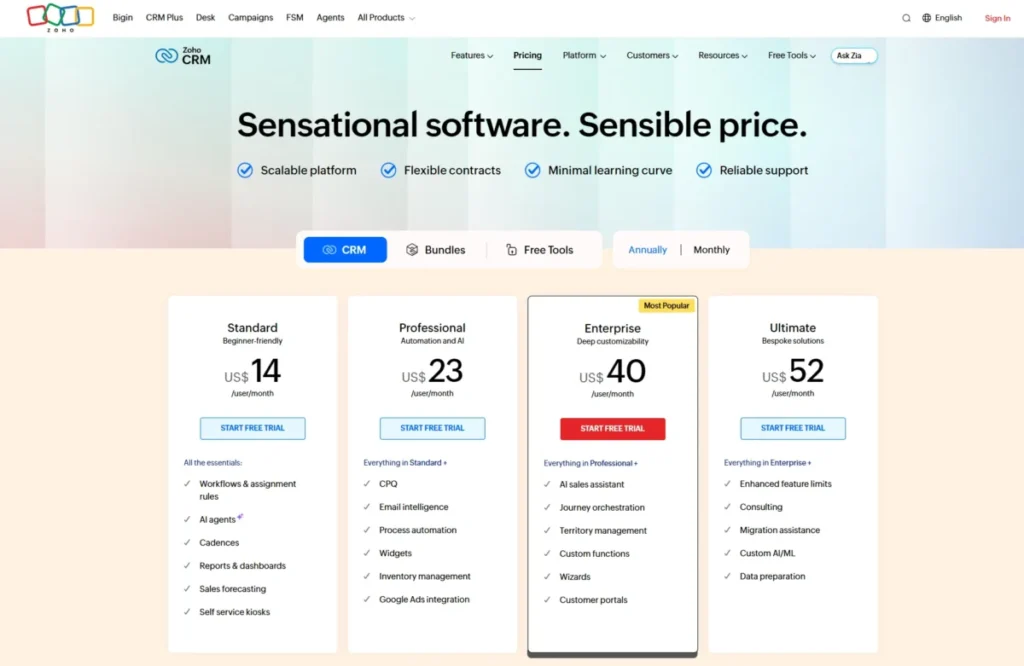
The full plan-gate and value read on this tool sits in the Zoho CRM review, which is worth reading before you commit to a tier.
Verdict: Choose Zoho CRM if you want the widest capability for the price and you have someone to run setup.
2. Salesforce Agentforce Sales: Best for Enterprise Scale

Salesforce is the best CRM software for 50-to-500-plus-seat organizations that need customizable architecture, governance, forecasting, and a deep app ecosystem. It ranks second, not first, because that power comes with setup and total-cost weight that most small teams do not need.
The official Salesforce Sales pricing page lists Free Suite at $0/user/month, Starter Suite at $25/user/month, Pro Suite at $100/user/month, and Enterprise at $175/user/month, with higher Agentforce tiers above that.
The minimum viable plan for a real sales operation is usually Enterprise, because advanced pipeline management, forecasting, opportunity scoring, conversation intelligence, and API access concentrate there. Starter and Pro can run a small team, but the reason companies choose Salesforce is the Enterprise-and-up architecture, so budgeting from $25 is misleading.
What it does well:
- The deepest customization, permissions, and governance model in this list.
- Forecasting, quotes, Slack collaboration, and Agentforce AI extend well beyond basic CRM.
- The partner and integration ecosystem scales with complex org structures.
Where it falls short:
- Setup, add-ons, and implementation effort can push total cost far above the per-seat price.
- Smaller teams pay in admin overhead and configuration time they may not have.
Avoid Salesforce if you want quick setup, low admin load, and a first CRM that runs itself in a week.
Setup difficulty: High. Expect configuration work, and for larger rollouts, partner or admin involvement before the 90-day mark.
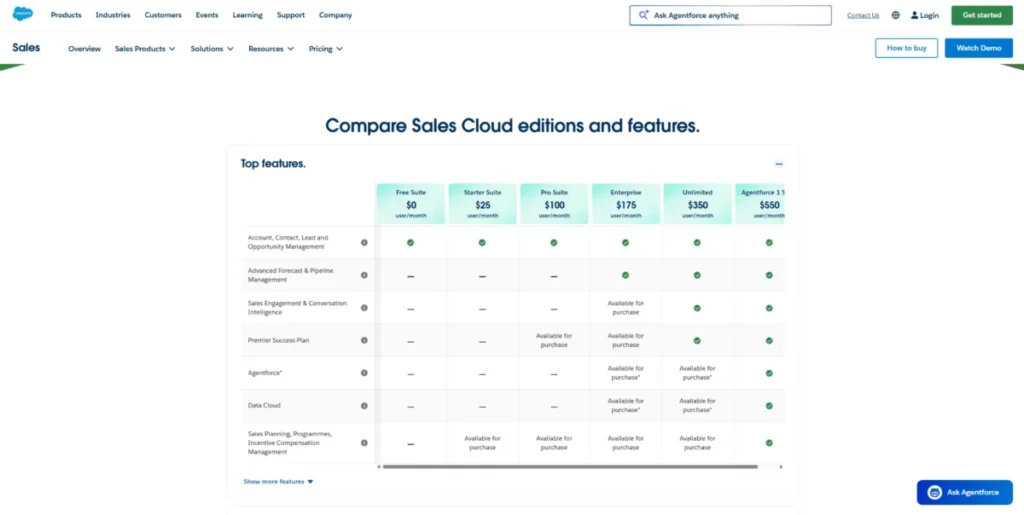
The deeper architecture and implementation caveats sit in the Salesforce CRM review if you are weighing an enterprise rollout.
Verdict: Choose Salesforce if you are building CRM to scale for years, not to launch this month.
3. HubSpot Sales Hub: Best for Inbound-Led Growth Teams

HubSpot Sales Hub is the best CRM software for inbound-focused teams that want CRM, email, chat, and marketing automation on one customer platform. It ranks third because the free and Starter entry is excellent, but the cost curve steepens fast at Professional and Enterprise.
The official HubSpot Sales pricing page shows Free for up to 2 users, Starter from $7/mo/seat on the annual-equivalent view (or $20/mo/seat monthly), Professional at $90/mo/seat annual-equivalent, and Enterprise at $150/mo/seat.
Watch the upgrade path. Professional carries a required one-time $1,500 onboarding fee and Enterprise a required one-time $3,500 onboarding fee, so the jump from Starter is both a per-seat and a setup-cost jump.
What it does well:
- The free CRM and Starter tier are a strong low-cost entry for young teams.
- Deal pipelines, email tracking, sales automation, and Breeze AI sit inside one platform.
- The inbound and marketing ecosystem is hard to match if you consolidate hubs.
Where it falls short:
- Professional and Enterprise seats, onboarding fees, and multi-hub bundles raise cost sharply.
- Consolidating everything into HubSpot creates suite dependency over time.
Avoid HubSpot Sales Hub if you need long-term flat costs as you scale into Professional or Enterprise, or if you only want a lean sales pipeline without the platform.
Setup difficulty: Medium. Free and Starter are quick, but Professional onboarding exists because the automation depth needs configuration.
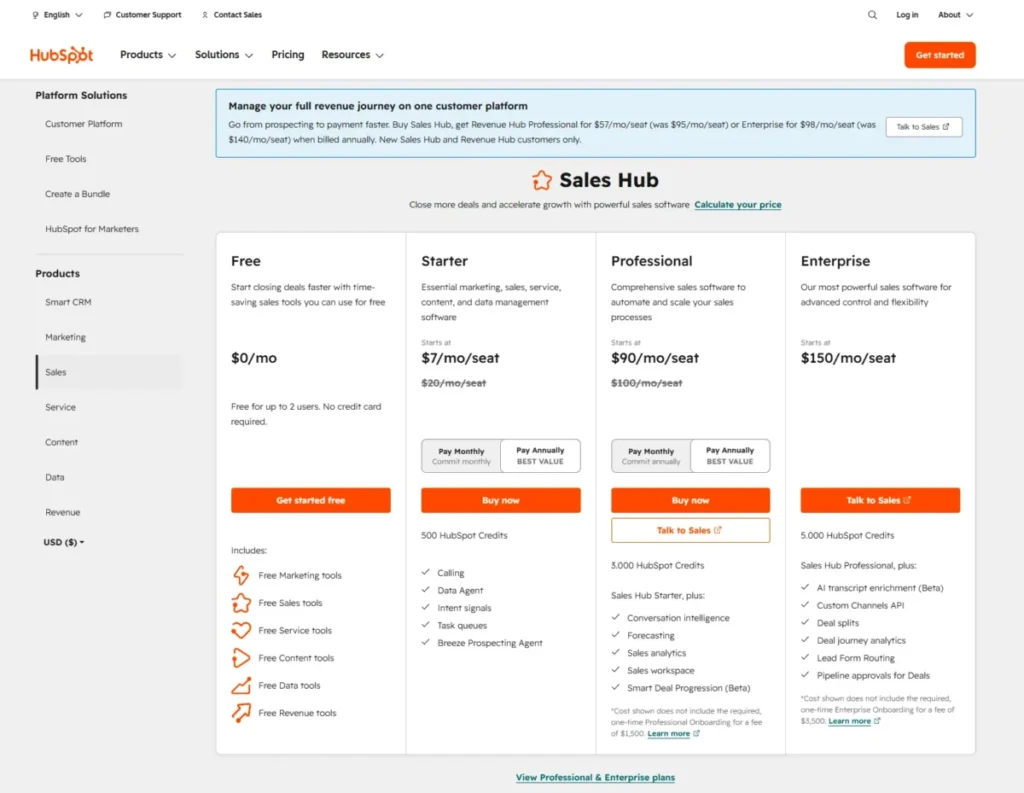
For the full free-to-Enterprise cost read, the HubSpot CRM review breaks down where the platform stops being cheap.
Verdict: Choose HubSpot Sales Hub if inbound and marketing alignment matters more than keeping the bill flat.
4. Pipedrive: Best for Visual Sales Pipeline Management

Pipedrive is the best CRM software for 5-to-50-person outbound or deal-driven teams that want a fast visual pipeline and easy rep adoption. It ranks fourth because it is sales-first by design, which is a strength for pipeline discipline and a limit for native marketing.
The official Pipedrive pricing page shows Lite from US$14/seat/month billed annually, Growth as one annual payment of US$288/seat/year, and Ultimate at US$69/seat/month billed annually. There is no free plan, but there is a 14-day free trial with no credit card.
The minimum viable plan for most sales teams is Growth, which works out to about $24/seat/month on the annual payment, because full email sync, tracking, automations, and nurturing sequences arrive there. Lite runs a basic pipeline, but sequences and automation are what make Pipedrive earn its keep.
What it does well:
- The visual pipeline drives fast rep adoption and clean stage discipline.
- Email sync, workflow automation, and sequences support real outbound motion.
- Reporting, custom scoring, and integrations scale with a growing sales team.
Where it falls short:
- Native marketing automation depth lags all-in-one suites, per review patterns.
- Marketing-heavy lifecycle teams will feel the sales-first ceiling.
Avoid Pipedrive if native lifecycle marketing automation is a core requirement; route those buyers toward HubSpot, Zoho, or a marketing-led suite instead.
Setup difficulty: Low. Reps get productive quickly, which is a large part of the appeal.
The pipeline-versus-suite tradeoff is covered in more depth in the Pipedrive CRM review.
Verdict: Choose Pipedrive if pipeline speed and rep adoption matter more than built-in marketing.
5. monday CRM: Best for No-Code Sales Workflow Customization

monday CRM is the best CRM software for teams that want customizable boards, visual workflows, and no-code automation without traditional CRM rigidity. It ranks fifth because that flexibility is real, but plan caps and localized pricing make simple cost comparison harder than the sticker suggests.
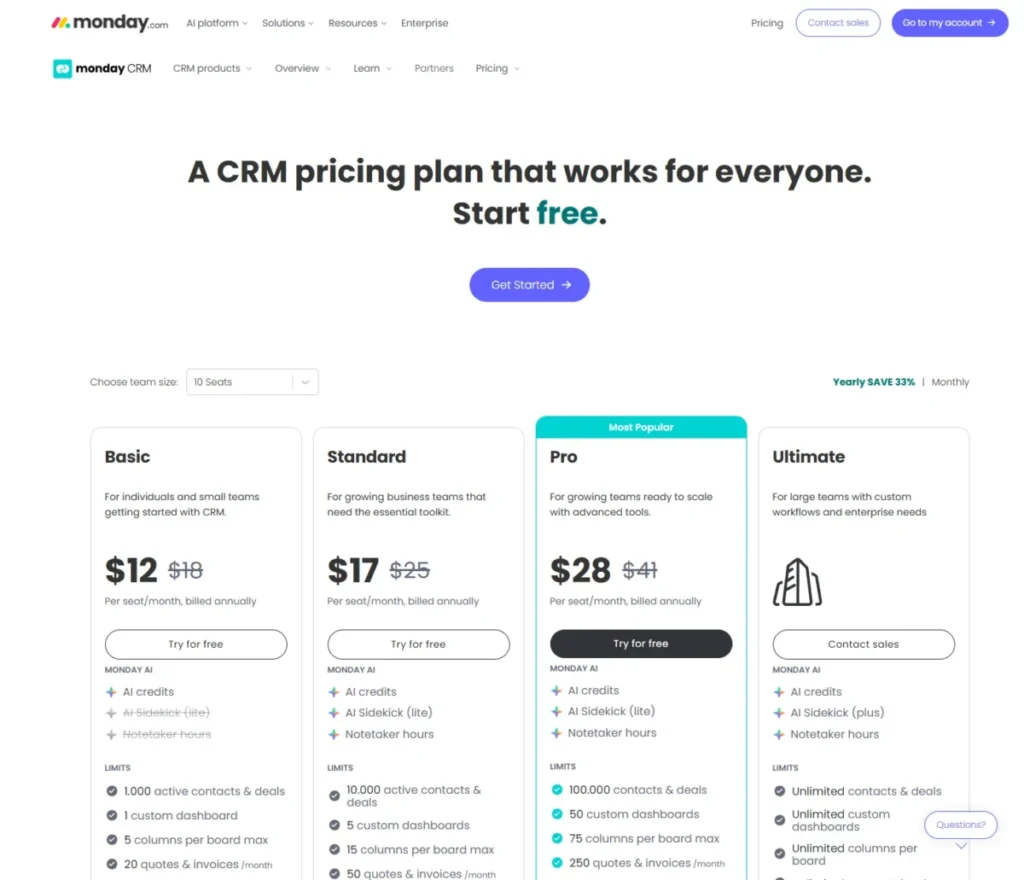
The official monday CRM pricing page shows plans from $10/user/month in US pricing, with a note that plans start from 3 users and that the page can localize currency. A yearly plan gives an 18 percent discount, and the final price depends on billing country, seat count, and billing period.
The plan caps are the part competitors skip, so here they are in one place.
| monday CRM plan | Active contacts/deals | Dashboards | Automations/month | Quotes & invoices/month |
|---|---|---|---|---|
| Basic | 1,000 | 1 | Not the automation tier | 20 |
| Standard | 10,000 | 5 | 250 | 50 |
| Pro | 100,000 | 50 | 25,000 | 250 |
| Ultimate | Unlimited | Unlimited | Enterprise-scale | Unlimited |
Basic also limits boards to 5 columns, and Ultimate adds governance, HIPAA, and priority support on a contact-sales basis. A team that expects a large contact database or automation-heavy workflows will hit these caps well before the per-seat price feels expensive.
What it does well:
- Custom pipelines, boards, dashboards, and no-code automations shape CRM around your process.
- Quotes, invoices, activity logging, and an AI sidekick sit in the same workspace.
- The visual model is friendlier than rigid enterprise CRM data structures.
Where it falls short:
- Minimum seats, plan caps, and localized pricing complicate clean budgeting.
- Standardized enterprise data architecture is not the out-of-the-box strength.
Avoid monday CRM if you need standardized enterprise CRM data structure on day one, or if your contact and automation volume will blow past Standard fast.
Setup difficulty: Medium. Building boards is easy, but designing a durable CRM data model still takes intent.
The board-versus-CRM tradeoff and adoption notes are in the monday.com review.
Verdict: Choose monday CRM if you want to shape the CRM around your workflow and you watch the plan caps as you grow.
6. Freshsales: Best Value CRM with Built-In Sales Tools

Freshsales is the best value CRM software for small and mid-sized sales teams that want built-in calling and AI-assisted workflows at a low entry price. It ranks sixth on strong price-to-feature value, held back mainly by a third-party integration ecosystem that trails the largest suites.
The official Freshsales pricing page shows a free plan, Growth from $9/user/month billed annually, Pro at $39/user/month, and Enterprise at $59/user/month.
The minimum viable plan for a team that wants AI-assisted selling is usually Pro, because Freddy AI contact scoring, sales sequences, Freddy AI sales emails, advanced workflows, custom reports, and multiple pipelines concentrate there. Growth is a capable core CRM, but the AI and sequence depth many buyers expect lives a tier up.
What it does well:
- Built-in telephony and Freddy AI features come without stitching separate tools together.
- Sales sequences, territory management, and custom reports arrive at a lower price than most rivals.
- The free plan and low Growth entry make it easy to start.
Where it falls short:
- Third-party integration depth can lag HubSpot or Salesforce, per review patterns.
- Support is described in review patterns as 24/5 rather than 24/7 on every tier.
Avoid Freshsales if you need the broadest third-party app ecosystem, or round-the-clock multilingual support on every plan.
Setup difficulty: Low. The core CRM is approachable, which suits teams moving off spreadsheets.
The AI tier gate and value read are covered in the Freshsales review for buyers comparing cheap AI CRMs.
Verdict: Choose Freshsales if you want built-in calling and AI value, and you budget for Pro rather than Growth when AI matters.
7. Microsoft Dynamics 365 Sales: Best for Microsoft-First Organizations

Microsoft Dynamics 365 Sales is the best CRM software for Microsoft 365 and Power Platform-heavy companies that want CRM tied into Outlook, Teams, Copilot, and Power BI. It ranks seventh for a general audience because stack fit is its edge and implementation weight is its cost.
The official Microsoft pricing page lists Dynamics 365 Sales Premium at $150/user/month paid yearly, with Copilot and agentic capabilities such as prebuilt agents, natural-language insights, and email and meeting assistance. Other Sales editions can depend on market and licensing path, so confirm US licensing with Microsoft or a partner.
This is not another small-business CRM. Its value shows up when the company already lives in the Microsoft stack and wants CRM data flowing into Teams, Outlook, and Power BI rather than a standalone tool.
What it does well:
- Deep Microsoft ecosystem fit for Outlook, Teams, Copilot, and Power Platform.
- Lead and opportunity management, forecasting, and enterprise integration at scale.
- Agentic Copilot features extend well beyond basic pipeline tracking.
Where it falls short:
- Implementation and licensing complexity can overwhelm smaller teams, per review patterns.
- Getting full value usually assumes existing Microsoft investment and admin capacity.
Avoid Dynamics 365 Sales if you are a small team that wants a quick, low-admin CRM without partner implementation, or if your stack is not Microsoft-centric.
Setup difficulty: High. Expect configuration and, for many rollouts, partner involvement before it settles.
The Microsoft-fit tradeoff is detailed in the Microsoft Dynamics 365 Sales review.
Verdict: Choose Dynamics 365 Sales if you are Microsoft-first and mid-market or larger, and you have implementation capacity.
8. Insightly CRM: Best for Deal-to-Project Handoffs

Insightly CRM is the best CRM software for professional services, agencies, and implementation teams that need to convert closed deals into delivery projects. It ranks eighth because that post-sale continuity is a real differentiator, even if procurement is less simple than the entry price implies.
The official Insightly pricing page lists Plus at $29/user/month, Professional at $49/user/month, and Enterprise at $99/user/month, all USD billed annually, with All-in-One bundles priced separately. There is a 14-day free trial and no free version on the standard CRM tiers.
The reason to pick Insightly is the handoff. Most pure sales CRMs stop at closed-won, while Insightly carries the same record into project management, which suits teams whose work begins after the sale.
What it does well:
- CRM and project management live together, so closed deals become delivery projects.
- Pipelines, dashboards, AppConnect, API, and AI Copilot queries support growing teams.
- Enterprise adds audit logging, custom validation rules, and unlimited brands and portals.
Where it falls short:
- Annual-only billing and onboarding considerations make procurement less simple than $29 suggests.
- A team that only needs a lightweight pipeline pays for capability it will not use.
Avoid Insightly if you only need a simple sales pipeline, or if you want monthly billing flexibility.
Setup difficulty: Medium. The CRM side is approachable, but the project workflows reward deliberate setup.
The deal-to-project workflow value is covered further in the Insightly CRM review.
Verdict: Choose Insightly if delivery starts after the sale closes and you want one system for both.
9. Less Annoying CRM: Best Simple CRM for Small Teams

Less Annoying CRM is the best simple CRM software for solo users and 1-to-20-person small businesses that want contacts, pipeline, and tasks without CRM bloat. It ranks ninth because its simplicity ceiling is also its limit for advanced work.
The pricing is refreshingly plain: $15/user/month, one tier, no contracts, and no upgrade fees, with a 30-day free trial per review patterns.
There are no plan gates to decode because there is only one plan. That transparency is the point, and it is a strong fit for teams leaving spreadsheets who want to solve adoption before feature depth.
What it does well:
- One flat price with no upgrade fees or contract lock-in.
- Contact management, pipeline, calendar, tasks, and email sync in a low learning curve.
- Human support and CRM coaching suit first-time CRM users.
Where it falls short:
- It is not built for advanced automation, AI, or deep analytics.
- Enterprise permissions and heavy reporting workflows are out of scope.
Avoid Less Annoying CRM if you need AI, complex marketing automation, enterprise permissions, or advanced reporting, because those are not its design goals.
Setup difficulty: Low. This is often the fastest path from spreadsheet chaos to a working pipeline.
The simplicity-versus-scale read is in the Less Annoying CRM review for teams weighing whether they will outgrow it.
Verdict: Choose Less Annoying CRM if you want contacts and pipeline that just work, and you do not need RevOps depth.
10. Copper CRM: Best for Google Workspace Users

Copper CRM is the best CRM software for relationship-driven teams that live in Gmail, Google Calendar, and Drive. It ranks tenth because that Google-native strength is also a hard limit for Microsoft-centric organizations.
The official Copper pricing page shows Basic at $23/seat/month paid annually or $29 monthly, and Professional at $59 annually or $69 monthly, with up to 26 percent off for annual billing. Basic includes a 2,500 contact limit, task automation, pipelines, project management, and enrichment; some sources reference a lower Starter plan, so confirm plan availability at checkout.
The 2,500-contact cap on Basic is the first thing a growing team will hit, so Professional is the common step-up. The Gmail side panel and Workspace integration make Copper feel native for Google-first sellers.
What it does well:
- Deep Gmail, Calendar, and Drive integration with a native side-panel experience.
- Pipelines, task automation, contact enrichment, and project management for relationship teams.
- Annual billing saves up to 26 percent for teams that commit.
Where it falls short:
- The Google Workspace strength turns into a limitation for Microsoft-heavy stacks, per review patterns.
- Basic’s 2,500-contact cap forces an upgrade sooner than the price implies.
Avoid Copper if your company runs on Microsoft 365 and Outlook, or if you need equal non-Google integration depth.
Setup difficulty: Low. For Google Workspace teams, it slots into existing habits quickly.
The ecosystem-fit constraint is detailed in the Copper CRM review for mixed-stack buyers.
Verdict: Choose Copper if you are all-in on Google Workspace and relationship selling is your motion.
CRM Pricing: What 10 and 25 Users Actually Pay
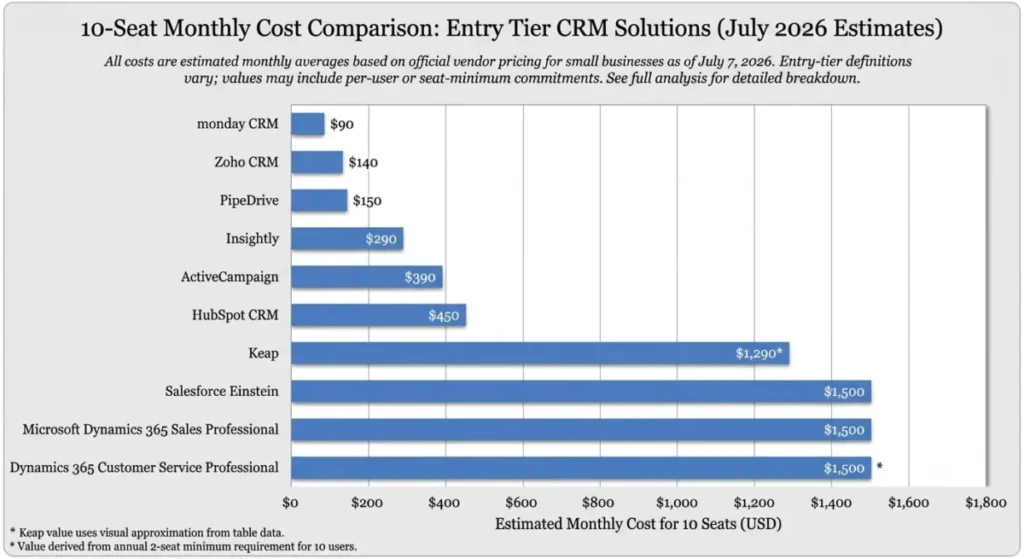
Entry prices hide the real budget. This table models monthly cost at 10 and 25 seats using each product’s entry paid tier, with clear labels where custom, annual-only, or localized terms apply.
| CRM | Entry paid tier | 10 seats/month | 25 seats/month | Billing note |
|---|---|---|---|---|
| Zoho CRM | Standard $14 | $140 | $350 | Annual billing; confirm USD at checkout |
| Salesforce | Starter $25 | $250 | $625 | Enterprise ($175) is the real sales-org tier |
| HubSpot Sales Hub | Starter $20 monthly | $200 | $500 | Professional adds $1,500 one-time onboarding |
| Pipedrive | Lite $14 | $140 | $350 | Growth (~$24) is the practical tier |
| monday CRM | From $10 (US) | $100 | $250 | Min 3 seats; caps force upgrades |
| Freshsales | Growth $9 | $90 | $225 | Pro ($39) adds AI and sequences |
| Dynamics 365 Sales | Premium $150 | $1,500 | $3,750 | Before implementation and licensing |
| Insightly | Plus $29 | $290 | $725 | Annual-only billing |
| Less Annoying CRM | Flat $15 | $150 | $375 | One tier, no upgrade fees |
| Copper | Basic $23 | $230 | $575 | Annual; Basic caps at 2,500 contacts |
The gap between the cheapest row and the most useful tier is where budgets break. A 25-seat team on HubSpot Professional pays 25 times $90 plus a one-time $1,500, not 25 times the Starter figure, and a Dynamics rollout carries implementation cost on top of $150 per seat, so I would budget from the practical tier and add onboarding, not from the sticker.
One more number hides in the billing basis. Several of these prices are annual-equivalent or annual-only: Insightly bills its $29, $49, and $99 tiers annually, Zoho and Copper show their lowest rates only on annual commitment, and monday’s 18 percent yearly discount applies only if you prepay.
If cash flow or contract flexibility matters, check the monthly rate before you sign, because HubSpot and Copper publish higher monthly prices ($29 and $69 on Copper) than their annual-equivalent figures.
Free Plan vs Free Trial
Free CRM is a high-intent search, but the word free hides four different things. This table separates a real free plan from a time-limited trial so the shortlist is honest.
| CRM | Free forever? | Trial | What free actually means |
|---|---|---|---|
| Zoho CRM | Yes | Standard trials exist | Free for 3 users with core CRM and 5,000 API calls/day |
| HubSpot Sales Hub | Yes | 2-user cap | Free CRM, capped at 2 users |
| Freshsales | Yes | Free plan available | Free core plan, AI depth is paid |
| Salesforce | Free Suite $0 | 30-day Starter trial | Free Suite plus a limited Starter trial |
| Pipedrive | No | 14-day trial | Trial only, no permanent free plan |
| monday CRM | No | 14-day trial | Trial only for normal commercial use |
| Insightly | No | 14-day trial | Trial only on standard CRM tiers |
| Less Annoying CRM | No | 30-day trial | Trial only, then one flat plan |
| Copper | No | Free trial | Trial only, no free plan confirmed |
| Dynamics 365 Sales | No | Trial only | Trial only, no free plan confirmed |
If free-forever is the requirement, the shortlist narrows to Zoho CRM, HubSpot, Freshsales, and Salesforce Free Suite, and the rest are trials that expire. I would not build a permanent workflow on a 14-day trial and call it a free CRM.
Feature Gate Comparison
The features that matter most, such as automation, reporting, AI, and API access, usually sit above the entry plan. This table maps where each capability lives so you do not buy a teaser tier.
| CRM | Automation | Advanced reporting | AI | API/integrations |
|---|---|---|---|---|
| Zoho CRM | Workflow rules from Standard; process mgmt Professional | Higher tiers | Zia at Professional and up | API on Free (5,000/day), deeper above |
| Salesforce | Broadens by edition | Enterprise forecasting/scoring | Agentforce at higher tiers | APIs concentrated at Enterprise |
| HubSpot Sales Hub | Deep automation at Professional | Professional and up | Breeze AI across tiers, depth higher | Integrations broad; depth by tier |
| Pipedrive | Automations from Growth | Higher tiers | Add-on and higher-tier scoring | 400+ integrations, API, Zapier |
| monday CRM | 250/mo Standard, 25K/mo Pro | Dashboards scale by plan | AI sidekick with credits | Integrations scale by plan |
| Freshsales | Advanced workflows at Pro | Custom reports at Pro | Freddy AI depth at Pro | Freshworks-centric ecosystem |
| Dynamics 365 Sales | Enterprise automation | Power BI integration | Copilot in Premium | Deep Microsoft integration |
| Insightly | Higher tiers | Professional and up | AI Copilot queries by tier | AppConnect and API |
| Less Annoying CRM | Not a core strength | Basic only | Not offered | Limited |
| Copper | Task automation on Basic | Professional and up | Limited | Google-first integrations |
The pattern is consistent: the plan that makes a CRM genuinely useful for a sales team is rarely the cheapest one. I would pick the tier by the first capability you cannot live without, then price that tier at your real seat count.
AI in CRM: Included, Add-On, or Higher Tier
AI is marketed as a headline feature, but inclusion varies. This matrix separates included AI from credits, add-ons, and enterprise-tier gates so AI does not become a surprise line item.
| CRM | AI status | Where it lives |
|---|---|---|
| Zoho CRM | Higher-tier | Zia predictive intelligence at Professional and up |
| Salesforce | Higher-tier/add-on | Agentforce at higher editions, Foundations context |
| HubSpot Sales Hub | Included, depth by tier | Breeze AI across tiers, more at Professional+ |
| Freshsales | Higher-tier | Freddy AI scoring and emails concentrate at Pro |
| monday CRM | Credit-based | AI sidekick with credits |
| Dynamics 365 Sales | Included at Premium | Copilot and agents in Sales Premium |
| Pipedrive | Add-on/higher-tier | Scoring and enrichment at higher tiers |
| Insightly | Tier-gated | AI Copilot query allowance by plan |
| Copper | Limited | Not an AI-led product |
| Less Annoying CRM | None | Simplicity by design |
AI capabilities move quickly, and credits or add-ons can change the bill, so verify current terms before you buy on an AI promise. A cheap AI CRM is often a cheap core CRM with paid AI depth one tier up, which is a very different budget.
Setup and Migration Difficulty
Most CRM failures come from adoption and implementation, not missing features. This matrix rates setup effort per tool with a one-line reason.
| CRM | Setup effort | Why |
|---|---|---|
| Less Annoying CRM | Low | One plan, minimal configuration |
| Freshsales | Low | Approachable core CRM |
| Pipedrive | Low | Fast rep adoption on a visual pipeline |
| Copper | Low | Slots into existing Google Workspace habits |
| Zoho CRM | Medium | Payoff needs field, module, and workflow design |
| monday CRM | Medium | Boards are easy; durable data model takes intent |
| Insightly | Medium | CRM is simple; project workflows reward planning |
| HubSpot Sales Hub | Medium | Professional onboarding exists for a reason |
| Salesforce | High | Configuration and often admin or partner effort |
| Dynamics 365 Sales | High | Implementation and licensing complexity |
If you are moving off spreadsheets, I would solve adoption before feature depth, which is why a low-setup tool often beats a powerful one for a first CRM. The 30-day test is simple: if reps are not logging deals by day 30 and the pipeline is not trusted by day 90, the tool choice or the rollout is the problem.
Choose by Sales Motion
Company size is a weak filter. How you sell is the better one, so this grid maps sales motion to fit.
| Sales motion | Strong fit | Why |
|---|---|---|
| Inbound-led growth | HubSpot Sales Hub | CRM plus marketing and chat in one platform |
| Outbound, deal-driven | Pipedrive | Visual pipeline and sequences for rep adoption |
| Value-led at scale | Zoho CRM, Salesforce | Depth and automation as the team grows |
| Field sales, mobile-first | Freshsales, Pipedrive | Built-in tools and mobile pipeline usability |
| Account and relationship | Copper | Native Gmail and Workspace relationship tracking |
| Post-sale delivery | Insightly | Deal-to-project handoff in one system |
| Microsoft-first org | Dynamics 365 Sales | CRM tied to Outlook, Teams, and Power BI |
Match the tool to the motion first, then check the price at your seat count. A CRM that fights your go-to-market motion gets abandoned no matter how strong the feature list looks.
Google vs Microsoft: Ecosystem Fit
Integration fit is a disqualifier, not just a feature. Where your team already works often decides the CRM more than the feature comparison does.
| Stack | Best-fit CRM | The catch |
|---|---|---|
| Google Workspace | Copper | Weak fit for Microsoft-heavy teams |
| Microsoft 365 | Dynamics 365 Sales | Implementation weight for small teams |
| Mixed or neutral | Zoho CRM, HubSpot, Freshsales | Broad integrations without a stack bet |
Copper is the clearer fit for a Gmail-first team, and Dynamics is the clearer fit for an Outlook-and-Teams shop. If your stack is mixed, a neutral CRM with broad integrations avoids locking your CRM to one productivity vendor.
Security and Admin Controls by Tier
Compliance and governance controls usually live on higher tiers, which can disqualify a low plan before features even matter. Confirm the specifics with each vendor, because plan-level security varies.
Enterprise-grade controls such as advanced permissions, audit logs, field-level encryption, and HIPAA support tend to concentrate in the top plans. On monday CRM, HIPAA and governance sit at Ultimate; on Zoho, field-level encryption and advanced controls arrive at Enterprise; on Salesforce and Dynamics, governance scales with the enterprise editions.
For any regulated team, I would confirm SSO, audit logs, HIPAA, SCIM, and data residency directly with the vendor before shortlisting a plan. A CRM that cannot meet your compliance bar on an affordable tier is not affordable, because the required tier is the real price.
Which CRM Should You Avoid?
The fastest way to a good decision is eliminating bad fits. This disqualifier view names who should skip each tool, drawn from the cards above.
| CRM | Skip it if |
|---|---|
| Zoho CRM | No one will own configuration |
| Salesforce | You want quick, low-admin setup |
| HubSpot Sales Hub | You need flat costs into Professional/Enterprise |
| Pipedrive | Native marketing automation is core |
| monday CRM | You need enterprise data structure day one |
| Freshsales | You need the broadest app ecosystem |
| Dynamics 365 Sales | You are a small, non-Microsoft team |
| Insightly | You only need a lightweight pipeline |
| Less Annoying CRM | You need AI, deep analytics, or RevOps depth |
| Copper | Your stack runs on Microsoft 365 |
The buyer risk ledger for this category is short and repeatable: the entry price rarely matches the practical tier, AI and automation hide above the cheapest plan, and integration fit can quietly disqualify a strong product. Name those three risks before you shortlist, and most bad fits eliminate themselves.
Three Buyer Scenarios, Priced and Decided
Abstract rankings get real when you attach a team, a budget, and a workflow. Here are three common CRM buyers and the pick I would defend for each.
A 5-person startup moving off spreadsheets needs adoption first, not depth. I would start on HubSpot’s free CRM for up to 2 users while the team is tiny, then move to Freshsales Growth at $9/user/month (about $45/month for 5 seats) once calling and sequences matter.
The risk here is overbuying. A 5-person team on Salesforce or Dynamics pays in admin time it does not have, so I would keep setup effort low and revisit tiers at 10 seats.
A 12-person outbound sales team needs pipeline discipline and sequences. Pipedrive Growth at roughly $24/seat/month runs about $288/month for 12 seats and gives reps a fast visual pipeline plus automation.
The budget pressure point arrives if this team later wants native marketing automation, because Pipedrive is sales-first. At that fork, I would compare HubSpot Professional against Zoho Professional rather than stretch Pipedrive past its design.
A 30-person professional services firm needs the deal-to-project handoff. Insightly Plus at $29/user/month is about $870/month for 30 seats, and it carries closed deals into delivery projects that pure sales CRMs drop.
If reporting and governance grow serious, Insightly Enterprise at $99/user/month or Zoho Enterprise becomes the practical tier. I would price that tier now, because the jump is the real cost, not the $29 entry.
What Breaks First as You Scale
Every CRM has a first failure point, and knowing it early saves a painful mid-year migration. This is where each tool tends to strain as the team and data grow.
On monday CRM, the contact and automation caps break first, because Basic stops at 1,000 active contacts and Standard at 250 automations per month. A growing pipeline hits those numbers before the per-seat price feels high.
On HubSpot, the budget breaks first at the Professional jump, where the per-seat price climbs and a $1,500 onboarding fee lands at once. Teams that grew comfortable on Starter feel this as a step change, not a gradual increase.
On Copper, the 2,500-contact Basic cap breaks first for teams doing real volume. On Less Annoying CRM, reporting and automation depth break first, because the single plan was never built for RevOps.
On Salesforce and Dynamics, admin capacity breaks first rather than the software, since both reward configuration effort that small teams cannot always staff. I would name the likely break point before buying, then choose the plan that survives it for at least a year.
How to Choose the Right CRM Software
Work through these steps in order, because the wrong order is how teams overbuy or underbuy.
First, define your sales motion: inbound, outbound, field, account, or post-sale delivery. The motion decides the shortlist faster than company size does.
Second, set your real seat count for the next 12 months, not today. Per-seat pricing and plan caps hit at scale, not at launch.
Third, identify the one capability you cannot live without, such as automation, forecasting, AI, or project handoff. That capability sets your minimum viable plan.
Fourth, price that plan at your seat count and add onboarding, add-ons, and AI credits. Budget from the practical tier, never the sticker.
Fifth, check integration fit against your existing stack. A Google-first or Microsoft-first stack narrows the field quickly.
Sixth, run a trial with real data and real reps, and watch adoption in the first 30 days. A tool reps will not log into is the wrong tool at any price.
Seventh, ask the renewal question before you sign: can you defend the cost, adoption, and reporting value in 12 months? If the answer is unclear, delay or simplify the choice.
Common Mistakes When Choosing CRM Software
These mistakes show up again and again in CRM buying, and each one has a cheaper fix than a re-platform.
Budgeting from the entry price is the first. The practical tier, onboarding, and add-ons are the real number.
Confusing a free trial with a free plan is the second. A 14-day trial is not a free CRM, and building on it leads to a forced upgrade.
Ignoring plan caps is the third. Contact, automation, and dashboard limits force upgrades even when the per-seat price looks low.
Choosing on feature count instead of sales motion is the fourth. A tool that fights your motion gets abandoned regardless of its feature list.
Overbuying enterprise power is the fifth. A small team on Salesforce or Dynamics often pays in admin overhead it cannot staff.
Underbuying on simplicity is the sixth. A simple CRM is great until you need reporting, automation, or AI it was never built to provide.
Skipping the adoption test is the seventh. If reps are not using it by day 30, the rollout failed no matter how good the demo looked.
Final Verdict
For most teams, Zoho CRM is the best CRM software of 2026 because it delivers automation, AI, and API depth from a low paid entry price, provided someone owns setup. It is the pick I would defend to finance for the widest range of buyers.
If you are scaling toward 50 to 500-plus seats, Salesforce is the stronger long-term architecture, and if inbound and marketing alignment lead your motion, HubSpot Sales Hub is the better platform despite the steeper cost curve.
Small teams get the clearest wins at the edges. Less Annoying CRM is the honest choice for a 1-to-20-person team that wants contacts and pipeline without complexity, Copper is the fit for Google Workspace relationship sellers, and Pipedrive is the pick for outbound reps who need pipeline speed.
The buyer risk that ties this list together is budget drift from entry price to practical tier, so I would set the seat count, choose the minimum viable plan, add onboarding and AI costs, and only then compare. The renewal question is the real test: if you cannot defend the cost and adoption in 12 months, simplify the choice now.
FAQ
What is the best CRM software for small business?
For most small businesses, Zoho CRM offers the best value-to-feature balance, while Less Annoying CRM wins for a 1-to-20-person team that wants simplicity and one flat $15/user/month price. HubSpot’s free CRM is a strong starting point for up to 2 users.
Which CRM is easiest to use?
Less Annoying CRM and Pipedrive rate lowest on setup effort, because one has a single plan and the other centers on a visual pipeline reps adopt quickly. Copper is also low-effort for teams already in Google Workspace.
What is the best free CRM?
Zoho CRM offers a free plan for 3 users with core CRM and 5,000 API calls per day, HubSpot offers a free CRM capped at 2 users, and Freshsales offers a free core plan. Salesforce offers a Free Suite as well, though its depth sits in paid editions.
Is HubSpot or Salesforce better?
HubSpot is the better fit for inbound-led teams that want CRM and marketing together, while Salesforce is the stronger choice for 50-to-500-plus-seat organizations that need deep customization and governance. HubSpot is cheaper to start; Salesforce scales further.
How much does CRM software cost?
Entry paid plans in this roundup range from about $9 to $150 per user per month, checked July 7, 2026. Real cost depends on the practical tier, seat count, onboarding fees, and AI add-ons, so budget from the tier that includes the features you need.
Which CRM has the best automation?
HubSpot at Professional and Salesforce at Enterprise offer the deepest automation, while monday CRM exposes clear automation-per-month caps (250 on Standard, 25,000 on Pro). Zoho adds process management at Professional.
What CRM works best with Gmail?
Copper is built for Gmail and Google Workspace, with a native side panel in Gmail and integration into Calendar and Drive. It is the strongest Google-first pick, though it is a weaker fit for Microsoft stacks.
What CRM works best with Microsoft 365?
Microsoft Dynamics 365 Sales integrates most deeply with Outlook, Teams, Copilot, and Power BI. It fits Microsoft-first mid-market and enterprise teams, but its implementation weight can overwhelm small teams.
Can a small business use Salesforce?
Yes, Salesforce offers a Free Suite and a $25/user/month Starter Suite, but the reason to choose Salesforce is its Enterprise-and-up architecture. A small team may pay in setup and admin overhead it cannot easily staff.
Which CRM is best for teams moving from spreadsheets?
Less Annoying CRM and Freshsales are the smoothest first CRMs, because low setup effort helps solve adoption before feature depth. Pipedrive is also a fast starting point for outbound teams.
About the author

Macedona is the founder and lead reviewer at SaaS CRM Review, where he has published 175+ in-depth reviews, pricing guides, and comparisons of CRM and SaaS tools. Each review is based on hands-on testing or verified documentation, and every article states clearly which method was used. Pricing and features are checked against official vendor sources, with the verification date noted in the article. Macedona follows a published review methodology and editorial policy. SaaS CRM Review earns affiliate commissions from some links, which never influence ratings or rankings. Read the full affiliate disclosure.