

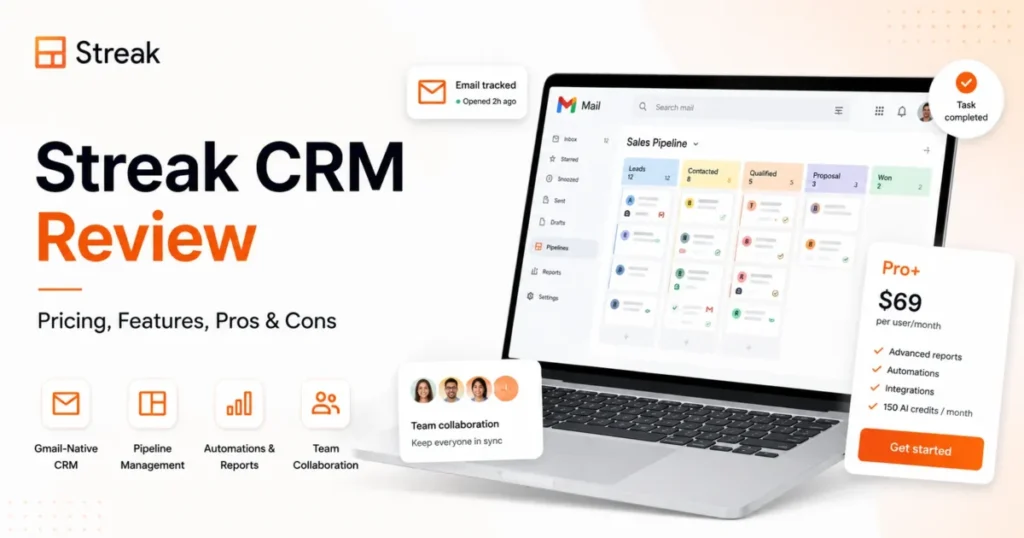
Streak is a CRM that lives inside Gmail, and that single design decision is the whole review.
For a 3 to 10 person team on Google Workspace that manages deals, candidates, or partnerships mostly by email, it removes the tab-switching tax that kills adoption. For almost everyone else, the same Gmail dependence turns into a cost and data-portability problem.
The short answer is simple. Streak is worth it for small, email-led Google Workspace teams that value in-inbox adoption, and it is the wrong pick for Outlook shops, high-volume senders, and buyers who need cheap view-only seats.
Paid CRM access starts on the Pro plan, and one automation user can push the whole team onto the pricier Pro+ tier. If you are still choosing a category, our guide to the best CRM for small business frames where an inbox-native option fits.
This review targets the questions the top pages skip: the team-wide plan rule, the missing viewer discount, real five and ten seat cost, mail quotas, AI-credit economics, export gaps, and offboarding risk.
In This Article (18 sections)
Quick Verdict
| Category | Verdict |
|---|---|
| Best for | 3 to 10 person Gmail-first sales, recruiting, and partnership teams |
| Not ideal for | Outlook shops, high-volume outbound, and cheap view-only stakeholders |
| Starting price | Pro at 59 USD per user monthly, or 49 USD effective on annual billing |
| Best practical plan | Pro for manual pipelines; Pro+ once automation or advanced reports are needed |
| Free plan | Email power tools only, not a free shared CRM |
| Setup difficulty | Low for Gmail-centric teams, medium once imports and permissions are tuned |
| Main strength | CRM records and shared context that live inside Gmail |
| Main limitation | Team-wide plan coupling with no discounted view-only seat |
| Best alternative | Copper for deeper Google Workspace CRM, Pipedrive for standalone pipeline depth |
Prices in this table are verified on the Streak pricing page and were checked 2026-07-23.
How We Reviewed Streak
This review is based on Streak’s official documentation and verified product evidence, checked on 2026-07-23. The sources were the pricing page, the help center, the API notes, and the security and privacy pages, cross-checked against current third-party review patterns.
Source: Streak official pricing page, help center, security page, and privacy policy, checked 2026-07-23.
Each plan was assessed on the criteria that decide a small-team CRM purchase: total cost at real seat counts, plan gates, workflow fit, data portability, and administration. Where two official pages disagree, this review shows both figures rather than picking one silently.
Testing level for this article is official research, so the language stays with what the documentation supports and never claims a live account or timed task.
Streak Pros and Cons
| Pros | Cons |
|---|---|
| CRM pipelines and email context sit inside Gmail, so daily adoption is easy | Every teammate must sit on the same plan, so one advanced need repriced the whole team |
| Pipelines behave like shared spreadsheets that non-technical teams grasp fast | No discounted view-only seat, so managers and finance viewers cost full price |
| Mail merge with automatic follow-up is built into the inbox | Standard export leaves out email threads, files, and comments |
| Native iOS, iPad, and Android apps plus documented API access | Advanced automation, reporting, and AI start on Pro+, not Pro |
| Six built-in permission roles, with granular custom roles on Enterprise | Archived users preserve only boxed mail, so offboarding needs a plan |
| Google Cloud hosting with documented OAuth and email-body handling | Deleting a pipeline column permanently removes that field across every box |
What Is Streak?
Streak is a CRM built into Gmail and Google Workspace, operated by Rewardly, Inc. under the Streak name, as stated in Streak’s privacy policy. Instead of a separate workspace, records live in shared pipelines and email-linked boxes inside the inbox.
Streak positions itself as the CRM a team keeps using because it lives in the inbox, and cites more than 750000 users and over 4000 companies. Those are vendor figures, not independently audited numbers.
If the concept of a shared customer database is new to your team, our explainer on what CRM software does covers the fundamentals that Streak reshapes around email.
The practical read is simple. Streak is more than an email tracker because it supports configurable pipelines, contact management, and reporting, but its core surface is Gmail, not a standalone app.
The distinction matters for expectations. Streak is not a lightweight bolt-on, and it is not a heavy standalone platform either, so buyers should judge it as an inbox-first system rather than a spreadsheet or a Salesforce replacement.
Setup, Pipelines, and Everyday Workflows
Setup starts inside Gmail. A pipeline can be built from a template or from a short description of the process, then adjusted with stages, columns, and saved views before it holds real data.
Records, called boxes, can be created from inbox contacts, bulk email selections, an email thread, a direct pipeline row, or a spreadsheet import. That range makes early data entry flexible for a small team.
Pipelines behave like shared spreadsheets, which is why non-technical sales and recruiting teams tend to grasp them quickly. The learning curve rises when you design permissions, report fields, and automation, not when you add your first deal.
Onboarding a Gmail-centric team is where Streak looks best. There is no second app to learn, no separate login habit to build, and the CRM shows up next to the email that created each record.
The friction shows up later, at import cleanup, permission design, and report setup. None of those are hard, but they are the steps that decide whether the pipeline stays trustworthy after month one.
One setup detail carries real risk. Per Streak’s column-editing warning, deleting a pipeline column permanently removes that column’s data across every box, and it cannot be undone.
Treat any structural change to a live pipeline as a data event. Export the affected fields first, because Streak documents no restore path for a deleted column.
The Pricing Math Nobody Shows You
Streak charges per user, and the plan you end up buying is rarely the cheapest one advertised. The list prices are only the starting point.
Per Streak’s pricing page, Pro is 59 USD per user each month, or 49 USD effective on annual billing, and Pro+ is 89 USD monthly or 69 USD effective annually. The 20 percent annual discount is the difference between the monthly and effective rates.
Enterprise is displayed at 159 USD per user monthly, but per Streak’s Enterprise pricing, it bills annually for teams of at least 10 users, so the entry point is a 10-seat annual commitment.
Two rules shape the real bill. Per its pricing terms, everyone on a team must sit on the same plan, and Streak lists no discounted price for users who only need view access.
That same-plan rule is the trap the list prices hide. If one person needs automation, every seat moves to Pro+, and read-only managers or finance viewers still consume full-price seats.
The free tier adds to the confusion. It is email power tools offered free, not a shared CRM, so a team that wants shared pipelines begins paying at Pro.
If a genuinely free shared database is the goal, compare dedicated options in our best free CRM software roundup.
Here is the cost at real team sizes, using list prices before tax or negotiated terms.
| Plan and billing | 5 users per year (USD) | 10 users per year (USD) | Notes |
|---|---|---|---|
| Pro, annual | 2,940 | 5,880 | Best value for manual pipelines |
| Pro, monthly | 3,540 | 7,080 | Costs 600 more at five seats than annual |
| Pro+, annual | 4,140 | 8,280 | Automation, advanced reports, archived users |
| Pro+, monthly | 5,340 | 10,680 | Costs 1,200 more at five seats than annual |
| Enterprise, annual | Not available | 15,480 | Ten-seat annual minimum, custom roles |
Totals multiply the effective per-seat rate by the seat count and the year, verified on the Streak pricing page (checked 2026-07-23).
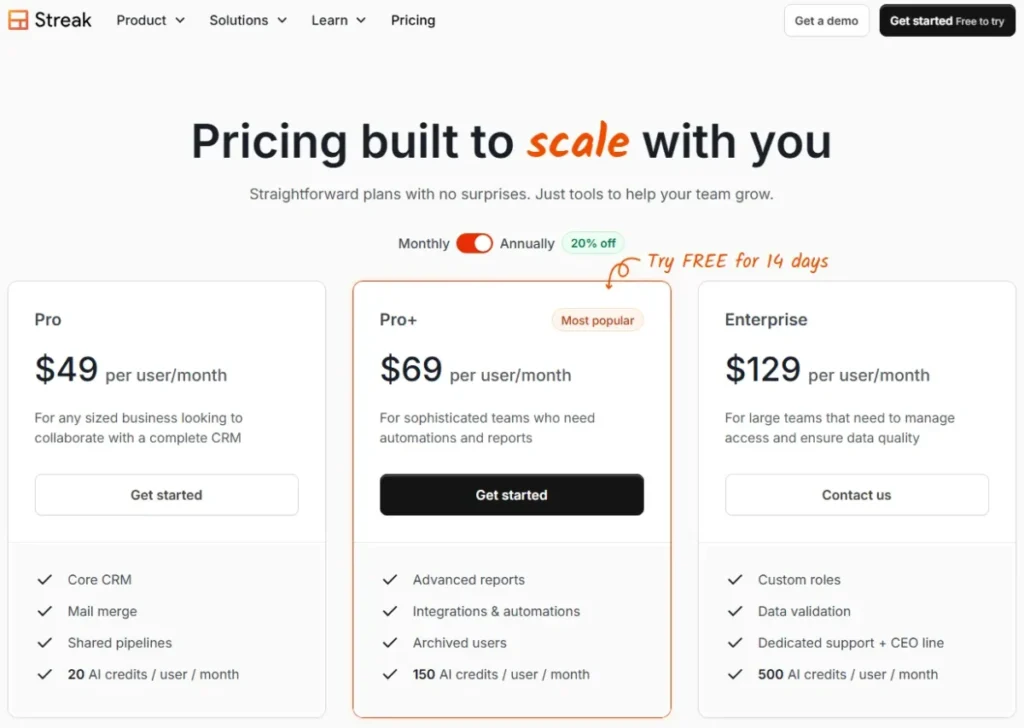
The five-seat jump from Pro to Pro+ costs 1,200 more per year, and it applies to every seat even when only one person needs the Pro+ feature. The ten-seat Enterprise floor works out to 15,480 per year before add-ons, which is a high bar for a small team that needs only one Enterprise control.
Model a common real case to see the viewer trap. A four-person deal team plus two read-only managers on Pro+ fills six paid seats, or 4,968 per year at the annual rate, even though a third of those people never edit a record.
Before you upgrade, count every invited seat and every stakeholder who only needs to look. If half your intended users are viewers, a tool with discounted view-only pricing can undercut Streak on total cost without changing anything about the work.
Feature Gates: What You Get on Each Plan
Streak reserves most operational features for Pro+ and above. The table below maps the gates that decide when a manual team has to upgrade.
| Capability | Pro | Pro+ | Enterprise |
|---|---|---|---|
| Shared pipelines and boxes | Yes | Yes | Yes |
| Standard reports | Yes | Yes | Yes |
| Advanced reports | No | Yes | Yes |
| Integrations and automation | No | Yes | Yes |
| Webhooks and scheduled exports | No | Yes | Yes |
| Archived users | No | Yes | Yes |
| AI Autofill, summaries, and Ask AI | No | Yes | Yes |
| Custom roles and data validation | No | No | Yes |
| Included AI credits per user monthly | 20 | 150 | 500 |
Pro is the honest starting tier for a team that runs manual pipelines, standard reports, and moderate mail merge. We recommend Pro+ the moment automation, advanced reports, webhooks, archived users, or the advanced AI features become part of the daily process, because each is a documented plan gate rather than a supported feature on Pro.
Enterprise earns its place through custom permissions, data validation, and dedicated support, not through team size alone. The operating consequence is direct: because plans cannot be mixed, every gate you cross moves the entire team, so choose the tier your workflows actually need, and confirm the gate against Streak’s official documentation before you upgrade.
Automation, AI, and Reporting
Automation is where a manual team meets the first hard wall. Per Streak’s automation documentation, integrations and automation are available on Pro+ and Enterprise only, with native connections to Calendly, Typeform, Google Forms, Streak-to-Streak, and webhooks, plus more than 9000 apps reachable through Zapier.
Do not read that Zapier number as native depth. The documented first-party connections are a short list, and everything else runs through a third-party automation layer you pay for and maintain separately.
AI is metered by credits, and the economics matter. Per Streak’s AI credit documentation, included credits are 20 per user monthly on Pro, 150 on Pro+, and 500 on Enterprise. They are pooled across the team with no rollover, and an AI action stops or fails when the shared pool is empty.
When the pool runs dry, the recurring add-on packs cost from 100 to 1,000 dollars a month, for pooled credit packs sized from 1,000 up to 25,000. That annualizes to between 1,200 and 12,000 dollars for an AI-heavy team.
There is a documented cost conflict worth knowing before you budget. The AI Autofill page lists web research at 5 credits per field, while Streak’s general credit page lists 2 credits. Plan against the higher figure until Streak reconciles the two.
Run the numbers before you commit to AI-heavy workflows. A five-person Pro+ team shares a monthly pool of 750, and because web-research autofill costs five credits per field, that pool clears after roughly 150 enrichment fields.
The reliability angle is easy to miss. Because an AI action fails at runtime when the shared pool is empty, an automation that autofills fields can stop mid-run, so a team that builds AI into its process also has to monitor credits like any other operating budget.
Reporting is often described too broadly by other reviews. Per Streak’s reporting documentation, Pro includes standard reports while advanced reports start on Pro+, and sales reports need a value column and a stage set to Won before the numbers mean anything.
Integrations and the API
The integration story splits into three lanes: documented native connections, webhooks and API access, and the wider Zapier ecosystem. Treating all three as equivalent overstates the native depth.
Standard API access is listed on Pro, while webhooks sit on Pro+ and above. Per Streak’s API notes, the API uses HTTP Basic Auth over HTTPS and has no hard published rate limit. It asks teams above 10 requests per second to make contact, and Google caps a project at 20 requests per second.
For an engineering team, that means capacity planning is a conversation with Streak rather than a fixed number. Model the twenty-requests-per-second Google ceiling as the real constraint for a busy integration.
The native-versus-Zapier split has a maintenance cost most teams underprice. A first-party connector is Streak’s to keep running, while a Zapier zap is one more account, one more bill, and one more thing that breaks quietly when a field changes.
For a small team, that difference decides how much automation is safe to depend on. Keep the load-bearing workflows on documented native connectors, and treat Zapier as convenience glue rather than core infrastructure.
Think of the ecosystem as concentric rings. The inner ring is Google Workspace, the middle ring is the documented native connectors and the API, and the outer ring is everything reachable through Zapier, with more setup and less reliability the further out you go.
Mail Merge and Sending Limits
Mail merge with automatic follow-up is a genuine strength for moderate outreach, but the ceiling is not the number Streak shows you. Two quotas apply at once.
Per Streak’s mail merge limits, paid Google Workspace accounts can send 1500 emails per day and personal gmail.com accounts are capped at 400, both measured over a rolling 24-hour window.
The catch is that Streak and Gmail enforce limits independently. Gmail can throttle delivery based on its own account-level controls even when Streak still shows quota, so the lower of the two ceilings is your real limit.
For a team sending real volume, treat Streak as CRM context plus light outreach, not as dedicated sending infrastructure with deliverability guarantees.
Security, Privacy, and Admin Controls
Streak’s data model is documented at a useful level, though it is not a full compliance dossier. The architecture is straightforward for a Gmail-native tool.
Per Streak’s security page, access runs on Google OAuth, and data is stored on Google Cloud in the United States. The body of your email is not stored but fetched through the Gmail API on request, with only metadata such as recipients and subject held temporarily.
On the AI question that worries buyers, Streak’s privacy policy states that Google Workspace API data is not used to develop or train generalized AI or machine-learning models. Public certification evidence for SOC, ISO, HIPAA, SAML, and SCIM frameworks was not verified on the pages checked here, so security-led buyers should request it directly.
Permissions are stronger than some recent reviews claim. Per Streak’s permission roles, Pro and Pro+ include six built-in roles (Admin, Editor, Creator, Assignee, Viewer, and Observer), Enterprise adds granular custom permissions, pipelines default to whole-team sharing, and newly shared users default to Editor.
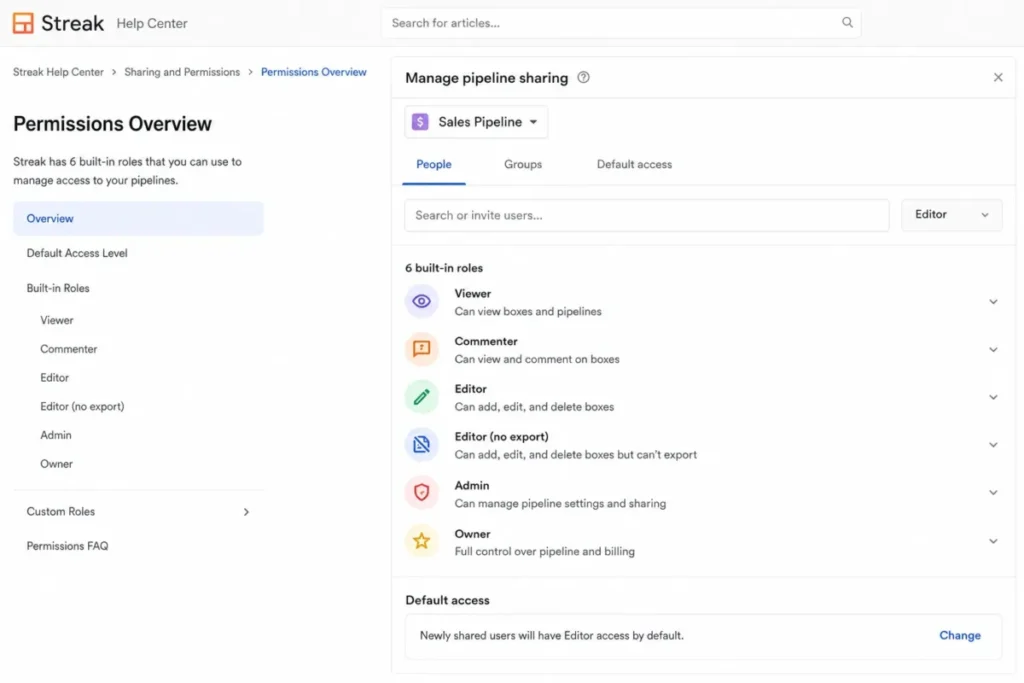
That default matters during onboarding. A new teammate can receive edit access to a shared pipeline by default, so review team-sharing and the default Editor role before you invite people.
The OAuth model has a practical upside worth stating plainly. Because access rides on the Google login, a team that already enforces strong Google security inherits that same control for Streak, and revoking a departing user’s Google access also cuts their Streak access.
The gap is public evidence, not architecture. Security-led buyers can get clear answers on data location and email handling, but the formal certification paperwork has to come from Streak directly rather than a public page.
Migration, Export, and Offboarding Risk
Getting data in is straightforward. Per Streak’s import documentation, the importer accepts Google Sheets, CSV, and Excel files, and each row becomes a box. A Box Name is required or built from First Name plus Last Name, same-named boxes update by default, and missing stages, dropdowns, or tags are created automatically.
Those defaults can alter an existing pipeline. Stage a copy, confirm Box Name uniqueness, and review the update and create-missing options before you run a real import, because Streak documents no rollback.
For a broader switching plan, our CRM migration guide covers the object-by-object checks a spreadsheet import cannot.
Getting data out is where switching risk hides. Per Streak’s export documentation, a pipeline exports boxes, contacts, and organizations to Google Sheets, but the standard export leaves out email threads, files, and comments, emails stay in Gmail, and scheduled recurring exports require Pro+.
So a Google Sheet is not a full CRM backup. Comments, thread keys, and file keys need the API, which turns a clean exit into an engineering task.
Offboarding is the most under-discussed risk in Streak. Per Streak’s archived-user policy, archived users are a Pro+ and Enterprise feature that preserves a static copy of only boxed messages and attachments. They cap at two archived users per paid seat, and they are explicitly not a full email backup.
Sequence matters more than most teams expect. Per Streak’s user-removal guidance, if you remove or deactivate a user’s Google account while no other teammate was on a thread, that email becomes inaccessible, so archive before you deactivate the Google Workspace account.
The safe order is fixed and worth writing into your offboarding runbook. Confirm the departing person’s threads are boxed, archive while their Google account is still active, respect the two-archived-per-seat ratio, then remove access.
Get that order wrong and the customer history can vanish the moment IT disables the mailbox. That is a real reason to keep Pro+ if staff turnover is part of your normal year.
Streak Limitations
The team-wide plan rule is the first structural limit. Because seats cannot be mixed, a single advanced requirement reprices every user, and read-only stakeholders still pay full price.
The second limit is data portability. Standard export excludes email threads, files, and comments, so audit, backup, and switching plans need extra engineering rather than a one-click download.
The third limit is offboarding fragility. Archived users cover only boxed mail and must be handled before a Google account is deactivated, which makes staff turnover a governance task, not a checkbox.
The fourth limit is outbound scale. The 1500 per day Workspace ceiling is shared with Gmail’s independent limits, so high-volume senders hit a wall Streak cannot lift.
The fifth limit is platform dependence. The interface, data access, and mail workflows all assume Gmail, so an Outlook-first team inherits friction that no setting removes.
None of these limits is a dealbreaker on its own. Taken together, though, they explain why Streak rewards a specific kind of team and frustrates everyone else, which is the pattern this review keeps returning to.
Who Should Use Streak?
Small Gmail-first sales teams are the core fit. A 3 to 5 person team that manages deals by email gets shared pipelines and context without leaving the inbox, which is where adoption usually succeeds or fails.
Recruiting, partnership, and investment teams fit the same pattern, much like the early-stage teams in our CRM for startups shortlist. Their work is relationship threads and follow-ups, so an email-anchored box model matches how they already operate.
Solo founders and very small service teams get value on Pro. They gain structure beyond a raw inbox without paying for automation they will not use yet, and our CRM for freelancers list is the fallback only if any spend is off the table.
Google Workspace shops that dislike standalone CRMs are the last strong fit. If your team resists logging into a separate system, an inbox-native tool removes the main reason CRMs go unused.
Teams that value speed of rollout over configurability also fit well. If your priority is getting a shared pipeline live this week rather than modeling every custom object, an inbox-native tool reaches usable faster than a heavier platform.
Who Should Avoid Streak?
Mixed Gmail and Outlook organizations should avoid it. The product architecture depends on Gmail and Google APIs, so an Outlook-first workflow fights the tool at every step.
A Google Workspace review is worth a look only if you are still choosing your email stack.
High-volume outbound teams should look elsewhere. The shared Streak and Gmail sending limits make it a poor fit for dedicated deliverability infrastructure and large daily sends.
RevOps teams that need deep cross-object analytics will outgrow it. Streak’s reporting is useful for pipeline and sales views, not for the multi-object modeling a conventional CRM offers.
Teams that need cheap view-only access should avoid the seat math. Every viewer costs a full seat, so a business with many read-only stakeholders pays for capability those people never use.
Regulated buyers that require public certification evidence should wait or ask first. The public pages checked here did not confirm a full compliance and identity-governance matrix.
Streak Alternatives
No single tool replaces Streak’s inbox-native simplicity, so pick the alternative by the exact Streak limit that blocks you.
| Alternative | Better for | Choose it if |
|---|---|---|
| Copper | Deeper Google Workspace CRM | You want Google-native depth beyond the inbox and richer reporting |
| Pipedrive | Standalone sales pipeline | You want a dedicated pipeline with broader workflow depth |
| HubSpot CRM | Lifecycle marketing and service | You need marketing, sales, and service under one roof |
| Zoho CRM | Value at scale | You want lower per-seat cost with more configuration |
| Nimble | Another Gmail-native option | You want inbox-anchored contacts with social enrichment |
Copper is the closest match for a team that likes the Google-native idea but wants more CRM depth, and our Copper CRM review covers where it pulls ahead. For teams that would rather leave the inbox entirely, the Pipedrive CRM review and the HubSpot CRM review show two different escape routes.
For value-focused buyers, the Zoho CRM review explains the trade of configuration effort for lower cost, while the Nimble CRM review is the other inbox-first contender worth a short list.
Final Verdict: Is Streak Worth It?
Streak is the best fit for a small Gmail-standardized team that prizes in-inbox adoption and can live with plan coupling, mail-sending limits, incomplete export, and a deliberate offboarding process. Its strongest advantage is making the CRM something people open every day, because it is already open.
It is a poor fit for Outlook shops, high-volume senders, deep-analytics RevOps teams, or businesses with many view-only stakeholders. Those buyers pay for the Gmail-native design without getting the adoption benefit that justifies it, which is the main limitation to weigh.
Choose Streak on Pro if your team runs manual, email-led pipelines and wants shared context fast. Move to Pro+ only when automation, advanced reporting, archived users, or AI enrichment has a measurable business case, since that upgrade moves every seat.
Choose Copper if you want Google-native depth beyond the inbox, or Pipedrive if you would rather run a dedicated pipeline outside Gmail entirely. Match the alternative to the specific Streak limit that would block your team, not to a generic feature count.
Our plain read is that Streak wins on a narrow axis and loses badly off it. If the inbox is where your team truly lives, that narrow axis is exactly the one that matters, and the tool pays for itself in adoption alone.
FAQ
These answers cover Streak’s pricing, plans, limits, and fit for small teams.
Is Streak CRM free?
No, not as a shared CRM. The free tier is a set of Gmail email power tools, including tracking and a capped mail merge. Shared pipelines and the CRM features start on the paid Pro plan at 59 USD per user monthly, per Streak’s pricing page.
How much does Streak CRM cost?
Per Streak’s pricing page, Pro is 59 USD per user monthly, or 49 USD effective on annual billing. Pro+ is 89 USD monthly or 69 USD annually, and Enterprise is 129 USD effective per user with a ten-seat annual minimum, which works out to about 15,480 per year at list price.
Is Streak a full CRM or a Gmail extension?
It is both. Streak is a real CRM with shared pipelines, contacts, reporting, and an API, but it runs inside Gmail rather than as a standalone app, so its capabilities and its limits are tied to Google Workspace.
What is the difference between Streak Pro and Pro+?
Pro covers shared pipelines, standard reports, and the core CRM. Pro+ adds integrations and automation, advanced reports, webhooks, archived users, and the advanced AI features, and because plans cannot be mixed, moving one user to Pro+ moves the whole team.
Does Streak work outside Gmail?
Not for a team outside Google Workspace, because the interface, data access, and email workflows all depend on Gmail and Google APIs. Firefox is not supported, though Streak works in Chrome, Safari, and Edge plus native iOS, iPad, and Android apps.
Can Streak import data from another CRM?
Yes, if you can export to a spreadsheet. Streak imports Google Sheets, CSV, and Excel files where each row becomes a box, but same-named boxes update by default and missing stages or tags are created automatically, so review the settings before importing.
Can Streak export emails and attachments?
No, not in a standard export. A pipeline export sends boxes, contacts, and organizations to Google Sheets, but it excludes email threads, files, and comments, which stay in Gmail or require the API, so it is not a complete backup.
Does Streak have workflow automation?
Yes, on Pro+ and Enterprise. Automation and integrations are gated to those tiers, with native connectors plus Zapier reach, and AI action steps can fail at runtime if the shared credit pool is exhausted.
Is Streak secure for customer data?
Streak uses Google OAuth, stores data on Google Cloud in the United States, does not store email bodies, and says Workspace data is not used to train AI models. Public SOC 2, HIPAA, SAML, and SCIM evidence was not confirmed on the pages checked, so request it during procurement.
What are the best alternatives to Streak CRM?
Copper is the closest Google Workspace alternative with more depth, Pipedrive is the standalone pipeline choice, HubSpot covers full lifecycle marketing and service, Zoho competes on value, and Nimble is another Gmail-native contact tool. Pick the one that fixes your specific Streak limitation.




Pingback: Copper vs Streak 2026: Gmail CRM Plans, Costs & Limits