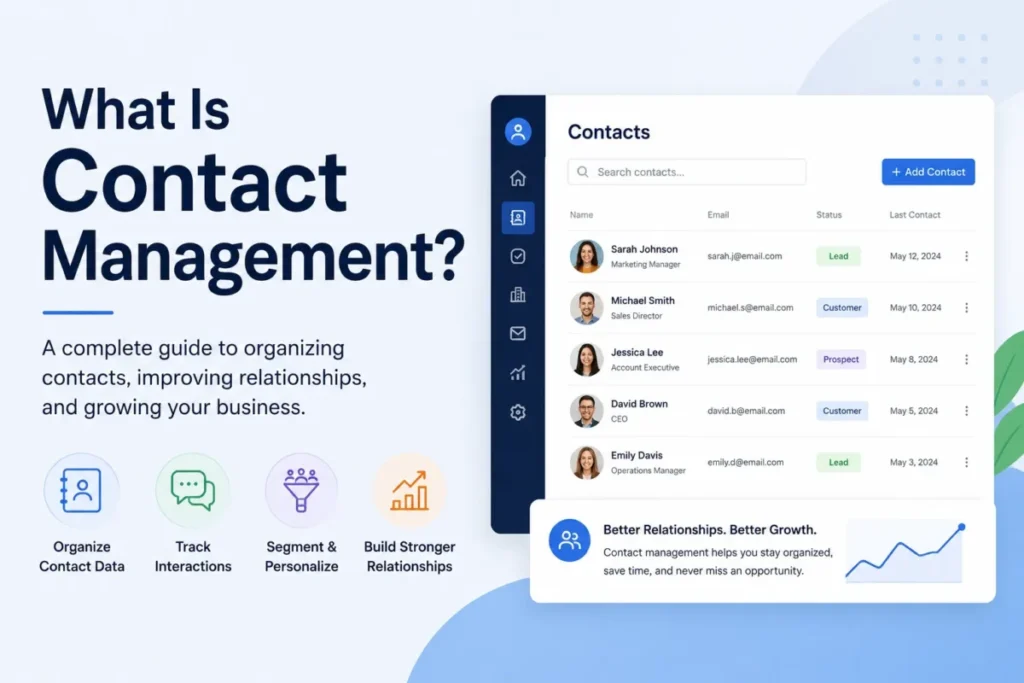
Most guides answer this question with two words: digital address book. That framing is where teams start losing money, because it treats contact management as storage when it is really an operating process that decides who your team can reach, bill, and report on.
Contact management is the discipline behind every clean pipeline, every accurate renewal forecast, and every campaign that reaches the right inbox, and it sits at the core of what CRM software does. Get the record model wrong early, and the damage shows up later as duplicate outreach, missed renewals, and reports nobody trusts.
I write this from a CRM buyer’s seat, not a vendor’s. The goal here is to give you the correct mental model before you pick a spreadsheet, a contact app, or one of the best CRM software options, so you do not pay for the wrong tool or rebuild your data twice.
Quick answer: Contact management is the process of storing, organizing, updating, and using information about people and organizations so teams can reach the right contact with the right context. It can live in a spreadsheet, a contact app, or a CRM, but it only works when records are structured, deduplicated, associated with accounts, and kept current. The difference from a full CRM is scope: contact management handles the record, while a CRM adds pipelines, automation, service, and reporting on top of it.
In This Article (13 sections)
What Contact Management Actually Means
Contact management is a process, not a product. The clearest way to understand it is in three layers, from the simple version to the operational one.
Layer 1, the plain version. It is how you keep track of the people and companies your business deals with, so nobody loses a name, a number, or the last conversation. That includes customers, prospects, partners, suppliers, and other stakeholders, not just buyers.
Layer 2, the CRM version. This is where contact management overlaps with a full CRM: it connects a person or organization’s profile to their contact details, activity history, account relationships, marketing status, deals, support tickets, and follow-up tasks. Salesforce describes it as how businesses store and manage contact information for clients, partners, and stakeholders, and notes that simple contact tools may not manage the relationships around those records.
Layer 3, the business version. AWS frames contact management as recording and tracking customer interactions, plus the technologies and strategies used to organize that data. That is the operator’s definition: the record is only useful if it drives outreach, service, segmentation, and reporting.
Here is the part the address-book framing hides. Real contact management is a seven-step loop, not a static list.
- Capture a person or organization from a form, import, email, call, event, API, sync, or manual entry.
- Structure the record with consistent fields and a unique identifier where one exists.
- Update it as details change, roles shift, and companies move.
- Deduplicate so one person is one record, not three.
- Associate the contact with accounts, deals, tickets, or campaigns.
- Use the record for outreach, segmentation, support, and workflows.
- Retire or archive stale records so the database stays trustworthy.
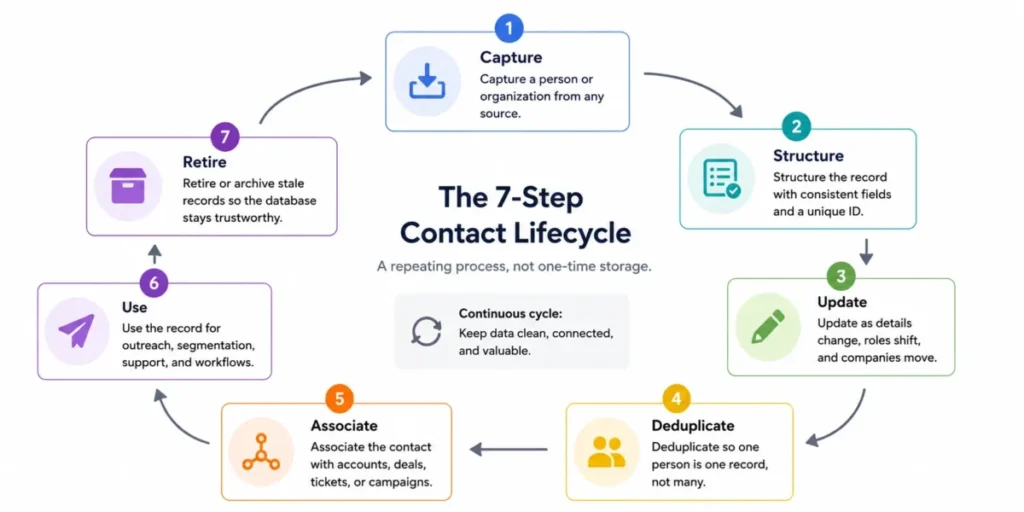
Skip steps four and seven, and the database slowly rots. That is why “we centralized our contacts” is not the same as “we manage our contacts.”
Contact vs Lead vs Account vs Opportunity
These four objects are the most confused terms in CRM, and mixing them up is how teams build broken reporting. A contact is a person, an account is an organization, a lead is an unqualified inbound, and an opportunity is a potential deal with revenue attached.
The exact labels shift by platform, so treat the table below as the common pattern, not a universal law. Pipedrive, for example, calls contacts people or organizations involved in deals, leads, and projects, while Salesforce, HubSpot, and Zoho each define these objects slightly differently.
| CRM object | What it represents | Simple example | Common mistake | Where it usually lives |
|---|---|---|---|---|
| Contact | A person | Jordan Lee, VP of Sales | Storing a company as a contact | Contacts / People |
| Account (company) | An organization | Acme Retail Inc. | Duplicating the account per contact | Accounts / Companies / Organizations |
| Lead | An unqualified inbound person | A form fill with no fit yet | Emailing leads as if they consented | Leads (separate object in some CRMs) |
| Opportunity (deal) | A potential sale with value and stage | Acme renewal, $40k, stage 3 | Tracking deals as notes on a contact | Opportunities / Deals / Pipeline |
Read this table as a setup guide: if your team cannot say which object a record belongs to, your pipeline and renewal reports will be wrong before you send a single email. Map each term to your specific CRM’s definitions during setup, and write the rules down for whoever imports data next.
How Contact Management Works in a CRM
A CRM turns the seven-step loop into linked records with a shared history. The record is the anchor, and everything else, deals, tickets, tasks, and campaigns, associates to it.
The workflow below shows how one contact moves through a CRM, from first capture to ongoing maintenance. Each stage maps to a real capability in tools like HubSpot, Salesforce, Zoho CRM, and Pipedrive.
| Stage | What happens | Why it matters to a buyer |
|---|---|---|
| Capture | Form, import, email, call, event, or API creates the record | Bad capture rules create duplicates on day one |
| Identify | CRM checks a unique identifier such as email or Record ID | Stops the same person becoming three records |
| Enrich | Fields fill in from entry, sync, or data providers | Empty fields break segmentation later |
| Associate | Contact links to accounts, deals, tickets, projects | B2B reporting depends on correct associations |
| Track | Calls, emails, meetings, tickets, and notes attach to the record | Context is what makes the record worth keeping |
| Segment | Filters group contacts by role, stage, or eligibility | Campaigns and routing fail on dirty segments |
| Maintain | Dedupe, ownership, permissions, and cleanup keep it current | This is the step teams skip and later regret |
The most useful record is the one with a full interaction history behind it, not the one with the most fields filled in. That history is what lets a rep or agent act without asking the customer to repeat themselves.
What counts as interaction history
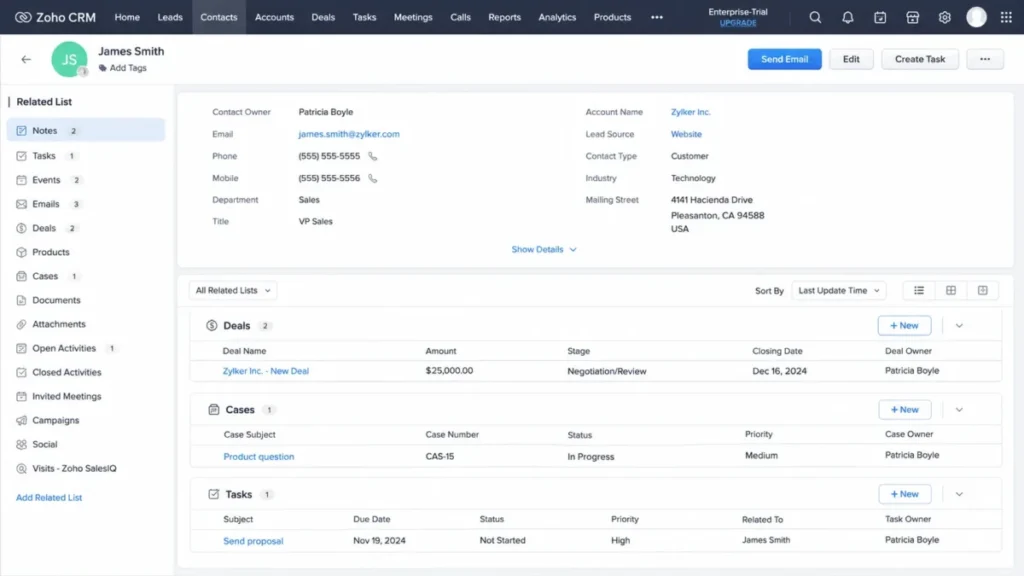
Interaction history is every touchpoint attached to a contact, not a vague “activity” label. Zoho CRM’s contact detail layout, covered in our Zoho CRM review, can show tasks, events, notes, business opportunities, emails, documents, products purchased, and trouble tickets in one 360-degree view.
A practical interaction-history checklist spans every team that touches the account:
- Sales: calls, emails, meetings, demo notes, deal stage changes.
- Marketing: form submissions, campaign engagement, and marketing-eligibility status where it applies.
- Support: tickets, chats, resolutions, and product usage notes.
- Customer success: renewal notes, health flags, and QBR follow-ups.
When one person belongs to several accounts
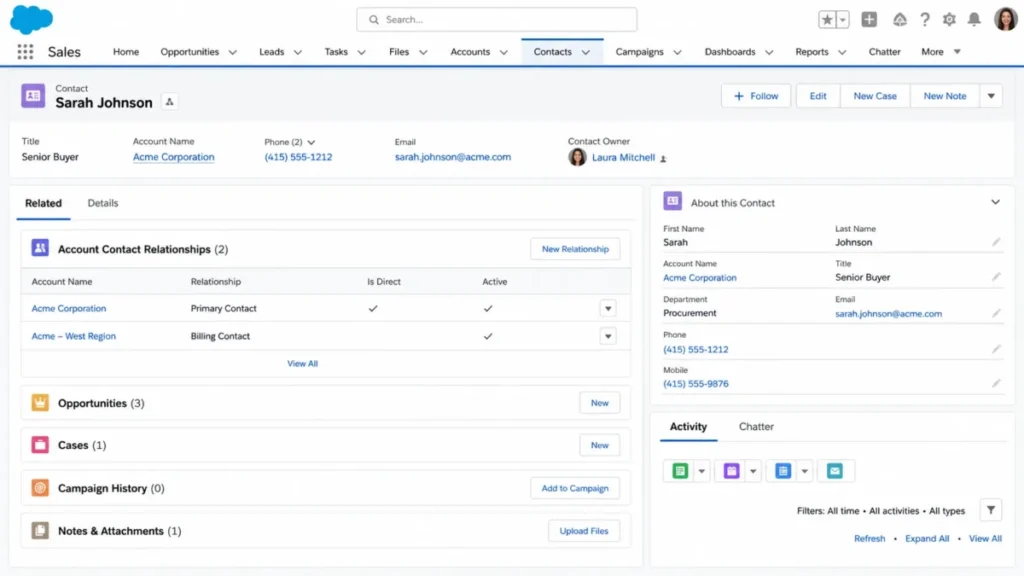
B2B breaks the “one contact, one company” assumption constantly. A consultant, board member, agency partner, or buyer who changed jobs can relate to more than one organization at once.
Salesforce handles this by relating a single contact to multiple accounts, which tracks the relationships without creating duplicate records, a pattern I unpack further in our Salesforce CRM review. Every contact still has one direct account, and the others represent indirect relationships.
The buyer lesson is simple: if your CRM supports multiple-account relationships, use them instead of cloning the person. Duplicate people are the fastest way to corrupt B2B reporting and double up on outreach.
What Belongs on a Contact Record
Good contact management starts with record design, not tool selection. The fields you require decide whether segmentation, dedupe, and reporting work later.
HubSpot ships default contact properties that store details such as email address and first conversion date, and some populate automatically, as noted in our HubSpot CRM review. The table below sorts fields into what you must have, what helps, and what to add with care.
| Tier | Example fields | Why it belongs here |
|---|---|---|
| Essential | Email, full name, company, contact owner, source, lifecycle stage | These drive dedupe, routing, and basic reporting |
| Useful | Phone, job title, location, last activity date, associated account | These power segmentation and follow-up timing |
| Add with care | Custom scores, enrichment data, consent/ | Valuable, but risky if ungoverned or unverified |
Treat email or another unique identifier as the backbone of the record, since that is usually what a CRM matches on to prevent duplicates. If a contact has no stable identifier, flag it for manual review rather than trusting automatic matching.
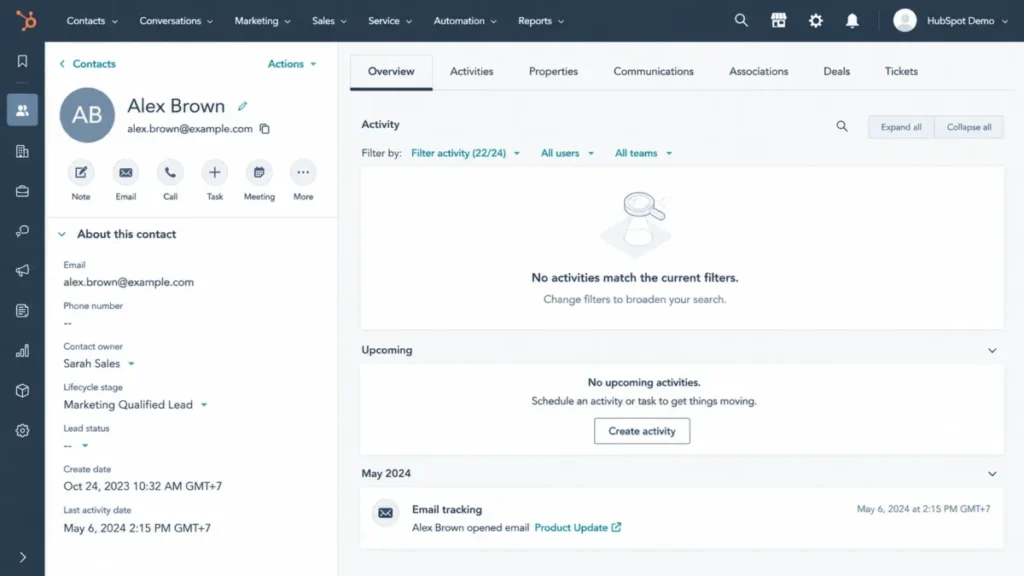
One more design rule that saves teams later: assign a contact owner and decide who can edit key fields. Without ownership, records drift, and two reps update the same person in conflicting ways.
Why Contact Management Matters
Contact management matters because bad contact data has a direct revenue cost, not a vague one. Most guides sell benefits; the sharper lens is what breaks when the data is wrong.
ShareCRM’s category guidance puts it bluntly: poor contact records send reps chasing people who left, cause customer success teams to miss renewals, and push marketers toward invalid addresses that damage deliverability. Here is that risk mapped to a buyer consequence, as a Buyer Risk Ledger.
| Bad-data problem | What it breaks | Buyer consequence |
|---|---|---|
| Duplicate contacts | Segmentation and email sends | One person gets three emails; unsubscribes rise |
| Stale titles and jobs | Outreach relevance | Reps pitch someone who left the company |
| Missing associations | B2B reporting | Pipeline by account becomes unreliable |
| No owner assigned | Accountability | Records go untouched or double-worked |
| Unverified marketing status | Deliverability and compliance | Sending to non-consented contacts risks the domain |
The pattern is consistent: the cost of weak contact management is not felt at setup, it is felt at reporting and renewal. That is the moment finance asks why the numbers do not match, and the honest answer is usually the contact database.
Reporting deserves its own callout, because clean contacts are the hidden dependency under every CRM dashboard. Lead-source analysis, pipeline by account, renewal risk, and campaign performance all distort when contacts are duplicated, stale, or misassociated, and no report fixes dirty inputs.
Marketing segmentation has the same dependency, and it fails silently. A segment is only as accurate as the fields behind it, so filtering by role, region, lifecycle stage, or last activity assumes those fields are populated and correct.
When contacts are duplicated, a single person can land in two segments and receive the same campaign twice. When marketing status is wrong, a send can reach contacts who never consented, which is a deliverability and compliance problem, not just a data one.
The order matters here. Fix properties, dedupe, and status first, then trust the segment, never the other way around.
Common Mistakes and Misconceptions
The most expensive mistakes in contact management are quiet ones that compound over months. Duplicates, wrong marketing assumptions, and careless syncs top the list.
Duplicate contacts, and how CRMs prevent them
Duplicates usually enter through imports and repeat form fills, not sloppy typing. HubSpot automatically deduplicates contacts by email address and companies by domain, supports Record IDs and custom unique-value properties for manual and import dedupe, and warns that imports without those identifiers can create new records instead of updating existing ones.
Salesforce approaches it with duplicate management that searches for existing records on creation or edit, alerts the user, and applies matching rules plus duplicate rules. A short dedupe checklist covers most teams:
- Match on a stable identifier such as email, domain, or Record ID.
- Include those identifiers in every import file.
- Set rules before a bulk import, not after the mess appears.
- Review contacts without emails manually, since automatic matching cannot help them.
Not every contact can be marketed to, or is free
A common and costly assumption is that every stored contact can be emailed by marketing. That is not how marketing CRMs price or permission contacts.
In HubSpot, a contact’s marketing-contact status determines whether it counts toward the contact tier in the billing period, and non-marketing contacts do not count toward the marketing contact tier. That means the label you apply to a contact can change both cost and permission, so I would verify the exact limits on the current HubSpot pricing tiers before importing or marking contacts in bulk.
This is a HubSpot-specific example, not a universal rule, but the principle travels. Marketing eligibility and billing can depend on status, consent, and plan design, so do not assume “stored” equals “sendable.”
One-way and two-way sync are not the same decision
Contact sync is where a small setup choice creates large data problems. Pipedrive, which we cover in our Pipedrive CRM review, supports syncing contacts with Google Contacts as either one-way or two-way.
Two-way sync propagates changes in both directions, so a bad edit in one system can overwrite good data in the other. Before enabling it, decide which system is the source of truth and who owns corrections, or the sync will quietly spread errors.
A few misconceptions are worth correcting directly, since they drive most of the bad setups:
- Misconception: contact management is just a digital address book. Reality: it includes structure, history, associations, dedupe, permissions, and workflows.
- Misconception: a contact and a lead are always the same thing. Reality: many CRMs separate them, and conversion rules vary by platform.
- Misconception: centralizing contacts automatically makes data clean. Reality: centralization helps, but dedupe rules, owners, required fields, and cleanup still do the work.
- Misconception: all CRM contact models are identical. Reality: Salesforce, HubSpot, Zoho, and Pipedrive use different object names, associations, and defaults.
Who Uses Contact Management
Contact management is not a sales-only practice, even though most guides frame it that way. Five roles rely on the same records for different jobs.
| Role | What they need from the record | Failure mode if data is bad |
|---|---|---|
| Sales rep | Deal stage, last touch, next step | Chasing dead leads, missing warm ones |
| Marketer | Segment fields, marketing status | Wrong audience, deliverability damage |
| Support agent | Tickets, products, past issues | Asking the customer to repeat context |
| Customer success | Renewal date, health, usage notes | Silent churn and missed renewals |
| Founder or operator | A single source of truth | Decisions made on numbers nobody trusts |
Support and customer success are the roles most often left out, and they are exactly where stale data costs renewals. A contact record that carries tickets and purchase history, as Zoho CRM’s layout shows, lets an agent resolve an issue without re-interviewing the customer.
Vendors and partners belong in contact management too. Salesforce and Indeed both frame it around customers, prospects, suppliers, and other stakeholders, so the practice covers every relationship the business tracks, not only buyers.
Contact Management vs CRM: Which Do You Need
You need contact management the moment you have contacts; you need a CRM when the work around those contacts becomes a system. The gap is scope, and the switch has clear trigger signs.
Act frames it well: contact management focuses on storing, managing, and serving contact information, while a CRM adds tools for communication, service, and relationship management on top. TrustRadius adds that contact management can be standalone or bundled inside a CRM, and buyers should weigh feature needs, contact volume, and integrations.
Use this decision path to place yourself, then let the trigger signs, not the tool marketing, decide the switch.
| Stage | Fits when | Sign you have outgrown it | Example category |
|---|---|---|---|
| Spreadsheet | A tiny static list, one owner | Two people edit it, duplicates appear | CSV or shared sheet |
| Address book / contact app | Personal or simple pro contacts | You need shared history and follow-ups | Google Contacts |
| Standalone contact manager | Small team, storage and filtering | You need pipelines and automation | Contact-focused tools |
| Sales CRM | Deals, tasks, and sales reporting | You need marketing or service depth | Pipedrive-style CRM |
| Marketing / all-in-one CRM | Segmentation, campaigns, service | You need enterprise governance | HubSpot-style CRM |
| Enterprise CRM / CDP | Identity, hierarchy, access control | Rare for small teams | Salesforce-scale platforms |
The honest read for most growing teams: a spreadsheet breaks around the point where a second person edits it and follow-ups need tracking. Zendesk makes the same point, noting that large companies struggle to manage customer information in spreadsheets, and if budget is the blocker, our roundup of the best free CRM software is a lower-risk first step than another spreadsheet.
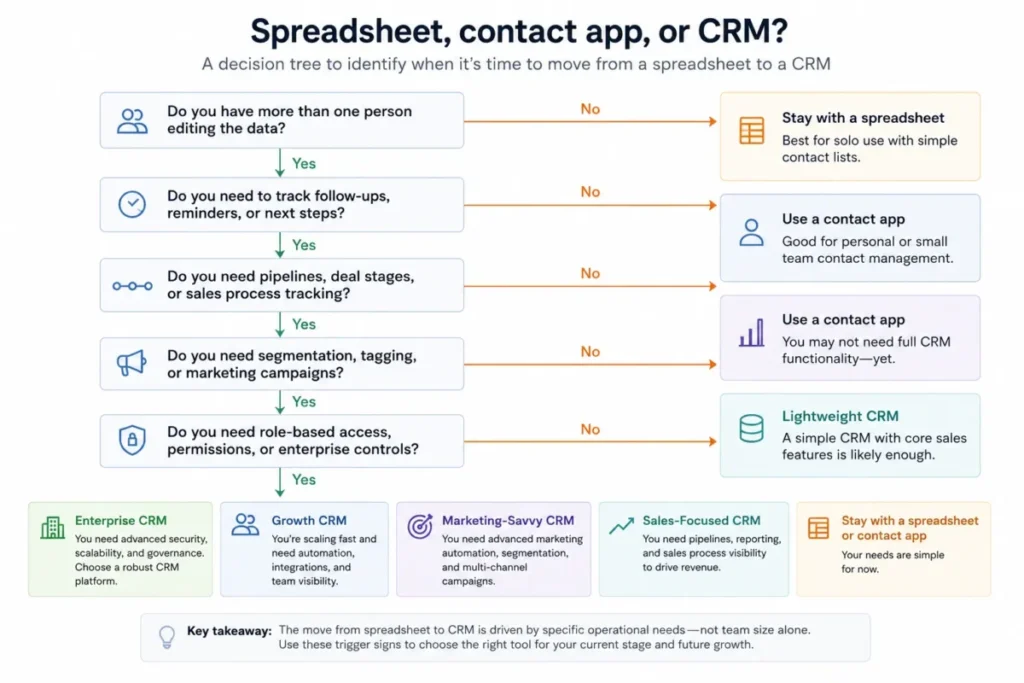
My recommendation for a team switching off spreadsheets is to solve adoption before feature depth, and to shortlist from options built for that stage, such as the best CRM for small business. The best-featured CRM still fails if nobody keeps the records clean after month two.
Contact Management Tools and Examples
The tools that “do” contact management sit on a spectrum from address book to enterprise CRM, and each represents a different level of the same concept. This is a category map, not a ranking, and it carries no pricing claims, since prices change and depend on plan and seats.
| Tool level | Represents | Best when |
|---|---|---|
| Address book (Google Contacts) | Basic storage and sync | Personal or simple professional use |
| Sales CRM (Pipedrive) | Contacts tied to deals and pipeline | Sales-led teams tracking opportunities |
| Marketing / all-in-one CRM (HubSpot) | Contacts tied to segmentation and campaigns | Teams running marketing and sales together |
| Full-suite CRM (Zoho CRM) | 360-degree contact detail across functions | Sales, support, and CS on one record |
| Enterprise CRM (Salesforce) | Account hierarchy and governance at scale | Complex B2B with strict access needs |
Google Contacts shows the entry level well: it keeps contacts organized and updated, lets you view them by account, and even offers help merging duplicates. Pipedrive represents the sales-CRM level, describing contacts as people or organizations involved in deals, leads, and projects, with communication tracking and segmentation around them.
Three quick examples make the concept concrete:
- Inbound demo request: a form submits, the CRM checks the email, updates or creates the contact, records the source, links it to a company, and routes it to sales.
- Existing customer support case: an agent opens the contact, sees prior emails, products, and tickets, and resolves the issue with full context.
- B2B buyer with two accounts: instead of a duplicate person, the CRM links one contact to both accounts and marks the direct relationship.
Privacy and Consent in Contact Management
Contact data is personal or business-person data, so privacy and consent belong in the basics, not the fine print. Storing a contact is not the same as having permission to market to it.
HubSpot’s marketing-contact model shows the split in practice: a stored contact is not automatically eligible for marketing, and its status controls both sending and billing. Pipedrive similarly documents privacy and security controls, such as access restrictions, layered around contact data.
A short consent-and-access habit keeps a growing team out of trouble:
- Store only data you have a reason to use.
- Control who can view and edit contact records.
- Keep a consent or marketing-status field wherever marketing applies.
- Do not email contacts who never opted in.
Requirements vary by jurisdiction, industry, and relationship. Treat this as a data-hygiene habit, and consult legal guidance for regulated or cross-border data.
A Beginner’s Contact Management Checklist
Use this checklist to stand up contact management that will not need rebuilding in six months. Copy it into your setup doc and assign an owner to each line.
- Pick one system as the source of truth for contacts.
- Decide required fields: email, name, company, owner, source, lifecycle stage.
- Choose a unique identifier, usually email, for matching and dedupe.
- Set dedupe rules before your first bulk import, not after.
- Include identifiers in every import file.
- Assign a contact owner and define who can edit key fields.
- Decide account associations, and use multiple-account links instead of duplicates in B2B.
- Track interactions across sales, support, and success on the record.
- Keep consent or marketing-status fields where marketing applies.
- Set a cleanup cadence to archive stale records.
- Confirm sync direction and source-of-truth rules before enabling any sync.
Work top to bottom, since each item depends on the ones above it. Skipping the identifier and dedupe steps is what forces most teams into a painful cleanup project later.
When You Need Contact Management Software
You need dedicated software once manual tracking starts costing time or accuracy. A few clear signals mean it is time.
- More than one person edits the same contact list.
- Duplicate entries keep appearing.
- You cannot see the last interaction with a contact.
- Follow-ups slip because nothing reminds anyone.
- You need to segment contacts for outreach or reporting.
- Support or renewals depend on knowing account history.
A couple of “not yet” signals also apply. If you are a solo operator with a short, static list and no follow-up cadence, a spreadsheet or contact app can hold you for now, and forcing a full CRM too early just adds admin overhead you will not use.
The renewal question to keep in front of you: before you pay to renew any contact tool, can you show that it kept your data clean and your reporting trustworthy? If the answer is no, the problem is usually process, not the product.
Frequently Asked Questions
What is contact management in simple terms?
It is how a business stores, organizes, updates, and uses information about people and organizations so teams reach the right contact with the right context. It can live in a spreadsheet, a contact app, or a CRM, but it works only when records are structured, deduplicated, and kept current.
Is contact management the same as CRM?
No. Contact management handles the record itself, while a CRM adds pipelines, automation, service, and reporting around it. Contact management can be standalone or a subsystem inside a CRM, depending on the tool.
What is the difference between a contact and a lead?
A contact is a person you have a relationship with, and a lead is usually an unqualified inbound person not yet vetted. Many CRMs separate the two objects, and conversion rules vary by platform, so map the terms to your specific CRM.
What is the difference between a contact and an account?
A contact is a person, and an account is the organization that person belongs to. In B2B, one contact can relate to more than one account, which some CRMs support without duplicate records.
How do CRMs prevent duplicate contacts?
They match on stable identifiers. HubSpot deduplicates contacts by email and companies by domain and supports Record IDs and custom unique properties, while Salesforce uses matching and duplicate rules that alert users on creation or edit.
What if one person submits a form with two different emails?
Automatic matching may treat them as two people, since email is the usual identifier. Add a secondary unique field or review these records manually, because dedupe cannot reliably merge contacts that share no stable identifier.
Can I email every contact I collect?
No. Marketing eligibility depends on consent and, in some tools, on billing status. In HubSpot, marketing-contact status affects the contact tier and cost, so verify plan rules and permission before sending.
Can a spreadsheet be used for contact management?
Yes, for a tiny, static, single-owner list. It breaks once two people edit it, duplicates appear, or you need follow-up tracking and history, at which point a contact app or CRM fits better.
When should a small business move from spreadsheets to a CRM?
When multiple people manage contacts, duplicates recur, follow-ups slip, or you need segmentation and account history. The trigger is workflow complexity, not a fixed headcount.