The hard part of picking the best CRM for small business is not the feature list. It is what happens after you add seats, import messy data, and ask finance to approve the renewal.
Most shortlists rank tools by starting price. That number rarely survives contact with a real 5-person team, a minimum-seat rule, or the plan gate that hides the automation you actually need.
This ranking scores 10 CRMs the way a buyer defends a software decision: entry cost, free-plan ceilings, plan gates, hidden add-ons, setup burden, and the workflow that breaks first as you grow. It sits inside our wider CRM software rankings and focuses on US small businesses, from solo founders to 25-seat sales teams.
For most small businesses, Zoho CRM is the safest all-round pick. HubSpot Sales Hub is the better free starting point, Salesforce Starter Suite is the growth-ready option, and Less Annoying CRM or Bigin fit owner-led teams that want the least setup.
If you have never run a CRM before, it helps to know what a CRM system actually does before you compare tiers, because half of the pricing traps below come from paying for capability you will not adopt in the first 90 days.
In This Article (17 sections)
Best CRM for Small Business by Use Case
Here is the fast answer before the detail. Each pick maps to a team profile, not a generic “best overall” label.
| Use case | Best pick | Why it fits |
|---|---|---|
| Best overall for most small businesses | Zoho CRM | Widest CRM depth per dollar with room to scale |
| Best free starting point | HubSpot Sales Hub | Usable free CRM for up to 2 users and 1,000 contacts |
| Best for growth-ready teams | Salesforce Starter Suite | A foundation you can scale without switching CRMs |
| Best visual pipeline for small sales teams | monday sales CRM | Board-based pipeline with light sales automation |
| Best pipeline-first sales CRM | Pipedrive | Reps adopt the deal view quickly |
| Best value with built-in calling and chat | Freshsales | Engagement tools inside CRM at a low entry price |
| Best simple CRM for owner-led teams | Less Annoying CRM | One flat price, no tiers, human support |
| Best budget pick to replace spreadsheets | Bigin by Zoho CRM | Pipeline visibility without full Zoho complexity |
| Best lightweight CRM for service firms | Capsule CRM | Contacts plus project boards for delivery work |
| Best CRM for post-sale project work | Insightly CRM | Deals turn into tracked projects in one system |
The pattern here is that price tier and team size decide the pick more than raw features. A solo founder and a 25-seat sales team almost never belong on the same CRM, even when they search the same keyword.
How I Ranked These CRMs
I evaluated these 10 CRMs from official pricing pages, product and help documentation, and verified third-party review patterns, with pricing checked on July 3, 2026. No hands-on testing was performed for this ranking, so I use “official pricing shows” and “documentation indicates” rather than any claim of testing the software myself.
I ranked by small-business fit, entry cost, free-plan usefulness, plan-gated features, automation depth, reporting, integrations, mobile access, onboarding burden, support access, and disqualifying limitations. I did not rank by brand popularity, and affiliate relationships do not change the order.
Two research cautions matter for trust. Several vendor pricing pages render prices by region, so some US figures below are verified against high-confidence current references and should be reconfirmed at checkout.
The other caution is source bias. Two of the current top-ranking guides for this keyword are published by Salesforce and by Slack, both inside the Salesforce ecosystem, so their competitor framing is not neutral.
This ranking is written independently for SaaS CRM Review by Macedona, and it recommends competitors wherever they are the better fit.
What a Small-Business CRM Really Costs at 5 and 25 Seats
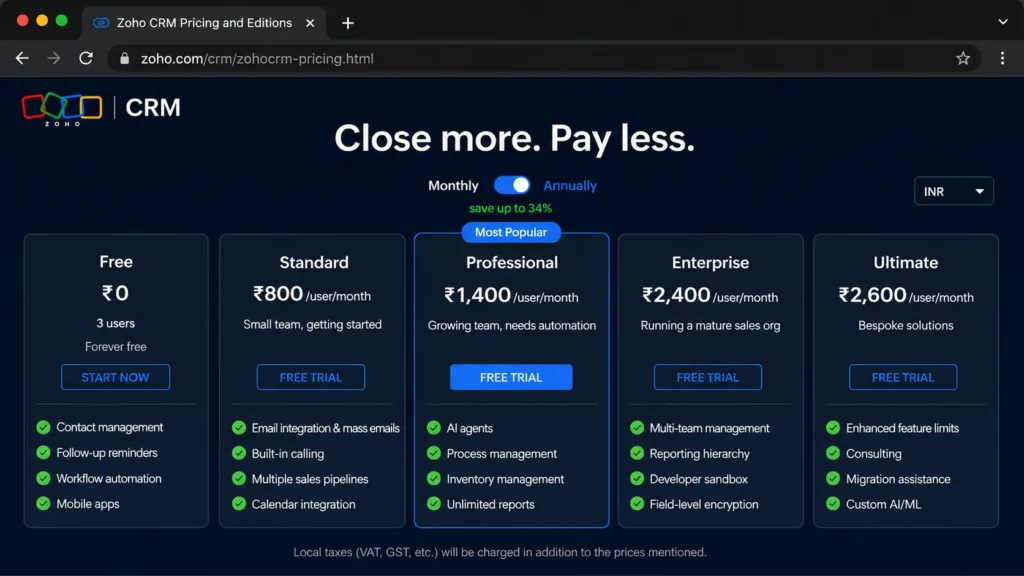
The advertised per-seat price is a teaser. Your real budget is the entry paid tier multiplied by your seat count, plus any minimum-seat rule, add-on, or onboarding fee.
The table below uses each product’s entry paid tier at annual billing, in USD, checked July 3, 2026. Figures for products with region-localized pages are verified against current high-confidence references and should be confirmed at checkout.
| CRM | Free plan | Entry paid tier | 5 seats/mo | 25 seats/mo | Budget watch-out |
|---|---|---|---|---|---|
| Zoho CRM | 3 users | Standard ~$14/ | $70 | $350 | Process automation pushes you to Professional (~$23) |
| HubSpot Sales Hub | 2 users, 1,000 contacts | Starter ~$7/ | ~$35 | ~$175 | Real sales automation needs Professional plus onboarding fee |
| Salesforce Starter Suite | None | $25/ | $125 | $625 | Transaction fees apply; deeper needs move to pricier editions |
| monday sales CRM | Trial only | Basic ~$12/ | $60 | $300 | Paid plans start at 3 seats; caps push you to Standard/ |
| Pipedrive | None (14-day trial) | ~$14/ | $70 | $350 | Lead gen and marketing arrive as paid add-ons |
| Freshsales | 3 users | Growth ~$9/ | $45 | $225 | Freddy AI beyond trial sessions is an add-on |
| Less Annoying CRM | None | $15/ | $75 | $375 | No advanced automation or AI at any price |
| Bigin by Zoho CRM | 1 user, 500 records | Express ~$7-9/ | $35-45 | $175-225 | Free is solo; record caps force an upgrade |
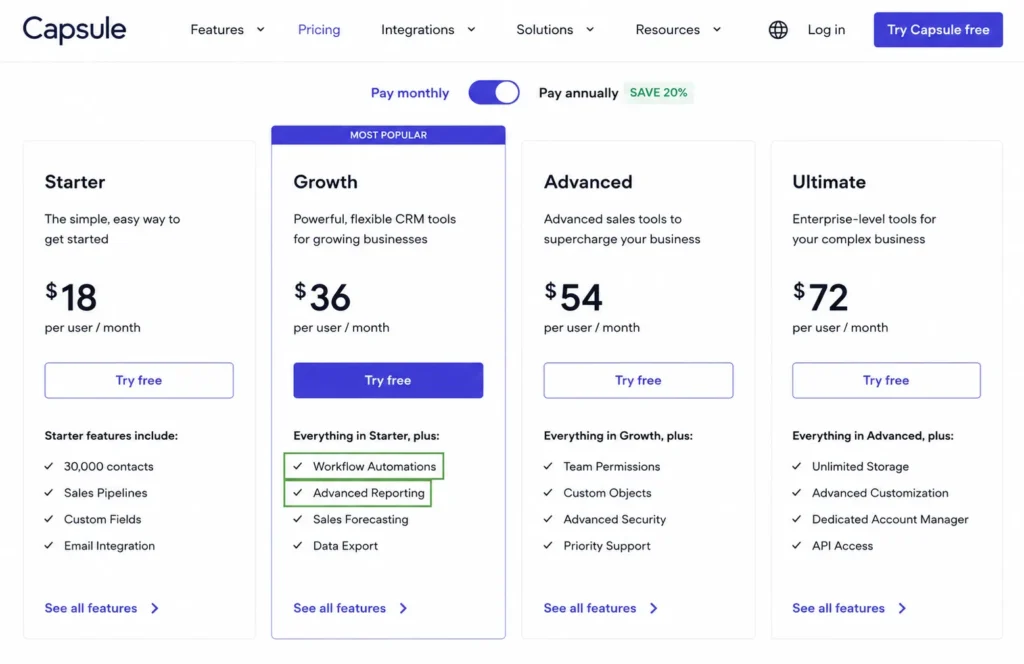
| Capsule CRM | 2 users, 250 contacts | Starter ~$18/ | $90 | $450 | Automation and dashboards are locked to Growth |
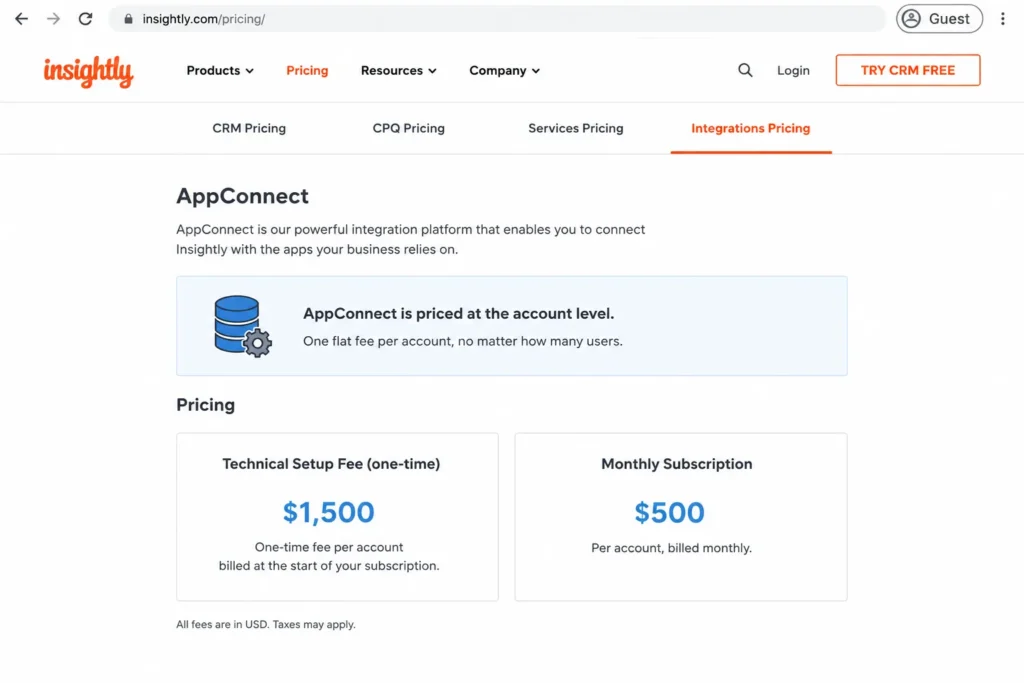
| Insightly CRM | None (14-day trial) | Plus $29/ | $145 | $725 | AppConnect and a $3,000 setup fee for integration automation |
Insightly, Salesforce, and Capsule cost the most per seat at the entry tier, while Bigin, HubSpot Starter, and Freshsales sit at the bottom. The 25-seat column is where cheap-looking tools separate: a $29 seat becomes $725 a month, and automation-heavy teams usually climb one more tier on top of that.
I would not budget from the entry price alone for any tool with a minimum-seat rule or a required onboarding fee. Those two line items, not the sticker price, are what surprise finance at renewal.
Free-Plan Ceilings: Where Free Stops Being Free
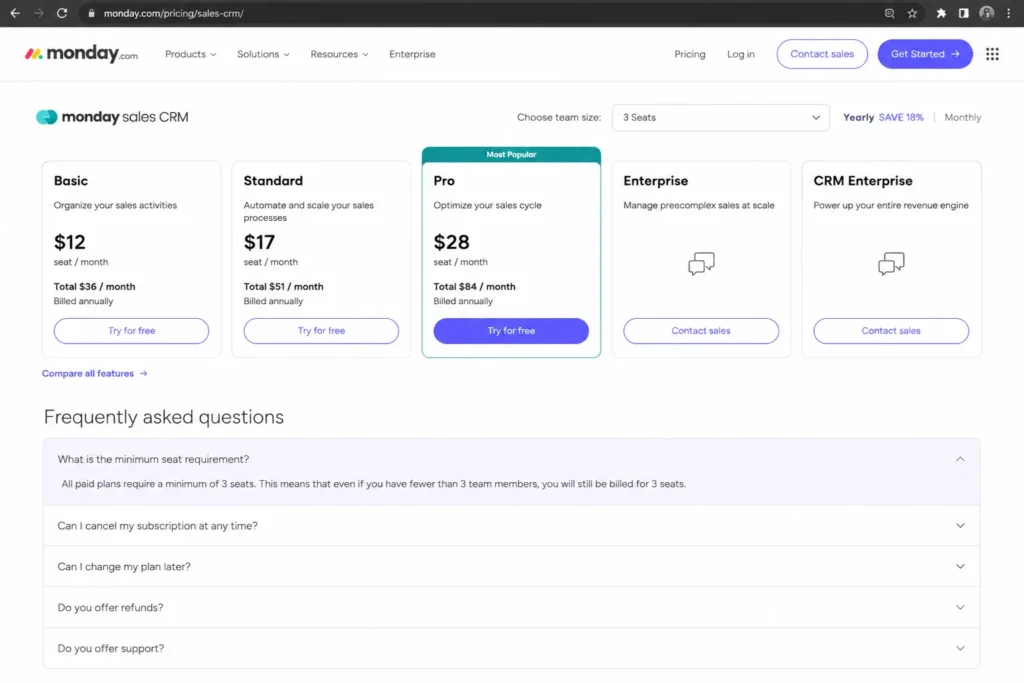
Free CRM plans are not equivalent, and treating them as equal is the most common shortlist error. The cap that matters is different for each tool: users for one, contacts for another, records for a third.
| CRM | Free users | Free record or contact cap | First real upgrade trigger |
|---|---|---|---|
| HubSpot Sales Hub | Up to 2 | 1,000 contacts, no time limit | You need a third seat or paid sales automation |
| Zoho CRM | 3 | Starter CRM feature set | You need email integration, multiple pipelines, or forecasting |
| Freshsales | 3 | Core CRM records | You need sequences, deeper CRM, or higher limits |
| Bigin by Zoho CRM | 1 | 500 records | You add a second user or pass 500 records |
| Capsule CRM | 2 | 250 contacts, 1 pipeline | You pass 250 contacts or need a second pipeline |
Pipedrive, Salesforce, Less Annoying CRM, and Insightly do not run a usable free plan, so their “free” is a 14-day trial, not a long-term tier. monday offers a trial rather than a free CRM plan for paid features.
For a solo founder, Bigin’s free tier is genuinely useful until 500 records, while HubSpot’s 1,000-contact free plan lasts longer but caps at 2 seats. If your team is already 3 people, Zoho and Freshsales free plans fit the seat count better than HubSpot’s 2-seat ceiling.
Plan Gates: Which Tier Opens Automation, Reporting, and AI
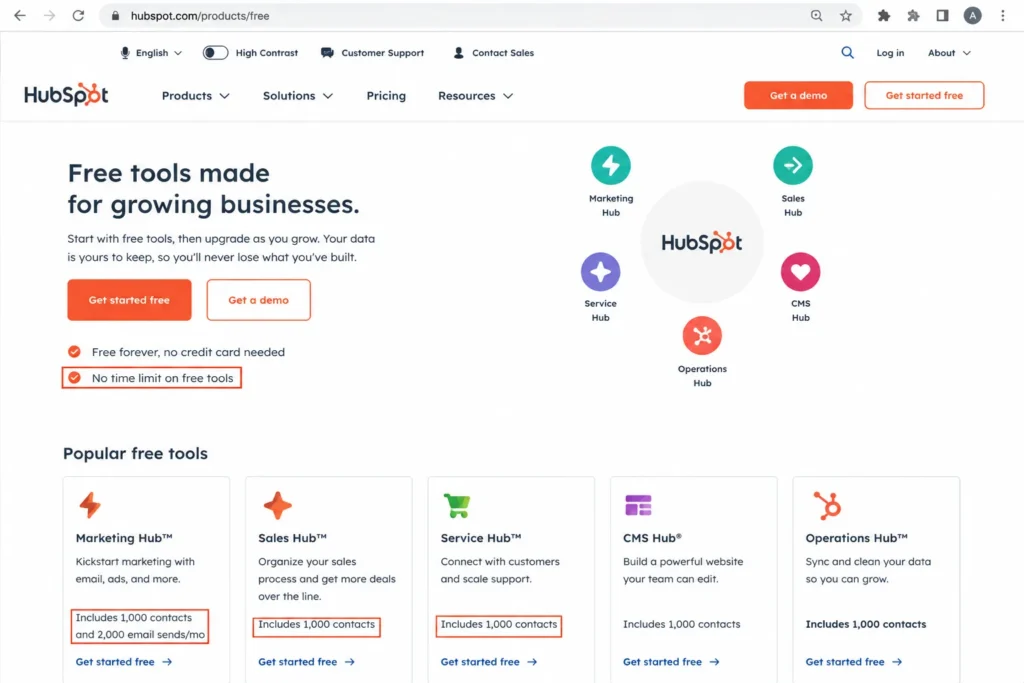
Every product below says it has automation. The buyer question is which plan makes that automation usable, because the answer is often two tiers above the price you were quoted.
| CRM | Automation opens on | Reporting and dashboards | AI availability |
|---|---|---|---|
| Zoho CRM | Standard (workflows), richer at Professional | Professional (unlimited reports) | AI agents on lower tiers; advanced Zia at Enterprise |
| HubSpot Sales Hub | Starter (basic), full on Professional | Professional | Breeze and HubSpot credits on paid tiers |
| Salesforce Starter Suite | Starter (basic); advanced needs higher editions | Higher editions | Positioned across editions; deeper on higher tiers |
| monday sales CRM | Standard and Pro add more automations | Standard and above | AI credits and Sidekick |
| Pipedrive | Higher tiers add workflow automation | Higher tiers | Higher tiers |
| Freshsales | Paid plans | Paid plans | Freddy AI sessions (add-on) |
| Less Annoying CRM | Not available | Basic only | None |
| Bigin by Zoho CRM | Paid editions | Paid editions | Limited |
| Capsule CRM | Growth (workflow automations) | Growth (advanced reporting) | AI pipeline generator (limited) |
| Insightly CRM | Professional (workflow automation) | Plus (advanced reports) | AI Copilot on Professional and Enterprise |
Automation is the single most common upgrade trigger in this category, and Capsule, Insightly, and HubSpot make it the reason you move up a tier. If you know you need workflow automation on day one, price the tier that includes it, not the entry plan.
Less Annoying CRM is the honest outlier here. It has no automation at any price, which is a feature for owner-led teams and a disqualifier for a scaling sales operation.
AI Billing Models Compared
AI is described as a feature by every vendor, but the billing model decides whether it raises your bill. There are five patterns, and mixing them up is how a “cheap” CRM becomes expensive.
| CRM | AI billing model |
|---|---|
| HubSpot Sales Hub | Credit-based (Breeze and HubSpot credits) on paid tiers |
| Freshsales | Session-based (Freddy AI Agent packs; 500 trial sessions once per account) |
| Salesforce Starter Suite | Edition-gated; transaction fees apply to the suite |
| monday sales CRM | Credit-based (AI credits and Sidekick) |
| Insightly CRM | Tier-gated (AI Copilot on Professional and Enterprise) |
| Zoho CRM | Tier-gated (AI agents on lower tiers, advanced Zia at Enterprise) |
| Pipedrive | Tier-gated (higher tiers) |
| Bigin by Zoho CRM | Tier-gated and limited |
| Capsule CRM | Limited (AI pipeline generator) |
| Less Annoying CRM | None |
Credit and session models (HubSpot, monday, Freshsales) can spike a small-business bill in a busy month, while tier-gated AI (Zoho, Insightly, Salesforce) is predictable but often sits behind a higher plan. For a small team, predictable tier-gated AI is easier to defend to finance than metered credits you cannot forecast.
I treat AI as a cost line, not a free bonus. If AI is central to your pitch, ask each vendor for the per-month cost at your expected volume before you sign, because the entry price almost never includes serious AI usage.
The 10 Best CRMs for Small Business in 2026
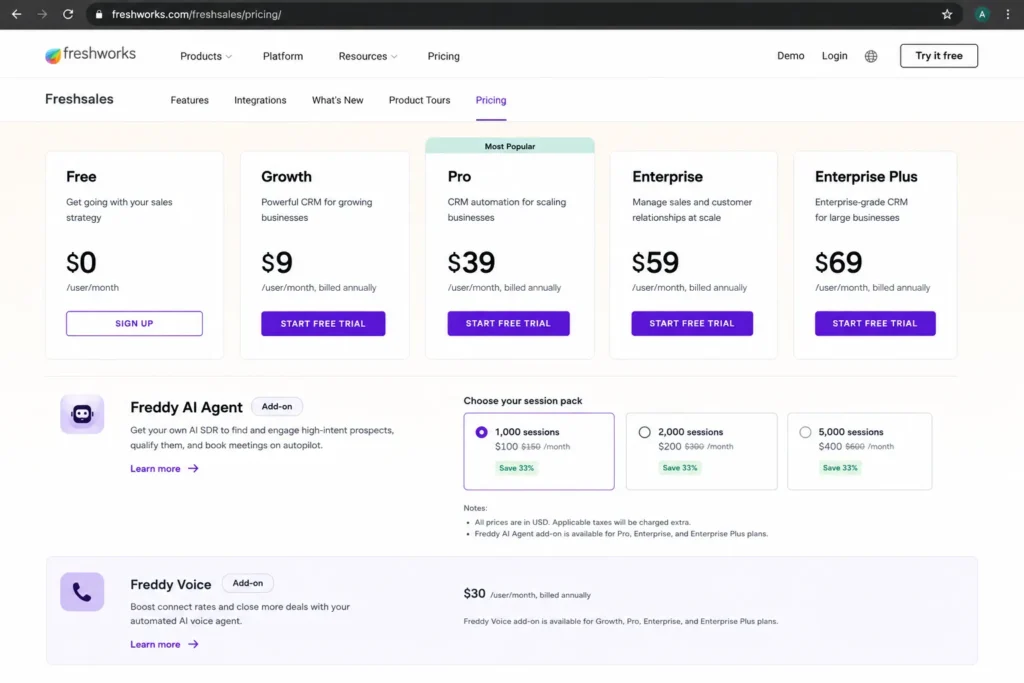
These are ranked in order. Only the number-one pick is the overall recommendation; every other product is the best choice for a specific team profile, not a runner-up you should default to.
1. Zoho CRM: Best Overall for Small Business
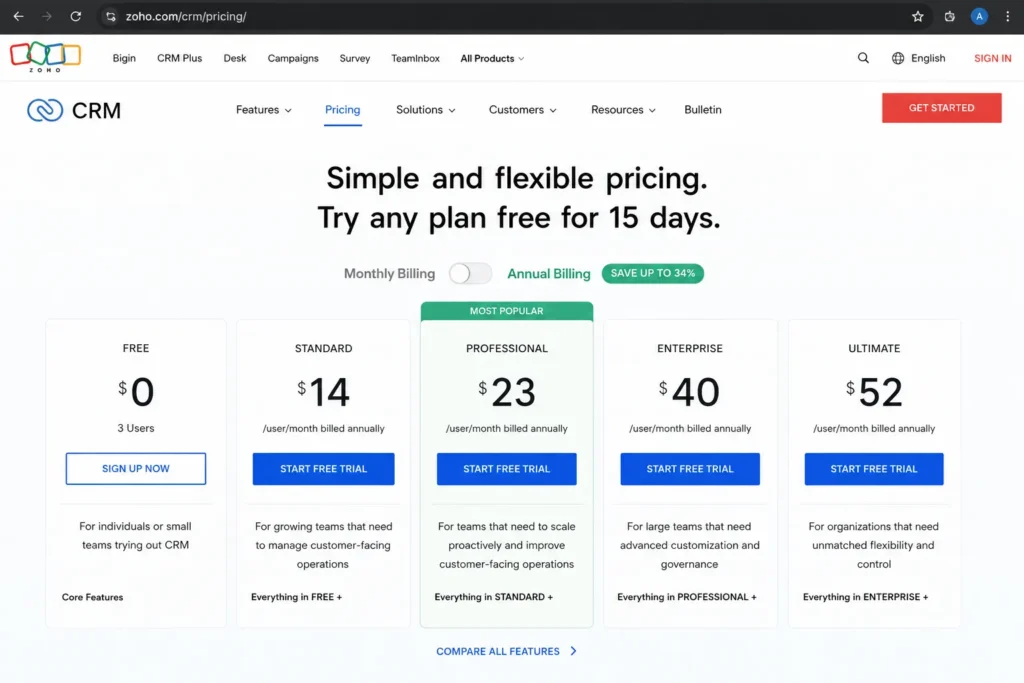
Zoho CRM is the best all-round choice for a 5-to-50 person small business that wants real CRM depth without HubSpot or Salesforce pricing. It balances price, feature range, and a scaling path better than anything else on this list.
- Starting price:
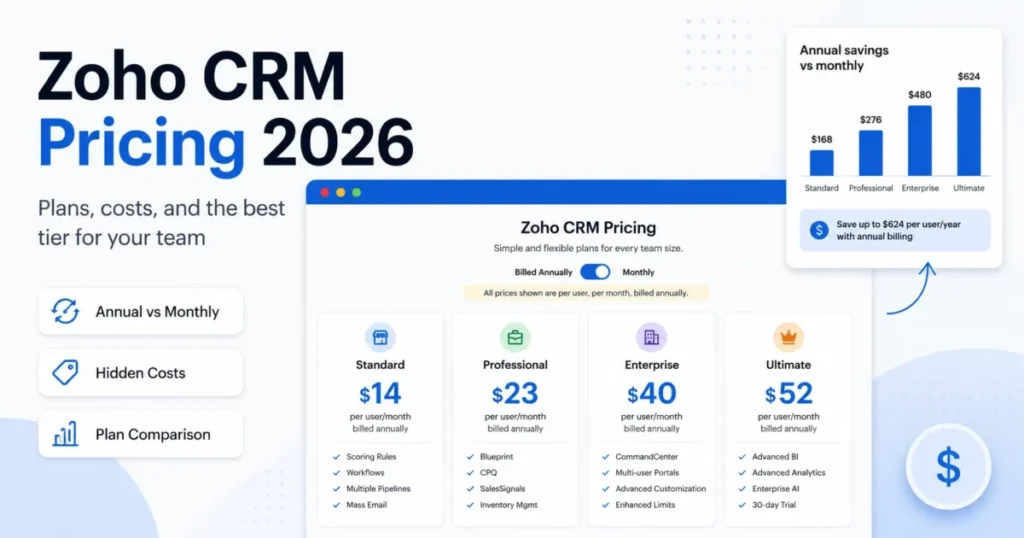
- Free for 3 users; Standard around $14 per user per month billed annually, with Professional near $23 and Enterprise near $40. Zoho localizes pricing, so US figures should be confirmed at checkout. Official pricing page
The free plan covers 3 users and starter CRM features, which is enough to run a first pipeline. Standard adds email integration, multiple pipelines, forecasting, and custom modules, and Professional adds process management, CPQ, and unlimited reports.
What Zoho does better than most rivals is give a small team enterprise-style capability at a small-business price. Workflows, multiple pipelines, and reporting arrive earlier in the tier ladder than they do at HubSpot.
Where it falls short is setup. Zoho’s depth is also its friction, and a team with no systems owner can turn it into tool sprawl.
- Avoid if:
- you want a near-zero-configuration CRM and have nobody to own setup. In that case a simpler tool will get adopted faster.
- Setup difficulty:
- Medium to High. The payoff is real, but plan for configuration time in the first month.
Verdict: choose Zoho CRM if you want the widest capability per dollar and can give it a few weeks of setup attention.
My recommendation for most small businesses starts here, and the full picture on customization and support sentiment is in our full Zoho CRM review.
2. HubSpot Sales Hub: Best Free CRM Starting Point
HubSpot Sales Hub is the best free-to-paid entry for an inbound-led startup or small business that wants easy adoption and a marketing, sales, and service ecosystem in one place. The free CRM is the most approachable on this list.
- Starting price:
- Free for up to 2 users with a 1,000-contact limit; Starter displayed near $7 per seat per month on a promotional annual price, with a monthly reference near $20. Official pricing page
The free tier includes deals, a pipeline, a meeting scheduler, live chat, and email tracking. Starter adds paid starter sales tools, and Professional adds full sales automation and custom reporting.
HubSpot’s advantage is the on-ramp. Non-technical teams adopt it quickly, and the free CRM holds 1,000 contacts with no time limit.
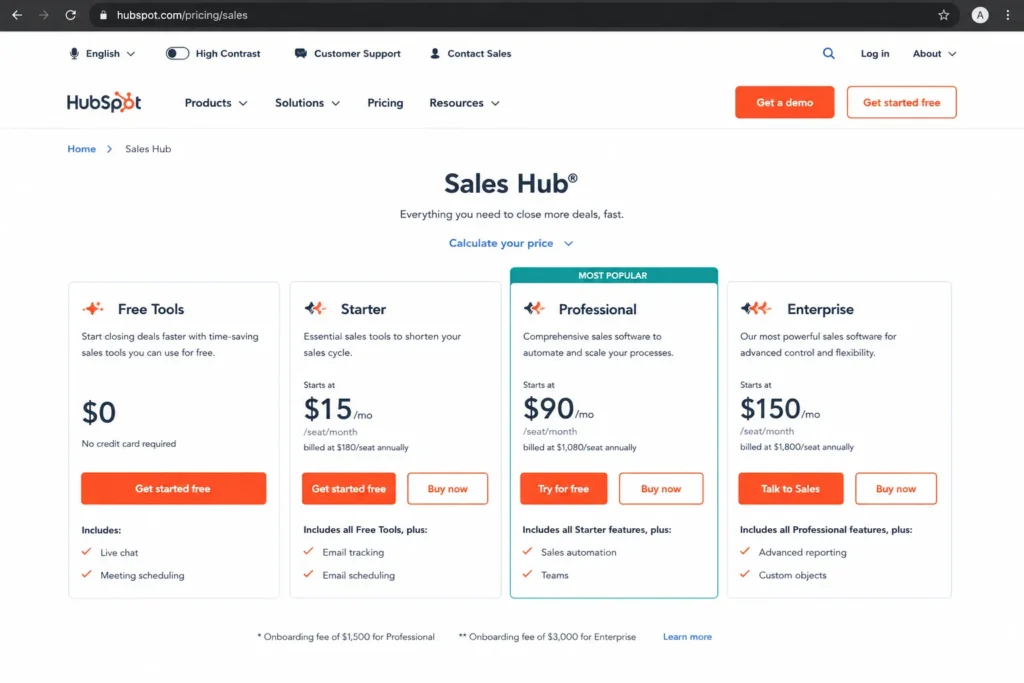
Here is the catch that most “best free CRM” lists skip. Professional is a steep jump per seat (public references place it near $90 per seat per month billed annually) and the official pricing page lists a required one-time onboarding fee of $1,500 for Professional and $3,500 for Enterprise.
- Avoid if:
- you know you will need Professional-level automation and custom reporting within a few months. The free plan is excellent, but the automation you will want lives behind a real price cliff.
- Setup difficulty:
- Low to Medium on free and Starter; the required onboarding fee raises the effective cost of Professional.
Verdict: choose HubSpot if you want the friendliest free CRM and an ecosystem to grow into, and budget carefully before the Professional jump. The cost curve is broken down further in our HubSpot Sales Hub review.
3. Salesforce Starter Suite: Best for Growth-Ready Teams
Salesforce Starter Suite is the best pick for a small business that expects fast growth and does not want to switch CRMs in two years. It buys you a foundation you can scale into sales, service, marketing, and the wider Salesforce ecosystem.
- Starting price:
- $25 per user per month, billed monthly or annually, with transaction fees noted on the official pricing page. Official pricing page
Starter Suite bundles sales, service, marketing, and commerce starter tools, plus Slack and lead, contact, and deal management. It is the small-business entry point to Salesforce, and advanced automation, AI, and admin controls sit in higher editions.
The strength is the ceiling. You are unlikely to outgrow Salesforce, so a growth-stage team avoids a painful migration later.
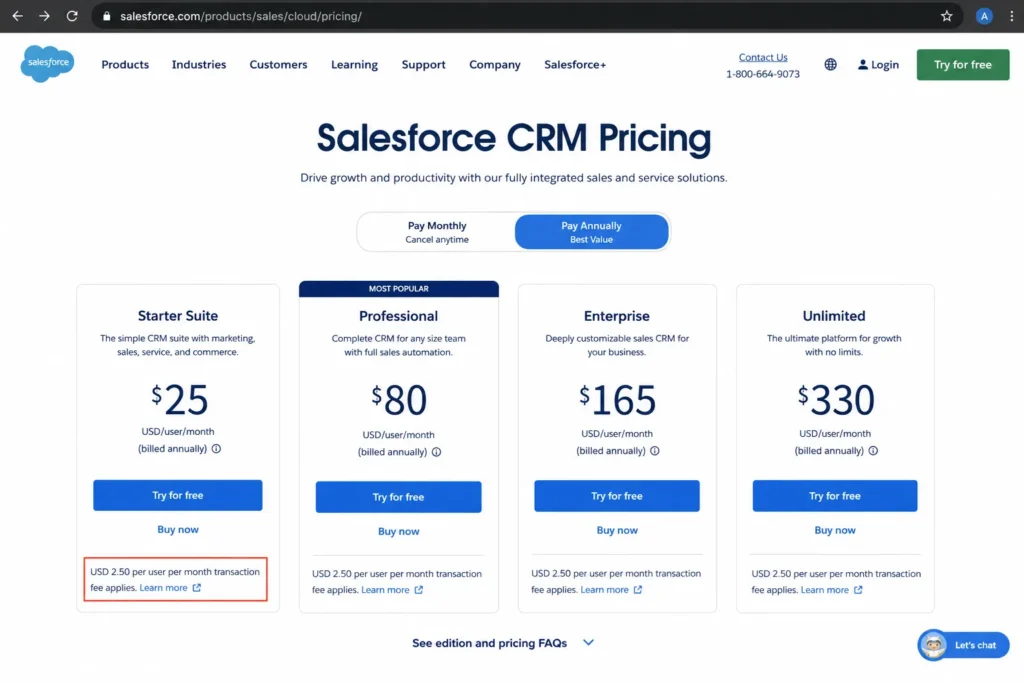
The limitation is that Starter Suite is more capable and more complex than a 3-person team needs. Transaction fees apply per the official note, and scaling up means moving to pricier editions.
- Avoid if:
- you are a 1-to-3 person team that wants the lowest monthly bill and the least setup. Salesforce is the wrong first CRM for that profile.
- Setup difficulty:
- Medium to High. Even Starter carries more configuration than the lightweight tools below.
Verdict: choose Salesforce Starter Suite if you are building for scale and want one CRM for the next several years. For a tiny team focused on the cheapest bill, it is overbuilt.
Our Salesforce CRM review covers the edition ladder in detail.
4. monday sales CRM: Best Visual Pipeline for Small Sales Teams
monday sales CRM is the best fit for a small sales team that thinks in boards and wants a visual, customizable pipeline with task management attached. It suits teams already comfortable with work-management tools.
- Starting price:
- Basic around $12 per seat per month billed annually, with Standard near $17 and Pro near $24. The page localizes currency, and paid plans start from a 3-seat minimum. Official pricing page
Basic limits active contacts, deals, and dashboards. Standard raises those caps, and Pro and Ultimate add more automations, quotes and invoices, workspaces, and stronger security and support.
The strength is visual control. Teams that want to see and reshape a pipeline as a board adopt monday fast, and mass emails and sequences are built in.
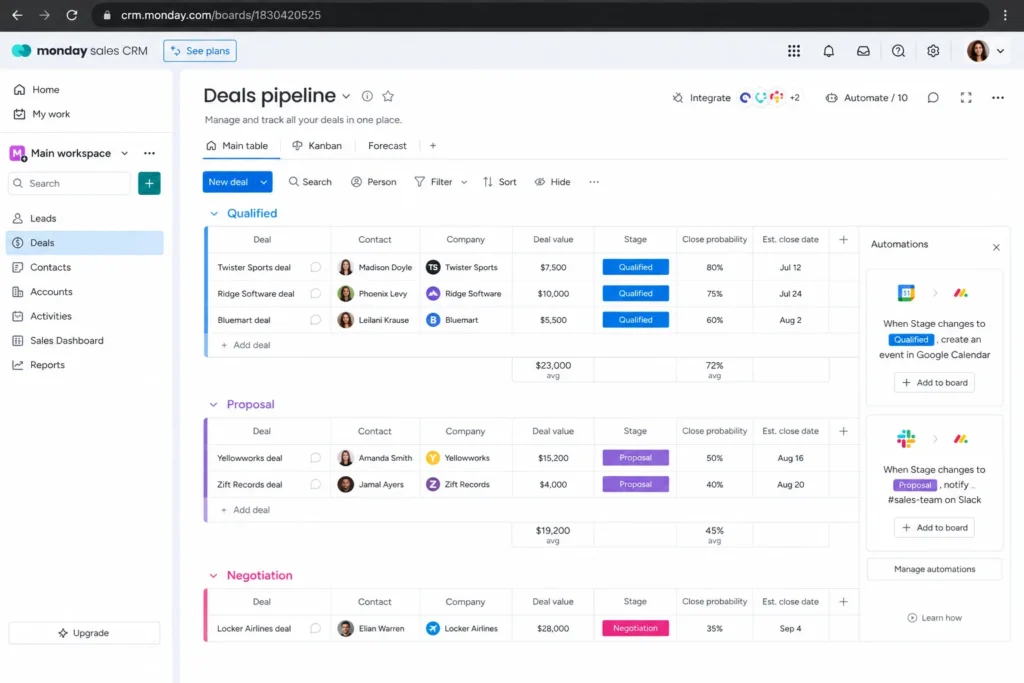
The catch is the seat math. Because paid plans start at 3 seats, a solo founder pays for capacity they will not use, and contact, deal, and automation caps can make the entry price misleading.
- Avoid if:
- you are a solo operator or a two-person team on a tight budget. The 3-seat minimum works against you.
- Setup difficulty:
- Low to Medium. Boards are approachable, but useful automations need configuration.
Verdict: choose monday sales CRM if you want a visual pipeline for a 3-plus person sales team and value flexibility over deep CRM reporting. Our monday.com review digs into the caps by plan.
5. Pipedrive: Best Pipeline-First Sales CRM
Pipedrive is the best choice for a small B2B sales team that wants a clean visual pipeline, activity tracking, and fast rep adoption. It is a sales CRM, not an all-in-one platform, and that focus is the point.
- Starting price:
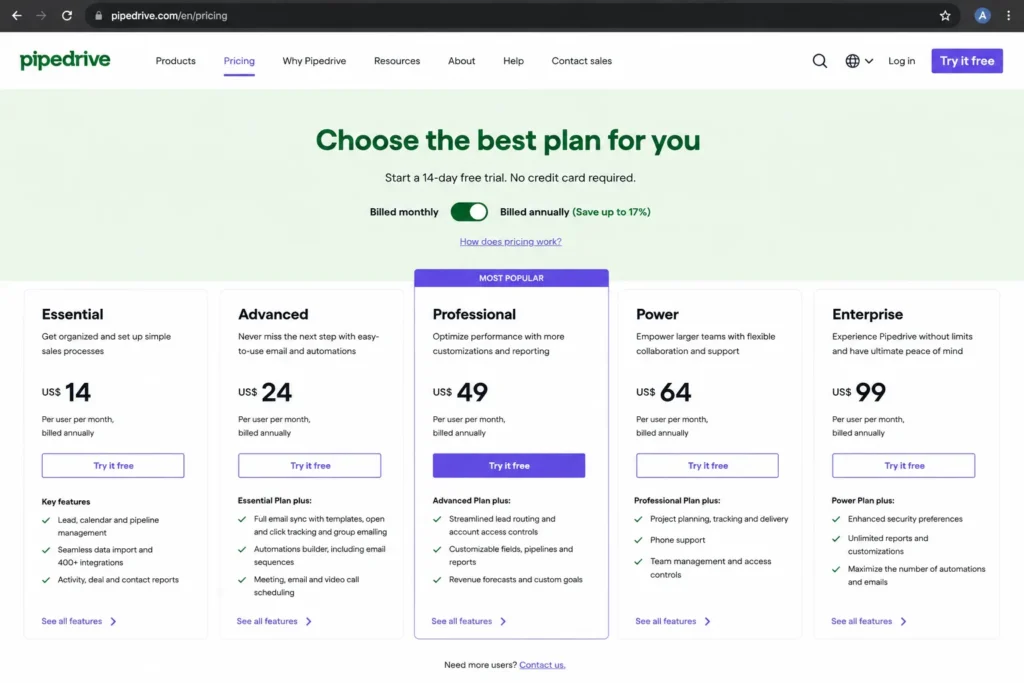
- No free plan; a 14-day free trial, then entry pricing from around $14 per user per month billed annually. The official page renders dynamically, so confirm the current plan price at checkout. Official pricing page
The entry plan covers the core pipeline, and higher tiers add stronger email, automation, reporting, permissions, and forecasting. Lead generation and marketing features arrive as add-ons or higher packaging rather than in the base price.
Pipedrive’s strength is adoption. Reps usually understand the deal view within a day, which is a real advantage for a team migrating off spreadsheets or a heavier CRM.
The trade-off is scope. It is deliberately narrower than HubSpot or Zoho, so lead capture, campaigns, documents, and visitor tracking can add cost through add-ons.
- Avoid if:
- you need native marketing automation, a service desk, or an all-in-one customer platform in one low base price. Pipedrive will feel add-on heavy.
- Setup difficulty:
- Low. It is one of the fastest CRMs here to get a team using.
Verdict: choose Pipedrive if pipeline discipline and rep adoption matter more than breadth, and accept that adjacent features cost extra. Our Pipedrive review covers where the add-ons stack up.
6. Freshsales: Best Value with Built-In Engagement
Freshsales is the best value pick for a small team that wants CRM plus built-in phone, live chat, and email without starting on a complex enterprise platform. It packs communication tools inside the CRM at a low entry price.
- Starting price:
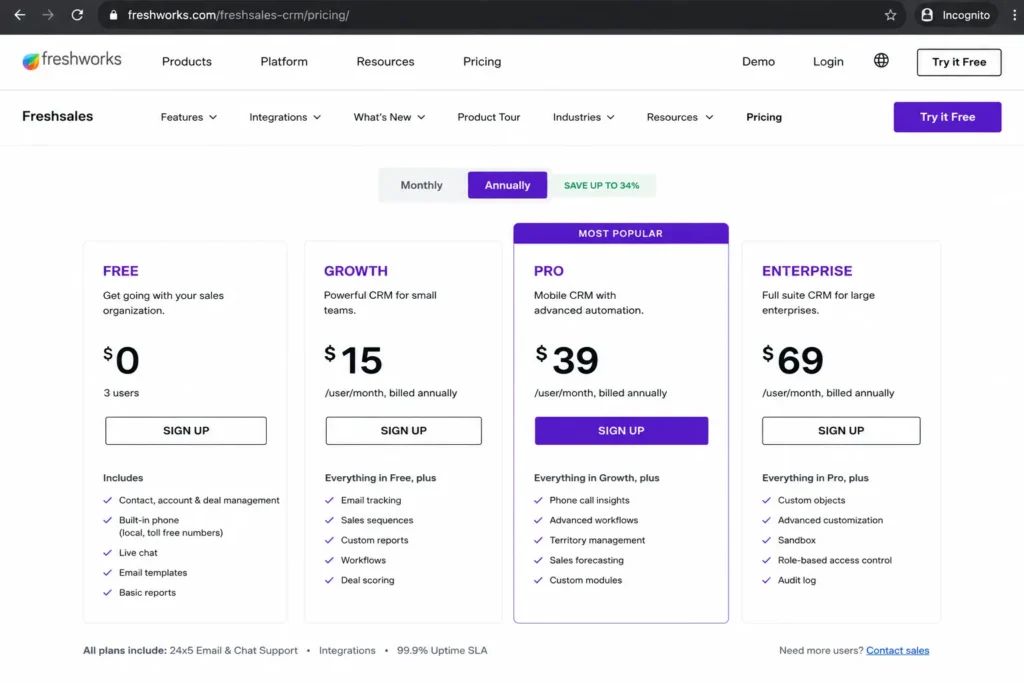
- Free for 3 users; paid Growth from around $9 per user per month billed annually, with a 21-day trial. Official pricing page
The free plan covers up to 3 users, and paid plans add CRM depth, sequences, and higher limits. Kanban views, email templates, built-in calling, and live chat are part of the core experience rather than paid extras.
The value story is real for a communication-heavy team. You get engagement tools inside the CRM that would be separate purchases elsewhere.
The caveat is AI and ecosystem. Freddy AI Agent runs on a session model, and the official FAQ notes paid plans include 500 sessions to try chatbots, limited once per account, after which sessions are an add-on.
The third-party marketplace is also narrower than HubSpot’s or Salesforce’s.
- Avoid if:
- you expect heavy, ongoing AI usage bundled into the base price, or you need the widest integration marketplace. Freshsales is value-led, not ecosystem-led.
- Setup difficulty:
- Low to Medium. Core setup is quick; AI and some automation need attention.
Verdict: choose Freshsales if you want built-in calling and chat at a low price, and treat AI sessions as a separate cost line. Our Freshsales evaluation covers the AI and support caveats.
7. Less Annoying CRM: Best Simple CRM for Owner-Led Teams
Less Annoying CRM is the best choice for a solo owner or a 1-to-20 person business that wants simple contacts, pipelines, tasks, and human support without enterprise bloat. It does one thing, and it does it without tiers.
- Starting price:
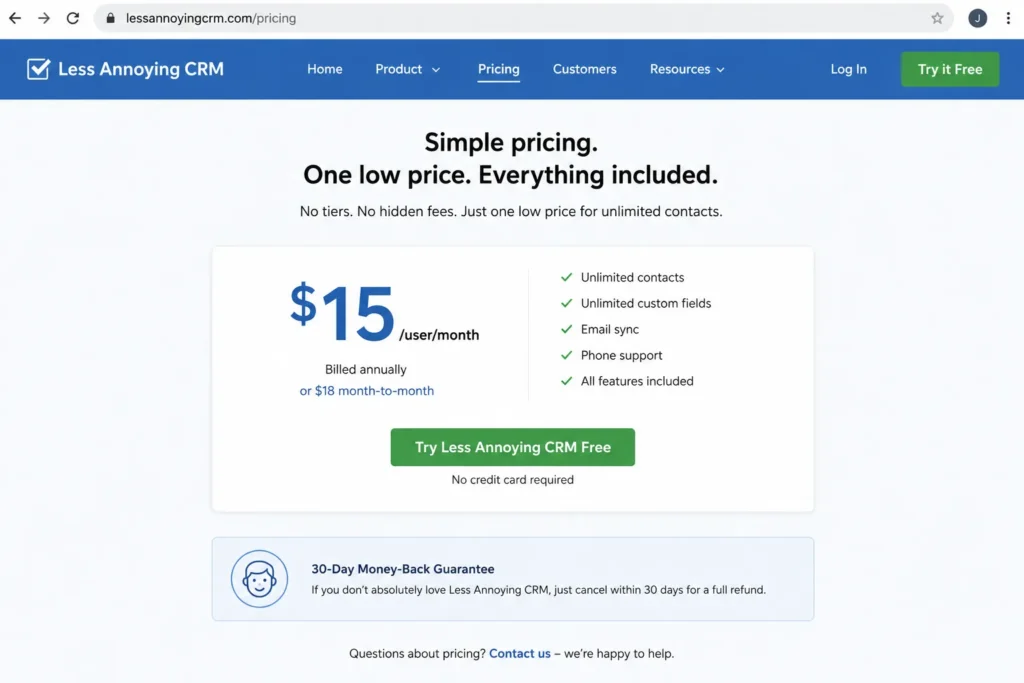
- $15 per user per month, one flat tier, no contracts, no upgrade fees, and no onboarding fees. Official pricing page
The single plan covers contact management, simple pipeline tracking, calendar and tasks, custom fields, reminders, and email and calendar sync. There is no tier ladder, because the product deliberately stays simple.
The strength is friction. For teams that dislike complicated software, this is the lowest-effort CRM here, and support is human coaching rather than a bot.
The limitation is depth. There is no advanced AI, no complex workflow automation, and no deep analytics, which is a disqualifier for a scaling revenue operation.
- Avoid if:
- you need workflow automation, predictive analytics, or marketing automation. The simplicity that helps owners hurts a growth team.
- Setup difficulty:
- Low. It is built to be running the same day.
Verdict: choose Less Annoying CRM if you value a flat price and a tool your whole team will actually use, and skip it if you need automation. Our Less Annoying CRM review covers where the simplicity stops working.
8. Bigin by Zoho CRM: Best Budget Pick to Replace Spreadsheets
Bigin by Zoho CRM is the best budget option for a very small team or a first-time CRM buyer moving off spreadsheets who wants pipeline visibility without full Zoho complexity. It is the friendliest spreadsheet-to-pipeline step here.
- Starting price:
- A free plan, plus Express near $9 per user per month monthly on the official help example, with current annual references from around $7 per user per month. Official pricing page
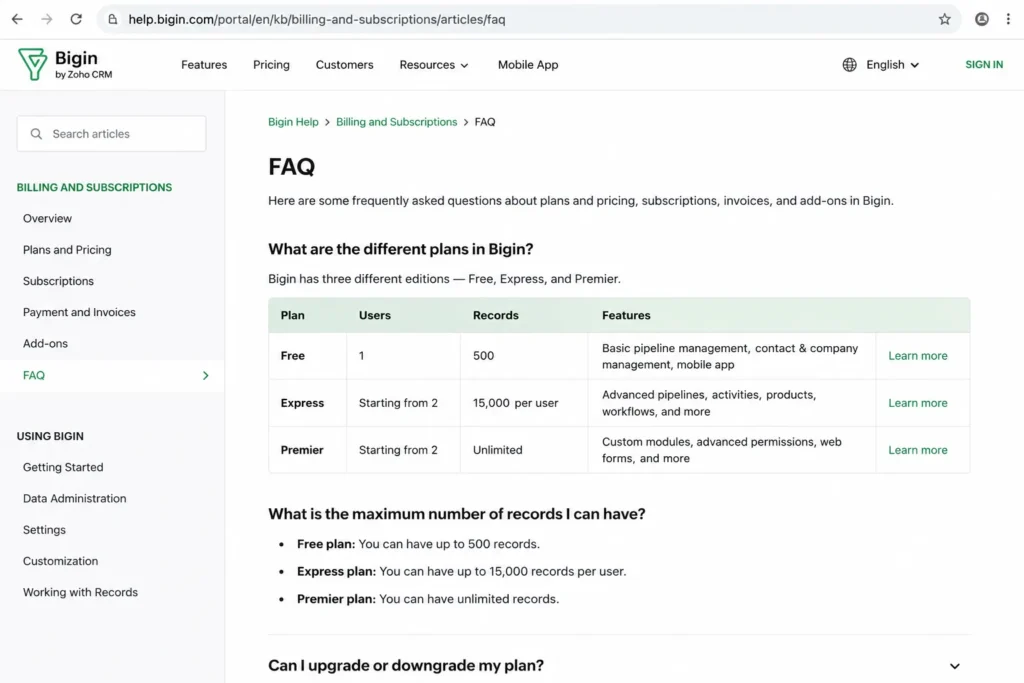
The key limit sits on the free plan. It allows 1 user and 500 records, while Express supports 50,000 records, Premier 100,000, and Bigin 360 up to 1 million, with Express and Premier billed per user and no user limit.
Bigin’s strength is the migration path. Pipelines, email integration, built-in calling, appointment scheduling, and a QuickBooks integration make it easy to leave a spreadsheet behind.
The limitation is headroom. The free plan is solo and record-capped, so a real team outgrows it quickly and moves to a paid edition.
- Avoid if:
- you already need advanced automation, deep reporting, or multi-department customization. Bigin is intentionally lighter than Zoho CRM.
- Setup difficulty:
- Low. It is one of the least demanding CRMs to stand up.
Verdict: choose Bigin if you are leaving spreadsheets and want a cheap, clean pipeline, and expect to upgrade past the solo free plan as the team grows. It shares Zoho’s ecosystem if you later graduate to full Zoho CRM for more depth.
9. Capsule CRM: Best Lightweight CRM for Service Teams
Capsule CRM is the best lightweight option for a small agency, consultancy, or service team that wants simple CRM plus project and delivery visibility. It bridges contact management and post-sale work.
- Starting price:
- A free plan for up to 2 users, then Starter commonly listed around $18 per user per month billed annually. Confirm the current price at checkout. Official pricing page
The free plan covers 250 contacts and 1 sales pipeline. Starter raises contacts to 30,000 with basic reporting, and Growth adds workflow automations, advanced reporting, dashboards, and multiple pipelines.
Capsule’s strength for service firms is the mix of CRM and project boards in one place. That combination fits agencies that need to see delivery, not just deals.
The trade-off is that automation and richer reporting are not on the free or Starter level.
- Avoid if:
- you are a sales team that needs built-in sequences or deep sales engagement on the cheapest plan. Capsule is delivery-friendly, not sales-engagement-heavy.
- Setup difficulty:
- Low to Medium. Contacts are simple; project boards need light setup.
Verdict: choose Capsule if you run a small service business and want CRM plus project tracking without automation on day one. Our Capsule CRM review covers the Growth-plan gates.
10. Insightly CRM: Best for CRM Plus Project Management
Insightly CRM is the best pick for a small business where deals turn into projects, onboarding, or ongoing client work, and you want both in one system. It is a CRM and a delivery tracker together.
- Starting price:
- Plus at $29 per user per month, Professional at $49, and Enterprise at $99, all billed annually. Official pricing page
Plus covers lead and contact management, project management, advanced reports, and dashboards. Professional adds lead routing, workflow automation, and AI Copilot, and Enterprise adds sandboxes, products and quotes, and audit logging.
The strength is continuity. When a closed deal becomes a project, Insightly keeps it in one place instead of a CRM-plus-spreadsheet handoff.
The budget trap is integration cost. AppConnect carries separate account-level pricing (from $249 per account per month, with more tasks at $249 and a required technical setup fee of $3,000), and an all-in-one option starts around $349 per month.
- Avoid if:
- you are a budget-first startup that needs the cheapest simple CRM, or an integration-heavy team that has not budgeted for AppConnect and setup. The seat price is not the whole cost.
- Setup difficulty:
- Medium to High, especially once integrations enter the picture.
Verdict: choose Insightly if post-sale project work matters and you can budget for integration automation, and skip it if you only need a low-cost pipeline. Our Insightly CRM review breaks down the AppConnect math.
Best Small-Business CRM at a Glance
This side-by-side view compresses the 10 picks into the four fields that decide most small-business shortlists. Use it to narrow to two or three, then read the cards above.
| CRM | Best for | Free plan | Entry paid tier |
|---|---|---|---|
| Zoho CRM | Best overall depth per dollar | 3 users | ~$14/ |
| HubSpot Sales Hub | Free starting point | 2 users, 1,000 contacts | ~$7/ |
| Salesforce Starter Suite | Growth-ready scaling | None | $25/ |
| monday sales CRM | Visual sales pipeline | Trial only | ~$12/ |
| Pipedrive | Pipeline-first sales | None (trial) | ~$14/ |
| Freshsales | Value with calling and chat | 3 users | ~$9/ |
| Less Annoying CRM | Simple owner-led teams | None | $15/ |
| Bigin by Zoho CRM | Leaving spreadsheets | 1 user, 500 records | ~$7-9/ |
| Capsule CRM | Lightweight service teams | 2 users, 250 contacts | ~$18/ |
| Insightly CRM | CRM plus projects | None (trial) | $29/ |
The cheapest entry price and the right CRM are rarely the same row. Bigin and Freshsales win on entry cost, but a growth team defending a two-year decision usually lands on Zoho, HubSpot, or Salesforce instead.
Setup and Migration Difficulty
Setup burden is a selection criterion, not an afterthought, because a small business often has no dedicated admin. A tool nobody configures is a tool nobody adopts.
| CRM | Setup difficulty | Why |
|---|---|---|
| Bigin by Zoho CRM | Low | Spreadsheet-to-pipeline with minimal configuration |
| Less Annoying CRM | Low | Deliberately simple, human onboarding, no tiers |
| Pipedrive | Low | Pipeline-first; reps adopt the deal view fast |
| Freshsales | Low to Medium | Quick core setup; AI and automation need attention |
| monday sales CRM | Low to Medium | Boards are approachable; automations need building |
| Capsule CRM | Low to Medium | Simple contacts; project boards need light setup |
| HubSpot Sales Hub | Low to Medium | Guided onboarding; Professional adds a paid onboarding fee |
| Zoho CRM | Medium to High | Deep customization needs a systems owner |
| Salesforce Starter Suite | Medium to High | More configuration than lightweight CRMs |
| Insightly CRM | Medium to High | CRM plus projects plus AppConnect setup |
The split is clean: the budget and simple tools (Bigin, Less Annoying CRM, Pipedrive) get adopted fastest, while the deepest tools (Zoho, Salesforce, Insightly) reward setup effort you have to plan for. If you have no admin capacity in the first month, weight this column heavily.
Here is the migration point most lists skip. For a team leaving spreadsheets, I would solve adoption before I solve feature depth, because a powerful CRM with dirty data and low usage is worse than a simple CRM the team keeps clean. Once you have picked a tool, plan the CRM rollout around clean data, lead ownership and role-based training before the whole team logs in.
Support and Onboarding Access by Plan
Support is often the deciding factor for a first-time CRM buyer, and it is usually tiered like everything else. The channel you get on the entry plan is not always the channel you get on free.
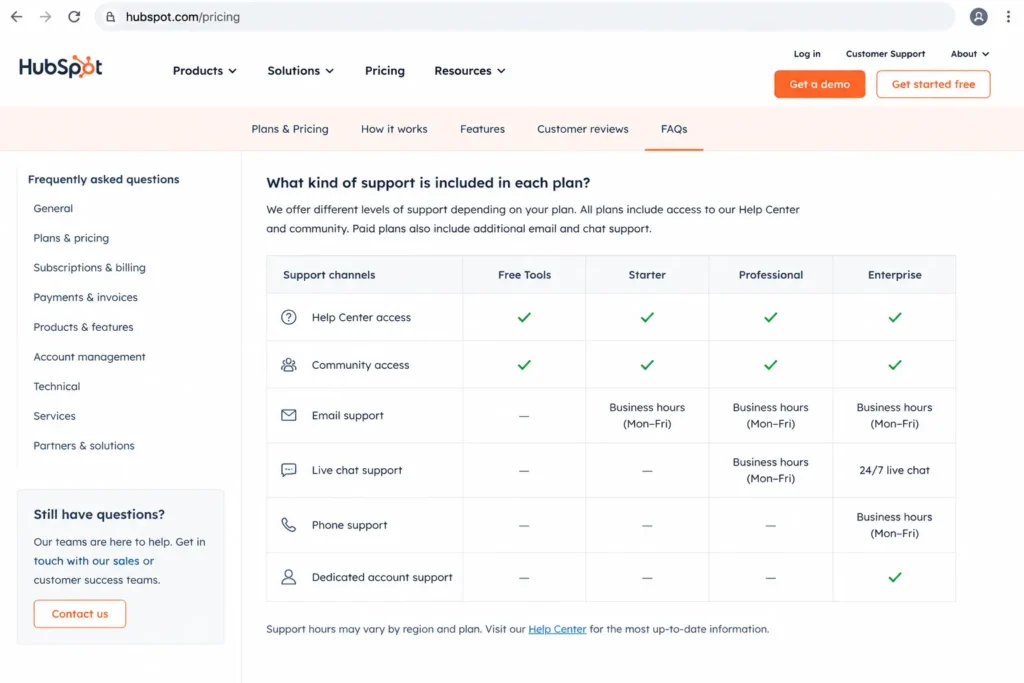
HubSpot’s support and available resources vary by plan, and its Professional and Enterprise tiers carry the required onboarding fees noted earlier. Freshsales support access also differs by plan, while Less Annoying CRM makes human support and no onboarding fee part of its single flat price.
For a team with no admin, that human-support model is worth more than a feature checkbox. A CRM that answers the phone during setup gets adopted; one that routes you to a community forum often stalls in week two.
There are two discount paths worth asking about before you sign. HubSpot and monday both reference startup or nonprofit programs, so an eligible small business should request those rates rather than pay list price.
I would confirm three things with any vendor here: which support channel your plan actually includes, whether onboarding is self-serve or a paid engagement, and whether you qualify for a startup or nonprofit discount. Those answers move the real cost more than a single extra feature.
A Quick Glossary So the Limits Compare Fairly
Contact, record, and deal limits are not the same thing, and vendors count them differently. Comparing a “1,000 contacts” cap to a “500 records” cap as if they were equal is how buyers mispick.
A contact is usually a person in your database, while a record can be any object (contact, company, deal, or note), so a 500-record cap fills faster than a 500-contact cap. An active contact or deal limit, used by tools like monday, counts only what is currently in play, not your full history.
HubSpot’s free plan counts 1,000 contacts, Bigin’s free plan counts 500 records, and Capsule’s free plan counts 250 contacts and 1 pipeline. Read each cap in the vendor’s own units before you assume one free plan beats another.
There is a scope difference too. A simple CRM (Less Annoying CRM, Bigin, Capsule) manages contacts and a pipeline, a sales CRM (Pipedrive, Freshsales) adds sales engagement, and a customer platform (HubSpot, Zoho, Salesforce) spans marketing, sales, and service.
Buying a platform when you needed a simple CRM is the most expensive mistake in this category.
Which CRM Should You Avoid, and Who Should Not Buy
No tool here is bad, but each is the wrong choice for a specific buyer. This is the buyer-risk ledger I would hand a small-business owner before they sign anything.
- Avoid Salesforce Starter Suite if you are a 1-to-3 person team chasing the lowest bill. The scaling ceiling is wasted on you, and the setup and transaction fees are not.
- Avoid HubSpot Professional-first if you are budget-sensitive. The free and Starter tiers are excellent, but the Professional jump plus a $1,500 onboarding fee is a real cliff.
- Avoid monday sales CRM if you are solo. The 3-seat paid minimum makes you pay for capacity you will not use.
- Avoid Less Annoying CRM if you need automation. It has none at any price, by design.
- Avoid Insightly if you have not budgeted for AppConnect. A $29 seat can hide a $3,000 setup fee and $249-per-month integration pricing.
- Avoid Pipedrive if you need native marketing and service in one base price. The add-ons stack up.
- Avoid Zoho if you have no one to own setup. Its depth becomes sprawl without a systems owner.
The pattern is adoption risk, not product quality. The tool most likely to fail you is the one that does not match your team size, budget ceiling, and setup capacity, regardless of how it scores on features.
CRM by Sales Motion: A Decision Tree
The fastest way to shortlist is to start from how your business actually sells, not from a feature grid. Match your motion to the branch below.
- Inbound, marketing-led: start with HubSpot Sales Hub for the free CRM and ecosystem, then price the Professional tier if you need automation.
- Flexible, low-cost sales operations: start with Zoho CRM for depth per dollar, and plan setup time.
- Visual, board-based sales work: start with monday sales CRM if you have 3 or more seats.
- Pipeline-only outbound sales: start with Pipedrive for rep adoption, and budget for lead-gen add-ons.
- Communication-heavy sales: start with Freshsales for built-in calling and chat.
- Owner-led, simple needs: start with Less Annoying CRM, Bigin, or Capsule, depending on whether you want flat pricing, spreadsheet migration, or project boards.
- Deals that become delivery projects: start with Insightly or Capsule so post-sale work stays in the CRM.
Wrong-fit CRM is the top cause of adoption failure, and it usually comes from picking on brand rather than motion. Choose the branch first, then use the cards and cost tables to pick within it.
How to Choose the Right Small-Business CRM
Work through these seven questions in order, because the later answers depend on the earlier ones. This is the same sequence I use when I write a buying memo for SaaS CRM Review.
- How many users need access today and in 12 months? Seat count drives both price and minimum-seat traps.
- Which features are must-have on day one, not nice-to-have? Automation and reporting are the usual must-haves.
- Which plan tier includes those must-haves? Price that tier, not the entry teaser.
- What is the total cost at your real seat count, including add-ons and onboarding? Use the 5-seat and 25-seat table above, or estimate your CRM cost at your exact seat count.
- What must the CRM connect to? Email, calendar, accounting (QuickBooks), and marketing tools decide fit.
- How much setup can your team handle in month one? Weight this if you have no admin.
- What will you need to answer before renewal? Adoption, reporting value, and clean data are the questions finance asks.
The 30/90-day adoption test is the check most buyers skip. After 30 days the whole team should be logging deals in one system, and after 90 days your pipeline data should be clean enough to forecast from.
If a tool cannot pass that, its feature list does not matter.
Common Mistakes When Choosing a Small-Business CRM
These are the recurring errors that turn a good CRM choice into a bad one. Each maps to a specific line in the tables above.
- Budgeting from the starting price. The practical tier that includes automation is usually one or two steps up.
- Treating free plans as equal. A 500-record cap and a 1,000-contact cap fill at very different speeds.
- Ignoring minimum-seat rules. monday’s 3-seat floor changes the math for solo buyers.
- Overlooking onboarding and setup fees. HubSpot Professional and Insightly AppConnect both add costs the sticker price hides.
- Buying a platform when you needed a simple CRM. Overbought CRM creates cost and low adoption.
- Skipping the integration check. If it does not connect to your email, calendar, or accounting, data gets siloed.
- Choosing on brand instead of sales motion. A popular CRM that fits the wrong motion still fails.
The through-line is that the cheapest or most popular option is rarely the right one. The right one is the tool your team adopts and finance can defend at renewal.
Final Verdict: The Best Small-Business CRM for Each Buyer
For most small businesses, Zoho CRM is the best CRM for small business in 2026, because it gives the widest capability per dollar with a genuine scaling path, provided you invest a few weeks in setup. It is my default recommendation when a team can own configuration.
If you want the easiest free start, HubSpot Sales Hub wins, as long as you budget for the Professional cliff and its onboarding fee. If you are building for scale and want to avoid a future migration, Salesforce Starter Suite is the growth-ready choice despite its complexity.
For owner-led and budget-first teams, the answer splits by need: Less Annoying CRM for flat-price simplicity, Bigin by Zoho CRM for leaving spreadsheets, Freshsales for built-in calling and chat, and Pipedrive for pipeline-first sales adoption. Service firms that track delivery should shortlist Capsule CRM or Insightly CRM, and monday sales CRM fits visual, 3-plus-seat sales teams.
The switch-or-stay rule is simple. If your spreadsheet still works and you are under three people, start with a free or flat-price CRM and revisit when the team or the data outgrows it, rather than overbuying for a future you have not reached.
This ranking is maintained by Macedona for SaaS CRM Review, with pricing checked July 3, 2026.
FAQ
What is the best CRM for a small business overall?
Zoho CRM is the best overall CRM for most small businesses in 2026, based on official pricing and documentation checked July 3, 2026. It offers the widest CRM depth per dollar, a free plan for 3 users, and a scaling path from around $14 per user per month, provided the team can handle setup. HubSpot and Salesforce are stronger for free-first and growth-first buyers respectively.
What is the best free CRM for small business?
HubSpot Sales Hub is the best free CRM starting point, with a free tier for up to 2 users and 1,000 contacts and no time limit. If your team is already three people, Zoho CRM and Freshsales both offer free plans for 3 users, which fit the seat count better. Bigin’s free plan is useful for a solo owner up to 500 records.
What is the cheapest CRM for a small business?
Bigin by Zoho CRM and Freshsales are the cheapest capable paid CRMs, with entry pricing around $7 to $9 per user per month billed annually. Less Annoying CRM is a flat $15 per user per month with no tiers or hidden fees. The cheapest sticker price is not always the cheapest real cost once minimum seats, add-ons, and onboarding fees are counted.
Is HubSpot or Zoho better for a small business?
It depends on your motion and budget. Choose HubSpot if you are inbound and marketing-led and want the easiest free CRM, and accept the Professional price cliff. Choose Zoho if you want more CRM depth per dollar and can invest setup time, since Zoho adds workflows, multiple pipelines, and reporting earlier in the tier ladder.
Is Salesforce worth it for a small business?
Yes, if you are a growth-stage team that wants one CRM for the next several years and can handle more configuration. Salesforce Starter Suite starts at $25 per user per month with transaction fees, and it scales into a full platform. No, if you are a 1-to-3 person team chasing the lowest bill, because lighter CRMs cost less and adopt faster.
How much does a small business CRM cost?
Entry paid CRMs range from about $7 to $29 per user per month billed annually, so a 5-seat team pays roughly $35 to $145 per month. At 25 seats the same tiers run about $175 to $725 per month, before add-ons, AI credits, or onboarding fees. Automation-heavy teams usually move up one tier, which raises the real cost.
What CRM should I use instead of spreadsheets?
Bigin by Zoho CRM is the best step off spreadsheets for a small team, with pipelines, email, and a QuickBooks integration at a low price. Its free plan covers 1 user and 500 records, so plan to upgrade to Express as the team and record count grow. Zoho CRM and HubSpot are stronger once you need automation and reporting.
Which small business CRM has the lowest setup burden?
Less Annoying CRM, Bigin, and Pipedrive have the lowest setup burden, because they are deliberately simple and get a team running quickly. Zoho, Salesforce, and Insightly reward more setup effort but need a systems owner. If your small business has no admin capacity in month one, weight setup difficulty heavily in the decision.