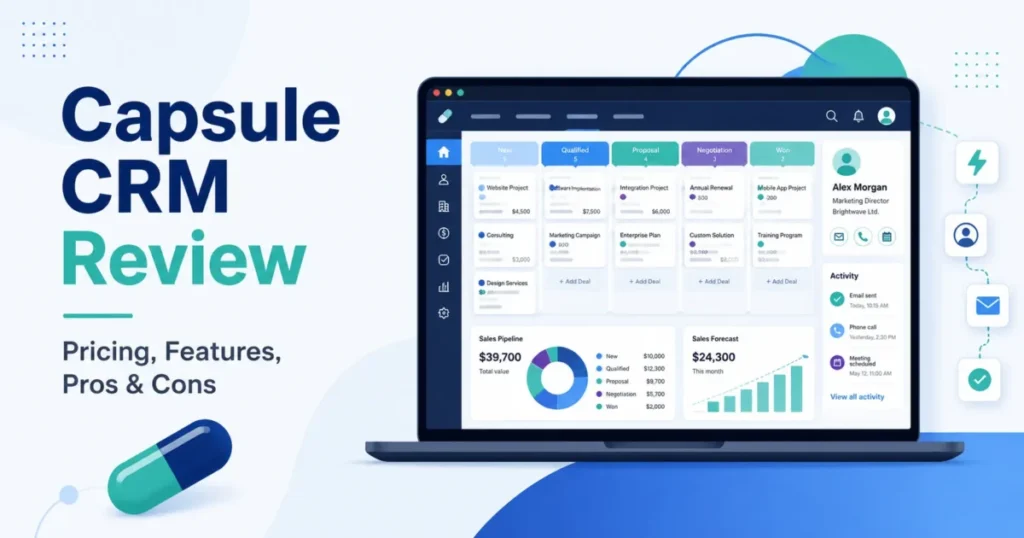
Capsule CRM sells itself as a simple CRM, and for the right team it is. The harder question is which plan a small business needs once contacts, follow-up, and reporting get real, and the honest answer is not the entry price.
Capsule is worth it for 1-to-5-person consulting, agency, and professional-service teams that want a clean shared contact and pipeline system without heavy setup. It is a weaker fit for process-heavy revenue teams that need built-in marketing, advanced sequencing, or a phone-support SLA.
Paid plans start at $18 per user/month billed annually, but most teams that need automation will land on Growth at $36 per user/month. There is a genuinely free plan for two users.
This Capsule CRM review is written for buyers comparing lightweight CRM software and shopping the best CRM software for small business. It works through pricing, plan choice, real workflows, limits, migration, and alternatives, checked against Capsule’s official documentation on July 23, 2026.
In This Article (13 sections)
Quick Verdict
| Category | Verdict |
|---|---|
| Best for | 1-to-5-person consulting, agency, and service teams needing shared contacts and one pipeline |
| Not ideal for | Process-heavy revenue teams needing built-in marketing, advanced sequencing, or a phone-support SLA |
| Starting price | $18 per user/ |
| Best practical plan | Growth at $36 per user/ |
| Free plan / trial | Free plan (2 users, 250 contacts); 14-day paid trial, no card required |
| Setup difficulty | Low for contacts and one pipeline; Medium once automation and migration begin |
| Main strength | Clean shared contact-and-pipeline system with automation bundled on Growth |
| Main limitation | Ownership, automation, and dashboards gated at Growth; 500-opportunity board ceiling |
| Best alternatives | Less Annoying CRM for tiny teams; Pipedrive for sales-process depth |
How Capsule CRM Was Reviewed
This review is based on Capsule’s official pricing and signup pages, help center, developer documentation, security pages, and labeled third-party review patterns from G2 and TrustRadius. Pricing and plan limits were checked on July 23, 2026.
Capsule was assessed against the criteria that decide a small-business CRM purchase: contact and pipeline workflow fit, plan gates, usage limits, automation and AI depth, migration and export behavior, security administration, support, and real cost at team scale.
Greater weight went to the facts that change a buying decision, including which plan unlocks each workflow, where the practical budget diverges from the entry price, and which documented limit affects operations after the first month.
Claims that Capsule’s own pages left unresolved, such as the Advanced storage figure and the Ultimate pipeline count, are flagged rather than guessed, and every price is treated as verifiable against the official pricing page on the date shown.
Capsule CRM Pros and Cons
| Pros | Cons |
|---|---|
| One shared record for people and linked organisations, with an offline-capable iOS and Android app on every plan, including Free | The visual sales pipeline stops rendering past 500 opportunities, so high-volume teams lose the Kanban board and fall back to filters or List View |
| Flat, predictable per-user pricing across five plans, a genuinely free two-user tier, and no setup or standard onboarding fee | Contact ownership, workflow automation, and dashboards are all locked below Growth, so Starter is thinner than its price suggests for multi-rep teams |
| Workflow automation, multiple pipelines, project boards, dashboards, and AI summaries all arrive together on the Growth plan | A full account export ships three CSV files but excludes every file attachment, which you download record by record before leaving |
| Published SOC 2 Type II status, encryption at rest, enforced two-factor authentication, and a documented 30-day deleted-record recovery window | Annual billing is prepaid, and removing a seat does not lower the current bill until renewal, which punishes seasonal or shrinking teams |
| A documented REST API and more than 60 integrations, including Google Workspace, Microsoft 365, Xero, QuickBooks, and Mailchimp | Capsule’s own pages disagree on Advanced storage and on the Ultimate pipeline count, so storage- or pipeline-heavy buyers must confirm before purchase |
What Capsule users say
Across G2 and TrustRadius reviews read in July 2026, the sentiment is consistent, and it lines up with the pros and cons above.
What users consistently like:
- A clean, uncluttered interface.
- Fast contact and opportunity management.
- A low learning curve for non-technical teams.
What users repeatedly criticize:
- Reporting and automation that feel shallower than larger CRM suites.
- Advanced needs that push a team onto Growth sooner than expected.
- Support channels that are narrower than the big platforms offer.
One TrustRadius reviewer summed up the trade-off directly: “Although the pricing is less, the features are less as well, so it’s almost true to say you get what you pay for.” These are recurring patterns from public reviews, not measured scores.
What Is Capsule CRM?
Capsule CRM is a customer relationship management platform run by Zestia Ltd. It centers on shared contacts, a visual sales pipeline, tasks, email, and lightweight project boards.
Capsule positions itself as a simple yet capable CRM for relationship-led small businesses rather than a full revenue suite. The product spans five plans, from a free two-user tier to a $72 per user/month Ultimate plan.
Capsule CRM Pricing Reality
Capsule uses flat per-user pricing across five plans, billed monthly or annually. The captured pricing view exposed the annual effective prices below.
The exact monthly list prices were not published in it, so they are not stated here.
| Plan | Annual price (per user) | Contacts | Best for | Worth it? |
|---|---|---|---|---|
| Free | $0 | 250 | 1-to-2-person testing or microbusiness | Good starting point, hard ceiling at 2 users |
| Starter | $18/ | 30,000 | Solo-to-5 relationship teams, one pipeline | Good if you do not need automation |
| Growth | $36/ | 60,000 | 3-to-10-person teams needing automation | Best practical plan |
| Advanced | $54/ | 120,000 | Teams hitting Growth’s caps | Only once you hit a Growth ceiling |
| Ultimate | $72/ | 240,000 | 5-plus teams needing dedicated support and training | Only for the service and scale bundle |
Sources: Capsule’s official pricing page and billing documentation, checked July 23, 2026. Capsule advertises an annual discount whose exact percentage its own page states inconsistently, so the annual effective prices above are the reliable figures.
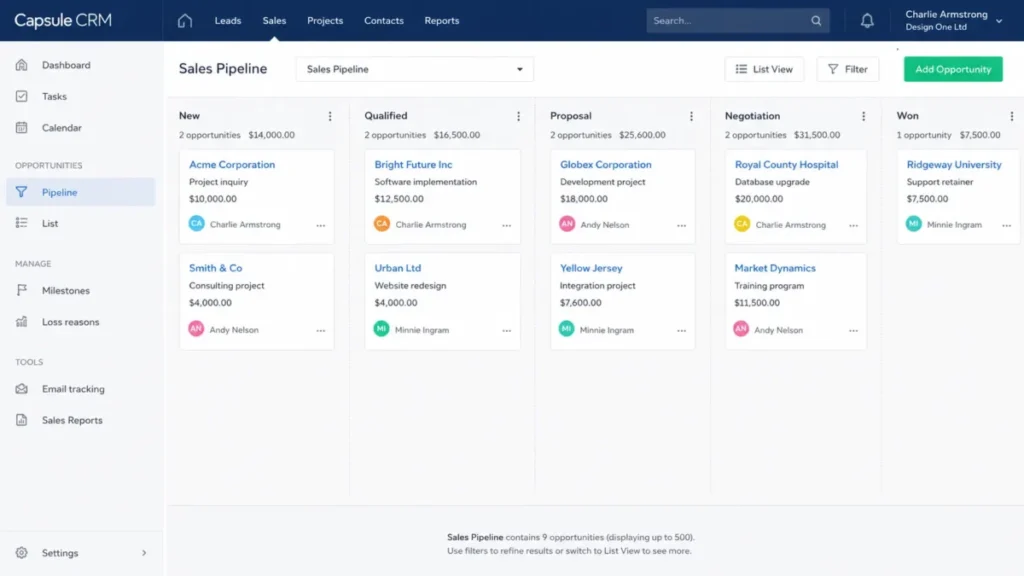
The real cost at team scale
Flat per-user pricing makes the math clean, so the practical budget is easy to model before you buy. The table below is editorial arithmetic from the annual per-user prices, not a separate vendor quote.
| Team size and plan | Annual list cost | Calculation |
|---|---|---|
| 1 user, Starter | $216 | $18 × 1 × 12 |
| 3 users, Starter | $648 | $18 × 3 × 12 |
| 5 users, Growth | $2,160 | $36 × 5 × 12 |
| 10 users, Starter | $2,160 | $18 × 10 × 12 |
| 10 users, Growth | $4,320 | $36 × 10 × 12 |
| 10 users, Advanced | $6,480 | $54 × 10 × 12 |
| 5 users, Ultimate | $4,320 | $72 × 5 × 12 |
These totals exclude the marketing add-on, tax, and any optional services. Source: editorial calculation from Capsule’s annual per-user prices on the pricing page, checked July 23, 2026.
Hidden costs to budget
Three costs sit outside the headline seat price. Marketing is a separate add-on that starts at $11 per month, and the captured pricing page did not make its billing unit or included volume clear, so treat it as an unknown add-on rather than folding an exact figure into your CRM cost.
Annual billing is the second. It is prepaid for twelve months, added seats are prorated, but removing a seat does not reduce the current bill until renewal, so a team that shrinks mid-term keeps paying for the empty seats.
The third is the failed-payment clock, and it is a data-continuity risk, not just a finance nuisance. After three failed payment attempts over 20 days, Capsule suspends the account 20 days from the due date, cancels it 60 days after suspension, and permanently clears the data 14 days after cancellation, with warning emails going only to the Super Administrator.
Source: Capsule’s billing documentation, checked July 23, 2026. Assign billing ownership to someone who reads those emails, and keep an independent export.
Which Capsule CRM Plan Should You Choose?
The plan you need is decided by workflow, not feature count, and most operational features turn on at Growth.
| Capability | Free | Starter | Growth | Advanced | Ultimate |
|---|---|---|---|---|---|
| Users | 2 | Per seat | Per seat | Per seat | Per seat |
| Contacts | 250 | 30,000 | 60,000 | 120,000 | 240,000 |
| Sales pipelines | 1 | 1 | 5 | 50 | Confirm with Capsule |
| Project boards | 1 | 1 | 5 | 50 | Unlimited |
| Custom fields | 5 | 50 | 150 | 300 | Unlimited |
| Workflow automation | Not offered | Not offered | Included | Included | Included |
| Custom dashboards | Not offered | Not offered | 5 | 10 | 20 |
| Contact ownership and teams | Not offered | Not offered | Included | Included | Included |
| Email templates | 0 | 5 | 50 | 500 | 1,000 |
| Shared mailboxes | 0 | 1 | 3 | 5 | 10 |
| AI summaries (per user, 30 days) | Not offered | Not offered | 20 | Confirm with Capsule | Confirm with Capsule |
| File storage | 50MB per account | 10GB per user | 20GB per user | 30-40GB per user (pages conflict) | 50GB per user |
| Dedicated support and training | Not offered | Not offered | Not offered | Not offered | Included |
Sources: Capsule’s pricing, getting-started, custom-field, dashboard, project-board, and email documentation, checked July 23, 2026.
Route the decision like this. Free works only up to two users and 250 records, so it suits a solo founder testing the idea.
Starter fits a one-pipeline relationship team that does follow-up by hand. Growth is the practical center once you need automation, ownership, multiple pipelines, or dashboards.
Advanced is for teams that hit Growth’s caps on pipelines, boards, or dashboards, and Ultimate is for five-plus teams that want the dedicated support and training bundle. A team that needs dashboards but not ten of them can stop at Growth’s five rather than paying $18 more per user each month for Advanced.
The two cells marked “conflict” or “confirm” are not oversights. Capsule’s own pages disagree on Advanced storage and the Ultimate pipeline count, so treat those as items to verify, covered in the conflicts box further down.
Capsule CRM Features and Core Workflows
Under the simple surface, Capsule is hired for three jobs: holding one shared relationship record, running a single sales pipeline, and automating follow-up. Here is how each works and where it stops.
Setup difficulty is low for the parts a small team touches first and medium once automation, SSO, and migration begin. None of it requires a paid onboarding, since account setup and standard onboarding are documented at $0.
Shared contacts and mobile access
Capsule stores people and organisations as separate but linked records, and every plan includes an iOS and Android app that works offline and syncs when the device reconnects. That combination lets a small team standardize on one system without a long onboarding project.
The workflow is light. A rep adds a person, links the organisation, drops in tags and a note, and the same record is on the phone the next morning.
Here is the counting detail that changes capacity planning. A person and the linked organisation are two separate records against your contact allowance, so a B2B database fills faster than a simple headcount of people suggests.
That matters most on Free, where 250 records and two users is the ceiling. A two-founder shop tracking 120 companies and their contacts can cross the Free limit long before it feels large, which makes early contact management discipline a real budgeting input.
Source: Capsule’s contact documentation and mobile app documentation. The mobile app requires iOS 15 or later, or Android 8 or later, and Caller ID is documented as iOS-only.
The visual sales pipeline
Capsule’s visual pipeline is a Kanban board of opportunity cards moving through stages, with expected value, owner, and close date on each card. For a solo founder or a small sales team running one motion, it is fast to set up and easy to keep current, with no forecasting ceremony to configure first.
The ceiling is specific and worth planning around. The visual pipeline is documented to display at most 500 opportunities before Capsule recommends filtering the board or switching to List View for performance.
The records are not deleted at that point, but the primary operating view changes, and that is a workflow event, not a storage event. A high-volume inside-sales team that lives on the Kanban board will feel the 500-opportunity ceiling, while a consultancy tracking 40 live deals never will.
Multiple pipelines are also a plan decision. Free and Starter allow one pipeline, Growth adds five, and Advanced raises the published count to 50.
Source: Capsule’s sales pipeline documentation. Capsule’s own pages give conflicting figures for the Ultimate pipeline count, so that number is left unstated here.
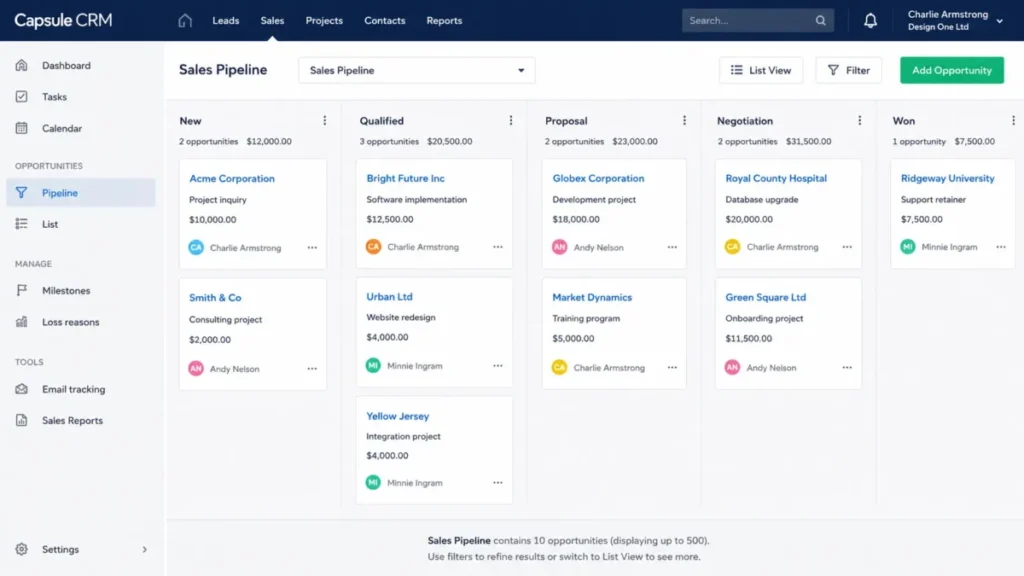
Workflow automation
Workflow automation is the feature that turns Capsule from a shared notebook into an operations tool. It can apply a Track, reassign an owner or team, create a project or opportunity, and send an email when an opportunity hits a milestone or is marked Won, Lost, or Closed.
This is the 30/90-day adoption test in practice. After 30 days the pipeline should be current, and by 90 days the repetitive follow-up should be running without a person remembering to trigger it.
The catch is the plan gate. Automation begins on Growth, only an administrator can create or edit an automation, and there is no automatic equivalent on Free or Starter beyond manual tasks and Tracks.
There is also an operational edge that belongs in the admin runbook. Capsule’s documented test function creates a real test opportunity that counts in sales and activity reports until you delete it, deleted automations cannot be restored from Trash, and a failed action has to be re-triggered by moving the record out of and back into the milestone after you fix the dependency.
Source: Capsule’s workflow automation documentation.
AI summaries, reporting, and enrichment
Capsule’s AI features are useful for preparation rather than volume. AI Summary generates a summary of a contact, opportunity, or project, and the quota is 20 summaries per user on a rolling 30-day basis, with each refresh consuming another credit.
Two boundaries decide whether it fits your workflow. The summary reads only the 50 most recent activities on a record, so it is a preparation aid rather than a full-history analysis, and the activity data is sent to OpenAI as a documented subprocessor, which is a privacy point worth raising with a security-conscious buyer.
Reporting depth is a plan decision. Custom dashboards start on Growth with five, rise to ten on Advanced, and reach 20 on Ultimate, while Free and Starter do not include custom dashboards at all.
Contact enrichment has its own quota shape that surprises buyers who assume every higher tier adds more. Business enrichment covers all organizations on eligible plans, but personal-contact enrichment is 100 per user on Growth and 200 per user on both Advanced and Ultimate, so Ultimate does not raise that specific ceiling.
Source: Capsule’s AI Summary documentation and enrichment documentation.
Capsule CRM Limitations and Operational Risks
The features are easy to like. The risks that change a real decision sit in the plan gates, in data portability, and in a few places where Capsule’s own pages disagree.
Real operations live on Growth, so Starter can be a false economy
The features that turn a contact list into a managed sales operation are all above Starter. Contact ownership and team assignment, workflow automation, multiple pipelines, custom dashboards, and AI summaries begin on Growth.
Below Growth, ownership has to be approximated with tags, lists, or a custom field, and there is a sharp edge in the workaround. Capsule documents that a bulk contact reassignment cannot be undone automatically, so a mis-click on a large selection is a manual cleanup job.
The buyer risk is straightforward. A multi-rep team that buys Starter to save money often discovers within the first month that it needs ownership and automation, and then pays the $1,080-per-year Growth delta anyway, having lost time to the workaround first.
Email operations follow the same pattern and can trigger an upgrade before contact capacity does. Starter allows five email templates and one shared mailbox, Growth raises those to 50 templates and three shared mailboxes, and each user can connect only one personal mailbox at a time.
Source: Capsule’s contact documentation and email documentation.
Getting data in and out is cleanup, not a safety net
Capsule imports contacts and opportunities from CSV or Excel with field mapping, which is fine for a first load. The problem is what happens when a mapping or deduplication choice is wrong.
There is no transactional rollback. The documented recovery is to find the newly imported records in the recent-import history and bulk-delete them into Trash, where they sit for 30 days, so a careless production import becomes a manual reversal.
Migration also has object-level limits that shape the plan. Opportunity notes and emails import as history only for new opportunities, an import allows one Track per new opportunity, and text custom fields cap at 250 characters while number fields cap at 12 characters plus three decimals.
A CRM migration from a heavily customized system needs a pilot batch and a retained source file before the full cutover.
Leaving is the mirror image, and it is the more surprising gap. A full account export produces a single ZIP with three CSV files for contacts, opportunities, and projects, the download link expires after 12 hours, and the export excludes every file attachment.
Attachments have to be downloaded record by record. For a team that has stored proposals and contracts in Capsule for years, that turns “export before you cancel” into a real project, and it is the switching cost most reviews skip.
Source: Capsule’s import documentation and export and cancellation documentation.
Limitations at a glance
These are the constraints most likely to change a team’s decision, each tied to a documented fact rather than a general gripe.
- The visual pipeline is capped at 500 opportunities before you must filter or move to List View, which changes the daily operating view for high-volume sales teams.
- AI Summary reads only the 50 most recent activities and allows 20 summaries per user across a rolling 30 days, so it is preparation, not a history analyst.
- The REST API is limited to 4,000 requests per hour per user and returns HTTP 429 above the ceiling, so high-volume integrations need throttling and caching.
- A full export excludes file attachments, and the download link expires after 12 hours, so leaving with a complete archive is manual work.
- Annual seats are prepaid and non-reducible until renewal, so a shrinking team keeps paying for empty seats.
- Support is Monday-to-Friday message and email with no published response-time SLA.
Official documentation conflicts to confirm before buying
Capsule’s own pages disagree in a few places, so these are the items to verify in-app or with sales before an annual commitment.
- Advanced storage: the Getting Started page says 30GB per user; the Data Enrichment page says 40GB per user.
- Ultimate pipelines: Capsule’s comparison pages give different counts, so no Ultimate pipeline number is stated in this review.
- Accounting integrations: the pricing page lists Xero among Starter integrations, while a help page places accounting integrations on Growth and above.
- Annual discount: the pricing page shows two different percentages, so rely on the annual per-user prices, not the percentage.
Source: Capsule pricing, Getting Started, Data Enrichment, and integration help pages, checked July 23, 2026.
Integrations, Security, and Support
Integrations are broad for a lightweight CRM, with more than 60 advertised, including Google Workspace, Microsoft 365, Xero, QuickBooks, Mailchimp, Zendesk, Zapier, and Looker Studio, while my Xero review covers the accounting side. Two facts matter for planning rather than logos.
Google Calendar changes can take up to 24 hours to appear because of Google’s refresh behavior, so the feed is not a real-time schedule. And the accounting-integration plan gate is one of the documented conflicts above, so confirm the connector before you assume Starter covers Xero.
For anyone building a custom integration, the API has a hard ceiling that shapes the architecture. Capsule’s REST API allows 4,000 requests per hour per Capsule user, returns HTTP 429 when you exceed it, and repeated requests after that can temporarily block the application or disable the user.
The documented fix is engineering discipline: read the rate-limit headers, add a delay of about one second, cache, and use incremental endpoints. A high-volume sync built as if the API were unlimited will get throttled.
Capsule’s security posture is stronger than a “2FA available” line suggests. It states SOC 2 Type II status, TLS in transit, encryption at rest, replicated backups, a 30-day recovery window for deleted records, and a 14-day recovery window for a canceled account.
Enforcing two-factor authentication is where the admin runbook matters. When a Super Administrator requires 2FA, users without it are logged out immediately and can lose unsaved work, so the safe rollout is to announce the change, have people save and enroll, then enforce.
Single sign-on has real prerequisites behind the “supported” label. Microsoft 365 SSO is available on all plans but not for GoDaddy-hosted Microsoft 365, and it needs user email addresses to match the configured domain, with duplicate emails able to block setup.
Support is documented but bounded. Capsule lists message and email support with replies Monday through Friday and no published response-time SLA, while Ultimate adds a dedicated account manager, priority support, and custom training.
Sources: Capsule’s Google integration documentation, developer documentation, security documentation, Super Administrator documentation, and support page.
Who Wins and Who Loses with Capsule CRM
Who should use Capsule CRM
A 1-to-5-person consulting, agency, or professional-service team wins here. It gets a clean shared contact and pipeline system at $18 per user/month on Starter, without paying for automation it will not use.
A 3-to-10-person sales or service team that needs automation wins on Growth. That plan bundles workflow automation, multiple pipelines, dashboards, ownership, and AI summaries at $36 per user/month, which is the practical center of the product.
A microbusiness or founder testing a first CRM wins on Free, provided it stays inside two users and 250 records. It is a real starting point, not a crippled demo, and the paid trial adds 14 days of the full feature set without a card.
A security-conscious small business also fits. SOC 2 Type II, enforced 2FA, and documented recovery windows give an admin more to work with than most lightweight CRMs publish.
Who should avoid Capsule CRM
A marketing-led team that wants campaigns and CRM in one subscription should look elsewhere, because marketing is a separate add-on starting at $11 per month rather than an included capability. Budgeting Capsule as an all-in-one will understate the cost.
A high-volume inside-sales team that runs hundreds of live deals on a single Kanban board will hit the 500-opportunity ceiling and lose its main view. That is a workflow constraint a process-heavy team should treat as disqualifying.
A team that needs a guaranteed support response or a documented phone-support SLA will not find one. An operation that cannot wait on an incident should weigh that risk.
A storage-heavy or many-pipeline buyer eyeing Advanced or Ultimate should pause until Capsule resolves its own conflicting numbers. No buyer should sign an annual contract on a figure the vendor’s own pages contradict.
Capsule CRM Alternatives
None of these are “better CRMs” in the abstract. Each one answers a specific Capsule limitation, so the right pick depends on which gap is blocking you.
| Alternative | Better for | Why choose it instead of Capsule |
|---|---|---|
| Less Annoying CRM | Very small teams wanting radical simplicity | Removes the Free 2-user ceiling and the Growth plan-gate decisions with one flat plan |
| Pipedrive | Sales teams that live in the pipeline | Deeper sales-process and forecasting depth when one track and the 500-deal board feel tight |
| HubSpot CRM | Teams needing CRM plus marketing together | Bundles marketing that Capsule charges as a separate add-on |
| Zoho CRM | Teams wanting more range per dollar | Broader automation and reporting than Capsule gates behind Growth |
| Insightly | Teams needing heavier project delivery | Stronger project management than Capsule’s capped project boards |
If your blocker is complexity or the two-user Free ceiling, the Less Annoying CRM review covers a flatter, single-plan model. If it is sales-process depth or the pipeline ceiling, the Pipedrive CRM review is the closer comparison.
If you need marketing in the same tool, the HubSpot CRM review explains the free-tier-plus-marketing model, and if you want more configuration range, the Zoho CRM review goes into its automation and analytics. For project-heavy delivery work alongside a CRM, the Insightly CRM review is the better fit.
For teams still deciding whether to pay at all, the best free CRM software roundup compares Capsule’s Free plan against its closest no-cost rivals.
Final Verdict: Is Capsule CRM Worth It?
Capsule CRM is worth it for relationship-led small teams that want a clean, shared contact and pipeline system and are willing to buy the plan the workflow needs. Its strongest asset is operational simplicity, and its main trade-off is that ownership, automation, dashboards, and AI all begin on Growth.
Choose Starter at $216 per user/year if you are a 1-to-5-person team running one pipeline with manual follow-up. Choose Growth at $432 per user/year the moment you need automation, ownership, multiple pipelines, or dashboards, and treat that as the real center of the product rather than an upsell.
Avoid Capsule if you need built-in marketing, run a high-volume board past the 500-deal ceiling, depend on a phone-support SLA, or need Advanced or Ultimate capacity that the vendor’s own pages describe inconsistently. In those cases a competitor named above is the safer buy.
The renewal question to answer before year two is simple. Has the team kept the data clean and moved its repetitive follow-up into Growth automations, or is it still paying per seat for a shared address book.
If it is the latter, the problem is adoption, not Capsule, and no plan upgrade fixes that.
Frequently Asked Questions
Is Capsule CRM any good?
Capsule CRM is a strong lightweight CRM for relationship-led teams of one to ten that want shared contacts, one or a few pipelines, and simple automation. It is less suited to process-heavy revenue teams that need built-in marketing, high-volume boards, or advanced sequencing.
Third-party reviews consistently praise its ease of use while noting shallower automation and reporting than larger suites.
How much does Capsule CRM cost?
Capsule has a free plan for two users, then paid plans billed annually at $18 per user/month (Starter), $36 (Growth), $54 (Advanced), and $72 (Ultimate), checked July 23, 2026. Ten Growth users cost $4,320 per year at list price.
Marketing is a separate add-on starting at $11 per month, and its exact billing unit was not published in the captured pricing view.
Is the Capsule CRM free plan genuinely free?
Yes, the Free plan is $0, but it caps at two users, 250 contact records, five custom fields, and one pipeline. A person and their linked organisation count as two records, so a B2B database reaches 250 faster than a headcount suggests.
Free also excludes automation, dashboards, ownership, and email templates, which are the features growing teams tend to need.
What is the difference between Capsule Starter and Growth?
Starter at $18 per user/month covers shared contacts, one pipeline, five email templates, and basic reporting, but no automation. Growth at $36 adds workflow automation, up to five pipelines, contact ownership, five dashboards, and AI summaries.
For five users, the upgrade adds $1,080 per year, which buys automated follow-up rather than manual tracking.
Does Capsule CRM have workflow automation?
Yes, but only on Growth and above, and only administrators can create or edit automations. Automations can apply a Track, reassign owners, create records, or send email on opportunity milestones.
Free and Starter have no equivalent beyond manual tasks. Test automations create real records that affect reports until deleted, and a deleted automation cannot be restored.
Can Capsule CRM integrate with Outlook and Gmail?
Yes. Capsule connects Gmail and Outlook mailboxes, sends email from a contact record, and supports Google Workspace and Microsoft 365, with one personal mailbox per user.
One caveat: Outlook can group emails with identical subject lines and file a message against the wrong contact, so Capsule recommends unique subjects such as adding the contact’s name.
Can you import data into Capsule CRM, and export it later?
You can import contacts and opportunities from CSV or Excel with field mapping on every plan. There is no transactional rollback, so a bad import is fixed by bulk-deleting the new records.
A full export gives three CSV files but excludes file attachments, and the link expires after 12 hours, so leaving with a complete archive takes manual effort.
Is Capsule CRM secure?
Capsule states SOC 2 Type II compliance, TLS in transit, encryption at rest, replicated backups, enforced two-factor authentication, and 30-day deleted-record and 14-day canceled-account recovery windows. Microsoft 365 and Google Workspace single sign-on are supported with configuration constraints.
Enforcing required 2FA logs out non-enrolled users immediately, so admins should schedule the change and have people save work first.
What happens if a Capsule payment fails?
Capsule attempts payment three times over 20 days, then suspends the account 20 days from the due date, cancels it 60 days after suspension, and permanently deletes the data 14 days after cancellation. Warning emails go only to the Super Administrator.
Assign billing ownership to someone who monitors those emails, and keep an independent export so a lapsed card never becomes a data-loss event.
What are the best Capsule CRM alternatives?
For radical simplicity, Less Annoying CRM removes Capsule’s plan-gate decisions, and for deeper sales process, Pipedrive fits teams that outgrow one pipeline or the 500-deal board.
HubSpot CRM suits teams needing marketing in the same tool, Zoho CRM offers more configuration range per dollar, and Insightly adds stronger project delivery.