HubSpot’s advertised price and HubSpot’s real bill are two different numbers, and the gap is where most buyers get budgeting wrong. A Starter seat shows from seven dollars a month for new customers, but a marketing team of ten on Professional passes sixteen thousand dollars in year one once onboarding lands.
This guide breaks down every public plan across the Customer Platform and the Marketing, Sales, Service, Content, Data, and Revenue hubs, then models the real cost by team size, with a calculator near the top.
Every figure was checked on September 7, 2026 against HubSpot’s official US pricing pages and Product and Services Catalog, and each section links to its page. No hands-on trial was run for this guide, so every figure traces to an official page rather than a personal test.
HubSpot sits among the best CRM software options, and the HubSpot CRM review covers the product behind these prices. I read HubSpot pricing the way I read a renewal contract: the seat you buy today matters less than the lines you inherit at scale.
In This Article (18 sections)
Quick Pricing Verdict
The short version, before the detail: choose Free or Starter for a shared CRM, treat Professional as the real commitment, and avoid Enterprise until you can name the governance feature you are buying.
| Decision point | Answer |
|---|---|
| Starting price | Free forever, or Starter from $7 per seat per month on an annual commitment for new customers |
| Free plan or trial | Free CRM for up to 2 users, with the AEO add-on carrying its own 28-day trial |
| Best plan for most growing teams | Customer Platform Professional or a single Professional hub |
| Plan to approach with caution | Marketing Hub Professional, because of contact tiers plus a $3,000 onboarding fee |
| Biggest hidden cost | Marketing contact tiers and required onboarding on Professional and Enterprise hubs |
| Newest 2026 cost lever | HubSpot Credits, which power AI agents and data features and expire monthly |
| Best alternative if too expensive | Pipedrive for sales-only teams, Salesforce for governance-heavy enterprises |
| Pricing verified | September 7, 2026, official HubSpot US pricing pages and Product and Services Catalog |
Sources: the Starter offer page for the promotional seat rate and the Marketing Hub pricing page for the Professional onboarding fee, both checked September 7, 2026.
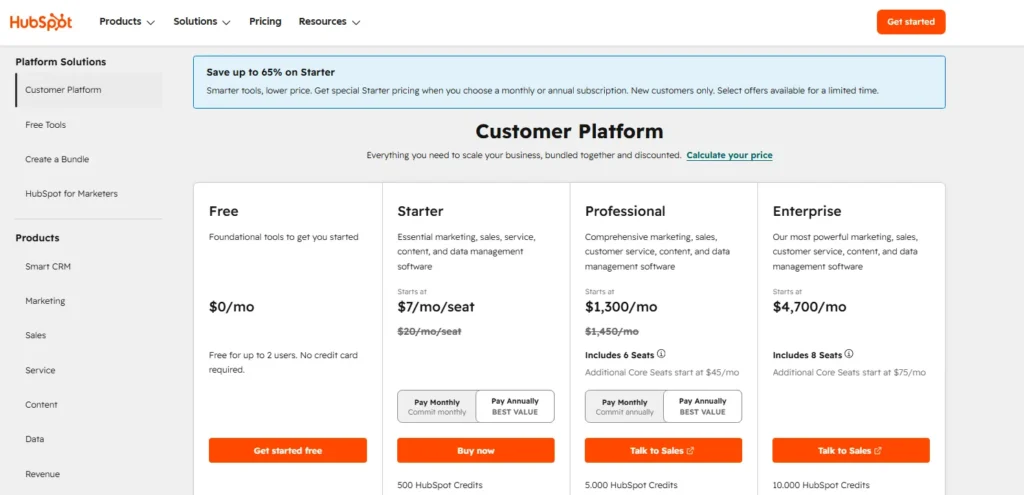
HubSpot Customer Platform pricing page showing Free, Starter, Professional, and Enterprise plans, including Starter promotional pricing and Professional/Enterprise included Core Seats.
HubSpot’s public prices are real, but they move. On the check date the pages showed promotional Starter pricing flagged for new customers, paired annual and monthly figures on most hubs, and Enterprise tiers marked as billed annually in the catalog.
Confirm the final number in HubSpot’s checkout or a written quote before you commit, because promotions, billing period, seat mix, and contact tier all change the effective bill.
HubSpot Cost Calculator
The calculator below turns a headcount into a HubSpot bill using the rules documented in the rest of this guide. Pick a hub or the Customer Platform bundle, choose the tier, enter how many people need a paid seat, and add your marketing contact count and expected credit usage.
It applies the included seats per tier, the additional Core Seat rate, the marketing contact tier bands from the catalog, the credit overage rate, and the required onboarding fee for the tier you pick. It then shows the first-year total, the renewal-year total, and the effective cost per paid user.
Everything it uses is a list price from an official page, so treat the output as the anchor you take into a quote conversation, not as the negotiated figure a sales rep will offer at 25-plus seats.
List prices from HubSpot’s US pricing pages and Product and Services Catalog, checked September 7, 2026. Output is the anchor for a quote, not a negotiated price.
| Cost line | Per month | Year one |
|---|---|---|
| Customer Platform Professional base, 6 seats included (annual) | $1,300 | $15,600 |
| 4 additional Core Seat(s) at $45 | $180 | $2,160 |
| Marketing contacts above included tier (1 block(s)) | $250 | $3,000 |
| HubSpot Credits overage (0 over the 5,000 pool) | $0 | $0 |
| Required onboarding, one-time | — | $3,000 |
| Total | $1,730 | $23,760 |
| Tier | Per month | Year one | Renewal |
|---|---|---|---|
| Starter | $295 | $3,540 | $3,540 |
| Professional (selected) | $1,730 | $23,760 | $20,760 |
| Enterprise | $4,850 | $65,200 | $58,200 |
Assumptions: Bundle onboarding is modelled at the Marketing Hub fee for the same tier, because the bundle includes Marketing Hub; confirm in your quote. Contact blocks are priced by the catalog band each block falls into. Credits reset monthly with no rollover. Prices are US list prices before tax and before any negotiated discount.
Rates this calculator uses
Rates: Customer Platform Professional $1,300 annual / $1,450 monthly with 6 seats, Enterprise $4,700 with 8 seats; Marketing Hub Professional $800 / $890 with 3 Core Seats, Enterprise $3,600 with 5; Sales and Service Hub seats $90 / $100 Professional and $150 Enterprise; Content Hub $450 / $500 and $1,500; Data Hub $720 / $800 and $2,000 with 1 Core Seat; Revenue Hub seats $85 / $95 and $140. Additional Core Seats $45 annual or $50 monthly on Professional, $75 on Enterprise. Onboarding: Marketing $3,000 / $7,000, Sales and Service $1,500 / $3,500. Marketing contact blocks and the credit rate sheet follow the catalog bands. Enterprise is billed annually. Contact tiers and onboarding for the Customer Platform bundle follow Marketing Hub, which the bundle includes.
How to turn headcount into a HubSpot bill
The calculator follows seven steps, and running them by hand once explains why two teams of the same size can receive bills that differ by a factor of three.
- Start from the plan price of the tier you need, because the price of the tier is set by the feature gate you cannot live without, not by headcount.
- Check the plan gate: multi-step automation, lead scoring, and custom reporting live at Professional, so if a workflow needs one of them the upgrade trigger has already fired.
- Count paid seats by usage, not by team size: only users who run marketing, sales, or service workflows need a Core, Sales, or Service Seat, and everyone else takes a free View-Only Seat.
- Subtract the seats included in the tier and price the remainder at the additional seat rate for that tier.
- Add the marketing contact tier if you buy Marketing Hub, because contact volume, not headcount, is what moves that line.
- Estimate credit usage from the rate sheet, since AI agents and data features draw from a monthly pool and overage becomes a recurring cost.
- Add the one-time onboarding fee for the tier, then compare year one with the renewal year to see the real total cost and the practical cost you will defend to finance.
If your team needs none of the Professional gates, the realistic buyer cost is a handful of Starter seats. If it needs two or more, the total cost of ownership is the Professional base plus seats plus contacts plus credits, and the rest of this guide sizes each of those lines.
HubSpot Pricing at a Glance
HubSpot sells one CRM foundation, the Smart CRM, wrapped by a Customer Platform bundle and six add-on hubs: Marketing, Sales, Service, Content, Data, and Revenue. You can buy the bundled Customer Platform or a single hub, and each comes in Free, Starter, Professional, and Enterprise tiers.
The table below shows the Customer Platform bundle prices, since that is the path most multi-function teams land on. Prices reflect what the official page displayed on September 7, 2026.
| Customer Platform tier | Monthly billing | Annual billing | Included seats | HubSpot Credits |
|---|---|---|---|---|
| Free | $0 | $0 | Free up to 2 users | None |
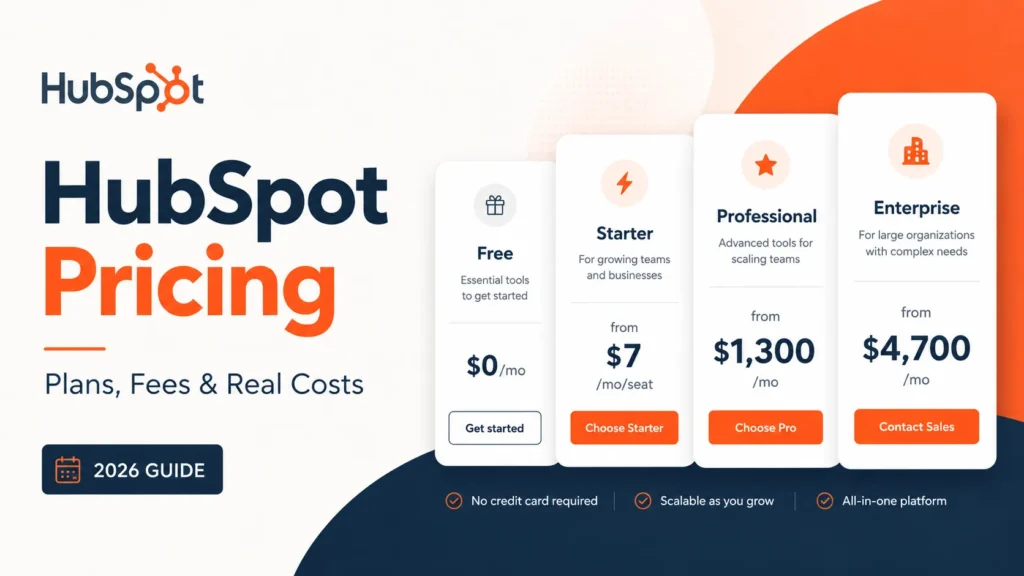
| Starter | $20 per seat per month list, $10 promotional for new customers | $7 per seat per month promotional for new customers | Per seat | 500 credits a month |
| Professional | $1,450 per month | $1,300 per month | 6 Core Seats, extras from $45 per seat per month | 5,000 credits a month |
| Enterprise | Billed annually only | Starts at $4,700 per month | 8 Core Seats, extras from $75 per seat per month | 10,000 credits a month |
Source: HubSpot Customer Platform pricing page, checked September 7, 2026. The Starter promotional rates are stated on the Starter offer page linked in the verdict above.
Two numbers on that table decide most budgets: the jump from a few dollars a seat on Starter to the Professional platform base, and the further jump to the Enterprise base.
Those are not per-seat prices at Professional and Enterprise. They are platform base prices with a fixed number of seats included, and extra Core Seats bill separately at the rate shown in the table.
Individual hubs price differently. Marketing, Content, and Data hubs use a flat platform fee at Professional and Enterprise, while Sales, Service, and Revenue hubs stay per-seat all the way up.
That distinction is the single most misread part of HubSpot pricing, and I will return to it in the seat section.
How to Read HubSpot’s Annual vs Monthly Prices
HubSpot displays paired numbers on most hubs, and the lower figure is the annual rate billed up front for the year. The higher figure is the month-to-month rate.
Starter is the exception, and it is where the live pricing cards mislead. The card shows a struck-through list price and a promotional figure with the annual toggle selected, and the monthly promotional figure only appears on the Starter offer page.
| Starter Customer Platform seat | Rate shown | Who gets it |
|---|---|---|
| List price | $20 per seat per month | Existing customers and anyone outside the promotion |
| Promotional, annual commitment | $7 per seat per month, described as 65 percent off | New customers, for a limited time, paid up front for the year |
| Promotional, monthly | $10 per seat per month, described as 50 percent off | New customers, for a limited time, no annual commitment |
Source: HubSpot Starter offer page, checked September 7, 2026, which states both promotional rates and the list price.
Enterprise tiers add a second wrinkle. The catalog marks every Enterprise edition as billed annually, which in practice means a twelve-month commitment rather than a monthly bill.
| Billing choice | Effect on cost | Buyer note |
|---|---|---|
| Annual, paid up front | Lower per-seat and per-hub rate | Requires the full-year cash commitment on day one |
| Monthly | Higher effective rate on most hubs | Useful only for short pilots you plan to cancel |
| Enterprise | Billed annually per the catalog | Budget for a 12-month contract, not a monthly bill |
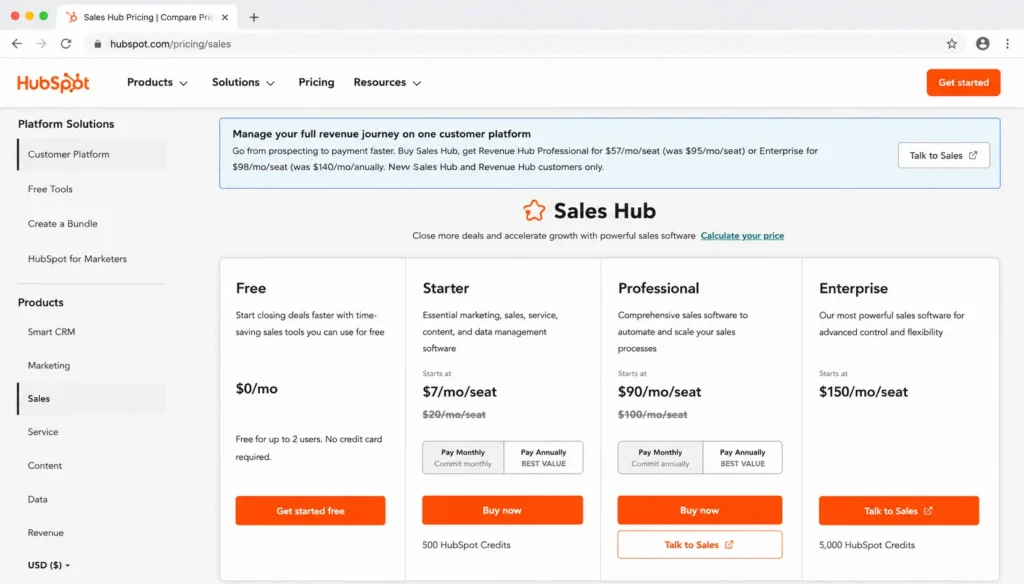
Screenshot-style mockup of the HubSpot Sales Hub pricing page showing the Free, Starter, Professional, and Enterprise pricing cards with monthly and annual billing toggle options.
Annual billing is cheaper per unit but demands the whole year’s cash immediately. For a pilot you intend to cancel, the monthly promotional Starter rate protects you from a locked year at a small premium over the annual rate.
I would not budget a HubSpot purchase from the annual rate alone, because the cash the finance team must approve on day one is twelve of those months at once.
If You Are a Solo User or Two
HubSpot Free is the right starting point for a solo operator or a two-person team that needs contact management, deal tracking, and basic email. Free covers up to 2 users and up to 1,000 contacts, with a cap of 1 million records across other standard objects, per HubSpot’s Free Tools pricing FAQ.
Free is evaluation-grade and small-team-grade, not growth-grade. The ceiling that forces an upgrade is rarely the contact count first. It is the absence of automation, custom reporting, and branding removal.
| Scenario | Recommended plan | Real monthly cost | Real annual cost |
|---|---|---|---|
| Solo, basic CRM | Free | 0 dollars | 0 dollars |
| 2 users, new customer, annual Starter | Starter | 14 dollars | 168 dollars |
| 2 users, new customer, monthly Starter | Starter | 20 dollars | 240 dollars |
| 2 users, list-price Starter | Starter | 40 dollars | 480 dollars |
Source: HubSpot Free Tools pricing page for the Free limits, checked September 7, 2026; the Starter rates are the three rates sourced in the billing section above, multiplied by two seats.
The two-user Starter math assumes no add-ons and no extra credits. At this size, the honest recommendation is to stay on Free until a specific paid feature blocks a workflow, then buy Starter for only the seats that need it.
Solo users rarely regret HubSpot Free. They regret assuming Free will carry a growing pipeline, which it will not once lifecycle automation and reporting become daily work.
If You Have a 5-Person Team
A five-person team that mainly needs a shared CRM, contact records, and light email should start on Starter, not Professional. Five Starter seats for a new customer cost 35 dollars a month on the annual promotion, or 50 dollars a month on the monthly promotion, against 100 dollars a month at list price.
Over a year that is 420 dollars on the annual promotion, 600 dollars on the monthly promotion, or 1,200 dollars at list price, all from the three Starter seat rates sourced in the billing section above.
Those figures assume no marketing-contact overages, no extra HubSpot Credits, and no paid onboarding, which Starter does not require. The trap at five people is upgrading to Professional too early because a single teammate wants one automation feature.
The upgrade trigger to watch is not headcount. It is the first time the team needs multi-step automation, lead scoring, or custom reporting that Starter gates behind Professional.
If You Have 10 to 20 Users
This is where HubSpot stops being cheap. A marketing-led team of ten that needs real marketing automation lands on Marketing Hub Professional, and the base plan includes only 3 Core Seats.
Marketing Hub Professional showed $800 per month on annual billing, or $890 per month on monthly billing, with 2,000 marketing contacts and 3,000 credits included, plus a required $3,000 one-time Professional onboarding fee. Ten Core Seats means paying for seven additional seats, and additional Core Seats on Professional start at $45 per seat per month.
| Cost line, marketing-led team of 10 | Amount |
|---|---|
| Marketing Hub Professional base, annual billing | 800 dollars a month |
| 7 additional Core Seats at the Professional rate | 315 dollars a month |
| Running subscription before contact overages | 1,115 dollars a month |
| Required Professional onboarding, one-time | 3,000 dollars |
| First-year total before contact overages | 16,380 dollars |
| Renewal-year total, no repeat onboarding | 13,380 dollars |
Source: HubSpot Marketing Hub pricing page, checked September 7, 2026; totals are this guide’s arithmetic from the listed rates.
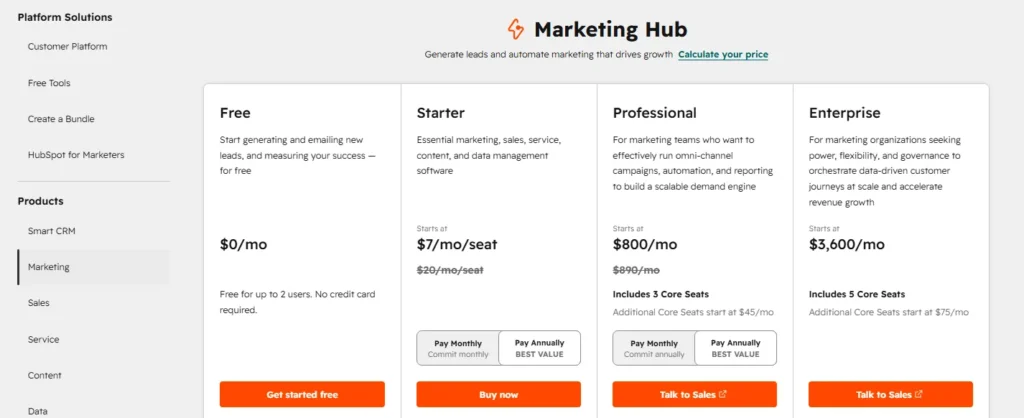
Screenshot-style mockup of the HubSpot Marketing Hub pricing page showing Free, Starter, Professional, and Enterprise tiers with annual pricing and plan CTAs.
The number most teams miss is that onboarding line, which is a one-time official fee on Marketing Hub Professional, not an optional partner service. It inflates year one by roughly 22 percent over the subscription alone, then disappears at renewal.
A ten-person sales team follows a cheaper path, because Sales Hub Professional prices per seat rather than as a platform fee. Sales Hub Professional showed $90 per seat per month on annual billing, or $100 per seat per month on monthly billing, plus a required one-time $1,500 Professional onboarding fee.
Ten Sales Hub Professional seats therefore run 900 dollars a month on annual billing. That is a first-year total of 12,300 dollars including onboarding and a renewal year of 10,800 dollars, per the Sales Hub pricing page checked September 7, 2026.
The lesson at 10 to 20 users is that your cost is driven by which hub you buy, not by headcount alone. Marketing Hub’s flat base plus seat add-ons and contact tiers costs more than Sales Hub’s straight per-seat model at the same team size.
If You Have 25 or More Users
At 25 users the per-seat hubs scale linearly and the platform hubs get heavy. A 25-rep sales org on Sales Hub Professional pays 2,250 dollars a month at the annual seat rate, or 2,500 dollars a month at the monthly seat rate.
Add the one-time Professional onboarding fee of 1,500 dollars sourced in the previous section and the first year lands at 28,500 dollars, with a renewal year of 27,000 dollars.
A 50-person team on the bundled Customer Platform makes the platform-fee math concrete. Customer Platform Professional starts at $1,300 per month on annual billing with 6 Core Seats, per the Customer Platform pricing page checked September 7, 2026. The 44 extra seats at the Professional Core Seat rate add 1,980 dollars a month, reaching about 3,280 dollars a month, or roughly 39,360 dollars a year before hub-specific onboarding and contact overages.
The Enterprise version of that same 50-person platform is far steeper. Customer Platform Enterprise starts at $4,700 per month with 8 Core Seats on the same page. The 42 extra seats at the Enterprise Core Seat rate add 3,150 dollars a month, reaching about 7,850 dollars a month, or roughly 94,200 dollars a year before add-ons.
At 25-plus users, list price is your negotiation floor, not your final number. Public pricing does not reflect negotiated enterprise discounts, so I would treat these totals as the anchor you bring into a procurement conversation, then ask HubSpot for volume and multi-hub concessions in writing.
The Hidden Costs That Change the Bill
HubSpot’s plan cards hide four cost levers that routinely surprise finance: marketing contacts, onboarding fees, extra seats, and HubSpot Credits. Each one is official and documented in HubSpot’s Product and Services Catalog, cited beneath the tables in this section, and each one recurs differently.
| Hidden cost | What it is | When it hits |
|---|---|---|
| Marketing contact tiers | Extra billed blocks of marketing contacts above the included allowance | When your marketing contact count crosses a tier |
| Required onboarding | One-time official fee on several Professional and Enterprise hubs | At initial purchase of the gated tier |
| Additional Core Seats | Per-seat charge above the seats bundled into the plan | When headcount exceeds included seats |
| HubSpot Credits overage | Usage charge for AI agents and data features beyond the monthly allotment | When credit-consuming features exceed the included pool |
| AEO add-on | Answer-engine visibility tracking, included with Marketing Hub Professional and Enterprise | Only for accounts without Marketing Hub Professional or Enterprise, billed monthly or annually |
| LinkedIn Sales Navigator | Third-party license that Sales Hub LinkedIn actions require | Not included in HubSpot pricing, billed by LinkedIn |
| Partner implementation | Optional migration and setup services from a HubSpot partner | Only if you hire a partner, not a mandatory HubSpot fee |
Screenshot-style image of HubSpot’s legal terms page, showing three sections for customers, partners and programs, and everyone, with a link to HubSpot’s Trust Center.
Marketing contacts, extra seats, and credit overage recur every billing cycle, while onboarding is one-time and partner implementation is optional. The AEO add-on lists at $50 per month standalone or $45 per month on annual billing, with extra prompt packs at $20 per month. It is a real cost only for accounts without Marketing Hub Professional or Enterprise, which the catalog says already include it.
The line item that breaks the most budgets is marketing contacts, because it scales with database growth rather than headcount, and it can climb faster than the team ever grows.
Marketing contacts are the real cost driver
For a marketing team, contacts often cost more than seats. HubSpot includes a base allowance, then bills extra blocks as your marketing contact count rises, and the block price falls as volume climbs.
| Marketing tier | Included marketing contacts | Block size | Block price by band, per month |
|---|---|---|---|
| Starter | 1,000 contacts | 1,000 contacts | $50 for 1,001 to 3,000, then $45 to 5,000, then $40 beyond |
| Professional | 2,000 contacts | 5,000 contacts | $250 for 2,001 to 22,000, falling in $25 steps to $150 beyond 82,000 |
| Enterprise | 10,000 contacts | 10,000 contacts | $100 for 10,001 to 50,000, falling in $10 steps to $60 beyond 500,000 |
Source: Marketing Contacts Pricing table in the HubSpot Product and Services Catalog, checked September 7, 2026.
Three catalog rules make this sharper. Non-marketing contacts are free, up to a limit of 15 million total contacts, so a large database only costs money for the contacts you actually email or target with ads.
Crossing a tier bills immediately, so a campaign that imports a large list mid-cycle raises the bill that cycle. Downgrading a contact tier, by contrast, takes effect only at renewal, so you carry the higher tier until the contract term ends.
A newsletter-heavy business on Marketing Hub Professional can watch contacts, not features, become the reason the renewal quote jumps. I would model contact growth for the next twelve months before committing, because the tier you land on at renewal is the tier you pay for.
HubSpot Credits are the 2026 cost lever
HubSpot Credits are the line most 2026 pricing guides still miss. Credits power AI agents such as the customer, prospecting, and data agents, plus Breeze workflow actions and Data Studio, and each paid plan includes a monthly allotment.
| Credit rule | Detail | Buyer consequence |
|---|---|---|
| Included pool, single hub | 500 credits on Starter, 3,000 credits on Professional, 5,000 credits on Enterprise | Marketing, Sales, Service, Content, and Revenue hubs share this schedule |
| Included pool, Data Hub or Customer Platform | 500 credits on Starter, 5,000 credits on Professional, 10,000 credits on Enterprise | Only these two products reach the 10,000 pool |
| Extra credits | $0.010 per credit pay-as-you-go, or a capacity pack at $10 per 1,000 credits a month | AI and data usage becomes a variable cost |
| Reset cadence | Unused credits reset monthly | No rollover, unused credits are lost |
| Allotment scope | Credits are not additive across products | Multiple hubs give you the highest single pool, not the sum |
| Data agent rate | 10 credits per prompt for one record | 10 cents per record at the pay-as-you-go rate |
| Customer agent rate | 50 credits per conversation resolved | 50 cents per resolution |
| Prospecting agent rate | 100 credits per outreach recommendation for one lead | 1 dollar per lead |
| Breeze workflow action rate | 10 credits per action executed | 10 cents per action |
| Data Studio rate | 25 credits to 200 credits per dataset use, by source size | 25 cents to 2 dollars per use |
Sources: the HubSpot Credits page for the per-credit and pack rates, plus the Included Credits table and Credits Rate Sheet in the catalog cited above, checked September 7, 2026. Cent values are this guide’s arithmetic.
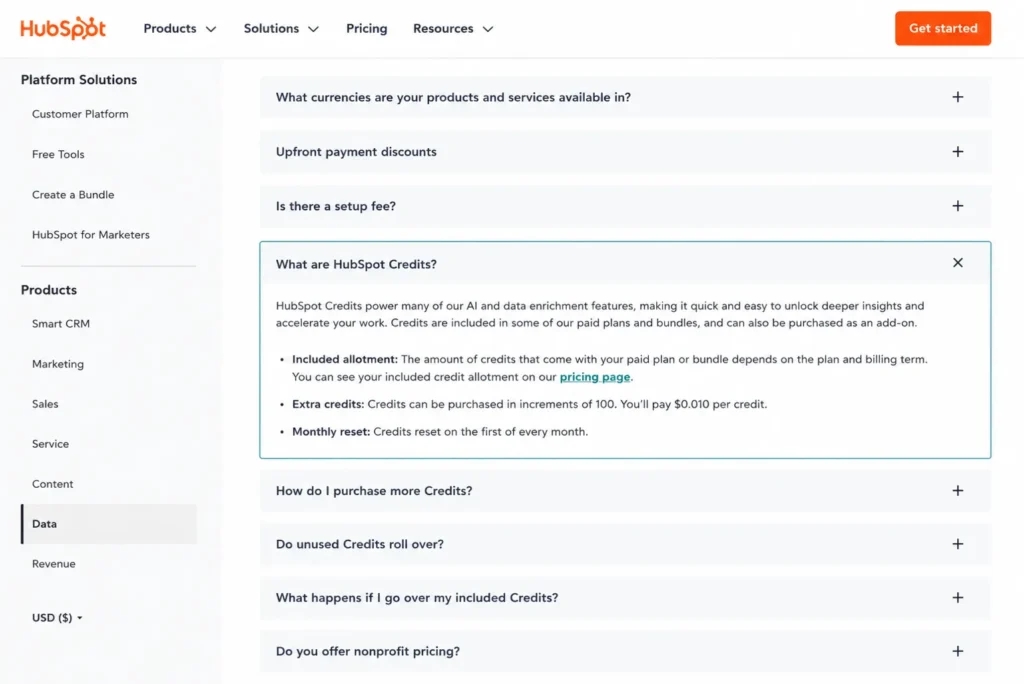
Screenshot-style mockup of HubSpot’s Data Hub pricing FAQ showing HubSpot Credits details, including included allotments, extra credit pricing, and monthly reset rules.
Credits move HubSpot from a pure seat-and-contact model toward hybrid usage pricing. The practical risk is a Data Hub or Breeze workflow that quietly consumes credits every month, then bills overage once the pool empties.
The renewal question I would answer first is whether your AI and enrichment usage fits the included pool, or whether credit overage is about to become a recurring line. The pricing pages also advertise a lower annual credit rate of nine dollars per thousand, so a team with predictable usage should price a committed pack rather than pay as it goes.
Full Plan Breakdown by Hub
Each hub gates features differently, and the gate that forces an upgrade is rarely the one on the plan card. Below is what changes as you move up each hub, with every rate checked on September 7, 2026 against the hub’s own pricing page and the Product and Services Catalog.
Seats explained: the taxonomy that prevents overpaying
The most expensive HubSpot mistake is multiplying the wrong seat price by your whole company. HubSpot uses several seat types, and most employees do not need a paid one.
| Seat type | What it covers | Typical cost |
|---|---|---|
| View-Only Seat | Viewing records without making changes | Included at no additional cost on every tier |
| Partner Seat | View access for a HubSpot Solutions Partner you work with | Included at no additional cost |
| Core Seat | Full access to purchased products, Breeze Assistant, and Smart CRM | Bundled seats included, extras from $45 per seat per month on Professional annual billing or $75 per seat per month on Enterprise |
| Sales Seat | Full Sales Hub Professional or Enterprise functionality, plus Core Seat access | $90 to $100 per seat per month on Professional, $150 per seat per month on Enterprise |
| Service Seat | Full Service Hub Professional or Enterprise functionality, plus Core Seat access | $90 to $100 per seat per month on Professional, $150 per seat per month on Enterprise |
| Revenue Seat | Full Revenue Hub Professional or Enterprise functionality, plus Core Seat access | $85 to $95 per seat per month on Professional, $140 per seat per month on Enterprise |
Source: HubSpot Seats table in the HubSpot Product and Services Catalog, checked September 7, 2026, with seat rates from each hub’s pricing page linked in the hub sections below.
A 40-person company does not need 40 paid seats. Only the users who run marketing, sales, service, or quoting workflows need one, and everyone else can sit on a View-Only Seat, which changes the total dramatically.
One catalog rule matters for mixed accounts: all Core Seats take the access level, and the price, of the highest tier you own, so adding one Enterprise hub reprices every Core Seat.
Marketing Hub
Marketing Hub Free covers basic forms and email with HubSpot branding. Marketing Hub Starter, at the $20 per seat per month list price or the promotional rates above, adds 1,000 marketing contacts and removes some limits, but its automation is capped to a limited set of actions.
Marketing Hub Professional, at $800 per month on annual billing, is where real automation, lead scoring, campaign tools, and omni-channel workflows open up. That automation gate, not the contact count, is usually why teams upgrade from Starter.
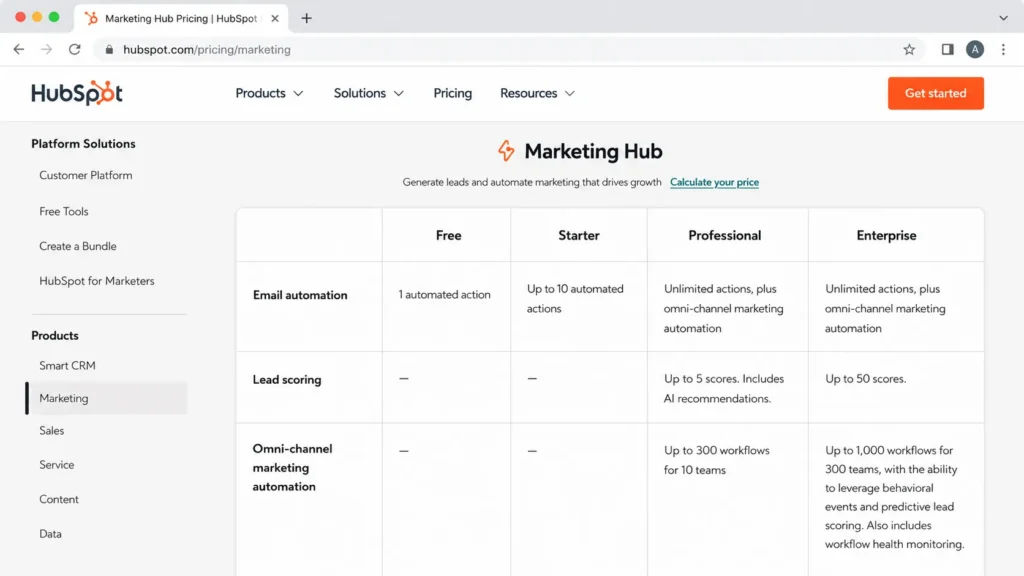
Screenshot-style mockup of HubSpot’s Marketing Hub feature comparison table, highlighting how email automation, lead scoring, and omni-channel marketing automation differ across Free, Starter, Professional, and Enterprise plans.
Marketing Hub Enterprise starts at $3,600 per month with 5 Core Seats, 10,000 marketing contacts, and 5,000 credits, and carries a required one-time $7,000 Enterprise onboarding fee.
The Starter-to-Professional automation cliff is the decision that matters here. The Enterprise jump is a governance and scale decision, not a feature-access one.
Sales Hub
Sales Hub prices per seat the whole way up, which makes it the cleaner math for a growing sales team. Sales Hub Professional runs $90 per seat per month on annual billing with a $1,500 onboarding fee, and Sales Hub Enterprise runs $150 per seat per month with a $3,500 onboarding fee.
Outbound teams should size Sales Hub on capacity, not just features. Sequences, daily send caps, and a LinkedIn dependency decide whether the plan supports real outbound volume, and the catalog states the caps.
| Sales Hub capacity check | Professional | Enterprise |
|---|---|---|
| Sequences per account | 5,000 sequences | 5,000 sequences |
| Sequence email sends | 500 sends per user per day | 1,000 sends per user per day |
| Trigger sequences from workflows | Not listed | Included |
| LinkedIn actions | Require a Sales Navigator subscription | Require a Sales Navigator subscription |
Source: Sales Hub pricing page for seat rates and onboarding, checked September 7, 2026; sequence caps from the Sales Hub entries of the catalog cited in the seats section above.
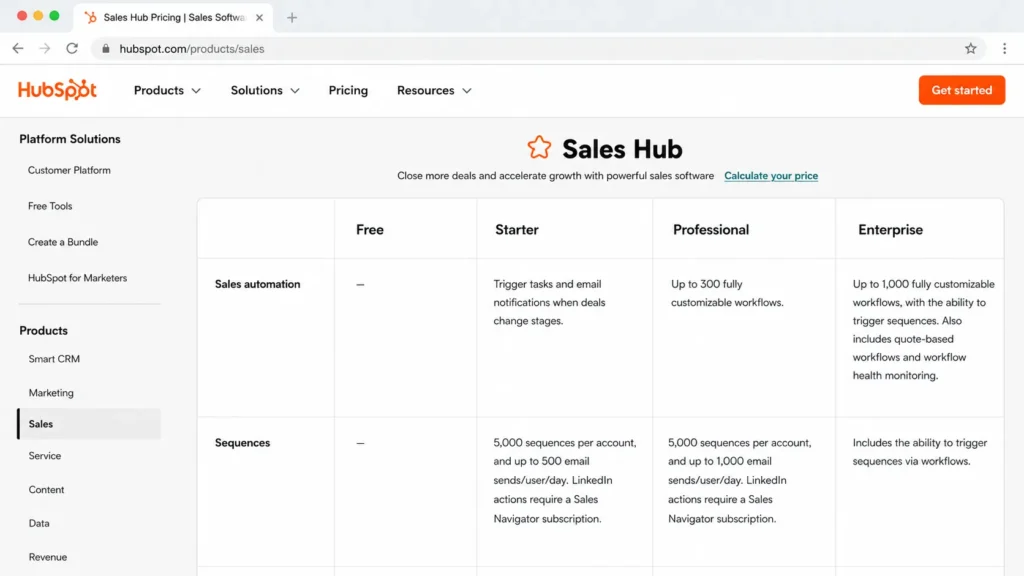
Screenshot-style mockup of HubSpot’s Sales Hub feature comparison table, highlighting sales automation, sequences, email send limits, and the LinkedIn Sales Navigator requirement.
An SDR team running high daily volume should check the 500-send Professional cap against its real cadence before buying, and budget the Sales Navigator license separately. That LinkedIn dependency is a real, recurring cost that sits outside HubSpot’s own pricing.
Service Hub
Service Hub also prices per seat. Service Hub Professional runs $90 per seat per month on annual billing or $100 per seat per month on monthly billing, with a $1,500 onboarding fee. Service Hub Enterprise runs $150 per seat per month with a $3,500 onboarding fee, per the Service Hub pricing page checked September 7, 2026.
The right tier depends on your support operating model, not your CRM size.
| Support model | Likely fit |
|---|---|
| Simple ticketing, one shared inbox | Starter |
| Growing help desk with bots, surveys, and automation | Professional |
| Multi-channel support with governance and scale | Enterprise |
The gate that matters for support leaders is shared inbox count, bot availability, and survey caps, which HubSpot’s catalog splits by tier. A small team drowning in one inbox may need Professional sooner than headcount suggests, because the bot and automation tools live there.
Content Hub
Content Hub covers website and CMS work. Content Hub Professional is priced at $450 per month on annual billing or $500 per month on monthly billing with 3 Core Seats. Content Hub Enterprise is priced at $1,500 per month with 5 Core Seats, per the Content Hub pricing page checked September 7, 2026.
CMS pricing is not only subscription pricing, because migration effort and hosting limits carry real cost and risk.
| Content Hub caveat | Detail |
|---|---|
| Migration | Migration paths and support vary by tier per the official FAQ |
| Support access | Support channels differ by tier |
| Hosting throttling | HubSpot reserves the right to throttle or optimize excessive hosted-content bandwidth |
| Credits | Content AI features draw on the monthly HubSpot Credit pool |
Switching a live website to Content Hub is a project, not a checkout. The throttling clause and tier-gated migration support mean a high-traffic content operation should scope migration and bandwidth before assuming the subscription price is the full cost.
Data Hub
Data Hub is the clearest example of HubSpot’s shift toward usage pricing. Data Hub Professional runs $720 per month on annual billing or $800 per month on monthly billing with 1 Core Seat and 5,000 credits. Data Hub Enterprise runs $2,000 per month with 1 Core Seat and 10,000 credits, per the Data Hub pricing page checked September 7, 2026.
The catalog states that Data Studio and the data agent consume HubSpot Credits, and the rate sheet prices the data agent at ten credits per record per prompt. Enterprise adds bi-directional cloud data warehouse integrations for platforms like Snowflake, BigQuery, and AWS S3.
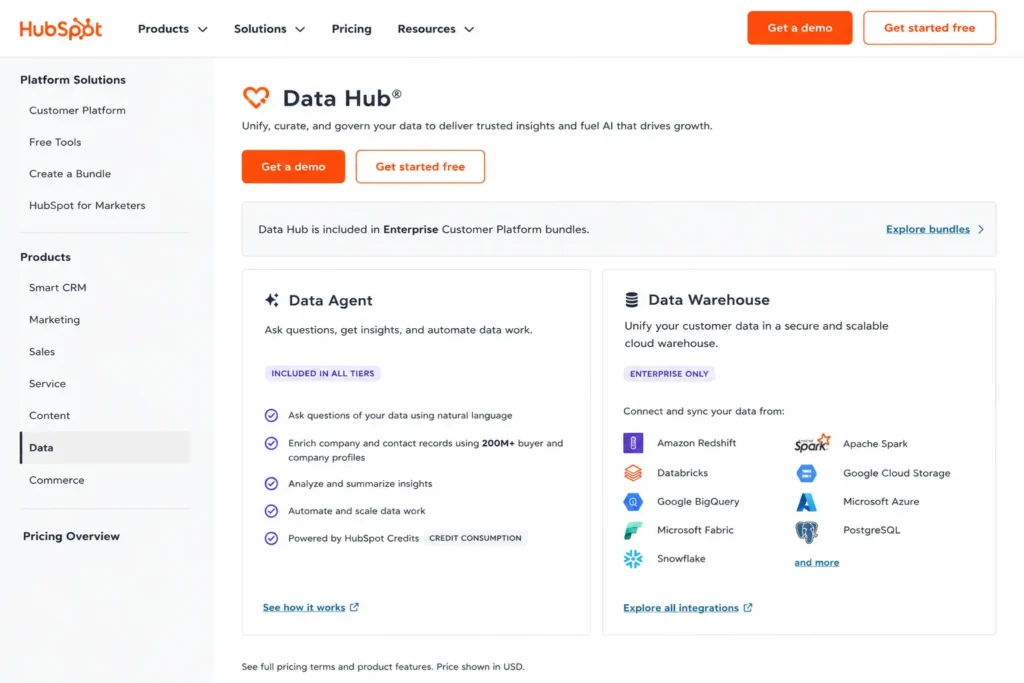
Screenshot-style mockup of HubSpot’s Data Hub page showing Data Agent credit usage and Enterprise Data Warehouse integrations.
For a RevOps or data team, enrichment volume is the cost variable to model. A team enriching ten thousand records a month through the data agent uses one hundred thousand credits, which is twenty times the Professional pool and costs about 950 dollars a month in overage at the pay-as-you-go rate. That turns Data Hub into a usage bill rather than a flat subscription.
Revenue Hub
Revenue Hub is the catalog’s new name for Commerce Hub, and it covers quotes, invoices, payments, and CPQ approvals. Revenue Hub Professional runs $85 per seat per month on annual billing or $95 per seat per month on monthly billing with 3,000 credits. Revenue Hub Enterprise runs $140 per seat per month with 5,000 credits.
On the check date the same page carried a promotional bundle for new Sales Hub customers: Revenue Hub Professional at $57 per seat per month, or Revenue Hub Enterprise at $98 per seat per month, on annual billing.
The seat price is only part of the bill, because collecting money through HubSpot carries a platform fee on top of payment processing.
| Revenue Hub cost line | Detail |
|---|---|
| Platform fee with HubSpot payments | 0.5 percent per transaction, ACH capped at $10, after a first-year promotion with no platform fee |
| Platform fee with Stripe processing | 0.75 percent per transaction, ACH uncapped |
| Availability | United States, Canada, and the United Kingdom |
Source: Revenue Hub pricing page, checked September 7, 2026, including the payment processing options section.
A team that invoices through HubSpot should model transaction volume, because a half-percent platform fee on a large invoice run can exceed the seat cost of the hub.
The Enterprise implementation caveats
Enterprise buyers should price the implementation limits, not just the license. HubSpot’s catalog documents constraints that affect larger, integrated architectures.
| Enterprise constraint | Catalog limit | Why it matters |
|---|---|---|
| Standard sandbox | One sandbox, import up to 200,000 records per object type, enroll up to 100,000 records per day in workflows | Testing at scale hits the enrollment cap before the record cap |
| Salesforce integration | Up to 500 field mappings per object, up to 10,000 Salesforce owners, one Salesforce account at a time | Deep Salesforce-connected data models need mapping triage |
| Multi-account management | Account limits and requirements apply to multi-brand or multi-region setups | Business-unit structures need a scoping call before signing |
Source: sandbox and CRM integration entries in the HubSpot Product and Services Catalog, checked September 7, 2026.
A team planning a Salesforce-connected enterprise rollout should confirm the field-mapping and sandbox limits against its data model before signing. These are CRM implementation risks that raise cost and timeline, and they rarely appear on a pricing page.
Support Access by Plan Tier
Support channels rise with the plan, and for a small team without a technical admin, that difference is a real cost factor. The Product and Services Catalog lists the channels per tier under the 1:1 technical support entry of each hub, checked September 7, 2026.
| Plan tier | Support access per the catalog |
|---|---|
| Free | Community, HubSpot Academy, and knowledge base |
| Starter | Email and in-app chat support |
| Professional | Email, in-app chat, and phone support |
| Enterprise | Email, in-app chat, and phone support |
Phone support starts at Professional, not Enterprise, so a five-person team without an in-house HubSpot admin does not need the Enterprise tier to get a person on the line. What Enterprise buys is governance and scale, and the support channels are the same as Professional.
Which HubSpot Plan Should You Choose?
The decision tree below maps team profile to the plan I would recommend, using public list prices and the feature gates above.
| Your situation | Plan to choose | Why |
|---|---|---|
| Evaluating, or solo with basic CRM needs | Free | Full CRM basics at no cost for a two-person team |
| Small team needing shared CRM and light paid tools | Starter | Cheap per seat, no onboarding fee, phone support not included |
| Team needing automation, lead scoring, or custom reporting | Professional, single hub or Customer Platform | This tier opens the automation and reporting gates most teams came for |
| Large org needing governance, sandboxes, and data scale | Enterprise | Admin, security, sandbox, and integration scale justify the jump |
| Price is the primary constraint | Consider a competitor | HubSpot’s Professional cliff is steep for tight budgets |
Start on Free if you are evaluating, move to Starter for cheap shared CRM, and treat Professional as the real commitment because that is where automation, scoring, and reporting live. Reserve Enterprise for governance, sandbox, sensitive-data, and multi-team scale rather than buying it for prestige.
Why Professional feels expensive
Professional is the HubSpot price cliff, and the jump is not arbitrary. It bundles the features most teams were shopping for.
| Feature added at Professional | Why it matters | Who should pay |
|---|---|---|
| Multi-step automation and workflows | Lifecycle nurturing and routing stop being manual | Teams running real marketing or sales automation |
| Lead scoring | Prioritizes pipeline instead of guessing | Sales and marketing teams with volume |
| Custom reporting and dashboards | Reporting the leadership team will trust | Any team defending numbers to finance |
| Omni-channel and advanced campaign tools | Coordinated marketing beyond single-channel email | Marketing teams past basic email |
The Professional price stops feeling like a penalty once you map it to those four gains.
If your team needs none of them, Professional is overkill and Starter is the honest choice. If it needs two or more, Professional is the plan you were always going to buy.
Which HubSpot Plan Should You Avoid?
Avoid Marketing Hub Professional if your value comes almost entirely from a large contact list rather than automation. The contact tiers plus the $3,000 onboarding fee make Marketing Hub Professional an expensive way to send email, and a dedicated email platform will cost far less.
Avoid Enterprise if you cannot name the specific governance, sandbox, or scale feature you are buying. Paying $4,700 per month for the Customer Platform Enterprise base without a concrete admin or compliance need is the most common HubSpot overspend.
There is an exception on both counts. Marketing Hub Professional earns its price for teams running genuine lifecycle automation and scoring, and Enterprise earns its price for regulated or multi-team organizations that need the governance controls.
HubSpot Pricing vs Competitors
HubSpot sits at the premium end of the CRM market, and a quick anchor helps you judge whether that premium fits your use case. Every competitor rate below was read from the vendor’s own pricing page on September 7, 2026, on the annual toggle unless stated.
| Competitor | Entry price | Best for |
|---|---|---|
| HubSpot | Free, or Starter from $7 per seat per month promotional on an annual commitment | Bundled CRM, marketing, sales, and service on one record |
| Salesforce | Starter Suite at $25 per user per month, monthly or annual, and Pro Suite at $100 per user per month annual | Governance-heavy and highly customized enterprises |
| Pipedrive | Lite $14, Growth $39, Premium $59, Ultimate $79 per seat per month on annual billing | Sales-focused teams wanting a lean pipeline CRM |
| ActiveCampaign | Starter from $15 per month on annual billing for 1,000 contacts and one user | Email and marketing automation on a smaller budget |
| Zoho CRM | Standard $14, Professional $23, Enterprise $40, Ultimate $52 per user per month on annual billing, free edition for 3 users | Cost-sensitive teams wanting broad CRM features |
Sources, all checked September 7, 2026: HubSpot Free Tools pricing page and Salesforce Sales Cloud pricing. Pipedrive pricing and ActiveCampaign pricing. Zoho CRM pricing, read with the currency selector on US dollars.
HubSpot’s entry seat looks competitive, but its practical tier does not. Once a team needs Professional-level automation, HubSpot’s platform fees and contact tiers push it above lean sales CRMs and above email-first tools, while Salesforce becomes the comparison only when governance and deep customization justify the cost.
Zoho CRM’s monthly rates run higher than its annual rates, at $20 for Standard, $35 for Professional, $50 for Enterprise, and $65 for Ultimate per user per month, which is worth knowing if you compare month-to-month pilots.
For a sales-only team, Pipedrive’s Growth seat undercuts HubSpot’s practical path.
For marketing automation on a budget, ActiveCampaign’s entry price is a fraction of Marketing Hub Professional plus onboarding.
Is HubSpot Worth the Price?
HubSpot is worth its price when you consolidate marketing, sales, and service onto one CRM and use the Professional automation you are paying for. The value is the shared data model and the workflows across hubs, not any single feature.
HubSpot is not worth it in three cases. A price-sensitive sales-only team overpays for hubs it will not use, a newsletter business overpays through contact tiers, and a team unwilling to fund onboarding will stall on a Professional hub that assumes it.
| Worth it if | Not worth it if |
|---|---|
| You run multi-hub workflows on shared CRM data | You need only a lightweight sales pipeline |
| You will use Professional automation and reporting | Your value is a large contact list, not automation |
| You can fund required onboarding at year one | Onboarding fees break the budget before value lands |
| You need governance and scale at Enterprise | You cannot name the Enterprise feature you need |
The honest verdict is that HubSpot rewards consolidation and punishes partial adoption.
If you will use two or three hubs and the automation tier, it earns the premium. If you will use one narrow function, a more focused HubSpot alternative is the better buy.
How to Avoid Overpaying for HubSpot
The levers below come straight from the catalog rules above, and each one is something a buyer controls before signing.
- Buy paid seats only for users who run workflows, and keep everyone else on a free View-Only Seat rather than multiplying the paid seat by headcount.
- Take the annual promotional Starter rate for a committed rollout, and use the monthly promotional rate only for a pilot you plan to cancel.
- Model twelve months of marketing-contact growth before buying Marketing Hub, since a downgrade only takes effect at renewal, and mark contacts you never email as non-marketing so they stay free.
- Confirm whether your AI and enrichment usage fits the included HubSpot Credit pool, and price a committed capacity pack rather than pay-as-you-go if the usage is predictable.
- Separate required onboarding from optional partner implementation, and treat only the official onboarding fee as mandatory.
- Bring list price to procurement as your floor, then ask HubSpot in writing for volume or multi-hub discounts at 25-plus seats.
- Buy a single hub instead of the Customer Platform bundle when only one function needs a paid tier, and remember that one Enterprise hub reprices every Core Seat.
- Check the HubSpot for Startups and HubSpot for Nonprofits programs, which the pricing FAQ lists as discount routes for eligible organizations.
FAQ
The questions below are the ones readers send most often after reading the plan tables.
Is HubSpot really free?
Yes, HubSpot’s core CRM is free for up to 2 users, with free tools that include up to 1,000 contacts and larger limits on other records. Free is genuinely usable for basic contact and deal management, but it excludes automation, custom reporting, and branding removal, which is why growing teams upgrade.
How much does HubSpot cost per user?
Starter seats list at $20 per seat per month, with new customers offered $7 per seat per month on an annual commitment or $10 per seat per month billed monthly, checked September 7, 2026. Sales and Service Hub Professional seats run $90 to $100 per seat per month, and Enterprise seats run $150 per seat per month. Marketing, Content, and Data hubs use a flat platform fee at Professional and Enterprise instead of pure per-seat pricing.
Is the $7 Starter price monthly or annual?
The $7 Starter rate is the promotional annual rate for new customers, paid up front for the year. The same promotion prices Starter at $10 per seat per month on monthly billing, and the list price without the promotion is $20 per seat per month.
Does HubSpot charge for contacts?
Marketing Hub charges for marketing contacts above the included allowance. Starter includes 1,000 contacts and bills extra blocks from $50 per 1,000, Professional includes 2,000 and bills extra 5,000-contact blocks from $250, and Enterprise includes 10,000 and bills extra 10,000-contact blocks from $100.
Non-marketing contacts are free up to 15 million total contacts. Crossing a tier bills immediately, and downgrades apply only at renewal.
Does HubSpot require annual contracts?
Starter, Professional, and per-seat hubs offer monthly or annual billing, with annual carrying the lower rate. The catalog marks Enterprise editions as billed annually, so budget Enterprise as a 12-month contract.
What are HubSpot onboarding fees?
Several Professional and Enterprise hubs carry a required one-time onboarding fee. Checked September 7, 2026, these were $3,000 on Marketing Hub Professional and $7,000 on Marketing Hub Enterprise. Sales Hub carries $1,500 on Professional and $3,500 on Enterprise, and Service Hub carries $1,500 on Professional and $3,500 on Enterprise.
These are official fees, separate from optional partner implementation.
What are HubSpot Credits?
HubSpot Credits power AI agents and data features. Each paid plan includes a monthly pool, extra credits cost $0.010 each or $10 per 1,000 in a capacity pack, unused credits reset monthly with no rollover, and the allotment is not additive across products.
They turn AI and data usage into a variable cost on top of your subscription, and the rate sheet prices each agent action so you can estimate it.
Is HubSpot more expensive than Salesforce?
At the entry level HubSpot is cheaper, since its Starter seat undercuts Salesforce’s Starter Suite seat. At the practical tier the answer depends on use case, because HubSpot’s platform fees and contact tiers can exceed Salesforce for marketing-heavy teams, while Salesforce often costs more for governance-heavy, highly customized enterprises.
Negotiated enterprise discounts, which are not public, change both.
Which HubSpot plan should a small business choose?
Most small businesses should start on Free or Starter and upgrade to Professional only when automation, scoring, or custom reporting becomes daily work, and it helps to weigh HubSpot against the best CRM for small business options first. Buying Professional before those needs exist is the most common small-business overspend, and the onboarding fee on some Professional hubs makes an early jump costly.
Your Next Step
Run your own numbers in the calculator above, then compare the first-year total against the renewal-year total before you talk to sales. If the gap between the two is mostly onboarding, the plan is probably right and the timing is the only question.
If the gap is mostly contacts or credits, model twelve months of growth first, because those two lines are the ones that move after you sign. Bring the list-price total to procurement as your floor, and ask for the discount in writing.