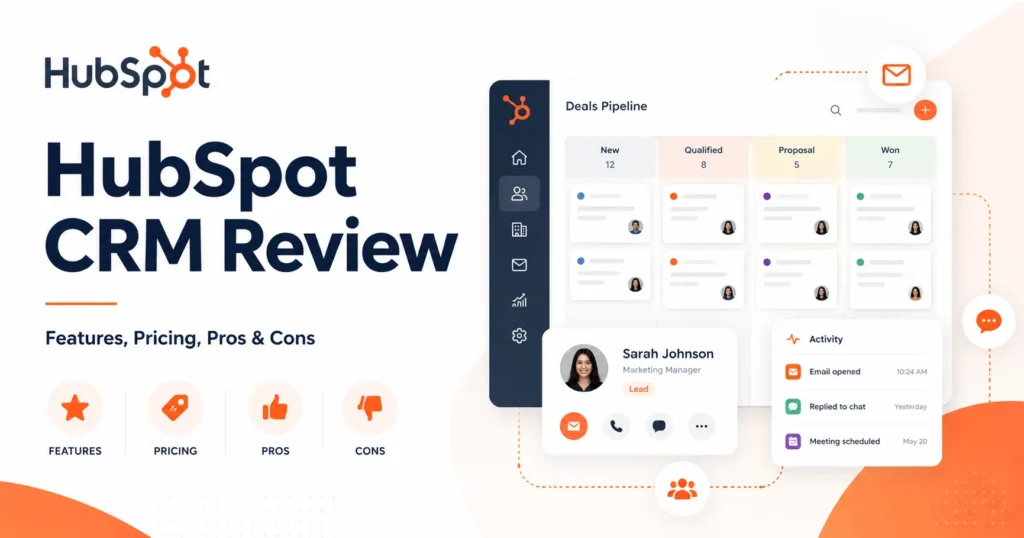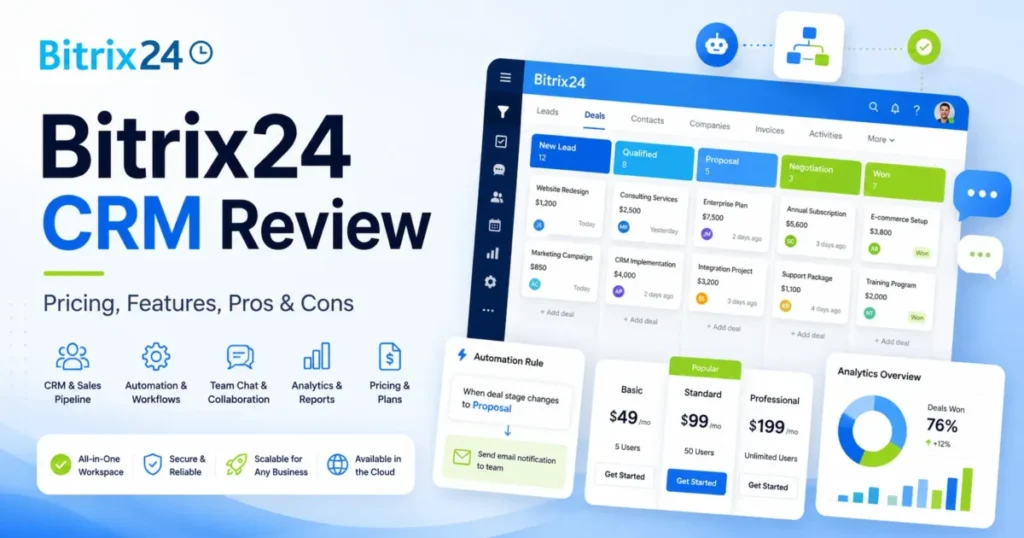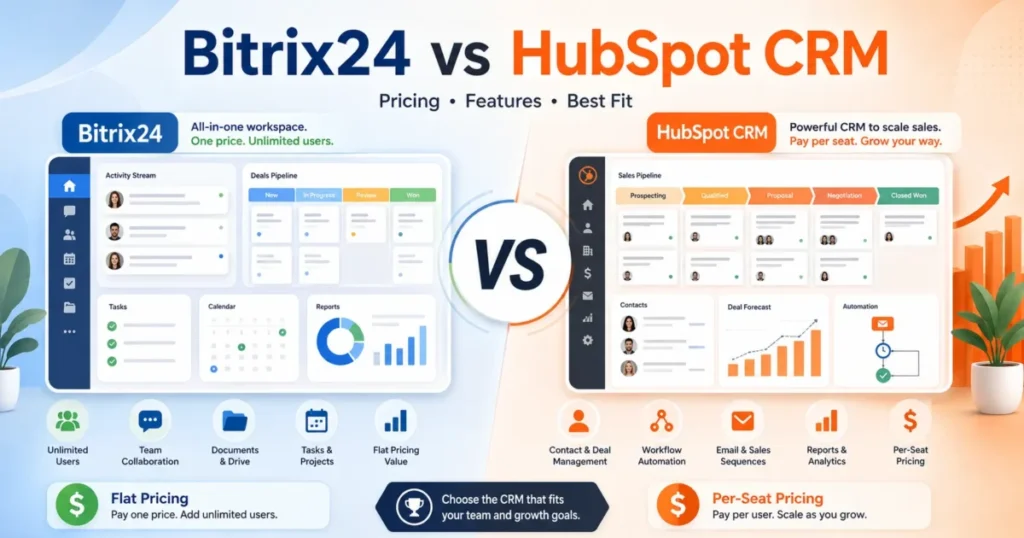
Bitrix24 and HubSpot CRM sell a similar promise to US sales teams, then bill for it in opposite directions. Bitrix24 charges one flat organization price inside a user cap, while HubSpot Sales Hub charges per paid seat.
So the headcount growth that costs Bitrix24 nothing arrives at HubSpot as a linear line item. Both products land on the same CRM software shortlist constantly, and they almost never win for the same buyer.
Choose Bitrix24 if you are collapsing CRM, projects, chat, and telephony into one subscription, if the team is heading past 20 users, or if self-hosting is a hard requirement. Choose HubSpot Sales Hub if the team is small and sales-only, if sequences and forecasting decide the deal, or if the rest of your go-to-market stack already sits on HubSpot.
The tension is not the feature list. It is whether you are buying a workspace or a revenue engine, and what each one bills after seat 20.
In This Article (28 sections)
Quick Verdict: Bitrix24 vs HubSpot CRM
| Category | Winner | Why |
|---|---|---|
| Free plan | Tie | Both official pages cap the free tier at 2 users; Bitrix24 adds tasks and chat, HubSpot adds a cleaner CRM |
| Cost at 5 seats | HubSpot Sales Hub | $420/ |
| Cost at 50 users | Bitrix24 | Standard is $1,188/ |
| Ease of use and adoption | HubSpot Sales Hub | Reviewer patterns consistently favor HubSpot on usability; Bitrix24 is described as needing training |
| Sales engagement and forecasting | HubSpot Sales Hub | Sequences, lead scoring, playbooks, and forecasting are documented Professional and Enterprise features |
| Projects and internal collaboration | Bitrix24 | Native tasks, Kanban, Gantt, chat, and video sit inside the same subscription |
| Automation | Tie | HubSpot goes deeper on sales workflows; Bitrix24 goes wider across CRM, tasks, marketing, and RPA |
| Integrations ecosystem | HubSpot Sales Hub | The official Sales Hub pricing page states more than 2,000 apps and services |
| Deployment and data control | Bitrix24 | An on-premise edition with source-code access exists; HubSpot has no equivalent |
| Price predictability | Bitrix24 | Flat tiers inside user caps vs per-seat billing plus onboarding fees, credits, and renewal-timed downgrades |
Source: Bitrix24 official US pricing page and HubSpot official Sales Hub pricing page, both checked 2026-07-17.
Two ties in ten categories is honest rather than diplomatic. The free plans genuinely converge at the same two-user ceiling, and the automation answer flips depending on whether you need depth in one workflow or coverage across six.
Everything else splits along one line. HubSpot wins the work a sales team does, and Bitrix24 wins the bill and the deployment options.
Bitrix24 vs HubSpot CRM at a Glance
| Attribute | Bitrix24 | HubSpot Sales Hub |
|---|---|---|
| Best for | 20 to 100 user teams consolidating CRM, projects, collaboration, and telephony | 10 to 50 person B2B sales teams with dedicated revenue operations |
| Not best for | Teams that need the simplest interface and fastest adoption | Large teams that need flat, predictable software cost |
| Starting price | $0 free, 1 to 2 users | $0 free, up to 2 users |
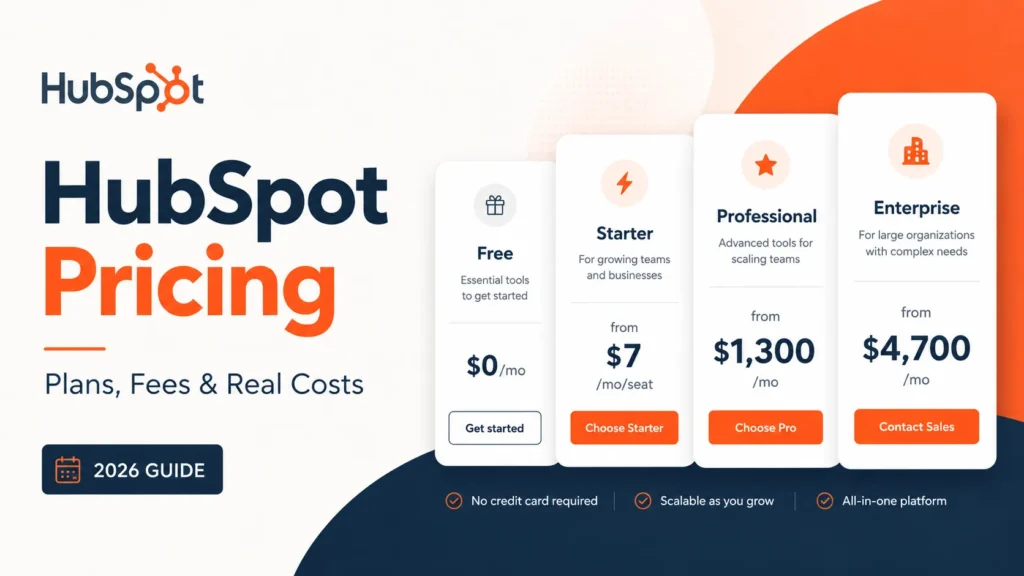
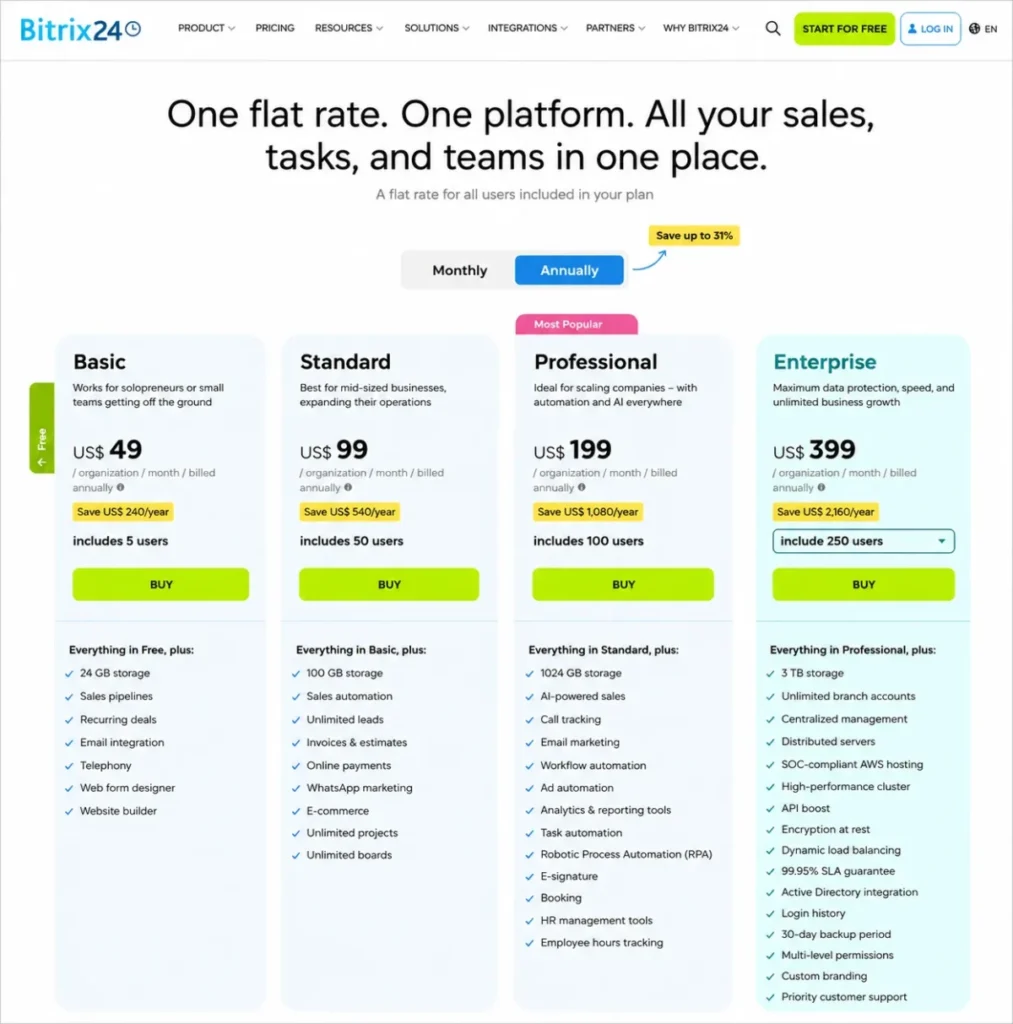
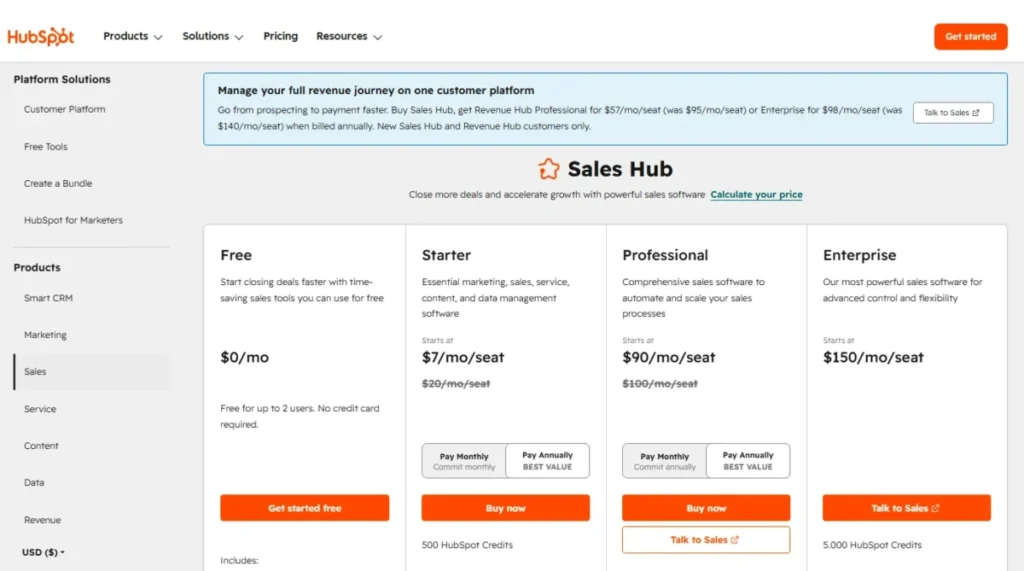
| Entry paid price | $49 per organization per month, billed annually, up to 5 users | $7 per seat per month, billed annually |
| Practical tier | Standard, $99 per organization per month billed annually, up to 50 users | Sales Hub Professional, $90 per seat per month billed annually, plus a one-time $1,500 onboarding fee |
| Free plan | 1 to 2 users, 5 GB, basic CRM, tasks with Kanban and Gantt, chat and video | Up to 2 users, 1,000 contacts, one deal pipeline, no expiration stated |
| Billing basis | Flat, per organization, inside a user cap | Per paid seat |
| Setup difficulty | High | Medium |
| Main strength | Scope. CRM, projects, telephony, forms, websites, and ecommerce in one price | Execution. Sequences, reporting, forecasting, training, and ecosystem depth |
| Main weakness | Interface density and plan-gated search and analytics limits | Seat cost at scale, mandatory onboarding, and a second usage meter in credits |
| Deployment | Cloud or self-hosted on-premise with source code | Cloud only, browser-first |
Source: Bitrix24 official US pricing page and HubSpot official Sales Hub pricing page, checked 2026-07-17. Prices are US dollars.
Methodology: How We Compared
This comparison is documentation-based. Every product fact below traces to an official vendor page, official documentation, an official developer or security page, or an official app listing, checked 2026-07-17.
Neither product was operated in a live account for this article, so every statement below is documentation-based for both vendors. Where reviewer opinion appears, it is paraphrased platform-level sentiment from G2, Capterra, TrustRadius, Software Advice, Gartner Peer Insights, and TechRadar, used only as context and never as the source of a product fact.
The comparison criteria are fixed for both vendors: current US pricing and billing basis, first-year total cost at real team sizes, plan and feature gates, CRM and sales workflow depth, project and collaboration coverage, integrations, API limits, onboarding, support, security, deployment, and migration effort.
Pricing was read from each vendor’s own US pricing page rather than a directory. Several third-party comparison pages mix US dollars with euro figures or repeat plan facts that the vendors have since changed, so directory pricing was excluded from every number in this article.
The limitation is worth stating plainly. Without a controlled benchmark of either product in use, this article makes no claim about page-load speed, exact setup hours, email deliverability, call quality, or migration success rates.
Every usability statement here is attributed to reviewer patterns rather than presented as measurement. That is a weaker claim than a benchmark, and pretending otherwise would be the easiest lie in this category.
How the Products Are Packaged
Half the confusion in this comparison is naming. HubSpot Smart CRM is the customer-data foundation, and Sales Hub is the sales execution layer that sits on top of it, according to the official Sales Hub pricing page checked 2026-07-17.
Those two layers together are roughly what CRM software means to most buyers, and HubSpot sells them as two decisions. Bitrix24 sells them as one.
Every HubSpot price in this article is standalone Sales Hub. Marketing Hub, Service Hub, Content Hub, and Data Hub are separate products with separate bills, and the same pricing page also runs a Revenue Hub bundle promotion that is not the same purchase as Sales Hub.
Bitrix24 splits differently. Bitrix24 Cloud is the subscription priced on the US pricing page, and Bitrix24 On-Premise is a separately licensed self-hosted edition with source-code access that the cloud pricing page does not cover.
So the honest framing is Bitrix24 Cloud against standalone HubSpot Sales Hub. Anything else compares a suite to a module and produces a number that no finance team can defend.
Why Teams Switch From Bitrix24 to HubSpot, and Back
Buyers leave Bitrix24 for three documented reasons. They want a lighter interface their reps will keep clean without being chased, they want ecommerce journey tracking and email funnels that sit natively beside the pipeline, and they want reporting they can hand to a board without rebuilding it.
A migration discussion in the HubSpot subreddit from a Bitrix24 user, checked 2026-07-17, centers on exactly that combination: performance, journey tracking, and email funnels. That is the switch-out profile.
The reverse switch has a narrower and louder trigger. Teams leave HubSpot when the seat count crosses the point where per-seat billing stops being a rounding error, or when a data-residency or self-hosting requirement arrives from legal.
Both switches are expensive, and neither is a feature decision. One is an adoption decision, and the other is a budget or architecture decision, which is why the rest of this article prices the switch instead of scoring the features.
Free Plans Compared
Both free plans stop at two users. That single fact disqualifies both products for a three-person team, and it is the fact that stale comparison pages get wrong most often.
The Bitrix24 US pricing page lists the Free plan at $0 for 1 to 2 users with 5 GB of storage, basic CRM, tasks with Kanban and Gantt, shared calendars, chat, and video calls, checked 2026-07-17. The HubSpot free CRM page and Sales Hub pricing page list up to 2 users, 1,000 contacts, and one deal pipeline, with no expiration stated, checked 2026-07-17.
Older vendor marketing pages and several directories still describe unlimited free users on one or both products. Those pages conflict with the current pricing pages, and current official pricing controls.
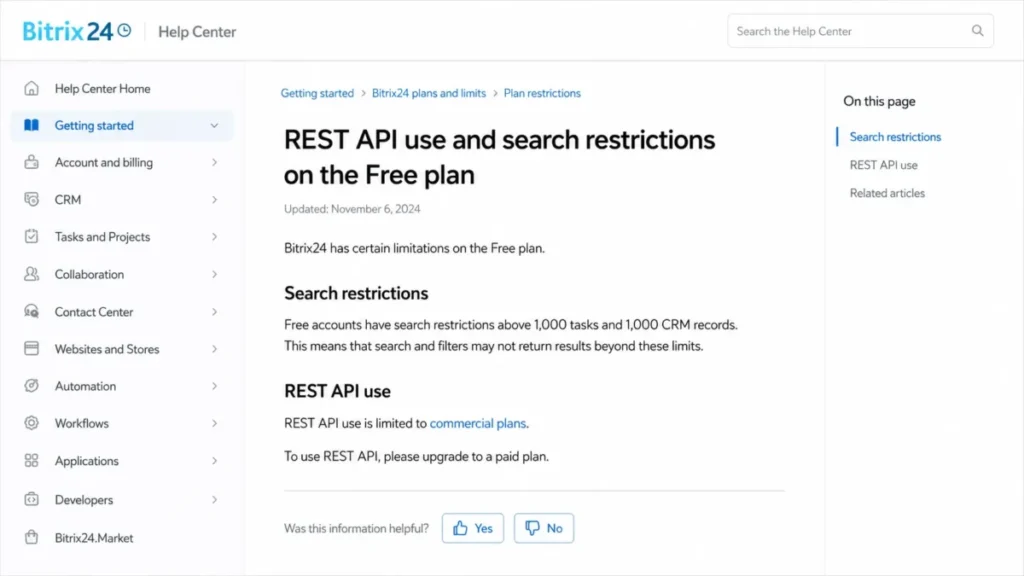
Bitrix24’s free plan also carries a limit that user count never reveals. Official Bitrix24 help, checked 2026-07-17, states that free accounts with more than 1,000 tasks and more than 1,000 CRM records face search restrictions, and that REST API access is limited to commercial plans.
That is the real upgrade trigger for a data-heavy free account. Search degrades before headcount does, so a two-person team importing 4,000 contacts hits the wall long before it hires a third rep.
I would not run a free Bitrix24 account as a CRM of record past a few thousand records. The free tier is a legitimate evaluation environment and a poor production system.
Teams shopping purely on price should widen the list rather than accept a two-user ceiling. This research verified free-plan limits for these two vendors only, so check the seat caps in our free CRM software roundup before assuming a three-person team has a $0 option anywhere.
Feature Comparison Matrix
| Dimension | Bitrix24 | HubSpot Sales Hub | Winner |
|---|---|---|---|
| Core pipeline and deals | Sales pipelines from Basic; unlimited leads and sales automation from Standard | Deal pipelines on every tier; one pipeline on Free, two on Starter, more above | Tie |
| Lead model | Two modes. Simple CRM runs without leads; Classic CRM adds the lead object | One consistent lifecycle model across every tier | HubSpot Sales Hub |
| Sales engagement | Telephony, email, and call tracking from Professional | Sequences, calling, lead scoring, and playbooks from Professional | HubSpot Sales Hub |
| Reporting and analytics | CRM analytics with plan-specific volume limits | Advanced reporting and forecasting on Professional and Enterprise | HubSpot Sales Hub |
| Automation | CRM rules, task automation, marketing automation, and RPA from Professional | Up to 300 customizable workflows on Professional, up to 1,000 on Enterprise | Tie |
| Projects and collaboration | Native tasks, Kanban, Gantt, calendars, chat, video, unlimited projects from Standard | CRM-first tasking; not positioned as a project workspace | Bitrix24 |
| Custom data model | Configurable across cloud; on-premise adds source-code customization | Custom objects require Enterprise | Bitrix24 |
| Integrations | Official marketplace across CRM, telephony, payments, accounting, and marketing | More than 2,000 apps and services per the official pricing page | HubSpot Sales Hub |
| API access | REST on commercial plans; 50-request batch cap; execution-time blocking | 110 requests per 10 seconds per account for public OAuth apps; CRM Search at 5 per second | Tie |
| Mobile and desktop | iOS, Android, browser, and desktop workspace applications | iOS, Android, and browser-first; no full native desktop CRM | Bitrix24 |
| Admin and security | 2FA, IP restrictions, SAML SSO, Active Directory, encryption at rest on Enterprise, 99.95 percent Enterprise SLA | SOC 2 Type 2 and SOC 3 assurance, published security program, enterprise admin controls | Tie |
| Support | Self-help on Free; AI-to-human escalation and partner support on commercial plans | Email on Starter; email and phone on Professional and Enterprise; Academy for all | HubSpot Sales Hub |
Source: Bitrix24 official cloud plan comparison and HubSpot official Sales Hub pricing page, checked 2026-07-17; HubSpot developer usage guidelines and Bitrix24 REST documentation, checked 2026-07-17.
Read the winners column and the pattern holds across eight of the twelve rows. HubSpot takes the dimensions that describe what a rep does on a Tuesday, and Bitrix24 takes the dimensions that describe what the company owns and runs.
Four ties are real ties. Pipelines, automation, APIs, and security are places where both vendors are competent and the tiebreaker is price or deployment rather than capability.
Pricing at Scale: Practical Tier and Cost at 5, 10, 50, and 100 Users
The practical tier is not the starting price. For Bitrix24 it is Standard at $99 per organization per month billed annually, because Standard is where sales automation, unlimited leads, invoices, online payments, ecommerce, and unlimited projects arrive, and because Basic caps at five users.
For HubSpot it is Sales Hub Professional at $90 per seat per month billed annually, plus a one-time $1,500 onboarding fee, because sequences, advanced reporting, lead scoring, and full sales automation are gated there. Enterprise is $150 per seat per month with a one-time $3,500 onboarding fee.
| Team size | Bitrix24 plan and first-year cost | HubSpot Starter, first-year cost | HubSpot Professional, first-year cost |
|---|---|---|---|
| 5 users | Basic, $588 | $420 | $6,900 including $1,500 onboarding |
| 10 users | Standard, $1,188 | $840 | $12,300 including $1,500 onboarding |
| 50 users | Standard, $1,188 | $4,200 | $55,500 including $1,500 onboarding |
| 100 users | Professional, $2,388 | $8,400 | $109,500 including $1,500 onboarding |
Source: derived from the Bitrix24 official US pricing page and the HubSpot official Sales Hub pricing page, both checked 2026-07-17. Subscription figures use each vendor’s displayed annual-equivalent rate multiplied by twelve months. HubSpot columns assume every modeled user holds a paid Sales Seat.
These tiers are not feature-equivalent, and the table is a pricing-model illustration rather than a like-for-like quote. Bitrix24 Standard includes projects and collaboration that Sales Hub does not sell, and HubSpot Professional includes sales engagement that Bitrix24 Standard does not gate open.
Read the 5-user row and HubSpot Starter is cheaper at $420 against $588. Read the 50-user row and the same comparison inverts by a factor of about 3.5 at Starter and about 47 at Professional.
The breakpoint sits between five and ten users, and it is structural. Bitrix24’s price stops moving inside a user band while HubSpot’s price never stops moving, so a hire inside the band is free on one side and billable on the other.
I would not let the 100-user row decide a purchase on its own. A $109,500 first-year HubSpot Professional bill assumes 100 paid Sales Seats, and HubSpot’s own pricing page separates paid Sales Seats, Starter Core Seats, and free view-only seats.
Model the seat roles before you model the total. If 40 of those 100 people only need to read a record, the real HubSpot bill is materially lower than the benchmark above, and the gap narrows.
The Bitrix24 side has its own asterisk. Bitrix24 states that users cannot construct a custom plan by picking only specific features or user counts, so a team of 55 buys the Professional band rather than five extra Standard seats.
That is the flat-pricing trade in one sentence. You get predictability inside the band and a cliff at the edge of it.
Anyone budgeting the HubSpot side beyond Sales Hub should read the full HubSpot pricing plans breakdown before signing, because hub bundles, marketing-contact tiers, and add-ons change the annual cost in ways a single seat price never shows.
A Note on the $7 Starter Rate
The HubSpot Sales Hub pricing page displayed $7 per seat per month billed annually beside a $20 per seat monthly rate when checked 2026-07-17. Re-verified on the publish date: 2026-07-17.
That $7 figure carries promotional risk, and HubSpot does not publish a separate standard price beside it, so I treat the $20 monthly figure as the standard price baseline and the $7 rate as an annual-commitment rate that must be confirmed at checkout. If the annual rate has moved by the time you buy, every Starter row in the table above moves with it.
Nothing in this comparison depends on that $7 number surviving. Bitrix24 still wins at 50 users against the $20 monthly rate, and HubSpot still wins at 5 users on ease of adoption alone.
Hidden Costs Both Vendors Keep Off the Headline Price
The advertised price is not the budget on either side. Four line items sit outside it, and three of them are HubSpot’s.
HubSpot onboarding is mandatory, not optional. The official pricing page lists a one-time $1,500 onboarding fee on Professional and a one-time $3,500 fee on Enterprise, checked 2026-07-17. Any comparison that quotes $90 per seat without adding that fee understates year one.
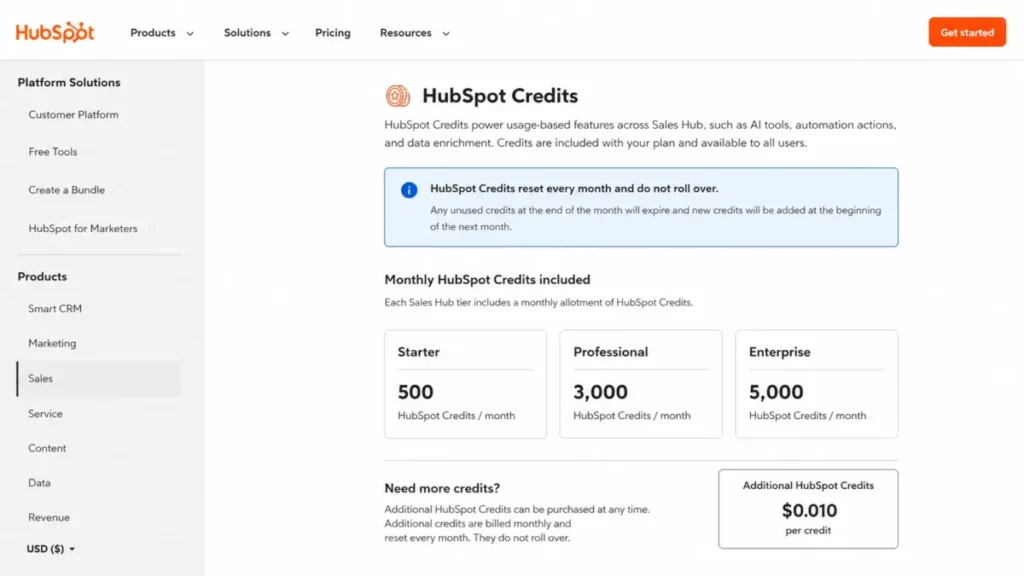
HubSpot Credits are a second meter. The pricing page lists 500 credits on Starter, 3,000 on Professional, and 5,000 on Enterprise, with additional credits at $0.010 each, a monthly reset, and no rollover, checked 2026-07-17.
Credits are the part of HubSpot’s bill I would ask about first. An automation-heavy or AI-heavy team consumes them at a rate no comparison article can estimate without seeing the workflows, which is exactly why the seat price alone is an incomplete quote.
Marketing contacts belong to a different bill. HubSpot separates marketing contacts from non-marketing contacts, and marketing-contact tiers affect billing on Marketing Hub, not on the standalone Sales Hub priced here.
Bitrix24 telephony is included until it is not. Official Bitrix24 help, checked 2026-07-17, states that connecting an external PBX includes a limited free test and then requires a SIP connector license for outbound use, while the telephony provider charges separately for the calls.
So “telephony included” is true of the feature and false of the phone bill. A phone-heavy sales team should price the connector and the carrier before it treats Bitrix24 Standard as an all-in number.
There is a fifth cost neither vendor prints. Bitrix24 implementation and customization through certified partners is real, priced per scope, and not published, so get a scoped quote rather than assuming the subscription is the whole project.
CRM Data Limits: What “Unlimited” Does Not Cover
Bitrix24 official material describes contacts, companies, deals, and leads as unlimited. The official cloud plan comparison, checked 2026-07-17, separately caps searchable deals and CRM analytics volume by plan.
Those are three different limits wearing one word. Storing a record, finding a record, and reporting on a record are governed independently, and only the first one is unlimited.
| Concept | What it means | Where the ceiling sits |
|---|---|---|
| Stored records | How many contacts, companies, deals, and leads the account holds | Described as unlimited on Bitrix24 cloud plans |
| Searchable records | How many records keyword search returns against | Free plan search is restricted above 1,000 tasks and 1,000 CRM records; paid plans carry plan-specific searchable-deal limits |
| Analytics volume | How many records CRM analytics will process into a report | Plan-specific CRM analytics limits on the official cloud plan comparison |
Source: Bitrix24 official cloud plan comparison and official Bitrix24 help, checked 2026-07-17. Exact per-plan values vary by tier and must be read from the live plan comparison before purchase.
Verify the searchable-deal and analytics numbers for the exact tier you are buying rather than trusting the unlimited headline. That is a five-minute check that prevents a year of quiet reporting failures.
HubSpot’s equivalent ceiling is contacts on the free tier at 1,000, and then plan-gated reporting capacity above it. Neither vendor is hiding anything; both are describing different things with similar words.
Automation Compared: Plan Gates, Not Checkboxes
Both products automate work, and that sentence is worthless to a buyer. The question is how much, of what kind, and at which tier.
HubSpot’s official pricing page, checked 2026-07-17, gates full sales automation at Professional with up to 300 customizable workflows and raises Enterprise to up to 1,000. Sequences, lead scoring, and playbooks sit on the same gate.
Bitrix24 spreads automation across more surfaces and gates it lower in places. Sales automation arrives at Standard, and marketing automation, workflow automation, task automation, and RPA arrive at Professional, per the official US pricing page checked 2026-07-17.
| Automation type | Bitrix24 tier | HubSpot Sales Hub tier |
|---|---|---|
| Stage-triggered CRM actions | Standard | Starter and above, within tier limits |
| Full customizable workflows | Professional | Professional, up to 300; Enterprise, up to 1,000 |
| Sales sequences | Not the same object; telephony and email automation from Professional | Professional |
| Task and project automation | Professional | Not offered as a project workspace |
| Marketing automation | Professional | Marketing Hub, a separate product |
| RPA | Professional | Not offered |
Source: Bitrix24 official US pricing page and cloud plan comparison, and HubSpot official Sales Hub pricing page, checked 2026-07-17.
These are not equivalent objects, and calling this dimension a tie is the accurate answer rather than the diplomatic one. A HubSpot workflow and a Bitrix24 RPA rule solve different problems.
Pick on shape, not count. If one revenue workflow needs to be excellent, HubSpot wins; if six business workflows need to exist at all, Bitrix24 wins.
One dependency belongs in this section. HubSpot’s LinkedIn actions inside sequences depend on a LinkedIn Sales Navigator subscription that HubSpot does not include, so the sequence feature list is not the whole cost of running sequences.
Reporting and Analytics Compared
HubSpot wins reporting, and the margin is wide. Professional and Enterprise carry advanced sales reporting, forecasting, lead scoring, and higher custom-report capacity, per the official pricing page checked 2026-07-17.
Bitrix24 includes CRM analytics and reporting on paid tiers, with the analytics-volume caveat above. The capability exists; the ceiling is lower and the assembly is more manual.
The buyer consequence is who builds the board deck. On HubSpot Professional a revenue operations lead configures a forecast and a pipeline report from documented features, and on Bitrix24 the same person builds more of it themselves and watches the analytics limit for the tier.
If reporting trust is the reason you are switching CRM at all, that fact alone should end the comparison. Everything after it is a discount argument.
Integrations and Ecosystem
The official HubSpot Sales Hub pricing page states more than 2,000 apps and services, checked 2026-07-17. Bitrix24’s official integrations page presents a marketplace spanning CRM, sales enablement, analytics, mobile, marketing, telephony, payments, accounting, and data transfer, checked 2026-07-17.
Counting logos answers the wrong question. What decides implementation cost is the type of connection behind each logo.
| Connection type | What it delivers in practice | Verification step before you buy |
|---|---|---|
| Native integration | Built and maintained by the vendor, usually deepest object coverage | Confirm which objects sync and in which direction |
| Marketplace or partner app | Built by a third party, quality and support vary | Check the listing owner, update history, and support route |
| Data sync | Selected objects mirrored between systems | Confirm field mapping, sync frequency, and conflict handling |
| Automation bridge | Middleware such as an automation platform stitching two APIs | Price the middleware seat and the task volume separately |
Source: HubSpot official Sales Hub pricing page, Bitrix24 official integrations page, and the HubSpot marketplace Bitrix24 CRM data-sync listing, checked 2026-07-17.
HubSpot’s ecosystem is larger and better documented, and that is a genuine advantage for a team with an existing stack. Marketplace presence is not proof of bidirectional or complete object coverage on either side, so verify data direction, supported objects, sync frequency, and field mapping for every integration you cannot live without.
APIs and Custom Integrations
The two vendors throttle in fundamentally different ways, and an engineer needs to know which model they are designing against.
HubSpot publishes request-rate limits. Public OAuth apps are documented at 110 requests per 10 seconds per account, and the CRM Search API is documented at 5 requests per second per account, per the official developer usage guidelines checked 2026-07-17.
Bitrix24 throttles on execution time instead. Official Bitrix24 help, checked 2026-07-17, states that a webhook or application can be blocked for ten minutes when combined REST method execution exceeds 480 seconds within a ten-minute window, and the official API course documents a 50-request cap per batch call.
| API dimension | Bitrix24 | HubSpot Sales Hub |
|---|---|---|
| Plan access | REST is limited to commercial plans | Available across tiers, with subscription-specific limits |
| Control model | Cumulative method execution time | Requests per time window |
| Documented ceiling | Ten-minute block above 480 seconds of execution in ten minutes | 110 requests per 10 seconds per account for public OAuth apps |
| Search-specific limit | Not published as a separate search rate | CRM Search at 5 requests per second per account |
| Batch cap | 50 requests per batch call | Not published as a single equivalent batch number |
| Deep customization route | On-premise source-code access | Custom objects require Enterprise |
Source: official Bitrix24 help and API documentation, and HubSpot official developer usage guidelines, checked 2026-07-17.
HubSpot’s limits vary by endpoint, app type, and subscription, and Bitrix24’s blocking behavior depends on what your methods cost to run. Treat both published sets as architectural starting points and verify the exact endpoints before production.
A high-volume sync is the workflow that breaks first on Bitrix24. A poorly batched nightly job that crosses 480 seconds of cumulative execution earns a ten-minute block, which turns an integration bug into an outage.
AI Features Compared
Bitrix24 lists AI sales tools and call tracking at Professional on its official US pricing page, checked 2026-07-17, delivered through its CoPilot layer. HubSpot delivers AI through Breeze and meters it with HubSpot Credits.
The difference is billing, not ambition. Bitrix24’s AI sits inside the flat tier price, and HubSpot’s AI consumes a meter that resets monthly and does not roll over.
Neither claim can be graded on output quality from documentation alone, and this article makes no such claim. What a buyer can price is the meter, and of these two products only HubSpot has one.
Support, Security, and Admin Controls
| Entitlement | Bitrix24 | HubSpot Sales Hub |
|---|---|---|
| Free tier support | Self-help resources | Community, Academy, and knowledge base |
| Entry paid support | Commercial plans can escalate AI support chat to a human specialist | Email support on Starter |
| Higher-tier support | Same escalation route plus certified partner support | Email and phone support on Professional and Enterprise |
| Training | Help center and partner network | HubSpot Academy, community, and knowledge base |
| Identity and access | 2FA, IP restrictions, SAML SSO, Active Directory | Enterprise admin controls and permission tooling |
| Assurance | SOC-compliant AWS hosting; encryption at rest on Enterprise; 99.95 percent Enterprise SLA | SOC 2 Type 2 and SOC 3 assurance, penetration-testing summaries, published security program |
| Backups | Seven-day backups on most cloud plans; thirty-day retention on Enterprise | Not published as a comparable retention window |
Source: official Bitrix24 help, official Bitrix24 cloud plan comparison, HubSpot official Sales Hub pricing page, and the HubSpot security page, checked 2026-07-17.
HubSpot wins support because the entitlement is explicit. Phone support at Professional and a training academy on every tier answer the first question a team without an internal admin asks.
Bitrix24’s answer is a partner ecosystem, and activating partner support changes your support route. That is a fine model when you have a partner and a poor one when you do not.
Security is a tie on documentation quality, and it stops being a tie the moment a compliance requirement names self-hosting. Both vendors publish enough for a security review; only one can be deployed inside your own perimeter.
Deployment and Data Control
Bitrix24 offers cloud and self-hosted on-premise editions, and the on-premise edition provides source-code and API access for deeper customization, per the official self-hosted page checked 2026-07-17. HubSpot is browser-first cloud software with mobile apps, and no equivalent self-hosted edition was identified.
This is the one dimension in the article that is binary. No amount of usability advantage survives a legal requirement that the CRM run on infrastructure you control.
| If your requirement is | Then | Reason |
|---|---|---|
| Self-hosting or source-code access is mandatory | Bitrix24 On-Premise | HubSpot has no self-hosted edition |
| Data must stay in a specific private environment | Bitrix24 On-Premise, subject to your own assessment | Deployment location is under your control |
| No deployment constraint, cloud is acceptable | Either | The decision returns to cost, adoption, and workflow |
| You want zero infrastructure ownership | HubSpot Sales Hub | Browser-first cloud with no server estate to run |
Source: Bitrix24 official self-hosted page and HubSpot official product pages, checked 2026-07-17.
The on-premise edition is licensed separately, and the cloud pricing in this article does not price it. Budget the license, the infrastructure, the maintenance, and the partner implementation as four separate numbers.
Compliance is your assessment, not mine. Self-hosting makes a compliance conversation possible; it does not make a compliance conclusion true.
Ease of Use and Setup Difficulty
Reviewer patterns are consistent on this dimension, and they favor HubSpot. G2 and Capterra comparison pages checked 2026-07-17 show HubSpot ahead on usability and customer service, while Bitrix24 reviewers more often describe navigation as less intuitive and needing training or adaptation.
TechRadar’s 2026 reviews, checked 2026-07-17, describe Bitrix24 as broad with a cluttered interface and a steeper learning curve, and HubSpot as easy to adopt with costs that need active monitoring as usage grows. That is two independent sources pointing the same way.
One Bitrix24 setup decision causes more confusion than any interface complaint. Bitrix24 can run in Simple CRM mode without leads or Classic CRM mode with leads, and the classic lead model must be enabled, per official Bitrix24 help checked 2026-07-17.
A new account that shows no Leads section is not broken. It is in Simple mode, and choosing the mode before you map any data is the difference between a clean import and a rebuild.
Pick the mode that matches how your team already handles lead management rather than the one the trial opened with. Reversing that choice after 5,000 records exist is not a settings change.
| Setup dimension | Bitrix24 | HubSpot Sales Hub |
|---|---|---|
| Overall setup difficulty | High | Medium |
| First decision that blocks progress | Choosing Simple CRM or Classic CRM before data mapping | Designing lifecycle stages and permissions before import |
| Admin overhead | Higher. Permissions, pipelines, automation, telephony, and collaboration all configure separately | Moderate on Starter, higher on Professional once workflows and reporting are designed |
| Team training | Reviewer patterns describe an adaptation period | HubSpot Academy is available on every tier |
| Paid onboarding | Not published; certified partner implementation is quoted per scope | Mandatory. $1,500 one-time on Professional, $3,500 one-time on Enterprise |
| Long-term scalability | Flat tiers to 100 users on Professional, higher Enterprise bands to 10,000 users | Scales cleanly on capability, linearly on cost |
Source: Bitrix24 official US pricing page and official Bitrix24 help, and the HubSpot official Sales Hub pricing page, checked 2026-07-17. Setup difficulty ratings are editorial judgments based on documented configuration scope, not measured setup time.
Here is the 30 and 90-day adoption check I would run either way. At 30 days, every rep should be logging deals without being chased, and at 90 days, a manager should be able to pull a pipeline report they trust without asking an admin to rebuild it.
Bitrix24 fails that check more often for one reason. Breadth is an adoption tax, and a team that only needed a CRM now has projects, chat, telephony, and a website builder competing for attention in the same left rail.
Neither product survives a rollout with no owner, which is the failure mode a CRM implementation guide exists to prevent. Name the internal owner before you name the vendor.
The Real Cost of Switching: Migration Effort and Data Risk
Migration is where comparison content stops being useful, so here are the documented ceilings. HubSpot’s official import documentation, checked 2026-07-17, lists paid-account limits of up to 500 imports and ten million rows per day, and export limits of 300 exports in a rolling 24-hour window with three simultaneous exports.
Those numbers are generous for most SMB migrations and tight for a poorly planned one. Three simultaneous exports is the constraint that bites during a rollback rehearsal, not during the import.
HubSpot’s marketplace lists a Bitrix24 CRM data-sync app, checked 2026-07-17. Treat it as a selective sync option rather than proof of migration parity, because a sync listing documents the objects it moves and nothing about the ones it does not.
| Object or asset | Migration difficulty | What to watch |
|---|---|---|
| Contacts and companies | Low | Deduplication rules and required-field mismatches |
| Deals and pipelines | Medium | Stage mapping; pipeline counts are plan-gated on HubSpot |
| Activities and email history | Medium | Timestamp fidelity and owner attribution |
| Custom fields | Medium | Type mismatches and picklist values that do not exist on the target |
| Record owners | Medium | Owner must exist as a seated user before import, or ownership silently drops |
| Associations between objects | High | Association limits and structure differ; verify before mapping |
| Automation and workflows | High. Rebuild | Automation objects are not portable in either direction |
| Reports and dashboards | High. Rebuild | Report definitions do not transfer |
| Leads, on Bitrix24 | Depends on mode | Simple CRM has no lead object; decide the mode before mapping |
Source: HubSpot official import and export documentation, the HubSpot marketplace Bitrix24 CRM data-sync listing, and official Bitrix24 help on CRM modes, checked 2026-07-17.
Run a test export and keep a rollback copy before you cut over. No public evidence supports a migration-completeness percentage in either direction, so plan it as a checklist and not as a button.
Work the object list above into a written CRM migration plan with an owner per row and a validation query per row. The rows marked Rebuild are project work, not data work, and they are where switching budgets die.
There is a contract clause that changes switching math on the HubSpot side. HubSpot’s customer terms, checked 2026-07-17, state that subscription downgrades generally take effect at renewal rather than mid-term.
So a HubSpot pilot that underperforms in month three is not a mid-term seat reduction. Confirm your renewal date, seat commitments, and notice requirements before you sign, because those three answers decide whether a pilot is reversible or merely regrettable.
What You Gain and What You Lose in Each Direction
Moving from Bitrix24 to HubSpot Sales Hub buys adoption, sales execution depth, reporting you can defend, and a documented ecosystem of more than 2,000 apps. It costs you projects, native collaboration, included telephony, the self-hosting option, and a predictable bill.
Moving from HubSpot Sales Hub to Bitrix24 buys flat pricing, tool consolidation, deployment control, and a much lower subscription at 50 or 100 users. It costs you sequences, forecasting depth, phone support, the academy, and the interface your reps stopped complaining about.
Neither direction is a pure upgrade, and both cost a quarter of somebody’s attention. That is the honest frame for a switch that looks obvious on a pricing page.
Where Bitrix24 Wins
| Pros | Cons |
|---|---|
| Flat organization pricing. Standard covers up to 50 users for $1,188 a year at the displayed annual rate | Free plan search degrades above 1,000 tasks and 1,000 CRM records |
| Replaces several tools. CRM, tasks with Gantt, chat, video, telephony, forms, websites, and ecommerce in one subscription | Reviewer patterns describe a dense interface and a real adaptation period |
| On-premise edition with source-code access for teams that must self-host | No custom plan constructor; a 55-user team buys the next band, not five more seats |
| Desktop and mobile applications alongside the browser | REST is limited to commercial plans, and execution-time blocking punishes unbatched sync jobs |
| Automation breadth. CRM rules, task automation, marketing automation, and RPA at Professional | Telephony to an external PBX needs a SIP connector license plus separate carrier charges |
The pros and cons above come from one design choice rather than five, which the full Bitrix24 CRM review traces through the product in more detail. Scope is the strength and scope is the tax.
Bitrix24 wins in five concrete situations.
A 50-person operations-heavy team pays $1,188 a year against $4,200 to $55,500, which is a $3,012 to $54,312 subscription gap to put against implementation. Bitrix24 partner fees are not published, so price the partner before you spend the gap twice.
A 12-person agency running client projects and a sales pipeline out of one system stops paying for a separate project tool, a separate chat tool, and a separate CRM.
A regulated or heavily customized enterprise that must self-host has exactly one option in this comparison.
A phone-heavy inside-sales team gets telephony and call tracking inside the tier price, with the connector caveat above.
A team of 60 that expects to hit 95 next year buys a fixed Professional price rather than watching 35 new hires arrive as 35 new invoices.
Where HubSpot Sales Hub Wins
| Pros | Cons |
|---|---|
| Adoption. Reviewer patterns favor HubSpot on usability and customer service | Per-seat billing compounds; 100 paid Professional seats reach $109,500 in year one |
| Sales execution depth. Sequences, lead scoring, forecasting, and playbooks at Professional | Onboarding is mandatory. $1,500 on Professional, $3,500 on Enterprise |
| Reporting a revenue operations lead can configure rather than construct | HubSpot Credits are a second meter that resets monthly and does not roll over |
| Ecosystem. More than 2,000 apps and services per the official pricing page | Downgrades generally wait until renewal, which limits mid-term correction |
| Support and training. Phone support at Professional, plus Academy on every tier | Custom objects require Enterprise, and no self-hosted edition exists |
Same pattern, opposite direction, and our HubSpot CRM evaluation reaches the same split. The execution depth and the billing model are the same decision seen from two sides.
HubSpot wins in five concrete situations.
A five-person sales-only team pays $420 a year against $588 and gets the interface its reps will not fight.
A 10 to 50 person B2B sales team with a dedicated revenue operations lead needs sequences, scoring, and forecasting more than it needs a flat bill.
A company already running Marketing Hub or Service Hub gets a shared Smart CRM, one ecosystem, and cross-hub workflows that a second platform cannot replicate.
A team with no internal admin gets phone support at Professional and an academy that reduces the training bill.
A business that must show a defensible pipeline forecast to investors gets it from documented features rather than from a build project.
Who Should Choose Bitrix24
Choose Bitrix24 if the team is heading past 20 users and software cost predictability is a stated goal. The price stops moving inside the band while HubSpot’s never does.
Choose it if you are consolidating a CRM, a project tool, a chat tool, and a phone system into one line item. That is the job the product is built for.
Choose it if self-hosting or source-code access is non-negotiable. Nothing else in this comparison qualifies.
Choose it if your automation needs are wide rather than deep, spanning CRM rules, task automation, and RPA across several business processes.
Choose it if you have, or will hire, an implementation partner. Bitrix24 rewards configuration and punishes teams who expect it to configure itself.
Who Should Choose HubSpot Sales Hub
Choose HubSpot Sales Hub if you are five to ten people and sales-only. At the displayed annual rate it is both cheaper and easier, which is a rare combination.
Choose it if sequences, lead scoring, forecasting, and advanced reporting are the reason you are buying a CRM at all. Those are Professional features and they are the product’s strongest work.
Choose it if you already run another HubSpot hub. The shared Smart CRM foundation and one ecosystem beat a cheaper second platform that has to be integrated.
Choose it if you have no internal admin and adoption risk is your real problem. Phone support at Professional and HubSpot Academy on every tier are the mitigation.
Choose it if your stack has ten integrations you cannot lose. More than 2,000 apps and services is a genuine advantage, and you should still verify object coverage on the ones that matter.
Who Should Avoid Both
Skip both if you are a three-person team looking for a free CRM. Both free plans stop at two users, so a three-person team is a paying customer at both vendors on day one.
Skip both if you want a lightweight pipeline tool and nothing else. Bitrix24 is a workspace and HubSpot Sales Hub is a revenue platform, and a two-rep team that only needs deal stages and reminders will pay for scope it never opens.
Skip both if you need deep vertical functionality that neither vendor documents for your industry. A CRM that fits the workflow beats a CRM that fits the budget.
Skip both if the budget is under $500 a year and the requirement is more than the free tiers allow. Bitrix24 Basic at $588 is the floor for a real five-person deployment on that side.
HubSpot Starter clears $500 a year at six seats, because $7 per seat per month annually is $84 a seat a year and six seats is $504.
Alternatives to Bitrix24 and HubSpot
These four names appear on both vendors’ own competitor sets, which is why they are the shortlist worth widening to. Read the evidence boundary first: this research verified pricing, plan gates, and limits for Bitrix24 and HubSpot Sales Hub only.
| Alternative | Choose it if | Evidence status in this article |
|---|---|---|
| Zoho CRM | Neither the workspace scope nor the seat price fits, and you want a suite you can expand one module at a time | No Zoho pricing, plan gates, or limits were verified here |
| Pipedrive | The honest answer to “what do you need” is a pipeline, and everything above is scope you will not open | No Pipedrive pricing, plan gates, or limits were verified here |
| monday CRM | You want work-management scope closer to Bitrix24’s without Bitrix24’s interface density | No monday CRM pricing, plan gates, or limits were verified here |
| Salesforce Sales Cloud | You have outgrown both on customization depth and have the operations headcount to run the replacement | No Salesforce pricing, plan gates, or limits were verified here |
That third column is doing real work. A comparison that prices two products to the dollar and then waves at four more with confident adjectives is guessing in its last section, and the reader cannot see where the evidence stopped.
Zoho CRM is the one I would shortlist first for a team torn between these two, on positioning rather than on any number this article checked. Confirm it against the Zoho CRM review before it reaches a budget.
Pipedrive is the alternative for the buyer this article keeps disqualifying. If a pipeline is the whole requirement, the Pipedrive CRM review is a shorter route to a decision than either platform above.
Final Verdict
There is no single winner here, and any article that names one is selling something. The verdict is a function of team size and job to be done, so here it is by buyer type.
At two users, both free plans work and neither is a production system. At five users and sales-only, HubSpot Sales Hub wins on cost and adoption at the displayed annual rate.
At five users replacing several tools, Bitrix24 Basic wins despite costing more, because Sales Hub does not sell the projects and collaboration you would otherwise buy separately.
At 10 to 50 users with a dedicated revenue operations lead, HubSpot Sales Hub Professional wins, and you should walk into that decision knowing it costs $12,300 to $55,500 in year one including onboarding.
At 50 to 100 users where predictable cost is the stated requirement, Bitrix24 wins outright. $1,188 to $2,388 a year against $4,200 to $109,500 is not a close comparison, and the money buys the implementation help the product needs.
If self-hosting is mandatory, Bitrix24 wins by default. If you already run HubSpot Marketing Hub or Service Hub, HubSpot Sales Hub wins by gravity.
Buyers who reject HubSpot on cost but still want its execution depth should work through the wider list of HubSpot CRM alternatives before defaulting to Bitrix24. Flat pricing is a reason to shortlist Bitrix24, not a reason to skip the shortlist.
The renewal question I would want answered before signing either contract is the same one. Can you show, twelve months from now, that the reporting is trusted and the data is clean, because both products fail identically when the answer is no.
FAQ
Is Bitrix24 better than HubSpot?
For a 50-person team that wants CRM, projects, and collaboration in one flat bill, yes. For a 10-person B2B sales team that lives in sequences and forecasts, no.
Bitrix24 wins on scope, deployment options, and cost at scale, while HubSpot Sales Hub wins on adoption, sales execution depth, reporting, and ecosystem size. Team size and job decide it, not a scorecard.
Which is cheaper for 10 users, Bitrix24 or HubSpot?
At the displayed annual rates checked 2026-07-17, HubSpot Starter is cheaper at $840 a year for 10 seats against $1,188 for Bitrix24 Standard. Flip to the practical tiers and it inverts hard: HubSpot Sales Hub Professional costs $12,300 in year one including the $1,500 onboarding fee.
So the answer depends entirely on which HubSpot plan your workflow needs.
Does Bitrix24 have a free plan?
Yes, and it stops at two users. The official US pricing page checked 2026-07-17 lists Free at $0 for 1 to 2 users with 5 GB of storage, basic CRM, tasks with Kanban and Gantt, shared calendars, chat, and video.
Watch the quieter limit: search is restricted above 1,000 tasks and 1,000 CRM records, and REST API access needs a commercial plan.
Is HubSpot CRM free forever?
Yes, with two ceilings. The official free CRM page checked 2026-07-17 lists up to 2 users, 1,000 contacts, and one deal pipeline, with no expiration stated.
Ignore older marketing pages and directories that still describe unlimited free users, because they conflict with the current pricing page. A three-person team cannot run on the free tier of either product.
Which platform has better automation?
Neither, and that is the accurate answer.
HubSpot goes deeper on sales workflows with up to 300 customizable workflows on Professional and up to 1,000 on Enterprise. Bitrix24 goes wider, adding task automation, marketing automation, and RPA at Professional.
Pick HubSpot if one revenue workflow must be excellent, and Bitrix24 if six business processes need to exist at all.
Which CRM is easier to use?
HubSpot, and it is not close. G2, Capterra, and TechRadar reviewer patterns checked 2026-07-17 all point the same way: HubSpot rates higher on usability, while Bitrix24 is described as dense and needing training.
The tradeoff is honest rather than accidental. Bitrix24’s interface carries CRM, projects, chat, telephony, and websites, and that scope has an adoption cost.
Does Bitrix24 include project management?
Yes, natively, and this is the clearest win in the comparison. The official US pricing page checked 2026-07-17 lists tasks with Kanban and Gantt on the free plan and unlimited projects from Standard, alongside shared calendars, chat, and video.
HubSpot Sales Hub offers CRM-first tasking and is not positioned as a project workspace, so replacing a project tool with it does not work.
Which CRM has more integrations?
HubSpot. The official Sales Hub pricing page checked 2026-07-17 states more than 2,000 apps and services, and Bitrix24 does not publish a comparable number.
Do not stop at the count, though. Marketplace presence proves nothing about data direction, object coverage, or sync frequency, so verify those three things for every integration you cannot operate without.
Can I migrate from Bitrix24 to HubSpot?
Yes, if you plan it as a project rather than a button. HubSpot’s official documentation checked 2026-07-17 supports up to 500 imports and ten million rows per day on paid accounts, and the marketplace lists a Bitrix24 CRM data-sync app for selective syncing.
Contacts and deals move, while automation, reports, and dashboards get rebuilt. Decide your Bitrix24 CRM mode before mapping anything.
Which is better for marketing and sales together?
HubSpot, on one condition: you buy Marketing Hub as well. Sales Hub pricing does not include it, and marketing-contact tiers create a separate billing model.
Bitrix24 bundles marketing automation at Professional inside the flat $2,388 annual price for up to 100 users, so it wins on cost and loses on depth. Price the full HubSpot quote before comparing.