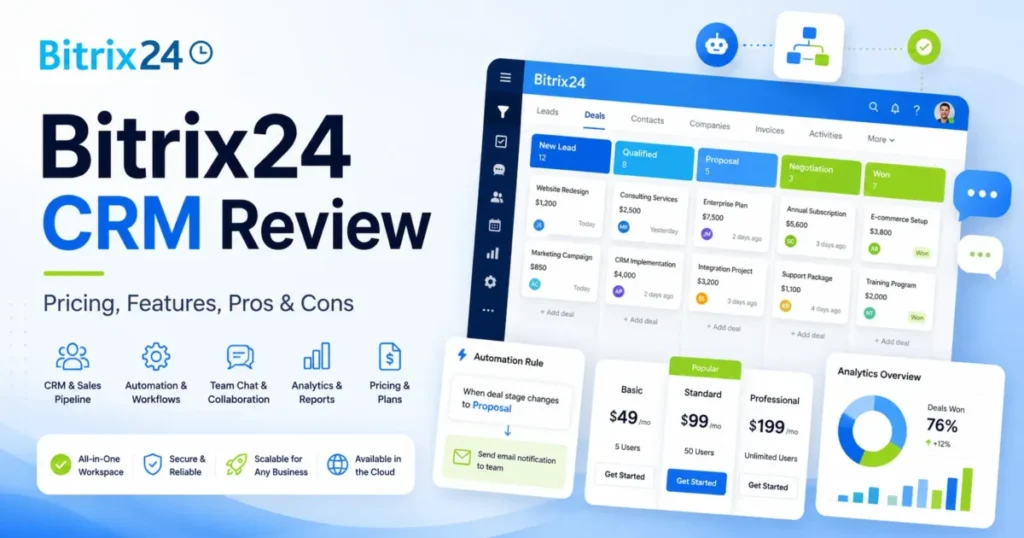
Bitrix24 sells one promise: replace your CRM, project tracker, chat tool, and light HR stack with a single flat-fee workspace. For a technically confident team of 10 to 100 people, that promise mostly holds.
For a simplicity-first sales team, the same breadth can turn into weeks of configuration nobody budgeted for. This Bitrix24 CRM review skips the feature tour and maps the plan gates, the real cost at 5, 50, and 100 users, the migration limits, and the documented ceilings that decide fit.
The short version: Bitrix24 is one of the strongest flat-fee value plays in the best CRM software shortlist if your team can absorb setup complexity. It is a weak choice if you want fast onboarding or a fully preserved migration of your deal history.
Every price and limit below was checked against Bitrix24’s official pricing and help documentation on July 22, 2026. If you are new to the category, start with what CRM software does, then come back to the plan math.
In This Article (16 sections)
Bitrix24 at a Glance: The Quick Verdict
| Attribute | Detail |
|---|---|
| Best for | Technically confident 10 to 100 person teams consolidating CRM, projects, and communication |
| Not ideal for | Simplicity-first sales teams that need onboarding in days, not weeks |
| Starting paid price | Basic at $49 per month for the whole organization, billed annually, up to 5 users |
| Practical plan | Standard at $99 per month, billed annually, for a serious 50-seat sales team |
| Free plan | Yes, with no time limit, but with a documented 1,000-record search ceiling |
| Setup difficulty | High. Broad surface area and heavy configuration |
| Main strength | Flat organization pricing that gets cheaper per user as you approach the plan cap |
| Main limitation | Deal import creates new deals and cannot update existing ones |
| Best alternative | Pipedrive for a simpler sales-first pipeline |
Source: Bitrix24 US cloud pricing and plan comparison, checked July 22, 2026.
Bitrix24 is operated for the US market by Alaio Inc., and the vendor says more than 15 million companies use the platform. Treat that count as a vendor claim, not an audited figure.
How We Reviewed Bitrix24
This review draws on Bitrix24’s official pricing page, cloud plan comparison, REST API reference, security page, and help center, each checked on July 22, 2026. We read the documented setup, import, automation, email, and telephony workflows to reconstruct how the product behaves in daily use.
We weighed seven buyer criteria: total cost at real team sizes, plan gates, workflow viability, migration limits, API constraints, security administration, and support access. Pricing reflects the US cloud plans in US dollars.
Vendor scale, security, and compliance statements are presented as Bitrix24 claims, not audited results. Recurring sentiment is attributed to G2, Capterra, TrustRadius, and Trustpilot, and treated as user opinion rather than proof of behavior.
What Is Bitrix24?
Bitrix24 is an online workspace built around a CRM and extended with projects, chat, telephony, websites, HR, and workflow automation. The company positions it as one place to run sales and operations instead of a stack of single-purpose tools.
The CRM sits at the center: leads, deals, pipelines, and contact records, with automation and invoicing layered on the paid tiers. Around it sit tasks and projects, a contact center for calls and messaging, a drive, and a site and form builder.
That breadth is the pitch and the risk in one sentence. A team that wants a single subscription for most of its front-office work gets a lot for the money, while a team that only wants a sales pipeline inherits a much larger surface to learn.
Alaio Inc. operates the service for the US market, and the platform is sold as both a cloud subscription and a separate self-hosted license.
Setup and First Impressions
Your first day with Bitrix24 is less “open the box” and more “assemble the box.” The workspace ships with CRM, tasks, chat, drive, sites, and contact center already switched on, so the first screen is dense.
Bitrix24’s own help center documents a long list of setup decisions before the CRM is useful: pipelines, stages, access permissions, and whether inbound contacts become leads or deals. None of that is hard individually, but the volume is why review platforms keep flagging a steep first week.
G2 reviewers repeatedly praise the payoff of consolidating CRM, tasks, collaboration, and communication in one place, according to aggregated G2 reviews. The same review pool just as repeatedly describes a steep learning curve and features that are hard to find until you know where to look.
That split is the real first impression. Teams with an admin who enjoys configuration tend to settle in; teams expecting a pipeline in an afternoon tend to stall.
If your goal is a working pipeline in a day, that expectation is the mismatch, not the tool. Bitrix24 rewards teams that treat setup as a project with an owner.
The mobile app mirrors the density. Bitrix24’s Android CRM app exposes the same lead, deal, and activity actions as the web workspace, so a rep can update a pipeline from a phone, and the learning curve travels along with it.
Plan the first week as configuration, permissions, and a pilot import, not a launch. Teams that switch on two or three modules to start, instead of everything at once, tend to ramp faster.
Running Real CRM Workflows
By week one, the question shifts from “where is everything” to “can your team run deals here.” On the documented workflows, the answer is mostly yes, with plan gates attached to the parts that matter most.
Pipelines and sales automation
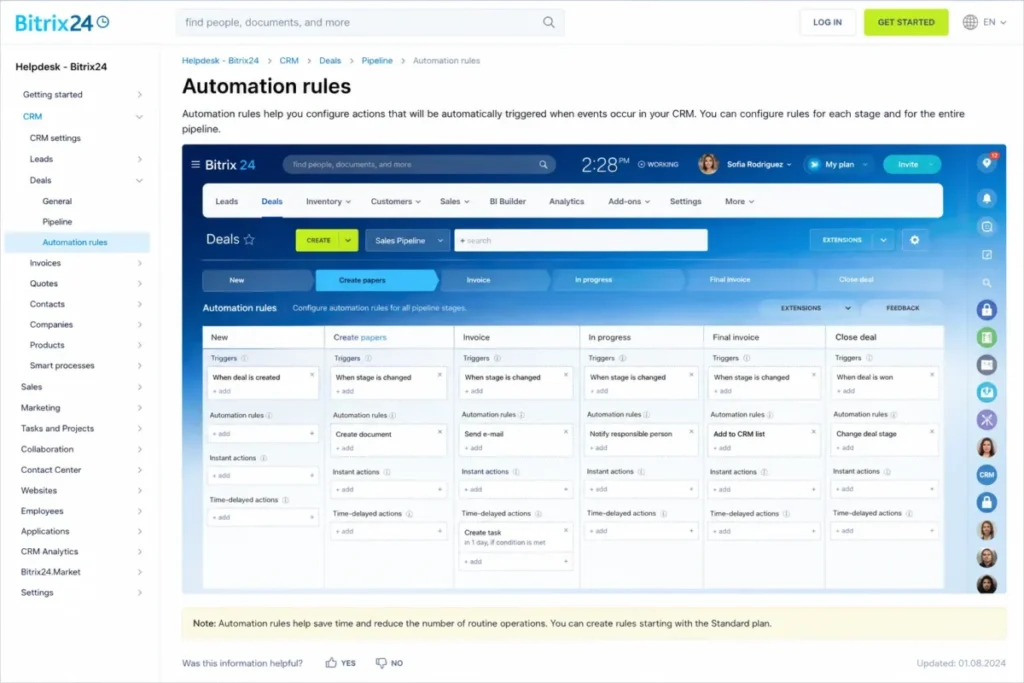
Bitrix24 builds the CRM around lead and deal pipelines, and stage-based automation rules sit on top of them. According to the official sales automation documentation, you open a pipeline, pick a stage, and attach a rule or trigger. Rules fire when a deal reaches that stage, or when an event such as a call or payment occurs.
The catch is the plan gate. Pipelines exist from Basic, but the documented sales-automation bundle starts on Standard, so a Basic team manages stages by hand.
Sales tunnels between pipelines
Teams that run separate new-business, renewal, and delivery pipelines can route deals between them with sales tunnels. Bitrix24’s sales tunnels documentation describes connecting a source stage to a destination stage and choosing whether the deal moves or is copied.
This is where the consolidated-workspace idea earns its keep. A closed deal can hand off to a fulfillment pipeline without a rep rebuilding the record, provided you keep the tunnel map documented.
Deal-to-invoice without re-keying
Invoicing is one of the clearest consolidation wins. According to Bitrix24’s invoice-from-deal help, an invoice created from a deal stays linked to it and prefills customer, product, amount, and owner fields.
That prefilled flow starts on Standard, alongside estimates, online payments, and unlimited leads. On Free or Basic, a rep re-enters customer and product data in a separate tool.
Email and Gmail capture
Bitrix24 connects Gmail and other mailboxes into the CRM, and the connection is more than authentication. The Gmail connection help walks through choosing a load period, a daily sending limit, whether new addresses create leads or contacts, and who gets assigned.
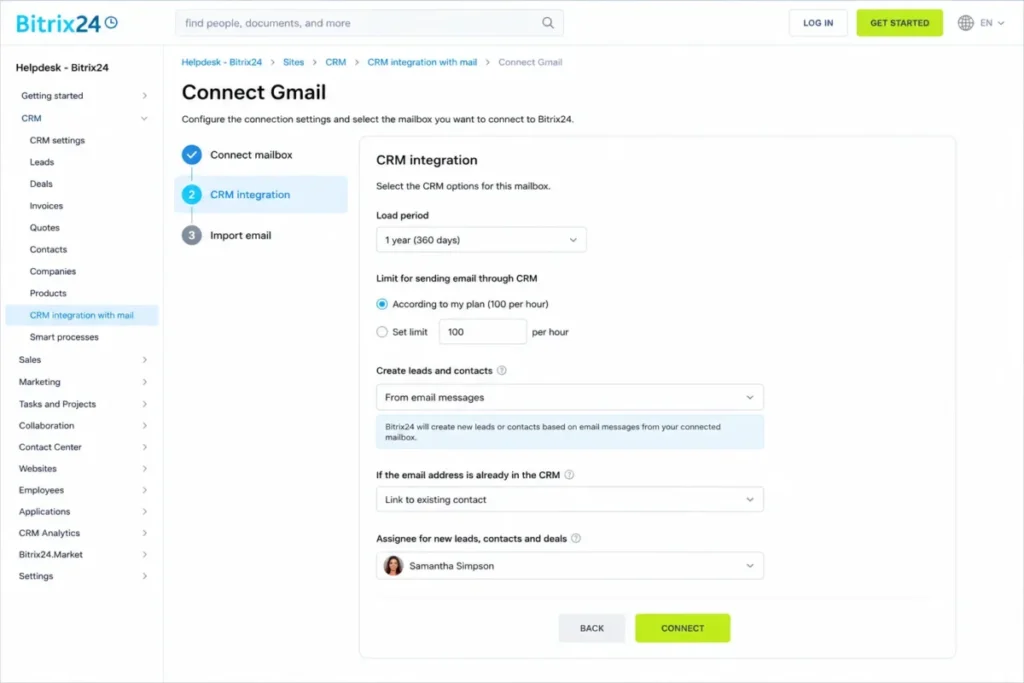
One documented runtime detail changes expectations for distributed teams. Mailbox synchronization depends on user activity, and Bitrix24’s mailbox sync documentation notes that a collapsed or inactive browser tab may not count as active, so email is not a background service you can leave unattended.
Integrations, telephony, and mobile
Bitrix24 advertises more than 750 apps and integrations in its marketplace, a figure worth flagging because older reviews such as TechRadar still cite around 300. We use the current vendor-attributed 750-plus number and treat it as a marketplace count, not an audited inventory.
Built-in telephony, a REST API, and an Android CRM app round out the week-one toolkit. Marketplace apps and telephony both require a paid plan, and the REST API is a commercial-plan capability, so the Free tier is not a safe base for a production integration.
Feature Gates: What Each Plan Includes
Bitrix24 does not sell “automation” as one feature. It sells a ladder, and buyers who miss the rungs either underbuy Standard or overpay for Professional.
| Capability | First available on | What it includes | Buyer impact |
|---|---|---|---|
| CRM pipelines, telephony, web forms, site builder | Basic | Recurring deals, email integration, forms | A 5-seat team gets a working pipeline without automation |
| Sales automation, invoices, online payments, unlimited leads | Standard | Stage rules, estimates, WhatsApp marketing | The practical tier for a real sales team |
| Workflow automation, RPA, email marketing, call tracking, e-signature, HR and time tracking | Professional | Cross-module automation and back-office tools | The rung that replaces several separate tools |
| Central admin, branches, API boost, encryption at rest, SSO, 99.95 percent SLA, priority support | Enterprise | Governance and scale controls | Required for large or regulated teams |
Source: Bitrix24 cloud plan comparison, checked July 22, 2026.
The gate that trips people is between Standard and Professional. Standard sales automation is not the same as Professional workflow automation, so name the exact workflow you need before you pay the higher price.
The workflow consequence is direct. For most teams we recommend Standard as the supported feature set for a real sales pipeline, and a move to Professional only when a documented cross-module workflow, not a feature wish, forces the plan gate.
Limitations That Surface at Scale
Month one is when the ceilings appear. None of these limitations is hidden, but none shows up in a feature list either, and each one changes how you architect around Bitrix24.
The Free plan stops working sooner than user counts suggest
Bitrix24’s Free plan is generous on people and stingy on records. The plan comparison documents a 1,000-record search and filter ceiling for deals, contacts, and companies, and CRM analytics on Free also stops at 1,000 records.
An active pipeline crosses 1,000 records quickly, so “unlimited users” is the wrong measure of whether Free scales. Record volume is the real limit, and it arrives faster than headcount does.
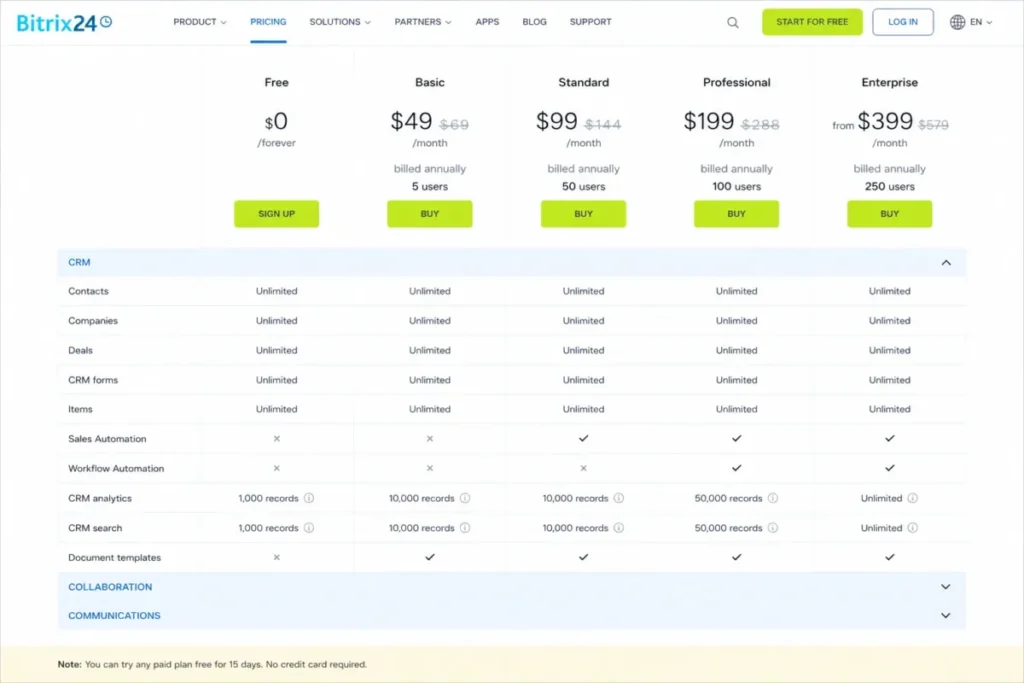
For a solo user or a two-person project, Free is a legitimate CRM. For an active sales team, the 1,000-record wall tends to arrive during the first busy quarter, so budget for a paid tier from the start rather than treating Free as a permanent home.
The REST API can block a heavy integration
Developers get a documented REST API, and they also get documented throttles. Bitrix24’s API limits reference sets a general intensity of two requests per second, 50 records per list page, and 50 operations per batch.
The threshold that bites is cumulative. A REST method that runs for more than 480 seconds of execution inside a 10-minute window is blocked for 10 minutes, according to Bitrix24’s cumulative execution-time note. Any high-volume sync needs backoff and batching by design.
For most buyers this never surfaces, because the CRM interface hides it. For a team piping thousands of records through a nightly job or a custom app, it is the line between a sync that finishes and a method that goes dark for 10 minutes.
Email marketing queues past a daily default
CRM Marketing sends on a default cap. Bitrix24’s marketing FAQ documents a default of 1,000 emails per day, with messages above the allowance queued to the next day and spam behavior able to reduce or block sending.
A 5,000-contact blast does not fail, but it does not go out in one day either. Plan a burst campaign around the queue, not against it.
Campaign segments cannot be exported
Data portability has a hard edge here. Bitrix24’s marketing documentation indicates that CRM Marketing campaign segments cannot be exported, including through the REST API.
For a team that runs marketing across more than one platform, that traps the segmentation logic inside Bitrix24. Keep the source-of-truth segmentation reproducible in an external system so a segment is never stranded.
A downgrade can disconnect mailboxes
Plan changes are not free of side effects. Bitrix24’s mailbox downgrade help documents that after a downgrade, excess mailboxes can be disconnected automatically, starting with the most recently connected one.
Connected mailboxes per user are plan-dependent: 1 on Basic, 5 on Standard, and 10 on Professional and Enterprise. Inventory who owns which mailbox before you change plans, or you can interrupt CRM email capture.
Deal import cannot update existing deals
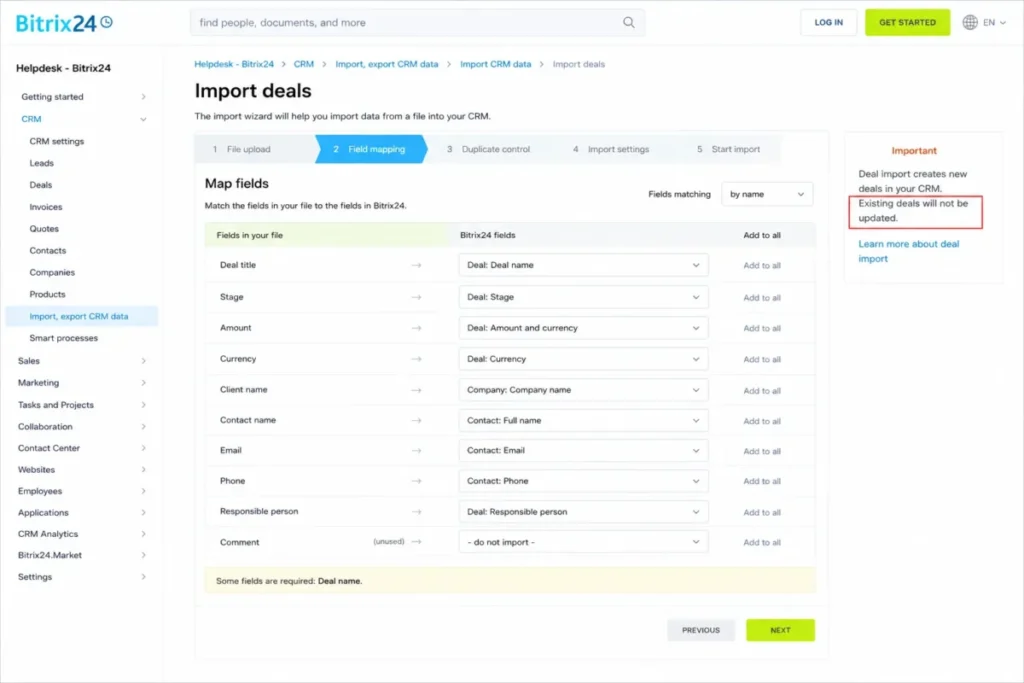
This is the migration limit that catches switching teams late. Bitrix24’s import documentation states that CRM deal import creates new deals and cannot update existing ones.
For a first load that is fine, and the contacts-and-deals import guide tells you to import contacts before deals so records link automatically. For an ongoing sync or a re-import, that create-only behavior risks duplicates, so treat updates as a separate design problem.
A structured CRM migration checklist helps here. Attachment, activity-history, and automation coverage all need a pilot before you commit.
One telephony provider, one connection
There is an architecture constraint for multi-entity teams. Bitrix24’s telephony requirements note that you cannot connect multiple accounts of the same telephony integration to one Bitrix24 instance.
A business trying to wire several regional accounts of the same provider into one workspace runs into this wall. Validate your account topology before migration, not after.
The Pricing Math Nobody Shows You
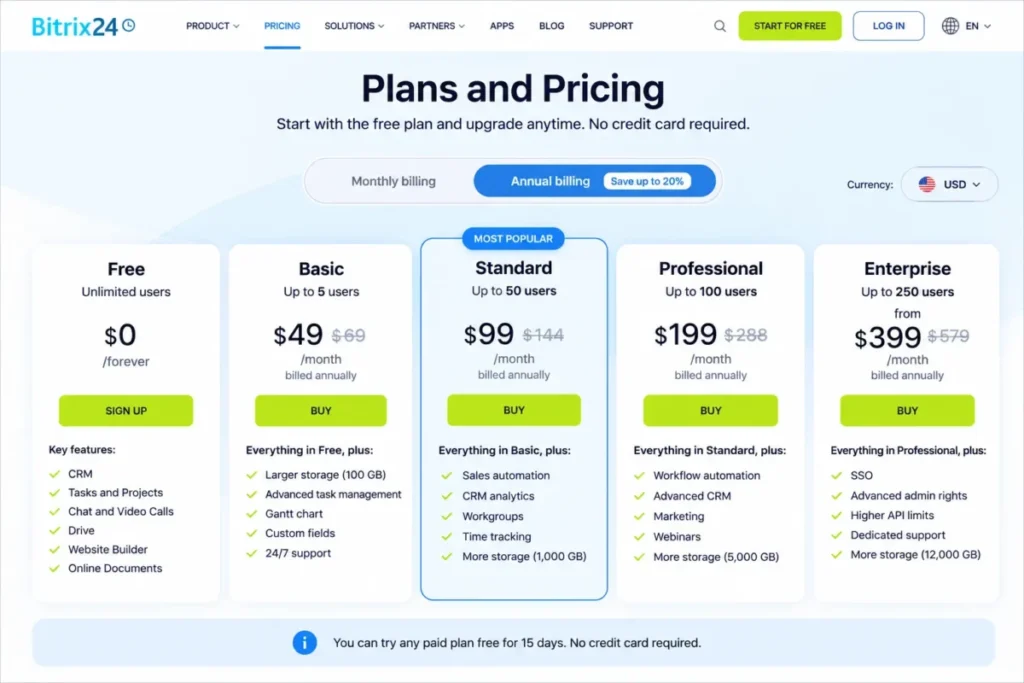
Bitrix24 does not charge per seat. It charges a fixed price for the whole organization within each plan’s user cap, which changes the value math at every team size.
| Plan | Monthly, per organization | Annual, effective monthly | User cap | Online storage |
|---|---|---|---|---|
| Free | $0 | $0 | See contradiction below | 5 GB |
| Basic | $69 | $49 | 5 | 24 GB |
| Standard | $144 | $99 | 50 | 100 GB |
| Professional | $289 | $199 | 100 | 1,024 GB |
| Enterprise (entry) | $579 | $399 | 250 | 3 TB |
Source: Bitrix24 cloud pricing, all plans, checked July 22, 2026. Annual figures show the effective monthly price when billed yearly.
What flat pricing costs per user
Because the price is fixed per plan, the effective per-user cost falls as your team fills the cap.
| Team size | Cheapest fitting plan | Annual, effective monthly | Effective cost per user | Note |
|---|---|---|---|---|
| 5 users | Basic | $49 | $9.80 per user | Small teams pay the most per head |
| 50 users | Standard | $99 | $1.98 per user | Best value near the cap |
| 100 users | Professional | $199 | $1.99 per user | Still strong per-user economics |
| 101 users | Enterprise (250) | $399 | $3.95 per user | One extra seat doubles the bill |
Source: Bitrix24 cloud pricing, per-user basis, checked July 22, 2026. Per-user figures divide the plan price by the listed team size.
The 101-user jump is the trap. Crossing 100 seats moves you from Professional at $199 to Enterprise at $399, because there is no tier between them, so forecast headcount before you settle on Professional.
The Free-plan user count is officially contradictory
One number could not be reconciled, and it matters too much to smooth over.
Bitrix24’s pricing summary describes the Free plan as suitable for 1 to 2 users, while the official plan comparison, About page, and edition documentation describe it as supporting unlimited users. Both statements are official as of July 22, 2026. Confirm the live workspace limit before you plan a rollout, because the sources disagree.
The costs that sit outside the subscription
Three usage-based costs never appear in the plan price. Built-in telephony bills separately, with outbound rates starting at $0.015 per minute on Bitrix24’s call-rates page, and destination pricing varies.
Text-to-speech voice broadcasting is a paid Voximplant add-on, documented in the voice-broadcast help. WhatsApp Business API can create paid dialog charges even though regular chat inside a 24-hour window can be free, per Bitrix24’s WhatsApp channel help.
For a call-heavy or messaging-heavy team, model these separately. The subscription is not the all-in number.
Enterprise scales in large steps, and cloud is not the only edition
Enterprise cloud pricing runs well past the entry tier. The ladder climbs from 250 users at $399 per month, billed annually, to 10,000 users at $7,999 per month, billed annually.
| Enterprise user cap | Monthly, per organization | Annual, effective monthly |
|---|---|---|
| 250 | $579 | $399 |
| 500 | $919 | $639 |
| 1,000 | $1,149 | $799 |
| 5,000 | $5,749 | $3,999 |
| 10,000 | $11,499 | $7,999 |
Source: Bitrix24 Enterprise cloud tiers, checked July 22, 2026.
Self-hosted licensing is a separate product with separate economics. Bitrix24’s self-hosted pricing lists Business 50 at $3,590, Business 100 at $5,990, and Business 250 at $10,990 per year, and those licenses exclude the infrastructure and implementation cost of running it yourself.
Keep cloud and self-hosted comparisons apart, because they solve different buying problems.
Automation, AI, and Reporting
Automation is Bitrix24’s clearest upsell path, and reporting is its quietest limit. Both scale in steps rather than smoothly.
Stage automation on Standard handles the daily grind: move a deal, send a templated email, create a task, or notify the owner when a stage changes. Professional adds the layer most operations teams want, including workflow automation, RPA, ad automation, call tracking, and email marketing.
The AI features, marketed as CoPilot, also sit on the Professional tier, so a Standard buyer who expects AI sales assistance out of the gate is on the wrong plan. Name the AI use case before you pay for it, because the price gap between Standard and Professional is $100 per month billed annually.
Reporting scales in steps too. CRM analytics covers 1,000 records on Free, 100,000 on Basic through Professional, and 200,000 on Enterprise, according to the plan comparison, so a large dataset can outrun the analytics engine long before it outruns storage.
For a growing sales org, that ceiling is the reporting story that feature lists skip. A 150,000-record CRM on Professional can hold the data yet cannot analyze all of it, which pushes analytics-heavy teams toward Enterprise for reasons that have nothing to do with headcount.
Security, Support, and Admin Controls
Bitrix24 describes a standard cloud security posture, and the strongest controls sit on the top tier. Read the specifics as vendor claims rather than audited results.
The security page lists TLS in transit, web application firewall controls, restricted staff access, separate data centers, daily backups, and tenant data isolation across all plans. That is a reasonable baseline for a business CRM.
Enterprise is where the governance features concentrate. Its materials advertise two-factor authentication, AES-256 encryption at rest, single sign-on, Active Directory, login history, a 30-day backup window, SOC 1/2/3 alignment, GDPR controls, ISO 27001, PCI DSS Level 1, and a 99.95 percent SLA.
For a regulated buyer, that list is the reason to price Enterprise, but a badge is not an audit. Request the current SOC report, the exact certificate scope, and the regional subprocessor list during procurement, because the vendor page will not substitute for those documents.
Support splits by whether you pay. Free users rely on self-service help: manuals, articles, videos, webinars, and local partners, according to Bitrix24’s help center.
Commercial subscribers gain access to technical specialist support beyond that self-service layer.
No published response-time commitment backs that access, and Trustpilot and Capterra sentiment skews negative on support waits. Treat those complaints as a signal to confirm channels, hours, and escalation in writing, not as a measured service level.
Source: Bitrix24 security page, checked July 22, 2026. Security and compliance statements are vendor claims, not independent audits.
Bitrix24 Pros and Cons
| Pros | Cons |
|---|---|
| Flat organization pricing gets cheaper per user as you fill the cap | Steep setup and a dense interface that reviewers flag repeatedly |
| One workspace for CRM, projects, chat, sites, and light HR | Deal import creates new deals and cannot update existing ones |
| Documented deal-to-invoice and cross-pipeline tunnel workflows | Free plan stalls at a 1,000-record CRM ceiling, not a user cap |
| More than 750 marketplace apps plus a REST API on paid plans | REST methods can be blocked for 10 minutes after heavy use |
| No-time-limit Free plan for evaluation and small teams | Telephony, WhatsApp dialogs, and text-to-speech bill on top of the plan |
Source: Bitrix24 official documentation and pricing, checked July 22, 2026.
Who Should Use Bitrix24
Technically confident teams of 10 to 100. A team with an admin who can own configuration gets the most from the flat-fee model and the consolidated workspace. This is the core fit.
Sales teams that will fill a plan cap. A 45-to-50 person sales org on Standard pays about $1.98 per user per month billed annually, which undercuts most per-seat CRMs at that size.
Operations teams replacing several tools. If Professional’s workflow automation, e-signature, and HR features displace three or four separate subscriptions, the consolidation math works in your favor.
Businesses that want built-in telephony and omnichannel. Teams that want calling, chat, and web forms inside the CRM avoid stitching them together, as long as they model the per-minute and per-dialog costs.
Who Should Avoid Bitrix24
Simplicity-first sales teams without a CRM owner. If nobody wants to own setup, the breadth becomes drag, and the abandonment risk is real. A simpler tool serves you better.
Teams migrating a mature CRM with rich history. Because deal import is create-only and attachment, activity, and automation coverage are unverified, a history-heavy migration needs a proof and a pilot first.
Marketing teams that live across platforms. The inability to export campaign segments limits portability, so a multi-platform stack fights the tool.
Buyers who need assured support response times. Official help distinguishes Free self-service from commercial technical support, but no response-time commitment is published, and Trustpilot sentiment skews negative on support.
Bitrix24 Alternatives
If the breadth or the setup burden is wrong for your team, three alternatives cover the common exits, and a direct comparison helps you weigh the tradeoffs.
| Tool | Choose it if | Starting price, billed annually | Best for |
|---|---|---|---|
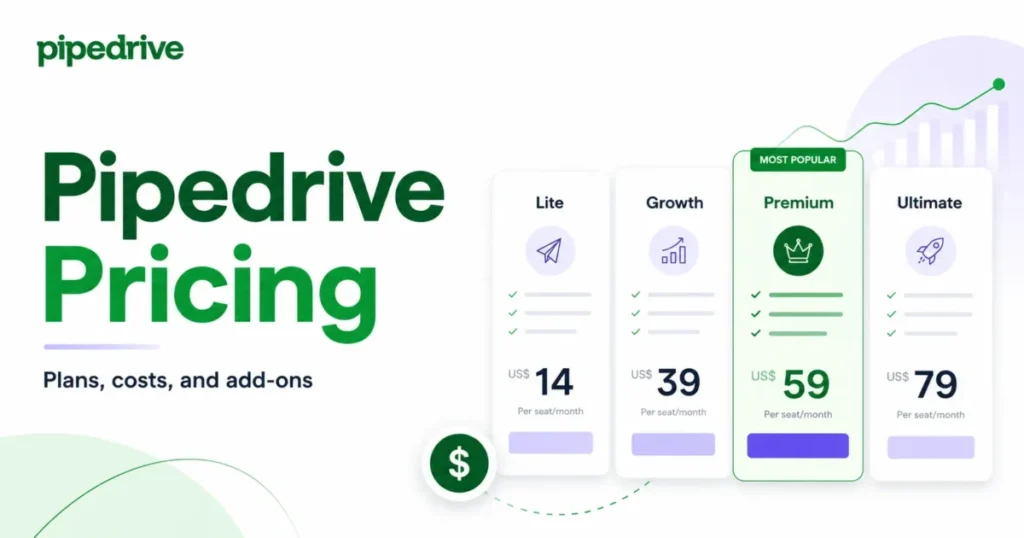
| Pipedrive | You want a simple sales-first pipeline | Per-seat, from a low entry tier | Small sales teams that value speed over breadth |
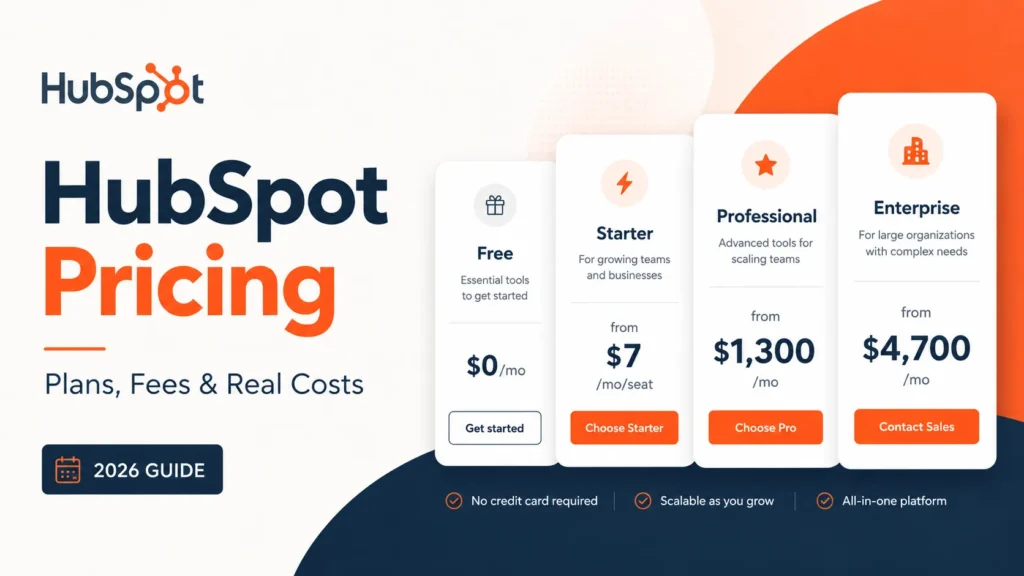
| HubSpot CRM | You want easier onboarding and a large ecosystem | Free tier, then per-seat | Teams combining sales and marketing |
| Zoho CRM | You want modular customization at a low entry price | Low per-user entry | Budget-conscious teams that still want depth |
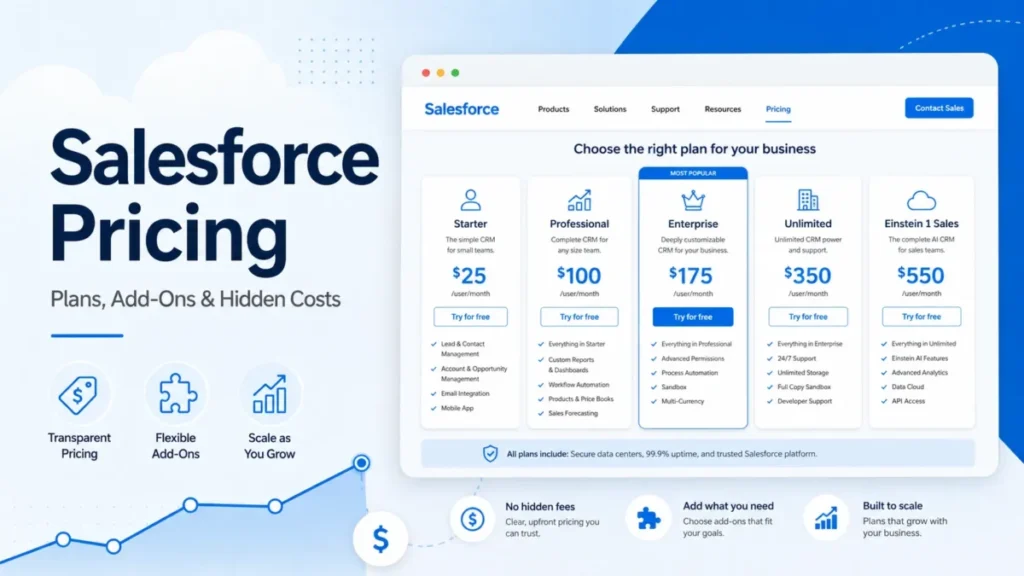
| Salesforce | You need deep enterprise governance | Higher per-seat | Large, process-heavy organizations |
Source: each tool’s official pricing page, checked July 22, 2026.
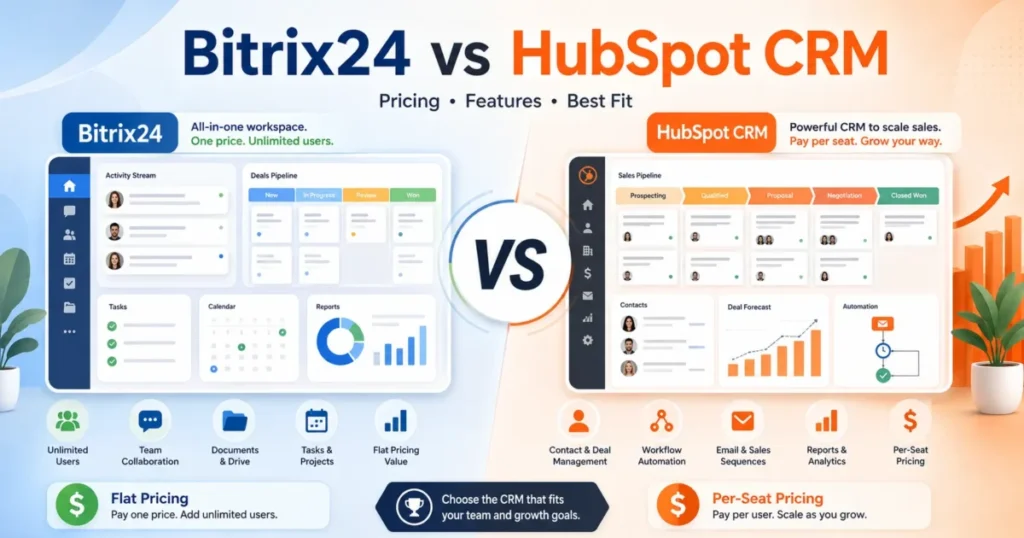
For the simplest path off Bitrix24, the Pipedrive CRM review explains its sales-first model, and the broader Pipedrive alternatives list widens the field. Teams weighing ecosystem breadth should read the HubSpot CRM review and the head-to-head on Bitrix24 and HubSpot compared.
Value-focused buyers get more from the Zoho CRM review, and enterprise buyers should size the governance gap with the Salesforce CRM review. If a free-first path is the priority, the best free CRM software roundup ranks the options.
Final Verdict: Is Bitrix24 Worth It?
Bitrix24 is worth it for the specific buyer it fits, and a poor deal for the buyer it does not. The dividing line is technical maturity, not company size.
For a technically confident 10-to-100 person team, Bitrix24 is one of the best flat-fee values in the CRM market, and Standard at $99 per month billed annually is the plan we would shortlist for a serious sales org. Step up to Professional only when you can name the cross-module workflow that forces it.
Three plans cover most buyers. Free suits a solo user who can live inside 1,000 records, Standard fits a 20-to-50 person sales team that wants automation and invoicing, and Professional earns its price only when workflow automation, marketing, or HR displaces separate tools.
Enterprise is a governance and scale decision, not a features-per-dollar one. Cross into it because you need SSO, branch administration, or the higher analytics ceiling, not because you added one seat past 100.
For a simplicity-first team, a history-heavy migration, or a multi-platform marketing operation, the documented limits outweigh the savings, and a narrower CRM is the better buy. The value is real, but it is conditional, and the conditions are the whole story.
Frequently Asked Questions
Short, direct answers to the questions buyers ask most about Bitrix24, drawn from its official pricing and documentation checked July 22, 2026.
Is Bitrix24 a good CRM?
Bitrix24 is a strong CRM for technically confident teams that want to consolidate tools under a flat fee, and a weak one for teams that need fast, low-admin onboarding. Fit depends on whether someone can own the configuration.
Is Bitrix24 free to use?
Yes, Bitrix24 has a Free cloud plan with no time limit, verified against its edition documentation on July 22, 2026. The Free plan stalls at a documented 1,000-record CRM search ceiling, and the official user count is contradictory, so confirm the live limit before rollout.
How much does Bitrix24 cost?
Paid cloud plans, billed annually, run from Basic at $49 per month to Professional at $199 per month for the whole organization, with Enterprise starting at $399 per month for 250 users. Telephony, WhatsApp dialogs, and text-to-speech bill separately.
How many users does Bitrix24 support?
Paid cloud caps are 5 users on Basic, 50 on Standard, 100 on Professional, and 250 to 10,000 across the Enterprise tiers. The Free-plan user allowance is described inconsistently across official pages, so verify it live.
What are the disadvantages of Bitrix24?
The main disadvantages are a steep learning curve, a Free-plan record ceiling, a REST API that can block heavy methods for 10 minutes, and a deal import that cannot update existing records. Campaign segments also cannot be exported.
Is Bitrix24 hard to learn?
Bitrix24 has a documented-heavy setup and a dense interface, and G2 and Capterra reviewers repeatedly cite a steep learning curve. Teams with a dedicated admin tend to settle in, while teams expecting instant use tend to stall.
Does Bitrix24 have workflow automation?
Yes, but it is tiered. Stage-based sales automation starts on Standard, while broader workflow automation, RPA, and task automation require the Professional plan.
Can Bitrix24 import data from another CRM?
Bitrix24 imports contacts and deals from CSV, and marketplace migration apps exist, but deal import creates new deals and cannot update existing ones. Attachment, activity-history, and automation coverage are unverified, so run a pilot first.
Does Bitrix24 have a mobile app?
Yes, Bitrix24 offers an Android CRM app, and the help center documents mobile CRM actions. Mobile availability does not by itself prove performance, so validate it against your workflows.
What are the best Bitrix24 alternatives?
Pipedrive suits teams that want a simpler sales-first pipeline, HubSpot fits sales-and-marketing teams that want easier onboarding, and Zoho serves budget-conscious buyers who still want depth. Salesforce is the choice for deep enterprise governance.