Switching CRMs costs more than the subscription line shows. So before you shortlist anything, get clear on why you are leaving.
The teams asking about Pipedrive alternatives in 2026 are rarely unhappy with the pipeline view. They hit a plan gate: full email sync and workflow automation start on the $39 Growth tier, add-ons stack up, or the sales process outgrows a sales-only tool.
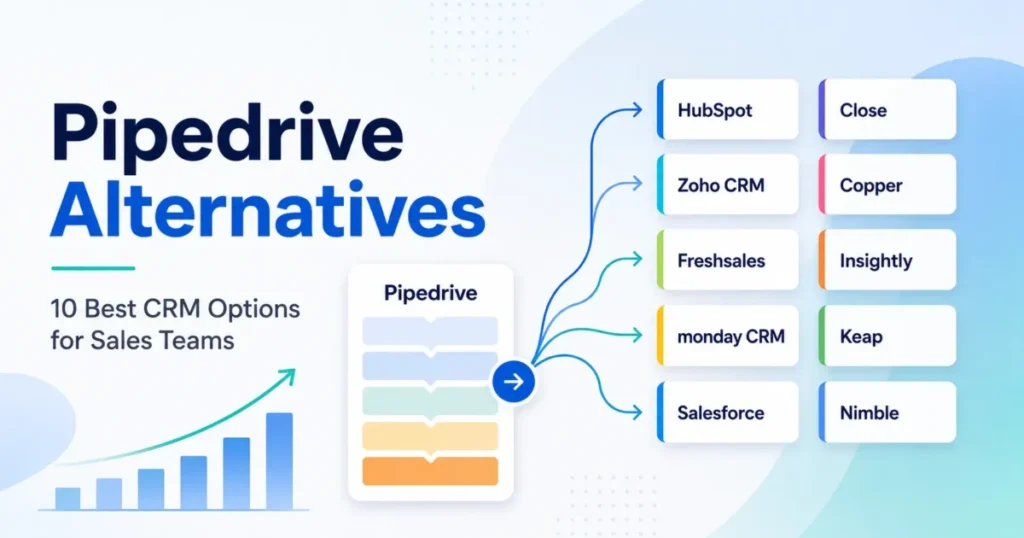
This guide ranks 10 replacements by the specific failure mode each one solves, and the wider best CRM for sales teams ranking covers the market beyond Pipedrive’s orbit. Every price was checked against the official pricing page on July 13, 2026.
You also get five-seat and ten-seat cost math, documented feature gates, migration exclusions most rankings skip, and an honest case for staying put.
In This Article (13 sections)
Quick Verdict: The Right Pipedrive Replacement by Switching Trigger
The right replacement depends on the constraint you hit, not on a universal winner. Use this table to jump to the option built for your exit reason.
| If you are leaving Pipedrive because… | Best alternative | Why |
|---|---|---|
| You need marketing, sales, and service on one platform | HubSpot Sales Hub | Free entry tier plus native lifecycle products on one customer record |
| Growth-tier pricing feels heavy for what you get | Zoho CRM | Standard runs $14 per user monthly with deeper customization |
| You want built-in email, chat, and phone at the lowest cost | Freshsales | Growth costs $9 per user monthly with channels included |
| Your process continues into onboarding and operations | monday CRM | Boards extend past closed-won into delivery work |
| You need enterprise governance and complex objects | Salesforce Sales Cloud | Custom objects, permissions, and admin depth Pipedrive does not offer |
| Reps spend most of the day calling and texting | Close | Dialers, SMS, and calling live inside the CRM |
| Your team works out of Gmail all day | Copper | CRM built around Google Workspace |
| Won deals become client projects | Insightly CRM | Opportunities convert into managed projects |
| You want automation plus invoices and payments | Keap | Lifecycle automation, appointments, and payments in one system |
| You sell on relationships, not pipeline governance | Nimble | One simple plan with contact enrichment and inbox context |
Eight of these ten wins are about scope or cost, not pipeline mechanics. If your only complaint is a missing pipeline feature, check the Growth-versus-Premium gates before paying migration costs.
What Breaks First Inside Pipedrive
Pipedrive fails teams in predictable places, and none of them show up in the demo. The official documentation names most of them if you read the plan pages closely.
The $14 price is not the price most sales teams pay
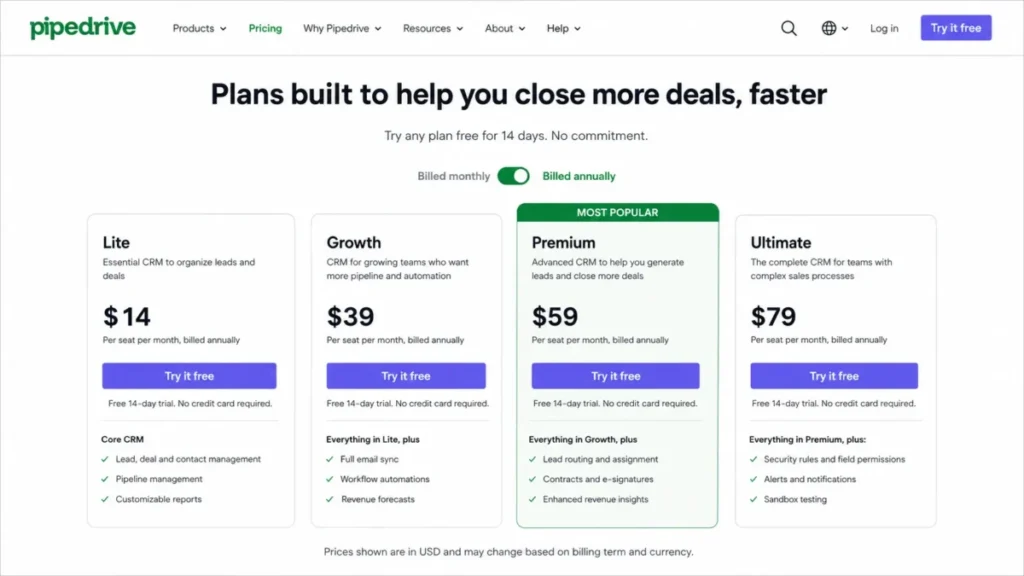
Pipedrive Lite costs $14 per seat per month on annual billing, or $24 month to month (official pricing page). Based on the official plan documentation, Lite excludes full email synchronization, workflow automation, nurturing sequences, forecast reports, the meeting scheduler, and the contact timeline.
Those are baseline features for an active sales team in 2026. The first tier that includes them is Growth at $39 per seat per month annually, or $49 monthly.
| Pipedrive plan | Annual price per seat | What it adds | Checked |
|---|---|---|---|
| Lite | $14/ | Core pipeline, leads, calendar, basic reporting | Jul 13, 2026 |
| Growth | $39/ | Email sync, automations, sequences, forecasts, scheduler | Jul 13, 2026 |
| Premium | $59/ | Lead routing, scoring, enrichment, e-signatures, Projects | Jul 13, 2026 |
| Ultimate | $79/ | Security rules, alerts, sandbox, highest limits | Jul 13, 2026 |
So the honest comparison baseline is $39, not $14. A five-seat team on Growth pays $2,340 per year, a ten-seat team pays $4,680 before add-ons, and the full Pipedrive pricing breakdown models the other tiers.
Pipedrive renders these prices dynamically, so verify the live US checkout before budgeting. The plan names changed too: per the official plan documentation, Lite, Growth, Premium, and Ultimate replaced Essential, Advanced, Professional, and Enterprise.
Add-ons quietly rebuild the bill
Pipedrive sells several functions as separately priced add-ons. Per the official pricing page on July 13, 2026: LeadBooster from $32.50 per company monthly, Web Visitors from $41, Campaigns from $13.33, and Projects from $6.67 per seat.
Projects, LeadBooster, and Smart Docs are bundled into Premium and Ultimate for eligible users. On Lite and Growth, they are extra line items.
| Job to be done | Pipedrive answer | Cost position |
|---|---|---|
| Lead capture, chatbot, forms | LeadBooster add-on | From $32.50/ |
| Email marketing campaigns | Campaigns add-on | From $13.33/ |
| Website visitor identification | Web Visitors add-on | From $41/ |
| Post-sale project delivery | Projects add-on | From $6.67/ |
| Documents and e-signatures | Smart Docs | Separate on lower plans; included higher up |
A ten-seat Growth team that adds LeadBooster and Campaigns is no longer buying a $39 CRM. That stack is where consolidation platforms like HubSpot Sales Hub and Freshsales start winning on total cost.
Usage limits have consequences, not just numbers
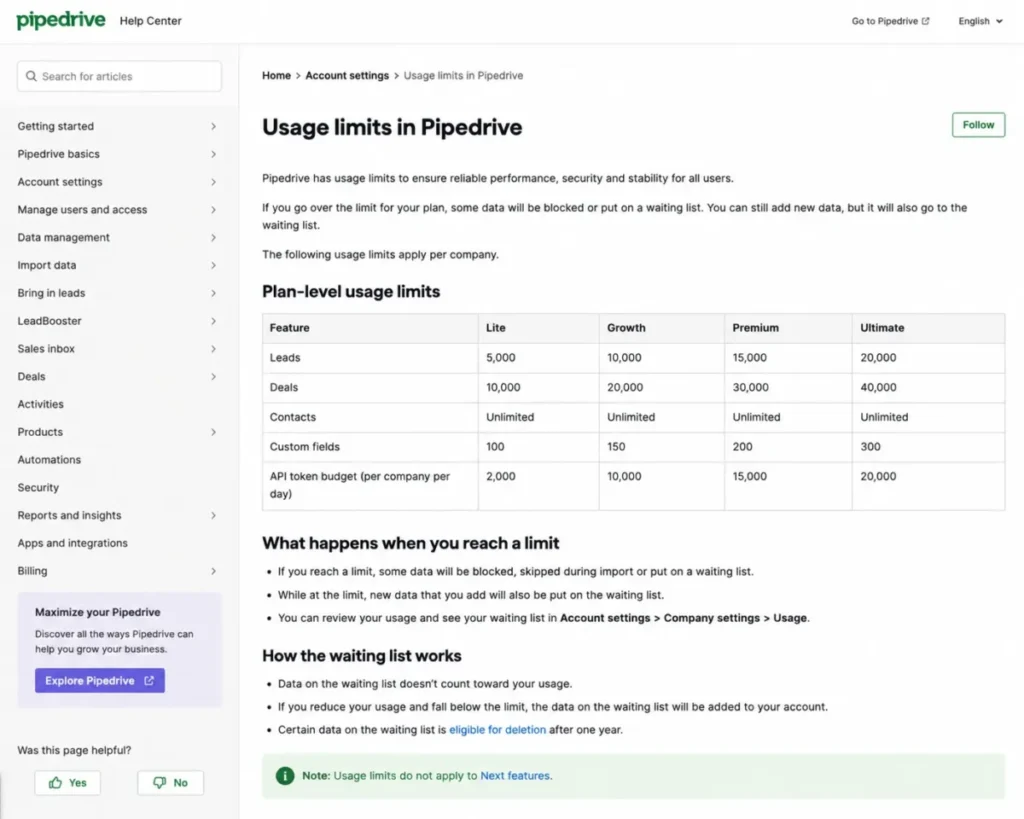
Pipedrive’s usage-limit documentation, updated May 2026, sets plan-level ceilings: Lite allows 2,500 active leads and deals per user, Growth allows 5,000, and Growth caps custom reports at 50. Automations carry documented limits on actions, delays, wait conditions, and total duration.
The consequence matters more than the ceiling. Per the same documentation, over-limit records can be blocked from creation, skipped during imports, or placed on a waiting list, and certain waitlisted data becomes eligible for deletion after one year.
API capacity is also plan-dependent. Daily token budgets multiply by paid seats: Lite 30,000 tokens per seat, Growth 60,000, Premium 150,000, and Ultimate 210,000, subject to a documented company cap.
| Pipedrive plan | Daily API token budget | When it exhausts |
|---|---|---|
| Lite | 30,000 x paid seats | API returns HTTP 429 until reset |
| Growth | 60,000 x paid seats | API returns HTTP 429 until reset |
| Premium | 150,000 x paid seats | API returns HTTP 429 until reset |
| Ultimate | 210,000 x paid seats | API returns HTTP 429 until reset |
For an integration-heavy RevOps stack, this is a real scaling wall. Your enrichment, sync, and reporting jobs can outgrow Pipedrive before your headcount does.
The platform stops at the sale
Pipedrive remains a sales-first system. Native marketing automation, customer service, payments, and deep post-sale operations either require add-ons or sit outside the product entirely.
A TechRadar review from April 2026 praised the intuitive pipeline and simple menu structure while calling the missing native marketing automation a meaningful limitation. That matches the pattern on Capterra, where users prefer Pipedrive for ease of use and pick rivals like Zoho CRM for customization and automation depth.
One more support note: the Pipedrive Community forum was discontinued on July 1, 2025. Self-serve help now routes through the knowledge base, Academy, and support channels, and live chat hours depend on your plan.
What Pipedrive Still Does Well
Fairness matters here, because Pipedrive keeps winning the adoption fight. More than 100,000 companies use it, the visual pipeline is the reference design for the category, and the marketplace lists over 500 integrations.
Gartner Peer Insights comparisons rate Pipedrive favorably against heavier suites for deployment, support experience, and contracting simplicity. Reps learn it fast, and managers trust the board view.
One named customer, Chris Wolpert of Group Benefit Solutions, is quoted on the pricing page saying the mobile app is “just as functional as the desktop version.” Field-heavy teams take that seriously.
My read: Pipedrive is not a bad product that people escape, and the full Pipedrive CRM review shows why. It is a focused product that some teams outgrow, and the rest of this guide is about which direction to grow.
How I Compared These Pipedrive Replacements
I write as Macedona, the CRM buying analyst behind saascrmreview.com, and this analysis is based on official pricing pages, help centers, migration documentation, and API docs checked on July 13, 2026, plus third-party sentiment from Gartner Peer Insights, Capterra, and TechRadar. No hands-on trials were run for this piece, so nothing below claims personal testing.
Plan names lie across vendors, so I compared capability scenarios instead: core pipeline, email plus automation, multichannel outbound, and enterprise governance.
If you are newer to the category, the primer on what CRM software does covers the baseline concepts these scenarios assume. A “Starter” plan at one vendor equals a “Pro” plan at another, and matching tier labels produces false price conclusions.
Each alternative below states the plan that matches Pipedrive Growth capability, not the cheapest shelf price. Rankings weigh how well each product solves a specific Pipedrive exit trigger, what it costs at five and ten seats, and how risky the migration is.
Lower-ranked tools are not worse products. Nimble at rank 10 is still the right pick for its cohort, and Salesforce at rank 5 is wrong for most ten-person teams.
The 10 Best Pipedrive Alternatives in 2026
Every review below follows the same frame: who it fits, what it costs at the tier that matters, where it beats Pipedrive, and the limitation that disqualifies it. Migration difficulty is an editorial estimate based on data model complexity, workflow rebuild effort, and documented import methods, not a promised timeline.
1. HubSpot Sales Hub: Best for Replacing Pipedrive Plus the Tools Around It

HubSpot Sales Hub is the strongest pick when the real problem is scope, not pipeline mechanics. Pipedrive sells LeadBooster, Campaigns, and Web Visitors as add-ons; HubSpot builds lead capture, marketing, service, and reporting on one customer record.
- Starting price:
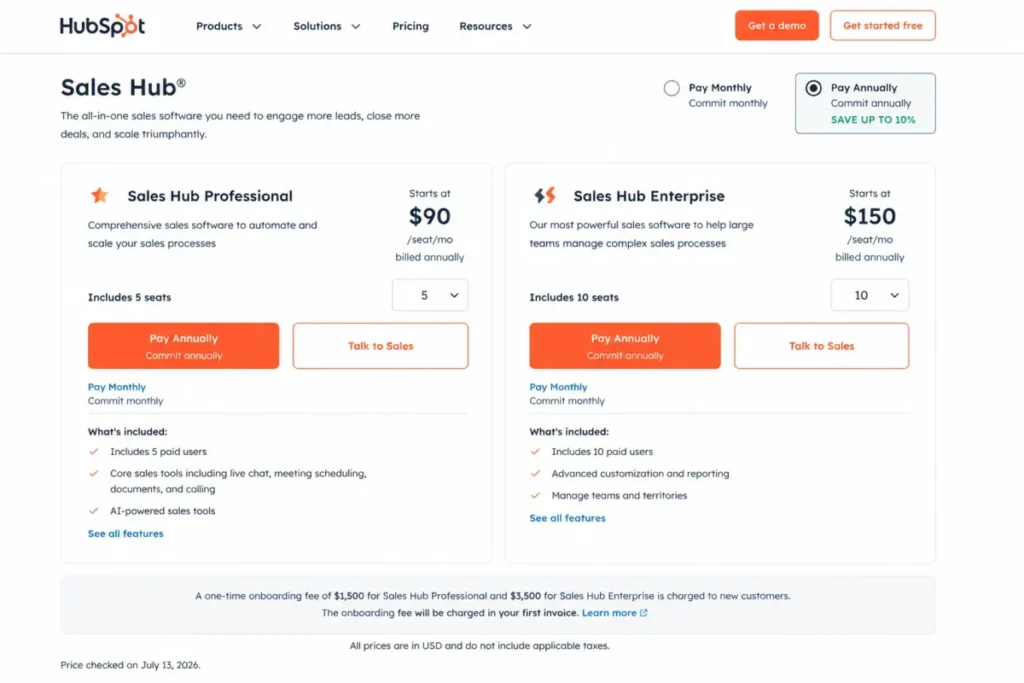
- free for up to two users. Starter displayed at $7 per seat monthly on annual promotional pricing beside a $20 monthly list reference, and Professional runs $90 per seat monthly on annual commitment (official pricing page).
Budget the onboarding fees most rankings hide. Professional carries a mandatory one-time $1,500 onboarding fee and Enterprise carries $3,500, so five Professional seats cost about $6,900 in year one and $5,400 at renewal; the HubSpot CRM review breaks down where that money goes.
| Pros | Cons |
|---|---|
| Free tier lets two users start without a contract | Professional jumps to $90 per seat plus $1,500 onboarding |
| Marketing, service, and content share one lifecycle record | Advanced sales features concentrate in Professional and Enterprise |
| Sequences, forecasting, and automation are native, not add-ons | Basic imports move core records, but historical emails and associations need careful mapping |
| HubSpot Academy shortens rep training | Promotional Starter pricing changes; verify before budgeting |
Best for: five-to-fifty-person revenue teams consolidating marketing and sales, founders who want one lifecycle system, and teams tired of stitching add-ons.
Avoid if: you only need a cheaper pipeline. First-year Professional costs roughly three times Pipedrive Growth.
Migration difficulty: Medium. Core records import cleanly; run a sample migration for emails and custom properties.
Verdict: choose HubSpot Sales Hub when the platform, not the pipeline, is what you are buying.
2. Zoho CRM: Best for More Capability per Dollar Than Pipedrive Growth

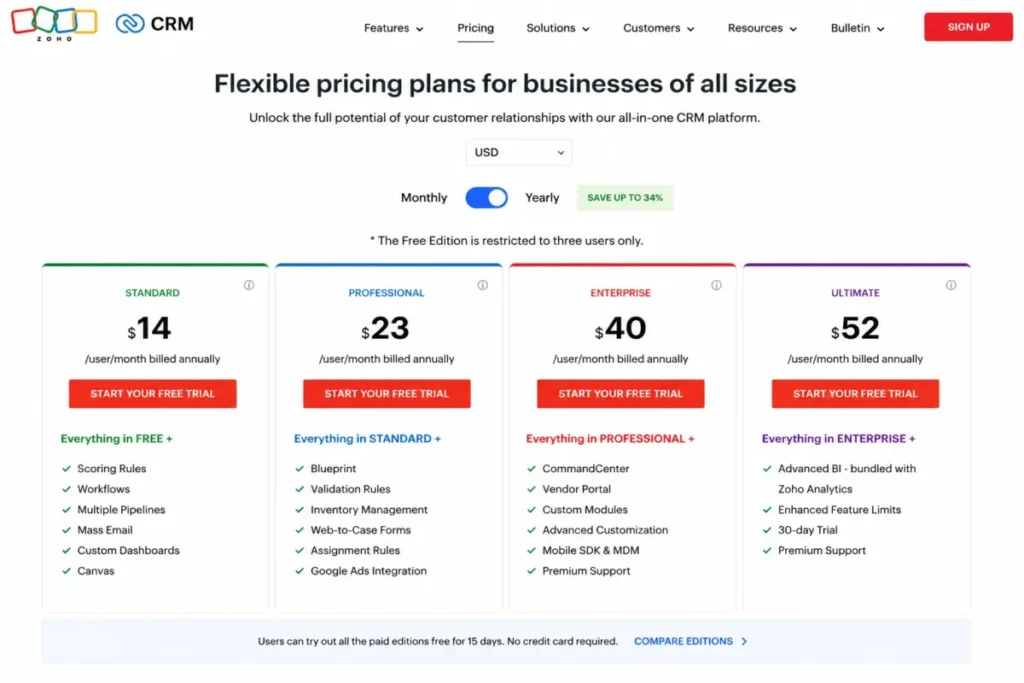
Zoho CRM is the value-and-customization answer to Pipedrive’s plan-gate problem. The free edition covers three users, and the US Standard plan is commonly displayed at $14 per user monthly on annual billing, the price Pipedrive charges for Lite without email sync or automation.
- Starting price:
- free for three users; Standard at $14 per user monthly annually, with deeper editions above it (official pricing page). The page localizes currency, so confirm the USD selector before you budget.
Zoho’s paid editions add custom modules, multiple pipelines, process management, built-in calling, inventory, CPQ options, and sandbox access as you climb. Capterra sentiment favors Zoho for customization and automation while favoring Pipedrive for ease of use.
Migration has a real safety net, and the Zoho CRM review covers the admin workload behind it. Zoho’s import wizard maps CSV fields, its import history flags skipped records, and an import can be undone within thirty days.
| Pros | Cons |
|---|---|
| Free three-user edition with a real upgrade path | Interface and setup feel less polished than Pipedrive’s board |
| Standard costs $14 against Pipedrive Growth at $39 | Configuration depth demands real admin time |
| Custom modules and process management scale with complexity | Salesflare’s comparison calls the experience more cumbersome for simple teams |
| Thirty-day import rollback reduces migration risk | Currency localization complicates price verification |
Best for: cost-sensitive ten-to-fifty-person teams, businesses already inside the Zoho suite, and owners who want configuration room to grow.
Avoid if: nobody on the team will own admin work. Zoho rewards configuration and punishes neglect.
Migration difficulty: Medium. Field mapping takes planning, but rollback and skipped-record reports are documented.
Verdict: the default pick when Pipedrive’s price-to-capability ratio is the exit reason.
3. Freshsales: Best Low-Cost Replacement With Built-In Channels

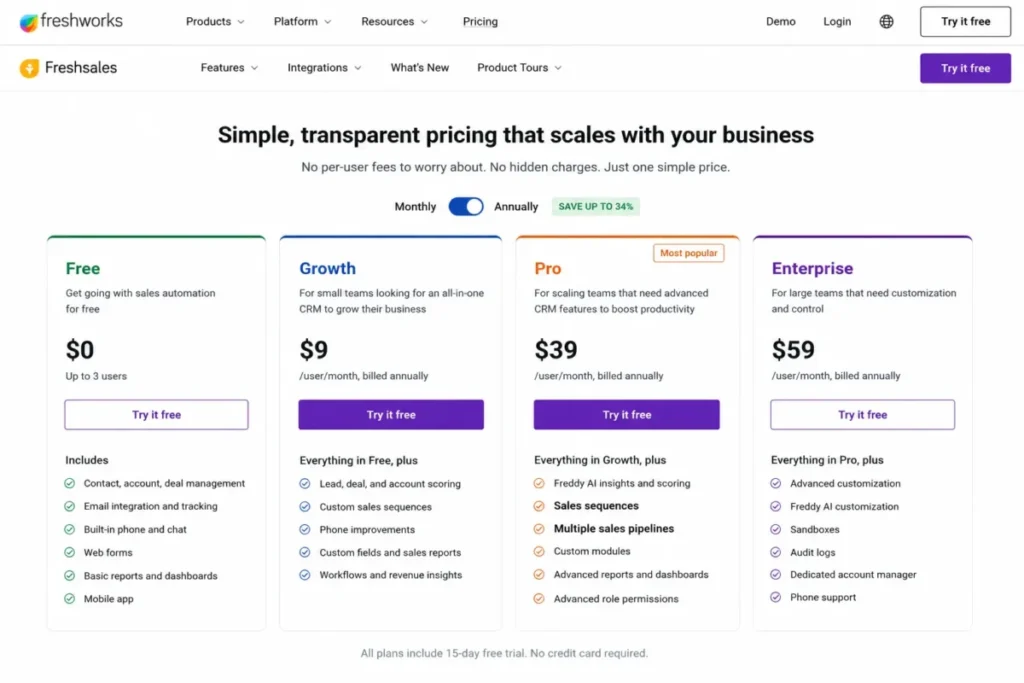
Freshsales, the Freshworks sales CRM, sets the lowest team-scale entry price in this ranking. Growth costs $9 per user monthly on annual billing and includes built-in email, chat, and phone, plus Kanban views, lifecycle stages, basic workflows, and one CPQ license.
- Starting price:
- free for up to three users; Growth at $9, Pro at $39, Enterprise at $59 per user monthly annually, with a 21-day trial and 24×5 support (official pricing page).
Read the gates before celebrating. Freddy AI scoring, sales sequences, multiple pipelines, territories, advanced workflows, and custom reports all start on Pro at $39, so the $9 plan replaces Pipedrive’s pipeline, not its automation depth; our Freshsales review examines how far Growth stretches.
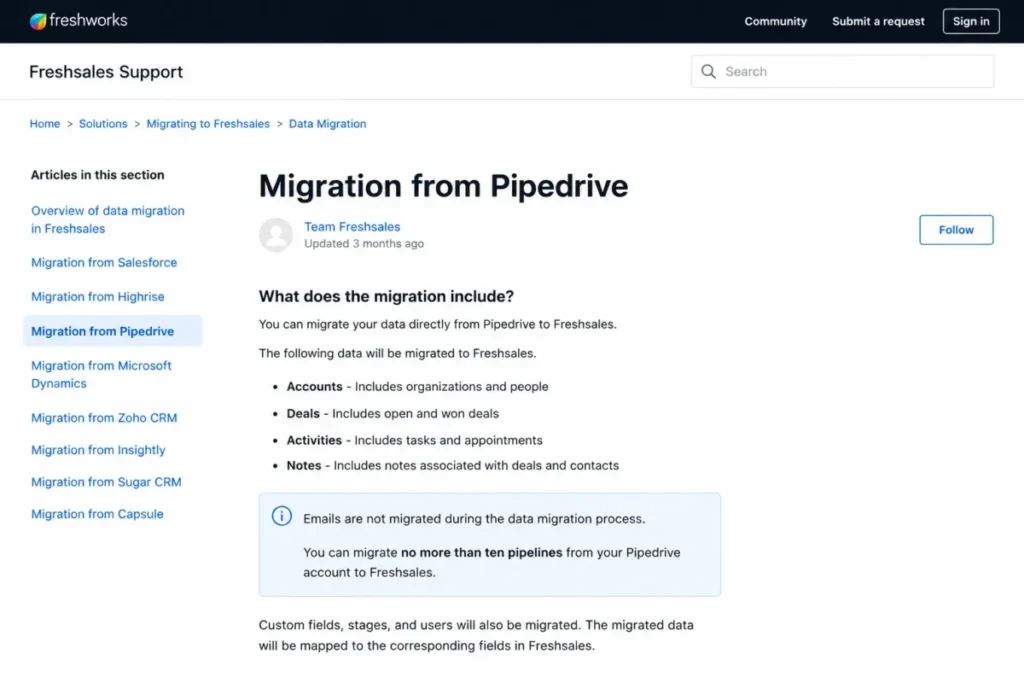
The migration path is direct but lossy. Freshsales migration documentation confirms its Pipedrive migration moves people, organizations, deals, pipelines, notes, and supported activities, but emails do not migrate, and only ten pipelines transfer.
| Pros | Cons |
|---|---|
| Phone, chat, and email included from $9 per user | AI scoring, sequences, and multiple pipelines wait behind Pro at $39 |
| Free plan covers three users with core CRM | Direct migration excludes email history entirely |
| Pro at $39 matches Pipedrive Growth pricing with more channels | Migrations past ten pipelines dump excess deals into the default pipeline |
| 21-day trial beats the 14-day norm on this list | Customization depth trails Zoho and Salesforce |
Best for: three-to-thirty-person teams that call and chat from the CRM, and budget-first buyers replacing Pipedrive Lite or Growth.
Avoid if: preserving email history in-CRM is non-negotiable.
Migration difficulty: Low to Medium, if you accept the documented exclusions.
Verdict: the best dollar-for-dollar Pipedrive replacement for communication-heavy small teams.
4. monday CRM: Best When Sales Is Only Half the Job

monday CRM treats the pipeline as one board inside a wider work platform. Deal records, onboarding checklists, delivery projects, forms, and dashboards live in the same system, which is exactly what Pipedrive cannot do without add-ons and external tools.
- Starting price:
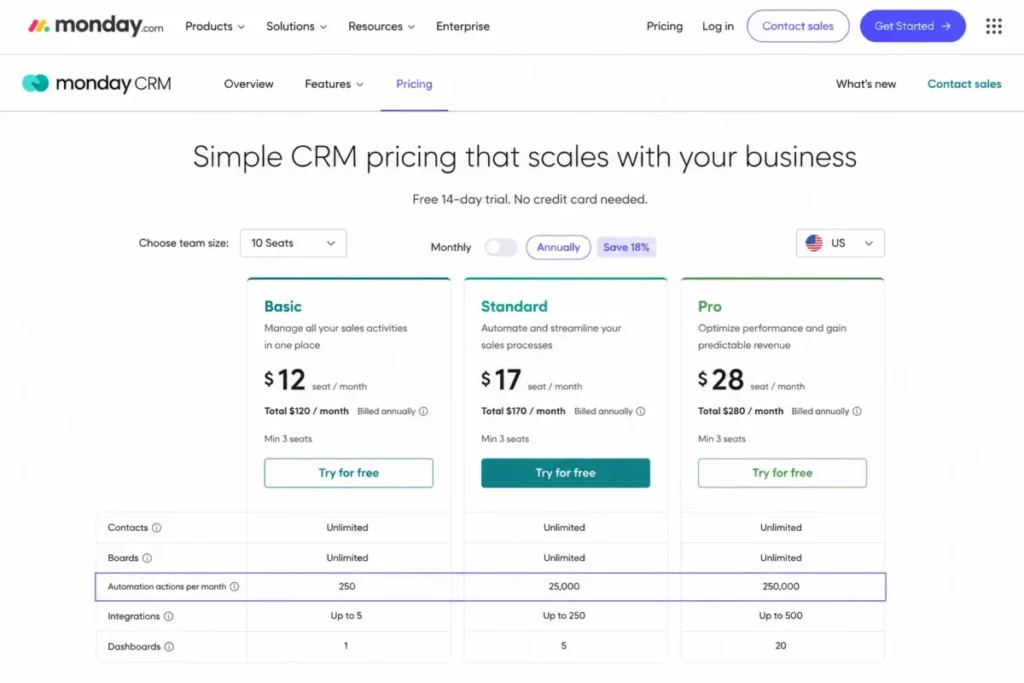
- Basic from $12 per seat monthly on annual billing with a three-seat minimum (official pricing page). The page can localize currency and naming, so verify the live US selector.
Flexibility has a metered core, as the monday.com review documents. Standard and Pro carry materially different monthly automation and integration action quotas, monday’s documentation describes warning and pausing behavior at the limit, and its own pages conflict on whether the top tier is unlimited or capped at 250,000 actions.
Switching also means rebuilding. monday’s Pipedrive guidance covers CSV or Excel import, then instructs teams to recreate automations manually, so your workflow library does not travel.
| Pros | Cons |
|---|---|
| Boards extend the CRM into onboarding and delivery work | Automation and integration actions are quota-metered by plan |
| Basic starts at $12 per seat with a visual, adoptable UI | Three-seat minimum applies at purchase |
| Dashboards and forms replace separate operations tools | Every Pipedrive automation must be rebuilt by hand |
| AI-assisted CRM functions ship with current plans | Board freedom demands upfront architecture discipline |
Best for: five-to-fifty-person teams coordinating sales with delivery, and operators who want one system for cross-functional work.
Avoid if: you expect a ready-made CRM data model. Boards reward design and punish improvisation.
Migration difficulty: Medium. Records import via CSV; automations, dashboards, and permissions are rebuild work.
Verdict: pick monday CRM for the work platform, not for automation volume on lower tiers.
5. Salesforce Sales Cloud: Best Enterprise Alternative to Pipedrive

Salesforce Sales Cloud is where teams go when Pipedrive’s data model, permissions, and reporting stop stretching. Custom objects, territory management, validation rules, advanced forecasting, and the AppExchange ecosystem operate at a depth no sales-first CRM matches.
- Starting price:
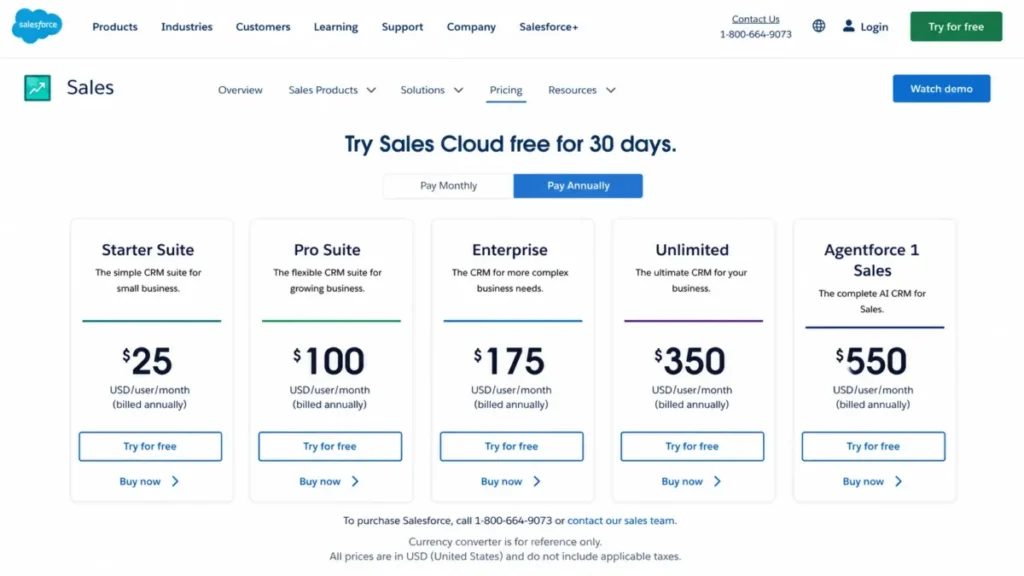
- Starter Suite at $25 per user monthly, Pro Suite at $100, Enterprise at $175, Unlimited at $350, and Agentforce 1 Sales at $550 (official pricing page).
Price the administration before the license. Editions climb steeply, add-ons like dialers and engagement tools cost extra, and third-party analysis consistently pairs Salesforce’s power with a steeper learning curve; the Salesforce CRM review maps that admin workload.
Migration is a project, not an import. CSV loading works within documented constraints, files up to 100 MB and records up to 400 KB, but object modeling, ownership, permissions, automations, and training need a structured implementation.
| Pros | Cons |
|---|---|
| Custom objects and governance handle processes Pipedrive cannot model | Enterprise at $175 per user is 4.5 times Pipedrive Growth |
| Forecasting, territories, and enterprise reporting run natively | Implementation and admin burden overwhelm small teams |
| AppExchange and APIs support massive integration volume | Add-ons and partner services inflate total cost beyond seats |
| Starter Suite at $25 offers a small on-ramp | Migration demands structured field mapping and permission design |
Best for: fifty-seat-plus sales organizations with a dedicated admin, multi-department reporting needs, and governance requirements.
Avoid if: no one owns the system full time. Unadministered Salesforce decays fast.
Migration difficulty: High. Plan a phased cutover with owners, validation rules, and training.
Verdict: the enterprise ceiling-remover, and overkill below serious scale.
6. Close: Best for High-Volume Outbound Calling

Close builds the phone into the CRM instead of bolting it on. Power and predictive dialers, SMS, calling, bulk email, and workflow sequences sit in the rep’s working view, plus the Chloe AI agent.
- Starting price:
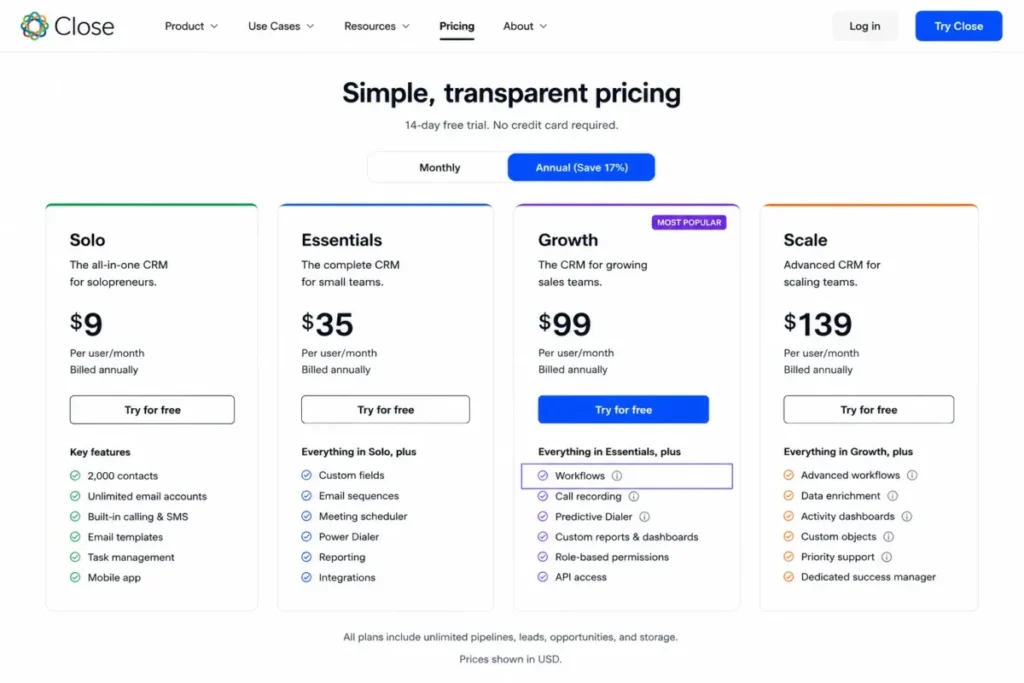
- Solo at $9 per user monthly annually for one user and 10,000 leads, Essentials at $35, Growth at $99, and Scale at $139 (official pricing page).
Match the plan to the promise. Workflows, the feature that replaces Pipedrive automation, start on Growth at $99, so Solo and Essentials buy the dialer without the follow-up engine.
Calling itself is metered. Close’s pricing FAQ states most outbound calls cost about $0.02 per minute and phone numbers start near $1 monthly, so a phone-heavy team budgets seats plus minutes times volume.
Migration gets vendor help, detailed in the Close CRM review. Close publishes a Pipedrive-specific export path for Leads, Deals, Organizations, People, Activities, and Notes handled through its support team, plus Import2-powered migrations with sample runs and error review.
| Pros | Cons |
|---|---|
| Dialers, SMS, and calling are native to the rep workflow | Workflows require Growth at $99 per user |
| Assisted Pipedrive migration with sample runs and error review | Calls, SMS, numbers, and extra AI usage bill by consumption |
| Solo at $9 gives one founder a serious outbound bench | Weak fit for teams that rarely call |
| 14-day trial without a card, plus a separate 30-day money-back policy | No native marketing or post-sale platform |
Best for: two-to-thirty-person outbound B2B teams whose reps live in call blocks and cadences.
Avoid if: outbound calling is occasional. You pay for specialization you will not use.
Migration difficulty: Low to Medium, thanks to the assisted path.
Verdict: the outbound specialist, priced like one.
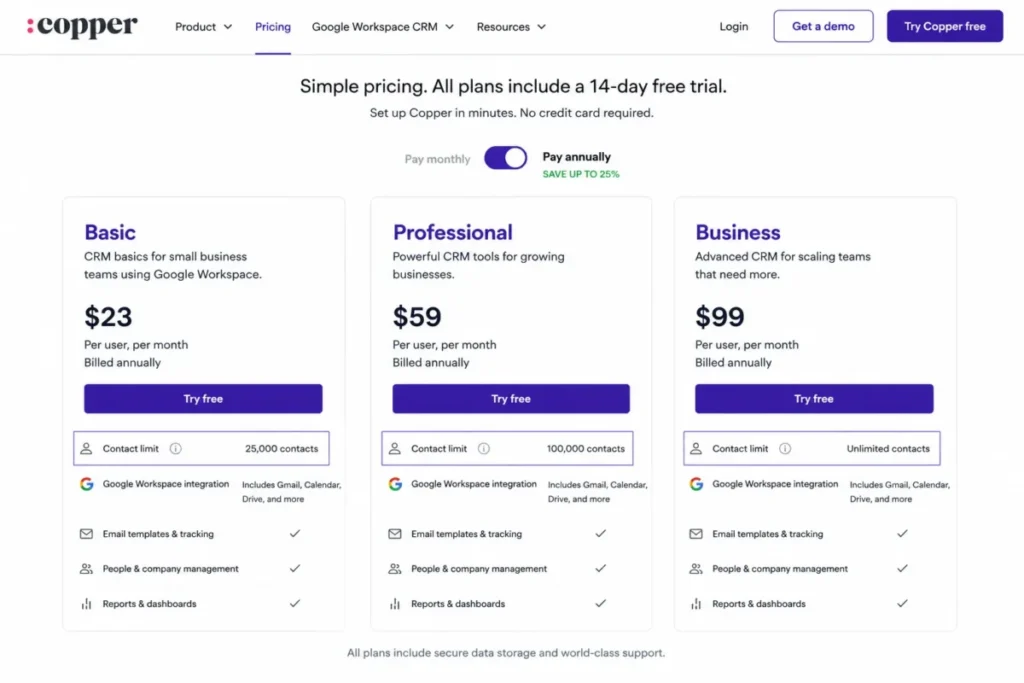
7. Copper: Best for Google Workspace Teams

Copper builds the CRM inside the tools your team already opens: Gmail, Google Calendar, and Google Drive. Contacts, opportunities, and activity capture live where relationship-driven reps work, cutting the tab-switching Pipedrive requires.
- Starting price:
- Basic at $23 per user monthly annually, Professional at $59, and Business at $99 (official pricing page).
The plan gates follow scale. Basic and Professional carry finite contact limits while Business removes the cap, and workflow automation arrives with Professional, so a growing database pushes you up the ladder.
The strength is also the filter, as our Copper CRM review explains. Copper’s differentiation depends on Google Workspace, and current analysis flags it as a poor fit for Microsoft-first teams, so Outlook-centric buyers exit this shortlist here.
Migration is workable but thinly documented. Structured records import after export and field preparation, but public Pipedrive-specific coverage for activity history, attachments, and workflow state was not fully documented, so run a sample import before cutover.
| Pros | Cons |
|---|---|
| CRM operates natively inside Gmail and Google Calendar | Value collapses for Microsoft 365 and Outlook teams |
| Automatic activity capture reduces rep data entry | Basic and Professional cap contact volume |
| Workflow automation and project features on Professional | Business at $99 is the only uncapped tier |
| Enrichment and bulk email support relationship workflows | Pipedrive-specific migration coverage is not fully documented |
Best for: five-to-thirty-person agencies, consultancies, and relationship-led teams standardized on Google Workspace.
Avoid if: your company runs Outlook or plans to. Ecosystem mismatch beats any feature win.
Migration difficulty: Medium. Validate activity history and associations on a sample first.
Verdict: the Gmail-native pick, conditional on your email stack.
8. Insightly CRM: Best for Turning Won Deals Into Delivered Projects

Insightly CRM answers the question Pipedrive leaves open: what happens after closed-won. Opportunities convert into managed projects with relationship linking, so consultancies and implementation shops keep sales context through delivery.
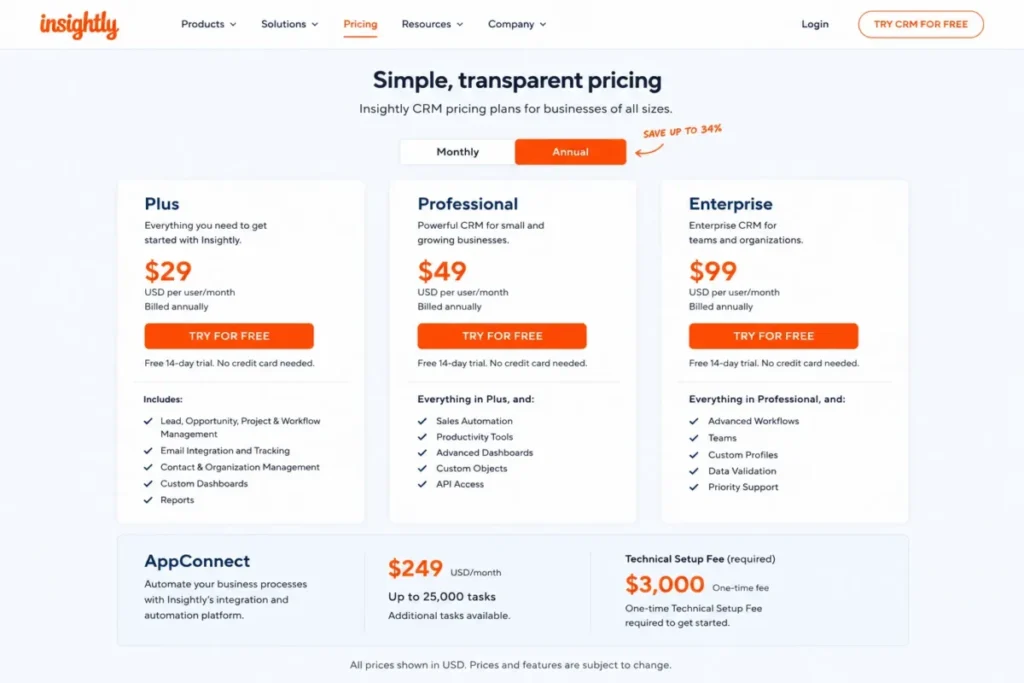
- Starting price:
- CRM Plus at $29 per user monthly annually, Professional at $49, and Enterprise at $99 (official pricing page).
Two gates deserve attention. Workflow automation begins on Professional at $49, and high-volume integration automation runs through AppConnect, a separately priced product from $249 monthly for 25,000 tasks with a documented $3,000 technical setup fee.
That AppConnect line changes the math, and the Insightly CRM review prices it out. An integration-heavy team comparing Insightly’s seat price against Pipedrive plus middleware needs to price the automation layer, not just the CRM.
Pipedrive’s Projects add-on costs $6.67 per seat on lower tiers; Insightly makes delivery native. Products, price books, quotes, and audit logging round out a stack aimed at service businesses.
| Pros | Cons |
|---|---|
| Won opportunities become managed projects with linked records | Workflow automation waits behind Professional at $49 |
| Relationship linking keeps context across contacts and delivery | AppConnect adds $249 monthly plus a $3,000 setup fee |
| Quotes, products, and price books support structured selling | Pipedrive-specific migration coverage needs verification |
| Enterprise tier stays cheaper than Salesforce equivalents | Post-sale templates and dashboards are rebuild work |
Best for: ten-to-fifty-person consulting, implementation, and service teams that deliver what they sell.
Avoid if: you need heavy cross-app automation on a small budget. AppConnect erases seat savings.
Migration difficulty: Medium. Map opportunities and associations, then rebuild project templates.
Verdict: the delivery-minded CRM, priced correctly only after AppConnect.
Description:
9. Keap: Best for Small-Business Automation Plus Payments

Keap is a different operating model, not a cheaper pipeline. It connects CRM records to lifecycle campaigns, lead capture, appointments, quotes, invoices, text messaging, and payments, aimed at owner-led service businesses that follow up for a living.
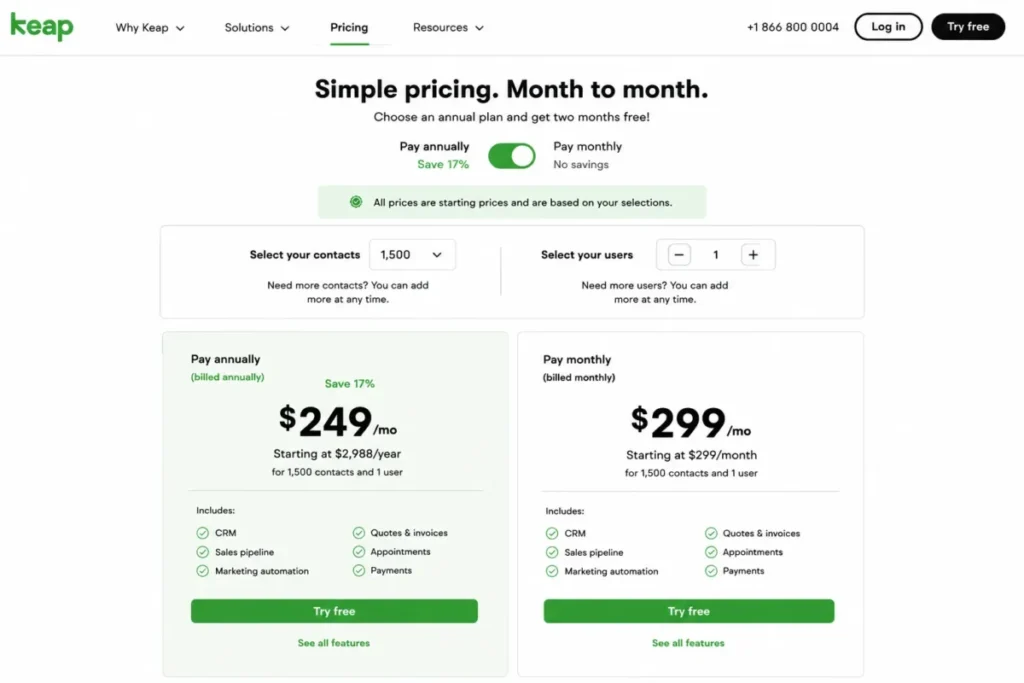
- Starting price:
- around $249 per month equivalent on annual billing, with a monthly starting context near $299; pricing scales with contacts and users (official pricing page). Quote both billing terms, because roundups citing one number mislead.
Compare scope before price, something the Keap CRM review does line by line. A basic five-person sales team gets a worse deal than Pipedrive Growth at $2,340 yearly, while a solo operator replacing a CRM, an email tool, a scheduler, and an invoicing app consolidates four bills.
Migration is implementation work. Contacts import, but campaigns, tags, forms, appointments, products, invoices, and payment workflows need planning, supported by Keap’s included customer-success help.
| Pros | Cons |
|---|---|
| Automation, appointments, invoices, and payments in one system | Entry cost sits near $3,000 per year, far above pipeline CRMs |
| Lifecycle campaigns run follow-up without rep effort | Pricing climbs with contacts, users, and messaging volume |
| Customer-success support is part of the package | Overkill for teams that only need deal tracking |
| Text and email marketing are built in | Campaign and commerce setup is real implementation work |
Best for: owner-led service businesses billing clients directly, and solo operators consolidating four tools into one.
Avoid if: you just need a sales pipeline. The platform premium buys features you will ignore.
Migration difficulty: Medium to High, because the value lives in rebuilt automations.
Verdict: strong consolidation play for small service businesses, wrong swap for pure sales teams.
10. Nimble: Best for Relationship-First Selling

Nimble replaces pipeline governance with relationship intelligence. Contact enrichment, social and inbox context, a browser extension, and the Prospector tool serve sellers whose deals close on familiarity rather than stage discipline.
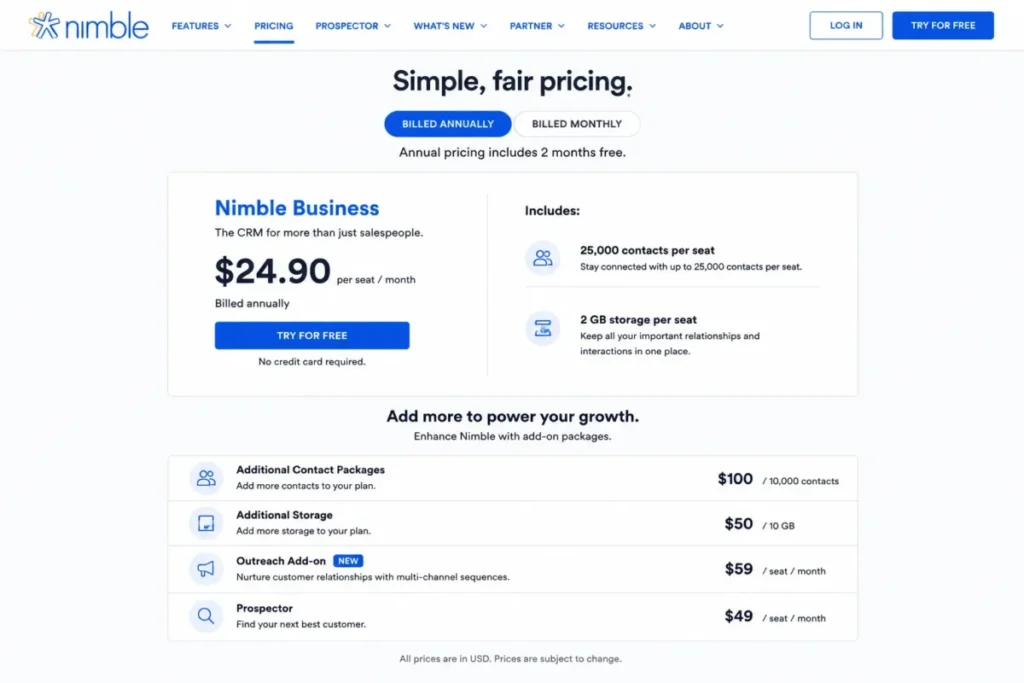
- Starting price:
- one primary plan at $24.90 per seat monthly annually, or $29.90 month to month (official pricing page).
One plan does not mean one price forever. The base includes 25,000 contacts and 2 GB of storage per seat, and Nimble separately prices extra contacts, storage, email marketing, enrichment credits, web forms, and group-message volume.
It works where your inbox works. Gmail and Microsoft 365 integrations both run deep, which makes Nimble the rare relationship CRM that skips the ecosystem choice; the Nimble CRM review rates both paths.
Migration is light for its core objects. Nimble documents a Pipedrive path through CSV export and its import wizard with field matching, custom-field creation, duplicate handling, and company-contact association, while complex deal history and automations need separate validation.
| Pros | Cons |
|---|---|
| One plan at $24.90 avoids Pipedrive’s four-tier ladder | Contact, storage, and outreach expansions bill separately |
| Enrichment and inbox context reduce manual research | Light pipeline governance for process-heavy teams |
| Works with both Google Workspace and Microsoft 365 | 25,000-contact base cap catches growing databases |
| Documented import wizard with duplicate handling | Deals, activities, and automations need manual validation |
Best for: two-to-twenty-person consultancies, recruiters, advisors, and agency owners selling on relationships.
Avoid if: you need forecasting rigor, quota reporting, or multi-stage automation.
Migration difficulty: Low for contacts and companies, Medium for full history.
Verdict: the simplest credible landing spot for relationship sellers leaving Pipedrive.
Pipedrive vs the Alternatives: What Five and Ten Seats Cost
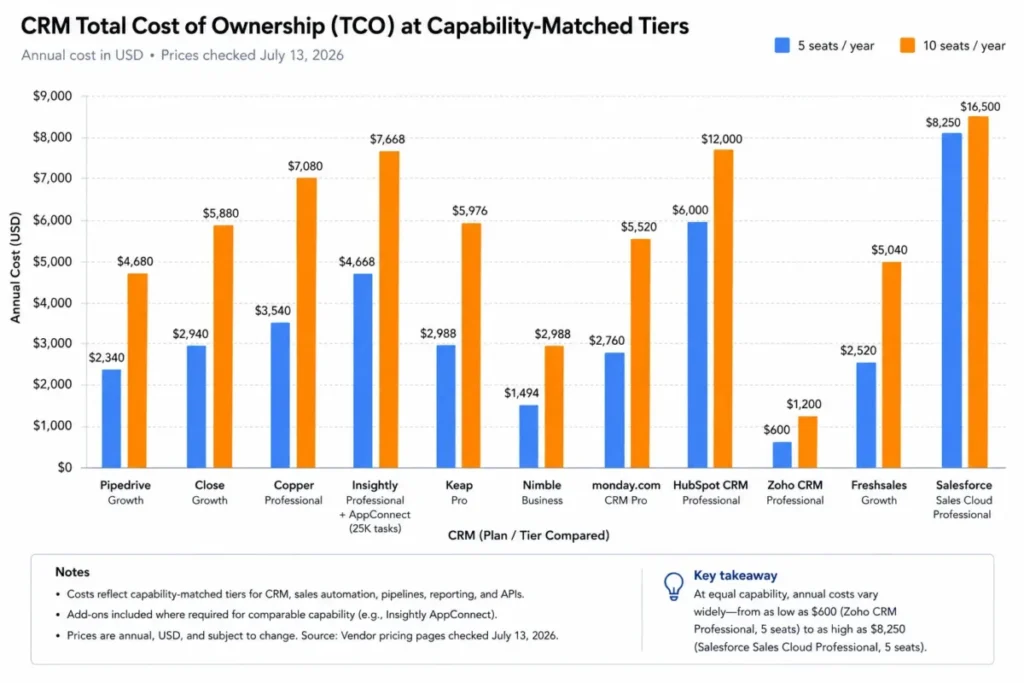
Starting prices are not comparable, because entry plans hide different capabilities. This table prices each product at the tier that covers a working scenario of email sync plus workflow automation, on annual billing, as checked July 13, 2026.
| Product | Capability-matched tier | 5 seats / year | 10 seats / year | Free plan |
|---|---|---|---|---|
| Pipedrive | Growth, $39/ | $2,340 | $4,680 | No, 14-day trial |
| HubSpot Sales Hub | Professional, $90/ | $6,900 year one; $5,400 after | $12,300 year one; $10,800 after | Yes, 2 users |
| Zoho CRM | Standard, $14/ | $840 | $1,680 | Yes, 3 users |
| Freshsales | Growth $9 (basic workflows); Pro $39 for sequences and multi-pipeline | $540 or $2,340 | $1,080 or $4,680 | Yes, 3 users |
| monday CRM | Basic $12/ | $720 at Basic; verify Standard live | $1,440 at Basic; verify Standard live | None published |
| Salesforce Sales Cloud | Starter Suite, $25/ | $1,500 | $3,000 | No, 30-day trial |
| Close | Growth, $99/ | $5,940 + usage | $11,880 + usage | No, 14-day trial |
| Copper | Professional, $59/ | $3,540 | $7,080 | None published |
| Insightly CRM | Professional, $49/ | $2,940 | $5,880 | None published |
| Keap | Platform pricing from ~$249/ | ~$2,988+, quote required | Quote required | None published |
| Nimble | Single plan, $24.90/ | $1,494 | $2,988 | None published |
Three budget conclusions fall out of this table. Zoho CRM undercuts Pipedrive Growth at every team size, Freshsales matches or beats it depending on the tier you need, and HubSpot, Close, and Keap cost more but replace additional tools.
Two rows need a live check before you rely on them: Salesforce Starter Suite and Zoho CRM Standard sit at the entry of deep edition ladders, so confirm your exact automation depth on each official feature matrix.
Prices change and promotions rotate, so treat every figure as a July 13, 2026 snapshot and verify the live page before signing. Usage-based costs, like Close telephony, deserve their own line in your budget model: seats plus minutes times monthly call volume.
Feature Gates: Which Tier Matches Pipedrive Growth
Automation existing somewhere in a product tells you nothing. The tier where it turns on decides your bill, and vendors gate different capabilities at different rungs.
| Product | Workflow automation starts at | Multiple pipelines | Built-in calling | Notable gate |
|---|---|---|---|---|
| Pipedrive | Growth, $39 | Yes, plan limits apply | Integration or add-on | Automations capped by actions, delays, and duration |
| HubSpot Sales Hub | Paid tiers; depth grows at Professional | Yes | Yes, plan-dependent | $1,500 onboarding at Professional |
| Zoho CRM | Paid editions, deepening upward | Yes | Yes | Configuration burden grows with depth |
| Freshsales | Basic on Growth; advanced on Pro, $39 | Pro only | Yes, built in | Freddy AI and sequences gated to Pro |
| monday CRM | Standard and above, quota-metered | Board-based | No, integrations | Monthly automation action quotas |
| Salesforce Sales Cloud | Edition-dependent, deepens upward | Yes | Add-on dialer | Add-ons and admin cost stack on seats |
| Close | Growth, $99 | Yes | Yes, usage-billed | Solo and Essentials omit workflows |
| Copper | Professional, $59 | Yes | No, integrations | Contact caps below Business |
| Insightly CRM | Professional, $49 | Yes | No, integrations | AppConnect priced separately |
| Keap | Included in platform | Sales pipeline included | Text messaging included | Contact-count pricing |
| Nimble | Light workflows | Basic pipelines | No, integrations | Contact and storage caps with paid expansions |
The pattern worth noticing: four of these ten Pipedrive alternatives gate their real automation behind a tier at or above Pipedrive Growth’s price. Cheaper-than-Pipedrive claims live or die on this table, not on homepage banners.
Migrating From Pipedrive: Effort, Exclusions, and Proof
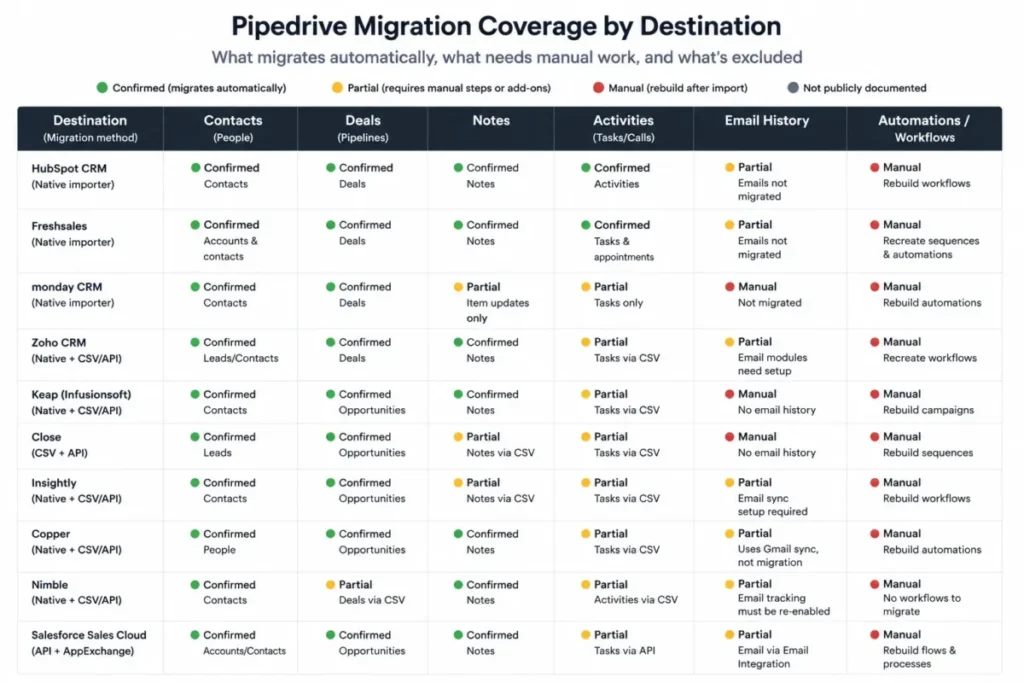
A successful CSV upload is not a completed migration. Rows transfer easily; relationships, ownership, email history, automations, permissions, and reporting logic are where switches fail.
Pipedrive’s own export side sets the first constraint. Spreadsheet imports and exports work in XLS, XLSX, and CSV with documented limits of 50 MB and 50,000 rows per file, so large accounts plan batched exports from the start.
What each destination documents
| Destination | Documented method | Confirmed coverage | Documented exclusions and caveats |
|---|---|---|---|
| HubSpot Sales Hub | CSV import | Contacts, companies, deals, basic properties | Historical emails, associations, and custom properties need mapping; run a sample migration |
| Zoho CRM | Migration wizard, CSV/ | Core modules with field mapping | Skipped-record review; undo window of 30 days |
| Freshsales | Direct Pipedrive migration | People, organizations, deals, pipelines, notes, supported activities | Emails do not migrate; 10-pipeline ceiling; 25,000+ records take 1-2 business days |
| monday CRM | CSV or Excel import | Records into boards | Automations must be recreated manually; partners sell setup help |
| Salesforce Sales Cloud | Import wizard and data loader | Core objects within file limits | 100 MB file cap; field, permission, and layout prep required |
| Close | Pipedrive-specific export to support; Import2 | Leads, Deals, Organizations, People, Activities, Notes | Assisted process; sample run and error review available |
| Copper | CSV import | Contacts and structured records | Pipedrive-specific activity and attachment coverage not fully documented |
| Insightly CRM | CSV import and mapping | Contacts, organizations, opportunities | Project templates, workflows, dashboards rebuilt in-app |
| Keap | Contact import | Contacts | Campaigns, tags, invoices, and automations are implementation work |
| Nimble | CSV export plus import wizard | Contacts, companies, field matching, dedupe | Deals, activities, and automations validated separately |
Freshsales deserves a highlighted warning, because its path is the most automated on this list and the most misunderstood. Reps lose in-CRM email history on arrival, and an account running more than ten pipelines watches excess deals collapse into the default pipeline.
The six-stage migration that survives contact with reality
Run every Pipedrive exit through the same sequence. Skipping a stage is how teams discover missing history three weeks after cutover.
- Inventory. List pipelines, custom fields, automations with triggers and owners, integrations, reports, and record counts per object.
- Clean. Merge duplicates and retire dead deals in Pipedrive first, because exporting garbage doubles the work.
- Map. Match every field, stage, and owner to a destination equivalent before touching an import button.
- Import. Move a sample batch first, then full batches sized to the export limits above.
- Rebuild. Recreate automations, permissions, dashboards, and integrations in the destination; no vendor moves these for free.
- Validate. Prove the result before decommissioning Pipedrive.
Validation means counts and spot checks, not vibes. Compare source-to-destination record counts per object, open ten random contacts and confirm associations and owners, review activity timelines for date integrity, fire each rebuilt automation in a test, and log every exception.
Budget the rebuild stage highest. monday CRM says outright that automations are recreated manually, and that labor pattern repeats at nearly every destination on this list.
Which of These Pipedrive Replacements Should You Avoid?
Every Pipedrive alternative above is someone’s right answer and someone else’s expensive mistake. Match yourself against the disqualifiers before shortlisting.
| Avoid… | If… |
|---|---|
| HubSpot Sales Hub | You only want a cheaper pipeline; year-one Professional runs near triple Pipedrive Growth |
| Zoho CRM | No one will own configuration and admin upkeep |
| Freshsales | In-CRM email history or more than ten pipelines must survive migration |
| monday CRM | You want a prebuilt CRM data model and unmetered automation |
| Salesforce Sales Cloud | You lack a dedicated admin or fifty-seat scale |
| Close | Reps rarely call; you would fund a dialer nobody uses |
| Copper | Your company runs Outlook and Microsoft 365 |
| Insightly CRM | You need high-volume integrations without AppConnect money |
| Keap | You need deal tracking, not a lifecycle-and-payments platform |
| Nimble | You need forecasting rigor and multi-stage automation |
The most common mismatch I see is buying breadth nobody asked for. If the sales team’s complaint is one plan gate, a platform migration is an expensive way to fix a line item.
How to Choose Your Pipedrive Replacement
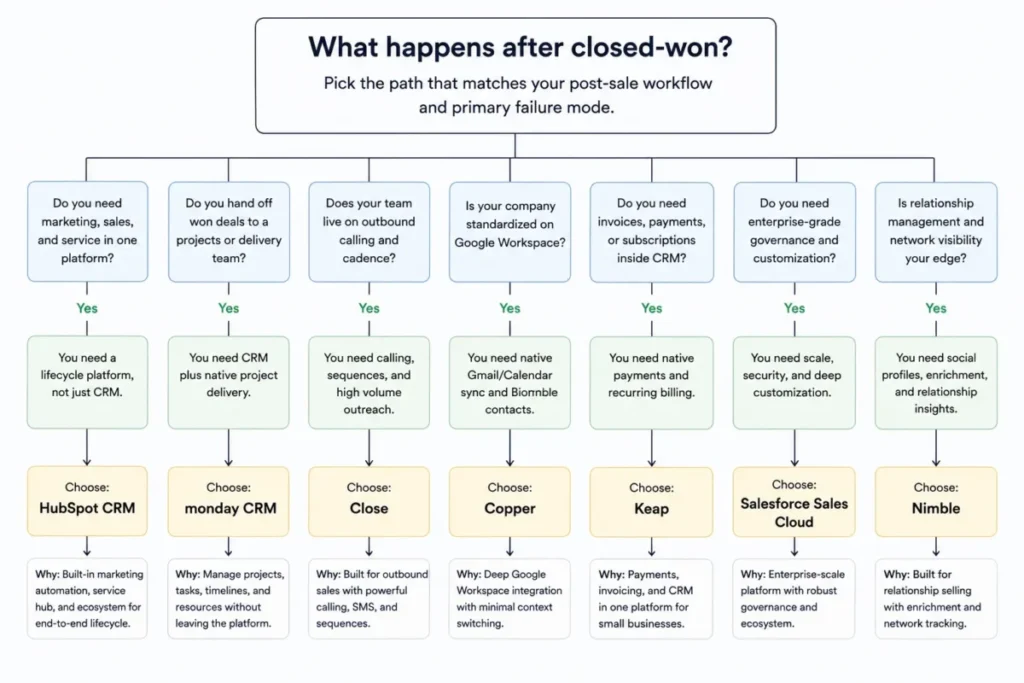
Start from what happens after closed-won, because that single question sorts most of this list. Then apply budget and stack constraints.
- The deal ends at handoff: stay sales-native. Compare Zoho CRM, Freshsales, and Close against your Pipedrive Growth bill.
- Won deals become projects: shortlist Insightly CRM and monday CRM.
- Marketing and service continue the record: shortlist HubSpot Sales Hub, or Zoho CRM inside its suite.
- Invoicing and payments follow the sale: Keap is the only real candidate here.
- Relationships outweigh process: Nimble, or Copper if you live in Gmail.
- Governance and scale dominate: Salesforce Sales Cloud, with an implementation budget.
Then run three checks in order. Budget at the capability-matched tier from the pricing table, confirm your email ecosystem fits, and read the migration row for the data you cannot lose.
Three worked scenarios show the framework in motion.
A five-rep outbound shop running daily call blocks compares Close Growth at $5,940 yearly plus usage against Pipedrive Growth plus a separate dialer subscription. One queue for calls, SMS, and coaching wins that comparison on rep time alone.
A twelve-person consultancy whose won deals become eight-week implementations prices Insightly Professional against Pipedrive Growth plus the $6.67-per-seat Projects add-on. Keeping sales context attached to delivery work is the deciding factor, not the seat price gap.
A three-person startup with no software budget starts free on Zoho CRM or Freshsales, which both cover three users. It upgrades only when automation volume or reporting demands it, and skips migration risk entirely by choosing the growth path early.
Give the winner a 30/90-day adoption test before full rollout. After 30 days, reps log activities without chasing; after 90, pipeline reports match reality and your automations run without a babysitter.
If a candidate fails on paper at any check, cut it and move on. Shortlists of two beat shortlists of six.
When You Should Stay With Pipedrive
Plenty of teams comparing Pipedrive alternatives are better off renewing, and vendor-authored rankings will not tell you that. Stay if most of these hold.
- Your sales motion is pipeline-first and ends at closed-won or a light handoff.
- Growth-tier features cover the workflow, and your add-on spend is zero or one item.
- Nobody has capacity to administer a heavier system, and adoption is your scarcest resource.
- Record volumes, report counts, and API usage sit comfortably inside plan limits.
- You do not need native marketing, service, projects, or payments this year.
Switch only when a documented constraint is material: a limit you have hit, an add-on stack that outprices a platform, or a post-sale workflow the product cannot hold. Migration consumes a quarter’s worth of ops attention, and that cost is real even when the new subscription is cheaper.
Delay is also a decision. A team six months from hiring an admin can bank that Salesforce or Zoho move until the admin exists.
Final Verdict: The Best Pipedrive Alternative for Most Teams
For the largest share of switchers, the answer is HubSpot Sales Hub, because most Pipedrive exits are scope problems and HubSpot solves scope with a free on-ramp and one customer record. Budget the Professional tier at its real cost: $90 per seat plus $1,500 onboarding.
By buyer type, based on the official pricing and documentation checked July 13, 2026:
- Best value replacement: Zoho CRM, $14 Standard against Pipedrive’s $39 Growth.
- Best budget with built-in channels: Freshsales, $9 Growth, eyes open on Pro gates and migration exclusions.
- Best for outbound: Close, priced at Growth plus usage.
- Best enterprise move: Salesforce Sales Cloud, with implementation staffing.
- Best post-sale fit: Insightly CRM for projects, monday CRM for wider operations, Keap for payments.
- Best simple relationship CRM: Nimble, with Copper for Gmail-first teams.
And the stay signal, one more time: a pipeline-first team inside Growth limits with no add-on creep should renew Pipedrive and spend the migration money on pipeline coverage instead.
FAQ
What is the best alternative to Pipedrive?
HubSpot Sales Hub is the best overall alternative for teams leaving over scope, because it adds native marketing, service, and lifecycle data with a free two-user entry point. For pure sales value, Zoho CRM at $14 or Freshsales at $9 per user monthly replaces the pipeline for less than Pipedrive Growth’s $39.
Is there a free alternative to Pipedrive?
Yes, if your team is small: HubSpot covers two users free, while Zoho CRM and Freshsales cover three users free, as checked July 13, 2026. Pipedrive itself has no permanent free plan, only a 14-day trial, so a three-person startup can run at zero on those rivals.
Is HubSpot better than Pipedrive?
For lifecycle breadth, yes; for lean pipeline management, no: HubSpot wins when marketing, sales, and service need one shared record. Sales Hub Professional costs $90 per seat plus a $1,500 mandatory onboarding fee, so Pipedrive Growth at $39 remains the better buy for a focused pipeline team.
Is Zoho CRM better than Pipedrive?
Zoho CRM wins on price and configurability, with Standard at $14 per user against Growth at $39, plus custom modules and a 30-day import undo. Pipedrive wins on out-of-the-box usability and rep adoption, and Capterra sentiment splits along exactly those lines, so pick by admin capacity.
Which CRM is cheaper than Pipedrive?
At the email-plus-automation level, Freshsales Growth costs $9, Zoho CRM Standard $14, and Nimble $24.90 per seat monthly on annual billing, all below Pipedrive Growth at $39. monday CRM starts at $12 but gates automation above Basic, so check every entry tier’s feature gates first.
What are the disadvantages of Pipedrive?
The documented ones: Lite excludes email sync and automation, so the working price is $39; lead capture, campaigns, visitor tracking, and projects cost extra as add-ons; plan limits can block, skip, or waitlist over-limit records; API budgets scale by tier; and there is no native marketing or service platform.
Can I migrate Pipedrive data to another CRM?
Yes, and the method matters: Pipedrive exports CSV or Excel at up to 50,000 rows per file, Freshsales offers direct migration minus emails, Close runs an assisted import through support, and Zoho allows a 30-day undo. No destination on this list documents automation transfer, so budget rebuild time wherever you land.
Which Pipedrive alternative has built-in calling and SMS?
Close is the clear leader, with dialers, SMS, and calling built into rep workflows and usage billed at roughly $0.02 per minute for most outbound calls. Freshsales includes a built-in phone channel from its $9 Growth plan, which fits lighter calling volume without dialer-grade tooling.
How much does Pipedrive cost for ten users?
On annual billing checked July 13, 2026, ten users cost $1,680 per year on Lite, $4,680 on Growth, $7,080 on Premium, and $9,480 on Ultimate. Most active sales teams need Growth for email sync and automation, so $4,680 is the realistic planning number before add-ons.
Which Pipedrive alternative works best with Google Workspace?
Copper, without much argument: the CRM operates inside Gmail, Google Calendar, and Drive, from $23 per user monthly, but only for companies committed to Google. Microsoft-first teams get more from Nimble, which documents deep integrations for both Microsoft 365 and Google Workspace.