Most teams do not leave Salesforce because of a missing feature. They leave at a seat count, when the practical edition, the admin time, and the add-ons stop matching what the sales team does each day.
That breakpoint is what this guide measures. I compared ten Salesforce alternatives on verified US pricing, the plan that replaces Sales Cloud, minimum seats, onboarding fees, AI metering, migration effort, and how much CRM administration each one demands after the data lands.
Sales Cloud remains the right answer for a large share of complex, multi-cloud organizations, and there is a section below that argues for staying. The rest of this page is for buyers who have already decided the fit is wrong and now need a shortlist they can defend to finance.
If you are still mapping the wider market first, the best CRM software shortlist covers the category without the switching angle.
Every price here is USD, annual billing unless stated, checked against official pricing pages on July 16, 2026.
In This Article (18 sections)
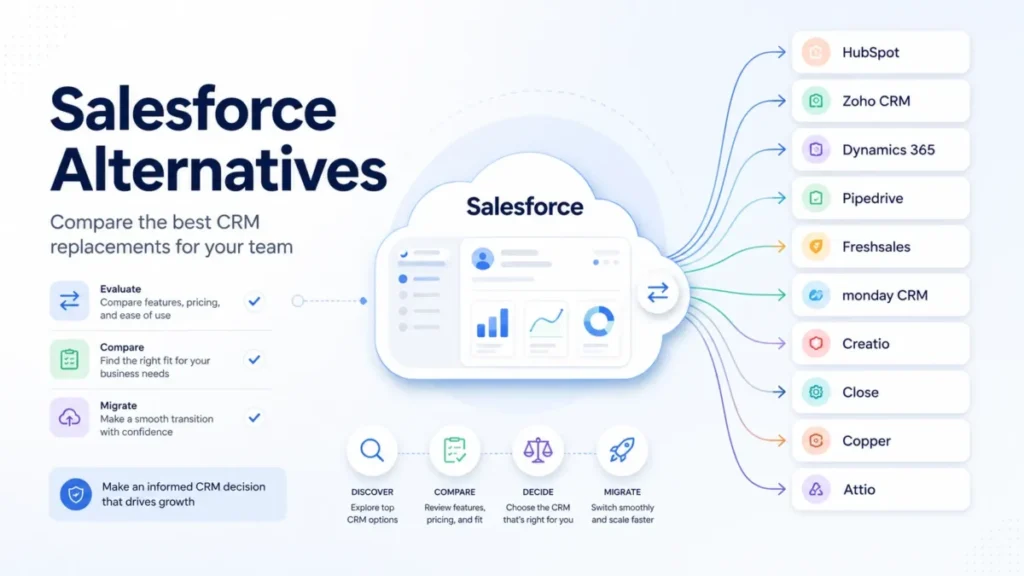
Quick Verdict: Best Salesforce Alternatives by Switching Trigger
| If you are leaving Salesforce because… | Best alternative | Why |
|---|---|---|
| The practical edition costs too much at 10-50 seats | Zoho CRM | Professional at $23/ |
| You want sales, marketing, and service on one platform | HubSpot Sales Hub | Shared Smart CRM data across hubs, at $90/ |
| Your company is standardized on Microsoft 365 | Microsoft Dynamics 365 Sales | Native Microsoft business-app alignment at $105/ |
| The CRM is too heavy for a simple pipeline | Pipedrive | Growth at $39/ |
| Reps need calling and email inside the CRM cheaply | Freshsales | Built-in phone, templates, and live chat from the $0 three-user plan upward |
| Sales work and delivery work live in separate tools | monday CRM | Pipelines and post-sale project work share one board model, from $12/ |
| You need enterprise process automation without heavy code | Creatio | No-code UI, data, and logic composition instead of a developer-led build |
| Outbound volume matters more than platform breadth | Close | Calling, SMS, and power dialing are native, with workflows from $99/ |
| The team lives in Gmail and Google Workspace | Copper | Google Workspace-centric records and pipelines from $23/ |
| Your data model changes faster than a CRM schema | Attio | Custom objects and a flexible model, free for 3 seats, $29/ |
No single product on that list replaces Salesforce for everyone, and the pricing column is the reason. Sales Cloud Enterprise runs $21,000 a year for ten users, so a team that only needs pipeline, email, and forecasting is paying for a platform layer it never opens.
The alternatives above solve one exit reason each, and the wrong match trades an expensive problem for a cheaper one you will feel in month three.
How This Comparison Was Built
This comparison is built from official documentation, not from product trials. On July 16, 2026, I checked the official US product, pricing, help, and documentation pages for Salesforce and the ten alternatives, then read current independent reviews and buyer discussions only to qualify usability and recurring sentiment.
Official sources control every price, plan gate, and limit on this page. Where a vendor’s page renders dynamically, geolocates, or hides a value behind a quote, that is stated rather than smoothed over.
Products were scored on verified cost, plan and usage gates, sales-workflow fit, ecosystem alignment, implementation burden, data portability, support, security controls, and the practical cost of leaving Salesforce. Rankings were based on buyer fit, verified cost, plan limits, migration effort, and administration requirements.
Three things this method cannot give you: an exact migration duration, a full certification matrix for every vendor, and a guarantee that a dynamic promotion still exists on the day you read this. Each is flagged where it appears.
Why Teams Look for Salesforce Alternatives
Salesforce sells an AI CRM and Customer 360 platform that spans sales, service, marketing, commerce, data, and a large extension marketplace, and that breadth is the source of both its value and its exit reasons. Buyer discussions and current independent reviews point at the same six triggers, and none of them is a missing feature.
If the underlying question is whether the team needs a platform at all, what CRM software is meant to do is the cheaper thing to settle first.
Cost beyond the license. Sales Cloud Enterprise lists at $175/user/month and Unlimited at $350, per the official Salesforce pricing page checked July 16, 2026. Adjacent clouds, marketplace packages, middleware, consumption, premium support, and consulting sit on top of that, so the line item finance approves is rarely the line item finance sees at renewal.
Administration that never ends. Custom objects, flows, validation rules, permission sets, and connected apps need an owner. A current TechRadar review of Salesforce praises the breadth, scalability, and Customer 360 integration while qualifying all of it with cost, complexity, and learning-curve concerns.
Over-complexity for a simpler motion. A 15-rep team running one pipeline does not need territory management and approval routing. Reviewer patterns and buyer threads keep landing on the same point: teams that do not need the full platform find lighter CRMs sufficient, with Zoho appearing repeatedly as the closer lower-cost substitute.
Ecosystem misalignment. A Microsoft-standardized enterprise or a Gmail-native consultancy pays an integration tax to make Salesforce feel native. Dynamics 365 Sales and Copper remove that tax by being built inside those stacks.
Adoption failure. Low adoption is the expensive failure mode, because a CRM nobody updates produces forecasts nobody trusts. This is where switching sometimes solves the wrong problem, since the CRM was rarely the reason the data went stale.
Cumulative modernization burden. A mature-company discussion on r/salesforce focused on the sum of multi-cloud licensing, maintenance, services, and modernization work rather than any single defect. That is the trigger with the highest switching cost, and the one most likely to survive the move.
Salesforce Sales Cloud Pricing and Feature Gates
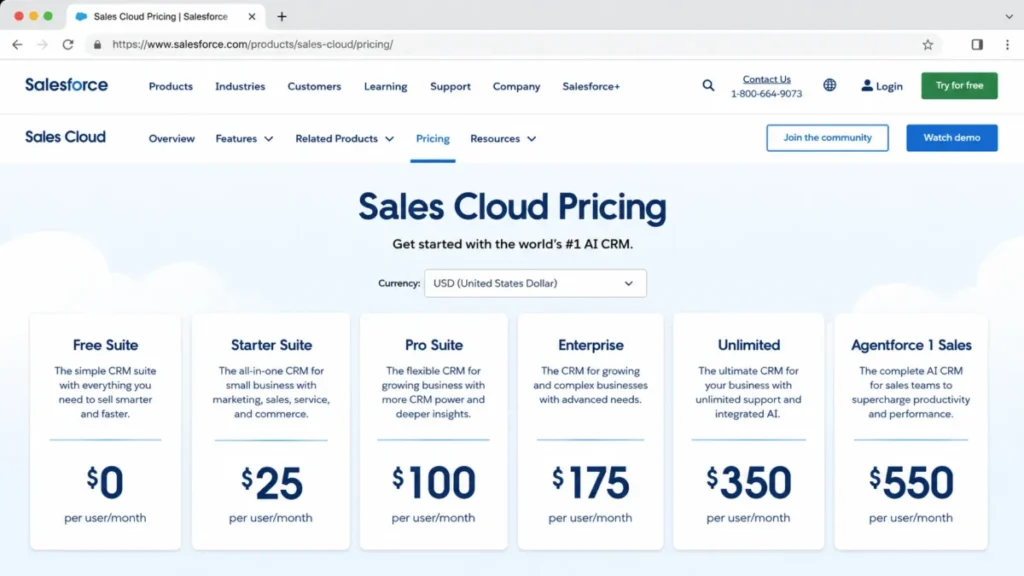
Sales Cloud sells six editions, and the gap between the entry price and the replacement price is the whole story. All values are USD per user per month, from the official pricing page checked July 16, 2026.
| Edition | Price | What it realistically covers |
|---|---|---|
| Free Suite | $0/user/ | Entry suite; verify current user and capability limits before treating it as production |
| Starter Suite | $25/ | Simple sales plus adjacent customer workflows |
| Pro Suite | $100/ | Broader sales use; advanced API and governance may still need Enterprise |
| Enterprise | $175/ | Advanced customization, API, and pipeline depth |
| Unlimited | $350/ | Higher support, sandbox, AI, and scale positioning |
| Agentforce 1 Sales | $550/ | Advanced CRM plus Agentforce; consumption terms can apply |
Source: official Salesforce Sales Cloud pricing page, checked 2026-07-16. Billing basis: USD per user per month; contract terms, adjacent clouds, and consumption are not included.
Ten users on Enterprise is $21,000 a year before a single add-on, and that is the number most alternatives compete against. Starter Suite at $3,000 a year looks competitive, but it is not the edition a team leaves Enterprise for.
The honest counterweight is that Salesforce earns those prices for a specific buyer. Our full Salesforce CRM review goes deeper on where the platform genuinely pays back.
| Salesforce strengths | Salesforce limitations |
|---|---|
| Deepest customization and platform extensibility in the category | Edition ladder moves from $25 to $175 the moment governance or API depth is needed |
| AppExchange and AgentExchange ecosystems cover most integration needs | Marketplace packages carry publisher, edition, and maintenance dependencies |
| Territory, forecast, and approval management suit complex enterprise selling | Overweight for a single-pipeline team of 5-25 reps |
| Customer 360 unifies sales, service, marketing, commerce, and data | Multi-cloud architecture multiplies licensing, services, and admin cost |
| Mature governance, sandboxing, and release control at higher editions | Requires dedicated RevOps or admin capacity to stay healthy |
Fair warning on the pricing page itself: it renders USD alongside other currencies and its terms shift by contract. Our Salesforce pricing tiers breakdown models the ladder plus the costs that sit above it.
The five switching triggers worth acting on
- Price at scale. The practical edition, not the entry edition, is over budget at your seat count.
- Admin dependency. Nobody owns the schema, and configuration debt is accumulating.
- Motion mismatch. The team runs one pipeline and needs speed, not governance.
- Ecosystem tax. Identity, email, calendar, and analytics live in a stack Salesforce is not native to.
- Communications gap. Reps need calling and sequencing, and the current answer is another product.
Best Salesforce Alternatives for Small Teams (1-10 Users)
The numbering across the next three sections is the overall ranking. The sections tell you which team size each product is built for, because a top-ranked platform is the wrong recommendation for a five-person team that has no CRM administrator.
At this size, the deciding factor is rarely feature depth. It is whether one person can own the CRM part-time and still trust the pipeline at the end of the quarter.
Pipedrive: Best for Teams Leaving Because Sales Cloud Is Too Heavy

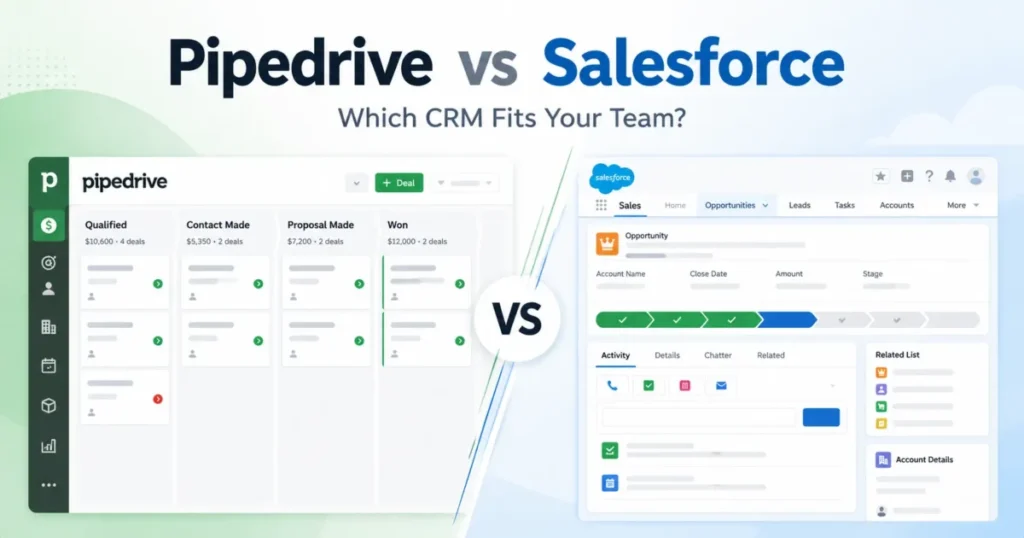
Pipedrive is what a 5-50 rep team buys when the honest requirement is a pipeline, an inbox, and a forecast, and Salesforce keeps answering with a platform.
US annual pricing runs Lite $14, Growth $39, Premium $59, and Ultimate $79 per user per month, with a 14-day trial that needs no card, per the official Pipedrive pricing page checked July 16, 2026. Growth is the practical tier, because full email sync arrives there and Lite leaves reps working outside the CRM.
Ten users on Growth is $4,680 a year against $21,000 for Sales Cloud Enterprise. Pipedrive states 500+ integrations and built-in AI on the Pipedrive product page, which covers the connection surface most small teams need.
Where it beats Salesforce is time-to-trust: a visual pipeline that reps update because it takes seconds, not because a manager chases them. Where it loses is everything Salesforce is: no service cloud, no deep custom application layer, no marketplace of that scale.
| Pros | Cons |
|---|---|
| Growth at $39/ | No permanent free plan, unlike Zoho CRM, Freshsales, and Attio |
| $4,680 a year at ten seats versus $21,000 for Sales Cloud Enterprise | Lead-generation, enrichment, and advanced security sit on Premium or Ultimate, or arrive as add-ons |
| Visual pipeline reduces the admin dependency that pushes teams off Salesforce | Pricing page can render local currency instead of USD, so verify the US selector |
| 14-day trial with no card, so a pilot costs nothing but time | Not a fit once service, CPQ, or complex custom objects enter scope |
| 500+ integrations cover the standard small-team stack | Reporting depth stops well short of Salesforce forecasting governance |
- Avoid if:
- your Salesforce instance runs custom objects, Flow automation, CPQ, service processes, or a stack of AppExchange packages. You would be rebuilding all of it into a tool that was never designed to hold it.
Migration difficulty: Low to medium. Standard accounts, contacts, and deals map cleanly. It rises to medium-high the moment custom objects, complex reports, or Flow logic are in scope.
The head-to-head detail lives in our Pipedrive vs Salesforce comparison, and the product detail in the Pipedrive CRM review.
- Verdict:
- Choose Pipedrive if your exit reason is complexity and your pipeline is genuinely simple. If you are hoping it will also absorb marketing and support later, choose something else now.
Freshsales: Best for Teams That Need Calling and Email Inside the CRM

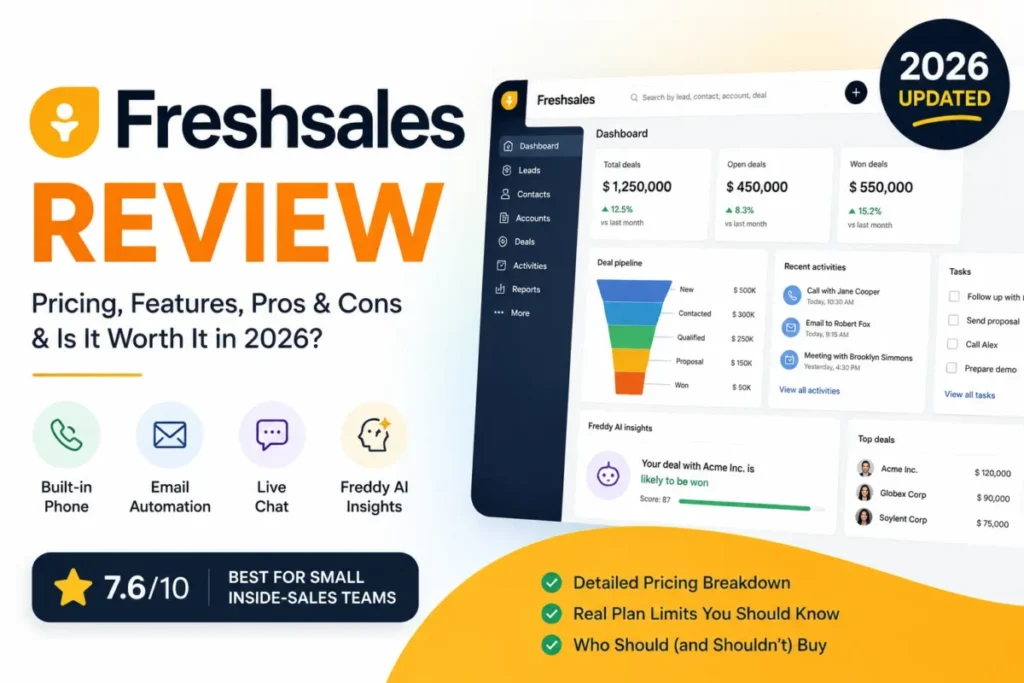
Start with the number that matters here: Freshsales Growth is $9 per user per month on annual billing, which is $1,080 a year for ten reps.
That ties Close Solo for the lowest entry price on this list, without Solo’s single-user cap.
Pro is $39 and Enterprise is $59, per the official Freshworks pricing comparison checked July 16, 2026. The free plan supports 3 users and already includes built-in phone, email templates, and live chat, per the Freshsales pricing page checked the same day.
That bundle is the argument. A 10-rep team replacing Sales Cloud usually also replaces a dialer and a sequencing tool, and Freshsales folds the frontline communications into the CRM at a price point Salesforce does not compete at.
Pro at $4,680 a year for ten users is the practical tier once automation, reporting depth, and pipeline management become real. The tradeoff is ecosystem: the integration and marketplace depth is narrower than Salesforce or HubSpot, and Freddy AI Agent sessions plus CPQ are separate add-ons rather than included capability.
| Pros | Cons |
|---|---|
| Built-in phone, email templates, and live chat from the free 3-user plan | Support is stated as 24×5 on the pricing page, not 24×7 |
| Growth at $9/user/ | Freddy AI Agent sessions and CPQ are priced as separate add-ons |
| Pro at $4,680/ | Marketplace and integration depth is narrower than Salesforce or HubSpot |
| 21-day trial, longer than most of this list | Enterprise controls are thinner than a Sales Cloud Enterprise deployment |
- Avoid if:
- your requirement list includes deep custom objects, complex approval routing, or an enterprise governance model. Freshsales is a strong sales CRM, not a platform substitute.
Migration difficulty: Low to medium. CSV-level data and standard sales workflows move without drama. Custom schemas, activity history, and enterprise permissions push it to medium.
The Freshsales review covers the workflow detail.
- Verdict:
- Choose Freshsales if the exit reason is cost plus a fragmented communications stack. I would budget for the Freddy AI sessions separately rather than assume they are included.
Close: Best for Outbound Teams That Live in the Dialer

Close is narrow on purpose, and for a 3-30 rep outbound team that narrowness is the feature.
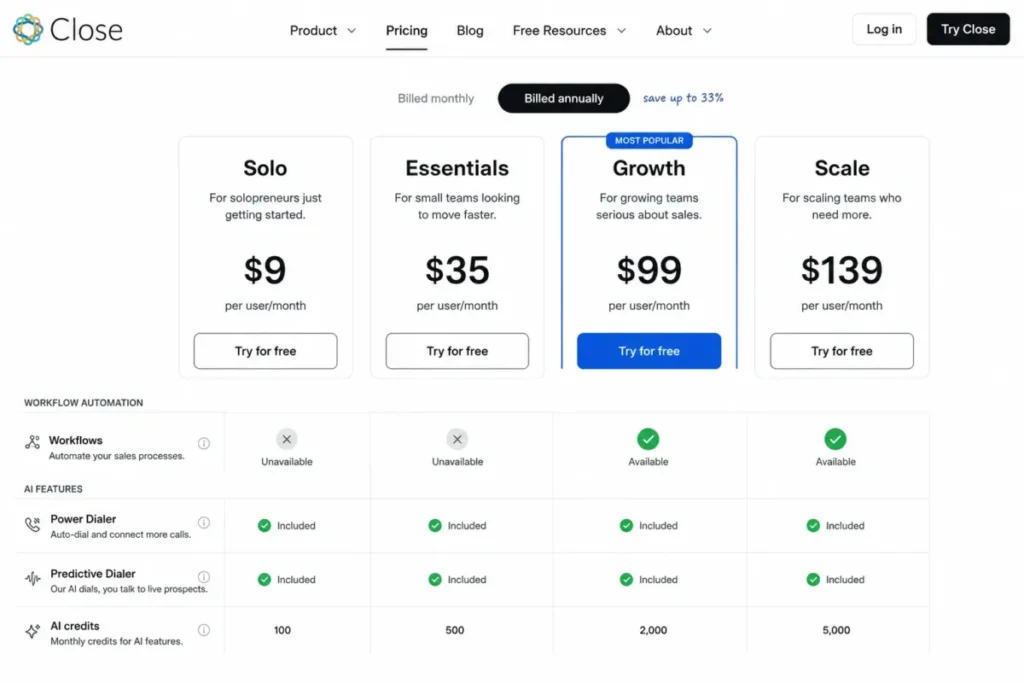
Annual pricing is Solo $9, Essentials $35, Growth $99, and Scale $139 per user per month, per the official Close pricing page checked July 16, 2026. Monthly runs $19, $49, $109, and $149.
Growth is the practical tier and it is not close: workflows start there, so Essentials at $35 is a CRM without automation. Ten users on Growth is $11,880 a year, which is more than Zoho, Pipedrive, or Freshsales, and the justification has to be that Close replaces a separate dialer and sequencer.
| Pros | Cons |
|---|---|
| Email, calling, SMS, power dialer, and predictive dialer are native, not add-ons | Workflows only start at Growth, $99/ |
| Growth at $11,880/ | Solo caps at one user and 10,000 leads |
| Call recording and coaching support a real outbound management motion | AI credits reset monthly with no rollover |
| Fastest rep workflow of anything on this list for call-heavy selling | Not a customer platform: no service, marketing, or CPQ scope |
- Avoid if:
- Salesforce is also running service, CPQ, complex custom objects, approvals, or enterprise reporting. Close solves one motion and does not pretend otherwise.
Migration difficulty: Low to medium for leads, contacts, opportunities, and activity history; higher if the Salesforce estate is broader than sales. See the Close CRM review for the outbound workflow detail.
- Verdict:
- Choose Close if calls per rep per day is the metric your quarter turns on. Otherwise the $99 practical tier is hard to defend against Pipedrive at $39.
Copper: Best for Google Workspace Consultancies

Copper only makes sense for one buyer, and it makes a lot of sense for that buyer: a 5-100 person consultancy or agency whose entire working day happens inside Gmail.
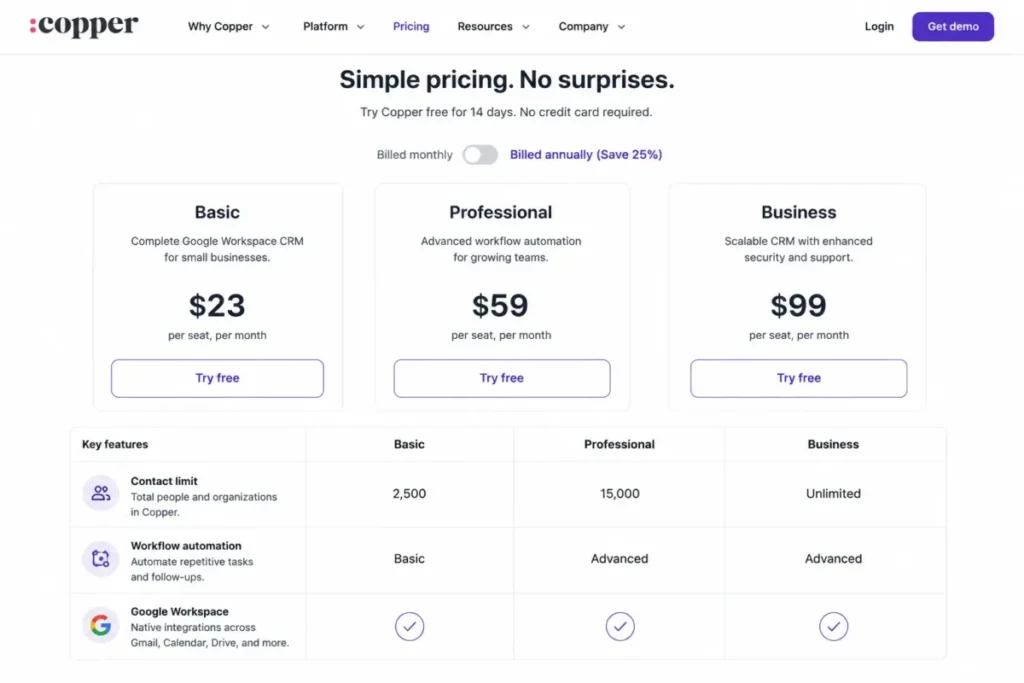
Annual pricing is Basic $23, Professional $59, and Business $99 per seat per month, per the official Copper pricing page checked July 16, 2026. Monthly is $29, $69, and $134.
The number that decides the plan is not the price, it is the contact cap: Basic holds 2,500 contacts and Professional holds 15,000. Workflow automation, bulk email, reporting, and integrations also start at Professional, which makes $59 the practical tier and $7,080 the ten-seat annual cost.
| Pros | Cons |
|---|---|
| Google Workspace integration removes the context switching that kills CRM adoption | Basic caps contacts at 2,500, which a real pipeline passes quickly |
| Professional at $7,080/ | Workflow automation and reporting are gated to Professional and above |
| Project management alongside pipelines fits consultancy delivery work | Value drops sharply outside a Google-centric stack |
| Contact enrichment and nurture reduce the separate-tool count | Not a substitute for a cross-cloud enterprise platform |
- Avoid if:
- your company runs on Microsoft 365, or the CRM has to serve as an enterprise platform. Copper’s advantage is ecosystem-specific and it does not travel.
Migration difficulty: Low to medium for relationship and pipeline data, medium for custom schema, large history, or enterprise controls. Product detail sits in the Copper CRM review.
- Verdict:
- Choose Copper if Gmail is where the work happens and 15,000 contacts is a ceiling you will not hit this year.
Attio: Best for Startups Whose Data Model Keeps Changing

Attio earns its place at the tail for a reason that has nothing to do with quality: it asks the buyer to design their own data model, and most teams leaving Salesforce are trying to do less of that, not more.
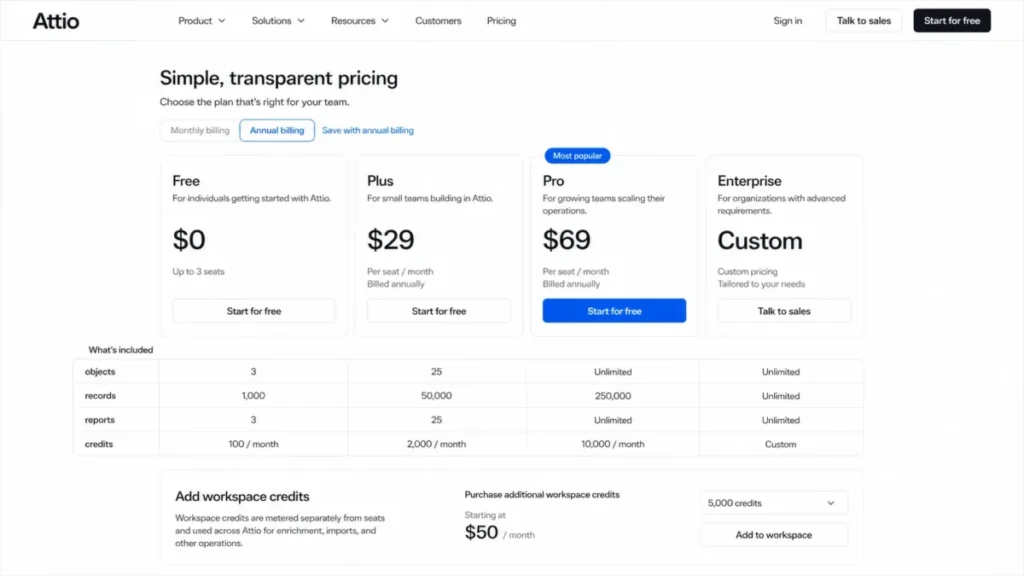
For a 5-100 person SaaS or venture team, that flexibility is the point. Free covers up to 3 seats, Plus is $29/user/month annual or $36 monthly, Pro is $69 annual or $86 monthly, and Enterprise is a custom annual quote, per the official Attio pricing page checked July 16, 2026.
Plus at $3,480 a year for ten users is the practical entry, and Pro at $8,280 is where call intelligence and sequences arrive. Free, Plus, and Pro all cap objects, records, reports, and credits, and workspace credits are metered separately, so usage modeling comes before the seat math.
| Pros | Cons |
|---|---|
| Custom objects and a flexible model handle a schema that changes each quarter | Free, Plus, and Pro cap objects, records, reports, and credits |
| Free plan supports 3 seats, so a pilot costs nothing | Advanced permissions and priority support require Pro at $69/ |
| Real-time contact sync and enrichment cut manual data entry | Newer ecosystem than Salesforce, HubSpot, or Zoho |
| API and webhook access support a clean exit later | Seat and workspace credits are metered, so AI cost is not a fixed line |
- Avoid if:
- nobody on the team wants to own data modeling, or enterprise identity and migration support are procurement requirements. Verify the Enterprise quote before assuming SSO, SCIM, and migration service are included.
Migration difficulty: Medium. Standard data imports, but custom objects, relationships, permissions, reports, sequences, and history need deliberate mapping. An Enterprise migration service is available.
- Verdict:
- Choose Attio if your GTM motion is still being designed. Choose Pipedrive or Zoho if it is already stable and you just want it cheaper.
Best Salesforce Alternatives for Growing Teams (10-50 Users)
This is the band where the Salesforce decision usually breaks. Ten users on Sales Cloud Enterprise is $21,000 a year; fifty is $105,000, and by then the team has real process, real reporting expectations, and often still no dedicated administrator.
The three products below are the ones that hold up at that size without asking for a platform team.
HubSpot Sales Hub: Best for Teams Consolidating Sales, Marketing, and Service

HubSpot ranks first because it pairs the reason most teams bought Salesforce, one customer record that sales, marketing, and service all write to, with adoption that does not need a certified administrator. Zoho CRM spans comparable ground for a third of the price, but asks for the configuration effort that pushed many teams off Salesforce in the first place.
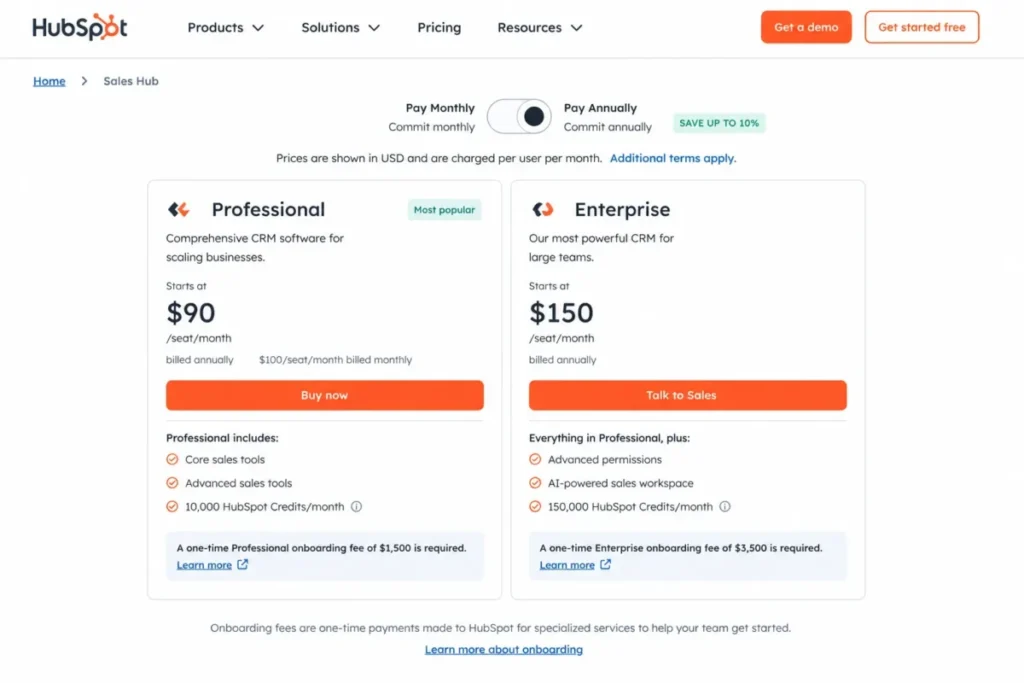
The free CRM covers up to 2 users at $0 and includes contact and deal management, tasks, email tracking, templates, document sharing, meetings, live chat, and sales quotes, per the official HubSpot CRM pricing page checked July 16, 2026. Starter displayed a promotional $7/seat/month with annual commitment against $20/seat/month monthly on that date, which is a promotion rather than a standard price, so verify it at checkout.
Sales Hub Professional starts at $90/seat/month annual or $100 monthly, and Enterprise starts at $150/seat/month, per the official Sales Hub pricing page checked July 16, 2026. Professional is the practical tier for a team leaving Sales Cloud, because that is where the automation and reporting depth arrives.
Here is the cost most comparisons omit. Professional carries a mandatory $1,500 onboarding fee and Enterprise a mandatory $3,500 fee, so ten seats on Professional is $10,800 in licences plus $1,500, which is $12,300 in year one against $21,000 for Sales Cloud Enterprise.
That is a real saving of $8,700, and it is smaller than the sticker comparison implies. At fifty seats the gap widens to $55,500 against $105,000, which is when the HubSpot case gets genuinely strong.
What HubSpot does better than Salesforce is time-to-value: a 25-person go-to-market team can run the platform without a certified administrator. What it does worse is open-ended platform customization, where Salesforce is still the deeper build surface.
| Pros | Cons |
|---|---|
| One Smart CRM record shared across sales, marketing, and service, without middleware | Professional requires a $1,500 onboarding fee, Enterprise $3,500 |
| Professional at $12,300 in year one for ten seats versus $21,000 for Sales Cloud Enterprise | Starter’s $7/seat/ |
| Free CRM for 2 users makes a pilot genuinely free | HubSpot Credits meter AI usage, so AI cost is not fixed |
| Adoption without a dedicated CRM administrator, the main Salesforce exit trigger | Contact tiers and additional hubs can erase the licence saving at scale |
| Faster path from signature to a working pipeline than a customized Sales Cloud rebuild | Less open-ended customization than the Salesforce platform layer |
- Avoid if:
- Salesforce is running deeply customized multi-cloud processes with heavy AppExchange dependencies. You would be trading a platform for a suite, and the rebuild cost lands on the same team that is already stretched.
Migration difficulty: Medium. Standard objects map, but custom objects, history, workflows, permissions, reports, and integrations all need design work, and the onboarding fee is mandatory on the tiers a switching buyer signs. The HubSpot vs Salesforce comparison covers the head-to-head, and the HubSpot CRM review covers the product.
- Verdict:
- Choose HubSpot if the exit reason is fragmentation plus admin burden and the budget survives the onboarding fee. I would not model it as the cheap option, because it is not.
Zoho CRM: Best for Teams Leaving Because of Price at Scale

If the exit reason is purely cost and the requirement is still a configurable CRM, Zoho is the closest substitute on this page, and it is not particularly close.
Zoho CRM Free supports up to 3 users and includes leads, deals, workflows, reports, mobile apps, import and export, and 5,000 API calls per day, per the official Zoho CRM pricing page checked July 16, 2026. The annual USD tiers used here are Standard $14, Professional $23, Enterprise $40, and Ultimate $52 per user per month, cross-checked for July 2026; the page renders dynamically, so confirm the live US selector before you budget.
Professional at $23 is the practical tier for most switchers, which is $2,760 a year for ten users against $21,000 for Sales Cloud Enterprise. At fifty users on Enterprise the comparison is $24,000 against $105,000, an $81,000 annual difference that is large enough to fund a migration project outright.
Zoho earns that position because it is architecturally similar to Salesforce rather than a simplification of it: custom modules, workflows, reports, and a broad suite sit underneath, with Zia as the AI layer. The complete feature list documents what each edition holds.
The tradeoffs are real. Advanced Zia, automation depth, analytics, territories, portals, and higher limits are all tier-gated, and workflow email-notification ceilings vary by edition per the official workflow rules documentation.
The interface is dense, and buyers who left Salesforce because configuration felt heavy will find Zoho asks similar questions at a lower price.
| Pros | Cons |
|---|---|
| Professional at $2,760/ | Interface and configuration are dense, so the complexity exit reason is only partly solved |
| Free edition supports 3 users with workflows, reports, and 5,000 API calls per day | Advanced Zia, analytics, territories, and portals are tier-gated |
| Custom modules and workflows keep a Salesforce-like data model intact | Workflow email-notification ceilings vary by edition and can bind at volume |
| Official import, export, and migration support reduce switching risk | Pricing page renders dynamically, so the US selector must be confirmed |
| $81,000 annual difference at fifty users versus Sales Cloud Enterprise | Ecosystem depth is narrower than AppExchange |
- Avoid if:
- the reason you are leaving Salesforce is that configuration and admin overhead ate your team. Zoho is cheaper, not simpler, and a cheap tool nobody configures correctly is still a failed CRM.
Migration difficulty: Medium. Zoho supports migration and import and export, but custom objects, relationships, history, flows, reports, and integrations still need mapping or rebuilding. The Zoho CRM vs Salesforce comparison covers the head-to-head, and the Zoho CRM review covers the product depth.
- Verdict:
- Choose Zoho if the budget is the trigger and you still have someone who enjoys configuring a CRM. That second condition is the one buyers skip.
monday CRM: Best for Teams Where Sales Work and Delivery Work Are the Same Work

monday CRM is the answer to a question the other nine products do not ask: what happens after the deal closes, in the same tool, with the same people.
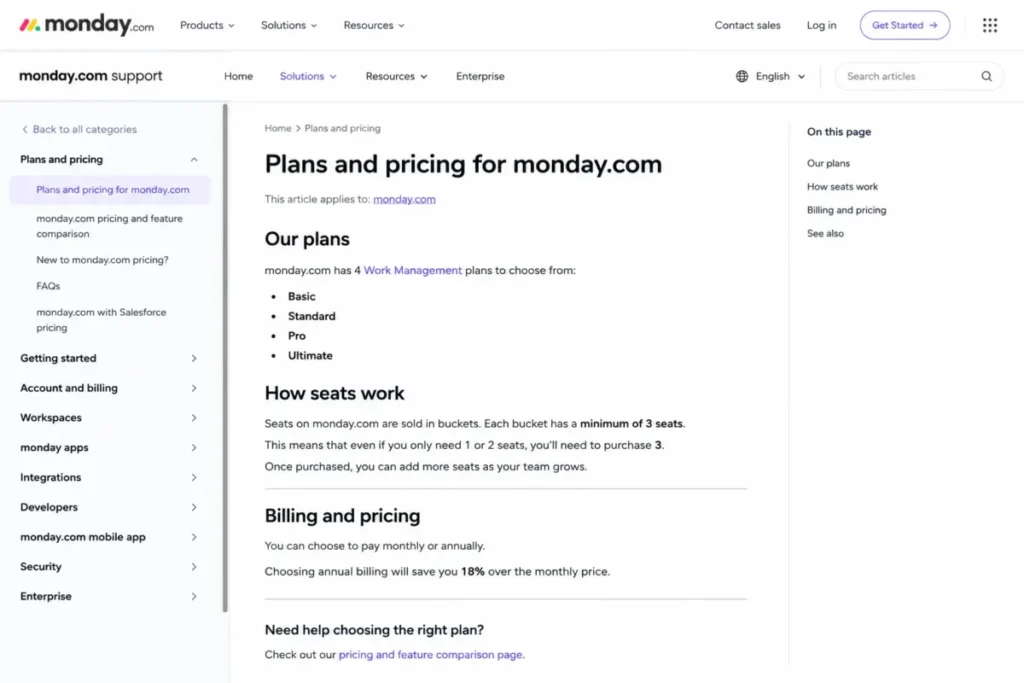
Official plan names are Basic, Standard, Pro, and Ultimate, per the monday.com plans and pricing help page checked July 16, 2026. Current 2026 US annual figures cross-check at roughly Basic $12, Standard $17, and Pro $28 per seat per month with top-tier pricing sales-led, but the official monday.com pricing page is multi-product and dynamic, so capture the CRM tab at your seat count before you budget.
Two mechanics distort every headline monday price you will read elsewhere. Seats are sold in buckets with a minimum of three, and annual billing carries an 18% discount over monthly, both per that same official help page.
monday CRM also has no Free plan; the free tier belongs to monday Work Management, which is a different product.
Pro at $28 is the practical tier once automations, dashboards, and permissions matter, which is $3,360 a year for ten seats. The board model is the tradeoff: it flexes into almost any workflow, and it is not a deep enterprise CRM schema.
| Pros | Cons |
|---|---|
| Pipelines and post-sale delivery work live in one board model, no handoff tool | Seats sell in buckets with a three-seat minimum, so per-seat math misleads |
| Pro at $3,360/ | monday CRM has no Free plan; the free tier is monday Work Management |
| Non-sales teams adopt it without CRM training, which lifts data quality | Automation, dashboards, permissions, and advanced controls are tier-gated |
| 18% annual discount is documented rather than a negotiated unknown | Board-centric model is not an enterprise CRM data model |
- Avoid if:
- you need a governed CRM schema with territory management and forecast controls. monday is flexible in a way that becomes a liability when compliance asks who changed what.
Migration difficulty: Medium. Standard records import, but relationships, automations, reports, permissions, and integrations normally need redesign into boards and connected workflows. The monday.com evaluation covers the board model in detail.
- Verdict:
- Choose monday CRM if your sales team and your delivery team argue about where the truth lives. Price it on the seat bucket, not the headline.
Best Salesforce Alternatives for Enterprise (50+ Users)
Above fifty seats the question changes. Nobody at this size is buying a lighter CRM to save admin time, because they already have an admin team; they are buying a different platform because the current one is misaligned with the rest of the architecture.
Dynamics 365 Sales and Creatio are the two strongest architecture-level replacements in this ranking for complex 50+ seat deployments.
Microsoft Dynamics 365 Sales: Best for Microsoft-Standardized Enterprises

For an organization already standardized on Microsoft 365, Teams, Azure, Power Platform, and Power BI, Dynamics 365 Sales is the strongest Salesforce substitute on this page, and ecosystem alignment is doing most of that work.
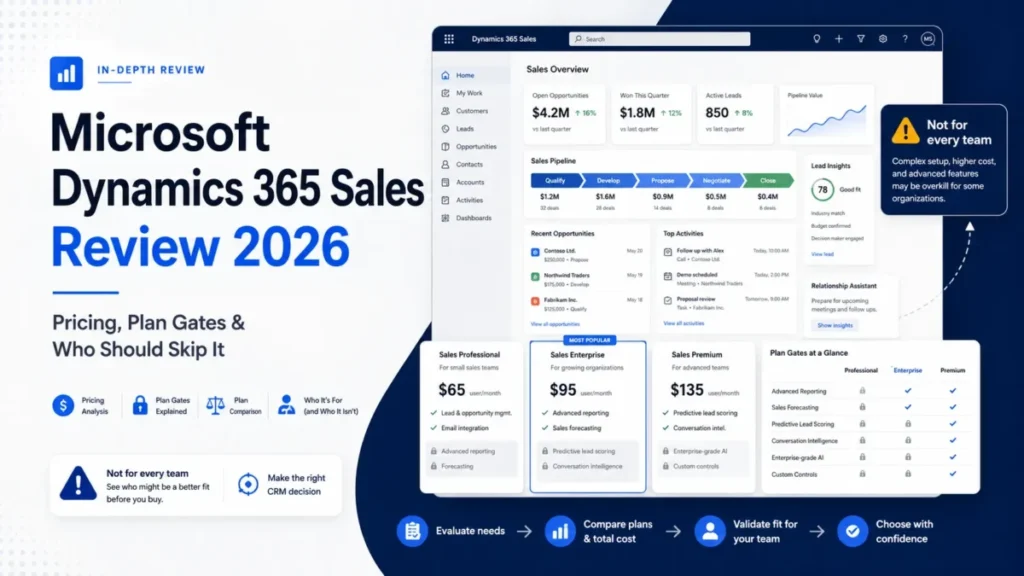
Pricing is Sales Professional $65, Sales Enterprise $105, and Sales Premium $150 per user per month paid yearly, per the official Dynamics 365 Sales pricing page checked July 16, 2026. Sales Enterprise is the practical replacement tier and includes Copilot and agentic capabilities.
At one hundred users, Sales Enterprise is $126,000 a year against $210,000 for Sales Cloud Enterprise. That $84,000 annual difference is real, and it is the smallest relative saving on this page, which tells you the decision is not primarily financial.
The case is architectural. Identity, productivity, collaboration, analytics, and low-code development already sit in one vendor’s stack, so the integration tax and the context switching disappear, and Dataverse plus Power Platform give the same extensibility story Salesforce sells.
Microsoft maintains current Dynamics 365 Sales documentation covering licensing and implementation.
The counterweight is that none of this is light. Licensing is complex, product availability can vary by market, and a Salesforce-to-Dynamics move is a structured project involving data mapping, Dataverse design, security roles, Power Platform flows, reporting, and retraining.
| Pros | Cons |
|---|---|
| Native alignment with Microsoft 365, Teams, Azure, Power BI, and Power Platform | Licensing and implementation complexity rival Salesforce, not a simplification |
| Sales Enterprise at $126,000/ | Migration is high effort: Dataverse design, security roles, flows, reporting, retraining |
| Copilot and agentic capabilities are included at the Sales Enterprise tier | Overweight for teams under roughly 50 seats |
| Dataverse and Power Platform match the extensibility Salesforce sells | Product availability can vary by market, so verify the US quote |
| One vendor for identity, productivity, analytics, and CRM reduces integration surface | Still requires dedicated administration and governance |
- Avoid if:
- your company is not genuinely Microsoft-standardized. Without that alignment you are taking on Salesforce-class complexity and losing the AppExchange ecosystem, which is a bad trade at any price.
Migration difficulty: High for complex Salesforce estates. Product detail sits in the Microsoft Dynamics 365 Sales review.
- Verdict:
- Choose Dynamics if the CIO already answered this question by standardizing on Microsoft. Do not choose it to save money, because the saving is not the point.
Creatio: Best for No-Code Enterprise Process Automation

Creatio is one of only two alternatives here that competes with Salesforce on extensibility rather than by simplifying it, and the only one of the two that does not require the Microsoft stack to do it. That makes it a real option for 50-500+ seat organizations and a bad one for everyone else.
The proposition is composable no-code design across UI, data, and logic, spanning sales, marketing, and service with a marketplace and industry solutions, per the official Creatio site checked July 16, 2026. A 500-person insurer that needs enterprise process automation without a developer-led build is the buyer this was made for.
Pricing is where I would slow down. Creatio publishes composable, sales-led pricing on the Creatio pricing page, and current 2026 references place entry pricing near $40 per user per month, but the public information on the annual minimum commitment conflicts across sources.
I am not publishing a settled minimum, because there is not one to publish, and any number you read elsewhere deserves the same skepticism.
Request a written US quote that separates platform, CRM products, support, implementation, and every minimum commitment before this enters a shortlist.
| Pros | Cons |
|---|---|
| No-code composition of UI, data, and logic across sales, marketing, and service | Pricing is composable and sales-led; public minimum-commitment information conflicts |
| Competes with Salesforce on enterprise process depth rather than simplifying it | Implementation and services costs can exceed the licence, often partner-led |
| Industry solutions and a marketplace shorten vertical builds | Poor value below roughly 50 seats |
| AI Studio and workflow automation cover process-heavy operations | Migration is a full design project: data model, processes, integrations, security, training |
- Avoid if:
- you are a small team, or you need a price before a sales conversation. Neither is a criticism of the product; it is a statement about who it is sold to.
Migration difficulty: High. Expect data-model design, process mapping, workflow rebuild, integration work, security design, testing, training, and a likely partner-led rollout.
- Verdict:
- Choose Creatio if process automation is the product you are buying and Salesforce’s build model is the thing you are escaping. Get the quote in writing first.
Full Pricing Matrix and 10-User Cost
Starting price is the least useful number in this category. The number that decides the budget is the practical tier: the lowest plan that replaces the Salesforce workflows your team runs.
All figures are USD, annual billing, licence only, checked against each vendor’s official pricing page on July 16, 2026. The ten-user column is the practical tier multiplied by ten users and twelve months, with fixed fees called out separately.
Pricing Freshness and What to Re-Check
Source: official vendor pricing pages for all eleven products, checked 2026-07-16. Currency USD, billing basis annual per user or per seat unless the row says otherwise.
HubSpot Starter’s displayed price and Attio’s workflow availability were re-checked against the official HubSpot Sales Hub pricing page and Attio’s help center on September 26, 2026.
| Value | Why it moves | Status at 2026-07-16 |
|---|---|---|
| HubSpot Starter, $7/seat/ | Promotional, not the standard price | Displayed against a $20/ |
| Zoho paid tiers, $14 / $23 / $40 / $52 | Pricing page renders dynamically | Cross-checked for July 2026; confirm the live US selector |
| Pipedrive, $14 / $39 / $59 / $79 | Page geolocates and can render local currency | Confirm the US/USD selector before quoting |
| monday CRM, $12 / $17 / $28 | Multi-product page, bucket-based seats | Capture the CRM tab at your seat count |
Creatio publishes no comparable public figure at all, so it stays quote-only across every table below rather than carrying an estimate.
| Product | Starting price | Practical sales-ready tier | 10-user cost | Free plan | Trial |
|---|---|---|---|---|---|
| Salesforce Sales Cloud | $25/ | Enterprise, $175/ | $21,000/ | Free Suite, limits require verification | Not published |
| HubSpot Sales Hub | $7/seat/ | Professional, $90/ | $10,800/ | Yes, up to 2 users | Not published |
| Zoho CRM | $14/ | Professional, $23/ | $2,760/ | Yes, up to 3 users | Not published |
| Microsoft Dynamics 365 Sales | $65/ | Sales Enterprise, $105/ | $12,600/ | Not offered | Not published |
| Pipedrive | $14/ | Growth, $39/ | $4,680/ | Not offered | 14 days, no card |
| Freshsales | $9/user/ | Pro, $39/ | $4,680/ | Yes, up to 3 users | 21 days |
| monday CRM | $12/ | Pro, $28/ | $3,360/ | Not offered on CRM | Not published |
| Creatio | Enterprise quote only | Enterprise quote only | Enterprise quote only | Not offered | Not published |
| Close | $9/user/ | Growth, $99/ | $11,880/ | Not offered | Not published |
| Copper | $23/ | Professional, $59/ | $7,080/ | Not offered | Not published |
| Attio | $29/ | Plus, $29/ | $3,480/ | Yes, up to 3 seats | Not published |
Source: the eleven official vendor pricing pages linked in each product section, checked 2026-07-16. Billing basis: USD, annual, licence only.
The 10-user column is a SaaS CRM Review calculation, practical tier x 10 users x 12 months, not a vendor-published figure.
Zoho Professional at $2,760 and Sales Cloud Enterprise at $21,000 are the two ends of this table. HubSpot at $12,300 in year one and Close at $11,880 sit close to each other for entirely different reasons: one is buying a platform, the other is buying a dialer that happens to hold your pipeline.
Two entries in that table are not directly comparable and should not be treated as such. Creatio is quote-only, and monday CRM bills in seat buckets rather than per individual seat, so a headline multiplied by ten is not a quote.
The Same Table at 50 and 100 Users
Seat count is where the ranking changes, because fixed fees stop mattering and per-seat multiplication takes over.
| Product | Practical tier | 50-user annual cost | 100-user annual cost |
|---|---|---|---|
| Salesforce Sales Cloud | Enterprise, $175/ | $105,000 | $210,000 |
| HubSpot Sales Hub | Professional, $90/ | $54,000 plus $1,500 onboarding | $108,000 plus $1,500 onboarding |
| Zoho CRM | Enterprise, $40/ | $24,000 | $48,000 |
| Microsoft Dynamics 365 Sales | Sales Enterprise, $105/ | $63,000 | $126,000 |
| Pipedrive | Premium, $59/ | $35,400 | $70,800 |
| Freshsales | Enterprise, $59/ | $35,400 | $70,800 |
| monday CRM | Pro, $28/ | $16,800 | $33,600 |
| Creatio | Enterprise quote only | Enterprise quote only | Enterprise quote only |
| Close | Growth, $99/ | $59,400 | $118,800 |
| Copper | Business, $99/ | $59,400 | $118,800 |
| Attio | Pro, $69/ | $41,400 | $82,800 |
Source: same official vendor pricing pages, checked 2026-07-16. Every cell is a SaaS CRM Review calculation, practical tier x seats x 12 months, at USD annual billing.
Seat-band discounts and negotiated enterprise terms are not modelled, so treat these as list-price ceilings.
At fifty users the HubSpot onboarding fee has stopped being a factor, which is the opposite of how it feels at ten. Zoho Enterprise at $24,000 against Sales Cloud Enterprise at $105,000 is an $81,000 annual difference, and at one hundred users Dynamics saves $84,000 while asking for a Salesforce-class implementation to collect it.
Hidden Costs the Sticker Price Hides
| Product | Fixed or hidden cost | Buyer consequence |
|---|---|---|
| Salesforce Sales Cloud | Adjacent clouds, marketplace packages, middleware, consumption, premium support, consulting | The licence is one layer of the bill, not the bill |
| HubSpot Sales Hub | $1,500 Professional onboarding, $3,500 Enterprise onboarding, mandatory | A ten-seat Professional buyer pays 14% above licence in year one |
| HubSpot Sales Hub | Starter’s $7/seat/ | Budgeting from the promotion risks a 186% variance at renewal |
| monday CRM | Three-seat minimum plus bucket billing | A four-person team pays a bucket, not four seats |
| Creatio | Composable pricing, conflicting public minimum-commitment information | No defensible budget exists before a written quote |
| Zoho CRM | Tier-gated Zia, analytics, territories, portals; edition-bound workflow email ceilings | The $14 Standard tier is not the tier you are buying |
| Pipedrive | Lead generation, enrichment, advanced security on Premium, Ultimate, or as add-ons | The $39 Growth plan is the floor, not the finish |
| Freshsales | Freddy AI Agent sessions and CPQ are separate add-ons | AI capability is a second line item |
| Copper | 2,500 contacts on Basic, 15,000 on Professional | The database, not the headcount, forces the upgrade |
| Attio | Object, record, report, and credit caps across Free, Plus, and Pro | Usage growth triggers the upgrade before hiring does |
| Close | AI credits reset monthly with no rollover | Unused capacity does not bank, so peaks cost extra |
Source: official vendor pricing and documentation pages, checked 2026-07-16. Each fixed fee, seat minimum, and usage cap in this table is published by the vendor; none is inferred.
The pattern across that table is that the products marketed as cheap carry usage ceilings, and the products marketed as complete carry fixed fees. Neither is dishonest, and both break a budget built from a pricing page headline.
AI Is Metered Differently by Every Vendor
AI on a comparison table is a checkmark. AI on an invoice is a unit, and no two of these vendors use the same unit.
| Product | AI unit | What the official page documents |
|---|---|---|
| HubSpot Sales Hub | HubSpot Credits | Starter displayed 500 HubSpot Credits at the checked date |
| Freshsales | Freddy AI Agent sessions | Sold as separate session packs, not bundled capability |
| Close | AI credits | Allocated by plan, reset monthly, no rollover |
| Attio | Seat and workspace credits | Metered per seat and per workspace, with public add-on credits |
| Salesforce Sales Cloud | Agentforce and consumption terms | Agentforce 1 Sales at $550/ |
| Zoho CRM | Zia | Advanced Zia capability is tier-gated |
| Microsoft Dynamics 365 Sales | Copilot | Included at the Sales Enterprise tier |
| Pipedrive | Built-in AI | Stated on the official product page |
| monday CRM | Not published in the checked sources | Verify at quote |
| Copper | Not published in the checked sources | Verify at quote |
| Creatio | AI Studio | Scope and cost resolve at quote |
Source: official vendor pricing and product documentation pages, checked 2026-07-16. “Not published in the checked sources” means the vendor does not expose the unit publicly; it does not mean the capability is absent.
Do not convert between these units, because they measure different activities and no exchange rate exists. Model your expected usage against each vendor’s own unit, then ask what happens when you exceed it.
Feature Gate Comparison
The lowest advertised price is almost never the functional replacement price. This table maps the plan where each capability becomes usable, using the lowest confirmed qualifying tier from official sources checked July 16, 2026.
| Product | Workflow automation | Custom reporting depth | Built-in calling or SMS | Sandbox or safe testing |
|---|---|---|---|---|
| Salesforce Sales Cloud | Available across editions; depth expands to Enterprise | Enterprise for advanced customization and API | Adjacent products or integrations | Higher editions; verify by edition |
| HubSpot Sales Hub | Professional, $90/ | Professional, $90/ | Not the core model; verify by hub | Not publicly confirmed |
| Zoho CRM | Standard and above, with edition-bound email ceilings | Enterprise for advanced analytics | Not native; integration-dependent | Not publicly confirmed |
| Microsoft Dynamics 365 Sales | Power Platform flows, Sales Enterprise | Power BI, Sales Enterprise | Teams and Microsoft stack dependent | Not publicly confirmed |
| Pipedrive | Growth, $39/ | Premium and Ultimate for depth | Available; verify plan at purchase | Higher tier; verify at purchase |
| Freshsales | Growth, $9/user/ | Pro, $39/ | Free plan and above, built in | Not publicly confirmed |
| monday CRM | Standard and above; depth at Pro | Pro, $28/ | Not native | Not publicly confirmed |
| Creatio | Core to the product; no-code composition | Core to the product | Verify at quote | Verify at quote |
| Close | Growth, $99/ | Growth and above | Solo and above, built in | Not publicly confirmed |
| Copper | Professional, $59/ | Professional, $59/ | Not native | Not publicly confirmed |
| Attio | Free and above | Report caps apply on Free, Plus, and Pro | Pro, $69/ | Not publicly confirmed |
Source: official vendor pricing pages and plan-comparison documentation, checked 2026-07-16. “Not publicly confirmed” marks a gate the vendor does not publish, and is an RFP question rather than a verified absence.
Two things stand out. Close and HubSpot both gate automation to a tier that costs three to eleven times the entry price, so the advertised floor is decorative for a switching buyer.
The other is the sandbox column, which is mostly blank. Safe testing before a cutover is the single most useful capability during a Salesforce migration, and most of this market does not publish whether you get one.
Ask before you sign, and do not accept a trial as a substitute for a production sandbox.
Enterprise Security and Identity Gates
| Control | Where it is confirmed |
|---|---|
| SSO | Salesforce by edition; Dynamics via Microsoft identity; monday and Attio at higher tiers; verify all at quote |
| SCIM provisioning | Attio Enterprise requires quote verification; not publicly confirmed for most of this list |
| Audit logs | Not publicly confirmed across most of this list; verify at quote |
| Advanced permissions | Attio Pro, $69/ |
| Compliance certification matrix | Salesforce maintains a trust resource; a full per-vendor audit was outside this pass |
Source: official vendor security and documentation pages, checked 2026-07-16. This table records only what each vendor publishes; a blank is missing evidence, never evidence of a missing control.
This table is deliberately thin, and the thinness is the finding. Identity and governance controls can force an enterprise tier even when the sales features fit a cheaper plan, and most vendors here do not expose the answer publicly.
Put SSO, SCIM, audit logs, residency, and support response targets in the RFP rather than assuming them.
Sales Engagement: What Is Native and What Is Another Invoice
Salesforce’s own answer to calling and sequencing usually involves an adjacent product or an integration, which is why outbound teams end up paying for a CRM and a dialer. The column that matters is not “has calling”, it is whether a rep can prospect, call, text, and follow up without leaving the record.
| Product | Calling | SMS | Sequences | Where it is gated |
|---|---|---|---|---|
| Close | Native, plus power and predictive dialer | Native | Native | Communications from Solo, $9/user/ |
| Freshsales | Native built-in phone | Not verified in this pass | Native email templates and automation | Phone, templates, and live chat from the $0 three-user plan |
| Pipedrive | Available, verify plan at purchase | Not verified in this pass | Native | Full email sync from Growth, $39/ |
| HubSpot Sales Hub | Not the core model, verify by hub | Not verified in this pass | Native | Automation and sequence depth from Professional, $90/ |
| Attio | Call intelligence | Not verified in this pass | Native | Both on Pro, $69/ |
| Zoho CRM | Not native, integration-dependent | Not native, integration-dependent | Native workflows | Workflow email ceilings vary by edition |
| monday CRM, Copper, Creatio, Dynamics 365 Sales | Not native, or resolves at quote | Not native, or resolves at quote | Varies | Verify at quote |
Source: official vendor pricing, product, and documentation pages, checked 2026-07-16. “Not verified in this pass” means the capability was not publicly confirmed at the checked date; it is an RFP question, not a verified absence.
Among the products whose native communications pricing was fully verified for this comparison, Close and Freshsales provide the clearest documented all-in-one outbound workflows. That spread is the actual decision, and it is why a team replacing a dialer should price Close against Freshsales rather than against Salesforce.
Integrations: Native, Marketplace, or a Paid Bridge
An integration count is a marketing number. What changes your implementation cost is whether a connection is native, a marketplace package with its own publisher and licence, or a Zapier-style bridge you rent forever.
| Product | What the official sources confirm | Implementation type |
|---|---|---|
| Salesforce Sales Cloud | AppExchange and AgentExchange plus APIs and integration products | Marketplace packages with publisher, edition, and data dependencies, plus custom API |
| Microsoft Dynamics 365 Sales | Documented Microsoft business-application interoperation, Dataverse, Power Platform | Native inside the Microsoft stack; custom via Power Platform |
| Zoho CRM | Broad Zoho suite; 5,000 API calls per day on the Free edition | Native inside the Zoho suite; custom via API |
| Pipedrive | 500+ integrations stated on the official product page | Type not broken out publicly; verify per connector |
| Attio | API and webhook access documented | Custom via API and webhooks |
| Creatio | Marketplace and industry solutions | Marketplace plus no-code composition, usually partner-led |
| Copper | Google Workspace integration; integrations gated to Professional and above | Native to Google Workspace |
| HubSpot Sales Hub, Freshsales, monday CRM | Ecosystems documented at product level only | Not verified in this pass |
Source: official vendor product, integration, API, and marketplace pages, checked 2026-07-16. A per-connector implementation-type audit for all eleven products was outside this pass, and the cells above say so rather than guessing.
The pattern worth acting on: Dynamics and Copper are native to a stack you already own, Zoho and Attio expect you to use an API, and Salesforce and Creatio expect a marketplace package with a licence and an owner. Only the first of those three is free.
Before you shortlist, list the five systems your CRM must talk to, then ask each vendor which of the three types each one is. A connector that turns out to be a paid bridge is a recurring cost the pricing table above does not contain.
Free Plans and Their Real Ceilings
“Has a free plan” is close to meaningless in this category. Four of these products offer one, and the user ceiling decides whether it is a production tier or a proof of concept.
| Product | Free plan | User ceiling | What binds first |
|---|---|---|---|
| Zoho CRM | Yes | 3 users | User count; 5,000 API calls per day is generous for a pilot |
| Freshsales | Yes | 3 users | User count; built-in phone and live chat are included |
| Attio | Yes | 3 seats | Object, record, report, and credit caps |
| HubSpot Sales Hub | Yes | 2 users | User count, then automation, which starts at Professional |
| Salesforce Sales Cloud | Free Suite | Requires verification | Capability limits require checking before production use |
| monday CRM | Not offered on CRM | Not applicable | The free tier belongs to monday Work Management, a different product |
| Pipedrive, Close, Copper, Creatio, Dynamics 365 Sales | Not offered | Not applicable | Trial or quote only |
Source: official vendor pricing pages, checked 2026-07-16. Free-plan user ceilings are vendor-published; Salesforce Free Suite limits were not publicly exposed at the checked date and need verification before production use.
No free plan on this page replaces Sales Cloud for a working sales team, because two or three users is a pilot, not a department. The correct use is to test migration mappings and rep workflow before committing budget, which is genuinely valuable and not the same as a free CRM.
Teams whose requirement is $0 forever should start from our free CRM software options rather than this list.
How to Choose the Right Salesforce Alternative
Work through these six questions in order. The first one that produces a definite answer is your shortlist, and the rest are confirmation.
1. Is your company standardized on Microsoft 365? If identity, email, collaboration, and BI already run on Microsoft, choose Dynamics 365 Sales and stop.
For organizations already standardized on one productivity ecosystem, native alignment can outweigh a moderate per-user price difference.
2. Are you replacing Sales Cloud alone, or the whole customer stack? If Salesforce also runs Service Cloud, Marketing Cloud, Revenue Cloud, or Data Cloud, a sales-only CRM lowers the CRM bill and creates three new ones.
HubSpot absorbs that scope with the least configuration work. Zoho and Creatio can also span it: Zoho for less money, Creatio only at enterprise scale and only after a quote.
3. Is cost the only trigger, and do you still have someone who configures CRMs? Both conditions true means Zoho at $2,760 a year for ten users.
Only the first is true means Pipedrive at $4,680, because Zoho will not configure itself.
4. Do reps live in the dialer? Close if calls and SMS are the motion and $99/user/month is defensible.
Freshsales if the same requirement exists at a quarter of the price and you accept a narrower ecosystem.
5. Where does the team work each day? Gmail all day points to Copper, with the 15,000-contact Professional ceiling as the constraint to check.
Sales and delivery in the same room points to monday CRM.
6. Is your GTM motion stable? A settled motion takes Pipedrive or Zoho.
A motion still being designed takes Attio, and a process-heavy enterprise motion that Salesforce forced you to code takes Creatio.
If two paths tie, break the tie on administration capacity rather than features. The product that a part-time owner can keep clean beats the product that needs a certified administrator you have not hired.
Which Salesforce Alternative Should You Avoid?
Every product on this page is the wrong answer for somebody, and the honest version of a recommendation includes who.
| Product | Avoid if |
|---|---|
| HubSpot Sales Hub | Your Salesforce estate is deeply customized and multi-cloud, or the $1,500 onboarding fee breaks the ten-seat business case |
| Zoho CRM | You are leaving Salesforce because configuration overhead exhausted the team; Zoho is cheaper, not simpler |
| Microsoft Dynamics 365 Sales | You are not genuinely Microsoft-standardized, or you have fewer than roughly 50 seats |
| Pipedrive | Salesforce runs custom objects, Flow, CPQ, service processes, or a stack of AppExchange packages |
| Freshsales | You need deep custom objects, complex approval routing, or an enterprise governance model |
| monday CRM | You need a governed CRM schema with territory management and forecast controls |
| Creatio | You are under 50 seats, or you need a defensible price before a sales conversation |
| Close | Salesforce also runs service, CPQ, complex custom objects, approvals, or enterprise reporting |
| Copper | Your company runs on Microsoft 365, or your contact database will pass 15,000 this year |
| Attio | Nobody wants to own data modeling, or SSO, SCIM, and migration support are procurement requirements |
The two entries I would flag hardest are Zoho and HubSpot, because they are the two most likely to be bought for the wrong reason. Zoho gets bought as a simplification when it is a discount, and HubSpot gets bought as the cheap option when its ten-seat year-one cost is $12,300.
Migration Complexity by Alternative
Migration difficulty below is an editorial estimate based on data-model complexity, workflow rebuild effort, integration requirements, and setup depth. It is not a timeline, and anyone quoting you weeks without seeing your schema is guessing.
| Product | Difficulty | Main risk | What has to be rebuilt |
|---|---|---|---|
| Pipedrive | Low to medium | Custom objects and Flow logic have nowhere to land | Automation, reports, custom fields, integration reconnects |
| Freshsales | Low to medium | Activity history and enterprise permissions | Workflows, custom schema, permissions, integrations |
| Close | Low to medium | Anything beyond the sales motion | Workflows on Growth, sequences, integration reconnects |
| Copper | Low to medium | Custom schema and large history | Workflow automation, reporting, field mapping |
| HubSpot Sales Hub | Medium | Custom objects, history, and permissions design | Workflows, reports, permissions, integrations, plus mandatory onboarding |
| Zoho CRM | Medium | Relationship integrity across custom modules | Flows, reports, custom modules, integrations |
| monday CRM | Medium | Relationships and reporting do not map to boards | Automations, dashboards, permissions, integration reconnects |
| Attio | Medium | Object and relationship design is yours to get right | Custom objects, permissions, reports, sequences, history mapping |
| Microsoft Dynamics 365 Sales | High | Dataverse and security-role design | Data model, security roles, Power Platform flows, reporting, retraining |
| Creatio | High | Process mapping across the whole estate | Data model, processes, integrations, security, testing, training |
What Transfers, and What Does Not
CRM data and CRM behavior are two separate migration workstreams, and CSV import only solves the first one.
| Layer | Effort |
|---|---|
| Accounts, contacts, leads, opportunities | Usually importable |
| Activity and email history | Mapping-dependent; the most common silent loss |
| Attachments and files | Mapping-dependent; check linked-record behavior |
| Custom objects and relationships | Mapping-dependent, often redesign |
| Formula fields and validation rules | Rebuild required |
| Salesforce Flow and approval processes | Rebuild required |
| Reports and dashboards | Rebuild required |
| Roles, profiles, permission sets | Rebuild required |
| AppExchange packages and connected apps | Rebuild or replace; inventory publisher and edition dependencies |
Run a discovery inventory before you shortlist, not after you sign: every custom object, field, flow, validation rule, formula, approval, report, permission set, and connected app. That inventory is the actual scope of your migration, and it is also the cheapest way to discover you should stay.
The safe cutover sequence is: inventory, clean, map, pilot, sample import, reconcile, rebuild automation, reconnect integrations, train a cohort, dual-run, freeze writes, final delta import, validate, retire. Timing is organization-specific, and our CRM migration checklist covers the sequence in detail; the CRM implementation guide covers what happens after the data lands.
One question buyers skip: how do you get out of the new tool later? Check export format, relationship preservation, attachment handling, API and webhook access, export frequency, rate limits, and retention before you sign, or you will run this project again in four years with the same surprises.
When to Stay with Salesforce
Switching is sometimes the wrong project, and this section exists because most alternatives pages will not say so.
Stay if any of these is true:
- Salesforce runs more than sales. Service Cloud, Marketing Cloud, Revenue Cloud, Data Cloud, MuleSoft, or an industry cloud in production means you are not replacing a CRM, you are re-architecting a customer platform.
- AppExchange dependencies are load-bearing. Packages with publisher, edition, and data dependencies do not port, and rebuilding them costs more than the licence gap.
- Governance is a requirement, not a preference. Territory management, forecast governance, approval routing, and audited release control are where Salesforce is genuinely ahead of most of this list.
- You have no defined target-state process. Moving an undefined process to a cheaper tool produces a cheaper mess, and a reimplementation in eighteen months.
- Adoption, not the tool, is the actual problem. If reps do not update Salesforce, they will not update Pipedrive either. A current TechRadar review of Salesforce credits its breadth, scalability, customization, and Customer 360 integration, and none of that helps a team that never adopted the CRM.
Switch if all of these are true instead:
- The practical edition is over budget at your seat count, and the gap is five figures a year.
- The team runs a sales motion that fits inside one of these products without a rebuild.
- Someone owns the migration inventory and can name every custom object and flow.
- The destination’s ecosystem matches where your team already works.
- You can accept the capabilities you are giving up, in writing, before the contract.
The 90-day test is simple. If, ninety days after cutover, forecast accuracy has not degraded and reps are updating records without being chased, the switch worked.
If either fails, the CRM was never the problem.
Final Verdict: The Best Salesforce Alternative for Most Teams
HubSpot Sales Hub is the best Salesforce alternative for most teams leaving Sales Cloud. It is the one product here that carries that scope, one customer record across sales, marketing, and service, without asking for either a configuration project or an enterprise quote, which is what the Zoho and Creatio blocks above each concede. Professional at $90/seat/month plus the mandatory $1,500 onboarding is $12,300 in year one for ten seats against $21,000 for Sales Cloud Enterprise, and at fifty seats the gap doubles.
It is not the cheapest, and I would not pretend otherwise.
By buyer type:
- Best value: Zoho CRM. Professional at $2,760 a year for ten users, if you still have someone who will configure it.
- Best free starting point: Zoho CRM or Freshsales at 3 users. Both are pilots, not departments.
- Best for enterprise: Microsoft Dynamics 365 Sales, but only for Microsoft-standardized organizations at 50+ seats.
- Best simple replacement: Pipedrive. Growth at $4,680 a year for ten users, for teams whose pipeline is genuinely simple.
- Best for outbound: Close, if $11,880 a year for ten reps retires a dialer and a sequencer.
- Best for a changing data model: Attio, free for 3 seats and $3,480 a year for ten on Plus.
The stay-versus-switch signal: if Salesforce runs more than sales at your company, or if AppExchange packages are load-bearing, stay and fix the edition and the admin model instead. If Sales Cloud is running one pipeline for under fifty reps at Enterprise pricing, the first-year license gap may offset a meaningful share of the migration cost, and the only real question is which exit reason you are solving.
Frequently Asked Questions
What is the best alternative to Salesforce?
HubSpot Sales Hub, for most teams leaving Sales Cloud. It keeps sales, marketing, and service on one customer record without requiring a dedicated administrator, at $90/seat/month on Professional plus a mandatory $1,500 onboarding fee.
Zoho CRM is the better answer if cost is the only trigger, at $23/user/month on Professional, checked July 16, 2026.
Is HubSpot cheaper than Salesforce in practice?
Yes, but by less than the sticker price suggests. Ten seats on HubSpot Professional is $10,800 a year plus $1,500 mandatory onboarding, so $12,300 in year one against $21,000 for Sales Cloud Enterprise.
That is an $8,700 saving, not the 90% implied by comparing Starter’s promotional $7 against Salesforce’s $175.
What CRM is cheaper than Salesforce?
Nearly all of them at the practical tier. Zoho CRM Professional is $2,760 a year for ten users, monday CRM Pro is $3,360, Attio Plus is $3,480, and Pipedrive Growth is $4,680, against $21,000 for Sales Cloud Enterprise.
Verify each against its official pricing page, since several render dynamically.
Which Salesforce alternative has a free plan?
Zoho CRM and Freshsales support 3 users free, Attio supports 3 seats, and HubSpot supports 2. Salesforce itself publishes a Free Suite whose limits need verification.
None replaces Sales Cloud for a working sales team; treat them as pilots for testing migration mappings and rep workflow, not as departmental CRMs.
Is Dynamics 365 better for Microsoft users?
Yes, if the company is genuinely standardized on Microsoft 365, Teams, Azure, and Power BI. Sales Enterprise at $105/user/month aligns natively with identity, productivity, and analytics, removing the integration tax.
Without that standardization you take on Salesforce-class complexity and lose the AppExchange ecosystem, which is a poor trade.
Can Pipedrive replace Salesforce?
Yes, if your Salesforce is one pipeline, email, and forecasting. No, if it runs custom objects, Flow automation, CPQ, service processes, or AppExchange packages.
Growth at $39/user/month covers the first case at $4,680 a year for ten users. The second case has nowhere to land in Pipedrive.
Why do companies leave Salesforce?
Six triggers recur: total cost beyond the licence, ongoing administration burden, over-complexity for a simpler sales motion, misalignment with Microsoft or Google ecosystems, low adoption, and the cumulative weight of multi-cloud maintenance and modernization. Reviewer patterns credit Salesforce’s breadth and scalability while qualifying it with cost and learning-curve concerns.
How much does it cost to migrate from Salesforce?
No credible number exists without your schema. Cost tracks the count of custom objects, flows, validation rules, reports, permission sets, and connected apps, plus data quality and retraining.
Build the discovery inventory first. HubSpot adds a known fixed cost: $1,500 onboarding on Professional, $3,500 on Enterprise.
What is the easiest CRM to migrate to from Salesforce?
Pipedrive, Freshsales, Close, and Copper are low-to-medium effort for standard sales data. All four rise to medium the moment custom objects, activity history, or enterprise permissions are involved.
Dynamics 365 Sales and Creatio are high effort regardless, because both require data-model and security design rather than an import.
Should we stay with Salesforce instead?
Yes, if Salesforce runs more than sales, if AppExchange packages are load-bearing, if territory and forecast governance are requirements, or if you have no defined target-state process. Also stay if the real problem is adoption, because reps who ignore Salesforce will ignore a cheaper CRM too.
Fix the edition and admin model first.