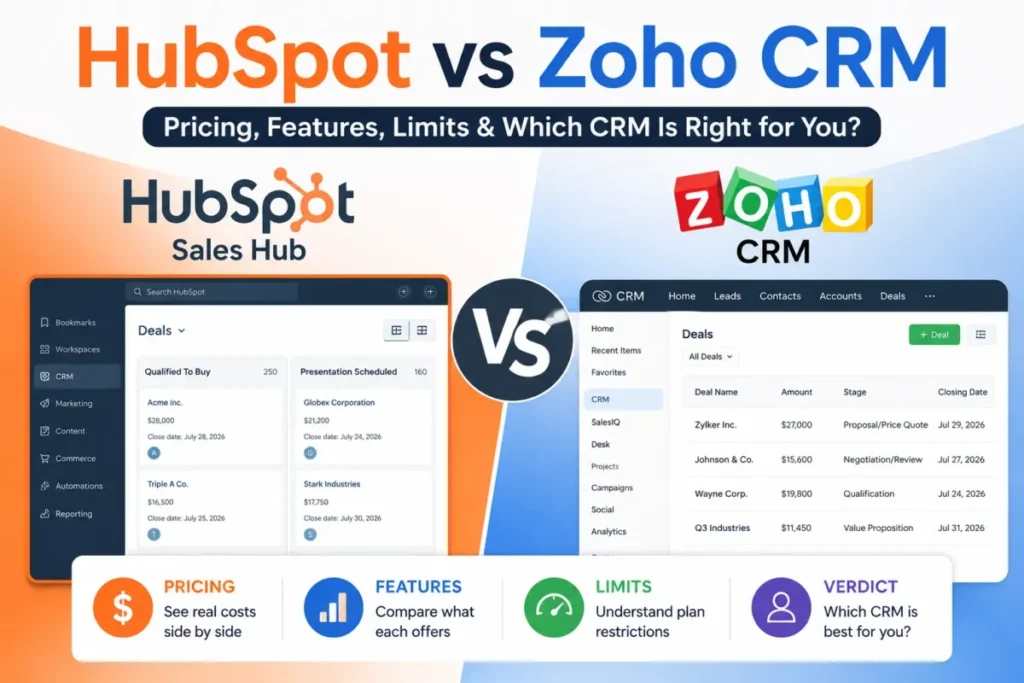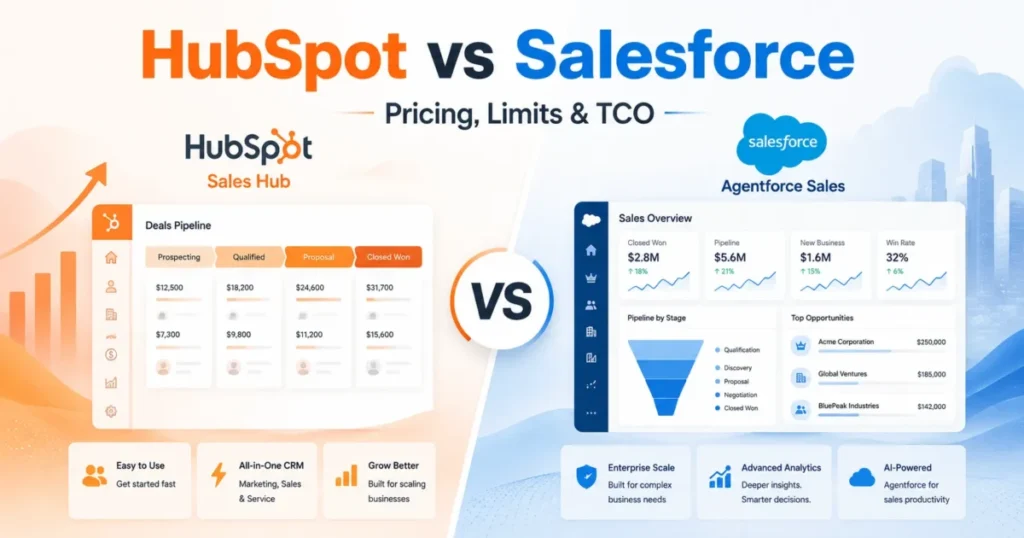
Choosing between HubSpot and Salesforce is rarely settled by which product demos better. It is settled by what your finance team signs, what your admins maintain, and what your reps still use after the first quarter.
This HubSpot vs Salesforce comparison is built for that decision. It leads with buyer scenarios, then quantifies the numbers most comparison pages skip: promotional versus list pricing, mandatory onboarding fees, workflow and reporting caps, API allocations, AI credit behavior, migration limits, and what breaks when you downgrade at renewal.
I treat both platforms as operating commitments, not brands. If you are picking a CRM for sales teams, the right answer depends on your process complexity, your connectivity, your admin capacity, and your tolerance for usage-based billing.
One correction up front, because several ranking pages get it wrong: Salesforce now has a free plan. Both HubSpot’s free Sales Hub and Salesforce Free Suite are capped at two users, so the old “HubSpot is the only free option” verdict is stale.
Here is the short version. Choose HubSpot if you want faster adoption, unified sales and marketing workflows, transparent operational limits, and lower entry pricing.
Choose Salesforce if you need deep customization, complex data models, offline field selling, or enterprise governance. Neither wins every scenario, and the cost gap at comparable tiers is smaller than the headline seat prices suggest.
In This Article (20 sections)
Quick Verdict: HubSpot vs Salesforce
This table covers the categories that change a purchase. Winners are based on official documentation checked July 15, 2026, not on brand reputation.
| Category | Winner | Why |
|---|---|---|
| Lowest paid entry price | HubSpot | Starter showed $7 promotional and $20 list per seat, versus Salesforce Starter Suite at $25 per user. |
| Free plan | Tie | Both cap the free tier at two users; Salesforce Free Suite adds service, marketing, and Slack functions. |
| Ease of adoption | HubSpot | Cleaner out-of-box workflows and stronger independent usability sentiment. |
| Customization and data models | Salesforce | Broader objects, roles, record types, and Flow-based configuration. |
| Sales and marketing alignment | HubSpot | One customer platform connects sales with marketing, service, and content. |
| Advanced reporting and territories | Salesforce | Opportunity splits, territories, and deeper forecasting architecture. |
| API transparency | HubSpot | Publishes clear burst and daily limits per tier. |
| Marketplace breadth | Salesforce | AgentExchange lists 13,000-plus agents, apps, tools, and experts. |
| Offline field operation | Salesforce | Documents enhanced offline through Mobile App Plus; HubSpot has no verified equivalent. |
| Support channel access | HubSpot | Chat and email start at Starter; phone starts at Professional. |
The pattern is consistent across the article. HubSpot wins speed, price entry, and transparency, while Salesforce wins depth, scale, and offline resilience.
HubSpot vs Salesforce at a Glance
Use this side-by-side before the detailed sections. Prices are US list and promotional values checked July 15, 2026, and promotions can change at checkout.
| Attribute | HubSpot Sales Hub | Agentforce Sales (formerly Salesforce Sales Cloud) |
|---|---|---|
| Best for | Marketing-led and revenue-led teams of roughly 5 to 50 that want fast adoption | Process-complex or 50-plus-seat teams with dedicated administration |
| Free plan | $0 for up to 2 users | Free Suite, $0 for up to 2 users |
| Starting paid price | $7 promo / $20 list per seat per month | $25 per user per month |
| Practical sales tier | Professional, $90 promo / $100 list per seat | Pro Suite, $100 per user, or Enterprise, $175 |
| Required onboarding | $1,500 Professional, $3,500 Enterprise | Not published; implementation is quoted separately |
| Setup difficulty | Low to medium for standard processes | Medium to high for custom architecture |
| Main strength | Unified go-to-market workflow and adoption speed | Deep customization, governance, and offline mobile |
| Main weakness | Feature gates, capacity packs, and credit-based usage rules | Add-on sprawl, admin overhead, and unpriced implementation |
How We Compared
This comparison is documentation-based. It draws on official pricing pages, product catalogs, developer docs, support pages, trust centers, and mobile documentation, each checked July 15, 2026.
The analysis reflects official documentation rather than a fresh product walkthrough, so I flag any claim the sources do not fully settle. Source: official HubSpot and Salesforce pricing pages (HubSpot Sales Hub, Salesforce Sales), checked July 15, 2026.
I cross-checked user sentiment against current G2, Capterra, TrustRadius, and Reddit patterns. I also reviewed ten organic comparison competitors to find repeated conclusions and missing buyer questions.
All cost figures are derived from official published USD prices. They exclude taxes, negotiated discounts, partner fees, data cleanup, integration labor, and administrator salaries unless a vendor explicitly states a required fee.
Two limits shape the analysis. Salesforce does not publish a universal implementation cost or a single API ceiling, so those stay scenario variables rather than invented numbers.
HubSpot showed different promotional prices across two official pages. I use the dedicated pricing page and flag the promotion as dynamic.
For product depth beyond this head-to-head, the full HubSpot CRM review and the Salesforce CRM review cover each platform on its own terms.
Verdict by Scenario
Most buyers do not need a category-by-category tour before they get an answer. This table routes the common operating situations to a product first, then the rest of the article shows the evidence.
| Your situation | Recommended | Deciding factor |
|---|---|---|
| One or two-person founder team | HubSpot | Both are free for two users; HubSpot adopts faster |
| Three-person, price-sensitive team | HubSpot Starter | Neither free plan fits; Starter has the lower entry price |
| Ten-rep marketing-led revenue team | HubSpot | Unified lifecycle and sequences outweigh deeper config |
| Ten-rep team judging only on price | Tie | Year-one figures land within a few hundred dollars |
| Fifty-plus seats with a dedicated admin | Salesforce | Objects, territories, APIs, and governance justify overhead |
| Regulated field team, poor connectivity | Salesforce | Documented offline path and enterprise governance |
| Outbound team needing sequence capacity | HubSpot | Published daily send ceilings are easy to budget |
| Many non-standard objects and apps | Salesforce | Platform model fits data you cannot flatten |
| Marketing on HubSpot, sales on Salesforce | Both, with governance | Viable only with a system-of-record policy |
Two scenarios deserve a caveat. The three-person team should compare leaner tools before forcing this choice, and the dual-platform setup only works with the governance steps covered later in this article.
The rest of the sections exist to defend these verdicts and to name the conditions that would reverse them. Where a recommendation flips, I say so directly.
Why Teams Switch Between HubSpot and Salesforce
Before the feature grid, get the product names right, because mismatched names produce mismatched quotes. Salesforce now markets its sales CRM as Agentforce Sales, formerly Salesforce Sales Cloud.
“Salesforce CRM” is an umbrella phrase. Service, Marketing, Revenue, Data Cloud, Slack, and Tableau are often separately licensed unless an edition explicitly includes them.
HubSpot centers a single Smart CRM that connects Sales Hub with marketing, service, content, and commerce. That difference in scope is the real reason teams move in each direction.
Teams switch to HubSpot when the current stack punishes adoption. The usual triggers are slow rep uptake, marketing and sales living in different systems, and admin overhead that never justified itself.
Teams switch to Salesforce when they outgrow standard objects. The triggers are custom data models, territory management, complex permissions, offline field work, and a partner ecosystem the business already depends on.
Neither move is free, and both create rebuild work. The rest of this article quantifies what you gain, what you pay, and what you lose in each direction.
Feature Comparison Matrix
Each dimension below names a winner and the plan gate behind it. A feature you cannot afford at the tier you need is not a feature you have.
| Dimension | HubSpot | Salesforce | Winner |
|---|---|---|---|
| Core pipeline management | 15 pipelines on Professional, 100 on Enterprise | Standard on all paid editions | Tie |
| Ease of use | Cleaner default workflows | More menus, objects, permissions | HubSpot |
| Workflow automation | Up to 300 workflows on Professional, 1,000 on Enterprise | Flow at higher editions, no universal run cap published | Salesforce (depth), HubSpot (clarity) |
| Sequences and outbound | 500 emails per user daily on Professional, 1,000 on Enterprise | Sales Engagement bundled or add-on by edition | HubSpot (transparency) |
| Reporting and forecasting | 100 custom reports on Professional, 500 on Enterprise | Opportunity splits, territories, deeper forecasting | Salesforce |
| Custom objects | Enterprise only | Broad platform objects at higher editions | Salesforce |
| API access | 250,000 to 1,000,000 requests daily by tier | License-based allocation model | HubSpot (transparency) |
| Marketplace | 2,000-plus apps | 13,000-plus mixed listings | Salesforce (breadth) |
| Mobile offline | No verified full offline workflow | Enhanced offline via Mobile App Plus | Salesforce |
| Support access | Phone from Professional | Premier for urgent 24/7 support | Depends on tier |
Ease of Use and Setup
HubSpot’s advantage is the default state. Reps land in a familiar deal board with less configuration between them and their first logged activity.
Salesforce is more configurable, and that is exactly why it is harder at the start. Free and Starter editions are guided, but advanced setups introduce more objects, layouts, and permission logic that someone has to own.
Independent review patterns back this up. G2 and TrustRadius reviewers who chose HubSpot repeatedly cite faster onboarding and less initial configuration effort, while Salesforce reviewers cite a steeper learning curve and the need for a dedicated admin.
My verdict: HubSpot wins adoption speed for standard sales processes. That advantage shrinks the moment your process stops being standard.
Automation and Workflow
Automation is not a yes-or-no feature, so compare it by ceiling. HubSpot Professional supports up to 300 customizable workflows, and Enterprise raises that to 1,000.
Starter only offers limited stage-change actions, so most teams that care about automation are budgeting for Professional. That is the tier where sequences, forecasting, and conversation intelligence also become available.
Salesforce handles automation through Flow, with more configuration depth at higher editions. It does not publish one universal flow-run number, so the honest comparison is architecture, not a single cap.
If you need many governed, branching processes across custom objects, Salesforce has more room. If you need clear, capacity-visible automation you can budget against, HubSpot is easier to plan.
Reporting, Forecasting, and Pipeline
HubSpot publishes concrete reporting ceilings, which helps budgeting. Pipelines scale from 1 on Free to 2 on Starter, 15 on Professional, and 100 on Enterprise.
Dashboards move from 10 to 30 to 75 to 100 across those tiers, and custom reports run 100 on Professional and 500 on Enterprise. For a single sales org, those numbers are usually enough.
Salesforce pulls ahead when structure gets complex. Opportunity splits, territory management, and deeper forecasting are built for multi-team revenue models that HubSpot’s flatter reporting can strain against.
The trigger is not company size, it is reporting shape. When you need revenue attributed across overlapping territories and split credit, Salesforce’s data model justifies its complexity.
Integrations and API Limits
Do not compare marketplace totals as if they measure the same thing. HubSpot cites more than 2,000 apps, while Salesforce AgentExchange advertises more than 13,000 agents, apps, tools, and experts backed by 187,000-plus reviews.
Those are different taxonomies, so the larger number does not mean six times the integrations for your specific tools. Classify each connection you need as native, vendor-built, partner-built, middleware-only, or custom API before you trust any count.
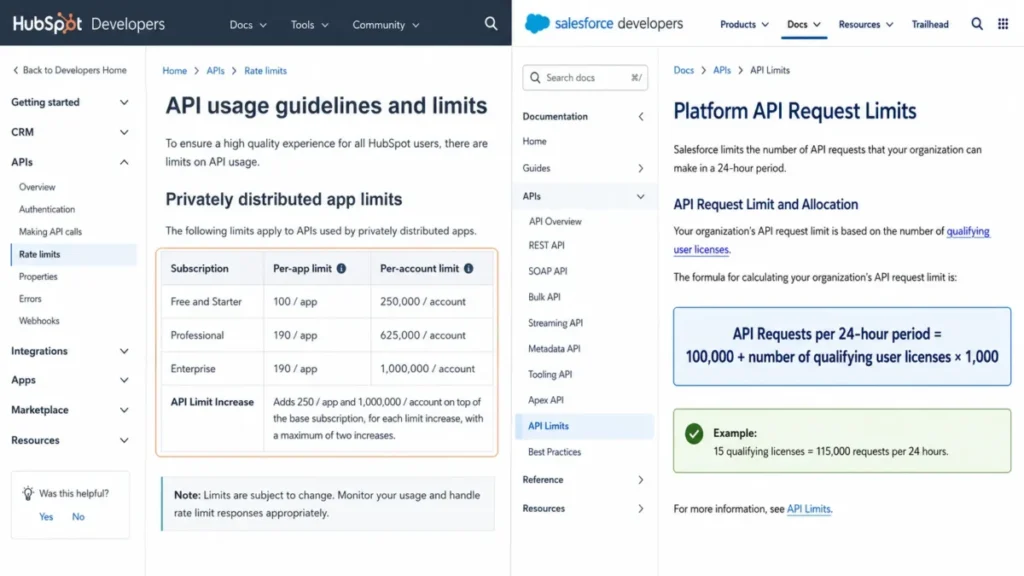
API capacity is where the models truly differ, and it matters for anyone syncing data at volume. HubSpot publishes tier-based private-app limits: 250,000 requests daily on Free and Starter, 625,000 on Professional, and 1,000,000 on Enterprise, with burst limits of 100 to 190 requests per ten seconds.
Salesforce uses a license-based allocation instead. Its official Enterprise example is 115,000 daily requests for an org with 15 qualifying licenses, calculated as 100,000 base plus 1,000 per license.
That example is not a universal ceiling, so calculate your own allowance rather than applying it broadly. If your integration traffic is heavy and predictable, HubSpot’s published tiers are easier to plan against.
For most buyers, understanding CRM integration requirements matters more here than raw marketplace totals.
AI and Usage-Based Costs
AI credits are not comparable across the two platforms, and treating them as equal is a budgeting mistake. HubSpot Credits and Salesforce Flex or Data Cloud Credits cover different features and different units.
HubSpot bundles credits by tier: 500 on Starter, 3,000 on Professional, and 5,000 on Enterprise. The billing behavior is the part competitors miss.
HubSpot Credits expire monthly and do not roll over. When the included cap is reached, usage-based features can pause. After you buy extra credits, exceeding a purchased pack can automatically upgrade the account to a higher pack for the rest of the commitment. Downgrading later carries restrictions, and pay-as-you-go overages require setup.
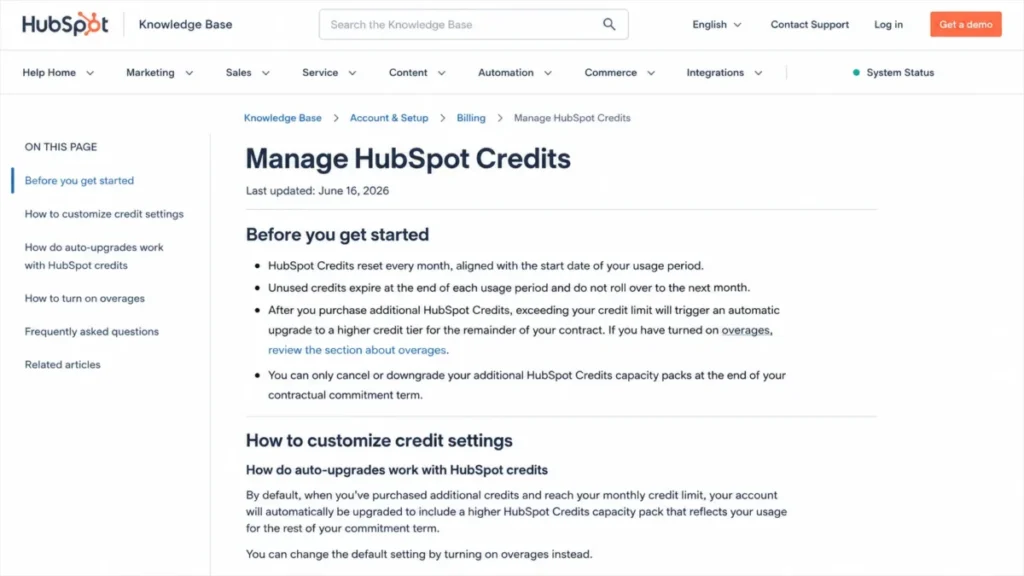
That is a direct budgeting and continuity risk for AI-heavy workflows. I would confirm the current overage rate in writing before I built a process on credits, because the exact rate was not captured in this research.
Salesforce places its broadest AI, including unmetered employee Agentforce usage and large Flex and Data Cloud credit pools, at the top Agentforce 1 Sales tier. For most buyers, AI is an add-on decision layered on the base license, not something included by default.
Support, Security, and Admin Controls
Support access differs before you even reach response-time guarantees. HubSpot gives knowledge base and community on Free, chat and email on Starter, and phone on Professional and Enterprise, subject to paid-seat rules.
Salesforce Standard Success is self-guided through documentation, Trailhead, and community. Faster help is a paid path.
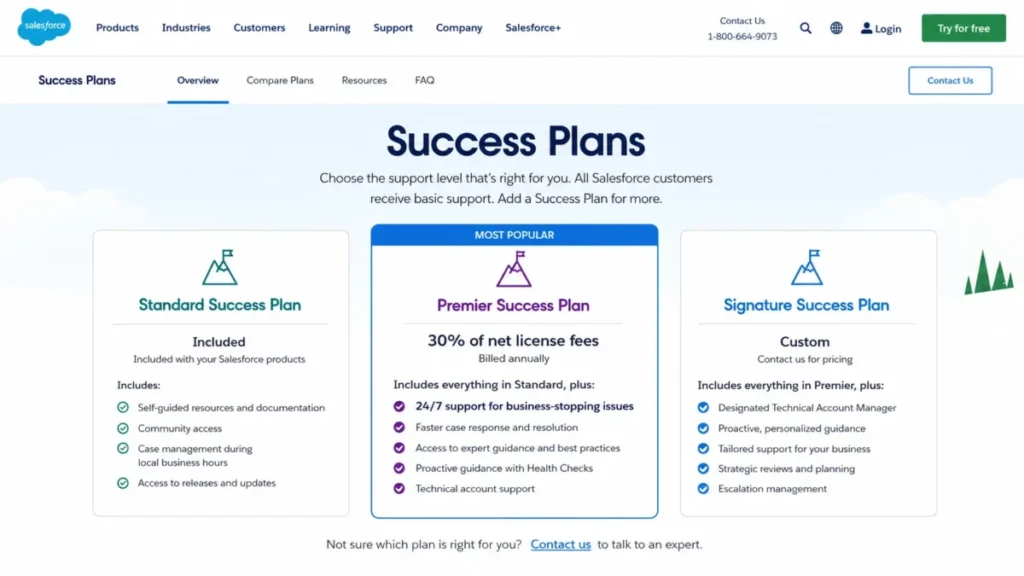
Salesforce Premier Success costs 30% of net license fees, adds expert guidance, health checks, and 24/7 support for business-stopping issues, and is bundled with Unlimited. Signature pricing is custom.
On security, both publish current evidence. HubSpot lists SOC 1, 2, and 3, HIPAA, GDPR, CCPA, TLS in transit, and AES-256 at rest, with SAML SSO at Enterprise.
Salesforce maintains a large compliance library with current SOC 2 reports. Advanced controls such as event monitoring and field audit are associated with Salesforce Shield, which is not included in every sales edition, so validate the exact edition against your control matrix.
Mobile and Field Sales
This is the dimension that can override interface preference. Salesforce documents basic offline limitations in its standard app and offers enhanced offline workflows through Mobile App Plus, which carries additional cost.
HubSpot’s official mobile app supports record viewing and editing, calls, marketing email, and inbox access. This research did not verify a full offline workflow equivalent to Mobile App Plus.
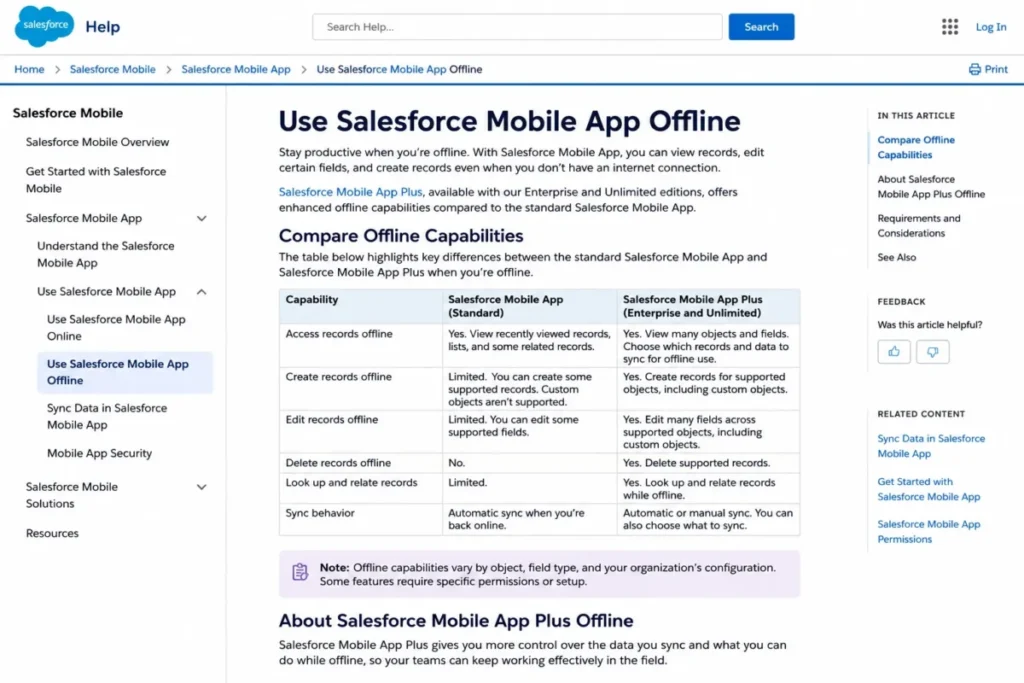
If your reps create and update records in poor-connectivity environments, offline capability is a hard requirement, not a preference. On this axis, Salesforce is the safer choice, and I would not let a cleaner interface overrule it.
To be precise, HubSpot is not offline-incapable. It simply does not document a comparable full offline operating model, so field teams should test their exact workflow before committing.
Pricing at Scale
Seat price is the least reliable way to compare these platforms. The working cost depends on onboarding, support, credits, and add-ons, so the tables below use total year-one figures.
Both free plans stop at two users, which makes three users the first real break point. A three-person team either pays for a plan or looks at another option, and price-sensitive teams should weigh a best CRM for small business shortlist before forcing this binary.
Free and Entry Pricing
| Plan | HubSpot | Salesforce |
|---|---|---|
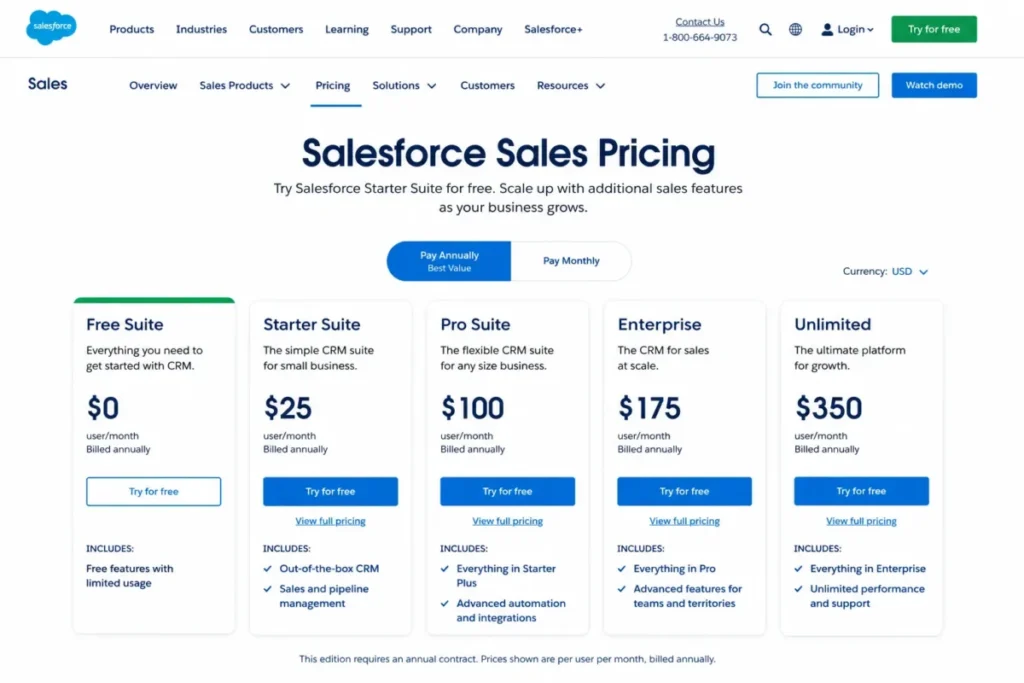
| Free | $0, up to 2 users | Free Suite, $0, up to 2 users |
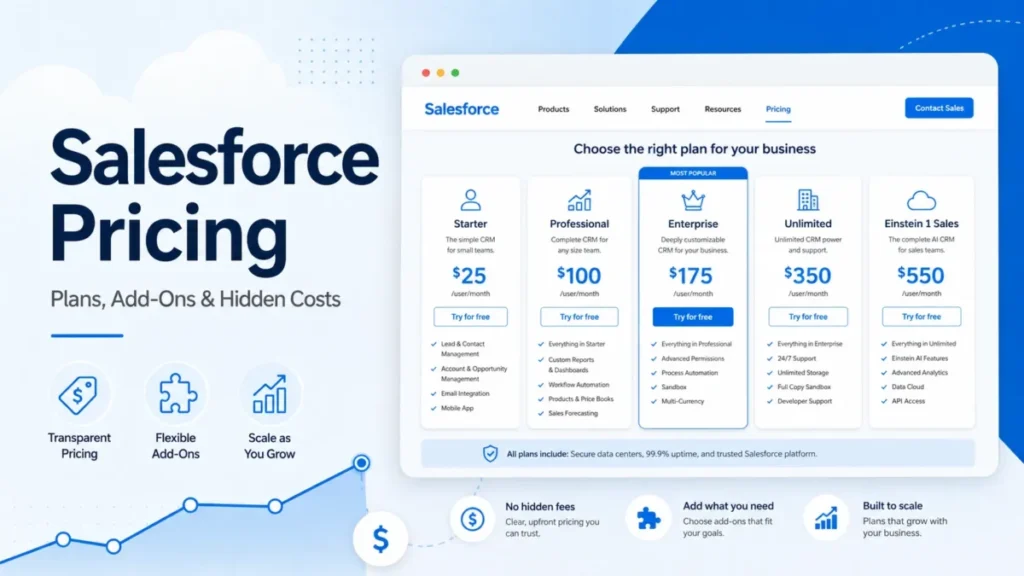
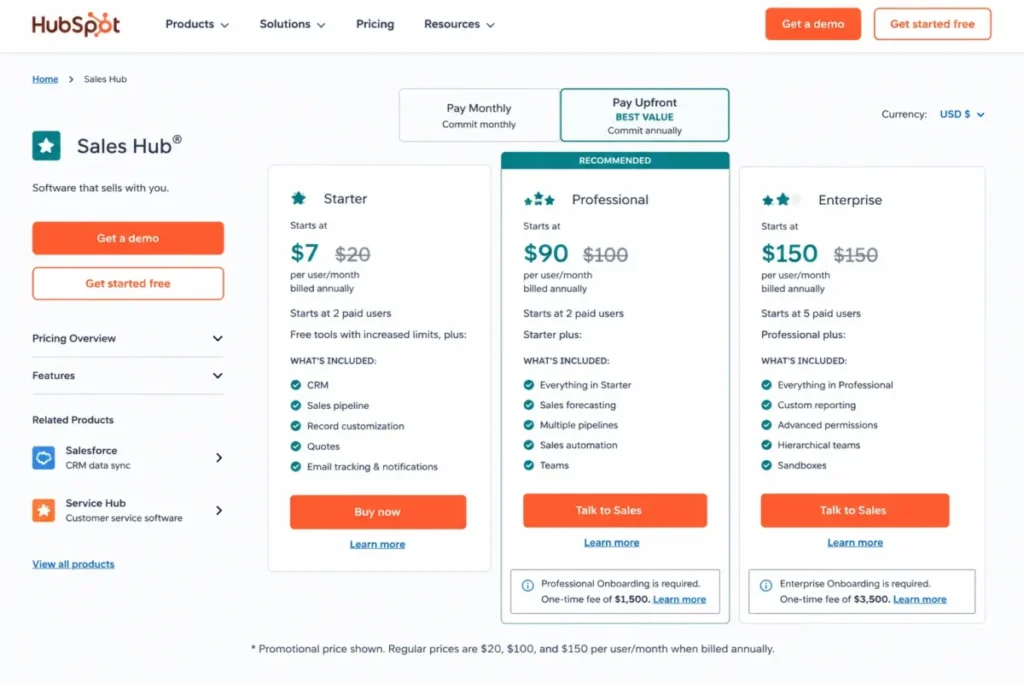
| Starter | $7 promo / $20 list per seat | $25 per user |
| Practical tier | Professional, $90 promo / $100 list | Pro Suite, $100 |
| Higher tier | Enterprise, $150 | Enterprise, $175 |
HubSpot showed a $7 Starter promotion against a crossed-out $20 list price on July 15, 2026. Treat the promotion as dynamic and confirm your checkout and renewal rate, because a promotional entry price is not a guaranteed renewal price.
Full detail sits in the official HubSpot pricing breakdown.
Ten-Seat Year-One Cost
Here comparable tiers land close, which overturns the assumption that the lower seat price always wins.
| Scenario | Year-one cost | What it includes |
|---|---|---|
| HubSpot Professional (promo) | $12,300 | $90 x 10 x 12 plus $1,500 onboarding |
| HubSpot Professional (list) | $13,500 | $100 x 10 x 12 plus $1,500 onboarding |
| Salesforce Pro Suite | $12,000 | Licenses only, before implementation or Premier |
| HubSpot Enterprise | $21,500 | $150 x 10 x 12 plus $3,500 onboarding |
| Salesforce Enterprise | $21,000 | Licenses only, before implementation |
At the Professional and Enterprise level, HubSpot is not automatically cheaper. Salesforce’s published license figure excludes implementation, and HubSpot’s includes a required onboarding fee, so scope decides the winner, not the sticker price.
The equivalent Salesforce pricing plans exclude implementation unless a written quote states otherwise.
Fifty-Seat Year-One Cost
At scale, support policy and promotions compound.
| Scenario | Year-one cost | What it includes |
|---|---|---|
| HubSpot Professional (promo) | $55,500 | $90 x 50 x 12 plus $1,500 onboarding |
| HubSpot Professional (list) | $61,500 | $100 x 50 x 12 plus $1,500 onboarding |
| Salesforce Pro Suite | $60,000 | Licenses only, before implementation |
| Salesforce Pro Suite plus Premier | $78,000 | Licenses plus 30% Premier support |
If a 50-seat team wants urgent Salesforce support, Premier adds 30% to net license fees, and the published license-plus-support figure reaches $78,000. That is the budget pressure point most comparison pages omit.
Source: figures derived from the official HubSpot and Salesforce pricing pages and the Salesforce Success Plans page, checked July 15, 2026.
Hidden Costs and Add-Ons
A base license is not a working configuration. Both vendors publish capacity and product add-ons that reshape the real budget.
| Add-on | HubSpot | Salesforce |
|---|---|---|
| Extra capacity | $500/mo for 10 custom objects; $250 for 400 transcription hours | Sales Engagement, Revenue Intelligence, Sales Dialer priced separately |
| Sandbox | $750/mo for an extra standard sandbox | Full sandbox included at Unlimited |
| Calling and numbers | $50 for 1,000 calling minutes; $25 for 5 phone numbers | Sales Dialer add-on |
| AI and analytics | Credits by tier, then packs | Agentforce for Sales, Tableau add-ons |
| Field tools | Included mobile app | Salesforce Maps add-on |
Not every team needs every add-on. The point is that two editions that look similar on paper can produce very different quotes once required capacity, support, and workflow products are added.
The Real Cost of Switching
Migration is where “cheaper on paper” meets reality. Before any workflow rebuilding, the two platforms have different data-transfer limits, and those limits decide whether you use native tools or hire a partner.
A structured CRM migration plan should separate raw transfer limits from the work of rebuilding automations, reports, and associations.
| Migration factor | HubSpot | Salesforce |
|---|---|---|
| Import file size | Up to 512 MB | Data Import Wizard up to 50,000 records |
| Daily import volume | 500 imports, 10 million rows | Data Loader for larger sets, documented sub-5M range |
| Rows per file | Up to 1,048,576 | Varies by tool |
| Association labels | Require Professional or Enterprise | Handled through object relationships |
| Export limits | 300 exports per rolling 24 hours, 3 simultaneous | Export files available for a 48-hour window |
Two details deserve attention. HubSpot gates association-label imports behind Professional or Enterprise, so relationship-rich data may force a higher tier during migration.
Salesforce export files can expire after a 48-hour retrieval window. Miss it, and you regenerate the export, which can delay a backup, audit, or migration.
I would assign one owner to download, checksum, store, and validate every export the day it completes.
The Downgrade Trap
Switching cost is not only about moving in. HubSpot’s downgrade behavior creates practical lock-in that competitor pricing tables ignore.
Before you downgrade a HubSpot tier at renewal, know what breaks. Downgrading can disable or delete workflows and sequences, restrict custom objects and custom reports, remove SSO, and stop the Salesforce sync. Some effects apply after documented grace periods rather than instantly.
A lower renewal quote does not preserve the operating model you built on the higher tier. If your processes depend on custom objects or many workflows, treat the higher tier as a standing commitment, not a flexible one.
What You Gain and What You Lose
Each direction has a real trade. Naming both sides is how you avoid a switch that solves one problem and creates two.
Moving from Salesforce to HubSpot, you gain adoption speed, unified marketing and sales data, transparent limits, and simpler administration. You lose deep custom objects, territory management, offline field capability, and the AppExchange and AgentExchange ecosystem depth.
Moving from HubSpot to Salesforce, you gain custom data models, governance, offline selling, and ecosystem breadth. You lose out-of-box adoption speed, and you take on implementation design, admin ownership, and separately priced engagement and analytics products.
The 30/90-day adoption test cuts through it. After 30 days, reps should be logging activity without prompting, and after 90 days, your reporting should be trusted enough to run a forecast.
HubSpot usually clears that bar faster for standard processes. Salesforce clears it when a capable admin has finished the build.
Setup and Migration Difficulty
Ignore any universal implementation-time claim you see. Vendor and consultancy pages publish conflicting rollout estimates because they use different scopes, data conditions, and definitions of “done.”
| Tool | Setup difficulty | Why |
|---|---|---|
| HubSpot Sales Hub | Low to medium | Lower initial configuration for standard processes; Professional and Enterprise still require onboarding fees |
| Agentforce Sales | Medium to high | Data architecture, objects, flows, permissions, and testing scale with complexity |
Instead of a number of days, scope the work. Account for data sources, custom objects, integrations, automation, permissions, reporting, migration validation, training, and change management.
A repeatable CRM implementation checklist beats any vendor-quoted average.
Where HubSpot Wins
HubSpot is the stronger buy when adoption speed and go-to-market alignment matter more than platform depth. These are the scenarios where I would recommend it without hesitation.
| Pros | Cons |
|---|---|
| Lower entry price and faster rep adoption | Custom objects locked to Enterprise |
| Unified sales, marketing, and service data | Downgrades can delete workflows and stop sync |
| Transparent, published operational limits | Credits expire monthly and can trigger pack upgrades |
| Phone support from Professional | Onboarding fees of $1,500 to $3,500 are mandatory |
| Clear API tiers for integration planning | No verified full offline mobile workflow |
Winning scenarios: a 10-rep marketing-led revenue team, an outbound team that needs predictable sequence capacity, a team that wants integration limits it can plan against, and a two-person startup that wants the smoothest self-serve start.
Where Salesforce Wins
Salesforce is the stronger buy when your process cannot be represented by standard objects, or when field conditions demand offline work. Its depth is real, and so is its overhead.
| Pros | Cons |
|---|---|
| Deep custom objects, roles, and record types | Implementation cost is not published |
| Territory management and opportunity splits | Premier support adds 30% to license fees |
| Enhanced offline selling via Mobile App Plus | Add-ons can rival the base license cost |
| Larger partner and app ecosystem than HubSpot | Steeper learning curve and admin dependency |
| Enterprise governance and Shield options | Advanced security may require separate products |
Winning scenarios: a 50-plus-seat org with a dedicated admin, a regulated field-sales team in poor-connectivity conditions, and any company that needs many non-standard objects, territories, or custom applications.
Who Should Choose HubSpot
Choose HubSpot if your priority is getting a team productive quickly on one connected platform. It rewards teams that value adoption over configuration depth.
Pick it if you run a marketing-led revenue motion and want sales and marketing on shared data. Pick it if you want operational limits you can read off a pricing page and budget against.
Pick it if you are a small or mid-sized team that does not have, and does not want, a dedicated CRM administrator. The trade you accept is Enterprise gating for custom objects and credit-based AI billing.
Who Should Choose Salesforce
Choose Salesforce if your operating model needs custom objects, territories, complex permissions, or offline field selling. It rewards organizations that will actually use its depth.
Pick it if you have or will hire dedicated administration, because that capacity is what turns configurability into value. Pick it if a regulated or field workflow makes offline mobile a hard requirement.
Pick it if you are committing to the Salesforce platform strategy long term and want ecosystem breadth. The trade you accept is implementation design work, admin ownership, and separately priced engagement and analytics products.
Who Should Avoid Both
Some teams should not force either platform. A three-person team on a tight budget that only needs simple pipeline tracking will find both free plans too small and both paid entry tiers heavier than necessary.
A solo operator or micro-team that wants a lightweight deal tracker without onboarding fees, credit rules, or admin overhead is a poor fit for either. In those cases, a leaner tool from a broader shortlist is the better call.
If that describes you, look at a leaner deal tracker before committing to a platform built for larger operations. The alternatives section below names concrete options for teams that outgrow neither product but never quite fit them.
Can You Use HubSpot and Salesforce Together?
Running HubSpot for marketing and Salesforce for sales is viable, but it is not zero-governance. The native integration is bidirectional, and it comes with prerequisites.
It requires qualifying Salesforce API access and administrator permissions. One contact sync can consume up to four Salesforce API calls, and only one Salesforce instance connects per HubSpot account.
There is also an irreversible step. HubSpot’s upgraded company sync improves matching and deduplication, but it cannot be reverted once enabled, so sandbox-test it first.
Before you run a dual-CRM setup in production, assign a system of record, an API budget, a deduplication method, a conflict rule, and a rollback plan. Without that written policy, you inherit duplicate records and brittle synchronization.
Alternatives to HubSpot and Salesforce
Neither platform fits every team. If the two-way choice does not match your budget or process, these are reasonable directions.
| Alternative | Choose if |
|---|---|
| Pipedrive | You want simple, visual pipeline management without marketing scope |
| Zoho CRM | You want deep features at a lower price and accept a steeper setup |
| Microsoft Dynamics 365 Sales | You are standardized on Microsoft and want native ecosystem fit |
| Freshsales | You want built-in phone, email, and automation for a mid-sized sales team |
For a wider view, the HubSpot alternatives and Salesforce alternatives guides map more options against specific buyer needs.
A Decision Tree by Operating Complexity
Category scores hide the fact that different constraints point to different products. Route your decision by hard requirements first, in this order.
Start with offline field work. If reps must create and update records without a connection, choose Salesforce and validate Mobile App Plus in the quote.
Next, check your data model. If your business needs many non-standard objects, territories, or custom applications, choose Salesforce, because HubSpot gates custom objects to Enterprise and limits their downgrade behavior.
Then check administration. If you have no dedicated CRM admin and do not want one, lean HubSpot, since Salesforce depth needs an owner to pay off.
Then check your go-to-market motion. If marketing owns a large share of the revenue lifecycle, lean HubSpot for its unified platform.
Finally, check budget model and API volume. If you need predictable, high-volume integration capacity and readable limits, HubSpot’s published tiers are easier to plan. If you can absorb a license-based allocation and implementation labor, Salesforce scales further.
Every endpoint should name one product or tell you to price both configurations. If two branches disagree, the hard requirement wins, and offline plus data model outrank interface preference.
Buyer Risk Ledger
I would put these five risks in front of finance before signing either contract. Each carries a buyer consequence and a mitigation.
| Risk | Who it hits | Mitigation |
|---|---|---|
| HubSpot promo is not the renewal rate | Finance forecasting year two | Confirm renewal pricing in writing before signing |
| HubSpot credits pause features at the cap | AI-enabled workflows | Size credit use and confirm the overage rate up front |
| HubSpot downgrade deletes workflows and stops sync | Teams that over-build on a high tier | Treat the tier as a standing commitment, not flexible |
| Salesforce Premier adds 30% to license fees | 50-plus-seat critical deployments | Budget support as a line item, not a footnote |
| Salesforce add-ons rival the base license | Buyers comparing seat price only | Price the full working configuration, not the edition |
The renewal question to answer before either contract: can you show the CRM’s reporting value, adoption rate, and workflow reliability clearly enough to defend the spend? If not, solve that before you scale seats.
Final Verdict
There is no blanket winner, and any comparison that declares one is oversimplifying. The right answer follows your operating constraints, and understanding what CRM software does for your specific motion matters more than brand preference.
For most small and mid-sized, marketing-led teams, HubSpot is the better buy. It adopts faster, aligns sales and marketing, publishes limits you can plan against, and enters at a lower price, with the caveat that credits, capacity packs, and downgrade rules need management.
For process-complex, 50-plus-seat, or field-heavy organizations with real administrative capacity, Salesforce is the safer long-term platform. It handles custom data models, territories, governance, and offline selling that HubSpot’s model strains against, at the cost of implementation labor and add-on budget.
If you are choosing on cost alone, remember the tie: at comparable Professional and Enterprise tiers, published year-one figures land within a few hundred dollars before implementation.
Scope, not seat price, is your deciding factor. My recommendation is to price both configurations against your actual requirements before you sign.
FAQ
Is HubSpot better than Salesforce?
Neither is better for everyone. HubSpot is better for adoption speed, unified sales and marketing, transparent limits, and lower entry pricing.
Salesforce is better for deep customization, complex data models, offline field selling, and enterprise governance. The right pick depends on your process complexity and admin capacity, not on brand reputation.
Is Salesforce more expensive than HubSpot?
Not automatically. At comparable tiers, year-one costs are close: HubSpot Professional runs $12,300 to $13,500 for 10 seats including onboarding, while Salesforce Pro Suite is $12,000 in licenses before implementation.
Salesforce can cost more once Premier support at 30% of license fees and add-ons are included, but HubSpot’s credits and capacity packs also raise its working price.
Can HubSpot replace Salesforce?
Yes, if your process fits standard CRM objects and you value adoption over deep customization. HubSpot Enterprise supports custom objects, workflows, and forecasting for many mid-sized teams.
No, unless you can live without Salesforce-level territories, custom applications, offline field selling, and ecosystem depth, which are the usual reasons teams stay on Salesforce.
Which is easier to use, HubSpot or Salesforce?
HubSpot is easier for most teams out of the box. Reps land in a familiar deal board with less configuration, and independent reviewers consistently cite faster onboarding.
Salesforce is more configurable, which makes it more capable and harder to set up, usually requiring a dedicated administrator to reach full value.
Do HubSpot and Salesforce both have free plans?
Yes. Both offer free plans capped at two users.
HubSpot’s free Sales Hub covers foundational sales tools, and Salesforce Free Suite adds foundational sales, service, marketing, reporting, and Slack functions.
Any comparison claiming Salesforce has no free plan is out of date. A third user pushes both teams to a paid plan.
Can you migrate from Salesforce to HubSpot?
Yes. HubSpot’s importer accepts files up to 512 MB and 10 million rows daily, though association-label imports require Professional or Enterprise.
The transfer is the easy part. Rebuilding workflows, reports, custom objects, and integrations is the real effort, so scope that work before you assume the migration is simple.
Which CRM has better API limits?
They use different models. HubSpot publishes tier-based private-app limits of 250,000 to 1,000,000 requests daily, which are easy to plan against.
Salesforce uses a license-based allocation, with an official Enterprise example of 115,000 daily requests for 15 licenses. For predictable, high-volume integration traffic, HubSpot’s published tiers are more transparent.
Can HubSpot integrate directly with Salesforce?
Yes. HubSpot offers a native bidirectional Salesforce integration, but it requires qualifying Salesforce API access and admin permissions.
One contact sync can use up to four Salesforce API calls, and only one Salesforce instance connects per HubSpot account. The upgraded company sync cannot be reversed, so test it in a sandbox first.
Which is better for a small sales team?
For a two-person team, either free plan works, and HubSpot has the stronger usability pattern. For a three-to-ten-person team, HubSpot’s lower entry price and unified workflow usually win unless you are committing to the Salesforce platform long term.
Budget the required HubSpot onboarding fee at Professional.
Is Salesforce better for enterprise companies?
Often, but not by default. Salesforce fits enterprises that will use custom objects, territories, complex permissions, offline selling, and governance, and that have administrative capacity.
An enterprise with standard processes and no dedicated admin can still be better served by HubSpot. Validate the exact edition, support plan, and Shield requirement against your control matrix.