Meta description: HubSpot vs monday CRM in 2026: HubSpot wins free entry and sales automation, monday CRM wins paid-seat value. Compare the real 10-user cost first.
A three-person sales team captures a lead, chases it for two weeks with automated follow-up, closes it, then hands the account to whoever runs onboarding. Every HubSpot vs monday CRM decision comes down to that loop, and the two products break at different points in it.
Choose HubSpot Sales Hub if you have one or two sellers who need a permanent free CRM, or if sequences, forecasting, and shared data with marketing and service are the reason you are buying at all.
Choose monday CRM if you have at least three seats, want a pipeline you can reshape without an admin, and need closed-won work to become a delivery board the same day.
The difference that decides this is not the feature list. It is what each vendor charges to reach the tier where your workflow runs without hitting a ceiling, which is why the shortlist stage matters more than the demo stage for CRM tools for sales teams.
In This Article (20 sections)
Quick Verdict: HubSpot Sales Hub vs monday CRM
| Category | Winner | Why |
|---|---|---|
| Permanent free entry | HubSpot Sales Hub | Free CRM for up to 2 users and 1,000 contacts, no expiry. monday CRM offers a 14-day trial only |
| Smallest real invoice | HubSpot Sales Hub | monday CRM paid plans start at 3 seats, so a 2-person team buys a seat it will not use |
| Paid-seat value at 10 users | monday CRM | Pro is $28 per seat per month annually against Sales Hub Professional at $90 |
| Advanced sales automation | HubSpot Sales Hub | 300 workflows on Professional and 1,000 on Enterprise, plus workflow-triggered sequences |
| Structured outbound sequences | HubSpot Sales Hub | 5,000 sequences per account with documented per-user daily send limits |
| Visual workflow customization | monday CRM | Boards, columns, views, and no-code automations are the core product model |
| Reporting and forecasting depth | HubSpot Sales Hub | Custom reports, sales analytics, and hierarchical forecasting on Enterprise |
| Sales-to-project handoff | monday CRM | Closed-won work moves into the same board platform your delivery team already uses |
| Integration ecosystem | HubSpot Sales Hub | Official pricing states more than 2,000 apps and web services |
| Migration path between them | HubSpot Sales Hub | HubSpot Smart Transfer officially lists Monday.com as a supported source application |
Six of those ten go to HubSpot, and this comparison still recommends monday CRM for most teams of three to fifteen people. That is not a contradiction.
HubSpot wins the dimensions that matter to a minority of buyers with real budget. monday CRM wins the two dimensions that decide the purchase for everyone else: what a seat costs, and whether the tool bends to the process you already run.
HubSpot Sales Hub vs monday CRM at a Glance
| Attribute | HubSpot Sales Hub | monday CRM |
|---|---|---|
| Parent company | HubSpot, Inc. | monday.com Ltd. |
| Category | Sales CRM on an integrated customer platform | Visual sales CRM on the monday work platform |
| Free plan | Yes, permanent, up to 2 users and 1,000 contacts | Not offered. 14-day trial only |
| Starting price | $7 per seat per month, annual commitment (Starter) | $12 per seat per month, annual commitment (Basic) |
| Seat minimum | 1 | 3 |
| Practical tier | Professional, $90 per seat per month annually | Pro, $28 per seat per month annually |
| Mandatory onboarding fee | $1,500 on Professional, $3,500 on Enterprise | Not published for self-serve plans |
| Automation ceiling | 300 workflows (Professional), 1,000 (Enterprise) | 250 actions per month (Standard), 25,000 (Pro) |
| Record ceiling | 1,000 contacts on Free; higher tiers scale by subscription | 1,000 (Basic), 10,000 (Standard), 100,000 (Pro) |
| Main strength | Sales engagement depth and cross-team customer data | Configurable visual workflow and paid-seat price |
| Main weakness | Professional-tier cost plus onboarding fee | Restrictive lower-tier caps and a 3-seat floor |
| Setup difficulty | Low on Free and Starter, Medium to High on Professional | Low for a simple pipeline, Medium once boards relate |
Source: official HubSpot Sales Hub pricing page, hubspot.com/pricing/sales, and the official monday pricing page, monday.com/pricing. Checked: 2026-07-17. Region: US, USD. Billing basis: per seat, per month, annual term.
Read two of those rows together. HubSpot’s starting price is lower than monday’s and its practical tier is more than three times higher, which is the whole comparison compressed into a single line.
How We Compared HubSpot and monday CRM
This HubSpot vs monday CRM comparison is documentation-based. Testing level: official_research_only.
No live account, paid subscription, sandbox, or workflow test was performed by SaaS CRM Review for this article, so nothing below claims product experience.
Every price, plan cap, automation ceiling, and compliance statement traces to an official vendor page or help-center document. Re-verified on the publish date: 2026-07-17.
Third-party review platforms were read only to identify recurring sentiment and adoption risk. Reviewer patterns are directional, not a controlled head-to-head benchmark, and they never decide a category winner here.
Comparison criteria, in the order they carry weight: cost at real team sizes, plan gates that block a named workflow, operational ceilings, migration and data portability, integration and API capacity, support and compliance entitlement, then buyer fit.
Review limitation: monday CRM Ultimate is sold by quote, monday displays dynamic promotional savings that vary by checkout, monday AI credit-pack prices are not published as one stable table, and account-specific API allowances are not public for either vendor.
Those four gaps are flagged where they appear rather than filled with estimates. For background on the category itself, our explainer on what CRM software does covers the object model both products build on.
Workflow 1: Getting a New Lead Into the Pipeline
Start with the smallest possible version of the job. One rep, one inbound lead, one pipeline, and a manager who wants to see it by Friday.
HubSpot’s free CRM handles this permanently at zero cost for up to two users and 1,000 contacts, with no expiry and no card required.
Source: official HubSpot CRM product page, hubspot.com/products/crm. Checked: 2026-07-17.
monday CRM has no equivalent. The initial free option is a 14-day trial, and the plans-and-pricing documentation confirms that the Free plan belongs to monday Work Management rather than to monday CRM.
Source: official monday plans-and-pricing help article, support.monday.com. Checked: 2026-07-17.
That single fact settles the one-person and two-person scenario before any feature comparison starts. A solo founder pays $0 on HubSpot and a minimum of $432 a year on monday Basic, because monday CRM plans start from three users.
Winner: HubSpot Sales Hub, for any team of one or two that fits inside 1,000 contacts.
Now add a schema. Your reps want account owner, source, deal size, next step, competitor, contract end date, and renewal risk on the record.
monday CRM Basic allows five columns per board.
Source: official monday CRM pricing feature matrix, monday.com/pricing. Checked: 2026-07-17.
Five columns is not a soft cap you grow into over a year. It is a wall you hit during setup week, which makes Basic a demo tier rather than a CRM tier for anything past a name, a stage, and an owner.
Standard raises that to 15 columns and 10,000 active contacts and deals. Pro raises it to 75 columns and 100,000 records, which is the first monday tier that holds a real B2B schema.
HubSpot does not gate the schema this way. It gates the pipeline count instead: 1 pipeline on Free, 2 on Starter, 15 on Professional, and 100 on Enterprise.
Source: official HubSpot Sales Hub pricing feature matrix. Checked: 2026-07-17.
Winner: monday CRM, but only from Pro. Below Pro, the customization story monday markets is constrained by the column cap in a way the vendor comparison page does not foreground.
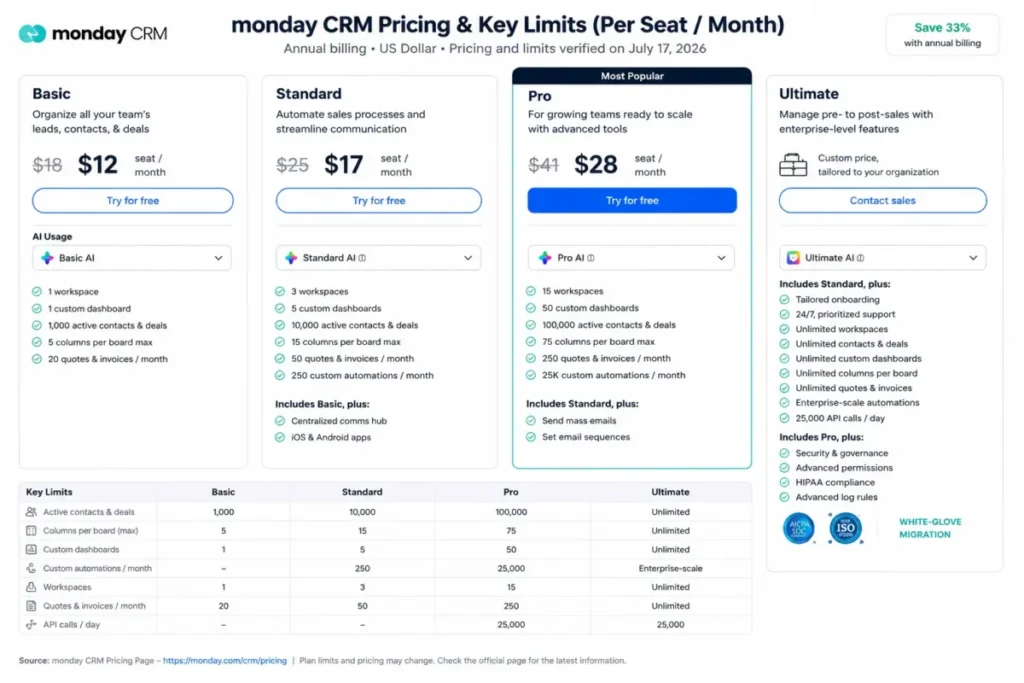
The plan-limit rows in that capture are why a monday quote for a working sales team lands on Pro rather than the advertised entry tier. Budget from the column count your schema needs, not from the cheapest row on the page.
Workflow 2: Automated Follow-Up After a Deal Stalls
A deal sits in Proposal for eight days. You want a task for the owner, a Slack nudge, a three-touch email sequence, and a stage change logged back to the record.
Both products do this. The question is how many times a month you can do it before the plan stops you.
HubSpot Starter automation covers simple deal-stage tasks and email notifications, which is enough for the nudge and nothing past it. Professional adds up to 300 customizable workflows and 5,000 sequences per account, with up to 500 sequence emails per user per day.
Source: official HubSpot Sales Hub pricing feature matrix. Checked: 2026-07-17.
Enterprise raises the ceiling to 1,000 workflows and 1,000 sequence emails per user per day. It also adds workflow-triggered sequence enrollment, which is the piece that turns a sequence from a manual list into a routed process.
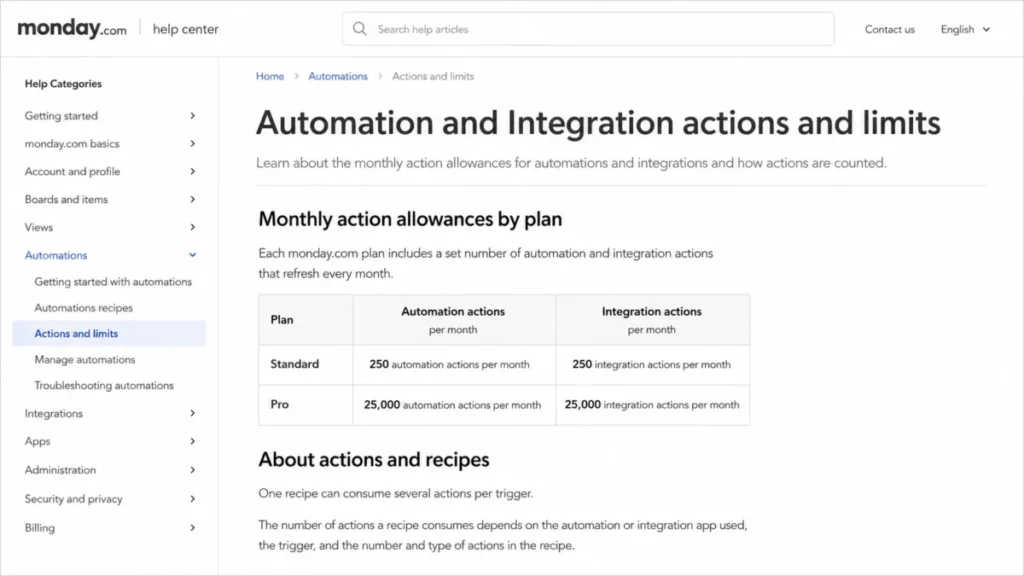
monday meters the same work differently, and this is the least understood number in the comparison. Standard receives 250 automation actions and 250 integration actions per month, while Pro receives 25,000 of each.
Source: official monday automation and integration limits documentation, support.monday.com. Checked: 2026-07-17.
An automation is not an action. One recipe that fires on a stage change, creates a task, notifies an owner, and updates a date consumes several actions per trigger, so the ceiling arrives faster than the headline number suggests.
monday’s own documentation warns that Gmail and Outlook integrations can consume actions quickly, and it points heavier users toward Pro or Enterprise.
Run the arithmetic against your own recipes, because per-recipe consumption depends on the recipe. A team logging inbound and outbound email automatically across three reps will not survive on 250 actions a month, which puts the practical monday tier for an email-heavy motion at Pro on $28 rather than Standard on $17.
Winner: HubSpot Sales Hub on automation depth and outbound structure. Practical caveat: you reach that depth at $90 per seat plus a $1,500 onboarding fee, and monday Pro’s 25,000 actions cover an ordinary SMB sales motion for a third of the seat price.
| Automation attribute | HubSpot Sales Hub | monday CRM |
|---|---|---|
| Entry-tier automation | Simple deal-stage tasks and email notifications (Starter) | 250 automation actions per month (Standard) |
| Practical-tier automation | 300 customizable workflows (Professional) | 25,000 automation actions per month (Pro) |
| Top-tier automation | 1,000 customizable workflows (Enterprise) | Enterprise-scale automations (Ultimate, quote only) |
| Integration actions | Not metered as a separate monthly action budget | 250 per month (Standard), 25,000 (Pro) |
| Sequences per account | 5,000 (Professional and Enterprise) | Email sequences available; account-level ceiling not published |
| Sequence sends per user per day | 500 (Professional), 1,000 (Enterprise) | Not published |
| Workflow-triggered enrollment | Enterprise only | Not published |
| External subscription dependency | LinkedIn actions in sequences require LinkedIn Sales Navigator | Not applicable |
Source: official HubSpot Sales Hub pricing feature matrix and official monday automation and integration limits documentation. Checked: 2026-07-17. Mobile strategy for this table: horizontal scroll with a pinned label column.
The LinkedIn row is the one buyers miss. A HubSpot sequence with LinkedIn touches needs a separate Sales Navigator subscription, so for those teams the sequence budget runs past the seat price.
Workflow 3: Closing the Quarter and Handing Work to Delivery
The quarter ends. A manager wants a forecast, five dashboards, and a way to move eleven closed-won accounts into onboarding without retyping them.
HubSpot provides 10, 30, 75, and 100 reporting dashboards across Free, Starter, Professional, and Enterprise. Custom reports and forecasting begin at Professional, with 100 custom reports there and 500 on Enterprise, and Enterprise adds hierarchical forecasting.
Source: official HubSpot Sales Hub pricing feature matrix. Checked: 2026-07-17.
monday provides 1, 5, 50, and unlimited custom dashboards across Basic, Standard, Pro, and Ultimate, with sales forecasting and advanced analytics arriving on Pro.
Source: official monday CRM pricing feature matrix. Checked: 2026-07-17.
Fifty dashboards at $28 a seat against 75 at $90 a seat is not a close comparison on volume. HubSpot earns this category on depth instead, because custom report building, sales analytics, and forecast rollups across a management hierarchy are a different class of tool from a board aggregation.
Winner: HubSpot Sales Hub for reporting depth, on Professional or higher. If your reporting need is “show me weighted pipeline by owner and stage”, monday Pro answers it at a third of the cost.
Then comes the handoff, and the winner flips.
monday CRM sits on a work platform whose native unit is a board, so a closed-won deal becomes an onboarding board, a delivery timeline, and a client-facing plan inside the same account.
Source: official monday CRM product page, monday.com/crm. Checked: 2026-07-17.
HubSpot Sales Hub is built around the customer lifecycle on Smart CRM, and its adjacent products are marketing, service, content, and revenue rather than project delivery.
Source: official HubSpot comparison page, hubspot.com/comparisons/hubspot-vs-monday. Checked: 2026-07-17.
Winner: monday CRM for teams whose work continues after the signature. An agency, an implementation firm, or any team where closed-won triggers a project is buying a different product from a team where closed-won triggers a nurture campaign.
That architectural question is worth more than any feature row above it. HubSpot unifies customer-facing work and monday unifies work delivery.
Both call themselves all-in-one, and they mean different things by it.
Feature-by-Feature Comparison
| Dimension | HubSpot Sales Hub | monday CRM | Winner |
|---|---|---|---|
| Core pipeline management | Contacts, companies, deals, tasks, activities on Smart CRM | Configurable boards, groups, items, and views | Tie |
| Ease of initial setup | Free and Starter deploy fast; complexity grows with hubs and workflows | Templates and no-code boards configure a simple pipeline quickly | monday CRM |
| Sales automation | 300 to 1,000 customizable workflows above Starter | 250 to 25,000 metered actions per month | HubSpot Sales Hub |
| Outbound sequences | 5,000 per account with documented daily send caps | Email sequences with no published account ceiling | HubSpot Sales Hub |
| Reporting and forecasting | Custom reports and forecasting from Professional; hierarchical forecasting on Enterprise | Forecasting and advanced analytics from Pro | HubSpot Sales Hub |
| Dashboard capacity | 10 to 100 by tier | 1 to unlimited by tier | Tie |
| Record and schema ceilings | 1,000 contacts on Free; pipeline count gated 1 to 100 | 1,000 to 100,000 records; 5 to 75 columns per board | HubSpot Sales Hub |
| Quotes and invoices | Quote tools available on paid tiers | 20, 50, 250 per month, then unlimited on Ultimate | HubSpot Sales Hub |
| Integrations | More than 2,000 apps and web services | Native apps, marketplace, connectors, and a GraphQL API | HubSpot Sales Hub |
| Mobile CRM | iOS and Android for records, deals, leads, and activities | iOS and Android with notes, calls, summaries, speech-to-text | Tie |
| Marketing and service alignment | Native, through the shared Smart CRM object model | Not equivalent in this evidence set | HubSpot Sales Hub |
| Project and delivery handoff | Not the Sales Hub product model | Native to the board platform | monday CRM |
| Activity-log retention | Not published as a per-tier window | 1 week, 6 months, 1 year, 5 years by tier | monday CRM |
| Paid-seat cost at the practical tier | $90 per seat per month annually | $28 per seat per month annually | monday CRM |
Source: official HubSpot Sales Hub pricing page and official monday pricing page. Checked: 2026-07-17.
Count the winners and HubSpot takes the grid. Weight them by how often each one blocks a purchase and the grid stops being the answer, because a team that never sends a sequence does not care that HubSpot allows 5,000 of them.
Pricing and Value per Dollar
Starting Price vs Practical Tier
HubSpot Sales Hub Free is $0 for up to 2 users. Starter is $7 per seat per month on an annual commitment, or $20 per seat per month billed monthly.
Professional is $90 per seat per month annually, or $100 monthly, and requires a one-time $1,500 onboarding fee. Enterprise starts at $150 per seat per month and requires a $3,500 one-time onboarding fee.
Source: official HubSpot Sales Hub pricing page. Checked: 2026-07-17. Region: US, USD.
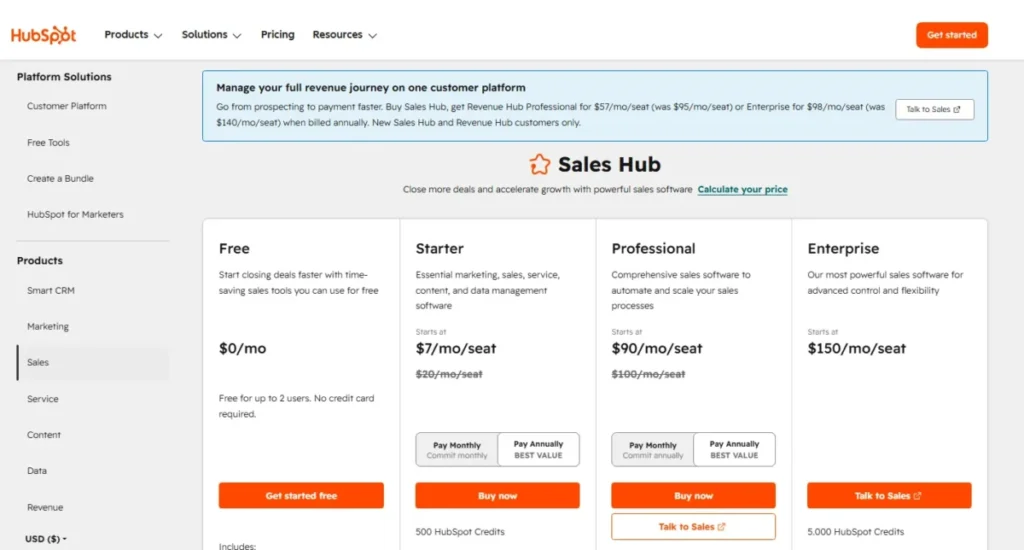
That card is the whole HubSpot budget problem in one frame: the seat price is the headline and the onboarding fee is the fine print.
monday CRM Basic is $12, Standard is $17, and Pro is $28 per seat per month billed annually, against displayed monthly reference prices of $18, $25, and $41. Only the Ultimate tier is quote-only.
Source: official monday pricing page. Checked: 2026-07-17. Region: US, USD.
The advertised entry prices mislead in opposite directions. HubSpot Starter is genuinely cheap and genuinely limited, so the practical HubSpot tier for a working sales motion is Professional at $90.
monday Basic is cheap and capped at five columns, so the practical monday tier is Standard at $17 for a light team or Pro at $28 for an email-heavy one. Our breakdown of monday CRM pricing tiers walks the per-seat cost and the annual billing terms plan by plan.
What 3, 10, and 25 Users Actually Cost
| Team size | HubSpot practical tier, year one | HubSpot renewal year | monday practical tier, year one | monday renewal year |
|---|---|---|---|---|
| 1 user | Free: $0 | $0 | Basic at the 3-seat minimum: $432 | $432 |
| 2 users | Free: $0 | $0 | Basic at the 3-seat minimum: $432 | $432 |
| 3 users | Professional: $3,240 licence + $1,500 onboarding = $4,740 | $3,240 | Pro: $1,008 | $1,008 |
| 10 users | Professional: $10,800 licence + $1,500 onboarding = $12,300 | $10,800 | Pro: $3,360 | $3,360 |
| 25 users | Professional: $27,000 licence + $1,500 onboarding = $28,500 | $27,000 | Pro: $8,400 | $8,400 |
Calculated from the annual-billing seat prices and onboarding fees above. Source: official HubSpot Sales Hub pricing page and official monday pricing page. Checked: 2026-07-17. Excludes tax, AI credit overage, add-ons, and any promotional variation at checkout. Professional and Pro are not feature-identical, so this compares practical tiers rather than equivalent ones.
At ten users the year-one gap is $8,940 and the renewal gap is $7,440. At twenty-five users the renewal gap is $18,600 a year, which is a headcount rather than a line item.
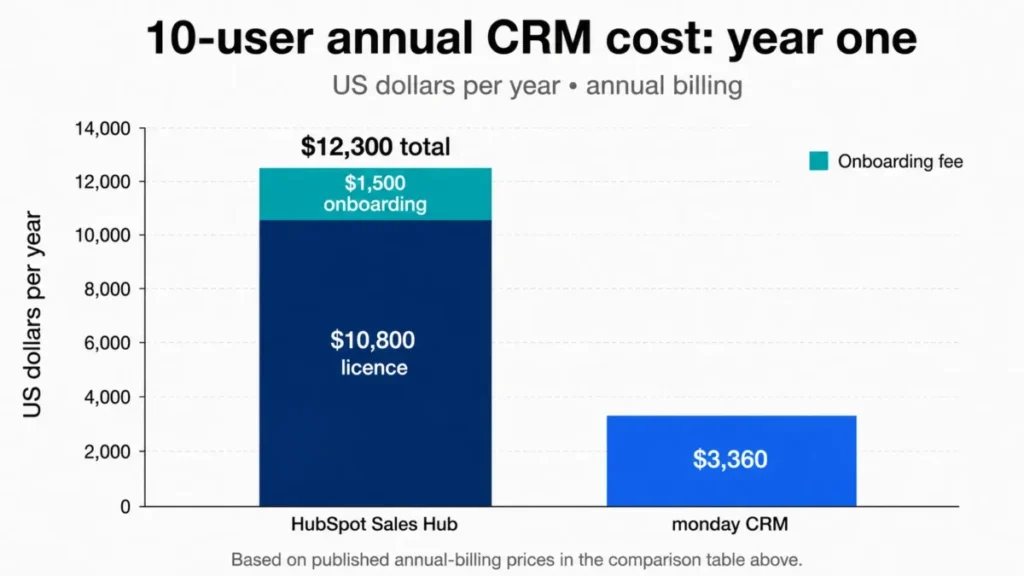
The full figures sit in the table above, which is the accessible source for those two bars.
The two-user row is the one that surprises people. HubSpot costs nothing and monday costs $432 before anyone logs a deal, purely because of the seat floor.
Full plan-by-plan detail sits in our HubSpot pricing plans breakdown if you need the other hubs modelled too.
Hidden Costs: Onboarding, Credits, and Seat Minimums
Four costs sit outside the seat price, and three of them belong to HubSpot.
Mandatory onboarding. Professional carries a required one-time $1,500 fee and Enterprise carries $3,500, so a three-person team on Professional pays 46% of its first-year licence again just to start.
HubSpot Credits. Starter, Professional, and Enterprise include 500, 3,000, and 5,000 credits per month. Additional credits are listed at $0.010 each, credits reset monthly, and unused credits do not roll over.
Source: official HubSpot Sales Hub pricing page. Checked: 2026-07-17.
As a worked example, a team that burns 10,000 credits beyond its allowance in a month pays $100 at that rate, or $1,200 a year. The rate is verified; the volume is yours to measure, so treat AI as consumption rather than an included feature.
monday’s three-seat minimum. Paid monday CRM plans start from three users, so below three sellers monday’s per-seat advantage inverts completely.
Source: official monday CRM pricing FAQ, monday.com/crm/pricing. Checked: 2026-07-17.
monday AI credits. monday AI tools consume credits, and the AI Notetaker consumes 120 credits per hour of meeting recording.
Source: official monday AI Notetaker documentation, support.monday.com. Checked: 2026-07-17.
Additional monday credits can be purchased, but exact pack pricing is not published as one stable table. Verify it in the account or the quote rather than budgeting from a number found elsewhere.
I would not sign either contract from the pricing page alone. The number that survives finance review is the renewal-year licence plus twelve months of credit overage, not the year-one view.
Annual vs Monthly and the Dynamic Discount Problem
HubSpot’s annual commitment saves $13 per seat per month on Starter and $10 on Professional. At ten seats that is $1,560 and $1,200 a year respectively, calculated from the published annual and monthly prices above.
monday’s annual saving is harder to state honestly. On 2026-07-17 the live US pricing display showed CRM annual prices of $12, $17, and $28 against monthly reference prices of $18, $25, and $41 alongside a “save 33%” message, while the general plans-and-pricing help article states that yearly billing includes an 18% discount.
Source: official monday pricing page and official monday plans-and-pricing help article. Checked: 2026-07-17.
Those two official sources disagree, which points to a promotional or region-dependent display rather than a stable universal rate.
Use the checked dollar amounts, not the percentage, and re-check the US checkout before you sign, because the standard price and the promotional price are not the same commitment.
AI Features and Credit Economics
HubSpot ships Breeze capabilities including a prospecting agent, funded by the monthly credit allowance above. monday ships monday AI, AI Sidekick, and AI Notetaker, funded by monday’s own credit system.
Feature parity is not the useful question here. Included usage is.
HubSpot publishes both halves of the equation: what each tier includes, and what an overage costs. monday publishes one verified consumption rate, the Notetaker’s 120 credits per hour, and does not publish a single stable public pack price for every account.
Winner: HubSpot Sales Hub on transparency, not on capability. A buyer can model HubSpot’s AI bill from the pricing page and cannot model monday’s without asking.
The renewal question to write down now: after twelve months, can you show what the AI credits produced in deals or in hours, or did they just become a recurring line item nobody owns?
Integrations and API Limits
HubSpot’s pricing page states that more than 2,000 leading apps and web services are available.
Source: official HubSpot Sales Hub pricing page. Checked: 2026-07-17.
monday supports native integrations, marketplace applications, automation recipes, Zapier and Make connections, and a GraphQL API.
Source: official monday CRM product page. Checked: 2026-07-17.
Public totals for monday vary between sources because some count native integrations, some count marketplace apps, and some count recipes or connector paths. No single number here would be reproducible, so this article does not print one.
Do not decide this on logo counts. Take your five most important tools and check each one individually for native versus connector status, sync direction, plan gating, and, on monday, how many integration actions the recipe burns per event.
API capacity is the same problem one layer down. HubSpot documents daily, burst, webhook-subscription, and private-app limits that vary by subscription and app type.
Source: official HubSpot developer usage guidelines, developers.hubspot.com. Checked: 2026-07-17.
monday documents complexity, daily-call, per-minute, concurrency, IP, and resource-protection limits, with capacity depending on plan and request type.
Source: official monday API rate-limit documentation, developer.monday.com. Checked: 2026-07-17.
Neither vendor publishes one universal allowance you can budget a warehouse sync against. If you are piping either CRM into a data warehouse or an enrichment tool, validate the workload against your specific plan and app architecture before you sign, not after the first sync fails.
Winner: HubSpot Sales Hub on ecosystem breadth, on the strength of its own published count. Tie on API transparency, because both document several limit dimensions and neither commits to a number without an account.
Support, Security, and Admin Controls
| Attribute | HubSpot Sales Hub | monday CRM |
|---|---|---|
| Free-tier support | Community, Academy, and Knowledge Base | Not applicable, no free CRM plan |
| Entry paid support | Email support (Starter) | 24/7 support resources |
| Mid-tier support | Email and phone (Professional) | 24/7 support resources |
| Top-tier support | Email and phone (Enterprise) | Enterprise-grade support with priority queue (Ultimate) |
| Published certifications | SOC 2 Type II, SOC 3, GDPR-related safeguards | ISO-family controls, SOC reports, GDPR-related safeguards |
| HIPAA | Not established by the reviewed security evidence for a specific plan | Explicitly listed on the CRM Ultimate plan |
| Multi-level permissions | Governance controls concentrate on Enterprise | Ultimate |
| Activity-log retention | Not published as a per-tier window | 1 week (Basic), 6 months (Standard), 1 year (Pro), 5 years (Enterprise) |
Source: official HubSpot security page, legal.hubspot.com/security, the monday Trust Center, trust.monday.com, and official monday HIPAA documentation. Checked: 2026-07-17.
A certification held by a vendor is not a control included in your plan. That distinction is where CRM procurement goes wrong, and both products punish it.
monday states HIPAA support explicitly on the CRM Ultimate matrix, which is the clearer public plan entitlement of the two.
The reviewed HubSpot security evidence establishes a documented security program, but it does not establish which Sales Hub plan, configuration, and business associate agreement a specific healthcare workflow requires. Get that in writing from HubSpot rather than inferring it from a certification badge.
The retention row deserves more attention than it usually gets. One week of activity history on monday Basic means an investigation into who changed a deal value three weeks ago has no answer.
Winner: Tie. HubSpot has clearer support tiers and monday has clearer compliance entitlement and published retention windows.
Setup and Migration Difficulty
| Attribute | HubSpot Sales Hub | monday CRM |
|---|---|---|
| Initial setup difficulty | Low on Free and Starter, Medium to High on Professional | Low for a simple pipeline, Medium once boards relate |
| Data import | Documented file-size, per-day, and per-file row limits, with higher allowances on paid subscriptions and API imports | Excel and CSV import into CRM boards, subject to mapping and board structure |
| Workflow rebuild effort | High if replacing metered board automations with workflows | Medium; recipes rebuild quickly but consume actions |
| Admin and training burden | Higher; governance, properties, and reporting need an owner | Lower at first; rises as customization spreads without a data model |
| Long-term scalability | Strong; the constraint is budget rather than structure | Strong to Pro; connected-board limits appear as relationships grow |
| Mandatory paid onboarding | Yes, $1,500 on Professional and $3,500 on Enterprise | Not published for self-serve plans |
Source: official HubSpot import documentation, knowledge.hubspot.com, and official monday import documentation, support.monday.com. Checked: 2026-07-17.
monday’s flexibility is also its setup risk. Nothing stops five people from building five different pipelines, and the connected-boards documentation imposes limits on connected items per board and per cell as those relationships multiply, with higher capacity on CRM Pro and Enterprise.
Source: official monday linkage-limitations documentation, support.monday.com. Checked: 2026-07-17.
Setup difficulty: monday CRM Low, HubSpot Sales Hub Medium. Winner: monday CRM, with the caveat that a board platform without a deliberate data model produces inconsistent process faster than a rigid CRM does.
Migrating monday CRM to HubSpot
Most comparisons tell you what to pick and stop there. The switching path matters more, because it decides how expensive a wrong choice becomes later.
HubSpot Smart Transfer officially supports Monday.com as a source application and runs through documented audit, configuration, synchronization, cleaning, and revert stages.
Source: official HubSpot Smart Transfer documentation, knowledge.hubspot.com. Checked: 2026-07-17.
Two constraints sit inside that support. The transfer is one-way, and custom field mappings require Data Hub.
A workable five-step path from the documented stages:
- Audit the monday account: boards in scope, columns per board, connected-board relationships, and which fields are genuinely used rather than merely present.
- Configure the mapping from monday columns to HubSpot properties, and confirm whether custom mappings push you into Data Hub before you price the project.
- Synchronize a bounded subset first, not the whole account, so the revert stage stays cheap.
- Clean duplicates and orphaned records in HubSpot after the sync rather than before, since Smart Transfer is one-way and a second attempt is not a merge.
- Audit email and activity history separately, because it does not travel the same way as board data.
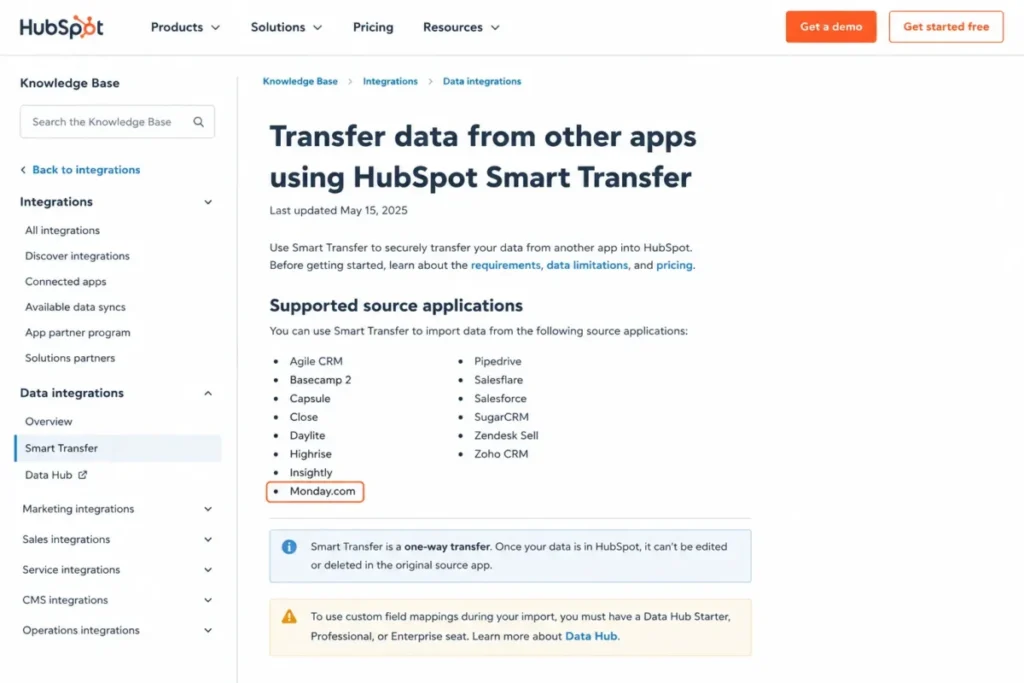
Do not read official support as parity. Object, field, attachment, activity, and email scope all need an account-level audit before anyone promises the team a weekend cutover, and our CRM data migration guide covers the sequencing in more depth.
The Data Portability Warning Nobody Prints
monday’s Emails and Activities documentation states that data connected through an external account cannot be transferred like ordinary board data.
Source: official monday Emails and Activities documentation, support.monday.com. Checked: 2026-07-17.
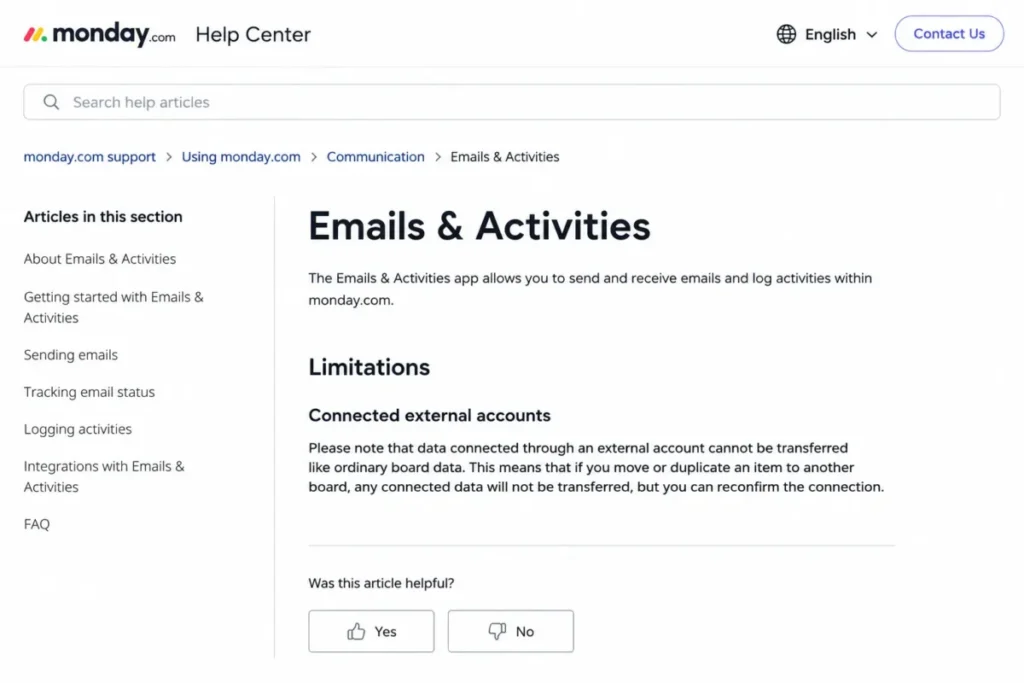
Read that slowly, because it is the sharpest fact in this comparison. Your board records are portable and a meaningful part of your communication history may not be.
monday does provide a whole-account export to a downloadable archive, and CRM boards import cleanly from Excel and CSV.
Source: official monday account export documentation, support.monday.com. Checked: 2026-07-17.
Those two facts do not cancel the first one.
Before committing to monday CRM as your system of record, run an export test on a real board with connected email and confirm what lands in the archive. A CRM you can leave is worth more than a CRM you cannot, and this is the one item I would test during the 14-day trial rather than after.
Where HubSpot Sales Hub Wins
Four scenarios where HubSpot is the correct answer regardless of the price gap.
The one-or-two-person team. Permanent free CRM for up to two users and 1,000 contacts against a 14-day trial and a three-seat floor is not a close call on cost.
The structured outbound motion. Sequences at 5,000 per account, 300 to 1,000 workflows, documented daily send limits, playbooks, and conversation intelligence are a sales-engagement stack rather than an automation feature.
The revenue operations team. If sales, marketing, and service must read the same customer object, HubSpot’s Smart CRM foundation is the entire product thesis and monday has no equivalent in this evidence set.
The reporting-led sales org. Custom report building, sales analytics, and hierarchical forecasting on Enterprise answer questions a board dashboard cannot.
| Pros | Cons |
|---|---|
| Permanent free CRM for 2 users and 1,000 contacts, no expiry | Professional costs $90 per seat per month annually, plus $1,500 onboarding |
| 300 to 1,000 customizable workflows above Starter | Sequences, forecasting, custom reports, and playbooks all gate at Professional |
| 5,000 sequences per account with published daily send caps | Credits reset monthly, do not roll over, and cost $0.010 each beyond the allowance |
| More than 2,000 apps and web services in the ecosystem | LinkedIn sequence actions need a separate Sales Navigator subscription |
| Custom reports and hierarchical forecasting on Enterprise | Platform breadth is overhead for a team that only wants a visual pipeline |
| Smart Transfer officially imports from Monday.com | Starter automation is limited to deal-stage tasks and notifications |
Source: official HubSpot Sales Hub pricing page and feature matrix. Checked: 2026-07-17.
Five of those six cons are a price or a gate rather than a missing feature, which is the honest shape of the HubSpot objection. The sixth is a fit problem: platform breadth is overhead when a team only wants a pipeline.
Our full HubSpot CRM review covers the object model and the Starter-to-Professional jump in more detail.
Where monday CRM Wins
Five scenarios where monday is the correct answer despite losing most of the grid above.
The three-to-fifteen-person team with a budget. Pro at $28 against Professional at $90 is a $7,440 annual difference at ten seats, and the cheaper product still forecasts, automates, and reports.
The team whose process does not match a CRM’s assumptions. Boards, columns, and views bend to the workflow instead of the other way round, which is the difference between adoption and a $10,800 shelfware bill.
The agency or client-service firm. Closed-won becoming an onboarding board in the same account is a workflow HubSpot Sales Hub does not model.
The team that wants audit history it can name. One year of activity log on Pro and five years on Enterprise are published windows, which is more than HubSpot publishes per tier.
The regulated buyer who needs a clear plan entitlement. HIPAA and multi-level permissions are stated explicitly on the CRM Ultimate matrix, subject to legal review and a written quote.
| Pros | Cons |
|---|---|
| Pro is $28 per seat per month annually with 25,000 automation actions | Paid plans start from 3 users, so 1-2 person teams overbuy |
| Boards, columns, and views reshape without an admin or a developer | Basic allows only 5 columns per board and 1,000 active records |
| Closed-won work moves into delivery boards in the same account | Standard’s 250 monthly actions do not survive an email-heavy motion |
| Forecasting and 50 custom dashboards arrive at Pro, not at $90 a seat | Emails and Activities data from a connected account is not portable like board data |
| HIPAA and multi-level permissions published on the Ultimate tier | Ultimate is quote-only, so the top-tier budget cannot be modelled publicly |
| Activity-log retention published per tier, up to 5 years | Mobile users cannot create, delete, or rename workspaces |
Source: official monday pricing page, official monday CRM pricing FAQ, and official monday automation limits documentation. Checked: 2026-07-17.
Those cons split into two kinds, and both differ from HubSpot’s. Three are ceilings that arrive earlier than the marketing implies, and three are exits that are harder than they look: the seat floor, the email-history portability limit, and the quote-only top tier.
For the wider platform view, see our monday.com evaluation.
Who Should Choose HubSpot Sales Hub?
Choose HubSpot if any one of these is true. Not all four; one is enough.
- You have one or two sellers and under 1,000 contacts. The free plan is permanent and monday’s cheapest real answer is $432 a year.
- Sequences and workflow automation are the job. If a rep’s day is enrollment, follow-up, and routing, Professional buys a category of tooling monday does not publish an equivalent for.
- Marketing or service must share the sales record. The Smart CRM foundation is the reason to pay the premium, and nothing in monday’s evidence set replaces it.
- Managers forecast in a hierarchy. Hierarchical forecasting and 500 custom reports on Enterprise answer rollup questions a board cannot.
Budget honestly if you pick it. Ten seats on Professional is $12,300 in year one and $10,800 every year after, before credits.
Who Should Choose monday CRM?
Choose monday if any one of these is true.
- You have three to twenty-five seats and the budget is real. Pro delivers a working sales motion at $3,360 for ten users against $12,300.
- Your process is unusual and you refuse to bend it. Configurable boards absorb a non-standard pipeline where a fixed CRM object model argues with it.
- Work continues after closed-won. Onboarding, delivery, and client projects in one platform is the reason to accept the reporting tradeoff.
- You want to start on Pro, not Basic. Basic’s five-column cap and Standard’s 250 actions mean the honest monday quote is usually $28 a seat.
Run the 14-day trial against your real schema and your real email volume. If Standard’s action budget survives a week of live email logging you saved $11 a seat, and if it does not you learned the real price before you paid it.
Who Should Avoid Both?
Three cases where neither product is the answer.
You need a pipeline and nothing else, under $500 a month, forever. Both platforms sell breadth you will not use, and a focused sales CRM does the job with less admin. Pipedrive’s visual deal tracking is the usual answer here.
You need deep CRM feature coverage on a small budget and you tolerate configuration work. Neither HubSpot Professional nor monday Pro is the value leader in that shape, while Zoho CRM’s feature depth generally is.
You need HIPAA-grade handling and cannot wait on a quote. monday’s clearest entitlement is Ultimate, which is quote-only, and HubSpot’s is not publicly established per plan. If a business associate agreement is a hard gate this quarter, shortlist vendors that publish it against a named plan.
Alternatives to HubSpot and monday CRM
| Alternative | Choose it if | Watch out for |
|---|---|---|
| Pipedrive | You want pipeline management with minimal admin and predictable seat pricing | Reporting and marketing depth are thinner than HubSpot’s |
| Zoho CRM | You need broad CRM feature coverage at a low seat price and accept configuration effort | Setup and admin effort is real, and the suite pulls you toward other Zoho apps |
| Salesforce Sales Cloud | You have enterprise governance, a partner ecosystem, and an admin on staff | Cost and implementation weight exceed both products compared here |
| Freshsales | You want a mid-price sales CRM with built-in engagement tooling | Ecosystem breadth does not match HubSpot’s published app count |
These are shortlist starting points rather than ranked picks. Each one changes the comparison enough to deserve its own evaluation instead of a row in someone else’s table.
Final Verdict: HubSpot vs monday CRM by Buyer Type
There is no single winner here, and any article that names one is selling you its own convenience.
| Buyer | Winner | Deciding factor | Nearest caveat |
|---|---|---|---|
| Solo founder or 2-person team | HubSpot Sales Hub | Permanent free CRM for 2 users and 1,000 contacts | You outgrow it at user three or contact 1,001 |
| 3-10 person visual sales team | monday CRM | Pro at $28 against Professional at $90 per seat | Check Standard’s 250 actions before saving $11 a seat |
| Email-heavy team on a budget | monday CRM Pro | 25,000 monthly actions absorb Gmail and Outlook logging | Standard is the wrong tier; do not budget from $17 |
| Outbound team running sequences | HubSpot Sales Hub | 5,000 sequences and 300 to 1,000 workflows | Budget $12,300 in year one at ten seats, not $10,800 |
| RevOps aligning marketing and service | HubSpot Sales Hub | Shared Smart CRM object across hubs | Onboarding is mandatory and priced separately |
| Agency moving closed-won into delivery | monday CRM | Sales and project work in one board platform | Reporting depth is the tradeoff you accept |
| Regulated buyer with HIPAA as a hard gate | monday CRM Ultimate | HIPAA published explicitly on the Ultimate matrix | Quote-only; requires legal and security review |
| Team planning to leave monday for HubSpot | HubSpot Sales Hub | Smart Transfer officially supports Monday.com | One-way transfer; Data Hub needed for custom mappings |
My recommendation for the median reader of this page, a three-to-ten-person B2B sales team with a real budget and no marketing hub in scope, is monday CRM Pro. The $7,440 annual saving at ten seats buys a lot of process, and Pro’s ceilings sit far enough away that the team will not meet them this year.
I would switch that recommendation the moment sequences, forecast rollups, or marketing alignment enter the requirements. At that point HubSpot Professional stops looking expensive and starts looking like the only product that does the job.
The 30-day check either way: are deals being logged without a manager chasing anyone, and can you produce a pipeline number you trust?
The 90-day check: has anyone hit an action ceiling, a column cap, or a credit overage nobody budgeted for? If the answer to that one is yes, you bought the tier below the one you needed, and that is far cheaper to catch at the shortlist stage than at renewal.
FAQ
Is monday CRM better than HubSpot?
For a three-to-fifteen-person sales team on a budget, yes. monday CRM Pro costs $28 per seat per month annually against HubSpot Sales Hub Professional at $90, and it forecasts, automates, and reports well enough for an ordinary SMB motion.
HubSpot is the better answer for one-to-two-person teams, structured outbound, deep reporting, and marketing alignment.
Source: both official pricing pages. Checked: 2026-07-17.
Does monday CRM have a free version?
No, and this trips up most shortlists. monday CRM offers a 14-day trial and then requires a paid plan starting from three users, so the smallest real invoice is $432 a year on Basic.
The Free plan you may have seen belongs to monday Work Management rather than to monday CRM, which is a different product on the same platform. If a permanent free CRM is the requirement, HubSpot is the only one of the two that offers it.
Source: official monday plans-and-pricing help article and CRM pricing FAQ. Checked: 2026-07-17.
How much does monday CRM cost for three users?
Three users on annual billing costs $432 a year on Basic, $612 on Standard, and $1,008 on Pro, calculated from the $12, $17, and $28 per-seat annual prices. Three is also the minimum, so a two-person team pays the same $432.
Source: official monday pricing page and CRM pricing FAQ. Checked: 2026-07-17. Excludes tax and AI credits.
Is the HubSpot free CRM genuinely free?
Yes, if you fit inside it. The free CRM covers up to 2 users and 1,000 contacts with no expiry and no card.
Past two seats or a thousand contacts you are buying Starter at $7 per seat per month annually, and past simple stage automation you are buying Professional at $90 plus a $1,500 onboarding fee.
Source: official HubSpot pricing page. Checked: 2026-07-17.
Which CRM is easier to use, HubSpot or monday?
monday CRM, for the first month. Boards and templates configure a pipeline quickly and the visual model is easier for non-CRM people to read.
That advantage narrows once boards relate to each other and nobody owns the data model, which is the point where flexibility becomes inconsistency.
Can monday CRM replace HubSpot?
Yes, if your requirements stop at pipeline, automation, forecasting, and dashboards. No, unless you can live without HubSpot-grade sequences, custom report building, hierarchical forecasting, and a shared record with marketing and service.
That list is the honest boundary, and plenty of SMB sales teams sit inside it.
Can I migrate monday CRM data to HubSpot?
Yes. HubSpot Smart Transfer officially supports Monday.com as a source application and runs through documented audit, configuration, synchronization, cleaning, and revert stages.
Two constraints decide the effort. The transfer is one-way, so a second attempt is not a merge, and custom field mappings require Data Hub, which changes the project price.
Audit your object, field, attachment, and email-history scope before promising anyone a weekend cutover.
Source: official HubSpot Smart Transfer documentation. Checked: 2026-07-17.
What hidden costs should I expect with HubSpot or monday CRM?
HubSpot: a mandatory $1,500 Professional or $3,500 Enterprise onboarding fee, credit overage at $0.010 each with no rollover, and a separate LinkedIn Sales Navigator subscription for LinkedIn sequence actions.
monday: a three-seat minimum, AI credits consumed at 120 per hour by the Notetaker, and an upgrade from Standard to Pro once automation actions run out.
Source: both official pricing pages. Checked: 2026-07-17.
Which platform is better for project management after a deal closes?
monday CRM, without much argument. Its board platform is the same surface your delivery team already works on, so closed-won becomes an onboarding plan without an export.
HubSpot Sales Hub models the customer lifecycle rather than project delivery, so post-sale work usually moves to dedicated project management software instead.
Should I switch from HubSpot to monday CRM to save money?
Only if you can name what you are giving up. If your team does not use sequences, custom reports, or shared marketing data, the $7,440 annual saving at ten seats is real and the switch is defensible.
If it does use them, you will rebuild that work in monday recipes and burn the saving in admin time within two quarters.