Two products share one brand name, and they do not share a price list. That single fact decides whether monday.com looks cheap or expensive to your finance team.
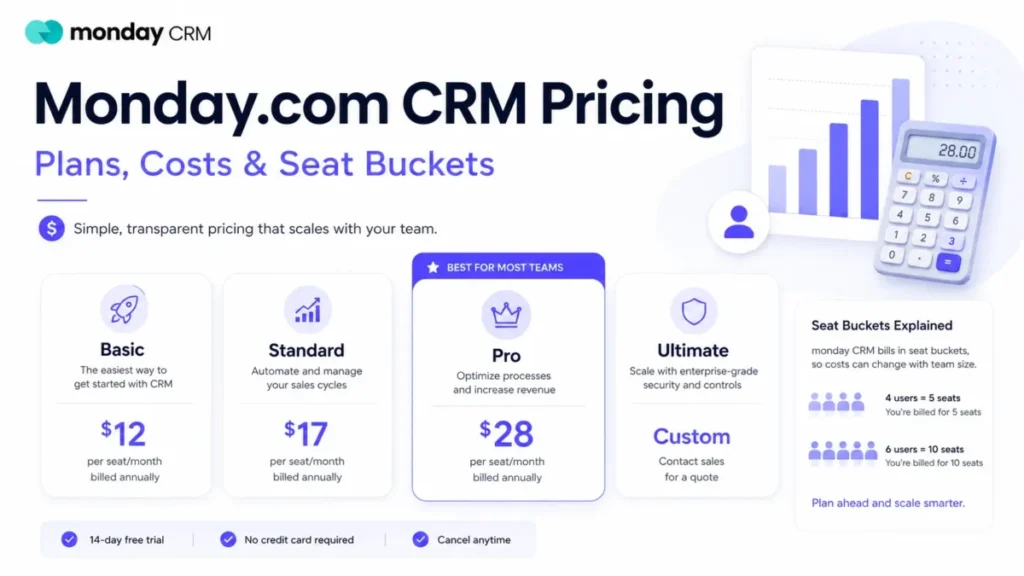
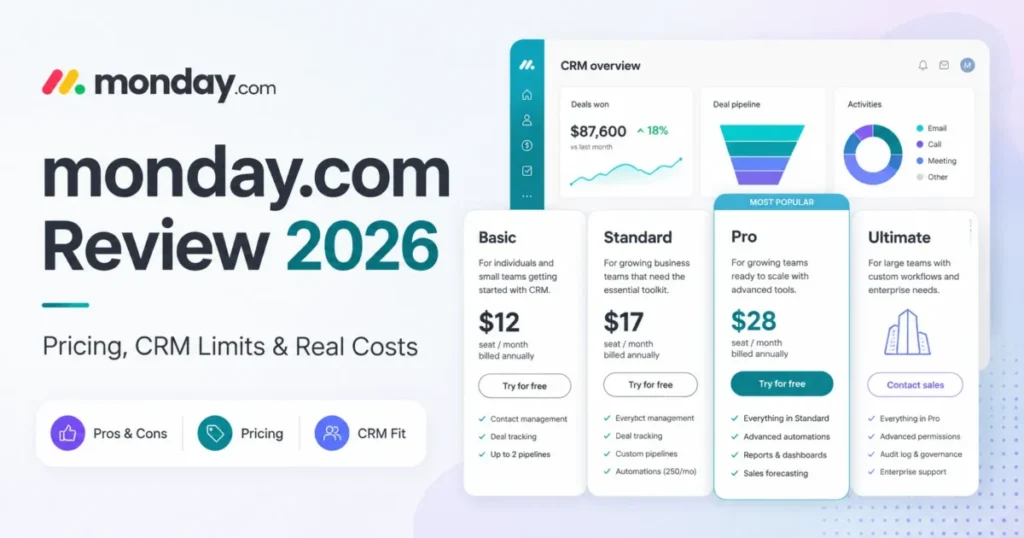
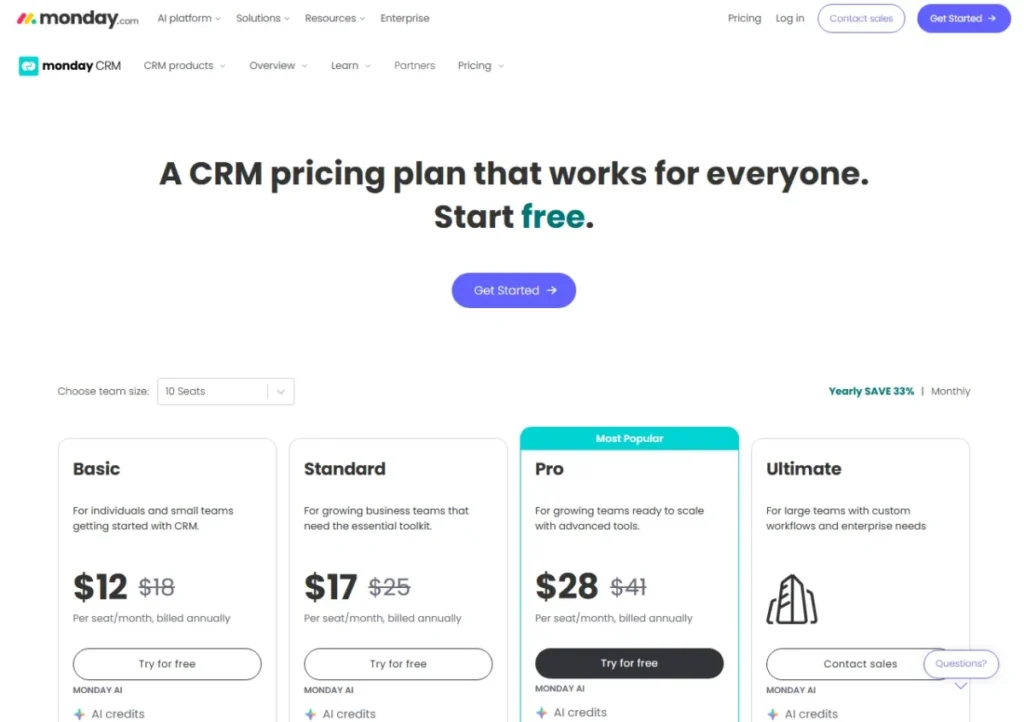
This monday.com review answers the CRM buyer’s version of the question. monday CRM starts at $12 per seat per month billed annually, but the plan most sales teams need starts at $28.
The short version: monday.com is worth it for 8- to 75-person revenue, agency, and operations teams that run process-heavy pipelines on visual boards. It is a poor fit for solo founders on a tight budget and for outbound teams that want built-in calling and an opinionated sales workflow.
This review assumes you already know what CRM software does. The open question is whether a flexible work platform beats a dedicated CRM for your pipeline.
Compare the answer against the wider best CRM software options before you commit to a year of billing.
Pricing was checked on July 10, 2026 against monday.com’s US pricing pages. No hands-on workspace testing was performed for this review, so every product claim below traces to official pages, official documentation, or verified third-party review patterns.
In This Article (19 sections)
Quick Verdict
| Category | Verdict |
|---|---|
| Best for | 8-75 person revenue, agency, and RevOps teams that run pipeline plus delivery work on the same boards |
| Not ideal for | Solo founders and 2-person teams on a tight budget; phone-heavy outbound teams; regulated teams that cannot buy the top tier |
| Starting price (monday CRM) | $12 per seat/ |
| Starting price (Work Management) | $9 per seat/ |
| Best practical plan | CRM Pro at $28 per seat/ |
| Free plan | Work Management only, capped at 2 seats, 3 boards, 3 docs. There is no free monday CRM plan. |
| Setup difficulty | Low for end users, medium to high for the admin who designs the boards |
| Main strength | Board and dashboard customization that a sales manager can change without a developer |
| Main limitation | 250 automation actions per month on Standard, which official docs say can be spent within days |
| Best alternative | Pipedrive for sales-first pipelines, HubSpot for a free entry point |
The gap between the $12 headline and the $28 practical plan is the whole story of this product. Everything below is an attempt to show you exactly where that gap opens.
How I Reviewed monday.com
This monday.com review is built from official sources only. Testing level for this article is official_research_only, which means no workspace was built, no trial was run, and no screenshots were captured by hand.
That constraint is worth stating plainly, because several ranking competitors write in hands-on language. Macedona and the SaaS CRM Review desk do not claim experience we did not have.
Sources for this review: monday.com’s US Work Management pricing page, the monday CRM pricing page, monday.com’s own pricing guidance blog, the automation and integration pricing support article, the automation rate-limit support article, the developer API rate-limit reference, the monday.com trust center, and the HIPAA support article.
Third-party sentiment came from G2, Capterra, Trustpilot, and a TrustRadius-visible comparison page. Review-platform sentiment is used to explain buyer experience patterns, never to establish product facts.
All prices are US dollars and were verified on July 10, 2026. Prices, plan names, and limits change, so confirm the current figures on monday.com’s billing screen before you sign.
The main limitation of this review: I cannot tell you how a 40-column CRM board feels after ninety days of use. I can tell you exactly which plan gate stops you, and what the official documentation says happens when you hit it.
What monday.com Is in 2026
monday.com is not one app. The company positions itself as an AI work platform, and it publishes separate products for work management, CRM, software development, and service.
That structure matters for buyers because monday Work Management and monday CRM have different price ladders. Comparing the $9 Work Management Basic price against a dedicated CRM is a category error.
monday.com Ltd. describes itself as having grown from a single Work OS into a multi-product company, and it has been publicly traded on Nasdaq since 2021. The homepage now frames the platform around marketing, operations, IT, product, sales, HR, and PMO use cases.
For a CRM buyer, the practical translation is this. You are buying a configurable board system with a sales module bolted to it, not a sales system with boards bolted on.
The board is the atomic unit. Contacts, deals, tasks, campaigns, and tickets all live as items in columns, which is why the same team can run a pipeline and a delivery workflow side by side.
That architecture is the reason monday.com wins agency and RevOps evaluations. It is also the reason it loses evaluations to sales-first CRMs where reps want a dialer, a call log, and a stage they cannot accidentally rename.
The integration story is broad on paper. The official integrations page lists 200-plus integrations, a marketplace, no-code connection paths, and custom builds.
Breadth is not the same as depth, and the difference shows up in the action limits covered later in this review.
Day 1: What Setup Costs You
Setup difficulty splits by role. End users open a board and understand it within an hour, and that is the single most reliable thing every review platform says about this product.
Admins have a different day. Someone has to decide the column schema, the pipeline stages, the automation recipes, the dashboard widgets, the permission model, and the workspace boundaries.
G2’s review summary captures the tension directly: users praise ease of use and customization, while some describe the feature depth as overwhelming. Capterra’s verified reviews echo it with reports of board overcrowding and difficulty finding things once boards grow.
Customizable is not the same as configured. If nobody on your team owns board design, you are buying a blank canvas and calling it a CRM.
Here is the practical risk. A 12-person sales team that adopts monday CRM without an admin will have five different definitions of “qualified” inside three months, because any column can be renamed by anyone with edit rights.
Budget the admin time before the license. I would allocate one part-time operations owner for the first 30 days, not a champion who does it between calls.
Mobile is available on iOS and Android, and Capterra lists deployment across web, Android, and iPhone or iPad. Nothing in the official documentation supports a claim of desktop-and-mobile feature parity, so treat mobile as a field-update surface rather than an admin console.
Teams comparing pure delivery workflows will also want to read the ClickUp review before choosing.
If the primary job is task management rather than pipeline management, the Asana review covers the narrower, more opinionated option.
Week 1: Where Workflows Hit Plan Gates
Week one is when a monday CRM buyer discovers what their plan does not include. This is the section every competing review skips.
monday CRM Basic has no automations and no integrations
monday.com’s own pricing guidance states that Basic CRM is for organizing leads, contacts, and deals, and that it does not include automations or integrations. Standard is where two-way email, activity management, duplicate merge, automations, and integrations appear.
That is a hard stop, not a soft limit. A CRM without email sync and without automation is a shared spreadsheet with better colors at $12 per seat per month.
Basic also caps you at 5 columns per board. A working sales record needs owner, stage, source, next action, and close date before you have added a single custom field.
Standard’s 250 actions are a monthly budget, not a feature
Automations and integrations draw down a monthly pool of “actions” rather than running unmetered. monday.com does not publish a per-recipe consumption table, so treat any action forecast as an estimate until the vendor confirms it in writing.
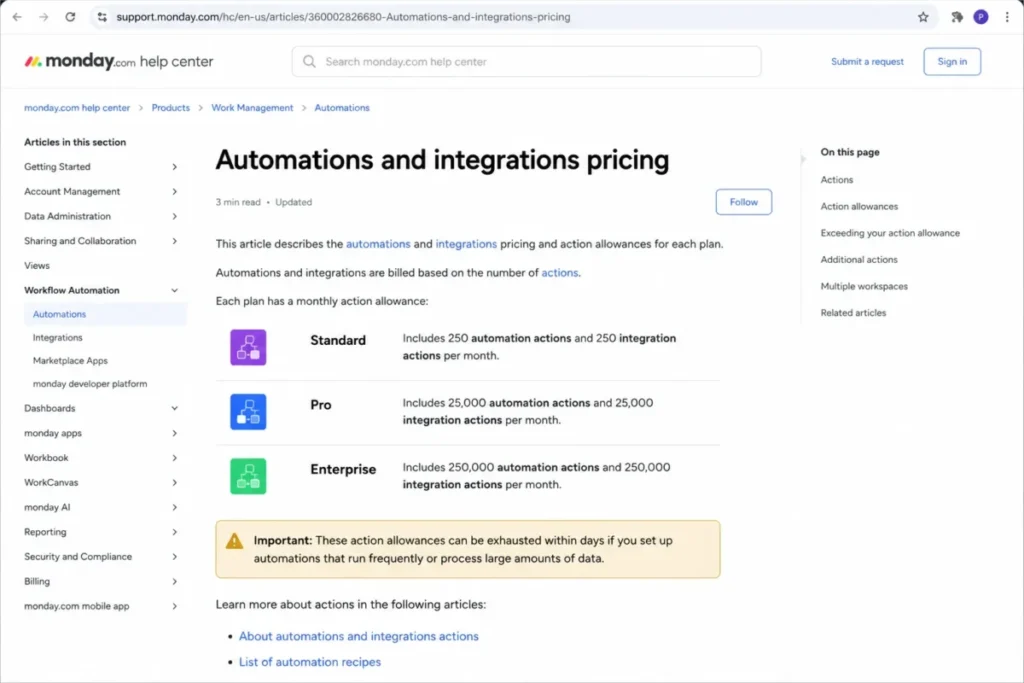
The automation and integration pricing documentation publishes the allowances directly.
| Plan tier | Automation actions per month | Integration actions per month |
|---|---|---|
| Standard | 250 | 250 |
| Pro | 25,000 | 25,000 |
| Enterprise | 250,000 | 250,000 |
monday.com’s own documentation warns that 250 actions per month are typically exhausted within days for accounts that notify several people or map several columns in a single automation. The same article suggests Pro for regular use.
Read that as a buyer. The vendor is telling you the automation feature on the $17 plan is a demonstration, and the working version costs $28.
A 6-person sales team running one recipe that notifies three reps and stamps two columns on every stage change is the exact pattern that warning names. Ask your account executive to price the action cost of your three most-used recipes before you commit a year to Standard.
Rate limits can fail a run even when you have actions left
monday.com’s rate-limit documentation says limits can be reached through automation loops, API or webhook triggering, and batch actions. Users receive a failed-run notification, and the run can appear later in run history with a delay.
The same article notes that integration rate limits can be set according to the third-party app’s API, using Outlook as its example. So when your email sync stalls, the constraint is not always monday.com.
That is a real operations problem. A pipeline that silently drops a “create follow-up task” step is worse than one that never had automation.
The API is metered by complexity, not by request count
Technical buyers need this before they scope a custom sync. The developer rate-limit reference describes a complexity-budget model rather than a simple requests-per-minute counter.
An individual query is capped at 5 million complexity points, and app tokens and personal tokens carry minute-level complexity budgets. Trial, free, NGO, and playground contexts run on lower budgets.
A RevOps engineer building a two-way warehouse sync will not hit a request ceiling. They will hit a complexity ceiling on a deeply nested query and have to flatten it.
Work Management Standard also publishes 1,000 API calls per day on the pricing page. Model that number against your nightly sync before you promise finance a data warehouse feed.
Integration breadth versus integration depth
| Connection type | What you get | The buyer caveat |
|---|---|---|
| Native and marketplace integrations | 200-plus listed connections plus marketplace apps | Every run consumes integration actions from the monthly allowance |
| No-code platform connections | Recipe-style connections built without engineering | Throughput can be governed by the third-party app’s own API limits |
| Custom API build | GraphQL API with app and personal tokens | Metered by complexity budgets, so query design decides throughput |
A logo wall tells you a connection exists. The action allowance and the third-party rate limit tell you whether it survives a busy quarter.
Month 1: What Breaks at Scale
By month one the boards are full, and the CRM capacity limits start to bite. These are published on the monday CRM pricing page and are almost entirely absent from the top ten search results.
| CRM capacity limit | Basic | Standard | Pro | Ultimate |
|---|---|---|---|---|
| Active contacts and deals | 1,000 | 10,000 | 100,000 | Unlimited |
| Custom dashboards | 1 | 5 | 50 | Unlimited |
| Columns per board (max) | 5 | 15 | 75 | Unlimited |
| Quotes and invoices per month | 20 | 50 | 250 | Unlimited |
| Workspaces | 1 | 3 | 15 | Unlimited |
| Custom automations per month | None | 250 | 25,000 | Enterprise-scale |
Three of those rows decide most upgrades before seat count ever does.
Columns per board is the first wall. Basic stops at 5 columns, while a working sales record needs lead source, lifecycle stage, owner, next action, next action date, product interest, MRR, contract end, renewal owner, objection, and competitor.
Those eleven fields fit inside Standard’s 15-column cap with four to spare. Add a second product line and a partner field, and Standard becomes the next upgrade trigger before your contact count moves at all.
Quotes and invoices is the second wall. A 4-person team quoting 60 deals a month is over the Standard limit of 50 before it is anywhere near the 10,000-contact limit.
Workspaces is the third wall, and it is the one multi-team buyers miss. Three workspaces on Standard means sales, marketing, and customer success can each have one, and nobody else can.
Dashboard count is the quiet upgrade trigger for managers. One dashboard on Basic means one view of the business, shared by everyone, forever.
What breaks first is not the contact database. It is the reporting layer, because dashboards and columns run out long before records do.
The monday.com Pricing Math Nobody Shows You
Pricing is where this monday.com review earns its keep. There are two price lists, one seat floor, one automation cliff, and one credit system that nobody can forecast.
Detailed tier-by-tier costs sit in the monday CRM pricing breakdown. The analysis below is about what those numbers do to a budget.
Work Management pricing versus monday CRM pricing
These are different products with different price ladders. Quoting the wrong one is the most common budgeting error in this category.
| Product | Free | Basic | Standard | Pro | Top tier |
|---|---|---|---|---|---|
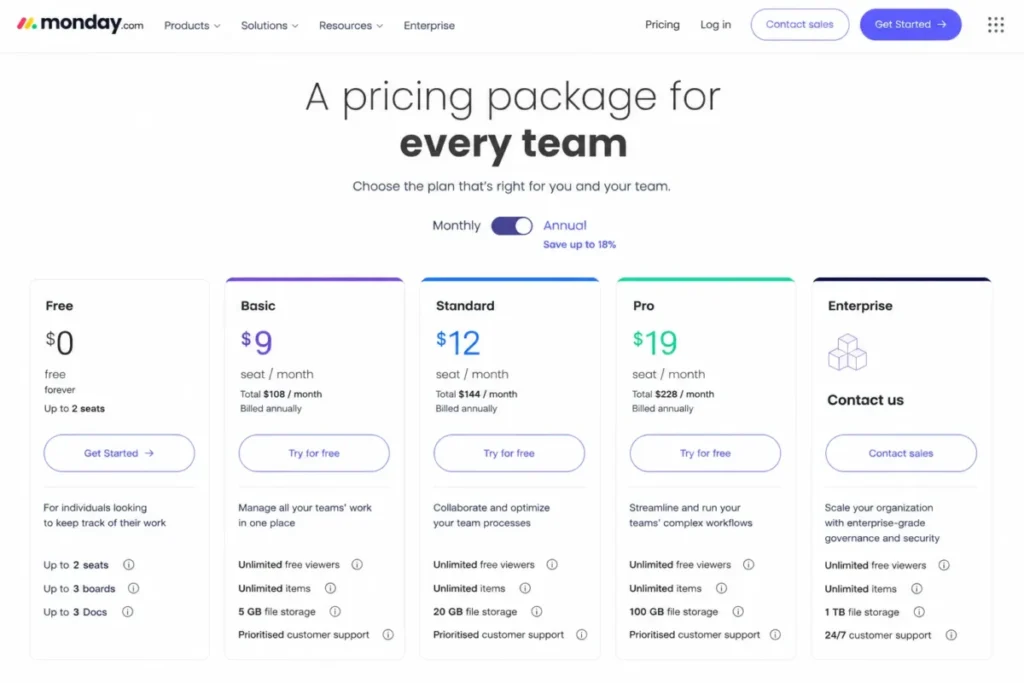
| monday Work Management | $0, up to 2 seats, 3 boards, 3 docs | $9/seat/mo | $12/ | $19/ | Enterprise, custom |
| monday CRM | None | $12/ | $17/ | $28/ | Ultimate, contact sales |
All figures are billed annually and were checked on the Work Management pricing page on July 10, 2026.
A sales leader who benchmarks $9 against a dedicated CRM has benchmarked the wrong product. The CRM ladder runs 33% to 47% higher at every comparable rung.
monday.com’s CRM pricing page also notes that Ultimate is the new name for the Enterprise tier. Reviews still calling it Enterprise are quoting a stale page.
What the seat floor does to a small team
Multiple 2026 competitor reviews and review-platform summaries report a three-paid-seat minimum on monday.com. That exact wording was not captured on the official pricing lines I verified, so confirm it on the live billing screen before you model the cost.
Assuming the reported floor holds, the practical monthly cost looks like this at annual billing.
| Paid seats | CRM Basic | CRM Standard | CRM Pro |
|---|---|---|---|
| 1 or 2 (billed at the reported 3-seat floor) | $36/mo | $51/mo | $84/mo |
| 3 | $36/mo | $51/mo | $84/mo |
| 5 | $60/mo | $85/mo | $140/mo |
| 10 | $120/mo | $170/mo | $280/mo |
| 25 | $300/mo | $425/mo | $700/mo |
A solo founder does not pay $12. If the reported floor holds, they pay about $36 per month for a plan with no automations, no integrations, and five columns per board.
A 10-person sales team on the working plan pays $280 per month, or $3,360 per year before a single add-on. That is the number to take to finance, not the $12 on the pricing card.
Monthly billing costs more. The CRM pricing page shows monthly reference prices of $18, $25, and $41, which is roughly a 46% to 50% premium over the annual rate.
The minimum useful monday CRM plan
| If your team needs this | Minimum plan | The reason |
|---|---|---|
| A shared record of leads, contacts, and deals, nothing more | Basic, $12/ | Automations and integrations are not included at this tier |
| Two-way email sync, duplicate merge, activity tracking, occasional automation | Standard, $17/ | The 250-action monthly cap limits automation to light use |
| Email sequences, email tracking, quotes and invoices, sales forecasting, daily automation | Pro, $28/ | 25,000 monthly actions and 75 columns per board |
| HIPAA, multi-level permissions, enterprise support, unlimited records | Ultimate, contact sales | These controls sit only at the top tier |
Most sales teams reading this monday.com review belong on row three. Verified on the monday CRM pricing page on July 10, 2026, that makes the honest starting price for a working sales team $28 per seat per month, not $12.
AI credits are the part of the bill you cannot forecast
monday.com’s pricing pages surface AI credits by plan and offer the option to buy more as needed. The exact credit consumption per action and the overage price were not publicly documented at the time of this review.
Treat AI as a variable line item. I would ask the sales rep for a written credit-consumption table before signing a multi-year deal, and I would not build a forecasting workflow that depends on credits you cannot price.
Pricing, plan names, and limits change without notice. Verify every figure above on monday.com’s billing screen on the day you buy.
Feature Gates by Plan
| Feature | CRM Basic | CRM Standard | CRM Pro | CRM Ultimate |
|---|---|---|---|---|
| Automations | Not included | 250 actions/mo | 25,000 actions/mo | Enterprise-scale |
| Integrations | Not included | 250 actions/mo | 25,000 actions/mo | Enterprise-scale |
| Two-way email sync | No | Yes | Yes | Yes |
| Email sequences and tracking | No | No | Yes | Yes |
| Sales forecasting | No | No | Yes | Yes |
| Quotes and invoices | 20/mo | 50/mo | 250/mo | Unlimited |
| Custom dashboards | 1 | 5 | 50 | Unlimited |
| Multi-level permissions | No | No | No | Yes |
| HIPAA compliance | No | No | No | Yes |
| Enterprise-grade support | No | No | No | Yes |
Feature gating on this product is unusually front-loaded. Email sync, sequences, and forecasting, the three capabilities that separate a CRM from a contact list, all sit above the entry plan.
Security, Support, and Admin Controls
monday.com publishes FY25 SOC 1, SOC 2, and SOC 3 reports and updated 2026 penetration-test documentation on its trust center. Those artifacts are published at company level and do not appear as plan-gated line items on the CRM pricing page.
The governance controls are a different matter. The CRM pricing page places enterprise-grade security and control, multi-level permissions, HIPAA compliance, and enterprise-grade support under Ultimate.
| Security or admin item | Where it sits |
|---|---|
| SOC 1, SOC 2, SOC 3 reports (FY25) | Account-wide, published on the trust center |
| 2026 penetration-test documentation | Account-wide, published on the trust center |
| Multi-level permissions | Ultimate, per the CRM pricing page |
| Enterprise-grade security and control | Ultimate, per the CRM pricing page |
| HIPAA compliance | Ultimate-level plans, plus correct configuration |
| Enterprise-grade support | Ultimate, per the CRM pricing page |
| Third-party app compliance | The buyer’s responsibility |
Compliance can force an upgrade that features never would. A 9-person healthcare-adjacent sales team with a HIPAA obligation cannot buy Pro and configure its way to compliance.
The HIPAA caveat almost nobody prints
The monday.com HIPAA support article states that HIPAA-compliant plans exist, and it recommends Google Apps Authentication or SAML SSO, regular access reviews, and audit-log monitoring. It also confirms the mobile app is HIPAA compliant starting from specific iOS and Android versions.
Then it adds the sentence that changes procurement. Third-party apps are not included services, and they must also be HIPAA compliant on their own.
Connecting a non-compliant marketplace app to a HIPAA workspace is a decision your security reviewer has to make, not a box monday.com ticks for you.
Support is broad, and the sentiment is not uniform
monday.com’s support page states 24/7 support for all customers through a platform-integrated live chatbot with human escalation, plus live chat and email paths. Capterra lists email and help desk, FAQ and forum, knowledge base, phone support, a 24/7 live rep, and chat, with training through in-person sessions, live online, webinars, documentation, and video.
Capterra rates customer service 4.4 out of 5. A named Trustpilot reviewer, Jason Treeby, praised the platform while criticizing the support experience during a workspace-to-Dev migration.
Both things are true. Day-to-day support is well staffed, and migration support is where the complaints cluster.
What monday.com Users Say
Capterra shows monday.com rated 4.6 out of 5 across 5,691 reviews, with strong marks for ease of use, features, and customer service. The same Capterra profile for monday.com lists high and confusing pricing, plus bugs and glitches, as recurring cons.
High satisfaction and pricing frustration coexisting is not a contradiction. This monday.com review reconciles the two rather than quoting the 4.6 and moving on.
A Capterra reviewer, Farid S., a senior associate at a 501 to 1,000 employee company, put the cost objection plainly: “It can get expensive, especially for small teams.”
Each recurring complaint maps to a specific gate on the official pricing page.
| Recurring review theme | The official gate that explains it |
|---|---|
| It gets expensive for small teams | The reported 3-seat floor plus a $28 practical plan |
| Pricing is confusing | Two products, two price ladders, and a 46%+ monthly premium |
| The feature depth is overwhelming | Board, column, dashboard, and workspace configuration is all buyer-owned |
| Automations stopped running | 250 monthly actions on Standard, plus loop and batch rate limits |
| Support struggled during migration | No official gate; this is a service pattern, not a plan limit |
Four of those five complaints are answerable before you buy. The fifth is a question for your account executive about migration resourcing.
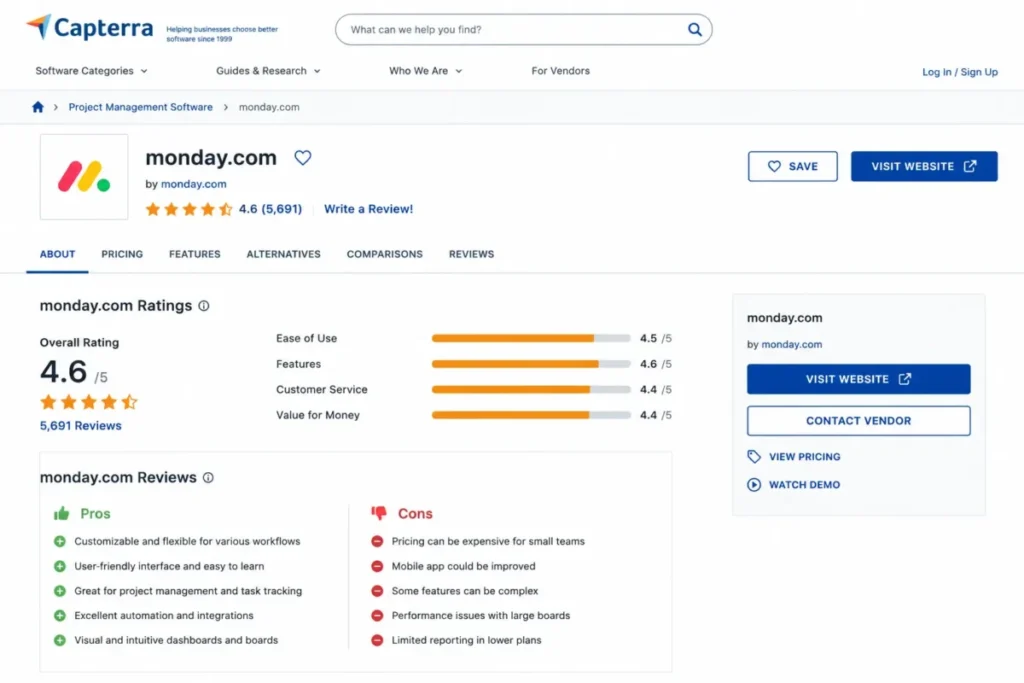
monday.com Pros and Cons
| Pros | Cons |
|---|---|
| Board and column customization lets a sales manager restructure a pipeline without engineering help | monday CRM Basic ships with no automations and no integrations, which removes most CRM value at the entry price |
| Pro’s 25,000 monthly automation actions and 75 columns per board support a real revenue workflow | Standard’s 250 monthly automation actions can be spent within days, per monday.com’s own documentation |
| Work management, CRM, dev, and service run on one board model, so agencies can bill and deliver in one place | Two separate price ladders make the product look cheaper than the CRM a sales team needs |
| 200-plus integrations plus a documented GraphQL API give RevOps teams real build options | The reported three-seat minimum turns a $12 headline into a $36 monthly floor for a solo founder |
| FY25 SOC 1, SOC 2, and SOC 3 reports and 2026 penetration-test documentation are published openly | HIPAA, multi-level permissions, and enterprise support are locked to the contact-sales Ultimate tier |
| Capterra’s 5,691 verified reviews average 4.6, with 4.4 for customer service | AI credits are surfaced by plan with a buy-more option, and consumption is not publicly documented |
monday.com Limitations
Six limitations matter enough to change a purchase decision, and this monday.com review treats them as buying criteria rather than cons. None of them are the generic “learning curve” that fills the rest of this search result page.
The entry CRM plan is not a CRM. No automations, no integrations, 5 columns, 1 dashboard, and 20 quotes a month puts Basic below the functional floor for a sales team.
Automation is metered, and the meter is small on Standard. monday.com’s documentation says 250 actions per month typically run out within days when a recipe notifies several people or maps several columns.
Reporting depth is gated by dashboard count, not by data. One dashboard on Basic and five on Standard means managers upgrade for visibility long before the contact limit becomes relevant.
Integration throughput is partly outside monday.com’s control. The rate-limit documentation states that integration limits can be set according to the third-party app’s API, so an Outlook sync can stall for reasons monday.com cannot fix.
API work is metered by complexity budgets. A nested GraphQL query can exhaust a token’s minute-level budget while a simpler query at higher volume runs fine, and trial and free contexts run on lower budgets.
Compliance is an upgrade, not a setting. HIPAA, multi-level permissions, and enterprise support sit at Ultimate, and a regulated 12-person team cannot configure its way there from Pro.
Teams whose real requirement is spreadsheet-style portfolio and resource reporting will find the board model fights them, and the Smartsheet review covers that trade-off in detail.
The Buyer Risk Ledger
| Risk | Buyer consequence | Mitigation before you sign |
|---|---|---|
| Budgeting from the $12 CRM headline | Finance approves $432/ | Model the Pro tier at your real seat count, annually |
| Buying Standard for automation | Recipes stop mid-month, and reps stop trusting the system | Ask the rep to price the action cost of your three most-used recipes |
| No named board owner | Column and stage definitions drift within one quarter | Assign one operations owner before rollout, not after |
| Assuming HIPAA is configurable | Security review blocks go-live after licences are bought | Confirm the tier and the third-party app posture in writing |
| Treating AI credits as included | Unforecastable line item at renewal | Get a written credit-consumption table and overage rate |
| Migration timed to a quarter end | Support friction lands during your busiest weeks | Schedule migration in the first month of a quarter |
The pattern across all six rows is the same. monday.com’s risks are budget risks and governance risks, not product-quality risks.
Who Should Use monday.com
8-40 person agencies that bill clients and manage delivery on the same records. The board model lets a project manager and an account manager work the same item, which is exactly what a dedicated CRM makes awkward.
15-75 person RevOps teams that already own a data warehouse. The GraphQL API and the 25,000-action Pro allowance support the sync patterns these teams build, and dashboards scale to 50 on the same tier.
Marketing and operations groups that need cross-functional pipelines, not sales pipelines. Campaign requests, vendor onboarding, and renewal tracking all fit the same board schema.
Sales teams of 5-30 reps that value visual process design over sales-specific depth. If your manager wants to redesign the stage model every quarter, this product rewards that behavior.
Existing monday Work Management customers adding a pipeline. Buying CRM on top of an adopted platform beats introducing a second vendor for a 6-person sales function.
Who Should Avoid monday.com
| Do not choose monday.com if | The reason | Look at instead |
|---|---|---|
| You are a solo founder or 2-person team on a tight budget | The reported 3-seat floor makes the real entry cost $36/mo on a plan with no automations | A free CRM entry point, then upgrade |
| Your reps live on the phone | The CRM pricing page lists mass emails and email sequences; a built-in dialer is not part of that listing | A purpose-built sales CRM with verified calling |
| You will run daily automation on a $17 plan | 250 monthly actions, per official documentation | Budget for Pro from day one |
| You need HIPAA at Pro pricing | HIPAA sits at Ultimate, contact-sales pricing | A CRM that publishes compliance at mid-tier |
| You need issue workflows with sprints and dependencies | The board model is not an engineering issue tracker | Jira |
| You need enterprise CRM governance and a partner ecosystem | monday.com is a work platform with a sales module | Salesforce |
Engineering-led organizations should read the Jira review for software teams before forcing a board model onto sprint work.
Enterprise buyers with procurement requirements around territory management and forecasting governance should start with the Salesforce CRM review instead.
monday.com Alternatives
Alternatives are only useful when they are tied to the reason you are leaving. Here is the mapping by disqualifier.
| Choose this instead | When the disqualifier is |
|---|---|
| Pipedrive | You want a sales-first pipeline that ships opinionated stages and needs no board design |
| HubSpot CRM | You need a free entry point before committing seats and annual billing |
| Salesforce | Procurement demands deep enterprise CRM governance and a partner ecosystem |
| Zoho CRM | Budget pressure and record customization outweigh visual board flexibility |
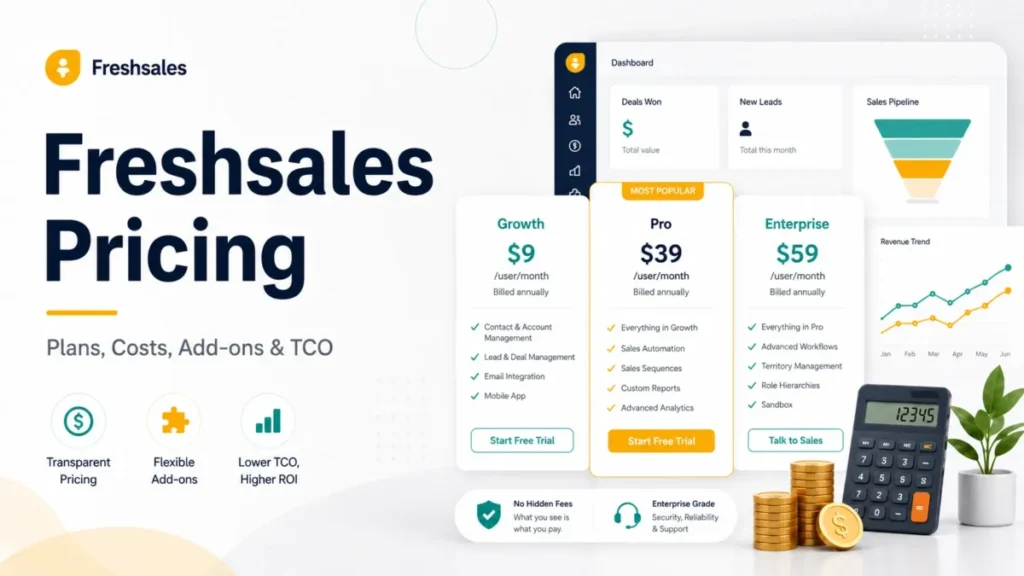
| Freshsales | You want a purpose-built sales CRM rather than a work platform adapted for sales |
| ClickUp or Asana | The primary job is project delivery, and the pipeline is secondary |
| Jira | Engineering issue workflows are the real requirement |
| Smartsheet | Spreadsheet-style portfolio and resource reporting is the requirement |
Pipedrive answers the configuration objection. Teams that leave monday CRM because board design turned into a project, not a setup step, are the ones a sales-first pipeline suits, and the Pipedrive CRM review covers where its own automation gates sit.
HubSpot answers the budget objection. Teams that cannot justify $84 a month before proving CRM value should start on a free tier, and the HubSpot CRM review explains what that tier withholds.
Confirm calling, sequencing, and forecasting features on each vendor’s own pricing page before shortlisting. Feature parity claims in comparison articles, including this one, age faster than pricing pages do.
The 30/90-Day Adoption Test
Buy on a plan, not on a demo. Then check these things on schedule.
After 30 days, one person can name the owner of every board, every automation recipe is documented with its action cost, and no rep has renamed a pipeline stage. If any of those is false, you have a governance problem, not a software problem.
After 90 days, the sales manager reads one dashboard rather than exporting to a spreadsheet, and the monthly automation-action usage sits below 60% of the plan allowance. As a working threshold, I would treat usage above 80% at day 90 as one campaign away from silent automation failures.
The renewal question is simpler than either. Before you renew, can you name the specific workflow that would break if you switched to a dedicated CRM tomorrow?
If the answer is “our boards”, you bought a work platform and you should keep it. If the answer is “our pipeline reporting”, you bought the wrong category and the second year costs more than the first.
Final Verdict: Is monday.com Worth It in 2026?
monday.com is worth it for agencies, RevOps teams, and cross-functional groups that need one board model for pipeline and delivery, priced at $28 per seat per month on CRM Pro. It is not worth it for solo founders, phone-heavy outbound teams, or regulated buyers who cannot reach the Ultimate tier.
The product is well built and the review sentiment is earned. The problem is the distance between the marketing price and the working price, which is roughly 133% at the seat level and larger once the reported three-seat floor applies.
Choose monday.com if your workflows are process-heavy, your admin owns board design, and your automation volume fits inside 25,000 monthly actions.
Choose a dedicated CRM if your reps want a pipeline that already knows what a deal is. Budget-driven buyers who need deep customization at a lower per-seat cost should compare the Zoho CRM review before committing.
Macedona’s recommendation for SaaS CRM Review readers: price the Pro tier, staff the admin role, and put the AI credit question in writing before you sign. Do that, and this monday.com review’s caveats stop being surprises.
FAQ
Is monday.com a good CRM?
monday CRM is a good CRM for process-heavy teams that want to design their own pipeline, and a weak one for teams that want sales workflows out of the box. The board architecture is the deciding factor. Sales teams that need email sequences, tracking, and forecasting must reach the Pro tier at $28 per seat per month billed annually.
How much does monday.com cost in 2026?
As checked on July 10, 2026, monday CRM costs $12, $17, and $28 per seat per month billed annually for Basic, Standard, and Pro, with Ultimate on contact-sales pricing. monday Work Management is a separate ladder at $0, $9, $12, and $19. Monthly billing carries roughly a 46% to 50% premium over annual rates.
Does monday.com have a free plan?
Yes, but not for CRM. monday Work Management offers a free-forever plan capped at 2 seats, 3 boards, and 3 docs. The CRM product starts at a paid tier. If you want a free CRM entry point before spending, the free plan here will not give you contacts, deals, or a pipeline.
What is the difference between monday CRM Basic, Standard, and Pro?
Basic stores leads, contacts, and deals with 1,000 records, 5 columns per board, and no automations or integrations. Standard adds two-way email, duplicate merge, and 250 automation actions per month across 10,000 records. Pro adds email sequences, email tracking, quotes and invoices, sales forecasting, 100,000 records, and 25,000 monthly automation actions.
What are the main disadvantages of monday.com?
The entry CRM plan has no automations or integrations. Standard’s 250 monthly automation actions can be exhausted within days according to monday.com’s own documentation. Compliance controls including HIPAA and multi-level permissions sit only at Ultimate. A reported three-seat minimum raises the real floor cost, and AI credit consumption is not publicly documented.
Is monday.com worth it for small sales teams?
Yes, if the team has 5 or more reps and an operations owner who will design the boards. No, if you are one or two people on a tight budget. The reported three-seat floor means a solo founder pays around $36 per month for a plan with no automation, which is poor value against a free CRM tier.
Can monday.com replace Salesforce?
For most mid-market teams, no. monday.com is a work platform with a sales module, and Salesforce is a CRM with enterprise governance, territory management, and a large partner ecosystem. Teams that need procurement-grade CRM controls will not close that distance through board configuration. Teams under 75 people with simple governance often find the swap workable, especially when delivery work already lives on monday.com boards.
Is monday.com HIPAA compliant?
monday.com offers HIPAA-compliant plans, but compliance is not automatic. The official HIPAA article recommends Google Apps Authentication or SAML SSO, regular access reviews, and audit-log monitoring, and it confirms mobile compliance from specific app versions. It also states that third-party apps are not included services and must be HIPAA compliant themselves.
What happens when monday.com automation limits are reached?
monday.com’s public documentation describes rate-limit behavior rather than a full account of monthly exhaustion. Rate limits can be triggered by automation loops, API or webhook triggering, and batch actions, and users receive a failed-run notification while the run can surface later in run history with a delay. The pricing article separately recommends Pro for regular automation use. Confirm the exact post-exhaustion behavior with monday.com support before you build a pipeline on Standard.
Is monday.com better than Asana or ClickUp?
For pipeline work, monday CRM is the only one of the three sold as a CRM product, with contacts, deals, quotes, and sales forecasting listed in its own pricing feature set. For project delivery, the three converge and the choice comes down to configuration preference and per-seat price. Teams weighing a dedicated sales CRM in the same band should read the Freshsales review alongside monday CRM Pro.