

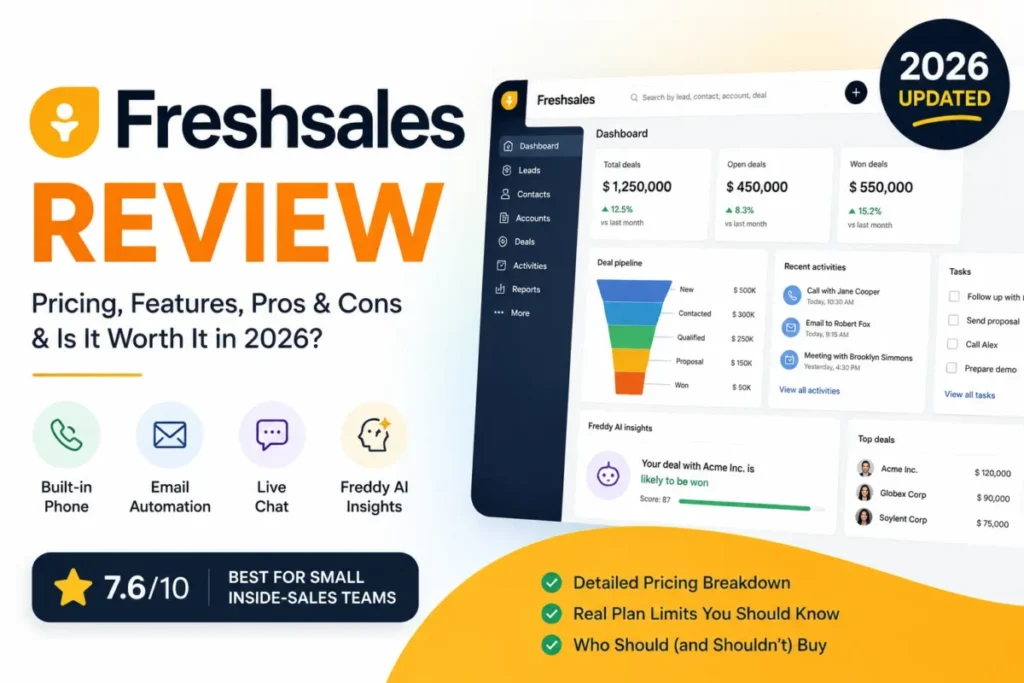
TL;DR: Freshsales is worth buying for 3 to 15 person inside-sales teams that want calling, email, and chat inside one CRM. It is the wrong purchase for outbound teams on an entry-level budget, because sales sequences, multiple pipelines, territory rules, and custom reports all begin on the Pro plan at $39/user/month billed annually, not on the $9 Growth plan.
This Freshsales review works through official Freshworks pricing, plan gates, sequence and API limits, security coverage, and verified user sentiment. Pricing checked: July 2026.
Testing level: documentation-based, not hands-on.
Freshsales sits in the value tier of the best CRM software options available to US buyers, priced under HubSpot Sales Hub and Salesforce Sales Cloud. The headline price is the part most buyers get wrong.
I would not budget from $9. I would budget from the plan that carries the workflow the team runs today.
In This Article (19 sections)
Quick Verdict on Freshsales
Here is the whole Freshsales review verdict in one table, before any of the evidence.
| Category | Verdict |
|---|---|
| Best for | 3-15 person inside-sales teams that want built-in phone, email, and chat in one CRM |
| Not ideal for | Outbound SDR teams that need email sequences while staying on an entry-level plan |
| Starting price | $0 for up to 3 users, then $9/user/ |
| Best practical plan | Pro, $39/ |
| Free plan / trial | Free plan up to 3 users, plus a 21-day trial with no credit card |
| Setup difficulty | Low for pipelines and contacts, Medium once sequences, territories, and API syncs start |
| Main strength | Built-in telephony, email, and chat with Freddy AI contact scoring on Pro |
| Main limitation | Zero sales sequences on both Free and Growth |
| Editorial score | 7.6/10, based on documentation and published limits |
| Best alternative | Pipedrive for pipeline simplicity, HubSpot Sales Hub for marketing depth |
The table above is the whole buying argument in miniature. Freshsales is cheap at the door and expensive at the workflow that most sales teams need by month three.
Verdict First: Where Freshsales Earns Its Price
Freshsales earns its price when a small sales team wants one screen for the pipeline and one place to call, email, and chat with a lead. Freshworks builds that channel bundle into the product instead of selling it as a bolt-on.
It stops earning its price when the sales motion becomes outbound, multi-pipeline, or report-heavy. Those workflows sit on Pro, and Pro costs 4.3 times what Growth costs per seat.
The Freshworks free tier is a genuine free CRM for up to 3 users, not a 14-day tease. That makes Freshsales a reasonable first CRM for a founder-led team leaving spreadsheets.
Here is the catch. The free plan and the Growth plan both carry a sequence limit of 0 per user, which means no automated outbound cadence at all.
So the practical Freshsales decision is not “Freshsales or HubSpot.” It is “Growth or Pro,” and that single question moves a 10-seat annual bill from $1,080 to $4,680.
Freshsales Pros and Cons
| Pros | Cons |
|---|---|
| Built-in phone, email, and chat ship inside the CRM instead of arriving as separate seats | Sales sequences are unavailable on Free and Growth, which blocks outbound cadences at the entry price |
| Free plan supports up to 3 users with Kanban views, email templates, and built-in phone | Custom reports start on Pro, so sales managers on Growth are stuck with curated reports |
| Pro adds Freddy AI contact scoring, deal insights, and Freddy sales emails without a separate AI seat | Multiple pipelines, territory management, and auto-assignment rules are all Pro-gated |
| Kanban views for contacts, accounts, and deals make pipeline hygiene visible to a 5-person team | API access is capped at 1,000 calls per hour on Free and Growth, at the account level, not per user |
| Freshworks publishes SOC 2 Type 2, ISO/ | Field-level permissions, audit logs, sandbox, and custom modules require Enterprise at $59/ |
| Deep alignment with Freshdesk and Freshchat for teams already inside the Freshworks stack | AI bot sessions are capped at 500 per account on paid plans, with extra sessions sold separately |
Five of those cons are plan gates, not product defects. That distinction is what separates a Freshsales buyer who is happy at renewal from one who feels ambushed in month four.
What Freshsales Is, and What It Is Not
Freshsales is the sales CRM inside the Freshworks product family. Freshworks positions it around lead capture, qualification, routing, Kanban pipeline management, a 360-degree contact view, workflow automation, and Freddy AI.
Freshsales is not Freshsales Suite. Freshworks cross-sells Suite as the combined sales and marketing product, and several campaign, journey, and email-marketing capabilities live in that scope rather than in the standalone CRM.
This distinction breaks buying decisions. A marketing-led team that expects landing pages, nurture journeys, and campaign analytics inside the $9 Growth plan is comparing the wrong product.
Freshsales is also not a help desk, and it is not a business intelligence stack. Freshdesk covers ticketing, and heavy executive reporting still points toward an external BI tool.
If your working definition of a CRM is still fuzzy, our explainer on what CRM software does draws the boundary between a contact database, a sales CRM, and a full revenue platform.
Freshsales sits squarely in the middle box. It manages contacts, accounts, deals, and sales conversations, and it hands the rest off.
Freshsales Review Methodology and Testing Level
This review is documentation-based. It draws on Freshworks official product, pricing, pricing-comparison, sales-sequence, API, security, and Trust Center pages, checked on July 9, 2026.
I did not run a Freshsales trial, a private demo, or a hands-on workflow test for this article. Nothing here is written as if I clicked through the product.
Third-party sources were used for one job only: sentiment. G2, Capterra, and TrustRadius supplied recurring praise and complaint patterns, review-count context, and reviewer demographics.
They were not used as the source of record for pricing or feature availability. Where a third-party page and Freshworks disagreed, Freshworks won.
That rule mattered here. Several widely-read pages list Growth near $11 and Pro near $47, which read as monthly or non-official figures against the annual USD pricing Freshworks publishes.
One more caveat about the sentiment layer. TrustRadius reviewer demographics skew toward small-business and mid-market users in sales departments, with the US as the largest country share.
So the complaints in this review describe what small and mid-sized sales teams hit. They are weaker evidence for a 400-seat enterprise rollout.
Commission never determines ranking on this site. A product that fails the buyer intent gets ranked lower or left out, and Macedona writes every CRM review on saascrmreview.com under that rule.
Freshsales Pricing Reality in 2026
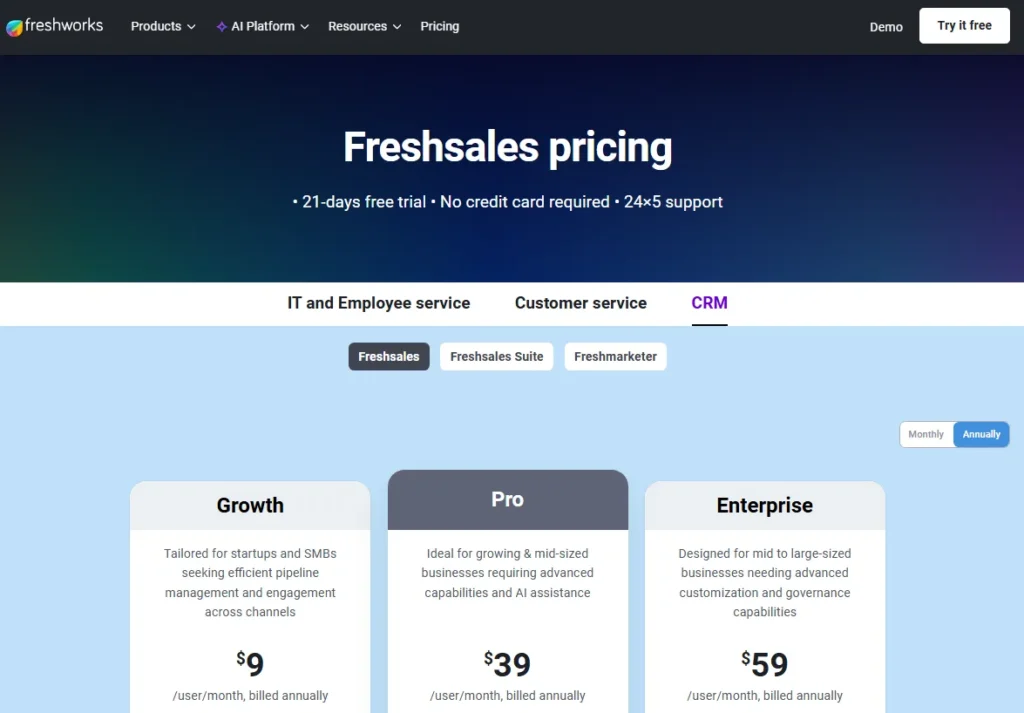
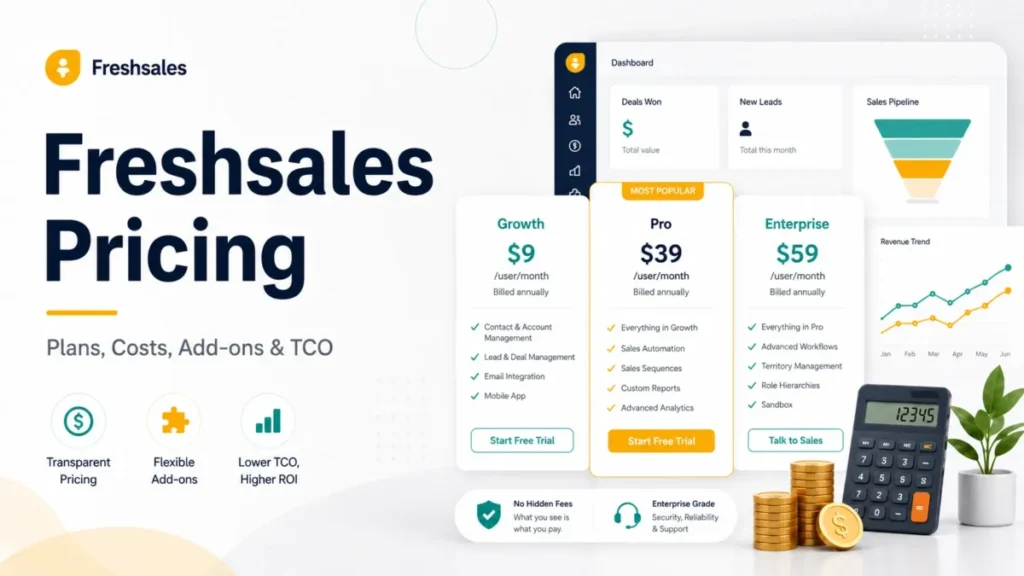
Freshworks publishes US pricing in USD on annual billing. The four plans below come from the official Freshworks pricing page, checked July 9, 2026.
| Plan | Price (annual) | Best for | Key limits | Worth it? |
|---|---|---|---|---|
| Free | $0 | Up to 3 users leaving spreadsheets | 3-user cap, 0 sales sequences | Good starting point, not a sales system |
| Growth | $9/user/mo | Small teams managing inbound deals | 0 sales sequences, curated reports only, basic workflows | Good if outbound is not the motion |
| Pro | $39/ | Inside-sales teams running cadences | 10 sequences per user, 2,000 API calls/ | Best practical plan |
| Enterprise | $59/ | Teams needing audit logs and sandbox | 25 sequences per user, custom modules | Only if governance is a purchase requirement |
Monthly checkout prices differ from these annual figures and must be confirmed on Freshworks before a budget is approved. Every price above assumes annual billing on the US pricing page.
A deeper plan-by-plan cost analysis lives in our Freshsales pricing breakdown, including how each tier maps to seat count.
The Budget Pressure Point: Growth to Pro
Growth to Pro is not a 20% upgrade. It is a 333% per-seat increase, and the features that trigger it are the ones a real sales team asks for by quarter two.
| Seats | Growth (annual) | Pro (annual) | Enterprise (annual) | Growth-to-Pro delta |
|---|---|---|---|---|
| 3 | $324 | $1,404 | $2,124 | +$1,080 |
| 10 | $1,080 | $4,680 | $7,080 | +$3,600 |
| 25 | $2,700 | $11,700 | $17,700 | +$9,000 |
At 25 seats the upgrade costs more per year than the entire Growth contract costs three times over. Finance teams that approved Freshsales as the cheap CRM tend to react badly to that renewal conversation.
My recommendation is blunt. If the team runs any outbound motion, price the deal at Pro from day one and treat the $9 tier as a pilot, not a plan.
Where the Freshsales Free Plan Stops Working
The free plan is capped at 3 users. That cap is the first hard stop, and it arrives the moment a founder hires a second rep.
The second stop is quieter. Free carries 0 sales sequences per user, so there is no automated follow-up cadence at all.
A founder who wants a free contact and deal tracker will be satisfied. A founder who wants a free outbound machine will not, and the best free CRM software comparison is a better starting point for that use case.
Hidden Costs Buyers Miss
Three cost lines sit outside the per-seat price, and none of them appear on a plan card.
AI bot sessions are capped. Freshworks lists 500 bot sessions included once per account across paid plans, with additional sessions available for purchase. Chat-heavy teams should model that ceiling before assuming unlimited AI chat.
Telephony is included, not free at any volume. Freshsales ships built-in phone, and Pro adds bring-your-own-carrier. Calling rates, credits, and advanced call-management costs were not verified on an official page for this review, so phone-heavy teams must confirm those rates with Freshworks before retiring an existing dialer.
Add-on packs exist. Freshworks lists CPQ and Freddy AI Agent session packs as add-ons. Growth includes one CPQ license, and anything beyond that is a quote conversation.
I have not seen an official per-user price for a Freddy Copilot add-on, so this review does not name one.
What the 21-Day Trial Cannot Tell You
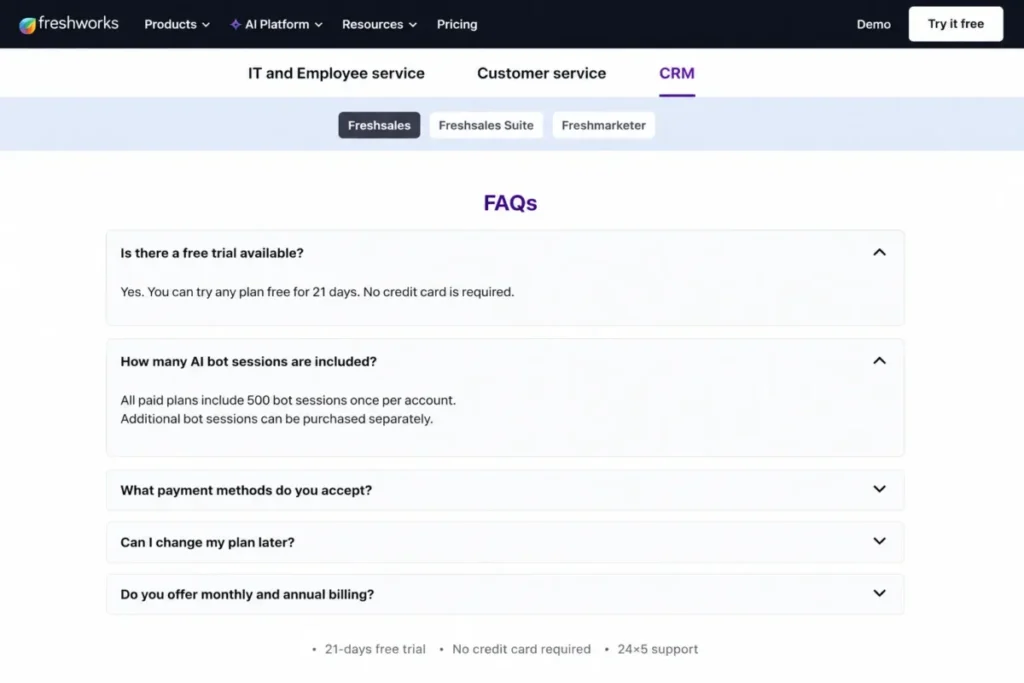
Freshworks offers a 21-day trial with no credit card. That is generous by CRM standards, and it still cannot validate outbound volume.
Freshworks documentation sets the trial sales-sequence email limit at 100 for the whole account. A team that plans to send thousands of cadence emails per week will learn nothing about deliverability or throughput in a trial.
Test contact hygiene, pipeline setup, and call quality during the trial. Ask Freshworks for a sandboxed volume test before committing to sequences at scale.
Freshsales Feature Gates by Plan
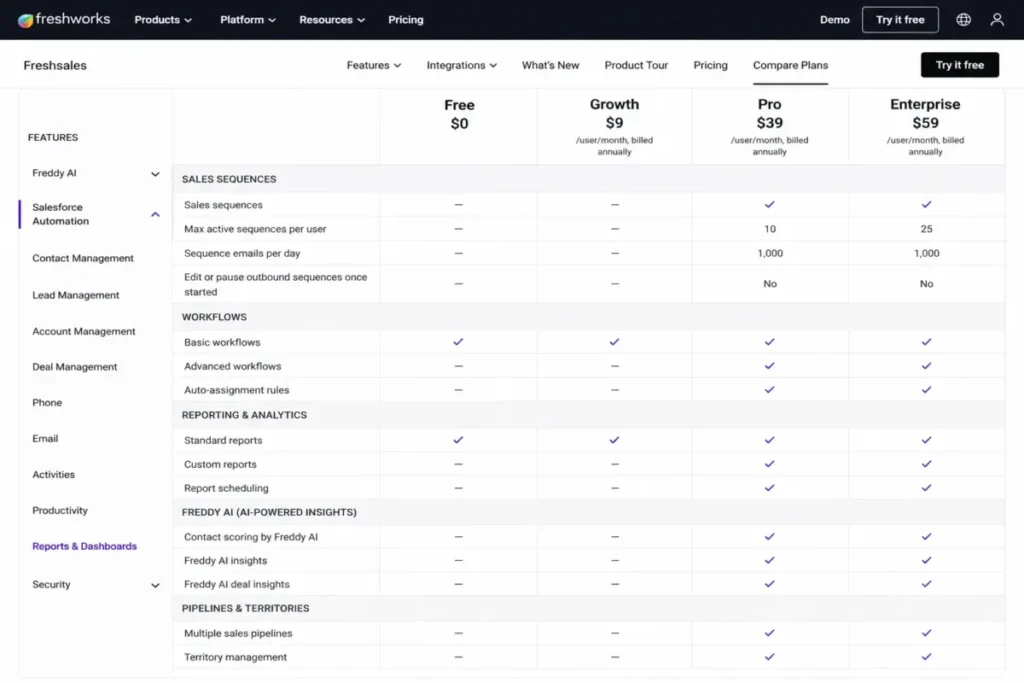
Feature gates decide the Freshsales bill more than seat count does. Every row below comes from Freshworks official pricing and sequence documentation, checked July 9, 2026.
| Feature | Free | Growth | Pro | Enterprise |
|---|---|---|---|---|
| Users | Up to 3 | Unlimited seats | Unlimited seats | Unlimited seats |
| Sales sequences (per user) | 0 | 0 | 10 | 25 |
| Sequence emails (per user/ | 0 | 0 | 1,000 | 2,000 |
| Workflow automation | No | Basic workflows | Advanced workflows | Plus custom-module workflows |
| Reporting | Basic views | Curated reports | Custom reports | Custom reports |
| Freddy AI | No | No | Contact scoring, sales emails, text assistance, deal insights | Plus forecasting insights |
| Pipelines | Single | Single | Multiple pipelines | Multiple pipelines |
| Territory management | No | No | Yes | Yes |
| API (contacts/ | 1,000/ | 1,000/ | 2,000/ | 5,000/ |
| Phone API | Not available | 2,000/ | 2,000/ | 2,000/ |
| Admin controls | Standard | Standard | Standard | Field-level permissions, custom modules, sandbox, audit logs |
| Support | 24×5 | 24×5 | 24×5 | 24×5 |
Growth and Free share the same sequence limit and the same API ceiling, which makes Growth a contact-management upgrade rather than a sales-automation upgrade. Pro is the first plan where Freshsales behaves like a sales engagement system.
Freshsales Feature Deep-Dive
Six capabilities decide whether Freshsales fits a revenue team. Each one below is paired with the plan that carries it and the limit that eventually bites.
Contact, Account, and Deal Management
Freshsales gives Kanban views for contacts, accounts, and deals, plus contact lifecycle stages and a single record view of the customer. Drag-and-drop deal stages make pipeline hygiene visible to a 5-person team without training sessions.
The limit is structural, not cosmetic. Growth runs a single pipeline, so a team selling two products through two motions has to fake it with deal tags.
Account hierarchy, which matters for parent-child enterprise accounts, also starts on Pro.
Sales Sequences and Outbound Cadences
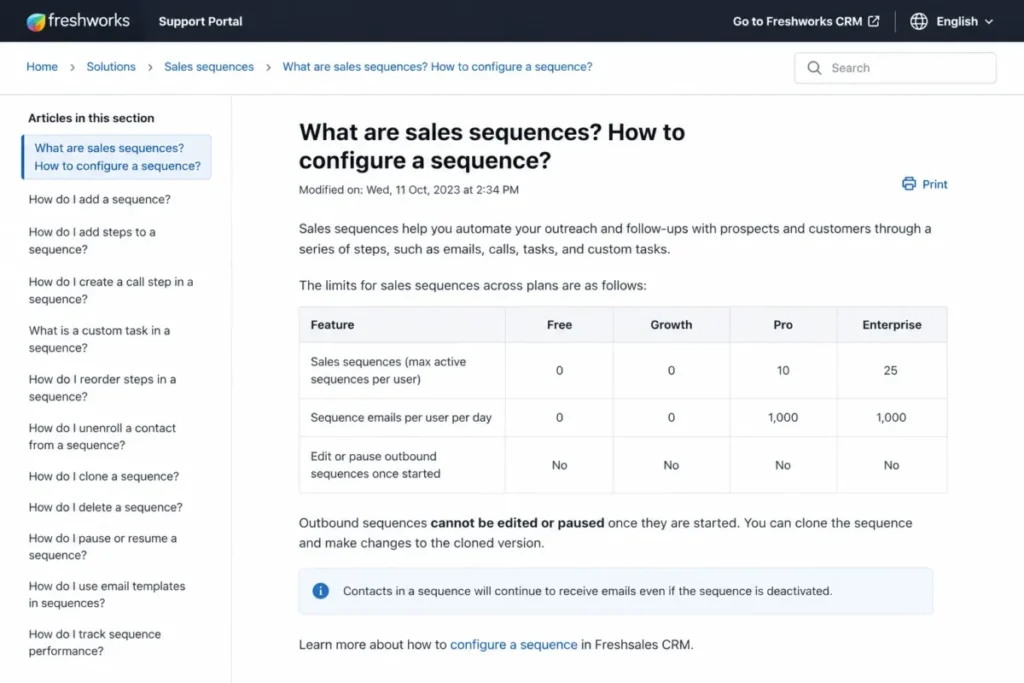
Sales sequences are where the Freshsales pricing argument is won or lost. According to the Freshworks sales sequence documentation, Free and Growth carry 0 sequences per user, Pro carries 10, and Enterprise carries 25.
Sequence email volume is capped per user per day: 1,000 on Pro and 2,000 on Enterprise. Freshworks calculates the account limit as users multiplied by the daily send limit, so a 10-seat Pro account tops out near 10,000 sequence emails per day.
That is comfortable for most SMB outbound teams. It is a real ceiling for an agency running cadences on behalf of clients.
Outbound Sequences Cannot Be Paused After Launch
Freshworks documentation states that outbound sequences cannot be edited or paused once they start. A typo in step three of a live cadence runs to completion across every enrolled contact.
That turns sequence launch into a one-way door for sales ops. The mitigation is procedural rather than technical, because no plan tier removes the restriction.
| Pre-launch check | Why it cannot wait |
|---|---|
| Copy and merge fields proofed on a 10-contact pilot list | Mid-flight corrections are not possible |
| Every link and UTM parameter clicked once | Broken links persist for the full cadence |
| Unsubscribe and reply handling confirmed | Compliance exposure runs to the final step |
| Send windows and time zones set | Off-hours sends cannot be halted |
| Enrollment filters and exit criteria reviewed | Wrongly enrolled contacts stay enrolled |
Run the pilot list before the real one. A 10-contact test costs a sales ops admin one afternoon and protects a quarter of outbound pipeline.
Freddy AI, Mapped to the Plans That Carry It
“Freshsales has AI” is true and useless. The AI features are gated feature by feature, not plan by plan.
| Freddy AI capability | Free | Growth | Pro | Enterprise |
|---|---|---|---|---|
| Contact scoring | No | No | Yes | Yes |
| Sales emails by Freddy AI | No | No | Yes | Yes |
| Freddy text assistance | No | No | Yes | Yes |
| Deal insights | No | No | Yes | Yes |
| Forecasting insights | No | No | No | Yes |
Every AI capability a sales manager would open during a pipeline review starts at Pro, and forecasting waits for Enterprise. A buyer choosing Growth because of the AI marketing gets none of it.
Workflow Automation by Tier
Automation depth follows the same staircase. Growth carries basic workflows, Pro carries advanced workflows, and Enterprise adds workflows that run against custom modules.
Freshworks does not publish an unlimited-automation claim, and this review does not make one. Lean teams that need round-robin lead assignment should note that auto-assignment rules are Pro-gated as well.
Built-in Phone, Email, and Chat
Freshsales includes phone, email, and chat inside the CRM from the Free plan upward, which is unusual at $0 and at $9. Pro adds bring-your-own-carrier for teams with an existing telephony contract.
That bundle is the single strongest reason to shortlist Freshsales over a pipeline-only CRM. A 6-person inside-sales team can log a call, send the follow-up, and answer the website chat without a second vendor.
The tradeoff is cost opacity. Calling rates and advanced call-management pricing were not verifiable on an official page during this review, so treat “built-in phone” as included access rather than free usage.
Reporting and Analytics
Reporting is the most frequently criticized part of Freshsales, and the criticism has two separate causes. The first is a plan gate: custom reports start on Pro, while Growth ships curated reports only.
The second is depth. Review-platform sentiment on G2 and TrustRadius repeatedly flags reporting flexibility and email-metric detail as improvement areas, including at higher tiers.
A sales manager who lives inside pipeline velocity and stage-conversion reporting will be fine on Pro. A RevOps lead who needs board-level dashboards will still export to a BI tool.
Freshsales Ease of Use, Setup, and Migration
Freshsales is approachable for the things it does simply: contacts, accounts, deals, Kanban stages, and built-in communication. Setup difficulty is Low for that scope and Medium once sequences, territory rules, custom fields, and API syncs enter the picture.
Migration is where documentation-based reviews earn their keep, and it is the part the ranking Freshsales reviews leave out entirely.
Migration Limits and the Cutover Checklist
The Freshworks developer API documentation caps bulk upsert at 100 entities per request, with a maximum of 10 concurrent in-progress bulk calls for contacts, accounts, and deals.
Pair that with the hourly API ceiling and the arithmetic gets specific. On Growth’s 1,000 calls per hour, bulk upserts of 100 records each imply a theoretical ceiling near 100,000 records per hour before throttling, assuming bulk calls draw from the same hourly allowance.
That is enough for most SMB migrations. It is not enough to promise a same-day cutover for a 2-million-record database, and I would not schedule one.
| Cutover step | Documented limit | Admin action before go-live |
|---|---|---|
| Bulk upsert batch size | 100 entities per request | Chunk the export into 100-record batches |
| Concurrent bulk calls | 10 in-progress calls | Cap parallel import workers at 10 |
| Hourly API allowance | 1,000 on Growth, 2,000 on Pro | Run the import outside enrichment and BI sync windows |
| Throttle response | HTTP 429 too many requests | Build retry with backoff before the first batch |
| Duplicate records | Not documented as a plan-level guarantee | Deduplicate in the source export, not after import |
Every row above is a scheduling constraint rather than a blocker. Teams that plan the import window around the hourly ceiling finish cleanly, and teams that discover HTTP 429 at 2am do not.
The 30/90-Day Adoption Test
Adoption failures rarely announce themselves. Set two checkpoints and hold the purchase to them.
After 30 days, every rep logs calls and emails inside Freshsales rather than in a personal inbox, and the pipeline reflects reality without a manager rebuilding it on Friday.
After 90 days, the team runs at least one report that a non-user trusts, deal stages have not multiplied past what the pipeline needs, and duplicate contacts have not become a running joke.
If the 90-day checkpoint fails, the problem is process, not plan tier. Upgrading to Pro will not fix a team that does not log activity.
Freshsales Integrations and API Limits
Freshsales connects through the Freshworks Marketplace and a documented REST API. Confirmed integration examples across official and review-platform sources include Slack, Freshdesk, Freshchat, QuickBooks Online, Xero, Mailchimp, Segment, Zapier, Google Workspace, Aircall, Microsoft Power BI, and SignNow.
Marketplace logo count is not integration depth. G2 review patterns specifically name missing or weaker fit for Marketo, Pardot, NetSuite, and Sage, which is the exact stack a mid-market RevOps team tends to run.
That gap is survivable with Zapier, Make, or custom API work. It is a real implementation cost, and it belongs in the budget rather than in a footnote.
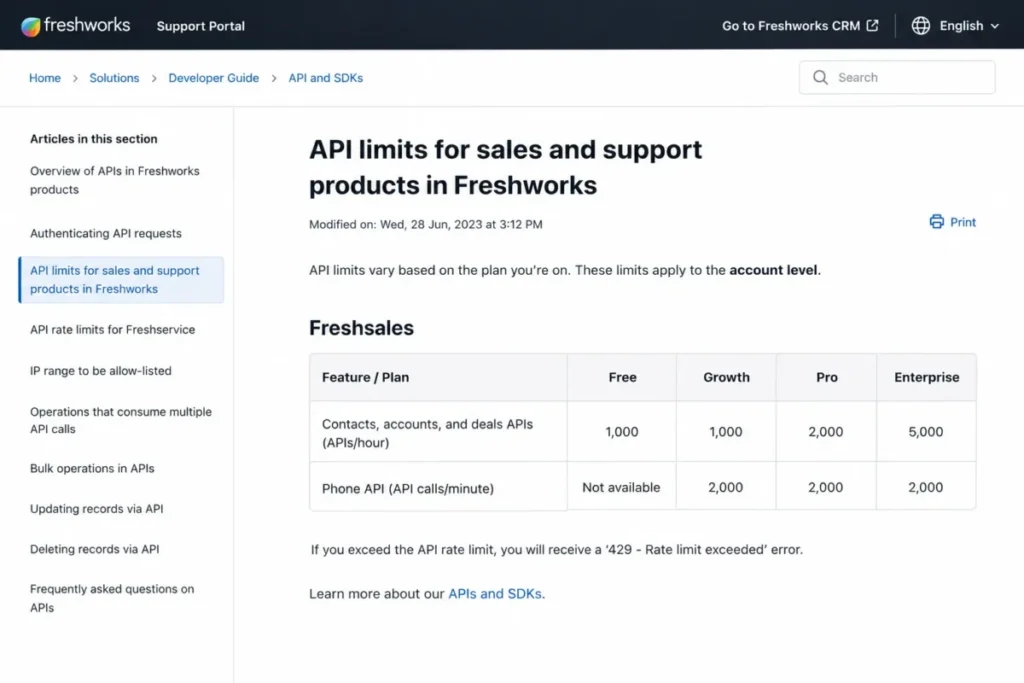
The API limits are the part almost no competing review quantifies. Per the Freshworks API limits documentation, contacts, accounts, and deals allow 1,000 calls/hour on Free and Growth, 2,000 on Pro, and 5,000 on Enterprise.
| API surface | Free | Growth | Pro | Enterprise |
|---|---|---|---|---|
| Contacts, accounts, deals | 1,000/ | 1,000/ | 2,000/ | 5,000/ |
| Phone API | Not available | 2,000/ | 2,000/ | 2,000/ |
| Bulk upsert entities per request | 100 | 100 | 100 | 100 |
| Concurrent in-progress bulk calls | 10 | 10 | 10 | 10 |
These limits apply at the account level, not per user, which is the detail that breaks assumptions. Ten reps sharing one enrichment tool and one BI connector draw from the same 1,000-call hour on Growth, and exceeding it returns HTTP 429.
Older Freshsales support documents still reference legacy plan names such as Sprout and Estate. Treat the current Freshworks pricing and support docs as the source of record and ignore the legacy tables.
Teams already inside the Freshworks stack get the smoothest path here, and our Freshdesk review covers how the support side of that ecosystem behaves.
The Freshsales Mobile App in Practice
Freshsales publishes iOS and Android apps that cover customer data, pipeline tracking, tasks, and appointments. Availability is not in doubt.
Parity is. Review-platform sentiment on G2, Capterra, and TrustRadius includes recurring reports that the mobile experience runs slower or covers fewer workflows than the desktop app.
I read that as a fit signal rather than a defect. Desk-based inside-sales teams will not notice, and field reps who plan to work primarily from a phone should trial the app against their real daily workflow before signing.
Freshsales Security, Support, and Admin Controls
Security has two layers here, and conflating them is the classic B2B procurement mistake. Vendor assurance is one layer, and plan-gated admin control is a different one.
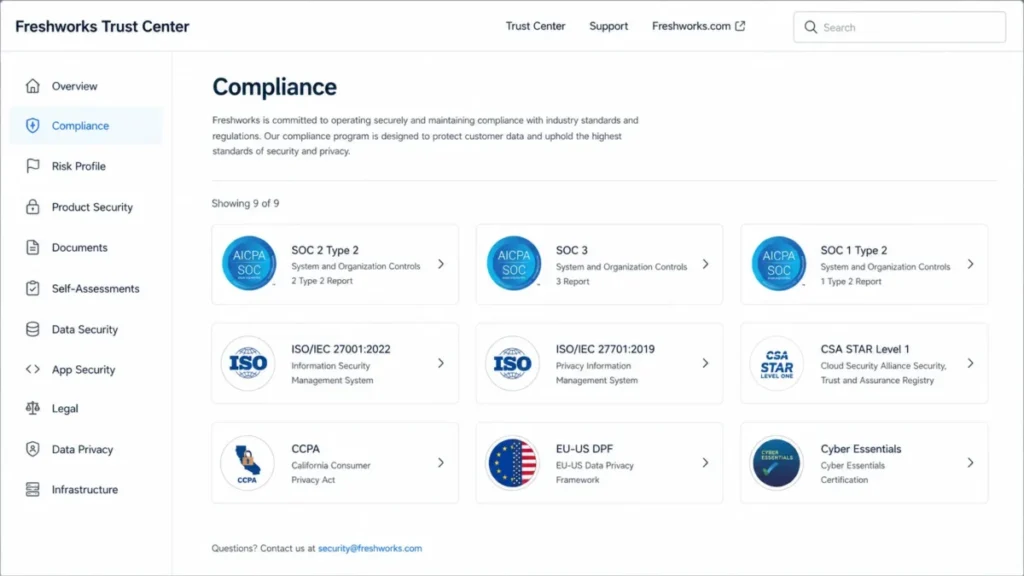
On vendor assurance, Freshworks describes VPCs, perimeter security, role-based access control through IAM, two-factor authentication, audit trails, AES-256 encryption at rest, and TLS 1.2 in transit. The Freshworks Trust Center lists SOC 2 Type 2, SOC 3, SOC 1 Type 2, ISO/IEC 27001:2022, ISO/IEC 27701:2019, CSA STAR Level 1, CCPA, the EU-US Data Privacy Framework, and Cyber Essentials.
The plan layer is narrower. Field-level permissions, custom modules, sandbox, and audit logs are Enterprise features at $59/user/month.
A security questionnaire that asks “do you have audit logging” gets a yes from the vendor and a no from a Growth tenant. That distinction has killed more late-stage deals than any missing certification.
This review makes no claim about SSO, SCIM, HIPAA applicability, or storage caps, because no official plan-gate source confirmed them.
Support is listed as 24×5 across plans, alongside the 21-day trial. Weekend coverage is not published, and I would not assume it exists without a written agreement.
Third-party sentiment on support is mixed. Some reviewers praise onboarding speed and responsiveness, others report inconsistent resolution quality, and a go-live scheduled for a Friday afternoon is a self-inflicted risk either way.
What Freshsales Users Report Most Often
Sentiment across G2, Capterra, and TrustRadius follows a consistent pattern. Users frequently praise Freshsales for its intuitive interface, straightforward onboarding, and built-in communication tools. At the same time, limitations around reporting depth, customization, mobile performance, and third-party integrations appear repeatedly across review platforms.
For example, one G2 reviewer, Sahil B., notes that “Detailed reporting of the email metrics can be highly improved,” reflecting one of the most common criticisms mentioned by customers.
Reviews on TrustRadius present a more nuanced picture. Many users describe the software as easy to learn once it’s running, requiring little formal training. However, several reviewers also mention that the initial setup and configuration process can be more involved than expected.
These observations are not contradictory. Freshsales generally offers a user-friendly day-to-day experience, while configuring pipelines, automations, permissions, and integrations often requires additional effort. This pattern is common among CRM platforms that prioritize ease of use after implementation rather than during deployment.
Feedback on Capterra reinforces similar themes. Users most often request more advanced reporting capabilities, greater customization flexibility, a smoother mobile experience, and better performance as data volumes and sales teams grow.
It’s also important to interpret these reviews in context. Most published feedback comes from small and mid-sized businesses rather than large enterprise deployments. As a result, the reported strengths and limitations primarily reflect the experience of sales teams with roughly 10–100 users, rather than organizations rolling out CRM to hundreds of seats.
Freshsales Limitations That Change the Decision
This Freshsales review counts six limitations that are decision-changing rather than cosmetic. The Buyer Risk Ledger below pairs each with its consequence and a mitigation.
| Risk | Buyer consequence | Mitigation |
|---|---|---|
| Zero sequences on Free and Growth | Outbound teams buy at $9 and cannot run a cadence | Price the deal at Pro, or run outbound in a separate tool |
| Custom reports gated to Pro | Sales managers on Growth cannot build their own pipeline reports | Budget Pro, or accept curated reports for the first two quarters |
| Outbound sequences cannot be edited or paused | A copy error runs to completion across the contact list | Mandatory QA checklist and a 10-contact pilot before full launch |
| Account-level API cap of 1,000 calls/ | Enrichment, BI, and sync jobs collide and return HTTP 429 | Stagger sync windows, or upgrade to Pro for 2,000 calls/ |
| Governance controls are Enterprise-only | Security review fails on audit logs and field-level permissions | Confirm the control list with security before signing Growth or Pro |
| 500 bot sessions per account | Chat-heavy teams exhaust AI sessions and buy add-on packs | Model expected chat volume before treating AI chat as included |
What Breaks First as the Team Grows
The first thing that breaks is not the pipeline. It is reporting, because a Growth-tier manager cannot build the report that the CEO asks for in month two.
The second is outbound, when a new SDR joins and discovers that sequences do not exist on the current plan. The third is integration load, when the enrichment tool and the BI connector start sharing a 1,000-call hour.
None of these are hidden. All three are documented, and all three are missed by buyers who compared starting prices and stopped there.
A team that needs field-level permissions and audit logs from day one is better served evaluating an enterprise-first platform such as Salesforce Sales Cloud.
Who Should Use Freshsales
Four cohorts get real value here, and each one has a specific reason.
3 to 15 person inside-sales teams that make calls, send email, and answer chat from one screen. The bundled channels remove a second vendor contract, and Pro adds Freddy contact scoring on top.
1 to 3 person founder-led teams leaving spreadsheets. The free plan covers contacts, deals, Kanban views, email templates, and built-in phone at $0, which is a genuinely useful CRM floor.
Existing Freshdesk or Freshchat customers. Shared ecosystem, shared vendor relationship, and one support contract usually beat a marginally better standalone CRM, and that logic drives many of the shortlists I see from Freshworks customers.
Mid-sized sales teams that can defend Pro. If the team runs sequences, territories, multiple pipelines, and custom reports, $39 per seat is competitive against Sales Hub and Sales Cloud for the same feature set.
Who Should Avoid Freshsales
Five cohorts should look elsewhere, and none of them are edge cases.
Budget outbound teams. If the plan is to run SDR cadences at $9 per seat, Freshsales cannot do it, and no configuration workaround changes that.
RevOps teams with a Marketo, Pardot, NetSuite, or Sage stack. Those connections draw user complaints, and middleware becomes a permanent line item.
Marketing-led buyers expecting campaign depth. Landing pages, journeys, and campaign analytics belong to Freshsales Suite or Freshmarketer scope, and the HubSpot CRM review is the more useful comparison for that requirement.
Enterprise buyers who need governance below Enterprise pricing. Field-level permissions, sandbox, custom modules, and audit logs do not exist on Pro at any negotiation.
Mobile-first field teams. The apps exist, the sentiment on mobile performance is mixed, and a field org should validate that before standardizing on it.
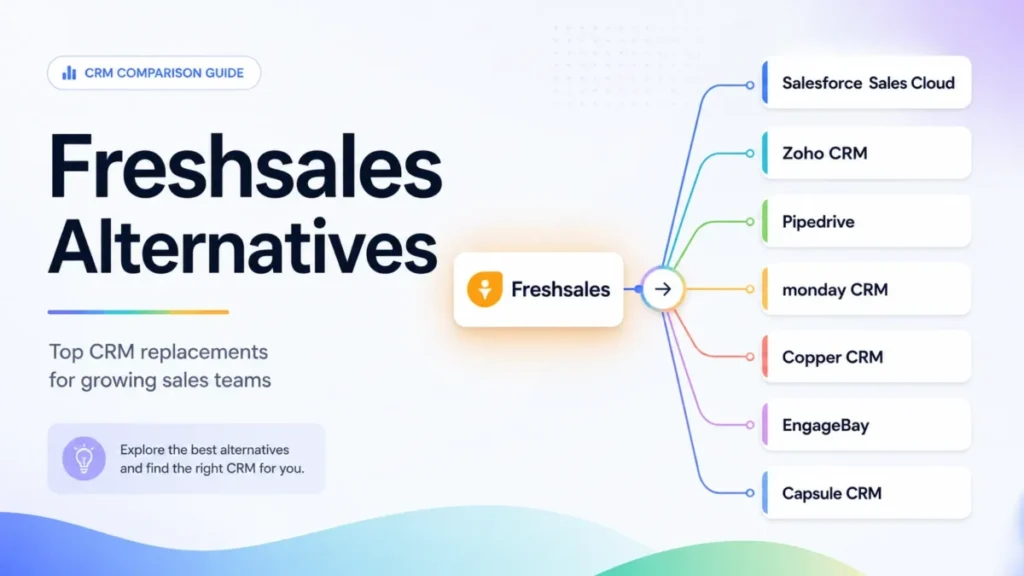
Freshsales Alternatives Worth Shortlisting
Each alternative below maps to a specific Freshsales limitation rather than to a generic feature comparison. Pricing for these products was not verified for this article, so confirm each vendor’s official pricing page before budgeting.
| Alternative | Better for | Choose it instead when |
|---|---|---|
| Pipedrive | Pipeline-first sales teams | You want clean deal stages and activity tracking without AI or sequence gates |
| HubSpot Sales Hub | Marketing-led revenue teams | Campaigns, landing pages, and CRM must live in one suite |
| Zoho CRM | Customization on a budget | You need custom modules and deep configuration without an enterprise-tier jump |
| Salesforce Sales Cloud | Governance-heavy organizations | Audit depth, admin controls, and partner ecosystem outrank simplicity |
| monday sales CRM | Ops teams already on monday.com | Boards, projects, and pipeline should share one workspace |
The switch-or-stay logic is simple. Stay with Freshsales if the blocker is budget and the motion is inbound, because Growth genuinely covers that.
Switch if the blocker is reporting depth, native enterprise integrations, or governance, because those are architectural rather than tiered. Our Pipedrive CRM review and Zoho CRM review cover the two most common landing spots for teams leaving Freshsales.
Final Verdict: Is Freshsales Worth It?
This Freshsales review lands on a plan-level answer, not a product-level one.
Freshsales is worth it for small inside-sales teams that value bundled phone, email, and chat, and that can either live inside Growth’s inbound-only limits or fund Pro at $39/user/month annually. It is not worth it for outbound teams shopping at the $9 price point, for RevOps teams with enterprise integration requirements, or for buyers who need audit logs without Enterprise budget.
Choose Freshsales if your team is 3 to 15 people, already runs on Freshworks tools, and wants one CRM for the pipeline and the conversation. Choose Pipedrive if you want pipeline simplicity, HubSpot if you want marketing depth, and Salesforce if governance is the buying committee’s first question.
Buy the plan that carries the workflow, not the plan that carries the headline. A full set of Freshsales alternatives is worth reading before signing, and the Pipedrive vs Freshsales comparison answers the head-to-head question directly.
Before renewal, answer one question honestly: can the team name a report, a cadence, or a routing rule that Freshsales runs better than the tool it replaced? If not, the CRM became a contact database, and $39 per seat is a lot to pay for one.
Freshsales Review FAQ
Is Freshsales a good CRM?
Yes, for small inside-sales teams that want calling, email, and chat inside the CRM. Freshsales handles contacts, accounts, deals, and Kanban pipelines well, and Pro adds Freddy AI contact scoring and deal insights.
It is a weaker choice for teams needing deep custom reporting, native enterprise integrations, or governance controls below the Enterprise plan.
How much does Freshsales cost in 2026?
Freshworks lists US annual pricing at $0 for up to 3 users, $9 per user per month for Growth, $39 for Pro, and $59 for Enterprise, checked July 9, 2026. Monthly checkout prices differ from those annual figures.
A 10-seat Pro contract runs about $4,680 per year before add-ons such as extra AI bot sessions.
Is Freshsales free, or is there a catch?
Freshsales is free for up to 3 users, with Kanban views, email templates, built-in phone, live chat, and 24×5 support, and no credit card required. The catch is that the free plan carries zero sales sequences.
Treat it as a free contact and deal tracker rather than a free sales engagement system.
What is the difference between Freshsales Growth and Pro?
Pro adds the features most sales teams eventually need: sales sequences, Freddy AI contact scoring, Freddy sales emails, deal insights, multiple pipelines, territory management, auto-assignment rules, account hierarchy, advanced workflows, and custom reports. Growth carries none of those.
The jump costs $30 more per seat per month, or $3,600 per year on a 10-seat account.
Does Freshsales include sales sequences?
No, unless you are on Pro or Enterprise. Freshworks documentation sets the sequence limit at 0 per user on Free and Growth, 10 per user on Pro, and 25 per user on Enterprise.
Pro also caps sequence emails at 1,000 per user per day, and outbound sequences cannot be edited or paused once they start.
What are Freshsales API limits?
Freshworks documents account-level API limits for contacts, accounts, and deals: 1,000 calls per hour on Free and Growth, 2,000 on Pro, and 5,000 on Enterprise. Phone API access is unavailable on Free and runs at 2,000 calls per minute on paid plans.
Bulk upsert allows 100 entities per request across a maximum of 10 concurrent in-progress calls.
Is Freshsales better than HubSpot or Pipedrive?
It depends on team size and sales motion, not on preference. Freshsales wins when bundled telephony and chat matter and the team fits Growth or can fund Pro.
Pipedrive wins on pipeline simplicity, and HubSpot Sales Hub wins when marketing campaigns and CRM must share one suite, which standalone Freshsales does not cover.
What are the limitations of Freshsales?
The decision-changing limits are zero sequences on Free and Growth, custom reports gated to Pro, and outbound sequences that cannot be edited or paused after launch.
Account-level API caps start at 1,000 calls per hour, audit logs and field-level permissions require Enterprise, and 500 AI bot sessions are included per account with extras sold separately.
Does Freshsales work on mobile?
Yes. Freshsales publishes iOS and Android apps covering customer data, pipeline, tasks, and appointments, though review-platform sentiment reports that mobile can run slower or cover fewer workflows than desktop.
Desk-based teams rarely notice this, and field-first sales teams should test the app against a real daily workflow during the 21-day trial.
Is Freshsales worth it for a small business?
Yes, if the sales motion is inbound and the team is under 15 people. Growth at $9 per user per month covers contacts, deals, pipelines, basic workflows, and built-in channels.
No, unless you budget Pro, if the team runs outbound cadences, needs multiple pipelines, or expects managers to build their own reports.



Pingback: HubSpot CRM Alternatives 2026: 10 Best Options Compared