Freshsales looks like a $9 CRM until your team needs a second pipeline. Multiple sales pipelines, sales sequences, auto-assignment, and territory management all sit on the $39 Pro tier, so the practical comparison price for many growing teams is more than four times the advertised entry point.
That plan gate is one of the clearest reasons buyers consider Freshsales alternatives, and it changes which replacement makes sense. This guide ranks 10 Freshsales alternatives by switching trigger and team size, using official US pricing checked on July 16, 2026.
This update sits alongside our best CRM for sales teams ranking, but every recommendation here is tied to a specific reason for leaving Freshsales. The research is documentation-based: every price, plan gate, and limit below comes from official vendor pages and public documentation, qualified with review-platform patterns where sentiment matters.
In This Article (14 sections)
Quick Verdict: Best Freshsales Alternatives by Switching Trigger
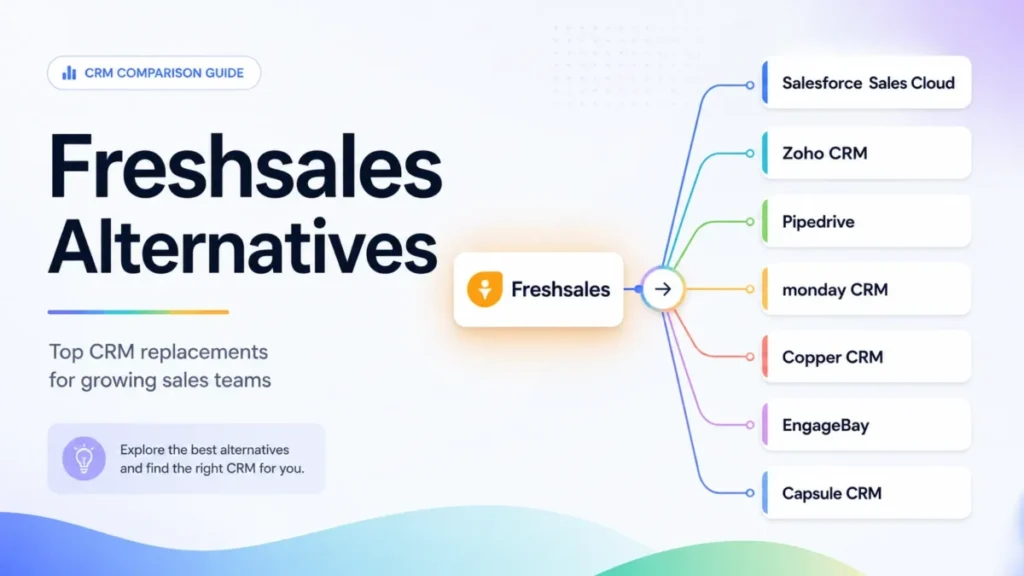
The rows below follow our overall 2026 ranking, from HubSpot Sales Hub at number one to EngageBay at number ten.
| If you are leaving Freshsales because… | Best alternative | Why |
|---|---|---|
| Growth’s single pipeline and missing sequences force a $39 Pro upgrade | HubSpot Sales Hub (#1) | Permanent free CRM plus connected marketing, service, and sales tiers on one platform |
| Pro pricing feels high for the customization you get | Zoho CRM (#2) | Standard tier corroborated at $14 per user with deeper customization per dollar |
| Reps ignore the CRM and you want pipeline clarity | Pipedrive (#3) | Visual pipeline-first design from $14 per seat, billed annually |
| Your reps live on the phone | Close (#4) | Built-in calling and SMS with tiered power and predictive dialers |
| You need sandbox, audit logs, and custom objects beyond Freshsales Enterprise | Salesforce Sales Cloud (#5) | Custom data model, enterprise permissions, and the AppExchange ecosystem |
| Sales runs inside cross-functional team workflows | monday CRM (#6) | Configurable boards and dashboards connected to broader work management |
| Your team works inside Gmail all day | Copper CRM (#7) | CRM built around Google Workspace, with projects included |
| Won deals need to become delivery projects | Insightly CRM (#8) | Opportunity-to-project handoff on one record from $29 per user |
| Freshsales feels overbuilt for a 2-3 person business | Bigin by Zoho CRM (#9) | Free single-user tier and paid plans starting at $7 per user |
| You want sales, marketing, chat, and service bundled cheaply | EngageBay (#10) | CRM & Sales Bay advertised from $11.04 per user with a free plan |
A single “best overall” pick would hide the real decision: a five-person outbound team and a fifty-seat inbound organization should not shortlist the same three products. Match the row to your exit reason first, then check the pricing and migration sections before you commit to a trial.
Freshsales, Freshsales Suite, or Freshworks? Freshsales is the standalone sales CRM from Freshworks Inc. Freshsales Suite is a separate combined sales-and-marketing offer, and Freshworks is the parent company that also sells Freshdesk and other products. This article compares alternatives to standalone Freshsales; if you run Freshsales Suite, your marketing automation scope and the right replacements both change.
Why Teams Look for Freshsales Alternatives
Freshsales is not a weak CRM. The exit reasons below come from its own plan structure, checked against the official Freshsales pricing page on July 16, 2026, plus recurring reviewer patterns on G2 and editorial reviews.
The Growth-to-Pro capability cliff
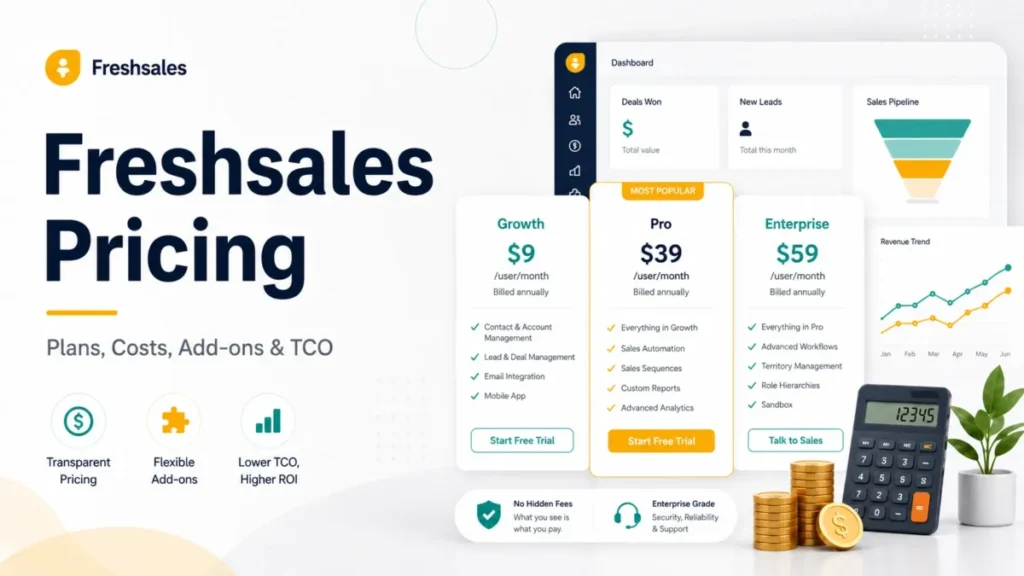
Growth costs $9 per user per month billed annually, and Pro costs $39. The features that separate them are not cosmetic.
| Capability | Growth ($9/ | Pro ($39/ |
|---|---|---|
| Sales pipelines | One pipeline | Multiple pipelines |
| Sales sequences | Not included | Included |
| Auto-assignment rules | Not included | Included |
| Territory management | Not included | Included |
| Workflows | Basic workflows | Advanced workflows |
| Reports | Curated reports | Custom reports |
| Freddy AI contact scoring | Not included | Included |
Source: official Freshsales pricing page, checked July 16, 2026.
If your process needs two pipelines or automated follow-up sequences, your real Freshsales budget is $39 per user, not $9. That single fact reframes every price comparison in this article, and our Freshsales pricing guide breaks the tiers down in more detail.
Governance is gated to Enterprise
Field-level permissions, custom modules, sandbox environments, and audit logs all start on the $59 Enterprise tier. A 20-seat team that needs an audit trail for compliance pays $59 per user even if it never touches forecasting insights.
Teams that hit this wall usually need either a cheaper governance path or a platform built for it. That is the Salesforce conversation, covered in the enterprise section below.
Support runs 24×5, not 24×7
The official pricing page lists 24×5 support across paid plans. If your sales floor operates on weekends, vendor help is a business-day service, and no alternative in this list should be assumed to do better without checking its own published support hours.
Add-ons can outgrow the seat price
Freshsales lists CPQ capability and additional Freddy AI Agent session packs as paid add-ons. Quoting-heavy or AI-heavy teams should price those into the renewal, because the advertised seat price stops being the whole budget once usage scales.
The standalone product is not a marketing suite
Standalone Freshsales handles sales. Teams that expected email marketing, campaigns, and service tooling in one product are often comparing it against Freshsales Suite or against platforms like HubSpot and EngageBay that bundle those functions differently.
A specialized sales motion fits a specialist tool
Calling-first outbound teams, Gmail-native teams, and agencies that convert deals into delivery projects each have a purpose-built option in this list. A general sales CRM is not the ceiling for any of those motions.
Freshsales Pricing and Feature Gates: The Baseline
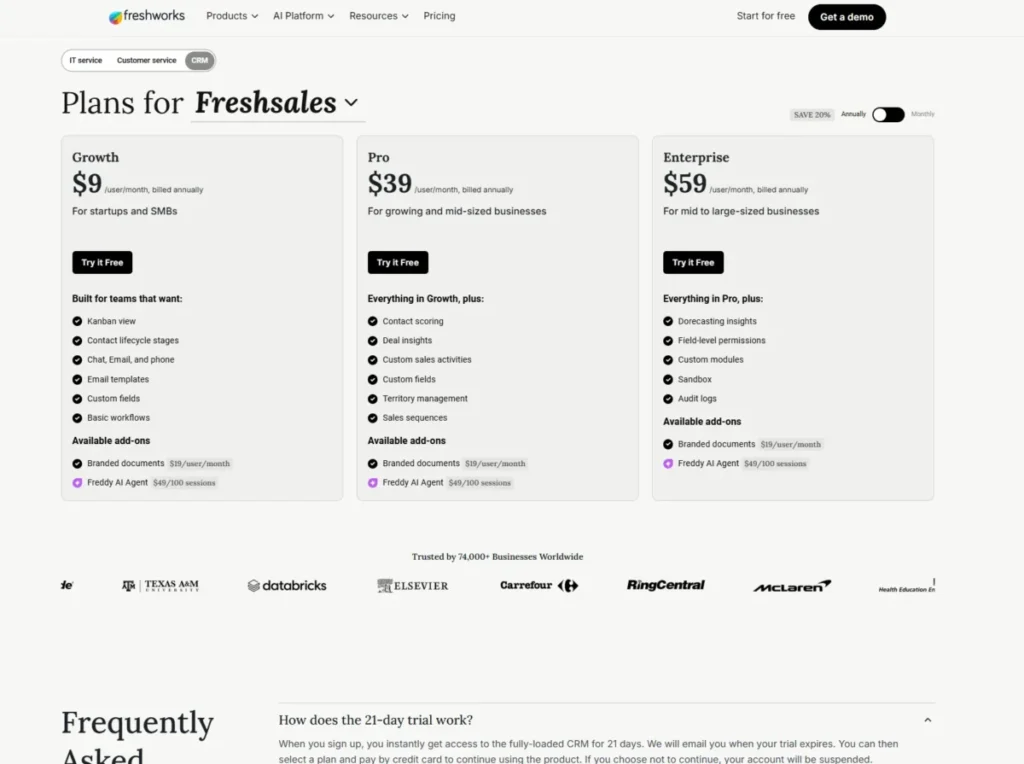
Before comparing replacements, fix the baseline. These are the official US annual prices checked July 16, 2026.
| Freshsales plan | Price (per user/ | Decision-relevant contents |
|---|---|---|
| Free | $0 for up to 3 users | Kanban views, email templates, built-in phone, live chat |
| Growth | $9 | One pipeline, basic workflows, curated reports, custom fields, marketplace access, mobile app |
| Pro | $39 | Multiple pipelines, sequences, auto-assignment, territory management, advanced workflows, custom reports, Freddy AI scoring |
| Enterprise | $59 | Field permissions, custom modules, sandbox, audit logs, forecasting insights |
Source: official Freshsales pricing page.
Freshsales offers a 21-day trial with no credit card required, and the free plan covers three users. An older third-party review published earlier in 2026 showed a different Enterprise figure, so treat the official page as the only current source.
What Freshsales still does well
Honesty about the incumbent keeps the switching decision clean. Our full Freshsales review covers the product in depth, but three strengths matter here.
| Real strengths | Real limitations |
|---|---|
| Built-in email, phone, and chat in one interface from the entry tiers | Multiple pipelines and sequences locked to the $39 Pro tier |
| Approachable interface with comparatively quick adoption, a consistent G2 reviewer pattern | Sandbox, audit logs, and custom modules locked to the $59 Enterprise tier |
| Free plan for three users plus a 21-day trial lowers evaluation risk | Support is 24×5; CPQ and extra Freddy AI sessions are paid add-ons |
| Freddy AI scoring and territory tools on Pro without enterprise-scale implementation | Standalone product does not include the Suite’s marketing scope |
Reviewer patterns on G2 generally praise the approachable interface and built-in communication tools, while treating the product as less suited to heavily customized requirements than larger platforms. That matches the plan-gate picture: Freshsales is strongest as a mid-priced, communication-led sales CRM.
If none of the six exit reasons above applies to you, the honest answer may be to stay. The when-to-stay section near the end makes that case properly.
Best Freshsales Alternatives for Small Teams (1-10 Users)
Rank numbers refer to the overall 2026 ranking, not the order within each team-size band. Small teams feel entry pricing, free-plan limits, and setup effort more than anyone else, so those factors lead here.
Pipedrive: Best for Pipeline Clarity

Pipedrive is the strongest Freshsales alternative for teams leaving because reps stopped updating the CRM. The product puts the visual pipeline at the center of everything, which is exactly the discipline a distracted 5-person sales team needs.
Pricing starts at $14 per seat per month for Lite, billed annually, with a 14-day free trial and no credit card required, per Pipedrive’s pricing page. Growth at $39, Premium at $59, and Ultimate at $79 stack deeper automation and reporting on top; my read is that switchers replacing Freshsales Pro sequences should budget for Growth, not Lite.
It beats Freshsales on pipeline usability and visual clarity, the same conclusion our Pipedrive vs Freshsales comparison reached. The tradeoff is platform breadth: Pipedrive is not a native marketing and service suite, so teams needing those functions will add integrations from its 500-plus marketplace or look at HubSpot instead.
| Pros | Cons |
|---|---|
| $14 annual entry price undercuts Freshsales Pro by $25 per seat | No native marketing-and-service suite; breadth comes from add-ons and integrations |
| Pipeline-first interface drives rep adoption faster than a multi-module CRM | Freshsales scoring, sequences, and phone setup must be rebuilt after migration |
| More than 500 integrations cover most small-team stacks | Deeper automation and reporting sit on Growth ($39) and above |
| 14-day trial with no credit card lowers evaluation risk | No permanent free plan, unlike Freshsales, HubSpot, or Bigin |
- Best for:
- 3-30 person teams that win or lose on deal-stage discipline
- Buyers who want a sales tool, not a platform project
- Teams pairing the CRM with an existing marketing stack
- Avoid if:
- you want native marketing, service, and sales under one vendor. That is HubSpot’s or EngageBay’s case, not Pipedrive’s.
- Migration difficulty:
- Low to Moderate. Records and pipelines map cleanly, but workflows, sequences, and phone configuration are rebuilds.
Our full Pipedrive review covers the tier differences in detail.
Stack fit matters here too: Pipedrive assumes your email marketing, support desk, and billing already live somewhere else and connect through its marketplace. That is an advantage for teams with a settled stack and a gap for teams hoping to consolidate tools.
- Verdict:
- choose Pipedrive when pipeline adoption is the real problem you are solving.
Close: Best for Calling-First Outbound Teams

Close is not a general CRM with a phone bolted on. It is a selling system built around calls, and that is the correct lens for evaluating it.
For a 2-50 person outbound team whose reps spend most of the day dialing, texting, and running sequences, Close replaces Freshsales plus a separate dialer. Solo starts at $9 per user per month billed annually, or $19 monthly, per the Close pricing page .
The budget honesty: the capabilities that make Close distinctive, workflows plus the power and predictive dialers, are gated to higher tiers, and AI usage is credit-based. Essentials runs $35 annually and Growth $99, so I would budget from Essentials at minimum and verify which tier carries the dialers your motion needs before signing.
The 30-day test for a Close migration is simple: call volume per rep should match or beat what your team logged in Freshsales, because that throughput is the entire reason to switch. If it does not, the tooling was never the constraint.
| Pros | Cons |
|---|---|
| Built-in calling, SMS, and email designed for high-volume outbound | Workflows and advanced dialers are excluded from the lowest plans |
| Power and predictive dialers plus call coaching on upper tiers | AI usage is metered by credits, an open-ended cost line |
| Sequences and templates cover the follow-up work Freshsales gates to Pro | Less suited to cross-department CRM programs than HubSpot or Zoho |
| $9 annual Solo tier allows a cheap single-rep start | Phone numbers, routing, and call workflows must be reconfigured at migration |
Best for outbound-heavy inside sales; avoid if your motion is inbound-led or you need marketing and service in the same product.
- Migration difficulty:
- Moderate, driven by telephony reconfiguration rather than data import. See our Close CRM review for the tier-by-tier gates.
- Verdict:
- if call volume drove you off Freshsales, Close is the specialist answer.
Bigin by Zoho CRM: Best for Microbusinesses

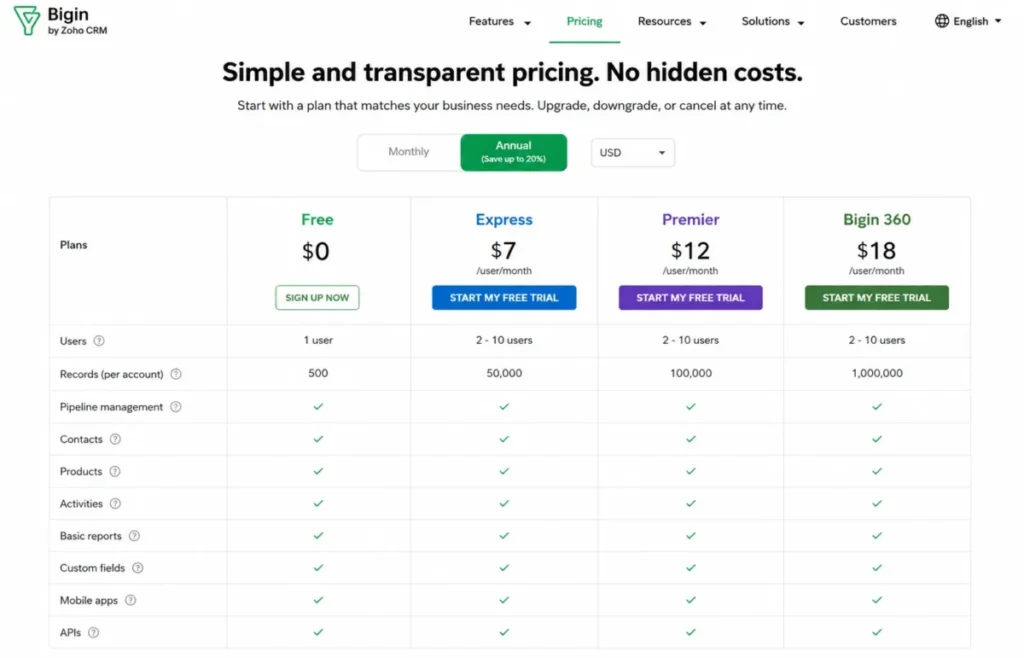
Bigin solves the opposite problem from most tools here: Freshsales being too much CRM for a 2-3 person business. The free tier covers one user, 500 records, and three automations, and Bigin’s pricing page states paid plans start at $7 per user per month.
The ceiling is explicit and worth respecting: paid record bands run 50,000 on Express, 100,000 on Premier, and 1,000,000 on Bigin 360, so a growing team can see exactly when it will outgrow the product. Bigin also documents direct migrations from several CRMs with CSV as the fallback, and advertises free onboarding, a 15-day trial, and no forced contracts.
| Pros | Cons |
|---|---|
| Paid plans from $7 per user, the lowest standard entry price in this list | Free tier caps at one user and 500 records |
| Documented CRM migrations plus CSV fallback reduce switching friction | Record and automation ceilings force a second migration if you scale past them |
| Team pipelines, workflows, and telephony integrations cover core small-team selling | No answer for territory management, sequences depth, or governance |
- Avoid if:
- you expect to pass ten seats or need advanced automation within a year. Higher-tier prices did not render reliably in our research session, so verify the live USD table before budgeting beyond the $7 entry point.
- Migration difficulty:
- Low for a clean, small dataset.
- Verdict:
- the right landing spot for a microbusiness that overbought Freshsales.
EngageBay: Best Affordable All-in-One Bundle

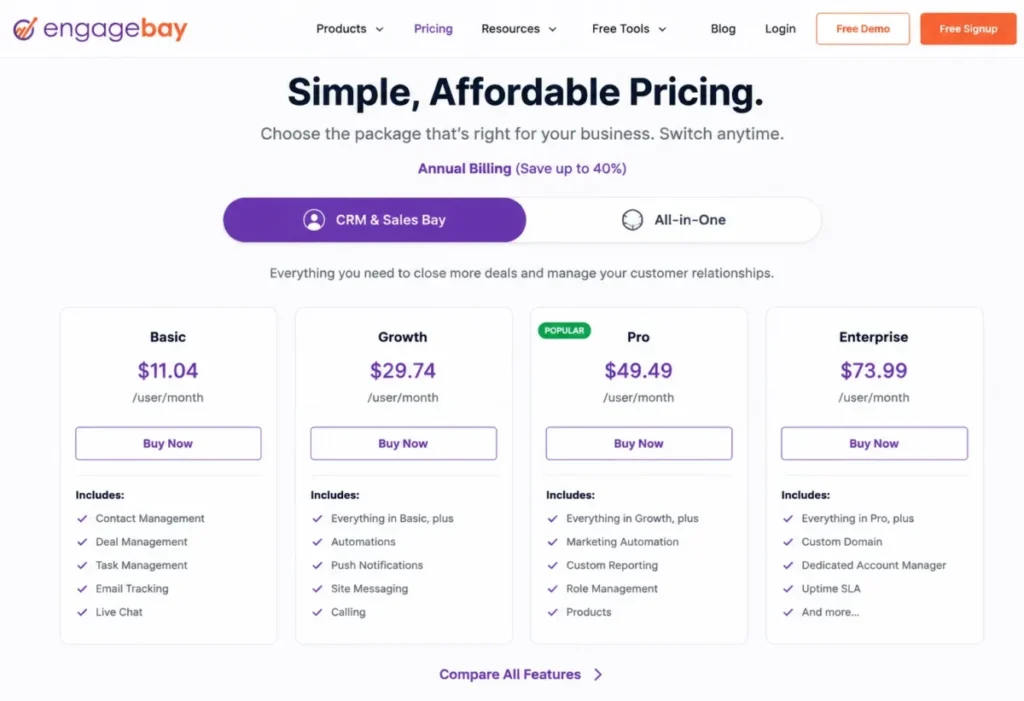
EngageBay’s prices only make sense once you name the package. CRM & Sales Bay is advertised from $11.04 per user per month and the All-in-One bundle from $12.74 under the billing offer displayed on the EngageBay pricing page, and articles that quote one figure without the package name are comparing unlike things.
For a 2-15 person startup that wants sales, email marketing, live chat, and service ticketing under one low-cost vendor, the All-in-One bundle is the actual Freshsales-plus-more replacement. EngageBay also advertises free migration from another platform, though the scope of that service is worth confirming before you rely on it.
| Pros | Cons |
|---|---|
| CRM & Sales Bay from $11.04 per user undercuts Freshsales Growth’s practical successor tiers | Two package families make advertised prices easy to misread |
| Free plan plus advertised free migration lowers total switching cost | Interface polish and advanced depth trail HubSpot and Zoho |
| Marketing, chat, and ticketing bundled where Freshsales standalone stops at sales | Enterprise-grade governance and ecosystem depth are not the offer |
- Avoid if:
- you need enterprise controls or expect to consolidate a complex stack; the bundle is broad, not deep.
- Migration difficulty:
- Low to Moderate, with the vendor-advertised migration offsetting some setup work.
- Verdict:
- the budget consolidation play, provided you price the right package.
Best Freshsales Alternatives for Growing Teams (10-50 Users)
At this scale the decision moves from entry price to plan gates, admin capacity, and what breaks first as headcount grows. The two highest-ranked alternatives in 2026 both live in this band.
HubSpot Sales Hub: Best Connected Customer Platform

HubSpot Sales Hub is our number one Freshsales alternative because it fixes the most common structural complaint: standalone Freshsales stops at sales, while HubSpot connects sales, marketing, service, content, and operations data on one customer platform. For an inbound-led 10-50 person team, that connection is the whole point of switching.
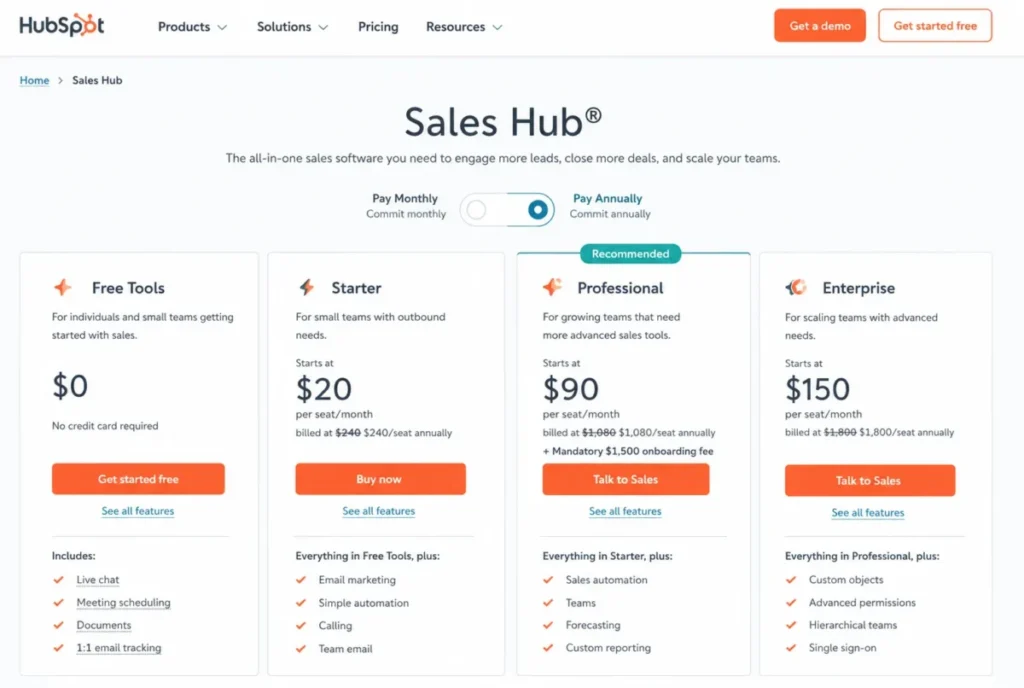
The cost story needs all four tiers, per the official Sales Hub pricing page . The free CRM is permanent, with no expiration and no credit card.
Starter displayed a promotional $7 per seat per month on annual billing that day, while the standard price shown on monthly billing was $20 per seat, so treat the $7 as a dated offer, not the renewal baseline.
Professional displayed at $90 per seat annually ($100 monthly) and Enterprise at $150, and both carried mandatory onboarding fees on the observed page. That onboarding charge is a first-year cost most Freshsales alternatives lists never mention, and it makes the practical migration target a five-figure first year at ten seats for teams that need automation and custom reporting.
Our HubSpot pricing analysis walks through the seat and credit mechanics.
| Pros | Cons |
|---|---|
| Permanent free CRM with no expiration lets you pilot before paying | Professional and Enterprise carry mandatory onboarding fees on top of seat prices |
| Marketing, service, and sales share one contact record, ending the Suite-vs-standalone question | Automation and reporting depth get expensive: $90 per seat annually at Professional |
| Sequences, workflows, forecasting, and calling cover the core Freshsales Pro gates | Promotional Starter pricing ($7 on July 16, 2026) can change without notice |
| Extensive marketplace and ecosystem reduce integration gaps | Property mapping, lifecycle stages, and workflow rebuilds make migration a real project |
- Best for:
- Inbound-led teams of 10-50 that want marketing and sales on one platform
- Teams that will use the free CRM as a staged migration path
- Buyers with budget room for Professional once automation needs mature
- Avoid if:
- your budget is anchored to Freshsales Growth’s $9 seat price; the tiers you would eventually need do not live in that range.
- Migration difficulty:
- Moderate. Core records import well, but properties, lifecycle definitions, workflows, sequences, scoring, and permissions need mapping or rebuilding.
The full picture is in our HubSpot CRM review.
- Verdict:
- the default replacement for teams leaving Freshsales for platform breadth rather than price.
Zoho CRM: Best Value and Customization

Zoho CRM is the value pick for teams that found Freshsales Pro expensive for the customization it delivers, with one honest condition: someone on your team has to own the configuration. The product rewards an administrator and punishes the absence of one.
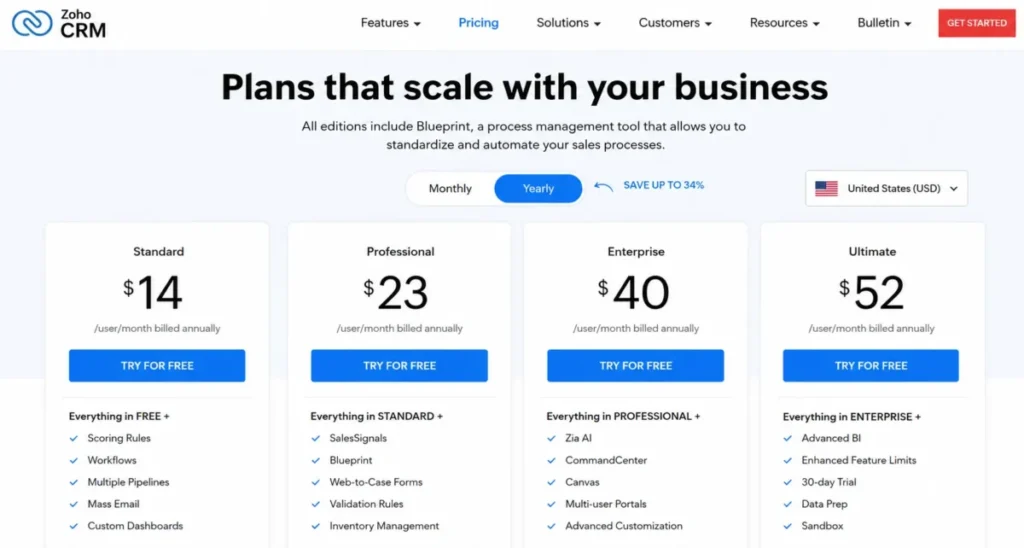
Zoho publishes Free, Standard, Professional, Enterprise, and Ultimate editions on its official pricing page, with a free plan for up to three users. During our July 16, 2026 research session the official page rendered a non-US currency.
The US annual values, $14 Standard, $23 Professional, $40 Enterprise, and $52 Ultimate per user per month, are corroborated from current US-focused reporting. Confirm them on the official page in a US/USD state before you budget.
Feature depth scales through the editions: workflow rules, Blueprint process controls, forecasting, and analytics arrive as you climb. Against Freshsales, the trade is more configurable power per dollar in exchange for a denser interface and more deliberate setup, and Gartner reviewer context echoes that administration theme.
Our Zoho CRM pricing guide maps the edition gates.
| Pros | Cons |
|---|---|
| Standard corroborated at $14 annually undercuts Freshsales Pro by $25 per user | Official pricing page rendered a non-US locale in research; verify USD values before budgeting |
| Blueprint process controls and workflow rules exceed Freshsales’ mid-tier automation | Denser interface and heavier admin burden than Freshsales’ approachable design |
| Free plan for three users matches Freshsales’ free allowance | Modules, layouts, scoring, roles, and reports all need deliberate remapping at migration |
| Broad Zoho ecosystem covers books, desk, campaigns, and analytics | Teams without a CRM owner tend to underuse the customization they paid for |
- Best for
- 5-50 person teams with an assigned CRM administrator; avoid if you want an opinionated, ready-made pipeline out of the box.
- Migration difficulty:
- Moderate to High, driven by remapping rather than data transfer. See our Zoho CRM review for where the admin effort lands.
- Verdict:
- the best price-to-customization ratio in this list, for teams staffed to use it.
monday CRM: Best Cross-Functional Flexibility

monday CRM suits teams whose sales process is tangled up with onboarding, projects, and operations work that a classic CRM ignores. Boards, dashboards, and automations reshape into whatever the process is in real life.
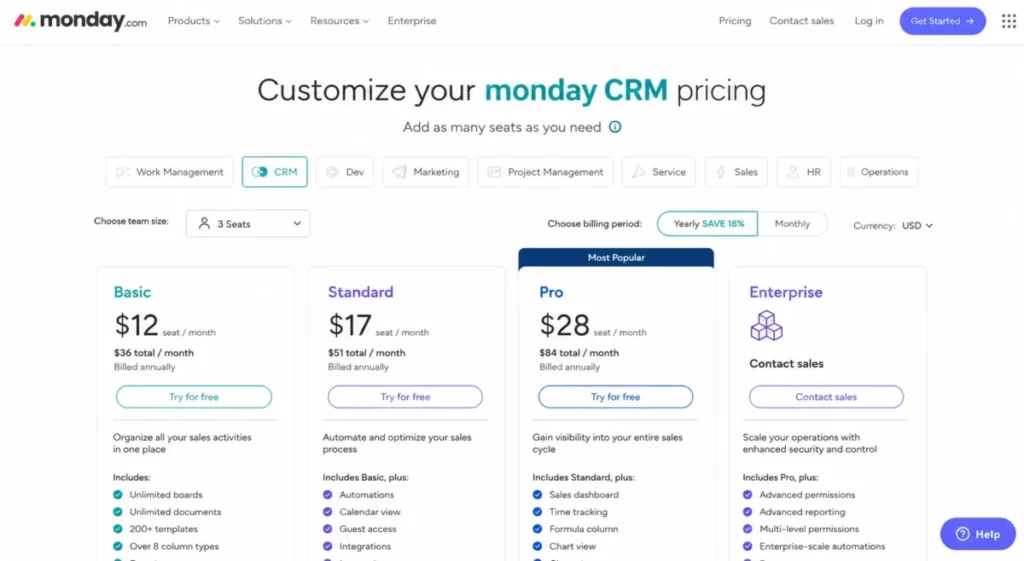
The entry math has a catch. Current US reporting corroborates Basic at $12, Standard at $17, and Pro at $28 per seat per month billed annually, with a three-seat minimum, while the official pricing page rendered a non-US currency in our session, so confirm the USD state before budgeting.
The seat floor means a solo buyer’s real entry is three seats, roughly $432 per year on Basic ($12 x 3 seats x 12 months).
The flexibility cuts both ways: without someone enforcing board conventions, five reps will build five different CRMs. Freshsales’ opinionated structure is a feature monday deliberately does not have.
| Pros | Cons |
|---|---|
| Boards flex across sales, onboarding, and operations in one tool | Three-seat minimum raises the practical entry cost for 1-2 person teams |
| Corroborated $12 Basic seat price is among the cheapest in this band | US pricing needed corroboration; official page rendered another locale in research |
| Dashboards and automations are simple enough for non-admins to build | High flexibility produces inconsistent CRM design without governance |
| Quotes and invoices available on eligible tiers | Records, relationships, and reporting logic must be redesigned as boards |
- Best for
- 3-50 person teams running sales inside broader work management; avoid if you want a traditional, opinionated sales CRM.
- Migration difficulty:
- Moderate, because the redesign is conceptual, not just field mapping. Our monday.com review covers the platform side.
- Verdict:
- pick monday CRM for shape-shifting workflows, not for CRM orthodoxy.
Copper CRM: Best for Google Workspace Teams

Copper’s pitch is that the CRM should live where your team already works: Gmail, Google Calendar, and Drive. For a relationship-led 5-30 person team on Google Workspace, that placement beats feature checklists.
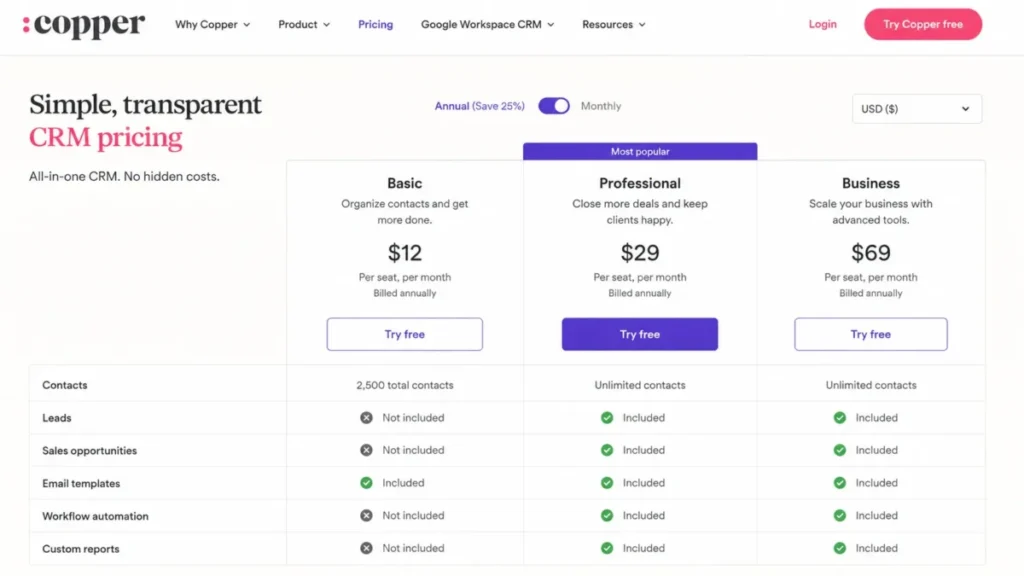
The tier trap matters more than the headline price. Basic costs $23 per seat per month billed annually ($29 monthly) but caps contacts at 2,500 and, per Copper’s pricing comparison , does not include leads or sales opportunities.
The honest comparison against Freshsales Pro is Copper Professional at $59 annually, which adds leads, opportunities, workflows, bulk email, and a 15,000-contact limit; Business runs $99 with unlimited contacts.
| Pros | Cons |
|---|---|
| Deep Google Workspace alignment keeps reps working inside Gmail | Basic excludes leads and sales opportunities, so it cannot replace a full sales workflow |
| Projects and processes extend the CRM past the closed-won moment | 2,500-contact cap on Basic forces early upgrades |
| Contact enrichment and workflow automation on Professional | Professional at $59 annually costs more than Freshsales Pro at $39 |
| Low retraining cost for teams already living in Google apps | Weak fit for Outlook or mixed-stack teams |
- Best for
- Gmail-native teams that value relationship context over pipeline mechanics; avoid if your company is not committed to Google Workspace, because the core differentiation disappears.
- Migration difficulty:
- Low to Moderate for Google-based teams; automations, custom fields, and reports still need rebuilding. Details in our Copper CRM review.
- Verdict:
- the strongest Gmail-native replacement, priced at Professional, not Basic.
Insightly CRM: Best CRM-to-Project Handoff

Insightly earns its slot on one workflow: the won opportunity that has to become a delivery project without re-entering data. Agencies, consultancies, and service firms feel that handoff every week, and most sales-only CRMs ignore it.
Pricing runs $29 for Plus, $49 for Professional, and $99 for Enterprise per user per month billed annually, with a 14-day trial, per Insightly’s pricing page . Relationship linking and workflow automation carry the sales side, and project delivery carries the post-sale side.
| Pros | Cons |
|---|---|
| Opportunity-to-project conversion keeps sales and delivery on one record | Less compelling for pure outbound teams with no post-sale delivery in the CRM |
| Relationship linking maps stakeholder webs better than flat contact lists | Annual billing framing; confirm terms if you need monthly flexibility |
| $29 Plus entry is mid-band for this list | Marketing and AppConnect capabilities can require separate products |
The buyer test is simple: if your delivery work lives in a separate project tool and deals get re-keyed into it by hand, Insightly removes that re-keying. If delivery never touches the CRM, you are paying for a bridge you will not cross.
- Best for
- 5-100 person service businesses; avoid if Close or Pipedrive’s tighter sales focus matches your motion better.
- Migration difficulty:
- Moderate, mostly redesigning handoffs and relationship links. Our Insightly CRM review covers the delivery workflow.
- Verdict:
- choose Insightly when the deal is the start of the work, not the end.
Best Freshsales Alternatives for Enterprise Teams (50+ Users)
Past fifty seats the constraint is rarely the seat price. It is governance, data architecture, and whether anyone owns the system.
Salesforce Sales Cloud: Best for Enterprise Governance
Salesforce is the answer when Freshsales Enterprise’s governance, field permissions, custom modules, sandbox, and audit logs at $59, is still not enough. Custom objects, granular permissions, and the AppExchange ecosystem form the deepest governance and customization stack in this list.
The official pricing page lists Free Suite at $0, Starter Suite at $25, Pro Suite at $100, Enterprise at $175, Unlimited at $350, and Agentforce 1 Sales at $550 per user per month; confirm billing and contract terms with Salesforce, since they vary by edition and purchase route. The license is one component of switching cost: object architecture, permissions, automations, integrations, data quality, and training make this a managed implementation, not a weekend import.
My rule for lean teams: if nobody on staff will own Salesforce administration, the platform’s power converts into shelfware faster than any product here.
The budget conversation should therefore start with people, not licenses. A 60-seat organization moving from Freshsales Enterprise is trading a $59 self-service product for a $100-to-$175 platform plus an admin salary, and the trade only pays off when process complexity genuinely demands custom objects and granular permissions.
| Pros | Cons |
|---|---|
| Custom objects and field-level governance exceed Freshsales Enterprise | License price understates implementation, administration, and training cost |
| AppExchange ecosystem covers integration needs at any scale | High migration effort: architecture, permissions, and automations need a managed project |
| Starter Suite at $25 offers a small-team on-ramp with a growth path | Overbuy risk is real for teams under 50 seats without admin capacity |
| Forecasting, analytics, and AI capabilities scale with the org | Contract and billing terms vary by edition and need direct confirmation |
- Best for
- 50-plus-seat or operationally complex organizations with dedicated administration; avoid if you are switching to save money, because you will not.
- Migration difficulty:
- High, as an editorial estimate based on data-model and governance scope. The full picture is in our Salesforce CRM review.
- Verdict:
- the governance ceiling of this list, and it must be priced and staffed like one.
Freshsales Alternatives Pricing Compared
Every price below is per user per month on annual billing, checked against official vendor pages on July 16, 2026 unless marked otherwise. Prices change; verify the official page before purchase.
Two caveats from the research session. Zoho CRM and monday.com rendered non-US currencies on their official pages, so their US values are corroborated from current US reporting, and Bigin’s paid tiers beyond the $7 entry did not render reliably.
| Product | Starting price | Practical sales-ready tier | Free plan | Trial | Hidden costs to watch |
|---|---|---|---|---|---|
| Freshsales | $9 (Growth) | Pro, $39 | Yes, 3 users | 21 days | CPQ add-on; extra Freddy AI session packs |
| HubSpot Sales Hub | $7 Starter (promotional on July 16, 2026; $20 monthly) | Professional, $90 | Yes, permanent free CRM | Free plan replaces trial | Mandatory onboarding fees on Professional and Enterprise |
| Zoho CRM | $14 (Standard, corroborated US value) | Professional, $23 | Yes, 3 users | Not verified in this research | Admin time |
| Pipedrive | $14 (Lite) | Growth, $39 | No free plan | 14 days, no credit card | Add-ons; automation depth sits on higher tiers |
| Close | $9 (Solo) | Essentials, $35; dialers gate higher | No free plan listed | Not verified in this research | Metered AI credits; advanced dialers on upper tiers |
| Salesforce Sales Cloud | $25 (Starter Suite) | Pro Suite, $100 | Free Suite, $0 | Not verified in this research | Implementation and administration; contract terms vary |
| monday CRM | $12 (Basic, corroborated US value) | Standard, $17 | Not published in this research | Not verified in this research | Three-seat minimum |
| Copper CRM | $23 (Basic) | Professional, $59 | No free plan listed | Not verified in this research | Basic excludes leads and opportunities; 2,500-contact cap |
| Insightly CRM | $29 (Plus) | Plus, $29 | No free plan listed | 14 days | Marketing/ |
| Bigin by Zoho CRM | $7 | Express | Yes, 1 user, 500 records | 15 days | Record bands: 50K/ |
| EngageBay | $11.04 (CRM & Sales Bay, displayed offer) | CRM & Sales Bay | Yes | Not verified in this research | Two package families; confirm package and billing term |
Source: official vendor pricing pages linked in each product section; Zoho CRM and monday CRM carry corroborated US values.
Bigin, Zoho CRM and monday CRM prices were re-checked on their official pricing pages (USD, annual billing) on September 26, 2026: Bigin, Zoho CRM and monday CRM.
The starting-price column is nearly useless on its own. Copper’s $23 Basic cannot run a lead-to-opportunity workflow, HubSpot’s $7 is a dated promotion, and monday’s $12 comes in three-seat buckets, so the practical-tier column is the one to budget from.
What the totals look like at 5, 10, and 50 seats
Annual subscription totals below are derived calculations: seats x practical-tier price x 12 months, using the tiers named above. Onboarding fees, add-ons, and taxes are excluded except where noted.
| Product (assumed tier) | 5 seats/ | 10 seats/ | 50 seats/ |
|---|---|---|---|
| Freshsales (Pro, $39) | $2,340 | $4,680 | $23,400 |
| HubSpot (Professional, $90) | $5,400 + onboarding fee | $10,800 + onboarding fee | $54,000 + onboarding fee |
| Zoho CRM (Professional, $23) | $1,380 | $2,760 | $13,800 |
| Pipedrive (Growth, $39) | $2,340 | $4,680 | $23,400 |
| Close (Essentials, $35) | $2,100 | $4,200 | $21,000 |
| Salesforce (Pro Suite, $100) | $6,000 | $12,000 | $60,000 |
| monday CRM (Standard, $17) | $1,020 | $2,040 | $10,200 |
| Copper (Professional, $59) | $3,540 | $7,080 | $35,400 |
| Insightly (Plus, $29) | $1,740 | $3,480 | $17,400 |
| Bigin (paid entry, $7) | $420 | $840 | $4,200, but record caps make this scale a poor fit |
| EngageBay (CRM & Sales Bay, $11.04) | $662 | $1,325 | $6,624 |
No product is cheapest in every configuration. At five seats the spread between Zoho Professional and HubSpot Professional is about $4,000 a year before HubSpot’s onboarding fee; at fifty seats it passes $40,000, which is the point where a finance team starts asking why the platform breadth is worth a Zoho-sized gap.
I would also separate first-year cost from renewal cost. HubSpot front-loads onboarding fees, Salesforce front-loads implementation labor, and EngageBay and Bigin front-load almost nothing, which is exactly why they fit smaller teams.
Feature Gates: Where Each Alternative Puts Its Paywall
Freshsales’ pain is rarely a missing feature; it is a feature living one tier higher than the budget. Here is where each replacement puts the equivalent gate, from official pages checked July 16, 2026.
| Product | First paid gate a Freshsales switcher hits |
|---|---|
| Freshsales | Multiple pipelines, sequences, and advanced workflows at Pro ($39); sandbox and audit logs at Enterprise ($59) |
| HubSpot Sales Hub | Automation and reporting depth at Professional ($90) plus mandatory onboarding |
| Zoho CRM | Deeper automation, process control, and analytics climb through Professional ($23) and Enterprise ($40) |
| Pipedrive | Deeper automation and reporting above Lite, on Growth ($39) through Ultimate ($79) |
| Close | Workflows and power/ |
| Salesforce | Governance scales with edition; Enterprise ($175) and up carry the deep controls |
| monday CRM | Tier ladder Basic to Pro ($12-$28, corroborated); three-seat minimum at entry |
| Copper CRM | Leads, opportunities, and workflows start at Professional ($59); Basic caps 2,500 contacts |
| Insightly CRM | Professional ($49) and Enterprise ($99) carry the deeper automation and permissions |
| Bigin | Record bands: 500 free, then 50K/ |
| EngageBay | Capability split by package: CRM & Sales Bay vs All-in-One, priced separately |
Read this table the way a finance reviewer would: the question is never “does it have automation” but “which tier, at which seat count, carries the automation our team runs in Freshsales Pro.”
Migration Effort: What Changes When You Leave Freshsales
Freshsales’ support documentation covers CSV migration for leads, deals, contacts, and accounts, per the Freshsales support portal. That is the easy half.
Historical activities, email records, attachments, workflow logic, lead scoring, phone numbers, reports, and permission schemes do not move as a package. Plan for records to transfer and for logic to be rebuilt, and treat any vendor promise beyond that as something to verify in writing.
Our CRM migration guide covers the sequencing.
| Alternative | Migration difficulty | Main risk to plan for |
|---|---|---|
| HubSpot Sales Hub | Moderate | Property mapping, lifecycle definitions, and workflow rebuilds; onboarding fees land in year one |
| Zoho CRM | Moderate to High | Modules, layouts, scoring, roles, and reports all need deliberate remapping |
| Pipedrive | Low to Moderate | Sequences, scoring, phone setup, and reports are rebuilds; records map cleanly |
| Close | Moderate | Phone numbers, call workflows, routing, and templates need reconfiguration |
| Salesforce Sales Cloud | High | Object architecture, permissions, and automations need a managed implementation |
| monday CRM | Moderate | The team must redesign records as boards, plus dashboards and automations |
| Copper CRM | Low to Moderate | Non-Google integrations, custom fields, and reports need rebuilding |
| Insightly CRM | Moderate | Project handoffs, relationship links, and workflow rules need redesign |
| Bigin | Low | Simpler model may force pruning fields, automations, or records |
| EngageBay | Low to Moderate | Vendor advertises free migration; confirm scope for fields, automations, and telephony |
Migration difficulty here is an editorial estimate based on data-model complexity, workflow rebuild effort, integration requirements, and setup depth, not a vendor-guaranteed timeline. No duration promises appear in this article because no vendor publishes consistent end-to-end switchover times.
One practical sequence lowers the risk regardless of destination: export and archive everything from Freshsales first, migrate core records second, rebuild one pipeline and its automations third, and only then cut the team over. Running both CRMs for a short overlap period can reduce cutover and data-loss risk.
How to Choose the Right Freshsales Alternative
Five questions settle most shortlists faster than a feature matrix.
- What broke in Freshsales? If it was the Growth-to-Pro jump, compare against $39, not $9; if it was governance, you are shopping the Enterprise band.
- What is your seat count in 18 months? monday’s seat buckets, Bigin’s record bands, and HubSpot’s tier jumps all behave differently as you grow.
- Which tier do you need in practice? Price the tier that carries your automation and reporting, never the entry tier.
- Who owns the CRM internally? Zoho and Salesforce reward an administrator; Pipedrive and Bigin forgive not having one.
- How much migration risk can you absorb? If the answer is little, start with the low-difficulty rows in the matrix above.
Decision tree by sales motion
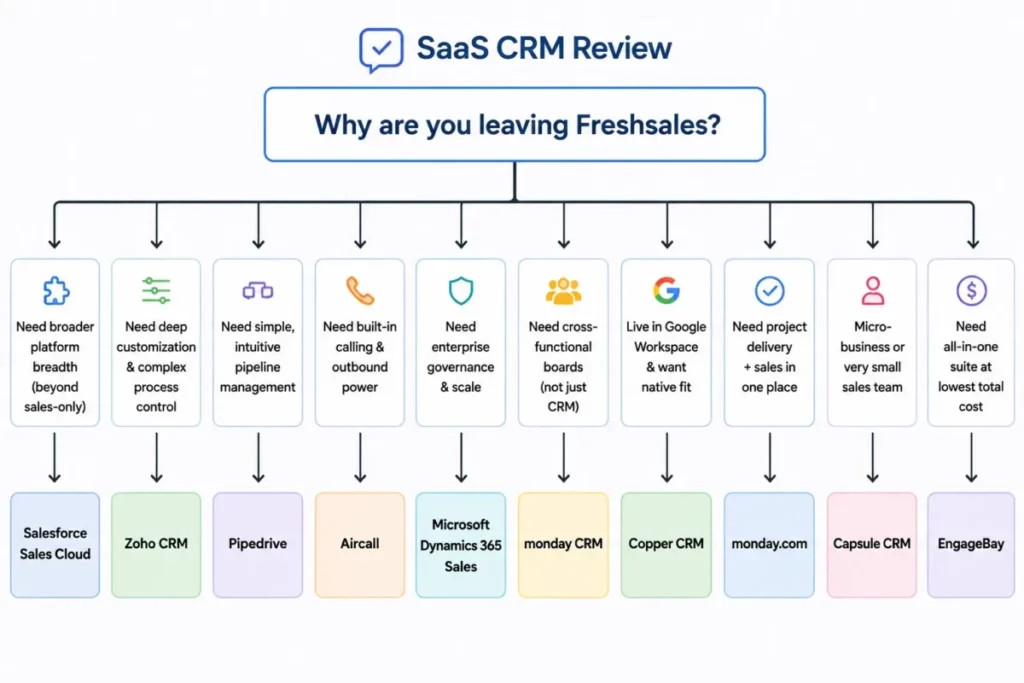
- Need marketing, service, and sales connected on one platform: HubSpot Sales Hub.
- Want maximum customization per dollar and have an admin: Zoho CRM.
- Need reps to keep using the pipeline: Pipedrive.
- Live on the phone, outbound-first: Close.
- Need enterprise governance and custom objects: Salesforce Sales Cloud.
- Sales runs inside cross-functional boards and projects: monday CRM.
- Team works out of Gmail all day: Copper CRM.
- Won deals become delivery projects: Insightly CRM.
- One-to-ten people, simple pipeline, lowest cost: Bigin by Zoho CRM.
- Want an affordable sales-marketing-service bundle: EngageBay.
Which Freshsales Alternative Should You Avoid?
Every product here is someone’s right answer and someone else’s expensive mistake. The avoid-if column is the trust test most alternatives lists skip.
| Alternative | Avoid it if… |
|---|---|
| HubSpot Sales Hub | Your budget is anchored near Freshsales Growth; Professional plus onboarding is a different spending class |
| Zoho CRM | Nobody will own configuration; unadministered Zoho becomes an expensive contact list |
| Pipedrive | You need native marketing and service breadth rather than a focused sales tool |
| Close | Your motion is inbound-led or call volume is low; you would pay for dialers you never run |
| Salesforce Sales Cloud | You have no admin capacity or fewer than 50 seats without complex process needs |
| monday CRM | You want an opinionated CRM structure, or you are a 1-2 person team facing the three-seat minimum |
| Copper CRM | Your company is not on Google Workspace; the core advantage disappears |
| Insightly CRM | You run pure outbound with no post-sale delivery living in the CRM |
| Bigin | You expect to pass the record bands or need sequences and territory depth within a year |
| EngageBay | You need enterprise depth, granular governance, or polish comparable to the platform leaders |
If several avoid-if rows describe you, that is usually a sign to stay put and renegotiate the Freshsales tier instead of migrating.
When to Stay with Freshsales
Switching CRMs is a tax on selling time, so the stay case deserves equal footing.
Stay if these hold:
- Your team fits inside one pipeline and Growth’s basic workflows, because $9 per user is hard to beat for built-in email, phone, and chat.
- You already run Freshsales Pro and the complaints are about polish, not plan gates; a rebuild elsewhere will not fix taste.
- Weekday 24×5 support matches your operating hours.
- Your reps have finally adopted it; adoption is the asset a migration puts at risk first.
- The Freshworks ecosystem, including Freshdesk, is already part of your stack.
Switch if these hold instead:
- You need multiple pipelines or sequences and the jump from $9 to $39 per user breaks the budget.
- Governance requirements force you to $59 Enterprise for audit logs alone.
- Your sales motion is specialized: calling-first, Gmail-native, or project-delivery-led.
- CPQ and Freddy AI add-on costs are compounding past a competitor’s bundled price.
- You need weekend vendor support and can verify an alternative offers it in writing.
Final Verdict: The Best Freshsales Alternative for Most Teams
For many 10–50 person teams leaving over plan gates and platform breadth, HubSpot Sales Hub is the best Freshsales alternative in 2026. The permanent free CRM de-risks the pilot, the platform closes the marketing-and-service gap standalone Freshsales cannot, and the tradeoff is a first-year cost you can at least see coming: $90 per seat at Professional plus a mandatory onboarding fee, per the official page checked July 16, 2026.
By buyer type:
- Best value: Zoho CRM, with Professional corroborated at $23 per user and the deepest customization per dollar, if you staff an admin.
- Best simple pipeline: Pipedrive, from $14, for teams whose problem is adoption.
- Best free plan: HubSpot’s permanent free CRM for functionality, EngageBay’s free plan for team-wide coverage on a budget.
- Best enterprise: Salesforce Sales Cloud, budgeted as an implementation program, not a subscription.
- Best microbusiness: Bigin, from $7, until the record bands say otherwise.
The stay-or-switch signal in one line: switch when a specific Freshsales plan gate, add-on, or missing sales motion costs you more than a migration would, and stay when your complaint is generic dissatisfaction, because generic dissatisfaction migrates with you. Teams still weighing platform breadth against a standalone sales tool can compare the wider field in our best sales and marketing software guide.
Whatever you choose, run a 30/90-day adoption check. After 30 days, every rep should be logging activity in the new pipeline without chasing; after 90 days, your pipeline reports should be trusted enough to run forecast meetings from.
If either test fails, the problem is rollout, not the software, and buying a third CRM will not fix it.
FAQ: Freshsales Alternatives
What is the best alternative to Freshsales?
HubSpot Sales Hub is the best alternative for most 10-50 person teams because it pairs a permanent free CRM with connected marketing and service tools, closing the platform gap standalone Freshsales leaves open. The right answer shifts with your exit reason: Zoho CRM for value and customization, Pipedrive for pipeline clarity, Close for calling-heavy outbound teams.
Is Freshsales better than HubSpot?
No, unless your budget is the deciding factor. Freshsales Pro at $39 per user annually undercuts HubSpot Professional at $90 plus a mandatory onboarding fee, and it bundles phone and chat early.
HubSpot wins on platform breadth, the permanent free CRM, and marketing-sales alignment, which is why it ranks first for teams leaving over connected-platform needs.
Is Zoho CRM better than Freshsales?
For customization per dollar, yes: Zoho’s Standard and Professional tiers, corroborated at $14 and $23 per user annually, deliver deeper configuration than Freshsales at similar prices. For out-of-the-box usability, Freshsales is the easier product.
Zoho rewards teams with an administrator and punishes teams without one, so staff the role before you switch.
Is Pipedrive easier to use than Freshsales?
For day-to-day pipeline work, the design is simpler by intent: Pipedrive centers everything on the visual pipeline, while Freshsales spreads attention across contacts, chat, phone, and AI panels. The tradeoff is breadth, since Pipedrive is not a native marketing and service platform.
Reps tend to adopt narrower tools faster, and adoption is the metric that matters.
Does Freshsales have a free plan?
Yes. Freshsales offers a free plan for up to three users with core contact management, Kanban views, email templates, built-in phone, and live chat, per the official pricing page checked July 16, 2026.
Paid tiers run $9 (Growth), $39 (Pro), and $59 (Enterprise) per user per month billed annually, with a 21-day free trial and no credit card required.
Why do companies leave Freshsales?
The most common trigger is the Growth-to-Pro gate: multiple pipelines, sales sequences, auto-assignment, and territory management all require the $39 tier. Other reasons include Enterprise-only governance at $59, weekday-only 24×5 support, CPQ and Freddy AI add-on costs, and sales motions like calling-first outbound or Gmail-native work that fit a specialist tool better.
Can I export my data from Freshsales?
Yes. Freshsales support documentation covers CSV migration for leads, deals, contacts, and accounts.
Plan separately for what CSV does not carry: historical activities, email threads, workflow logic, lead scoring, phone configuration, and reports need rebuilding in the destination CRM. Archive a full export before you start, and keep Freshsales running through a short overlap period.
What’s the cheapest Freshsales alternative?
There is no universal cheapest option, only cheapest for a configuration. Bigin’s paid plans start at $7 per user and EngageBay’s CRM & Sales Bay is advertised from $11.04, but Bigin carries record bands and EngageBay splits capability across packages.
At ten seats needing serious automation, Zoho Professional’s corroborated $23 rate is often the strongest cost-to-capability ratio.
Can Bigin replace Freshsales for a three-person company?
Yes, if your process fits a simple pipeline and your data fits the record bands: 500 records free, then 50,000 on Express. Paid plans start at $7 per user, migrations from several CRMs are documented, and CSV covers the rest.
It cannot replace Freshsales Pro’s sequences, territory management, or reporting depth, so scaling teams should look higher up this list.
Should I stay with Freshsales or switch?
Stay if your team fits one pipeline on the $9 Growth tier, or if you already run Pro and your complaints are cosmetic, because adoption is expensive to rebuild. Switch when a specific plan gate, add-on cost, or unsupported sales motion is measurably costing you more than a migration would.
Generic dissatisfaction is not a switching trigger; it travels with you.