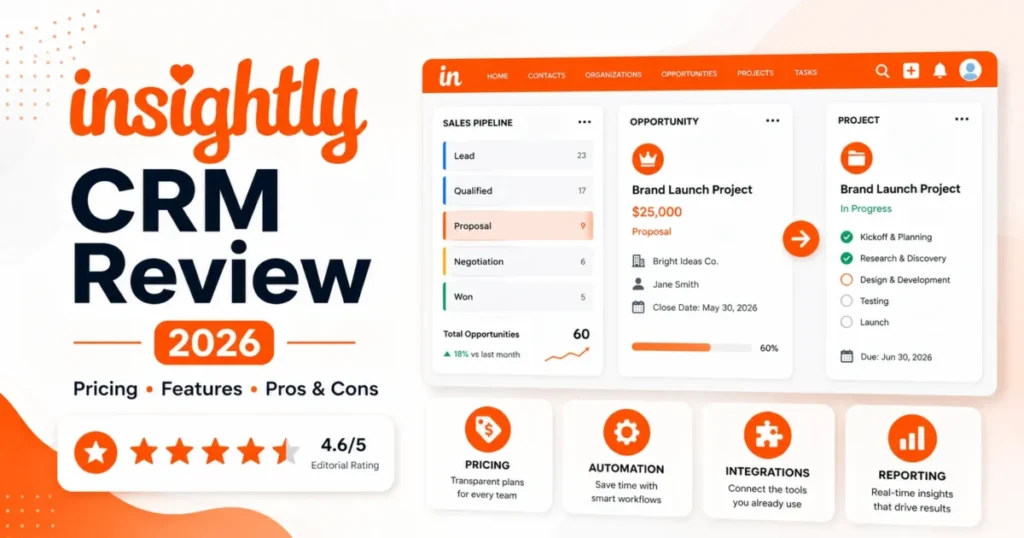
Insightly CRM earns its price when a won deal has to become a delivery project inside the same system. It is the wrong purchase when a team only needs a pipeline, a reminder, and a cheap seat.
This Insightly CRM review is built from Insightly’s official pricing, product, API, onboarding, and security pages checked on July 10, 2026, plus review-platform sentiment from G2, Capterra, TrustRadius, and Gartner Peer Insights.
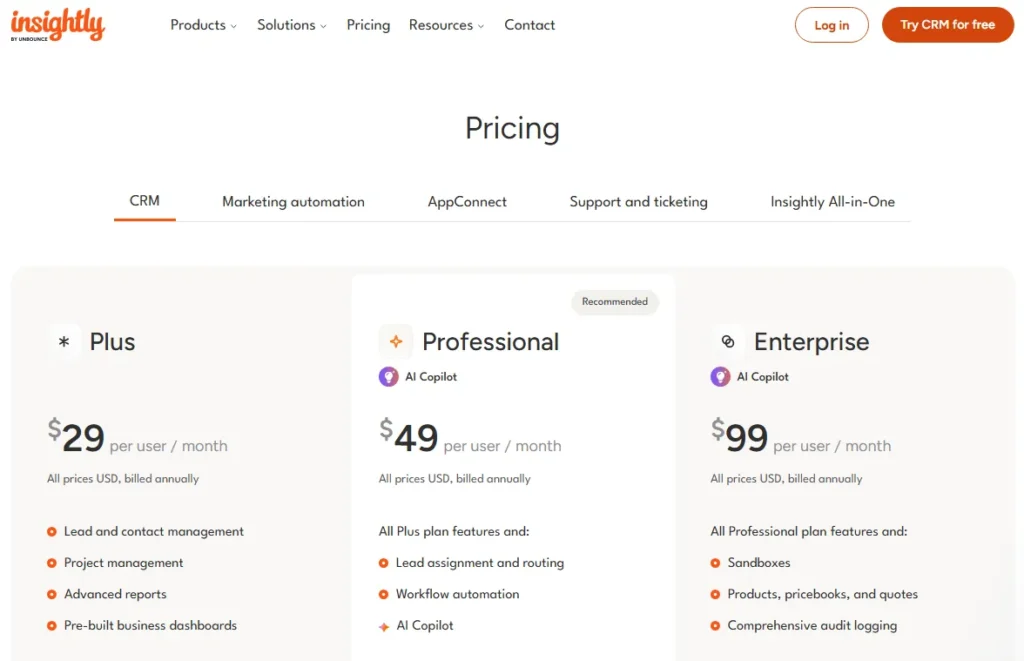
Pricing starts at $29 per user per month, USD, billed annually. The plan most teams land on is Professional at $49 per user per month, because workflow automation, lead routing, and AI Copilot do not exist on the entry tier.
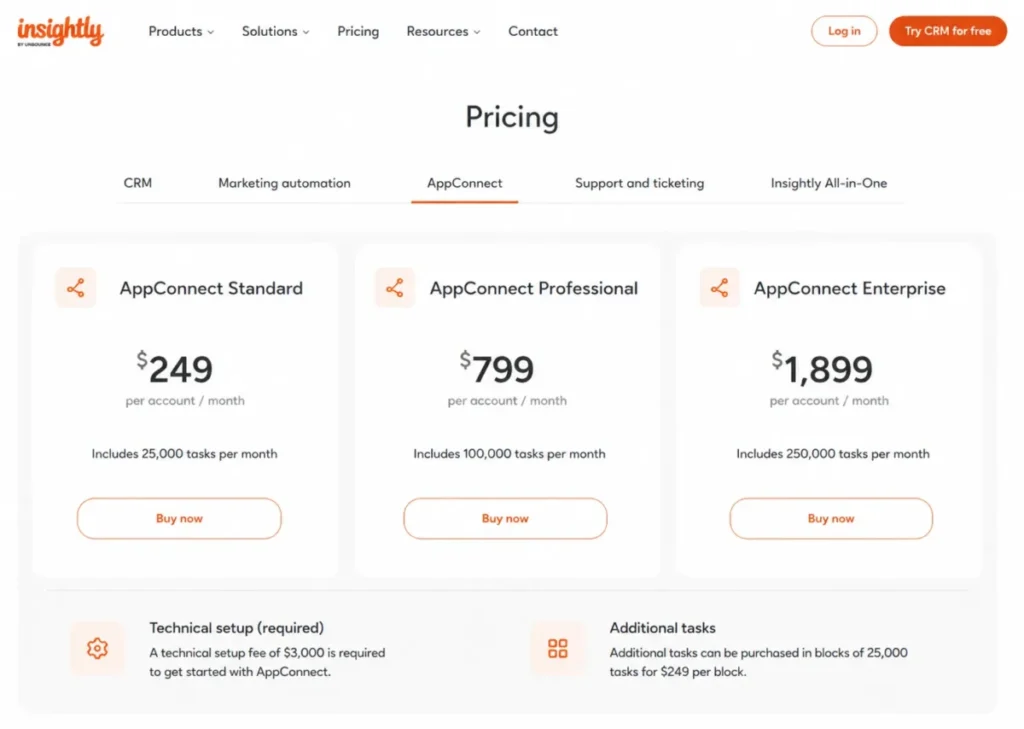
I also priced the parts most reviews skip: $1,500 guided onboarding, an AppConnect add-on that starts at $249 per account per month plus a $3,000 technical setup, and a daily API quota that quietly decides whether your integrations survive month three.
If you want the wider shortlist before you commit, start with the best CRM software options and come back to this page.
Quick Verdict on Insightly CRM
| Category | Verdict |
|---|---|
| Best for | 15-75 person consulting, agency, professional services, and manufacturing teams where closed deals turn into delivery projects |
| Not ideal for | Solo users and 2-5 person teams that only need pipeline tracking and follow-up reminders |
| Starting price | $29 per user per month, USD, billed annually (Plus) |
| Best practical plan | Professional, $49 per user per month, because workflow automation, lead routing, and AI Copilot start here |
| Free plan / trial | No free CRM tier on the official pricing page checked July 10, 2026. A 14-day free trial is offered on Plus and Professional |
| Setup difficulty | Medium to high. Insightly’s onboarding page puts average CRM implementation at 6-8 weeks |
| Main strength | Won opportunities convert into projects with related record details carried across |
| Main limitation | Automation, AI, custom objects, SAML, SCIM, and audit logging all sit above the entry plan |
| Hidden cost to budget | $1,500 guided onboarding; AppConnect from $249 per account per month plus $3,000 technical setup |
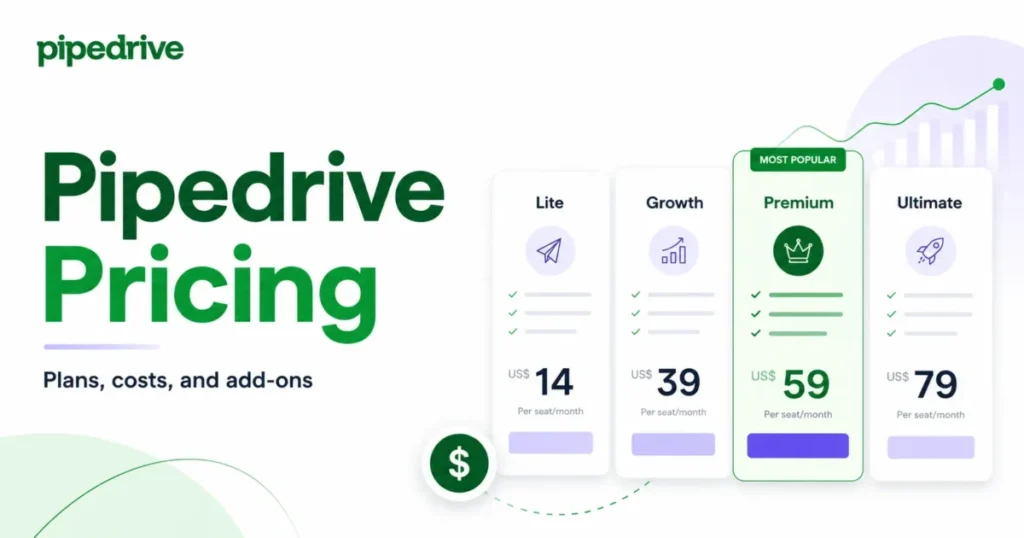
| Best alternative | Pipedrive for pipeline-only teams; Salesforce Sales Cloud for deep analytics and heavy API volume |
The table above is the whole argument in miniature. Insightly is priced like a mid-market CRM at the top of the ladder and marketed like an affordable one at the bottom, and the gap between those two positions is where buyers get hurt.
Insightly CRM Pros and Cons
Every item below maps to a plan, a limit, or a published price rather than a general impression.
| Pros | Cons |
|---|---|
| Won opportunities convert into projects with related details copied, keeping post-sale delivery attached to the customer record | Plus has no AI Copilot and no full workflow automation, so $29 per user per month is not the working price for most teams |
| Relationship linking ties contacts, organizations, opportunities, and projects together for account-based services selling | AppConnect is sold separately from $249 per account per month and carries a $3,000 required technical setup |
| Professional adds workflow automation and lead assignment at $49 per user per month, below most enterprise CRM equivalents | SAML, SCIM, audit logging, sandboxes, and custom objects are Enterprise-only, forcing a jump to $99 per user per month |
| The REST API v3.1 is usable on every CRM plan, including the $29 Plus tier, at 40,000 requests per day | Plus caps role-based permissions at 2 and configurable page layouts at 2, which breaks multi-team admin models |
| Insightly’s security page lists SOC 2 Type II, GDPR, CCPA, and HIPAA compliance with a stated 99.95 percent uptime track record | Mass email is capped at 2,500 per day on Plus, and there are no native outbound sequences equal to a sales engagement tool |
| Enterprise adds calculated fields, validation rules, and sandboxes for teams modeling non-standard revenue processes | TrustRadius and Capterra review patterns repeatedly cite support responsiveness and duplicate contacts after import |
What Is Insightly CRM?
Insightly CRM is a sales CRM with native project and task management built into the same record model. It is sold by Insightly Inc., now part of Unbounce’s go-to-market portfolio under Crest Rock Partners ownership.
The product line splits into Insightly CRM, Insightly Marketing, Insightly Service, and AppConnect, with an All-in-One bundle sitting on top. This review covers the CRM product only, because that is what the pricing page prices per seat and what buyers compare against Pipedrive, Zoho, and HubSpot.
The core object model is leads, contacts, organizations, opportunities, projects, and tasks, linked to each other. That linkage, not the pipeline itself, is the reason Insightly still exists in a market where cheaper pipeline tools do the sales half competently.
If you are early in the category and need the fundamentals first, our explainer on what CRM software does covers the object model before you evaluate any vendor.
How I Reviewed Insightly CRM
I am Macedona, the CRM buying analyst who writes and edits SaaS CRM Review. This evaluation is documentation-led, not hands-on.
Testing level: official research only. I did not run a trial workspace and did not click through the product.
Every price, plan gate, quota, and compliance claim below comes from Insightly’s own pages, checked on July 10, 2026, and every sentiment claim is labeled as reviewer pattern rather than fact.
Sources used: Insightly’s official pricing page for tiers, limits, AI query caps, and add-on prices; the Insightly CRM product page for workflow and mobile claims; the Insightly API v3.1 documentation for rate limits; the Insightly onboarding page for setup cost and timeline; and the Insightly security and compliance page for SOC 2, GDPR, CCPA, and HIPAA statements.
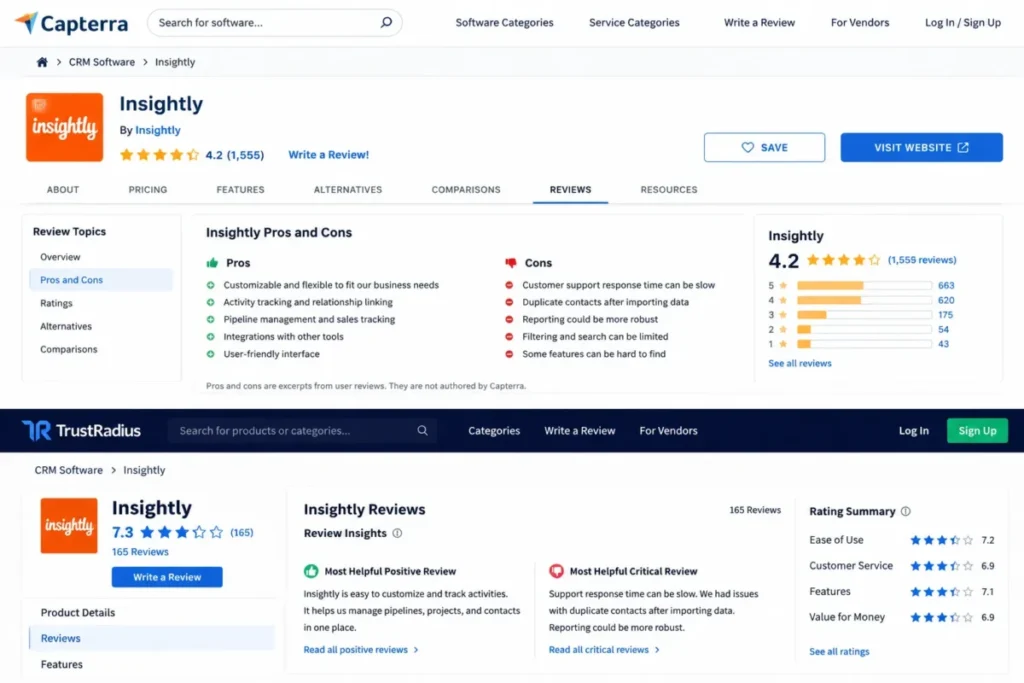
Third-party review platforms were used for one job only: finding the friction patterns buyers report after the sale. Gartner Peer Insights shows a 4.2 rating from 721 ratings, and Capterra lists ease of use at 4.0 across 602 reviews, while Trustpilot’s separate company profile sits near 2.1, which is a reminder that platform choice changes the picture.
The known limitation of this review: no first-party screenshots, no negotiated contract data, and no public price table for Premier Support. Where a fact could not be verified on an official page, I say so instead of filling the gap.
The Three Problems Insightly CRM Solves
Insightly is not a general-purpose CRM that happens to have projects. It is a delivery-shaped CRM that happens to have a pipeline, and the difference decides who should buy it.
Deals that die at the handoff
In a services business, the expensive failure is not a lost deal. It is a won deal that gets re-explained from scratch to a delivery team working in a different tool.
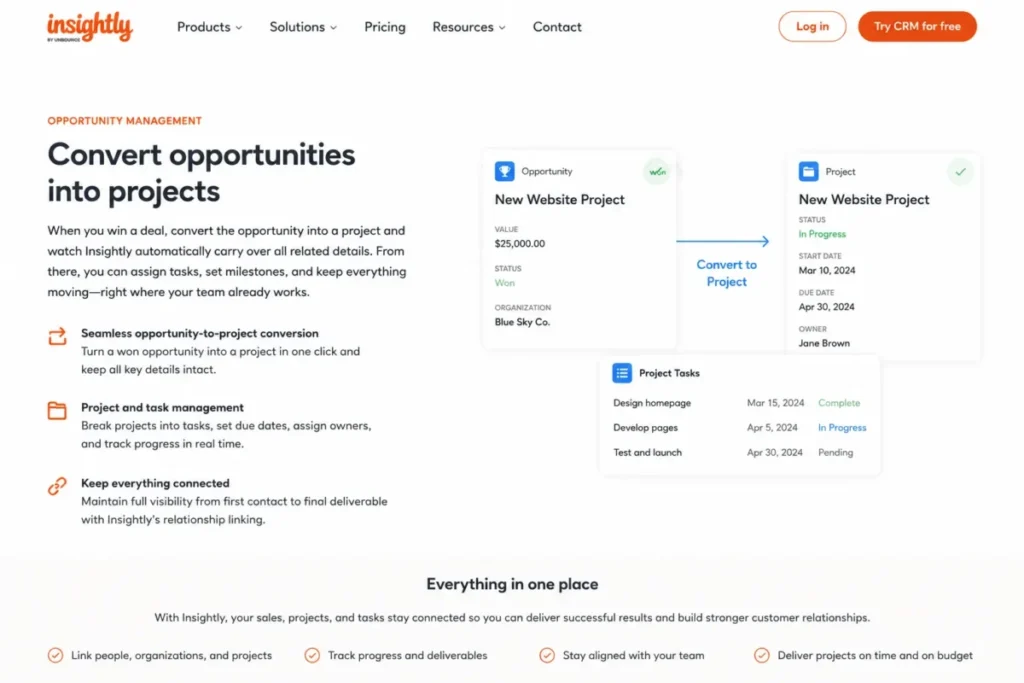
Insightly’s CRM page describes converting a won opportunity into a project and carrying the related details across. The scope, contacts, and history stay attached to the same customer record instead of being copy-pasted into a project tracker.
For a 30-person consultancy running 40 active engagements, that removes one full handoff meeting per project and one duplicate source of truth. I would treat this as the single reason to shortlist Insightly over a pipeline-only CRM.
The catch is that the project side is task and milestone management, not resource forecasting or utilization reporting. Agencies that bill on utilization still need a separate PSA layer.
Account context spread across five records
B2B services deals rarely involve one buyer. A single engagement has a sponsor, an economic buyer, a delivery owner, and a referral source, often across two organizations.
Insightly’s relationship linking connects contacts, organizations, opportunities, and projects so those roles are visible from one record. A consulting firm can open an organization and see the sponsor who signed, the delivery lead who inherited the work, and the partner contact who referred the deal.
Here is the practical workflow that makes it real. Log the referral source as a linked contact, attach the opportunity, convert it to a project on close, and the referral relationship stays visible when the renewal conversation starts eleven months later.
That is a genuine advantage over CRMs that model relationships as a flat contact list with an owner field.
Structured pipeline without an admin team
Insightly’s Enterprise tier exposes custom objects, custom apps, calculated fields, and validation rules. Those are the ingredients of a modeled revenue process rather than a prettier deal board.
A manufacturer tracking quotes against pricebooks gets Products, Pricebooks, and Quotes at the Enterprise tier, which keeps quoting inside the CRM instead of in a spreadsheet. Most teams reaching for that capability elsewhere end up in a Salesforce-class implementation with a Salesforce-class admin budget.
Insightly’s version is narrower, and that is the point. It fits a company that needs process control but cannot fund a dedicated CRM administrator.
The Three Problems Insightly CRM Creates
Now the honest half. Each problem below has a number attached, because a limitation without a number is a marketing sentence.
The $29 plan is not the plan you will run
Insightly’s pricing comparison places workflow automation and lead assignment and routing on Professional and above. Insightly’s own onboarding documentation confirms workflow automation is available on Professional and Enterprise plans.
AI Copilot follows the same pattern: not available on Plus, 75 queries on Professional, 100 queries on Enterprise. Plus also caps role-based permissions at 2 and configurable profiles and page layouts at 2.
Strip away the marketing, and Plus is a structured contact and project tracker with reporting. It is not an automated CRM.
If your buying case includes automated lead follow-up, Plus fails the case at any price. Budget from $49 per user per month or evaluate a lighter tool, and our Pipedrive CRM review covers the pipeline-only alternative honestly.
Integrations can cost more than the CRM
Insightly’s integrations page lists connectors across collaboration, finance, HR, operations, productivity, and sales categories, including Slack, Jira, QuickBooks Online, Xero, Gmail, DocuSign, Okta, Calendly, Asana, Shopify, and Microsoft Power BI. That list reads like a solved problem.
But here is the catch. The pricing comparison lists AppConnect support as a separately sold product, priced at $249, $799, or $1,899 per account per month with 25,000, 100,000, or 250,000 tasks respectively, a $3,000 required technical setup, and $249 per additional 25,000 tasks.
Run the math for a 10-seat Professional team that needs AppConnect at the entry tier. Seats cost $5,880 per year, AppConnect adds $2,988 per year plus the $3,000 setup, taking first-year spend to $11,868.
That is 2.0x the seat cost, and it is invisible if you budget from the plan card. I would decide native-versus-AppConnect before signing, not after.
Support and onboarding are a line item, not a courtesy
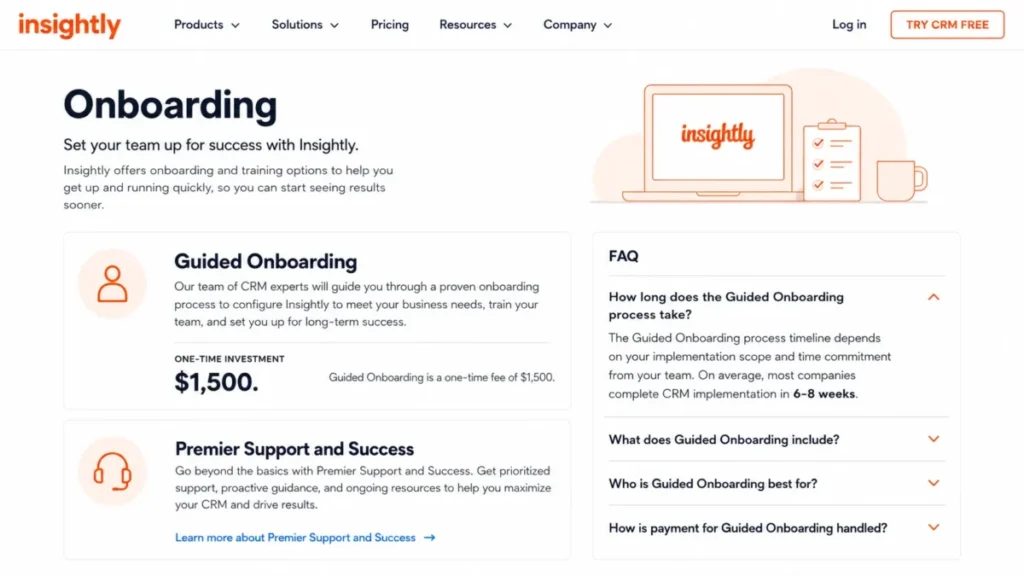
Insightly’s contact page states that all users can reach support by phone or email, and its onboarding page states that basic support is included with every license. That is the official floor.
Above that floor, Guided Onboarding is priced at $1,500, and Premier Support and Success is sold separately with faster response times, extended hours, individualized training, and one-on-one technical guidance. Insightly’s onboarding FAQ puts average CRM implementation at 6-8 weeks, depending on scope and time commitment.
Reviewer patterns on TrustRadius and Capterra repeatedly cite slow or unhelpful support experiences and onboarding gaps. Those are opinions, not facts about response times, and I treat them as a risk signal rather than a measurement.
The buying implication is unglamorous. Assume the $1,500 onboarding is mandatory for any team migrating real data, and ask for a Premier Support quote before you sign, not during your first outage.
Insightly CRM Pricing Reality
All Insightly CRM prices below are USD, billed annually, and were listed on the Insightly official pricing page when it was checked on July 10, 2026. Insightly can change prices at any time, so verify before purchase.
Plus vs Professional vs Enterprise
| Plan | Price (USD, billed annually) | Best for | Key gates | Worth it? |
|---|---|---|---|---|
| Plus | $29 per user per month | 5-15 person teams that need structured contact, opportunity, and project tracking | No workflow automation, no AI Copilot, 2 roles, 2 page layouts | Only if automation is genuinely not needed in year one |
| Professional | $49 per user per month | 15-75 person services teams that need lead routing and automation | AI Copilot capped at 75 queries; no custom objects; no SAML or SCIM | The practical plan for most buyers |
| Enterprise | $99 per user per month | Regulated, quoting, or process-heavy teams needing SSO and audit trails | Sales-led purchase; highest per-seat cost in the CRM line | Only when SAML, SCIM, audit logging, custom objects, or sandboxes are required |
Plus is priced to win a comparison table and Professional is priced to run a business, which is why the effective entry cost of Insightly CRM is $49 per user per month, not $29. Enterprise is a compliance and process purchase, not a features purchase.
What 10 and 25 users pay in year one
Per-seat annual math, before add-ons:
| Team size | Plus | Professional | Enterprise |
|---|---|---|---|
| 10 users | $3,480 / year | $5,880 / year | $11,880 / year |
| 25 users | $8,700 / year | $14,700 / year | $29,700 / year |
Add the $1,500 guided onboarding and a 10-user Professional deployment costs $7,380 in year one, which works out to $615 per month rather than the $490 the plan card implies. A 25-user Enterprise rollout with onboarding lands at $31,200 in year one, at which point the comparison stops being against Pipedrive and starts being against Salesforce Sales Cloud.
That threshold is where I would pause. Above roughly 25 Enterprise seats, run a real bake-off, and our HubSpot CRM review covers the closest all-in-one contender at that budget.
The free-plan question, settled
Several older reviews and directory pages still describe a free Insightly plan for two users. On the official pricing page checked on July 10, 2026, the CRM tab shows three paid tiers, a 14-day free trial CTA on Plus and Professional, and a contact-sales CTA on Enterprise.
No free CRM tier was visible. Treat any “Insightly free plan” claim published before 2026 as stale until Insightly’s own pricing page shows one.
Hidden costs to put in the budget
| Cost item | Listed price (checked July 10, 2026) | When it applies |
|---|---|---|
| Guided Onboarding | $1,500 one-time | Any migration with real data, layouts, and workflows |
| AppConnect (entry) | $249 per account per month, 25,000 tasks | Automation across apps beyond native connectors |
| AppConnect technical setup | $3,000 one-time, required | Every AppConnect purchase |
| Additional AppConnect tasks | $249 per 25,000 tasks per month | Task-heavy syncs, enrichment, or two-way integrations |
| Premier Support and Success | Sold separately, price not publicly disclosed | Teams that need faster response and one-on-one guidance |
Onboarding and AppConnect together add $4,500 in one-time cost before a single seat is billed.
Ask for both quotes in writing during the trial window, because neither appears on the plan card a finance team will be shown.
CRM-only versus Insightly All-in-One
The pricing page also sells an Insightly All-in-One bundle starting at $349, $899, or $2,599 per month, USD, billed annually, combining CRM, Marketing, Service, and AppConnect. The page states new All-in-One customers can receive up to 30 percent off the cost of buying those products separately.
Bundle economics reward teams that already planned to buy marketing automation and a service desk. They punish teams that only wanted a CRM and got sold a suite during procurement.
Request a line-item quote that shows the standalone price of each product against the bundle price. If marketing and service are not in the roadmap for the next 12 months, the CRM-only path is cheaper and simpler to unwind.
Feature Gates: What You Get on Each Plan
This is the table every competing review should have published and did not. All values come from Insightly’s official pricing comparison, checked July 10, 2026.
| Feature | Plus ($29) | Professional ($49) | Enterprise ($99) |
|---|---|---|---|
| Workflow automation | No | Yes | Yes |
| Lead assignment and routing | No | Yes | Yes |
| AI Copilot | Not available | 75 queries | 100 queries |
| REST API | Yes | Yes | Yes |
| Webhooks | Yes | Yes | Yes |
| AppConnect support | Sold separately | Sold separately | Sold separately |
| Custom fields | 50 | 100 | 200 |
| Custom objects and custom apps | No | No | Yes |
| Field-based permissions | No | No | Yes |
| Calculated fields and validation rules | No | No | Yes |
| Products, pricebooks, and quotes | No | No | Yes |
| Role-based permissions | 2 | Unlimited | Unlimited |
| Configurable profiles and page layouts | 2 | Unlimited | Unlimited |
| Shareable dashboards | Pre-built dashboards | 100 | 100 |
| SAML and SCIM single sign-on | No | No | Yes |
| Audit logging | No | No | Yes |
| Sandboxes | No | No | Yes |
Read the middle column carefully, because Professional is where Insightly becomes a CRM and Enterprise is where it becomes an administered CRM. A security team that requires SAML and audit trails is not buying a $49 product no matter how the sales conversation starts.
Scale limits by plan
| Limit | Plus | Professional | Enterprise |
|---|---|---|---|
| Records | 100,000 | 250,000 | 500,000 |
| File storage | 10 GB | 100 GB | 250 GB |
| Records per import | 25,000 | 50,000 | 50,000 |
| Mass emails per day | 2,500 | 5,000 | 10,000 |
| API requests per day | 40,000 | 60,000 | 100,000 |
Divide storage by records and Plus gives roughly 105 KB of file storage per record, against 410 KB on Professional and 512 KB on Enterprise. Document-heavy delivery work, meaning signed SOWs, deliverables, and design files attached to projects, will exhaust Plus storage long before it exhausts the 100,000-record ceiling.
The import cap matters on day one. Migrating 60,000 contacts into Plus requires three separate import batches at 25,000 records each, and every batch is another chance to create duplicates.
AI Copilot query limits
| Plan | AI Copilot | Practical reading |
|---|---|---|
| Plus | Not available | AI is not part of the entry purchase |
| Professional | 75 queries | Adoption aid for a small pilot group |
| Enterprise | 100 queries | Still a capped allowance, not unlimited assistance |
Insightly’s AI page describes Copilot as conversational record lookup, communication assistance, AI email summaries, AI email replies, and record management via chat. That is a productivity assistant, not autonomous automation, and the query caps confirm it.
Insightly’s pricing comparison lists the allowances without stating whether each one is per user or per account, or how often it resets.
Ask Insightly to confirm the scope and reset period in writing, because the answer decides whether 75 queries is a pilot budget or a rounding error across 40 seats.
The customization ladder
Insightly’s marketing says customizable. The pricing comparison says customizable in three distinct amounts.
Plus gives light customization: 50 custom fields, two roles, two page layouts. Professional removes the role and layout caps and doubles custom fields to 100.
Enterprise is the only tier that lets you model a business process rather than decorate a record: custom objects, custom apps, field-based permissions, calculated fields, validation rules, and quoting. If your requirements document contains the phrase “custom object,” your real budget is $99 per user per month.
Teams that want deep configuration at a lower per-seat cost should price the comparison honestly, and our Zoho CRM review covers the closest customization-per-dollar rival.
Key Insightly CRM Features and Their Plan Gates
Four to seven features matter in a CRM evaluation. These are the five that decide the Insightly purchase.
Lead and opportunity management
Insightly’s CRM page covers lead capture, lead management, opportunity management, and pipeline tracking as core CRM functions available across plans. The pipeline itself is competent and unremarkable, which is the correct outcome for a mature category.
The gate arrives at routing. Lead assignment and routing begins on Professional, so a Plus team assigns leads by hand or by convention.
For a 6-person inside sales pod fielding 300 inbound leads a month, manual assignment is a real cost measured in response time. That single gate is why I do not recommend Plus to any team with inbound volume.
Project and task management after close
This is Insightly’s differentiator. The CRM page describes converting a won opportunity into a project with related details carried over, plus project and task management inside the CRM.
Best fit: a 25-person implementation firm where the same account manager owns the deal and the delivery milestone. Poor fit: an agency that bills on staff utilization and needs resource forecasting, which Insightly’s project layer does not replace.
The limitation to plan around is storage rather than features. At 10 GB on Plus, project files are the first thing to fill the tenant.
Workflow automation and lead routing
Insightly’s onboarding documentation places workflow automation, together with lead assignment and routing, on the Professional and Enterprise plans. It is the gate that turns Insightly from a structured database into a system of action.
Buyers routinely under-buy here. The sales conversation starts at $29, the requirements list contains “automatic follow-up task when a deal reaches proposal,” and the requirement lands on a plan that costs 69 percent more per seat.
Decide the automation requirement before you look at prices. If it is present, Plus is off the table.
Relationship linking across records
Relationship linking is the quiet feature that services teams should test first. It connects contacts to organizations, organizations to opportunities, and opportunities to projects.
Concrete workflow: a consulting firm logs the CFO as economic buyer, the operations director as sponsor, the delivery partner as project owner, and the former client who referred the deal. Twelve months later, the renewal owner opens the organization record and sees all four roles plus the delivered project.
Without that, renewal preparation becomes an archaeology exercise across email threads. With it, the same preparation is one record.
Reporting on those relationships is where reviewer complaints cluster, with TrustRadius summaries citing limited reporting and filtering options. Validate your two most important reports during the 14-day trial rather than after migration.
Reporting and dashboards
Insightly lists advanced reports and pre-built business dashboards on Plus, with 100 shareable dashboards from Professional upward. That is enough for pipeline coverage, win rate, and project status reporting.
It is not enough for a revenue operations team that wants cohort retention, multi-touch attribution, or warehouse-grade slicing. Those teams should plan to export to a BI layer, which Insightly supports through its Microsoft Power BI connector and REST API.
The honest positioning: reporting that a sales manager can run, not reporting that a data team will respect.
Ease of Use, Setup, and Migration
Setup difficulty: medium to high. Insightly’s onboarding FAQ states that implementation duration depends on scope and time commitment, and that on average most companies complete CRM implementation in 6-8 weeks.
That timeline is honest and rare. It also tells you that Insightly is configured, not switched on.
Capterra reviewers rate ease of use at 4.0 across 602 reviews, while individual reviewers describe feeling overwhelmed by the number of items available to change. Both statements can be true: the daily interface is approachable, and the admin surface is deep.
The migration risk nobody prices
TrustRadius review summaries list duplicate contacts after import as a recurring complaint, alongside onboarding gaps. Combine that with the 25,000-record import cap on Plus and the risk becomes structural rather than anecdotal.
Work this checklist before the first import:
- Deduplicate in the source system, not in Insightly, using email as the match key.
- Map custom fields to Insightly custom fields before export, and confirm you are within the 50 / 100 / 200 custom field ceiling for your plan.
- Preserve relationship links by importing organizations first, then contacts, then opportunities, then projects.
- Test one batch of 500 records, verify counts and links, then scale to full batches.
- Convert every date to UTC, because the Insightly API expects UTC.
- Record the Insightly record IDs returned on import if any integration will reference them later.
Skipping the 500-record test is the cheapest mistake to avoid and the most expensive to fix, because duplicate customer records destroy CRM trust in week one and never fully recover it.
The 30/90-day adoption test
After 30 days, three things should be true: every open opportunity lives in Insightly, no rep is maintaining a private spreadsheet, and at least one workflow rule fires automatically. If any of those fail on Plus, the plan is the problem, not the team.
After 90 days, the delivery test applies: at least 80 percent of won deals in the quarter converted to projects inside Insightly, and the renewal owner can name the sponsor without asking. Miss that, and you bought a CRM and kept your old handoff.
Integrations, API, and Automation Limits
Integration logos are not equivalent at Insightly, and treating them as equivalent is where the budget breaks. There are three tiers of connectivity, and they cost different amounts.
| Integration type | What it covers | Cost implication |
|---|---|---|
| Native and direct | Connectors listed on Insightly’s integrations page, including Slack, Jira, Gmail, QuickBooks Online, Xero, Okta, Calendly, DocuSign, Shopify, and Microsoft Power BI | Included with the CRM plan |
| AppConnect workflows | Low-code and no-code multi-step automations across apps, with monthly task allowances | Sold separately from $249 per account per month plus $3,000 setup |
| Custom REST API work | Bespoke sync, enrichment, warehouse loads, and internal tooling | Developer time, bounded by the daily API quota |
Check your three most important integrations against the Insightly AppConnect integrations page before you assume they are free. If two of the three require AppConnect, the CRM decision has become an integration-platform decision.
API quotas, and why the daily cap binds first
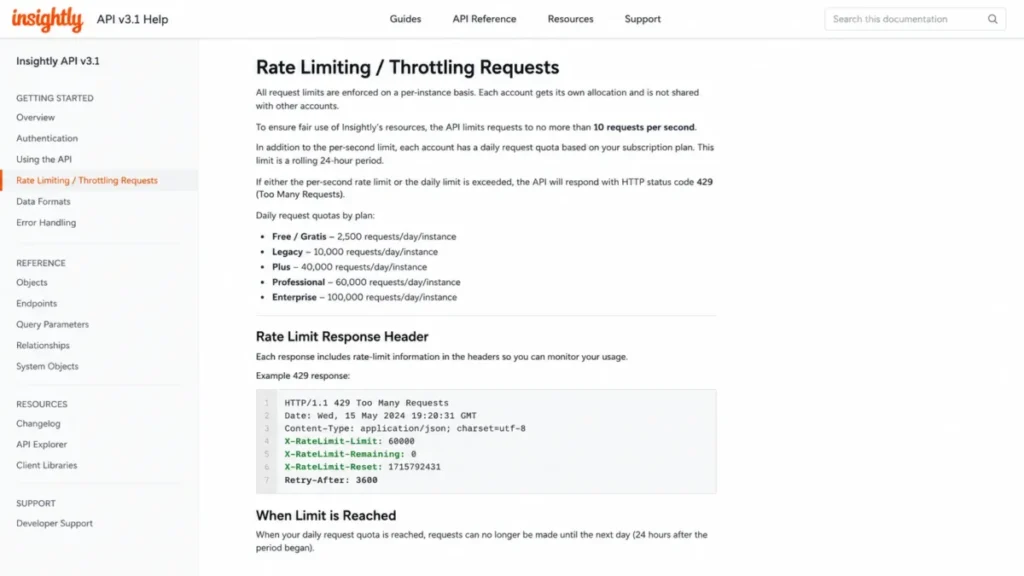
Insightly’s API v3.1 supports REST GET, POST, PUT, and DELETE operations and is available on every CRM plan. The Insightly API documentation sets a limit of 10 requests per second and daily quotas of 40,000 (Plus), 60,000 (Professional), and 100,000 (Enterprise) requests.
Exceeding a limit returns HTTP 429. Pagination returns 100 records by default with a maximum of 500.
| Plan | Daily API quota | Sustained rate if spread across 24 hours | Burst ceiling |
|---|---|---|---|
| Plus | 40,000 | 0.46 requests/ | 10 requests/ |
| Professional | 60,000 | 0.69 requests/ | 10 requests/ |
| Enterprise | 100,000 | 1.16 requests/ | 10 requests/ |
The 10-per-second burst ceiling is not the binding constraint. Holding that rate would consume the entire Enterprise daily quota in under three hours, and the Plus quota in just over an hour.
The daily cap is what breaks the nightly sync, and it fails silently as a 429 in a log file rather than as an alert in the CRM.
Size the job before you build it. Pulling 250,000 records at 500 per page costs 500 requests, so full-table extracts are cheap and per-record write-backs are not.
Security, Support, and Admin Controls
Two different things get called security in CRM reviews. One is what the platform holds as certification, and the other is what your plan lets you switch on.
| Control | Type | Availability |
|---|---|---|
| SOC 2 Type II attestation | Platform posture | Stated on the Insightly security page |
| GDPR and CCPA compliance | Platform posture | Stated on the Insightly security page |
| HIPAA compliance | Platform posture | Stated on the Insightly security page |
| Encryption in transit and at rest | Platform posture | Stated on the Insightly CRM page |
| Two-factor authentication | Platform posture | Stated on the Insightly CRM page |
| SAML single sign-on | Plan-gated admin control | Enterprise only |
| SCIM provisioning | Plan-gated admin control | Enterprise only |
| Audit logging | Plan-gated admin control | Enterprise only |
| Field-based permissions | Plan-gated admin control | Enterprise only |
| Sandboxes | Plan-gated admin control | Enterprise only |
A security questionnaire that requires SSO, provisioning, and audit trails converts Insightly into a $99 per user per month decision before anyone looks at a pipeline screen.
That gate appears only when the Insightly security and compliance page is read alongside the pricing comparison, which makes plan choice a compliance decision here rather than a feature decision.
Teams already committed to an enterprise identity stack should price the alternative properly. Our Salesforce CRM review covers where that additional cost buys additional governance.
Healthcare buyers and the BAA question
Insightly’s security page states HIPAA compliance, and Capterra shows at least one healthcare-adjacent reviewer citing Insightly’s willingness to sign a Business Associate Agreement as a selection factor. That is a procurement signal, not legal advice, and I am not a lawyer.
Confirm three items directly with Insightly before any PHI enters the system: the exact BAA terms, which subprocessors touch the data, and which plan-level controls your compliance officer requires. Vendor compliance posture does not transfer your legal obligation.
Support: what is included and what is billed
| Support layer | What Insightly states | Buyer reading |
|---|---|---|
| Basic support | Included with every license; phone or email access for all users | Adequate for configuration questions |
| Self-serve resources | Help center and onboarding documentation | Adequate for admins who will read |
| Guided Onboarding | $1,500 one-time | Treat as mandatory for any real migration |
| Premier Support and Success | Sold separately; faster response, extended hours, one-on-one guidance | Price it before signing, not after |
Official access and perceived quality are different measurements, and the gap between them is where Insightly’s reputation suffers. Reviewer patterns across TrustRadius and Capterra point to slow or unhelpful support experiences, which suggests the included tier works for questions and struggles under implementation pressure.
Insightly CRM Mobile App
Insightly’s CRM page states that Android and iOS apps support dashboards, real-time project updates, and opportunity updates. Google Play and the Apple App Store both list Insightly CRM apps covering interactions, leads, opportunities, and projects.
That covers the field-update use case: a delivery lead marking a milestone complete between client meetings, or an account manager logging an interaction from a parking lot.
Advanced admin work, workflow configuration, and complex reporting are a separate question, and TechRadar’s review notes mobile feature gaps without listing them. No mobile feature-parity matrix appears on Insightly’s official pages, so treat parity as unverified rather than absent.
Run this checklist inside the trial app before you commit field reps to mobile:
- Create a lead and reassign it from the phone, not the browser.
- Move an opportunity stage and confirm the change reaches a dashboard.
- Open a project, complete a task, and check that the linked contact record updates.
- Attach a file from the phone and confirm it counts against your plan’s storage.
- Run the one report a manager checks daily and see whether it renders.
If two or more of those fail, mobile is a companion app for your team, not a workspace. Budget desk time accordingly.
Insightly CRM Limitations
Six limitations that could change a purchase decision, each tied to a source or a published limit.
Automation is a paid upgrade, not a feature. Workflow automation and lead routing start on Professional at $49 per user per month, so the advertised $29 entry price does not buy an automated CRM.
Integration budget can double the CRM budget. AppConnect starts at $249 per account per month with a $3,000 required technical setup, and task overages cost $249 per 25,000 tasks.
Enterprise security is a per-seat decision. SAML, SCIM, audit logging, sandboxes, and field-based permissions sit only on the $99 per user per month tier.
Email tools are not a sales engagement suite. Insightly covers customer email management, templates, sync, AI summaries, and AI replies, while Capterra reviewers describe email features as limited and cumbersome.
Insightly’s official CRM page does not list outbound email sequencing, so outbound-heavy teams should budget for a separate sequencing tool.
Social selling is thin. TechRadar and Capterra both surface limited social media integration, so teams whose pipeline originates in LinkedIn conversations will bolt on another tool.
Reporting depth stops before RevOps starts. TrustRadius summaries cite reporting and filtering limits, and shareable dashboards are capped at 100 from Professional upward.
Data teams should plan for Power BI or an API extract rather than expecting warehouse-grade analysis inside the CRM.
Teams that want board-friendly dashboards without a BI layer will find a different fit in our monday.com CRM review, which trades relationship depth for visual reporting.
The Insightly Buyer Risk Ledger
| Risk | Where it shows up | Buyer consequence | Mitigation |
|---|---|---|---|
| Under-buying the plan | Plus lacks automation, AI, and routing | Manual follow-up, low rep adoption by week six | Budget from $49 per user per month |
| Integration cost shock | AppConnect $249 per account per month plus $3,000 setup | Year-one cost doubles against the seat budget | Map the three critical integrations before signing |
| Migration duplicates | 25,000-record import batches; reviewer reports of duplicate contacts | Data trust collapses in week one | Deduplicate at source, then test 500 records first |
| Security tier surprise | SAML, SCIM, audit logging on Enterprise only | Compliance review forces $99 per user per month | Run the security questionnaire before pricing |
| Storage ceiling | 10 GB on Plus across 100,000 records | Project files exhaust the tenant before records do | Estimate attachment volume per project |
| Support under pressure | Premier Support sold separately, price not public | Slow resolution during the go-live window | Quote Premier Support during the trial |
Every row above is answerable before a contract is signed, which is the useful part. Ask the six questions in a single procurement email and you will learn more than a 14-day trial will tell you.
Who Wins and Who Loses With Insightly CRM
Who should use Insightly CRM
15-75 person consulting and implementation firms where the person who closes the deal also owns the delivery milestone. The opportunity-to-project conversion is worth the Professional seat price on its own.
Digital and creative agencies with fewer than 60 staff that manage retainers as projects and want the client relationship history attached. They should still verify storage headroom before choosing Plus.
Manufacturers and industrial B2B teams that quote against pricebooks. Products, pricebooks, and quotes are Enterprise features, so this cohort buys at $99 per user per month and should run a bake-off against enterprise-CRM options at that budget.
Healthcare-adjacent services businesses that need HIPAA posture and a signed BAA alongside project delivery. Confirm terms with Insightly’s legal team, not with a review article.
Small revenue operations teams building light integrations who can live inside a 40,000 to 60,000 request daily API budget and do not need AppConnect.
Who should avoid Insightly CRM
Solo users and 2-5 person teams that need contacts, deals, and follow-ups. The configuration surface is a cost at that size, and our Less Annoying CRM review covers the deliberately minimal end of the market.
Teams that require a permanently free CRM. No free tier appeared on the official pricing page on July 10, 2026, and a 14-day trial is not a budget plan.
Outbound-heavy sales teams whose core workflow is multi-step email sequencing with A/B tested cadences. Insightly’s email tooling is CRM email, not sales engagement.
Social-selling teams sourcing pipeline from LinkedIn and X conversations. Social integration is repeatedly cited as weak, and our Nimble CRM review covers a relationship CRM built around social signals.
Enterprises needing high-volume API throughput or reporting beyond dashboards. A 100,000 request daily ceiling and capped dashboards are real limits at scale.
Better Alternatives When Insightly Is the Wrong Fit
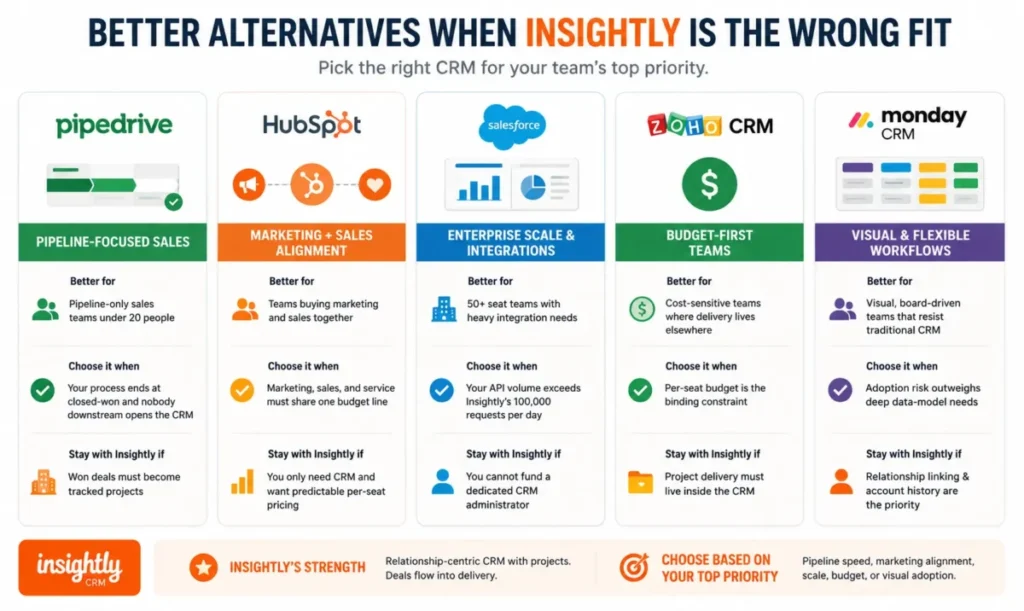
None of these are ranked. Each replaces Insightly for one specific failure mode, and the switch-or-stay logic matters more than the feature list.
| Alternative | Better for | Choose it when | Stay with Insightly if |
|---|---|---|---|
| Pipedrive | Pipeline-only sales teams under 20 people | Your process ends at closed-won and nobody downstream opens the CRM | Won deals must become tracked projects |
| HubSpot CRM | Teams buying marketing and sales together | Marketing, sales, and service must share one budget line | You only need CRM and want per-seat pricing you can forecast |
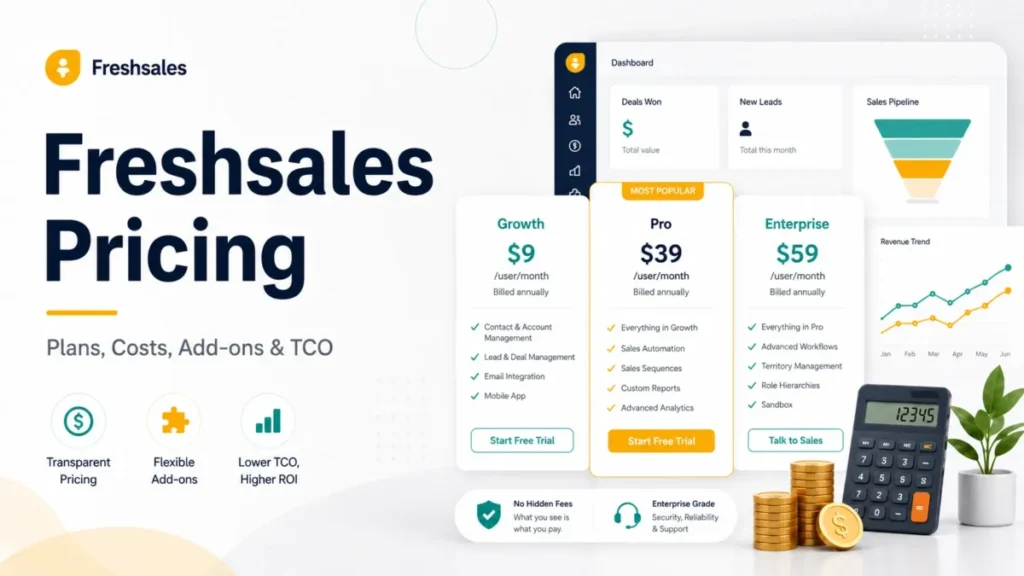
| Salesforce Sales Cloud | 50+ seat teams with heavy integration volume | Your API volume exceeds Insightly’s published 100,000 requests per day | You cannot fund a dedicated CRM administrator |
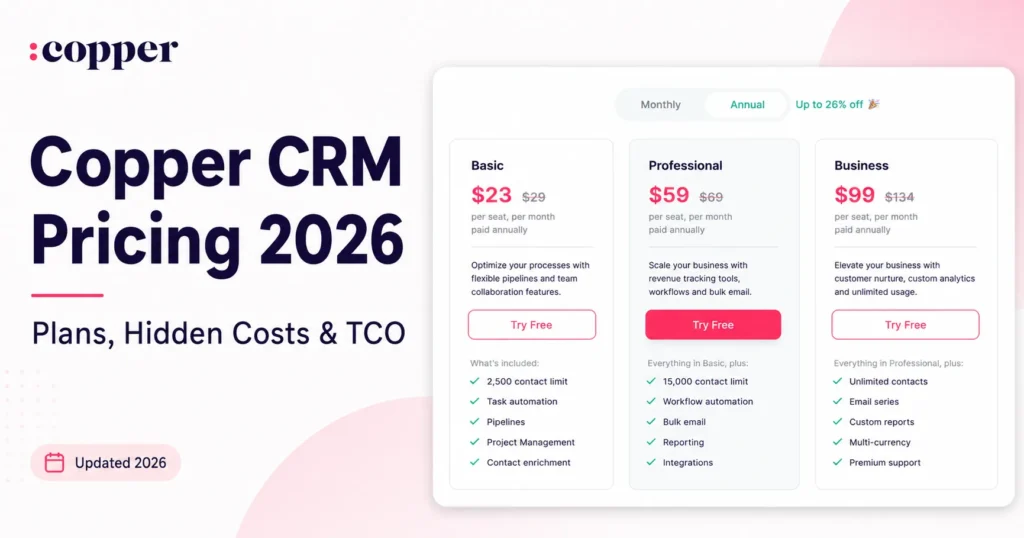
| Zoho CRM | Cost-sensitive teams where delivery lives elsewhere | Per-seat budget is the binding constraint | Project delivery must live inside the CRM |
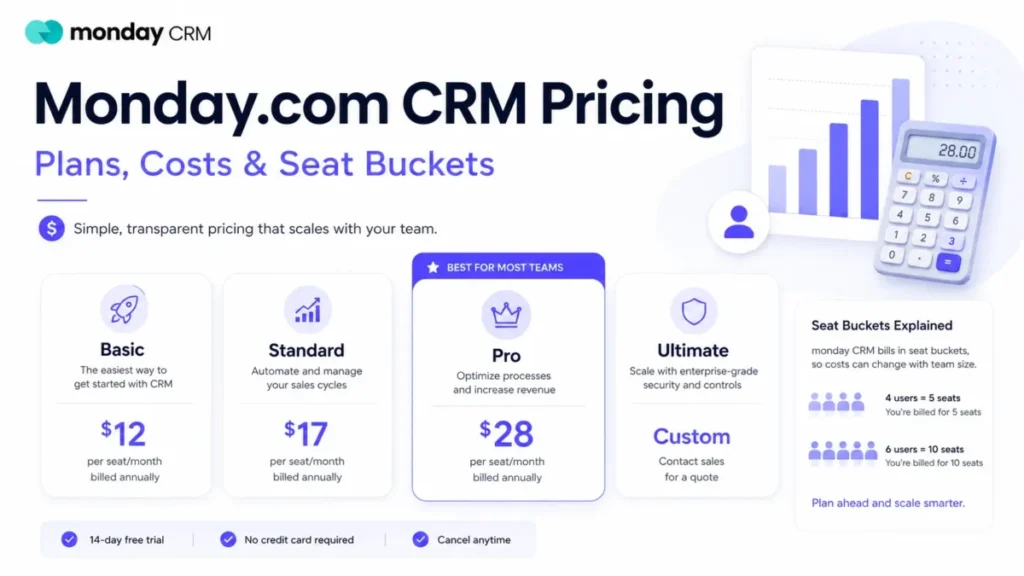
| monday CRM | Visual, board-driven teams that resist CRM records | Adoption risk outweighs data-model depth | Relationship linking is the core requirement |
Pipedrive
Choose Pipedrive over Insightly if your sales process ends at “closed won” and nobody downstream reads the CRM. The tradeoff is that you gain adoption speed and lose the delivery layer entirely.
Stay with Insightly if a project manager needs the deal context on day one of delivery.
HubSpot CRM
Choose HubSpot if the same budget line must fund marketing automation, sales, and a service desk, and if the buying committee includes a marketing lead.
Check HubSpot’s own pricing page before comparing, because its plan structure does not map one-to-one onto Insightly’s per-seat model.
Stay with Insightly if the CRM’s job is delivery continuity rather than demand generation.
Salesforce Sales Cloud
Choose Salesforce when your API volume exceeds Insightly’s 100,000 daily request ceiling, when reporting must satisfy a data team, or when a compliance program requires deeper governance. The switch buys headroom and costs administration.
Stay with Insightly if the honest answer to “who will own the CRM” is “the sales manager, part-time.” A well-run set of Salesforce alternatives exists precisely because that answer is common.
Zoho CRM
Choose Zoho if per-seat budget is the binding constraint and post-sale delivery already lives in another system.
Stay with Insightly if the relationship model, contacts linked to organizations linked to projects, is the reason you are shopping.
monday CRM
Choose monday CRM when adoption risk outweighs data-model purity and when non-sales teams need to see the same board. It is the easier sell internally.
Stay with Insightly if renewal owners need account history rather than a card that moved across a board. Teams pulled toward monday for the delivery half should first compare dedicated project management software tools alongside a lighter CRM.
Final Verdict: Is Insightly CRM Worth It in 2026?
Insightly CRM is worth it for 15-75 person services, consulting, agency, and manufacturing teams whose closed deals become delivery projects, and who can budget $49 per user per month rather than the $29 headline. The opportunity-to-project handoff and relationship linking solve a problem that pipeline-only CRMs do not attempt.
It is not worth it for solo operators, pipeline-only sales teams, outbound sequencing shops, social sellers, or anyone waiting for a free plan that the official pricing page does not show.
Buy Professional if you need workflow automation, lead routing, and a capped AI Copilot allowance. Buy Enterprise only when SAML, SCIM, audit logging, custom objects, or quoting appear in your requirements, and accept that the seat price is roughly 3.4x the Plus price.
Before you sign, answer one renewal question: twelve months from now, will you be able to prove that project delivery got faster because the CRM held the context? If the answer is no, buy a cheaper pipeline tool and spend the difference on the delivery system your team already lives in.
Pricing checked: July 10, 2026, against Insightly’s official pricing page. Prices, plan gates, and limits change; verify before purchase.
FAQ
Is Insightly CRM worth it in 2026?
Yes, if closed deals turn into delivery projects and you can budget the Professional plan at $49 per user per month. The opportunity-to-project conversion and relationship linking are the differentiators. No, unless post-sale work lives in the CRM, because a pipeline-only tool costs less and requires far less configuration. Teams that only need contacts, deals, and reminders will find Insightly overbuilt for the job.
How much does Insightly CRM cost?
Insightly CRM lists Plus at $29, Professional at $49, and Enterprise at $99 per user per month, USD, billed annually, on its official pricing page checked July 10, 2026. Add $1,500 for Guided Onboarding. AppConnect, sold separately, starts at $249 per account per month with a required $3,000 technical setup. A 10-user Professional deployment costs $7,380 in year one including onboarding.
Does Insightly CRM have a free plan?
No. On the official pricing page checked July 10, 2026, the CRM tab showed three paid tiers with a 14-day free trial on Plus and Professional, and a contact-sales option on Enterprise. Older reviews and directory listings still describe a free two-user plan, but that claim was not supported by Insightly’s current pricing page. Treat pre-2026 free-plan claims as stale.
Is Insightly CRM good for small businesses?
It depends on the workflow, not the headcount. A 15-person consultancy that delivers projects after closing gets real value from Insightly. A 4-person sales team tracking deals does not, because Plus lacks workflow automation and AI Copilot, and the admin surface adds setup time. Below roughly 10 people with no delivery workflow, a simpler CRM is the better purchase.
Insightly CRM vs Salesforce: which should I choose?
Choose Insightly when the CRM will be administered part-time by a sales manager and delivery projects need to live beside the pipeline. Choose Salesforce Sales Cloud when API volume exceeds Insightly’s 100,000 daily request ceiling, when reporting must satisfy a data team, or when governance requirements are formal. The dividing line is whether you can fund a dedicated administrator, not company size.
Does Insightly CRM include project management?
Yes. Insightly’s CRM page describes project and task management inside the CRM, plus conversion of a won opportunity into a project with related details carried across. This is Insightly’s main differentiator against pipeline-only CRMs. It is task and milestone management rather than resource forecasting or utilization reporting, so agencies billing on utilization still need a separate professional services automation layer.
Does Insightly CRM support workflow automation?
Yes, on Professional and Enterprise. Insightly’s onboarding documentation and pricing comparison both place workflow automation and lead assignment and routing above the Plus plan. That makes $49 per user per month the practical entry point for any team with inbound lead volume or automated follow-up requirements. Plus buyers who expect automated follow-up have bought the wrong plan for the requirement.
Is Insightly CRM HIPAA compliant?
Insightly’s security and compliance page states HIPAA compliance alongside SOC 2 Type II, GDPR, and CCPA. Capterra shows at least one healthcare-adjacent reviewer citing Insightly’s willingness to sign a Business Associate Agreement. Vendor compliance posture does not transfer your legal obligation. Confirm BAA terms, subprocessors, and required plan-level controls directly with Insightly before storing any protected health information.
Does Insightly CRM have an API and mobile apps?
Yes to both. The Insightly API v3.1 is a REST API available on every CRM plan, limited to 10 requests per second and 40,000, 60,000, or 100,000 requests per day by tier, returning HTTP 429 when exceeded. Android and iOS apps cover dashboards, opportunity updates, and real-time project updates. Validate advanced mobile workflows during the trial, since parity with the web app is undocumented.
What are Insightly CRM’s biggest limitations?
Four stand out. Workflow automation and AI Copilot are gated above the $29 plan. AppConnect integrations are sold separately from $249 per account per month plus $3,000 setup. SAML, SCIM, audit logging, and custom objects are Enterprise-only at $99 per user per month. Reviewer patterns on TrustRadius and Capterra cite support responsiveness, duplicate contacts after import, and reporting filter limits.