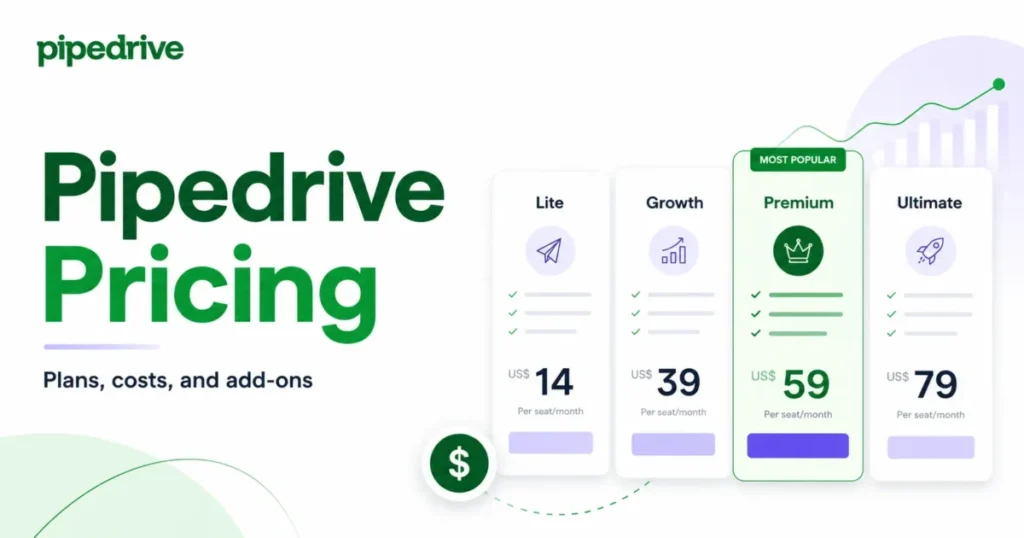
Pipedrive advertises a $14 seat, but almost no active sales team pays that number for long. The seat price is only the first line of the invoice, and the parts that decide your real cost sit below it: which plan unlocks email sync, which add-ons are bundled versus billed separately, and which usage ceiling forces the next upgrade.
This guide treats Pipedrive pricing the way a finance owner treats a renewal quote, with every plan, add-on, and hidden limit priced out for teams of 1, 5, 10, 25, and 50 seats. If Pipedrive is only one name on your best CRM software shortlist, the numbers here make the comparison concrete.
I built every scenario below from Pipedrive’s official US pricing and its published usage-limit documentation, all checked on July 15, 2026. No product testing is involved here. The value is in the math and the gates.
That is where most pricing pages stop, well past the basics of what CRM software does, and where the actual budget decision starts. The short version: Growth at $39 per seat is the practical operating floor for teams that send email from the CRM, and Premium at $59 becomes rational the moment you need LeadBooster, Smart Docs, or Projects.
| Quick Pricing Verdict | Detail (US, checked July 15, 2026) |
|---|---|
| Starting price | $14 per seat per month (Lite, billed annually) |
| Free plan | None. 14-day free trial, no credit card required |
| Best plan for most sales teams | Growth, $39 per seat per month annually |
| Best plan for feature-heavy teams | Premium, $59 per seat per month annually |
| Plan to avoid (for active sellers) | Lite, because it has no email sync, sequences, or automation |
| Biggest hidden cost | Add-ons on Lite and Growth, plus monthly-billing uplift |
| Best alternative if too expensive | Zoho CRM (free up to 3 users) or a free CRM tier |
| Pricing verified | July 15, 2026, US dollars, annual billing unless noted |
All figures are US-dollar reference prices. Pipedrive’s pricing page renders by region, so regional offers, taxes, and checkout totals can differ. Confirm your localized checkout before purchase.
In This Article (13 sections)
Executive Summary: Pipedrive TCO at 1, 5, 10, 25, and 50 Seats
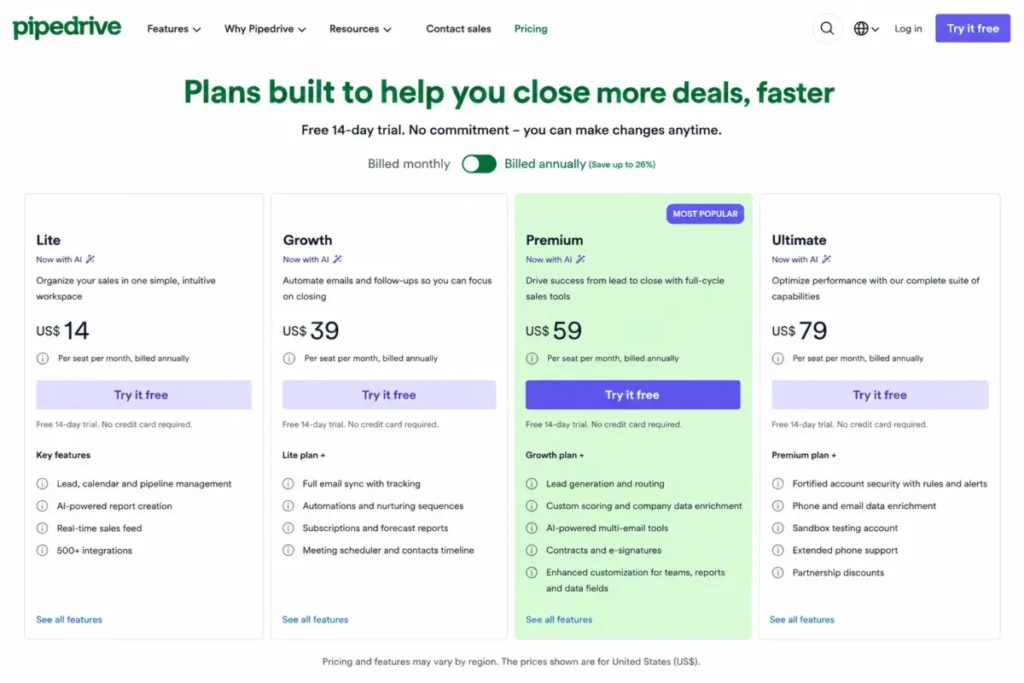
Pipedrive charges per seat per month, and every plan bills either monthly or annually, with annual prepayment lowering the effective seat rate. The four current plans are Lite ($14), Growth ($39), Premium ($59), and Ultimate ($79), all quoted per seat per month on annual billing. Those are the numbers that matter for a budget, but only after you attach them to a real headcount and a real feature requirement.
Here is what the annual commitment looks like once you multiply seats by the plan a team of that size usually lands on.
| Team size | Recommended plan | Monthly-equivalent (annual billing) | Billed annually |
|---|---|---|---|
| 1 seat | Lite (manual pipeline, no email sync) | $14 | $168 |
| 5 seats | Growth (email, sequences, automation) | $195 | $2,340 |
| 5 seats | Premium (needs LeadBooster, Docs, Projects) | $295 | $3,540 |
| 10 seats | Premium | $590 | $7,080 |
| 25 seats | Premium | $1,475 | $17,700 |
| 50 seats | Ultimate (governance, security rules) | $3,950 | $47,400 |
These totals assume annual billing, no add-on overages, and no tax. They are mathematical models built from published per-seat prices, not negotiated quotes. Pipedrive publishes no seat minimum on its self-service page, so the one-seat line is a real starting point rather than a floor you are forced above.
The single most useful number in this table is the gap between five-seat Growth and five-seat Premium: $2,340 versus $3,540, a $1,200 annual difference. That gap looks decisive until you add the three add-ons Premium bundles for free, at which point it nearly disappears. I break that break-even down in the add-on section, because it changes the recommendation for feature-heavy five-person teams.
One caveat worth stating up front. Contacts are not the same object as leads and deals. Pipedrive treats contacts generously, but leads and deals carry per-seat allowances and a hard company ceiling, so “unlimited contacts” language from marketing summaries does not mean unlimited sales records. That distinction becomes a budget and architecture question at scale, and I return to it in the limits section.
Line-Item Cost Breakdown: Every Billable Plan
Before the add-ons and overages, the plan itself is the first line item. This is the full matrix with both billing cadences, the practical use case, and the key limits that decide whether a plan holds up as your team grows.
| Plan | Monthly billing | Annual (per seat/ | Annual per seat/yr | Best for | Key limits |
|---|---|---|---|---|---|
| Lite | $24 | $14 | $168 | Solo or manual pipeline tracking | 2,500 leads+deals/ |
| Growth | $49 | $39 | $468 | Active outbound sales teams | 5,000 leads+deals/ |
| Premium | $79 | $59 | $708 | Teams needing docs, lead capture, projects | 15,000 leads+deals/ |
| Ultimate | $99 | $79 | $948 | Multi-team orgs needing governance and security rules | 20,000 leads+deals/ |
Source: Pipedrive official pricing and usage-limit documentation, checked July 15, 2026. Prices are US dollars.
What Each Plan Includes
Lite ($14 per seat, annual). Lite covers the core visual pipeline, contact and deal management, API access, webhooks, basic reporting, and the mobile apps. It includes 2,500 combined leads and deals per seat and 30 custom fields. What it lacks is the whole reason most teams buy a CRM instead of a spreadsheet: no synchronized email, no sequences, no workflow automation, and no shared team inbox. Avoid Lite if anyone on the team sends prospecting email from the CRM. It is a real fit only for a founder tracking a small, manual pipeline.
Growth ($39 per seat, annual). Growth is the practical operating floor. It adds two-way email sync, open and click tracking, templates, the meeting scheduler, sales sequences, workflow automation, forecasting, recurring products, and the contacts timeline. Limits step up to 5,000 leads and deals per seat, 100 custom fields, 50 reports per user, and 50 automations per company. What it still gates behind Premium: LeadBooster, Smart Docs, and Projects remain paid add-ons here. Avoid Growth only if you need those three modules for most of the team, because bundling them changes the math.
Premium ($59 per seat, annual). Premium is where Pipedrive stops nickel-and-diming feature-heavy teams. It bundles LeadBooster, Smart Docs, and Projects at no extra charge, then adds lead routing, custom scoring, company enrichment, AI email tools, contracts and e-signatures, a shared team inbox, three synchronized email accounts per user, and multiple dashboards. Limits jump to 15,000 leads and deals per seat, 300 custom fields, 250 reports per user, and 150 automations. This is the tier most growing sales organizations settle on. Avoid it only if your governance and security requirements specifically demand Ultimate.
Ultimate ($79 per seat, annual). Ultimate adds contact data enrichment, security rules, security alerts, sandbox access, extended phone support, and larger administrative allowances: 25 teams, visibility groups, and permission sets, five shared inboxes, and 500 enrichment credits. It is the right tier when governance, not features, is the constraint. One correction worth making loudly: Ultimate is not unlimited. It carries published ceilings of 500 custom fields, 500 reports per user, 250 automations, 50 sequences, 20,000 leads and deals per seat, and a company-level cap. Buy it for governance and security rules, not for the belief that limits disappear.
Old Pipedrive Plans vs Current Plans
If you are comparing an old invoice, a stale review, or a competitor’s comparison table, the plan names will not match. Pipedrive retired its previous five-tier naming. Use this crosswalk, and do not carry over the old prices, which are no longer accurate.
| Old plan name | Current plan |
|---|---|
| Essential | Lite |
| Advanced | Growth |
| Professional | Premium |
| Power | Premium |
| Enterprise | Ultimate |
Several indexed pricing pages still show Essential, Advanced, Professional, Power, and Enterprise with their old prices. Treat any table using those names as outdated for 2026 buying decisions.
Feature Gates: What You Actually Get by Plan
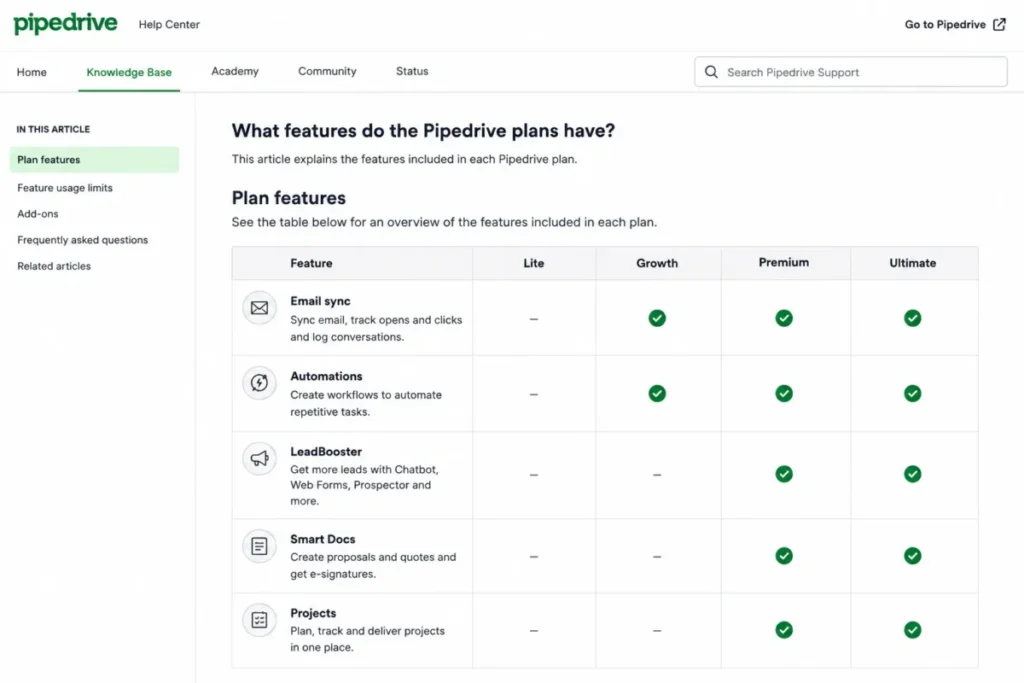
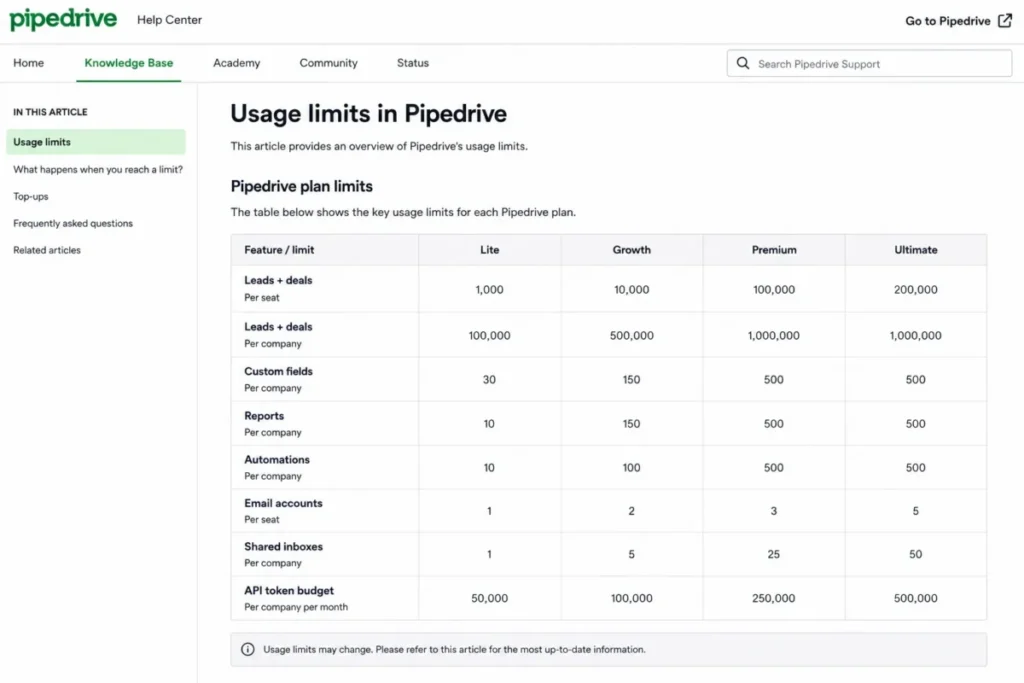
A plan card tells you a feature exists. It rarely tells you the ceiling on that feature, and the ceiling is what forces your next upgrade. This is the operational matrix Pipedrive’s marketing summary compresses away.
| Capability | Lite | Growth | Premium | Ultimate |
|---|---|---|---|---|
| Leads + deals per seat | 2,500 | 5,000 | 15,000 | 20,000 |
| Custom fields | 30 | 100 | 300 | 500 |
| Reports per user | 15 | 50 | 250 | 500 |
| Email sync | No | 1 account/ | 3 accounts/ | 5 accounts/ |
| Shared team inbox | No | No | 1 | 5 |
| Workflow automations (company) | No | 50 | 150 | 250 |
| If/else branches per automation | No | 3 | 10 | 20 |
| Sales sequences (company) | No | 5 | 25 | 50 |
| Teams / visibility groups / permission sets | No | No | 15 | 25 |
| Company enrichment credits | No | No | 100 | 500 |
| Custom scores | No | No | 5 | 10 |
| Daily API token budget (per seat) | 30,000 | 60,000 | 150,000 | 210,000 |
Source: Pipedrive usage-limit documentation, checked July 15, 2026. Company-level ceiling of 300,000 combined leads and deals applies across all plans, and the API budget is capped at 100 million tokens. The markdown table above is the accessible version of the data captured in the screenshot brief below.
Two gates deserve special attention because they trip up teams that only read the plan card.
Automation depth is capped separately from automation count. Being under your plan’s automation count does not mean a single workflow can be as long as you want. Each automation path is limited to 10 actions, 10 delay steps, a total path duration of 90 days, and a maximum seven-day wait-for-condition step. A long, multi-week nurture sequence can hit the per-path ceiling while you still have automation slots free. That is a design constraint, not a billing one, and no plan lifts it.
API budgets are per plan and per seat, and they run out. Pipedrive uses a daily token budget rather than a simple request cap. Exhaust it and the API returns HTTP 429 until the budget resets after the relevant 24-hour period. High-volume syncs, migrations, or a chatty integration can stall mid-run on a smaller plan. The stable API v2 endpoints cost fewer tokens than the older v1 endpoints, so integration teams can stretch the budget by moving to v2, but the ceiling is real and worth checking before you commit to a sync-heavy stack.
Contacts, Leads, and Deals Are Not the Same Limit
This is the misconception that wrecks capacity planning. Contacts, leads, and deals are three different objects with different rules. Pipedrive stores contacts generously, but leads and deals share a per-seat allowance and a company-level ceiling of 300,000 combined records. A 30-seat Premium account has a large per-seat allowance on paper, but the 300,000 company cap sits above the sum, so you cannot simply multiply per-seat limits and assume that is your true capacity. High-volume teams need to model against the ceiling, not the per-seat number.
What Happens When You Hit a Pipedrive Limit
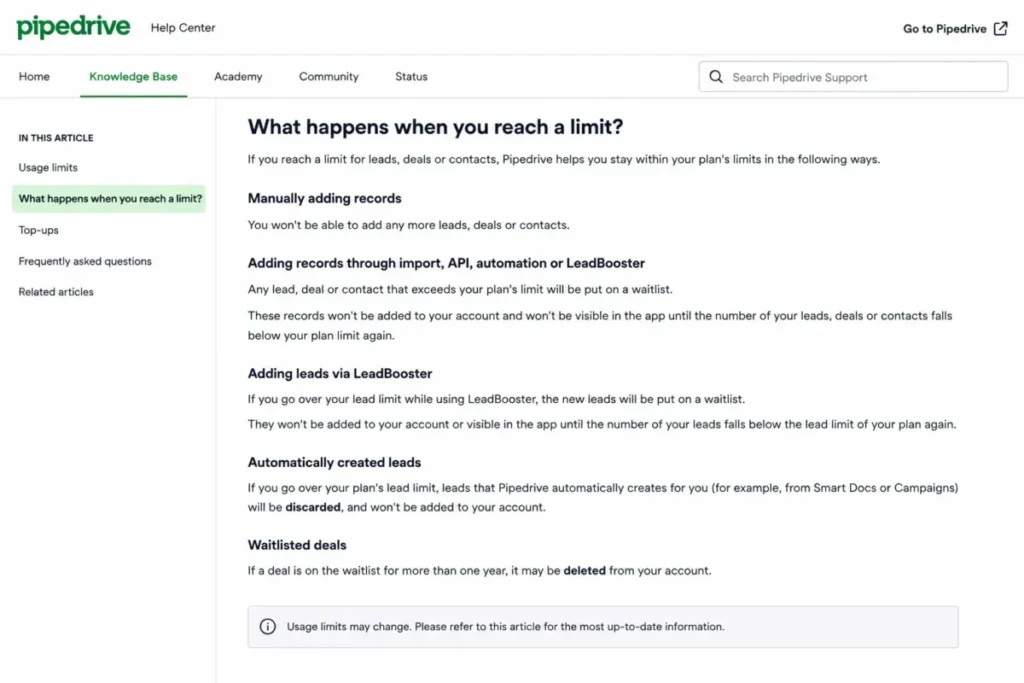
Most pricing pages never answer the question a nervous buyer brings: does Pipedrive delete my data if I exceed a limit? The honest answer is that behavior depends on how the record was created, and some of it does end in deletion.
According to Pipedrive’s usage-limit documentation, once you reach a record ceiling the system handles overflow by source. Manual additions are blocked, so a rep simply cannot create a new deal until space is freed. Records arriving from imports, the API, automations, or LeadBooster can be waitlisted or skipped rather than added. Automatically created leads can be discarded outright. And waitlisted deals that sit unprocessed for more than one year can be deleted.
This is a buyer-risk fact, not a footnote. Your existing in-limit data is not wiped the moment you cross a threshold, but new inbound records can silently fail to land, and waitlisted items have an expiration. For a team running heavy lead capture or an integration that pushes records in bulk, this is a reason to size the plan against real inbound volume and to watch the ceiling before it bites. I would treat the record limit as an operational alarm, not a soft suggestion.
Annual vs Monthly: The Real Savings Math
Pipedrive prices every plan two ways, and the annual-versus-monthly gap is larger on the expensive plans. Here is the per-seat cash difference, calculated from the published monthly and annual rates rather than a single blanket discount percentage.
| Plan | Monthly rate | Annual rate | Saved per seat/yr | Saving % | 10-seat annual saving |
|---|---|---|---|---|---|
| Lite | $24 | $14 | $120 | 41.7% | $1,200 |
| Growth | $49 | $39 | $120 | 20.4% | $1,200 |
| Premium | $79 | $59 | $240 | 25.3% | $2,400 |
| Ultimate | $99 | $79 | $240 | 20.2% | $2,400 |
The monthly-billing uplift is $10 per seat on Lite and Growth, and $20 per seat on Premium and Ultimate. At 10 Premium seats, choosing month-to-month instead of annual costs an extra $2,400 a year for the exact same product. Ten-seat Premium on annual billing runs $7,080; the same ten seats billed monthly run $9,480.
My recommendation is simple and conditional. Commit annually once you are past the trial and confident in the plan, because the cash saving is real and the product does not change. Stay on monthly billing only while you are still validating fit, or if cash flow makes a twelve-month prepayment painful. Do not let a sales rep talk you onto annual before you have confirmed the plan tier, because downgrading a prepaid annual seat is harder than upgrading one.
Add-Ons, Overages, and Surprise Costs
The seat price is not the whole invoice. Pipedrive sells five add-ons, and the trap is that they bill in different units. Some are company-level flat fees, one is per assigned seat, and one scales with your website traffic. Multiplying a company-level fee by headcount, or ignoring a usage-based one, is how buyers misjudge the real cost.
| Add-on | Starting price (annual) | Billing unit | Included with | Trigger |
|---|---|---|---|---|
| LeadBooster | $32.50/mo | Per company | Premium, Ultimate | Chatbot, Live Chat, Prospector, Web Forms |
| Smart Docs | $32.50/mo | Per company | Premium, Ultimate | Documents, proposals, contracts, e-signatures |
| Projects | $6.67/mo | Per assigned user | Premium, Ultimate | Post-sale project delivery |
| Campaigns | $13.33/mo | Per company | Not bundled | Email marketing module |
| Web Visitors | From $41/mo | Per identified-org volume | Not bundled | Website visitor identification |
| Capacity / Prospector top-ups | Undisclosed | Credit / capacity | N/A | Extra records, enrichment, or prospecting credits |
Source: Pipedrive pricing and add-on documentation, checked July 15, 2026.
Three of these deserve a closer read.
Web Visitors is not a flat fee. Many pricing pages quote “$41 per month” as if that number holds forever. It does not. Web Visitors starts at $41 and scales with the average volume of unique identified organizations visiting your site. As traffic grows, so does this line, independent of your seat count. Budget it as a usage-based cost and confirm the tier for your traffic level before you rely on the entry price.
Campaigns starts low but tiers by contact volume. Campaigns begins at $13.33 per company per month on annual billing, but the final price depends on the applicable contact tier. Treat $13.33 as a floor, not the number your list size will cost in practice. A June 2026 user report also described difficulty segmenting contacts who never opened an email; I could not confirm that in official documentation, so treat it as a workflow to test during the trial rather than a confirmed restriction.
Trials on add-ons can convert to paid. The Projects add-on trial can roll into a paid subscription unless you cancel it, and Smart Docs trial documentation references billing details and a five-signature-request cap. These are separate from the core 14-day CRM trial, and they are the kind of quiet conversion that produces a surprise line on the next invoice. Set a calendar reminder before any add-on trial ends.
There is one more cost that is not an add-on. Pipedrive documents capacity and Prospector top-ups, but it does not consistently publish every US top-up price. If your plan runs short on records, enrichment credits, or prospecting capacity, you can buy more, but request a quote rather than assuming a published rate. Do not budget against a top-up price you cannot verify.
The Five-Seat Break-Even: Growth Plus Add-Ons vs Premium
This is the calculation no competitor page runs, and it flips the obvious answer. Suppose a five-person team on Growth needs LeadBooster, Smart Docs, and Projects. On Growth, those are paid add-ons. On Premium, they are bundled free. So which is cheaper?
Growth path, per month on annual billing: five Growth seats at $39 = $195, plus LeadBooster at $32.50, plus Smart Docs at $32.50, plus five Projects seats at $6.67 = $33.35. Total: $293.35 per month, or $3,520.20 a year.
Premium path: five Premium seats at $59 = $295 per month, or $3,540 a year.
The Growth-plus-add-ons bundle is cheaper by $1.65 a month, roughly $19.80 across the year. That is a rounding error. Once a five-person team needs those three modules, Premium is effectively free relative to loading them onto Growth, and Premium throws in routing, scoring, enrichment, e-signatures, a team inbox, and far higher limits on top. The break-even point is where the apparently pricier tier becomes the rational buy. Below that need, Growth wins on price; at or above it, Premium wins on value.
Which Pipedrive Plan Should You Choose?
Company-size labels are a poor guide here. Pipedrive’s plans divide by workflow, not headcount, so the right question is what your team does, not how many people do it.
Solo founder or a manual pipeline. Choose Lite if you are tracking deals by hand and do not send prospecting email from the CRM. At $14 per seat, it is a clean upgrade from a spreadsheet. The moment you want email sync or automation, Lite stops being enough.
Active outbound sales team, any size from 2 to 50. Choose Growth. Email sync, tracking, sequences, the scheduler, forecasting, and automation are the daily tools of a working sales team, and Growth is the cheapest tier that includes all of them. This is the plan most teams need, and it is why the practical starting price is $39, not $14.
Team that needs lead capture, documents, scoring, or post-sale projects. Choose Premium. Once LeadBooster, Smart Docs, or Projects is a requirement for most of the team, the bundle math makes Premium the rational choice, and the higher limits and routing come along for free.
Multi-team organization with governance or security requirements. Choose Ultimate, but only for the governance. Security rules, security alerts, larger permission-set and visibility-group allowances, and extended phone support are the reasons to pay $79. If you are buying Ultimate expecting unlimited capacity, re-read the limits section first.
A quick 30/90-day adoption test to sanity-check the tier: after 30 days, reps should be living in the pipeline and sending synced email without exporting to a spreadsheet. After 90 days, your automations, sequences, and reporting should be doing work a human used to do manually. If you are still on Lite at day 30 and fighting the lack of email sync, you bought a tier too low. If you are on Premium at day 90 using none of the bundled add-ons, you bought a tier too high. Adoption, not licensing, is the usual failure point, which is why a disciplined CRM implementation guide rollout matters more than the tier you land on.
Which Pipedrive Plan Should You Avoid?
Avoid Lite if you run any real sales motion. This is the clearest disqualifier in the lineup. Lite has no synchronized email, no sequences, and no workflow automation, which means a rep cannot track opens, cannot run a follow-up cadence, and cannot offload deal admin to the system. For a working sales team, Lite creates a forced upgrade within the first month or two, and paying for a plan you will abandon quickly is worse than starting on Growth. The one exception is the genuinely manual, single-person pipeline where a spreadsheet was the previous tool and email lives entirely in a normal inbox.
The secondary caution is buying Ultimate for capacity rather than governance. Ultimate is the right call when you need security rules, alerts, and expanded administrative allowances across multiple teams. It is the wrong call if you are paying the $79 seat expecting the limits to vanish. They do not. If your only reason for Ultimate is “we are big,” price Premium against your actual record and automation needs first, because Premium’s ceilings clear most mid-market workloads. For how those ceilings and features hold up beyond the price sheet, the Pipedrive CRM review goes deeper than this pricing breakdown.
Competitor TCO Comparison
Pipedrive is a sales-first CRM, and its per-seat pricing sits in the middle of the market. The useful comparison is not the headline seat price but the entry point and the practical tier, because several competitors offer a permanent free plan that Pipedrive does not.
| CRM | Entry price | Free plan | Notes |
|---|---|---|---|
| Pipedrive | $14/ | No, 14-day trial | Sales-first, per-seat, add-ons extra below Premium |
| Zoho CRM | Free up to 3 users | Yes | Check paid edition pricing separately |
| HubSpot Sales Hub | Free for up to 2 users | Yes | Starter list rate around $20/ |
| Salesforce Sales Cloud | $25/ | Yes (Free Suite) | Scales steeply; Enterprise $175/ |
| Close | $9/mo Solo (1 user), $35/ | No | Built for high-velocity outbound teams |
| Insightly | $29/ | No | CRM plus project features |
Source: official competitor pricing pages, checked July 15, 2026. US dollars, annual billing where applicable.
The pattern for a US buyer is this. If budget is the hard constraint and you have three or fewer users, a free tier beats paying for Pipedrive, and Zoho CRM pricing stays modest even as you move onto paid editions. If you want a purpose-built outbound calling and emailing machine, Close is the closer comparison.
If you need Salesforce-grade extensibility, its entry Starter Suite undercuts Pipedrive Premium on paper, but Salesforce pricing scales into a very different cost class at Enterprise. Pipedrive’s argument is not that it is the cheapest; it is that Growth and Premium give a working sales team fast adoption and predictable per-seat pricing without a heavy admin burden. That is a real value, but it is not a price-leadership claim.
Is Pipedrive Worth the Price?
Pipedrive is worth it if you are a 5-to-50-person B2B sales team that wants reps in the pipeline quickly, needs synced email and manageable automation, and values predictable per-seat billing over deep customization. At $39 for Growth or $59 for Premium, the cost is defensible against the adoption speed and the low admin overhead, especially compared with heavier platforms that need a dedicated admin to run.
It is not worth it if your core requirement is native lifecycle marketing, a built-in customer-support and ticketing suite, deeply customizable analytics, or complex multi-object revenue modeling. Buying the highest plan does not turn a sales-first CRM into a full marketing or service platform, and if those are your must-haves, the stronger-fit Pipedrive alternatives are worth pricing before you commit. Reviewer patterns on G2, Capterra, and TrustRadius line up with this: consistent praise for the visual pipeline and ease of use, with recurring criticism about add-on cost, reporting depth, and limited native marketing. As one named Capterra reviewer put it, Pipedrive “is pricey for small teams.”
The buyer-risk ledger for Pipedrive is short and manageable. The pricing risk is the add-on and monthly-billing creep that pushes the real cost above the advertised seat. The workflow risk is the automation path cap and the reporting depth if you need advanced analytics. The scale risk is the record ceiling, including on Ultimate. The renewal question to answer before you sign again: is the team using the tier you are paying for, or are you paying for Premium add-ons and Ultimate limits you never touch?
How to Avoid Overpaying for Pipedrive
- Start on Growth, not Lite, if anyone sends prospecting email. Paying $14 for a plan you abandon in a month is more expensive than starting at $39.
- Run the five-seat break-even before you add LeadBooster, Smart Docs, or Projects. If most of the team needs all three, Premium is cheaper than loading them onto Growth.
- Do not multiply company-level add-ons by headcount. LeadBooster, Smart Docs, and Campaigns bill once per company; only Projects and seats scale with users.
- Commit annually only after the trial confirms the tier. Annual billing saves $120 to $240 per seat a year, but a prepaid wrong tier is hard to unwind.
- Watch add-on trials. The Projects trial can convert to paid unless canceled, and Smart Docs has its own billing and signature conditions.
- Size the plan against real record and API volume, not the marketing “unlimited contacts” line. Leads and deals are capped, and the API budget can throttle a heavy sync.
- Verify your localized checkout price. Pipedrive renders pricing by region, and some third-party pages still show outdated figures, so confirm the number on your own account before you buy.
A Note on the Premium Price Conflict
You will find 2026 pages listing Pipedrive Premium at $49 per seat per month billed annually, and others listing $59. This guide uses $59 as the US annual-equivalent figure verified on July 15, 2026. Some third-party pricing databases and competitor articles still display $49. Because Pipedrive’s pricing page renders by region and promotions come and go, the safest move is to treat $59 as the current US reference and confirm the exact number in your own checkout before committing. At 10 seats, the difference between $49 and $59 is $1,200 a year, so it is worth a 60-second verification.
Pipedrive Pricing FAQ
How much does Pipedrive cost per month?
Pipedrive costs $14 to $79 per seat per month on annual billing, across Lite, Growth, Premium, and Ultimate. On monthly billing the same plans run $24 to $99 per seat. Most active sales teams land on Growth at $39 or Premium at $59 per seat per month, verified for the US market on July 15, 2026.
Does Pipedrive have a free plan?
No. Pipedrive offers a 14-day free trial that does not require a credit card, but there is no permanent free tier. If you need an ongoing free CRM, Zoho is free for up to three users and HubSpot has a free tier for up to two, both verified as of July 15, 2026; comparing HubSpot pricing is a sensible next step for budget-constrained teams.
What is the cheapest Pipedrive plan?
Lite is the cheapest at $14 per seat per month on annual billing, or $24 on monthly billing. It is genuinely basic, though: no email sync, no sequences, and no automation. For a working sales team, the cheapest usable plan is Growth at $39.
Which Pipedrive plan includes email sync?
Growth is the first plan with two-way email sync, tracking, and templates. Lite has none of it. Premium raises the limit to three synchronized email accounts per user, and Ultimate to five. If email is part of your sales motion, Growth is the floor.
Which Pipedrive plan includes LeadBooster?
LeadBooster is bundled with Premium and Ultimate at no extra charge. On Lite and Growth it is a paid add-on starting at $32.50 per company per month on annual billing. The same applies to Smart Docs and Projects, which is why Premium often works out cheaper than Growth plus those add-ons.
Can I pay for Pipedrive monthly?
Yes. Every plan bills monthly or annually. Monthly billing costs $10 more per seat on Lite and Growth, and $20 more per seat on Premium and Ultimate. At 10 Premium seats that is an extra $2,400 a year, so annual billing pays off once you are confident in the plan.
What are Pipedrive’s hidden costs?
The main ones are add-ons on Lite and Growth (LeadBooster, Smart Docs, Projects, Campaigns, Web Visitors), the monthly-billing uplift, usage-based Web Visitors pricing that scales with traffic, and capacity or Prospector top-ups whose prices Pipedrive does not consistently publish. Add-on trials that convert to paid are another quiet cost.
How many automations does Pipedrive include?
Growth includes 50 automations per company, Premium 150, and Ultimate 250. Lite includes none. Separately, each automation path is capped at 10 actions, 10 delays, a 90-day total duration, and a seven-day maximum wait-for-condition step, regardless of plan.
What happens when I reach a Pipedrive usage limit?
Manual additions are blocked, and records from imports, the API, automations, or LeadBooster can be waitlisted or skipped. Automatically created leads can be discarded, and waitlisted deals older than one year can be deleted. Your existing in-limit data is not deleted the moment you cross a threshold, but new inbound records can fail to land.
Is Pipedrive Ultimate unlimited?
No. Ultimate has published ceilings: 500 custom fields, 500 reports per user, 250 automations, 50 sequences, 20,000 leads and deals per seat, and a 300,000 company-level record cap. It adds governance and security features, not unlimited capacity. Some older reviews carry forward “unlimited” language from the retired Enterprise plan, but that does not match current documentation.
Can I change Pipedrive plans later?
Yes. You can upgrade or downgrade, and add-ons generally follow your account billing cadence. Upgrading is straightforward; downgrading a prepaid annual seat is harder to unwind mid-term, which is why I would confirm the tier during the trial before committing to annual billing.