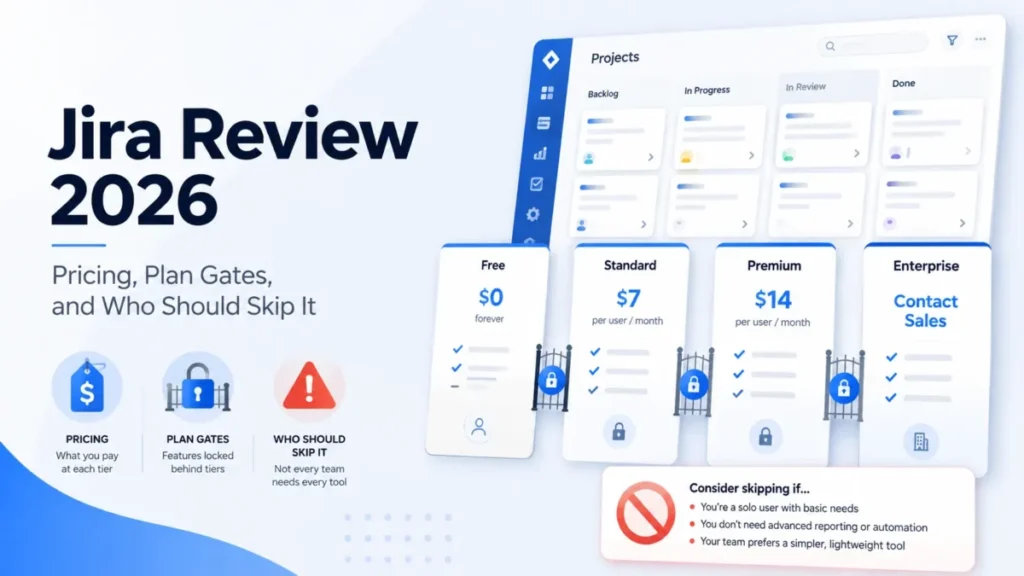
Jira has four plans, two billing cadences, and a per-seat rate that changes depending on how many seats you buy. That combination is why so many teams budget one number and pay another.
The advertised figure is the smallest part of the decision. What actually moves the invoice is peak-seat billing on monthly plans, a fixed user tier on annual plans, a security add-on that most plan tables skip, and an automation allowance that stops flows rather than throttling them.
I wrote this for the person who has to defend a Jira line item to finance, not for someone browsing plan cards.
In This Article (18 sections)
Quick Pricing Verdict
| Decision point | Answer |
|---|---|
| Starting price | $0 on Jira Free for up to 10 users |
| Free plan or trial | Both: a permanent Free plan, plus a 7-day trial on Standard and Premium |
| Best plan for most teams | Standard, at a documented monthly rate of $8.60 per user/ |
| Plan to avoid | Free, once permission control or more than 100 automation runs per month is needed |
| Biggest hidden cost | Atlassian Guard, when enforced SSO or SCIM is a requirement below Enterprise |
| Second hidden cost | Maximum Quantity Billing: monthly invoices follow peak seats, not end-of-month seats |
| Best alternative if too expensive | ClickUp Unlimited at $7 per user/ |
| Pricing evidence | Official Atlassian pages, verified 2026-08-25 |
Source: Jira plan pricing and Atlassian Cloud licensing rates, per user per month.
Standard is the practical default for most paid teams. Premium earns its price only when cross-team planning, formal approvals, pooled automation capacity, or a 99.9% uptime SLA is a stated requirement.
The Advertised Price vs the Real Price
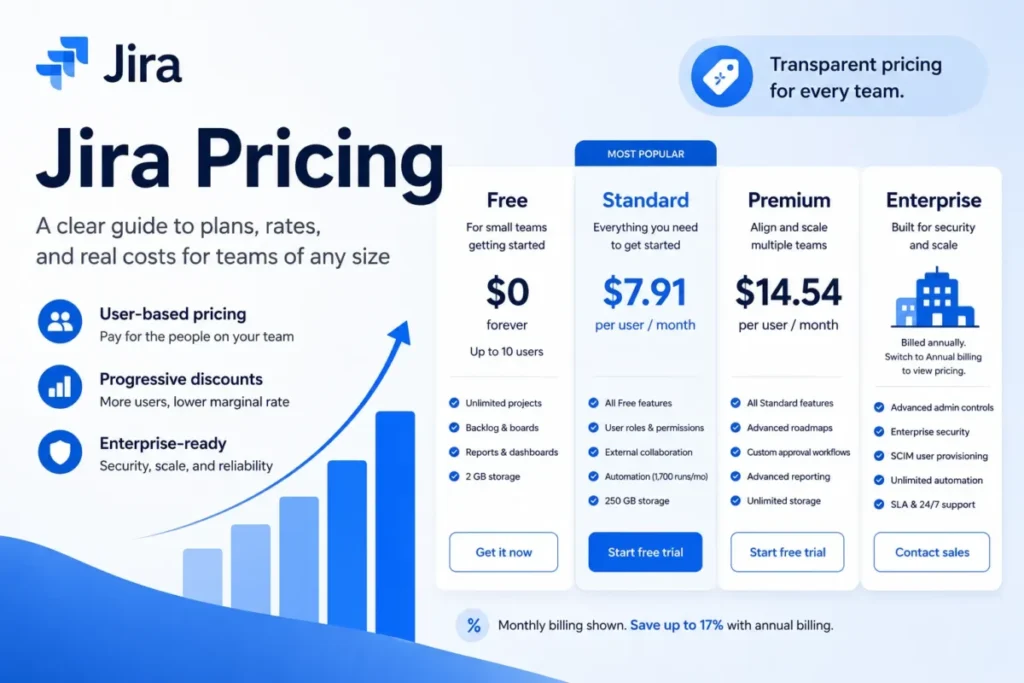
Atlassian’s public pricing page displays $7.91 per user/month next to Standard and $14.54 per user/month next to Premium, with a Monthly and an Annually control above them. Atlassian’s own Cloud licensing documentation separately documents $8.60 per user/month for the first 100 Standard seats on monthly billing.
Those two numbers cannot both describe the same billing cadence. Until the calculator is captured with its selected cadence visibly bound to the displayed rate, I treat $7.91 and $14.54 as displayed headline figures and nothing more.
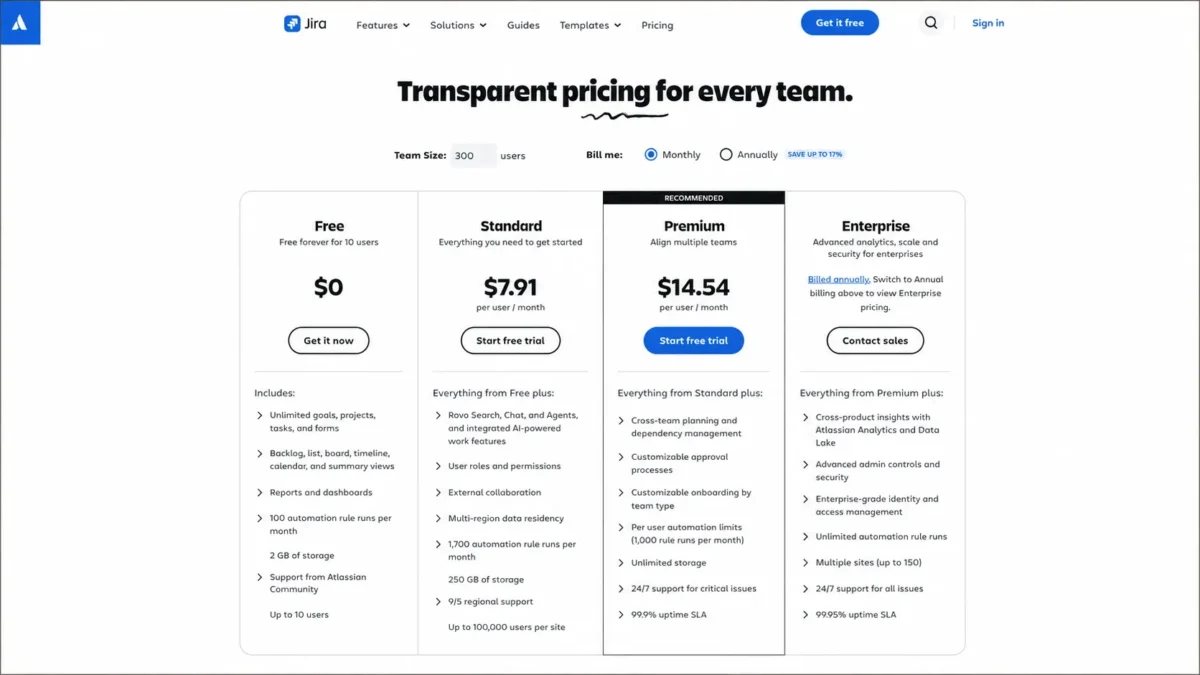
The gap matters because every downstream estimate inherits it. A team of 40 modelling Standard at $7.91 budgets $3,796 a year, while the documented monthly rate produces $4,128, and neither figure is an annual contract quote.
Three other gaps sit between the plan card and the invoice.
| Advertised idea | What the documentation actually supports | Who pays for the gap |
|---|---|---|
| One flat per-seat rate | Progressive bands on monthly billing: $8.60, then $7.30, then $6.10 per user/ | Teams above 100 seats that model a flat rate and over-budget |
| Remove a seat, pay less | Maximum Quantity Billing charges the highest seat count reached during the cycle | Teams with contractors, interns or seasonal load |
| Annual billing is always cheaper | The annual user tier is fixed for the term and cannot be altered | Teams expecting headcount to fall mid-term |
| Security is included | Guard Standard ships with Enterprise; below it, identity controls are priced separately | Any team where SSO or SCIM is a policy requirement |
Progressive bands, Maximum Quantity Billing and annual tier immutability, all per user per month where a rate applies: Atlassian Cloud licensing.
Jira Pricing Plans Compared
| Plan | Documented monthly rate | Billing basis | Best for | Key limits |
|---|---|---|---|---|
| Free | $0 | Up to 10 users on one site | Squads under 10 people with simple governance | 100 automation runs/ |
| Standard | $8.60 per user/ | Exact-user monthly billing, progressive bands, or a fixed annual tier | Teams needing roles, permissions and moderate automation | 1,700 automation runs/ |
| Premium | Displayed at $14.54 per user/ | Same monthly or annual structure as Standard | Multi-team planning, approvals, higher support commitments | 1,000 runs per paid user/ |
| Enterprise | Not publicly disclosed | Annual billing only, sales quote | Multi-site governance, enterprise analytics, identity controls | Up to 150 sites, service-level automation guardrails still apply |
Plan features and support tiers: official Jira pricing page. Monthly rate bands: Atlassian Cloud licensing.
Only one row in that table is a cadence-bound number I would put in a budget model. That is the $8.60 band, because Atlassian’s licensing documentation states the cadence alongside the figure.
What Each Jira Plan Includes
Each plan below carries a mini verdict and an avoid-if line, because the useful question is not what a tier contains but which requirement forces you onto it.
Free: real, but narrower than the ten-user headline suggests
Free covers boards, backlogs, timelines and reports for up to 10 users at $0, with 2 GB of storage and Community support. It includes 100 automation rule runs per month.
The ceiling that catches teams first is not headcount. Free permits 100 outgoing email notifications per day, and notifications pause once that threshold is reached until the following day.
Free also cannot assign space roles, configure work-item security schemes, or restrict permissions through permission schemes. A six-person team handling client data or contractor access hits that wall long before it hits ten seats.
Avoid Free if: access control is a requirement, notification volume is routine, or automation carries any business-critical work.
Standard: the plan most paid teams actually need
Standard adds user roles and permissions, external collaboration, multi-region data residency, 250 GB of storage, Rovo at 25 credits per user, and regional support 9 hours a day across 5 working days with a 2-hour critical response target. Automation rises to 1,700 rule runs per month.
For seats 1 to 100 on monthly billing the documented rate is $8.60 per user/month, falling to $7.30 for seats 101 to 250 and $6.10 for seats 251 to 450.
The plan does what a growing engineering or operations team needs it to do. The one thing it does not do is scale automation with headcount, which is where a busy 40-person department can outgrow it without ever wanting a Premium planning feature.
Avoid Standard if: business-critical rules regularly exceed 1,700 runs per month, or several teams need shared dependency planning.
Premium: buy it for a workflow, not for a team-size label
Premium adds cross-team planning through Plans, dependency management, customizable approval processes and customizable onboarding. It also raises storage to unlimited, gives Rovo 70 credits per user, and adds 24/7 support for critical issues with a 1-hour response target under a 99.9% uptime SLA.
Automation moves to 1,000 rule runs per paid user per month, pooled across the site.
Pooled automation is the part worth modelling. At 30 paid users the pool is 30,000 runs a month, which is a different order of capacity from Standard’s flat 1,700.
The planning story has a documented boundary. A plan supports at most two active Program Boards, and Atlassian states the Program Board is not designed for real-time collaborative Big Room Planning.
Avoid Premium if: the reason for buying it is “the team got bigger” rather than a named requirement such as Plans, approvals, automation volume, or the SLA.
Enterprise: an architecture and governance purchase
Enterprise is sold annually through a sales quote, with no public per-user figure. It adds Atlassian Analytics and Data Lake cross-product insights, advanced administration and security, enterprise identity capabilities including Guard Standard, unlimited Jira automation rule runs, and support for multiple sites up to 150.
Support moves to 24/7 coverage for all issues with a 30-minute critical response target and a 99.95% uptime SLA.
I would not model Enterprise from a guessed per-seat number. The honest inputs for a business case are the included Guard entitlement, the automation ceiling removal, and the site count, then a quote against that specification.
Avoid Enterprise if: the requirement is only more automation on a single site, because that is a narrower problem than the plan solves.
Feature Gates: What You Actually Get by Plan
| Capability | Free | Standard | Premium | Enterprise |
|---|---|---|---|---|
| Automation rule runs per month | 100 | 1,700 | 1,000 per paid user, pooled | Unlimited at plan level |
| Concurrent automation flows | 5 | 10 | 20 | 30 |
| Rovo credits per user per month | Not included | 25 | 70 | 150 |
| Roles and permission schemes | Not configurable | Included | Included | Included |
| Cross-team planning with Plans | Not available | Not available | Included | Included |
| Storage | 2 GB | 250 GB | Unlimited | Unlimited |
| Support and response target | Community | Regional, 9 hours a day, 2 hours critical | 24/7 critical, 1 hour, 99.9% SLA | 24/7 all issues, 30 minutes, 99.95% SLA |
| API points per hour | Not documented for this edition | 100,000 plus 10 per user | 130,000 plus 20 per user | 150,000 plus 30 per user |
| Sites per subscription | 1 | 1 | 1 | Up to 150 |
Plan capabilities, Rovo credits and support targets: Jira plan comparison. Concurrent flows: automation service limits. API points: Jira Cloud rate limiting.
Four of those rows are genuine upgrade triggers rather than nice-to-haves: automation runs, concurrent flows, Plans, and the support response target. The rest rarely decide a purchase on their own.
Rovo is included on every paid plan, and Atlassian states that Search does not consume credits while Chat and Agent requests do. As of 2026-08-25 Atlassian states it is not charging for usage above the included allowance, and says it will give at least 90 days’ notice and require explicit opt-in before changing that.
That is a favourable position and a temporary one. I would not build a business case whose savings depend on it.
The Hidden Costs Nobody Puts in the Budget
Five costs sit outside the plan card, and four of them are billing mechanics rather than fees. Each one below names the trigger, the buyer it hits and the mitigation.
Peak seats, not end-of-month seats, drive the monthly bill
Atlassian bills monthly subscriptions using Maximum Quantity Billing, which charges for the highest number of seats assigned at any point during the billing cycle. Removing seats mid-cycle does not reduce that cycle’s bill.
The buyer consequence is specific. Add eight contractors for a two-week release push on a 40-seat Standard site and the cycle bills 48 seats, so the $8.60 band turns a temporary staffing decision into a $68.80 charge that no one planned.
Mitigation is procedural rather than commercial: batch seat additions, reclaim licences before the cycle boundary rather than after it, and treat seat provisioning as a billing event.
An annual tier cannot shrink during the term
Annual Atlassian Cloud subscriptions are purchased at a user tier, and Atlassian’s licensing documentation states that annual user tiers cannot be altered during the term.
That converts the annual saving into a bet on headcount. A team confident it will grow can take it comfortably, while a team expecting attrition, a reorganisation, or the end of a contractor programme is buying a floor it cannot lower.
The renewal question to answer before signing: if headcount falls 20% in month four, what does the invoice do?
Security can add a second subscription below Enterprise
Enterprise includes Guard Standard. Below Enterprise, identity controls such as enforced SSO and SCIM sit in Atlassian Guard, whose pricing page displayed $4.20 per user/month on 2026-08-25 without binding that figure to a selected billing cadence.
Two mechanics soften the number. Guard bills unique users across supported Atlassian applications rather than charging the same person once per application.
Someone working across two Atlassian products is therefore one billable Guard user, and Atlassian describes the annual Guard rate as equivalent to two months free against monthly billing.
I would price Jira and the identity requirement together from the first day of the evaluation. A security policy that mandates SSO can move the effective per-seat cost by roughly half again, and it is one of the easiest Jira costs to miss in an initial budget..
Automation exhaustion is an outage, not a warning
When the monthly automation allowance is spent, ordinary flows fail until usage resets on the first of the following month. Quotas reset at the start of each month and unused runs do not roll over.
For a service desk or a release pipeline that runs on rules, that is a workflow outage with a calendar attached. The cost is not the overage fee, because no universally applicable overage price is published; the cost is the work that stops.
Migration labour that no calculator prices
Atlassian recommends splitting large CSV imports into files of approximately 1,500 work items and notes an import can take about an hour depending on size, complexity and setup. Attachments are supplied through URLs reachable by Jira Cloud, and parent-child relationships are mapped using identifiers and parent references.
A 12,000-item migration is therefore eight batches, each needing mapping, a validation pass and a correction loop. Duplicate handling, activity history and automation recreation are not covered by that generic CSV path, so a switching team should scope them separately rather than assume them.
Against a subscription difference of a few hundred dollars a year, that implementation effort is usually the larger number.
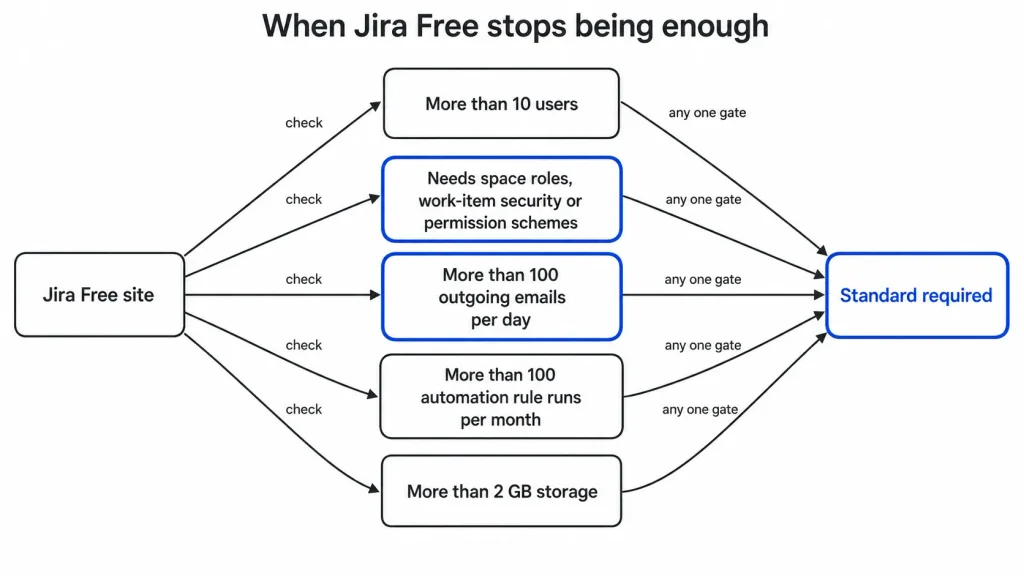
When the Free Plan Stops Working
Free stops being viable at the first of these, not the last:
- Headcount passes 10 users, at which point the site is moved to an automatic 7-day Standard trial.
- Anyone needs a space role, a work-item security scheme, or a restricted permission scheme.
- Outgoing notifications routinely pass 100 per day.
- Automation carries more than 100 rule runs per month, or any rule the business depends on.
- Storage passes 2 GB, or support needs to be something other than Community.
One transition detail deserves planning time. Atlassian states the Free email restriction may take up to 30 days to lift after an upgrade, so a team that upgrades reactively because notifications stopped can still be constrained after paying.
Automation Limits by Plan
Automation is the most under-priced part of a Jira decision, because the plan cards present it as a feature count when it behaves as a capacity ceiling.
| Automation dimension | Free | Standard | Premium | Enterprise |
|---|---|---|---|---|
| Monthly rule runs | 100 | 1,700 | 1,000 per paid user, pooled | Unlimited at plan level |
| Behaviour at the ceiling | Ordinary flows fail until the first of the next month | Same | Same | Plan quota removed |
| Rollover | None | None | None | Not applicable |
| Concurrent flows | 5 | 10 | 20 | 30 |
Quotas and reset behaviour: automation usage documentation. Concurrency: service limits for automation.
Monthly runs are only one of the ceilings. Service limits apply independently of the plan quota, and a complex or bursty implementation can meet them while runs remain available.
| Service guardrail | Documented limit |
|---|---|
| Steps in a standard flow | 65 |
| Steps in an advanced flow | 500 |
| Work items searched by scheduled JQL | 999 |
| Associated items processed | 5,000 |
| Global automation queue | 50,000 |
| Processing time | 60 minutes per 12 hours |
| Loop detection | 10 |
| Lookup work items | 100 |
| Branch retrieval | 150 |
| Rovo agent automation | 500 requests per minute, soft limit |
Every ceiling above: Atlassian automation service limits.
A rule that fans out across a large backlog can therefore stall on the branch or lookup ceiling while the monthly counter still reads healthy. Teams designing around Jira automation should size the design against both tables, not just the headline allowance.
Scale Limits the Pricing Page Does Not Explain
Higher tiers do not remove every platform constraint. Jira Cloud data limits active from March 2026 cap a space at 700 fields, 10,000 select-list options per field across contexts, and 150 work types.
Four further limits are documented as scheduled for September 2026, which means that on 2026-08-25 they are announced rather than active. Those four are 20,000 field options per field, 50 work-item security levels per space, 50 permission grants per permission, and 15,000 releases per space.
An organisation with a heavily customised Jira instance should audit against those four now. Cleaning field options and security levels ahead of enforcement is administrator time; discovering the ceiling after enforcement is a schema redesign.
Integration capacity has its own ceiling. The documented per-tenant API pool gives Standard 100,000 points per hour plus 10 per user, Premium 130,000 plus 20, and Enterprise 150,000 plus 30, with every one of those editions capped at 500,000 points per hour.
Upgrading raises the base and the per-user multiplier. It does not remove the cap, so an integration-heavy organisation still has to design for batching and backoff rather than buying its way past throttling.
Real Cost Scenarios: 5, 10 and 20 Users
Every figure below is editorial arithmetic on one verified input, the $8.60 per user/month monthly Standard rate for seats 1 to 100. The formula is seats multiplied by $8.60, and the twelve-cycle column is that monthly figure across twelve unchanged monthly billing cycles.
| Team size | Recommended plan | Monthly cost | Twelve unchanged monthly cycles | Notes |
|---|---|---|---|---|
| 5 users | Free, or Standard if permissions are needed | $0 or $43 | $0 or $516 | Free works only if all five gates hold |
| 10 users | Free, or Standard for governance | $0 or $86 | $0 or $1,032 | Seat 11 triggers an automatic Standard trial |
| 20 users | Standard | $172 | $2,064 | 1,700 runs is roughly 85 per person per month |
| 25 users | Standard | $215 | $2,580 | An identity add-on, if required, is billed separately |
| 50 users | Standard | $430 | $5,160 | Automation volume is the usual upgrade trigger here |
| 100 users | Standard | $860 | $10,320 | Last seat in the first documented band |
| 450 users | Standard | $3,175 | $38,100 | Atlassian’s own progressive example, blended to $7.06 per user |
Rate band and the 450-seat example, per user per month: Atlassian Cloud licensing rates. Twelve-cycle totals are editorial calculations from that rate, not annual subscription quotes.
The twelve-cycle column is not an annual plan price. Annual Jira subscriptions are quoted against a fixed user tier with different mechanics, so treating twelve monthly cycles as an annual quote is the most common modelling error in published Jira cost tables.
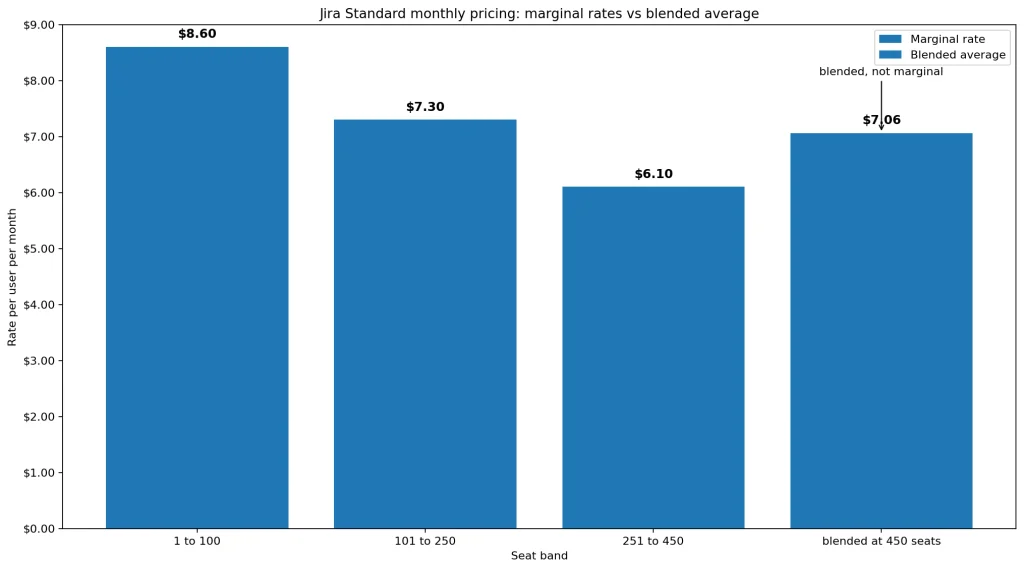
Above 100 seats the flat-rate assumption overstates the bill. A 300-seat model at a flat $8.60 produces $2,580 a month, while the documented bands produce $2,299, and a finance team told the larger number will question the smaller invoice.
Monthly vs Annual Billing
The billing basis diverges here. Monthly Jira subscriptions bill exact users with progressive rates and are exposed to Maximum Quantity Billing.
Annual subscriptions are purchased at a user tier that is fixed for the term.
Payment methods differ too. Monthly subscriptions accept credit card or PayPal, while annual subscriptions accept credit card, bank transfer or check.
Refund windows differ in the same direction. Monthly subscriptions are refundable within the first paid month after the trial, and annual subscriptions within 30 days of payment.
The decision rule I would apply is about volatility rather than headline saving:
- Headcount stable or growing, with a firm budget: annual, because the tier commitment is a bet you expect to win.
- Contractors, seasonal staffing, or an unfinished reorganisation: monthly, and treat peak-seat exposure as the price of that flexibility.
- Headcount likely to fall within the term: monthly, and revisit at the next planning cycle rather than locking a floor.
Jira licensing documentation supports monthly terms as well as one-year and two-year terms, and removing a product or app before the end of an existing term does not itself imply a prorated credit. That last point belongs in the contract review, not the spreadsheet.
Which Jira Plan Should You Choose?
Each cohort below is resolved on four things: the plan price, the feature gate that forces the tier, the team size and usage volume it fits, and the upgrade trigger that ends it. The total cost figures come from the official Atlassian licensing rate documented above, because a practical cost is what decides this and a headline rate is not.
Solo user or a squad of two to five. Free, provided nobody needs permission schemes and automation stays under 100 runs per month. The moment client data or contractor access enters the site, move to Standard.
A 10 to 25 person product team. Standard. Roles and permissions, 250 GB of storage and business-hours regional support are the reasons, and 1,700 automation runs is usually comfortable at this size.
A 25 to 100 person department running serious automation. Standard first, with automation volume monitored monthly. Premium becomes the right answer when pooled capacity, not planning features, is what the team is short of.
Multiple teams planning against shared dependencies. Premium, because Plans and dependency management are gated there. Keep a collaborative whiteboard alongside it if live planning sessions matter, since the Program Board is capped at two active boards per plan and is not built for that job.
A regulated or federated enterprise. Enterprise, quoted against a specification that names site count, identity requirements, analytics needs and automation volume. The included Guard Standard entitlement is a real part of that comparison and is easy to leave out of a spreadsheet.
Which Jira Plan Should You Avoid?
Avoid Free for any team that needs access control. The restriction on space roles, work-item security schemes and permission schemes is a governance disqualifier, and it fires at six users as readily as at ten.
Avoid Standard when automation is load-bearing and volume is climbing. Hitting 1,700 runs stops ordinary flows until the first of the next month, and a service desk that discovers this on a Tuesday has bought a week of manual work.
Avoid Premium when the justification is headcount alone. Nothing in the Premium feature set is priced for team size, so a large team with no cross-team planning requirement and modest automation is paying for capability it will not use.
Avoid Enterprise as an automation fix. If unlimited rule runs is the only Enterprise capability the organisation needs, the cheaper conversation is rule optimisation and a Premium pool sized to actual usage.
The exception in all four cases is a written requirement. A policy that mandates SSO, an SLA in a customer contract, or an auditor asking for permission granularity converts a preference into a purchase.
Jira Pricing vs Competitors
| Product | Entry paid rate | Practical tier for a mixed team | Roughly at 10 users | Best for |
|---|---|---|---|---|
| Jira Standard | $8.60 per user/ | Standard | $86 per month | Software teams needing issue workflow depth and permission control |
| ClickUp | $7 per user/ | Business at $12 per user/ | $70 per month on Unlimited | Teams wanting one tool across docs, tasks and light CRM |
| monday.com | $9 per seat/ | Standard at $12 per seat/ | $120 per month on Standard | Operations teams wanting visual boards and fast setup |
Jira rate per user per month: Atlassian Cloud licensing tables. ClickUp plan rates and monday.com plan rates as displayed on 2026-08-25, in the states observed on each page.
Those rows are orientation, not equivalence. The billing bases differ, the observed monday.com state was a 10-seat annual selection, and none of the three products gates the same capability at the same tier.
Jira is the stronger fit when work-item workflow, permission granularity and developer tooling matter more than breadth. ClickUp and monday.com are the stronger fit when the buying reason is one tool for a mixed operations team rather than deep issue tracking.
Is Jira Worth the Price?
Jira is worth it when the workflow is genuinely issue-shaped: branching status models, permission granularity, dependency planning across teams, and automation that has to survive an audit. At $8.60 per user/month for the first 100 monthly seats, Standard is not expensive for that job.
It is not worth it when the real requirement is a shared task list with a nice view. The administration overhead that makes Jira good at governance is a cost with no return for a team that does not need governance, and the 2026 configuration guardrails are a reminder that customisation has a ceiling.
The condition that changes the verdict is security policy. Add a mandated SSO requirement below Enterprise and the effective per-seat cost moves enough that a like-for-like comparison against ClickUp or monday.com needs rerunning with Guard included.
Three things should be true after 90 days for the purchase to be working. Automation usage is tracked and sits below the plan ceiling, permission schemes match the access policy on paper, and no one has had to work around a field or work-type limit.
How to Avoid Overpaying for Jira
- Quote the exact seat count in the live calculator with the cadence visibly selected. The displayed headline rate and the documented monthly band are different numbers, so an estimate built from a plan card is a guess.
- Model peak seats, not average seats, for monthly billing. Maximum Quantity Billing means the highest count reached in the cycle is what gets invoiced.
- Test the annual tier against a headcount drop before committing. The tier cannot be altered during the term, so the saving only survives if the headcount does.
- Price the identity requirement in the same spreadsheet as the plan. Guard Standard ships with Enterprise and is a separate subscription below it, billed on unique users across supported Atlassian applications.
- Size automation against runs and service limits together. A rule set can pass the monthly quota and still stall on concurrency, branch retrieval or processing time.
- Audit field, work-type, security-level and release counts before September 2026. Cleaning configuration ahead of the scheduled limits is cheaper than redesigning a schema after them.
- Budget the migration, not just the subscription. Batches of roughly 1,500 work items, an hour per import and a validation pass per batch is real implementation time, and it is usually larger than the annual price gap between two candidate tools.
For a broader view of how Jira behaves in daily use, the full Jira review covers workflow depth and administration overhead. The project management software comparison sets it against the wider category. Teams weighing the switching cost specifically should read the ClickUp pricing breakdown alongside this one.
Methodology: How This Jira Pricing Analysis Was Verified
This analysis is based on Atlassian’s official pricing pages, Cloud and product licensing documentation, administration and automation help-center articles, developer platform documentation, and trust and compliance resources. Volatile pricing and plan limits were checked on 2026-08-25 against those primary sources.
Each plan was assessed against the same buyer-focused criteria. Those criteria are cadence-bound rate evidence, billing mechanics, feature gates, usage ceilings and their overflow behaviour, support commitments, security requirements and implementation effort.
Greater weight was given to factors that move a real invoice or stop a workflow: seat-billing mechanics, automation capacity, identity requirements, and configuration ceilings. Vendor positioning and headline presentation carried no weight in the assessment.
Where a displayed rate could not be tied to a stated billing cadence, it is presented as a displayed figure rather than a cadence-specific price, and it is kept out of every cost calculation. Cost scenarios are labelled as editorial arithmetic on a single documented rate.
FAQ
These are the questions the body leaves genuinely open for a buyer who has already picked a plan.
How much does Jira cost per month?
Jira Free is $0 for up to 10 users. Standard is documented at $8.60 per user per month for the first 100 seats on monthly billing, so a 20-person team pays $172 a month at that rate.
Is Jira free for 10 users?
Yes, the Free plan supports up to 10 users at no cost. Adding an eleventh user moves the site onto an automatic 7-day Standard trial.
What is the difference between Jira Standard and Premium?
Premium adds cross-team planning through Plans, dependency management, customizable approvals, unlimited storage, 24/7 critical support with a 1-hour response target and a 99.9% SLA. It also changes automation from a flat 1,700 runs per month to 1,000 runs per paid user per month, pooled.
What happens when Jira automation reaches its limit?
Ordinary automation flows fail until usage resets on the first of the following month. Unused runs from the previous month do not roll over, and no universally applicable paid overage rate is published.
Does Jira include SSO?
Enterprise includes Guard Standard, which covers enforced SSO and SCIM. Below Enterprise those identity controls sit in a separate Atlassian Guard subscription, billed on unique users across supported Atlassian applications.
Is Jira cheaper if billed annually?
Annual billing is presented as the cheaper cadence, but the annual purchase is made at a user tier that cannot be altered during the term. A team expecting headcount to fall should compare the tier commitment against monthly flexibility rather than the headline saving alone.
Why did my Jira bill not drop after removing users?
Monthly subscriptions use Maximum Quantity Billing, which charges for the highest seat count assigned at any point in the cycle. Seats released mid-cycle become available for reassignment but do not reduce that cycle’s invoice.
Can I still buy Jira Data Center in 2026?
No. Atlassian ended sales of new Data Center licences on March 30, 2026, and states that Data Center reaches end of life on March 28, 2029.
Does Jira work on mobile?
Atlassian publishes Jira mobile apps for iOS and Android. Deeper administration and configuration work remains better suited to the web application.
Is Jira Cloud GDPR and SOC 2 compliant?
Atlassian publishes GDPR compliance resources for its cloud platform.
Atlassian also publishes SOC 2 compliance resources. Both are vendor compliance materials, and a buyer’s own configuration still has to meet its own obligations.