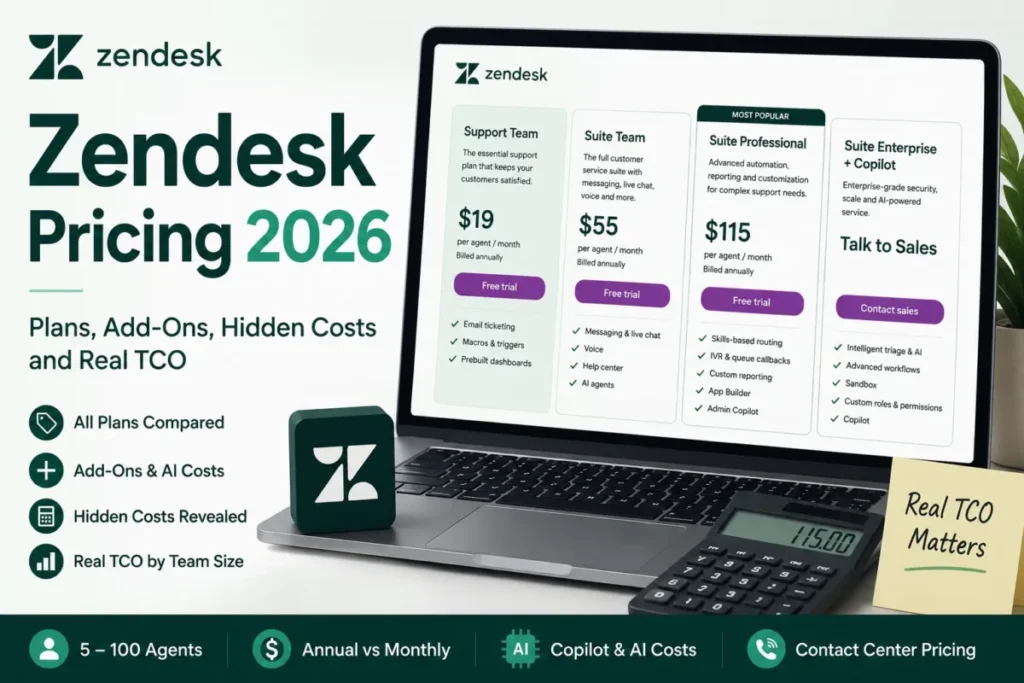
Zendesk pricing starts at $19 per agent per month for Support Team, billed annually, or $25 billed monthly. The Suite plans cost $55 and $115 per agent per month billed annually ($69 and $149 billed monthly), and Suite Enterprise + Copilot is quote-only.
This guide prices those plans for a US support team: what each one adds, what AI resolutions and add-ons cost on top of the seat, and what 3 to 25 agents pay in a year, with the math shown.

Quick pricing answer
Zendesk sells four Customer Service plans, priced per agent per month in US dollars (checked October 17, 2026):
- Support Team: $19 billed annually, $25 billed monthly
- Suite Team: $55 billed annually, $69 billed monthly; the plan for a first omnichannel desk
- Suite Professional: $115 billed annually, $149 billed monthly; the plan for skills routing, SLAs and HIPAA
- Suite Enterprise + Copilot: Talk to Sales
- No free plan: a 14-day trial with Suite Professional features and Copilot included
- The cost caveat: AI agents include 5 or 10 automated resolutions per agent per month, then bill $1.50 each committed or $2.00 pay-as-you-go
In This Article (13 sections)
Zendesk Pricing at a Glance
Three of Zendesk’s four Customer Service plans carry a public price: Support Team, Suite Team and Suite Professional. Billed annually they cost $19, $55 and $115 per agent per month; billed monthly, $25, $69 and $149.
| Plan | Monthly billing | Annual billing | Best for | Main limitation |
|---|---|---|---|---|
| Support Team | $25 per agent/ | $19 per agent/ | An email ticket queue | Help center, messaging and live chat are add-ons; Copilot cannot be added |
| Suite Team | $69 per agent/ | $55 per agent/ | A first omnichannel desk | Routing by agent status and capacity only; reports refresh every 24 hours |
| Suite Professional | $149 per agent/ | $115 per agent/ | Specialist queues, SLAs, HIPAA | Sandbox is an add-on; custom agent roles sit on the Enterprise card |
| Suite Enterprise + Copilot | Contact sales | Contact sales | Governance and full Copilot | No public price |
Sources: Zendesk customer service pricing page, checked October 2026.
Prices are per agent per month in US dollars, read on Zendesk’s English (US) pricing page, checked October 17, 2026. They are USD list prices; Zendesk also supports EUR, GBP and BRL as billing currencies.
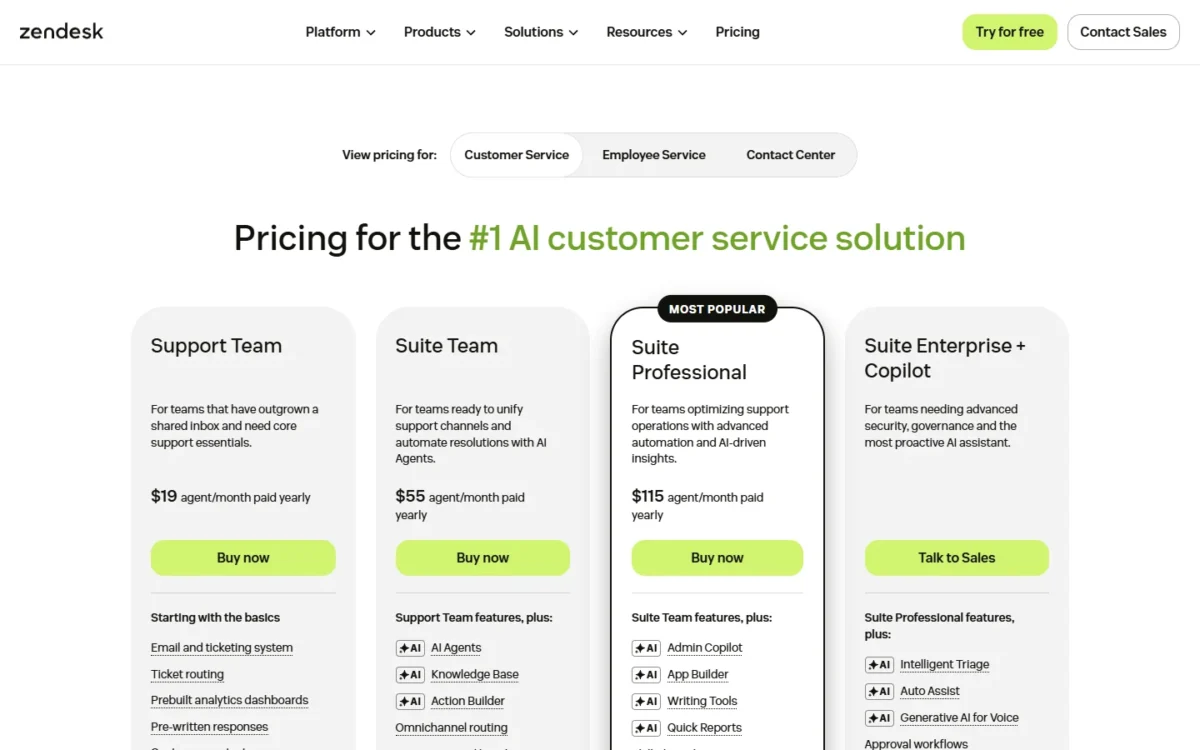
The jump from $19 to $55 to $115 is steep, and it only makes sense once you see what each plan adds.
Zendesk Pricing Plans Explained
Support Team is a ticketing plan, Suite Team adds the customer channels, Suite Professional adds routing intelligence, SLAs, custom reporting and HIPAA, and Enterprise adds governance at a quoted price. This page prices the Customer Service plans only; Employee Service Suite has its own pricing view.
For how these plans behave once configured, my Zendesk review covers setup and daily workflow, which a pricing page cannot show. The gates below are the ones that change a quote.
| Gate | Support Team | Suite Team | Suite Professional |
|---|---|---|---|
| Help center | Add-on | Included (1 help center) | Included (up to 5) |
| Messaging and live chat | Add-on | Included | Included |
| Conversation routing | Limited: agent status and capacity | Limited: agent status and capacity | Status, capacity, skill and priority |
| IVR phone trees | Higher plan: Suite Professional | Higher plan: Suite Professional | Included |
| SLAs | Higher plan: Suite Professional | Higher plan: Suite Professional | Included |
| Report refresh | 24 hours | 24 hours | 1 hour |
| Included automated resolutions | 5 per agent/ | 5 per agent/ | 10 per agent/ |
| Copilot add-on | Higher plan: Suite Professional | Higher plan: Suite Professional | Add-on: Copilot |
| HIPAA | Higher plan: Suite Professional | Higher plan: Suite Professional | HIPAA Enabled |
Sources: Zendesk customer service pricing page and Zendesk product add-ons, checked October 2026.
Support Team
Support Team at $19 per agent per month, billed annually, is enough for an email ticket queue. It covers email and ticketing, ticket routing, prebuilt dashboards, pre-written responses, customer context, and automations and triggers.
It is close to the textbook case of what a ticketing system does: email in, tracked tickets out. Help center, messaging and live chat are sold as add-ons on Support plans, and Copilot can be added only to Professional and higher plans.
That makes Support Team the right buy for a team whose customers write in and never chat. A team planning a chat widget or a phone line within a year should price Suite Team now, because those channels are what the next plan is for.
Suite Team
The $55 – $19 = $36 per agent per month step to Suite Team, billed annually, buys a knowledge base, Action Builder, messaging and live chat, and telephony on one seat. Conversation routing works on agent status and capacity, and reports refresh every 24 hours.
Suite Team also includes one help center and two chat departments, against up to five help centers and unlimited departments on Suite Professional. Action Builder runs up to 40K actions a month.
For a desk of generalist agents working one queue, Suite Team is the plan that needs no upgrade. The trigger to move up is the first specialist queue, SLA, IVR tree, hourly report or HIPAA requirement: the gates table puts all five on Suite Professional.
Suite Professional
Suite Professional at $115 per agent per month, billed annually, is justified when queues need skills-based routing, IVR phone trees, SLAs, custom dashboards refreshed every hour, or HIPAA. The comparison table marks Suite Professional “HIPAA Enabled”; Support Team and Suite Team are not.
It also doubles the included automated resolutions to 10 per agent per month, raises Action Builder to 100K actions a month and adds up to 100 light agents, Admin Copilot and App Builder. Copilot can be added only from this plan up.
Billed annually, the cost is $115 – $55 = $60 per agent per month more than Suite Team. That premium pays off for a team that uses routing rules and SLAs every week, and is wasted on a team that does not.
Suite Enterprise + Copilot
Zendesk publishes no price for Suite Enterprise + Copilot; the card reads “Talk to Sales”. The card lists intelligent triage, auto assist, generative AI for voice, approval workflows, a sandbox environment and custom agent roles on top of Suite Professional.
Annual Suite Enterprise subscriptions get 2.7M Action Builder actions a year. Zendesk says enterprise plans generally require sales engagement, so the price is set in a quote.
Zendesk’s Suite plan types page also credits Enterprise with real-time shareable reports, against custom dashboards refreshed every hour on Suite Professional.
Buy Enterprise for governance (approval workflows and custom agent roles), not for a bigger seat. A sandbox alone does not need Enterprise: Zendesk’s add-ons page lets Suite Growth plans and above buy sandboxes as an add-on, so a new buyer can add one to Suite Professional.
Plans the Pricing Page Does Not Price
Suite Growth, Suite Enterprise Plus, Support Professional and Support Enterprise still appear in Zendesk’s help center, but the October 2026 pricing page shows no price for them. A figure for them in an older quote or a rival’s table is not today’s list price.
Growth is the one to ask about. Zendesk’s Suite plan types page describes it as Suite Team plus conversation routing based on skills, light agents and multiple help centers. That is the gate that otherwise forces Suite Professional, so confirm with Zendesk Sales whether a new US account can buy Growth, and at what price.
Does Zendesk Have a Free Plan or Trial?
No: Zendesk is paid only, and its pricing page lists no free plan. The free option is a 14-day trial with access to all Suite Professional features, and Copilot is included in the trial by default.
The trial runs on Suite Professional unless you ask Zendesk for another plan. A Suite Team buyer should therefore note which features they used in the trial, because skills routing, SLAs and hourly reports disappear on the cheaper plan.
Copilot alone has its own 30-day free trial. Early-stage startups can apply to Zendesk for Startups, which gives a 6-month trial of the Zendesk Suite for up to 50 agents; Zendesk’s site menu describes it as “up to 2 years of Zendesk free for qualified startups”.
After the trial, the first money decision is how you pay: monthly or annually.
Monthly vs Annual Zendesk Pricing
Annual billing cuts Suite Professional from $149 to $115 per agent per month, a gap of $34 x 10 agents x 12 months = $4,080 a year for a 10-agent team. The table shows the saving per agent on each priced plan.
| Plan | Monthly billing | Annual billing | Saving per agent per year | Saving vs monthly |
|---|---|---|---|---|
| Support Team | $25 | $19 | $6 x 12 = $72 | $6 of $25, 24% |
| Suite Team | $69 | $55 | $14 x 12 = $168 | $14 of $69, 20.3% |
| Suite Professional | $149 | $115 | $34 x 12 = $408 | $34 of $149, 22.8% |
Sources: Zendesk customer service pricing page, checked October 2026.
Zendesk labels the toggle on its pricing page “20% off annual”, but every row of the table above saves more than 20%, so the label understates the real saving.
Zendesk sells month to month, annual and multi-year terms. The catch is the exit: a change from annual to monthly billing waits for the next billing cycle and needs approval, so a switch one month into the first year takes effect eleven months later.
My rule: pay monthly only while you are still deciding between Suite Team and Suite Professional, then commit annually with the seat count you have today. Automated resolutions beyond the plan allowance are a separate line, billed per resolution at the rates above.
Zendesk AI Pricing: Automated Resolutions and Copilot
Zendesk AI agents are included in every Suite and Support plan, with 5 automated resolutions per agent per month on Support Team and Suite Team and 10 on Suite Professional. Beyond that allowance, each automated resolution costs $1.50 committed or $2.00 pay-as-you-go.
An automated resolution is Zendesk’s billing unit for AI agent usage: a customer request the AI agent resolved without escalating to a human. The included allowance is capped at “up to 10k per year”.
That cap is reachable. On Suite Professional, 84 agents x 10 resolutions x 12 months = 10,080, so an account above about 83 agents gets no more included resolutions from extra seats.
What counts against the allowance since May 18, 2026
Since May 18, 2026, Zendesk sorts AI outcomes into three automated resolution tiers. Assisted escalation and contained resolution do not count against the resolution allowance. A verified resolution is one that an LLM check of the conversation confirms was resolved.
So the meter tracks verified outcomes, not every AI conversation. A request the AI agent starts and a human finishes costs nothing from the allowance.
The example below uses Suite Professional’s allowance of 10 automated resolutions per agent per month.
Take an illustrative team of 10 agents whose AI agent reaches 400 verified resolutions a month. The plan includes 10 x 10 = 100 automated resolutions, so 300 are extra.
At the pay-as-you-go rate, 300 x $2.00 = $600 a month; at the committed rate, 300 x $1.50 = $450 a month. Over 12 months that is $600 x 12 = $7,200 or $450 x 12 = $5,400.
The committed rate saves a quarter of the overage, but only once your volume is predictable enough to commit to. My view: weigh that overage against your own figure for a human-handled ticket; I set out that math in my guide to AI customer service workflows and ROI.
Copilot: $50 per agent, or a pooled free allowance
Copilot costs $50 per agent per month, paid yearly, and can be added to Professional and higher plans only. With it, Copilot usage is unlimited; it adds auto assist, suggestions and writing tools for agents.
The pricing page marks suggested first replies as an add-on: they draft an agent’s first response from existing macros and help center articles. My reading: each help center article the team keeps current is material for those drafts, so the add-on returns more on a desk with a maintained knowledge base.
Without the add-on, Professional and higher plans get a free Copilot allowance of five uses per agent per month, pooled across the team and capped at 500 uses per account. A use is each writing-tool run, manual ticket summary or confirmed merge suggestion.
At the cap, access pauses until the next billing cycle, with no overage charge. A 20-agent desk gets 20 x 5 = 100 uses a month, roughly one assisted reply per agent per week.
A team that wants AI writing help daily is really buying Suite Professional plus Copilot: $115 + $50 = $165 per agent per month, billed annually.
Additional Zendesk Costs to Consider
The published per-agent add-ons are Copilot at $50, the Workforce Engagement Bundle at $50, Quality Assurance at $35 and Contact Center from $83, each per agent per month paid yearly. Storage, API volume, sandboxes and Premier support are add-ons without a public price.
On support, the pricing page’s plan comparison lists digital support: business-hours access to customer support for highest-severity issues, the Zendesk help center and community, and on-demand training. Premier plans, its 24/7 proactive support, are marked as an add-on.
| Cost type | When it applies | Pricing basis | Notes |
|---|---|---|---|
| Copilot | Unlimited AI writing and auto assist | $50 per agent/ | Suite Professional and higher |
| Workforce Engagement Bundle | Scheduling plus QA | $50 per agent/ | WFM and QA together at a discounted price; all plans |
| Quality Assurance | QA scoring alone | $35 per agent/ | All Suite and Support plans |
| Workforce management | Scheduling alone | Not published on the pricing page | Sold inside the $50 bundle; all plans |
| Contact Center | Voice at contact-center scale | $83+ per agent/ | Needs a Suite plan and a Premier plan |
| Minutes Block | Contact Center minutes | $33 per agent/ | 1,000 minutes per block; one block per user included |
| Action credits | Above 40K actions a month (Team plans) or 100K (Professional) | $200 per 100K actions per subscription term | Spread evenly across the term |
| Sunshine Conversations packs | Above 1,000 MAU or 1,000 notifications a month | $50 per 2,500 MAU; $50 per 25,000 notifications | Suite Professional and above |
| Phone numbers and minutes | Zendesk voice calls and texts | Usage-based add-on | Suite plans |
| More Storage | Above the plan’s storage limit | Not published | Unit: 500 MB data, 25 GB files, 500 MB external content |
| High Volume API | Above standard API limits | Not published | 2,500 requests per minute; 10 agent seats minimum |
| Sandbox and Premier plans | Testing; 24/7 support | Not published | Sandbox is an add-on on Suite Professional |
Sources: Zendesk customer service pricing page, Zendesk Contact Center pricing and Zendesk product add-ons, checked October 2026.
Workforce management has no standalone price on the pricing page, which prints only the $50 bundle. If you need both scheduling and QA, the bundle at $50 costs $15 more per agent than QA alone at $35.
Storage is the meter most teams forget. Every account gets 10 GB of data and 10 GB of file storage, plus 50 MB of data and 2 GB of files per agent on Team plans, or 100 MB and 5 GB per agent on Professional.
Zendesk’s data storage guide shows an in-product warning above 80% of the limit. Past the limit, the choice is deleting data or buying More Storage units.
Pricing note
Contact Center is a stack, not one fee. Zendesk requires a Suite plan and a Premier plan, charges the license from $83 per agent per month, and bills AWS services and Amazon Connect telephony on consumption. For 10 voice agents the license alone is $83 x 10 agents = $830 a month, before their Suite seats and Premier.
If voice is your main channel, compare customer service platforms with voice before signing for a four-part stack. With seats, AI and add-ons priced, the next question is the total for your team.
How Much Does Zendesk Cost for Your Team?
A Zendesk year costs from $684 for 3 agents on Support Team to $49,500 for 25 agents on Suite Professional ($115) with Copilot ($50), on annual list prices before tax.
Zendesk cost calculator
This calculator needs JavaScript. The scenario table below gives the same estimate for typical workloads.
Enter what you need. The calculator prices it on every plan at list prices and names the cheapest plan that covers it.
- List prices in USD from Zendesk’s official pricing pages, checked Oct 17, 2026. Tax and regional prices are not included.
- 12-month figures are 12 times the monthly cost at the billing you choose.
- A planning estimate at list prices, not a quote.
Enter your number of agents, choose monthly or annual billing and tick the features you need. The calculator shows Support Team, Suite Team and Suite Professional side by side and names the cheapest plan that covers your needs. It leaves out tax, regional prices, add-ons, automated resolution overage and Enterprise, which has no public price.
| Team size | Plan | Billing | Monthly equivalent | Annual total | Assumptions |
|---|---|---|---|---|---|
| 3 agents, email only | Support Team | Annual | $19 x 3 = $57 | $19 x 3 x 12 = $684 | No chat or phone; 15 automated resolutions a month included |
| 5 agents, first omnichannel desk | Suite Team | Annual | $55 x 5 = $275 | $55 x 5 x 12 = $3,300 | Messaging, live chat and phone; 25 automated resolutions a month included |
| 10 agents, specialist queues | Suite Professional | Annual | $115 x 10 = $1,150 | $115 x 10 x 12 = $13,800 | Skills routing and SLAs; 100 automated resolutions a month included |
| 25 agents with Copilot | Suite Professional + Copilot | Annual | $165 x 25 = $4,125 | $165 x 25 x 12 = $49,500 | Includes the Copilot add-on: $115 + $50 = $165 per agent |
Sources: Zendesk customer service pricing page, checked October 2026.
These totals are estimates from list prices, not quotes. They leave out AI resolution overage, Contact Center, Premier, storage units, Marketplace apps, onboarding and tax.
The 25-agent row is where scale starts to show. That account clears the 10-seat minimum for the High Volume API add-on. Without Copilot, its free pooled allowance would be 25 x 5 = 125 uses a month; the 500-use cap binds only from 100 agents.
The total tells you the budget; the workflow tells you the plan.
Which Zendesk Plan Should You Choose?
Pick the plan by the gate you need, not by headcount: Support Team for email only, Suite Team for a first omnichannel desk, Suite Professional when routing, SLAs, reporting or HIPAA decide. Enterprise fits when governance decides, and that holds for a small business desk and a large support operation alike.
| Your needs | Plan to consider | Why | Main limitation |
|---|---|---|---|
| Email-only queue, no chat or phone planned | Support Team | Ticketing, routing, macros and triggers at the lowest seat price | Chat and a help center mean add-ons or a plan change |
| First omnichannel desk with generalist agents | Suite Team | Messaging, live chat, phone and a help center on one seat | Routing by status and capacity only |
| A Suite Team desk that never routes by skill and needs no SLAs, IVR, hourly reports or HIPAA | Stay on Suite Team | Skills routing, SLAs, IVR, hourly reports and HIPAA are the main Professional gates, and this desk uses none | Reports refresh every 24 hours |
| Specialist queues, SLAs, IVR, custom reports or HIPAA | Suite Professional | All five gates sit on Professional | The seat price more than doubles from Suite Team |
| AI writing and auto assist every day | Suite Professional plus Copilot | Without Copilot, the free allowance is 5 uses per agent per month, pooled and capped at 500 per account | Copilot is priced per agent |
| Approval workflows and custom agent roles | Suite Enterprise + Copilot | The Enterprise card lists both | Quote only |
| Voice-heavy contact center | A Suite plan plus Contact Center | Amazon Connect telephony inside Zendesk | Needs Premier and consumption billing |
Sources: Zendesk customer service pricing page and Zendesk Contact Center pricing, checked October 2026.
Knowing the plan, the remaining question is whether the total is worth paying.
Is Zendesk Worth the Price?
Zendesk is worth its price for teams that use Suite Professional’s gates every week: skills routing, SLAs, IVR and hourly reporting. The bill grows fast because three things scale with the team at once: seats, AI resolutions and per-agent add-ons.
That is the honest answer to “why is Zendesk so expensive”. Copilot alone costs a 25-agent desk $50 x 25 agents x 12 months = $15,000 a year, and Contact Center, QA or workforce tools each add another per-agent line.
A lower plan is enough more often than the pricing page suggests. A Suite Team desk with one queue gets messaging, live chat, phone and a help center, and paying the Professional premium buys routing rules it will not run.
Who should skip Zendesk
Skip Zendesk if any of these is true:
- You need a free plan: Zendesk lists none.
- You need one fixed yearly number and expect heavy AI volume: resolution overage moves every month.
- You run a small business with two or three agents that needs chat but cannot budget Suite Team’s $55 per agent per month, billed annually.
- You run voice at scale but cannot add a Premier plan, which Contact Center requires.
If Intercom is on your shortlist, my Zendesk vs Intercom comparison sets the two side by side. Before signing, check what the billing terms commit you to.
Billing, Discounts and Cancellation
Zendesk bills monthly, annually or on multi-year terms, by card, bank direct debit or PayPal, in USD, EUR, GBP or BRL. It gives no refunds or credits, and cancelling needs 30 days notice before the term ends.
| Contract mechanic | What Zendesk documents |
|---|---|
| Payment methods | Bank account (direct debit), credit or debit card, or PayPal |
| Billing cycle change | Applied at the next billing cycle; annual to monthly needs approval |
| Cancellation timing | Self-service cancellations take effect at the end of the billing cycle |
| Cancellation notice | At least 30 days before the end of the subscription term |
| Managed accounts | Cannot cancel online; cancel through Zendesk Sales |
| Refunds | No refunds or credits for subscription charges or unused time |
Sources: Zendesk customer service pricing page, canceling products and accounts and Zendesk’s refund policy answer, checked October 2026.
No refunds means seats bought for a hire that slipped are paid until renewal. Size the annual seat count to the team you have, and add seats when people start.
Zendesk documents four discount paths: the annual rate and three add-ons its help center sells “at a discounted price”. Those are the Suite + Copilot bundle (bought through Zendesk Sales), the WFM + QA bundle ($50 on the pricing page) and recurring packs of automated resolutions.
How I Verified Zendesk Pricing
I read every price on Zendesk’s own pages for the US region, checked October 17, 2026. The sources are the English (US) customer service pricing page, the Contact Center pricing page and help center articles on plans, add-ons, AI resolutions, Copilot, storage, billing changes, cancellation and refunds.
All prices are list prices in US dollars on the billing basis the page states: seats and per-agent add-ons per agent per month, and automated resolutions, action credits and Sunshine Conversations packs per unit.
I calculated every total as price x agents x 12 months on those list prices; the decision table and verdicts are my judgment from the plan gates.
Zendesk does not publish prices for Suite Enterprise + Copilot, Premier plans, More Storage, High Volume API, sandboxes or standalone workforce management, so this guide gives none. I did not contact Zendesk Sales or use a Zendesk account for this guide.
Frequently Asked Questions
Is there a free alternative to Zendesk?
Zendesk itself has no free plan, only a 14-day trial. If a free plan is a hard requirement, start from my ranking of the best help desk software rather than from Zendesk’s pricing page.
How much does Zendesk Contact Center cost?
Contact Center starts at $83 per agent per month, paid yearly, on top of a Suite plan and a required Premier plan. Its contract term aligns with the term of your Suite subscription, and extra Minutes Blocks must be bought in the same quantity for every Contact Center user.
When does an AI conversation end for billing?
Zendesk judges a conversation once it ends: 72 hours after the first email on email, 2 hours after the first message on messaging by default (extendable to 72 hours through support), and immediately at hangup on voice. The resolution tier is decided after that point.
Can I pay for Zendesk with an invoice?
Online purchases are typically paid by credit card at checkout. Sales-assisted purchases, which Zendesk recommends for larger organizations and enterprise plans, may support invoice-based billing depending on eligibility and terms.
Is Zendesk Sell included in Zendesk pricing?
No. The Customer Service and Contact Center pricing views list no Zendesk Sell plan. My Zendesk Sell review covers that product separately.
Final Pricing Verdict
Start most multichannel teams on Suite Team at $55 per agent per month, billed annually. Move to Suite Professional at $115 only when skills routing, SLAs, IVR, custom reports or HIPAA are required, and budget AI resolutions as their own line at $1.50 to $2.00 each beyond the allowance.
Support Team at $19 is enough for an email-only queue that will stay that way. Enterprise is worth a sales call only when approval workflows or custom agent roles are requirements, not preferences; a sandbox alone is an add-on on Suite Professional.
Run your own team size through the calculator above, then check the live numbers on Zendesk’s pricing page before you sign an annual term.