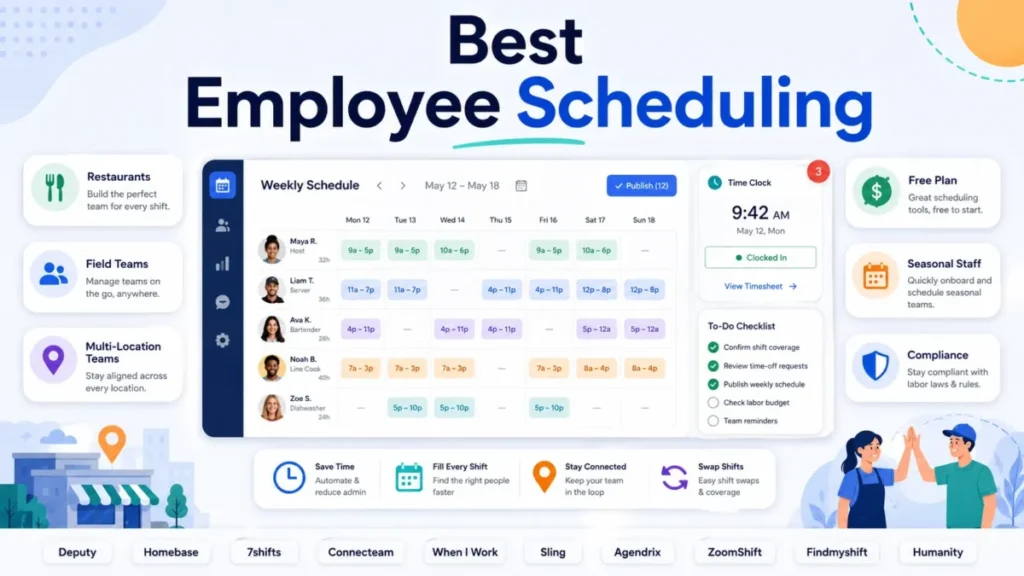
The best employee scheduling software for your team is almost never the one with the lowest advertised price. It is the one whose billing unit, free-plan ceiling, and plan gates survive contact with your actual roster.
That distinction decides the budget. A $2.50 per-user tool looks cheaper than a $30 per-location tool until you count 25 workers at one site, and then the per-location option wins by more than half.
Deputy is my Best Overall pick because its tier ladder carries a team from basic shift publishing to demand forecasting, labor optimization, advanced compliance, and enterprise administration without a product migration. Homebase is the safer buy for a single-site hourly business, 7shifts for restaurants, Connecteam for deskless crews, and Sling for teams that want free scheduling and messaging for up to 30 people.
If your only constraint is a zero budget, the free-tier question deserves its own path, and I cover the permanent free plans separately in our guide to the best free employee scheduling software.
Everything below is built from official vendor pricing and product pages checked on July 14, 2026, plus current third-party review patterns. No product account or trial workspace was used, so you will not find fake hands-on claims here.
In This Article (33 sections)
Best Employee Scheduling Software by Use Case
Use this table to shortlist before you read 3,000 words of product detail.
| Use case | Best pick | Why it fits |
|---|---|---|
| Best overall for growing hourly teams | Deputy | Scheduling, time clock, forecasting, compliance, and SSO in one tier ladder |
| Best for one location under 50 staff | Homebase | Flat per-location pricing plus a free plan for 10 employees |
| Best for restaurants | 7shifts | POS-connected labor budgets, logbook, tips, and restaurant payroll |
| Best for deskless and field crews | Connecteam | GPS time clock, geofencing, tasks, forms, and job scheduling |
| Best for simple multi-location scheduling | When I Work | One per-user price includes unlimited sites and departments |
| Best free scheduling and messaging | Sling | Free tier covers 30 users with shifts, time off, and private messaging |
| Best budget pick with a time clock | ZoomShift | Starter at $2.50 per active team member adds time clock and timesheets |
| Best flat-rate pricing | Findmyshift | $43 per team per month covers up to 100 members |
| Best for supported rollouts | Agendrix | Guided implementation, chat and phone support, ISO 27001 and 27701 |
| Best for complex compliance and forecasting | Humanity Schedule by TCP | Configurable labor-law, policy, and collective bargaining rules |
Two of these picks flip depending on a single variable. Homebase beats Deputy on price at one location and loses to it at five, and Sling beats everything on free scheduling until the day you need a time clock.
How We Chose and Ranked These Tools
I evaluated ten products using official pricing pages, official product and documentation pages, security and integration materials, and current G2 and Capterra review patterns, all checked on July 14, 2026. No product account, trial workspace, or hands-on workflow test was used, so every claim here traces to a published source rather than a private demo.
Ranking weighted seven things: scheduling depth, employee self-service, time and attendance, labor forecasting, compliance control, multi-location economics, and pricing transparency. A product that hides its price behind a sales call was penalized on transparency, not on capability.
Commission never moved a product up or down. One of the ten publishes no price ladder at all, and it still earned a place because humanity documents the deepest combination of union-rule support and demand-driven staffing among the products researched here.
Where a vendor’s pricing page rendered dynamically and did not expose its numbers in parsed content, I say so in that product’s section rather than presenting an unverified figure as fact. Prices, caps, and plan names change without notice, so treat every number here as a July 14, 2026 snapshot and confirm at checkout.
The Three Problems Every Scheduling Buyer Faces
Many scheduling purchase mistakes trace back to three recurring issues, and none of them are about feature counts.
Problem 1: the billing unit is not the price. Per-user, per-location, per-team, per-hub, and per-active-member models cannot be compared in a single “starting price” column. The winner changes at 10 workers, at 25, and again at three sites.
Problem 2: the free plan ends at a specific line, not gradually. Homebase Basic stops at ten employees, and ZoomShift Essentials stops at two weeks of forward scheduling.
Sling Free stops the moment you need a time clock.
Problem 3: the feature you are buying for is usually gated one tier above where you looked. Demand forecasting sits in Deputy Core, advanced hourly labor forecasting sits in 7shifts Premium, auto-scheduling sits in ZoomShift Premium, and API access sits in Connecteam Expert.
The rest of this article is organized around those three problems: normalized cost, free-plan cliffs, and plan gates. Everything else, including the ten reviews, is downstream of them.
Pricing Models Explained Before You Compare
Nine of these ten products publish pricing, but their billing units, included features, capacity limits, and add-ons differ enough that entry prices are not directly comparable.
| Product | Billing unit | Free plan | Entry tier (monthly, USD) | What the unit does to your bill |
|---|---|---|---|---|
| Deputy | Per user | No | Lite, $5 per user | Scales linearly with headcount; the published price is per user, not per site |
| Homebase | Per location | Yes, 10 employees, 1 location | Essentials, $30 per location | Flat at any headcount, multiplies with every new site |
| 7shifts | Per location, with employee caps by tier | Yes, 15 employees, 1 location | Essentials, $44.99 per location | Caps force a tier jump before the site count does |
| Connecteam | Per hub, first 30 users included | Yes, 10 users full, 30 users limited | Operations Basic, $35 | Cheap to 30 users, then $1 to $5 per extra user by tier |
| When I Work | Per user, rate set by location scope | No | $2.50 per user, single location | Multi-location doubles the rate to $5 per user |
| Sling | Per user | Yes, 30 users | Premium, $2 per user | Free until you need a time clock, then linear |
| Agendrix | Per user, plus per-user add-ons | No | Essential, $3.25 per user | Time and attendance adds $2.25 per user on top |
| ZoomShift | Per active team member | Yes, 20 users, 2-week horizon | Starter, $2.50 per active member | Seasonal rosters only pay for active staff |
| Findmyshift | Flat per team, capacity tiers | Yes, 5 members | Starter, $27 per team | Cost stops rising until you cross the member cap |
| Humanity Schedule by TCP | Sales-led custom quote | No | Not publicly disclosed | Budget cannot be modeled without a written quote |
These are all SaaS subscriptions, and how SaaS pricing works matters more here than in most categories because the billing unit changes the winner. Read the “billing unit” column before the “entry tier” column, then jump to the cost tables further down.
1. Deputy: Best Overall Employee Scheduling Software

- Best for:
- 20 to 200-person hourly teams that need scheduling, a time clock, and a credible path to forecasting, compliance, and SSO without switching products.
- Not best for:
- a five-person café that wants a permanent free plan, or any buyer who assumes payroll is included in the advertised price.
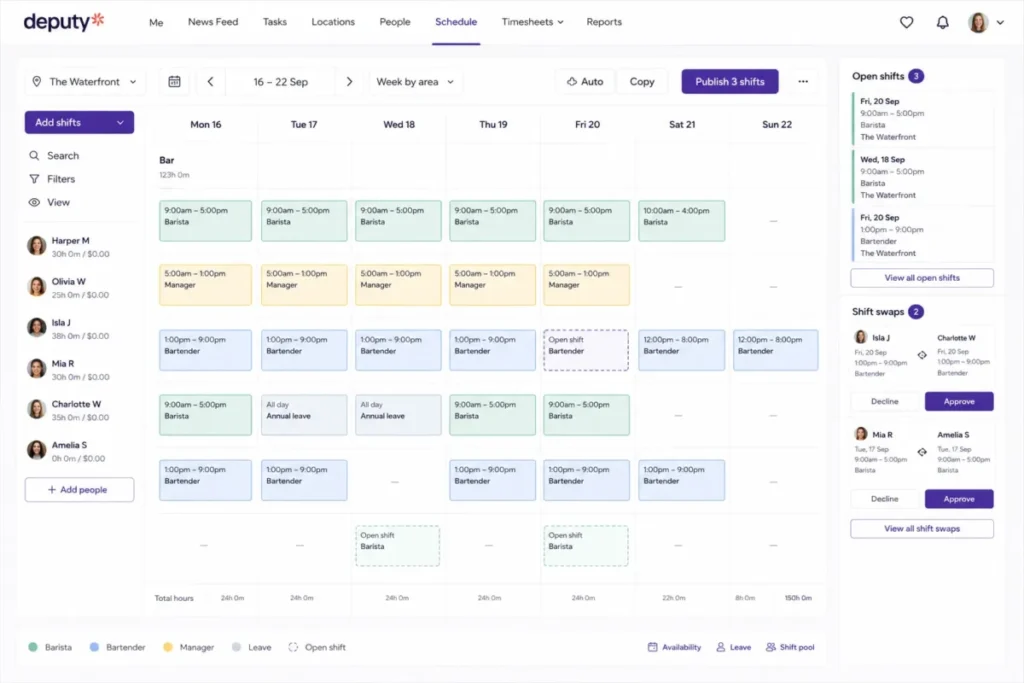
Deputy earned the top rank because its tier ladder covers the whole decision path, not because it has the longest feature list. Lite already includes scheduling, timesheets, the time clock, swaps, leave, and payroll integrations.
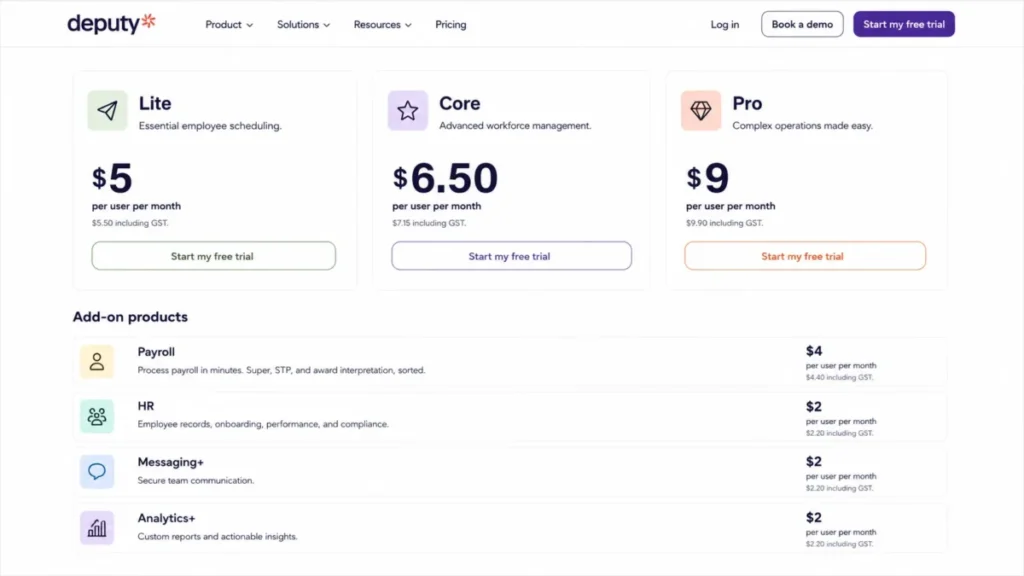
Pricing starts at $5 per user per month for Lite, with Core at $6.50 and Pro at $9 on the official Deputy pricing page.
Pricing checked: July 2026.
The tier that matters for most operators is Core. Advanced compliance, auto-scheduling, demand forecasting, labor optimization, and wage budgets all sit there, which is the real reason a growing team upgrades.
The Budget Pressure Point is payroll. Deputy Payroll was listed at a $49 monthly base plus $8 per user for eligible annual Core or Pro US accounts, so a 25-person team pays $249 for payroll against $162.50 for the Core subscription.
| Pros | Cons |
|---|---|
| One product covers basic shifts through demand forecasting and labor optimization | No permanent free plan, unlike Homebase, Sling, and ZoomShift |
| Per-user billing does not multiply when you add a second or third site | Forecasting and advanced compliance require Core, not Lite |
| SSO, location hierarchies, and pay centers available on Pro | Payroll, HR, Messaging+, and Analytics+ are separate recurring charges |
- Verdict:
- Choose Deputy if you expect to need forecasting or compliance depth within 12 months. Skip it if you need a free plan today and nothing more than published shifts.
2. Homebase: Best for Single-Location Hourly Teams

- Best for:
- a café, shop, salon, or clinic with one primary site and up to roughly 50 hourly employees.
- Not best for:
- a multi-site group with a low headcount per site, where paying per location beats paying per user only until the third store opens.
Homebase ranks second because it prices by location, not by person, the cheapest structure in this ranking for a busy single site. A 50-person restaurant pays the same $30 as a 12-person bakery.
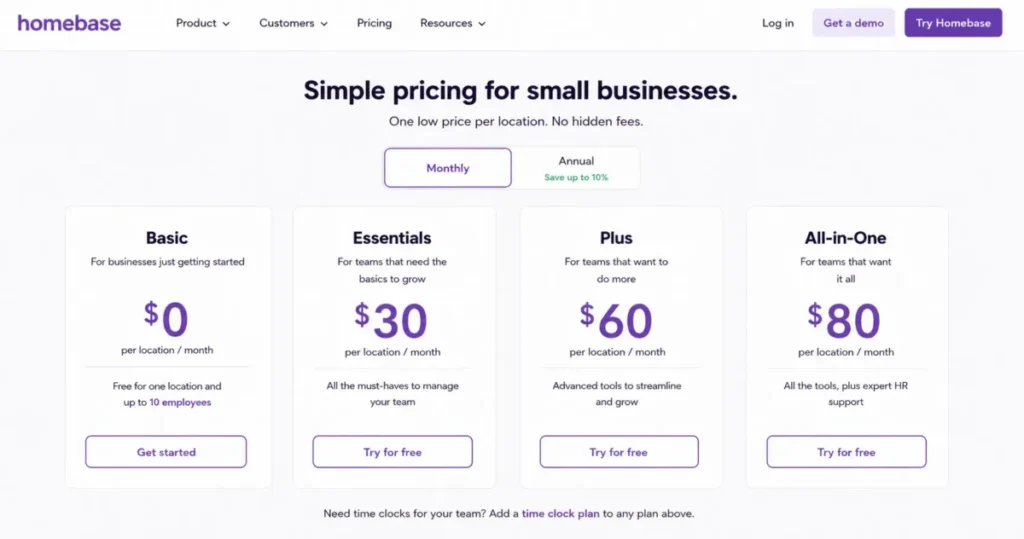
Basic is free for one location and up to ten employees, and paid plans start at $30 per location per month, or $24 with annual billing, on the official Homebase pricing page.
Pricing checked: July 2026.
Essentials removes the ten-employee cap. The AI scheduling assistant, PTO controls, and permissions arrive on Plus at $70, and hiring, onboarding, and labor-cost management on All-in-One at $120.
What breaks first is the free plan, and it breaks on headcount. Employee eleven forces the upgrade, which is why seasonal hiring triggers most Homebase bills.
Payroll is the other cost. Homebase Payroll was listed at $39 per month plus $6 per paid employee, so 25 staff cost $189 against a $30 subscription.
| Pros | Cons |
|---|---|
| Per-location pricing keeps a 50-person single site at $30 per month | Free plan hard-stops at ten employees |
| Free plan includes scheduling, time tracking, and POS integration | Cost multiplies with each additional location |
| Payroll and tips available as add-ons | Reviewer themes mention glitches and limited customization |
- Verdict:
- Choose Homebase if you run one location and want scheduling, time tracking, and HR in a single bill. Skip it if you operate four or more sites with small crews.
3. 7shifts: Best for Restaurants

- Best for:
- a restaurant with 15 to 60-plus employees per location that needs POS-connected labor scheduling, a manager logbook, and tip handling.
- Not best for:
- a retail, clinic, or field team that would pay per location for restaurant workflows it will never open.
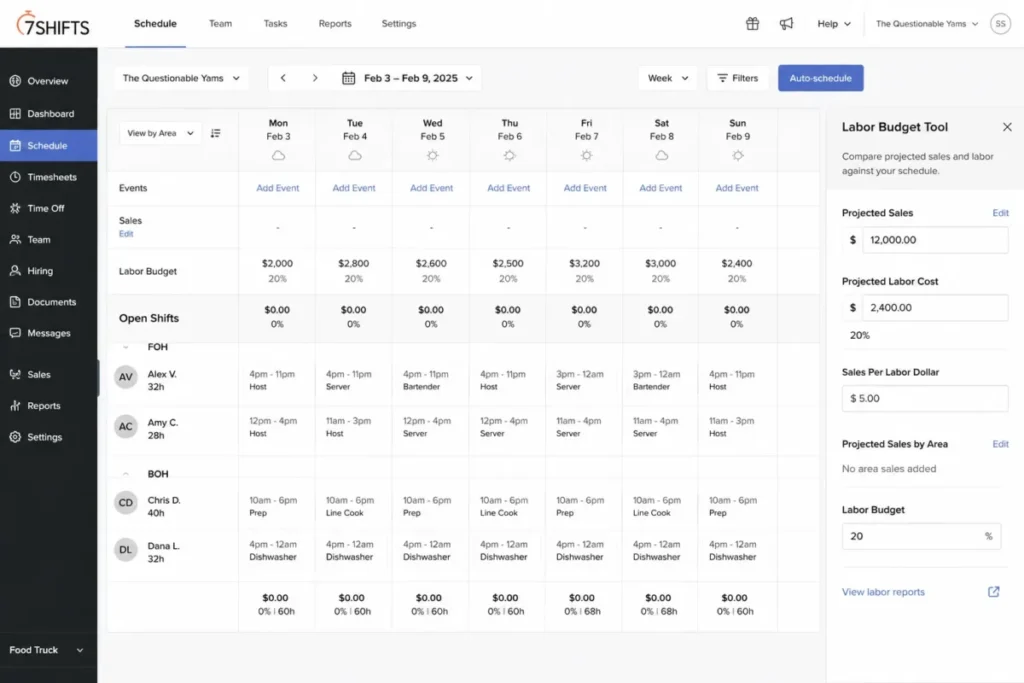
7shifts ranks third because its restaurant specialization is structural, not cosmetic. The Labor Budget Tool compares projected sales against projected labor cost while the schedule is being built, which a shift grid cannot reproduce.
The Comp plan is free for one location and up to 15 employees. Essentials was corroborated at $44.99 per location monthly, or $39.99 annually, for up to 30 employees on the official 7shifts pricing page.
Pricing checked: July 2026.
One caveat matters. The official pricing cards render dynamically, so these US figures were corroborated against two current 2026 secondary sources and need reconfirming on the live page.
Pro at $89.99 covers up to 60 employees and adds PTO, compliance, and the logbook. Advanced hourly labor forecasting sits on Premium at $149.99, the tier most groups want.
The employee caps, not the site count, drive the bill. A 35-person restaurant is already forced off Essentials onto Pro.
| Pros | Cons |
|---|---|
| Labor budgets tie projected sales to projected labor cost during scheduling | Employee caps force tier jumps at 15, 30, and 60 staff |
| POS integrations, logbook, tips, and tasks are built for restaurants | Advanced hourly forecasting is locked to Premium at $149.99 |
| Restaurant payroll available as an add-on | Payroll adds $39.99 per location plus $6 per employee |
- Verdict:
- Choose 7shifts if you run restaurants and will use the labor budget and logbook. Skip it if you only need shifts, swaps, and a time clock.
4. Connecteam: Best for Deskless and Field Teams

- Best for:
- a 20 to 200-person cleaning, construction, security, or field-service crew that needs scheduling attached to tasks, forms, and GPS time tracking.
- Not best for:
- a scheduling-only buyer who will never open the tasks, training, or communication hubs.
Connecteam ranks fourth because scheduling is one module inside a mobile-first system for frontline staff. Jobs, checklists, forms, and a GPS time clock live in the app the employee already opens.
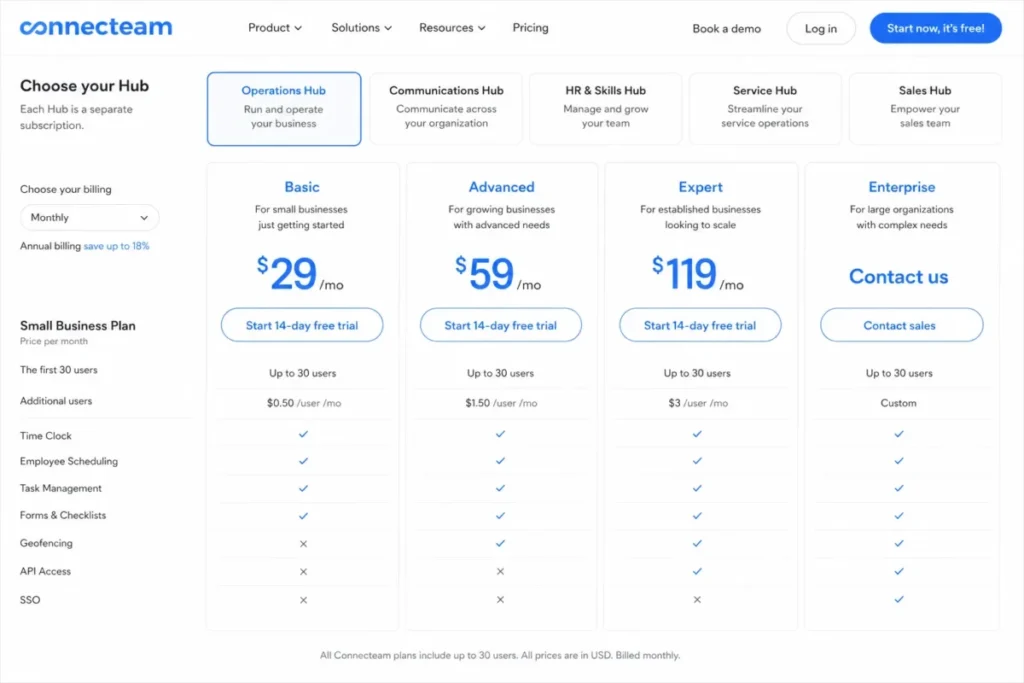
The free Small Business Plan covers up to ten users across hubs, and a reduced Free Limited option reaches 30 users. Operations Basic was listed at $35 monthly, or $29 annually, for the first 30 users on the official Connecteam pricing page.
Pricing checked: July 2026.
The included-user allowance is why Connecteam looks unbeatable at 30 people and less so at 100. Extra users cost $1 on Basic, $3 on Advanced, and $5 on Expert.
Feature gates surprise buyers here. Repeating shifts and templates start on Advanced, while unlimited geofences, auto-assignment, API access, and webhooks start on Expert at $119.
Answer the scope question first. Operations Hub pricing does not cover every hub, so model the hubs you need rather than assuming one price replaces four apps.
| Pros | Cons |
|---|---|
| GPS time clock, jobs, forms, and tasks sit alongside the schedule | Repeating shifts and templates require Advanced at $59 |
| First 30 users included in every Operations tier | API and webhooks require Expert at $119 |
| Free plan for up to ten users spans multiple hubs | SSO, 2FA, and biometric app lock require Enterprise |
- Verdict:
- Choose Connecteam if the schedule is one of five jobs your frontline app must do. Skip it if you want a focused scheduler at a flat price.
5. When I Work: Best for Simple Multi-Location Scheduling
- Best for:
- a 10 to 100-person hourly business that wants one per-user price covering scheduling, time and attendance, and messaging across several sites.
- Not best for:
- an operator who needs demand forecasting, configurable compliance rules, or deep custom reporting.
When I Work ranks fifth because it refuses to split its core product into modules. Scheduling, time and attendance, and messaging are included rather than sold as three upgrades.
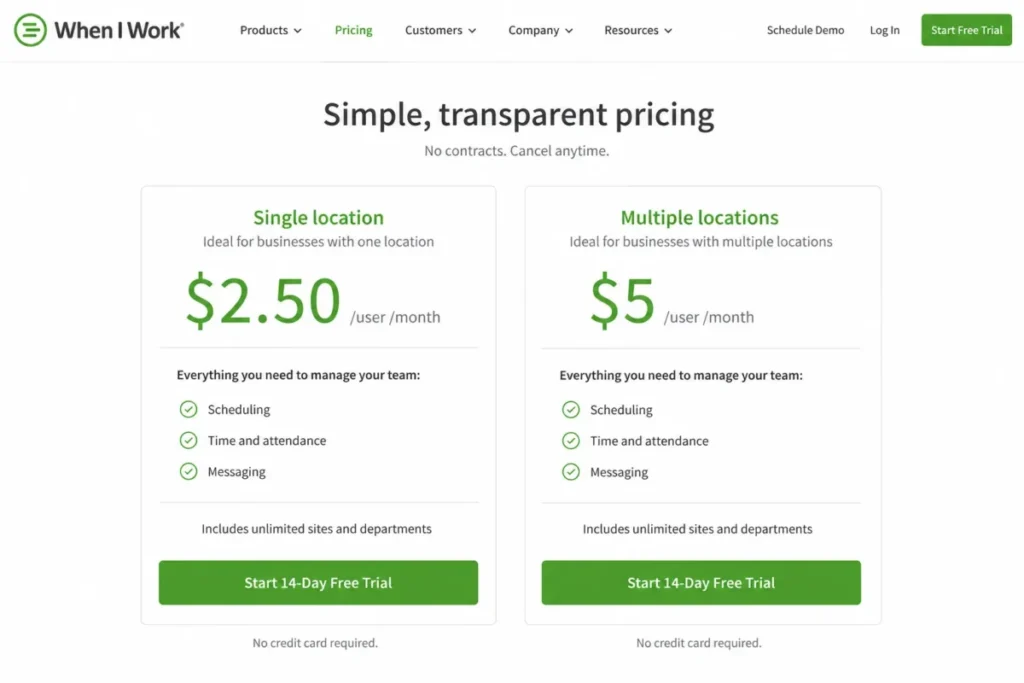
Single-location pricing was listed at $2.50 per user per month, and multi-location pricing at $5 per user per month with unlimited sites and departments, on the official When I Work pricing page.
Pricing checked: July 2026.
That $5 rate is the number to model. A 25-person business spread across three sites pays $125 with unlimited departments, which beats 7shifts at three locations and loses to Homebase at three locations.
The trade-off is depth. Recurring G2 review themes praise the ease and the shift-management flow, while also mentioning notification problems, software bugs, and thin advanced forecasting, customization, and reporting.
There is no permanent free plan here, only a 14-day full-access trial with no card and no contract.
| Pros | Cons |
|---|---|
| Scheduling, time and attendance, and messaging included at every tier | No permanent free plan, only a 14-day trial |
| Multi-location pricing covers unlimited sites and departments | Multi-location doubles the per-user rate to $5 |
| Simple per-user math makes budgeting predictable | Advanced forecasting and custom reporting are not strengths |
- Verdict:
- Choose When I Work if you run several small sites and want one predictable per-user bill. Skip it if labor forecasting is the reason you are buying.
6. Sling: Best Free Scheduling and Communication

- Best for:
- a restaurant, retailer, nonprofit, or event team of up to 30 workers that needs free shift publishing and private messaging.
- Not best for:
- any team that needs a time clock, labor-cost tracking, or reporting without paying, because none of those are in the free tier.
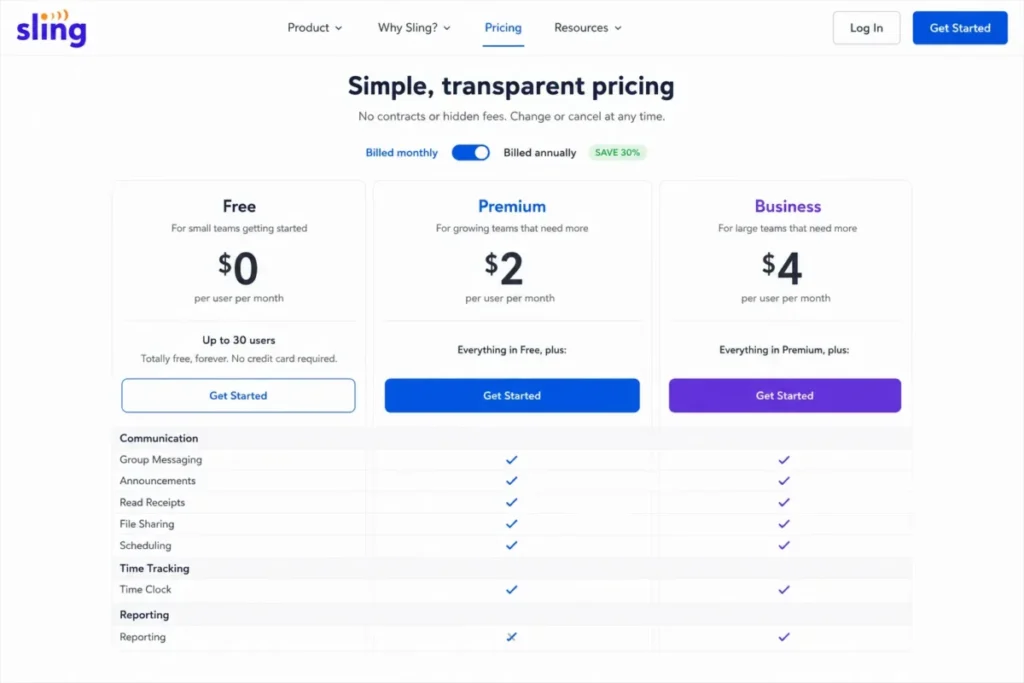
Sling ranks sixth because its free plan is the most generous verified mix of scheduling and communication here. Thirty users get shifts, time-off requests, long-term scheduling, a newsfeed, and private messaging at no cost.
Premium was listed at $2 per user monthly, or $1.70 annually, and Business at $4 or $3.40 on the official Sling pricing page.
Pricing checked: July 2026.
The cliff is the time clock. Mobile time tracking, labor-cost management, and group messaging begin on Premium, while reports, kiosk clocking, no-show tracking, and PTO begin on Business.
Sling is owned by Toast, which matters if you already run a Toast restaurant stack. It is not a restaurant-only product, and a 20-person nonprofit gets the same free scheduling.
The renewal question to answer at month three is simple. If managers are keying hours into payroll by hand, the free plan is costing more than $50 a month in admin time.
| Pros | Cons |
|---|---|
| Free tier covers 30 users with shifts, time off, open shifts, and messaging | Free plan has no time clock and no labor-cost tracking |
| Premium adds mobile time tracking at $2 per user | Reports, kiosk, PTO, and no-show tracking require Business at $4 |
| Toast integration for restaurants on that POS | Free plan caps at 30 users |
- Verdict:
- Choose Sling if free schedule publishing and team messaging solve today’s problem. Skip it if approved hours must reach payroll without manual work.
7. Agendrix: Best for Supported Rollouts

- Best for:
- a 20 to 200-person retail, hospitality, or healthcare team that wants guided implementation, live support, and published security credentials.
- Not best for:
- a buyer who expects the time clock to be included in the entry price, or who wants a permanent free plan.
Agendrix ranks seventh because it sells the rollout, not just the software. Its pricing page describes guided implementation, training, and support by chat, phone, and email, which is rare at this price.
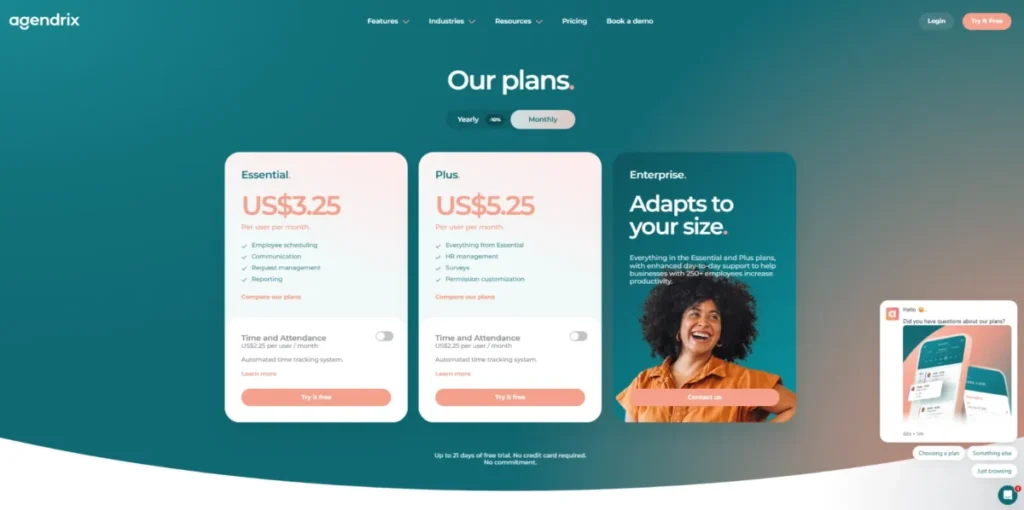
US Essential was listed at $3.25 per user monthly, or $2.93 annually, and Plus at $5.25 or $4.73, on the official Agendrix pricing page.
Pricing checked: July 2026.
The add-on structure is the catch. Time and Attendance costs a separate $2.25 per user, so 25 people needing scheduling plus a time clock pay $137.50, not $81.25.
Plus adds HR records, e-signatures, surveys, and permission customization, which puts it closer to a light HR platform than a shift app. If HR records are the real requirement, price a dedicated HRIS before you pay for scheduling twice.
Security is a differentiator here. Agendrix publishes MFA, change logs, encryption, and ISO/IEC 27001 and 27701 certifications, which most SMB schedulers here do not publish.
| Pros | Cons |
|---|---|
| Guided implementation, training, and chat, phone, and email support | Time and attendance costs an extra $2.25 per user per month |
| Published ISO/ | No permanent free plan, only a 21-day trial |
| Multilingual mobile apps suit mixed-language teams | Enterprise pricing is custom above 250 users |
- Verdict:
- Choose Agendrix if a supported rollout and documented security matter more than the sticker price. Skip it if you are comparing entry prices without adding the time clock.
8. ZoomShift: Best for Seasonal and Event Teams

- Best for:
- a seasonal attraction, summer program, or hospitality team whose active roster changes month to month.
- Not best for:
- a free-plan user who needs to publish schedules more than two weeks ahead, the sharpest limit in this ranking.
ZoomShift ranks eighth because it bills per active team member, which fits a roster that doubles in June and halves in September. You do not pay for 40 seats when 18 people work.
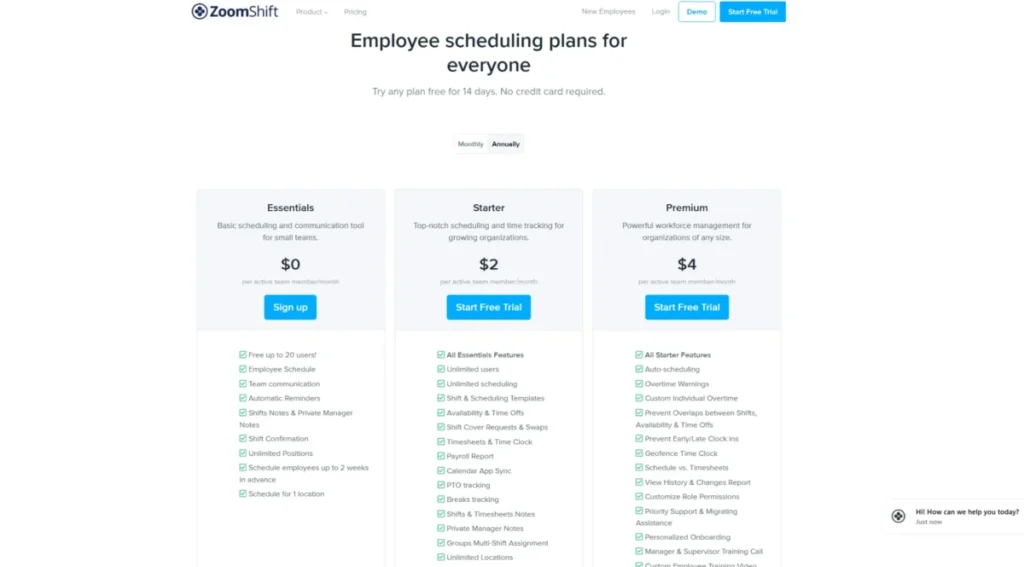
Essentials is free for up to 20 users at one location, but caps forward scheduling at two weeks. Starter was listed at $2.50 per active team member monthly, or $2 annually, and Premium at $5 or $4, on the official ZoomShift pricing page.
Pricing checked: July 2026.
Starter is where the product becomes usable. It adds unlimited users, locations, and scheduling horizon, plus templates, availability, time off, swaps, the time clock, and a payroll report.
Premium at $5 is the automation tier. Auto-scheduling, custom overtime rules, overlap prevention, geofencing, schedule history, and permissions all sit there.
The two-week free horizon is the detail no competing roundup surfaces. A camp publishing an August schedule in June cannot use the free plan at all.
| Pros | Cons |
|---|---|
| Paid tiers bill per active team member, matching seasonal rosters | Free plan cannot publish more than two weeks ahead |
| Starter at $2.50 includes time clock, timesheets, PTO, and payroll report | Auto-scheduling and geofencing require Premium at $5 |
| Free plan covers 20 users at one location | Schedule history and permissions are Premium-only |
- Verdict:
- Choose ZoomShift if headcount swings by season and you want a time clock under $3 per person. Skip it if you plan further than two weeks out on a free plan.
9. Findmyshift: Best Flat-Rate Team Pricing
- Best for:
- a 20 to 100-person team that wants a spreadsheet-style schedule editor and a bill that stops rising as headcount grows inside a tier.
- Not best for:
- a buyer who needs demand forecasting, enterprise SSO, or a modern frontline app rather than a fast grid.
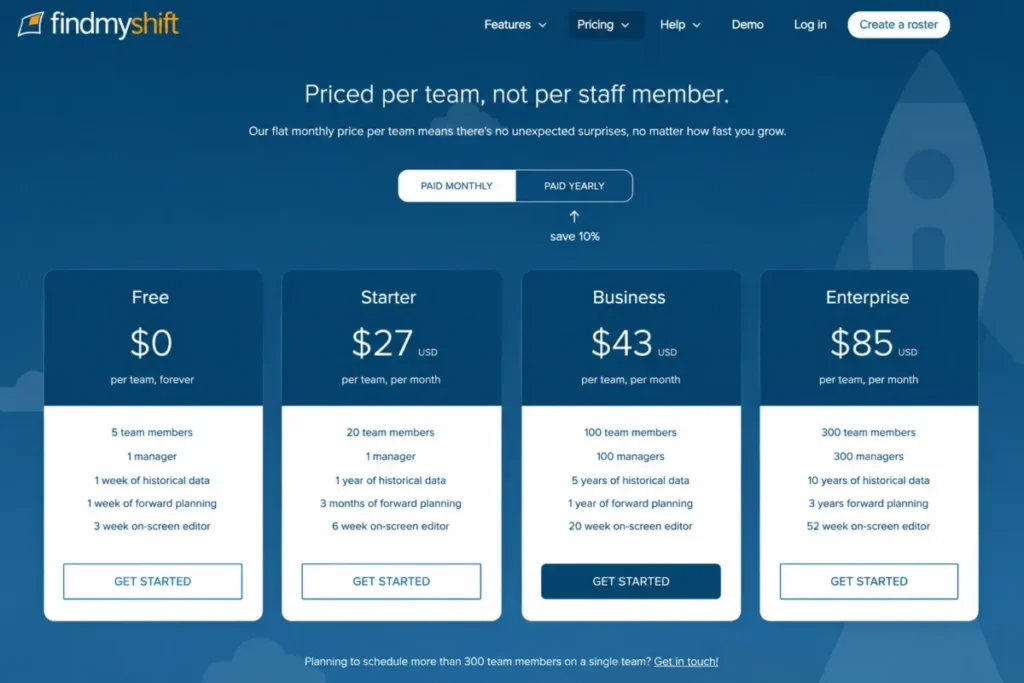
Findmyshift ranks ninth because flat per-team pricing is a structural difference, not a marketing angle. Business at $43 per month covers up to 100 members, or $0.43 per person at capacity.
Free covers five members and one manager, and Starter was listed at $27 per team monthly, or $24 annually, on the official Findmyshift pricing page.
Pricing checked: July 2026.
The break-even is easy to compute. Starter caps at 20 members, so a 25-person team takes Business at $43, which still beats Deputy Lite at $125 and When I Work at $62.50.
The tier limits are unusually transparent, and not only about headcount. Free retains one week of history and one week of forward planning, while Business gives five years of history and a year of forward planning.
What breaks first here is ambition, not capacity. It does practical scheduling, labor cost, a free time clock, and real-time reporting, and does not pretend to forecast demand.
| Pros | Cons |
|---|---|
| $43 per team covers up to 100 members, with no per-user math | Starter allows only one manager and 20 members |
| History, forward-planning, and editor horizons published per tier | Free plan caps at five team members |
| Spreadsheet-style editor suits Excel-native managers | Thin review coverage and no enterprise SSO evidence |
- Verdict:
- Choose Findmyshift if a 25 to 100-person team wants the lowest predictable bill. Skip it if forecasting, compliance rules, or SSO are on your requirements list.
10. Humanity Schedule by TCP: Best for Complex Compliance

- Best for:
- a large healthcare, retail, public-sector, or unionized workforce that needs demand-based staffing and configurable labor rules.
- Not best for:
- a small team that wants a transparent price, a free account today, and a schedule they can publish this afternoon.
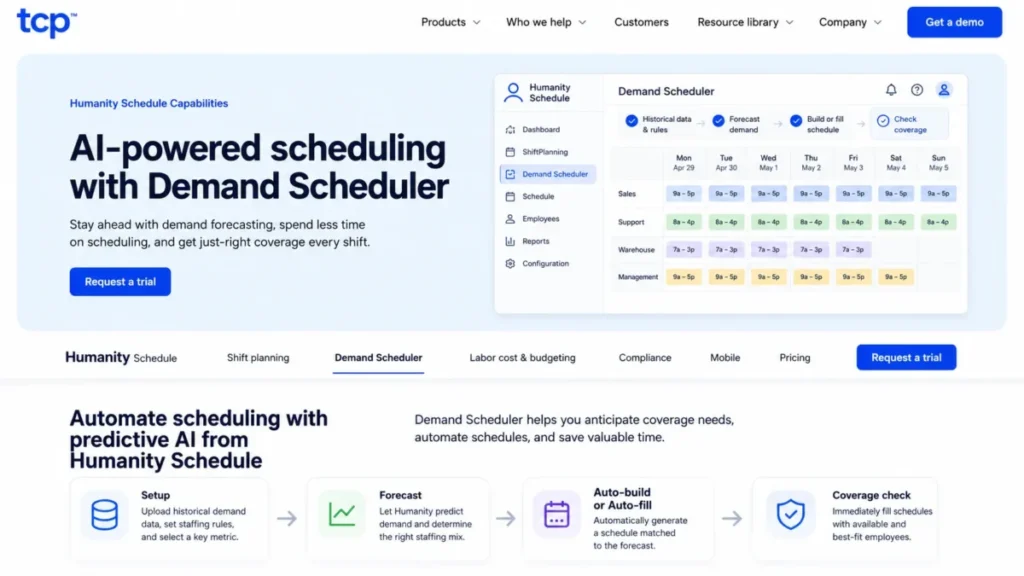
Humanity ranks tenth because it solves a different problem than the other nine. Its Demand Scheduler takes historical demand and staffing rules, forecasts the need, then builds or fills the schedule and checks coverage.
Compliance is the other reason it exists. The official compliance page describes rules covering labor laws, internal policies, collective bargaining agreements, qualifications, and availability, which no SMB scheduler here attempts.
Pricing is not publicly disclosed. Treat this as a sales-led option and confirm the quote before shortlisting it, using the official Humanity product page as the starting point.
Pricing status checked: July 2026.
The evaluation friction is real. The site offers a request-a-trial path, but no public self-serve trial terms were confirmed, and G2 data shows longer implementation than simpler schedulers.
My rule here is a hard one. If nobody can name the labor rule, union clause, or qualification that breaks a normal scheduler, you do not need Humanity yet.
| Pros | Cons |
|---|---|
| Demand Scheduler forecasts staffing need from historical demand and rules | Pricing is not publicly disclosed, so budgeting requires a sales call |
| Compliance rules cover labor law, policy, CBAs, and qualifications | No public self-serve trial terms were confirmed |
| Day, week, biweekly, and month views with auto-fill | Reviewer data shows longer implementation than SMB tools |
- Verdict:
- Choose Humanity if union rules, qualifications, or demand forecasting drive your schedule. Skip it if a sales-led evaluation and a longer, rules-heavy implementation would stall the project.
Employee Scheduling Software Compared
One table, ten products, the fields that actually eliminate options.
| Product | Best for | Entry price (monthly) | Free plan | Time clock included at entry | Key limitation |
|---|---|---|---|---|---|
| Deputy | Growing hourly teams | $5 per user | No | Yes, on Lite | Forecasting needs Core at $6.50 |
| Homebase | One location, hourly staff | $30 per location | Yes, 10 employees | Yes | Free plan stops at 10 employees |
| 7shifts | Restaurants | $44.99 per location | Yes, 15 employees | Basic clock on Essentials | Employee caps per tier |
| Connecteam | Deskless and field crews | $35 for first 30 users | Yes, 10 users | Yes, GPS clock | API and webhooks need Expert |
| When I Work | Simple multi-location | $2.50 per user | No | Yes | Thin forecasting and reporting |
| Sling | Free scheduling and messaging | $2 per user | Yes, 30 users | No, Premium only | No free time clock |
| Agendrix | Supported rollouts | $3.25 per user | No | No, $2.25 add-on | Time clock costs extra |
| ZoomShift | Seasonal rosters | $2.50 per active member | Yes, 20 users | Yes, on Starter | Free plan caps at two weeks ahead |
| Findmyshift | Flat-rate teams | $27 per team | Yes, 5 members | Yes, free clock | Starter allows one manager |
| Humanity by TCP | Complex compliance | Not publicly disclosed | No | Yes | Sales-led evaluation, no public price |
Read the “free plan” and “time clock” columns together.The free plans are not equivalent: Sling and 7shifts omit the time clock, ZoomShift restricts forward scheduling, and the remaining products impose headcount or functionality limits.
Cost at Scale: 10, 25, and 50 Workers
These are illustrative monthly scenarios using published US monthly prices checked July 14, 2026, at one location, with the cheapest plan that fits the headcount. Humanity is excluded from the math because it publishes no price.
| Product | 10 workers | 25 workers | 50 workers |
|---|---|---|---|
| Deputy (Lite) | $50 | $125 | $250 |
| Homebase (Basic, then Essentials) | $0 | $30 | $30 |
| 7shifts (Comp, Essentials, Pro) | $0 | $44.99 | $89.99 |
| Connecteam (Small Business, then Operations Basic) | $0 | $35 | $55 |
| When I Work (single location) | $25 | $62.50 | $125 |
| Sling (Free, then Premium if a clock is needed) | $0 | $50 | $100 |
| Agendrix (Essential) | $32.50 | $81.25 | $162.50 |
| ZoomShift (Essentials, then Starter) | $0 | $62.50 | $125 |
| Findmyshift (Starter, then Business) | $27 | $43 | $43 |
| Humanity Schedule by TCP | Contact sales | Contact sales | Contact sales |
Assumptions: one location; Homebase and 7shifts free tiers used where the headcount fits; Sling priced on Premium at 25 and 50 because the free tier has no time clock; Findmyshift moved to Business at 25 because Starter caps at 20 members; Connecteam at 50 users is $35 plus 20 additional users at $1.
The spread at 50 workers is the finding. Homebase and Findmyshift cost $30 and $43, Deputy costs $250, and both are defensible purchases depending on whether you need forecasting.
The Three-Location Scenario
Now hold the workforce at 25 people and split them across three sites. This is where per-location pricing reverses.
| Product | 25 workers, 3 locations | Why |
|---|---|---|
| Homebase (Essentials) | $90 | $30 per location, three accounts |
| 7shifts (Essentials) | $134.97 | $44.99 per location, employee caps apply per site |
| When I Work (multi-location) | $125 | $5 per user, unlimited sites and departments |
| Deputy (Lite) | $125 | Per user; confirm site handling with Deputy before you sign |
| Connecteam (Operations Basic) | $35 | First 30 users included, hub-based rather than site-based |
| Sling (Premium) | $50 | Per user |
| Agendrix (Essential) | $81.25 | Per user |
| ZoomShift (Starter) | $62.50 | Per active member, unlimited locations on paid tiers |
| Findmyshift (Business) | $43 | Flat per team |
Confirm the account architecture with any per-location vendor before you sign, because the assumption of one paid account per site is what drives these numbers. Homebase went from the cheapest option at one site to triple its own price at three, while Connecteam and Findmyshift barely moved.
Hidden Costs and Payroll Add-Ons
The scheduling subscription is rarely the whole bill. Three vendors publish payroll pricing that can exceed the scheduler itself.
| Add-on | Published price | Cost at 25 paid employees | Compared with the scheduler |
|---|---|---|---|
| Deputy Payroll (eligible annual Core or Pro US accounts) | $49 base plus $8 per user | $249 | Core subscription is $162.50 |
| Homebase Payroll | $39 plus $6 per paid employee | $189 | Essentials is $30 per location |
| 7shifts Payroll | $39.99 per location plus $6 per paid employee | $189.99 | Essentials is $44.99 per location |
| Deputy HR | $2 per user | $50 | Optional |
| Deputy Analytics+ | $1.50 per user where not included | $37.50 | Included on Pro |
| Agendrix Time and Attendance | $2.25 per user | $56.25 | Essential is $81.25 |
A Homebase buyer comparing $30 against a $125 Deputy bill is not comparing the same purchase if payroll is in scope. Deputy Payroll requires Core or Pro, so the honest comparison is Homebase at $219 against Deputy at $411.50, and the gap narrows from four times to under two.
If You Request a Humanity Quote, Ask for These Six Things
Sales-led pricing is not a reason to skip a product, but it is a reason to arrive prepared. Humanity publishes no price, so the quote is the only cost evidence you will get.
- Total monthly cost at your exact headcount and site count, in USD.
- Implementation fee, timeline, and who configures the staffing rules.
- Which modules are included and which are billed separately.
- Contract term, minimum seats, and the renewal uplift cap.
- Support tier, escalation path, and any response-time commitment in writing.
- Integration scope for your payroll and time systems, including API limits.
Get all six in the order form, not in an email. A verbal promise about implementation scope is the single most expensive thing a buyer accepts in this category.
Free Plans and Exactly Where They End
Six of the ten products offer a permanent free option, but each one fails at a different operational limit. This is the table I would build before trusting any free plan with a real roster.
| Product | Free employee cap | Locations | Schedule horizon | Time clock | First reason you upgrade |
|---|---|---|---|---|---|
| Homebase Basic | 10 employees | 1 | No published limit | Yes | Hiring employee 11 |
| 7shifts Comp | 15 employees | 1 | No published limit | No | Headcount or a second site |
| Connecteam Small Business | 10 users | Not capped by site | No published limit | Yes | Growing past 10 users |
| Connecteam Free Limited | 30 users | Not capped by site | No published limit | Reduced functionality | Needing full features |
| Sling Free | 30 users | Not capped by site | Long-term scheduling included | No | Needing a time clock |
| ZoomShift Essentials | 20 users | 1 | Two weeks ahead only | No | Publishing beyond two weeks |
| Findmyshift Free | 5 members | Not capped by site | One week ahead, one week of history | Yes | Adding a sixth person or a second manager |
The most under-reported line in this table is the ZoomShift horizon. A free plan that cannot publish a schedule three weeks out is not a scheduling tool for a seasonal business, no matter how many users it allows.
Feature Gates That Change the Price
Most roundups list forecasting or automation as a product feature. The tier that gates it is the fact that changes your budget.
| Product | Auto-scheduling | Demand forecasting | API and webhooks | SSO | Advanced reporting |
|---|---|---|---|---|---|
| Deputy | Core | Core | Not publicly detailed by tier | Pro | Analytics+ included on Pro |
| Homebase | AI scheduling assistant on Plus | Not evidenced | Not evidenced publicly | Not evidenced | Labor-cost tools on All-in-One |
| 7shifts | Not evidenced as auto-build | Advanced hourly forecasting on Premium | Integration marketplace | Not evidenced | Operations reporting on Premium |
| Connecteam | Auto-assignment on Expert | Not evidenced | API and webhooks on Expert | Enterprise | Not evidenced by tier |
| When I Work | Not evidenced | Not evidenced | Not evidenced by tier | Not evidenced | Basic |
| Sling | Not evidenced | Not evidenced | Not evidenced by tier | Not evidenced | Reports on Business |
| Agendrix | Auto work-shift assignment | Not evidenced | API access available | Not evidenced | Reports on Essential |
| ZoomShift | Premium | Not evidenced | Not evidenced by tier | Not evidenced | Schedule history on Premium |
| Findmyshift | Not evidenced | Not evidenced | Not evidenced by tier | Not evidenced | Real-time reporting included |
| Humanity by TCP | Demand Scheduler auto-fill | Yes, core capability | Not publicly detailed | Not publicly detailed | Reporting documented as a product capability; plan packaging not public |
“Not evidenced” means the official sources checked on July 14, 2026 did not confirm the capability or its tier. It is not proof the feature is missing, and a vendor rep can answer it in one email.
Four Things Vendors Call AI Scheduling
The word “AI” is doing four different jobs across these products, and they are not interchangeable.
Schedule assistance suggests or drafts a schedule that a manager still builds, which is closest to what Homebase Plus offers.
Rule-based auto-assignment fills open shifts against availability and constraints, which is what Connecteam Expert and Agendrix do.
Auto-scheduling builds the schedule from templates, availability, and rules, which is what ZoomShift Premium and Deputy Core do.
Demand forecasting predicts how many people you need before it schedules anyone, using sales or historical demand. Of the ten here, only 7shifts Premium, Deputy Core, and Humanity clearly do this.
If you are paying for a higher tier because of “AI”, write down which of those four you expect. Buyers who skip that step upgrade to Premium and discover they bought a suggestion engine, not a forecast.
How Labor Forecasting Actually Works
Forecasting is not a switch. It is a data pipeline that a manager has to feed, and that is why it fails more often than it is oversold.
The workflow runs in six steps: projected or historical demand goes in, staffing rules and constraints are applied, the system produces a forecasted staffing need, it builds or recommends a schedule, a manager reviews it, and the result is checked against a labor budget.
7shifts runs the restaurant version of this by comparing projected sales with projected labor cost and labor percentage during scheduling. Humanity runs the enterprise version by feeding historical demand and staffing rules into the Demand Scheduler, which then builds or fills the schedule and checks coverage.
Deputy sits between them with demand forecasting, labor optimization, and wage budgets on Core. The input quality decides the output, so a business without clean sales history or defined staffing rules will get a confident forecast built on nothing.
That is my 30-day test for any forecasting purchase. If nobody has entered a staffing rule or a sales projection within 30 days of go-live, you bought a feature the team has not adopted, and the renewal conversation should reflect that.
Compliance and Scheduling Risk
Compliance is treated as one checkmark in almost every competing roundup. It is a ladder, and buying the wrong rung is how regulated employers get exposed.
| Level | What it does | Products with evidence at this level |
|---|---|---|
| 1. Conflict and overtime alerts | Flags double-bookings and overtime as the manager schedules | ZoomShift Premium, Findmyshift, When I Work |
| 2. Break, PTO, and time-off controls | Enforces breaks, PTO balances, and time-off approvals | Homebase Plus, Sling Business, 7shifts Pro |
| 3. Advanced labor-law controls | Applies labor-law and predictive-scheduling controls beyond alerts | Deputy Core |
| 4. Configurable internal policy rules | Encodes company policy alongside statute | Humanity Schedule by TCP |
| 5. Qualification-aware scheduling | Matches shifts to skills, certifications, and qualifications | Humanity Schedule by TCP |
| 6. Collective bargaining logic | Applies union agreements to schedule generation | Humanity Schedule by TCP |
Nothing here is legal advice, and no scheduling product guarantees compliance. These tools reduce the chance that a manager builds a non-compliant schedule, and they do not replace counsel.
Pick the lowest rung that covers your actual exposure. A 15-person café buying rung six is paying for union logic it will never configure, and a 400-bed hospital buying rung one is one audit away from an expensive discovery.
Payroll and Time Tracking Workflows
A payroll integration checkmark hides three different workflows, and the difference is worth real money.
| Product | Payroll path | What that means at month end |
|---|---|---|
| Deputy | Vendor payroll add-on plus integrations | Run payroll inside Deputy for $49 plus $8 per user, or export to your provider |
| Homebase | Vendor payroll add-on plus integrations | Homebase Payroll at $39 plus $6 per paid employee, or sync approved hours out |
| 7shifts | Restaurant payroll add-on plus POS and payroll integrations | 7shifts Payroll at $39.99 per location plus $6 per paid employee |
| Connecteam | Payroll integrations | Approved timesheets sync to a payroll provider |
| When I Work | Time and attendance, integrations | Approved hours exported to your existing payroll system |
| Sling | Time tracking on Premium, reports on Business | Reporting and export live on paid tiers |
| Agendrix | Time and attendance add-on, reports | Hours captured only if you buy the $2.25 add-on |
| ZoomShift | Payroll report on Starter | Export a payroll report rather than running payroll |
| Findmyshift | Reporting and payroll workflows | Real-time cost and headcount reporting, export to payroll |
| Humanity by TCP | Enterprise workforce integrations | Confirm the payroll path in the quote |
Keeping payroll where it already lives is usually the cheaper answer. If you run Gusto payroll today, exporting approved hours from a $30 scheduler beats replacing a working payroll system to save two clicks.
Check the export path before the demo ends. Ask whether approved timesheets leave the scheduler as a payroll-ready file, move through a native connector, or need a manual spreadsheet cleanup every pay period.
The answer decides how much manager time the tool gives back. A scheduler that saves two hours on the roster and then costs an hour at payroll is worth half of what the vendor claims, and that gap only widens as headcount grows.
The same logic applies to accounting. Teams that reconcile labor cost in QuickBooks Online should confirm the export format before they buy, not after the first payroll run.
Limits Most Comparisons Miss
Two products publish limits that no competing roundup surfaces, and both can break a real operation.
| Product and tier | History retained | Forward planning | On-screen editor |
|---|---|---|---|
| Findmyshift Free | 1 week | 1 week | 3 weeks |
| Findmyshift Starter | 1 year | 3 months | 6 weeks |
| Findmyshift Business | 5 years | 1 year | 20 weeks |
| Findmyshift Enterprise | 10 years | 3 years | 52 weeks |
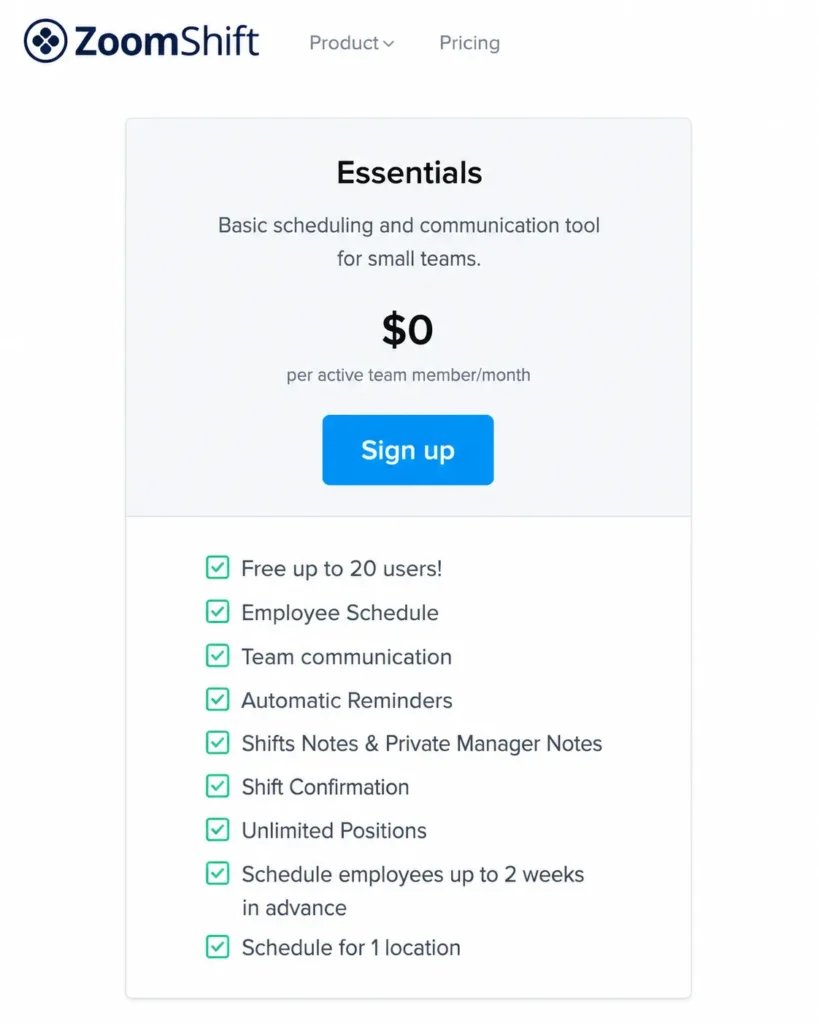
| ZoomShift Essentials (free) | Not published | 2 weeks | Not published |
| ZoomShift Starter | Not published | Unlimited scheduling | Not published |
| ZoomShift Premium | Schedule history included | Unlimited scheduling | Not published |
If you need three years of schedule history for an audit or a dispute, the Findmyshift tier is chosen for you, and it is Enterprise at $85. Pick the tier by history and horizon first, then check whether the member cap fits.
Integrations, API, Security, and Administration
Technical requirements can force an upgrade before headcount does, and this is the table most buyers see too late.
| Product | API access | Webhooks | SSO | Geofencing | Other admin controls |
|---|---|---|---|---|---|
| Deputy | Integrations across tiers | Not detailed publicly | Pro | Not evidenced | Custom access, location hierarchies, pay centers on Pro |
| Connecteam | Expert | Expert | Enterprise | Up to 10 sites on Advanced, unlimited on Expert | 2FA and biometric app lock on Enterprise |
| Agendrix | API access available | Not detailed publicly | Not evidenced | Not evidenced | MFA, change logs, ISO/ |
| ZoomShift | Not detailed by tier | Not detailed by tier | Not evidenced | Premium | Permissions on Premium |
| Others in this list | Not publicly detailed by tier | Not publicly detailed | Not evidenced | Not evidenced | Confirm with the vendor |
Exact API rate limits and webhook quotas were not publicly verified for any product here, so a technical buyer should ask for them in writing. Understanding what an API does is the easy part; getting a written rate limit before you architect a sync is the part that saves the project.
A displayed partner logo is not proof of a native integration. Ask which direction data flows, whether the sync runs in real time or in batches, and which plan the connector requires, because none of these vendors publishes a complete native-integration inventory in the sources checked on July 14, 2026.
Geofencing and GPS clock-in data raise the same question. Confirm where location data is stored and who can see it before the first shift is scheduled.
For most SMB stacks, a middleware connector is the pragmatic answer rather than a direct API build. Teams already running Zapier automation can usually move approved hours and new hires between systems without touching a scheduling API at all.
Employee Self-Service and Shift Coverage
The value of a scheduling app is not the schedule. It is the number of manager phone calls that stop happening on a Saturday.
A working coverage workflow has six steps: the employee sets availability, requests time off, an open shift is published, an eligible employee claims or swaps it, a manager approves where policy requires it, and everyone gets a notification with the updated schedule.
Deputy, Homebase, When I Work, 7shifts, Connecteam, Sling, Agendrix, ZoomShift, and Humanity all support availability, open shifts, time off, and swaps in some form. Humanity adds partial open shifts, which matters when a ten-hour shift needs two people to split coverage.
What differs is manager control. Some products let employees swap freely once eligibility passes, and others hold every swap for approval, which is the setting to check during a demo rather than after a rollout.
The most common failure mode is notifications. Recurring reviewer themes for When I Work mention notification problems, and a schedule change that nobody sees is worse than no schedule change at all.
Setup, Migration, and Adoption
Subscription price is the easy number. Manager hours are the expensive one, and they are not on any pricing page.
| Product | Setup difficulty | Why |
|---|---|---|
| Sling | Low | Publish shifts and invite the team, no configuration required |
| Findmyshift | Low | Spreadsheet-style editor that a manager already understands |
| ZoomShift | Low | Simple roster and time-clock setup, Premium adds migration help |
| When I Work | Low | Core product ships complete, no module assembly |
| Homebase | Low to medium | Straightforward for one site, HR and payroll add configuration |
| Sling Business | Medium | Kiosk, PTO, and reporting need policy decisions |
| Agendrix | Medium | Guided implementation and training are offered, which implies real setup |
| Deputy | Medium | Lite is quick, but Core forecasting and compliance need rules and data |
| 7shifts | Medium | POS connections, labor budgets, and compliance settings require more configuration than a basic shift-publishing tool. |
| Connecteam | Medium to high | Hubs, geofences, forms, and tasks all need owners |
| Humanity by TCP | High | Demand data, staffing rules, qualifications, and CBA logic must be configured |
Employee data is the other migration cost. If your HR records already live in a dedicated HRIS such as the one covered in our BambooHR HR platform review, sync the roster rather than rebuilding it inside the scheduler.
My 90-day adoption test is the same for all eleven rows. If managers are still building the schedule in a spreadsheet and pasting it into the tool at day 90, the rollout failed, and no feature will fix it.
Support and Onboarding
Support access is a real selection criterion for a first scheduling rollout, and vendors package it very differently.
| Product | Published support access |
|---|---|
| Deputy | Customer-success support on Core, dedicated customer success on Pro |
| Agendrix | Chat, phone, and email, with guided implementation and training |
| ZoomShift | Priority support, migration help, onboarding, and training on Premium |
| Sling | Support available across tiers, depth not published by tier |
| Connecteam | Dedicated customer success on Enterprise |
| Humanity by TCP | Enterprise support through TCP, confirm terms in the quote |
| Homebase, 7shifts, When I Work, Findmyshift | Support offered, tier-specific SLAs not publicly disclosed |
No vendor here publishes a formal response-time SLA, so do not accept a verbal promise as one. Ask for the SLA in the order form if support response is a real requirement.
Buyer Risk Ledger
Five risks decide whether this purchase is still working at renewal, and each has a mitigation you can execute in week one.
| Risk | Buyer consequence | Mitigation |
|---|---|---|
| Billing-unit mismatch | A per-user tool doubles when you hire seasonally, or a per-location tool triples when you open stores | Model your 12-month roster and site count before signing |
| Free-plan cliff | An unbudgeted upgrade lands mid-quarter when employee 11 starts | Check the cap that fits your peak headcount, not today’s |
| Feature-gate surprise | The forecasting or API feature you bought for sits one tier up | Name the exact tier that gates the feature in the order form |
| Payroll add-on creep | The payroll add-on costs more than the scheduler | Price scheduling and payroll as one line, not two |
| Adoption failure | Managers keep the spreadsheet and the tool becomes a viewer | Run the 30 and 90-day tests and cancel early if they fail |
The renewal question to answer before month 11 is direct. Can you name one manager hour per week that this tool gave back, and if not, why are you renewing it?
Which Employee Scheduling Tool Should You Avoid?
No product here is bad. Each one is wrong for a specific buyer, and that is more useful than another feature list.
| Product | Skip it if |
|---|---|
| Deputy | You need a permanent free plan or will never use forecasting or compliance depth |
| Homebase | You run four or more locations with small crews at each site |
| 7shifts | You are not a restaurant and would never open the logbook, tips, or POS labor tools |
| Connecteam | You want a focused scheduler and do not want to reason about hubs and tiers |
| When I Work | Demand forecasting or custom reporting is the reason you are buying |
| Sling | You need a time clock, labor-cost tracking, or reporting without paying |
| Agendrix | You are comparing entry prices and forgot to add $2.25 per user for the clock |
| ZoomShift | You publish schedules more than two weeks ahead on a free plan |
| Findmyshift | You need forecasting, enterprise SSO, or specialized compliance rules |
| Humanity by TCP | You want a transparent price and a schedule published this week |
The most expensive mistake in this table is buying Humanity-class complexity for a 30-person team. The second most expensive is buying a $2.50 per-user tool for a workforce that needs union rules.
Which Employee Scheduling Tool and Plan Is Right for You?
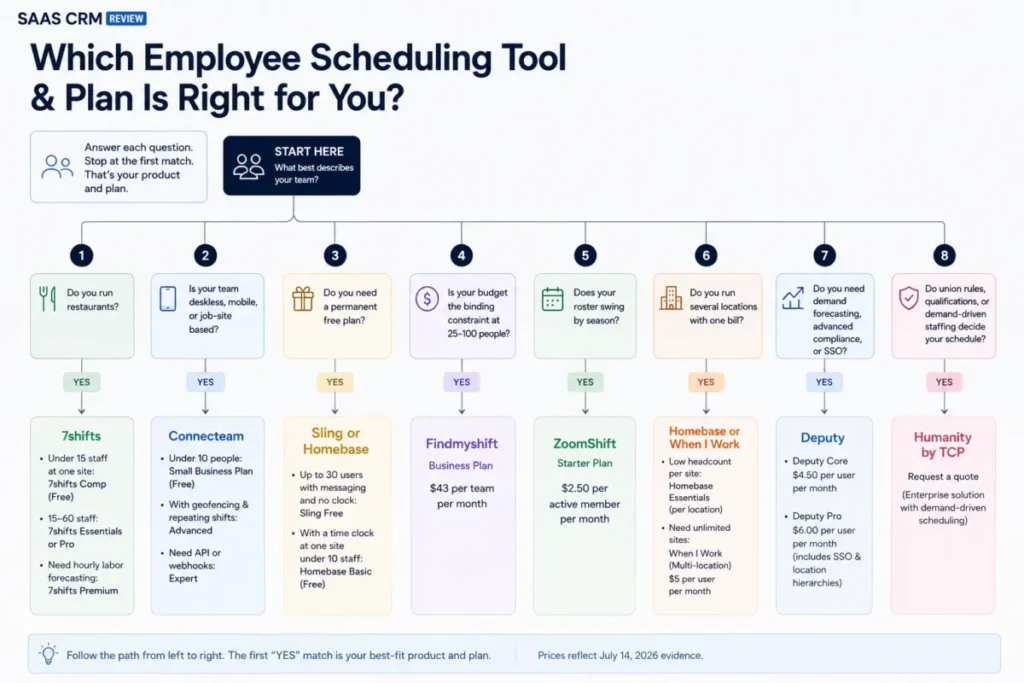
Work down this tree and stop at the first branch that matches. The answer is a product and a plan, not a shortlist.
- Do you run restaurants? Yes, and under 15 staff at one site: 7shifts Comp, free. Yes, and 15 to 60 staff: 7shifts Essentials or Pro. Yes, and you need hourly labor forecasting: 7shifts Premium.
- Is your team deskless, mobile, or job-site based? Yes, and under ten people: Connecteam Small Business Plan, free. Yes, with geofencing and repeating shifts: Connecteam Advanced. Yes, with API or webhooks: Connecteam Expert.
- Do you need a permanent free plan? Yes, up to 30 users with messaging and no clock: Sling Free. Yes, with a time clock at one site under 10 staff: Homebase Basic.
- Is your budget the binding constraint at 25 to 100 people? Yes: Findmyshift Business at $43 per team.
- Does your roster swing by season? Yes: ZoomShift Starter at $2.50 per active member.
- Do you run several locations with one bill? Yes, and headcount is low per site: Homebase Essentials. Yes, and you want unlimited sites: When I Work multi-location at $5 per user.
- Do you need demand forecasting, advanced compliance, or SSO? Yes: Deputy Core, then Deputy Pro for SSO and location hierarchies.
- Do union rules, qualifications, or demand-driven staffing decide your schedule? Yes: request a written Humanity quote from TCP.
Common Mistakes When Choosing Scheduling Software
Six mistakes account for most of the regret I see in this category, and five of them happen before the first schedule is published.
Comparing starting prices across different billing units. A $2.50 per-user price and a $30 per-location price are not comparable numbers until you fix the roster and the site count.
Choosing a free plan that fits today’s team. Free plans break on a specific line, usually headcount or schedule horizon, and hiring season is when that line arrives.
Assuming the time clock is included. Sling and Agendrix both sell scheduling first and time tracking second, which changes the real entry price.
Buying forecasting nobody will configure. Demand forecasting needs sales history and staffing rules, and a tier upgrade does not create either one.
Ignoring the payroll add-on. Payroll can cost more than the scheduler at 25 employees, and it is the line most comparison tables leave out entirely.
Treating messaging as a feature you already have. If schedule chat lives in a separate app from your other team collaboration tools, staff will read one and ignore the other, and the schedule is usually the one they ignore.
Final Verdict
Deputy is the best employee scheduling software for most growing hourly teams because it is the only product here whose ladder runs from a $5 shift schedule to demand forecasting, advanced compliance, SSO, and multi-site administration without a migration. I would budget for Core at $6.50, not Lite, because the reason you outgrow a spreadsheet is usually the reason you need forecasting.
For one location and fewer than 50 hourly staff, Homebase at $30 per location is the cheaper and simpler purchase, and no feature comparison changes that math. Restaurants should buy 7shifts, deskless crews should buy Connecteam, and teams that want free scheduling and messaging for 30 people should start with Sling and upgrade the day they need a clock.
Findmyshift deserves more attention than the SERP gives it, because $43 per team for 100 members is a structural price advantage that per-user vendors cannot match. Humanity is the right answer only when union rules, qualifications, or demand-driven staffing are the actual problem.
Whatever you shortlist, confirm the price at checkout. Scheduling sits next to payroll, POS, and your other operations software, so check the export path into the systems you already run, including project management software options if crews and jobs are scheduled in two places today.
Macedona reviews CRM, sales, support, and revenue-operations software for SaaS CRM Review, and every price above was checked on the vendor’s official US page on July 14, 2026.
FAQ
What is the best employee scheduling software overall?
Deputy is the best employee scheduling software for most growing hourly teams. Its tier ladder covers scheduling, time clocks, auto-scheduling, demand forecasting, labor optimization, advanced compliance, SSO, and multi-location administration, so a team can grow without changing products. Pricing starts at $5 per user per month for Lite, with Core at $6.50 and Pro at $9, checked July 14, 2026.
Is there a genuinely free employee scheduling app?
Yes, if your needs are narrow. Sling’s free plan covers up to 30 users with shift scheduling, time-off requests, open shifts, and private messaging, but it has no time clock. Homebase Basic is free for one location and ten employees and does include time tracking. Connecteam, ZoomShift, and Findmyshift also offer permanent free tiers with their own caps.
How much does employee scheduling software cost?
For 25 workers at one location, published monthly prices ranged from $30 for Homebase Essentials to $125 for Deputy Lite when checked on July 14, 2026. Findmyshift charges $43 per team, When I Work $62.50, and Connecteam $35. Humanity Schedule by TCP does not publish pricing and requires a sales quote.
Which scheduling app is best for restaurants?
7shifts. It connects to restaurant POS systems, compares projected sales against projected labor cost while you build the schedule, and adds a manager logbook, tip management, and restaurant payroll. The free Comp plan covers one location and 15 employees, and Essentials was corroborated at $44.99 per location per month for up to 30 employees.
Does free employee scheduling software include a time clock?
No, unless you pick carefully. Sling Free and 7shifts Comp do not include a time clock, and ZoomShift’s free plan caps forward scheduling at two weeks. Homebase Basic, Connecteam’s Small Business Plan, and Findmyshift Free do include time tracking, each with its own user cap. Check the clock before the feature list.
Can employee scheduling software integrate with payroll?
Yes, through three different paths. Deputy, Homebase, and 7shifts sell their own payroll add-ons, several products integrate directly with payroll providers, and others export a payroll-ready report. The add-on path is the expensive one: Homebase Payroll costs $39 per month plus $6 per paid employee, which is $189 for 25 staff.
What is the cheapest employee scheduling software for 25 employees?
Homebase Essentials at $30 per location per month, if you run one site. Connecteam Operations Basic at $35 and Findmyshift Business at $43 are the next cheapest, and Findmyshift stays at $43 all the way to 100 members. Deputy Lite costs $125 for the same 25 people because it bills per user.
How do I schedule employees across multiple locations?
Decide whether you pay by site or by person. When I Work charges $5 per user for unlimited sites and departments, while Homebase charges $30 per location and 7shifts $44.99 per location. At three sites and 25 total staff, Connecteam costs $35, Findmyshift $43, When I Work $125, and Homebase $90.
Which employee scheduling software handles labor law compliance?
Deputy offers advanced labor-law controls on Core, and Humanity Schedule by TCP goes further with configurable rules for labor laws, internal policies, collective bargaining agreements, and qualifications. Most other products stop at conflict alerts, overtime warnings, and break rules. No scheduling tool guarantees compliance, and none of this is legal advice.
Do employees actually use these scheduling apps?
Adoption depends on notifications and self-service, not features. Every product here offers mobile availability, time-off requests, open shifts, and swaps, so the practical test is whether staff receive shift-change alerts reliably. Recurring reviewer themes for When I Work mention notification problems, which is worth probing in any demo before rollout.