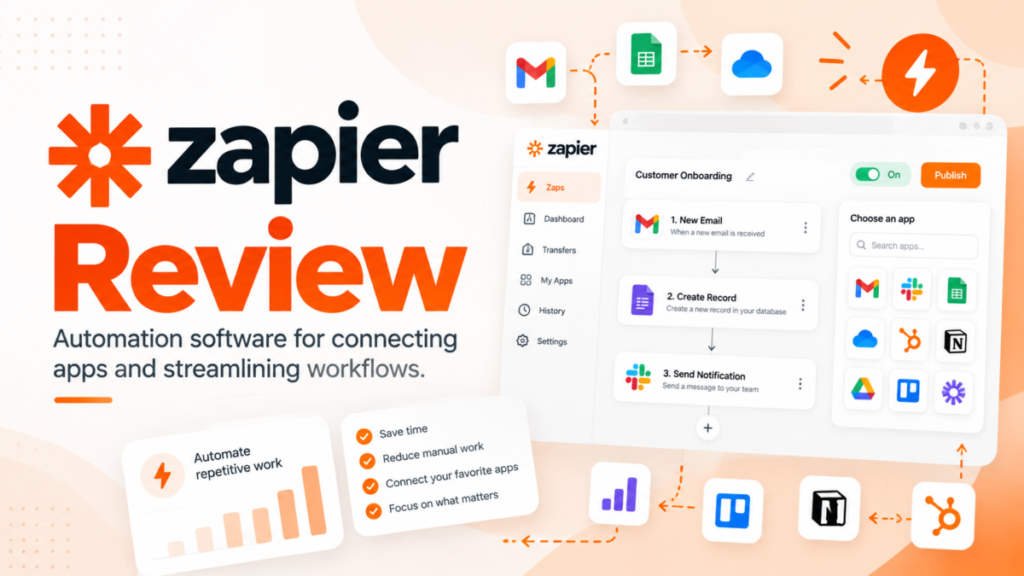
Zapier is worth paying for when a team without a developer needs many SaaS apps connected quickly. It gets expensive when long Zaps run thousands of times, because every successful action is billed as a task.
Professional starts at $19.99 a month billed yearly for one user; Team starts at $69 a month billed yearly for 25 users and 2,000 tasks. This Zapier review prices Professional at five task tiers and Team at four, checked October 2026, and names the limit behind each upgrade.
Quick verdict
- Zapier is worth it for: marketing, sales and ops teams without a developer that connect several SaaS apps and run a few thousand tasks a month.
- Skip Zapier if: your workflows are long and run thousands of times a month, or you must self-host; n8n bills per whole workflow run and Make per credit.
- Main strength: 9,000+ apps, with Zaps, AI steps, code and MCP drawing on one task pool.
- Biggest limit: every successful action is a task, and Professional has one seat, so a second builder means Team.
- Price basis: Professional from $19.99 a month billed yearly ($29.99 monthly); Team from $69 a month billed yearly ($103.50 monthly); Enterprise is Contact for pricing.
In This Article (12 sections)
Zapier at a Glance
Zapier is a no-code automation platform that connects 9,000+ apps through Zaps (a trigger plus one or more actions), with Tables and Forms in every plan.
- Category: no-code automation and AI orchestration platform
- Best for: SMB marketing, sales and ops teams that connect SaaS apps without a developer
- Starting price: Professional at 750 tasks a month, $19.99 a month billed yearly, $29.99 billed monthly (see Pricing)
- Free plan: Free forever, 100 tasks a month, two-step Zaps, 15-minute polling, 1 seat
- Trial: a 14-day Professional trial on every new account, no credit card required
- Main limitation: each successful action uses a task, and only Team and Enterprise have more than one seat
The Free plan is a working start. The question is where it pays off and where the task meter bites.
Zapier Pros and Cons
Zapier’s strengths are app breadth and logic steps that cost nothing; its weak points are the per-action meter and a one-seat Professional plan.
Pros
- 9,000+ app integrations, so most SaaS stacks connect without code or a custom API project.
- Filter, Paths, Formatter, Delay and Looping steps use no tasks, so branching logic adds nothing to the bill.
- Tables and Forms come with every plan and their steps use no tasks, which covers light intake and record-keeping without another subscription.
- All paid plans include Zap version control and custom error notifications, which protects Zaps that touch customer data.
- Zaps, AI steps, code and MCP share one task pool, so one number shows what Zaps, AI steps, code and MCP cost. The SDK is free while in beta, and Agents and Chatbots have their own plans.
Cons
- Free allows two-step Zaps only, polls every 15 minutes and gives 100 tasks a month, so a multi-step workflow needs a paid plan.
- Professional has 1 seat; a second person who builds or shares Zaps means Team, from $69 a month billed yearly.
- Every successful action is a task, so a five-action Zap uses five times the tasks of a one-action Zap on each run.
- Pay-per-task billing stops at 3x the plan’s task limit, and Zap runs are then held until the billing cycle ends.
- Live chat support starts at Professional’s 2,000-task tier ($49 a month billed yearly), not at the entry tier.
Most of those cons are plan gates, so the features worth paying for are the ones to check against your plan.
Zapier Features
Five capabilities decide whether Zapier can carry a team’s workflows: integrations, multi-step logic, Tables and Forms, the AI layer, and Zap management. Each one has a plan gate or a meter attached.
Integrations: 9,000+ apps, premium apps and webhooks
Zapier connects 9,000+ apps, and Professional or higher adds unlimited premium apps and webhooks. Premium apps are select apps only paid plans can use, so check whether one you depend on is premium before planning to stay on Free.
Internal tools can also get a private integration through Zapier’s developer platform; my guide to what an API is explains the term for a non-developer.
Multi-step Zaps, Filters, Paths and Looping
Free stops at two-step Zaps (one trigger, one action); Professional and higher run multi-step Zaps. Filter and Paths steps use no tasks, and neither do Formatter, Delay or Looping, though the actions a loop repeats still count.
That makes Zap design a cost lever: a Filter in front of four actions stops runs that would have used four tasks each. Polling also speeds up by plan, from 15 minutes on Free to 2 on Professional and 1 on Team, and polls never use tasks.
Tables and Forms (formerly Interfaces)
Tables and Forms are in every plan, and their steps use no tasks; capacity is what changes by plan. Tables holds 2,500 records per account on Free, 100,000 on Professional and 500,000 on Team. Forms allows 10 pages per account on Free, 50 on Professional and 150 on Team.
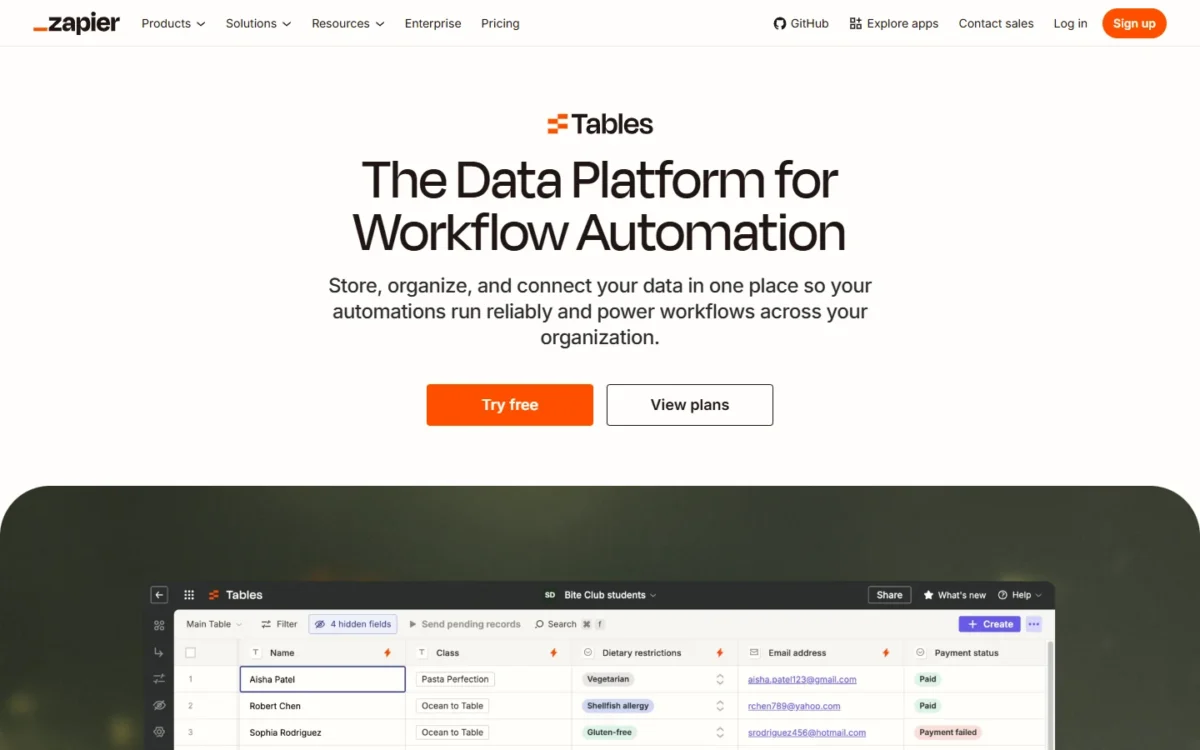
For a team that pays for a form builder or a shared spreadsheet only to feed Zaps, 100,000 records on Professional covers a lead tracker or an intake queue. I would treat Tables as workflow storage, not a database app. Forms is the renamed Interfaces product.
AI by Zapier, Copilot, MCP and Agents
AI steps now bill like any other action. As of October 2026, AI steps, code and the SDK follow the same task-based pricing as Zaps and draw from one shared task pool. The rate per step varies:
- AI by Zapier uses tasks according to the model tier you select.
- Each successful Zapier MCP tool call uses 2 tasks; failed calls use none.
- Code by Zapier uses 1 task per run at standard runtime and more with extended runtime.
- The Zapier SDK is free while in beta.
Zapier Agents sit outside the task pool, on a separate activity quota. Agents Free gives 400 activities a month, and Agents Pro costs $33.33 a month ($400 billed annually) for 1,500.
Agent output depends on your prompts and data, so run one real job on the free tier before paying. My ranking of AI agent builders compared sets Zapier Agents against other tools.
Version control and error alerts
All paid plans include Zap version control, custom error notifications and advanced Zap settings.
Features are worth only what a team can build with them, so the next question is how much effort a build takes.
Zapier Ease of Use and What Users Say
A first two-step Zap means choosing one event in one app and one action in another. Copilot is among the Free plan’s key features, and the Tables and Forms pages offer templates such as lead capture, expense reports and employee onboarding.
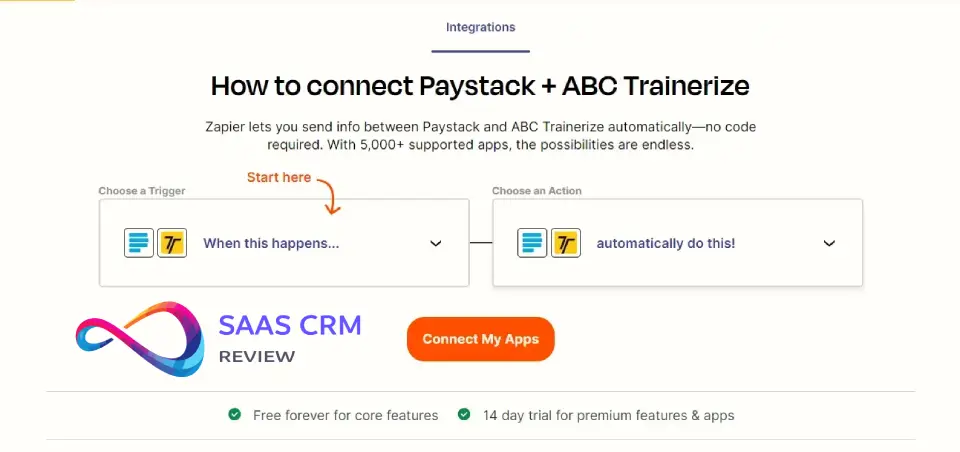
The effort rises with webhooks, Code steps and Paths with several branches. Those are the builds where a non-developer may need help, and where Make’s and n8n’s builders compete.
Capterra’s page for this product, checked October 2026 and based on 3,083 reviews, summarizes reviewers as saving time and reducing errors. Some Capterra reviewers mention a learning curve for building complex automations.
Your own stack settles it. During the 14-day Professional trial, build the busiest Zap you plan to run, let it run for a week, and read its tasks per run on the Task Usage page.
Zapier Pricing
A Zapier bill is set by tasks, not seats: each plan has an entry price, then climbs with the task tier you select. Professional enters at 750 tasks for one user, Team at 2,000 tasks for 25 users, and Enterprise is Contact for pricing.
The plan price follows the task tier, and tasks are shared across the whole account. The table shows each plan’s entry tier in US dollars; the yearly column is the monthly rate when you pay for a year.
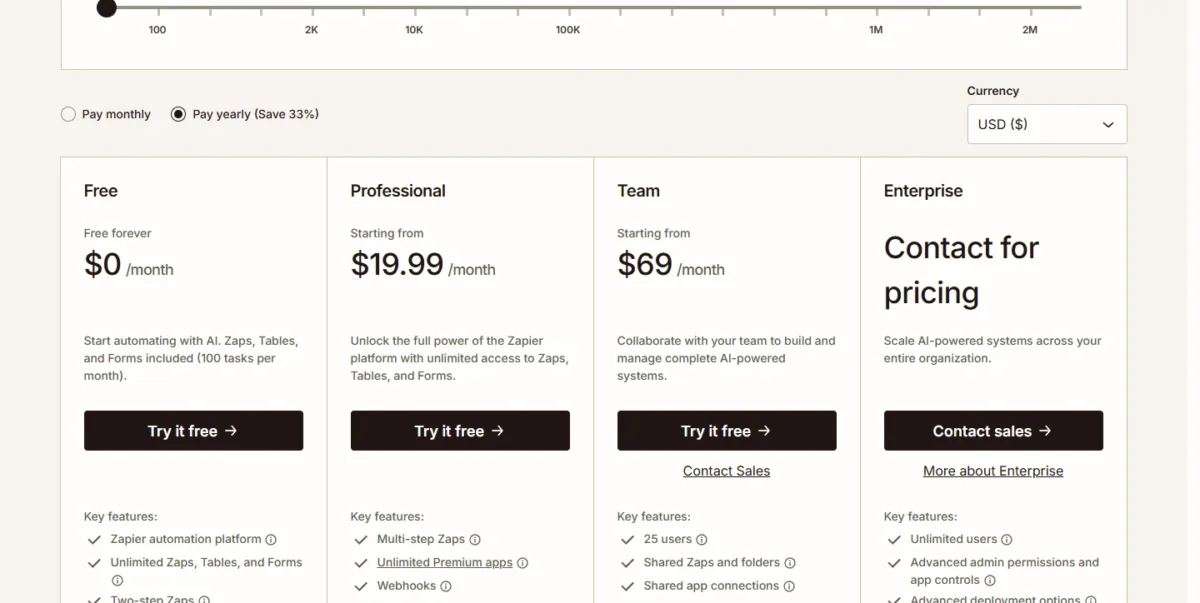
| Plan | Pay yearly (per month) | Pay monthly | Seats and key limit |
|---|---|---|---|
| Free | $0 | $0 | 1 seat, 100 tasks a month, two-step Zaps |
| Professional | $19.99 at 750 tasks | $29.99 at 750 tasks | 1 seat, multi-step Zaps, premium apps, webhooks |
| Team | $69 at 2,000 tasks | $103.50 at 2,000 tasks | 25 users, shared app connections, SAML SSO |
| Enterprise | Contact for pricing | Contact for pricing | Unlimited users, annual task limits |
Sources: Zapier pricing page, Pay yearly and Pay monthly views at each task tier, checked October 2026.
The toggle reads “Pay yearly (Save 33%)”, and monthly billing costs half as much again at every tier. I would pay monthly for the first two or three months, while the task count is a guess, then switch to yearly.
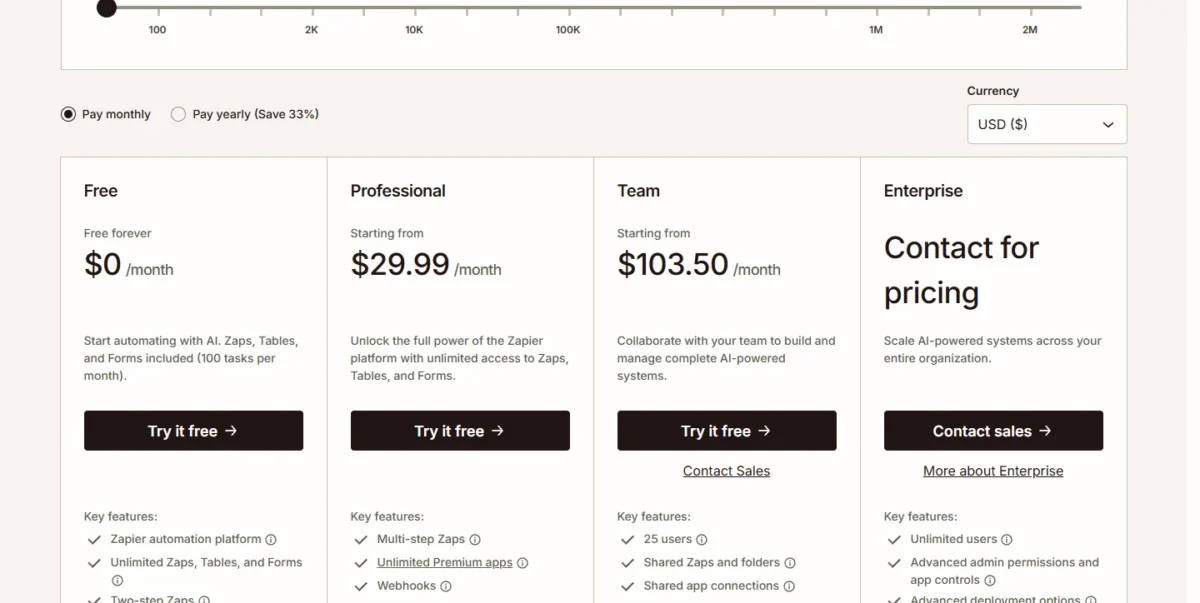
A solo operator belongs on Professional at the tier that covers the busiest month. A team moves to Team the day a second person builds Zaps, because Professional has 1 seat and Team shares Zaps, folders and app connections.
The advertised price leaves out Agents and Chatbots, which have their own plans, and pay-per-task overage, billed at a higher per-task rate that the page does not print. Non-profits get 15% off any paid plan, excluding pay-per-task charges.
How Zapier Counts Tasks
A task is one successful action step. Triggers, polls, actions that error or halt, steps a filter skips, and Filter, Paths, Tables, Forms, Formatter, Delay, Looping, Digest and Storage steps use none.
Two products count differently: Zapier Lead Router uses 5 tasks per lead routed, and MCP 2 per tool call.
Since July 21, 2026, Lead Router usage shows on the Task Usage and Zap History pages. Before that date it did not appear there, but it still counted toward task usage. A sudden jump across July 21 is display, not new use.
Take an illustrative Zap: an entry from a generic web form (not Zapier Forms) triggers it, then it creates a CRM contact, posts to Slack, adds a Tables record and sends a welcome email. The Tables step is free, so each run uses 3 tasks.
Take an illustrative generic web form with 500 entries a month: that is 3 x 500 = 1,500 tasks. A Filter that lets 200 of the 500 entries through cuts it to 3 x 200 = 600 tasks.
With the task selector at 750 tasks, Professional starts from $19.99 a month billed yearly; with the selector at 2,000 tasks, it starts from $49 a month billed yearly.
At the task limit
When you reach your plan’s task limit, Zapier switches you to pay-per-task billing unless you turned it off. Pay-per-task runs up to 3x your plan’s task limit; after that, every further task is held until the billing cycle ends, unless you upgrade.
What a Team Really Pays
A year of Zapier costs anywhere from a few hundred dollars to several thousand, and the task tier moves the bill far more than headcount does. The first table gives the monthly price per tier; the second turns it into a year.
| Tasks per month | Professional, pay yearly | Professional, pay monthly | Team, pay yearly | Team, pay monthly |
|---|---|---|---|---|
| 750 | $19.99 | $29.99 | Starts at 2,000 tasks | Starts at 2,000 tasks |
| 2,000 | $49 | $73.50 | $69 | $103.50 |
| 5,000 | $89 | $133.50 | $119 | $178.50 |
| 10,000 | $129 | $193.50 | $169 | $253.50 |
| 50,000 | $289 | $433.50 | $399 | $598.50 |
Sources: Zapier pricing page, Pay yearly and Pay monthly views with the task selector at 750, 2,000, 5,000, 10,000 and 50,000 tasks, checked October 2026.
| Team and workload | Plan and tier | Billed yearly, per year | Billed monthly, per year |
|---|---|---|---|
| 1 person, 750 tasks | Professional, 750 | $19.99 x 12 = $239.88 | $29.99 x 12 = $359.88 |
| 1 person, 2,000 tasks | Professional, 2,000 | $49 x 12 = $588 | $73.50 x 12 = $882 |
| 5 people, 2,000 tasks | Team, 2,000 | $69 x 12 = $828 | $103.50 x 12 = $1,242 |
| 5 people, 10,000 tasks | Team, 10,000 | $169 x 12 = $2,028 | $253.50 x 12 = $3,042 |
| 20 people, 50,000 tasks | Team, 50,000 | $399 x 12 = $4,788 | $598.50 x 12 = $7,182 |
Sources: Zapier pricing page, checked October 2026. Assumptions: usage stays inside the tier every month, no Agents or Chatbots plans, and Team’s 25 users share one task pool.
Going from 5 people to 20 adds nothing by itself, since both fit inside Team’s 25 users. Five people who automate heavily can pay more than twenty who do not.
At 2,000 tasks billed yearly, Team costs $69 – $49 = $20 a month more than Professional, for 24 more seats, shared app connections and SAML SSO. For two or more builders, I would not try to save it.
Volume gets cheaper per task: the 10,000-task Professional tier costs $129 against $49 for 2,000 tasks, five times the tasks for about 2.6 times the price.
What Forces an Upgrade
The first upgrade is forced by steps, apps or the 100-task cap, the second by people, and every later one by tasks.
| What you need | Plan that has it | What crossing costs, billed yearly |
|---|---|---|
| A third step in a Zap, or more than 100 tasks a month | Professional | from $19.99 a month at 750 tasks |
| Premium apps or webhooks | Professional | from $19.99 a month |
| Live chat support | Professional at the 2,000-task tier | $49 a month |
| A second user, shared Zaps and folders, shared app connections | Team | from $69 a month at 2,000 tasks |
| SAML SSO or 1-minute polling | Team | from $69 a month |
| More than 25 users, advanced admin permissions and app controls, annual task limits | Enterprise | Contact for pricing |
| More tasks than your tier | The next tier of your plan | Team at 2,000 to 5,000 tasks: $69 to $119 a month |
Sources: Zapier pricing page and Zapier’s task usage article, checked October 2026.
The card that matters for a growing team is Team’s, where 25 users, shared Zaps and folders, and shared app connections sit together.

Support, Security and Reliability
Professional includes email and live chat support, with live chat from its 2,000-task tier. Team and Enterprise add priority support on top of 24/7 email and weekday live chat. Enterprise also gets screen-share support, 6am to 6pm EST on weekdays.
Zapier states that it maintains SOC 2 (Type II) and SOC 3, annually audited, plus GDPR and CCPA compliance. Its enterprise page lists SAML 2.0 and SCIM, Team’s card lists SAML SSO, and Zapier lists AES-256 encryption at rest.
Zapier’s pricing and enterprise pages publish no HIPAA, data-residency or uptime commitment, so a healthcare or EU-hosting requirement is a question for sales. Zapier Agents also does not support the app and action restrictions an Enterprise account may set.
With cost, support and security known, the reader can place their own team.
Who Should Use Zapier?
Zapier fits teams whose work crosses many SaaS apps and whose monthly task count is moderate and predictable. A marketing ops team that moves form leads into a CRM and an email platform gets the most from it.
Zapier connects the apps; a marketing automation suite runs the campaigns, and my guide to what marketing automation is draws that line.
If the email tool is still open, my comparison of email marketing platforms covers the ones a Zap would feed.
Best for
- Marketing or sales ops teams without a developer that connect five or more SaaS apps from the 9,000+ directory.
- Solo operators and freelancers who fit Professional’s one seat and a 750- to 2,000-task tier.
- Teams of up to 25 that need shared Zaps, shared app connections and SAML SSO on one Team plan.
- Teams that want light workflow data in Tables and intake in Forms without paying for another tool.
Not ideal for
- High-frequency workflows with many actions per run, where every action is a task; n8n bills one execution per whole run.
- Teams that must self-host their automation; n8n’s free Community edition is self-hosted.
- Organizations that need attended desktop (RPA) flows, which Power Automate Premium includes.
- Teams that would stay inside Free’s two-step Zaps and 15-minute polling, and should not pay at all.
A reader in the “not ideal” column needs to know which rival fits instead.
Zapier vs Make, n8n and Power Automate
The billing unit decides most of this choice: Zapier charges per successful action, Make per credit, n8n per whole workflow execution, and Power Automate per user or per bot.
| Software | Best for | Starting price | Key difference | Main trade-off |
|---|---|---|---|---|
| Zapier | Non-developer teams connecting many SaaS apps | Free, 100 tasks; Professional $19.99 per month billed yearly | Bills each successful action; 9,000+ apps | Long, frequent Zaps multiply tasks |
| Make | Visual scenario builders at higher volume | Free, 1,000 credits; Core $9 per month billed annually at 10,000 credits | Bills credits, most actions 1 credit; 3,500+ apps | Scenarios stop when credits run out until more are added |
| n8n | Technical teams that want to self-host | Free Community edition, self-hosted | Bills one execution per whole workflow run, unlimited steps | You run and maintain the server yourself |
| Power Automate | Teams that need desktop (RPA) flows beside cloud flows | Premium $15.00 per user per month, paid yearly | Per-user licence with attended desktop flows | Cost grows with each user; unattended bots are $150.00 per bot per month |
Sources: Zapier pricing, Make pricing and Power Automate pricing, checked October 2026.
Make is the rival to price first at high volume. Most Make actions use 1 credit, and Router and error handler modules use none. Core costs $9 a month billed annually ($10.59 monthly) for 10,000 credits, where 10,000 Zapier tasks cost $129 a month on Professional billed yearly.
A credit and a task are different units, so that gap holds best for simple one-credit actions. The catch: when Make credits run out, scenarios stop until you add credits, while Zapier keeps running on pay-per-task up to its cap. My Make review covers its plans in depth.
n8n removes the per-step meter. n8n’s own pricing explainer defines an execution as a single run of an entire workflow, however many steps or nodes it has. Zapier counts one task per successful action step.
Take an illustrative 500 runs of a five-action workflow: 500 runs, and 5 x 500 = 2,500 action steps.
The free Community edition runs on your own server, and the code is on GitHub. The n8n review weighs the effort of running it.
Power Automate suits an organization that also needs desktop automation. Premium costs $15.00 per user per month paid yearly, with cloud flows, attended desktop flows and a 30-day free trial. Five users come to 5 x $15.00 x 12 = $900 a year before any unattended bot.
Best Zapier Alternatives
Look elsewhere for one of three reasons: the per-action bill (Make or n8n), the need to self-host (n8n), or desktop automation (Power Automate). My list of Zapier alternatives compared by price and limits ranks the wider field.
How I Evaluated Zapier
In October 2026 I read Zapier’s pricing page in both billing views at five task tiers and its help center article on task usage. I also read its apps, Tables, Forms, Agents and enterprise pages. I read the pricing pages of Make and Power Automate and n8n’s documentation and blog in the same month.
Prices, limits and plan gates come from those official pages; the team costs, plan fit and billing contrasts are my analysis, with the math shown. The one user opinion comes from Capterra, named and linked, and the review carries no score.
Zapier does not publish its pay-per-task rate, a HIPAA or data-residency commitment, or an uptime figure on these pages. How many tasks a Zap uses depends on your own workflow, which the trial settles.
Zapier Review FAQ
Is Zapier free?
Yes. Free forever costs $0 and includes 100 tasks a month with unlimited Zaps, Tables and Forms, but only two-step Zaps. If you outgrow it as a non-profit, Zapier gives non-profits 15% off any paid plan, a discount that does not apply to pay-per-task charges.
Does Zapier charge for polling or failed steps?
No. Polls never use tasks, even for a Zap that checks an app every two minutes, which is over 20 thousand polls a month. Actions that error or halt use none either.
Two cases that surprise people do cost: a search action set to proceed when nothing is found uses 1 task, and replaying a whole Zap run charges its successful steps again.
Can I stop overage charges?
Yes. Turn pay-per-task billing off, and Zapier holds new Zap runs at your plan’s limit instead of charging more. Held runs can be replayed once the billing cycle resets, you upgrade, or you turn pay-per-task back on.
Final Verdict
Zapier is worth paying for when a non-developer team connects many SaaS apps at moderate volume. The trade-off is 9,000+ apps against a meter that charges every successful action.
Start on Free or the 14-day Professional trial, and move to Team the day a second person builds Zaps. Look at Make or n8n when your Zaps are long and run thousands of times a month, and at Power Automate when desktop flows are part of the job.
Before you pay, multiply your busiest Zap’s tasks per run by its runs per month, then add your other Zaps. Pick the tier that covers the total with room to spare.