Marketing automation gets sold as a time-saver, but the buyers who regret it are the ones who switched on workflows before their data, consent records, and lifecycle stages were ready. The question of what is marketing automation matters less than knowing what it does to your database once it runs at scale.
This guide explains the concept, the workflow mechanics, and the CRM and revenue-operations decisions that decide whether automation helps your pipeline or quietly damages your contact list. It is written for founders, marketers, and revenue teams who have to defend the setup to finance and to their own customers.
Automation sits on top of your customer database, so it helps to know what CRM software does before you wire workflows onto it. The rest of this guide assumes that system of record is the foundation, not an afterthought.
Buyers who need scoring and a clean sales handoff in one place usually shortlist a CRM built for marketing automation rather than a standalone email tool. This guide explains why that choice matters before you commit.
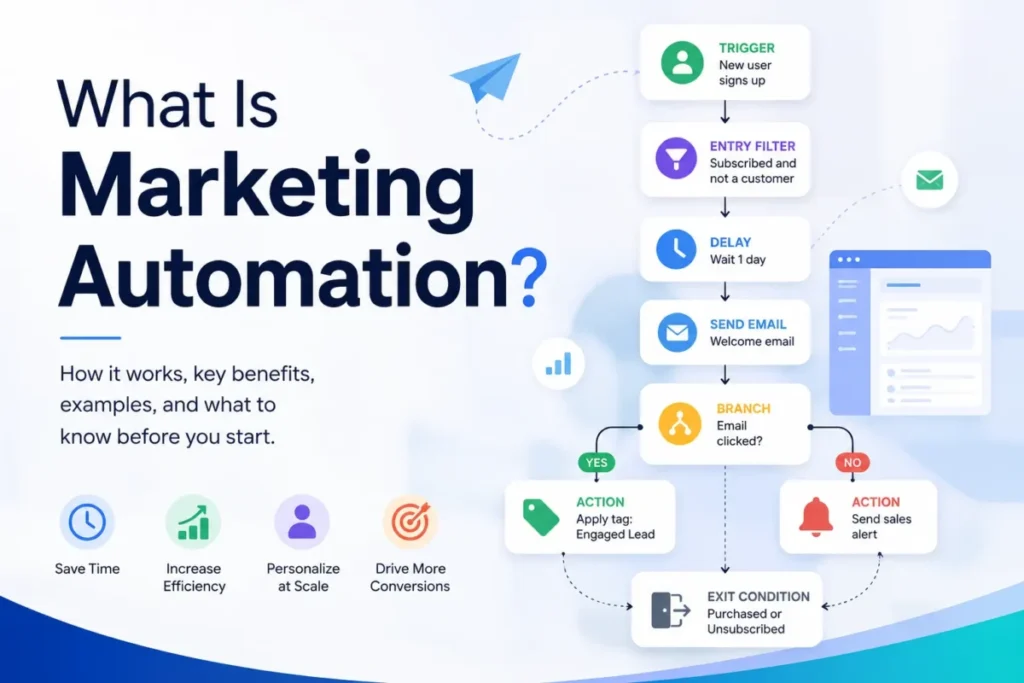
Quick answer: Marketing automation is software that uses customer data, triggers, rules, and workflows to run marketing actions automatically across channels like email, SMS, web, and CRM. A workflow starts when a contact meets a condition, then sends messages, updates records, scores leads, or alerts sales, without someone touching each contact by hand.
In This Article (21 sections)
The 60-Second Explanation of Marketing Automation
Marketing automation replaces repetitive manual marketing work with predefined or AI-assisted workflows. HubSpot’s marketing automation page describes it as software that automates repetitive tasks and uses customer data to trigger the next action.
At the simplest layer, it is a rule: when something happens, do something. A new subscriber joins, so the system sends a welcome email a day later.
At the technical layer, it is a workflow engine sitting on top of a contact database. Triggers, filters, delays, branches, actions, and exit conditions decide what each contact receives and when.
At the business layer, it is a way to run lifecycle marketing and lead handoff at a volume no team could handle manually. Salesforce’s automation guide frames it as technology that manages multi-channel campaigns across email, web, social, and text.
The value is real, but conditional. Automation multiplies whatever you already have, which means it multiplies good campaigns and bad data at the same rate.
How Marketing Automation Actually Works
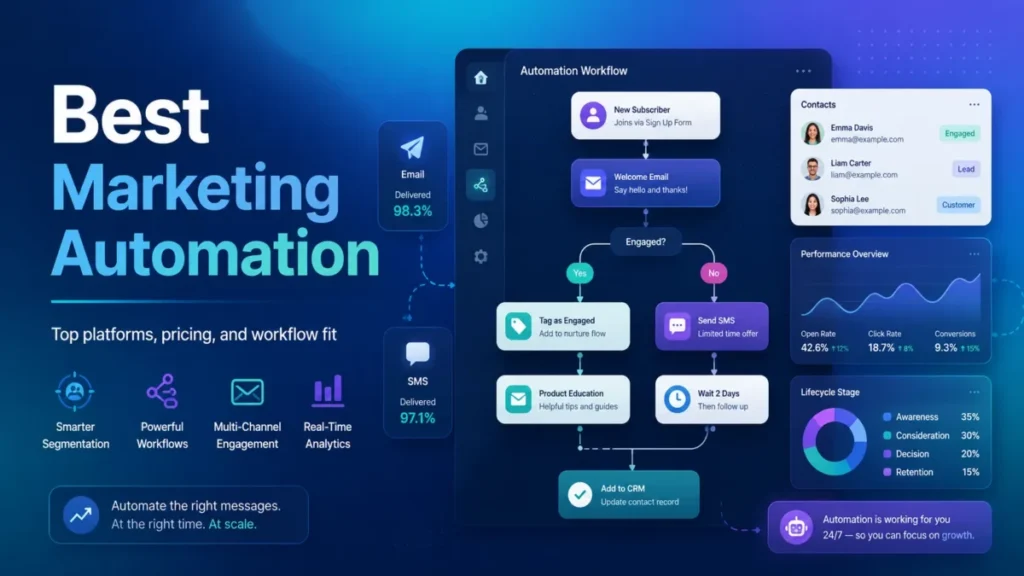
A marketing automation workflow is a sequence of instructions attached to a contact record. Mailchimp’s customer journey documentation breaks a flow into triggers, rules, actions, delays, and exit conditions, and a contact enters the flow only when they match the trigger.
Here is the anatomy of a single workflow, in order:
- Trigger: the event that starts the flow, such as a sign-up, a form submission, an email click, a pricing-page visit, a purchase, or a CRM stage change.
- Filter or entry condition: a check that decides who is eligible, for example only contacts who opted in and are not already customers.
- Delay: a wait step, such as one day or three days, so messages arrive at a sensible pace.
- Branch or condition: an if-then split, for example clicked versus did not click, that sends contacts down different paths.
- Action: the task the system performs, such as sending an email or SMS, adding a tag, updating a field, creating a task, or notifying a sales rep.
- Exit condition: the rule that removes a contact from the flow, such as purchased, unsubscribed, became a customer, or entered a sales sequence.
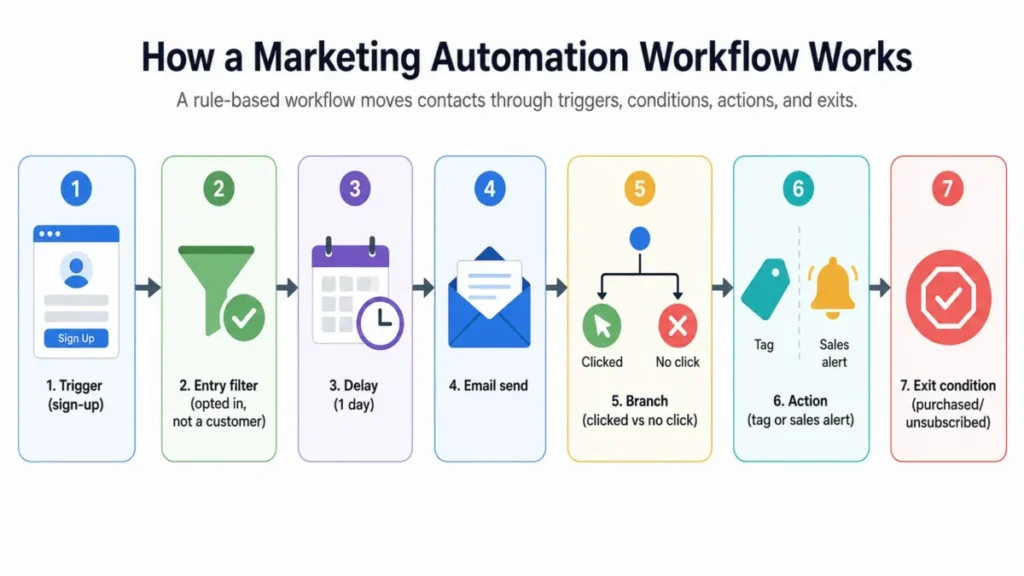
A concrete example makes the parts obvious. A visitor downloads a pricing guide, waits one day, receives a follow-up email, then branches: contacts who click get a case study, and contacts who ignore it get a softer re-send before the flow ends.
The failure point most beginners miss is the exit condition. Without one, a customer who already bought keeps receiving “still deciding?” emails, and a contact who unsubscribed can still be pulled into a parallel flow.
Exit logic is the difference between automation that feels helpful and automation that feels broken. I treat a missing exit condition as a launch blocker, not a nice-to-have.
Marketing Automation vs Email Marketing, CRM, and Sales Automation
These four terms get used interchangeably, and that confusion leads teams to buy the wrong tool. Email automation is one channel inside marketing automation, not a synonym for it.
The table below separates them by job, data source, and typical owner.
| Term | Core job | Primary data | Typical channel | Where it fits |
|---|---|---|---|---|
| Email marketing automation | Send triggered or scheduled emails | Email list, engagement | Email only | Subset of marketing automation |
| Marketing automation | Orchestrate lifecycle actions across channels | Behavior, CRM fields, consent | Email, SMS, web, ads, CRM | The broader engine |
| CRM automation | Store customer records and automate internal sales tasks | Contacts, deals, activities | Internal pipeline, tasks | The system of record |
| Sales automation | Speed up rep outreach and follow-up | Deals, sequences, activity | Rep email, calls, tasks | Owned by sales, not marketing |
A CRM is the database of record and the place deals live, while marketing automation is the engine that acts on that data across channels. The two overlap at the sales handoff, where automation scores a lead and passes it into the CRM for a rep to work.
TechRadar’s guide describes email marketing automation as software that sends pre-built emails based on triggers, conditions, or intervals. That is accurate, but it covers one channel, so a team that needs web, SMS, ad audiences, and CRM alerts will outgrow an email-only tool fast.
The buyer mistake I see most: paying for a full marketing automation platform when a triggered email tool would do, or buying an email tool when the real need is lifecycle orchestration and a clean sales handoff.
The Data You Need Before Automation Works
Automation cannot personalize what your database does not know. Salesforce describes the inputs as data from emails, website visits, app usage, and social activity, and HubSpot ties automation directly to CRM data.
Before you build a single workflow, confirm these fields and events exist and are trustworthy:
- Contact identity fields: email, name, and a stable unique identifier for deduplication.
- Consent status: email opt-in, SMS opt-in, and the source and date of each.
- Lifecycle stage: subscriber, lead, marketing-qualified, sales-qualified, customer, churned.
- Source: where the contact came from, so nurture matches intent.
- Product or topic interest: what they downloaded, viewed, or bought.
- Behavioral events: clicks, form submissions, page visits, purchases, logins.
- CRM owner: which rep or team owns the record for handoff.
- Suppression status: unsubscribed, bounced, or do-not-contact flags.
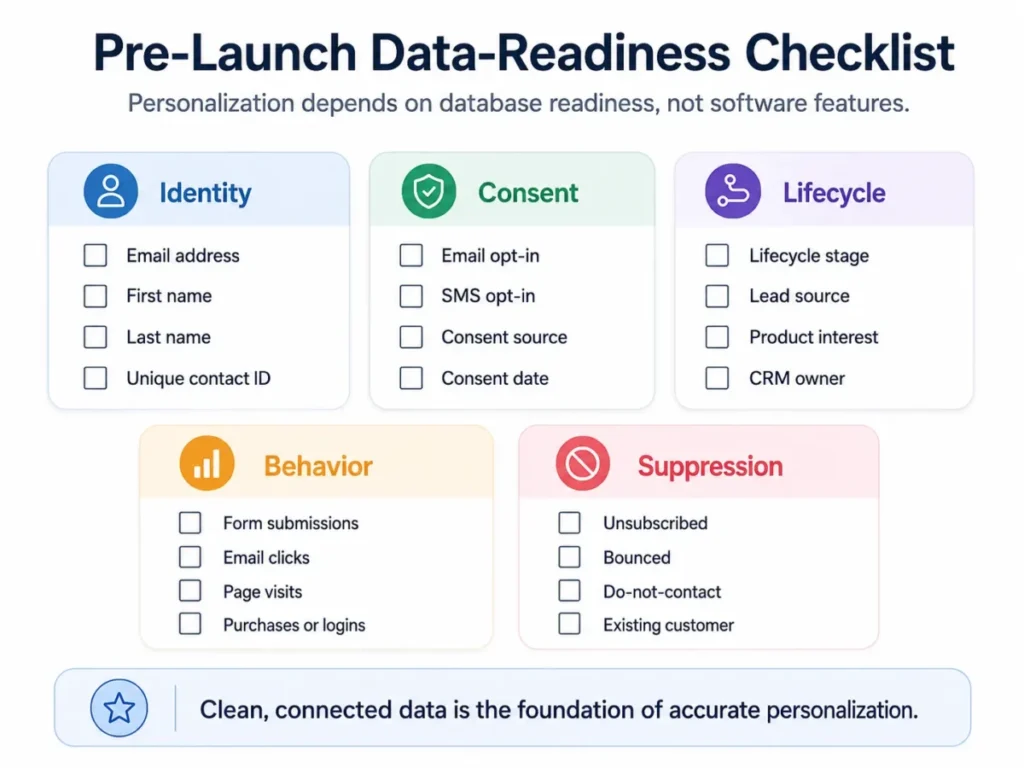
Stack fit is the quiet risk here. If consent lives in one tool, behavior in another, and lifecycle stage in a third, your workflows will act on stale or conflicting data.
My rule: if you cannot answer “is this contact allowed to receive this message today?” from one reliable source, you are not ready to automate that channel yet.
What to Automate First
The best first workflow is low-risk, high-frequency, and tied to a signal you already collect. Do not start with a complex lead-scoring model when a welcome sequence would prove the setup with less exposure.
Pick your first workflow by business model:
| Business model | Best first workflow | Trigger | Data needed | Success signal |
|---|---|---|---|---|
| Newsletter or content site | Welcome sequence | Sign-up | Opt-in, source | Reply or click, not open |
| B2B SaaS | Demo or lead-magnet follow-up | Form submission | Opt-in, interest, CRM owner | Booked call, sales-accepted lead |
| Ecommerce | Abandoned cart | Cart with no purchase | Commerce events, consent | Completed checkout |
| Any list with dormant contacts | Re-engagement | No activity for N days | Engagement history | Re-engaged or clean suppression |
A welcome sequence is the safest starting point for most teams because the trigger is clean and the consent is fresh. Dotdigital’s examples show welcome flows, triggered reminders, and win-back campaigns as reliable lifecycle patterns.
I would ship one workflow, watch it for two weeks, and only then build the next. A staged rollout is how you catch a broken branch before it reaches your whole list.
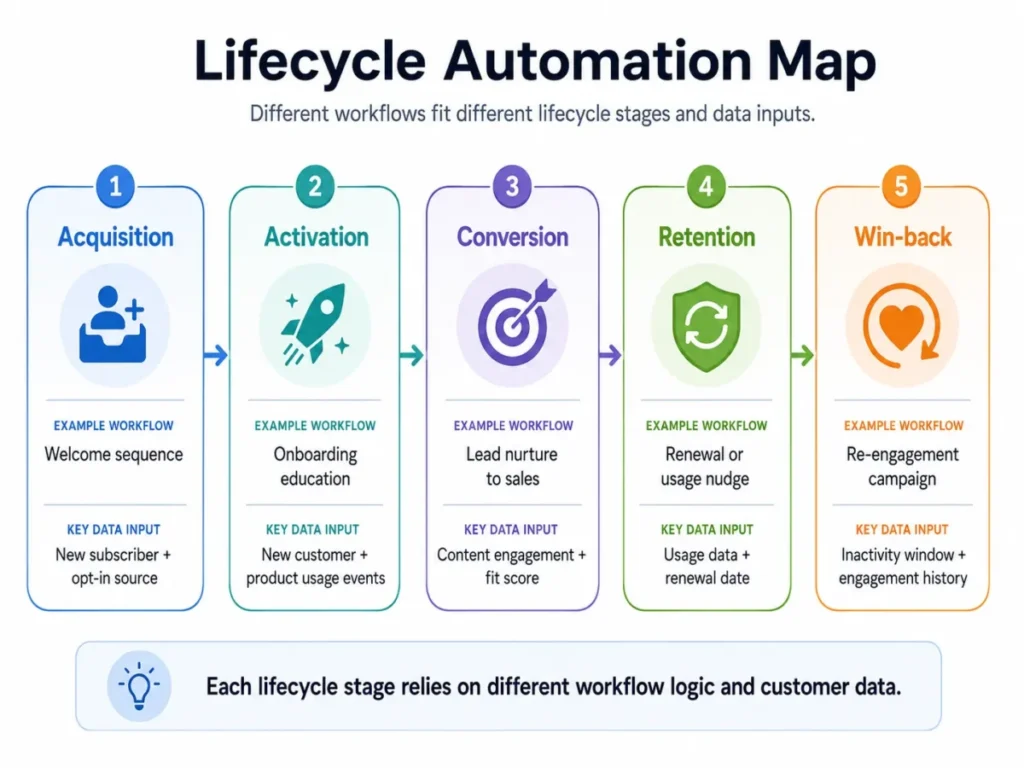
Marketing Automation Examples by Lifecycle Stage
Examples are more useful when they are mapped to a lifecycle stage and the data each one requires. A win-back flow and a welcome flow look similar in the builder but depend on very different signals.
| Lifecycle stage | Example workflow | Trigger | Required data | What to measure |
|---|---|---|---|---|
| Acquisition | Welcome sequence | New subscriber | Opt-in, source | Click, first conversion |
| Activation | Onboarding education | New customer | Product usage events | Adoption milestone reached |
| Conversion | Lead nurture to sales | Content engagement | Fit and engagement score | Sales-accepted lead |
| Retention | Renewal or usage nudge | Low usage or renewal date | Usage, contract data | Retained account |
| Win-back | Re-engagement | Inactivity window | Engagement history | Re-engaged or suppressed |
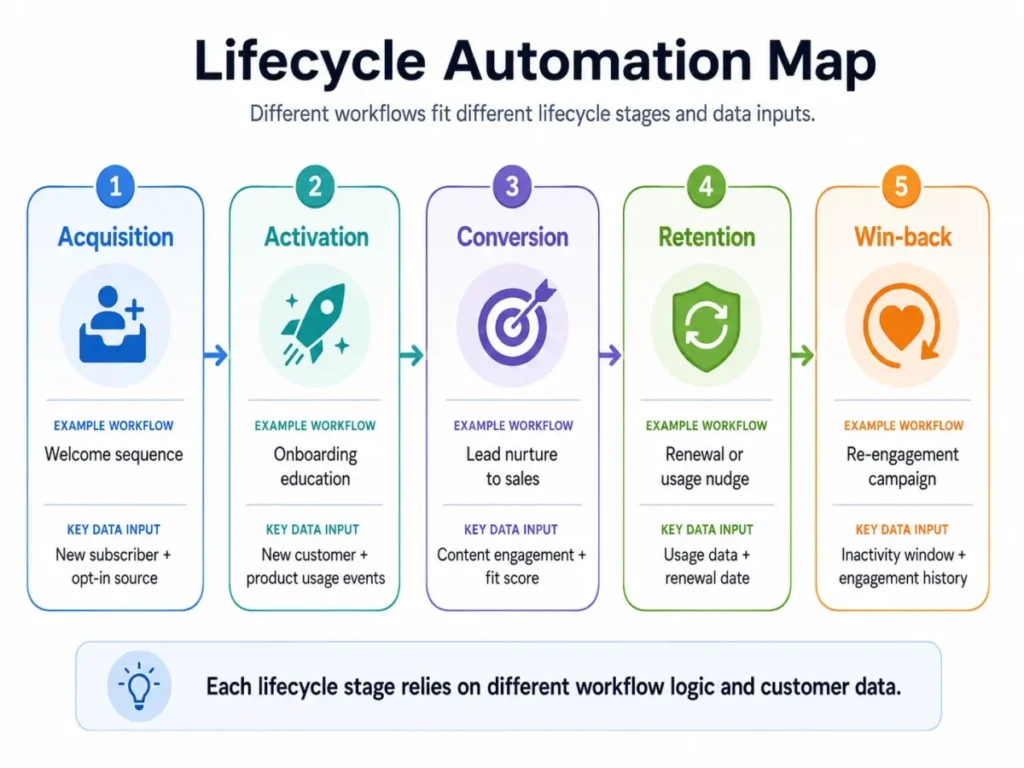
The pattern that separates good operators: they know which stage each workflow serves and refuse to reuse an acquisition message for a retention problem. A discount aimed at a churning customer is not the same asset as a welcome offer.
Lead Scoring: Why a High Score Can Still Be a Bad Lead
Lead scoring gets treated as one magic number, and that is where teams route unqualified contacts to sales. HubSpot’s lead scoring documentation separates engagement scores, fit scores, and combined scores for contacts, companies, and deals.
Fit measures whether the account matches your ideal customer: industry, size, role, budget signals. Engagement measures whether the contact is active: opens, clicks, visits, form fills.
A single blended score hides which of the two is high. A junior employee at a perfect-fit company and a hyper-active browser at a company you will never sell to can produce the same number.
| High engagement | Low engagement | |
|---|---|---|
| High fit | Route to sales now | Nurture and warm up |
| Low fit | Qualify carefully before routing | Suppress or deprioritize |
The sales handoff is where this gets expensive. A high score is a prioritization signal, not proof of a sales-qualified lead, because a rep still has to confirm need, budget, authority, and timing.
If marketing calls a contact an MQL and sales cannot turn those into SQLs, the score model is routing noise. I would review the MQL-to-SQL acceptance rate monthly and retune the thresholds before I trust the automation to route on its own.
Marketing Automation Maturity Levels
Automation is not one capability; it grows in stages, and buying above your stage wastes budget. Small teams overbuy enterprise platforms, and scaling teams under-scope and hit walls.
| Level | What it does | Typical tools | Who it fits |
|---|---|---|---|
| 1. Scheduled sends | Newsletters and one-off broadcasts | Basic email tools | Early lists, low volume |
| 2. Trigger-based email flows | Welcome, cart, re-engagement | Email automation platforms | Teams with clean triggers |
| 3. Multi-step lifecycle automation | Branching, tagging, cross-channel | Full marketing automation | Growing B2B and ecommerce |
| 4. Revenue orchestration | Lead scoring, CRM sync, analytics, sales handoff | Enterprise automation | Complex revenue teams |
Mailchimp covers the lower and middle levels well, while Adobe Marketo Engage is positioned for level-four enterprise orchestration with omnichannel campaigns and sales alignment.
The honest read: most teams operate at level two or three and pay for level four they never configure. Match the tier to the workflows you will actually run this quarter, not the roadmap you imagine.
Channels and Types of Marketing Automation
Marketing automation is often collapsed into email, but the broader engine coordinates several channels. Salesforce and Adobe both describe multi-channel and omnichannel campaigns rather than a single send.
Common channels and types include:
- Email automation: welcome sequences, drip campaigns, cart recovery, re-engagement, transactional messages.
- SMS automation: reminders and alerts, gated behind separate consent from email.
- Web and on-site: forms, personalized content, pop-ups tied to behavior.
- Ads and audiences: syncing segments to ad platforms for retargeting.
- Lead scoring and sales handoff: fit, engagement, and combined scores with alerts.
- Lifecycle and retention: onboarding, upsell, renewal, win-back.
Not every tool covers every channel, and that gap is a real buying constraint. An email-first platform will not orchestrate SMS consent, ad audiences, and CRM alerts the way a full automation suite does.
If email is your only channel for now, the best email marketing platforms guide covers tools built around triggered and scheduled sends, and you can add broader orchestration later.
The Mistakes That Waste Your First Month
Most first-month failures come from turning on volume before the safeguards. Here is a Buyer Risk Ledger of the common ones, each tied to a consequence and a fix.
| Mistake | What breaks | Fix |
|---|---|---|
| Automating on dirty data | Wrong names, wrong segments, duplicate sends | Clean and dedupe before launch |
| No exit conditions | Customers get “still deciding?” emails | Define exits for purchase, unsubscribe, handoff |
| Repeated-trigger sends | Same message fires again and again | Set run-once and frequency caps |
| Open-only triggers | Flows fire on unreliable signals | Trigger on clicks, visits, replies, CRM stage |
| No owner | QA and suppression get skipped | Assign one accountable owner |
ActiveCampaign’s automation builder documentation warns that a workflow set to run multiple times can send a contact the same message repeatedly, a detail covered in the ActiveCampaign review. That setting is the difference between a helpful nudge and a fatigue-driven unsubscribe.
What breaks first as you scale is almost never the software. It is data hygiene, frequency control, and the absence of an exit condition, and all three get worse with volume.
Set a frequency cap and a suppression list before you launch the second workflow. Over-messaging is the fastest way to burn a list you spent months building.
Common Misconceptions About Marketing Automation
Several beliefs about automation cost teams money and trust. Correcting them early changes what you buy and how you build.
Misconception: Marketing automation is the same as email marketing. Reality: Email is one channel. Marketing automation orchestrates behavior across email, SMS, web, ads, and CRM.
Misconception: Automation replaces marketing strategy. Reality: Automation executes the rules, content, and offers you supply. IBM and Microsoft position it as enabling a strategy, not creating one.
Misconception: A high lead score means a sales-ready lead. Reality: Score is a prioritization signal. Sales still confirms need, budget, authority, and timing.
Misconception: Automation is set-and-forget. Reality: Workflows need QA, suppression rules, consent checks, and regular performance review.
Misconception: Transactional and promotional messages follow the same rules. Reality: The FTC treats commercial marketing messages differently from transactional or relationship messages, so opt-out handling is not identical.
The through-line is that automation is an execution engine, not a decision-maker. It does what you tell it, faster and at scale, including your mistakes.
Risks and Compliance Guardrails
Automation scales compliance mistakes as efficiently as it scales campaigns. This section is educational and not legal advice; consult counsel for regulated or high-volume campaigns.
Compliance risk differs by channel, so treat email, SMS, and profiling separately.
- Email: The FTC’s CAN-SPAM compliance guide requires accurate header information, non-deceptive subject lines, a valid physical postal address, and a working opt-out. Automated sends must honor unsubscribes promptly.
- SMS and texts: The FCC’s consent revocation order confirms consumers can revoke consent to marketing texts in any reasonable way, and senders cannot restrict how they opt out. Your automation must catch and honor those revocations.
- Profiling and automated decisions: Handle these with care where the audience or data triggers stricter rules.
The buyer consequence is direct. A single misconfigured send at automated scale reaches thousands of people before anyone notices, which turns a small process gap into a large exposure.
Build consent capture, suppression, and opt-out handling into the workflow before launch, not after the first complaint.
What Not to Automate Blindly
Some signals are too unreliable to drive automation on their own. Email opens are the clearest example after mail privacy changes.
Litmus notes that Apple Mail Privacy Protection can inflate opens and obscure open times, which distorts any nurture flow engineered around open behavior. A contact can register as “engaged” without ever reading the message.
| Signal | Reliability for automation | Better use |
|---|---|---|
| Email open | Low, inflated by privacy tools | Weak secondary signal only |
| Email click | High | Trigger and scoring input |
| Form submission | High | Strong intent trigger |
| Page or pricing visit | High | Intent and routing signal |
| Purchase or reply | Highest | Exit condition, sales trigger |
Automated decisions that meaningfully affect people also deserve caution under privacy frameworks. GDPR Article 22 sets out rights around solely automated processing and profiling that produces significant effects, with specific safeguards and exceptions.
Prioritize clicks, form fills, page visits, replies, purchases, and CRM stage changes over open-only triggers. Building a nurture path on opens alone is how teams misclassify engagement and message the wrong people.
AI and Marketing Automation in 2026
AI now helps build workflows, draft content, and suggest segments, but it does not remove the need for human review. IBM notes that AI, natural language processing, and machine learning expand automation functions, and ActiveCampaign and Adobe describe AI-assisted automation building.
The line that matters is between assistance and unsupervised sending. AI can generate a draft flow, propose copy, and recommend a segment, and a human still approves strategy, compliance, brand voice, suppression logic, and performance thresholds.
Treat AI output as a first draft, not a published campaign. An AI-generated workflow that skips an exit condition or a consent check is still your liability, not the model’s.
My recommendation: keep a human-in-the-loop review step for any AI-built automation that sends real messages to real contacts. Speed is useful; unreviewed autonomous sending is a risk you do not need.
When to Use Marketing Automation and When to Wait
Automation rewards teams that have foundations in place and punishes teams that do not. The honest answer for some readers is “not yet.”
Use marketing automation when you have consent records, a reasonably clean database, defined lifecycle stages, content offers to send, a working unsubscribe process, and someone accountable for it.
Do not automate yet if any of these are true:
- You have no reliable consent records for the channel.
- Your CRM is messy, duplicated, or missing lifecycle stages.
- You have no content offers worth sending on a schedule.
- No unsubscribe or suppression process exists.
- No single person owns QA and performance.
- You have no measurement baseline to judge results against.
This is a 30/90-day adoption test. After 30 days, at least one workflow should run cleanly with a real exit condition and no over-messaging complaints, and after 90 days, you should see a downstream result such as booked calls, conversions, or retained accounts, not just opens.
If those foundations are missing, fix data and consent first. Automation applied to a weak base scales the weakness.
How to Measure Marketing Automation Success
Vanity metrics drive bad automation decisions, and opens are the worst offender. Measure downstream behavior that ties to revenue and list health.
| Metric | What it tells you | Why it beats opens |
|---|---|---|
| Click-through rate | Real interaction with content | Not inflated by privacy tools |
| Conversion or booked call | Workflow drove an action | Ties to pipeline |
| Sales-accepted leads | Handoff quality | Tests scoring accuracy |
| Pipeline influenced | Revenue contribution | Connects to the number finance cares about |
| Unsubscribe and spam rate | List health and fatigue | Flags over-messaging early |
Judge a workflow by what happens after the send, not by the send itself. A flow with high opens and rising unsubscribes is failing, whatever the open rate says.
The renewal-style question I would want answered before scaling automation: can we show that these workflows influenced pipeline or retention, or are we only reporting activity?
Who Owns Marketing Automation
Automation fails when no one owns QA, suppression, data hygiene, and performance review. Ownership shifts as the team grows.
| Company stage | Likely owner | Main responsibility |
|---|---|---|
| Early team | Founder or first marketer | Build and monitor simple flows |
| Scaling team | Marketing operations | Workflow QA, segmentation, reporting |
| Complex B2B | Revenue operations plus CRM admin | Scoring, CRM sync, sales handoff, governance |
The owner is the person who can answer why a contact received a given message and prove it was compliant. Without that accountability, workflows drift and suppression rules quietly break.
Name the owner before launch. An unowned automation is a liability waiting for a complaint.
Related Marketing Automation Tools
These tools play different roles, and naming the role matters more than ranking them for a concept article. This is not a best-of list; it is a map of where each type sits.
| Tool | Role in the concept | Best understood as |
|---|---|---|
| HubSpot Marketing Hub | CRM-connected automation, workflows, scoring, forms | Automation tied to a CRM system of record |
| Mailchimp | Email and customer journey automation | Entry-level lifecycle and email flows |
| ActiveCampaign | Visual automation builder with recipes | Flexible workflow automation for growing teams |
| Adobe Marketo Engage | Enterprise B2B automation and orchestration | Complex, high-volume revenue teams |
For entry-level lifecycle and email flows, product-level detail lives in the Mailchimp review, which covers how its customer journeys handle triggers and exit conditions.
Teams that want automation attached to their pipeline rather than a standalone email tool should start with the HubSpot CRM review to see how workflows, scoring, and forms connect to the record.
How to Choose Your First Marketing Automation Setup
Choose the tool by the workflows you will run this quarter, the channels you need, and the state of your data. Do not buy for the roadmap you imagine; buy for the flows you can configure now.
Use these criteria:
- Channel coverage: email only, or email plus SMS, web, ads, and CRM alerts.
- CRM fit: does it connect cleanly to your system of record.
- Scoring and handoff: do you need fit-versus-engagement scoring and sales alerts.
- Data readiness: can your database feed it clean, consented events.
- Ownership: do you have someone to run QA and suppression.
Beginner checklist before you launch:
- Confirm consent records and opt-out handling for each channel.
- Deduplicate and clean the contact database.
- Define lifecycle stages and one clear first workflow.
- Add an exit condition and a frequency cap to that workflow.
- Choose click, form, visit, or CRM-stage triggers over open-only triggers.
- Set the success metric before launch, not after.
- Assign one accountable owner.
- Run the first workflow for two weeks before building the next.
For buyers weighing a combined stack, the sales and marketing software overview shows where automation sits alongside CRM and outreach tools.
FAQ
What is marketing automation in simple terms?
Marketing automation is software that runs marketing actions automatically based on rules and customer behavior. When a contact does something, such as signing up or clicking, the system responds with the next step, like an email, a tag, or a sales alert, without someone handling each contact manually across email, SMS, web, and CRM.
How does marketing automation work?
A workflow starts when a contact matches a trigger, such as a sign-up or a purchase. The system then applies filters, delays, and branches, performs actions like sending messages or updating records, and removes the contact when an exit condition is met. It runs on data from forms, CRM records, website activity, and consent fields.
What is an example of marketing automation?
A welcome sequence is a common example. A new subscriber signs up, waits a day, receives an educational email, then branches based on whether they clicked. Other examples include abandoned-cart reminders, lead-nurture sequences, onboarding flows, and re-engagement campaigns, each tied to a lifecycle stage and the data it requires.
Is marketing automation the same as email marketing?
No. Email marketing automation is one channel inside marketing automation. Marketing automation coordinates actions across email, SMS, web, ads, and CRM, and can score leads and alert sales. A team that only sends triggered emails uses a subset of what full marketing automation platforms do.
What is the difference between CRM and marketing automation?
A CRM is the system of record that stores contacts, deals, and activities and automates internal sales tasks. Marketing automation acts on that data to run marketing actions across channels. They overlap at the sales handoff, where automation scores leads and passes them into the CRM for a rep to work.
What data do you need for marketing automation?
You need identity fields, consent status by channel, lifecycle stage, contact source, product or topic interest, behavioral events, CRM owner, and suppression status. Without reliable consent and clean records, automation personalizes incorrectly and can message the wrong people, so most teams should clean their database before building workflows.
What are the biggest risks of marketing automation?
The main risks are automating on dirty data, missing exit conditions, repeated-trigger over-messaging, unreliable open-based triggers, and compliance gaps across email and SMS. Each one scales with volume, so a small setup mistake can reach thousands of contacts before anyone notices. Assigning a clear owner reduces most of these risks.
Can marketing automation help sales teams?
Yes, when the handoff is designed carefully. Automation can score leads by fit and engagement and alert reps when a contact is worth a call. A high score is a prioritization signal, not a qualified lead, so sales still confirms need, budget, authority, and timing before treating it as sales-ready.
What should a small business automate first?
Start with a low-risk, high-frequency workflow tied to a signal you already collect. A welcome sequence suits newsletters and content sites, a lead-magnet follow-up suits B2B, and an abandoned-cart flow suits ecommerce. Run one workflow with a clear exit condition for two weeks before building the next.
Which marketing automation tools are commonly used?
Commonly referenced tools include HubSpot Marketing Hub for CRM-connected automation, Mailchimp for entry-level email and journey flows, ActiveCampaign for visual workflow building, and Adobe Marketo Engage for enterprise B2B orchestration. Each plays a different role, so the right choice depends on your channels, CRM fit, and the workflows you will actually run.
Related Resources
- What CRM software does and how it stores customer data: understanding the system of record before you automate on top of it.
- Best CRM for marketing automation: CRM-connected platforms with scoring and sales handoff.
- Best email marketing platforms: tools built around triggered and scheduled sends.
- Mailchimp review and ActiveCampaign review: product-level detail on two common automation tools.
- HubSpot CRM review: automation attached to a CRM system of record.
- Sales and marketing software: where automation fits alongside CRM and outreach.
By Macedona, SaaS CRM Review. Based on official documentation and public product pages from HubSpot, Salesforce, IBM, Microsoft, Mailchimp, ActiveCampaign, and Adobe, plus FTC, FCC, and GDPR reference material. No hands-on platform testing was performed for this guide.