Most follow-up emails fail for a dull reason. The sender reuses one message for fifteen different situations, and the recipient can feel it.
A recap after a demo, a nudge on an unpaid invoice, and a status request after a job interview are not the same email. They differ in timing, in tone, and in what they ask the reader to do next.
This library gives you fifty copy-ready follow up emails grouped into fifteen situations, from cold sales and silence through invoices, interviews, support tickets, renewals, and the final message that closes the loop. Every example carries a subject line, a full body, a send-timing note, a shorter and softer alternative, a copy control, and a ChatGPT prompt written for that exact scenario.
Start with the situation. The wording only matters once the timing is right.
In This Article (12 sections)
Quick copy: the follow-up email checklist
Run every message against this list before you send it. It takes about a minute and it catches the mistakes that make a polite email read as pushy.
FOLLOW-UP EMAIL CHECKLIST

1.  The situation is named correctly (recap, nudge, escalation, or close-the-loop).
2.  The send time matches the situation, not the sender's impatience.
3.  No promised response date has passed unfairly.
4.  The subject line names the prior interaction, not "Following up".
5.  The first line restores context in one sentence.
6.  The email gives the reader a reason to reply that is not my deadline.
7.  There is exactly one ask.
8.  The ask is answerable in under a minute.
9.  Every date, number, and commitment is real and verifiable.
10. No invented urgency, penalty, or consequence.
11. No guilt language ("I guess this is not a priority").
12. The message is short enough to read on a phone without scrolling twice.
13. The reader has an easy way to say no or redirect me.
14. This message differs from my last one in reason, not just in wording.
15. If this is the end of a sequence, the door is left open.
Copy the block above into your notes app and keep it beside your drafts.
Who this library is for
You are following up with someone who owes you a reply, a decision, a payment, an approval, or a piece of information.
That covers a rep chasing a stalled deal, a founder waiting on a client, and an accounts-receivable coordinator on an overdue invoice. It also covers a candidate waiting on a hiring decision, a support agent waiting on a screenshot, and an account manager approaching a renewal date.
The fastest route is the picker below. Pick the situation, jump to the section, take the template whose goal matches your next action.
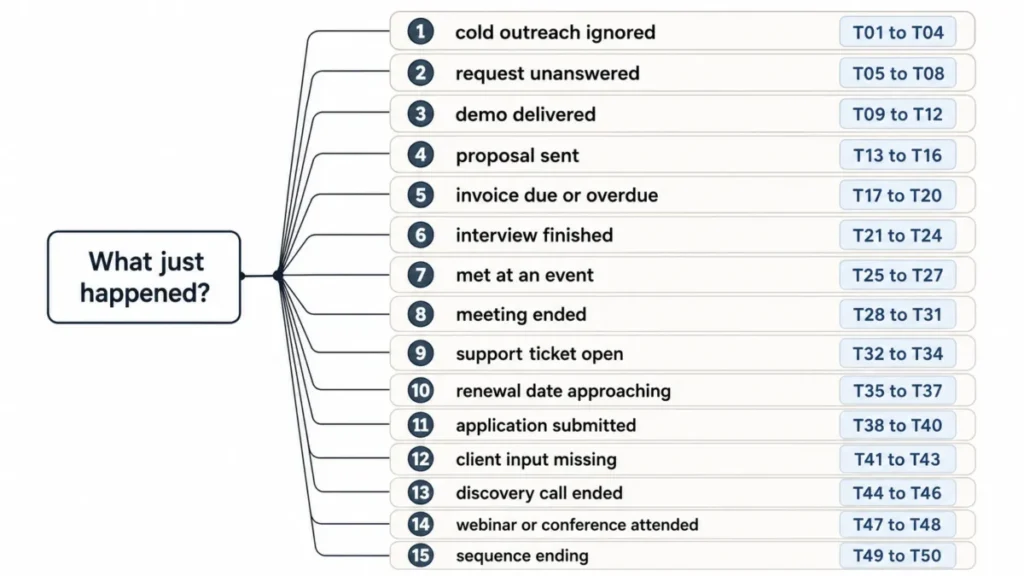
Pick your situation
| Situation | Use it when | Templates |
|---|---|---|
| Cold sales | Your first outreach got no reply | T01 to T04 |
| No response | A real request has gone quiet | T05 to T08 |
| After a demo | You showed the product and need next steps | T09 to T12 |
| After a proposal | Numbers are out and the buyer is reviewing | T13 to T16 |
| Invoice and payment | An invoice is due or overdue | T17 to T20 |
| After an interview | You interviewed and want a decision | T21 to T24 |
| Networking | You met someone and want to stay connected | T25 to T27 |
| After a meeting | Decisions were made and need a record | T28 to T31 |
| Customer support | A ticket is open, waiting, or resolved | T32 to T34 |
| Renewal | A subscription term is ending | T35 to T37 |
| Job application | You applied but have not interviewed | T38 to T40 |
| Client and project | Work is blocked on the client | T41 to T43 |
| After a sales call | You ran discovery and need a next stage | T44 to T46 |
| Event and webinar | You met or hosted someone at an event | T47 to T48 |
| Final follow-up | The sequence is ending | T49 to T50 |
When to send a follow-up email
Timing decides more than wording does. Sent early, a well-written email reads as pressure.
Sent late, the same email reads as an afterthought.
There is no single correct waiting period. Published guidance splits by situation, and the strongest rule in practice is that a real agreed date always beats a generic interval.
Grammarly’s guide to writing a follow-up email puts the first nudge on an unanswered message at three to five business days, then spaces later messages a few days apart. Use that as the default for silence, and use the table below when the situation gives you something firmer to anchor on.
| Situation | Send it | What overrides this |
|---|---|---|
| Meeting recap | Same business day, or within one business day | A different follow-up time agreed in the meeting |
| Demo recap | Same business day, or within one business day | A scheduled next call already on the calendar |
| Discovery call recap | Same business day, or within one business day | A promise to send materials sooner |
| Promised documents after a verbal pitch | As soon as they are ready | Nothing; a promise has its own deadline |
| Emailed proposal or quote | The agreed review date, otherwise a few business days | The buyer’s stated evaluation process |
| Cold outreach with no reply | About three to five business days | A genuine trigger event worth mentioning now |
| Any request with no reply | About three to five business days | A response date the recipient already gave you |
| Interview thank-you | The day of the interview, or the next morning | Nothing, speed is the point |
| Interview status request | After the stated decision date, or about two weeks | The employer’s own timeline, always |
| Job application status | Several business days after applying | Any timeline stated in the posting |
| First networking note | The same day, before the detail fades | Nothing |
| Networking nudge after silence | Several days after your first note | A specific event you both attend next |
| Invoice reminder | By payment state, not by mood | The contract terms you signed |
| Support ticket | By ticket state and your service commitments | The customer’s own stated availability |
| Annual renewal | A staged sequence starting well before the date | Procurement or approval cycles you know about |
| Month-to-month renewal | A short sequence close to the date | The customer’s stated preferences |
| Client approval | The promised response date, or the dependency | A milestone that genuinely moves |
| Final close-the-loop | After a reasonable sequence, never after one email | An explicit “not now, try me later” |
Two rules survive every situation in that table. Never follow up before a date the other person gave you, and never let a follow-up be identical in substance to the message before it.
If I had to keep one, it would be the first. Following up before a promised date costs more credibility than a late follow-up ever costs momentum.
Every other row in that table is explained again, with its own source link, in the situation section it belongs to.
Source: Grammarly follow-up guidance page. Checked: 2026-08-14.
How to use this template library
Every card below carries the same six fields, so you can move between situations without relearning the format.
Start from the use case, because the situation decides the timing and the ask before any wording matters. The required input is small: the prior interaction, its date, the one action you want, and any date the other person already gave you.
Apply the template by replacing every bracket, then customize the tone with the shorter and softer version when the relationship is new or the recipient is senior. If nothing has changed since your last message, choose the close-the-loop card instead of sending another reminder.
The example output is the filled card in the reader-facing block below, which shows what a completed subject line and body look like against real recipient context. The most common error is copying a template without editing the brackets, so read the finished email once as the recipient before you send it.
A second tool workflow matters as much as the wording: log the next follow-up date somewhere you will see it, because missed follow-ups are usually memory failures. Timing guidance in this library follows the official published guidance named in the methodology, and each card states the trigger it is measured against.
Goal. The single next action the email is trying to produce.
When to send. The timing for this exact scenario, expressed against the trigger rather than a universal interval.
Email. The complete copy-ready message, subject line included, kept short enough to read on a phone.
Copy email. The control that copies the subject line and body together.
Shorter, softer version. A lower-pressure alternative for a new relationship, a senior recipient, or a message you have already sent once.
ChatGPT prompt. A scenario-specific prompt that tells the model the task, the context it must use, the tone, the single call to action, and an explicit instruction never to invent facts.
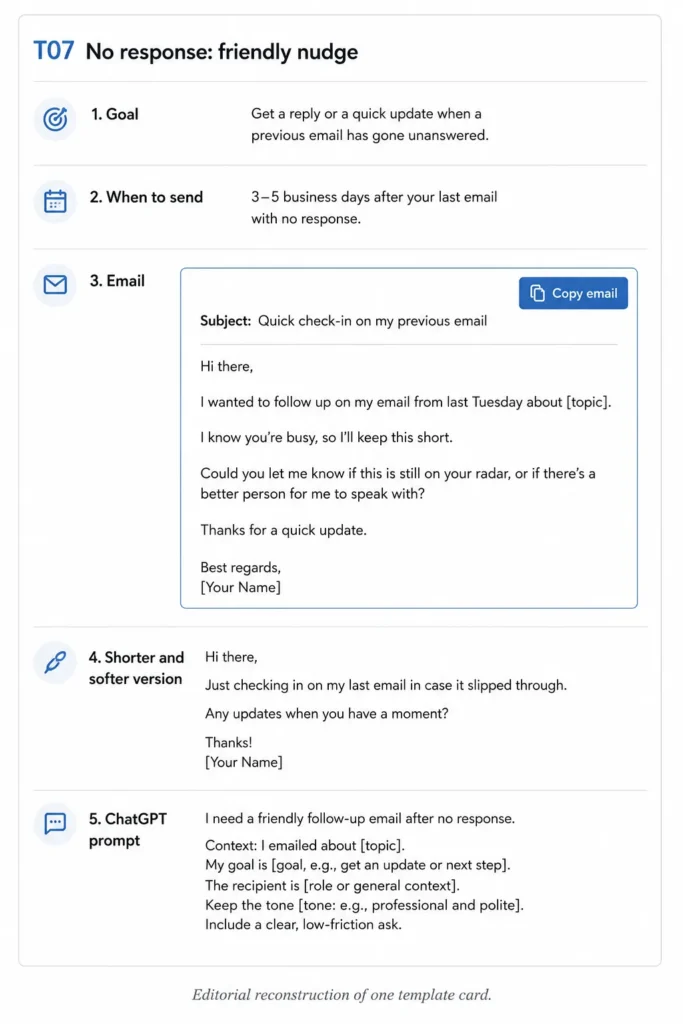
Square brackets mark the variables you replace. Replace all of them before sending, because a half-personalized email is more damaging than an openly generic one.
50 Follow-Up Email Examples by Situation
Fifteen situations, fifty templates, one format. Work down from the situation in front of you.
Cold sales follow-up emails
Your first message was an interruption the recipient did not ask for. A second interruption that only repeats the first is why cold follow-up gets ignored.
Change the reason to reply, not the adjectives. Each of the four below opens a different door: relevance, a resource, one small question, and a clean exit.
Before you copy any of these, handle the legal layer separately from the wording. The Federal Trade Commission’s CAN-SPAM compliance guide states that the law makes no exception for business-to-business email, so a business recipient is not an exemption.
That same guide requires covered commercial messages to explain how the recipient can opt out, and it requires you to honor an opt-out request within 10 business days. A polite template does not make a message compliant, and this article is not legal advice for your specific sending program.
T01. Value-led cold follow-up
Goal. Reconnect the original outreach to one problem the recipient personally owns.
When to send. About three to five business days after the first email, unless a real trigger gives you a stronger reason to write sooner.
Personalize. Their role, one specific detail about their team, and the angle of your first message.
Subject: The [specific problem] question from my last note

Hi [First name],

I wrote last week about [topic]. Rather than repeat it, here is the
part that usually matters to a [their role]:

[One sentence naming a problem they own, in their words, not yours.]

If that is on your list this quarter, I can send a two-minute
breakdown of how [three similar companies / a team your size] handled
it. If it is not, tell me and I will stop there.

Worth a look?

[Your name]
Copy email. Copies the T01 subject line and body as one block.
Shorter, softer version
Subject: [Specific problem], quickly

Hi [First name],

Following my note last week: is [specific problem] something your team
is working on this quarter? A yes or no is enough.

[Your name]
ChatGPT prompt
Rewrite this cold follow-up email using the context I paste below.
Context: recipient role, company, the angle of my first email, and one
problem I have real evidence they care about.
Rules: keep it under ninety words, restate my original angle in one clause,
name exactly one problem, and end with a single yes-or-no question.
Do not invent pain points, metrics, company facts, mutual contacts, or
results. If I have not given you a fact, leave that detail out.
Return one subject line, the email body, and two alternative subject lines.
T02. Resource-led cold follow-up
Goal. Earn a reply by sending something the recipient can use whether or not they buy.
When to send. About three to five business days after the first email, and only when you have a resource that genuinely fits their role.
Personalize. The resource, the one-line reason it fits them, and the role you are writing to.
Subject: [Resource name] for [their team or role]

Hi [First name],

You did not ask for this, so I will keep it short. I put together
[resource, for example a benchmark or a teardown] for [their role] dealing
with [situation].

The part most relevant to [their company] is [one specific section],
because [one sentence tied to something you actually know about them].

Here it is: [link]. No form, no follow-up sequence attached to it.

If it is useful and you want the longer version, say the word.

[Your name]
Copy email. Copies the T02 subject line and body as one block.
Shorter, softer version
Subject: [Resource name], no strings

Hi [First name],

Made this for [their role] working on [situation]: [link]. Section
[number or name] is the part I would read first. Nothing needed back.

[Your name]
ChatGPT prompt
Rewrite this resource-led cold follow-up from the details I paste below.
Context: the resource title, what is inside it, the recipient's role, and
one verified fact about their company or team.
Rules: explain the resource's relevance in one sentence, keep the total
under one hundred words, make the ask optional, and use a low-pressure closing.
Do not describe sections of the resource I have not described to you, and
do not invent statistics, outcomes, or the recipient's priorities.
Return one subject line, the email body, and a two-sentence version.
T03. Question-led cold follow-up
Goal. Reduce the effort of replying to one short, answerable question.
When to send. About three to five business days after the first email, or after a second unanswered attempt when you want to reset the ask.
Personalize. The single question and the responsibility it maps to.
Subject: One question about [process they own]

Hi [First name],

Skipping the pitch. One question:

[Single closed question tied to their responsibility, for example:
"Is [process] handled in-house or by an agency this quarter?"]

I ask because the answer changes whether anything I do is relevant to
you at all. If it is not, I would rather find that out now than send
you three more emails.

[Your name]
Copy email. Copies the T03 subject line and body as one block.
Shorter, softer version
Subject: Quick question, [First name]

Hi [First name],

One question and I will leave it there: [single closed question]?

Thanks either way.

[Your name]
ChatGPT prompt
Rewrite this question-led cold follow-up using the context below.
Context: the recipient's role, the process I believe they own, and the
one thing I need to know to decide whether to keep contacting them.
Rules: produce exactly one closed question, keep the email under seventy
words, remove every product claim, and make it easy to answer in three
words.
Do not assume a pain point, a tool they use, a team size, or a budget.
If my context does not state it, do not write it.
Return one subject line, the email body, and one softer variant.
T04. Permission-based cold follow-up
Goal. Give the recipient a clean way to decline, redirect, or defer.
When to send. As the last message of a short cold sequence, once earlier attempts have gone unanswered.
Personalize. The original topic and the person you would rather be talking to.
Subject: Should I close the file on this?

Hi [First name],

I have written twice about [topic] and heard nothing back, which is
usually a clear enough answer. Before I stop, one of these three would
help me:

1. "Not now, try me in [month]."
2. "Wrong person, talk to [name]."
3. "Not relevant, remove me."

Any of the three is a good outcome for me. Silence is the only one I
cannot act on.

[Your name]
Copy email. Copies the T04 subject line and body as one block.
Shorter, softer version
Subject: Closing the loop on [topic]

Hi [First name],

No reply is a fine answer, so this is my last note on [topic]. If the
timing is just wrong, tell me when to come back and I will.

[Your name]
ChatGPT prompt
Rewrite this permission-based cold follow-up from the context below.
Context: the topic of my earlier emails, how many went out, and the
alternative contact or timing options I can genuinely offer.
Rules: offer two or three explicit exit options, keep the tone neutral
and unbothered, stay under ninety words, and never imply the recipient owes
me a reply.
Do not add guilt language, false deadlines, discounts, or a claim that I
will delete their data unless I told you that is true.
Return one subject line and the email body.
No response follow-up emails
This group is for a request that was legitimate: a question you were asked to send, a document someone agreed to review, an answer you need to finish your own work.
The mistake here is repetition. A second email that repeats the first tells the reader nothing changed, so their reason to ignore it has not changed either.
Move through these four in order. Each one adds something the previous message did not have.
T05. Simple professional nudge
Goal. Put the original request back at the top of the inbox with no friction attached.
When to send. About three to five business days after the original message, unless the recipient gave you a response date.
Personalize. The original request, restated in one sentence.
Subject: Re: [original subject]

Hi [First name],

Bringing this back up in case it slipped: I asked about [one-sentence
restatement of the request] on [day you sent it].

No rush if it is in a queue. A one-line "got it, next week" is all I
need to stop wondering.

Thanks,
[Your name]
Copy email. Copies the T05 subject line and body as one block.
Shorter, softer version
Subject: Re: [original subject]

Hi [First name],

Just floating this back up. Still need [the one thing], whenever it suits.

Thanks,
[Your name]
ChatGPT prompt
Rewrite this no-response nudge using the details below.
Context: my original request, the date it went out, and the relationship
(peer, client, vendor, senior stakeholder).
Rules: restate the request in one sentence, keep a neutral tone, stay
under seventy words, and offer an acknowledgment as an acceptable reply.
Do not imply the recipient ignored me, do not invent a deadline, and do
not add a second request.
Return one subject line, the email body, and one warmer variant.
T06. Deadline-aware follow-up
Goal. Convert a real, external deadline into a reason to reply now.
When to send. Far enough before the deadline that the recipient can still act on it, which usually means several working days, not the morning of.
Personalize. The real date, what it blocks, and who it affects.
Subject: [Deliverable] needs your input before [real date]

Hi [First name],

Quick timing note. [Deliverable] goes to [audience] on [real date], and
your [decision, approval, or answer] is the last open item.

If I have it by [working date], we hold the schedule. If not, the
realistic outcome is [specific, true consequence: the review slips a
week, the build starts without section three].

Which of those works better on your side?

[Your name]
Copy email. Copies the T06 subject line and body as one block.
Shorter, softer version
Subject: Timing check on [deliverable]

Hi [First name],

[Deliverable] is due [real date] and yours is the last piece. Is
[working date] realistic, or should I adjust the schedule?

[Your name]
ChatGPT prompt
Rewrite this deadline follow-up using only the facts below.
Context: the real deadline, what the deadline is for, what is blocked,
and the true consequence of missing it.
Rules: state the deadline once, state the consequence in plain terms,
keep it under ninety words, and end with one question about feasibility.
Do not invent, tighten, or dramatize the deadline. Do not add penalties,
escalation, or urgency language that I did not supply.
Return one subject line and the email body.
T07. Value-add follow-up after silence
Goal. Give the reader something new so replying is worth their minute.
When to send. Several business days after your previous nudge, and only once you hold something new.
Personalize. The new fact, document, or answer that did not exist last time.
Subject: Update on [topic]: [the new thing]

Hi [First name],

Since I last wrote, [the new development: the pricing sheet you asked
about is finished, the legal review closed, the numbers came back].

That changes one thing for you: [the specific implication for their
decision, in one sentence].

I have attached it. Does it answer the open question, or is there
something else you need before you can move?

[Your name]
Copy email. Copies the T07 subject line and body as one block.
Shorter, softer version
Subject: One update on [topic]

Hi [First name],

[The new thing] is ready and attached. It covers [the open question].
Anything else you need from me?

[Your name]
ChatGPT prompt
Rewrite this value-add follow-up using only what I paste below.
Context: what has changed since my last email, the document or fact I am
attaching, and the open question it addresses.
Rules: lead with the new development, state its implication for the
recipient in one sentence, keep it under ninety words, and close with one
open question.
Do not invent the update, the document contents, or any effect on the
recipient's decision. If the update is thin, say it plainly.
Return one subject line and the email body.
T08. Second follow-up after no response
Goal. Make a near-final attempt that stays warm and gives the reader an easy exit.
When to send. Several business days after your previous message, and only if the original request still matters.
Personalize. The count of previous attempts and the single decision you need.
Subject: Still open: [the one thing]

Hi [First name],

I know this is not the only thing in your inbox, so I will make it a
one-word reply.

[Original request, in a single sentence.] Is that still something you
want to do?

Yes, no, or later all work. I will take my cue from whichever one you
send.

Thanks,
[Your name]
Copy email. Copies the T08 subject line and body as one block.
Shorter, softer version
Subject: Yes, no, or later?

Hi [First name],

On [the one thing]: yes, no, or later? Whichever you pick, I will act
on it and stop chasing.

[Your name]
ChatGPT prompt
Rewrite this second no-response follow-up from the context below.
Context: the original request, how many times I have written, and how
long the thread has been quiet.
Rules: acknowledge the recipient is busy without apologizing twice, give
a yes-no-later choice, keep it under eighty words, and remove all urgency.
Do not use guilt phrasing such as "I assume this is not a priority", do
not invent consequences, and do not add a new request.
Return one subject line, the email body, and one two-line variant.
Follow-up emails after a demo
A demo follow-up has one job that a discovery follow-up does not: connect what the buyer saw on screen to the problem they described before the call.
Send the recap the same business day, or within one business day at the outside, unless the demo ended with a different agreement. Waiting three days means the buyer reconstructs the session from memory, and memory favors whoever emailed first.
Keep the recap to what was said in the room. An invented priority is the fastest way to lose a champion who has to forward your email internally.
T09. Post-demo recap
Goal. Confirm what the buyer said mattered and lock the agreed next step.
When to send. Same business day, or within one business day.
Personalize. Two priorities the buyer named out loud and the exact next step you agreed on.
Subject: Recap and next step from today's walkthrough

Hi [First name],

Thanks for the time today. Three things I took away:

1. [Priority the buyer stated, in their words.]
2. [Second priority or constraint they stated.]
3. [The next step you agreed on, with the date.]

If I got any of those wrong, correct me and I will resend the summary
to the group.

Otherwise I will send [the agreed item] by [agreed date].

[Your name]
Copy email. Copies the T09 subject line and body as one block.
Shorter, softer version
Subject: Today's walkthrough, in three lines

Hi [First name],

Takeaways: [priority one] and [priority two]. Next step is [agreed step]
by [agreed date]. Correct me if that is off.

[Your name]
ChatGPT prompt
Turn my demo notes below into a recap email.
Context: what the buyer said mattered, any constraint they raised, and
the next step we agreed on with its date.
Rules: use only priorities that appear in my notes, use a numbered list
of no more than three items, keep it under one hundred and ten words, and end with the
agreed next step.
Do not add product capabilities, benefits, outcomes, timelines, or
attendee names that are not in my notes. Flag anything I left blank
instead of guessing it.
Return one subject line and the email body.
T10. Demo value recap
Goal. Tie two demonstrated capabilities to the buyer’s stated use case so the email survives an internal forward.
When to send. Same business day, or within one business day, when the buyer needs to justify the evaluation to someone else.
Personalize. The two features shown, the workflow each one changes, and the team affected.
Subject: [Feature] and [feature] against your [use case]

Hi [First name],

You described [use case] as the thing that takes [their stated effort or
number of steps]. Here is how the two parts we looked at map to it:

[Feature one] handles [the step it removes or changes].
[Feature two] handles [the second step].

What that does not solve is [an honest gap you know about], and I would
rather you hear that from me than find it in week three.

Does this match how your team would actually run it?

[Your name]
Copy email. Copies the T10 subject line and body as one block.
Shorter, softer version
Subject: How today maps to [use case]

Hi [First name],

Short version: [feature one] covers [step], [feature two] covers [step].
[Honest gap] is still manual. Does that match your read?

[Your name]
ChatGPT prompt
Write a demo value recap from the notes below.
Context: the buyer's stated use case, the two capabilities I showed, the
workflow step each one affects, and one honest gap I know about.
Rules: make exactly two connections between capability and workflow, name
the gap in one sentence, keep it under one hundred and twenty words, and close with one
question about fit.
Do not invent capabilities, savings, percentages, timelines, or customer
outcomes. Do not soften the gap.
Return one subject line and the email body.
T11. Demo follow-up for other stakeholders
Goal. Give your contact something forwardable so they do not have to rewrite your pitch for their colleagues.
When to send. Within one business day of the demo, once you know who else has to weigh in.
Personalize. The named stakeholders and the question each one will ask.
Subject: Summary you can forward to [names or roles]

Hi [First name],

You mentioned [name or role] and [name or role] need to weigh in. This
version is written for them rather than for you, so forward it as is if
that helps.

What it is: [one sentence, no jargon].
Why it came up: [the problem your contact described].
What it changes: [the specific workflow or step].
What it does not do: [the honest boundary].
Open question for [role]: [the question that person will care about].

Happy to join a short call with them if that is simpler than a thread.

[Your name]
Copy email. Copies the T11 subject line and body as one block.
Shorter, softer version
Subject: Forwardable summary

Hi [First name],

Here is a version you can forward to [names]: [one sentence on what it
is], [one sentence on the problem it addresses], [one sentence on the
boundary]. Tell me if you would rather I write to them directly.

[Your name]
ChatGPT prompt
Rewrite this stakeholder summary from the details below.
Context: my contact's name, the other stakeholders and their roles, the
problem my contact described, and the honest boundary of what we do.
Rules: write it so it can be forwarded without editing, use short labeled
lines, keep it under one hundred and thirty words, and include one question aimed at the
named stakeholder's role.
Do not invent stakeholder concerns, titles, budget authority, internal
processes, or approval steps I have not described.
Return one subject line and the email body.
T12. Stalled demo follow-up
Goal. Restart a conversation that went quiet after the demo without repeating the demo.
When to send. Several business days after the recap went unanswered, and only with a new reason to write.
Personalize. The reason the conversation stalled, if you know it, and one genuinely new input.
Subject: [Their use case], parked or dropped?

Hi [First name],

We looked at [use case] on [month], then things went quiet, which
usually means priorities moved rather than anything I did.

Two things changed on my side since then: [genuinely new item] and
[second new item, if real].

Is [use case] parked until [quarter or event], or off the list? Either
answer is useful, and "off the list" means I stop emailing.

[Your name]
Copy email. Copies the T12 subject line and body as one block.
Shorter, softer version
Subject: Parked or dropped?

Hi [First name],

Is [use case] parked for now or off the list? No wrong answer, I just do
not want to keep guessing.

[Your name]
ChatGPT prompt
Rewrite this stalled-deal follow-up using the context below.
Context: what we discussed, roughly when, and any genuinely new
development on my side since then.
Rules: assume the buyer got busy rather than lost interest, mention at
most two new developments, keep it under one hundred words, and offer "parked" and
"dropped" as equally acceptable answers.
Do not invent a new release, a case study, a deadline, a discount, or a
reason for their silence.
Return one subject line and the email body.
Follow-up emails after a proposal or quote
Proposal timing looks contradictory across published guidance until you separate two different states.
If you promised to send something after a verbal pitch, that promise has its own clock and you send it as soon as it is ready. If a written proposal is already in their inbox, the buyer needs reading time, so a few business days or the agreed review date is the sensible trigger.
The four templates below map to the four states a proposal occupies: delivered, under review, at the decision date, and stuck behind an approval.
T13. Proposal delivery and next-step email
Goal. Confirm the proposal arrived and restate the evaluation process both sides agreed on.
When to send. Immediately after sending the proposal, or the same day you promised it after a call.
Personalize. The scope, the sections that answer their known questions, and the agreed review date.
Subject: [Company] proposal, and what happens next

Hi [First name],

The proposal is attached. It covers [scope in one clause] and answers
the two questions you raised: [question one] on page [number] and
[question two] on page [number].

What I have written down for next steps:

You review with [names or team] by [agreed date].
We speak on [agreed date] to work through anything unclear.

If that process changed on your side, tell me and I will follow yours.

[Your name]
Copy email. Copies the T13 subject line and body as one block.
Shorter, softer version
Subject: Proposal attached

Hi [First name],

Proposal attached. Pages [number] and [number] answer the two questions
you raised. Still good for [agreed date]?

[Your name]
ChatGPT prompt
Write a proposal delivery email from the details below.
Context: the scope of the proposal, the questions the buyer raised and
where each is answered, and the review process we agreed on with dates.
Rules: confirm delivery in the first line, reference only questions I
listed, restate the agreed process as short lines, and keep it under one hundred and ten
words.
Do not invent page numbers, scope items, participants, review dates, or
approval steps. Leave a blank marker where I have not given you a value.
Return one subject line and the email body.
T14. Proposal questions follow-up
Goal. Open a door for questions after the buyer has had genuine reading time.
When to send. A few business days after the proposal went out, or on the review date if one was agreed.
Personalize. The one part of the proposal most likely to raise an internal question.
Subject: Anything unclear in the proposal?

Hi [First name],

You have had the proposal since [day]. No pressure on a decision, but
questions usually surface around [the section that raises them: scope
boundaries, the delivery schedule, what happens after go-live].

If anything in there is unclear or needs reworking before you take it
further, I would rather fix it now than have it read as a no.

Anything you want changed?

[Your name]
Copy email. Copies the T14 subject line and body as one block.
Shorter, softer version
Subject: Questions on the proposal?

Hi [First name],

Any questions on the proposal so far? Happy to rework anything that does
not fit before you take it further.

[Your name]
ChatGPT prompt
Rewrite this proposal questions email from the context below.
Context: the date the proposal was sent, the section most likely to raise
questions, and how much room I genuinely have to change the terms.
Rules: invite questions rather than a decision, name one likely area of
concern, keep it under ninety words, and end with one open question.
Do not create urgency, expiry dates, discounts, or the impression that a
decision is overdue. Do not promise flexibility I did not describe.
Return one subject line and the email body.
T15. Decision-date follow-up
Goal. Check progress against a date the buyer set, and surface whatever is still unresolved.
When to send. On the agreed decision date, or the first working day after it.
Personalize. The agreed date, the decision makers, and the last known open item.
Subject: [Agreed date] check-in on the [project] decision

Hi [First name],

You mentioned [agreed date] as the point where [company] would decide on
[project], so I am checking in rather than guessing.

Where is it sitting? If it is a yes, I will send [the practical next
step]. If something is still open, tell me which part and I will get you
what you need for it.

If the date moved, that is fine too. I would just like to plan against
the real one.

[Your name]
Copy email. Copies the T15 subject line and body as one block.
Shorter, softer version
Subject: Where did [project] land?

Hi [First name],

You had [agreed date] for the [project] decision. Where did it land, and
is anything still open on my side?

[Your name]
ChatGPT prompt
Write a decision-date follow-up from the facts below.
Context: the decision date the buyer gave me, the project, the decision
makers, and the last open item I know about.
Rules: reference only the date the buyer stated, ask what remains
unresolved, offer to supply the missing input, and stay under one hundred words.
Do not invent a decision date, add pressure, imply the buyer is late, or
assume an outcome.
Return one subject line and the email body.
T16. Proposal stuck in approval
Goal. Surface the real blocker and offer the documentation that unblocks it.
When to send. When the buyer has told you the proposal sits with legal, finance, or an executive approver and the thread has gone quiet.
Personalize. The named approving function and the document that function usually asks for.
Subject: Anything [legal / finance / your approver] still needs?

Hi [First name],

Last I heard, [project] was with [the approving function]. Those reviews
have their own queue, so this is not a nudge on you.

Most of the time they come back asking for the same three things:
[document one], [document two], and [document three]. I can send any of
those today if it saves a round trip.

Is there a specific question they raised that I can answer directly?

[Your name]
Copy email. Copies the T16 subject line and body as one block.
Shorter, softer version
Subject: Paperwork for [approver]?

Hi [First name],

If [approver] needs [document] or anything similar, say the word and I
will send it today.

[Your name]
ChatGPT prompt
Rewrite this approval-stage follow-up from the context below.
Context: the approving function the buyer named, the documents I can
genuinely provide, and any question that function already raised.
Rules: put the delay on the process rather than the person, offer only
documents I listed, keep it under one hundred words, and end with one question.
Do not invent an approver, a policy, a compliance requirement, a document
I cannot produce, or a timeline for their internal review.
Return one subject line and the email body.
Invoice and payment follow-up emails
Payment follow-up is the one situation where the wording matters less than the facts. A reminder that leaves out the invoice number, the issue date, the due date, the terms, or the payment instructions creates another round trip and delays you further.
QuickBooks’ past-due invoice guidance lists the details a reminder should carry, including the invoice number, the date the invoice was issued, the due date, the payment terms, the amount owed, and payment instructions. It also stages overdue communication rather than jumping straight to a threat.
| Stage | Tone | What changes in the email |
|---|---|---|
| The due date | Neutral and administrative | A courtesy reminder with the payment details attached |
| Fifteen days overdue | Direct but friendly | Ask for a payment status and a date |
| Thirty days overdue | Firm and specific | Ask for a committed payment date and name the account owner |
| Sixty days overdue | Formal and final-stage | Request immediate resolution and reference only real contract terms |
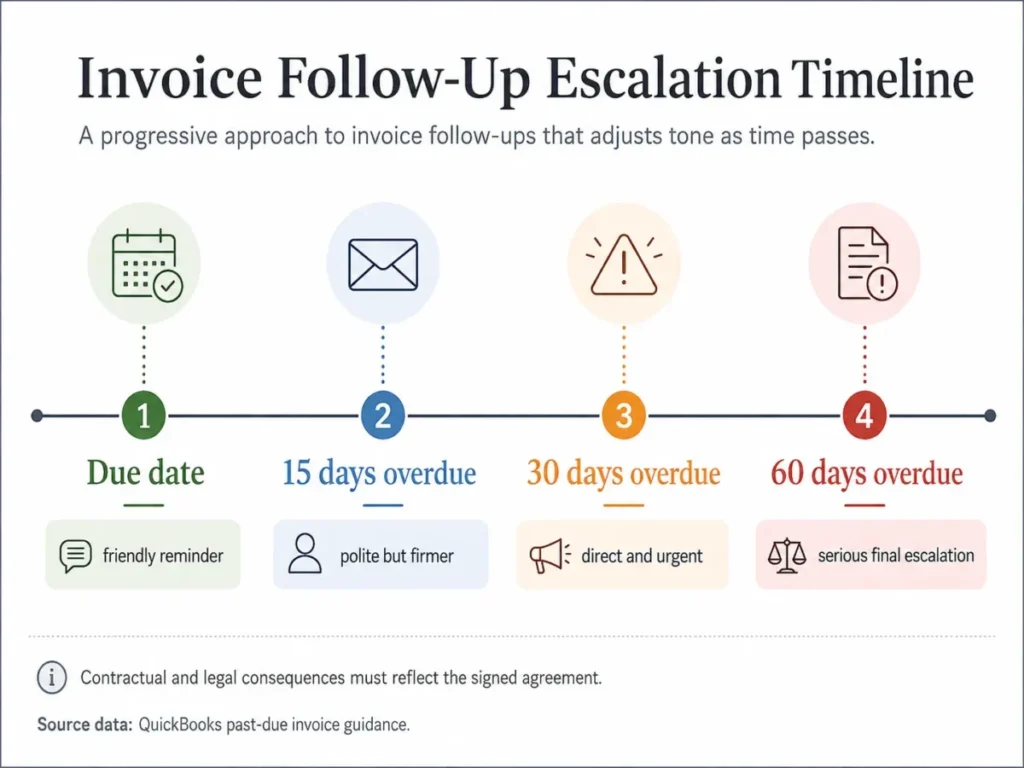
One rule governs all four templates. Never write a late fee, a service suspension, an interest charge, or a collections step into an email unless your signed agreement and your local rules genuinely support it.
I would treat an invented penalty as the most expensive sentence in this entire library. It converts a collection problem into a dispute, and disputes take months.
T17. Payment due-date reminder
Goal. Make paying on time the path of least resistance.
When to send. On the payment due date, before the invoice is late.
Personalize. Invoice number, issue date, due date, amount, terms, and payment instructions.
Subject: Invoice [number] is due today

Hi [First name],

A quick administrative note: invoice [number] for [amount], issued
[issue date] on [payment terms] terms, is due today.

Payment details: [bank details, portal link, or payment method].

If it is already scheduled, ignore this. If anything on the invoice
needs correcting before you can process it, tell me and I will reissue
it today.

Thanks,
[Your name]
[Phone number and contact details]
Copy email. Copies the T17 subject line and body as one block.
Shorter, softer version
Subject: Invoice [number] due today

Hi [First name],

Invoice [number] for [amount] is due today. Details are here: [payment
link]. Let me know if anything needs correcting.

Thanks,
[Your name]
ChatGPT prompt
Write a due-date payment reminder using only the invoice facts below.
Context: invoice number, issue date, due date, amount, payment terms,
payment instructions, and my contact details.
Rules: keep the tone administrative, put every invoice fact in the email,
offer to correct errors, and stay under one hundred words.
Do not add late fees, interest, penalties, suspension warnings, or any
consequence. Do not restate an amount or date I have not given you.
Return one subject line and the email body.
T18. Fifteen days overdue
Goal. Get a payment status and a date without damaging the relationship.
When to send. About two weeks after the due date, once an internal check confirms no payment arrived.
Personalize. The invoice facts, the days overdue, and the person who handles payables.
Subject: Invoice [number]: payment status?

Hi [First name],

Invoice [number] for [amount] was due on [due date] and has not come
through on our side yet.

That is often a routing issue rather than anything deliberate, so before
I chase it further: has it been approved for payment, and do you have a
date?

Payment details again for convenience: [payment instructions]. If it
needs to go to someone else in accounts payable, send me their name and
I will take it off your desk.

Thanks,
[Your name]
Copy email. Copies the T18 subject line and body as one block.
Shorter, softer version
Subject: Quick status on invoice [number]

Hi [First name],

Invoice [number] was due [due date]. Has it been approved for payment
yet, and who should I follow up with?

Thanks,
[Your name]
ChatGPT prompt
Write a two-weeks-overdue payment follow-up from the facts below.
Context: invoice number, amount, due date, days overdue, payment
instructions, and the recipient's role.
Rules: state the overdue status as a fact rather than an accusation, ask
for approval status and a payment date, offer to redirect to accounts
payable, and stay under one hundred and ten words.
Do not add a late fee, a threat, an interest charge, a suspension, or a
legal reference of any kind.
Return one subject line and the email body.
T19. Thirty days overdue
Goal. Get a committed payment date from someone with authority to give one.
When to send. About a month after the due date, after at least one earlier reminder.
Personalize. The invoice facts, the earlier reminder dates, and any terms your signed agreement genuinely contains.
Subject: Invoice [number], one month overdue

Hi [First name],

Invoice [number] for [amount] is now a month past its [due date] due
date. Reminders went out on [date one] and [date two].

I need a committed payment date rather than a status this time. If
there is a dispute or a problem with the invoice, tell me what it is and
I will deal with it directly.

If payment cannot happen this month, say so and propose a schedule. I
would rather work to a real date than keep sending reminders.

Thanks,
[Your name]
Copy email. Copies the T19 subject line and body as one block.
Shorter, softer version
Subject: Payment date for invoice [number]

Hi [First name],

Invoice [number] is a month overdue. Can you give me a committed payment
date, or tell me what is blocking it?

Thanks,
[Your name]
ChatGPT prompt
Write a one-month-overdue payment follow-up from the facts below.
Context: invoice number, amount, due date, the dates of my earlier
reminders, and any payment terms my signed contract genuinely contains.
Rules: ask for a committed payment date, invite a dispute if one exists,
offer a payment schedule as an option, and stay under one hundred and twenty words. Use a
firm, professional tone with no sarcasm.
Do not invent contract terms, late fees, interest, suspension rights,
credit consequences, or collection steps. If I did not supply a term, it
does not exist.
Return one subject line and the email body.
T20. Sixty days overdue
Goal. Make a formal, final-stage request that stays factual and defensible.
When to send. About two months after the due date, once earlier reminders have gone unanswered.
Personalize. The full reminder history and only the contract terms you can point to in writing.
Subject: Formal notice: invoice [number], two months overdue

Hi [First name],

Invoice [number] for [amount], issued [issue date] and due [due date],
remains unpaid two months after the due date. Reminders were sent on
[date], [date], and [date].

I am asking for one of two things by [reasonable date]:

1. Payment in full, using the details below.
2. A written explanation of what is preventing payment, with a proposed
   date.

Payment details: [payment instructions]. If there is an error on our
side, I will correct it the day you tell me.

[Your name]
[Role, company, phone number]
Copy email. Copies the T20 subject line and body as one block.
Shorter, softer version
Subject: Invoice [number]: payment or an explanation by [date needed]

Hi [First name],

Invoice [number] is two months overdue. I need either payment or a
written explanation with a proposed date by [date needed].

[Your name]
ChatGPT prompt
Write a formal two-months-overdue payment email from the facts below.
Context: every invoice detail, the full list of reminder dates, my
contact details, and the exact wording of any contract term I can cite.
Rules: stay factual and unemotional, request either payment or a written
explanation by a specific date, and keep it under one hundred and thirty words.
Do not reference legal action, collections agencies, interest, late fees,
service suspension, or credit reporting unless I pasted that clause to
you. Never imply a consequence I did not supply.
Return one subject line and the email body.
Follow-up emails after an interview
Two different emails get confused here, and sending the second one too early costs candidates offers.
The thank-you note is a courtesy that reinforces interest, and Indeed’s guidance on post-interview follow-up emails puts it within 24 hours of the interview. The status request is a different message with a different clock, and the same guidance points to sending it once about two weeks have passed with no word back.
Whenever the employer gave you a decision date, that date wins over any general interval. Following up before it signals that you do not listen well, which is the opposite of what you are trying to prove.
A deeper set of interview-stage variants sits in the companion guide to follow-up emails after an interview.
T21. Short interview thank-you
Goal. Thank the interviewer and reinforce interest without adding reading work.
When to send. Within a day of the interview, ideally the same evening.
Personalize. One real moment from the conversation and one strength that matches the role.
Subject: Thank you, [First name]

Hi [First name],

Thank you for the time today. The part about [specific thing they
described: the reporting rebuild, the team's move to a new region] was
the most useful thing I learned about the role.

It also lined up with [one relevant strength or experience of yours], so
I left more interested than I went in.

Happy to answer anything else that comes up.

Best,
[Your name]
Copy email. Copies the T21 subject line and body as one block.
Shorter, softer version
Subject: Thanks for today

Hi [First name],

Thanks for the conversation today. [One specific thing discussed] was
the part that stayed with me, and I am still very interested.

Best,
[Your name]
ChatGPT prompt
Write a short post-interview thank-you email from the notes below.
Context: the interviewer's name, one specific topic we discussed, and one
of my strengths that genuinely matches it.
Rules: keep it under ninety words, reference exactly one conversation detail,
connect it to one strength, and close warmly without asking for anything.
Do not invent conversation details, company facts, compliments, or claims
about my experience that I did not give you.
Return one subject line and the email body.
T22. Detailed interview follow-up
Goal. Reinforce fit after a substantive interview where a real concern or requirement came up.
When to send. Within a day of the interview, when the conversation raised something worth answering properly.
Personalize. The requirement they emphasized and the evidence you have for it.
Subject: Following up on [topic] from our conversation

Hi [First name],

Thanks again for today. You spent a good part of the conversation on
[requirement or challenge], so I want to be concrete about it.

At [previous company], I [specific relevant action] which resulted in
[specific outcome you can defend in a reference check].

The part I would want to understand better before starting is [an honest
open question about the role]. If that is worth a short follow-up
conversation, I am glad to have one.

Best,
[Your name]
Copy email. Copies the T22 subject line and body as one block.
Shorter, softer version
Subject: One follow-up thought on [topic]

Hi [First name],

On [requirement] from today: at [previous company] I [specific action]
and [specific outcome]. Happy to go deeper if useful.

Best,
[Your name]
ChatGPT prompt
Write a substantive post-interview follow-up from the notes below.
Context: the requirement the interviewer emphasized, my relevant
experience with a defensible outcome, and one honest question I still
have about the role.
Rules: reference one requirement, give one specific piece of evidence,
include one genuine question, and stay under one hundred and thirty words.
Do not inflate my results, invent metrics or titles, or manufacture
enthusiasm. Use only the outcomes I gave you.
Return one subject line and the email body.
T23. Interview status follow-up
Goal. Ask politely for a decision update once the employer’s own window has passed.
When to send. After the decision date they gave you, or about two weeks after the interview when no date was given.
Personalize. The interview date, the role title, and the timeline they stated.
Subject: [Role title] role: any update?

Hi [First name],

Following up on the [role title] interview on [interview date]. You
mentioned decisions would be made around [stated timeline], so I wanted
to check in rather than assume.

I am still interested, and I am happy to supply anything else that would
help, whether that is references, a work sample, or another
conversation.

If the timeline has moved, that is completely fine. A rough update helps
me plan on my side.

Best,
[Your name]
Copy email. Copies the T23 subject line and body as one block.
Shorter, softer version
Subject: Checking in on the [role title] role

Hi [First name],

Just checking in on the [role title] role after our conversation on
[interview date]. Any update, even a rough one, would be appreciated.

Best,
[Your name]
ChatGPT prompt
Write a hiring-status follow-up from the details below.
Context: the role title, the interview date, and the decision timeline
the employer stated, if any.
Rules: reference the employer's own timeline, keep the tone patient, offer
additional materials, accept a moved timeline gracefully, and stay under
one hundred and ten words.
Do not imply an offer is expected, do not add a deadline of my own, and do
not invent a timeline the employer never gave.
Return one subject line and the email body.
T24. Staying in touch after a rejection
Goal. Keep a professional relationship alive without arguing with the decision.
When to send. Within a day or two of hearing the outcome.
Personalize. The role, one thing you valued about the process, and the area you would want to be considered for next.
Subject: Thank you, and staying in touch

Hi [First name],

Thanks for letting me know, and for running a straightforward process.
That is rarer than it should be.

I enjoyed the conversation about [specific topic], and [company] stayed
interesting to me throughout. If something opens up in [area], I would
welcome the note.

Good luck with the [role title] hire.

Best,
[Your name]
Copy email. Copies the T24 subject line and body as one block.
Shorter, softer version
Subject: Thanks, and good luck

Hi [First name],

Thanks for the update and for a clear process. If something opens up in
[area] later, I would be glad to hear from you.

Best,
[Your name]
ChatGPT prompt
Write a gracious post-rejection email from the details below.
Context: the role, one specific thing I valued about the process or
conversation, and the area I would like to be considered for in future.
Rules: thank them, reference one genuine detail, express future interest
once, and stay under ninety words.
Do not ask them to reconsider, do not request detailed feedback unless I
tell you to, and do not add disappointment or criticism.
Return one subject line and the email body.
Networking follow-up emails
Two stages get merged here, and merging them is why networking follow-up feels awkward.
The first note after meeting someone belongs to the same day or the next morning, before the detail of your conversation goes fuzzy for both of you. A nudge after that first note goes unanswered is a separate message that can wait several days and needs a fresh reason to exist.
T25. After meeting at an event
Goal. Turn a hallway conversation into a connection that survives the week.
When to send. The same day, or the next morning, before the detail of the conversation fades.
Personalize. The exact event, the specific thing you talked about, and one thing you can offer.
Subject: [Specific topic] from [event name]

Hi [First name],

Good to meet you at [event name] yesterday. Your point about [specific
thing they said] has stuck with me, particularly [the part you found
useful].

You mentioned [thing they were working on or looking for]. I know
[person, resource, or approach] that fits it, and I am glad to make the
introduction or send it over.

Either way, good to have met.

[Your name]
Copy email. Copies the T25 subject line and body as one block.
Shorter, softer version
Subject: Good to meet you at [event name]

Hi [First name],

Enjoyed the conversation about [specific topic] at [event name]. If
[thing they mentioned] is still on your list, I am happy to help.

[Your name]
ChatGPT prompt
Write a post-event networking email from the notes below.
Context: the event name, the specific topic we discussed, something the
person said, and one genuine thing I can offer them.
Rules: reference the event and one real detail from the conversation,
offer help without a sales angle, and keep it under one hundred words.
Do not invent conversation content, shared contacts, compliments, or
interests. Do not turn this into a pitch.
Return one subject line and the email body.
T26. After a warm introduction
Goal. Thank the connector and move the introduced conversation forward in one step.
When to send. Within a day of the introduction, before the thread goes cold.
Personalize. The connector’s name, why they made the introduction, and a concrete first step.
Subject: Thanks [connector name], and hello [new contact]

Hi [New contact name],

[Connector] suggested we talk because [the reason they gave]. Moving
[connector] to bcc so their inbox stays clean.

Short version on my side: [one sentence on who you are and what you
want]. [Connector] thought it was relevant to [the thing you are working
on].

Would a short call in the next couple of weeks be useful, or would you
rather I send the detail by email first?

[Your name]
Copy email. Copies the T26 subject line and body as one block.
Shorter, softer version
Subject: Introduced by [connector name]

Hi [New contact name],

[Connector] connected us about [reason]. Happy to send detail by email or
find a short call, whichever suits you.

[Your name]
ChatGPT prompt
Write a follow-up to a warm introduction from the details below.
Context: the connector's name, the reason for the introduction, who I am
in one sentence, and the next step I want.
Rules: thank the connector, move them to bcc, explain the reason for the
introduction in one line, and offer two low-effort next steps.
Do not invent the connector's words, the recipient's interests, or any
shared history. Do not assume the recipient has agreed to anything.
Return one subject line and the email body.
T27. Networking nudge with something useful
Goal. Reopen a connection that went quiet by giving before asking.
When to send. Several days or more after your first note went unanswered, once you have something genuinely relevant.
Personalize. The resource and the reason it connects to what they told you.
Subject: This reminded me of your [project or problem]

Hi [First name],

You mentioned [their project or problem] when we spoke at [event or
context]. This came across my desk and it is close enough to be worth
sending: [link or short description].

No agenda attached. If it is useful and you want to talk it through, I
am around.

[Your name]
Copy email. Copies the T27 subject line and body as one block.
Shorter, softer version
Subject: Thought of your [project]

Hi [First name],

Saw this and thought of what you said about [project]: [link]. Nothing
needed back.

[Your name]
ChatGPT prompt
Write a networking reconnection email from the details below.
Context: where we met, what the person said they were working on, and the
resource I want to send with a one-line reason it fits.
Rules: lead with their project rather than my update, explain relevance
in one sentence, make the ask optional, and stay under eighty words.
Do not claim knowledge of their current priorities, invent a shared
interest, or attach a meeting request they did not invite.
Return one subject line and the email body.
Follow-up emails after a meeting
A meeting recap is an accountability record first and a courtesy second. Written well, it becomes the thing people reference three weeks later when nobody remembers who agreed to what.
Send it the same business day, or within one business day. The value decays fast, because a recap that arrives after people have already acted on their own version of the meeting fixes nothing.
Note the difference from the no-response group. A recap is a fresh output from a shared conversation, so it never uses nudge language.
T28. Meeting recap and next steps
Goal. Create a short record of what was decided and what happens next.
When to send. Before the end of the meeting day, or first thing the next morning.
Personalize. The decisions, the next step, and the one open question.
Subject: [Meeting topic]: decisions and next steps

Hi [First name],

Summary of today so we have one version on record.

Decided:
[Decision one.]
[Decision two.]

Next:
[Next step], owned by [name], by [date].

Still open: [the question nobody answered].

If anything here does not match your notes, reply and I will correct the
record.

[Your name]
Copy email. Copies the T28 subject line and body as one block.
Shorter, softer version
Subject: Today's decisions

Hi [First name],

Two decisions: [decision one] and [decision two]. Next step is [step] by
[date]. Open question: [question]. Correct me if that is off.

[Your name]
ChatGPT prompt
Turn the meeting notes below into a recap email.
Context: my raw notes, including decisions, next steps, owners, dates, and
anything left unresolved.
Rules: separate decisions from next steps, keep it scannable, name the
open question explicitly, and end with an invitation to correct the
record.
Do not invent decisions, owners, dates, or agreements. If an owner or date
is missing from my notes, write "owner not assigned" instead of guessing.
Return one subject line and the email body.
T29. Action items with owners and dates
Goal. Turn a discussion into assigned work that people can be held to.
When to send. Same business day, when the meeting produced more than two commitments.
Personalize. Every owner, every date, and every gap where ownership was never agreed.
Subject: Action items from [meeting name]

Hi all,

Action items from [meeting name] on [date]:

1. [Action] to [owner] by [date].
2. [Action] to [owner] by [date].
3. [Action] to [owner] by [date].

Two items had no owner agreed in the room: [item] and [item]. If you
want one of them, say so on this thread and I will update the list.

I will check in on the open items on [date].

[Your name]
Copy email. Copies the T29 subject line and body as one block.
Shorter, softer version
Subject: Actions from [meeting name]

Hi all,

[Action] to [owner] by [date]. [Action] to [owner] by [date]. Unassigned:
[item]. Shout if you want it.

[Your name]
ChatGPT prompt
Turn my meeting notes below into an action-item email.
Context: my notes, including any owners and dates that were stated.
Rules: use a numbered list of actions in the format "action to owner by
date", list unassigned items in a separate short paragraph, and keep it
under one hundred and thirty words.
Do not assign an owner or a date that my notes do not contain. Where one
is missing, write "owner not assigned" or "date to confirm" and flag it.
Return one subject line and the email body.
T30. Client meeting follow-up
Goal. Confirm scope and responsibilities with a client so nothing drifts.
When to send. The same working day, with both sides still holding the same picture of the meeting.
Personalize. What was confirmed, what is still open, and what you need from them.
Subject: Confirming what we agreed today

Hi [First name],

Thanks for the time today. Writing it down so we are working from the
same page.

Confirmed: [scope item], [scope item], and the delivery date of [date].

Still open: [item that needs their decision], and [item that needs
information from their side].

From me: [what you will send and when]. From you: [what you need and by
when].

Anything I have misread here, tell me now rather than later.

[Your name]
Copy email. Copies the T30 subject line and body as one block.
Shorter, softer version
Subject: Today, in short

Hi [First name],

Confirmed: [scope] by [date]. Open: [item]. I will send [thing] by
[date]. Let me know if that reads wrong.

[Your name]
ChatGPT prompt
Write a client meeting follow-up from my notes below.
Context: what was confirmed, what remains open, what I owe the client, and
what the client owes me.
Rules: separate confirmed items from open items, state both sides'
commitments explicitly, use a warm professional tone, and stay under one hundred and forty
words.
Do not convert an open item into a confirmed one, invent dates or scope,
or add commitments I did not record.
Return one subject line and the email body.
T31. Internal meeting follow-up
Goal. Keep a team aligned without writing minutes nobody reads.
When to send. Same business day, before people start acting on different assumptions.
Personalize. Decisions, owners, dates, and the blocker that will bite first.
Subject: [Team or project] sync: what we decided

Hi team,

Decisions: [decision one] and [decision two].

Owners: [name] has [action] by [date]. [Name] has [action] by [date].

Blocked: [the blocker], waiting on [person or dependency]. This is the
one that will hold up [downstream work] if it drifts past [date].

Corrections welcome on this thread.

[Your name]
Copy email. Copies the T31 subject line and body as one block.
Shorter, softer version
Subject: Sync notes

Hi team,

Decided [decision]. [Name] owns [action] by [date]. Blocked on
[dependency]. Shout if I got any of it wrong.

[Your name]
ChatGPT prompt
Condense the internal meeting notes below into a team update.
Context: my notes, including decisions, owners, dates, and blockers.
Rules: use four short labeled blocks (decisions, owners, blocked,
corrections), keep it under one hundred and twenty words, and name the blocker that affects
downstream work.
Do not invent decisions, owners, dates, dependencies, or the severity of a
blocker. Keep unresolved items visibly unresolved.
Return one subject line and the email body.
Customer support follow-up emails
Support follow-up is not one email. Zendesk’s customer service email templates separate receipt acknowledgment, asking the customer for more detail, and following up on a completed request, and those three states need genuinely different messages.
Timing here comes from your service commitments and the ticket state, not from a general waiting period. A customer who is waiting on you and a customer you are waiting on need opposite tones.
Whichever help desk software your team runs, these three states are the ones worth separating in your saved replies.
T32. Support request acknowledgment
Goal. Confirm the request landed and set the next expectation.
When to send. As soon as the ticket is created, inside whatever response window your team commits to.
Personalize. The issue in the customer’s own words, the ticket reference, and the next update time.
Subject: [Ticket reference]: we have your request

Hi [First name],

Thanks for writing in. Here is what I have on record: [issue restated in
the customer's own words, one sentence].

[Name] is looking at it now. You will hear from me by [specific time or
day] with either a fix or a clear update, whichever is true at that
point.

If anything about the issue has changed since you wrote, reply here and
it stays on the same ticket.

[Your name]
[Team name]
Copy email. Copies the T32 subject line and body as one block.
Shorter, softer version
Subject: [Ticket reference] received

Hi [First name],

Got your message about [issue]. I will come back to you by [specific time
or day] with an update.

[Your name]
ChatGPT prompt
Write a support acknowledgment email from the details below.
Context: the customer's issue in their words, the ticket reference, who is
handling it, and the update time my team commits to.
Rules: restate the issue in one sentence, name the next update time, and
keep it under ninety words.
Do not promise a fix, a cause, a workaround, or a timeline I have not
given you. Do not describe the issue as resolved or understood if it is
still being investigated.
Return one subject line and the email body.
T33. Waiting on the customer
Goal. Get the missing information without making the customer feel blamed for the delay.
When to send. After your first request for information goes unanswered, at the interval your team uses for open tickets.
Personalize. Exactly what is missing, why each item is needed, and the closure rule if you have one.
Subject: [Ticket reference]: still need two things from you

Hi [First name],

Your ticket about [issue] is open on my side and I am stuck without two
things:

1. [Item], which I need because [the specific diagnostic reason].
2. [Item], which tells me whether [the specific branch of the problem].

Anything you can send helps, even partial. If it is quicker to show me,
a short screen recording works too.

If your team has a documented inactivity rule, state it here. Tickets with
no reply move to a paused state after [period], and replying reopens them.

[Your name]
Copy email. Copies the T33 subject line and body as one block.
Shorter, softer version
Subject: [Ticket reference]: one thing still missing

Hi [First name],

Still need [item] before I can go further on [issue]. Whenever you get a
moment.

[Your name]
ChatGPT prompt
Write a waiting-on-customer support follow-up from the details below.
Context: the ticket reference, the issue, exactly what information is
missing, why each item is needed, and my team's documented rule for
inactive tickets, if one exists.
Rules: list only the items I named, give a reason for each, offer an
easier alternative format, and keep the tone patient.
Do not invent a closure deadline, a policy, or a consequence. If I did not
give you an inactivity rule, leave that sentence out entirely.
Return one subject line and the email body.
T34. Post-resolution check-in
Goal. Confirm the fix worked before treating the issue as closed.
When to send. A short interval after you delivered the fix, long enough for the customer to have used it.
Personalize. The exact fix, what changed for them, and one specific confirmation question.
Subject: Did [the fix] hold up on your side?

Hi [First name],

Checking back on [ticket reference]. On [date] I [the specific action
taken: cleared the duplicate records, corrected the routing rule], and I
would like to confirm it worked in your day-to-day rather than only on
our side.

One question: is [the specific behavior] now doing what you expect?

If it is, I will close the ticket. If anything is still off, reply here
and it stays open with all the history attached.

[Your name]
Copy email. Copies the T34 subject line and body as one block.
Shorter, softer version
Subject: Quick check on [ticket reference]

Hi [First name],

Is [specific behavior] working the way you expect now? If yes I will close
the ticket, if not just reply here.

[Your name]
ChatGPT prompt
Write a post-resolution support check-in from the details below.
Context: the ticket reference, the exact action taken, the date, and the
behavior the customer should now see.
Rules: describe only the action I took, ask one closed confirmation
question, offer to keep the ticket open, and stay under one hundred and ten words.
Do not state that the issue is resolved, fixed, or confirmed. The customer
confirms that, not the email. Do not invent the root cause.
Return one subject line and the email body.
Renewal follow-up emails
One renewal cadence for every account is the most common mistake in this category, because the contract term changes how much warning a customer needs.
Zoho’s subscription renewal email guidance illustrates the split. An annual sequence starts well ahead and steps down through several reminders, and a month-to-month sequence uses a lighter touch much closer to the renewal date.
| Term | Sequence shape | Why it differs |
|---|---|---|
| Annual | Starts far ahead, steps down through several reminders to the renewal date | Budget cycles, approvals, and stakeholder changes need lead time |
| Month-to-month | A short sequence very close to the renewal date | A long runway on a short term reads as email fatigue |
Match the cadence to the term, then match the content to the account. A customer who has not logged in for a quarter needs a different renewal email from one whose usage doubled.
T35. Early annual renewal reminder
Goal. Give the customer enough runway for budget and approval before the term ends.
When to send. Early in the annual sequence, well before the renewal date, with follow-ups stepping down toward it.
Personalize. The real renewal date, the term, the account owner, and one thing the account genuinely got from the year.
Subject: [Company] renewal on [renewal date]

Hi [First name],

Your term renews on [renewal date], so this is the early note rather
than the last-minute one.

Where things stand: [one factual line about the account, such as seats in
use or the workflows they run]. Nothing changes automatically that you
have not already agreed to.

If renewal needs a budget line, an approver, or a signature from someone
else, tell me who and I will get them what they need now rather than in
[renewal month].

Anything you want to change before then?

[Your name]
Copy email. Copies the T35 subject line and body as one block.
Shorter, softer version
Subject: Renewal on [renewal date], early heads-up

Hi [First name],

Your term renews [renewal date]. Flagging early in case approvals take
time on your side. Anything you want to change?

[Your name]
ChatGPT prompt
Write an early annual renewal reminder from the account facts below.
Context: the renewal date, the contract term, the account contact, and one
verified fact about how the account has been used.
Rules: state the renewal date once, give the customer room to change
things, offer help with approvals, and stay under one hundred and twenty words.
Do not invent usage figures, savings, results, renewal terms, or automatic
changes. Do not mention amounts I have not supplied.
Return one subject line and the email body.
T36. Final renewal reminder
Goal. Make the date and the required action unmistakable without applying pressure.
When to send. Close to the renewal date, at the end of whichever sequence the term calls for.
Personalize. The date, the single action required, and who has to take it.
Subject: [Renewal date]: what happens and what you need to do

Hi [First name],

Renewal date is [renewal date]. Two lines so nothing is ambiguous.

What happens on that date: [the factual outcome under your agreement, in
plain words].

What you need to do: [the single action, or "nothing" if that is true].

If you want to change anything before it, [renewal date] minus a few
working days is the realistic cutoff for paperwork. Say the word and I
will start it.

[Your name]
Copy email. Copies the T36 subject line and body as one block.
Shorter, softer version
Subject: Renewal is [renewal date]

Hi [First name],

Renewal is [renewal date]. [What happens]. [What you need to do]. Happy to
start any changes now.

[Your name]
ChatGPT prompt
Write a final renewal reminder from the facts below.
Context: the renewal date, exactly what happens on that date under the
signed agreement, and the single action the customer must take.
Rules: state the date and the required action in separate lines, keep it
under one hundred words, and use a neutral tone.
Do not invent an outcome, a lapse consequence, a price change, or a
deadline that is not in the agreement I described. If nothing is required,
say nothing is required.
Return one subject line and the email body.
T37. Win-back after an expired renewal
Goal. Find out what stopped the renewal and offer a genuine route back.
When to send. Shortly after the term lapsed, once you have checked the account record.
Personalize. What the account used, when it lapsed, and the real options available now.
Subject: What stopped the renewal?

Hi [First name],

Your term ended on [end date] and I would rather understand why than
guess at it.

Three reasons usually explain it: budget moved, the workflow changed, or
something in the product did not hold up. If it is the third one, I want
to hear the specifics even if you are not coming back.

If it was timing, [the genuine option available to them now] is open and
I can walk you through it.

Either way, thank you for the [duration] you spent with us.

[Your name]
Copy email. Copies the T37 subject line and body as one block.
Shorter, softer version
Subject: Anything we should know?

Hi [First name],

Your term ended on [end date]. If something in the product was the reason,
I would value hearing it, even briefly.

[Your name]
ChatGPT prompt
Write a post-expiry win-back email from the account facts below.
Context: the end date, what the account used, how long they were a
customer, and the genuine options available to them now.
Rules: ask what stopped the renewal, accept criticism openly, offer only
options I listed, and stay under one hundred and ten words.
Do not invent discounts, extensions, reactivation offers, usage data, or
reasons for the lapse. Do not imply the account can return on terms I have
not confirmed.
Return one subject line and the email body.
Job application follow-up emails
This group is for the stage before an interview, and mixing it with post-interview language is the giveaway that a candidate is sending the same email to everyone.
You have applied. You have no relationship yet, so the tone is brief and low-claim, and the timing follows whatever the posting or the recruiter told you.
T38. Application status follow-up
Goal. Confirm your application was received and signal continued interest.
When to send. Several business days after applying, or after any date given in the posting.
Personalize. The role title, the application date, the requisition number if there is one, and one qualification.
Subject: [Role title] application, submitted [application date]

Hi [First name],

I applied for the [role title] role on [application date] and wanted to
confirm it reached the right place.

The short reason I applied: [one sentence tying a specific requirement in
the posting to specific experience of yours].

If the process has a timeline, I am happy to work to it. If the role has
been filled or paused, that is useful to know too.

Best,
[Your name]
Copy email. Copies the T38 subject line and body as one block.
Shorter, softer version
Subject: Checking my [role title] application

Hi [First name],

I applied for [role title] on [application date]. Just confirming it
arrived, and I am still interested.

Best,
[Your name]
ChatGPT prompt
Write an application status follow-up from the details below.
Context: the role title, the application date, the requisition number if
any, and one requirement from the posting that matches my experience.
Rules: confirm the application rather than demand an update, make exactly
one relevance point, accept a filled or paused role gracefully, and stay
under one hundred words.
Do not invent qualifications, dates, requisition numbers, or a
relationship with the company.
Return one subject line and the email body.
T39. Following up with a recruiter
Goal. Restart a recruiter conversation that stopped without a clear reason.
When to send. Several business days after the recruiter’s last message went unanswered by them.
Personalize. The recruiter’s last message, the role discussed, and your current availability.
Subject: Following up on [role or conversation]

Hi [First name],

You reached out on [date] about [role or opportunity] and we got as far
as [where the conversation stopped].

Two things that might help: I am [available from date or in a specific
situation], and my answer on [the open question they raised] is [your
answer].

Is [role] still live, and is there a next step on your side?

Best,
[Your name]
Copy email. Copies the T39 subject line and body as one block.
Shorter, softer version
Subject: Is [role] still live?

Hi [First name],

Following our conversation on [date]: is [role] still open, and is there
a next step?

Best,
[Your name]
ChatGPT prompt
Write a recruiter follow-up from the details below.
Context: when the recruiter contacted me, the role discussed, where the
conversation stopped, and my current availability.
Rules: reference the real exchange, answer any open question the recruiter
raised, ask one specific next-step question, and stay under one hundred words.
Do not invent interest from other companies, competing offers, salary
expectations, or availability I have not stated.
Return one subject line and the email body.
T40. After sending requested materials
Goal. Confirm your materials arrived and ask about the next stage.
When to send. Several business days after sending the materials, unless a review date was given.
Personalize. Exactly what you sent, when, and how it was sent.
Subject: [Materials] sent on [send date]

Hi [First name],

Confirming that [exact list, for example the portfolio, the take-home task,
the references] went out on [send date] by [method].

No rush on feedback. If it helps to have anything in a different format,
or if something did not arrive, tell me and I will resend it today.

What is the next stage after this?

Best,
[Your name]
Copy email. Copies the T40 subject line and body as one block.
Shorter, softer version
Subject: Confirming [materials] arrived?

Hi [First name],

[Materials] went out on [send date]. Just confirming they arrived, and
happy to resend in another format.

Best,
[Your name]
ChatGPT prompt
Write a follow-up confirming materials were sent, using the details below.
Context: exactly what went out, the date, the method, and any review
timeline I was given.
Rules: name only the materials I listed, offer to resend or reformat, ask
one question about the next stage, and keep the tone unhurried.
Do not imply a delay, invent a review deadline, or add materials I did not
send.
Return one subject line and the email body.
Client and project follow-up emails
The client is not ignoring you. Your project is one of eleven things on their desk, and your deadline is not on their calendar unless you put it there.
That is why these three lead with the dependency rather than the delay. Name the thing you need, name what it blocks, and give a date they can work to.
T41. Requesting client feedback
Goal. Get the approval or comments that unblock the next stage of work.
When to send. On the promised review date, or a few business days after you sent the work when no date was set.
Personalize. What needs review, the downstream effect, and the exact response you need.
Subject: [Deliverable]: your review unblocks [next stage]

Hi [First name],

[Deliverable] has been with you since [send date]. It is the last thing
standing between now and [next stage of work].

What I need is narrower than a full review: [the specific decision, for
example "approve the layout or tell me which two sections to change"].

If [working date] is realistic, the schedule holds. If it is not, tell me
what is and I will rebuild the plan around it.

[Your name]
Copy email. Copies the T41 subject line and body as one block.
Shorter, softer version
Subject: Quick review of [deliverable]?

Hi [First name],

[Deliverable] is waiting on your sign-off. Approve it or tell me the two
things to change, whenever you get a window.

[Your name]
ChatGPT prompt
Write a client feedback request from the details below.
Context: the deliverable, the date it went out, the next stage it blocks,
and the exact decision I need from the client.
Rules: name the specific decision rather than asking for general feedback,
state the real downstream effect, offer to reschedule, and stay under one hundred and ten
words.
Do not imply the client is slow, invent a deadline, or add a consequence
that is not real.
Return one subject line and the email body.
T42. Chasing missing files or information
Goal. Get a specific dependency without turning it into a complaint.
When to send. Once the missing item is genuinely blocking work, and after the date it was promised.
Personalize. Each missing item and what each one blocks.
Subject: Two items still open on [project]

Hi [First name],

Short list of what I am still missing on [project]:

1. [Item], which blocks [specific task].
2. [Item], which blocks [specific task].

If either one is hard to get hold of, there is a workaround: [the
genuine alternative, such as a lower-resolution version or a placeholder
I can swap later].

Which of the two can you get me first?

[Your name]
Copy email. Copies the T42 subject line and body as one block.
Shorter, softer version
Subject: Still missing [item]

Hi [First name],

Still waiting on [item] for [project]. A rough version works if the final
one is not ready.

[Your name]
ChatGPT prompt
Write a missing-information follow-up from the details below.
Context: the project, each missing item, what each item blocks, and any
genuine workaround I can accept.
Rules: list only the items I named, pair each with what it blocks, offer a
workaround where I gave one, and end by asking which item can come first.
Do not blame the client, invent items, or claim work has stopped entirely
unless I told you it has.
Return one subject line and the email body.
T43. Approval that is holding the timeline
Goal. Surface a real schedule impact and secure a decision.
When to send. As soon as the delay creates a genuine effect on a milestone, not before.
Personalize. The milestone, the real slip, and the decision that prevents it.
Subject: [Milestone] slips without a decision by [working date]

Hi [First name],

Flagging a scheduling reality rather than chasing you.

[Milestone] is set for [milestone date]. It depends on [the pending
approval], and the build takes [duration] once approval lands.

That means a decision after [working date] moves [milestone] to [the real
revised date]. Neither outcome is a problem if we choose it deliberately.

Do you want to hold [milestone date], or move it?

[Your name]
Copy email. Copies the T43 subject line and body as one block.
Shorter, softer version
Subject: Decision needed to hold [milestone date]

Hi [First name],

To hold [milestone date] I need [the approval] by [working date].
Otherwise it moves to [revised date]. Which do you prefer?

[Your name]
ChatGPT prompt
Write a timeline-impact follow-up from the facts below.
Context: the milestone and its date, the pending approval, how long the
work takes after approval, and the real revised date if the decision
slips.
Rules: present the slip as arithmetic rather than pressure, give the
client a genuine choice between holding and moving, and stay under one hundred and twenty
words.
Do not invent dates, durations, penalties, or urgency. If I did not give
you a revised date, ask for one instead of inventing it.
Return one subject line and the email body.
Follow-up emails after a sales or discovery call
A discovery follow-up and a demo follow-up are not interchangeable, because the information you hold after each one is different.
After discovery you hold the buyer’s stated problems, constraints, and process. After a demo you hold what they saw and reacted to.
Reflect the right one, or the buyer will assume you were not listening.
Send the recap the same business day, or within one business day, unless the call ended with a different commitment. Teams running this at volume keep the recap and the next action in a CRM built for sales teams rather than in a personal inbox.
T44. Discovery-call recap
Goal. Prove you heard the problem correctly and confirm the next stage.
When to send. The same business day as the call, or the next working morning.
Personalize. Their stated problem, their constraint, their process, and the agreed next step.
Subject: What I heard today, and what happens next

Hi [First name],

Playing back the call so you can correct me before I build anything.

The problem: [their words, not your category language].
The constraint: [budget window, headcount, timing, or approval process,
as they described it].
The process: [who decides, what they need, by when].

Next step: [agreed step] on [agreed date].

If any of that is off, one line back is enough and I will adjust.

[Your name]
Copy email. Copies the T44 subject line and body as one block.
Shorter, softer version
Subject: Playing back today's call

Hi [First name],

What I heard: [problem], with [constraint] in the way. Next step is
[agreed step] on [agreed date]. Correct me if that is wrong.

[Your name]
ChatGPT prompt
Turn my discovery call notes below into a recap email.
Context: the buyer's stated problem, constraints, decision process, and
the next step we agreed on.
Rules: use the buyer's own language for the problem, separate problem from
constraint from process, keep it under one hundred and twenty words, and invite corrections.
Do not add product claims, benefits, priorities, decision makers, or
timelines that are absent from my notes. Leave any gap visible.
Return one subject line and the email body.
T45. Sending a promised resource
Goal. Deliver what you promised and connect it to one problem they raised.
When to send. As soon as the resource is ready, because a promise sets its own deadline.
Personalize. The resource, the problem it addresses, and the part worth reading first.
Subject: The [resource] I promised on our call

Hi [First name],

Here is [resource], as promised: [link or attachment].

You raised [their specific problem]. The part that speaks to it is
[specific section or page], and it will take about [reading time] to
get through.

It does not cover [the honest gap]. If that is the piece you need, tell
me and I will find you something that does.

[Your name]
Copy email. Copies the T45 subject line and body as one block.
Shorter, softer version
Subject: [Resource], as promised

Hi [First name],

Here it is: [link]. [Section or page] is the part that answers your
question about [problem].

[Your name]
ChatGPT prompt
Write a promised-resource follow-up from the details below.
Context: the resource, the problem the buyer raised, the section that
addresses it, and anything the resource does not cover.
Rules: deliver the resource in the first line, make one connection to the
buyer's stated problem, name the gap honestly, and stay under one hundred words.
Do not describe content of the resource I have not described, invent
outcomes, or make product claims the resource does not support.
Return one subject line and the email body.
T46. Booking the next stage
Goal. Move the conversation from discovery to a defined next stage.
When to send. Same business day as the call, or immediately after you deliver a promised item.
Personalize. The next stage, who needs to attend, and the constraints they told you about.
Subject: Setting up [next stage] with [who needs to be there]

Hi [First name],

Based on what you described, the sensible next step is [specific next
stage: a technical walkthrough, a scoped pilot, a session with your
operations lead].

For it to be useful, [role] would need to be there, because [the specific
question only that person can answer].

You mentioned [their scheduling constraint]. Does [option one] or [option
two] fit around it?

[Your name]
Copy email. Copies the T46 subject line and body as one block.
Shorter, softer version
Subject: Next step?

Hi [First name],

Next sensible step looks like [next stage] with [role] in the room. Does
[option one] or [option two] work?

[Your name]
ChatGPT prompt
Write a next-stage booking email from the details below.
Context: what the buyer described, the next stage I am proposing, who
needs to attend and why, and the scheduling constraints they mentioned.
Rules: justify the next stage in one sentence, name the required attendee
and the reason, offer two concrete options, and stay under one hundred words.
Do not invent attendees, job titles, availability, or internal processes.
Do not propose a date that conflicts with a constraint I gave you.
Return one subject line and the email body.
Event, webinar, and conference follow-up emails
Event follow-up goes wrong when the sender pretends to know more than the attendance record shows.
Registering is not attending. Attending is not watching to the end, and watching is not agreeing with anything you said.
Write to the engagement state you can verify, and use neutral wording when you cannot.
T47. After a conference conversation
Goal. Continue a specific conversation that started in person.
When to send. The same day or the next morning, before the event blurs into every other event.
Personalize. The event, the specific exchange, and the thing you said you would do.
Subject: [Specific topic] from [conference name]

Hi [First name],

Good to meet you at [conference name], between [session or location
detail so they place you].

You said [their specific point], and I have been thinking about it since,
mostly because [your honest reaction].

I said I would [the thing you promised]. Here it is: [deliver it].

If it is worth a longer conversation, I am glad to have one. If not, good
to have met you either way.

[Your name]
Copy email. Copies the T47 subject line and body as one block.
Shorter, softer version
Subject: Good to meet you at [conference name]

Hi [First name],

Enjoyed the conversation about [specific topic]. Here is [the thing I
promised]: [link]. Shout if it is useful.

[Your name]
ChatGPT prompt
Write a conference follow-up from the notes below.
Context: the conference, where and when we spoke, the specific point the
person made, and anything I promised to send.
Rules: include one detail that helps them place me, reference one real
thing they said, deliver what I promised, and stay under one hundred words.
Do not invent conversation content, sessions they attended, mutual
contacts, or interest they did not express. Never write a generic "great
to meet you" with no specifics.
Return one subject line and the email body.
T48. After a webinar
Goal. Continue a relevant conversation using only the engagement you can verify.
When to send. Within a day or two of the session, before the topic loses its context.
Personalize. The verified engagement state: attended, registered but absent, or unknown.
Subject: [Webinar topic]: the two questions that came up most

Hi [First name],

You registered for [webinar title] on [date]. I am not assuming you made
it live, so here is the short version either way.

Two questions came up more than any others: [question one] and [question
two]. The recording is here if you want them in context: [link].

If [webinar topic] is something your team is working through, I am happy
to answer either question directly rather than pointing you at a video.

[Your name]
Copy email. Copies the T48 subject line and body as one block.
Shorter, softer version
Subject: Recording and the two big questions

Hi [First name],

Recording from [webinar title]: [link]. The two questions that came up
most were [question one] and [question two]. Happy to answer either
directly.

[Your name]
ChatGPT prompt
Write a webinar follow-up from the details below.
Context: the webinar title and date, the recipient's verified engagement
state (registered, attended, attended partially, or unknown), and the
questions that came up.
Rules: match the language exactly to the engagement state I gave you, use
neutral wording when attendance is unknown, and stay under one hundred words.
Do not claim the recipient attended, watched, engaged with, or reacted to
anything unless I told you that is confirmed.
Return one subject line and the email body.
Final follow-up and close-the-loop emails
A close-the-loop email is the end of a sequence, not the second message in one. Sending it after a single unanswered email is a manipulation tactic, and experienced buyers recognize it immediately.
The test is simple. If you would be embarrassed for the recipient to see all your previous messages in one screenshot, you have not earned this email yet.
I would rather send four emails with four distinct reasons than seven that repeat one.
T49. Polite close-the-loop
Goal. End the sequence cleanly and leave a door open with no guilt attached.
When to send. After a reasonable sequence with genuinely different reasons in each message.
Personalize. The original topic and the specific circumstances that would make you a fit later.
Subject: Closing this out

Hi [First name],

I have written a few times about [topic] and have not heard back, so I
am going to stop rather than keep filling your inbox.

Nothing is wrong on my side. Timing is usually the whole story, and
yours clearly is not now.

If [the specific trigger: you take on the new region, the current
contract comes up, the team grows past its process] ever happens, my door
is open and there is no catching up to do.

All the best,
[Your name]
Copy email. Copies the T49 subject line and body as one block.
Shorter, softer version
Subject: Last note from me

Hi [First name],

Closing this out so I stop cluttering your inbox. If [specific trigger]
comes up, get in touch and we will pick it straight back up.

All the best,
[Your name]
ChatGPT prompt
Write a close-the-loop email from the details below.
Context: the topic, how many messages have gone out, and the specific future
trigger that would make me relevant again.
Rules: keep it short and warm, take responsibility for stopping, name one
concrete trigger for a future conversation, and stay under ninety words.
Do not use guilt, sarcasm, false finality ("this is your last chance"),
fake scarcity, or a breakup framing that implies the recipient owes me
anything.
Return one subject line and the email body.
T50. Re-engagement with a genuinely new reason
Goal. Restart an old conversation on the strength of something new, not on the passage of time.
When to send. Months after the sequence ended, and only when the new reason is real.
Personalize. The new development and the specific problem it changes for them.
Subject: [The new thing] changes the [problem] conversation

Hi [First name],

We spoke about [topic] back in [month or season]. I said I would only
write again if something changed, and something has.

[The new development, in one factual sentence.]

That matters to you specifically because [the connection to the problem
they described, in one sentence]. If it does not, ignore this and I will
not use it as an excuse to restart the old thread.

Worth fifteen minutes?

[Your name]
Copy email. Copies the T50 subject line and body as one block.
Shorter, softer version
Subject: One thing changed since we spoke

Hi [First name],

[New development]. It affects [the problem you raised] specifically. Worth
a short call, or still not the right time?

[Your name]
ChatGPT prompt
Write a re-engagement email from the details below.
Context: when we last spoke, what we discussed, the genuinely new
development, and how it connects to the problem the person described.
Rules: lead with the new development, make one specific connection to
their situation, stay under one hundred words, and make ignoring the email an
acceptable response.
Do not treat elapsed time as a reason to write, invent a product change,
or claim their situation has changed. If the new development is weak, say
so plainly.
Return one subject line and the email body.
How to personalize any template with ChatGPT
Every card above carries its own prompt, but they all follow the same shape, and knowing the shape means you can build one for a situation this article does not cover.
OpenAI’s own prompt engineering guidance asks for prompts that are clear, specific, and carry enough context for the model to understand the request. The same guidance uses descriptive adjectives to set the tone and refines the prompt when the first output misses.
Applied to a follow-up email, that means seven inputs. Give the model all seven and it stops inventing, and give it three and it fills the gaps with plausible fiction.
MASTER FOLLOW-UP PROMPT

Personalize the follow-up email below for my situation.

My context:
1. Relationship and role: [who they are to me]
2. Previous interaction: [what happened, and when]
3. Reason for following up: [why I am writing now]
4. Desired next action: [the one thing I want them to do]
5. Real dates and commitments: [only dates that exist]
6. Relevant factual context: [what I actually know]
7. Tone: [warm, neutral, direct, formal, apologetic, firm]

Rules:
- Rewrite so it sounds written for this person, not assembled from a template.
- Keep one primary call to action.
- Stay under [word count] words.
- Use only the facts I supplied.

Never invent: names, dates, deadlines, prices, results, metrics, product
capabilities, objections, mutual contacts, or promises. If a detail is
missing, use neutral wording instead of guessing, and list what you
would need from me.

Return: one subject line, the email body, a shorter and softer version,
and two alternative subject lines.
The no-fabrication clause is the part people delete, and it is the part that matters. A model asked to sound personal without facts will produce a confident email about a priority your recipient never mentioned.
Two habits keep the output honest. Paste real notes rather than summarizing them from memory, and refine the prompt rather than editing a bad draft, because the second draft from a sharper prompt beats the fifth edit of a weak one.
One more boundary has nothing to do with quality. Do not paste customer records, contract terms, personal data, or anything confidential into a general AI tool unless your organization has approved that use.
For a deeper library of reusable prompts, the ChatGPT prompt collection covers the same structure for other business tasks.
Common follow-up mistakes
Fifteen situations, one recurring set of errors. Each of these turns a reasonable message into one that damages the relationship it was meant to protect.
| Mistake | What the reader experiences | Do this instead |
|---|---|---|
| Opening with “just checking in” | No new information, so no reason to reply | Restore context in one clause, then add one new thing |
| Repeating the same message | The sender is broadcasting, not writing | Change the reason to reply, not the synonyms |
| Following up before a promised date | The sender does not listen | Wait for the date they gave you, then reference it |
| Waiting so long the context is gone | The reader has to reconstruct the thread | Anchor to the trigger, not to your own convenience |
| Asking for three things at once | Decision paralysis and no reply | One ask per email, answerable in a minute |
| Manufacturing urgency | The sender is untrustworthy on everything else | State only deadlines that exist |
| Guilt phrasing | Defensive reader, damaged relationship | Assume they are busy and say so once |
| Invented consequences on invoices | A dispute instead of a payment | Reference only terms in the signed agreement |
| Interview nudge sent too early | Impatient, poor judgment | Respect the stated decision timeline |
| One renewal cadence for every term | Fatigue on short terms, panic on long ones | Match the sequence shape to the contract term |
| Support ticket closed without confirming | The customer feels processed, not helped | Ask the customer to confirm the fix worked |
| Assuming business email is exempt from the rules | Complaints and deliverability damage | Treat commercial messages as covered and handle opt-outs |
| Pasting a template without editing the brackets | Obvious mass mail | Replace every variable or delete the sentence |
| Letting AI invent the personalization | A confident email about a fictional priority | Give the model real notes and a no-fabrication rule |
Tracking is the other half of this. Most missed follow-ups are memory failures rather than judgment failures, and a simple sheet of next actions with dates solves more of them than sharper wording does.
The CRM Excel template covers a workbook layout for exactly that, and the Google Sheets CRM template is the version to use when your follow-ups map to pipeline stages.
When not to send another follow-up
Restraint is a skill in this category, and these six conditions mean the next email should not be written at all.
They said no. A decline is an answer. Re-litigating it converts a maybe-later into a never.
They asked to be removed. Stop, suppress the address, and honor the request within the period your obligations require.
A promised date has not arrived. Following up before the date they gave you is the fastest way to look like you were not listening.
Nothing has changed. If your new message says the same thing as the last one, it will get the same result. Wait until you have a new reason.
You cannot support the claim. No follow-up should be the first place a late fee, a legal consequence, a renewal penalty, or a product capability appears.
The situation belongs to a different channel. A payment dispute, a support outage, or a serious client problem needs a call, not a fourth email in a thread.
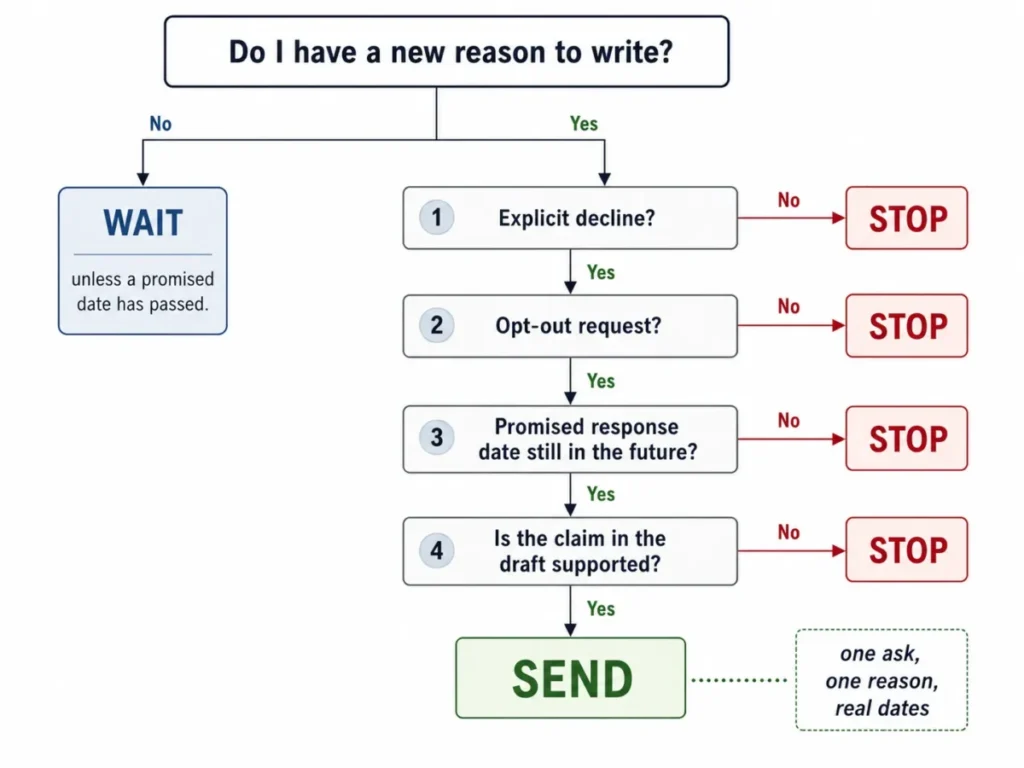
Print that tree, or keep the checklist near the top of this page. The decision to send is a bigger lever than the wording of what you send.
Methodology and sources
This library is based on current publicly accessible guidance from established publishers in each domain, checked on 2026-08-14.
The sources are Grammarly for general follow-up structure and timing, Indeed for post-interview follow-up, and QuickBooks for overdue invoice handling. Zendesk covers support ticket states, Zoho covers renewal reminder cadence, and the Federal Trade Commission covers US commercial email obligations.
Templates were assessed against the same criteria: one primary call to action, timing anchored to the trigger rather than a universal interval, wording that respects a real agreed date, and no consequence or commitment that the sender cannot support.
Greater weight was given to the distinctions that competing template collections merge, including thank-you against status request, meeting recap against no-response nudge, and support acknowledgment against post-resolution confirmation.
Where evidence supports only a range, this article states a range. Response-rate, open-rate, and best-time-to-send figures were excluded because no primary dataset behind them was available to verify.
Frequently asked questions
How do you politely follow up on an email?
Restore the context in one clause, add something the previous message did not contain, and ask for one thing that can be answered in under a minute. Politeness comes from making the reply cheap, not from apologizing.
Give the reader an easy way to say no, later, or wrong person.
How long should I wait before sending a follow-up email?
It depends on the trigger. A meeting, demo, or discovery call earns a recap the same business day.
An unanswered request usually needs about three to five business days, and an interview thank-you goes out within a day.
Any date the other person gave you overrides all of these.
What can I say instead of “just checking in”?
Name the thing and the reason in the same breath. “Coming back to the [document] from [day], because [downstream work] depends on it” carries context and a reason.
Other workable openers: “One question before I close this out”, “Something changed since that conversation”, and “Your review is the last open item”.
How many times should I follow up after no response?
The count matters less than whether each message earns its place. If your second, third, and fourth emails say the same thing with different words, one email would have done the same job.
Keep going only as long as you have a new reason, and end with a clean close-the-loop message rather than fading out.
What makes a good follow-up subject line?
Specificity. “Following up” tells the reader nothing, so use the interaction instead: “Recap and next step from Tuesday’s walkthrough”, “Invoice [number], payment status”, “The budget question you raised”.
Replying inside the existing thread with the original subject line also works, and it keeps the history attached.
How do I follow up after an interview without sounding pushy?
Separate the two messages. The thank-you goes out fast, references one real moment from the conversation, and asks for nothing.
The status request waits for the decision date the employer gave you, or roughly two weeks when they gave you none, and offers something useful such as references or a work sample.
How do I politely follow up on an unpaid invoice?
Lead with the facts rather than the feeling. Include the invoice number, the issue date, the due date, the terms, the amount, and payment instructions, then ask a specific question: has it been approved, and what is the payment date?
Escalate tone by stage, and never reference a fee or consequence your signed agreement does not contain.
What should a meeting follow-up email include?
Decisions, next steps with owners and dates, and the questions nobody answered. That last part is what turns a courtesy note into a working record.
Send it the same business day, and invite corrections so the version on record is the accurate one rather than yours.
How do I personalize a follow-up email with ChatGPT?
Give the model seven things: the relationship, the previous interaction, your reason for writing, the action you want, real dates, factual context, and the tone. Then add an explicit instruction never to invent facts and to flag missing details instead of guessing.
Paste real notes rather than a summary, and refine the prompt when the output misses.
When should I stop following up?
Stop when they decline, when they ask to be removed, when a promised response date has not arrived yet, and when you have nothing new to say. Silence alone is not a reason to escalate.
Close the loop warmly, name the trigger that would make you relevant again, and leave it there.
What to do next
Pick the situation from the table near the top, then check the timing row before you open the card. If the trigger date has not arrived, wait; if it has, copy the card, replace every bracket with real detail, and send it.
For anything this library does not cover, build the prompt from the seven inputs in the personalization section and keep the no-fabrication rule attached. Then log the next follow-up date somewhere you will see it, because that is the step most senders skip.