Newsletter platforms rarely lose a buyer during the demo. They lose the buyer in month three, when the free tier stops sending, the automation that looked included turns out to be a single workflow, or a revenue share quietly overtakes what a fixed monthly plan would have cost.
So this ranking of the best newsletter tools is built around the numbers that move your bill and your workflow. Free-plan ceilings, the tier that opens automation and paid subscriptions, and the pricing model sitting underneath the sticker price.
beehiiv takes the top spot for newsletter businesses, Kit for creators selling digital products, and MailerLite for anyone who wants a capable stack at the lowest practical cost. Buyers shopping the wider send-side category will find more depth in the roundup of best email marketing platforms, which covers campaign tooling rather than publishing.
Every price, plan gate, and limit below was read from the official pricing and plan pages on August 10, 2026.
In This Article (13 sections)
Quick Verdict: The Right Platform by Use Case
| Use case | Best pick | Why it fits |
|---|---|---|
| Newsletter business that needs growth and money built in | beehiiv | Launch is free to 2,500 subscribers with unlimited sends, and Scale adds the Ad Network plus a zero platform take rate on paid subscriptions |
| Creator selling digital products and subscriptions | Kit | Digital products, subscriptions, tagging, and unlimited visual automations on the Creator tier |
| Lowest practical cost for a small list | MailerLite | The free tier keeps campaigns, visual automations, websites, forms, and A/B testing |
| Owned website plus paid memberships | Ghost | Publisher adds paid subscriptions, custom themes, advanced analytics, and three staff users |
| Writer who wants no fixed cost to start | Substack | No monthly software fee and no free-tier subscriber limit, with a share taken only once paid revenue exists |
| Small business that wants one broad marketing suite | Mailchimp | Contact-based tiers with documented send multiples and progressively deeper automation |
| High send volume on a tight budget | Brevo | Sending allowance is priced separately from stored contacts, and the free tier sends 300 emails a day |
| Deep lifecycle automation | ActiveCampaign | Unlimited automation actions and deeper segmentation above the Starter tier |
| Newsletter bundled with webinars and courses | GetResponse | The Creator tier adds webinars, course creation, and premium newsletter subscriptions |
| Markdown-first technical newsletter | Buttondown | The first 100 subscribers are free and advanced capabilities are bought individually |
- Source: official pricing and plan pages, checked August 10, 2026, for beehiiv, Kit, MailerLite, Ghost, Substack, Mailchimp, Brevo, ActiveCampaign, GetResponse, and Buttondown.
Read that table as ten different jobs rather than ten versions of the same job. Four of these products are newsletter businesses in a box, three are general marketing suites that happen to send newsletters, and the rest sit somewhere between.
Do These Ten Platforms Compete for the Same Buyer?
| Platform | Publishing website | Native paid subscriptions | Built-in growth network | Automation depth | Primary job |
|---|---|---|---|---|---|
| beehiiv | Yes | By plan | Yes | By plan | Newsletter business |
| Kit | Limited | Yes | Not documented | By plan | Creator commerce |
| MailerLite | Yes | Yes | Not documented | By plan | Low-cost email stack |
| Ghost | Yes | By plan | Not documented | Not documented | Owned publishing |
| Substack | Yes | Yes | Yes | Limited | Writer publishing |
| Mailchimp | Not documented | Not documented | Not documented | By plan | SMB marketing suite |
| Brevo | Not documented | Not documented | Not documented | By plan | Multichannel marketing |
| ActiveCampaign | Not documented | Not documented | Not documented | By plan | Lifecycle automation |
| GetResponse | Limited | By plan | Not documented | By plan | Funnels and courses |
| Buttondown | Yes | By add-on | Not documented | By add-on | Minimalist publishing |
This grid is an editorial reading of documented feature scope on the official pages checked for this article, not a capability score. “Not documented” means the checked pages did not list the capability, which is different from proof that it does not exist anywhere in the product.
beehiiv, Substack, Ghost, and Buttondown compete directly for the same publisher. Mailchimp, Brevo, and ActiveCampaign compete with each other for a marketing team that also sends a newsletter, and a buyer who confuses those two groups usually ends up paying for a segmentation engine to send a weekly letter.
How We Evaluated the Best Newsletter Tools
These rankings are based on official pricing pages, published plan comparisons, vendor help-center documentation, and labeled third-party evidence. Pricing, free-plan ceilings, and plan gates were read on August 10, 2026.
Each platform was assessed against the same buyer-focused criteria: newsletter creation and sending, audience growth, automation depth, monetization routes, publishing and audience ownership, pricing model, scaling limits, and documented plan restrictions.
Greater weight went to the factors that change a purchase decision, including the tier that opens the workflow a buyer came for, the ceiling that forces an upgrade, and the cost of scaling. Brand familiarity and affiliate relationships did not influence the order.
Figures that could not be read from a reliable source were excluded rather than estimated. Time-limited offers are treated separately from standard pricing and are re-read on the publication date.
The Three Problems Every Newsletter Buyer Runs Into
Three failure patterns show up again and again in this category, and all three are visible on the pricing pages before anyone signs a contract.
Problem one: the pricing model decides your bill, not the price
Five different billing bases sit inside this list, and they are not comparable on a single dollar figure.
beehiiv, Buttondown, and Ghost price against the size of the audience. Brevo prices against sending volume and holds that apart from stored contacts, while Mailchimp prices against contacts and meters sends as a multiple of that allowance.
Substack charges no software fee at all and takes a share of paid-subscription revenue instead. Buttondown starts from a free first 100 subscribers and then sells individual capabilities as separately priced add-ons.
Two consequences follow. A large stored-contact allowance is not a large sending allowance, and a low entry price on an add-on model is not a low price for the setup a real workflow needs.
The Brevo free tier is the clearest example. Brevo’s published plan limits allow up to 100,000 contacts but 300 emails a day, and unused daily allowance does not roll forward. A list of several thousand subscribers cannot be mailed in one go on that tier.
Problem two: “automation included” hides five different depths
Every platform in this list claims automation somewhere. The documented depth at the entry tier ranges from none at all to unlimited.
Buyers arriving from a marketing background tend to assume the phrase carries everything marketing automation covers, with branching journeys and conditional logic behind it. On most entry tiers in this comparison it means one welcome email.
Kit’s free Newsletter plan allows one basic Visual Automation, and GetResponse Starter allows one custom automation workflow. ActiveCampaign Starter allows five actions per automation and one user.
Brevo’s free tier runs marketing automation for up to 2,000 contacts.
At the other end, beehiiv’s free Launch tier includes no email automations at all, and Buttondown sells automations as a separate add-on.
Those are five materially different products sharing one checkbox. A three-message welcome sequence with a branch fits comfortably in some of them and does not fit in others, so the automation you sketch on a whiteboard is what sets your real plan.
Problem three: monetization is gated somewhere, and rarely where you look
Paid subscriptions are the reason many buyers move to a dedicated newsletter platform, and almost every product in this list puts them behind something.
Ghost lists paid subscriptions from Publisher, not from the Starter tier. beehiiv lists paid subscriptions with a zero platform take rate on Scale, not on free Launch. Buttondown sells paid subscriptions as an add-on rather than including them.
Substack inverts the model entirely: nothing is gated, and the platform takes 10% of paid-subscription revenue instead, with card and payment fees on top. That is the cheapest way to start and the most expensive way to scale, and the crossover point is arithmetic rather than opinion.
The monetization question belongs before the feature question. It moves more money than any editor, template, or analytics screen in this comparison.
Best Newsletter Tools Compared
| Platform | Best for | Entry price | Practical tier | Free-tier ceiling | Pricing model |
|---|---|---|---|---|---|
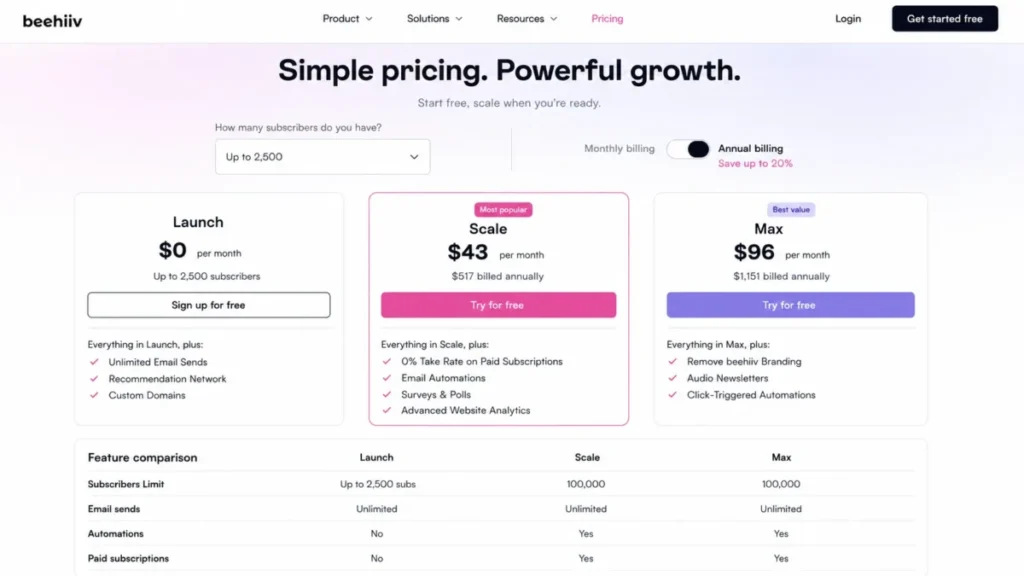
| beehiiv | Newsletter businesses | $0 on Launch | Scale, $43 monthly equivalent at $517 billed annually | 2,500 subscribers, unlimited sends | Subscriber-based |
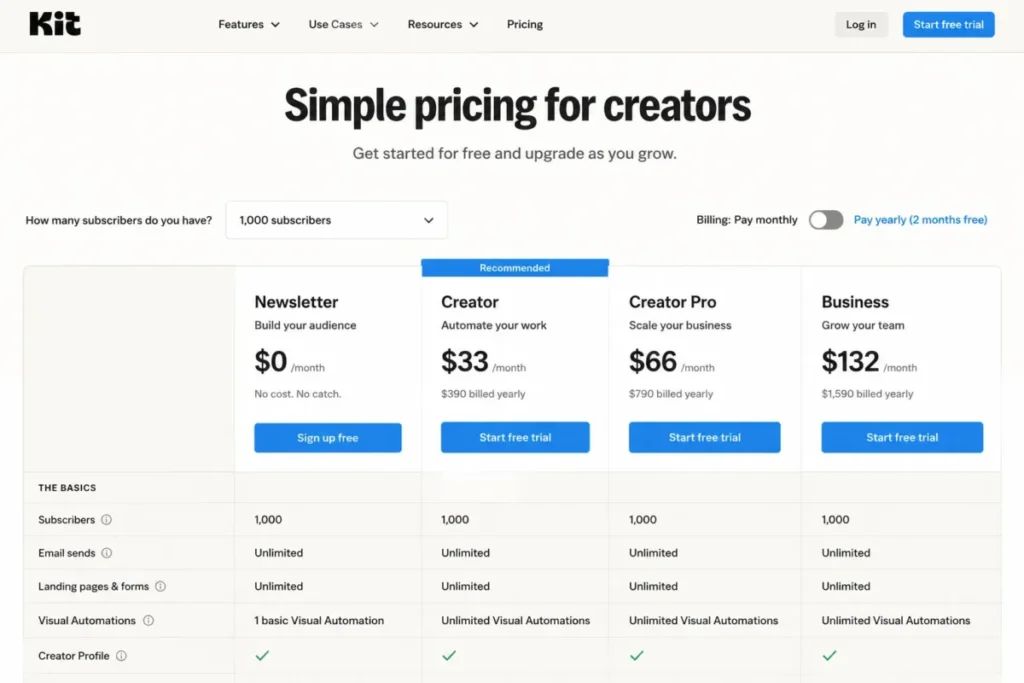
| Kit | Creator commerce | $0 on Newsletter | Creator, $33 monthly equivalent at $390 billed yearly | Free at the 1,000-subscriber pricing-card state | Subscriber-based |
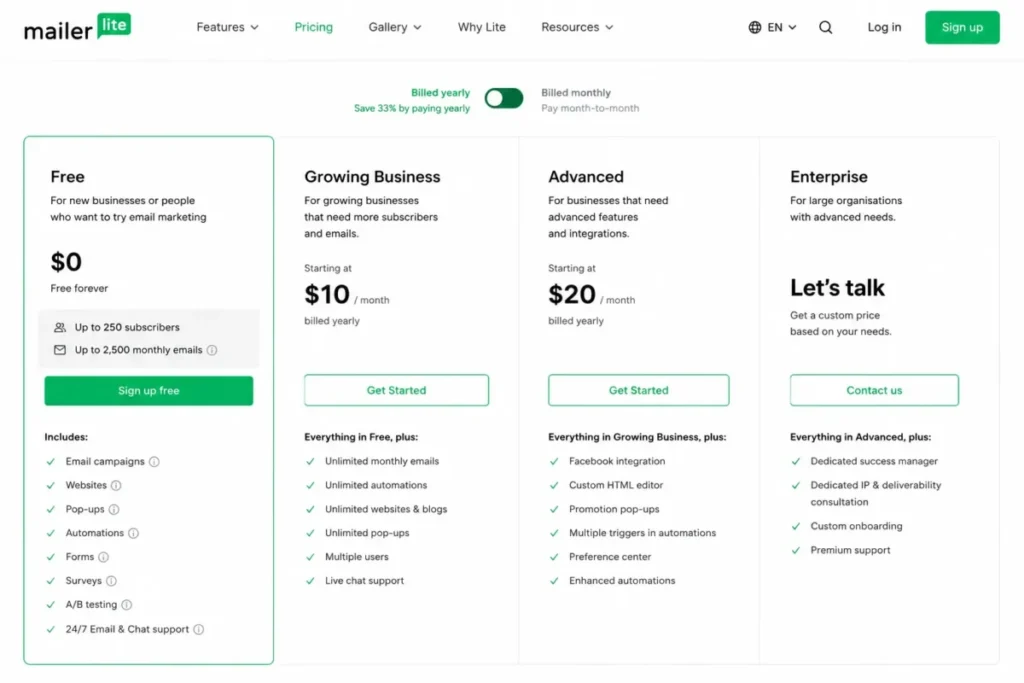
| MailerLite | Simple value | $0 on Free | A paid tier; the amount was not published in the page state read | 250 subscribers and 2,500 monthly emails | Subscriber-based |
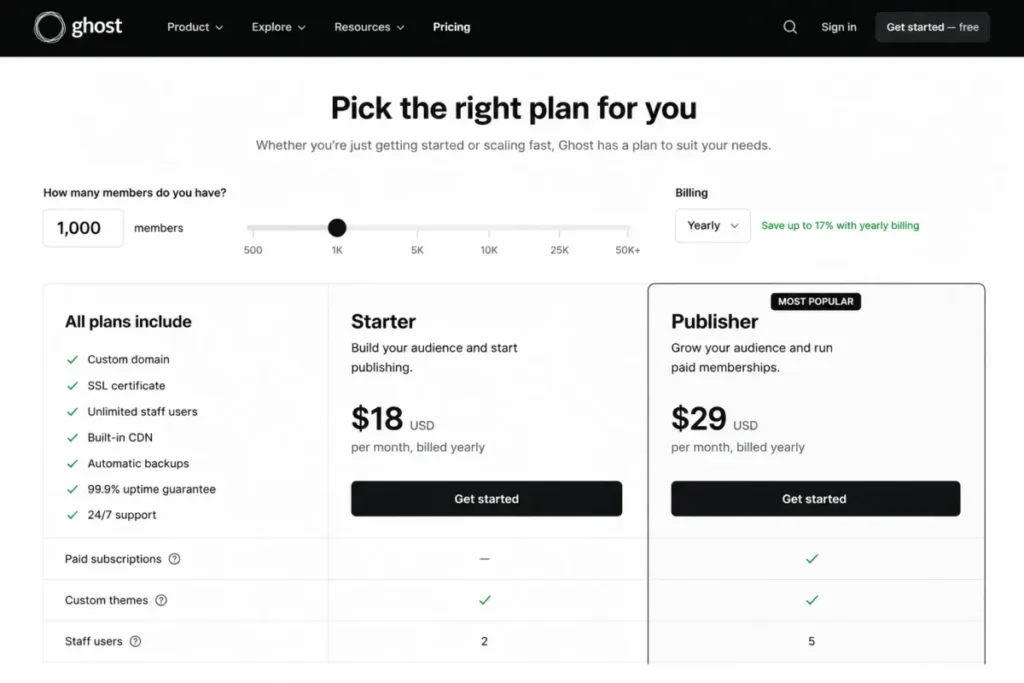
| Ghost | Owned publishing | $18 per month billed yearly on Starter | Publisher, $29 per month billed yearly | Not offered | Member-based |
| Substack | Writer publishing | $0, no monthly software fee | The same tier, plus a 10% share of paid-subscription revenue | No free-tier subscriber limit | Revenue share |
| Mailchimp | SMB marketing suite | $0 on Free | Standard, from $20.00 at the displayed baseline | 250 contacts, 500 monthly sends, 250 daily | Contact-based with send multiples |
| Brevo | Send-based value | $0 on Free | Standard, from $18 per month | 300 emails a day, up to 100,000 stored contacts | Send-based |
| ActiveCampaign | Lifecycle automation | From $15 per month for 1,000 contacts | A tier above Starter; the amount was not published in the page state read | Not documented | Contact-based |
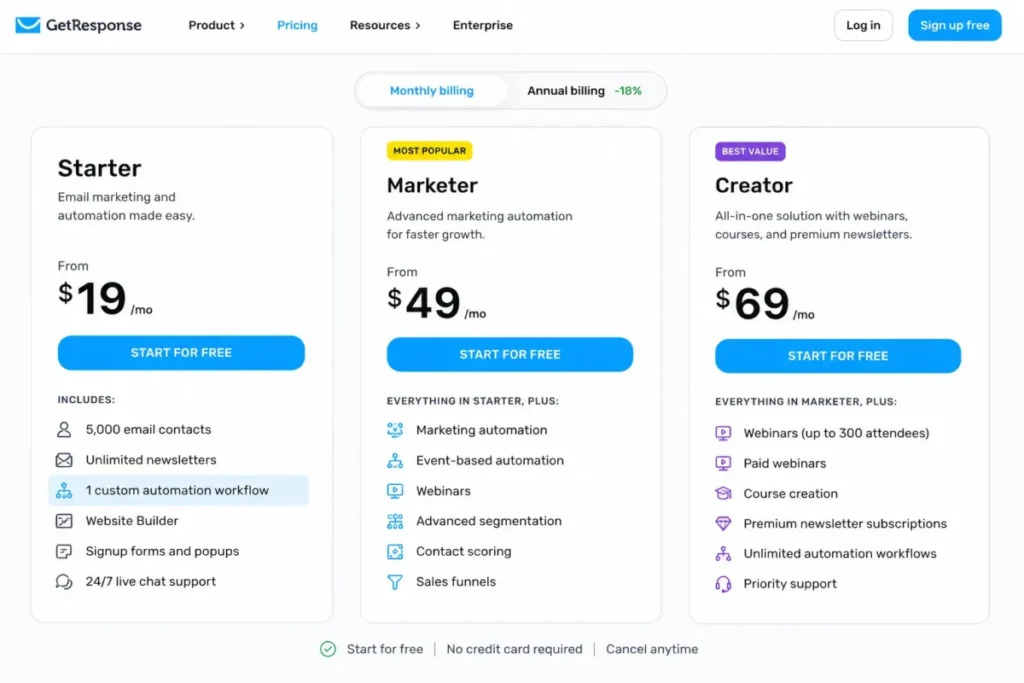
| GetResponse | Funnels and courses | $19 per month, or $15.58 monthly equivalent annually | Marketer for automation depth, Creator at $69 per month | Not documented | Contact-based |
| Buttondown | Minimalist publishing | $0 for the first 100 subscribers | Core plus the add-ons the workflow needs, from $9 per month each | First 100 active subscribers | Active subscribers plus add-ons |
Every figure in this table was read on August 10, 2026 from the official pages linked beneath the quick verdict, and prices in this category change without notice.
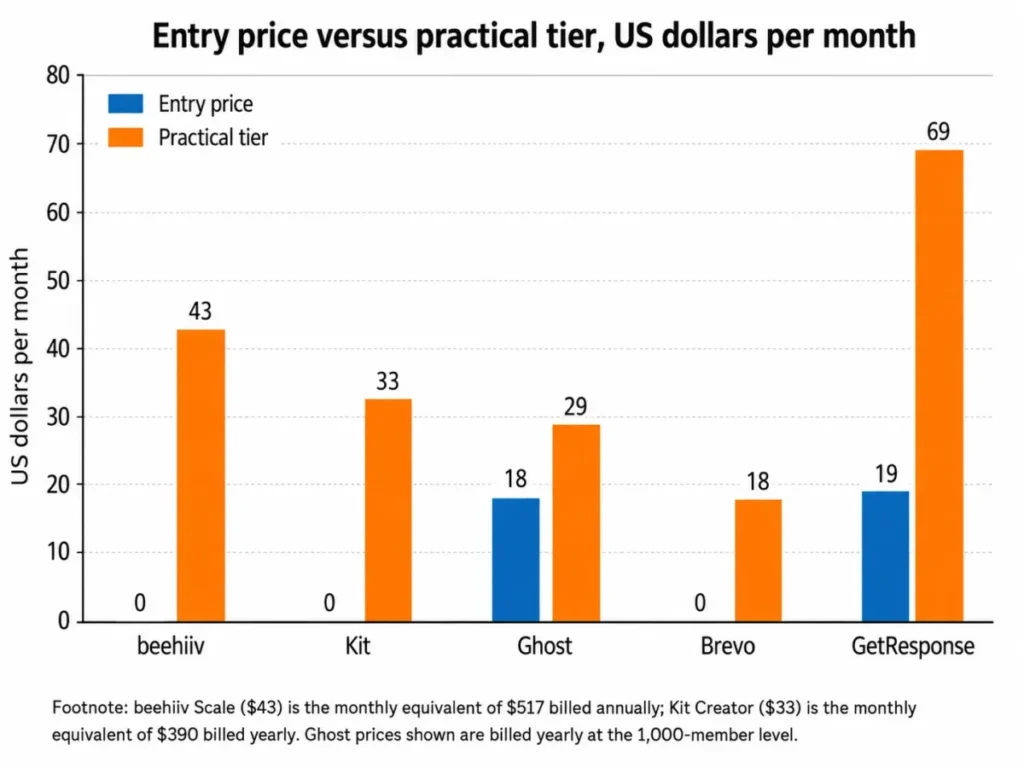
Two columns in that table do most of the work. The gap between entry price and practical tier is where budgets break, and the pricing-model column explains why two platforms with the same headline number can bill very differently once a list grows.
Notice how often the practical tier is not the cheapest tier. beehiiv, Ghost, and GetResponse all place the capability most buyers arrive for one step above the entry plan.
The 10 Best Newsletter Tools in 2026
1. beehiiv: Best for newsletter businesses and creator-led media brands

- Best for:
- newsletter businesses and creator-led media brands that want audience growth and money-making built into the publishing product.
- Avoid if:
- you need email automations, paid subscriptions, or brand removal while staying on the free tier.
- Starting price:
- $0 on Launch, per beehiiv’s official pricing page.
- Practical tier:
- Scale, displayed at $43 per month equivalent when billed $517 annually.
- Free plan:
- yes. Launch covers up to 2,500 subscribers with unlimited email sends.
- First limit that bites:
- Launch lists no email automations, no paid subscriptions, no A/B testing, and no referral program.
- Better than Substack:
- the platform fee is fixed once Scale is paid, so growing paid revenue does not keep raising the platform’s cut.
- Worse than Ghost:
- Ghost’s Publisher tier lists custom themes and 8,000+ integrations for a fully owned website, which the beehiiv plan pages read here do not match.
- Setup difficulty:
- Low. A publication, a custom domain, and unlimited sending are available on the free tier, so the first issue does not wait on a plan decision.
- Hidden costs:
- removal of beehiiv branding appears on Max, one step above the Scale tier most newsletter businesses will land on, per beehiiv’s published plan cards.
- Evidence status:
- plan names, ceilings, and feature gates read from beehiiv’s official pricing page on August 10, 2026, in its annual-billing state.
The reason beehiiv ranks first is not its editor. It is that the growth and revenue machinery a newsletter business needs is packaged as product features rather than assembled from four vendors.
Launch already carries the Recommendation Network and custom domains at no cost, which is a genuinely large free allowance for a category where 250 subscribers is a common ceiling. According to beehiiv’s published plan comparison, Scale then adds the Ad Network, paid subscriptions with a 0% beehiiv take rate, digital products, community, email automations, surveys, advanced website analytics, webhooks, three team seats, and human support.
That single upgrade is the whole decision. Everything a newsletter uses to make money sits on one side of it, and everything a newsletter uses to publish sits on the other.
Budget for that step. If the plan is to monetize, the honest entry cost is $517 for the year rather than $0, and the Launch headline is the wrong number for a business case.
The 2,500-subscriber ceiling is the second pressure point. It is generous for a launch and tight for a growth phase, and the pages read here did not state what happens to sending once a list passes it, so treat that as a question for the vendor rather than an assumption.
What breaks first here is usually branding. A media brand that sells sponsorships will want the beehiiv mark off its emails, and that request lands on Max rather than Scale, which is a second budget conversation nobody plans for.
| Pros | Cons |
|---|---|
| Free tier holds 2,500 subscribers with unlimited sends, well above the 250-subscriber norm in this list | Email automations, paid subscriptions, A/B testing, and the referral program are all absent from Launch |
| Scale takes 0% of paid-subscription revenue, which caps platform cost as revenue grows | The practical monetization tier is $517 billed annually, so the real entry cost is not zero |
| Ad Network, Recommendations, and referrals put audience growth inside the product rather than in a separate tool | Brand removal sits on Max, above the tier most newsletter businesses will buy |
| Three team seats and webhooks on Scale support a small editorial team and custom integrations | Behavior above the 2,500-subscriber free ceiling was not published on the page read |
Both columns are read from beehiiv’s published plan comparison, checked August 10, 2026.
- Verdict:
- choose beehiiv if the newsletter is the business and you expect to sell sponsorships or subscriptions within a year, and budget for Scale from the start rather than treating Launch as the destination.
2. Kit: Best for creator businesses selling digital products and subscriptions

- Best for:
- creator businesses that sell digital products, subscriptions, and email-driven offers to their own audience.
- Avoid if:
- you are a larger marketing department that needs deep multi-user administration on a lower tier.
- Starting price:
- $0 on the Newsletter plan in the current 1,000-subscriber pricing-card state, per Kit’s official pricing page.
- Practical tier:
- Creator, shown at $33 per month equivalent and $390 billed yearly.
- Free plan:
- yes, with unlimited broadcasts, landing pages, forms, tagging, and one basic Visual Automation.
- First limit that bites:
- the Newsletter plan allows a single basic Visual Automation, so the second sequence forces the upgrade.
- Better than MailerLite:
- commerce is native rather than adjacent, with digital products and subscriptions sold to the same tagged audience that receives the broadcast.
- Worse than beehiiv:
- there is no equivalent built-in recommendation or advertising network listed on the plan pages read here, so audience growth stays a manual job.
- Setup difficulty:
- Low to medium. Forms, tags, and broadcasts are quick; the tagging model rewards planning before the first import.
- Hidden costs:
- none disclosed as separate add-ons on the page read, but the Creator upgrade is effectively mandatory for any multi-step funnel, per Kit’s published plan columns.
- Evidence status:
- plan pricing and the automation limit read from Kit’s official pricing page on August 10, 2026, at the 1,000-subscriber selection.
Kit earns second place on a narrow, useful strength: it treats the list as a customer base rather than an audience.
Tagging and segmentation, digital products, subscriptions, landing pages, and unlimited broadcasts all sit in the free Newsletter plan, which is unusual generosity for a product with commerce built in. The constraint is deliberate and sits exactly where a creator business starts to work.
One basic Visual Automation is enough for a welcome email. It is not enough for a launch sequence with a branch for buyers and a branch for non-buyers, and that is the moment Creator stops being optional.
According to Kit’s published plan comparison, Creator adds unlimited visual automations and email sequences, A/B subject-line testing, RSS campaigns, apps and integrations, and 24/7 email and chat support. At $390 billed yearly that is a fair price for a creator with products to sell, and a poor one for a writer who only sends a weekly letter.
Kit is the platform formerly known as ConvertKit, and readers wanting the deeper product walkthrough will find it in the full ConvertKit review.
Watch the renewal question here. If a year passes and the automations still amount to one welcome email, Creator is not earning its fee and the Newsletter plan would have carried the same workload.
| Pros | Cons |
|---|---|
| Digital products and subscriptions sell to the same tagged list that receives the broadcast, with no separate commerce tool | The free Newsletter plan caps out at one basic Visual Automation, which stops at a single welcome email |
| Unlimited broadcasts, landing pages, forms, and tagging on the free plan | No built-in recommendation or advertising network is listed, so growth is not productized the way beehiiv productizes it |
| Creator adds unlimited automations and sequences plus A/B subject testing and RSS campaigns | Deep multi-user administration is positioned above the tiers a small creator business will buy |
| 24/7 email and chat support is attached to the Creator tier rather than sold separately | The $390 yearly commitment is hard to justify for a plain weekly letter with no products |
Both columns are read from Kit’s published plan columns, checked August 10, 2026.
- Verdict:
- choose Kit if you sell something to your list, and stay on the free Newsletter plan only while a single welcome automation still describes your funnel.
3. MailerLite: Best for small creators who want a capable low-cost stack

- Best for:
- small creators and businesses that want a broad newsletter toolkit at the lowest practical cost.
- Avoid if:
- your list already passes 250 subscribers or your sending passes 2,500 emails a month, because the free tier ends there.
- Starting price:
- $0 on Free, per MailerLite’s official pricing page.
- Practical tier:
- a paid tier. The dynamic price control did not expose a figure in the page state read, so no amount is stated here.
- Free plan:
- yes, and it is unusually complete for a free tier.
- First limit that bites:
- 250 subscribers, 2,500 monthly emails, and two user seats.
- Better than Mailchimp:
- the free tier keeps visual automations, websites, landing pages, digital products, reports, and A/B testing rather than reserving them for paid plans.
- Worse than beehiiv:
- the free subscriber ceiling is a tenth of beehiiv Launch’s, so a growing list runs out of runway far sooner.
- Setup difficulty:
- Low. Campaigns, forms, and a landing page can be live without touching a paid plan.
- Hidden costs:
- logo removal and broader template and automation allowances require a paid tier, per MailerLite’s published plan cards.
- Evidence status:
- free-tier ceilings and the included feature list read from MailerLite’s official pricing page on August 10, 2026; paid-tier amounts were not exposed in that page state.
This is the entry on the list most likely to be described inaccurately elsewhere, and the correction matters.
Several widely read roundups still describe a far larger MailerLite free tier. MailerLite’s current pricing page puts Free at 250 subscribers and 2,500 monthly emails, which is a different product decision from the one those older tables describe.
What survives the cut is the interesting part. Free still includes email campaigns, visual automations, websites and landing pages, digital products and services, signup forms, 100+ integrations, reports, and A/B testing.
That combination is rare. A solo creator can run a real funnel, sell a product, and test subject lines without paying anything, provided the audience stays small.
The trap is arithmetic rather than features. A 250-subscriber list mailed weekly consumes about 1,000 sends a month, so the send ceiling only bites for senders who mail several times a week or run automations on top of the broadcast.
MailerLite is better read as the best free trial in this category than as a free destination. The 250-subscriber wall arrives fast for anyone actively growing, and the two-seat cap arrives at the same time a second person joins the workflow.
| Pros | Cons |
|---|---|
| Free tier keeps visual automations, websites, landing pages, digital products, forms, reports, and A/B testing | The free ceiling of 250 subscribers is the tightest audience limit among the free tiers in this list |
| 100+ integrations on the free plan, so the stack does not have to wait for an upgrade | 2,500 monthly emails constrains anyone mailing more than about once a week |
| Two user seats on the free tier, where several competitors allow one | Logo removal and broader template and automation allowances require a paid tier |
| Broad enough to run a small product business without a second tool | The paid-tier amount was not published in the page state read, so budgeting needs a fresh check |
- Verdict:
- choose MailerLite if the list is under 250 subscribers and you want a real funnel for nothing, then re-price the decision the week you cross that ceiling.
4. Ghost: Best for independent publishers who want an owned site and memberships

- Best for:
- independent publishers that want an owned website, a newsletter, and paid memberships in one stack.
- Avoid if:
- you expect to sell paid subscriptions while staying on the entry Starter plan.
- Starting price:
- $18 per month billed yearly on Starter, at the displayed 1,000-member level, per Ghost’s official Ghost(Pro) pricing page.
- Practical tier:
- Publisher, $29 per month billed yearly at the same member level.
- Free plan:
- not offered on Ghost(Pro). Starter is the entry paid tier.
- First limit that bites:
- Starter lists one staff user, 5 MB file uploads, and no paid subscriptions.
- Better than Substack:
- the site, the theme, the analytics, and the revenue all stay with the publisher, and no share of subscription income leaves the business.
- Worse than beehiiv:
- no advertising or recommendation network appears on the plan pages read here, so audience growth stays a job for the publisher.
- Setup difficulty:
- Medium. A hosted site, a custom domain, and theme decisions are more configuration than a pure sending tool asks for.
- Hidden costs:
- the step from Starter to Publisher is $11 a month, and that $11 is effectively the price of memberships, per the same Ghost(Pro) plan comparison.
- Evidence status:
- Starter and Publisher pricing and their feature gates read from Ghost’s official Ghost(Pro) pricing page on August 10, 2026, at the 1,000-member level billed yearly.
The gate is the story here, and it is easy to miss because Starter looks like a complete product.
Starter gives a hosted publishing website, an email newsletter, and a custom domain, which reads as everything a small publication needs. Ghost’s published plan comparison then places paid subscriptions, custom themes, advanced analytics, 8,000+ integrations, and three staff users on Publisher.
So the plan that sells memberships is $29 a month billed yearly, not $18. Anyone building a business case on the entry number is underbudgeting by $132 a year before a single member signs up.
Starter’s one-staff-user limit is the quieter constraint. A publication with an editor and a writer has already outgrown it, and the 5 MB upload ceiling matters the first time someone wants to attach a report or a high-resolution image.
Ghost is the strongest answer in this list to the ownership question. It is also the one that asks for the most setup work before the first issue ships, which is a real cost for a solo writer with an evening a week.
| Pros | Cons |
|---|---|
| Hosted website, newsletter, and custom domain arrive together on the entry tier | Paid subscriptions are absent from Starter and appear from Publisher |
| Publisher adds custom themes, advanced analytics, and 8,000+ integrations for $29 a month billed yearly | Starter allows one staff user, which a two-person publication passes immediately |
| No platform share of membership revenue, so income scales without the platform’s cut scaling with it | 5 MB file uploads on Starter constrain reports, audio, and large images |
| Three staff users on Publisher support a small editorial team | No free tier at all, so evaluation starts as a paid commitment |
Both columns are read from the Ghost(Pro) plan comparison, checked August 10, 2026.
- Verdict:
- choose Ghost if owning the website and the member relationship matters more than speed to first issue, and price the decision at Publisher rather than Starter.
5. Substack: Best for writers who want low-friction publishing and network discovery

- Best for:
- writers and creator-led publications that value fast publishing, platform discovery, and paid subscriptions with no fixed cost.
- Avoid if:
- paid-subscription revenue is large enough that a 10% share costs more than a fixed platform fee.
- Starting price:
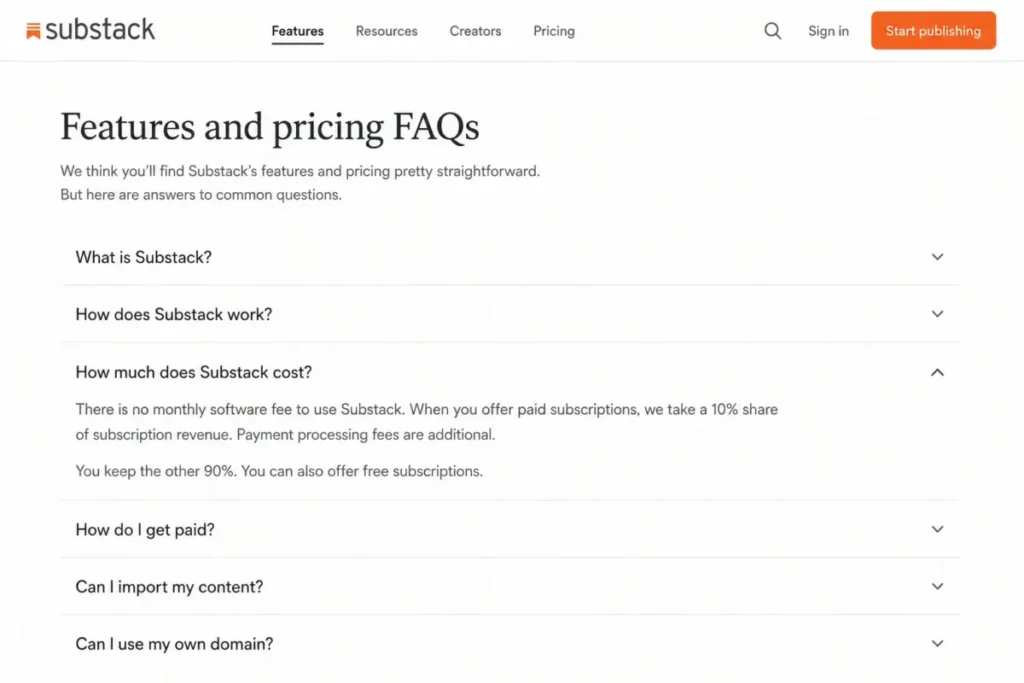
- $0. There is no upfront cost and no monthly software fee, per Substack’s official features and pricing FAQ.
- Practical tier:
- the same tier. Cost arrives as a 10% share of paid-subscription revenue once the publication earns.
- Free plan:
- yes, with no subscriber limit on the free tier.
- First limit that bites:
- the platform share is proportional, so the cost curve follows revenue rather than list size.
- Better than Ghost:
- nothing is plan-gated, so paid subscriptions, trials, gifting, and group plans are available from the first post at no fixed cost.
- Worse than beehiiv:
- at $430 a month in paid revenue the 10% share matches the $43 monthly equivalent on beehiiv’s Scale plan, and every dollar above that widens the gap.
- Setup difficulty:
- Low. Publishing can start the same day, with a custom domain attached later.
- Hidden costs:
- card and payment processing fees sit on top of the 10% platform share, per the same Substack pricing FAQ.
- Evidence status:
- the pricing model, ownership controls, and published feature set read from Substack’s official features and pricing FAQ page on August 10, 2026.
Substack is the only entry here whose price is a percentage, and that single design choice explains both its appeal and its ceiling.
Substack’s published features and pricing FAQ states there is no monthly fee and no free-tier subscriber limit, with the platform taking 10% of paid-subscription revenue and card fees charged separately. A publication with a large free readership pays nothing, which no fixed-fee platform in this list can match.
The publishing surface is wider than the newsletter label suggests. Posts, podcasts, video and live publishing, Recommendations, Notes, referrals, and search sit alongside paid subscriptions, trials, gifting, and group plans, plus subscriber-list ownership, custom domains, and data export.
Those ownership controls matter more than they sound. They are the difference between a network that hosts an audience and a network that holds it hostage, and they make the switch-or-stay question answerable later rather than never.
The cost curve is the honest caveat. A publication earning $2,000 a month hands over $200 a month, which buys a lot of fixed-fee software, and one earning $10,000 hands over $1,000.
Staying on Substack until paid revenue is stable and predictable is the safer default, with the arithmetic in the monetization section below deciding the switch rather than instinct.
| Pros | Cons |
|---|---|
| No monthly software fee and no free-tier subscriber limit, so a large free audience costs nothing | The 10% share of paid-subscription revenue rises with success and never plateaus |
| Recommendations, Notes, referrals, and search put discovery inside the network rather than outside it | Card and payment processing fees are charged on top of the platform share |
| Paid subscriptions, trials, gifting, and group plans are available immediately with no tier to buy | Automation is limited to lifecycle drip campaigns rather than branching workflows |
| Subscriber-list ownership, custom domains, and data export keep an exit route open | Publisher analytics are the platform’s own, with no deep third-party stack listed on the page read |
- Verdict:
- choose Substack if you are starting from zero or your paid revenue is still small. Revisit at roughly $430 a month, where the share stated in Substack’s pricing FAQ starts to exceed a fixed plan fee.
6. Mailchimp: Best for small businesses that want a broad marketing platform

- Best for:
- small businesses that already know the product and want a wider marketing platform around the newsletter.
- Avoid if:
- the list is newsletter-only and cost-sensitive, where contact counting and overage mechanics work against you.
- Starting price:
- $0 on Free, per Mailchimp’s official pricing-plans documentation.
- Practical tier:
- Standard, from $20.00 at the pricing page’s displayed baseline, with up to 6,000 email sends a month.
- Free plan:
- yes, and it is the smallest free tier in this comparison.
- First limit that bites:
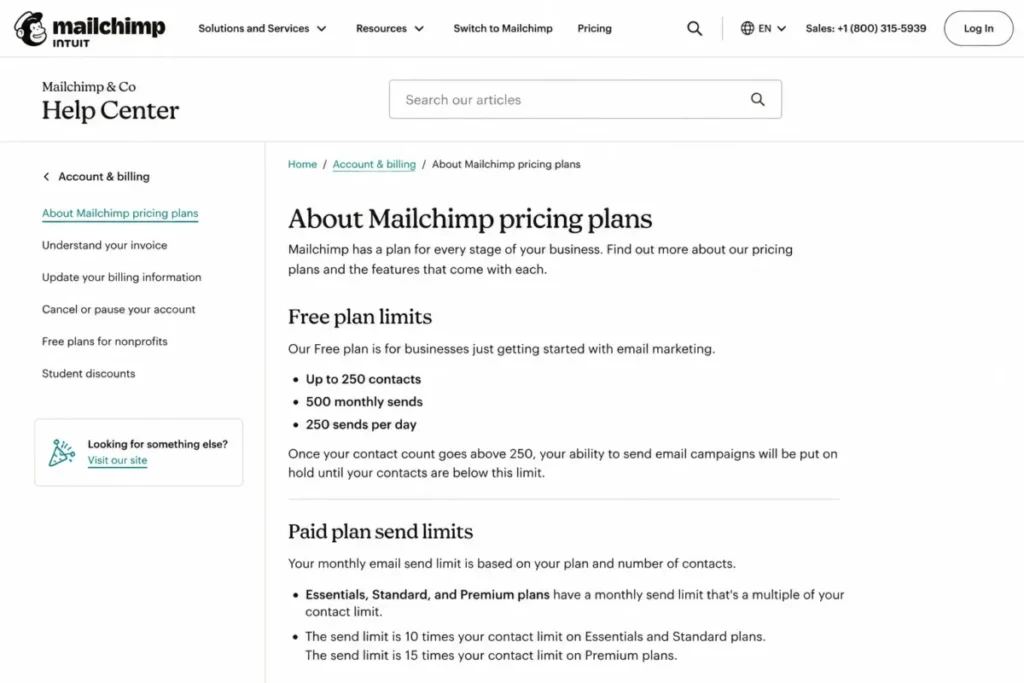
- 250 contacts, 500 monthly sends, and a 250-send daily cap.
- Better than Buttondown:
- capability arrives bundled by tier rather than accumulating as separately priced add-ons.
- Worse than Brevo:
- contacts and sends are coupled through a multiplier, so a large list that mails rarely still pays for stored capacity.
- Setup difficulty:
- Low to medium. Familiar templates and audience tools, with a segmentation model that repays planning.
- Hidden costs:
- exceeding the monthly contact limit on a paid plan can trigger an additional charge, per Mailchimp’s official marketing pricing page.
- Evidence status:
- contact counting, send multiples, and overflow behavior read from Mailchimp’s official pricing-plans help documentation on August 10, 2026, with the Standard baseline read from the marketing pricing page.
The mechanic worth knowing before signing up is what happens when the ceiling arrives, because it is not a warning email.
Mailchimp’s official pricing-plans documentation states that Free-plan sending is put on hold once the contact limit is exceeded. A campaign that was scheduled to go out does not, which is a different class of problem from a soft overage.
Paid plans behave differently. Exceeding the monthly contact limit there can trigger an additional charge rather than an interruption, so the risk moves from a stopped send to an unplanned invoice.
The send multiplier is the second thing to model. Essentials allows up to 10 times the contact limit in monthly sends, Standard 12 times, and Premium 15 times, with automation, segmentation, seats, and support deepening as the tier rises.
That structure suits a business that mails a large audience several times a month. It suits a 3,000-subscriber weekly letter far less well, because the multiplier sells sending capacity that a weekly cadence never consumes.
Readers weighing the wider platform against a pure newsletter tool will find the product detail in the full Mailchimp review.
| Pros | Cons |
|---|---|
| Tiered send multiples of 10, 12, and 15 times the contact limit suit high-frequency senders | The free tier stops at 250 contacts, 500 monthly sends, and 250 sends a day |
| Automation, segmentation, seats, and support all deepen predictably as the tier rises | Free-plan sending goes on hold once the contact limit is exceeded |
| Familiar audience management and reporting reduce the training cost for a small team | Exceeding the monthly contact limit on a paid plan can trigger an additional charge |
| A single platform covers campaigns beyond the newsletter, avoiding a second tool | Contact-based pricing charges for stored audience a weekly newsletter never mails |
Both columns are read from Mailchimp’s documented plan limits, checked August 10, 2026.
- Verdict:
- choose Mailchimp if the newsletter is one channel inside a wider marketing programme, and model the contact multiplier before comparing its headline price with a subscriber-priced newsletter tool.
7. Brevo: Best for send-volume-conscious teams that want multichannel marketing

- Best for:
- small businesses watching sending volume that also want multichannel marketing beside the newsletter.
- Avoid if:
- you need high-volume sending, logo removal, and unlimited-contact automation without upgrading or buying add-ons.
- Starting price:
- $0 on Free, with paid plans listed from $9 per month on Starter, per Brevo’s official pricing-plans article.
- Practical tier:
- Standard, listed from $18 per month.
- Free plan:
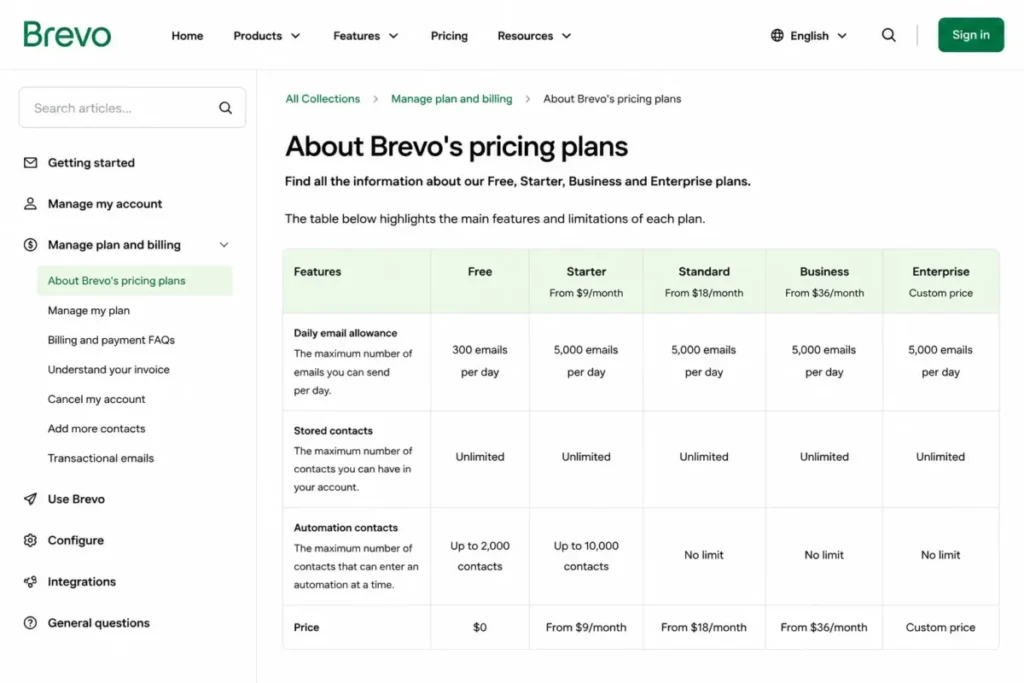
- yes: 300 emails a day, up to 100,000 stored contacts, and marketing automation for up to 2,000 contacts.
- First limit that bites:
- the 300-email daily allowance, which does not carry forward when unused.
- Better than Mailchimp:
- stored contacts are priced separately from sending, so a large dormant list is not automatically expensive.
- Worse than beehiiv:
- nothing on the plan pages read here productizes newsletter growth, paid subscriptions, or sponsorship revenue.
- Setup difficulty:
- Medium. The multichannel surface is wider than a newsletter tool, so there is more to configure before the first send.
- Hidden costs:
- removing the Brevo logo on Starter is a $9 per month add-on, which doubles the effective Starter price, per the same Brevo plan documentation.
- Evidence status:
- plan prices, daily send limits, automation caps, and the branding add-on read from Brevo’s official pricing documentation on August 10, 2026.
Brevo is the entry most often misread, and the misreading is expensive.
The free tier stores up to 100,000 contacts. It sends 300 emails a day, and unused daily allowance does not carry over.
- Source: Brevo’s official pricing-plans documentation, checked August 10, 2026.
Those two numbers describe a CRM-sized address book attached to a very narrow sending pipe. A list of several thousand subscribers cannot be delivered in a single send on that tier, however many contacts the account is allowed to hold.
Automation has its own ceiling. The free tier runs marketing automation for up to 2,000 contacts, and unlimited-contact automation, A/B testing, send-time optimization, advanced reporting, and priority email support all sit on Standard at $18 a month.
Starter at $9 is therefore a narrower plan than the price suggests. Adding logo removal takes the real Starter cost to $18 a month, which is the Standard price, so the $9 tier only makes sense for a sender who genuinely does not mind the branding.
The wider product context sits in the full Brevo evaluation for teams weighing the multichannel side.
| Pros | Cons |
|---|---|
| Sending allowance is priced apart from stored contacts, which suits a large but rarely mailed list | The free tier sends only 300 emails a day and unused allowance does not carry forward |
| Free tier stores up to 100,000 contacts, far beyond any other free tier here | Free automation is capped at 2,000 contacts, so lifecycle work outgrows it early |
| Standard at $18 a month adds unlimited-contact automation, A/B testing, and send-time optimization | Logo removal on Starter is a $9 per month add-on that erases the gap to Standard |
| Multichannel reach beyond email for teams that need more than a newsletter | No newsletter-native growth or monetization feature appears on the pages read |
Both columns are read from Brevo’s documented plan limits, checked August 10, 2026.
- Verdict:
- choose Brevo if daily sending volume and a wide contact database matter more than newsletter-native monetization, and treat Standard rather than Starter as the real entry point.
8. ActiveCampaign: Best for lifecycle marketing teams that need deep automation

- Best for:
- lifecycle marketing teams that need deep segmentation and branching automation rather than a broadcast tool.
- Avoid if:
- the newsletter is the whole programme, in which case most of what you are buying will sit unused.
- Starting price:
- from $15 per month for 1,000 contacts, per the vendor’s own published comparison guide, per ActiveCampaign’s official comparison guide.
- Practical tier:
- a tier above Starter, which lists unlimited automation actions. The dynamic pricing control did not expose that amount in the page state read.
- Free plan:
- not documented on the pages read.
- First limit that bites:
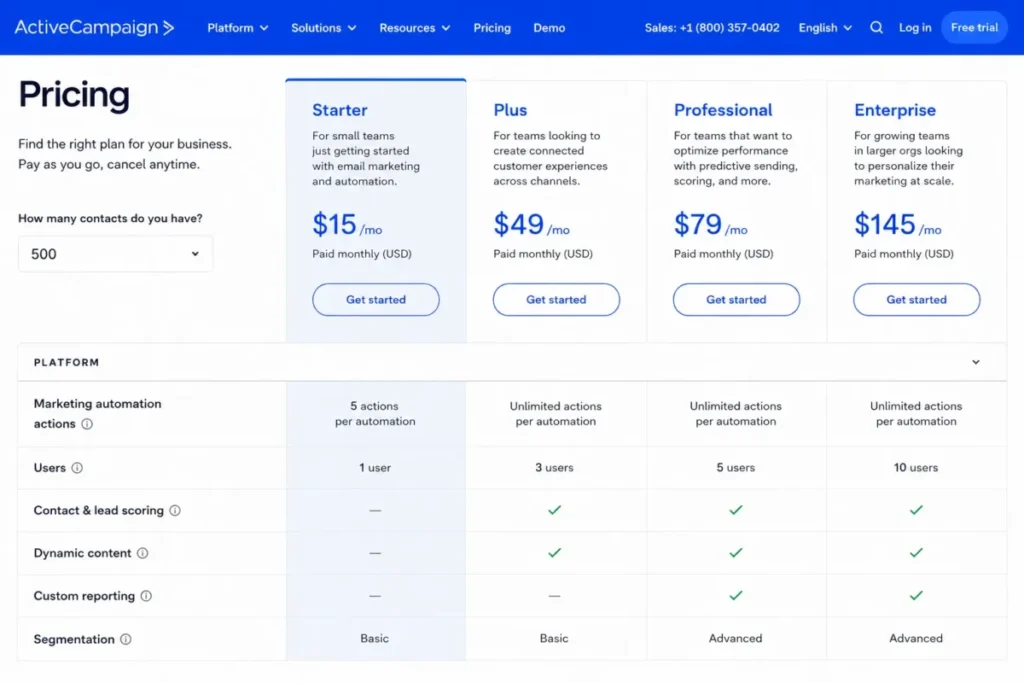
- five actions per automation, one user, and limited segmentation on Starter.
- Better than Kit:
- the segmentation and branching depth above Starter goes well past what a creator email tool exposes.
- Worse than Buttondown:
- for a plain weekly letter the configuration surface is far larger than the job needs, a point ActiveCampaign’s own comparison guide concedes when it notes the feature depth can look overwhelming.
- Setup difficulty:
- High. Segmentation models, automations, and CRM or ecommerce connections all want designing before launch.
- Hidden costs:
- higher-tier amounts were not published in the page state read, so treat any budget above Starter as unpriced until re-checked, per ActiveCampaign’s official pricing page.
- Evidence status:
- the $15 starting point read from ActiveCampaign’s official comparison guide, and the Starter limits from its official pricing page, both on August 10, 2026.
Five actions per automation is the number that decides whether this platform fits.
A welcome sequence with three emails, a wait step, and a tag already spends the Starter allowance. Anything with a branch, a condition, or a re-entry rule needs the tier above it, and the published plan comparison lists unlimited automation actions there rather than a larger finite number.
One user on Starter compounds the problem for any team that shares the workload. Conditional and predictive content, attribution, custom objects, and single sign-on all sit higher again, which is appropriate for a revenue team and irrelevant for a publisher.
The clearest signal comes from the vendor. When a company’s own buying guide warns that its depth may exceed what a simple newsletter needs, a newsletter-only buyer should take that at face value.
| Pros | Cons |
|---|---|
| Unlimited automation actions above Starter support branching lifecycle journeys that most tools here cannot model | Starter is capped at five actions per automation, which a branched welcome sequence exceeds |
| Segmentation, CRM and ecommerce connections, and attribution suit a revenue team rather than a publisher | Starter allows one user, so shared editorial workflows need an upgrade |
| A published $15 starting point for 1,000 contacts is competitive for the capability class | Higher-tier prices were not published in the page state read, leaving the real budget unresolved |
Both columns are read from ActiveCampaign’s published plan comparison, checked August 10, 2026.
Teams weighing the automation depth against the setup burden will find the workflow detail in the ActiveCampaign review breakdown.
- Verdict:
- choose ActiveCampaign if the newsletter is one touchpoint inside a lifecycle programme with branching journeys, and skip it entirely if a weekly broadcast describes the whole plan.
9. GetResponse: Best for creators bundling newsletters with webinars and courses

- Best for:
- creators and small businesses that want newsletters alongside funnels, webinars, or paid courses.
- Avoid if:
- you expect webinars, course creation, or premium newsletter subscriptions on the entry plan.
- Starting price:
- $19 per month on Starter, or $15.58 monthly equivalent on the annual option displayed, per GetResponse’s official pricing page.
- Practical tier:
- Marketer for automation depth, and Creator at $69 per month, or $56.58 monthly equivalent annually, for the bundled creator features.
- Free plan:
- not documented on the page read.
- First limit that bites:
- one custom automation workflow on Starter.
- Better than Substack:
- webinars and course creation live inside the same subscription rather than requiring a second platform and a second payment relationship.
- Worse than MailerLite:
- the entry tier costs real money where MailerLite’s entry tier costs nothing.
- Setup difficulty:
- Medium to high. Funnels, webinars, and courses are each their own configuration project.
- Hidden costs:
- the step from Starter to Creator is $50 a month, and that gap is the actual price of the webinar and course bundle, per the same GetResponse plan cards.
- Evidence status:
- Starter and Creator pricing plus the automation gate read from GetResponse’s official pricing page on August 10, 2026.
Starter reads well on paper: unlimited monthly email sends, AI-assisted content, a welcome series, landing pages, and forms.
Then the automation ceiling appears. GetResponse’s published plan comparison allows one custom automation workflow on Starter, with unlimited workflows and advanced segmentation arriving on Marketer.
Creator is where the interesting bundle lives, at $69 a month or $56.58 monthly equivalent annually, adding webinars, course creation, and premium newsletter subscriptions. For a creator already paying separately for a webinar tool and a course platform, that consolidation can be cheaper than the sum of the parts.
For everyone else it is a $50 monthly step for capability the newsletter does not use. The renewal test is direct: if no webinar ran and no course sold in twelve months, Creator was the wrong tier.
| Pros | Cons |
|---|---|
| Unlimited monthly email sends on the entry Starter tier, which several rivals meter | One custom automation workflow on Starter, so a second journey forces Marketer |
| Creator consolidates webinars, courses, and premium newsletter subscriptions into one subscription | The Creator tier is $50 a month above Starter, which only pays off if the bundle is used |
| An annual option lowers Starter to a $15.58 monthly equivalent | Webinars, courses, and premium subscriptions are absent from the lower tiers |
| Funnels and landing pages reduce the number of separate tools a small business runs | No free tier was documented on the page read, so evaluation starts as a paid commitment |
Both columns are read from GetResponse’s published plan cards, checked August 10, 2026.
- Verdict:
- choose GetResponse if a webinar or a course is already on the roadmap, and stay on Starter only while a single automation workflow still covers the funnel.
10. Buttondown: Best for Markdown-first and technical newsletter operators
- Best for:
- Markdown-first writers and technical operators who want a lean core product with no unused surface area.
- Avoid if:
- the workflow needs several advanced capabilities at once, because each one is a separate line on the invoice.
- Starting price:
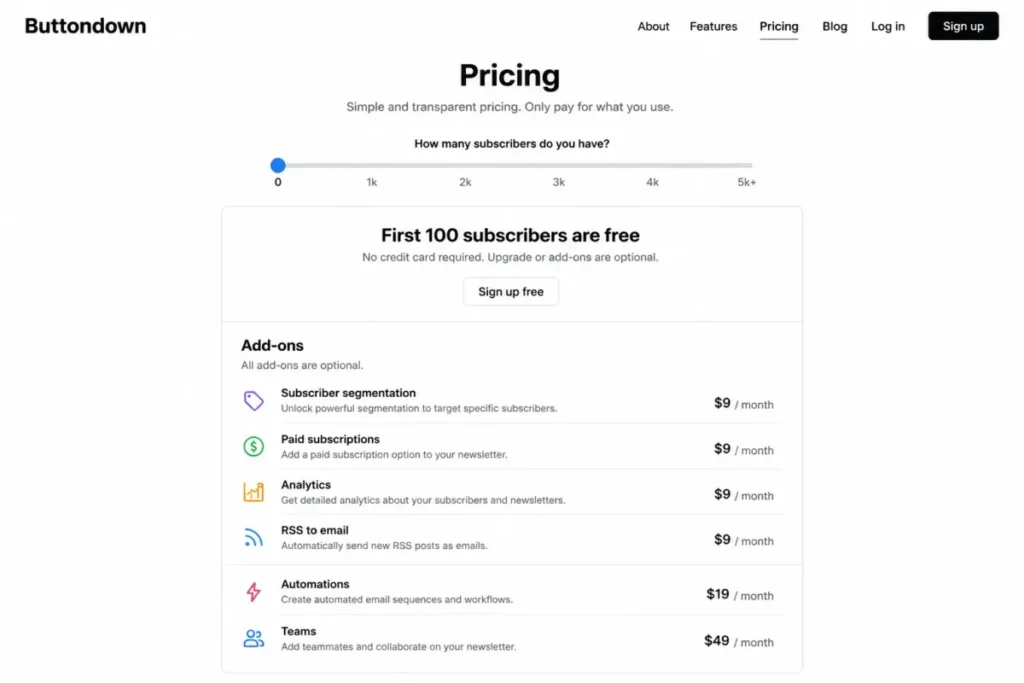
- $0 for the first 100 subscribers, per Buttondown’s official pricing page.
- Practical tier:
- the core plan plus whichever add-ons the workflow needs, from $9 per month each. The base amount above 100 subscribers was not exposed by the dynamic control in the page state read.
- Free plan:
- yes, for the first 100 active subscribers, and billing counts active subscribers only.
- First limit that bites:
- the pricing model assumes at most one email a day to the full subscriber base.
- Better than Mailchimp:
- billing counts active subscribers, so a list that has partly gone quiet stops being charged for at full price.
- Worse than beehiiv:
- five common capabilities bought as add-ons reach $65 a month before the base subscription, against one fixed fee on beehiiv’s Scale plan.
- Setup difficulty:
- Low for a writer comfortable with Markdown, higher for a team that needs shared access.
- Hidden costs:
- the add-on stack itself. Tagging and segmentation, paid subscriptions, comments and surveys, analytics, RSS-to-email, sponsorships, and attachments are $9 a month each, automations and multiple newsletters are $29 each, and white-labeling and teams are $79 each, per the same Buttondown add-on list.
- Evidence status:
- first-100 pricing, the add-on price list, and the sending-frequency assumption read from Buttondown’s official pricing page on August 10, 2026.
The core product is deliberately small, and that is the appeal for a writer who wants a rich-text and Markdown editor, a custom sending domain, and hosted archives without a marketing suite attached.
The cost model deserves a calculation rather than a glance. Take a common creator setup of segmentation, paid subscriptions, analytics, RSS-to-email, and automations: $9 plus $9 plus $9 plus $9 plus $29 comes to $65 a month, on top of whatever the base subscription costs at that list size.
Buttondown’s published pricing also states that the model assumes at most one email a day to the full list, with higher frequency requiring a usage-based conversation. A daily briefing with a second alert edition cannot assume the standard price applies.
| Pros | Cons |
|---|---|
| First 100 subscribers are free and billing counts active subscribers only | Segmentation, paid subscriptions, analytics, and RSS-to-email are each a separate $9 monthly charge |
| A lean Markdown and rich-text editor with a custom sending domain and hosted archives suits technical writers | Automations and multiple newsletters are $29 each, and white-labeling and teams $79 each |
| Buying capability one piece at a time avoids paying for an unused marketing suite | Pricing assumes at most one full-list email a day, so daily publishers need a separate conversation |
Both columns are read from Buttondown’s published pricing page, checked August 10, 2026.
- Verdict:
- choose Buttondown if the list is small, the editor matters more than the marketing stack, and you can name in advance the two or three add-ons the workflow needs.
Pricing, Limits, and Hidden Upgrade Triggers
| Platform | Entry price | Practical tier and price | What the upgrade buys | Team seats | Hidden costs |
|---|---|---|---|---|---|
| beehiiv | $0 Launch | Scale, $43 monthly equivalent at $517 billed annually | Automations, paid subscriptions at a 0% take rate, Ad Network, surveys, webhooks | Three on Scale | Brand removal sits on Max, above Scale |
| Kit | $0 Newsletter | Creator, $33 monthly equivalent at $390 billed yearly | Unlimited visual automations and sequences, A/B subject testing, RSS campaigns | Not published in the page state read | None listed separately on the page read |
| MailerLite | $0 Free | Paid tier, amount not published in the page state read | Logo removal, broader templates, higher automation capacity | Two on Free | Logo removal requires a paid tier |
| Ghost | $18 per month billed yearly | Publisher, $29 per month billed yearly | Paid subscriptions, custom themes, advanced analytics, 8,000+ integrations | One on Starter, three on Publisher | The $11 monthly step is the price of memberships |
| Substack | $0, no monthly fee | The same tier, with a 10% share of paid-subscription revenue | Nothing is gated; the share replaces a plan fee | Not published in the page state read | Card and payment processing fees on top of the share |
| Mailchimp | $0 Free | Standard, from $20.00 at the displayed baseline | Higher send multiples, deeper automation and segmentation, more seats | One on Free, more by tier | Exceeding a paid contact limit can trigger an extra charge |
| Brevo | $0 Free, Starter from $9 per month | Standard, from $18 per month | Unlimited-contact automation, A/B testing, send-time optimization, advanced reports | Not published in the page state read | Starter logo removal is a $9 per month add-on |
| ActiveCampaign | From $15 per month for 1,000 contacts | Above Starter, amount not published in the page state read | Unlimited automation actions and deeper segmentation | One on Starter | Higher-tier pricing was not published on the page read |
| GetResponse | $19 per month, $15.58 monthly equivalent annually | Marketer for automation, Creator at $69 per month | Unlimited workflows, then webinars, courses, premium subscriptions | Not published in the page state read | The $50 step to Creator is the bundle price |
| Buttondown | $0 for the first 100 subscribers | Core plus the needed add-ons, from $9 per month each | Segmentation, paid subscriptions, analytics, RSS-to-email, automations | Teams is a $79 per month add-on | Five common add-ons total $65 a month |
Every amount above was read on August 10, 2026 from the official pages linked beneath the quick verdict, and several of these pages price dynamically, so re-check before committing a budget.
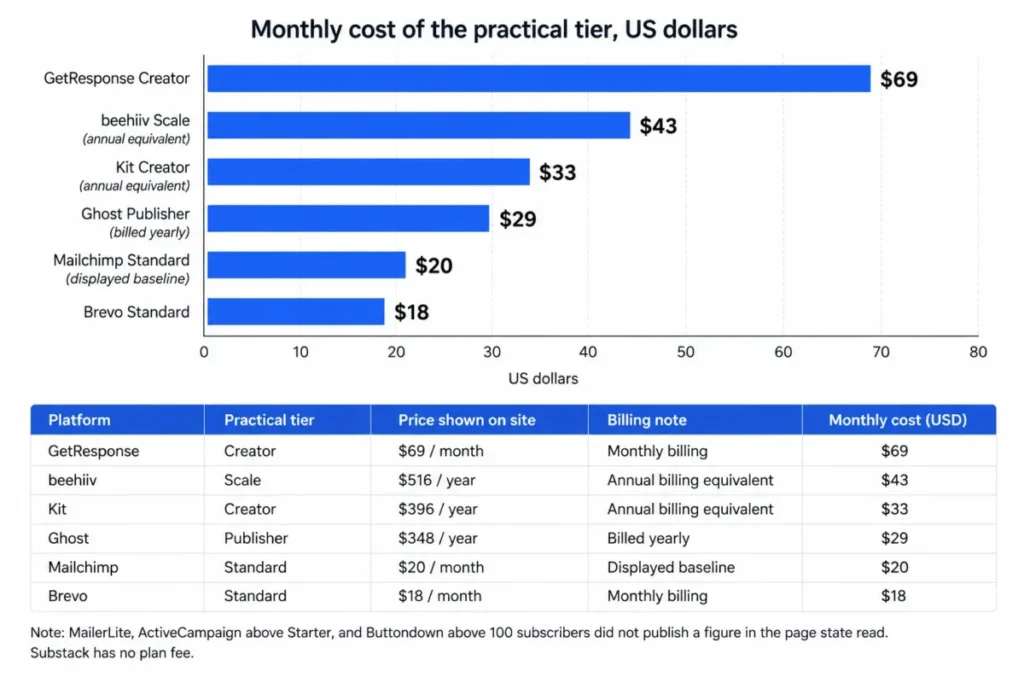
Per-seat arithmetic does not transfer to this category, and forcing it produces a misleading number. Nine of these ten platforms bill against subscribers, contacts, sends, or revenue, so a ten-user cost is not the comparison a newsletter buyer needs.
The seat column still matters, for a different reason. Ghost’s plan comparison allows one staff user on Starter and three on Publisher, MailerLite Free allows two, beehiiv Scale allows three, and Buttondown puts team access behind a $79 monthly add-on.
That is the constraint that surprises small publications. The plan is sized correctly for the list and then blocks the second editor.
Anyone modelling the contact multiplier before committing should work from the tier-by-tier figures in Mailchimp pricing plans, because the send allowance moves with the contact allowance rather than independently of it.
The unpriced tiers are the harder gap in this table, and the plan-by-plan cost detail in ActiveCampaign pricing is the fastest way to close it before a budget goes to finance.
The costs that do not appear on a plan card
- Brand removal. Brevo sells it on Starter as a $9 monthly add-on.
- Brand removal elsewhere. On beehiiv the option sits on the Max tier, and on MailerLite it requires a paid tier, with neither amount published on the pages read.
- Overage behavior. Mailchimp puts Free-plan sending on hold when the contact limit is exceeded, and can add a charge on paid plans when the monthly contact limit is passed.
- Payment processing. Substack’s 10% platform share is separate from card fees, so the total cost of a paid subscription is higher than 10%.
- Add-on accumulation. Buttondown’s individually priced capabilities reach $65 a month for a five-feature setup before the base subscription.
- Unpriced tiers. MailerLite’s paid amounts, ActiveCampaign’s higher tiers, and Buttondown’s base price above 100 subscribers were not exposed in the page states read, so those budgets stay open questions.
What forces the upgrade
| Platform | The trigger | The tier it forces |
|---|---|---|
| beehiiv | A second automated sequence, a paid subscription, or an A/B test | Scale |
| beehiiv branding on a sponsored issue | Removing the platform mark | Max |
| Kit | A second visual automation or a branched launch sequence | Creator |
| MailerLite | The 251st subscriber, or the 2,501st monthly email | A paid tier |
| Ghost | Selling a membership, or adding a second staff user | Publisher |
| Mailchimp | The 251st contact, or a send volume above the tier multiple | Essentials or Standard |
| Brevo | Sending to more than 300 recipients in a day, or automating past 2,000 contacts | Standard |
| ActiveCampaign | A sixth action in one automation, or a second user | The tier above Starter |
| GetResponse | A second automation workflow, then a webinar or a course | Marketer, then Creator |
| Buttondown | Any single advanced capability, one at a time | An add-on per capability |
Read that grid as a budget forecast rather than a feature list. Each row is a specific event with a date attached to it, and the date is usually inside the first ninety days.
Monetization Economics: Revenue Share Versus a Fixed Plan Fee
Every paid-newsletter decision in this list reduces to one question. Do you want to pay a fixed fee whatever you earn, or a percentage that stays at zero until you earn?
| Platform | Cheapest verified route to paid subscriptions | What the platform takes |
|---|---|---|
| Substack | The standard tier, with no plan to buy | 10% of paid-subscription revenue, plus card and payment fees |
| beehiiv | Scale, $43 monthly equivalent at $517 billed annually | A 0% beehiiv take rate on paid subscriptions |
| Ghost | Publisher, $29 per month billed yearly | No platform share is listed on the page read |
| Kit | The Newsletter plan, which lists digital products and subscriptions | Not published in the page state read |
| GetResponse | Creator, $69 per month, or $56.58 monthly equivalent annually | Not published in the page state read |
| Buttondown | The paid-subscriptions add-on, at $9 per month | Not published in the page state read |
| MailerLite | Free, which lists digital products and services rather than recurring newsletter subscriptions | Not published in the page state read |
Two products are missing from that grid on purpose. Mailchimp, Brevo, and ActiveCampaign published no native paid-newsletter subscription route on the pages read for this article, so a paywalled publication on those platforms needs a separate payment layer.
The interesting comparison is the top two rows, because they price the same outcome in opposite ways.
| Monthly paid revenue | Substack platform share at 10% | beehiiv Scale fixed plan fee | Difference |
|---|---|---|---|
| $430 | $43 | $43 | $0 |
| $500 | $50 | $43 | $7 |
| $2,000 | $200 | $43 | $157 |
| $10,000 | $1,000 | $43 | $957 |
The arithmetic is reproducible. The share in Substack’s pricing FAQ equals revenue multiplied by 0.10.
The $43 monthly equivalent shown on beehiiv’s Scale plan divided by 0.10 gives the fee-only break-even of $430 in monthly paid revenue.
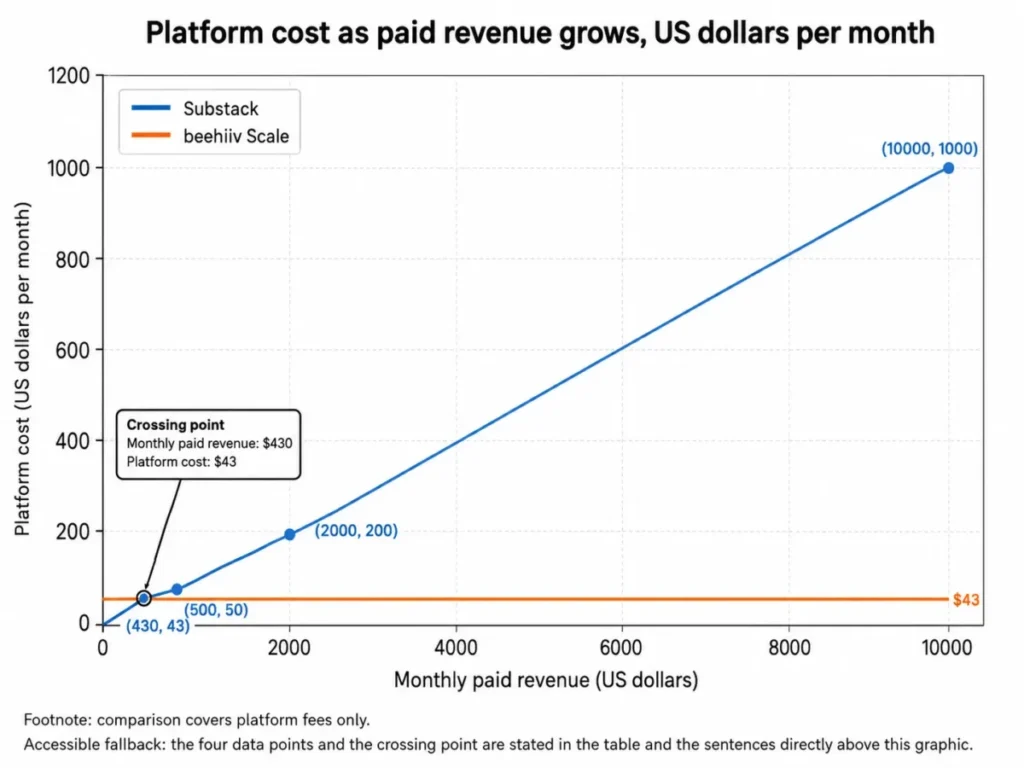
That comparison covers platform fees only. It excludes card and payment processing, taxes, annual-commitment effects, other add-ons, and every difference in what the two products do, so it is a fee comparison rather than a total cost of ownership.
Used properly, the number is a useful trigger. A publication earning under roughly $400 a month in paid subscriptions pays less under Substack’s revenue share, and one earning several thousand pays a large multiple of a fixed plan.
The switch is not free either. Moving a paying subscriber base means moving a payment relationship, which is the part of a migration that loses revenue, so the crossing point is a signal to plan rather than a signal to act that week.
Feature Gate Comparison: What Opens at Which Tier
| Platform | Automations | Paid subscriptions | A/B testing | Branding removal | Analytics and reporting |
|---|---|---|---|---|---|
| beehiiv | Scale | Scale | Scale | Max | Advanced website analytics on Scale |
| Kit | One basic on Newsletter, unlimited on Creator | Newsletter | Creator | Not documented | Not documented |
| MailerLite | Free, with higher capacity on paid tiers | Free, as digital products and services | Free | Paid tier | Reports on Free |
| Ghost | Not documented | Publisher | Not documented | Not documented | Advanced analytics on Publisher |
| Substack | Lifecycle drip campaigns, with no tier to buy | No tier to buy | Not documented | Not documented | Publisher analytics, with no tier to buy |
| Mailchimp | Deepens by tier from Essentials upward | Not documented | Qualifying tiers | Not documented | Reporting deepens by tier |
| Brevo | Free to 2,000 contacts, unlimited on Standard | Not documented | Standard | Starter add-on | Advanced reports on Standard |
| ActiveCampaign | Five actions on Starter, unlimited above it | Not documented | Not documented | Not documented | Attribution on higher tiers |
| GetResponse | One workflow on Starter, unlimited on Marketer | Creator | Not documented | Not documented | Not documented |
| Buttondown | Automations add-on | Paid subscriptions add-on | Not documented | White-labeling add-on | Analytics add-on |
“Not documented” in that grid means the official pages read for this article did not state the capability or its tier. It is an evidence boundary, not a verdict that the capability is missing.
The automation column is the one to read twice. A buyer comparing Kit, GetResponse, and ActiveCampaign on their entry tiers is comparing one basic automation, one workflow, and five actions, and those three numbers do not describe the same product at all.
The branding column is smaller but sharper. Only Brevo publishes an explicit price for removing the platform mark, at $9 a month on Starter.
beehiiv places the same option a full tier above its monetization plan, on Max rather than Scale.
Teams comparing Brevo pricing tiers should add that add-on to the Starter figure first.
Setup and Migration Difficulty
| Platform | Setup difficulty | Why |
|---|---|---|
| beehiiv | Low | A publication, a custom domain, and unlimited sending are available before any plan decision |
| Kit | Low to medium | Forms and broadcasts are quick, but the tagging model repays planning before the first import |
| MailerLite | Low | Campaigns, forms, a website, and a landing page can all go live on the free tier |
| Ghost | Medium | A hosted site, a domain, and theme decisions are a publishing project rather than a signup |
| Substack | Low | Publishing can start the same day, with a custom domain attached afterwards |
| Mailchimp | Low to medium | Familiar templates and audiences, with a segmentation model that rewards planning |
| Brevo | Medium | The multichannel surface is wider than a newsletter tool, so more is configured before the first send |
| ActiveCampaign | High | Segmentation models, branching automations, and CRM or ecommerce connections all want designing first |
| GetResponse | Medium to high | Funnels, webinars, and courses are each a separate configuration project |
| Buttondown | Low for a solo writer | A Markdown editor, a sending domain, and hosted archives, with team access behind an add-on |
These ratings are an editorial judgement about configuration effort, derived from the documented feature scope of each platform rather than from a stopwatch.
Migration is the gap this comparison does not close. Object-level import behavior, duplicate handling, attachment and history coverage, and failure recovery were not verified consistently across all ten products, so no cross-product migration ranking appears here.
The practical substitute is three questions put to each shortlisted vendor before signing. Does the import carry subscriber tags and signup dates, does it carry paid-subscription status and billing history, and what happens to a partial import that fails halfway.
Substack is the one platform in this list whose published feature set explicitly names subscriber-list ownership, custom domains, and data export. That does not make the migration easy, but it does make the exit route documented rather than assumed.
Which Newsletter Tool Should You Choose?
Start by deciding which of two businesses you are running, because the rest of the decision follows from it.
Every ranking reason in this article is a cohort match rather than an overall score. The winner by scenario changes with the workflow you run and with the first plan gate or disqualifier you hit, so the official plan limits checked on August 10, 2026 matter more than the order of the list.
If the newsletter is the product, and its revenue comes from readers or sponsors, you are shopping for a publishing business platform. beehiiv, Substack, Ghost, and Buttondown live here.
If the newsletter is one channel serving a business that sells something else, you are shopping for a marketing platform. Mailchimp, Brevo, and ActiveCampaign live there, with Kit, MailerLite, and GetResponse straddling the two.
Then work through seven questions in order:
- How many subscribers do you have, and how many will you have in twelve months? This sets which free tiers are real options and which are demos.
- How often will you send? Weekly cadence and daily cadence produce completely different bills on send-metered and frequency-assumed models.
- Will you charge readers? If yes, find the cheapest tier or add-on that opens paid subscriptions before comparing headline prices.
- Draw the automation the funnel needs. Count the steps and branches, then check that count against the entry tier’s documented allowance.
- Who else needs access? Ghost Starter and ActiveCampaign Starter allow one person, and Buttondown puts team access behind an add-on.
- Does the platform mark need to come off the email? On beehiiv that means the Max tier, on Brevo a paid add-on, and on MailerLite a paid tier, all priced in the hidden-costs list above.
- What is the cost at the tier that answers questions three to six, not at the entry tier?
Match your answers to the shortlist, and treat each match as a cohort rather than a personality. A monetizing newsletter business lands on beehiiv Scale, a creator with products on Kit Creator, a publisher who wants to own the site on Ghost Publisher, and a writer with no revenue yet stays on Substack.
A small list on a tight budget lands on MailerLite Free until the 250-subscriber wall, and a business with a large dormant contact database lands on Brevo. A lifecycle team with branching journeys lands on ActiveCampaign above Starter, and a technical writer who wants nothing extra lands on Buttondown.
Common Mistakes When Choosing Newsletter Software
- Budgeting from the entry price. In this list the tier that opens monetization or automation is one step up for beehiiv, Ghost, GetResponse, and often Kit, so the entry number is rarely the real number.
- Reading a contact allowance as a sending allowance. Brevo’s free tier stores a very large contact database and sends a small daily volume, and those two allowances are unrelated.
- Treating automation as a yes or no feature. One basic automation, one workflow, five actions, and a 2,000-contact cap are four different products wearing the same label.
- Trusting an old free-tier figure. MailerLite Free is 250 subscribers and 2,500 monthly emails on the page read for this article, which is tighter than several widely shared tables still suggest.
- Ignoring what happens above a limit. Mailchimp puts free sending on hold above the contact limit, while a paid plan can add a charge instead, and those are two very different operational risks.
- Underestimating add-on accumulation. Five common Buttondown add-ons cost more together than several rivals charge for a whole practical tier, before the base subscription.
- Choosing a revenue share without modelling growth. A share of revenue is the cheapest option at zero revenue and the most expensive at scale, and the crossover point is in the break-even table above.
Final Verdict
Across the best newsletter tools in this comparison, beehiiv is the pick for most newsletter businesses in 2026. Launch carries a large free audience at 2,500 subscribers with unlimited sends, and Scale puts audience growth, paid subscriptions at a 0% platform take rate, automations, and analytics behind one predictable annual fee.
The caveat sits on the same page. beehiiv’s plan comparison shows Launch with no automations, no paid subscriptions, no A/B testing, and no referral program, so the honest budget is $517 a year rather than nothing.
By buyer type, the answers separate cleanly. Kit for a creator selling digital products, MailerLite for the cheapest capable start under 250 subscribers, and Ghost for a publisher who wants the website, the theme, and the member relationship to belong to the business.
Substack for a writer with no revenue yet, or with paid revenue below the break-even point set out above. Mailchimp for a small business that wants one marketing platform, Brevo for a large contact database with modest sending, and ActiveCampaign only when branching lifecycle journeys are the actual requirement.
GetResponse earns its place when a webinar or a course is already planned, and Buttondown when a Markdown editor and a sending domain describe the entire brief.
Picking on the free tier alone is the one move to avoid. In this category the free plan tells you almost nothing about the plan you will be paying for in six months, and the upgrade-trigger grid above is a better predictor of your real bill than any headline price in this comparison.
FAQ
What is the best newsletter tool overall?
beehiiv is the strongest all-round choice for a newsletter that needs to make money, because its Scale tier combines audience growth, paid subscriptions at a 0% platform take rate, automations, and analytics in one plan. For a writer with no revenue yet, Substack is the better starting point, since it charges no monthly fee at all.
What is the best free newsletter platform?
beehiiv Launch has the largest free ceiling in this comparison, at 2,500 subscribers with unlimited sends. MailerLite Free is more capable feature for feature but stops far sooner, and Substack has no free-tier subscriber limit at all, charging only once a publication earns.
Is beehiiv better than Substack?
For a newsletter business, usually yes. beehiiv’s Scale tier caps platform cost at a fixed annual fee and adds an ad network and automations, while Substack takes a share of paid-subscription revenue with no ceiling. Below the break-even point in the monetization section, Substack is cheaper and needs no plan decision.
Which newsletter platform is best for paid subscriptions?
It depends on revenue. Substack wins below the break-even point set out in the monetization section because there is no plan fee, and beehiiv Scale wins above it because a fixed plan fee stops growing. Ghost Publisher is the choice when owning the site and the member relationship matters more than either fee model.
How much does newsletter software cost?
Entry tiers in this comparison run from free to under twenty dollars a month, and the tiers most buyers land on sit well above that, as the pricing table shows. Substack sits outside the range entirely, charging a share of paid-subscription revenue instead of a plan fee.
Which newsletter tool has the best automation?
ActiveCampaign above its Starter tier lists unlimited automation actions and deeper segmentation than anything else here, and Kit Creator and GetResponse Marketer both offer unlimited workflows for a creator audience. Entry tiers are far weaker: one basic automation on Kit, one workflow on GetResponse Starter, and five actions on ActiveCampaign Starter.
Which newsletter platform is best for a small business?
Mailchimp suits a business where the newsletter is one channel in a broader marketing programme, because automation, segmentation, and seats deepen predictably by tier. Brevo suits a large contact database with modest sending, and MailerLite suits a small list where budget is the binding constraint.
Can I move my subscribers between newsletter platforms?
Yes, if you plan for it, and Substack’s published feature set names subscriber-list ownership, custom domains, and data export, which makes that exit route explicit. Object-level import behavior varies too much across these ten products to rank here, so ask each vendor about tags, signup dates, paid-subscription status, and failed-import recovery.
Do I need a separate CRM alongside a newsletter tool?
No, unless sales follow-up depends on it, because a publishing platform tracks subscribers rather than deals and a business selling a considered purchase usually needs both. Teams in that position should compare the best CRM for marketing automation rather than stretching a newsletter tool into pipeline management.
Which newsletter platform lets me own my domain and audience?
Ghost gives the strongest ownership position, since the site, the theme, the analytics, and the member revenue all stay with the publisher. Substack names subscriber-list ownership, custom domains, and data export in its published features, and beehiiv offers custom domains from its free Launch tier.
Whichever you shortlist, choose the newsletter tool and the practical plan together, matching audience size, send volume, monetization model, automation depth, and publishing requirements rather than the entry price.