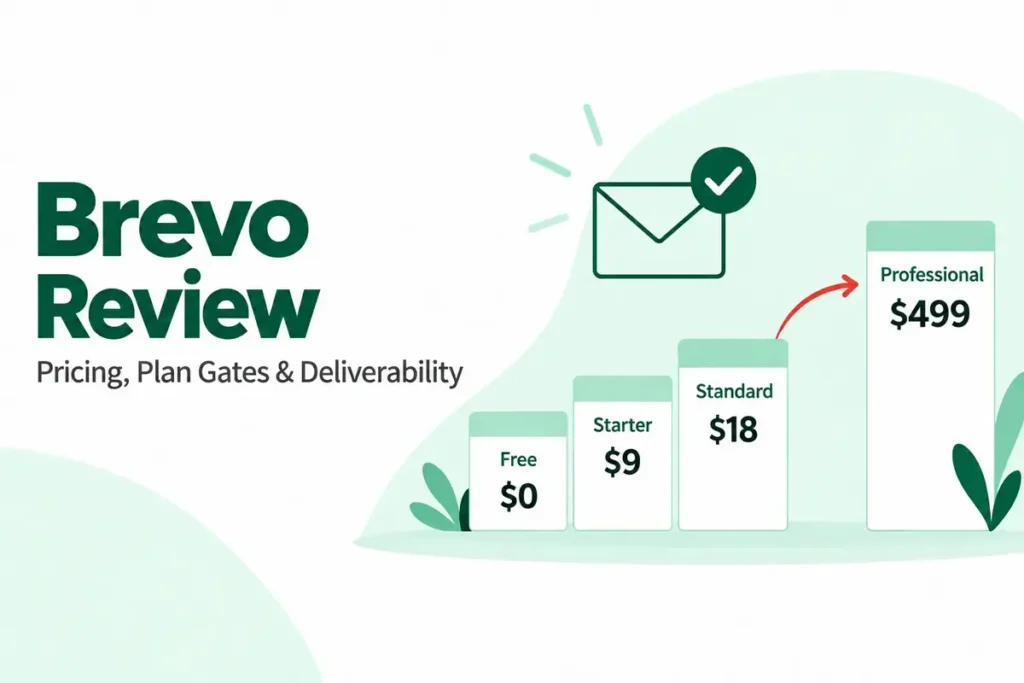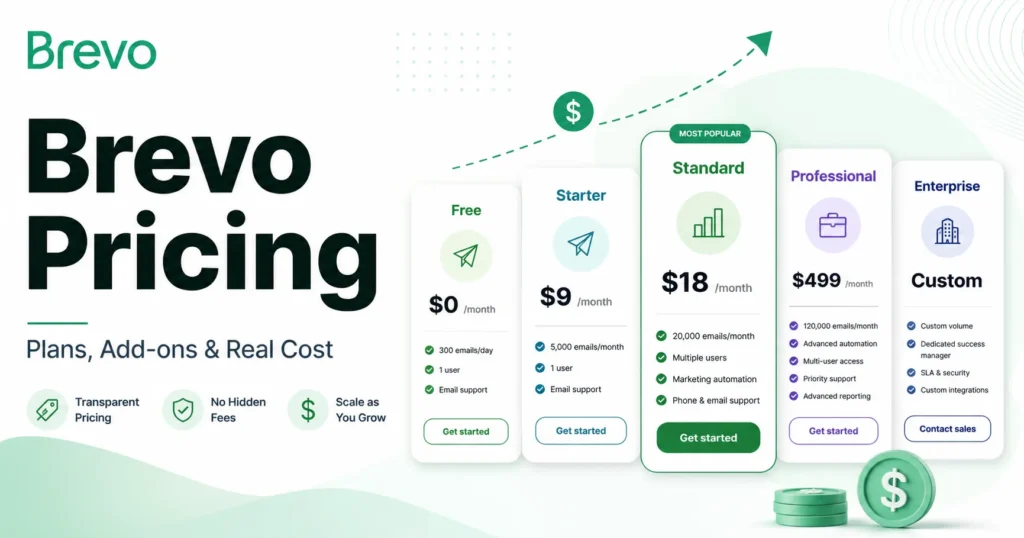
Brevo pricing starts at $0 for the Free plan and $9/month for Starter, which is why so many buyers file it under “cheap email tool.” That number stops describing your bill the moment you remove branding, add a second marketing user, turn on SSO, or send past 300 emails a day.
For most growing teams, the plan that actually matters is Standard at $18/month, because it adds automation, A/B testing, and logo removal without the $499/month jump to Professional. This guide breaks down every Brevo plan, the add-ons that change the real price, free-plan limits, team-size cost scenarios, billing terms, and how Brevo compares to other email marketing platforms in 2026.
I write these buying guides for SaaS CRM Review as a software buying analyst, not as a Brevo affiliate cheerleader. If you want the wider category view, see our roundup of the best email marketing platforms after you finish here.
In This Article (18 sections)
Quick Pricing Verdict
| Question | Answer |
|---|---|
| Starting paid price | $9/month (Starter, from 5,000 emails/ |
| Free plan | Yes, 300 emails/ |
| Best plan for most teams | Standard, $18/ |
| Plan to avoid for brand-sensitive senders | Starter, once you add the $9/month logo-removal add-on |
| Biggest hidden cost | SAML SSO at $324/ |
| Sharpest price cliff | Standard $18 to Professional $499/ |
| Best alternative if too expensive | Contact-based tools like Mailchimp or MailerLite for small lists |
| Pricing verified | Official Brevo pricing and help pages, checked July 1, 2026 |
What this means: Brevo is genuinely inexpensive at the entry tier, but the entry price is not the budget number. The real decision sits between Standard and Professional, and the add-on stack is where finance gets surprised.
How I checked this pricing
I built this guide from Brevo’s official pricing page, the help-center pricing and add-on articles, the Free plan limits page, and the Brevo Terms, all checked on July 1, 2026. I did not run a hands-on account test, so every number here traces to an official Brevo source or a clearly labeled third-party pricing matrix.
Brevo restructured its plans in October 2025. If another guide still shows a “Business” plan, it predates that change and is stale.
The Advertised Price vs the Real Price
Brevo’s plan cards advertise clean starting prices. The real invoice depends on branding, seats, security, and sending volume, and each of those sits in a separate add-on or a higher tier.
| Scenario | Advertised price | Real monthly cost | What drove the gap |
|---|---|---|---|
| Starter, but you want no Brevo logo | $9/month | $18/ | Logo removal add-on, $9/month |
| Standard, 4-person marketing team | $18/ | Professional territory | Standard caps at 3 marketing seats |
| Professional, but you need SSO | $499/ | $823/ | SAML SSO add-on, $324/ |
| Professional, wanting a dedicated IP | $499/ | ~$520/ | Dedicated IP, $251/ |
What this means: The advertised price holds only for a single-seat, branded, low-volume sender. Once branding, seats, or security enter the picture, budget from the real column, not the plan card. Our full Brevo review covers the product experience behind these numbers.
Five Hidden Costs Brevo’s Plan Cards Skip
Brevo’s pricing FAQ says there are no hidden fees, and in a narrow sense that is fair: every add-on is documented. The catch is that the documentation lives away from the plan cards, so buyers price the plan and forget the add-ons.
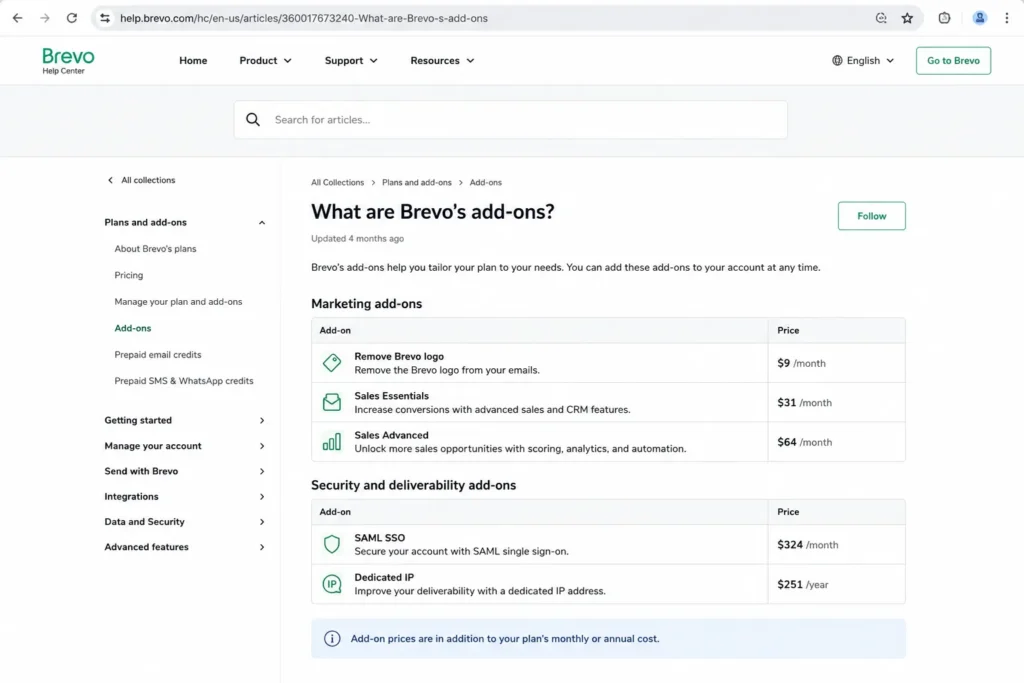
Here is the full add-on stack in one place, checked against Brevo’s official add-on help article on July 1, 2026.
| Add-on | Price | Available on | Billing |
|---|---|---|---|
| Remove Brevo logo | $9/month | Starter (included on Standard and up) | Monthly |
| Sales Essentials | $31/ | All plans | Monthly |
| Sales Advanced | $64/ | Professional, Enterprise | Monthly |
| Additional marketing seat | $9/month each | Standard (up to 3 total) | Monthly |
| Additional sales seat | Same as your Sales package | By plan limit | Monthly |
| SAML SSO | $324/ | Professional (included on Enterprise) | Monthly |
| Dedicated IP | $251/ | Professional, Enterprise | Annual |
| Prepaid email credits | Variable, non-refundable | All plans | One-time |
| Prepaid SMS / WhatsApp credits | Variable by country | SMS all plans, WhatsApp Pro/ | One-time |
What this means: These add-ons rarely appear in the plan comparison, yet they can double a Starter bill or push Professional past $800/month. Price the add-ons you actually need before you commit.
The Starter logo trap
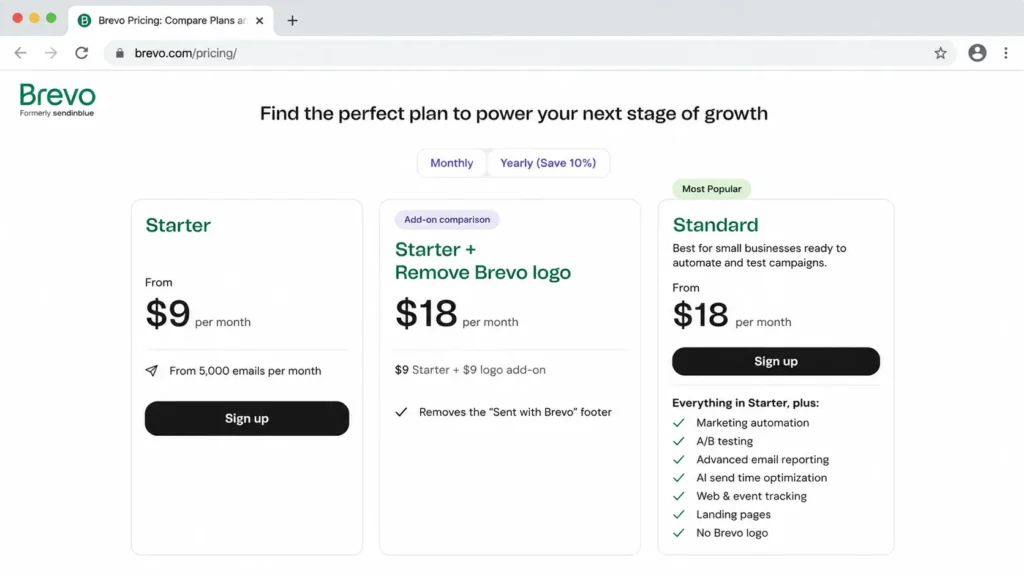
Starter is advertised at $9/month, but the Brevo logo stays on your emails unless you buy the $9/month removal add-on. That makes a branded-email Starter plan cost $18/month, the same as Standard.
For any sender who cares about brand appearance, Starter plus logo removal is a worse deal than Standard, because Standard removes the logo and adds automation, A/B testing, and advanced reports for the same $18. My recommendation: if you need unbranded emails, skip Starter and start at Standard.
SAML SSO costs $324/month, and it is not on Professional by default
Single sign-on is where security-conscious buyers misbudget Brevo. SAML SSO is included with Enterprise, but on Professional it is a $324/month add-on on top of the $499 plan.
That turns a Professional plan with SSO into roughly $823/month before taxes. If your security team requires SSO with Okta, Azure AD, or Google Workspace, price Enterprise against Professional-plus-SSO before you decide.
Dedicated IP is $251/year, and most senders do not need it
A dedicated IP costs $251/year on Professional and Enterprise, with one IP included on Enterprise. Brevo recommends it only for senders running at least three campaigns per week to 3,000 or more contacts, or over 100,000 emails per month with no long gaps.
Buy a dedicated IP for volume and sender-reputation control, not for peace of mind. If you send irregularly, a dedicated IP can hurt email deliverability instead of helping it, because reputation depends on consistent volume.
Sales features are free, but serious sales use is a separate bill
Brevo includes basic sales features on paid plans, which makes it easy to assume the CRM side is bundled. Real pipeline work runs through Sales Essentials at $31/month or Sales Advanced at $64/month, and each extra sales seat costs the same as the package it joins.
So a two-person team on Sales Essentials is $62/month for the sales layer, on top of the marketing plan. Treat Brevo’s sales suite as an add-on product, not an included CRM.
Prepaid credits do not expire, but they are non-refundable
Prepaid email credits run from 5,000 to 1 million, never expire, and cost one credit per email sent to one contact. They are also non-refundable, and prepaid SMS and WhatsApp credits vary by destination country and message type.
For occasional senders, prepaid credits beat a monthly subscription. For anyone sending predictably each month, a plan is cheaper, and you avoid paying for credits you cannot get back.
Brevo Plans Compared
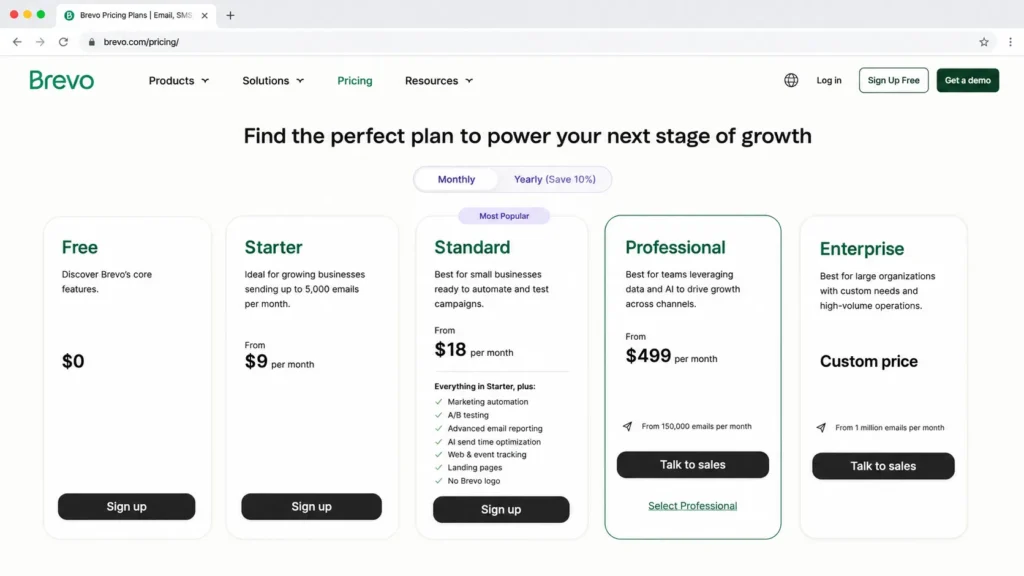
Brevo prices mainly by monthly email volume, not by contacts, which is the opposite of most competitors. Here is the full lineup with official starting prices, checked July 1, 2026.
| Plan | Monthly | Billing basis | Best for | Key limits |
|---|---|---|---|---|
| Free | $0 | Email sends | Testing and tiny lists | 300 emails/ |
| Starter | From $9 | Monthly email volume, from 5,000/ | Low-volume senders on a budget | No logo removal without $9/month add-on |
| Standard | From $18 | Monthly email volume, from 5,000/ | Growing SMBs needing automation | 1 seat included, up to 3 with add-ons; 1 landing page |
| Professional | From $499 | Monthly email volume, from 150,000/ | High-volume multichannel teams | 10 seats; SSO and dedicated IP are add-ons |
| Enterprise | Custom | Negotiated | 1M+ contacts, custom data and control | Contact sales; unlimited marketing seats |
What this means: The lineup looks smooth until you hit the gap between Standard and Professional. Annual billing shows a Yearly -10% option on the pricing page, so verify exact annual totals at checkout rather than trusting a rounded figure.
What Each Brevo Plan Includes
Free: real, but operationally capped
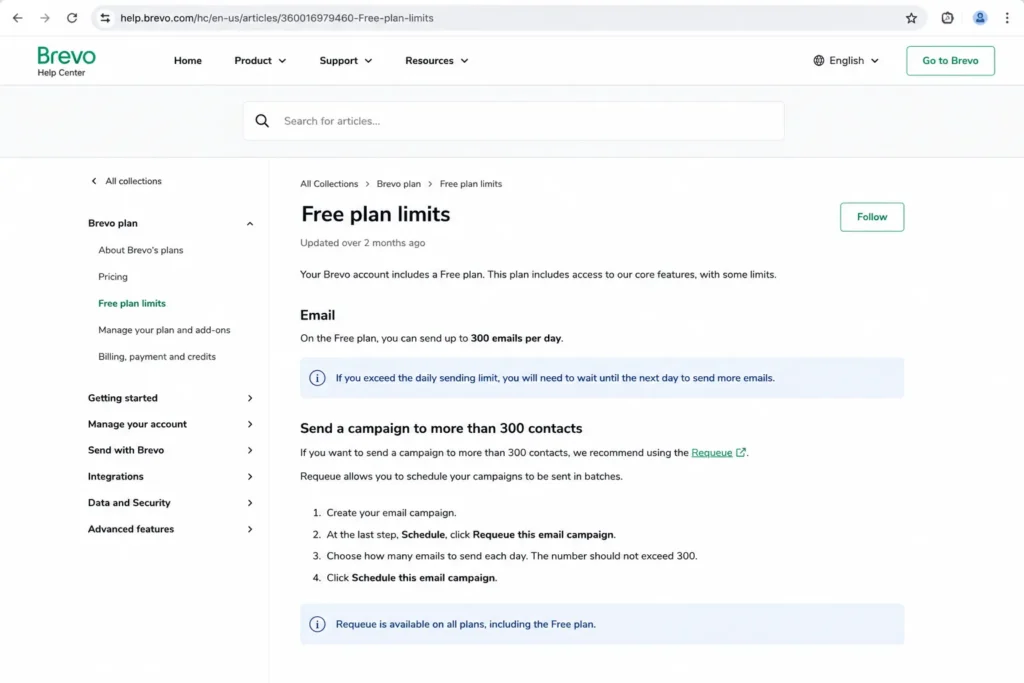
Free includes 300 email sends per day, up to 100,000 stored contacts, and one user seat. It keeps the “Sent with Brevo” sticker, limits active automation to 2,000 contacts, and unused daily sends do not roll over.
Missing: logo removal, A/B testing, landing pages, phone support, and any way past the 300/day cap. Avoid Free if you run real campaigns above 300 recipients, because you will resend manually every day.
Starter: budget sending with a branding asterisk
Starter starts at $9/month, removes the daily cap, and sends from 5,000 emails per month upward. It still shows the Brevo logo unless you add the $9/month removal.
Missing: marketing automation depth, A/B testing, and landing pages, which sit on Standard. Avoid Starter if you want unbranded, automated campaigns, because Standard does that for the same effective $18.
Standard: the plan most SMBs actually want
Standard at $18/month adds marketing automation, A/B testing, advanced reports, AI send-time optimization, web and event tracking, one landing page, priority email support, and logo removal. It includes one marketing seat and allows up to three with add-ons.
Missing: WhatsApp campaigns, contact scoring, AI segmentation, and phone support, which are Professional-only. My recommendation: for most teams under 150,000 monthly sends, Standard is the practical plan.
Professional: powerful, but a 27x price jump
Professional starts at $499/month, begins at 150,000 emails per month, and includes 10 marketing seats. It adds WhatsApp, popups, mobile and web push, contact scoring, advanced ecommerce features, AI segmentation, an AI Data Analyst, phone support, and deliverability specialist support.
Missing by default: SAML SSO and dedicated IP, which are paid add-ons. Avoid Professional if you only need one or two of its gated features and do not send high volume, because Standard plus targeted tools is far cheaper.
Enterprise: custom pricing for scale and control
Enterprise is custom-priced and aimed at companies with roughly a million contacts or more. It adds multi-account management, custom objects, mobile wallet, custom loyalty, custom data integrations, a dedicated IP, included SSO/SAML, tailored onboarding, a CSM, and an SLA.
Missing: a public price, so budgeting requires a sales conversation. Choose Enterprise when unlimited marketing seats, included SSO, and custom data handling are hard requirements.
Feature Gates: What You Actually Get by Plan
The gates decide the plan more than the price does. This table maps the features that trigger most upgrades, checked against Brevo’s pricing and help pages on July 1, 2026.
| Feature | Free | Starter | Standard | Professional | Enterprise |
|---|---|---|---|---|---|
| Daily send cap removed | No, 300/ | Yes | Yes | Yes | Yes |
| Remove Brevo logo | No | Add-on $9/mo | Yes | Yes | Yes |
| Marketing automation | Up to 2,000 contacts | Limited | Unlimited contacts | Advanced | Custom |
| A/B testing | No | No | Yes | Yes | Yes |
| Landing pages | No | No | 1 | 10 | Custom |
| WhatsApp campaigns | No | No | No | Yes | Yes |
| Contact scoring / AI segmentation | No | No | No | Yes | Yes |
| Phone support | No | No | No | Yes | Yes |
| Marketing seats included | 1 | 1 | 1 (up to 3) | 10 | Unlimited |
| SAML SSO | No | No | No | Add-on $324/mo | Included |
| Dedicated IP | No | No | No | Add-on $251/yr | 1 included |
What this means: Two gates cause most Brevo budget shocks. Automation past 2,000 contacts pushes free users to a paid plan, and WhatsApp, contact scoring, and AI segmentation all sit behind the $499 Professional wall.
When the Brevo Free Plan Stops Working
Brevo’s Free plan is one of the more usable free tiers in email, but it breaks in a specific, predictable way. The 300-emails-per-day cap is a send limit, not a signup limit, and it applies to campaigns too.
Send a campaign to 1,200 contacts on Free, and only 300 go out on the scheduled day. To reach the rest, you manually resend with the Requeue action across the following days, which turns one campaign into a four-day chore.
Add the 2,000-contact automation ceiling, the single seat, and the permanent Brevo sticker, and Free becomes a testing tier rather than an operating tier. It stops working the day your list outgrows 300 daily recipients or your automation needs to touch more than 2,000 people.
My recommendation: treat Free as a trial you never have to end, then move to Standard once campaigns exceed 300 recipients or automation becomes central.
Real Cost Scenarios by Team Size
Brevo is not a per-seat product for marketing, but marketing-seat caps still force plan jumps. This is where “cheap email tool” runs into team reality.
| Marketing users | Public-plan fit | Starting monthly | Why |
|---|---|---|---|
| 1 to 3 | Standard | $18 plus $9/seat above one | Standard includes 1 seat, up to 3 with add-ons |
| 5 | Professional | From $499 | Standard caps at 3 seats, so 5 users forces Professional |
| 10 | Professional | From $499 | Professional includes 10 marketing seats |
| 25 | Enterprise | Custom | Public plans cap at 10; unlimited seats need Enterprise |
| 50 to 100 | Enterprise | Custom | Enterprise for unlimited seats and procurement terms |
What this means: The seat cap is the quiet budget breaker. A four- or five-person marketing team cannot stay on Standard, so it jumps from $18 to $499 for seats alone, even if send volume is modest.
For a solo sender or freelancer, Standard at $18/month is the realistic floor once you want automation and unbranded emails, and Free covers you until daily sends pass 300. A single seat is plenty here, so the add-on math stays simple.
At 20 marketing users, you are firmly in Enterprise territory, because public plans cap at ten seats. Budget for a sales conversation, custom onboarding, and negotiated volume rather than a public rate.
For sending volume itself, a third-party pricing matrix from EmailToolTester lists Starter and Standard rates by monthly emails, checked March 2026: roughly $17/$35 at 10,000 emails, $29/$65 at 20,000, and $69/$129 at 100,000. Treat those as secondary context, and confirm current numbers at Brevo checkout, since the official slider is the source of truth.
Monthly vs Annual Billing
Brevo shows a Yearly -10% option on the pricing page, applied by switching the billing toggle. That discount is modest by SaaS standards, so the annual commitment is more about locking a rate than saving heavily.
A third-party review observed annual-equivalent rates near $8.08/month for Starter, $16.17 for Standard, and $449.08 for Professional. Use those only as a rough guide, because exact annual totals and taxes appear at checkout.
My recommendation: pay monthly while you are still testing fit, then switch to annual once you have picked the plan and confirmed the seat count you actually need.
Billing Terms and Caveats Worth Reading
The Brevo Terms hold a few clauses that matter for finance and procurement, and most competing pricing pages skip them. I checked these against the Brevo Terms of Use on July 1, 2026.
Public plan prices exclude VAT, and additional charges or taxes can apply on top of the listed rate. You cannot downgrade to a lower plan level before your current subscription ends, so an oversized plan is locked in for the term.
Professional subscribers must give written notice at least 15 calendar days before renewal to avoid auto-renewal. Brevo also reserves the right to charge a 100-euro annual fee for specific invoicing-platform or public-entity payment arrangements.
For scale, the Terms describe Professional fair use as a limit of two million contacts, so “high volume” still has a documented ceiling. None of this is unusual for SaaS, but a buyer who assumes free downgrades or tax-inclusive pricing will be wrong on both.
Brevo Buyer Risk Ledger
Before you sign, name the risks that turn a cheap plan into an expensive one. I keep a short ledger of what tends to go wrong after month two, with the buyer consequence and a mitigation for each.
Seat-cap risk. A team that hires past three marketing users cannot stay on Standard, so headcount growth, not send volume, triggers the $499 Professional jump. Mitigation: forecast marketing seats for the next two quarters before you pick a plan.
Automation-ceiling risk. The Free plan stops automating at 2,000 contacts, and irregular high-volume senders can hit deliverability limits without a dedicated IP. Mitigation: model your active-automation audience now, not your total list size.
Channel-cost risk. SMS and WhatsApp are prepaid, non-refundable, and priced by destination country, so a multichannel campaign can add an unbudgeted line item. Mitigation: price a sample SMS and WhatsApp send by country before you promise multichannel to stakeholders.
Downgrade-lock risk. Brevo’s Terms block a plan downgrade before the current subscription ends, so an oversized annual plan is money you cannot recover mid-term. Mitigation: buy the smaller plan monthly first, then commit annually once the fit is proven.
Renewal risk. Professional auto-renews unless you give written notice at least 15 calendar days before the renewal date. Mitigation: set a calendar reminder 30 days out so the choice stays yours, not the default.
The renewal question I would want answered before signing: after 90 days, is the automation, reporting, and channel mix delivering enough to justify the tier, or are you paying Professional prices for Standard-level use?
Which Brevo Plan Should You Choose?
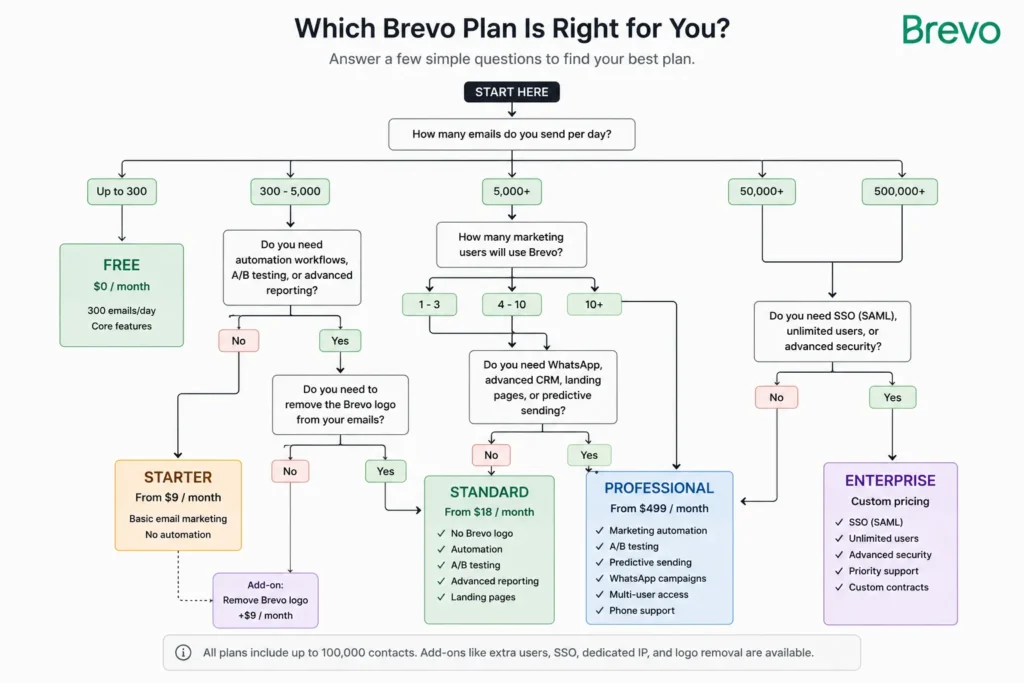
The plan follows your sending volume, branding, automation, seat count, and channel needs. Here is the decision path I would use.
Choose Free if you send under 300 emails a day, keep automation under 2,000 contacts, and accept the Brevo logo. Choose Starter only if you send low volume, need no automation, and do not care about branding.
Choose Standard if you want automation, A/B testing, landing pages, advanced reports, and unbranded emails, and your team fits within three marketing seats. Choose Professional if you need WhatsApp, contact scoring, AI segmentation, phone support, or more than three marketing seats.
Choose Enterprise if you require SSO included, unlimited seats, a dedicated IP, or custom data and onboarding. For most small and mid-size senders, my recommendation is Standard, with a hard look at Professional only when a specific gated feature becomes non-optional.
Which Brevo Plan Should You Avoid?
Avoid Starter with the logo add-on for any brand-conscious sender. At an effective $18/month it matches Standard’s price while giving you less, so the only buyers who benefit from Starter are those happy to keep the Brevo logo.
Avoid Professional if you are buying it for one gated feature and your volume is low. Paying $499/month to switch on a single capability rarely pencils out, and a Standard plan plus a targeted third-party tool usually costs less.
The exception is high-volume multichannel senders. If you already push past 150,000 emails a month and run WhatsApp or scoring, Professional stops being expensive and starts being appropriate. If Starter and Standard both feel tight, a contact-based tool such as Mailchimp may fit a small list better than Brevo’s volume model.
Brevo Pricing vs Competitors
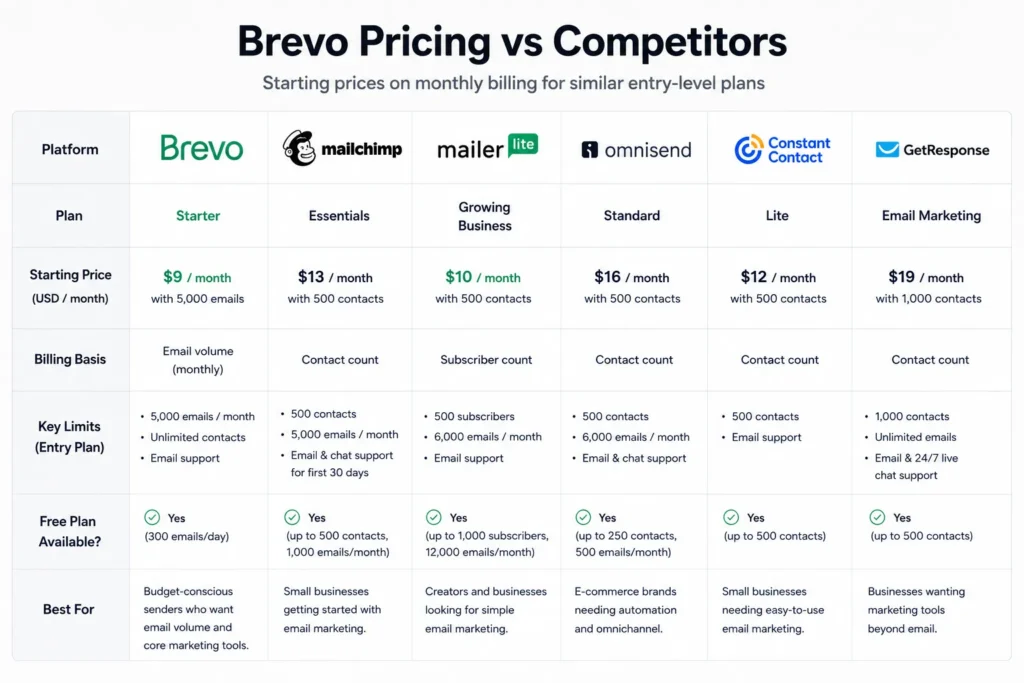
Brevo’s core pricing difference is that it charges by email volume, while most rivals charge by contacts or subscribers. That makes Brevo cheaper for large lists that send infrequently, and less obviously cheaper for small lists that send often.
| Tool | Starting paid price | Billing basis | Free plan |
|---|---|---|---|
| Brevo | $9/month (Starter) | Email volume | Yes, 300/ |
| Mailchimp | $13/ | Contact tiers | Yes |
| MailerLite | Subscriber slider | Subscriber count | Yes |
| Omnisend | $16/ | Contacts / ecommerce | Yes, 500 emails/mo |
| Constant Contact | ~$12/ | Contact tiers | No permanent free plan |
| GetResponse | $19/ | Contact tiers | 14-day trial |
What this means: If you store 80,000 contacts but email them twice a month, Brevo’s volume pricing usually wins. If you email a 2,000-person list daily, a contact-based plan can be cheaper, so run your own send frequency against both models.
Integrations and Security That Affect the Bill
Two cost drivers hide in the integration and security columns, so they belong in a pricing guide, not just a feature review. Brevo’s unified REST API covers email, SMS, WhatsApp, contacts, events, ecommerce data, and custom objects, which keeps developer teams from paying for a separate transactional provider.
Native integrations include WordPress, WooCommerce, Shopify, and BigCommerce, plus more than 7,000 apps through Zapier. For most SMBs, that removes the need for paid middleware, so the integration line stays near zero.
Security is where the bill moves. Brevo runs EU-based servers, encrypts account data before backup, and holds ISO 27001:2022 certification, and its practices support GDPR, CASL, and CCPA.
The compliance basics come with the plan, but the admin control most enterprises require, SAML SSO, does not. On Professional it is the $324/month add-on covered earlier, and only Enterprise includes it by default. My recommendation: if your security review mandates SSO, treat it as a pricing input from day one, not a late add-on.
Is Brevo Worth the Price?
Brevo is worth it for SMBs with large contact databases, moderate send frequency, and practical automation needs, especially WordPress, WooCommerce, and Shopify senders who also want transactional email through the same API. Transactional email, SMTP, and webhooks are available on every plan, which is a real advantage for developers and SaaS teams.
Brevo is not worth it if you need SSO at a mid tier without a $324/month add-on, more than three marketing seats below Professional, fixed and predictable SMS or WhatsApp pricing, or advanced landing pages. In those cases, price Professional-plus-SSO against Enterprise, or compare an ecommerce-focused tool like Omnisend.
The switch-or-stay call is simple. Stay with Brevo if volume pricing and transactional email fit your stack, and switch to a contact-based tool if your list is small, your send frequency is high, or your seat count sits awkwardly between Standard and Professional.
How to Avoid Overpaying for Brevo
- Start on Standard, not Starter, if you want unbranded automated campaigns, since the logo add-on erases Starter’s price advantage.
- Count marketing seats before you buy, because the jump from three seats on Standard to Professional’s ten costs $481/month, not a seat fee.
- Buy a dedicated IP only if you clear Brevo’s volume threshold of three weekly campaigns to 3,000-plus contacts, or you will pay $251/year for worse deliverability.
- Price Professional-plus-SSO against Enterprise whenever SSO is mandatory, because the $324/month add-on can make Enterprise the cheaper path.
- Choose prepaid credits only for irregular sending, since they are non-refundable and a monthly plan is cheaper for predictable volume.
- Confirm annual totals at checkout before committing, because the 10% discount and taxes are applied there, not on the plan card.
- Cross-check any older Brevo pricing article, and ignore anything that still lists a “Business” plan, which Brevo retired in October 2025.
Frequently Asked Questions
How much does Brevo cost in 2026?
Brevo Free is $0, Starter starts at $9/month, Standard at $18/month, and Professional at $499/month, with Enterprise priced custom. These are official starting prices checked July 1, 2026, and your real cost depends on add-ons, seats, and send volume.
Is Brevo really free forever?
Yes, the Free plan has no time limit. It caps sending at 300 emails per day, keeps the Brevo logo, limits active automation to 2,000 contacts, and allows one user.
Does Brevo charge by contacts or by email sends?
Brevo charges mainly by monthly email volume, not by contact count, and stores up to 100,000 contacts even on Free. That model favors large lists that send infrequently.
What is the difference between Brevo Starter and Standard?
Starter removes the daily send cap but keeps the logo and lacks automation, A/B testing, and landing pages. Standard, at $18/month, adds all of those and removes the logo, which makes it the better value for most senders.
How much does Brevo SSO cost?
SAML SSO is a $324/month add-on on the Professional plan and is included with Enterprise. A Professional plan with SSO runs about $823/month before taxes.
Does Brevo include transactional email?
Yes, every Brevo plan includes transactional email with RESTful APIs, SMTP, outbound webhooks, and unlimited log retention. That makes it usable for developers on any tier.
Is Brevo cheaper than Mailchimp?
Often, for large lists that send occasionally, because Brevo prices by email volume while Mailchimp prices by contact tiers starting at $13/month. For small lists that email frequently, Mailchimp can be competitive, so compare against your own send frequency.
Which Brevo plan has WhatsApp campaigns?
WhatsApp campaigns are gated to Professional and Enterprise. WhatsApp credit pricing also varies by destination country and template type, so treat it as a variable cost.
Does Brevo offer an annual discount?
Yes, the pricing page shows a Yearly -10% option. Confirm exact annual totals and taxes at checkout, since the discount is applied there rather than on the plan card.
Can I downgrade my Brevo plan anytime?
No. Brevo’s Terms state you cannot downgrade to a lower plan level before your current subscription ends, so avoid over-buying a tier you may want to leave early.
Pricing sourced from Brevo’s official pricing page, help center, add-on documentation, and Terms of Use, all checked July 1, 2026. Prices exclude taxes and can change, so confirm current figures at Brevo checkout before purchasing.