Asana pricing runs across four public tiers plus a governance tier. Personal is free for up to 2 users, Starter is $10.99 per user per month billed annually ($13.49 billed monthly), Advanced is $24.99 per user per month billed annually ($30.49 billed monthly), and Enterprise and Enterprise+ are quote-based (contact sales).
That is the headline. The rest of this guide shows what each plan actually unlocks, where the real Asana cost hides, and which plan fits which team, using a revenue-operations lens: adoption risk, plan gates, budget pressure, and what breaks first as the team grows.
The goal here is a buying decision, not a feature list. Two teams on the same tier can pay very different amounts once add-ons, AI usage, and tax enter the picture, so this guide separates the seat price from the total you actually pay.
If you are still choosing at the category level, our roundup of the best project management software is a better starting point than one pricing page. If you want the full feature view of the product itself, see our Asana review.
In This Article (22 sections)
Quick verdict
- Best free option: Personal, but only if your team is 2 people or fewer.
- Best paid plan for most small teams: Starter at $10.99 per user per month annually, for timelines, dashboards, and unlimited automations.
- Best plan for portfolios and goals: Advanced at $24.99 per user per month annually.
- Best plan for SAML SSO and SCIM: Enterprise, since both are gated to Enterprise and Enterprise+.
- Biggest hidden cost risk: stacked add-ons and AI credits, because Timesheets and Budgets, AI Studio Plus or Pro, and Enterprise governance add-ons all sit on top of your per-seat price.
This box is opinion built on verified facts. The prices and plan gates throughout this guide come directly from Asana’s pricing page.
Asana pricing snapshot (all plans)
| Plan | Annual price | Monthly price | Best for | Key features | Main limitation | Hidden cost risk |
|---|---|---|---|---|---|---|
| Personal | $0 | $0 | Individuals and pairs | Unlimited tasks and projects, list, board, and calendar views, 100+ free integrations | Hard cap of 2 users | Growing past 2 users forces a paid plan |
| Starter | $10.99/ | $13.49/ | Small teams that need timelines and reporting | Timeline and Gantt, dashboards, unlimited automations, unlimited free guests, AI Studio Basic (50K credits) | No portfolios, goals, or SAML SSO | AI credits and paid add-ons stack on top |
| Advanced | $24.99/ | $30.49/ | Teams managing portfolios and goals | Portfolios, goals, workload, approvals and proofing, time tracking, AI Studio Basic (75K credits) | No SAML SSO or SCIM | Timesheets and Budgets add-on for real budgeting |
| Enterprise | Contact sales | Contact sales | Orgs needing SAML SSO and SCIM | SAML, SCIM, universal workload, capacity planning, AI Studio Basic (200K credits) | Quote-based, no public rate | Compliance and Permissions management are paid add-ons |
| Enterprise+ | Contact sales | Contact sales | Regulated orgs needing governance | Advanced security, data residency, audit logs, managed workspaces | Quote-based, highest tier | Governance add-ons plus procurement and onboarding effort |
The pattern to notice is that published prices only cover Personal, Starter, and Advanced. Anything above Advanced is a sales conversation, and several security and resource features buyers assume are included are actually paid add-ons.
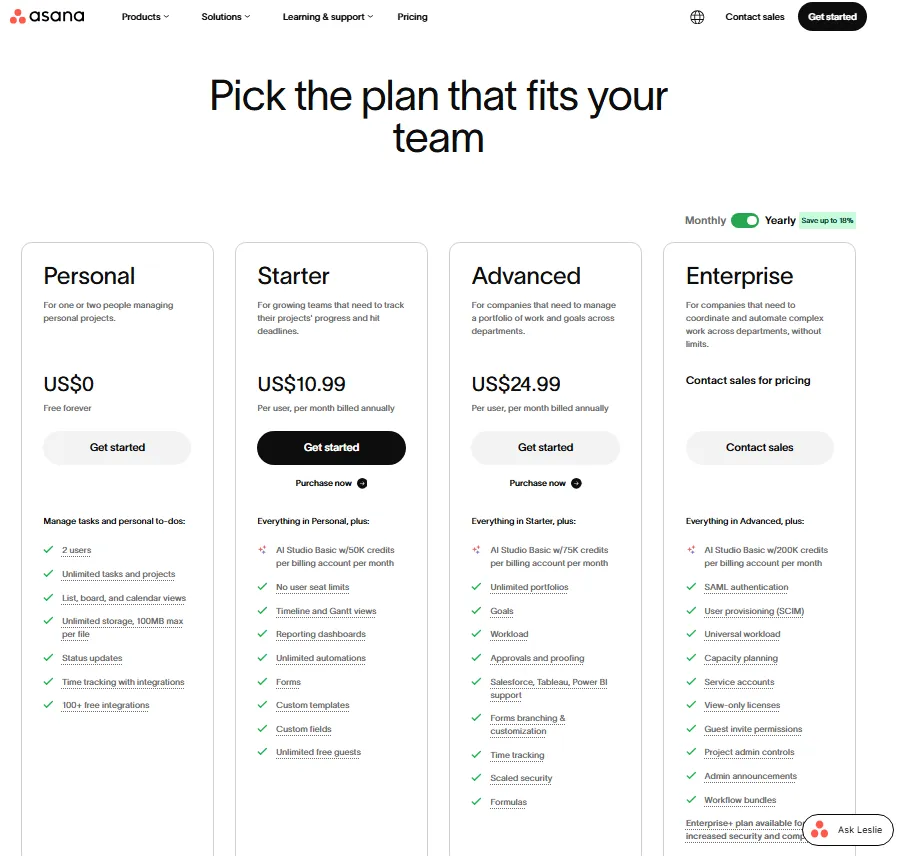
Asana’s official pricing page shows Personal at $0, Starter at $10.99 per user/month, Advanced at $24.99 per user/month, and Enterprise as contact sales pricing.
How Asana pricing works: cost per user and billing
Asana charges per user per month on paid plans, and Personal carries no per-seat charge. Starter and Advanced remove the seat cap entirely, so you pay for each member you add.
Billing is either monthly or annual, and annual is cheaper per seat. Asana advertises savings of up to 18 percent on annual billing, which matches the math on both paid tiers.
Seats are added in set increments rather than one at a time at every level. Between 2 and 5 total users you add seats in increments of 1, up to 30 users in increments of 5, up to 100 in increments of 10, up to 500 in increments of 25, and beyond 500 in increments of 50.
Those increments matter for mid-size teams. A team of 32 pays for a block that rounds up, so the marginal cost of the next hire is not always one seat, and planning headcount against the increment saves money.
Guests are the other lever on your Asana cost. Every paid plan includes unlimited free guests who do not count toward your paid user total, which matters for agencies and client-facing teams.
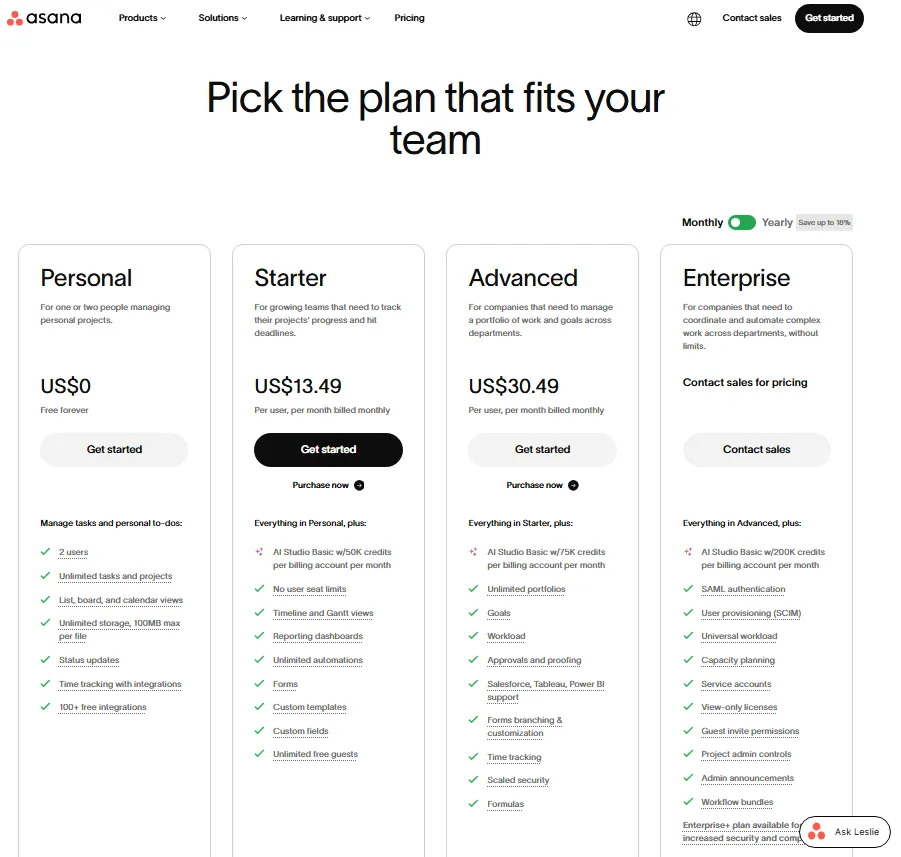
Asana’s monthly pricing view shows Starter at US$13.49 per user/month and Advanced at US$30.49 per user/month, while Personal remains free and Enterprise requires contact sales.
Asana price per user: seat price versus landed cost
The per-seat number is only the base of your Asana cost. Your real landed cost is the seat price, plus any add-ons the workflow needs, plus AI usage beyond the included credits, plus sales tax or VAT applied at checkout.
Consider a 10-person team on Advanced. The seats alone run about $2,999 per year on annual billing, but adding the Timesheets and Budgets add-on lifts the total by roughly $719 per year before any AI overage or tax.
The interpretation is simple: the sticker price undersells the real commitment for any team that needs budgets or heavy AI. The buyer impact is that two identical headcounts can differ by thousands of dollars a year depending on add-ons.
The recommendation is to build your budget from the total, not the seat price. List the add-ons you actually need first, then attach the per-seat cost, then add a line for tax.
Asana Pricing plans explained (what you actually get)
Personal / Free
Personal is free forever and supports up to 2 users. You get unlimited tasks and projects, list, board, and calendar views, unlimited storage with a 100MB per-file limit, status updates, time tracking through integrations, and 100+ free integrations.
Who should choose it: solo operators and 2-person teams who want structured task and project tracking without paying anything.
Who should skip it: any team of 3 or more, because the 2-user cap is a hard limit, not a soft nudge.
Upgrade trigger: the moment a third person needs to collaborate, or you need timeline, Gantt, dashboards, or automations.
Hidden cost warning: there is no gentle overage on Personal. Adding a third teammate moves the whole account onto a paid plan at full per-seat pricing.
Buyer scenario: a founder and co-founder can run early operations on Personal for free, and the first non-founder hire triggers Starter for everyone at once.
Starter ($10.99 annual, $13.49 monthly)
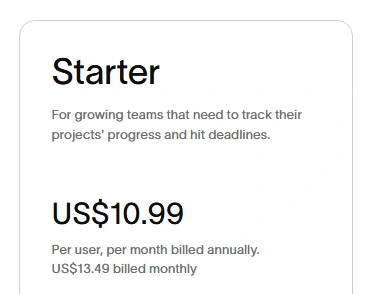
Starter is the first paid tier and the one most small teams land on. It adds no seat limits, timeline and Gantt views, reporting dashboards, unlimited automations, forms, custom fields, custom templates, and unlimited free guests, plus AI Studio Basic with 50,000 credits per billing account per month.
The Starter feature set is aimed at running a single team well. You get scheduling, reporting, and automation, but you do not get the cross-project layer that leadership usually wants once several projects run at once.
Who should choose it: teams of roughly 3 to 30 people who need scheduling views and reporting but do not yet manage cross-project portfolios.
Who should skip it: teams that need portfolios, goals, workload, approvals, or single sign-on, since none of those live on Starter.
Upgrade trigger: you begin juggling several related projects and want a portfolio rollup, or leadership asks for goal tracking.
Hidden cost warning: the 50,000 monthly AI Studio credits are a cap, not unlimited AI, so heavy AI use pushes you toward paid packages or a higher tier.
Buyer scenario: a 12-person marketing team runs campaigns on Starter comfortably until it wants one portfolio view across every campaign, which is the Advanced trigger.
Advanced ($24.99 annual, $30.49 monthly)
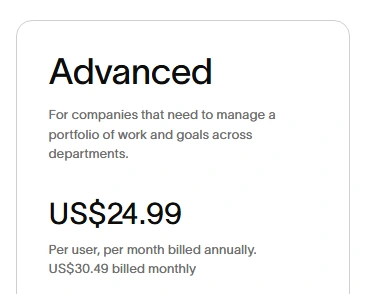
Advanced is built for coordinating a portfolio of work across departments. On top of Starter, it adds unlimited portfolios, goals, portfolio workload, approvals and proofing, forms branching, formulas, Salesforce, Tableau, and Power BI integrations, basic time tracking, and AI Studio Basic with 75,000 credits per billing account per month.
One clarification trips up buyers here, and it involves time tracking. Advanced includes basic time tracking that compares estimated versus actual time, but full timesheets, user rates, and project budgets are not part of Advanced.
Those resource-management features come from the paid Timesheets and Budgets add-on, not the Advanced seat price. Budgeting for Advanced without budgeting for that add-on is one of the most common planning misses on this plan.
Who should choose it: teams that manage several projects as portfolios and need goals, workload, and approvals in one place.
Who should skip it: teams whose main requirement is SAML SSO or SCIM, because paying for Advanced will not unlock either one.
Upgrade trigger: IT mandates SAML single sign-on or automated provisioning, or you need universal workload across the whole organization.
Hidden cost warning: if you expect native budgets and billable rates, add $5.99 per user per month for Timesheets and Budgets on top of the $24.99 seat price.
Buyer scenario: an agency on Advanced tracks time natively, then adds Timesheets and Budgets once it needs client budgets and billable rates per person.
Enterprise and Enterprise+ (contact sales)
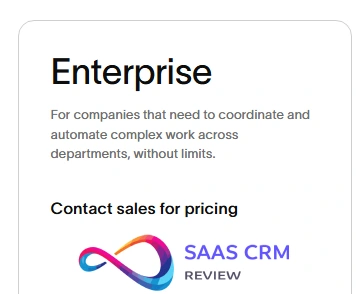
Enterprise and Enterprise+ are quote-based, so there is no public per-seat price. Enterprise adds SAML authentication, SCIM user provisioning, universal workload, capacity planning, service accounts, view-only licenses, guest invite permissions, project admin controls, admin announcements, workflow bundles, and AI Studio Basic with 200,000 credits per billing account per month.
Enterprise+ layers on governance: SIEM integrations, data loss prevention support, eDiscovery, archiving, managed workspaces, data residency, and audit controls. Several of these controls are delivered through the Compliance management and Permissions management add-ons rather than bundled by default.
Who should choose Enterprise: organizations that need centralized identity (SAML and SCIM), resource planning at scale, or view-only licensing to include stakeholders cheaply.
Who should choose Enterprise+: regulated organizations that need audit logging, data residency, DLP, or eDiscovery.
Who should skip both: teams that can meet their needs on Advanced, since these tiers are negotiated and step up meaningfully in cost.
Upgrade trigger: a security, identity, or compliance requirement that Advanced cannot satisfy, most often SAML SSO, SCIM, or audit and residency controls.
Hidden cost warning: two features buyers associate with Enterprise, Compliance management and Permissions management, are separate paid add-ons rather than bundled inclusions, and view-only licenses are worth requesting to hold down full-seat count.
Buyer scenario: a 300-person company standardizes on Enterprise the moment security requires SAML and automated deprovisioning through SCIM, then evaluates Enterprise+ only when a compliance team defines specific controls.
Starter vs Advanced: the decision that sets your Asana cost
For most growing teams, the real pricing question is not free versus paid. It is Starter versus Advanced, because that is where the annual bill roughly doubles.
Starter covers scheduling and reporting for a single team. Advanced covers coordination across many teams, which is why portfolios, goals, and workload live there and not lower.
The clean test is whether you manage work as a portfolio. If a leader needs status across many projects and wants work tied to goals, Advanced pays for itself, and if you run one team’s projects, Starter is enough.
One warning saves money here. Do not upgrade to Advanced only to get single sign-on, because Advanced does not include SAML, and that requirement points to Enterprise instead.
Asana Enterprise pricing: how to budget without a public number
Enterprise and Enterprise+ have no published per-seat rate, so any exact figure you see quoted elsewhere is an estimate, not an Asana price. This guide does not invent one.
What you can do is understand the drivers. Enterprise cost scales with seat count, the term you commit to, whether you add view-only licenses, and which add-ons you attach, such as Compliance management or Permissions management.
The interpretation is that your quote is a build, not a shelf price. The buyer impact is that two companies of the same size can be quoted very differently based on add-ons and term length.
The recommendation is to enter the sales conversation with a clear list: exact seat count, the security features you require by name (SAML, SCIM), any add-ons, and your preferred term. Ask for the quote in writing and confirm what is bundled versus add-on before you sign.
Asana add-ons and AI pricing
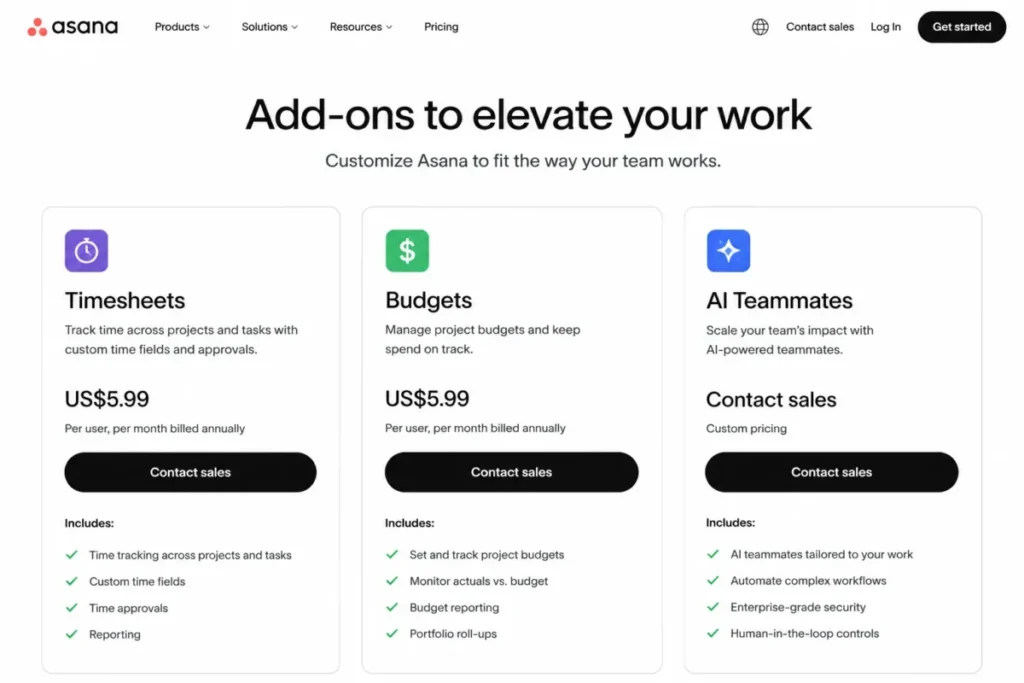
Asana does sell add-ons on top of your plan, and its AI has clear credit limits and paid tiers. Any guide that claims Asana has no add-ons is out of date.
| Add-on or AI package | Status | Price | Availability |
|---|---|---|---|
| AI Studio Basic | Included with plan | Included, with monthly credit caps (50K Starter, 75K Advanced, 200K Enterprise) | Starter, Advanced, Enterprise, Enterprise+ |
| AI Studio Plus | Paid | Paid, offered on monthly and annual plans | Where AI Studio is offered |
| AI Studio Pro | Paid | Paid, annual plan, advanced billing controls | Where AI Studio is offered |
| AI Teammates | Contact sales | Not publicly priced | Starter, Advanced, Enterprise, Enterprise+ |
| Timesheets and Budgets | Paid add-on | $5.99 per user per month billed annually | Starter, Advanced, Enterprise, Enterprise+ |
| Compliance management | Contact sales add-on | Not publicly priced | Enterprise plans |
| Permissions management | Contact sales add-on | Not publicly priced | Enterprise plans |
The practical read on Asana add-ons is that only Timesheets and Budgets carries a public price, so it is the only one you can model precisely today. Everything else in the paid or contact-sales rows requires either a purchase step or a sales quote.
Asana AI pricing: how AI Studio credits actually work
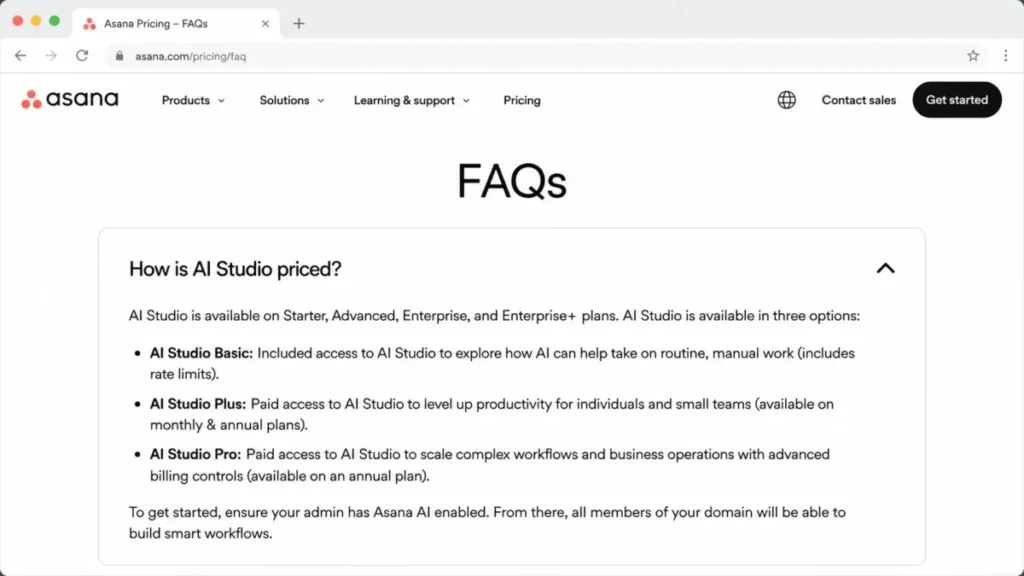
AI is included on paid plans through AI Studio Basic, but it is metered by monthly credits rather than unlimited. The included allotment rises with your tier: 50,000 credits on Starter, 75,000 on Advanced, and 200,000 on Enterprise, counted per billing account per month.
AI Studio work consumes those credits as your team builds and runs AI-driven workflows. Once you exhaust the monthly allotment, you either wait for the reset, buy additional credits, or move to a paid AI tier.
Above Basic sit two paid tiers, AI Studio Plus and AI Studio Pro, and a separate contact-sales add-on called AI Teammates. Plus and Pro expand what you can run, and Pro adds advanced billing controls on annual plans.
The interpretation is that AI is a budget line, not a free bundle. The buyer impact is that a team planning real production use of AI should treat AI Studio Plus or Pro, or additional credits, as an expected cost rather than a surprise.
The recommendation is to pilot on Basic first, watch your monthly credit burn, and only commit to a paid AI tier once you can see the run rate. That keeps AI spend tied to actual usage.
Integrations and your Asana cost
Asana includes more than 100 free integrations on every plan, including Personal, so basic connections rarely add cost. The heavier business integrations, Salesforce, Tableau, and Power BI, are native on Advanced and above rather than something you bolt on through a third-party connector.
That matters because older guides claim you need paid middleware to connect Asana to those systems. On Advanced you do not, since those connectors ship with the plan.
The interpretation is that integration cost depends on which systems you use, not on Asana charging per connection. The buyer impact is that a team already on Advanced can reach Salesforce, Tableau, and Power BI without a separate integration bill.
The recommendation is to check whether your must-have integration is native before budgeting for a paid connector, because on Advanced several of the expensive ones are already included.
What affects your total cost (the hidden pricing factors)
Sticker price is only part of the story, and these are the line items that surprise buyers.
Paid seats and the 2-user minimum. Paid plans are built around a 2-member minimum, and there is no dedicated single-seat paid tier, so a solo user cannot buy one Advanced seat.
Guest versus member confusion. Guests are free and unlimited on paid plans and do not consume a paid seat, but anyone who needs full member capabilities does, and misjudging that inflates your seat count.
Annual commitment. Annual billing saves about 18 percent per seat but assumes a yearly term, so a team that leaves mid-year does not recover the difference. Monthly billing costs roughly 22 percent more than the annual rate, not double.
AI credit limits and paid AI. AI Studio Basic credits are capped monthly, and real production use of AI Studio or AI Teammates moves you into paid packages or contact-sales pricing.
Timesheets and Budgets add-on. If you need timesheets, user rates, or project budgets, add $5.99 per user per month, because basic time tracking is included on Advanced but the resource-management depth is not.
SAML SSO and SCIM require a higher tier. Google SSO is available on a paid tier below Enterprise, but SAML single sign-on and SCIM user provisioning are gated to Enterprise and Enterprise+, so an SSO mandate can turn a $24.99 plan into a sales quote.
Taxes. Asana applies state and local sales tax based on your billing address, and VAT or GST may apply under local law, with an exemption if you enter a valid VAT or GST registration number at checkout.
Implementation and admin effort. Migration, training, and ongoing administration take internal time. Any consulting, middleware, or staffing figures you see are illustrative estimates, not Asana charges, and vary widely by team.
Refunds, taxes, and trials
Asana does not offer refunds. If you cancel before renewal, you keep paid features until the end of your current subscription period, then lose access to those features and their associated data.
Sales tax is applied based on your billing address, and VAT or GST may apply depending on your location, with an exemption path for registered businesses. These are automatic at checkout, so factor them into your true landed cost.
Asana does offer a free trial of paid plans, and trials can be canceled from the billing tab in the admin console. Asana’s pricing page confirms trials exist but does not publish a fixed length there, so confirm the current trial duration in-app before planning a rollout around it.
Cost scenarios (real numbers) and which plan fits
These tables use current per-seat prices: Starter at $10.99 annual and $13.49 monthly, Advanced at $24.99 annual and $30.49 monthly. The formula is users x price per user x billing period, and Personal is free but caps at 2 users, so any team of 3 or more sits on a paid plan.
Starter plan totals
| Users | Monthly billing (per month) | Annual billing (monthly equivalent) | Annual total (per year) |
|---|---|---|---|
| 2 | $26.98 | $21.98 | $263.76 |
| 5 | $67.45 | $54.95 | $659.40 |
| 10 | $134.90 | $109.90 | $1,318.80 |
| 25 | $337.25 | $274.75 | $3,297.00 |
| 50 | $674.50 | $549.50 | $6,594.00 |
Starter stays affordable even at 50 seats, landing near $6,594 per year on annual billing, which is why it suits scaling teams that have not yet outgrown a single-team structure.
Advanced plan totals
| Users | Monthly billing (per month) | Annual billing (monthly equivalent) | Annual total (per year) |
|---|---|---|---|
| 2 | $60.98 | $49.98 | $599.76 |
| 5 | $152.45 | $124.95 | $1,499.40 |
| 10 | $304.90 | $249.90 | $2,998.80 |
| 25 | $762.25 | $624.75 | $7,497.00 |
| 50 | $1,524.50 | $1,249.50 | $14,994.00 |
Advanced roughly doubles the Starter bill at the same headcount, so the jump should be tied to needing portfolios and goals, not to a vague sense that a higher tier is safer.
For a 10-seat Advanced team at about $2,999 per year, adding Timesheets and Budgets at roughly $719 per year ($5.99 x 10 x 12) brings the landed total near $3,718 before AI overages or tax. For Enterprise at any seat count, treat the number as a sales quote rather than a public rate, since Asana does not publish one.
Asana vs competitors on pricing value (2026)
Asana sits in the mid-to-premium band of work-management pricing. Its free Personal plan is unusually limited at 2 users, while its paid entry point at $10.99 annually is competitive for a tool that includes timelines, dashboards, and unlimited automations.
Rival prices change often, so treat the notes below as qualitative positioning and confirm current numbers on each vendor’s official page before committing budget.
| Competitor | How it tends to compare to Asana | Where to verify |
|---|---|---|
| ClickUp | Often positioned as lower cost per seat with a broad feature set | Check current ClickUp pricing directly |
| monday.com | Similar mid-market positioning, tiered per-seat model | Check current monday.com pricing directly |
| Trello | Cheaper and simpler, board-first, weaker for portfolios | Check current Trello pricing directly |
| Jira | Strong for software teams, different structure at scale | Check current Jira pricing directly |
| Smartsheet | Spreadsheet-style planning, enterprise-leaning | Check current Smartsheet pricing directly |
| Wrike | Comparable mid-market range with resource features | Check current Wrike pricing directly |
The honest read is that Asana rarely wins on raw price, so its case rests on portfolio and goal management, adoption, and integration fit rather than being the cheapest option in the room.
For live numbers, see our ClickUp pricing, monday.com pricing, Trello pricing, and Jira pricing guides, plus our Wrike review and Smartsheet review. For the two most-compared tools head to head, read our Asana vs monday.com comparison, and if you are weighing a wider set, our guide to team collaboration tools broadens the field.
How to choose the right Asana plan (decision framework)
Choose Personal if your team is 2 people or fewer and you only need core task and project tracking.
Choose Starter if you have a small team that needs timelines, Gantt, dashboards, and automations, but not portfolios, goals, or SAML SSO.
Choose Advanced if you manage multiple projects as portfolios, track goals, and want workload and approvals, and you do not require SAML SSO or SCIM.
Choose Enterprise if IT requires SAML single sign-on, SCIM provisioning, universal workload, or admin governance controls.
Choose Enterprise+ if you have compliance mandates such as audit logging, data residency, DLP, or eDiscovery.
Do not upgrade yet if your current tier meets your needs and the next tier’s extra features are not tied to a concrete requirement, since upgrading for unused features is the most common overspend.
Common Asana pricing mistakes
A few mistakes show up again and again in buying decisions, and each one costs money.
The first is upgrading to Advanced for single sign-on. Advanced does not include SAML, so the money buys features you did not need while the SSO requirement still points to Enterprise.
The second is assuming Advanced handles budgets natively. Basic time tracking is included, but timesheets, rates, and project budgets need the paid add-on.
The third is treating AI as free and unlimited. The included credits are capped monthly, and heavy use becomes a real line item.
The fourth is over-counting seats by making external collaborators members instead of guests. Guests are free, so scoping them correctly can remove several paid seats.
The recommendation across all four is to write down your true requirements before you pick a tier, then match the tier and add-ons to that list rather than to the feature that looks most complete.
What breaks first as your team grows
Every plan has a first breaking point, and knowing it prevents both overpaying early and scrambling later.
On Personal, the break is user number three, full stop. There is no way to add one more seat without moving to a paid plan.
On Starter, the break is coordination. The day a leader needs one view across many projects, or wants goals tied to work, Starter runs out of room and Advanced is the answer.
On Advanced, the break is identity and governance. When IT requires SAML or SCIM, or finance needs true budgets, you either add the Timesheets and Budgets add-on or move to Enterprise.
On Enterprise, the break is compliance. Audit, residency, and retention mandates push you toward Enterprise+ or the Compliance management add-on.
The switch-or-stay lesson is to upgrade against a concrete trigger, not a feeling that the next tier looks safer.
Pros, cons, and deal-breakers (consultant view)
Pros
Asana is easy to adopt, so non-technical teams ramp faster than on issue-tracker tools. That lowers change-management friction during rollout.
Its portfolio and goal layer on Advanced is a genuine strength for leadership reporting. Rolling up project health without spreadsheets is where the price earns its keep.
The integration ecosystem is broad, with 100+ integrations and native Salesforce, Tableau, and Power BI on Advanced. Mobile apps are strong for field and remote teams.
Cons
Single sign-on is the sharpest cost edge. SAML SSO and SCIM sit at Enterprise, so an identity mandate forces a quote-based tier even for a mid-size team.
Native budgeting is not built in. Timesheets, rates, and project budgets require the paid Timesheets and Budgets add-on rather than shipping with Advanced.
AI is metered. The included AI Studio credits are capped monthly, so heavy AI workflows add cost through paid tiers or extra credits.
Deal-breakers
No SAML SSO below Enterprise affects IT-governed teams of 20 to 100 users that cannot justify a quote-based tier just for identity. Google SSO exists lower down, but SAML and SCIM do not.
No on-premise or self-hosted option affects air-gapped or highly regulated environments. Teams with that requirement should look at tools built for self-hosting.
FAQs about Asana Pricing 2026
Is Asana free in 2026?
Yes. The Personal plan is free forever for up to 2 users, with unlimited tasks and projects and 100+ integrations. It does not include timeline, Gantt, automations, portfolios, or advanced reporting.
How much is Asana per user?
Starter is $10.99 per user per month billed annually, or $13.49 billed monthly. Advanced is $24.99 per user per month billed annually, or $30.49 billed monthly. Enterprise and Enterprise+ are contact sales.
What is the cheapest Asana paid plan?
Starter, at $10.99 per user per month on annual billing. For 10 users that is about $1,319 per year.
Is annual cheaper than monthly?
Yes. Annual billing saves about 18 percent per seat, and monthly billing costs roughly 22 percent more than the annual rate in exchange for flexibility.
What is the difference between Starter and Advanced?
Starter includes timelines, dashboards, forms, and unlimited automations for a single team. Advanced adds portfolios, goals, workload, approvals, proofing, and native time tracking for coordinating many projects.
Does Asana charge for guests?
No. All paid plans include unlimited free guests who do not count toward your paid user total. Anyone who needs full member capabilities requires a paid seat.
Does Asana have a one-user paid plan?
No. Paid plans are built around a 2-member minimum, so there is no single-seat paid tier, and a solo user stays on free Personal.
Which Asana plan includes SAML SSO and SCIM?
Enterprise and Enterprise+. Google SSO is available on a paid tier below Enterprise, but SAML SSO and SCIM provisioning require Enterprise or higher.
Does Asana offer refunds?
No. Asana does not offer refunds, though you keep paid features until the end of your current subscription period if you cancel before renewal.
Does Asana offer nonprofit discounts?
Yes. Asana offers eligible nonprofits a discount on a Starter or Advanced annual plan, and it does not publish a fixed percentage, so confirm current terms through its nonprofit program.
Are AI features included in Asana pricing?
Partly. AI Studio Basic is included on paid plans with monthly credit caps (50K Starter, 75K Advanced, 200K Enterprise), while AI Studio Plus and Pro are paid and AI Teammates is a contact-sales add-on.
Does Asana offer a free trial?
Yes, Asana offers a free trial of its paid plans, and you can cancel it from the billing tab in the admin console. The pricing page confirms trials exist but does not publish a fixed length, so check the current trial terms in-app before you plan a rollout.
How do Enterprise prices work?
Enterprise and Enterprise+ are custom-quoted based on seat count, term, and the features and add-ons you require. Asana does not publish a per-seat rate, so ask for a written quote and confirm what is bundled versus add-on.
Is Asana more expensive than ClickUp or monday.com?
Often, yes, at the per-seat level, as my ClickUp vs Asana pricing comparison shows, though it depends on tier and current promotions. Asana’s value case rests on portfolio and goal management, so compare current rates on each vendor’s official page.
Which Asana plan is best for small businesses?
Most small businesses fit Starter for scheduling and reporting, then move to Advanced only when they need portfolios, goals, or workload across several projects.
Questions to ask Asana sales before you buy
A short list of questions turns a quote into something you can defend. Ask each one in writing so the answers are on record.
What is the exact annual and monthly per-seat rate for our seat count, and what is the best annual discount available? Confirm whether the quote is Enterprise or Enterprise+, since the two differ on governance.
Which of our required controls are bundled, and which are paid add-ons? Name SAML SSO, SCIM, Compliance management, Permissions management, and Timesheets and Budgets specifically so nothing is assumed.
How are AI Studio credits allocated across our billing account, and what does exceeding the monthly allotment cost? Ask whether AI Studio Plus or Pro is needed for our expected usage.
What is the true-up policy when we add seats mid-term, and the downgrade policy at renewal? Seat creep and locked annual terms are where budgets quietly slip.
Do we qualify for a nonprofit or academic discount, and does it apply to the annual Starter or Advanced plan? Confirm eligibility before buying at list price rather than after.
Methodology, verification, and disclosure
Prices, plan limits, feature availability, add-ons, AI packaging, tax, refund, and nonprofit terms were verified against Asana’s official pricing page and pricing FAQ on July 6, 2026.
This is a documentation-based pricing analysis, not a hands-on Enterprise test. I did not have access to a current Enterprise or Enterprise+ admin console, so those tiers are described as quote-based rather than tested, and no per-seat Enterprise figure is invented here.
Where numbers can change, such as competitor prices and trial length, this guide points you to the official source to confirm rather than stating an unverified figure. No ratings, review counts, or customer quotes are fabricated.
Conclusion
For teams that actually use portfolios, goals, and workload, Advanced at $24.99 per user per month on annual billing earns its cost by replacing status meetings and scattered spreadsheets. For teams that only need task lists and a board, Starter at $10.99 is the better value and enough.
Choose Enterprise only when identity or compliance forces it: SAML SSO, SCIM, audit logging, or data residency. Those are the requirements that justify a quote-based tier, not headcount alone.
The renewal question is the quieter one. Revisit guest-versus-member counts and unused add-ons each year, because seat creep and idle add-ons are where teams quietly overpay.