

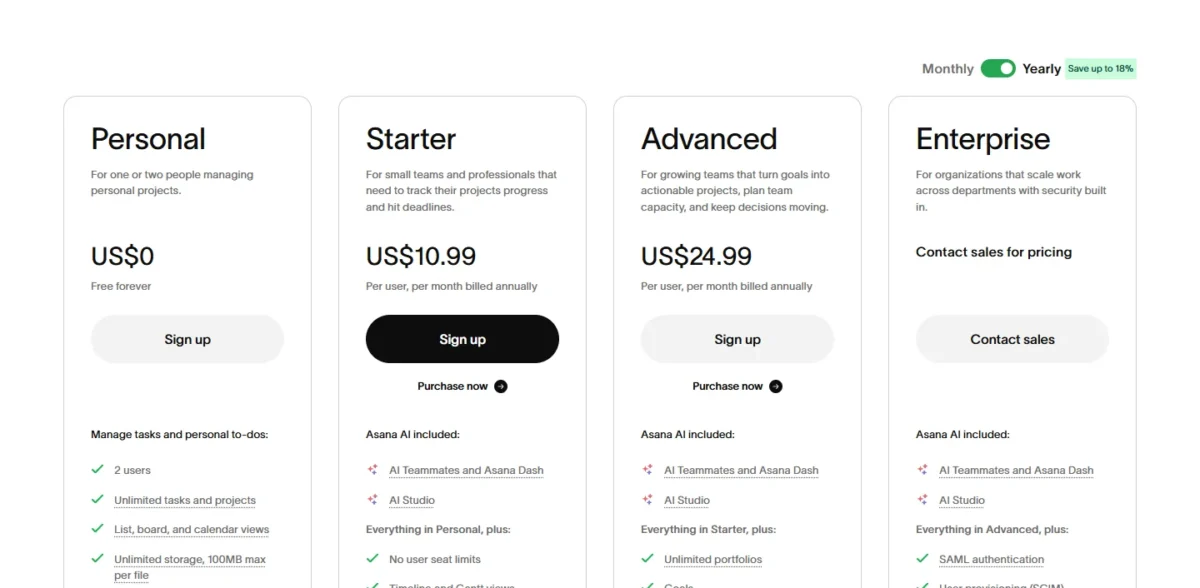
In ClickUp vs Asana, ClickUp is the pick for teams that want Gantt charts, dependencies and time tracking at the lowest seat price, $7 per user per month on Unlimited. Asana Starter, at $10.99, suits teams that automate many handoffs or invite many clients: it lists unlimited automations and unlimited free guests. Both prices are billed yearly.
I built the same 10-task website-launch plan in both on October 10, 2026: ClickUp on its Free Forever plan, Asana on an Advanced trial. Neither tool moved a date when I linked overlapping tasks. The same assign-to-me rule ran in both, ClickUp’s by my 5-second check and Asana’s within about 17 seconds.
Evidence basis: hands-on test in a ClickUp Free Forever workspace and an Asana Advanced trial on October 10, 2026 (10 tasks, 3 dependencies, 1 rule run in each), plus both pricing pages, checked October 2026. How I review
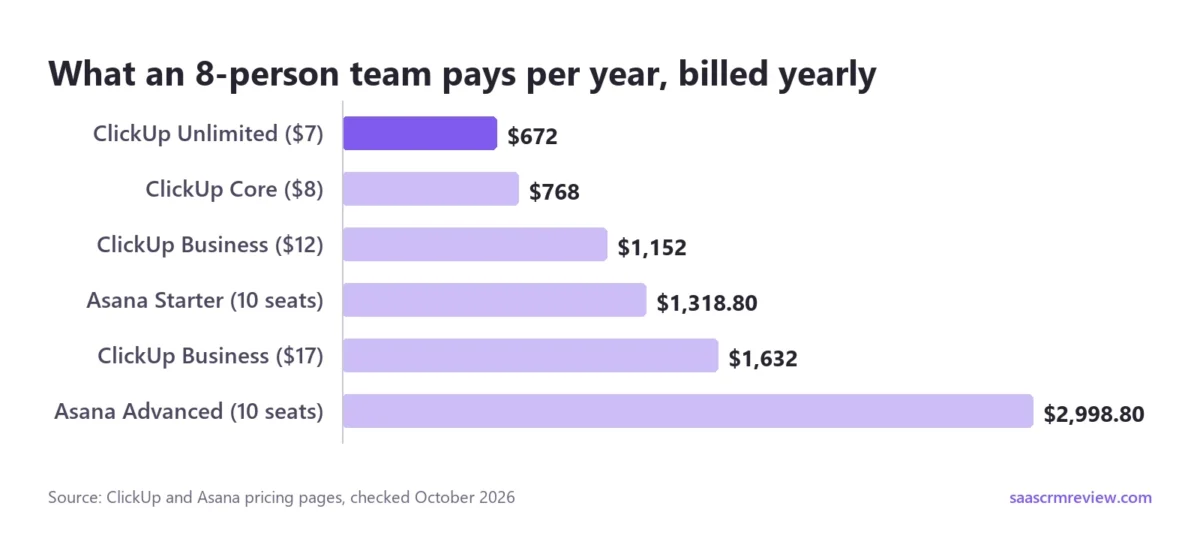
The price gap is wider than $7 against $10.99 suggests. An 8-person team pays $7 x 8 users x 12 months = $672 a year on ClickUp Unlimited. Asana adds seats in steps of 5 between 5 and 30 users, so that team buys 10 Starter seats: $10.99 x 10 seats x 12 months = $1,318.80.
My Asana trial ran on Advanced, so what Personal and Starter include comes from Asana’s pricing page, not from my account.
In This Article (13 sections)
ClickUp or Asana: Which Is Better for Your Team?
Team type decides it: ClickUp wins for budget, schedule and sprint teams, and Asana Starter wins for rule-heavy and client-heavy teams. Each row below rests on one plan gate from the two pricing pages.
| If your team… | Pick (per user per month, billed yearly) | Because |
|---|---|---|
| Wants Gantt and time tracking on a budget | ClickUp Unlimited, $7 | Unlimited Gantt charts and native time tracking are on Unlimited; Asana’s native time tracking starts on Advanced, $24.99 |
| Automates many handoffs | Asana Starter, $10.99 | Starter lists unlimited automations; ClickUp Unlimited stops at 1,000 actions a month |
| Invites many clients | Asana Starter, $10.99 | Unlimited free guests; ClickUp Unlimited gives 5 guest seats plus 2 per extra paid user |
| Runs sprints | ClickUp Free Forever or Unlimited | Sprint Management is on Free Forever; Sprint Points arrive on Business |
| Needs 3 or more people at $0 | ClickUp Free Forever | Unlimited members; Asana Personal stops at 2 users per project and team |
| Needs to see who is overloaded | ClickUp Business, $12, or Asana Advanced, $24.99 | Workload has no use cap from ClickUp Business; Asana lists resource management on Advanced |
Sources: ClickUp pricing page, Asana pricing page and ClickUp’s Automations limits, checked October 2026.
Some teams sit in two rows. An agency that bills hours and shares work with clients gets time tracking cheaper in ClickUp and guests cheaper in Asana, so it should price both sections below before choosing.
If no row describes your team, my ranking of the best project management software by team fit covers eight more tools beyond these two.
ClickUp vs Asana at a Glance: Features, Plans and Limits
ClickUp is cheaper per seat and free at any head count. Asana’s free Personal plan allows 2 users per project and team, and its first paid plan lists unlimited automations.
| Product | Free plan | First paid plan (per user per month) | Gantt and dependencies | Automations | Native time tracking |
|---|---|---|---|---|---|
| ClickUp | Free Forever: unlimited members, 60MB storage, 5 Spaces | Unlimited: $7 billed yearly, $10 billed monthly | Dependencies on every plan; Gantt 60 uses on Free Forever, unlimited from Unlimited | Free Forever: 5 active rules, 100 actions a month; Unlimited: 1,000 actions a month | Unlimited |
| Asana | Personal: 2 users per project and team; list, board and calendar views | Starter: $10.99 billed yearly, $13.49 billed monthly | Starter and up | Starter: unlimited automations | Advanced, $24.99 billed yearly |
Sources: ClickUp pricing page, ClickUp’s views availability page and Asana pricing page, checked October 2026.
ClickUp meters usage and Asana meters people, so the first upgrade arrives on a different trigger in each. The test below runs one rule once and then reads ClickUp’s action counter.
How I Tested ClickUp vs Asana on the Same Website-Launch Project
On October 10, 2026, I built the same 10-task website-launch plan in a ClickUp Free Forever workspace and an Asana Advanced trial, then ran the same checks in each:
- 10 tasks from Scope and goals to Go-live checklist, dated October 12 to October 30: 10 start and due dates in ClickUp, 10 due dates and nine start dates in Asana
- 3 blocked-by links (labeled FS in Asana) in a chain (Scope and goals, Site map and wireframes, Design homepage, Build the pages), each successor starting on its predecessor’s due date
- Gantt and Workload views added to the project
- 1 rule that assigns every new task to me, fired once by adding a task called Automation check
- the quota pages read after the run, and each Help menu opened, with no message sent
The test has hard limits. I was the only user, assigned none of the 10 tasks, dragged no bars and moved no predecessor. The Asana trial shows Advanced, not Personal or Starter.
ClickUp’s steps ran as scripts and Asana’s through a browser assistant, so no time here measures how long a person would take.
| Product (plan tested) | Linked overlapping tasks | Gantt and Workload views | Rule fired once | Counter after the run |
|---|---|---|---|---|
| ClickUp (Free Forever) | No date moved | Both opened with no upgrade prompt | Task assigned by the 5-second check | 0 of 100 actions used about 35 seconds later; 1 of 5 active rules |
| Asana (Advanced trial) | No date moved; red arrows | Both opened with no upgrade prompt | Empty at about 5 seconds, assigned by about 17 | No run counter; 0 / 75K AI Studio credits |
Sources: my test accounts, October 10, 2026; plan allowances from ClickUp’s Automations limits and the Asana pricing page, checked October 2026.
The first thing the plan tested was whether either tool enforces the order of work.
Gantt View and Task Dependencies: Neither Tool Moved My Dates
Neither tool rescheduled anything: with each successor starting on its predecessor’s due date, ClickUp and Asana both kept all 10 dates as I entered them.
Asana added a warning. It drew the arrows between overlapping linked tasks in red and gave each blocked task an hourglass icon. ClickUp drew its 3 arrows and tagged the list rows “Blocks dependency” or “Blocked by dependency”.
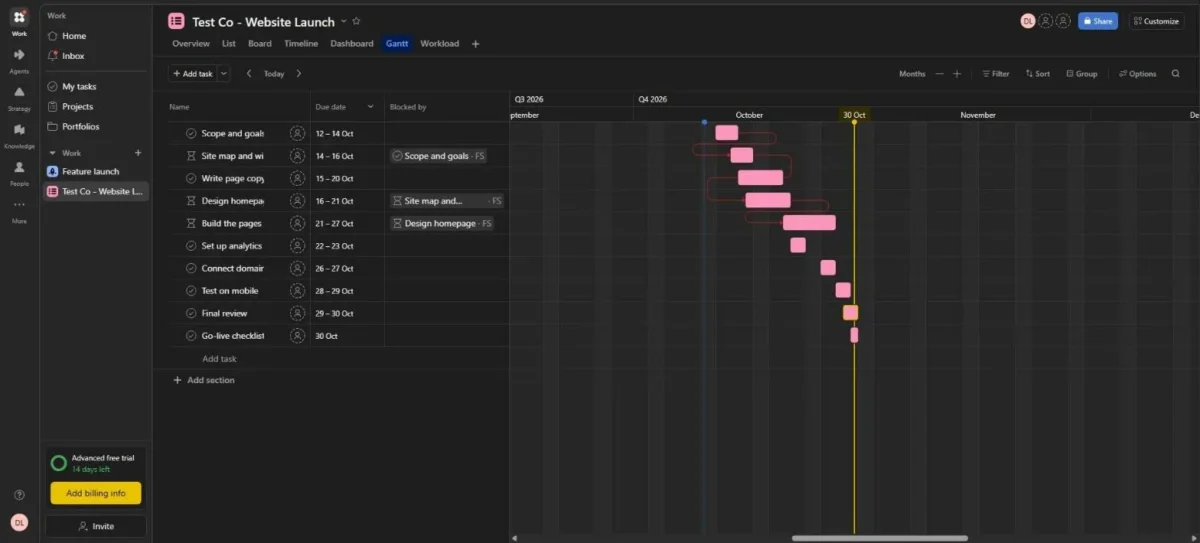
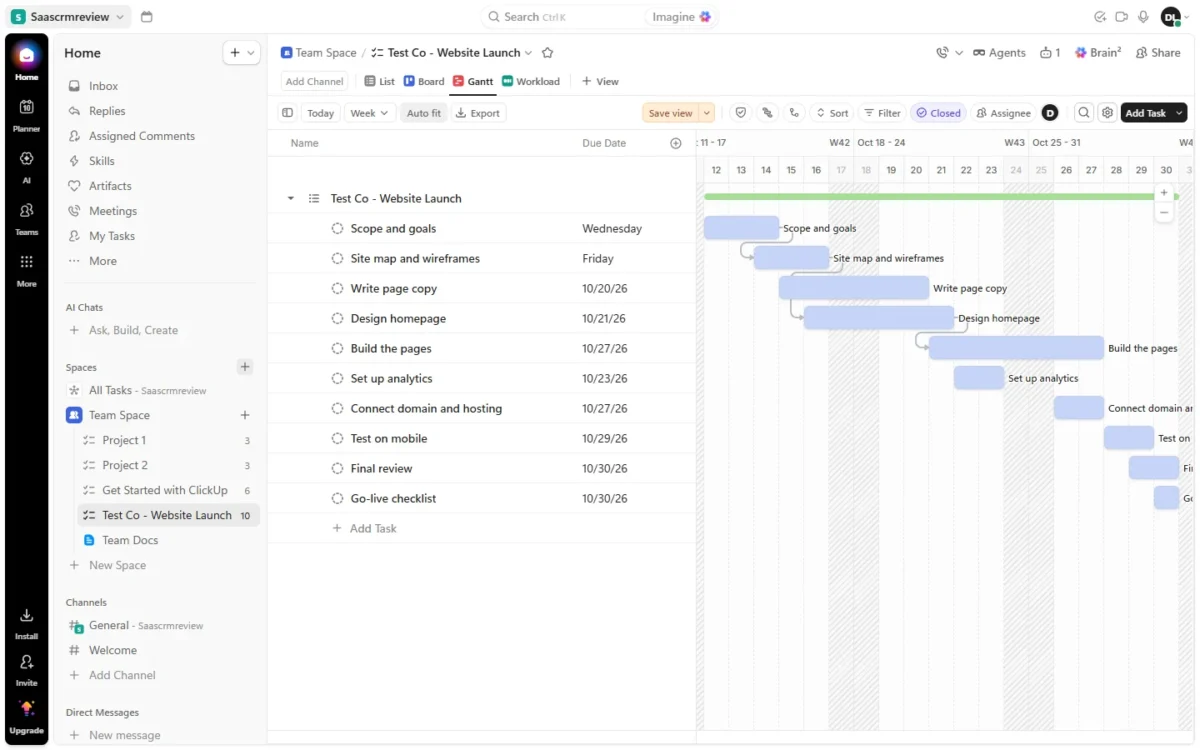
For a project lead, one detail stands out: on my Advanced trial, Asana drew the arrows between overlapping linked tasks in red. Starter, where Asana’s Gantt view begins, was not tested.
Neither auto-shift was put to the test. Asana’s “Auto-schedule tasks” setting was on, but its own description covers dates for new tasks. ClickUp lists “Reschedule dependencies: Automatically adjust dates on dependent tasks”, a setting I left as it was.
With “Highlight critical path” switched on, my Asana trial outlined 1 of 10 bars, Final review, and none of the 3 linked tasks. On a partly linked plan, that told me little, and I saw it only on Advanced.
Gantt access is gated differently. Asana puts Gantt view on Starter and up, with Timeline and dependencies on the same plan. ClickUp includes dependencies on every plan but gives Free Forever 60 Gantt uses that never reset; Unlimited removes the cap.
When a ClickUp workspace runs out of uses, it keeps the data but blocks editing or creating items in that view. A team that plans in Gantt every week should budget for Unlimited from day one. Gantt baselines, for comparing the plan against reality, start on ClickUp Business.
A chart that leaves dates alone leaves the follow-up to people, and that is the job rules take over.
Automation and Integrations: How Fast Each Rule Ran and What It Counted
Both tools ran my one-step rule: ClickUp had assigned the new task by my 5-second check, and Asana had by about 17 seconds. The meter is what differs. ClickUp caps actions per workspace per month, 100 on Free Forever and 1,000 on Unlimited, while Asana Starter lists unlimited automations.
Neither counter moved. ClickUp’s Usage tab still read “0 / 100” about 35 seconds after the run, with 1 of 5 active rules in use. Asana showed no run counter at all.
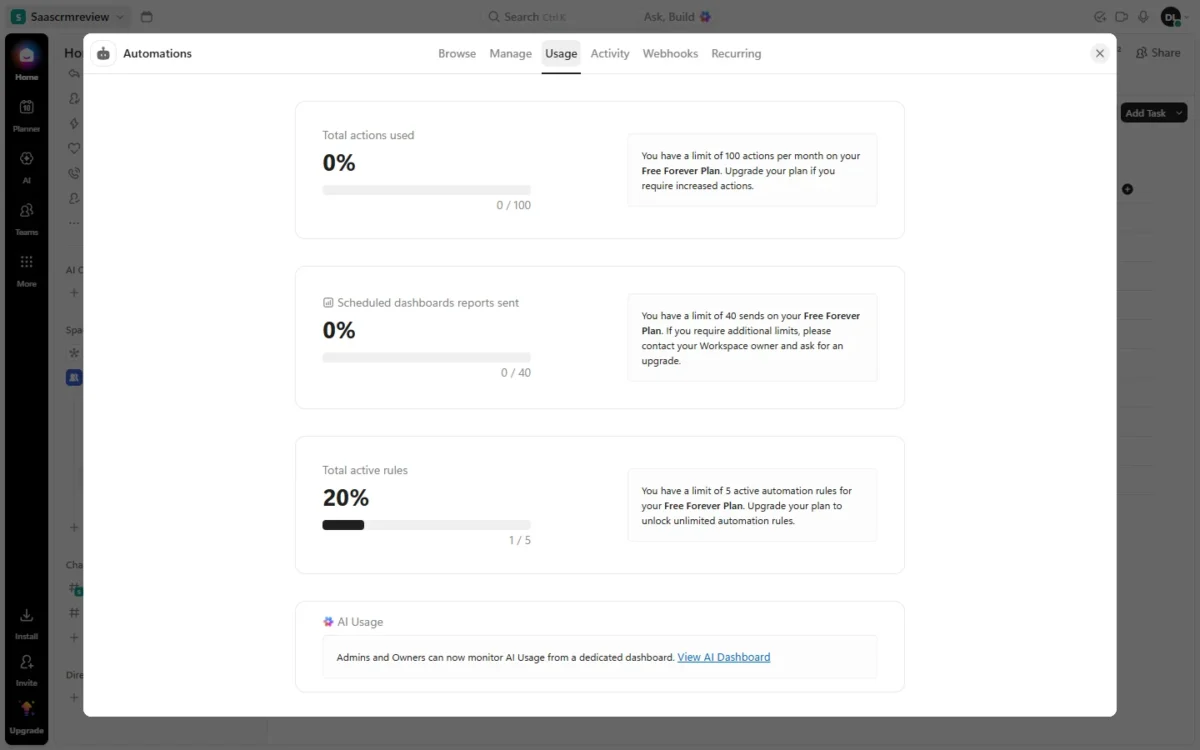
Because my counter had not moved, the test does not show what one run costs in ClickUp; count each run as at least one action. At that rate, Unlimited’s 1,000 actions divided by 22 workdays is about 45 runs a workday for the whole team.
Past the limit, ClickUp pauses the workspace’s automations for the rest of that month, and the count resets on the first. For a team whose handoffs run on rules, 1,000 actions is a hard ceiling.
Asana’s meter is AI, not rules. Starter includes 50K AI Studio credits per billing account per month and Advanced 75K, the allowance my trial showed. My ordinary assign rule used none of them.
The builders differ as much as the meters. ClickUp’s is a trigger-and-action list, and on Free Forever it listed actions such as Call webhook and Do anything with AI. Task webhooks and Automations integrations still start on ClickUp Business, as do conditions.
Asana’s builder, on my Advanced trial, is a canvas: a trigger from Asana, apps, a schedule or a webhook, then steps that can branch through Paths. That structure suits if-then handoffs, which ClickUp only builds from Business up.
Slack connects on ClickUp Unlimited and on Asana’s free Personal plan, and Asana adds Salesforce, Tableau and Power BI on Advanced. Check your must-have apps against both vendors’ integration lists before you choose.
Rules hand tasks to people, which raises a manager’s next question: who is overloaded?
Workload View and Resource Management: What a Manager Sees Before Paying More
Not reliably on either entry plan. ClickUp’s Workload view is a trial below Business, at 60 uses on Free Forever and 100 on Unlimited; Asana lists resource management on Advanced and capacity planning on Enterprise.
ClickUp counts as a use creating or opening the view, rescheduling, assigning or moving tasks, and setting capacity. A manager who opens Workload once a workday spends Free Forever’s 60 uses in 12 five-day weeks, and those uses never reset.
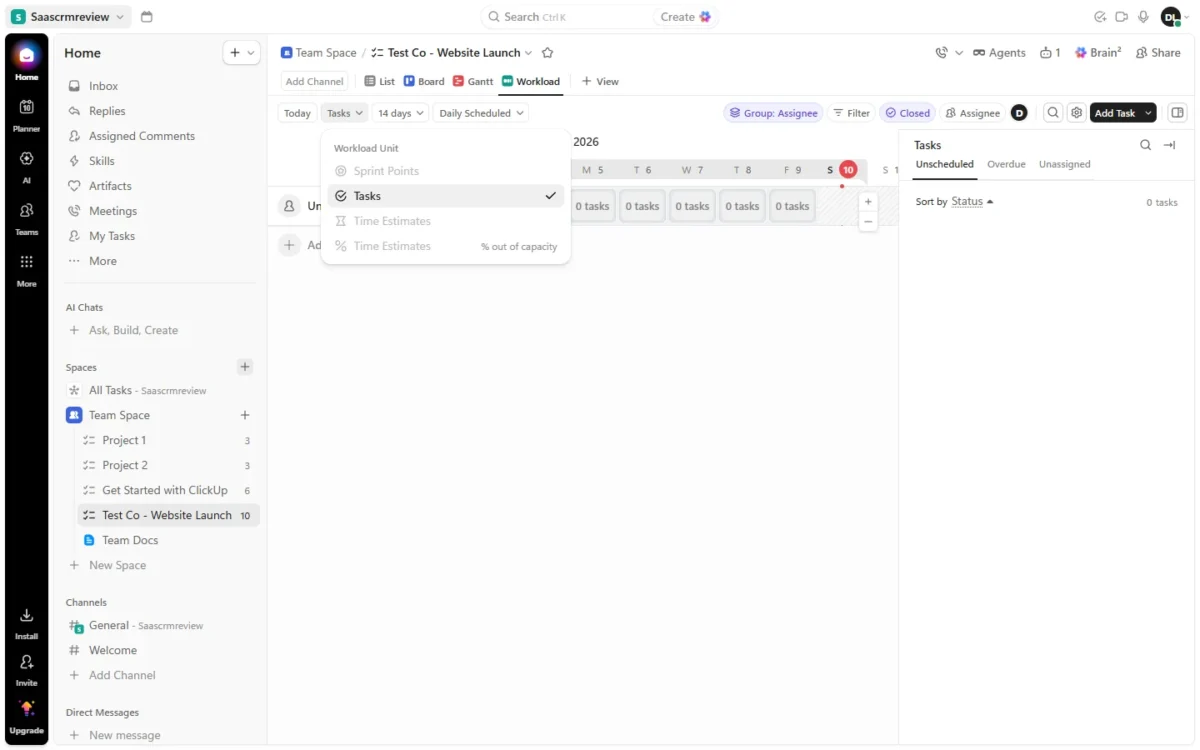
In my test both views opened without an upgrade prompt. ClickUp’s Workload view grouped the 10 unassigned tasks by day, but its unit menu greyed out Sprint Points and both Time Estimates options, and clicking Time Estimates did nothing.
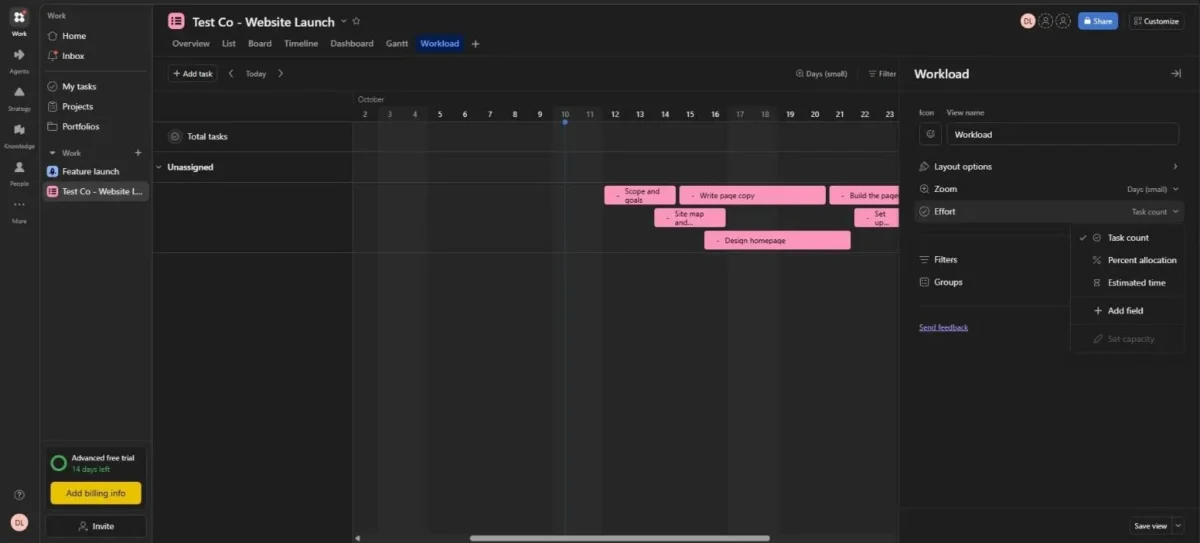
Asana’s Workload on the Advanced trial measured effort as Task count, Percent allocation or Estimated time, but “Set capacity” was greyed with no reason shown.
Detailed capacity sits high in both tools. Asana lists capacity planning on Enterprise, where universal workload also lives. ClickUp puts per-day custom capacity on Business Plus and Enterprise.
For a 3 to 25 person team, ClickUp’s lowest plan without a Workload use cap is Business, $12 per user per month billed yearly on its public plan cards.
The newer lineup, explained in the cost section below, lists Business at $17. Asana’s pricing page lists resource management on Advanced at $24.99, where it covers the projects in one portfolio. I saw Asana’s Workload view only on the Advanced trial, not on Starter.
Setup is where the two behave least alike.
Setup, Help and the AI Suggestions Asana Made Unasked
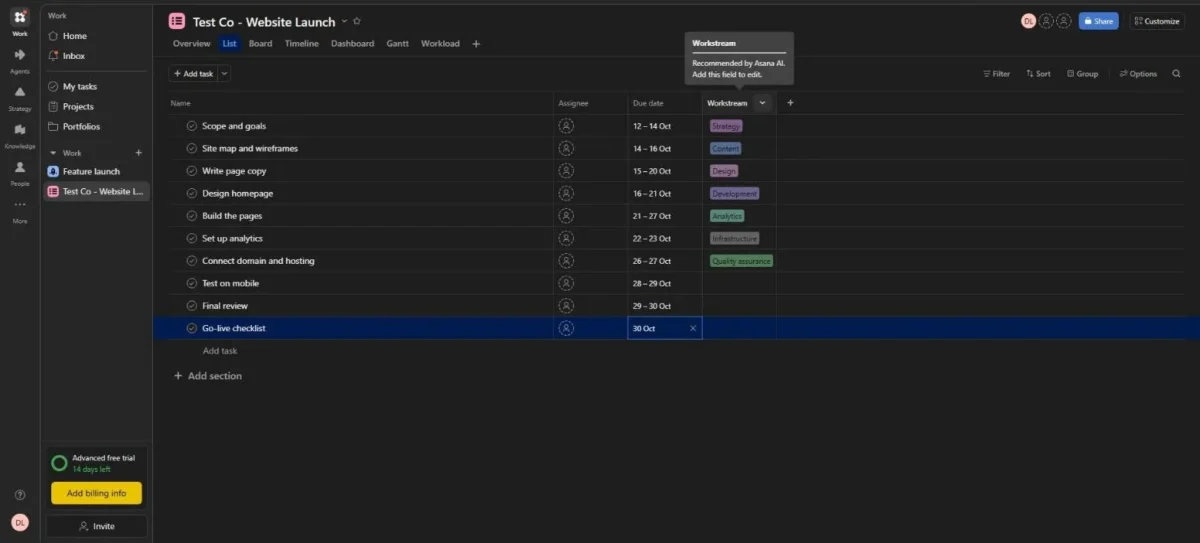
Asana did more on its own. It offered Gantt and Workload while I created the project and, on my trial, added an AI “Workstream” column I never asked for. ClickUp’s new list opened with just List and Board, and I added Gantt and Workload myself.
Asana’s view chooser preselected Overview, List, Board, Timeline and Dashboard. The Workstream column, tooltip “Recommended by Asana AI”, labeled 7 of the 10 tasks.
Several labels missed: Write page copy got Design, Build the pages got Analytics, and Connect domain and hosting got Quality assurance. From the third task down, each label fits the task below it better, so check an AI field before your team filters on it.
ClickUp left setup to me, and I used no AI feature there.
AI is billed differently. ClickUp’s plan-card page sells Brain AI at $9 per user per month, while Asana includes AI Assists on every paid plan. ClickUp’s second price lineup, explained in the cost section below, adds 500 AI credits per workspace on Free and 1,000 per user per month, pooled, on its $8 Core plan.
Help sits one menu away in both. ClickUp’s Help panel opens a chat promising “We typically respond in 5 minutes or less”, and Asana’s “Help & getting started” menu links help articles, Contact support and Asana Academy. I sent no message to either.
Asana’s defaults suit a team with no admin to build views. ClickUp’s blank list suits a team that wants nothing added it did not ask for.
Team type outlasts setup, and it splits the choice on three features.
Guests, Time Tracking and Sprints: Where Team Type Decides
Team type tips the choice three ways: client-heavy agencies get more from Asana, while teams that log hours or run sprints get more from ClickUp.
- Agencies with many clients: Asana Starter includes unlimited free guests who do not count toward your users. On ClickUp Unlimited, an 8-person team gets 5 + 2 x 7 = 19 guest seats, and Business raises that to 10 + 5 x 7 = 45.
- Teams that log hours: ClickUp Unlimited includes native time tracking. Asana’s native time tracking starts on Advanced; Personal tracks time through integrations, and Timesheets and Budgets is an add-on billed separately on Starter and up.
- Sprint teams: ClickUp Free Forever includes Sprint Management, and Sprint Points with reporting arrive on Business. ClickUp’s own comparison says its Sprints ClickApp includes burndown charts and velocity tracking; that is a vendor claim, and my test did not cover sprints.
Hours tracking carries the biggest price gap. For 8 people billed yearly, native time tracking costs $672 on ClickUp Unlimited ($7 x 8 users x 12 months). Asana Advanced costs $24.99 x 10 seats x 12 months = $2,998.80, which is $2,326.80 more than ClickUp’s $672.
Guests carry a ClickUp trap. Free Forever guests get full edit rights that cannot be limited, and anyone from inside your organization added as a guest is billed as a paid user.
Each of these features sits behind a gate, and the two tools gate in opposite ways.
The Plan Gate That Forces Your First Upgrade
Asana’s first gate is head count: Personal stops at 2 users per project and team and lists no Gantt or automations. ClickUp’s first gate is usage, and which limit bites depends on the team: 60MB of files, 60 Gantt uses or 100 automation actions a month.
| Product | Third user | Gantt | Automations | Workload | Time tracking |
|---|---|---|---|---|---|
| ClickUp | No gate: Free Forever has unlimited members | 60 uses on Free Forever; no cap from Unlimited | 100 actions and 5 rules on Free Forever; 1,000 actions on Unlimited; 5,000 on Business | 60 uses on Free Forever, 100 on Unlimited; no cap from Business | Native from Unlimited |
| Asana | Starter (Personal: 2 users per project and team) | Starter | Unlimited from Starter | Resource management on Advanced | Native on Advanced; Timesheets and Budgets add-on |
Sources: ClickUp pricing page, ClickUp’s views availability page and Asana pricing page, checked October 2026.
Asana’s gate is predictable: 3 people sharing a project pass Personal’s limit on day one. ClickUp’s depends on behavior, so two 8-person teams on Free Forever can hit it months apart, one through files and the other through rules.
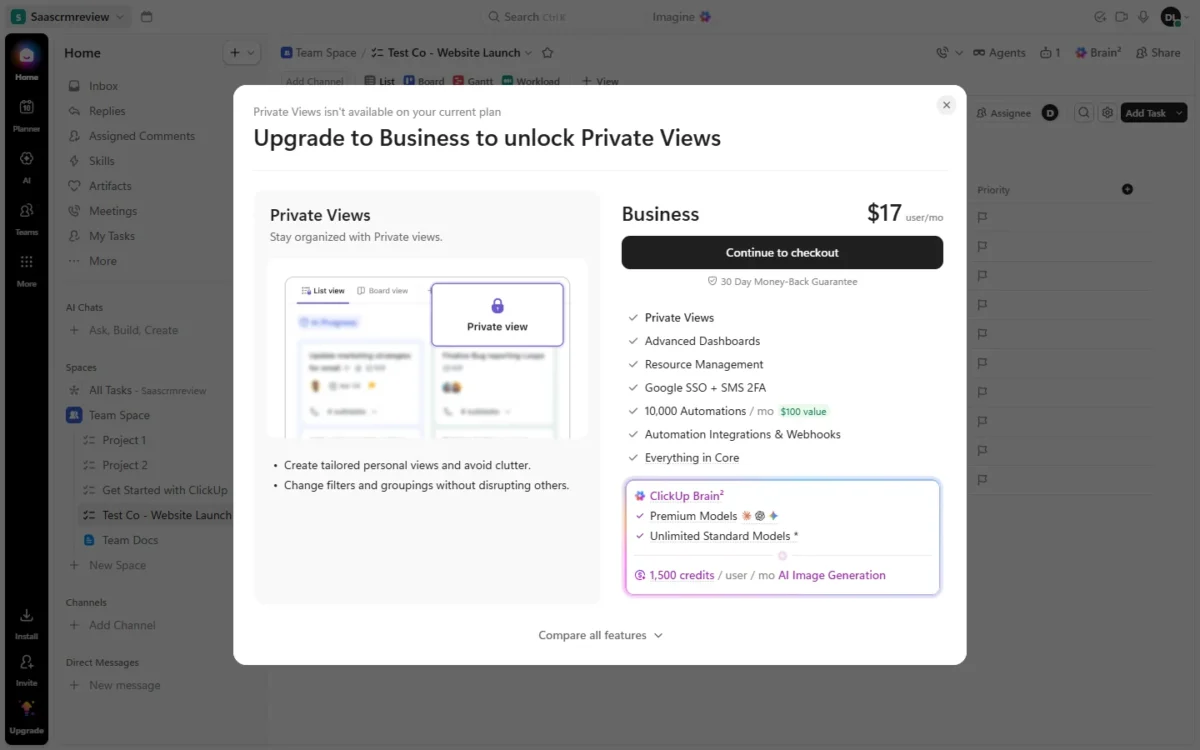
In my Free Forever workspace, the only gate I met came from clicking the greyed Private view option. The dialog read “Private Views isn’t available on your current plan” and priced Business at $17 per user per month.
That differs from the $12 Business price used elsewhere because ClickUp shows two price lineups; the cost section below explains which to budget for.
ClickUp Free Forever vs Asana Personal: is either free version enough for a team?
ClickUp Free Forever is enough for a small team that stays within 60MB of files, 5 Spaces, 5 active rules, 100 actions a month and 60 Gantt uses. Asana Personal is not enough once 3 people share a project: it allows 2 users per project and team.
Storage is the ClickUp limit most likely to end a file-heavy team’s free run, because only file attachments count against the 60MB. A team that shares design files reaches it long before task counts matter.
For a team set on paying nothing, see my roundup of free project management tools.
The second gate: what pushes a paid team to ClickUp Business or Asana Advanced
ClickUp Business is the second step for uncapped Workload and Timeline views, Private Views, webhooks and Automations integrations, and Sprint Points. Asana Advanced is the second step for native time tracking, portfolios, goals, approvals and resource management within a portfolio.
The second step costs very differently. For 8 people billed yearly, ClickUp Business costs $12 x 8 users x 12 months = $1,152, which is $480 more than Unlimited’s $672. Asana Advanced costs $24.99 x 10 seats x 12 months = $2,998.80, which is $1,680 more than Starter’s $1,318.80.
Those totals scale with head count, which is where Asana’s seat steps start to matter.
What ClickUp and Asana Cost per Year at 3, 8, 12 and 25 People
At 8 people billed yearly, ClickUp Unlimited costs $7 x 8 users x 12 months = $672. Asana Starter costs $10.99 x 10 seats x 12 months = $1,318.80, because Asana bills that team for 10 seats.
Each cell below is the seat price x seats x 12 months, billed yearly.
| Plan (price per seat per month, billed yearly) | 3 people | 8 people | 12 people | 25 people |
|---|---|---|---|---|
| ClickUp Unlimited ($7) | $252 | $672 | $1,008 | $2,100 |
| ClickUp Core ($8, newer lineup) | $288 | $768 | $1,152 | $2,400 |
| ClickUp Business ($12) | $432 | $1,152 | $1,728 | $3,600 |
| ClickUp Business ($17, newer lineup) | $612 | $1,632 | $2,448 | $5,100 |
| Asana Starter ($10.99) | $395.64 (3 seats) | $1,318.80 (10 seats) | $1,978.20 (15 seats) | $3,297 (25 seats) |
| Asana Advanced ($24.99) | $899.64 (3 seats) | $2,998.80 (10 seats) | $4,498.20 (15 seats) | $7,497 (25 seats) |
Sources: ClickUp pricing page and Asana pricing page, including its seat increments, checked October 2026.
At 6 people, Asana’s seat step costs more than its price gap. Asana bills a 6-person team for 10 Starter seats.
The 4 spare seats cost 4 seats x $10.99 x 12 months = $527.52 a year.
The 6-person per-seat gap is 6 users x $3.99 x 12 months = $287.28. That $3.99 is Asana Starter at $10.99 minus ClickUp Unlimited at $7, both billed yearly.
Seats go up 1 at a time from 2 to 5 users, in steps of 5 up to 30 and in steps of 10 up to 100.
A 6-person team therefore pays for 10 Starter seats, $1,318.80 a year, while 6 people on ClickUp Unlimited pay $7 x 6 users x 12 months = $504.
Monthly billing leaves the 8-person gap in dollars about where it was. ClickUp Unlimited at $10 billed monthly comes to $10 x 8 users x 12 months = $960. Asana Starter at $13.49 billed monthly comes to $13.49 x 10 seats x 12 months = $1,618.80, which is $658.80 more than ClickUp’s $960.
Billed yearly, the same gap is $10.99 x 10 seats x 12 months = $1,318.80 against $7 x 8 users x 12 months = $672, which is $646.80 more.
The yearly commitment carries different risk. Asana does not offer refunds, while ClickUp refunds in full if you ask within 30 days. Run Asana’s trial until you are sure before paying for a year.
ClickUp bills the whole workspace: an upgrade covers every member, and paid users added mid-cycle are charged a prorated price. Occasional contributors cannot stay free while the core team pays, unless they are outside clients on guest seats.
Timesheets and Budgets is billed separately on top of these totals, so price it with Asana’s plans and add-on costs before you commit.
Which ClickUp price should you budget for: $7 or $8, $12 or $17?
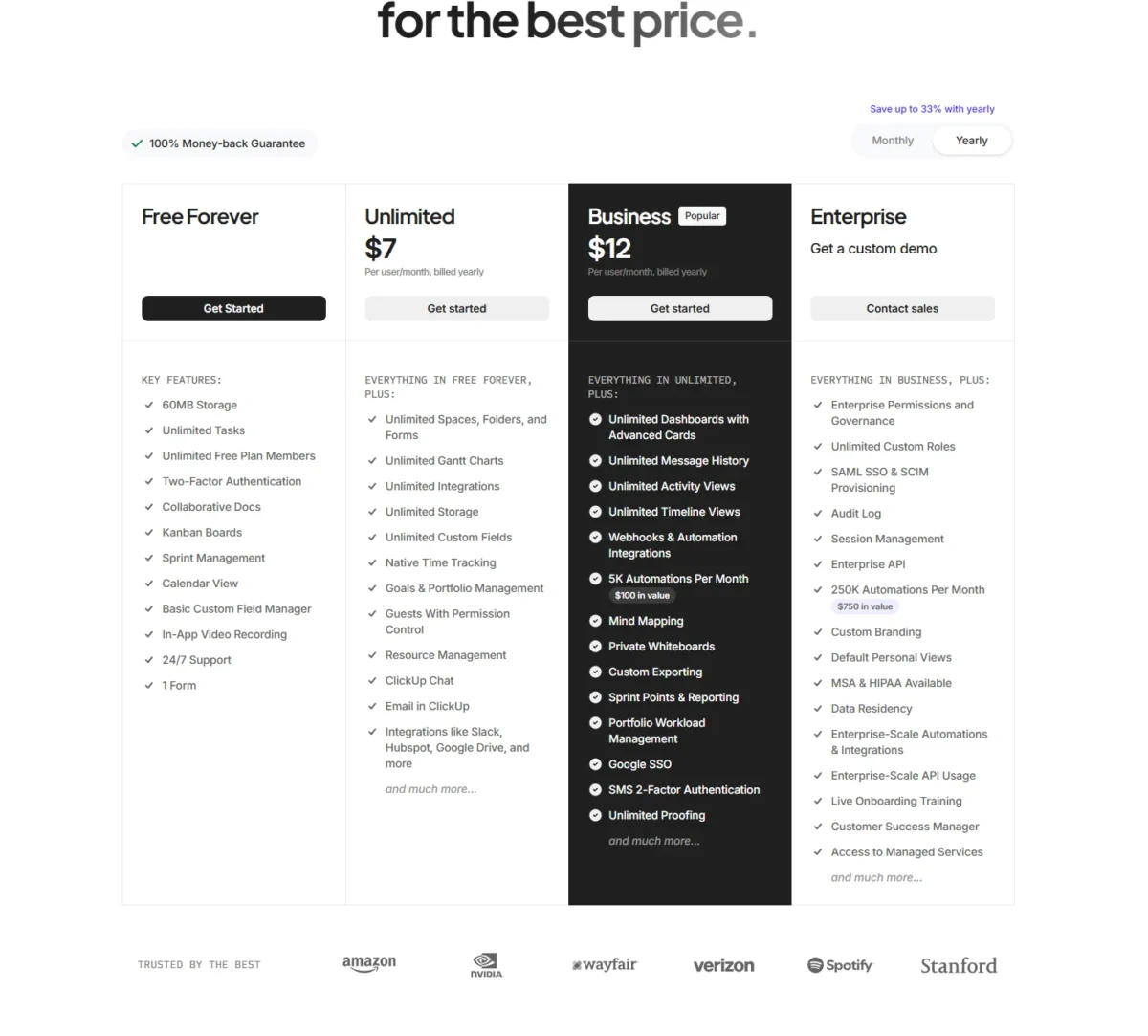
Budget on the Plans page inside your own workspace. On October 10, 2026, ClickUp’s public plan cards listed Unlimited at $7 and Business at $12 per user per month billed yearly. The same page’s savings calculator, and my workspace’s Plans page marked “Early access”, listed Core at $8 and Business at $17.
The newer lineup is not a relabel. Core lists 1,000 automations a month and unlimited Gantt charts, and the $17 Business lists 10,000 automations against 5,000 on the $12 card.
At 8 people, Core’s $768 is only $96 a year above Unlimited’s $672, but Business at $1,632 is $480 above Business at $1,152. If your workspace shows the newer lineup, use the $8 and $17 rows above and check ClickUp’s plan-by-plan pricing for the tiers above Business.
Who Should Skip ClickUp, and Who Should Skip Asana
Skip ClickUp if your rules or your clients outgrow its entry plan. Skip Asana if you need a third free user, cheap time tracking or a head count just past a seat step.
Skip ClickUp if one of these holds; my full ClickUp review weighs the rest of its trade-offs.
- Your rules would run past 1,000 actions a month on Unlimited. ClickUp pauses automations at the limit, and Asana Starter lists unlimited automations.
- Many clients need limited access without paid seats. ClickUp’s Free Forever guests have full edit rights, and Unlimited’s guest seats are capped.
Skip Asana if one of these holds; my Asana review gives the full verdict.
- You need 3 or more people on one project at $0. Personal allows 2 users per project and team.
- You need native time tracking for under $24.99 per user per month. Asana puts it on Advanced.
- Your head count sits just past a seat step. Six people pay for 10 Starter seats, and 11 pay for 15.
My rule: count your clients and your monthly rule runs before your head count. If either is large and your team does not log hours, buy Asana Starter. If neither is, ClickUp Unlimited does the job for about half Asana’s yearly bill at 8 people.
A team that logs hours should first price ClickUp Unlimited against Asana Advanced or the Timesheets and Budgets add-on. Asana’s native time tracking starts on Advanced.
How to Migrate a Project From Asana to ClickUp, or Back
ClickUp has a direct Asana importer that maps projects, sections and people, but six kinds of data do not import automatically. The trip back to Asana runs through a CSV file.
In ClickUp, the Asana importer sits under Settings, Imports / Exports. After you sign in to Asana, you map projects to Spaces or Folders, sections to a custom field, Lists or statuses, and people by email. Inviting unmatched people can add charges.
Six things do not import automatically: freestanding tasks, nested subtasks, tasks shared between projects, recurring tasks, private tasks and @mentions. An import takes from 1 minute to a few hours, and a Free Forever workspace should check attachments against its 60MB limit first.
Going back, you export a ClickUp view to CSV and upload it through Asana’s CSV Importer, which maps columns by their names. ClickUp Free Forever cannot export List and Table views, and Unlimited gets 5 uses, so check that allowance before you plan the move.
Neither ClickUp’s Asana importer page nor Asana’s CSV importer page mentions automation rules, so plan to rebuild them by hand; the builders differ, with ClickUp’s trigger-and-action list against Asana’s canvas. Dependencies are not on ClickUp’s list of what transfers, so budget time to re-link blocked tasks.
Frequently Asked Questions
Is ClickUp or Asana better for personal use?
Both free plans fit one or two people, so pick by the work. Asana Personal covers 2 users per project and team with list, board and calendar views and accepts files up to 100MB each, which suits file-heavy work. ClickUp Free Forever adds docs, sprints and 60 Gantt uses for planning, but its whole workspace holds 60MB of files.
Why is ClickUp better than Asana for some teams?
ClickUp is cheaper per seat, $7 against $10.99 per user per month billed yearly, and its free plan has no member limit. It is not better for every team: Unlimited caps automation at 1,000 actions a month and limits guest seats, while Asana Starter lists unlimited automations and unlimited free guests.
What’s better than ClickUp and Asana?
Look past both only when ClickUp’s action cap and Asana’s seat steps both rule them out for your team. The usual third candidate is monday.com, and my comparison of how Asana compares with monday.com sets it against Asana directly. The ten-tool ranking linked in the first section covers the wider field.





