Asana looks inexpensive on the pricing page and stops looking inexpensive the moment a real team signs up. The free Personal plan stops at two users, the smallest paid subscription is two seats, and paid seats are sold in fixed blocks, so a 31-person team is billed for 40.
The short version of this Asana review: Starter at $10.99 per user per month on annual billing is the practical entry plan for a working team. Advanced at $24.99 earns its price only when portfolios, goals, workload, approvals, or branching forms are genuine requirements, and Enterprise pricing never appears in public.
Asana is strong at turning messy cross-functional work into owned, dated, reportable tasks.
It is weak for solo buyers, for teams that need two accountable owners on one task, and for anyone who expects a spreadsheet migration to arrive intact.
Prices below were checked against the official pricing page on 2026-08-04.
In This Article (17 sections)
Quick Verdict
| Decision point | Assessment |
|---|---|
| Best for | Cross-functional teams of 5 to 50 running repeatable campaigns, launches, and intake queues |
| Not ideal for | Solo buyers, shared-ownership workflows, budget-capped teams needing portfolio reporting |
| Starting price | $0 Personal (2 users); $10.99 per user/ |
| Practical plan | Starter for most teams; Advanced when portfolios, goals, or proofing are required |
| Free plan | Yes, Personal, capped at 2 users |
| Setup difficulty | Moderate. Project structure is fast, field and template governance is the slow part |
| Main strength | Reusable project structure with forms, custom fields, dependencies, and rules from Starter up |
| Main limitation | One assignee per task, and billed seats round up to fixed increments |
| Best alternative | monday.com for visual boards, Jira for software delivery, ClickUp for feature density |
Pricing and plan limits checked: 2026-08-04. Source: Asana official pricing and Asana subscription documentation.
Review Methodology and Sources
This review is built on Asana’s official pricing page, help-center documentation, developer documentation, trust and security pages, the public app directory, and attributed third-party review platforms. Plan names, rates, and plan limits were checked on 2026-08-04.
Asana was assessed against the criteria that decide a work management purchase: workflow fit, plan gates, billing mechanics, automation ceilings, migration effort, integration and API constraints, administrative control, and support entitlements.
Greater weight went to factors that change the invoice or the implementation plan. Billed seat behavior, add-on packaging, feature gates that block a documented workflow, and documented API limits counted for more than feature counts or vendor positioning.
Claims without a matching official source were excluded from the analysis, and reviewer opinion is labeled as sentiment rather than product behavior. Temporary offers are separated from standard pricing and re-checked at publication.
What Is Asana?
Asana is a work management platform from Asana, Inc.
that connects tasks, projects, portfolios, goals, and automated workflows through what the company calls the Asana Work Graph.
The vendor positions the 2026 product as an operating system for human-agent teams, which is marketing language for adding AI agents to the same task and project model.
Source: About Asana.
Strip that back and the buying decision is simpler. Asana sells a shared vocabulary of task, project, portfolio, and goal to departments that coordinate through email threads, chat pings, and spreadsheets.
The category is crowded, and Asana’s position inside it is neutrality. It is not a developer tool, not a CRM, and not a document workspace, which is exactly why marketing, operations, creative, and product teams end up in the same workspace.
That neutrality is also the risk. A tool that fits everyone fits nobody by default, so the value depends on the conventions a team enforces in the first month.
For teams still shortlisting, the wider category comparison lives in this project management software guide.
Setup, Onboarding, and the Two-User Wall
Early setup is easy in the way that hurts later. A project, a few sections, and a task list take minutes, and nothing in the interface forces a decision about naming, field libraries, or template ownership.
The free plan is where the first buying decision arrives. Personal is free forever for up to two users, which makes it a personal task manager rather than a team pilot.
Older reviews still describe a 10-user free tier. The official pricing page checked on 2026-08-04 shows two users, so a three-person team cannot run a free evaluation at all.
Setup difficulty for a single project is low. Setup difficulty for an operating model is moderate, and the work is governance rather than configuration.
Asana provides free desktop applications for macOS and Windows plus mobile applications for iOS, iPadOS, and Android, so the rollout does not depend on a browser tab staying open. Source: Asana app downloads.
The first hour that matters
Skip the sample project and build the real one. A campaign, a launch, or an intake queue is the only honest test of whether the team will adopt the tool.
Three decisions carry the whole implementation: who owns each project template, which custom fields are allowed to exist, and what a task title looks like. None of them are enforced by the product.
Reviewers on Gartner Peer Insights and TrustRadius regularly praise Asana’s project setup, documentation, and organization, and reviewers on Capterra just as regularly report a learning curve on larger projects.
Both patterns can be true, because they describe different stages of the same rollout. Sources: Gartner Peer Insights and Capterra reviews.
Migrating in from a spreadsheet or another tool
Asana documents CSV import paths from Excel, Google Sheets, Trello, monday.com, and Smartsheet.
The importer maps rows to tasks with descriptions, sections, one assignee, collaborators, dates, milestones, dependencies, and parent-task relationships. Source: Asana import documentation.
Three documented behaviors decide how much cleanup follows.
The importer adds tasks and cannot update existing tasks. An invalid value in a mapped column can force the whole column to import as the wrong field type, and custom fields created during import stay local to that project until someone converts them for organization-wide reuse. Source: preparing data for CSV import.
That third behavior is the quiet one. Local fields multiply across projects, and cross-project reporting later depends on a field library nobody consolidated.
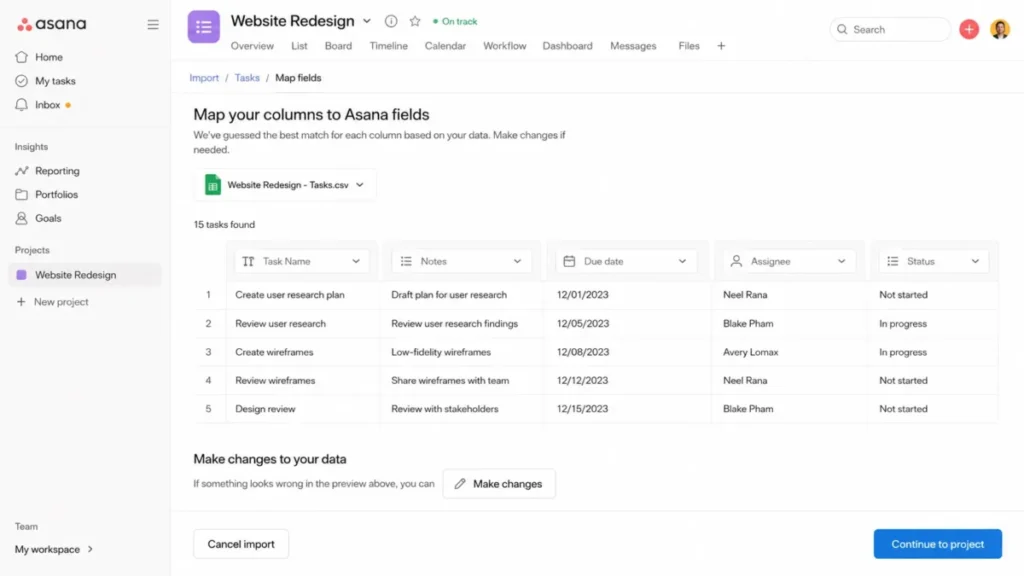
A staged sequence keeps this survivable: normalize the export, import a small sample, compare row and task counts, convert approved local fields to global fields, then run the real cutover once. Repeat imports create duplicates because the importer only adds.
Comments, attachments, activity history, permissions, dashboards, and source automations are not documented as migrating through CSV. Treat those as manual rebuild work, and read the wider CRM and system migration guide before committing to a cutover date.
The Workflows Asana Is Built to Run
Plan gates stop being a table and start being a blocker here. Everything below is documented behavior, mapped to the plan that carries it.
Reusable projects, templates, and dependencies
Starter adds timeline and Gantt views, reporting dashboards, unlimited automation actions, forms, custom templates, custom fields, and free guests. Source: Asana pricing.
That bundle is the difference between a task list and an operating model. A campaign template with owners, stages, custom fields, dependencies, and rules is reusable; a shared to-do list is not.
The friction is schema drift. Two campaign managers can create two versions of a Priority field in a week, and portfolio reporting later inherits both.
Assign a template owner before the second project exists. It is the cheapest governance decision available and the one most teams skip.
Forms and request intake
Forms turn scattered requests into structured tasks inside the destination project.
Project members on paid plans can share a form by public link or restrict it to the organization when the administrator allows it. Source: Asana forms access permissions.
Branching logic, where different answers surface different follow-up questions, sits on Advanced rather than Starter. A single-path intake form works on Starter, and an IT, HR, or creative queue with conditional routing does not.
Only an Enterprise+ super admin can restrict every form in the domain to authenticated organization users. Below that tier, form governance is a policy the team follows, not a control the administrator enforces.
Portfolios, goals, and workload
Advanced adds portfolios, goals, portfolio workload, approvals and proofing, form branching, native time tracking, formulas, and integrations with Salesforce, Tableau, and Power BI. Enterprise adds universal workload and capacity planning across the organization.
A portfolio does not repair the data underneath it. Missing status updates, stale tasks, absent estimates, and inconsistent fields all survive the rollup and show up as an executive dashboard nobody trusts.
Before buying Advanced for reporting, define required portfolio fields, a status-update cadence, and a project-owner responsibility. Reporting quality is a process purchase, not a feature purchase.
Automation rules
The pricing page advertises unlimited automation actions on Starter and Advanced.
The rules documentation caps each project at 50 rules and each custom rule at 20 triggers. Source: Asana rules documentation.
Both statements are current, and they answer different questions. Action volume is uncapped, and workflow complexity inside one project is not.
A 50-rule ceiling is generous for a campaign project and tight for a consolidated service desk where every request type carries its own routing, escalation, and notification logic. The workaround is consolidation, splitting the process across projects, or moving orchestration into an integration.
Prototype the largest intended workflow and count the rules it needs before standardizing on Asana. That count is a better purchase signal than any feature list.
Time tracking, timesheets, and budgets
This is where three different things get confused. Native task time tracking arrives with Advanced, and centralized timesheets, user rates, and project budgets sit behind the Timesheets and Budgets add-on at $5.99 per user per month on annual billing, available with Starter, Advanced, Enterprise, and Enterprise+.
For a 10-seat agency that means $718.80 per year on top of the core plan. For 50 seats it is $3,594 per year.
Agencies and consultancies should price that add-on into the first budget conversation. Reviews that say Asana lacks native time tracking are out of date, and reviews that imply Advanced covers full cost and budget management are overstating it.
Asana AI and AI Studio
AI Studio Basic includes account-level monthly credits: 50,000 on Starter, 75,000 on Advanced, and 200,000 on Enterprise and Enterprise+. AI Studio Plus and Pro are paid options, and their public US prices were not verified on the pricing page checked on 2026-08-04.
Read that allowance carefully. The credits attach to the billing account each month rather than scaling per user, so a 40-seat Starter account and a 5-seat Starter account draw from the same 50,000-credit pool.
Overflow behavior, credit conversion rates, and warning thresholds are not published. Any team planning production AI routing should get consumption assumptions, overage pricing, and renewal treatment in writing before signing.
What Breaks at Scale
None of this shows up in a small pilot. All of it appears once the workspace holds several teams, a few thousand tasks, and an integration.
One assignee per task
Every Asana task carries exactly one assignee, with multiple collaborators able to follow and edit it. Source: understanding tasks.
As an accountability model this is a deliberate strength. As a workflow model it forces a decision for any task two people genuinely deliver together.
Three workarounds exist: split the work into subtasks with separate owners, name one accountable owner and add the other as a collaborator, or create two linked tasks. Co-delivery workflows such as paired design and copy production stay awkward in all three.
I would not treat this as a dealbreaker for marketing or operations teams. I would treat it as a dealbreaker for teams whose process documents literally require two accountable performers on one record.
File size, not storage
Asana describes storage as unlimited and caps each uploaded file at 100MB. Creative, video, and design teams hit that ceiling faster than they expect.
The workaround is attaching through Google Drive, Dropbox, or another storage integration. Proofing and approvals then depend on a second system’s permissions rather than Asana’s.
API and bulk-operation ceilings
Integration teams need four documented numbers before designing anything.
The search API allows 60 requests per minute, concurrent requests are capped at 50 GET and 15 write requests, and exceeding a limit returns HTTP 429 with a Retry-After header. Source: Asana API rate limits.
The fourth number is the one that surprises people. Project duplication, template instantiation, export, and CSV import share a limit of five concurrent jobs per user, so a browser-triggered bulk import competes with the same capacity an API job uses.
Event-driven designs carry their own ceilings: 1,000 webhooks per resource and 10,000 active webhooks per token, with a single event sync token returning up to 100 events before pagination. Sources: Asana webhooks guide and the events endpoint reference.
None of these are unusual for a platform at this scale, and all of them shape architecture.
A per-task webhook strategy fails at volume, and a polling integration that ignores Retry-After throttles itself. If the team is new to this territory, start with the basics of what an API is.
Governance features that arrive later than expected
Custom fields exist from Starter.
Private custom fields and restrictions on who can edit a field value require Enterprise or Enterprise+. Source: custom field permissions.
Field creation and field confidentiality are separate purchases. A Starter or Advanced team that puts salary bands, deal values, or vendor pricing in a custom field inside a shared project has no field-level control to fall back on.
Keep sensitive attributes in the system of record until the contract includes those controls. That is a workflow decision, not a compliance opinion.
Downgrade risk at renewal
Cancellations and downgrades take effect at the end of the current billing period, after which the team loses paid features including advanced permissions, custom fields, timeline, and task dependencies. Source: modify your Asana plan.
That is a switching cost, not a billing footnote. A year of workflow structure built on custom fields and dependencies does not survive a downgrade intact.
Feature Gates: What You Get on Each Plan
| Capability | Personal | Starter | Advanced | Enterprise | Enterprise+ |
|---|---|---|---|---|---|
| Users | Up to 2 | 2 seat minimum | 2 seat minimum | Custom | Custom |
| Timeline, Gantt, dashboards | No | Yes | Yes | Yes | Yes |
| Forms, custom fields, templates, rules | No | Yes | Yes | Yes | Yes |
| Form branching, approvals, proofing | No | No | Yes | Yes | Yes |
| Portfolios, goals, portfolio workload, formulas | No | No | Yes | Yes | Yes |
| Native task time tracking | No | No | Yes | Yes | Yes |
| SAML, SCIM, service accounts, view-only licenses | No | No | No | Yes | Yes |
| Universal workload and capacity planning | No | No | No | Yes | Yes |
| Private custom fields and field edit restrictions | No | No | No | Yes | Yes |
| Domain-wide form access restriction | No | No | No | No | Yes |
| SIEM integrations, data residency, audit logs, managed workspaces | No | No | No | Add-on dependent | Yes |
| AI Studio Basic credits per account per month | Not listed | 50,000 | 75,000 | 200,000 | 200,000 |
Plan gates checked: 2026-08-04. Sources: Asana pricing for plan contents, plus the forms and custom-field permission articles cited above for the two governance rows.
Two rows deserve a second look. Advanced is the first tier where cross-project management exists at all, and Enterprise+ is the only tier where an administrator can enforce form access across the domain rather than trusting each project owner.
Read the gate table as a workflow consequence, not a feature checklist. Official documentation puts branching intake on Advanced and field privacy on Enterprise, so the plan gate a buyer hits first is the one attached to the workflow that team runs every week.
Choose the lowest plan that clears every named workflow, because paying for a higher tier does not remove the limitation that blocked the previous one.
The Enterprise row is deliberately hedged.
Asana’s release notes and add-on documentation show that Compliance Management and Permissions Management can be purchased as add-ons by eligible Enterprise customers, so the Enterprise+ question is a quote question rather than a plan-page question. Sources: compliance management add-on and permissions management add-on.
The Pricing Math Nobody Shows You
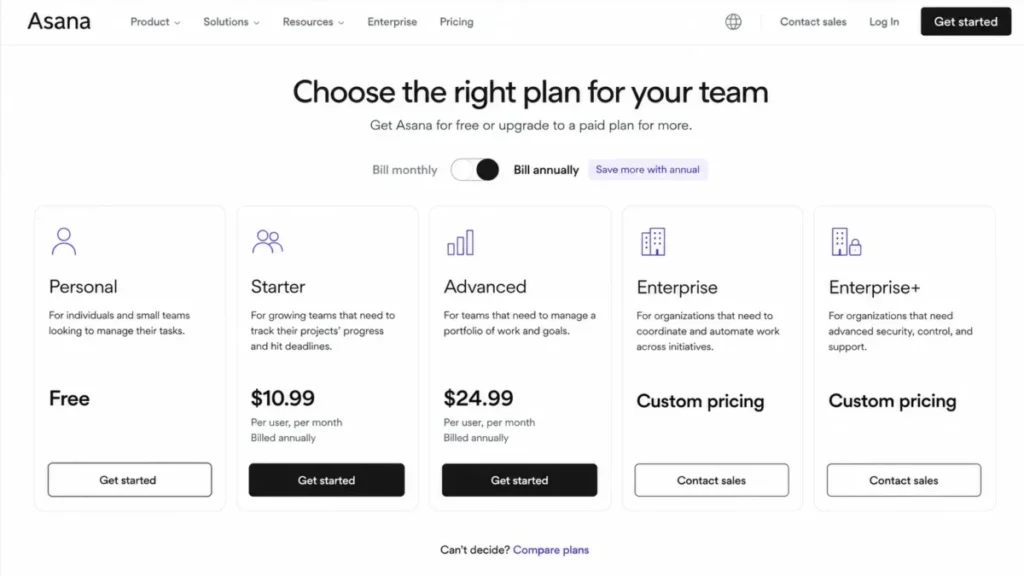
| Plan | Annual billing | Monthly billing | What it is for |
|---|---|---|---|
| Personal | $0 | $0 | Up to 2 users, basic task and project management |
| Starter | $10.99 per user/ | $13.49 per user/ | Team workflows: forms, fields, timeline, dashboards, rules |
| Advanced | $24.99 per user/ | $30.49 per user/ | Portfolios, goals, workload, proofing, branching, formulas |
| Enterprise | Custom quote | Custom quote | SAML, SCIM, service accounts, org-wide capacity |
| Enterprise+ | Custom quote | Custom quote | Advanced security, compliance, audit, data residency |
| Timesheets and Budgets add-on | $5.99 per user/ | Not listed | Timesheets, user rates, project budgets |
Prices checked: 2026-08-04, US market, USD. Source: Asana official pricing.
The two-seat floor
The smallest paid Asana subscription contains two seats, and there is no one-user paid plan. Source: Asana subscriptions and pricing.
A solo consultant who needs forms, timeline, custom fields, or rules pays $21.98 per month equivalent on annual billing, or $26.98 month to month, for one working seat. That is the clearest disqualifier in the whole product.
Seat increments, not headcount
Paid seat quantities move in fixed blocks: single seats from two through five, five-seat blocks through 30, 10-seat blocks from more than 30 through 100, 25-seat blocks from more than 100 through 500, and 50-seat blocks above 500.
| Active users | Billed seats | Starter, annual term | Advanced, annual term | Effective premium per active user |
|---|---|---|---|---|
| 5 | 5 | $659.40 per year | $1,499.40 per year | None |
| 10 | 10 | $1,318.80 per year | $2,998.80 per year | None |
| 12 | 15 | $1,978.20 per year | $4,498.20 per year | 25.00% |
| 31 | 40 | $5,275.20 per year | $11,995.20 per year | 29.03% |
| 50 | 50 | $6,594.00 per year | $14,994.00 per year | None |
Calculated from the annual per-user rates and the documented seat increments, both checked on 2026-08-04.
Formula: billed seats multiplied by the plan rate multiplied by 12. Sources: Asana pricing for rates, and the subscription documentation cited above for increments.
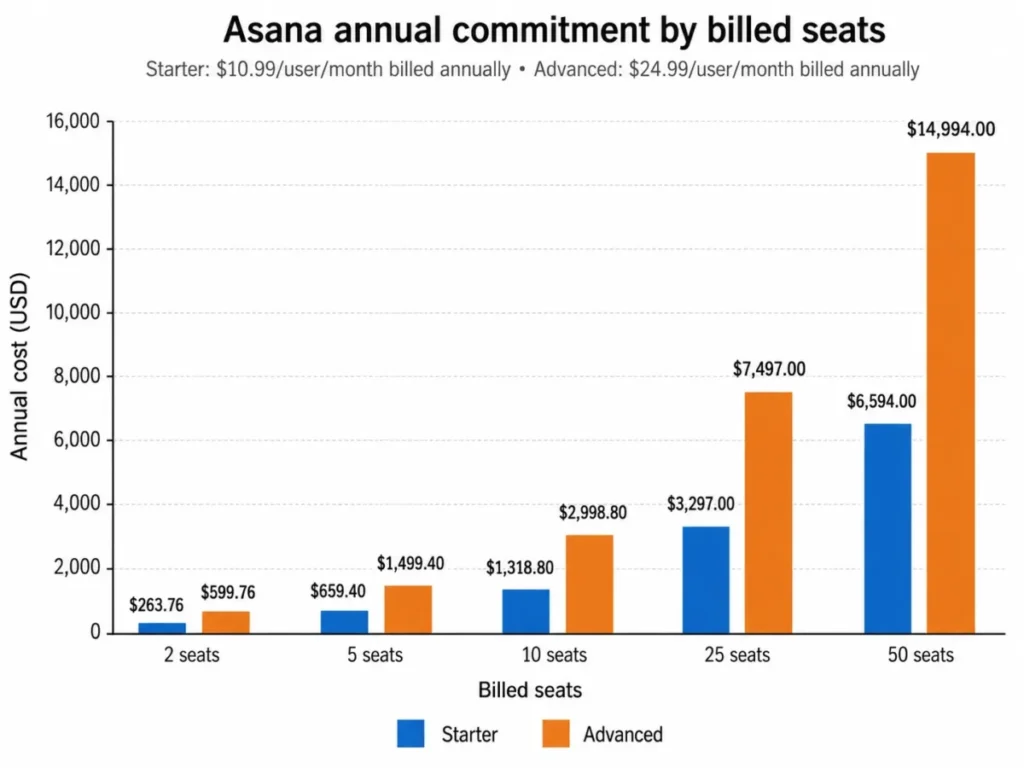
A 31-person team pays for nine seats nobody uses. That is not a surcharge, it is unused billed capacity, and it pushes the effective Advanced rate from $24.99 to roughly $32.25 per active user per month.
Budget from the billed tier, not the headcount, and add expected hiring inside the contract term. A team of 29 people that hires four more crosses an increment boundary mid-year.
Guests are free, unless the account is a workspace
Guests do not consume paid seats in organizations, teams, or divisions. In a paid workspace, everyone collaborating counts toward the plan, including people who would be guests in an organization.
Agencies running client collaboration should confirm which structure the account uses before modeling cost. The same 12 external collaborators are free in one structure and billable in the other.
The Advanced jump
Advanced costs $14.00 more per user per month than Starter on annual billing, a 127.39% increase over the Starter rate. Across 10 seats that is $1,680 per year, and across 50 seats it is $8,400.
I would not approve that upgrade for a single feature. I would require at least two named Advanced-only workflows with named owners, drawn from portfolios, goals, portfolio workload, approvals, proofing, branching forms, formulas, native time tracking, or the Salesforce and BI integrations.
For a per-plan cost breakdown at other team sizes, the dedicated Asana pricing analysis carries the full tier math.
Costs the plan page will not total for you
Four line items sit outside the headline rate. They are the Timesheets and Budgets add-on at $5.99 per user per month, AI Studio Plus or Pro at unpublished prices, the Compliance Management and Permissions Management add-ons at unpublished prices, and Enterprise or Enterprise+ base subscriptions at custom quote.
A 50-seat Advanced deployment with the timesheets add-on already reaches $18,588 per year before any Enterprise control is discussed. That is the number finance should see first.
Integrations, API, and Ecosystem
Asana maintains a public app directory covering communication, file storage, identity, reporting, CRM, time tracking, automation connectors, and security tools. Source: Asana apps and integrations.
Directory presence is not integration depth. Listing proves an app exists, not that it synchronizes two ways, that the vendor owns support for it, or that it survives a field rename.
Three integration facts carry buying weight. Salesforce, Tableau, and Power BI support sits on Advanced, Splunk requires Enterprise+ or Enterprise with the Compliance Management add-on, and service accounts for approved integrations require Enterprise.
For the Splunk path specifically, the documented ingestion interval runs from 30 to 300 seconds, the default backfill is 30 days, and Asana stores the relevant logs for up to 90 days. Source: Splunk and Asana integration.
That 90-day window is a retention design constraint. Any audit requirement longer than 90 days needs the log destination to own retention, not Asana.
Security, Support, and Admin Controls
Asana publishes SOC 2 Type 2, SOC 3, ISO/IEC 27001, ISO/IEC 27017, ISO/IEC 27018, and ISO/IEC 27701 coverage alongside GDPR and US state privacy-law statements, encryption details, and data governance documentation. Source: Trust at Asana.
Those are vendor-published certifications rather than an independent audit, which is normal and still worth verifying against current reports during procurement.
Enterprise administration is marketed around SAML, SCIM, audit log access, service accounts, app management, and SIEM-related APIs. Source: Asana for Enterprise.
The exposure here is packaging, not capability. Several compliance and permission controls are custom priced or sold as add-ons, so a plan comparison is not a contract.
Build a control-to-tier matrix before the sales call. List SAML, SCIM, service accounts, audit logs, SIEM, data residency, managed workspaces, domain-wide form policy, and private custom fields, then require the quote to name each one as included, add-on, or unavailable.
Support is the weakest documented area.
The published entry point is the Asana Support chatbot in the Help Center, and the pricing comparison lists 24/7 support and a 99.9% uptime commitment in the enterprise service area. Source: getting support from Asana.
No public average response time or resolution time was verified. Reviewer sentiment on support runs in both directions, so treat published channels as availability and put severity definitions, response targets, and escalation paths in the order form.
Asana Limitations That Affect the Buying Decision
Five limitations are documented rather than anecdotal, and each one changes an implementation plan.
- One assignee per task. Shared accountability has to be modeled with subtasks, collaborators, or linked tasks.
- 50 rules per project and 20 triggers per custom rule. Unlimited automation actions do not mean unlimited workflow definitions.
- 100MB per uploaded file. Unlimited storage still routes large creative assets to an external drive.
- CSV import adds and never updates. A second import creates duplicates, and imported custom fields stay local to the project.
- Field-level privacy starts at Enterprise. Custom fields exist from Starter, and private fields and edit restrictions do not.
A sixth limitation is structural rather than documented.
Asana rewards teams that maintain task hygiene and punishes teams that do not, which is why reviewer complaints about complexity, subtask visibility, and cross-project friction cluster around large workspaces. Source: TrustRadius reviews.
Asana Pros and Cons
| Pros | Cons |
|---|---|
| Starter unlocks the full workflow stack at $10.99 per user per month on annual billing | Personal caps at two users, so free team pilots are not possible |
| Forms, custom fields, templates, dependencies, and rules make processes genuinely reusable | Paid plans start at two seats and bill in fixed increments, so a 31-person team pays for 40 |
| Guests are free in organizations, teams, and divisions | Advanced costs 127.39% more per seat than Starter on annual billing |
| Neutral task vocabulary works across marketing, operations, product, and creative teams | One assignee per task complicates genuine co-delivery workflows |
| Documented API, webhook, and event limits let integration teams design against real ceilings | Timesheets, budgets, AI Studio Plus, compliance, and permissions all sit outside the core plan price |
| Enterprise administration covers SAML, SCIM, service accounts, audit logs, and SIEM paths | Enterprise and add-on pricing is not public, so TCO cannot be modeled without a quote |
Reviewers on G2 consistently credit the interface, task organization, progress tracking, and collaboration, which matches the strengths above. Source: G2 reviews.
Who Should Use Asana
Six-person campaign operations teams. Starter covers structured intake, campaign templates, custom fields, dashboards, and free external guests, which is the exact stack a request-driven marketing function needs. Budget $659.40 per year at five seats.
Fifteen-person cross-functional launch teams. Product, marketing, design, sales, and operations need a shared vocabulary more than they need depth in any one discipline, and 15 people happen to land exactly on a billed seat tier. Starter runs $1,978.20 per year, and Advanced runs $4,498.20.
Thirty-person marketing PMOs. This is the first cohort where Advanced is defensible, because portfolios, goals, portfolio workload, proofing, branching forms, and formulas all get used in the same quarter. Watch the increment boundary at 31 active users.
Agencies that invoice from a separate finance system. Starter plus disciplined templates handles intake and status reporting without the Advanced portfolio layer, and the timesheets add-on stays optional until rates and budgets need to live in Asana.
Enterprise IT organizations with a governance mandate. SAML, SCIM, service accounts, guest controls, app management, and audit integration are documented, and small teams inside the same org can be rolled up rather than run separately. Smaller organizations should compare against these project management tools for small teams first.
Who Should Avoid Asana
Solo consultants who need paid features. Two seats minimum means paying twice for one working user, and a single-user tool does the same job for less.
Teams that require two accountable owners per task. The one-assignee model is a design decision, not a setting, and every workaround adds a record to maintain.
Budget-capped 30-to-40 person teams that need portfolio reporting. Advanced at 40 billed seats is $11,995.20 per year, and a flat-priced alternative changes that math entirely.
Buyers who need full historical migration. CSV import covers tasks and fields; comments, attachments, activity history, permissions, and automations are rebuild work.
Teams unwilling to own governance. Without a template owner, a controlled field library, and a cleanup cadence, Asana becomes an expensive place to store stale tasks.
Asana Alternatives
| Alternative | Choose it when | Starting point |
|---|---|---|
| monday.com | Visual board customization and color-coded status views drive adoption | Per-seat pricing, verify current rates |
| Jira | Software delivery needs issue types, sprints, backlogs, and release workflows | Per-seat pricing, verify current rates |
| ClickUp | Feature density and a lower entry price matter more than polish | Per-seat pricing, verify current rates |
| Notion | Documentation, wikis, and lightweight databases are the primary need | Per-seat pricing, verify current rates |
| Flat-price platforms | Seat rounding and per-user cost outweigh portfolio and governance depth | Verify current rates |
Pricing for alternatives was not verified in this analysis and must be checked against each vendor’s official page before comparison.
The head-to-head that matters most for marketing and operations buyers is Asana versus monday.com, where board customization trades against dependency and portfolio depth. For full profiles, see the monday.com review, the ClickUp review, the Jira review, and the Notion review.
Final Verdict: Is Asana Worth It in 2026?
Asana is worth buying for cross-functional teams that will govern templates, fields, ownership, and cleanup. It is not worth buying as a shared to-do list, and it is a poor value for a single user at any price.
Start on Starter. At $10.99 per user per month on annual billing it carries forms, custom fields, timeline, Gantt, dashboards, templates, and rules, which is the whole point of choosing Asana over a free task app.
Move to Advanced only against named workflows. Portfolios, goals, portfolio workload, approvals, proofing, branching forms, formulas, native time tracking, and the Salesforce and BI integrations are the justification, and team growth by itself is not.
Move to Enterprise or Enterprise+ when identity lifecycle, organization-wide capacity, field privacy, form policy, SIEM, or data residency become mandatory. Then require a written control-to-tier matrix, because add-on packaging decides the real price.
Budget from billed seats, not headcount. Add the timesheets add-on if rates and budgets belong in Asana, and get AI credit consumption in writing before production AI workflows.
The renewal question to answer twelve months in is simple: can the team point to a workflow that is faster and more reportable than it was before? If the honest answer is no, the tool was never the problem, and neither is the price.
Asana Review FAQ
These are the questions buyers ask after the plan table stops answering them, covering real cost at team size, plan gates, migration, and downgrade risk.
Every answer below uses the same official pricing and documentation checked on 2026-08-04.
How much does Asana cost for 10 users?
Starter costs $1,318.80 per year for 10 seats on annual billing, at $10.99 per user per month.
Advanced costs $2,998.80 per year at $24.99 per user per month. Ten users bill as exactly 10 seats, so there is no increment rounding at that size.
Adding the Timesheets and Budgets add-on brings another $718.80 per year.
Rates checked 2026-08-04.
Is Asana free for teams?
Only for two users.
The Personal plan is free forever for up to two people, which makes it a personal or paired task manager rather than a team pilot.
Reviews that mention a 10-user free tier describe older packaging.
A three-person team needs Starter, and the smallest paid subscription contains two seats.
What is the difference between Asana Starter and Advanced?
Starter carries the workflow layer: timeline, Gantt, dashboards, forms, custom fields, custom templates, rules, and free guests.
Advanced adds the cross-project and strategic layer: portfolios, goals, portfolio workload, approvals, proofing, branching forms, formulas, native time tracking, and Salesforce, Tableau, and Power BI support. The gap costs $14.00 more per user per month on annual billing.
Can more than one person be assigned to an Asana task?
No.
Each task has exactly one assignee, though multiple collaborators can follow and edit it.
Teams model shared work by splitting it into subtasks with separate owners, naming one accountable owner plus collaborators, or creating two linked tasks.
Processes that formally require two accountable performers on one record fit this model badly.
Does Asana have a limit on automation rules?
Yes.
Each project supports a maximum of 50 rules, and a custom rule supports up to 20 triggers.
The pricing page separately advertises unlimited automation actions on Starter and Advanced, which refers to how often rules run rather than how many can exist.
Large service-desk style workflows hit the configuration ceiling before the volume ceiling.
Can Asana import data from Trello or monday.com?
Yes, through CSV export and import.
Rows become tasks with descriptions, sections, one assignee, collaborators, dates, milestones, dependencies, and parent relationships.
The importer only adds tasks and never updates existing ones, so a repeat import creates duplicates.
Comments, attachments, history, permissions, and source automations are not documented as migrating and need a manual rebuild.
Why does Asana charge for more seats than my team size?
Paid subscriptions round to fixed increments: single seats from two through five, five-seat blocks through 30, 10-seat blocks from more than 30 through 100, 25-seat blocks from more than 100 through 500, and 50-seat blocks above that.
A 12-person team buys 15 seats and a 31-person team buys 40. The effective cost per active user rises 25.00% and 29.03% respectively.
What happens when you downgrade Asana?
Cancellations and downgrades take effect at the end of the current billing period.
After that the team loses paid features including advanced permissions, custom fields, timeline, and task dependencies.
Any structure built on those features stops working, so a downgrade is a workflow migration rather than a billing change.
Export anything that matters before the period ends.
Is Asana suitable for enterprise security requirements?
Asana publishes SOC 2 Type 2, SOC 3, ISO/IEC 27001, ISO/IEC 27017, ISO/IEC 27018, and ISO/IEC 27701 coverage, and markets SAML, SCIM, service accounts, audit logs, and SIEM paths at Enterprise level.
The caveat is packaging: several compliance and permission controls are add-ons or Enterprise+ features with no public price. Require a control-by-control written quote.
Does Asana include time tracking?
Native task time tracking is included with Advanced.
Centralized timesheets, user rates, and project budgets are a separate add-on at $5.99 per user per month on annual billing, available with Starter, Advanced, Enterprise, and Enterprise+.
For 10 seats that add-on costs $718.80 per year.
Agencies that bill by the hour should price it in from the start.