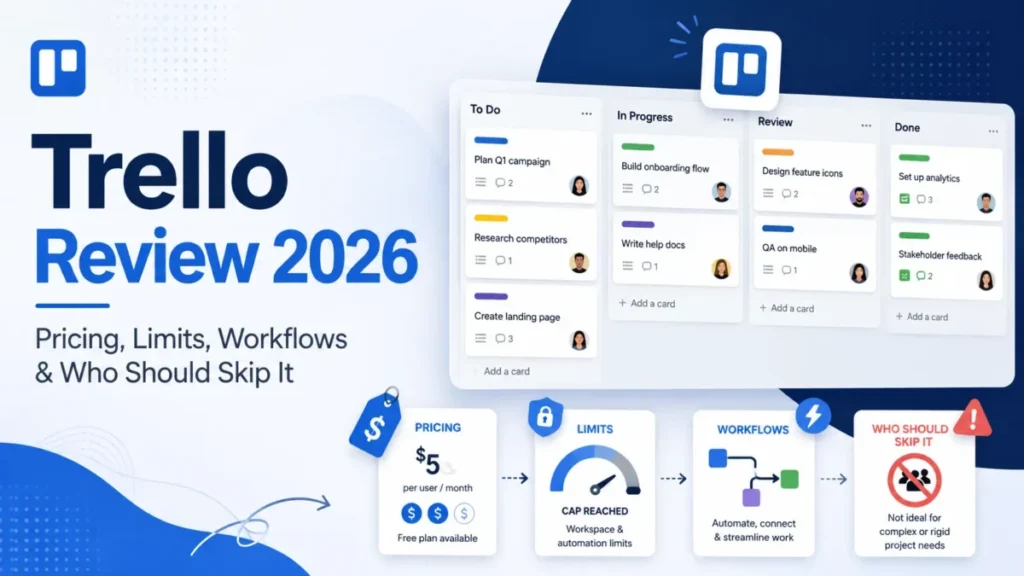
A Trello Workspace rarely breaks on features. It breaks on the eleventh collaborator, when a Free Workspace crosses its cap and the boards stop accepting work.
That is the shape of most Trello buying mistakes. The board metaphor is the easiest thing in this category to adopt, so teams standardize on it fast, then meet a plan gate they never priced into the decision.
This review walks the gates in the order a growing team hits them: the Free ceiling, the Standard schema layer, the Premium reporting layer, and the Enterprise floor that starts at 50 seats. US prices and plan limits were checked on 2026-08-05.
For the wider category, start with our project management software roundup.
In This Article (19 sections)
Quick Verdict
| Decision point | Verdict |
|---|---|
| Best for | 3 to 15 person teams running visual, stage-based work inside one Workspace |
| Not ideal for | Program and PMO teams that need native dependencies, workload balancing, or time tracking |
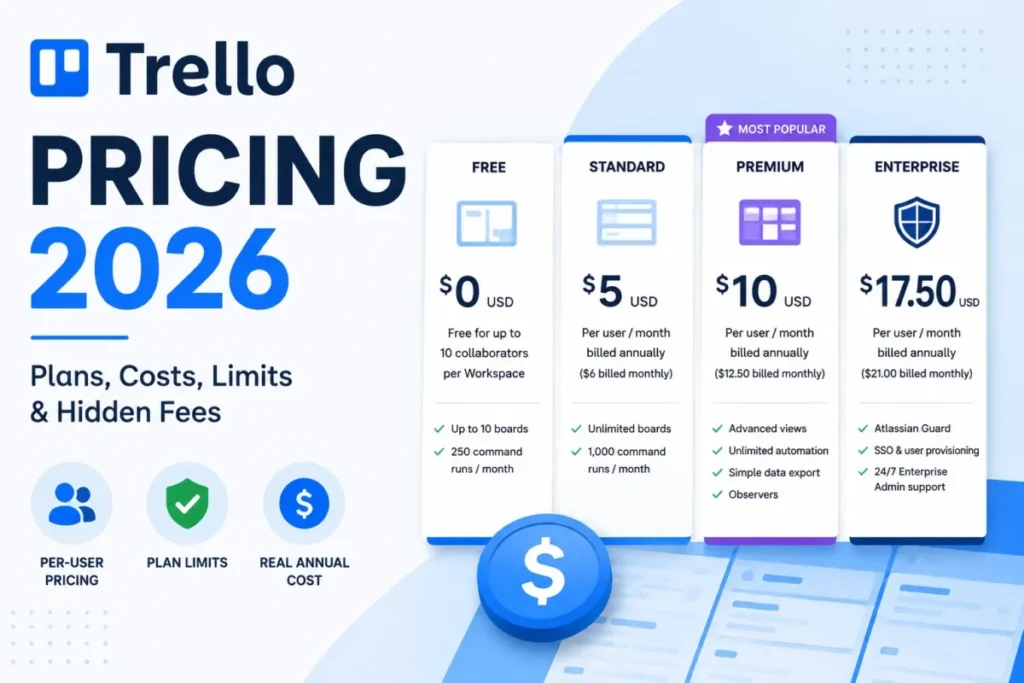
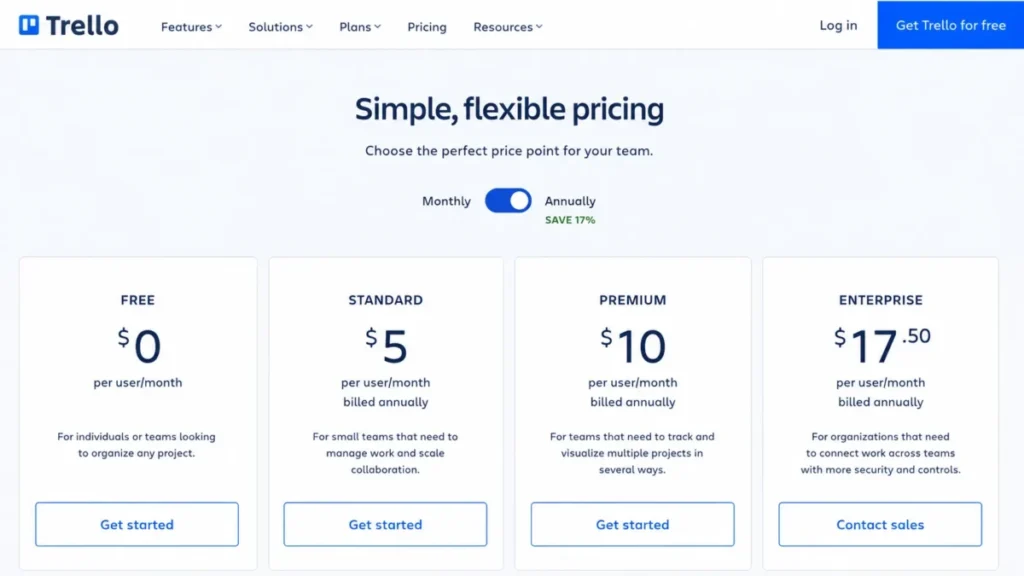
| Starting price | Free at $0; Standard from $5 per user/ |
| Practical plan | Standard for most paying teams; Premium once cross-board views or CSV export decide the purchase |
| Free plan | Up to 10 collaborators and 10 open boards per Workspace |
| Setup difficulty | Low for a first board; higher once Workspace topology and guest access have to be designed |
| Main strength | Visual work tracking that non-technical teams adopt with almost no training |
| Main limitation | Reporting, dependency scheduling, workload, and time tracking are not native |
| Best alternative | A heavier work-management platform when portfolio reporting decides the purchase |
Every figure above comes from the official Trello pricing page and the Atlassian Free Workspace collaborator limit documentation, checked 2026-08-05 for the US market in USD.
Trello Pros and Cons
| Pros | Cons |
|---|---|
| Board, list, and card model that a mixed-skill team can run on day one without training budget | Free Workspace boards become view-only above 10 collaborators, and automations stop running |
| Standard adds Custom Fields, card mirroring, and 250 MB per-file uploads at the lowest paid tier | Standard and Premium bill per Workspace, so one person can be charged in each upgraded Workspace |
| Premium adds cross-board and Workspace views, Observers, and CSV export for portfolio and audit work | Premium automation is unlimited in runs only; operations stay capped at 250,000 per month |
| Documented board thresholds and API rate limits let an integrator size a build before committing | No generic import tool exists, so migration runs through copy-paste, the REST API, or a partner Power-Up |
| Enterprise bills a user once across Enterprise Workspaces instead of per upgraded Workspace | Reporting, dependency scheduling, workload views, and time tracking are not native capabilities |
| Attachment limits are per file with no stated total account storage cap | Custom Field type cannot be changed after creation, and deleting a field removes its values from every card |
What Trello Is in 2026
Trello is an Atlassian product built around boards, lists, and cards for organizing work visually. That model is the whole proposition, and it explains both the adoption speed and the reporting gap.
The product has also moved outward from team boards. Independent reporting on the Trello Inbox and Planner expansion describes a direction that pairs shared boards with personal capture and day planning.
Read that as a positioning signal, not a capability upgrade. Inbox and Planner make Trello better at collecting and scheduling individual work; they do not add dependency logic, workload balancing, or portfolio rollups.
Buyers who expect recent releases to close the classic project-management gap will misprice the decision. The realistic frame is a coordination layer that is excellent at visible stage-based work and thin at governance reporting.
Source: About Trello, https://www.trello.com/about, and independent reporting on the Inbox and Planner release. Checked: 2026-08-05.
How We Reviewed Trello: Methodology and Sources
This analysis is based on Trello’s official US pricing page, Atlassian help-center documentation, Trello developer documentation, the Trello Trust Center, a public app-store listing, third-party review platforms, and current community discussion. Pricing and plan limits were checked on 2026-08-05.
Trello was assessed against the same buyer-focused criteria we apply across work-management coverage: plan gates, usage limits, billing mechanics, data portability, security posture, support entitlements, and total cost by team size.
Greater weight was given to facts that change a purchase. Those are the event that locks the Free plan, the quota that makes an unlimited label conditional, the access pattern that converts a guest into a paid seat, and the board size that degrades usability.
Claims that could not be verified from official evidence were excluded rather than hedged, and vendor security statements are labeled as vendor claims. Workflow descriptions follow documented behavior, published limits, and stated plan requirements.
Setup Reality: Where a Trello Workspace Starts and Where Free Stops
Creating a first board is the least interesting part of a Trello decision. Lists become stages, cards become work, and members, due dates, labels, and checklists attach to the card.
The decision that matters is Workspace topology, because Trello prices and limits almost everything at the Workspace level rather than the board level.
The Free ceiling is a lock, not a nudge
A Free Workspace supports up to 10 collaborators and 10 open boards. Collaborators are counted as members, guests, and pending invitations together, so three unaccepted invites consume three of the ten seats.
Cross that line and the Workspace changes state. Boards become view-only, no further collaborators can be added, and automations stop running.
Nothing is deleted in that state, but the Workspace stops being a place where work happens. For an agency or a cross-company team that adds client contacts as it goes, that is a production outage triggered by an invitation.
The practical consequence is that Free is only viable when the collaborator list is bounded and stable. Anyone planning to grow past ten should treat Standard as the real entry plan rather than a later upgrade.
Source: official Trello Free Workspace collaborator limit documentation, https://support.atlassian.com/trello/docs/workspace-user-limit/. Checked: 2026-08-05.
File uploads are generous per file, not per account
Free allows 10 MB per uploaded file. Paid plans raise that to 250 MB per file, and Trello does not state a total account storage cap.
Link attachments do not consume the upload limit, which is the workaround for teams whose real document store is elsewhere. That is a reason to keep Trello as a work tracker and leave the file repository where it already lives.
Source: official Trello attachment documentation, https://support.atlassian.com/trello/docs/adding-attachments-to-cards/. Checked: 2026-08-05.
Real Workflows Under Load
Four capabilities decide whether Trello survives contact with a real operating team: board schema, cross-board reuse, automation, and cross-board reporting. Each one carries a plan gate and a limit worth checking before purchase.
Custom Fields: schema you cannot easily undo
Custom Fields require Standard or higher and are the mechanism for turning a card into a structured record with priority, client, effort, or stage metadata.
The caps are 50 fields per board and 50 dropdown options per field, which is generous for most operational boards. The governance risk sits elsewhere.
A field type cannot be changed after creation, so a field created as text stays text. Deleting a field removes its values from every card on the board, irreversibly.
Design the field set before rollout and treat it as a schema change, not a UI tweak. Teams that iterate field types casually will rebuild boards.
Downgrading to Free does not destroy the values. They remain stored but unavailable until the Workspace returns to a paid plan.
Source: official Trello Custom Fields documentation, https://support.atlassian.com/trello/docs/using-custom-fields/. Checked: 2026-08-05.
Card mirroring: a reference, not a working copy
Mirroring puts one source card onto another board and is available only in paid Workspaces. On Free, the same action produces a Link card instead.
The access rule is the part that breaks cross-team workflows. A viewer without access to the source board sees hidden content, so a mirrored card on a shared board can arrive empty for exactly the stakeholders it was meant to inform.
Several actions also stay on the original. Power-Ups, card-button automation, and deletion must be handled on the source card, not the mirror.
Treat mirroring as visibility plumbing rather than synchronization. If a team expects to execute work from the mirror, the workflow will stall on a permission boundary.
Source: official Trello card mirroring documentation, https://support.atlassian.com/trello/docs/mirroring-cards/. Checked: 2026-08-05.
Automation: unlimited runs with a very finite ceiling
Trello’s automation quotas are pooled by Workspace, not by board. That single design choice is what surprises multi-board teams.
Free provides 250 runs and 2,500 operations per month. Standard provides 1,000 runs and 20,000 operations.
Premium and Enterprise provide unlimited runs, but operations are capped at 150,000 plus 10,000 per paid user, to a maximum of 250,000 per month. Unlimited describes the run counter only.
Secondary limits apply on every plan: 20 operations per run, 20 enabled card buttons, 20 enabled board buttons, 50 email recipients per email action, and 64,000 characters of stored automation definitions per user. Quotas reset on the first day of the month at midnight GMT.
Usage is visible through the board menu under Automation, then Activity, then Workspace activity. A Workspace running ten moderately automated boards consumes one shared allowance, so capacity planning belongs at the Workspace level.
Atlassian documents the caps but not the behavior when a Premium or Enterprise Workspace exhausts its operations quota mid-month. Whether actions queue, skip, or fail is not something we can state, so an automation-critical team should confirm it with Atlassian before committing.
Source: official Trello automation quotas and limits documentation, https://support.atlassian.com/trello/docs/butler-quotas-and-limits/. Checked: 2026-08-05.
Views and Observers: the Premium reporting layer
Premium is where Trello stops being a single-board tool. It adds board and Workspace views, CSV export, Observers, admin and security controls, templates, Collections, unlimited automation runs, and priority support with an answer target within one business day.
Observers matter more than the feature list suggests. A read-only stakeholder role is the difference between showing a client or executive the work and copying it into a status document every week.
If a manager needs to see work across several boards in one place, that requirement alone justifies Premium. Standard has no equivalent.
Source: official Atlassian plan comparison guidance, https://support.atlassian.com/trello/docs/which-trello-plan-is-best-for-me/. Checked: 2026-08-05.
Feature Gates: What Each Trello Plan Adds
| Capability | Free | Standard | Premium | Enterprise |
|---|---|---|---|---|
| Open boards per Workspace | 10 | Unlimited | Unlimited | Unlimited |
| Collaborators | Up to 10 | Paid seats | Paid seats | Paid seats |
| Custom Fields | No | Yes, 50 per board | Yes | Yes |
| Card mirroring | Link card only | Yes | Yes | Yes |
| Per-file upload | 10 MB | 250 MB | 250 MB | 250 MB |
| Automation runs per month | 250 | 1,000 | Unlimited | Unlimited |
| Automation operations per month | 2,500 | 20,000 | 150,000 plus 10,000 per paid user, capped at 250,000 | Same as Premium |
| Board and Workspace views | No | No | Yes | Yes |
| CSV export | No | No | Yes | Yes |
| Observers | No | No | Yes | Yes |
| Documented support target | Not publicly stated | Not publicly stated | Answer within one business day | 24/7 Enterprise Admin support |
| Billing basis | Not applicable | Per Workspace | Per Workspace | Once per user across Enterprise Workspaces |
Sources: official Trello pricing page, Atlassian plan comparison guidance, and Trello automation quota documentation, checked 2026-08-05. Support targets appear only where Atlassian publishes one, and the Free and Standard response commitment is not publicly stated.
Where Trello Breaks at Scale
Trello’s hard limits are high enough that most teams never see them. The usable limits sit far below the hard ones, and that gap is where the real scaling decision lives.
A board warns at 4,500 open cards and blocks at 5,000. Across a board’s full history the total-card hard limit is 2,000,000, with a warning at 1,800,000.
Beyond a hard limit, clients refuse to add cards and the API returns errors.
For practical performance, Atlassian recommends staying under 1,000 open cards per board, or under 500 when cards carry many attachments or checklists. Archiving completed work and splitting boards are the documented workarounds.
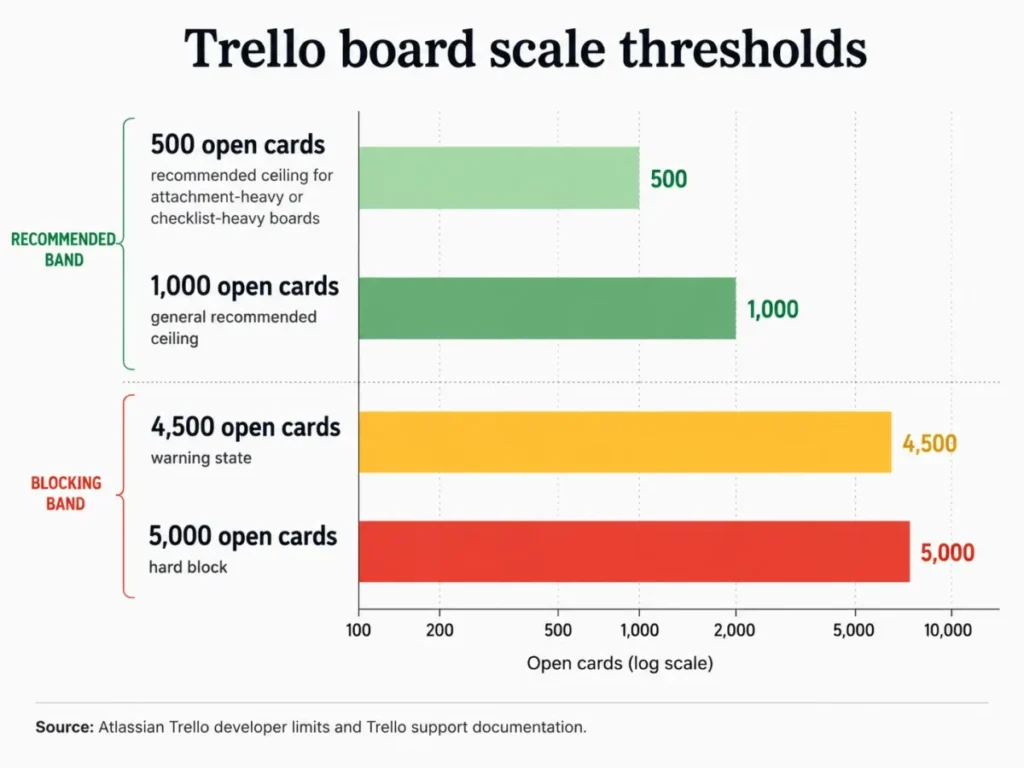
The gap between 1,000 and 5,000 is the buyer’s warning. A board that still technically works can already be slow enough that people stop using it, and adoption failure looks like a tooling failure long before a limit is hit.
Plan board splits at intake rather than at the warning. A team that hits 4,500 open cards is almost certainly already running a board that nobody wants to open.
Source: official Trello object limits documentation and Atlassian slow-board troubleshooting guidance. Checked: 2026-08-05.
Integrations, Power-Ups, and the API
Trello advertises more than 200 Power-Ups. The number is real, and the cost boundary is the part that gets skipped: some partner Power-Ups require a separate subscription outside the Trello plan price.
That matters most for the capabilities Trello lacks natively. Time tracking, resource planning, and deeper reporting are commonly added through partner tools, which means the honest budget for those workflows is the Trello seat price plus a second vendor.
For teams building their own sync, the REST API has three independent throttles. Trello allows 300 requests per 10 seconds per API key and 100 requests per 10 seconds per token, while member routes allow 100 requests per 900 seconds.
Excess requests return HTTP 429.
The token limit is usually the binding constraint, not the key limit. An integrator sizing a two-way sync should design against the tightest applicable window and split large responses rather than assuming key-level headroom.
Sources: official Trello pricing page and Trello REST API rate limit documentation, https://developer.atlassian.com/cloud/trello/guides/rest-api/rate-limits/. Checked: 2026-08-05.
Automation, AI, and Reporting Capability
Automation capacity is covered above, and the practical summary is that Standard suits rule-light boards while Premium suits Workspaces running automation as infrastructure.
AI entitlement is unresolved in Trello’s own materials as of 2026-08-05. The public pricing page lists AI capability under Standard, while the Atlassian plan guide places Atlassian Intelligence under Premium.
We are not going to pick a side on an entitlement the vendor’s two pages disagree about. Confirm the AI tier in checkout before it influences a plan choice, and do not let it carry weight in a Standard versus Premium decision.
Reporting is the clearest structural gap. Recurring critical feedback on third-party review platforms and in current community discussion points at limited native reporting, missing dependency depth, absent time tracking, weak workload visibility, notification control, and friction when one team runs many parallel projects.
That pattern is user sentiment rather than a measured benchmark, and it is consistent across platforms. Weight it as a signal about fit, not as a specification.
Sources: official Trello pricing page, Atlassian plan comparison guidance, TrustRadius review patterns, and current r/trello discussion. Checked: 2026-08-05.
The Trello Pricing Math Nobody Shows You
Trello’s list prices are simple. The invoice is not, because seats are counted per Workspace and guest access can convert into billable seats.
Plan prices and annual cost at scale
| Plan | Monthly billing | Annual billing | Billing basis |
|---|---|---|---|
| Free | $0 | $0 | Per Workspace, with collaborator and board limits |
| Standard | $6 per user/ | $5 per user/ | Per user, per Workspace |
| Premium | $12.50 per user/ | $10 per user/ | Per user, per Workspace |
| Enterprise | Not offered | $17.50 per user/ | Per user, billed once across Enterprise Workspaces |
Annual billing saves $12 per user per year on Standard and $30 per user per year on Premium against twelve monthly payments. On a 25-person Premium Workspace that is $750 a year, which is real money but not the largest variable in this pricing model.
| Paid users | Standard, annual rate | Premium, annual rate |
|---|---|---|
| 5 | $300 | $600 |
| 10 | $600 | $1,200 |
| 25 | $1,500 | $3,000 |
| 50 | $3,000 | $6,000 |
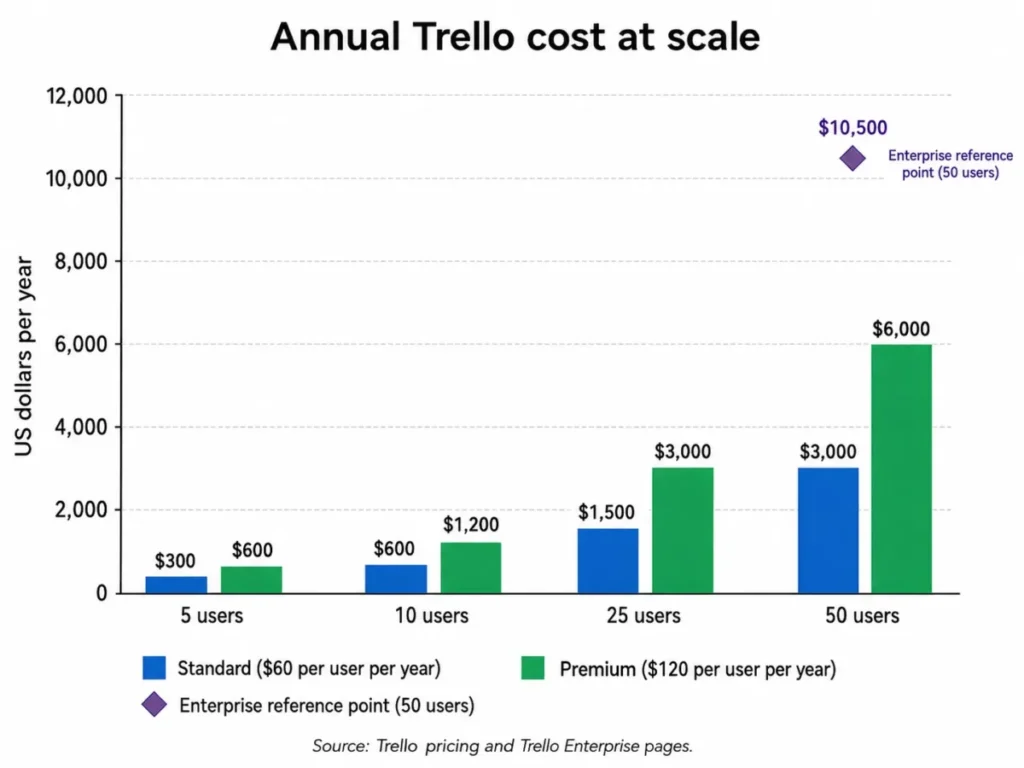
The calculation is the official annual effective rate multiplied by paid users, excluding taxes, partner Power-Up subscriptions, and any separately contracted services. Premium is exactly double Standard at every team size, which makes the upgrade decision a clean yes or no rather than a gradient.
Sources: official Trello pricing page, https://trello.com/pricing, and the official Trello Enterprise page, https://trello.com/en/enterprise. Checked 2026-08-05 for the US market in USD.
Billing topology: how one person becomes two seats
Standard and Premium upgrades apply per Workspace. The same person belonging to two separately upgraded Workspaces is billed in each of them.
Guests follow a second rule. Workspace members and multi-board guests are billable, while a guest who sits on only one board in a paid Workspace is not billed.
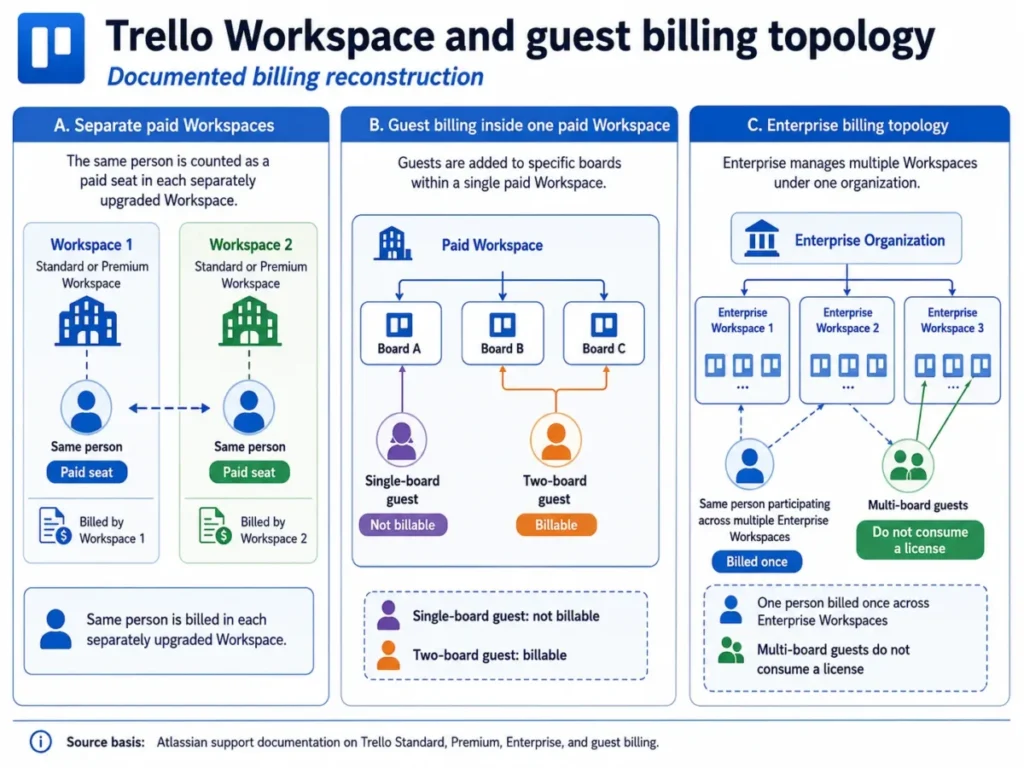
For an agency running one board per client, this is the single most expensive design decision in the product. Adding a client contact to a second board converts a free guest into a paid seat, and splitting clients across separate paid Workspaces multiplies internal staff seats.
The mitigations are structural rather than clever. Keep clients as single-board guests where the engagement allows, consolidate Workspaces instead of proliferating them, and audit multi-board guests before every renewal.
Enterprise inverts the rule. A user is billed once across Enterprise Workspaces rather than separately per Workspace, and multi-board guests do not consume an Enterprise license.
Source: official Trello billing documentation and Atlassian plan comparison guidance. Checked: 2026-08-05.
Enterprise starts at 50 seats and a $10,000 floor
Enterprise is displayed at $17.50 per user per month billed annually, which is $210 per user per year. The per-user figure invites bad arithmetic.
Trello positions Enterprise at a minimum of 50 seats and states a $10,000 annual minimum spend, with $10,500 shown as the total for 50 users. A 12-person team cannot buy governance at $2,520 a year.
Enterprise buys centralized multi-Workspace administration, organization-wide controls, Atlassian Guard Standard, once-per-user billing, and 24/7 Enterprise Admin support. Below the threshold, Premium plus disciplined Workspace design is the only route to most of that.
Source: official Trello Enterprise page, https://trello.com/en/enterprise. Checked: 2026-08-05.
Annual versus monthly, and the way back
Moving from annual to monthly is not a toggle. The documented path requires cancellation or downgrade followed by a new monthly subscription.
Downgrading to Free is also a state change rather than a data event. Trello keeps the ten most active boards open and closes additional boards instead of deleting them, and reopening one requires reducing open boards or upgrading again.
Source: official Trello billing documentation and the Atlassian plan change and cancellation guidance, https://support.atlassian.com/trello/docs/change-or-cancel-your-trello-plan/. Checked: 2026-08-05.
Security, Support, and Admin Controls
Trello’s Trust Center states SOC 2 Type 2, ISO 27001, ISO 27018, encryption in transit and at rest, weekly vulnerability scans, annual penetration testing, daily encrypted backups, and SAML 2.0 single sign-on for Enterprise or Atlassian Guard customers. These are vendor statements rather than independently verified findings.
The distribution matters more than the list. Single sign-on and centralized governance attach to Enterprise or Guard, not to every paid tier, so a security-led buyer at 20 seats is choosing between a separate Guard subscription and accepting Premium-level controls.
Support is also plan-gated rather than uniform. Premium documents priority support with an answer target within one business day, and Enterprise documents 24/7 Enterprise Admin support.
Atlassian does not publish a formal response target for Free or Standard. We mark that as not publicly verified rather than estimating one, which is the honest answer for a team weighing support risk on a launch-critical board.
Sources: Trello Trust Center and the official Trello Enterprise page. Checked: 2026-08-05.
Migration and Data Portability
Getting data out of Trello and getting data into Trello are two very different problems, and only one of them is well supported.
On the way out, Premium adds CSV board export. Three boundaries apply.
A CSV normally covers unarchived cards, while archived cards require the .csv URL method. Inbox cards cannot be exported until they are moved to a board, and a Workspace export including raw attachments must be requested by a Workspace admin.
An export that silently omits archived work and Inbox items is a compliance problem, not a formatting one. Move Inbox cards to a board and handle archived cards explicitly before treating any export as a backup.
On the way in, Trello documents no generic import tool. The supported paths are copying a list into a board, using the REST API, or using a third-party Power-Up.
Object mapping, duplicate handling, and fidelity for comments, attachments, history, and automations are not documented. That absence is the finding, and it should not be filled in with optimism.
A serious migration therefore needs a pilot on a representative board, a reconciliation step that compares counts and samples against the source, and a rollback plan that keeps the source system exportable until acceptance. API-based migration also has to respect the rate limits above, which lengthens the cutover window for large datasets.
Teams that treat this as a weekend copy-paste job discover the gaps after the source system is decommissioned. Our data migration planning guide covers the reconciliation pattern in more detail.
Sources: official Trello export documentation, https://support.atlassian.com/trello/docs/exporting-data-from-trello/, and official Trello import documentation, https://support.atlassian.com/trello/docs/importing-data-into-trello/. Checked: 2026-08-05.
Trello Limitations
These are the constraints that change a purchase decision, separate from the general cons above.
The Free plan fails closed, not gracefully. Passing 10 collaborators turns boards view-only and stops automations, which converts an invitation into an operational incident for guest-heavy teams.
Unlimited automation is a run counter, not a capacity guarantee. Premium and Enterprise Workspaces still work inside a 250,000 monthly operations ceiling, and the behavior at exhaustion is not documented.
Per-Workspace billing punishes distributed structures. An organization with several upgraded Workspaces pays repeatedly for the same people, and only Enterprise resolves it.
Board schema changes are one-way. A Custom Field type is fixed at creation and deleting a field destroys its values across every card, so schema mistakes cost a rebuild.
There is no supported bulk import. Without a documented importer or a fidelity matrix, every migration is a custom project with unverified coverage for comments, attachments, and history.
The reporting layer is not native. Dependencies, critical path, workload balancing, and time tracking are consistently identified as gaps in third-party review evidence, which pushes those requirements to partner Power-Ups or a different system.
Who Should Use Trello
Small content, campaign, or operations teams of 3 to 15 people in one Workspace. Visual stages, Custom Fields, checklists, and moderate automation cover the workflow, and Standard at $5 per user/month annually keeps the cost proportionate.
Client-services teams that design guest access deliberately. Trello works well at one board per client when contacts stay single-board guests and the Workspace count stays at one, which keeps both the seat count and the access model predictable.
Cross-functional operations teams of 10 to 30 that need portfolio visibility. This is the Premium case: Workspace views, Observers for read-only stakeholders, admin controls, and CSV export for reporting outside the tool.
Solo consultants and individual planners. Free covers ten boards, mobile access, and light automation, and the iOS listing states that offline edits sync once a connection returns. Android offline parity is not something the available evidence establishes.
Organizations at 50 or more seats that need governed multi-Workspace administration. Enterprise consolidates billing to once per user, adds organization controls and Guard Standard, and provides 24/7 admin support, provided the $10,000 annual minimum is acceptable.
Compare against our shortlist of project management tools for small teams before committing at the low end.
Who Should Avoid Trello
Program and PMO teams that need native dependency scheduling. Critical path, workload balancing, and portfolio forecasting are not part of Trello’s documented model, and review evidence repeatedly identifies them as gaps.
Agencies spread across many separately paid Workspaces with multi-board guests. Billing topology multiplies seats faster than headcount grows, and access design becomes an ongoing cost-control task rather than a setup step.
Migration-sensitive organizations with fidelity requirements. With no generic importer and no published object-fidelity matrix, a regulated or audit-heavy team cannot demonstrate that comments, attachments, and history survived the move.
Automation-heavy operations that cannot tolerate an undocumented failure mode. The operations ceiling is published, but the behavior on exhaustion is not, and that is an unacceptable unknown for a Workspace running business-critical rules.
Teams that need built-in time tracking and analytics. These requirements are usually met through partner Power-Ups that carry their own subscriptions, which changes the real budget and adds a second vendor relationship.
Trello Alternatives
Trello does not need replacing for visual coordination. It needs replacing when a requirement it does not cover natively decides the purchase.
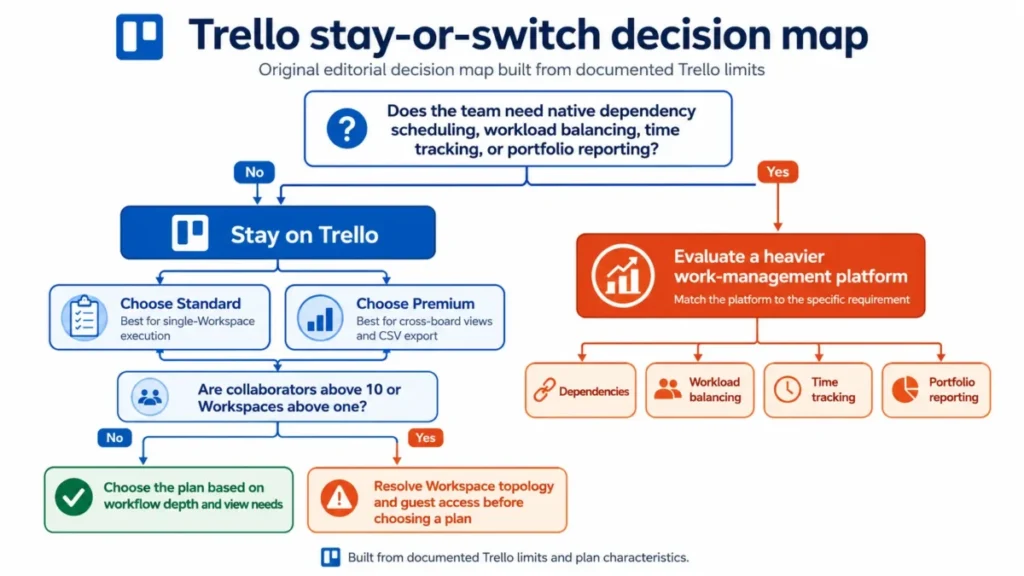
| Evaluate next | The requirement that should trigger it | Trello gap it addresses |
|---|---|---|
| Asana | Dependency scheduling and portfolio rollups decide the purchase | Dependencies and portfolio reporting are not native |
| ClickUp | Time tracking and workload views are mandatory, not optional | Time tracking and workload visibility are not native |
| monday.com | Resource planning across many parallel client projects | Multi-project scaling friction is a recurring sentiment theme |
| Jira | Engineering workflow, issue hierarchy, and release governance | Trello’s model is stage-based rather than hierarchical |
| Notion | Documentation and work tracking must live in one surface | Trello is a work tracker, not a document system |
The Trello-side column above is evidence-backed. The capability of each alternative is a requirement to verify against that product’s own documentation, not a claim made here.
If dependency scheduling and portfolio rollups are the trigger, start with our Asana review.
Where time tracking and workload views are mandatory, the relevant evaluation is our ClickUp review.
Resource planning across many parallel client engagements points at our monday.com review instead.
Engineering teams that need issue hierarchy and release governance should read our Jira review, and teams that want documentation and tracking on one surface should read our Notion review.
If budget rather than capability is the constraint, our roundup of free project management tools is the better starting point, and teams optimizing for communication should look at team collaboration tools instead.
Final Verdict: Is Trello Worth It in 2026?
Trello is worth buying when the job is making stage-based work visible to people who will not tolerate a heavy tool. It is not worth buying when the job is proving to a stakeholder how a portfolio is tracking against plan.
For most paying teams, Standard at $5 per user/month billed annually is the practical plan. It removes the board and collaborator ceilings and adds Custom Fields, card mirroring, advanced checklists, and 250 MB uploads, with 1,000 automation runs a month for rule-light Workspaces.
Move to Premium at $10 per user/month annually when a specific workflow requires it: cross-board or Workspace views, CSV export, Observers for read-only stakeholders, admin and security controls, a documented one-business-day support target, or automation capacity above Standard’s pooled quota. Premium is exactly double Standard at every team size, so the trigger should be a named requirement rather than a general sense of needing more.
Stay on Free only while the Workspace is bounded at 10 collaborators and 10 boards, and treat that boundary as a hard operational limit rather than a soft one.
Reserve Enterprise for organizations that clear 50 seats and can absorb the $10,000 annual minimum, where once-per-user billing and centralized governance change the math rather than just the feature list.
Skip Trello entirely when dependencies, workload, time tracking, or audit-grade reporting are the reason the tool is being bought. Adding four partner Power-Ups to reach parity costs more than the seat price suggests and leaves the reporting story dependent on vendors outside the Trello contract.
The decision chain behind that verdict is short. Each supported feature above is a documented capability drawn from official documentation, every plan gate carries an operating consequence for a named workflow, and each consequence lands on a specific buyer or team rather than on a generic user.
Because those trade-offs are plan-bound, the recommendation stays conditional: we recommend Standard when execution happens inside one Workspace, and we recommend Premium only when cross-board reporting, export, or Observers are the reason the tool is being bought.
Before renewal, the question to answer is narrow: has the Workspace count stayed flat, and has the multi-board guest list stayed short? If either answer is no, the invoice grew for reasons unrelated to headcount, and the fix is topology rather than a plan change.
Full tier-by-tier numbers sit in our Trello pricing guide.
FAQ
Is Trello still worth using in 2026?
Yes, for teams whose core need is visible, stage-based work coordination in a tool that people adopt without training. It is a weak primary system for dependency scheduling, workload planning, time tracking, or portfolio reporting, all of which are absent from its native model and consistently identified as gaps in third-party review evidence.
What happens when a Free Trello Workspace passes 10 collaborators?
The Workspace changes state rather than just blocking the new person. Editing stops on every board, further invitations are refused, and scheduled rules no longer fire.
Collaborators are counted as members, guests, and pending invitations together, so unaccepted invites consume the allowance. Nothing is deleted, but work stops until the Workspace is upgraded or the count is reduced.
What is the difference between Trello Free and Standard?
Standard removes the 10-board and 10-collaborator ceilings and adds Custom Fields, card mirroring, advanced checklists, and 250 MB per-file uploads against Free’s 10 MB. Automation also rises from 250 runs and 2,500 operations a month to 1,000 runs and 20,000 operations.
At $5 per user/month billed annually or $6 monthly, Standard is the plan a team should start on if it expects to pass ten collaborators.
Is Trello Premium worth the upgrade?
Premium is worth it when a named requirement forces it: board and Workspace views, CSV export, Observers, admin and security controls, a documented one-business-day support target, or automation beyond Standard’s pooled quota. At $10 per user/month annually it is double Standard at every team size, so it should follow a specific workflow need rather than a general upgrade instinct.
Can the same person be billed twice in Trello?
Yes, on Standard and Premium. Those plans are billed per Workspace, so a person who belongs to two separately upgraded Workspaces is charged in each.
Enterprise removes this by billing a user once across Enterprise Workspaces. Below that threshold, consolidating Workspaces is the practical fix.
Will client guests increase my Trello bill?
It depends on how many boards they touch. A guest on only one board in a paid Workspace is not billed, while a multi-board guest is billable, exactly like a Workspace member.
Agencies that add the same client contact to a second board convert a free guest into a paid seat without any change to headcount.
Are Trello’s unlimited automations truly unlimited?
Only the run counter is. Premium and Enterprise provide unlimited runs but cap operations at 150,000 plus 10,000 per paid user, to a maximum of 250,000 per month, pooled across the Workspace.
Every plan also limits 20 operations per run, 20 card buttons, 20 board buttons, and 50 email recipients per email action.
Can Trello export everything to CSV?
No. CSV export requires Premium, and it carries boundaries: a CSV normally covers unarchived cards, archived cards require the .csv URL method, and Inbox cards cannot be exported until they are moved to a board.
A Workspace export including raw attachments must be requested by a Workspace admin.
Can I import an existing project tool into Trello?
Not through a generic importer, because Trello does not document one. What remains are a list copy-paste, a custom REST API build, or a partner Power-Up.
Fidelity for comments, attachments, history, and automations is undocumented, so any real migration needs a pilot, a reconciliation step, and a rollback plan.
How many cards make a Trello board slow?
Atlassian recommends staying under 1,000 open cards per board, or under 500 when cards carry many attachments or checklists. The technical warning appears at 4,500 open cards and the hard block at 5,000.
The usable ceiling therefore sits far below the enforced one, so archiving and splitting boards should start long before a warning appears.