Trello’s published seat prices sit at the low end of the best project management software shortlist most small teams build. The number that reaches the invoice is decided somewhere else.
Three billing rules do most of the damage. Standard and Premium upgrade one Workspace rather than an account, and a client added to a second board turns into a full-price seat.
The third is quieter. Premium’s unlimited automation runs sit on top of an operations quota that stops growing once a Workspace reaches ten paid users.
This guide prices Trello the way a finance review would: line items first, sticker price last. Every rate and limit below was read from Atlassian’s own pages on 2026-08-25.
In This Article (19 sections)
Quick Pricing Verdict
| Decision point | Answer |
|---|---|
| Starting price | $0 on Free; the cheapest paid seat is Standard at $5 per user/ |
| Free plan or trial | Free plan, capped at 10 collaborators and 10 boards per Workspace |
| Best plan for most teams | Standard, for board-centric teams that outgrew the Free caps |
| Plan to avoid | Premium bought for board count alone, since Standard already removes the board cap |
| Biggest hidden cost | A guest added to a second board becomes a billable seat at the full member rate |
| Best alternative if too expensive | ClickUp Unlimited, when reporting depth matters more than board simplicity |
| Pricing verified | 2026-08-25, US list pricing in USD |
Sources: Trello’s official pricing page and Trello’s multi-board guest billing documentation.
Executive Summary: Trello TCO at 5, 10, and 20 Users
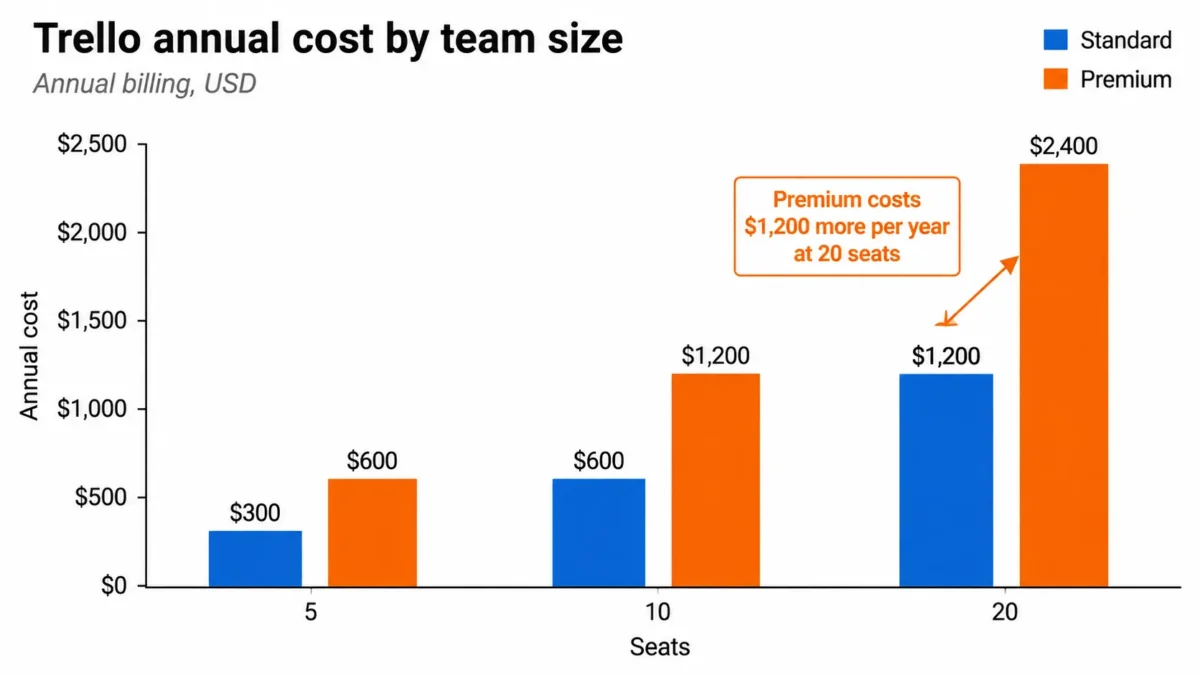
Trello’s per-seat rates are simple. What finance needs is the annual number, and the gap between the two billing cadences.
| Team | Seats | Plan | Annual billing, per year | Monthly billing, per year |
|---|---|---|---|---|
| Small team | 5 | Standard | $300 | $360 |
| Small team | 5 | Premium | $600 | $750 |
| Growing team | 10 | Standard | $600 | $720 |
| Growing team | 10 | Premium | $1,200 | $1,500 |
| Department | 20 | Standard | $1,200 | $1,440 |
| Department | 20 | Premium | $2,400 | $3,000 |
These totals are this article’s arithmetic over Trello’s published per-user rates, not quoted package prices. Taxes, partner Power-Up subscriptions, and billable guests sit outside them.
Two things fall out of the table. The Premium decision costs exactly as much again as the whole Standard subscription at every team size, and the monthly cadence adds a fifth to the Standard bill and a quarter to the Premium bill.
I would not treat that Premium premium as a growth cost. It buys reporting surface and administration, and a team that only needs more boards is paying twice for something Standard already includes.
Trello Pricing Plans in 2026
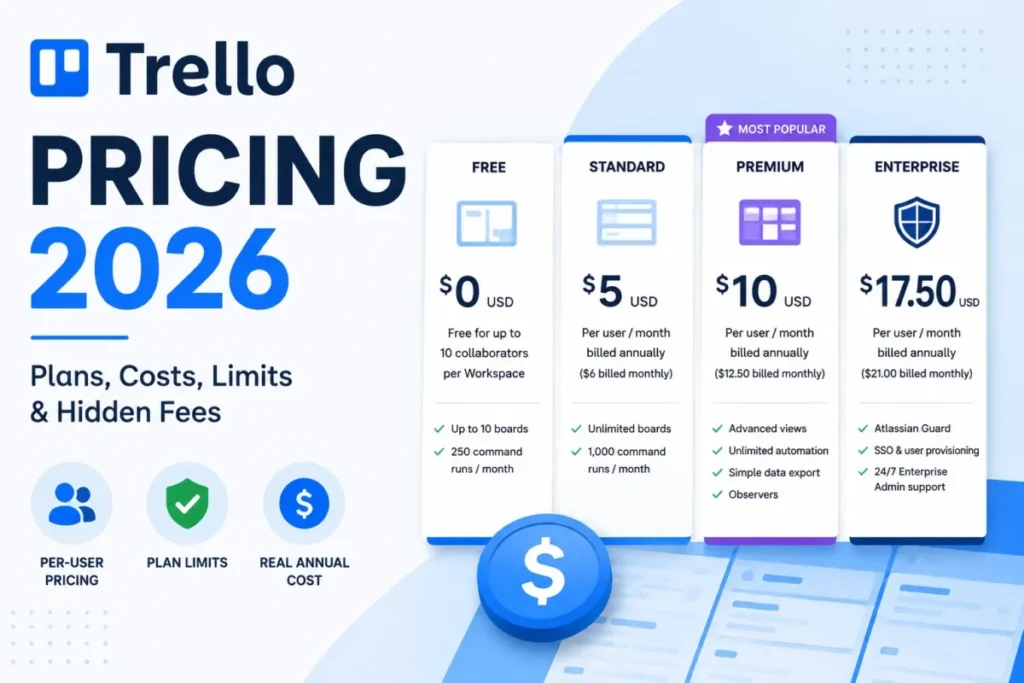
| Plan | Per user/ | Per user/ | Billing basis | Best for | Hard limits that bite |
|---|---|---|---|---|---|
| Free | $0 | $0 | Free for up to 10 collaborators per Workspace | Individuals and small groups with a stable board count | 10 boards per Workspace, 10MB per file, 250 command runs per month |
| Standard | $5 | $6 | Per billable Workspace member and multi-board guest | Board-centric teams that need structure and volume | 1,000 command runs per month, no advanced views |
| Premium | $10 | $12.50 | Per billable Workspace member and multi-board guest | Teams tracking work across many boards | Operations quota, not run count, is the real ceiling |
| Enterprise | $17.50 | Not listed | Per user, billed annually, $210 per user per year | Organizations governing multiple Workspaces | Commercial terms confirmed with Atlassian |
Sources: Trello’s published plan pricing and inclusions and Trello’s Premium and Standard billing rules, both checked 2026-08-25.
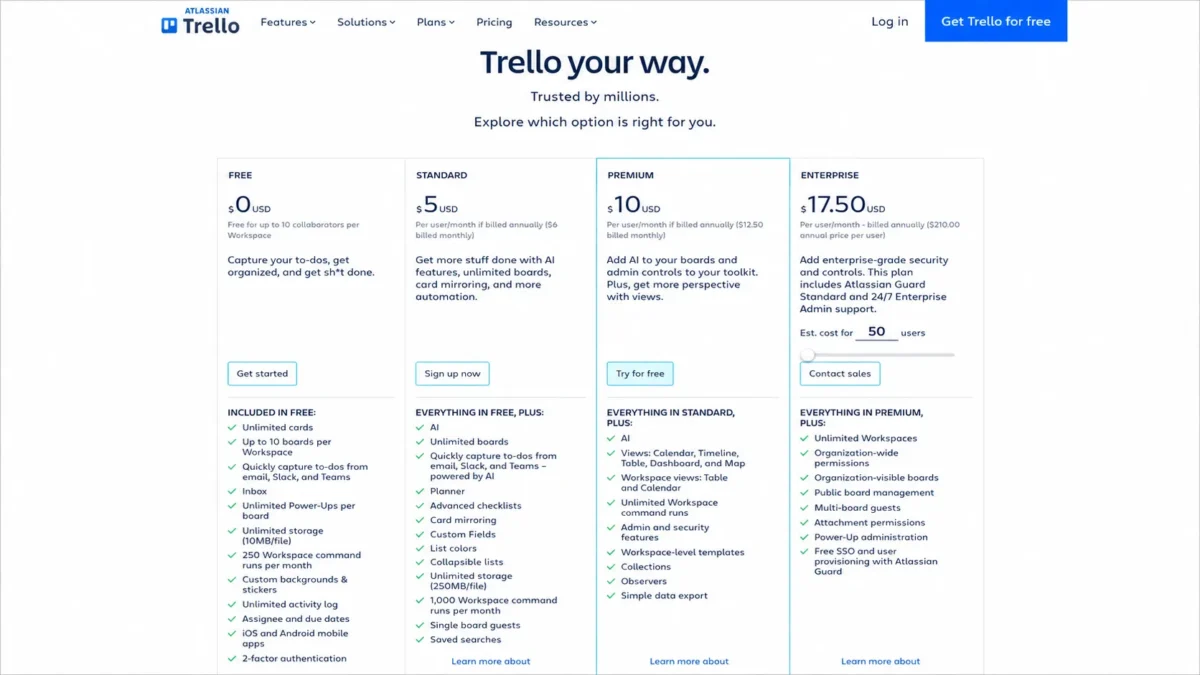
The billing basis column is the one most pricing tables skip, and it is the column that decides the invoice. A Trello subscription attaches to a Workspace, so seat count is a property of how the company organized its boards rather than of how many people it employs.
What Each Trello Plan Includes
Each plan below is described by what it adds over the one beneath it, and by the buyer it stops working for. Read the avoid-if line first if you are already leaning toward a tier.
Free: usable, until the eleventh person arrives
Free covers 10 boards per Workspace, 10MB per file and 250 Workspace command runs per month, alongside unlimited Power-Ups per board and two-factor authentication.
The collaborator cap is stricter than it reads. A collaborator is anyone invited to a board in the Workspace or to the Workspace itself, and pending invites count toward the 10.
Cross the cap and the Workspace does not simply stop growing. Boards become view-only until the count drops back under 10, and automations on those boards stop running.
Avoid Free if: the team invites clients or contractors to boards, because every pending invitation consumes one of the ten slots.
Standard: the structure tier, not the reporting tier
Standard removes the board cap and the collaborator cap, raises attachments to 250MB per file, and lifts automation to 1,000 Workspace command runs per month. It adds advanced checklists, Custom Fields, card mirroring, list colors, collapsible lists, saved searches, and single-board guests.
What Standard does not add is a way to see work across boards. There is no Calendar, Timeline, Table, Dashboard, or Map view, and no CSV export.
Avoid Standard if: anyone in the team is being asked for a cross-project status view, because that request has no answer on this plan.
Premium: visibility, export, and administration
Premium is where the Calendar, Timeline, Table, Dashboard and Map views appear, alongside Workspace views for Table and Calendar, unlimited Workspace command runs, Observers, Workspace-level templates, Collections, simple data export, and admin and security features.
It is also the first tier with priority support answered within one business day.
Avoid Premium if: the only trigger is board count or headcount growth, since neither is gated above Standard.
Enterprise: governance across Workspaces
Enterprise adds unlimited Workspaces, organization-wide permissions and organization-visible boards, plus public board management, attachment permissions, Power-Up administration, and free SSO and user provisioning with Atlassian Guard.
One Enterprise rule changes the guest arithmetic completely: multi-board guests do not require a license and are not billed the way they are on Standard and Premium.
Avoid Enterprise if: the requirement is one team needing better views, because that is a Premium problem wearing an Enterprise budget.
Feature Gates by Plan
Read this as a shopping list rather than a checkmark grid. The left column is the requirement, and the other two columns are what satisfying it costs.
| What the team needs | Lowest plan that includes it | Seat cost per year at that plan |
|---|---|---|
| More than 10 boards in one Workspace | Standard | $60 |
| More than 10 collaborators in one Workspace | Standard | $60 |
| Attachments above 10MB per file | Standard | $60 |
| Custom Fields, advanced checklists, card mirroring | Standard | $60 |
| Dedicated support tickets | Standard | $60 |
| More than 1,000 automation runs a month | Premium | $120 |
| Calendar, Timeline, Table, Dashboard, or Map views | Premium | $120 |
| CSV export or a Workspace-wide export | Premium | $120 |
| Observers on a board | Premium | $120 |
| AI writing and editing in descriptions and comments | Premium | $120 |
| Organization-wide permissions and Power-Up administration | Enterprise | $210 |
| SSO and user provisioning through Atlassian Guard | Enterprise | $210 |
Sources: Trello’s plan comparison and Trello’s AI writing and editing documentation. Support and export gating come from Trello’s support ticket eligibility page and Trello’s export documentation.
Two of those rows are routinely reported wrong elsewhere, and both change a purchase.
The AI row is not a simple yes or no. Writing and editing content in card descriptions and comments is documented as Premium and Enterprise only, while creating cards with AI summaries is available on Standard.
A team whose only AI need is faster card capture therefore does not have to move up a tier.
The support row is the other one. Only accounts with an active subscription can submit a support ticket, which puts Free users on community help and the knowledge base for general issues.
Observers look free and are not
Observers are a Premium board permission. An Observer can view a board and its cards, download attachments, comment, vote where voting is enabled, and export the board, but cannot move or edit cards, upload attachments, tick checklist items, or change board settings.
Read-only access does not mean unpaid access. An Observer can be a billable Workspace member, a billable multi-board guest, or a non-billable single-board guest, so billing follows membership type and ignores the permission entirely.
That is a useful lever if you use it deliberately. A stakeholder who only ever needs to watch one board costs nothing; the same stakeholder watching two boards costs a full seat.
Automation Limits: Runs Are Not the Ceiling
Premium and Enterprise list unlimited automation runs, and that phrase does more work in competitors’ pricing tables than the documentation supports.
| Automation quota | Free | Standard | Premium and Enterprise |
|---|---|---|---|
| Command runs per month | 250 | 1,000 | Unlimited |
| Operations per month | 2,500 | 20,000 | 150,000 plus 10,000 per user, capped at 250,000 per Workspace |
| Emails per month | 250 | 1,000 | 1,000 per paid user, capped at 100,000 |
Source: Trello’s automation quotas and limits. Quotas reset on the first day of every month at midnight GMT.
Four ceilings do not move with the plan at all. A single automation run is limited to 20 actions and operations, and a board can have 20 enabled card buttons and 20 board buttons at once.
The other two are easy to trip. A send-email action reaches at most 50 recipients, and all the automations one user creates share 64,000 characters of storage.
Run the arithmetic and the picture changes. Premium’s operations pool reaches its 250,000 Workspace cap at exactly ten paid users, which means the eleventh seat and every seat after it adds automation cost without adding capacity.
The lower tiers have their own version of the same trap. Free’s quotas allow an average of ten operations per run, and Standard’s allow twenty, which is the same figure as the per-run ceiling itself.
A rule that assigns an owner, sets a due date, moves the card, posts to a channel, and emails a client is five operations. On Standard that pattern exhausts the monthly operations pool at 4,000 runs, well before the 1,000-run allowance is the binding constraint.
What breaks first: an automation-heavy Workspace on Premium hits the operations cap, not the run count, and the fix is fewer actions per rule rather than more seats.
Annual vs Monthly: The Real Savings Math
| Plan | Annual billing, per user/ | Monthly rate paid for 12 months | Difference per user/ |
|---|---|---|---|
| Standard | $60 | $72 | $12 |
| Premium | $120 | $150 | $30 |
Measured against the published monthly rates, the annual cadence hands back about a sixth of the Standard bill and a fifth of the Premium bill. On a 25-seat Premium Workspace that is $750 a year, which is more than most teams save by arguing about the plan choice itself.
The catch is direction of travel. Trello Workspace subscriptions are paid in advance, so an annual commitment locks a seat count that a shrinking team cannot walk back mid-term.
Two rules soften the risk. New billable members added mid-period are prorated against the days remaining, and refunds are available within the first 30 days of upgrading a Workspace.
My rule of thumb: pay annually once the roster has been stable for two quarters, and pay monthly through any hiring or contractor surge.
Add-Ons, Overages, and Surprise Costs
| Cost | When it applies | What it does to the bill |
|---|---|---|
| Multi-board guest seat | A guest belongs to two or more boards in a Standard or Premium Workspace | Billed at the same rate as a Workspace member |
| Overlapping paid Workspaces | The same person is a member of two separately upgraded Workspaces | Billed once in each Workspace |
| Partner Power-Up subscription | The workflow depends on a third-party Power-Up that charges separately | Varies by provider; not included in the Trello seat price |
| Atlassian Guard | Identity controls beyond what the plan already includes | Advertised from $4 per user/ |
| US sales tax | The billing location is a taxing jurisdiction | Added on top of the list calculation |
| Mid-cycle seats | Headcount grows inside a paid period | Prorated to the next renewal date |
Sources: Trello’s multi-board guest rules and Trello’s Workspace billing documentation. Add-on and tax rows come from the partner Power-Up and Atlassian Guard notes on Trello’s pricing page and Atlassian’s sales tax guidance.
The second board that costs $60 a year
A guest on exactly one board in a paid Workspace is not billable. Invite that person to a second board and they become a multi-board guest, billed at the same rate as a normal Workspace member, with the charge prorated to the next renewal.
Take an agency running five client relationships on Standard annual billing. Keep each client on one shared board and the guest cost is zero; give each client a second board for invoices or approvals and the same five people add $300 a year, or $600 a year on Premium.
Nothing about the interface announces that threshold, and the conversion is reversible: removing the person from all but one board turns them back into a single-board guest.
The Workspace that bills the same person twice
Upgrading one Workspace does not give paid features to boards in other Workspaces, and upgrading several Workspaces that share members means paying more than once for those people.
Picture a 12-person company where marketing and delivery each run a nine-member Premium Workspace and six people sit in both. Trello bills 18 seats, not 12, which is $2,160 a year against $1,440 for the same people in one Workspace at the published Premium rate.
That gap has nothing to do with usage. It follows from an org-chart decision made months earlier, usually by whoever created the second Workspace.
The renewal question: how many paid Workspaces does the company hold, and how many people appear on more than one of them?
The costs Trello does not price for you
Unlimited Power-Ups is a statement about how many you can enable, not about what they cost. Trello’s own pricing page notes that some partner Power-Ups require an additional subscription fee, so an integration-heavy board can carry a second software bill the seat price never shows.
Atlassian Guard is the other line worth pricing early. Enterprise advertises SSO and user provisioning through Guard Standard, while Guard is also sold across Atlassian products from $4 per user/month.
Which capabilities a given organization already holds has to be confirmed against its own Atlassian contract.
Sales tax closes the list. Some US states tax software services where the provider has a presence, and the rate is calculated from the country and ZIP code attached to the payment method.
Real Cost Scenarios: 5, 10, and 20 Users
| Scenario | Billable seats | Recommended plan | Annual cost | What decides it |
|---|---|---|---|---|
| Freelancer with client boards | 1 | Free | $0 | Board count stays under 10 and guests stay on one board each |
| Studio of five, shared boards | 5 | Standard | $300 | Needs Custom Fields and 250MB files, not cross-board views |
| Agency of five plus five clients | 10 | Standard | $600 | Each client sits on two boards, so five guests become billable seats |
| Ops team of ten, weekly reporting | 10 | Premium | $1,200 | Timeline and Dashboard views plus CSV export |
| Department of twenty, one Workspace | 20 | Standard | $1,200 | Board-centric work with no cross-project reporting requirement |
| Department of twenty, portfolio view | 20 | Premium | $2,400 | Workspace views and Observers for stakeholders |
Every figure multiplies billable seats by the published rate per user over twelve months, and counts multi-board guests as full seats at that same annual rate. Tax and partner Power-Up fees sit outside these totals.
The agency row is the one that surprises people. The same five staff cost twice as much the moment each client needs a second board, and the increase is driven by board layout rather than by headcount.
Which Trello Plan Should You Choose?
Solo users and pairs. Stay on Free while the Workspace holds under 10 boards and under 10 collaborators, and treat a pending invite as a used slot. Teams that need more room without paying for it are usually better served by broader free project management tools than by a Trello upgrade.
Small teams, 3 to 10 people. Standard is the value tier. The upgrade triggers are the Free caps in the plan table above, plus any need for Custom Fields, advanced checklists or card mirroring.
Project and operations teams. Premium becomes justified when someone outside the board owners needs a view: Calendar, Timeline, Table, Dashboard, Map, or a Workspace-level roll-up. CSV export, Observers, and AI writing inside descriptions and comments are the three secondary triggers.
Organizations with several teams. Enterprise is the answer only when governance is the problem: multiple Workspaces to administer centrally, organization-wide permissions, public-board control, Power-Up administration, or identity provisioning. Everything below that line is a Premium conversation.
Which Trello Plan Should You Avoid?
Avoid Premium bought for capacity. Standard already gives unlimited boards and unlimited collaborators, so a team upgrading because it “outgrew” Free is paying double the Standard seat rate for a limit Standard removes.
The exception is real and worth naming. A team that genuinely reports across boards, exports to CSV for finance, or needs stakeholder Observers gets its money back on the first quarterly review cycle.
Avoid running several paid Workspaces with overlapping membership. The duplicate-billing rule turns an organizational convenience into a recurring line item, and consolidating before an annual commitment is far cheaper than after one.
Avoid Free for client work. Guest invitations consume collaborator slots, and the Workspace flips to view-only with automations halted once the count passes ten, which is a bad way to discover a plan limit on a client deadline.
Export, Backup, and What Happens If You Downgrade
Export is where Trello’s plan gates stop being a convenience question and start being a risk question.
| Data task | Free and Standard | Premium and Enterprise |
|---|---|---|
| Board export to raw JSON | Available to all board members | Available |
| Board export to CSV | Not available | Available |
| Export every board in the Workspace | Not available | Available in CSV and JSON |
| Comments included | JSON only, within the 1,000 most recent actions | JSON only; CSV excludes comments |
| Archived cards in CSV | Not applicable | Excluded unless exported deliberately |
| Import a CSV or JSON file back into Trello | No generic import tool | No generic import tool |
Sources: Trello’s data export documentation and Trello’s import guidance.
The last row is the one to read twice. Trello does not have a generic import tool, and the documented routes back in are copy and paste, the REST API, or a third-party Power-Up, so an export file is an extract rather than a restore point.
Cards sitting in Inbox cannot be exported at all until they are moved to a board, which is easy to miss in a backup routine that was designed around boards.
Before you downgrade
Cancelling moves the Workspace to Free at the end of the paid period, and the 10 most active boards stay open while the rest are closed but not deleted. Data from paid features is hidden rather than deleted.
If the Workspace still has more than 10 collaborators, its boards become view-only until that number comes down. That is a working-day outage, not a billing footnote.
The order of operations matters, so run it in this sequence:
- Export what finance and legal need while CSV and Workspace-wide export are still active on Premium.
- Keep a JSON export of each board that carries comment history worth preserving.
- Decide which 10 boards should stay open, and archive or close the rest yourself rather than letting the downgrade choose.
- Reduce collaborators below 10 before the billing period ends.
- List every workflow that depends on Custom Fields, views, or Observers, because that data goes hidden on the same day.
Trello Pricing vs Competitors
| Product | Entry paid seat, annual | Practical tier, annual | 10-user cost at the practical tier | Best for |
|---|---|---|---|---|
| Trello | $5 per user/ | $10 per user/ | $1,200 per year | Visual board work with light cross-project reporting |
| ClickUp | $7 per user/ | $12 per user/ | $1,440 per year | Teams that want reporting depth inside one tool |
| monday.com | $9 per seat/ | $12 per seat/ | $1,440 per year | Teams that want configurable views without add-ons |
| Asana | $10.99 per user/ | $24.99 per user/ | $2,998.80 per year | Portfolio and goal tracking above project level |
Sources: Trello’s published seat rates, ClickUp’s pricing page, monday.com’s plans and pricing and Asana’s pricing page. Ten-user figures are this article’s arithmetic over those published rates.
Read that table as prices, not as capability equivalence. Trello wins the entry number and keeps it at the practical tier, and the honest caveat is that its depth in reporting, dependencies, and resource planning is narrower than the tools charging more.
The seat-price advantage also narrows once a workflow needs a paid partner Power-Up, because the second subscription is not in the comparison. Teams weighing that trade-off should price ClickUp pricing tiers against Trello Premium at their own seat count rather than at the entry rate.
One in-family option is worth naming. Teams outgrowing Trello inside Atlassian frequently land on Jira rather than on a rival, and Jira pricing plans are the right comparison when the driver is issue tracking and workflow rules instead of visual boards.
Integrations and API Limits
Automation quotas cover the no-code layer. Anything built against the REST API runs into a separate set of ceilings, and they are documented per credential rather than per plan.
Trello’s REST API allows 300 requests per 10 seconds for each API key and 100 requests per 10 seconds for each token. The members route is tighter at 100 requests per 900 seconds, and the API returns a 429 once a limit is exceeded.
Nothing in that documentation ties those numbers to a pricing tier, so buying Premium does not buy API headroom. A sync job that batches by member is the one most likely to hit the tighter route, and understanding what an API is and how these ceilings are counted matters more here than the plan choice.
Is Trello Worth the Price?
Worth it if the work is genuinely board-shaped, the team stays inside one Workspace, and external collaborators can live on a single board each. At the Standard seat rate, few tools give a small team unlimited boards, Custom Fields, and that much automation for less.
Worth it at Premium if at least two of these are true: someone needs a cross-board view every week, finance needs CSV export, stakeholders need read-only Observers, or writers need AI editing inside cards.
Not worth it if the requirement list includes dependency management, resource planning, time tracking, or reporting depth. Trello reaches those through Power-Ups and integrations, and the second subscription plus the administration overhead usually costs more than a higher-priced competitor seat.
Not worth it if the company runs several overlapping paid Workspaces and is unwilling to consolidate them, because the duplicate-billing rule quietly removes Trello’s price advantage.
Security certification is rarely what stops a Trello purchase. Administration is, and every control a governance review asks for sits at the top tier, which turns a plan question into a procurement one.
For a fuller look at how the product behaves outside pricing, the Trello review covers workflow fit and reporting limits in more depth.
How to Avoid Overpaying for Trello
- Count Workspaces before you count people. Consolidate overlapping paid Workspaces first, because the same six people billed twice costs more than the entire plan upgrade you were debating.
- Audit guests by board count, not by name. Anyone on exactly one board is free; anyone on two is a full seat. Trimming a guest back to one board reverses the charge.
- Buy Standard for capacity and Premium for visibility. Board count, collaborator count, attachment size, and Custom Fields are all Standard triggers, and paying Premium for them doubles the seat rate for nothing.
- Model automation in operations, not runs. Multiply representative rules by their actions before choosing a tier, and remember that Premium’s operations pool stops growing at ten paid users.
- Commit annually only after two stable quarters. The annual cadence saves real money per user on both paid plans, as the table above sets out, and subscriptions are prepaid, so an unstable roster should stay monthly.
- Price partner Power-Ups before signing. Identify which integrations the workflow actually depends on and check whether each carries its own subscription, then add that to the seat math.
- Use the 30-day window as a real test. Refunds are available within the first 30 days of upgrading a Workspace, which is long enough to confirm that the views or export you bought are the ones the team uses.
How These Trello Prices Were Verified
This analysis is based on Trello’s official pricing page, Atlassian’s billing, automation, export, import, cancellation, guest, observer, support, and tax documentation, and Atlassian’s developer documentation. Every price, plan limit, and quota was read from those pages on 2026-08-25 for the US market in USD.
Every plan was assessed against the same buyer-focused criteria: usable entry price, feature gates, collaborator and guest billing rules, automation capacity, export and migration constraints, administration scope, and cost at scale.
Greater weight was given to the factors that change a purchase decision: which limit forces an upgrade, which billing rule adds seats without adding staff, and what a plan costs across a full year at real team sizes.
Claims that could not be verified from Trello or Atlassian sources were excluded or stated with their limit visible. Competitor rates are published list prices used as cost anchors, not as capability equivalence.
FAQ
These are the questions the sections above deliberately leave open, because the published evidence does not close them.
Do Trello’s API rate limits change if I upgrade my plan?
No. The published limits are attached to the API key and the token rather than to a pricing tier, so Premium and Enterprise buyers get exactly the same per-key and per-token ceilings as everyone else.
What happens when a Trello automation quota is used up?
Trello publishes the quota values and the monthly reset, but the reviewed documentation does not state what happens to a rule that fires after the ceiling is reached. Treat the behavior as unconfirmed, size the quota with headroom, and ask Atlassian directly if an automation is business-critical.
Does Trello Enterprise have a minimum number of seats?
The current public pricing page displays a per-user rate without establishing a universal seat minimum or a volume-discount schedule. Use the displayed rate as a planning reference and confirm the final commercial terms in an Atlassian quote before budgeting.
Do I need Atlassian Guard to get SSO on a plan below Enterprise?
Enterprise advertises SSO and user provisioning through Guard Standard, and Guard is also sold separately across Atlassian products at the rate shown in the hidden-cost table above. Which Guard capabilities an organization already holds depends on its own Atlassian configuration, so confirm entitlement before assuming SSO is either included or extra.
The Bottom Line
Select the lowest Trello tier that clears an actual plan gate, not the one that matches your headcount. Every gate named below comes from Trello’s own documented plan comparison rather than from a sales conversation. On Free the feature gate that binds first is board count or collaborator count, and the upgrade trigger for Premium is a reporting view someone outside the board owners needs every week.
For most teams the answer is Standard, which covers board count, collaboration model and automation volume without the Premium seat cost. Move up when views, export, Observers or AI writing are genuinely required.
Move to Enterprise only when administration and security requirements span several Workspaces. Whatever tier you choose, count billable seats before you count staff, because guest access and Workspace architecture are what turn a low per-user rate into an unnecessary annual cost.