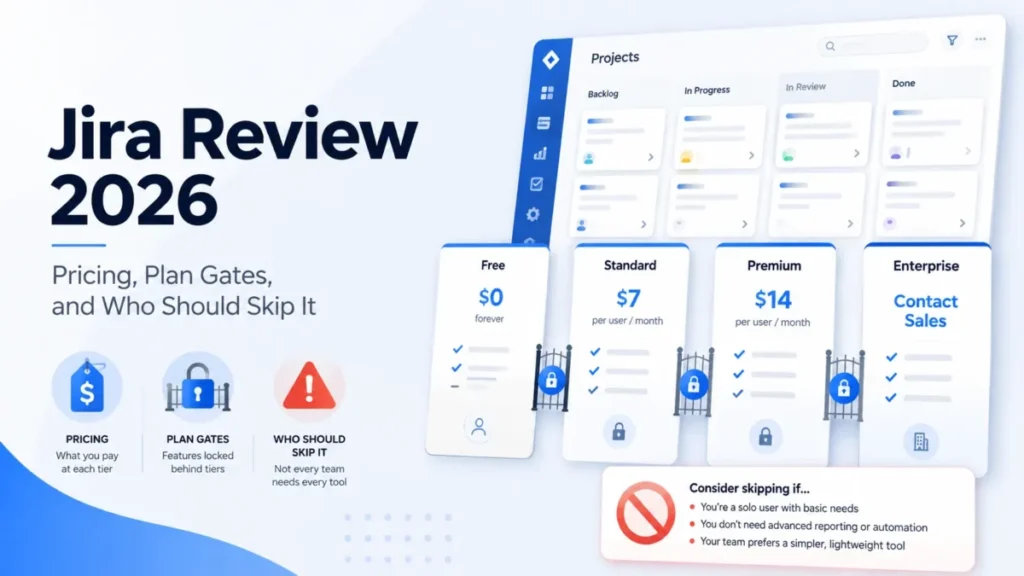
Jira sells itself as work management for every team. The buying decision is narrower than that, because Jira rewards teams that can staff an administrator and quietly punishes teams that cannot.
This Jira review works from Atlassian’s own pricing, licensing, administration, automation, developer, migration, and trust documentation, checked on August 4, 2026. If the shortlist is still open, the wider best project management software roundup covers the category first.
The short version: Jira earns its price when workflow complexity, traceability, and cross-team coordination justify the configuration work. It is the wrong default for a five-person team that wants a shared task list.
In This Article (18 sections)
Quick Verdict
| Category | Verdict |
|---|---|
| Best for | Software, product, IT, and operations teams of roughly 8 to 30 people with one named Jira owner |
| Not ideal for | Two to five person non-technical teams that need a checklist and have no administrator |
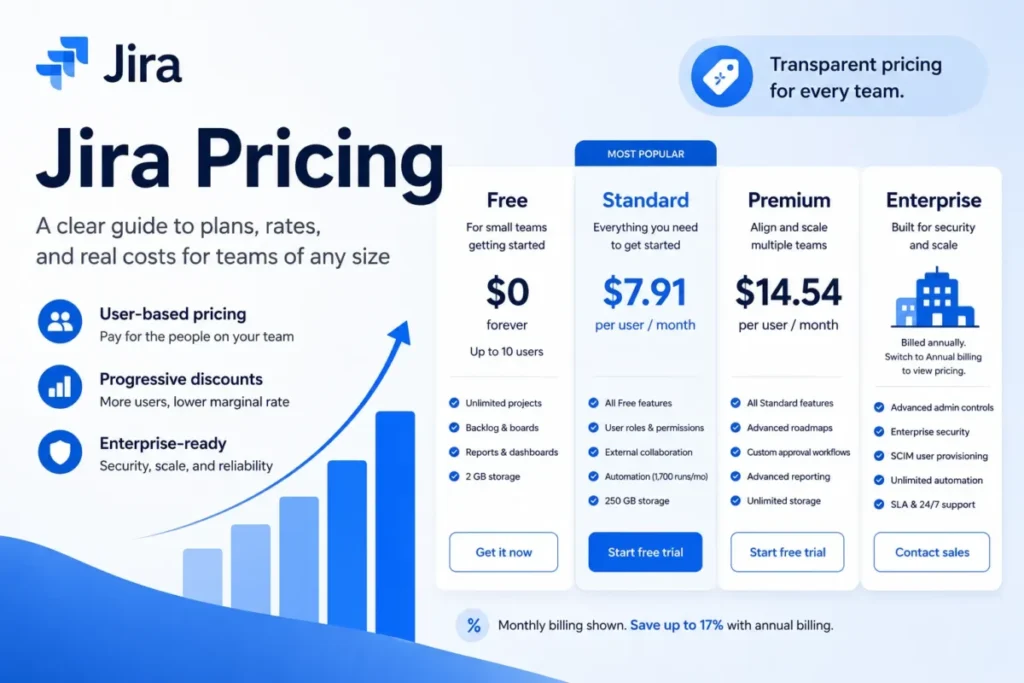
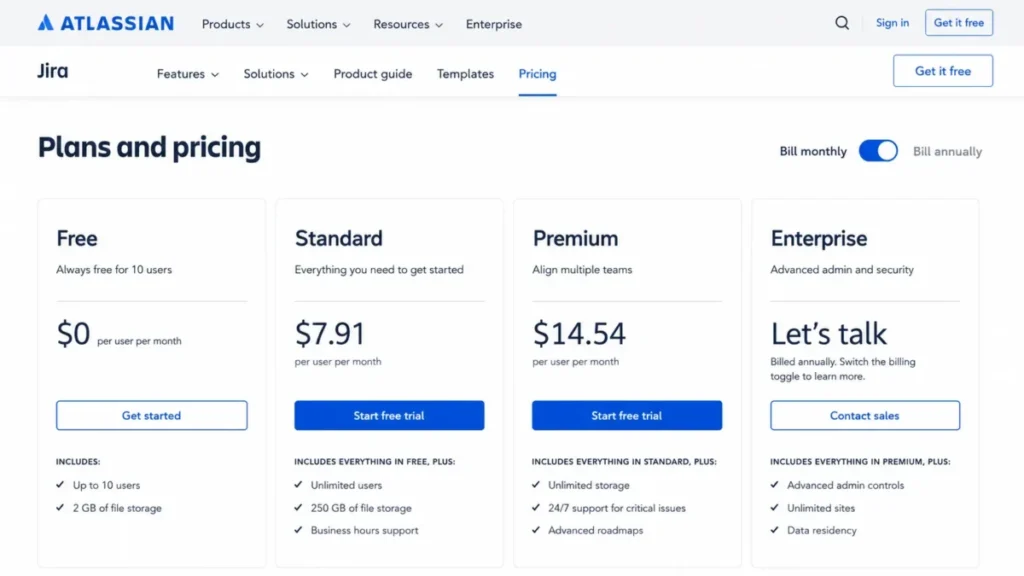
| Starting price | $0 on Free for up to 10 users, then $7.91 per user/ |
| Best practical plan | Standard for a single team, Premium once dependencies, approvals, sandbox, or archiving become mandatory |
| Free plan or trial | Yes, Free covers up to 10 users with 100 automation runs a month |
| Setup difficulty | Medium to high, driven by workflow, field, permission, and notification configuration |
| Main strength | Issue types, workflows, and permissions that bend to a real process instead of a fixed template |
| Main limitation | Configuration debt, where the same flexibility turns into onboarding and maintenance load |
| Best alternative | A lighter tracker when the team needs a task list rather than a governed workflow |
Source: Atlassian official Jira pricing page. Checked: 2026-08-04. Region: US, USD. Billing basis: per user, per month, monthly list price.
How We Reviewed Jira
This analysis is based on Atlassian’s official Jira pricing and licensing pages, the Premium and Enterprise product pages, administration and automation help documentation, developer API documentation, migration and backup guides, and published trust and support pages. Pricing and plan limits were checked on August 4, 2026.
Jira was assessed against the criteria that decide a work-management purchase: workflow fit, plan gates, usage limits, automation capacity, API behavior, migration risk, security administration, support coverage, and cost at realistic team sizes.
Greater weight went to factors that change a budget or a rollout plan, including the lowest plan that covers required workflows, the limit that forces an upgrade, and the costs that sit outside the seat price.
Claims that the evidence did not support were excluded rather than hedged. Independent review platforms informed sentiment patterns only, never a price, a plan limit, or a security claim.
What Is Jira?
Jira is Atlassian’s issue-tracking and work-management product, positioned by Atlassian as AI-powered project management for software and business teams.
In operating terms, Jira is a configurable record system. Work items carry types, fields, statuses, permissions, and links, and everything else in the product sits on top of that record model.
That is the whole buying argument. Teams that need the record model get real use from it.
Teams that only need a list of tasks pay for structure they will never touch.
Setup and First Configuration: What the Documentation Requires
Project creation is the easy part.
The documented entry point runs from Jira’s navigation to a template choice between Scrum, Kanban, and business templates, then project identity and access, then work items.
The hard part is everything that follows the template. A project owner still has to settle work-item types, workflow statuses, custom fields, permission schemes, and notification rules before the first sprint means anything.
That is where the friction reported on independent platforms starts.
TrustRadius review patterns support Jira for development, QA, support, sprint, and dashboard workflows while reporting onboarding friction and slower search or performance in large, busy instances.
Who finds setup easy: an engineering or IT team that already runs Scrum or Kanban, has an agreed definition of done, and can name one person who owns the configuration.
Who finds it hard: a mixed team with no shared process, where every function asks for its own fields and statuses and nobody has authority to say no.
My working rule is to start with the smallest template, keep custom fields close to zero for the first month, and only add a status when a real handoff exists. Setup difficulty is medium to high, and almost all of that difficulty is governance rather than software.
Key Features and Where Each One Stops
Five capabilities carry most of the buying case, and each one stops somewhere specific. The plan gate is listed after every feature so the cost of that capability is visible at the point of reading.
Boards, backlogs, and configurable workflows
The core loop covers backlog, board, assignment, status transitions, filters, and reports, built from Scrum, Kanban, or business templates. This is the reason most engineering teams adopt Jira in the first place.
The limitation is not the feature, it is the entropy.
Capterra review patterns praise visibility, workflows, integrations, and boards while repeatedly criticizing complexity, noisy notifications, administrative setup, cost at scale, and occasional support delays.
Teams still deciding between Jira and a lighter sprint tool should read the agile project management tools roundup alongside this review, because the board itself is rarely the differentiator.
Plan gate: available from Free upward.
Cross-team planning, capacity, and dependencies
Advanced cross-team planning covers plans across projects and teams, capacity, dependency views, scenarios, and release coordination. For two or more teams sharing a release train, this is the single clearest reason to pay more.
Plan gate: Premium or Enterprise.
A single independent team rarely recovers the price difference here, which is exactly why the upgrade should be triggered by a blocked workflow rather than a feature list.
Approvals, sandbox, and release tracks
Premium adds approvals, a sandbox, and release tracks alongside the planning set. For an organization with change-control obligations, the sandbox is the item that matters most, because it is the only documented place to test a configuration change before it touches live work.
Plan gate: Premium or Enterprise.
Project and issue archiving
Archiving is how a mature site stays usable after a few years of dead projects.
Two constraints apply: archiving requires Premium or Enterprise, and only one archive request can be active per Jira instance.
That second constraint is a scheduling problem, not a licensing one. An administrator cleaning up dozens of legacy projects queues the work sequentially and plans the cleanup window around it.
Plan gate: Premium or Enterprise.
The mobile apps
Jira mobile apps are available for Apple and Android and support assignment, comments, attachments, notifications, and approvals.
Offline behavior is a different question, and the documentation checked here does not establish it. A field team that depends on offline editing should confirm that behavior with Atlassian before standardizing on Jira mobile.
Plan gate: available on supported cloud plans.
Automation, AI, and Reporting
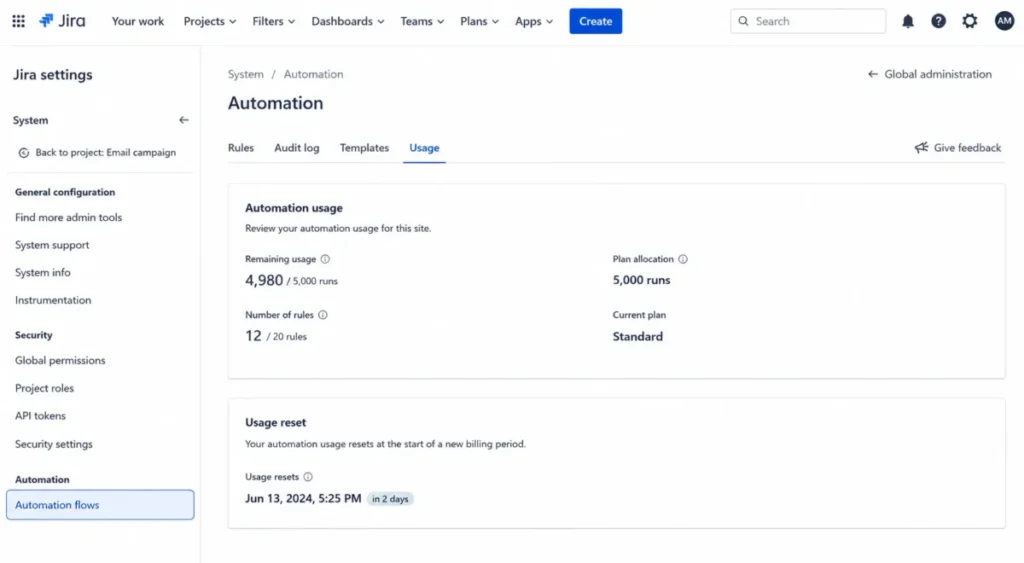
Automation is where Jira’s marketing and Jira’s meter diverge. Every plan carries a monthly allocation, and the allocation is the number that decides whether a routing or notification design survives contact with production.
| Plan | Monthly automation allocation | What that means in practice |
|---|---|---|
| Free | 100 runs | Enough to prove a rule works, not enough to run routing or notifications |
| Standard | 1,700 runs | One shared pool, so a heavy rule on one project eats the site’s capacity |
| Premium | 1,000 runs per paid user | Capacity scales with seats, so a 25-seat site has far more headroom than a 10-seat one |
| Enterprise | Unlimited plan allocation | Service limits and external system limits still apply |
Source: Atlassian official automation usage documentation. Checked: 2026-08-04.
Only successful executions that perform an action count toward the allocation, so a rule that triggers and then fails a condition does not spend capacity. That detail changes rule design, because cheap filtering conditions in front of expensive actions genuinely lower consumption.
A separate layer of service limits sits underneath the plan allocation.
On Free and trial plans, Send email actions are capped at 100 per 24 hours, and loop-detection thresholds and processing-time constraints apply independently of the monthly number.
What the documentation checked here does not state is what happens the moment a site exhausts its monthly allocation. That is a question to put to Atlassian in writing before a business-critical process depends on a rule, because “queued”, “skipped”, and “blocked” have very different consequences for an approval workflow.
Administrators can watch the meter directly.
The Usage screen sits at Jira settings, then System, then Automation flows, then Usage, and it requires the Administer Jira global permission.
On the AI and analytics side, Standard already carries Rovo capabilities on the pricing page checked here, which contradicts older comparison content that treats Atlassian AI as a higher-tier feature.
Enterprise is where centralized reporting changes shape, adding Atlassian Analytics and Data Lake alongside multi-site administration.
Integrations, API, and Ecosystem
The Microsoft Teams integration goes past a logo on a marketing page.
It supports notifications, link previews, and creating, searching, and updating Jira work items from inside Teams. S
For anything deeper, the REST API is the real integration surface, and it behaves like a metered one.
Burst limits are applied per tenant and endpoint, exceeding a limit can return HTTP 429, and clients are expected to retry with backoff.
Atlassian does not publish one universal burst quota, because the limit depends on tenant, endpoint, app, and context.
A team planning a high-volume sync should budget engineering time for backoff, idempotency, and monitoring rather than assuming a fixed ceiling, and should confirm behavior against live response headers for its own endpoints.
If the integration plan is being scoped by a non-engineer, it is worth reading what an API is before signing off on the estimate.
There is a second set of ceilings that almost no review mentions, and they bite long-lived records rather than busy sites.
| Entity | Documented ceiling per issue |
|---|---|
| Attachments | 2,000 |
| Comments | 5,000 |
| Issue links | 2,000 |
| Remote links | 2,000 |
| Worklogs | 10,000 |
Source: Atlassian official Jira Cloud REST API issue group reference, per-issue entity ceilings. Checked: 2026-08-04.
Ordinary project work never approaches these numbers. A long-running compliance record, a permanent incident ticket, or a catch-all service queue can, and that is a record-design problem worth solving before it becomes a data-migration problem.
Marketplace apps extend all of this, and they are purchased separately from the Jira subscription. Source: Atlassian Jira Premium overview, Marketplace boundary. Checked: 2026-08-04.
What Breaks at Scale: Feature Gates by Plan
Plan gates are the honest way to read Jira pricing, because the seat price only tells you what a seat costs, not what the seat can do.
| Capability | Free | Standard | Premium | Enterprise |
|---|---|---|---|---|
| Automation allocation per month | 100 runs | 1,700 runs | 1,000 runs per paid user | Unlimited |
| Cross-team planning, capacity, and dependency views | No | No | Yes | Yes |
| Approvals, sandbox, and release tracks | No | No | Yes | Yes |
| Project and issue archiving | No | No | Yes | Yes |
| Storage | Not published in the sources checked | 250 GB | Unlimited | Unlimited |
| Uptime SLA | Not included | Not included | 99.9 percent | 99.95 percent |
Sources: the Atlassian Jira pricing page and automation allocation documentation. Premium and Enterprise rows confirmed on the Jira Premium page and the Jira Enterprise page. Checked: 2026-08-04.
Administration and security gates run on a separate track, and they are the ones that surprise buyers late in a procurement cycle.
| Capability | Standard | Premium | Enterprise |
|---|---|---|---|
| Multi-region data residency | Yes | Yes | Yes |
| Rovo search, chat, and agents | Yes | Yes | Yes |
| Support coverage | 9 hours a day, Monday to Friday | 24/7 for Level 1 | 24/7 for all severities |
| Atlassian Guard Standard | Separate subscription | Separate subscription | Included |
| Automation destination allowlists | No | No | Yes |
| Multiple sites, Atlassian Analytics, and Data Lake | No | No | Yes |
Sources: the Atlassian Jira plan comparison and Jira Enterprise overview. Guard and support rows confirmed on Atlassian Guard licensing and the Atlassian support services matrix. Checked: 2026-08-04.
The allowlist row is the one to read twice.
Restricting where automation can send email, web requests, Slack, Teams, and Twilio traffic is an Enterprise-only control that requires global administration.
For a regulated team, that turns an automation feature into a data-exfiltration control, and it moves the Enterprise conversation from “nice reporting” to “required governance”.
The Free plan deserves its own warning.
Free sites can be moved to a trial or paid plan when they exceed plan limits, and Atlassian cloud policies allow inactive Free sites to be deactivated.
Free is a fine way to validate fit on one or two projects. Treating it as a permanent operating tier is the mistake, because 100 automation runs and the Send email cap will find the ceiling long before the 10-user limit does.
The Pricing Math Nobody Shows You
| Plan | US list price | Best for | Key limits | Worth it? |
|---|---|---|---|---|
| Free | $0 for up to 10 users | A pilot on one or two projects | 100 automation runs a month, no Premium planning or archiving | Good for validation, not for permanent operations |
| Standard | $7.91 per user/ | One product, software, or operations team | 1,700 automation runs a month, 250 GB storage, no sandbox or archiving | The practical plan for a single team |
| Premium | $14.54 per user/ | Two to six coordinated teams | Automation scales per paid user, one active archive request per instance | Worth it once dependencies, approvals, or archiving are mandatory |
| Enterprise | Custom, annual only | Multi-site or regulated organizations | Sales-led quote, annual term | Only when governance, Guard, analytics, or the 99.95 percent SLA decides it |
Premium costs about 83.8 percent more per seat than Standard at those list prices. That gap is the whole plan decision, so it deserves a number rather than a shrug.
| Team size | Standard monthly | Standard 12-month run rate | Premium monthly | Premium 12-month run rate |
|---|---|---|---|---|
| 5 users | $39.55 | $474.60 | $72.70 | $872.40 |
| 10 users | $79.10 | $949.20 | $145.40 | $1,744.80 |
| 25 users | $197.75 | $2,373.00 | $363.50 | $4,362.00 |
| 50 users | $395.50 | $4,746.00 | $727.00 | $8,724.00 |
| 100 users | $791.00 | $9,492.00 | $1,454.00 | $17,448.00 |
Editorial calculation from the monthly list prices above. Source: Atlassian Jira pricing page, US monthly list. Checked: 2026-08-04. These are twelve months of monthly list billing, not an annual plan quote, and they exclude Guard, Marketplace apps, taxes, and services.
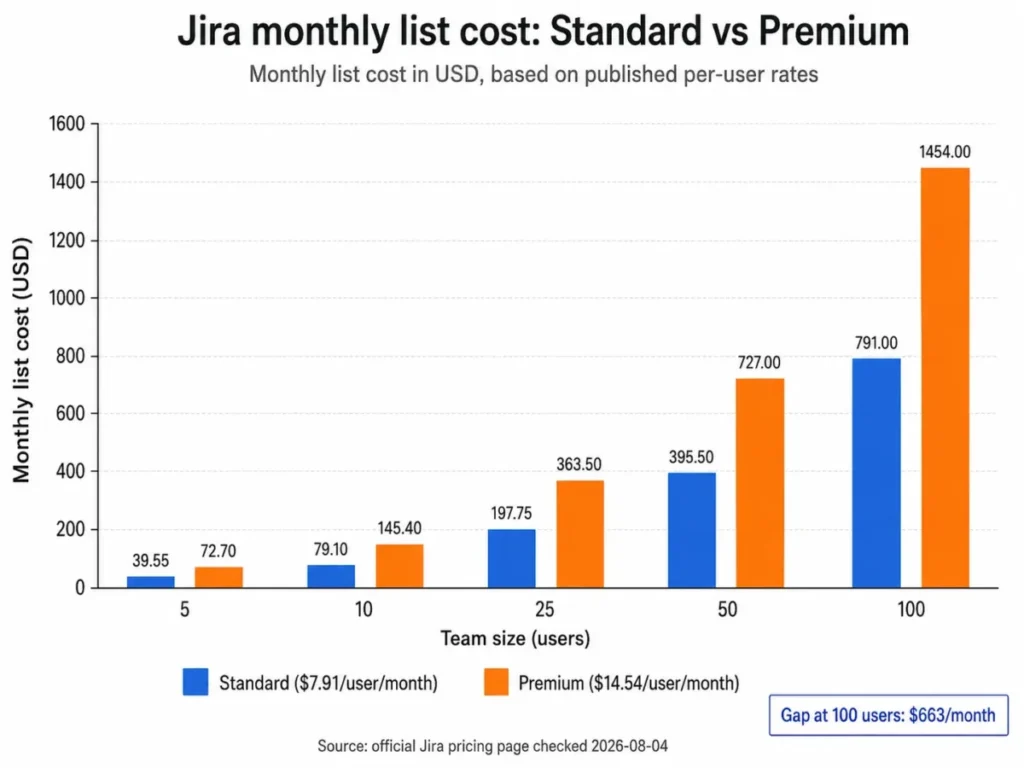
At 25 seats the two plans are $165.75 apart every month, which is roughly the cost of a junior contractor day. At 100 seats the same decision is worth $7,956 a year, and that is before a single Marketplace app appears on the invoice.
Three cost mechanics sit outside the sticker price, and each one has bitten a buyer who budgeted from the plan card alone.
The first is Maximum Quantity Billing.
A monthly cycle is charged according to the highest number of assigned seats reached during that cycle, so removing a user later in the same cycle does not reduce that cycle’s quantity.
Give three contractors seats for a two-week engagement and the month bills at the peak, not the average. The control is procedural rather than technical: an approval step before seat assignment, and deprovisioning that runs on the billing cycle rather than whenever someone remembers.
The second is the billing model itself.
Monthly cloud pricing uses progressive per-user pricing, while annual subscriptions are billed to user tiers, and Atlassian advertises savings of up to 17 percent for annual billing.
Tier billing means an annual plan is bought at a tier rather than at an exact headcount, so a team sitting just above a tier boundary pays for capacity it does not use.
The exact US annual quote for a given seat count was not captured in the sources checked here. I would run the official annual calculator for the intended tier on the day of purchase rather than applying a percentage to a monthly number. Teams doing that math will find the plan-by-plan breakdown in the Jira pricing plans guide useful alongside the official calculator.
The third is the add-on layer.
Atlassian Guard is a separate subscription for non-Enterprise customers, billed against unique covered users across supported apps and sites, and Guard Standard is included with Jira Enterprise.
The exact US Guard amount was not captured in the sources checked here, so a security-led buyer should price Jira plus Guard against Enterprise as two complete quotes rather than assuming the seat price covers organization-wide identity controls. Marketplace apps sit on the same invoice line of thinking, and a required app stack can quietly rewrite the plan comparison entirely.
Security, Support, and Admin Controls
Atlassian states that its relevant cloud controls are independently audited under SOC 2, and it publishes a GDPR compliance program that leaves buyers responsible for lawful configuration and use.
That second clause is the part a buyer owns, because the certification covers Atlassian’s controls and not how a team configures permissions, residency, or automation destinations.
Healthcare buyers need to read the fine print rather than the badge.
Atlassian describes HIPAA-oriented cloud solutions only within supported product and contractual boundaries, and that is not a universal Jira compliance guarantee.
One administrative ceiling matters for investigations.
Jira audit-log export is capped at 100,000 events, and the newest events are returned when more exist.
A high-event site therefore needs a collection cadence rather than an annual export habit, because an investigation that reaches back further than the last export window will come up short.
| Plan | Support coverage | Level 1 initial-response target |
|---|---|---|
| Standard | 9 hours a day, Monday to Friday | 2 business hours |
| Premium | 24/7 for Level 1 issues | 1 hour |
| Enterprise | 24/7 for all severities | 30 minutes |
Source: Atlassian official support services page. Checked: 2026-08-04. These are initial-response targets, not resolution commitments.
That distinction is worth holding onto during a vendor call. A 30-minute target says when someone replies, not when the incident ends, and no resolution commitment appears in the sources checked here.
For a team whose delivery pipeline stops when Jira stops, the jump from a 2-business-hour target to a 1-hour target with round-the-clock Level 1 coverage is a defensible reason to fund Premium on its own.
Migration and Backup Risk Before You Commit
Atlassian documents CSV and JSON migration paths plus direct import options for Asana and Trello, while other trackers route through CSV.
CSV is more capable than it looks.
It maps repeated columns, imports attachments from reachable HTTP or HTTPS URLs, and preserves parent-child relationships when unique work-item IDs and parent references are ordered correctly.
Full-site restore is a different animal, and this is the paragraph to read before anyone schedules a cutover.
A site backup import can overwrite the target database, attachments, avatars, and logos, and Atlassian recommends splitting large backups to reduce timeouts.
There is a permissions hazard stacked on top of the data hazard.
Imported users can merge with existing cloud users and can gain app access or permissions through group mapping, so groups need review before cutover rather than after.
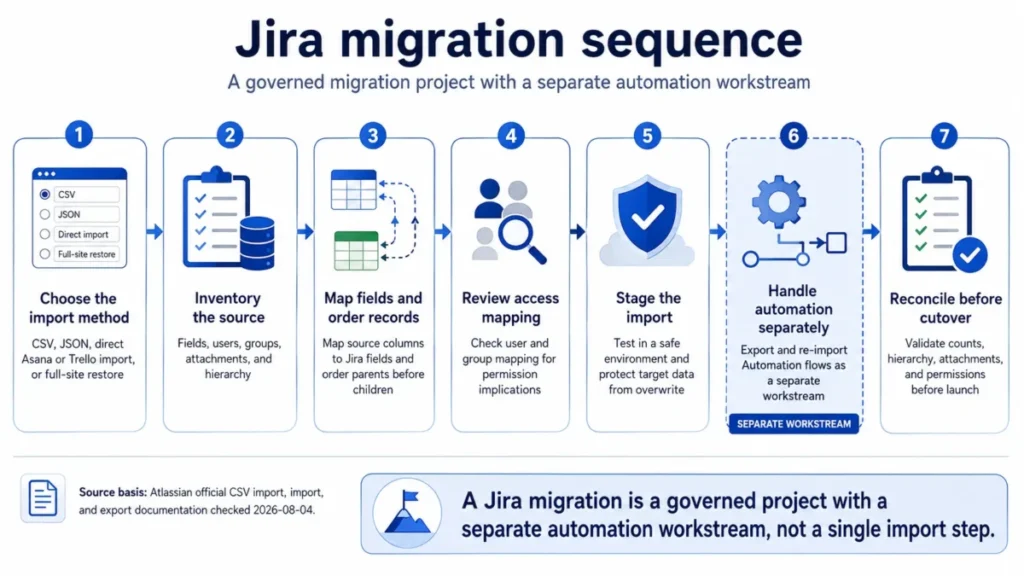
The stage that gets skipped is stage six, and skipping it is how a migration looks successful on Monday and fails on Wednesday.
Jira exports can include work items, board and sprint data, users, groups, comments, media, configuration, and Advanced Roadmaps data, but automation flows are not automatically included in Jira backups and must be exported and imported separately.
Recovery planning carries two hard numbers.
When attachments are included, Atlassian requires a 48-hour interval between backup exports, and beginning January 22, 2026, restore backups must be 30 days old or newer.
A continuity plan built on quarterly attachment-inclusive backups therefore does not survive contact with the restore rule. Duplicate-record behavior also varies by importer and source platform, so I would prove the exact path in a staging site before trusting it with a production cutover.
One more date belongs in any deployment discussion.
New Jira Data Center license sales ended March 30, 2026, and Data Center reaches end of life on March 28, 2029.
Jira Limitations
Configuration debt is the real cost. Gartner Peer Insights review patterns describe deep automation and workflow capability alongside setup complexity and cost concerns, and Capterra patterns add noisy notifications and administrative setup to the same list.
Uncontrolled workflows, fields, permissions, and notifications accumulate, and the team pays for that accumulation in onboarding time and admin hours every quarter.
Automation is a quota, not a utility. Standard’s 1,700 monthly runs are a single shared pool across the site, and the behavior at the ceiling is not stated in the documentation checked here. That makes capacity planning a pre-purchase question rather than a post-launch surprise.
Archiving is gated and serialized. Premium or Enterprise is required, and one archive request runs at a time per instance, so large cleanups become a scheduled program rather than an afternoon.
Backups exclude automation flows. A restore that looks complete can still leave routing, notifications, and approvals silently broken, which is the most expensive kind of migration failure because nobody notices immediately.
Identity controls sit outside the seat price. Outside Enterprise, Atlassian Guard is a separate subscription billed on unique covered users, so an organization-wide access model is a second purchase decision.
Non-technical fit is genuinely weak. Anecdotal discussion from non-software users on Reddit describes Jira as unintuitive or overcomplicated for simple work, and while that is buyer-fit evidence rather than measurement, it matches the onboarding friction reported on the major review platforms.
Jira Pros and Cons
| Pros | Cons |
|---|---|
| Issue types, workflows, fields, and permissions bend to a real process instead of a fixed template | Configuration debt accumulates, and reviewers repeatedly cite setup complexity and administrative overhead |
| Standard already includes roles and permissions, anonymous external collaboration, and multi-region data residency | Premium costs about 83.8 percent more per seat than Standard, and its gates are planning features one team rarely needs |
| Automation allocations are published per plan, so rule volume can be sized before purchase | Automation flows are excluded from site backups and need a separate export and import |
| Premium adds cross-team dependency planning, capacity views, approvals, sandbox, and release tracks | Archiving is locked to Premium and above, and only one archive request runs at a time per instance |
| Enterprise adds destination allowlists for automation, giving outbound data an administrative control | Atlassian Guard is a separate subscription outside Enterprise, so identity controls sit outside the seat price |
| Support targets tighten from 2 business hours on Standard to 30 minutes on Enterprise for Level 1 issues | Monthly billing uses the highest assigned seat count in the cycle, so a short seat spike sets that cycle’s charge |
Who Should Use Jira
An 8 to 30 person software or product team with one Jira owner. Standard covers roles and permissions, external collaboration, data residency, 250 GB of storage, Rovo capabilities, and 1,700 automation runs a month. That is enough for one team with a real process and someone to defend it.
Two to six engineering teams sharing releases and dependencies. Cross-team plans, capacity views, approvals, sandbox, release tracks, and per-seat automation scaling are the specific reasons Premium stops being an upsell and starts being infrastructure. Teams comparing this against other developer-oriented options will find the project management tools for developers roundup a useful cross-check.
IT, QA, support, and operations teams with structured queues. Independent review patterns consistently place Jira well for issue tracking, dashboards, and structured workflows, and the plan choice then depends on whether governance and cross-team coordination are in scope.
Multi-site or regulated organizations. Multiple sites, Guard Standard inclusion, Atlassian Analytics and Data Lake, automation destination allowlists, 24/7 support across severities, and a 99.95 percent SLA are Enterprise-specific, and each one is a governance requirement rather than a convenience.
A team running a genuine pilot. Free is legitimate for validating fit on one or two projects with up to 10 users, provided nobody treats it as the destination.
Who Should Avoid Jira
Two to five person non-technical teams with simple checklists and no administrator. The configuration and onboarding load is disproportionate to the work being tracked, and the likely outcome is a half-configured instance that nobody trusts. A shortlist from the project management tools for small teams roundup is a better starting point.
Buyers who expect one-click, lossless migration of complex custom workflows. Full-site restore can overwrite target data, imported users can merge and gain access through group mapping, and automation flows transfer separately.
Organizations that need one-price identity controls but will not fund Guard or Enterprise. The core Jira seat price does not carry every organization-wide control, and discovering that during security review is an expensive time to find out.
Teams that depend on offline mobile editing. Offline behavior is not established by the documentation checked here, and a field workflow should not be designed around an unconfirmed capability.
Integration teams that want a single published API quota and no retry engineering. Jira documents HTTP 429 behavior and context-dependent limits rather than one universal capacity number, so adaptive clients are a requirement rather than an optimization.
Any team unwilling to govern workflows, fields, permissions, and notifications. Independent evidence points at complexity and performance friction in large, busy instances, and governance is the only documented defense.
Jira Alternatives
| Alternative | Choose it instead when | The trade-off you accept |
|---|---|---|
| Lightweight task manager | A small non-technical team values fast setup and simple lists over workflow depth | You lose granular issue types, advanced permissions, dependency planning, and deep auditability |
| Developer-first tracker with stricter defaults | A software team wants faster onboarding and a smaller configuration surface | You lose Marketplace breadth, the wider Atlassian ecosystem, and enterprise governance controls |
| Broad work-management platform | Portfolio, resource, and executive work management span many departments | You lose engineering-grade issue depth and agile backlog mechanics |
| IT service management platform | Service catalog, incident, change, and service SLA workflows are the primary purchase | You are buying a service-management product, which needs its own pricing and workflow evaluation |
These are category-level trade-offs derived from the Jira evidence in this review. Competitor pricing and features require their own verification.
If the pull is toward a broader work-management platform, the Asana review covers that category’s plan gates and cost profile in the same format as this one.
For teams whose real complaint is Jira’s configuration surface rather than its capability, the ClickUp review is the more useful comparison, because the trade-off there is breadth against focus rather than power against simplicity.
Final Verdict: Is Jira Worth It?
Jira is worth it for software, product, IT, and operations teams whose work has real structure, where issue types, permissions, traceability, and cross-team coordination pay back the configuration effort. It is not worth it for a small non-technical team that needs a shared list, because the setup burden arrives immediately and the benefit arrives late or never.
Choose Standard if one team runs the work and cross-team planning, sandbox, archiving, the 99.9 percent SLA, and automation above 1,700 monthly runs are not decision-critical. At 10 users that is $79.10 a month at list price.
Choose Premium if dependency planning, capacity views, approvals, sandbox, release tracks, archiving, unlimited storage, the 99.9 percent SLA, or per-seat automation scaling is already blocking a workflow. Do not choose it because the feature list looks better, because at 25 seats the difference is $165.75 every month.
Choose Enterprise only when multi-site governance, Guard Standard inclusion, Atlassian Analytics and Data Lake, automation destination allowlists, unlimited plan automation, or the 99.95 percent SLA is a stated requirement.
Each recommendation above traces to a documented capability in Atlassian’s official documentation, the operating consequence it creates for a team, and the plan gate that limits it, so the choice is conditional on buyer context rather than on feature count.
Before signing, I would answer three questions honestly. Who owns Jira configuration by name, what happens to the workflow when the monthly automation allocation runs out, and what does the annual quote look like at the exact tier the headcount lands in.
If those three answers are solid at 30 days and still solid at 90 days, Jira is the right purchase. If the first one is missing, no plan tier fixes it.
FAQs
These answers repeat the evidence used above rather than adding new claims, and every price or limit carries the same checked date as the body.
Is Jira worth it in 2026?
Yes, if the work has real structure and someone owns the configuration.
Jira pays back on issue depth, permissions, traceability, and cross-team coordination.
It does not pay back for a small team that needs a task list, where setup effort arrives immediately and the benefit does not.
The deciding factor is administrative capacity, not feature count.
How much does Jira cost per user?
Standard is listed at $7.91 per user per month and Premium at $14.54 per user per month on the US pricing page, checked August 4, 2026.
Free covers up to 10 users at $0, and Enterprise is a sales-led annual quote.
Ten Standard users cost $79.10 a month at list price, and ten Premium users cost $145.40.
Is Jira free for 10 users?
Yes, Free supports up to 10 users at $0.
The practical ceiling arrives earlier than the user count, because Free carries 100 automation runs a month and caps Send email actions at 100 per 24 hours on Free and trial plans. Free sites can also move to a trial or paid plan once they exceed plan limits.
What are Jira’s biggest limitations?
Configuration debt is first: workflows, fields, permissions, and notifications accumulate and turn flexibility into maintenance load. Automation is a monthly quota rather than a utility.
Archiving requires Premium and runs one request at a time.
Backups exclude automation flows. Identity controls through Atlassian Guard sit outside the seat price for non-Enterprise customers.
Is Jira good for small businesses and non-technical teams?
No, unless the team already runs a structured process and can name a Jira owner.
Independent review patterns and forum discussion from non-software users consistently describe Jira as overcomplicated for simple work. A five-person marketing or operations team with a checklist will spend more time configuring Jira than the tracking is worth.
Jira vs a simpler tracker: which should a five-person team pick?
Pick the simpler tracker when the work is a list with owners and dates, and pick Jira when the work needs issue types, permission control, and audit history.
The honest test is whether anyone can spend two hours a week on administration.
The Linear review covers the developer-first side of that decision.
Does Jira have a mobile app?
Yes.
Jira mobile apps are available for Apple and Android and support assignment, comments, attachments, notifications, and approvals according to Atlassian’s documentation. Offline behavior is a separate question that the documentation checked here does not establish, so any workflow that depends on editing without connectivity should be confirmed with Atlassian first.
Does Jira support SOC 2 and GDPR?
Atlassian states that its relevant cloud controls are independently audited under SOC 2 and publishes a GDPR compliance program, with customer obligations preserved for lawful configuration and use. HIPAA is narrower: Atlassian describes HIPAA-oriented cloud solutions only within supported product and contractual boundaries, which is not a universal Jira compliance guarantee.
How hard is it to migrate to Jira?
Harder than the importer suggests.
CSV and JSON paths exist alongside direct Asana and Trello imports, but a full-site restore can overwrite target data, imported users can merge and gain permissions through group mapping, and automation flows need a separate export and import.
Treat it as a governed project with staging and reconciliation, not a single upload.
Which Jira plan includes cross-team planning and archiving?
Premium and Enterprise.
Cross-team plans, capacity views, dependency views, approvals, sandbox, release tracks, and project archiving are Premium-or-higher gates, along with unlimited storage and the 99.9 percent uptime SLA. Standard covers a single team well but does not carry those planning and governance capabilities.