Agile tooling decisions rarely fail on features. They fail on the plan that unlocks sprint reporting, the seat block that resets a budget at 16 users, and the connected board that quietly stops feeding the burndown.
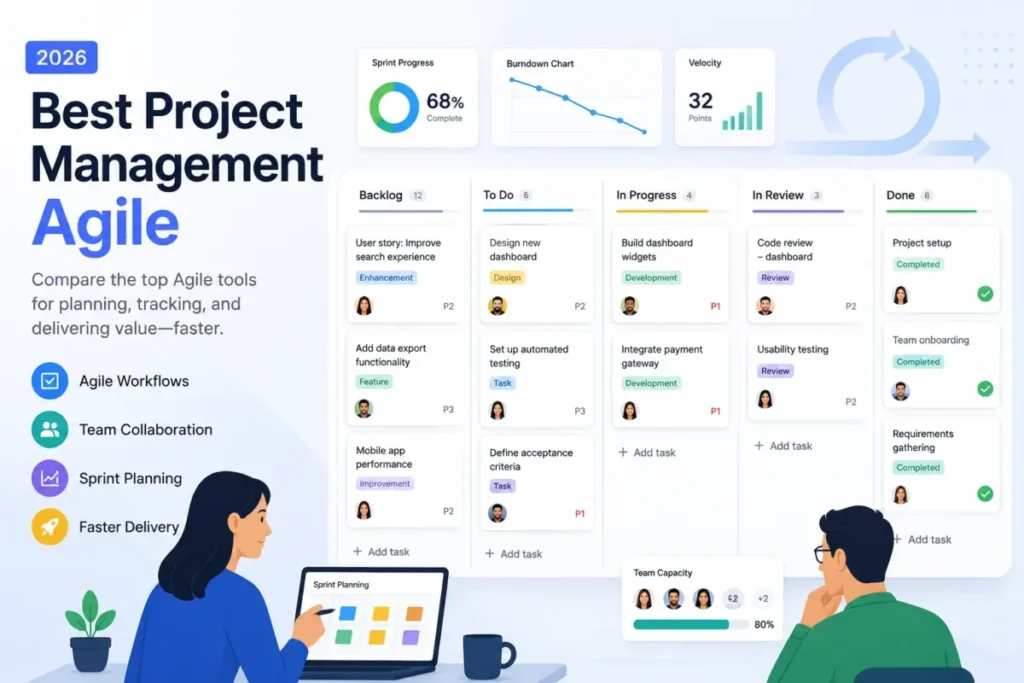
This ranking covers 10 Agile project management tools for US buyers, ordered by delivery fit rather than by feature count. Jira holds the top position for software teams that need mature backlog, board, and cross-team planning control.
That top position carries a condition. A five-person team that wants a working board this week gets more from Linear, Shortcut, or Trello than from a Jira project nobody owns.
Three groups make the shortlist manageable. Engineering-native delivery points to Jira, Azure DevOps Services, Linear, and Shortcut; mixed product, marketing, and operations delivery points to ClickUp, monday dev, Asana, and Wrike; and the light or budget end is covered by Trello and Zoho Sprints.
The wider project management software guide frames Agile tooling against general work management.
Every price below is a US list price taken from each vendor’s official pricing page, checked 2026-07-27.
In This Article (15 sections)
Quick verdict: best Agile project management software by use case
| Use case | Best pick | Why it fits |
|---|---|---|
| Software teams that need deep Scrum and Kanban control | Jira | Documented backlog ranking, sprint start, and cross-team planning on Premium |
| Cross-functional teams replacing several separate tools | ClickUp | Sprints, docs, goals, and native time tracking in one workspace |
| Product, design, and business stakeholders in one view | monday dev | Connected task, sprint, and roadmap boards with burndown and Agile Insights |
| Marketing and operations running Agile outside engineering | Asana | Board, timeline, forms, and rules without an engineering issue model |
| Speed-first product engineering teams | Linear | Repeating cycles with automatic rollover and capacity estimates |
| Microsoft-standardized engineering organizations | Azure DevOps Services | Boards, Repos, Pipelines, and Test Plans under one identity |
| 10 to 50 person software teams leaving a heavy tracker | Shortcut | Iterations that span multiple epics, projects, and workflows |
| Budget pick for a very small Scrum team | Zoho Sprints | Free plan covers backlog, boards, epics, and Agile reports |
| Lightweight Kanban and Scrumban with almost no setup | Trello | Boards, lists, cards, and Butler automation on day one |
| Request-driven intake that feeds delivery | Wrike | Request forms, custom workflows, and dashboards on Business |
Source: official pricing page per tool. Ranks one to three: Jira pricing, ClickUp pricing, monday dev, Asana pricing. Ranks four to six: Linear pricing, Azure DevOps, Shortcut pricing. Ranks seven to nine: Zoho Sprints, Trello pricing, Wrike pricing.
Read that table as a starting shortlist, not a verdict. Two products can both run a sprint and still produce different outcomes once reporting, permissions, and seat counts enter the picture.
The split that matters most is engineering-native versus cross-functional. Jira, Azure DevOps Services, Linear, and Shortcut model software work as issues, stories, and iterations, while ClickUp, monday dev, Asana, and Wrike model it as tasks inside a broader work platform.
How We Chose and Evaluated Agile Project Management Tools
These rankings are based on official pricing pages, official product documentation, help-center guidance, and third-party review evidence that is labeled as such. Pricing and plan limits were checked on 2026-07-27.
Each tool was assessed against the same buyer-focused criteria: backlog and sprint or cycle support, board behavior, Agile reporting depth, integration reach, governance controls, implementation burden, and plan gates.
Greater weight was given to factors that change a purchase, including the first tier that unlocks usable sprint metrics, seat minimums, automation quotas, and the cost of scaling a team.
Claims that could not be verified from reliable evidence were excluded from the rankings. Temporary vendor offers are treated separately from standard list pricing and rechecked before publication.
The three problems every Agile tooling buyer faces
Most Agile tool comparisons list features and stop. The decisions that go wrong in month three usually trace back to one of three problems, and each one maps to a different part of this ranking.
Problem 1: buying an engineering tracker for a cross-functional team, or the reverse
An Agile project management tool encodes an operating model. Jira’s documented Scrum backlog expects work items to be created, ranked, estimated, and assigned to sprints, epics, or versions before delivery starts, according to Atlassian’s Scrum backlog documentation.
Asana encodes something different. Its official Agile resources describe board views, sprint-planning guidance, Kanban templates, custom fields, forms, and rules, which is a work-management model applied to Agile rather than a software delivery lifecycle, per Asana’s Agile resource hub.
Neither model is wrong. The failure happens when a marketing team inherits an issue tracker built for release versions, or when an engineering team is asked to run defects, branches, and deployments inside a task board that has no native concept of any of them.
Use this test before shortlisting. If your sprint output ships as code and needs to connect to repositories, pipelines, or releases, stay in the engineering-native group; if your sprint output is campaigns, launches, or process work, stay in the work-platform group.
Problem 2: sprint reporting is not available at the same plan across products
Burndown and velocity appear on almost every vendor’s feature list. The plan that exposes them differs by product, and that difference is a budget decision rather than a feature decision.
ClickUp places advanced sprint points and sprint reporting on Business, the same plan that lists 5,000 automations per month, according to the official ClickUp plan comparison. ClickUp also requires the entire Workspace to move up together, so one team’s reporting need becomes an organization-wide bill.
Asana gates portfolios, goals, and workload to Advanced, with universal workload and capacity planning held for Enterprise, per Asana’s official plan page. Zoho Sprints keeps release management, work-in-progress settings, webhooks, capacity planning, test cases, and objectives above its Free plan, per Zoho Sprints plan details.
Trello has no native sprint object at all. Its Free plan allows 250 automation runs per month and Standard raises that to 1,000, with operation quotas pooled across a workspace, per Atlassian’s Trello automation quota documentation.
The practical rule is simple. Price the plan that carries the metrics your review cadence depends on, then compare tools at that plan, because comparing entry tiers compares products that do not do the same job.
Problem 3: packaging cliffs that appear between 10 and 25 seats
Per-seat list prices scale smoothly. Packaging does not.
Wrike Team covers 2 to 15 users, and Business covers 5 to 200 users at a higher per-user rate with annual billing, per Wrike’s official plan and pricing page. A 16th hire therefore moves a team to a different plan rather than a slightly larger invoice.
monday dev sells in a three-seat minimum, per monday.com’s official pricing. Azure DevOps runs the opposite way, with the first five Basic users free and a per-user charge only after that, per Microsoft’s Azure DevOps Services pricing.
Free tiers create their own cliff. Linear Free stops at 250 issues and two teams, per Linear’s official pricing page, and Shortcut Free covers up to 10 users with one team and one workflow, per Shortcut’s official pricing.
Model the seat count you expect in 12 months, not the one you have. The cost-at-scale tables further down do that arithmetic for 10 and 25 seats so you can see where each packaging model bends.
Best Agile project management software compared
| Tool | Rank | Best-fit delivery model | Sprint or cycle model | Practical paid plan | Constraint that decides the fit |
|---|---|---|---|---|---|
| Jira | 1 | Engineering-native, multi-team | Scrum backlog plus sprints, Kanban boards | Standard | Configuration and admin overhead |
| ClickUp | 2 | Cross-functional work platform | Sprint folders with burndown, burnup, velocity | Business | Sprint reporting depth sits on Business |
| monday dev | 3 | Product plus business alignment | Sprint boards with automated start and close | Standard | Connected boards must stay intact |
| Asana | 4 | Non-engineering Agile programs | Board projects with rules and forms | Starter | No native software lifecycle objects |
| Linear | 5 | Speed-first product engineering | Repeating cycles of one to eight weeks | Basic | Opinionated model, limited customization |
| Azure DevOps Services | 6 | Microsoft engineering estates | Product, portfolio, and sprint backlogs | Basic | Pipelines, artifacts, and tests priced separately |
| Shortcut | 7 | Mid-sized software teams | Iterations across epics and workflows | Team | Workflow and team caps on Free |
| Zoho Sprints | 8 | Budget Scrum teams | Backlog plus Scrum and Kanban boards | Undisclosed paid tier | Free plan caps users, projects, and sprints |
| Trello | 9 | Lightweight Kanban and Scrumban | Lists used as a manual sprint lane | Standard | No native sprint object or velocity report |
| Wrike | 10 | Request-driven cross-functional work | Kanban with custom workflows | Business | Seat blocks and annual-only higher tiers |
Source: official plan pages. First three ranks: Jira plans, ClickUp plans, monday plans, Asana plans. Middle ranks: Linear plans, Azure plans, Shortcut plans, Zoho plans. Lower ranks: Trello plans, Wrike plans.
The ranking order reflects delivery fit and evidence quality, not popularity. Jira leads because its documented backlog, board, reporting, automation, and cross-team planning cover the widest range of Agile delivery models, and because its constraints are visible on the pricing page rather than hidden in a contract.
Positions eight to ten are not weak products. They are products with a narrower job: Zoho Sprints for a budget Scrum team, Trello for visual flow, and Wrike for intake-driven work that happens to run on a board.
Detailed reviews of all 10 tools
Each entry below carries the same decision fields: its ranking reason, the micro-cohort it fits, the plan most teams end up on, the documented sprint workflow, at least one plan gate or disqualifier, and the condition that would send you elsewhere. Depth varies on purpose, because a top pick with a complex plan structure needs more explanation than a tool whose whole value is that it needs almost none.
1. Jira

- Best for:
- software teams that need mature Scrum and Kanban control, issue tracking, automation, and cross-team planning. Not best for: very small teams that want a minimal, nearly configuration-free interface.
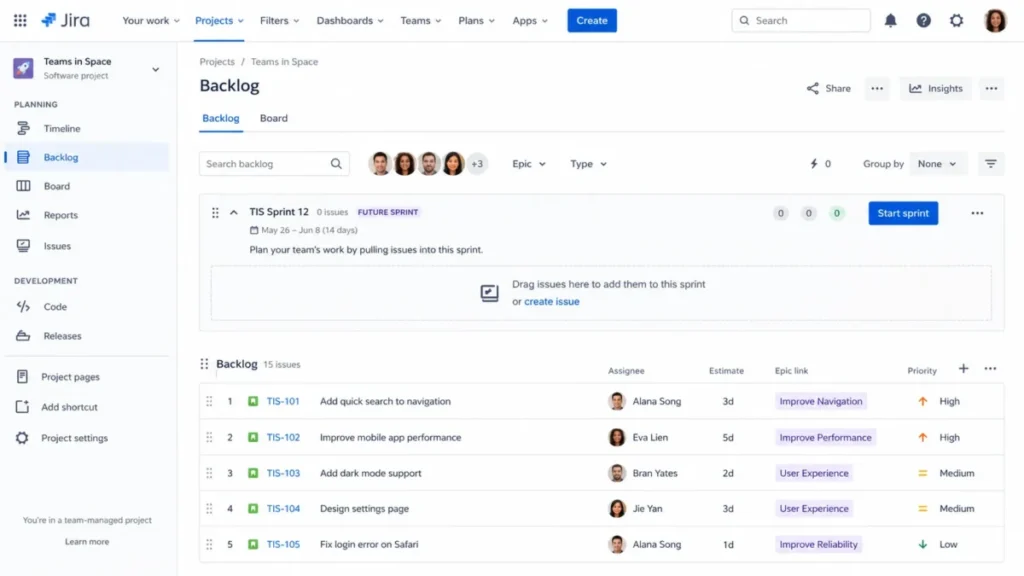
Jira takes the top position because its delivery model is documented end to end rather than implied. The official Scrum backlog documentation describes creating and refining work items, ranking them, attaching estimates, epics, and versions, assigning them to a sprint, starting that sprint, and routing whatever does not finish.
That chain matters more than any single feature. It means a Scrum master can explain, in writing, why a story moved and where it went, which is the part of Agile tooling that survives an audit or a leadership review.
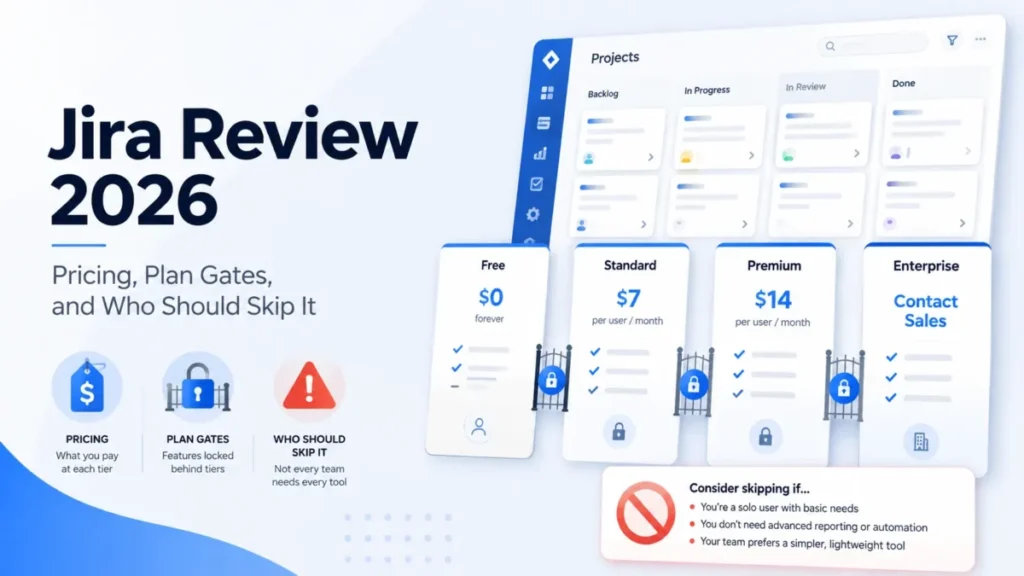
Pricing starts free for up to 10 users, and Standard is listed at $7.91 per user per month on the official US pricing page. Standard is the practical tier for most delivery teams, because the Free plan includes only 100 automation rule runs per month.
Automation is where the free-to-paid decision usually gets made. A single rule that transitions an issue when a pull request merges can consume that monthly allowance inside one active sprint for a team of six.
Source: Atlassian’s official Jira pricing page and the Jira Scrum backlog documentation.
Where Jira gives ground is onboarding. G2 review patterns praise the flexible workflows and the integration reach, and the same patterns repeatedly flag clutter, complexity, and a steep first month for new administrators.
That feedback lines up with the product’s own design. Configuration power and configuration burden are the same property viewed from two sides, and a team without an owner for board filters and status mappings will feel the second one.
| Pros | Cons |
|---|---|
| Documented backlog to sprint to report chain that a Scrum master can defend | Free plan stops at 10 users and 100 automation rule runs per month |
| Cross-team planning available on Premium for multi-squad delivery | Board filters and status mappings need a named administrator |
| Marketplace and native links to GitHub, Bitbucket, Slack, Teams, and Confluence | Review patterns repeatedly cite clutter and a steep learning curve |
| Automation quotas scale with the plan instead of an add-on purchase | Data residency and advanced identity controls sit on paid and Enterprise tiers |
Source: Jira plan and limit page.
- Setup difficulty:
- high, because sprint permissions, board filters, and status mappings all have to be decided before the first sprint. Hidden costs: automation allowance on Free, Marketplace apps, and the admin time to keep one project schema clean. Evidence level: documentation-verified, from official pricing and official Scrum backlog documentation.
Choose Jira if you run more than one delivery team, need auditable sprint history, and have someone who will own the configuration. Skip it if the honest answer to that last condition is nobody, and read the full Jira review before committing a whole organization to it.
2. ClickUp

- Best for:
- cross-functional teams that want tasks, sprints, docs, goals, time tracking, and chat in one workspace. Not best for: teams that prefer a tightly opinionated engineering-only tracker with minimal settings.
- Starting price: Unlimited at $7 per user per month billed yearly
- Practical tier: Business at $12 per user per month billed yearly
- Free plan: yes, with two-factor authentication included
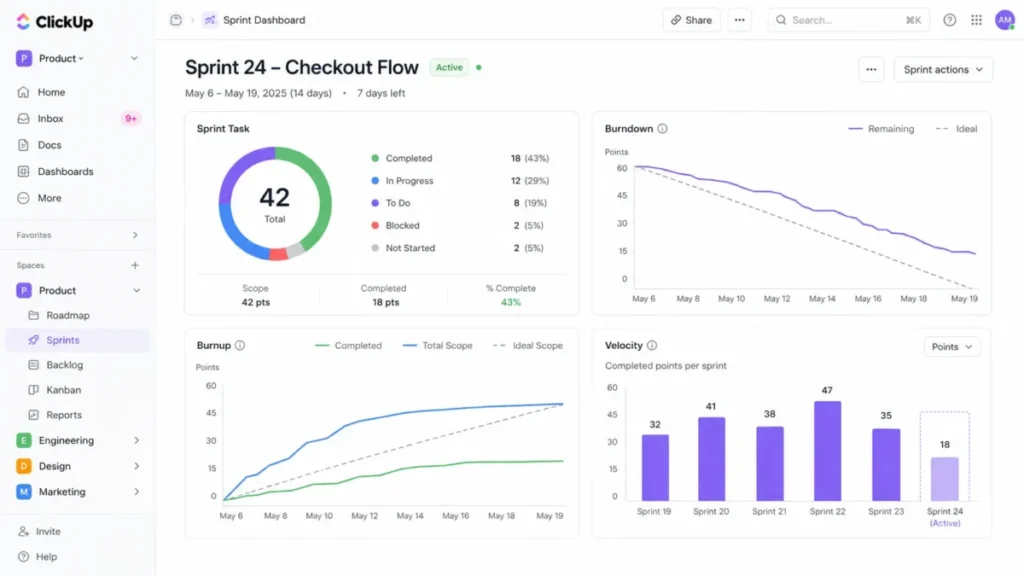
- Sprint model: sprint folders with burndown, burnup, velocity, and scope-change cards
- Evidence level: documentation-verified, from official pricing and official sprint reporting documentation
Consolidation is the entire argument here. ClickUp documents sprint task, burndown, burnup, and velocity cards for monitoring scope and delivery, and it pairs them with docs, goals, native time tracking, and chat that would otherwise be four separate subscriptions.
The catch is the tier those metrics live on. Advanced sprint points and sprint reporting are included on Business, which also lists 5,000 automations per month, so the realistic comparison price for a delivery team is $12 per user per month rather than the headline $7.
Source: the official ClickUp pricing and plan comparison and ClickUp’s sprint monitoring and reporting documentation.
One packaging rule deserves attention before a pilot. Upgrading requires the entire Workspace to move together, so a single squad that needs sprint analytics pulls every other seat in the workspace onto the same plan.
G2 users commonly praise the breadth and the customization, while some report notification noise, general complexity, and occasional slow loading on large workspaces.
| Pros | Cons |
|---|---|
| Sprint burndown, burnup, velocity, and scope-change cards documented in one place | Advanced sprint points and reporting are gated to the Business plan |
| Docs, goals, chat, and native time tracking remove several separate subscriptions | The whole Workspace must upgrade together, not one team at a time |
| 24/7 support listed across plans, with live onboarding on Enterprise | Review patterns cite notification noise and slow loading at scale |
| API and webhooks available, with higher-scale API usage on Enterprise | Broad feature surface raises the training cost for new members |
- Setup difficulty:
- medium, because the feature surface invites configuration that a new team does not need yet. Hidden costs: the workspace-wide upgrade rule, plus the Enterprise tier for higher-scale API usage, SCIM, audit log, and data residency. Avoid if: you want an issue tracker with few settings, or you cannot move an entire workspace to Business at once.
Choose ClickUp if one workspace has to serve engineering, marketing, and operations at the same time and the Business price is acceptable for every seat. The ClickUp review covers the non-sprint side of the platform in more detail.
3. monday dev

Alignment between engineering and the rest of the business is the specific problem monday dev solves. Its documentation describes creating a sprint from the Tasks board, dragging backlog tasks into it, starting or completing that sprint, and reviewing burndown and Agile Insights afterwards.
Basic is listed at $9 per seat per month and Standard at $12 per seat per month when billed annually, with plans starting at three seats. Standard is the practical tier for a delivery team that wants the broader sprint workflow rather than a task list.
Source: monday.com’s official pricing page and the monday dev sprint management documentation, checked 2026-07-27.
The architectural risk is the interesting part, and it is documented by the vendor rather than inferred. monday dev runs as a connected solution across Tasks, Sprints, and a hidden Capacity board, and the official guidance warns that breaking or manually duplicating those connected boards can break sprint-management behavior.
That is a migration and governance instruction disguised as a help article. Duplicating a board to make a second squad’s workspace is exactly the kind of well-intentioned move that silently disconnects the burndown.
| Pros | Cons |
|---|---|
| Sprint creation, automated start and close, burndown, and Agile Insights are documented | Plans start at a three-seat minimum |
| Roadmap, story points, and bug tracking sit alongside business-facing boards | Breaking or duplicating connected boards can break sprint management |
| GitHub, GitLab, CircleCI, Slack, and Teams connections cover a normal delivery stack | Some documented insights are unavailable for manually run sprints |
| Enterprise governance and multi-level permissions available on higher tiers | Review patterns cite sluggish behavior on very large boards |
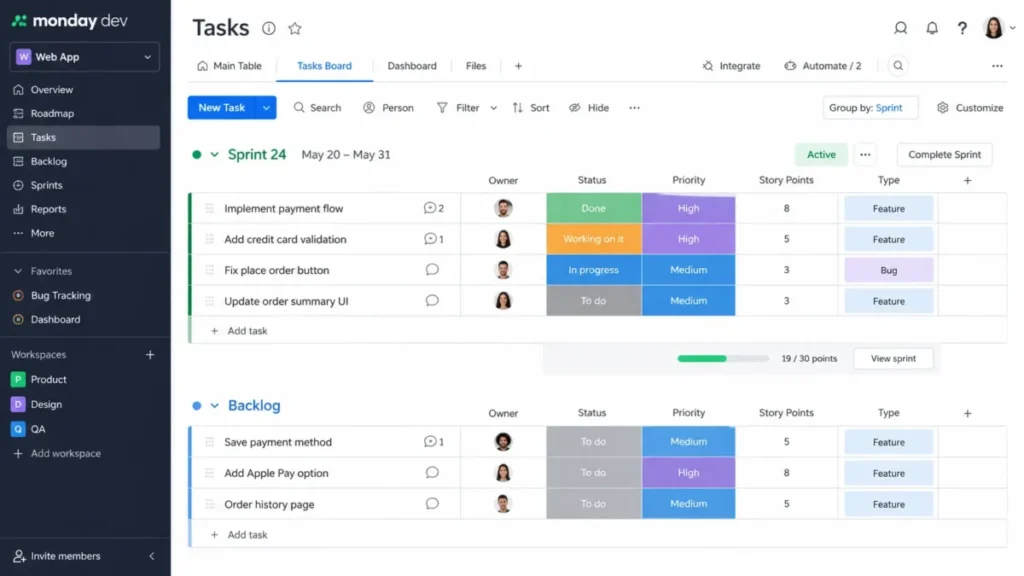
G2 users praise the visual collaboration, the customization, and the GitHub connection, and cite a real setup learning curve plus limits in advanced DevOps detail.
- Setup difficulty:
- medium, with the caveat that solution setup and board connections deserve care rather than speed. Hidden costs: the three-seat floor, and the rework created if a connected board is duplicated by hand. Avoid if: you need a deeply standardized issue model or an extensive developer-centric marketplace.
Choose monday dev when keeping product, engineering, design, and business stakeholders in one visual system matters more than a rigid issue schema. The monday.com review covers the underlying work platform that monday dev sits on.
4. Asana

- Best for:
- marketing, operations, product, and launch teams applying Agile practices outside software engineering. Not best for: engineering organizations that need native source-code, build, deployment, and defect management.
Asana’s Agile story is honest about what it is. The official Agile resources describe board views, sprint-planning guidance, Kanban templates, custom fields, forms, and rules, which is enough to run a two-week cadence for a campaign team without pretending to be a software lifecycle tool.
Starter is listed at $10.99 per user per month billed annually and $13.49 billed monthly, with Advanced at $24.99 billed annually. Starter is the practical tier for a single Agile team, and Advanced becomes necessary the moment portfolio-level visibility enters the conversation.
Source: Asana’s official pricing page and Asana’s official Agile resource hub.
The plan gates are the buying decision here. Personal is limited to two users, portfolios, goals, and workload are gated to Advanced, and universal workload with capacity planning is held for Enterprise.
For a marketing organization running six parallel squads, that means the tool works fine per team and the cross-team view is the thing you pay for.
| Pros | Cons |
|---|---|
| Board, list, calendar, timeline, and Gantt views cover non-engineering Agile work | Personal plan is limited to two users |
| Forms and rules turn intake into structured, assignable work | Portfolios, goals, and workload require the Advanced plan |
| Strong connections to Slack, Teams, Google Workspace, Salesforce, and Jira | No native source-code, build, or deployment objects |
| Accessible to general business users without an administrator | Review patterns cite friction moving tasks and subtasks between structures |
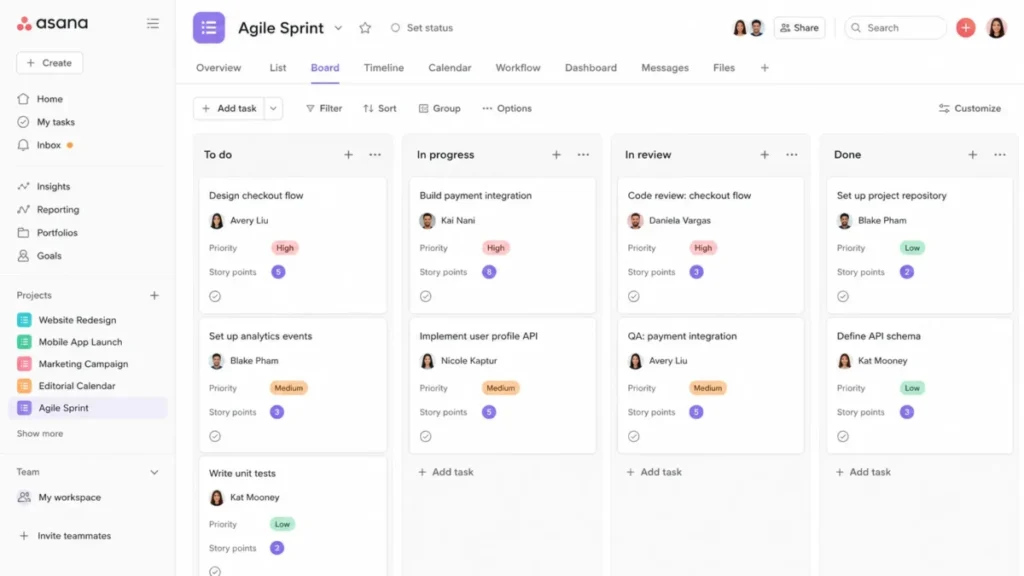
G2 users praise the clarity and cross-team coordination, and report friction when moving tasks or subtasks and a learning burden created by the number of moving pieces.
- Setup difficulty:
- low to medium for a single team, higher once portfolio design and permissions are involved. Hidden costs: the Advanced tier for portfolio visibility, and the Enterprise tier for service accounts and capacity planning. Avoid if: your sprint output is code and you expect the tool to track branches, builds, or releases natively.
Choose Asana when Agile is a working method for non-engineering delivery and the reporting you need is program-level rather than repository-level. The Asana review and verdict goes deeper on its automation and reporting behavior.
5. Linear

Cycles, not sprints, are the organizing idea. Linear documents repeating time boxes of one to eight weeks with automatic future cycles, rollover behavior, capacity estimates, and optional cooldowns, which removes most of the ceremony a Scrum master would otherwise run manually.
Basic is listed at $10 per user per month billed yearly and Business at $16 per user per month billed yearly. Free exists but stops at 250 issues and two teams, which a real product team crosses quickly.
Source: Linear’s official pricing page and Linear’s official cycles documentation.
The opinionated model is both the appeal and the limit. Cycles follow a repeating cadence rather than an arbitrary schedule, unfinished work rolls forward under configured rules instead of staying in a closed cycle, and initiative views are reserved for Enterprise.
A team that wants to hold a closed cycle open for two extra days will not get that behavior. That constraint is the point for teams that keep slipping, and a blocker for teams whose delivery genuinely varies.
| Pros | Cons |
|---|---|
| Cycles automate the repetitive parts of sprint administration | Free plan is capped at 250 issues and two teams |
| Triage, projects, initiatives, and roadmaps cover product planning natively | Cycle start-date changes cannot be reverted |
| API and webhook access included rather than sold as an add-on | Initiative views are reserved for the Enterprise plan |
| Keyboard-first interface keeps daily update cost low for engineers | Review patterns cite limited customization for complex workflows |
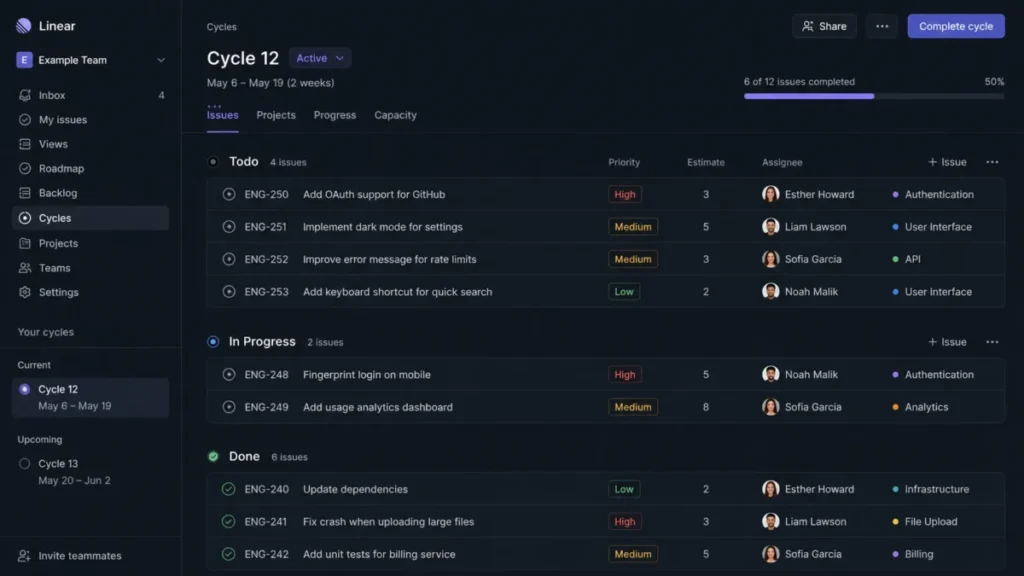
G2 users praise the speed, the clean interface, and the GitHub and Slack fit, and often cite limited customization, reporting depth, and advanced workflow control.
- Setup difficulty:
- low for engineers, medium for an organization adapting its process to Linear rather than the reverse. Hidden costs: the Enterprise tier for initiative views, SAML, SCIM, and granular organization modeling. Avoid if: a project management office needs highly customized fields, resource management, or portfolio reporting on a lower tier.
Choose Linear if the team’s biggest tax is process administration and a fixed cadence is acceptable. The Linear review covers how its issue model behaves as a team grows.
6. Azure DevOps Services
- Best for:
- engineering organizations already standardized on Microsoft, Azure, Visual Studio, Repos, Pipelines, and Test Plans. Not best for: non-technical business teams that want a simple, visually polished work experience.
The seat economics are unusual. Basic is free for the first five users and then $6 per user per month. That makes it the cheapest entry point in this ranking for a small engineering team, while Basic plus Test Plans is listed at $52 per user per month.
Azure Boards supplies prioritized product, portfolio, and sprint backlogs with hierarchy, team configuration, velocity, and rollups, so the Agile side is not a bolt-on to the pipeline story.
Source: Microsoft’s official Azure DevOps Services pricing and Microsoft Learn’s Azure Boards backlog documentation.
Budget for the modules, not the seats. The free hosted pipeline allowance is one parallel job with 1,800 minutes per month, and extra hosted jobs, artifact storage, security products, and Test Plans are all separate charges.
| Pros | Cons |
|---|---|
| First five Basic users are free, then a low per-user rate | Hosted CI/CD is capped at 1,800 free minutes and one parallel job |
| Product, portfolio, and sprint backlogs with velocity and rollups | Test Plans costs far more per user than Basic |
| Boards, Repos, Pipelines, Artifacts, and Test Plans under one identity | Implementation surface is broad and technical |
| Marketplace extensions, service hooks, and full APIs available | Area and iteration paths must be configured before work is visible |
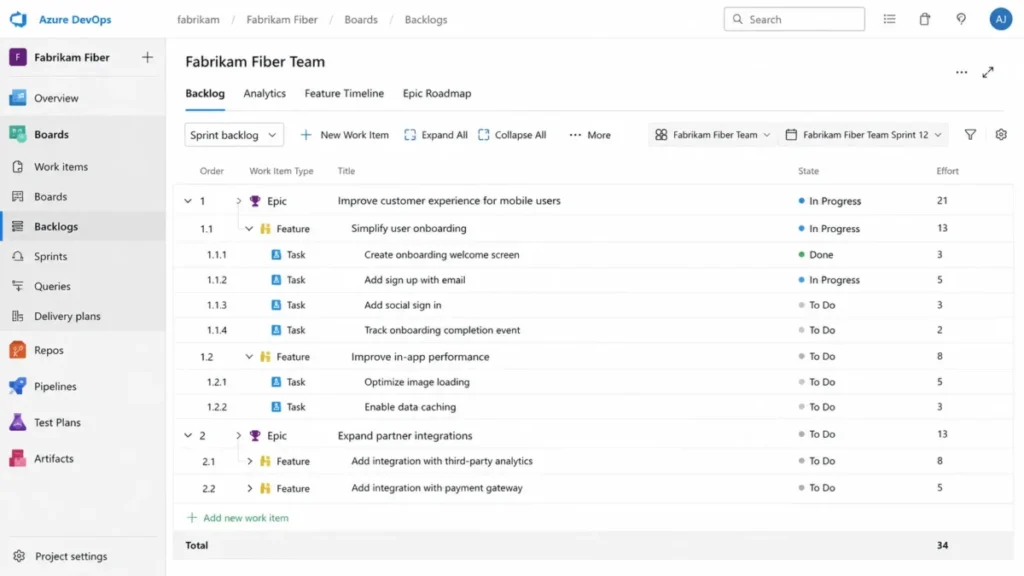
Official Microsoft documentation shows strong Scrum and Kanban depth, and the breadth across Boards, Repos, Pipelines, Artifacts, and Test Plans creates a more technical implementation surface than a task-first product.
- Setup difficulty:
- high for non-technical teams, medium for an experienced Microsoft engineering organization. Hidden costs: extra parallel jobs, artifact storage, security products, and Test Plans seats. Avoid if: the buying team is business-side and nobody will own area paths, iteration paths, and pipeline configuration.
Choose Azure DevOps Services when the estate is already Microsoft and the cost model rewards consolidating work tracking with source control and pipelines.
7. Shortcut

Shortcut is positioned as the simpler alternative for teams that have outgrown a board but do not want to administer a full platform. Its Iterations are time-boxed sprints that can span multiple epics, projects, and workflows, with drag-and-drop story assignment.
Team is listed at $8.50 per user per month and Business at $12 per user per month on yearly billing, with a Free plan for up to 10 users.
Source: Shortcut’s official pricing page and Shortcut’s official iteration documentation.
The Free plan is a trial in practice rather than a home. It includes one team and one workflow, while work-in-progress limits and up to five workflows require Team, and advanced reports plus unlimited workspaces require Business.
| Pros | Cons |
|---|---|
| Iterations span epics, projects, and workflows without extra configuration | Free plan allows only one team and one workflow |
| Stories, epics, roadmaps, docs, and objectives cover product planning | Work-in-progress limits require the Team plan |
| API and webhook access included across plans | Advanced reports and unlimited workspaces require Business |
| SOC 2 Type II, with SSO and SCIM included on Enterprise | Review patterns request stronger search and reporting |
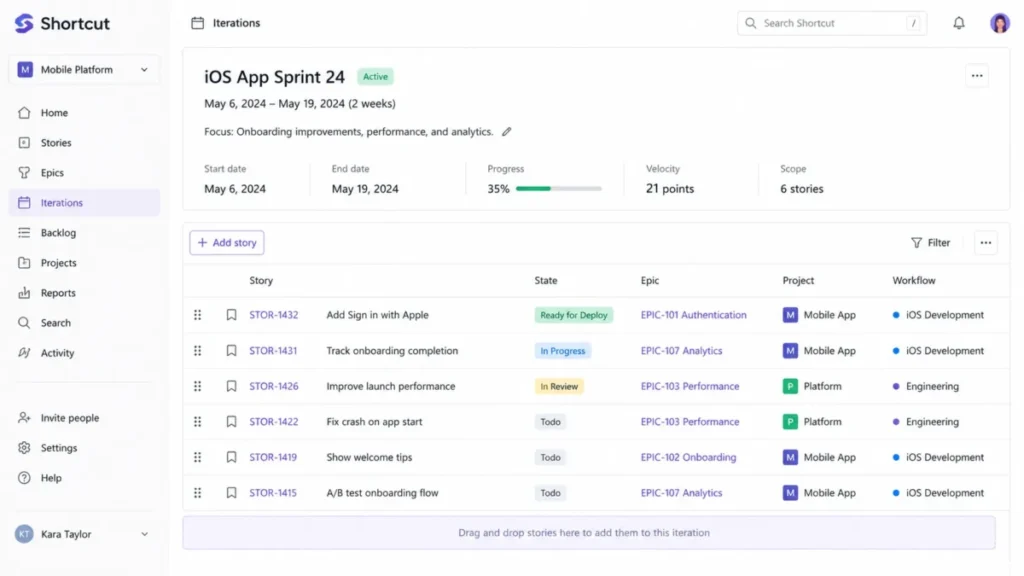
G2 users praise the engineering-focused structure and an easier start than a heavier tracker, while some cite weaker search, thinner reporting, and occasional interface clutter.
- Setup difficulty:
- low to medium, with advanced search and reporting as the parts that take practice. Hidden costs: SSO and SCIM as add-ons on Business, and the Team plan as the real entry point once a second workflow appears. Avoid if: the organization needs broad non-technical work management or multi-department portfolio administration.
Choose Shortcut for a 10 to 50 person software team that wants sprints, stories, epics, roadmaps, and engineering integrations without a dedicated administrator.
8. Zoho Sprints

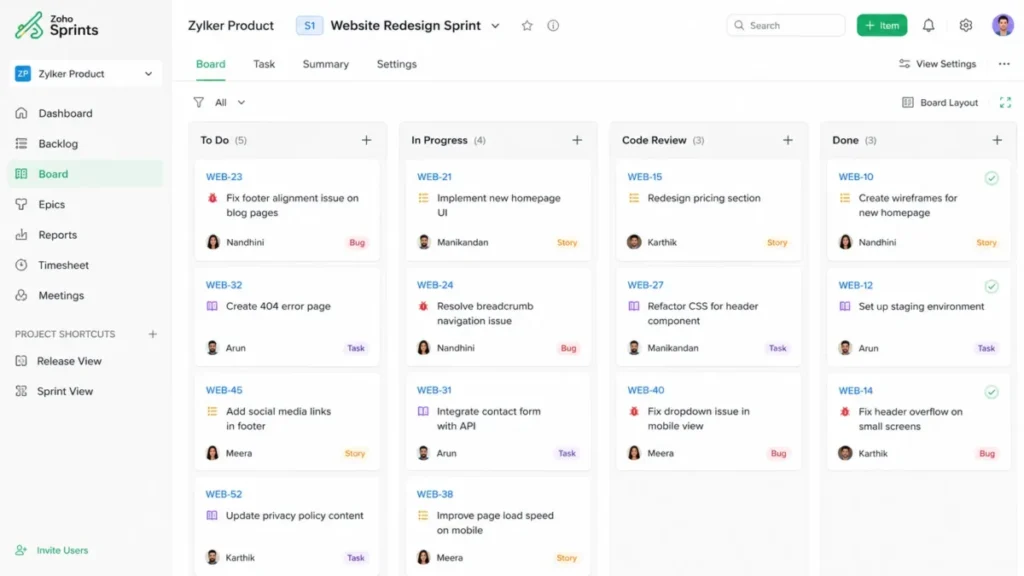
Scrum is the whole product rather than a mode inside a wider suite. Zoho Sprints documents a backlog, Scrum and Kanban boards, epics, release management, Agile reports, time tracking, imports, APIs, webhooks, and mobile apps.
The Free plan is genuinely usable inside its limits: three users, three projects, 500 MB of storage, limited backlog management, one parallel sprint, and no release management.
Paid pricing is the gap. The accessible official pricing page did not expose paid amounts at the checked date, so the paid tiers are recorded here as undisclosed rather than estimated from third-party figures.
Source: Zoho Sprints official pricing page and Zoho Sprints official feature documentation.
| Pros | Cons |
|---|---|
| Free plan covers backlog, boards, epics, and Agile reports for three users | Free plan is limited to three projects, 500 MB storage, and one parallel sprint |
| Burndown, burnup, velocity, and cumulative flow reports are native | Release management, WIP settings, and webhooks require higher tiers |
| Imports from other trackers plus Jenkins, GitLab, Teams, and Zapier connections | Paid amounts were not exposed on the accessible official pricing page |
| Zoho lists ISO, SOC 2 Type II, HIPAA, GDPR, CCPA, and CSA STAR controls | Review patterns cite reporting and integration gaps against larger platforms |
Source: Zoho Sprints plan limits.
- Setup difficulty:
- low to medium, because the Scrum model is purpose-built rather than assembled from generic tasks. Avoid if: you need deep source-code integration or multi-department portfolio governance.
Request a written quote before committing, since the paid amount is the one number this ranking cannot verify. Buyers already inside the Zoho ecosystem can compare adjacent packaging in the Zoho CRM review.
9. Trello

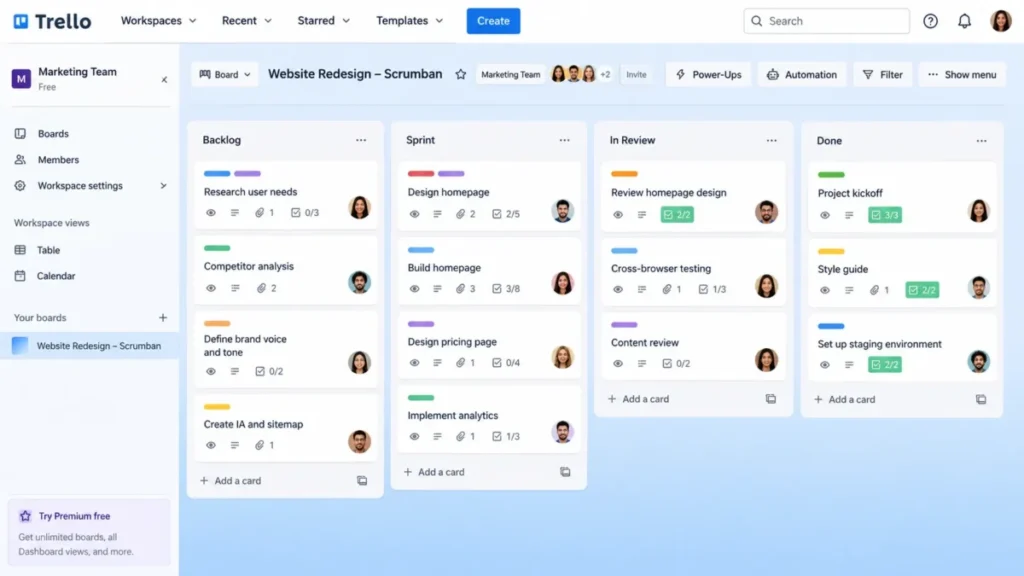
Adoption speed is the argument. Boards, lists, and cards work on the first day without configuration, and custom fields on Standard plus Premium timeline, table, calendar, and dashboard views cover a light Scrumban cadence.
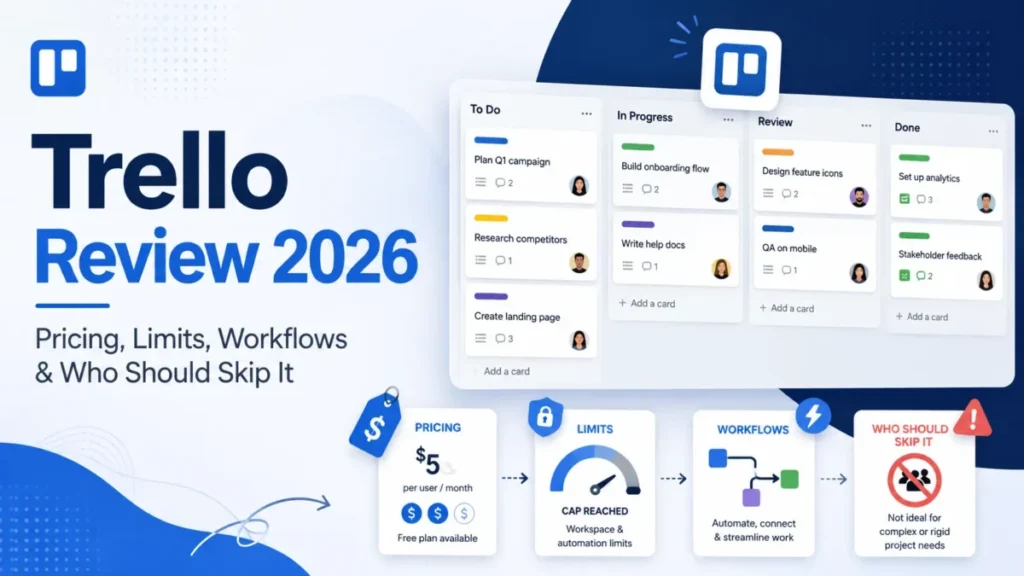
Standard is listed at $5 per user per month billed annually and $6 billed monthly, with Premium at $10 annually and $12.50 monthly.
Source: Atlassian’s official Trello pricing page and Trello’s official automation quota documentation.
There is no native sprint object, which is the honest limitation. A sprint in Trello is a list that a human moves cards into, so velocity and forecasting come from a Power-Up or a spreadsheet rather than the product.
| Pros | Cons |
|---|---|
| Fastest adoption in this ranking, with no configuration required to start | No native sprint object, velocity report, or dependency model |
| Butler automation is available from the Free plan | Free plan caps 10 boards, 10 collaborators, and 250 automation runs monthly |
| Premium adds timeline, table, calendar, and dashboard views | API rate limits are 300 requests per 10 seconds per key |
| Power-Ups connect Slack, Teams, Google Drive, Jira, and GitHub | Review patterns cite clutter once a board grows past a small project |
Source: Trello plan and quota page.
- Setup difficulty:
- low, and that is the reason to pick it. Hidden costs: Premium for richer views and higher automation allowances, plus Power-Ups for anything resembling reporting. Avoid if: you need native sprint forecasting, dependency management, or velocity analytics without add-ons.
Choose Trello for a small team that needs visible flow in week one and can accept manual sprint mechanics. The Trello review explains where boards stop scaling.
10. Wrike

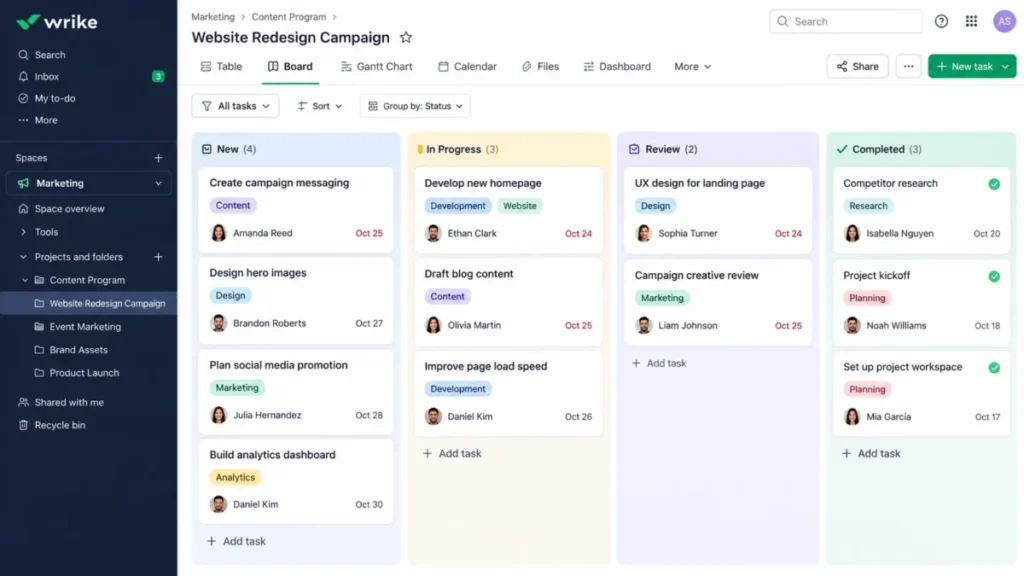
Intake is the entry point that makes Wrike different in this ranking. Work arrives through a request form, becomes a task or project, routes automatically, and then moves through a custom workflow that a board visualizes.
Team is listed at $10 per user per month for 2 to 15 users, and Business at $25 per user per month for 5 to 200 users, billed annually.
The gating is the thing to price. Request forms and custom workflows are officially available on Business and higher, which means the intake model that justifies Wrike is not available on the entry plan.
Source: Wrike’s official plans and pricing page and Wrike’s official workflow documentation.
| Pros | Cons |
|---|---|
| Request forms turn unstructured demand into routed, assignable work | Request forms and custom workflows require Business or higher |
| Custom workflows, dashboards, and reports cover approval-heavy delivery | Team plan supports only 2 to 15 users |
| Resource and capacity planning available on higher tiers | Seats are sold in blocks and Business is annual-only |
| SOC 2 Type II with published ISO information-security certifications | Guided deployment is recommended at 20 or more users |
Source: Wrike plan and seat ranges.
- Setup difficulty:
- medium to high, because request forms, workflow states, and approval routing all need decisions before launch. Hidden costs: seat blocks, annual commitment above Team, and paid add-ons for integration and two-way sync. Avoid if: a small engineering team only needs a sprint tracker.
Choose Wrike when demand management is the real problem and the board is downstream of intake. The Wrike review covers its approval and proofing behavior in more detail.
Pricing, limits, and cost at scale
List prices are the least useful number on this page. The number that decides a budget is the cost of the first plan that carries the sprint metrics, permissions, and automation your delivery cadence depends on.
Starting price, practical tier, and 10-seat cost
| Tool | Entry paid price | Practical tier for a delivery team | 10-seat monthly cost at the listed rate | Free plan | Cost to watch |
|---|---|---|---|---|---|
| Jira | $7.91 per user/month, Standard | Standard | $79.10 | Yes, up to 10 users | Automation allowance, Marketplace apps |
| ClickUp | $7 per user/month, Unlimited, billed yearly | Business at $12 per user/month | $70.00 | Yes | Workspace-wide upgrade, Enterprise API scale |
| monday dev | $9 per seat/month, Basic, billed annually | Standard at $12 per seat/month | $120.00 | No, three-seat minimum applies | Three-seat floor, connected-board rework |
| Asana | $10.99 per user/month, Starter, billed annually | Starter, then Advanced for portfolios | $109.90 | Yes, Personal capped at two users | Advanced for portfolios, goals, workload |
| Linear | $10 per user/month, Basic, billed yearly | Basic, Business at $16 for advanced controls | $100.00 | Yes, capped at 250 issues | Enterprise for initiative views and SCIM |
| Azure DevOps Services | $6 per user/month after five free Basic users | Basic | $30.00 | First five Basic users are free | Pipeline minutes, artifacts, Test Plans seats |
| Shortcut | $8.50 per user/month, Team, yearly billing | Team | $85.00 | Yes, up to 10 users | Business for advanced reports, SSO add-on |
| Zoho Sprints | Undisclosed on the accessible official page | Undisclosed paid tier | Not disclosed | Yes, three users and three projects | Higher tiers for releases, webhooks, capacity |
| Trello | $5 per user/month, Standard, billed annually | Premium at $10 per user/month | $50.00 | Yes, 10 boards and 10 collaborators | Premium views, Power-Ups for reporting |
| Wrike | $10 per user/month, Team, billed annually | Business at $25 per user/month | $100.00 | Free trial offered | Seat blocks, annual terms, paid sync add-ons |
Source: official list prices. Top three entries: Jira rate, ClickUp rate, monday rate, Asana rate. Entries four to six: Linear rate, Azure rate, Shortcut rate. Entries seven to nine: Zoho rate, Trello rate, Wrike rate. The 10-seat column is editorial arithmetic on those list prices, not a vendor-quoted plan price.
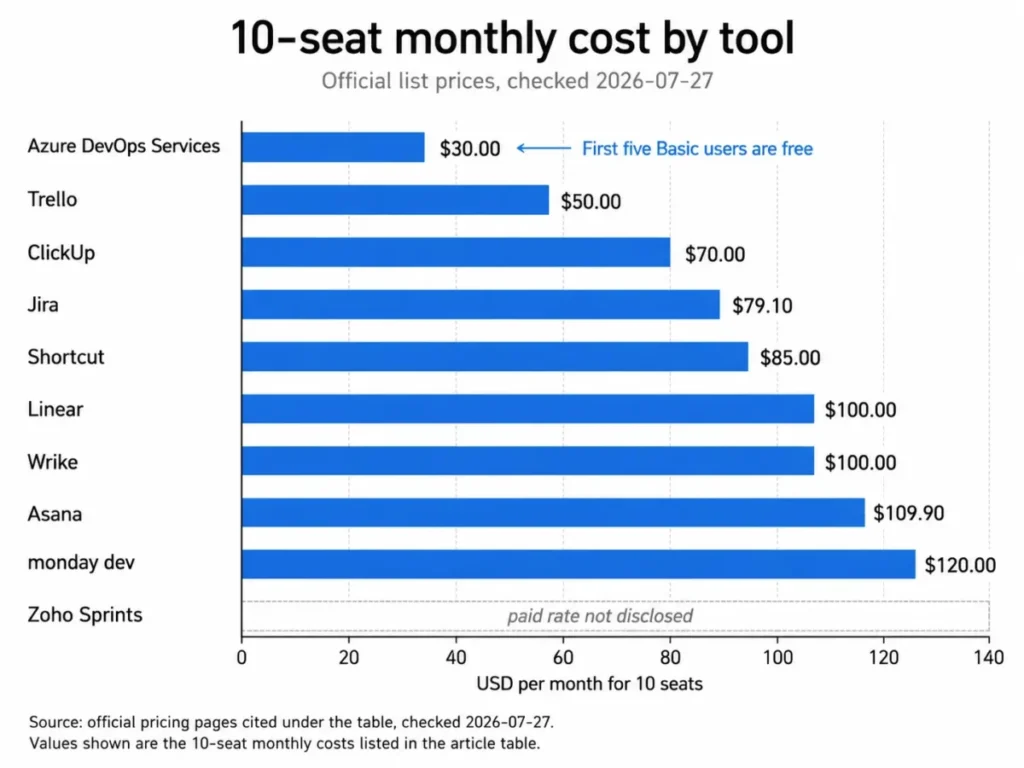
The arithmetic is deliberately plain: list rate multiplied by seats, with no discount assumed. Azure DevOps Services is the outlier because the first five Basic users cost nothing, so ten users are billed as five.
Two numbers in that column deserve a second look before anyone builds a budget around them.
ClickUp’s $70.00 assumes Unlimited, and a team that needs sprint points and sprint reporting is pricing Business at $12 per user per month instead, which turns the same ten seats into $120.00 per month.
Wrike’s $100.00 assumes Team, and Team stops at 15 users. A team planning to pass that line is pricing Business at $25 per user per month instead.
Zoho Sprints is the one entry with no comparable figure. The paid amount was not exposed on the accessible official pricing page at the checked date, so it stays undisclosed here rather than being filled in from a third-party listing.
What changes at 25 seats
| Tool | Plan used for the calculation | Formula | 25-seat monthly cost |
|---|---|---|---|
| Jira | Standard | $7.91 multiplied by 25 seats | $197.75 |
| ClickUp | Business, the sprint-reporting tier | $12 multiplied by 25 seats | $300.00 |
| monday dev | Standard | $12 multiplied by 25 seats | $300.00 |
| Asana | Starter | $10.99 multiplied by 25 seats | $274.75 |
| Linear | Basic | $10 multiplied by 25 seats | $250.00 |
| Azure DevOps Services | Basic, first five users free | $6 multiplied by 20 billable users | $120.00 |
| Shortcut | Team | $8.50 multiplied by 25 seats | $212.50 |
| Zoho Sprints | Paid tier not disclosed | Not calculable from the official page | Not disclosed |
| Trello | Standard | $5 multiplied by 25 seats | $125.00 |
| Wrike | Business, because Team stops at 15 users | $25 multiplied by 25 seats | $625.00 |
Source: official rate pages, checked 2026-07-27. Leading three tools: Jira tiers, ClickUp tiers, monday tiers, Asana tiers. Mid-table tools: Linear tiers, Azure tiers, Shortcut tiers, Zoho tiers. Lower-ranked tools: Trello tiers, Wrike tiers. Every figure in the last column is an editorial calculation from those rates. It excludes tax, negotiated terms, add-ons, and renewal changes.
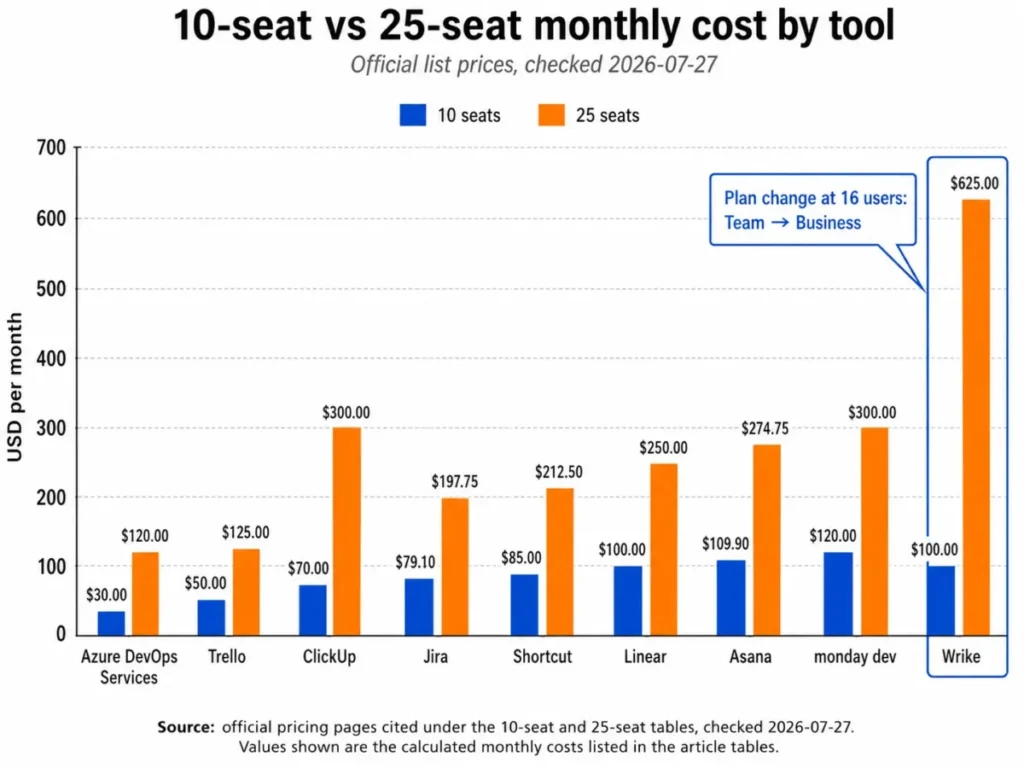
The spread between the cheapest and most expensive disclosed option widens from $70.00 to $625.00 per month once packaging is respected. That gap is not a quality gap; it is the price of intake governance, approvals, and cross-department administration that a small engineering team does not need.
Azure DevOps Services keeps the lowest disclosed cost at both sizes, and that number only holds if pipeline usage stays inside the free allowance. Beyond one parallel job and 1,800 minutes per month, extra hosted jobs, artifact storage, security products, and Test Plans seats are separate charges that can exceed the Boards spend.
Four tools carry the most complex packaging. Plan-by-plan breakdowns live in the Jira pricing breakdown, the ClickUp pricing guide, the Asana pricing details, and the Trello pricing tiers.
Hard caps and quotas by plan
| Tool | Free-plan cap | Automation, pipeline, or API quota | Other documented limit |
|---|---|---|---|
| Jira | Up to 10 users | 100 automation rule runs per month on Free | Premium moves automation to a per-user allowance |
| ClickUp | Free plan with two-factor authentication | Business lists 5,000 automations per month | Whole Workspace must upgrade together |
| monday dev | No free tier, three-seat minimum | Automations and integrations vary by plan | Connected Tasks, Sprints, and Capacity boards must stay linked |
| Asana | Personal capped at two users | Rules available from paid plans | Portfolios, goals, and workload require Advanced |
| Linear | 250 issues and two teams | API and webhook access included | Cycles run one to eight weeks with at most 15 future cycles |
| Azure DevOps Services | First five Basic users free | One parallel job and 1,800 minutes per month | Artifact storage and Test Plans are priced separately |
| Shortcut | 10 users, one team, one workflow | API and webhook access across plans | WIP limits and up to five workflows require Team |
| Zoho Sprints | Three users, three projects, 500 MB storage | Webhooks and custom functions on higher tiers | One parallel sprint on Free, no release management |
| Trello | 10 boards, 10 collaborators | 250 automation runs monthly, 1,000 on Standard | API limits of 300 requests per 10 seconds per key |
| Wrike | Free trial rather than a free tier | Paid Integrate and Two-Way Sync add-ons | Team covers 2 to 15 users, Business covers 5 to 200 |
Source: official pricing and limit documentation, checked 2026-07-27. Ranks 1 to 3 here: Jira limits, ClickUp limits, monday boards. Ranks 4 to 6 here: Asana limits, Linear cycles, Azure quotas, Shortcut limits. Ranks 7 to 9 here: Zoho limits, Trello quotas, Wrike ranges.
Quota behavior over the limit is the part public pages rarely state. None of the sources checked here documents whether an over-limit automation event queues, skips, blocks, or is discarded, so that behavior stays an open question to test during a trial rather than an assumption to plan around.
Hidden costs to budget before signing
- Seat minimums and blocks. monday dev starts at three seats, and Wrike sells seats in blocks with annual billing above Team, so the invoice moves in steps rather than per hire.
- Free users that are not free forever. Azure DevOps gives the first five Basic users at no cost, which quietly makes the sixth engineer the moment the line item appears.
- The reporting tier. ClickUp puts advanced sprint points and reporting on Business, and Asana puts portfolios, goals, and workload on Advanced.
- Automation overflow on Jira. The Free plan includes 100 rule runs per month, which one active sprint of merge-triggered rules can consume.
- Automation overflow on Trello. The Free plan includes 250 runs per month, and operation quotas are pooled across a whole workspace.
- Modules priced outside the seat. Azure DevOps charges separately for extra hosted pipeline jobs, artifact storage, security products, and Test Plans.
- Identity and governance. SSO and SCIM are add-ons on Shortcut Business and included on Enterprise, and Linear reserves granular organization controls for Enterprise.
None of these appears in a starting-price comparison, and every one of them changes a 12-month budget. Price the plan you will be on in month nine, then negotiate.
Feature gate comparison
| Tool | Sprint or cycle metrics | Automation | API and webhooks | Identity and admin controls |
|---|---|---|---|---|
| Jira | Reports and dashboards from Standard, cross-team planning on Premium | Rule runs capped on Free, per-user allowance on Premium | REST APIs plus Marketplace apps | SAML and SCIM oriented to Enterprise |
| ClickUp | Advanced sprint points and reporting on Business | 5,000 automations monthly listed on Business | API and webhooks, higher scale on Enterprise | SAML SSO, SCIM, and audit log on Enterprise |
| monday dev | Burndown and Agile Insights on connected sprint boards | Automations and integrations vary by plan | API, automations, and integrations available | Multi-level permissions on higher tiers |
| Asana | Reporting dashboards on paid plans, portfolios on Advanced | Rules on paid plans | API and many integrations, service accounts on Enterprise | SAML, SCIM, and service accounts on Enterprise |
| Linear | Cycle progress and capacity estimates included | Cycle rollover automated by configuration | API and webhook access included | SAML, SCIM, and granular controls on Enterprise |
| Azure DevOps Services | Velocity and rollups in Azure Boards | Pipelines, service hooks, and extensions | Full Azure DevOps APIs and extensions | Microsoft identity and Azure governance |
| Shortcut | Burndown and cumulative flow reporting, advanced reports on Business | Workflow automation across plans | API and webhook access across plans | SSO and SCIM as add-ons on Business |
| Zoho Sprints | Burndown, burnup, velocity, and cumulative flow | Custom functions on higher tiers | APIs and webhooks on higher tiers | Zoho lists ISO, SOC 2 Type II, HIPAA, and GDPR controls |
| Trello | No native sprint metrics, Premium dashboard view only | 250 runs monthly on Free, 1,000 on Standard | Public API with per-key and per-token rate limits | Atlassian Guard Standard and SSO on Enterprise |
| Wrike | Dashboards and reports, custom workflows on Business | Automation plus paid Integrate add-on | API with paid integration and sync add-ons | SOC 2 Type II and published ISO certifications |
Source: official plan and product documentation, checked 2026-07-27. Opening three products: Jira features, ClickUp reporting, monday sprints. Middle products: Asana features, Linear docs, Azure Boards, Shortcut features. Later products: Zoho features, Trello features, Wrike workflows.
Read the first column before the price column. Two products can both advertise burndown and still put it on tiers that differ by five dollars per user per month, which over 25 seats is the difference between a rounding error and a line item finance will question.
The identity column decides enterprise timing rather than daily work. A 12-person team can ignore SCIM entirely, and the same team at 60 people cannot, which is why the Enterprise conversation usually arrives before anyone expects it.
Governance thresholds and support by plan
Governance is the quietest upgrade trigger in this category. Nothing in a sprint workflow forces SSO, provisioning, or audit logging, and then a security review does it in a single afternoon.
The pattern across these ten products is consistent: sprint mechanics are cheap and identity controls are not. Budget the governance tier as a separate line rather than assuming it arrives with the reporting tier.
- Jira places SAML and SCIM in Enterprise territory, and data residency is a paid-plan capability, so a regulated buyer should confirm both before standardizing on Standard.
- ClickUp keeps SAML SSO, SCIM, audit log, HIPAA options, and data residency on Enterprise, which makes Enterprise the compliance tier rather than the feature tier.
- Shortcut treats SSO and SCIM as add-ons on Business and includes them on Enterprise, so identity is a separate purchase decision at mid-size.
- Linear reserves granular controls and advanced organization modeling for Enterprise, alongside the initiative views a portfolio lead would want.
- Asana puts SAML, SCIM, and service accounts on Enterprise, with Enterprise Plus adding further governance depth.
- Trello relies on Atlassian Guard Standard, organization controls, SSO, and provisioning at the Enterprise level, with two-factor authentication available below that.
Support escalation follows the same shape. Jira offers community support on Free, regional support on Standard, and around-the-clock critical support on Premium and Enterprise.
Wrike sits at the other end of that pattern, with official guidance recommending guided deployment once an account passes 20 users.
Treat that Wrike recommendation as a cost signal rather than a courtesy. A vendor that suggests guided deployment at a specific headcount is describing a configuration surface that punishes improvisation.
Setup and migration difficulty
| Tool | Setup difficulty | Why it lands there |
|---|---|---|
| Trello | Low | Boards, lists, and cards work without configuration |
| Linear | Low for engineers | Cycles are configured once and then repeat automatically |
| Zoho Sprints | Low to medium | Purpose-built Scrum model, but the feature set grows quickly |
| Shortcut | Low to medium | Iterations are simple, advanced search and reporting take practice |
| Asana | Low to medium | Accessible for business users, portfolio design needs governance |
| ClickUp | Medium | Broad feature surface invites configuration a new team does not need |
| monday dev | Medium | Solution setup and connected board relationships need care |
| Wrike | Medium to high | Request forms, workflow states, and approvals need decisions first |
| Jira | Medium to high | Project schema, permissions, and board filters need an owner |
| Azure DevOps Services | High for non-technical teams | Area paths, iteration paths, and pipelines are technical setup |
Source: official product and support documentation, checked 2026-07-27. Highest three ranks: Jira backlog, ClickUp overview, monday setup, Asana Agile. Following ranks: Linear setup, Azure setup, Shortcut iterations. Lower ranks here: Zoho feature set, Trello automation, Wrike setup.
Setup difficulty is not a proxy for quality. It is a proxy for how much of your first month goes into configuration instead of delivery, and for how badly things break when the person who configured it leaves.
Migration risks worth checking before you switch
- Connected-board integrity. monday dev’s own documentation warns that breaking or manually duplicating the connected solution boards can break sprint-management behavior, so a duplicated workspace is a migration hazard rather than a shortcut.
- Import coverage. Zoho Sprints documents imports from other trackers, and an import path is not the same as full object fidelity for comments, attachments, history, automations, and permissions.
- Configuration governance. Wrike recommends guided deployment at 20 or more users, which is a signal that its configuration surface rewards planning over improvisation.
- Free-tier ceilings during a pilot. A Linear pilot stops being representative once it approaches 250 issues, and a Shortcut pilot stops being representative once a second workflow is needed.
- Object-level fidelity is unverified. The official sources checked here do not enumerate exactly which comments, attachments, histories, automations, and permission structures survive an import for every source platform, so treat that as a trial task rather than a documented guarantee.
Run one real squad through one real sprint on synthetic data before committing a whole organization. A pilot that only tests issue creation tests the easiest part of the migration.
Which Agile tool should you avoid?
No product on this list is unusable. Each one has a buyer it actively fails, and naming that buyer is more useful than a general warning.
- Avoid Jira if nobody will own the project schema, permissions, and board filters, because the same configuration depth that makes it defensible makes it fragile when unmanaged.
- Avoid ClickUp if you cannot move an entire workspace to Business at once, since the sprint metrics most teams want sit on that plan and the upgrade is workspace-wide.
- Avoid monday dev if you need a standardized issue model and an extensive developer marketplace, or if your admins routinely duplicate boards by hand.
- Avoid Asana if your delivery output is code and you expect native branches, builds, releases, or defect management.
- Avoid Linear if your delivery genuinely varies in length or a project office needs heavy custom fields and resource management on a lower tier.
- Avoid Azure DevOps Services if the buying team is business-side, because area paths, iteration paths, and pipeline configuration are engineering work.
- Avoid Shortcut if you need multi-department portfolio administration or deep financial controls.
- Avoid Zoho Sprints if you cannot proceed without a published paid price, or if deep source-code integration is a requirement.
- Avoid Trello if you need velocity, forecasting, or dependency management without buying add-ons.
- Avoid Wrike if a small engineering team just needs a sprint tracker, because seat blocks and annual terms add cost that intake governance is supposed to justify.
The tool most teams buy for the wrong reason
Trello is the honest example. It is bought because it is fast to adopt, and then asked to produce velocity, forecasting, and dependency views that it has no native object for.
Nothing is broken when that happens. The board still works, and the reporting conversation quietly moves to a spreadsheet, which is exactly the outcome the tool purchase was meant to prevent.
The same pattern hits from the opposite direction with Jira. It gets bought for governance a 12-person team does not yet need, and the configuration debt arrives before the governance benefit does.
How to choose the right Agile project management software
- Count seats twice. Write down the current user count and the number you expect in 12 months, because packaging changes at the second number, not the first.
- Name the metrics your review cadence depends on. If retrospectives run on velocity and burndown, price the plan that includes them rather than the entry plan.
- Decide whether delivery is engineering-native. Code output that connects to repositories and pipelines points to Jira, Azure DevOps Services, Linear, or Shortcut.
- Map the integration stack you already pay for. A Microsoft estate, a GitHub-centred stack, and a Google Workspace marketing team each have a different cheapest correct answer.
- Check governance timing. Ask when SSO, SCIM, audit logs, and permission depth become mandatory, then check which plan carries them.
- Estimate the configuration owner. If no one will own board filters, workflow states, or area paths, choose a product whose defaults are the answer.
- Run a costed pilot. One squad, one sprint, synthetic data, and a written note of every plan gate that blocked the workflow.
That last step is the one most teams skip, and it is the cheapest insurance available. A pilot that surfaces one blocking plan gate pays for itself against a year of the wrong subscription.
For teams under about ten people, the shortlist compresses fast, and the trade-offs are covered in more depth in this guide to project management tools for small teams.
Common mistakes when choosing Agile project management software
- Budgeting from the starting price. The entry tier is rarely the tier that carries sprint reporting, and the gap between them is the real cost.
- Treating burndown as a checkbox. Burndown exists in most of these products and sits on a different plan in each one.
- Ignoring seat packaging. A sixteenth user changes which Wrike plan applies, and a three-seat floor sets the smallest possible monday dev invoice.
- Assuming automation is unlimited. Free tiers in this ranking include 100 and 250 monthly runs, which one active sprint can consume.
- Piloting on the free plan and pricing the paid plan. Free-tier caps on issues, teams, workflows, and projects make the pilot unrepresentative.
- Skipping the configuration owner question. Products with the deepest control need someone accountable for that control.
- Confusing an import with a migration. Documented import paths rarely promise full fidelity for comments, attachments, history, automations, and permissions.
Every one of these mistakes shows up as a renewal surprise rather than a launch failure. That delay is what makes them expensive.
Which tool fits your team?
Work down this list and stop at the first branch that matches. The branches are ordered by how strongly each condition constrains the choice.
- You ship code, run more than one squad, and need auditable sprint history. Jira, with a named configuration owner and the Standard plan as the baseline.
- You ship code and your estate is Microsoft. Azure DevOps Services, because the first five Basic users are free and Boards sits next to Repos and Pipelines.
- You ship code, the team is mid-sized, and administration is the tax you want to remove. Shortcut for iterations that span epics and workflows, or Linear when a fixed repeating cadence is acceptable.
- Engineering, product, marketing, and operations all live in one workspace. ClickUp on Business, priced for every seat because the upgrade is workspace-wide.
- Engineering and business stakeholders need one visual system. monday dev on Standard, with a rule that nobody duplicates a connected board by hand.
- Agile is your working method but nothing ships as code. Asana on Starter, moving to Advanced only when portfolio visibility becomes the bottleneck.
- Work arrives as requests and needs routing before it needs a sprint. Wrike on Business, since request forms and custom workflows are gated there.
- Budget is the binding constraint and the team is tiny. Zoho Sprints on Free within three users and three projects, with a written quote before any paid commitment.
- You need visible flow this week and formal metrics later. Trello on Standard, with a planned exit if velocity or dependencies ever become mandatory.
If two branches match, take the one tied to how work arrives rather than the one tied to team size. Intake shape changes tooling fit more than headcount does.
Final verdict
Jira takes the top position in this ranking for software teams that need mature Scrum and Kanban control, auditable sprint history, and cross-team planning, provided that someone owns the configuration. At $7.91 per user per month on Standard, it is also cheaper at ten seats than most of the cross-functional platforms it competes with.
That recommendation does not extend to a five-person team. The evidence that makes Jira defensible for a multi-squad organization is the same evidence that makes it heavy for a team whose entire process fits on one board.
For cross-functional delivery, ClickUp is the stronger fit when one workspace has to serve several functions and the Business rate is acceptable for every seat. monday dev is the better choice when the priority is keeping business stakeholders inside the same visual system as engineering.
For speed-first product engineering, Linear is the stronger choice when process administration is the main tax and a repeating cadence is acceptable. Shortcut is the better fit when iterations need to span multiple epics, projects, and workflows without an administrator.
Azure DevOps Services wins on disclosed cost at both ten and 25 users for Microsoft-standardized engineering organizations, as long as pipeline usage stays inside the included allowance. Asana, Wrike, Zoho Sprints, and Trello each win a narrower cohort: non-engineering Agile programs, request-driven intake, budget Scrum, and lightweight flow.
Whichever way the shortlist lands, price the plan that carries your metrics, model the seat count you expect in a year, and run one real sprint before signing an annual term.
Methodology and evidence boundaries
Every product claim on this page traces to an official pricing page, official product documentation, or third-party review evidence that is labeled as such. Volatile facts carry a checked date of 2026-07-27.
Each tool was assessed against the same criteria set: backlog and sprint support, board behavior, reporting depth, integrations, governance, implementation burden, and plan gates. Workflow descriptions are reconstructed from official documentation of the documented steps.
Review sentiment is labeled as a pattern from third-party review platforms and is never presented as a measured result. Where a figure was not exposed on an accessible official page, it is recorded as undisclosed rather than estimated.
All cost-at-scale figures are editorial arithmetic on published list rates, labeled as calculations, and exclude tax, negotiated terms, and renewal changes.
Frequently asked questions
These answers repeat the evidence used in the rankings above, with the plan and the checked date attached where a number appears.
What is the best Agile project management software overall?
Jira ranks first here for software teams that need mature Scrum and Kanban control, documented backlog behavior, and cross-team planning. That ranking assumes someone will own the configuration.
For a cross-functional team, ClickUp on Business is the stronger fit, and for a speed-first product team, Linear is. The right answer depends on whether your delivery output is code.
Is Jira the best Agile project management tool for small teams?
No, unless the team already has an administrator. Jira’s Free plan supports up to 10 users, so the price is not the obstacle.
The obstacle is configuration: board filters, status mappings, and sprint permissions all need decisions. A five-person team usually gets more delivered on Linear, Shortcut, or Trello in the same first month.
What is the best free Agile project management software?
Zoho Sprints has the most complete free Scrum feature set, covering backlog, Scrum and Kanban boards, epics, and Agile reports, and it stops at three users and three projects.
Jira Free supports up to 10 users with 100 automation rule runs per month.
Shortcut Free also covers up to 10 users with one team and one workflow. Pick by the cap you will hit first.
What is the cheapest Agile project management software for a 10-person team?
Azure DevOps Services is the lowest disclosed option at ten users, because the first five Basic users are free and the remaining five are billed at $6 per user per month. That is $30.00 per month by editorial calculation on the listed rate.
Trello Standard at $5 per user per month is next, at $50.00 for ten seats.
ClickUp Unlimited follows at $70.00 for the same headcount. Those figures assume list rates with no negotiated terms.
Which Agile tool is best for a small business that does not write code?
Asana on Starter fits best when Agile is a working method for marketing, operations, or launch teams. Board views, custom fields, forms, and rules cover a two-week cadence without an engineering issue model.
Trello is the lighter alternative if the team wants flow visibility rather than reporting. Move to Asana Advanced only when portfolio visibility becomes the constraint.
Which Agile tool is best for enterprise teams?
Jira Premium and Enterprise cover multi-team planning and advanced identity controls, and Azure DevOps Services fits organizations standardized on Microsoft. Both assume dedicated administration.
Wrike is the better fit when the enterprise problem is request intake, approvals, and cross-department routing rather than code delivery. Confirm SSO, SCIM, and audit requirements against the specific plan before signing.
How much does Agile project management software cost?
Disclosed entry rates in this ranking run from $5 per user per month to $10.99 per user per month, with Azure DevOps Services billing $6 per user per month only after five free Basic users. Practical tiers run higher.
At ten seats, the disclosed monthly totals in this ranking range from $30.00 to $120.00 by editorial calculation. At 25 seats with packaging respected, the top figure rises to $625.00.
Can Trello be used for Agile project management?
Yes, if your definition of Agile stops at visible flow. Boards, lists, cards, and Butler automation support a Scrumban cadence with no configuration.
No, if you need velocity, forecasting, or dependency management, because Trello has no native sprint object. Those views come from Power-Ups or a spreadsheet rather than the product.
What is the difference between Jira and Linear?
Jira models Scrum explicitly: a ranked backlog, sprints you start and complete, and issues assigned to epics or versions. Configuration is wide and needs an owner.
Linear models repeating cycles of one to eight weeks with automatic rollover and capacity estimates, which removes ceremony but fixes the cadence. Jira suits multi-team governance; Linear suits teams that want less administration.
What features should an Agile project management tool have?
At minimum: a rankable backlog, a sprint or cycle object, a board with status control, estimates, and burndown or velocity reporting on the plan you intend to buy. Work-in-progress limits and dependency handling matter once more than one squad is involved.
Add integration with your source control, chat, and identity provider. Then confirm the automation quota, because that is the limit teams hit first.