Wrike sells paid seats in blocks, not by headcount. A 22-person team on the Business plan buys 25 seats and commits to $7,500 a year, which turns a $25 per-user sticker price into $28.41 per active user each month.
That gap is the center of this Wrike review. Wrike earns its price for cross-functional teams that need governed intake, approvals, workload visibility, and reporting a finance lead will accept, and it punishes small groups that only want a shared task list.
The plan most buyers land on is Business, because request forms, approvals, time tracking, and real-time reports all sit above the Team tier. Every number below traces to Wrike’s official pricing page, plan comparison table, help center, and developer documentation as checked on August 5, 2026, plus labeled third-party review evidence.
If Wrike is still one of four tabs open, the wider project management software roundup covers the field around it.
In This Article (21 sections)
Quick Verdict
| Quick verdict | Assessment |
|---|---|
| Best for | 15 to 200-person marketing, creative, PMO, and professional-services teams that need intake, approvals, workload views, and reporting in one system |
| Not ideal for | Solo users, five-person ad hoc teams, and buyers who need month-to-month billing or exact seat matching |
| Starting price | $0 Free, $10 per user/ |
| Practical plan | Business, the first tier with request forms, approvals, time tracking, and real-time reports |
| Free plan and trial | Free plan with unlimited users and 2 GB per account, plus a 14-day trial with no credit card |
| Setup difficulty | High for governed workflows: custom item types, blueprints, approval routing, and permissions all need an owner |
| Main strength | Depth of workflow governance across intake, approval, resourcing, and portfolio reporting |
| Main limitation | Seat-band purchasing plus annual-only Business billing, with no account-version rollback |
| Best alternative | Asana for adoption speed, monday.com for faster no-code configuration, Jira for engineering-led delivery |
What Is Wrike?
Wrike is a collaborative work-management platform that the vendor positions as a trusted delivery platform for complex work. It sits in the same category as Asana, monday.com, and ClickUp rather than in the CRM category, and it is bought most often by teams coordinating requests across departments.
Symphony Technology Group became Wrike’s full owner on July 7, 2023. Ownership matters to buyers only insofar as it shapes roadmap and pricing cadence, and the 2026 lineup change described below is the visible result.
The platform runs in a browser, on Windows and Mac desktop apps, and on iOS and Android.
Functionally, Wrike organizes work into spaces, folders, projects, and tasks, with custom item types layered on top for teams that want request records, campaign briefs, or approval objects to behave differently from generic tasks. That flexibility is the reason Wrike wins governance-heavy evaluations and the reason it loses simplicity-first ones.
Methodology: How This Wrike Review Was Built
This review is based on Wrike’s official US pricing page, the public plan comparison table, 2026 help-center and developer documentation, security and privacy materials, product release notes, and labeled third-party review evidence. Pricing, plan limits, and documented behavior were verified on August 5, 2026.
Wrike was assessed against the same buyer-focused criteria applied to every work-management platform on this site: plan gates, real purchase cost, workflow depth, usage limits and failure behavior, migration fidelity, administration, security controls, and support entitlements.
Greater weight went to factors that change a purchase order rather than a demo impression: seat-band mechanics, annual commitment, gated workflows, automation and AI allowances, export coverage, and separately priced add-ons. Vendor positioning and category awards carried none.
Workflow assessments follow documented product behavior, plan requirements, and published limits. Claims without supporting evidence were excluded, and custom-quote amounts are reported as undisclosed rather than estimated.
What Changed in Wrike’s 2026 Plan Lineup
Several reviews still ranking for this query describe an Enterprise tier and older prices. Wrike’s pricing page now states that its plan structure applies to new purchases made on or after January 21, 2026, and Apex was introduced for accounts created on or after that date.
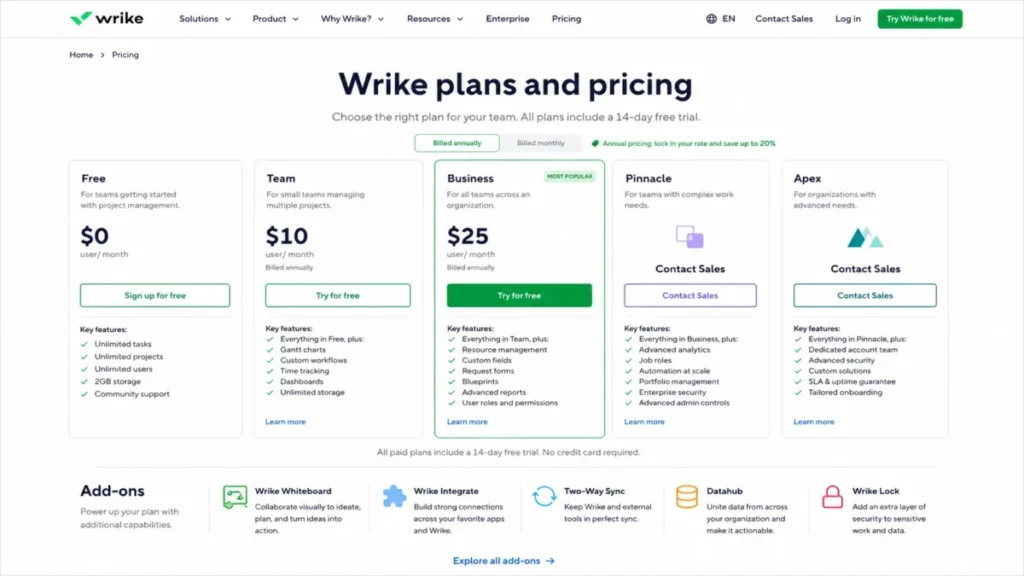
The current public lineup is Free, Team, Business, Pinnacle, and Apex. Free, Team, and Business carry visible prices.
Pinnacle and Apex are contact-sales tiers with no published amount.
Apex sits above Pinnacle and bundles Wrike Whiteboard, Wrike Integrate, Two-Way Sync, and Datahub into the plan, along with larger AI and automation allowances. Wrike Lock stays separately priced even on Apex.
Two practical consequences follow. A buyer quoting an older article risks asking a sales rep for a plan that no longer exists for new purchases, and an existing Enterprise account is a legacy arrangement rather than the tier a new contract would use.
Ask the account team to confirm in writing which lineup your order form references before comparing quotes.
Setup and Configuration: What the First Weeks Demand
Wrike’s setup burden is not account creation. It is deciding who owns spaces, which item types exist, how approvals route, and which folders carry restricted permissions.
Team unlocks custom fields, custom workflows and statuses, calendars, interactive Gantt charts, dashboards, project portfolio management, and standard productivity integrations. Business adds the configuration objects that most implementations depend on: request forms, dynamic forms, blueprints, custom item types, task and project approvals, custom approvals, and folder and project permissions.
That split changes the sequencing. A team that configures Wrike on Team and later moves to Business rebuilds intake and approval logic rather than extending it.
Reviewer sentiment is consistent on this point. TrustRadius reviews praise task organization, cross-functional accountability, customization, and collaboration, while a recurring minority describe the interface and navigation as overwhelming and report notification and reporting friction.
One Gartner Peer Insights reviewer said Wrike works well for basic project tracking but becomes harder to manage on complex projects, specifically in reporting, dashboards, automation, and administration. That is one attributable opinion rather than a benchmark, and it matches the shape of the plan gates.
Budget an internal owner for configuration the same way a CRM implementation guide rollout does. Wrike rewards a trained administrator and quietly punishes an account with none.
Migrating Spreadsheets and Legacy Projects Into Wrike
XLS import is available on Team and higher. The documented behavior is narrower than most buyers assume: import creates new regular tasks, folders, and projects, and does not update existing items.
Source files must follow Wrike’s format. Assignees map by primary email, and workflow and status values are case-sensitive, so a status typed as “In review” against a workflow status of “In Review” fails to bind.
The hard caps matter for cutover planning. A single import is limited to 5,000 tasks, and weekly mass creation is capped at 3,000 items on Free, legacy Professional, and Team, and 12,000 on Business and higher.
Reaching that cap blocks related mass-creation methods until a seven-day reset or a support reset.
Wrike also documents a server-side import error when the spreadsheet is formatted incorrectly or the user lacks sufficient permission. Both causes are silent until the load fails, which is why a sample import earns its time.
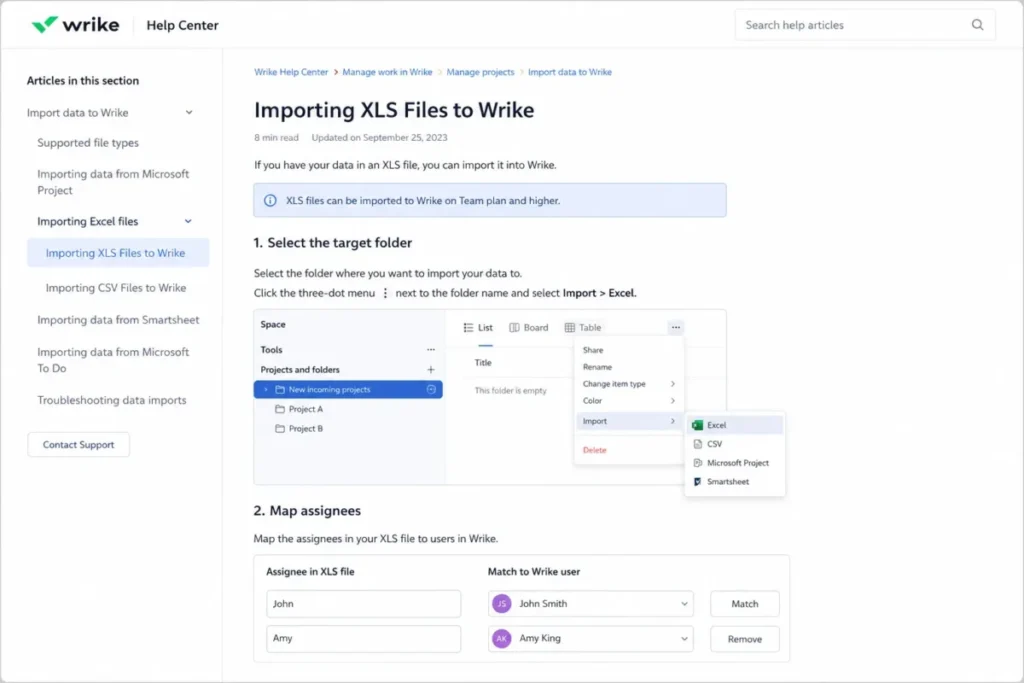
Effort, billing, and budget columns require Business or higher plus the matching permission, so a professional-services migration that carries rate and budget data cannot land on Team at all.
Spreadsheet import is a structured creation tool, not a full-fidelity migration engine. Comments, attachments, account configuration, and existing-record updates fall outside it, which puts them into a separate archive and rebuild plan.
The safe sequence is a 50-row sample load, a count and dependency check against the source, then split loads under the weekly cap, with the original files archived outside Wrike. The same discipline that a data migration checklist applies to customer records applies here to project history.
Running Governed Workflows: Intake, Approvals, and Reporting
Request forms and dynamic intake
Request forms are the feature that converts Wrike from a task tracker into an intake system, and they start at Business. Dynamic forms branch based on answers, which lets a marketing team route a paid-social brief and a print brief through one entry point.
The buyer consequence is blunt. A team that wants to stop taking work through email and chat cannot do it on Team.
Approvals and proofing
Business unlocks task approvals, project approvals, and custom approvals, alongside the Adobe Creative Cloud integration that creative teams ask about first.
Video proofing carries its own constraint that storage numbers hide. Free and Team have no monthly video processing allowance, while Business, Pinnacle, and Apex provide 0.5 GB, 1 GB, and 2 GB per user per month.
Once that allowance is exhausted, a user can keep uploading video if account storage remains, but playback and proofing stay unavailable until the monthly reset.
A creative team running a heavy campaign month can therefore lose proofing while its storage meter still looks healthy. Model peak-month video volume before signing, not the monthly average.
Time tracking, workload, and resource views
Time tracking, workload views, and resource views are Business features. Pinnacle adds resource bookings, utilization dashboards, user skills, and asset scheduling.
For a professional-services group billing against project budgets, that ordering means Business covers capture and Pinnacle covers planning. Buying Business and expecting utilization forecasting is the most common plan mismatch in this category.
Reporting
Real-time reports arrive at Business. Advanced analytics, Tableau integration, and BI API access are Pinnacle features.
If a leadership dashboard has to pull Wrike data into an existing warehouse or BI tool, that requirement alone sets the tier before any feature comparison begins.
Feature Gates: What You Get on Each Plan
| Capability | Free | Team | Business | Pinnacle | Apex |
|---|---|---|---|---|---|
| Users | Unlimited | 2 to 15 | 5 to 200 | Unlimited | Unlimited |
| Storage | 2 GB per account | 2 GB per user | 5 GB per user | 15 GB per user | 50 GB per user |
| Gantt, dashboards, custom workflows | No | Yes | Yes | Yes | Yes |
| Request forms, approvals, time tracking | No | No | Yes | Yes | Yes |
| SAML SSO, audit reports, IP allowlisting | No | No | No | Yes | Yes |
| Automation actions per paid seat/ | None | 50 | 200 | 1,500 | 3,000 |
The rows above come from Wrike’s public plan comparison table and pricing page, checked August 5, 2026.
The Free plan is the one most often oversold in reviews, because unlimited users reads generously. Structured XLS import, account backup, Gantt planning, dashboards, custom workflows, and governed automation are all paid features, so Free stops working the moment a team needs any of them, not when it reaches a user count.
Automation Limits and the Shutdown Behavior Buyers Miss
Wrike’s automation allowance is not a soft quota. Monthly actions run at 50 per paid seat on Team, 200 on Business, 1,500 on Pinnacle, and 3,000 on Apex. Reaching the account limit disables every rule automatically and notifies account admins.
There is a second, separate trip wire. An individual rule is disabled when it performs more than 200 actions in one minute, or more than 100 actions per minute for five consecutive minutes.
A rule may carry one trigger, up to ten actions, and unlimited conditions. Ten actions on a single trigger is how a well-meant routing rule burns an allowance ten times faster than the author expected.
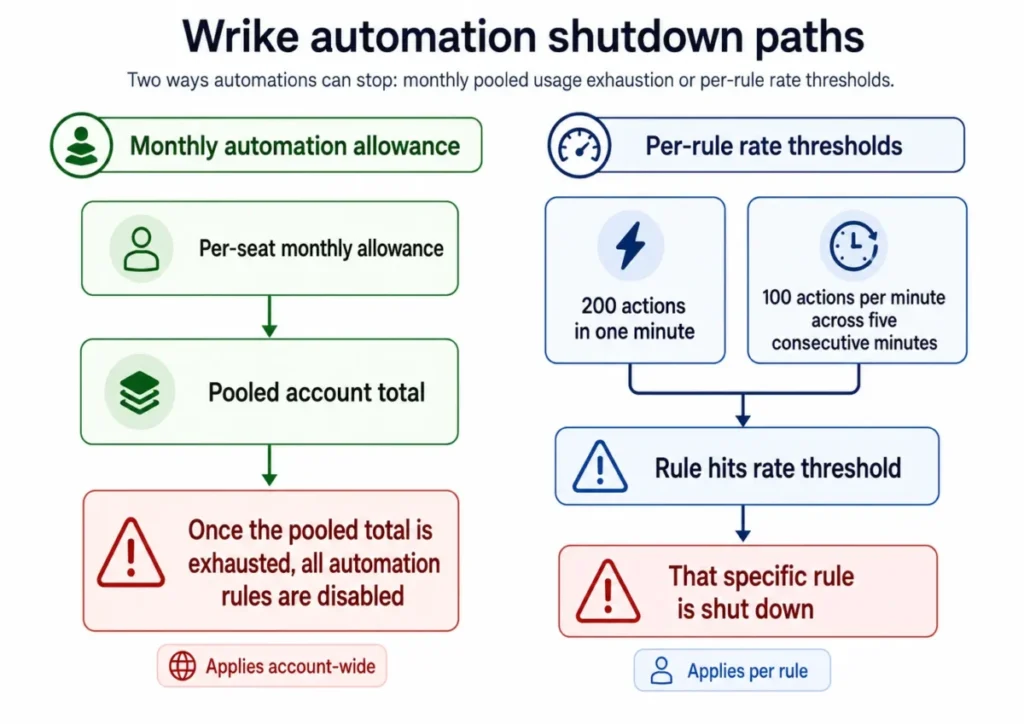
Run the arithmetic before deployment. A 25-seat Business account holds 5,000 automation actions per month across the whole tenant, which a bulk status change across a 400-task project can consume in a single afternoon.
The failure mode is what makes this a purchase criterion rather than a footnote. Routing, notifications, and approval handoffs stop together, and they stay stopped until an administrator responds.
Narrow conditions, staggered bulk operations, and a manual exception queue are the practical mitigations. Automation capacity is also a clean upgrade trigger: a Team account exceeding 50 actions per paid seat each month has a documented reason to move to Business.
Wrike AI and AI Agents: How the Action Budget Works
Wrike splits AI into two products. AI Essentials is included on paid plans subject to fair-use restrictions, with no published numeric threshold, and AI Elite draws on a pooled monthly account allowance.
Wrike’s documented examples for a 100-user account are 300 AI Elite actions per month on Business, 1,000 on Pinnacle, and 10,000 on Apex. Those are documented examples tied to seat count, not a contractual guarantee for every quote.
The metering rule is the part worth reading twice. Skipped and failed AI Agent actions count toward AI Elite usage, so a badly scoped agent consumes allowance without producing the intended result.
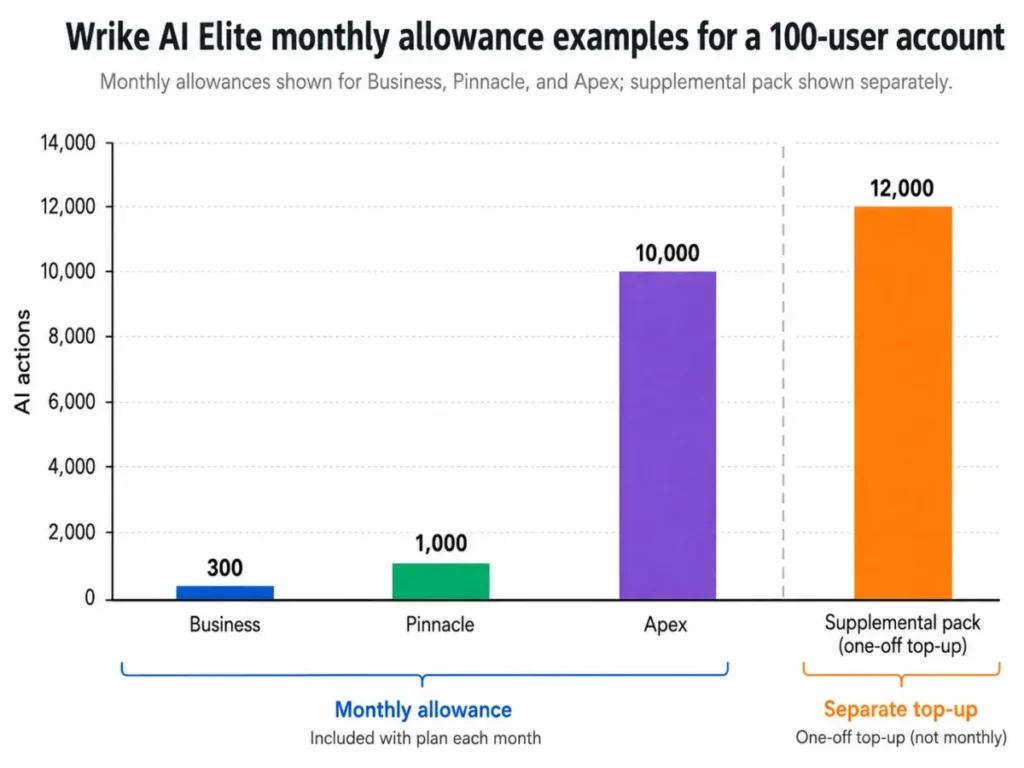
Admins receive warnings at 90% and 100% of the allowance. After exhaustion, AI Elite access is restricted until the monthly reset or the purchase of a 12,000-action pack, and Wrike states that it does not automatically charge for the overage.
AI Agents themselves are available on Business and higher and require the account owner to sign the AI Addendum. Newer agents support multiple independent actions, API-triggered runs, and per-action testing in a playground that makes no real changes.
Estimate cost as actions per run multiplied by objects in scope multiplied by runs per month. An agent with four actions running across 60 projects twice a month reaches 480 actions, which already exceeds the documented 300-action Business example for a 100-user account.
That arithmetic, not the number of agents, is what decides whether AI capacity pushes a quote from Business to Pinnacle or Apex.
Integrations, the API, and the Batch Write Problem
Wrike markets more than 400 integrations alongside a REST API, Wrike Integrate, Two-Way Sync, and cloud-storage connections. Plan gates differ by connector: Salesforce and Adobe Creative Cloud sit at Business, while Power BI and QuickBooks sit at Pinnacle.
A logo count says nothing about which layer a specific connection lives in. Four layers exist in practice: standard productivity connectors, plan-gated business connectors, separately priced add-ons such as Integrate and Two-Way Sync, and custom API work owned by your own engineers.
For custom work, the documented limits shape the architecture. Wrike documents an approximate limit of 400 requests per minute, exponential backoff after HTTP 429, and 1,000 tasks returned by default for GET tasks. Overload protection can also return 429 below the nominal limit.
The Batch API is the trap. It supports up to 100 operations per batch, executes operations independently rather than transactionally, allows partial success, and rejects a request when account quota is insufficient.
An integration written on the assumption of an all-or-nothing bulk write produces half-applied changes and a reconciliation problem nobody owns. Teams comfortable with pagination, backoff, idempotency keys, and per-operation result handling will be fine, and teams expecting a simple sync will not.
If your integration lead is newer to this territory, the API fundamentals primer covers the vocabulary before the design review.
The Pricing Math Nobody Shows You
| Plan | Public price | Users | Storage | Billing | 10-user annual cost |
|---|---|---|---|---|---|
| Free | $0 | Unlimited | 2 GB per account | None | $0 |
| Team | $10 per user/ | 2 to 15 | 2 GB per user | Annual | $1,200 |
| Business | $25 per user/ | 5 to 200 | 5 GB per user | Annual only | $3,000 |
| Pinnacle | Custom quote | Unlimited | 15 GB per user | Annual | Not disclosed |
| Apex | Custom quote | Unlimited | 50 GB per user | Annual | Not disclosed |
Prices are US list prices from Wrike’s official pricing page, checked August 5, 2026. Displayed paid prices are billed annually.
Seat bands are the real cost driver
Wrike sells paid seats in groups: five-seat increments up to 30 seats, ten-seat increments from 30 to 100, and 25-seat increments above 100. Business and higher plans are annual-only.
| Plan | Active users | Purchased seats | Annual base license | Effective cost per active user/ |
|---|---|---|---|---|
| Team | 6 | 10 | $1,200 | $16.67 |
| Business | 22 | 25 | $7,500 | $28.41 |
| Business | 31 | 40 | $12,000 | $32.26 |
| Business | 101 | 125 | $37,500 | $30.94 |
Calculated from Wrike’s published per-user prices and documented seat-band increments. Taxes, add-ons, contributor licenses, implementation, premium support, and negotiated discounts are excluded.
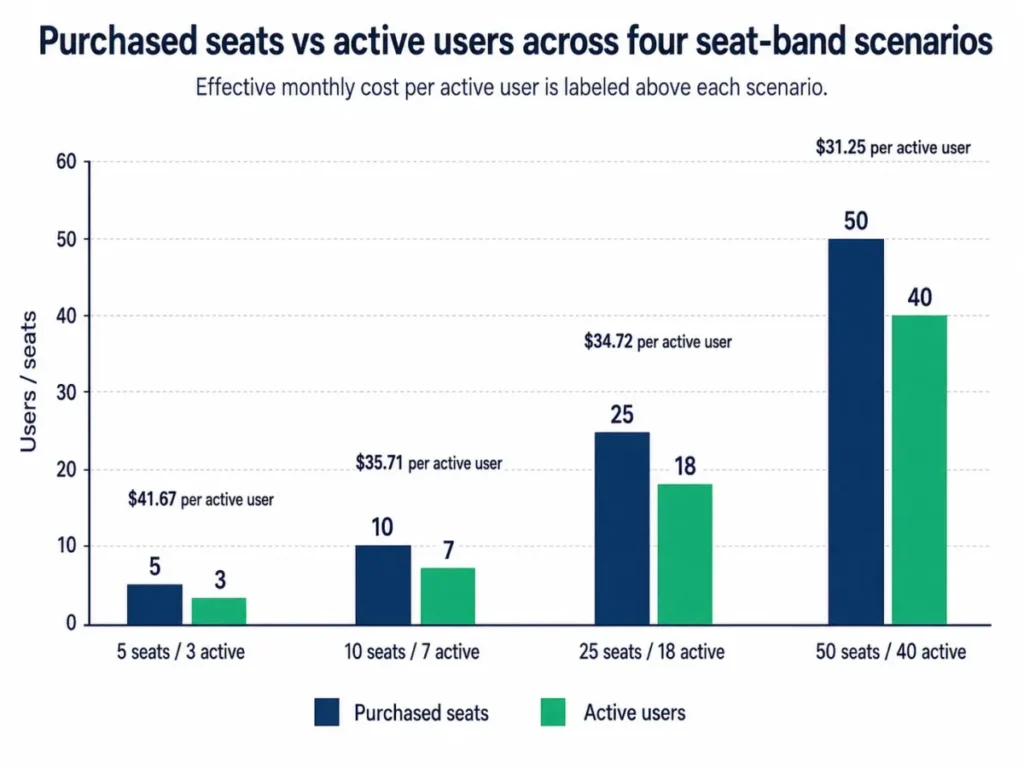
Thirty-one active users is the worst position in this table, because a single person over the 30-seat boundary pulls the account into ten-seat increments and adds $2,250 a year for nine seats nobody uses.
Add-ons, contributors, and the online purchase question
Wrike Whiteboard is listed at $15 per user per month. Wrike Integrate, Two-Way Sync, Datahub, Wrike Lock, and AI Elite action packs are custom-priced or require an account manager, and none of them carries a public amount.
Contributors are a licensing detail most reviews skip entirely. They are paid reduced-function licenses on Business and higher, not free viewer seats, their reduced price is not publicly disclosed, and their permissions become more customizable on Pinnacle.
There is also an unresolved conflict in Wrike’s own documentation. The pricing FAQ states that Team and Business can be purchased online for up to 15 users. The June 2026 subscription help page states that Business can be purchased online for up to 20 seats.
Neither number is safe to plan procurement around. Confirm the current threshold in the authenticated Subscription screen or with a Wrike rep before assuming a 16 to 20-seat purchase is self-service.
Seat reduction and downgrade are not instant self-service either. The subscription documentation points seat reductions and downgrades to the account team, which puts contraction on renewal timing rather than on the month a contractor rolls off.
The 14-day trial requires no credit card. If the trial expires without a plan decision, the account is blocked while the data stays intact until the owner chooses a plan or a downgrade path.
Security, Support, and Admin Controls
Wrike states compliance and certification coverage including SOC 2 Type II, ISO 27001, ISO 27017, ISO 27018, and ISO 27701 on its security overview. Those are vendor-stated certifications, and they describe the platform rather than any single tenant’s configuration.
The controls a security reviewer asks for sit behind a plan gate. SAML SSO, audit reports, IP allowlisting, advanced access controls, customizable user types, and Locked Spaces are Pinnacle features.
That distinction eliminates tiers early. A regulated IT team requiring SSO and audit logging has no viable path on Team or Business regardless of how well the workflow features fit.
Hosting is chosen at registration. The pricing FAQ states that US registrations are hosted in Santa Clara and European registrations in Paris. Wrike’s privacy policy notes that third-party integrations carry those third parties’ own privacy terms, and it identifies long retention for certain core account records.
| Support tier | Channels | Coverage | First response | Price |
|---|---|---|---|---|
| Included with paid plans | Help Center live agent | 24/5 | Not published | Included |
| Premium | Web form plus premium channels | 24/7 | One hour, published commitment | Not disclosed |
| Premium Support Plus | Web form plus premium channels | 24/7 | One hour, published commitment | Not disclosed |
Support tiers above come from Wrike’s support packages page, checked August 5, 2026. The published commitment is a first-response time, not a resolution time.
Weekend coverage and the one-hour first-response commitment sit in a separately priced add-on. Any team running weekend campaign launches or client-facing SLAs must price that support layer into the quote rather than assume the software plan carries it.
Data Protection and Exit Readiness
Wrike does not keep account versions, so an account cannot be rolled back to a previous state. That single documented fact reshapes how an administrator handles bulk edits, imports, and workflow changes.
| Method | Plan | Includes | Key limits | Re-import |
|---|---|---|---|---|
| Excel export | All plans, eligible users | Task and project data | 65,000 rows, 256 columns, no comments or attachments | Manual rebuild only |
| Quick account backup | Business and higher | Account data by emailed link | Once per week, link valid 7 days, no attachments | Not a native restore |
| Full account backup | Business and higher | JSON data plus attachments | Command-line tool and Java runtime required | Not a native restore |
| BI export | Pinnacle and Apex | Analytics extracts to BI tools | Plan-gated | Not a native restore |
Compiled from Wrike’s Excel export, efficient export, and account backup documentation, checked August 5, 2026.
Excel export drops comments and attachments, which is where most of a project’s decision history lives. Exceeding the row or column ceiling produces an error and forces split exports.
Full backup is the only method that includes attachments, and it needs command-line execution rather than a button in the admin console. A non-technical administrator cannot produce a complete local archive without help.
None of these methods is a one-click restore. Treat every one as an archive, keep a pre-change export before any bulk operation, and confirm exit coverage during procurement rather than during the renewal conversation.
Wrike Limitations
Seat bands force overbuying at every awkward headcount. Purchasing increments of 5, 10, and 25 seats mean a team just above a boundary pays for capacity it will not use for a full annual term.
Automation stops account-wide, not gracefully. Exhausting the monthly allowance disables every rule at once, which turns a capacity miss into a routing outage until an admin intervenes.
AI allowance is consumed by attempts, not results. Skipped and failed AI Agent actions draw down AI Elite the same as successful ones, so agent design determines cost more than agent count does.
Spreadsheet import cannot update existing records. XLS creates new tasks, folders, and projects only, which rules it out for ongoing sync and for correcting data already inside Wrike.
There is no account-version rollback. Backups and exports are archives, and recovering from a damaging bulk change means a manual rebuild rather than a restore.
Enterprise-grade identity controls sit two tiers up. SSO, audit reports, and IP allowlisting are Pinnacle features, so a security requirement can double the plan cost independently of workflow needs.
Wrike Pros and Cons
| Pros | Cons |
|---|---|
| Business tier covers intake, approvals, time tracking, workload views, and real-time reports in one plan | Business and higher are annual-only, with seats sold in 5, 10, and 25-seat blocks |
| Custom item types, blueprints, and dynamic forms support genuinely different work types in one account | Configuration depth needs a dedicated administrator, a recurring theme in reviewer complaints |
| Automation and AI limits are published by plan, which makes capacity planning possible before purchase | Hitting the monthly automation allowance disables every rule across the account |
| Documented API, Batch API, and webhook behavior give integration teams a real specification | Batch operations are non-transactional, so partial success handling is the buyer’s problem |
| Certification coverage includes SOC 2 Type II and four ISO standards | SSO, audit reports, IP allowlisting, and Locked Spaces require Pinnacle |
| Free plan and a 14-day no-card trial allow evaluation before commitment | Contributor licenses, Integrate, Two-Way Sync, Datahub, Wrike Lock, and premium support carry no public price |
Who Should Use Wrike?
Marketing operations teams of 15 to 75 people. Request forms, dynamic intake, approvals, and the Adobe Creative Cloud integration replace an email-and-chat request process. That is the specific problem project management for marketing teams tools are bought to solve. Business is the entry point, and peak-month video processing volume belongs in the plan decision.
Professional-services delivery groups of 20 to 150 people. Time tracking, workload views, approvals, and real-time reporting cover capture and delivery, with billing and budget columns available on Business and higher. Utilization forecasting pushes the decision to Pinnacle.
Enterprise PMOs above 100 users. Resource bookings, utilization dashboards, BI API access, and portfolio reporting are the reason this cohort chooses Wrike over lighter tools, and all of them are Pinnacle capabilities.
Regulated IT and operations teams with a security review. Wrike’s certification coverage plus Pinnacle-level SSO, audit reporting, and IP allowlisting clears most internal reviews, provided the separately priced Wrike Lock question is settled in the quote.
Integration-led teams with engineering capacity. A documented REST API, batch endpoints, and webhooks make Wrike a reasonable hub for a team that will build and maintain its own sync layer.
Who Should Avoid Wrike?
Solo users and five-person ad hoc teams. Wrike’s depth, seat bands, and configuration overhead outweigh the benefit at that size, and the shortlists in project management tools for small teams fit better.
Teams that need month-to-month billing or exact seat matching. Business and above are annual-only, and seat reduction routes through the account team rather than a self-service control.
Buyers expecting a one-click migration and rollback. XLS import creates records rather than updating them, exports drop comments and attachments, and no account-version rollback exists.
Automation-heavy teams unwilling to monitor quotas. An account that treats automation as invisible infrastructure will eventually discover the monthly cap by watching every rule switch off at once.
Buyers who require published enterprise pricing. Pinnacle, Apex, contributor licenses, most add-ons, and premium support are all quote-only, which makes budget approval slower than it is with published-price competitors.
Wrike Alternatives
| Alternative | Choose it when | Wrike is the better call when |
|---|---|---|
| Asana | Adoption speed and clean cross-functional coordination matter more than administrative depth | Governed intake, approvals, and resource planning are the reason for buying |
| monday.com | A team wants visual boards and faster no-code configuration | Portfolio governance and enterprise administration outrank configuration speed |
| ClickUp | Budget pressure is high and broad customization in one workspace is the priority | Formal approval routing, proofing, and resource planning justify more structure |
| Teamwork | Client-service economics and agency billing drive the decision | Work management has to span marketing, operations, creative, and IT together |
| Jira | Engineering issue tracking and the developer ecosystem are the core need | Business teams outside engineering need the same delivery platform |
Adoption speed is the axis where the Asana review goes deeper, since onboarding friction decides more Wrike rejections than feature gaps do.
Configuration speed belongs to the monday.com review, which matters when no administrator owns the build.
Breadth per dollar is the ClickUp review question, and it is the usual counter-argument to Wrike’s seat bands.
For service delivery economics, the Teamwork review covers client billing models in more detail.
Engineering-led delivery sits with the Jira review, including issue workflows Wrike does not attempt to replace.
These are directional fit calls rather than verified feature-by-feature comparisons. Competitor pricing and 2026 feature sets were not independently verified here, so treat them as shortlist guidance and confirm current plans on each vendor’s own pricing page.
Final Verdict: Is Wrike Worth It in 2026?
Wrike is worth it when workflow governance is the problem being solved. For a 40-person marketing or services organization drowning in request emails and untracked approvals, Business at $25 per user per month buys intake, approval routing, time capture, workload views, and reporting that competitors gate higher or split across products.
Each judgment here rests on Wrike’s official documentation and published plan gates rather than vendor positioning, because the workflow consequence of a plan gate is what a buyer pays for. If a team needs approvals and real-time reporting, shortlist Business rather than Team, since that gate decides whether the intake-to-report chain exists at all.
It is not worth it for a small team that wants a shared board. The seat bands, annual commitment, and configuration overhead all charge for capability that team will never switch on.
The plan recommendation follows the workflow, not the headcount. Team at $10 per user per month is the honest value pick for a 2 to 15-person group that needs Gantt planning, dashboards, and custom workflows without intake or approvals.
Business is the first tier that supports a real intake-to-approval-to-report chain. Pinnacle becomes mandatory the moment SSO, audit reporting, or BI analytics enters the requirements list, and Apex is a bundle decision driven by AI and automation volume plus the four bundled add-ons.
Three questions belong in the quote before signing. What is the exact purchasable seat count for our headcount, what does the automation and AI allowance work out to per month at our volume, and what does premium support cost if a weekend outage matters.
Before renewal, one question decides whether the purchase worked: is intake still flowing through Wrike forms rather than around them. If routing has drifted back to email, the plan tier was never the problem and a lighter tool will serve better.
Frequently Asked Questions
Is the Wrike free plan enough for a team?
Wrike’s free plan is genuine, with unlimited users and 2 GB of storage per account, but it excludes Gantt charts, dashboards, custom workflows, request forms, structured XLS import, account backup, and automation. Free works for a shared task list and stops working the moment a team needs planning views or governed intake.
How much does Wrike cost per user in 2026?
Wrike’s published US prices as of August 5, 2026 are $0 for Free, $10 per user per month for Team, and $25 per user per month for Business, all billed annually, with Pinnacle and Apex quote-only. Because seats are sold in blocks of 5, 10, or 25, the effective cost per active user runs higher than the sticker price at most real headcounts.
What is the difference between Wrike Team and Business?
Team covers custom fields, workflows, statuses, calendars, interactive Gantt charts, dashboards, and portfolio management for 2 to 15 users. Business adds request forms, dynamic forms, blueprints, custom item types, approvals, time tracking, workload and resource views, real-time reports, and folder and project permissions. It also adds the Salesforce and Adobe Creative Cloud integrations plus automation at 200 rather than 50 actions per paid seat each month.
Can I buy a 20-seat Wrike Business plan online?
Wrike’s own pages disagree on this: the pricing FAQ states online purchase for Team and Business up to 15 users, while the June 2026 subscription help article states Business up to 20 seats. Neither figure is safe to plan around, so confirm the threshold in the authenticated Subscription screen or with a Wrike rep before assuming a 16 to 20-seat order is self-service.
What happens when Wrike automation reaches its limit?
Reaching the monthly account allowance disables every automation rule at once and notifies account admins. An individual rule is separately disabled at more than 200 actions in one minute, or more than 100 actions per minute across five consecutive minutes. Both behaviors make automation capacity a continuity question rather than a quota footnote.
Do failed Wrike AI Agent actions still use the allowance?
Yes, Wrike documents that skipped and failed AI Agent actions count toward AI Elite usage the same as successful ones. Admins are warned at 90% and 100%, access is restricted after exhaustion until the monthly reset or the purchase of a 12,000-action pack, and Wrike states that it does not charge automatically for the overage.
Can Wrike import comments and attachments from a spreadsheet?
No: XLS import creates new tasks, folders, and projects, cannot update existing items, and does not establish comment or attachment import in Wrike’s documentation. Plan a separate archive for collaboration history and files, then validate a small sample load before the full migration under the 5,000-task per-import cap.
Can a Wrike account be restored after a bad bulk change?
Not natively, because Wrike does not keep account versions and offers no rollback to a previous account state. Business and higher plans can create weekly quick backups without attachments or full backups with attachments through a command-line tool, but both are archives rather than restores, which makes a pre-change export the practical safeguard.
Does Wrike support SSO and audit logs?
Yes, on Pinnacle and above, where SAML SSO, audit reports, IP allowlisting, advanced access controls, customizable user types, and Locked Spaces all sit. Wrike separately states platform certifications including SOC 2 Type II and ISO 27001, 27017, 27018, and 27701, which apply across plans and are distinct from those tenant controls.
Is Wrike better than Asana, monday.com, or ClickUp?
For governed intake, approvals, proofing, and resource planning inside one account, Wrike is the stronger structural fit, while Asana tends to win on adoption speed, monday.com on configuration speed, and ClickUp on breadth per dollar. Teams whose main problem is coordination rather than governance are likely to get more value elsewhere, which is why the plan gates matter more than the feature lists here.