Airtable’s sticker price is not the number that decides this purchase. Role-based billing is.
On the Team plan, a person who only leaves comments can still occupy a billable seat. On self-serve Business, commenters are not billable at all, which can flip the cheaper-plan answer for a collaboration-heavy team.
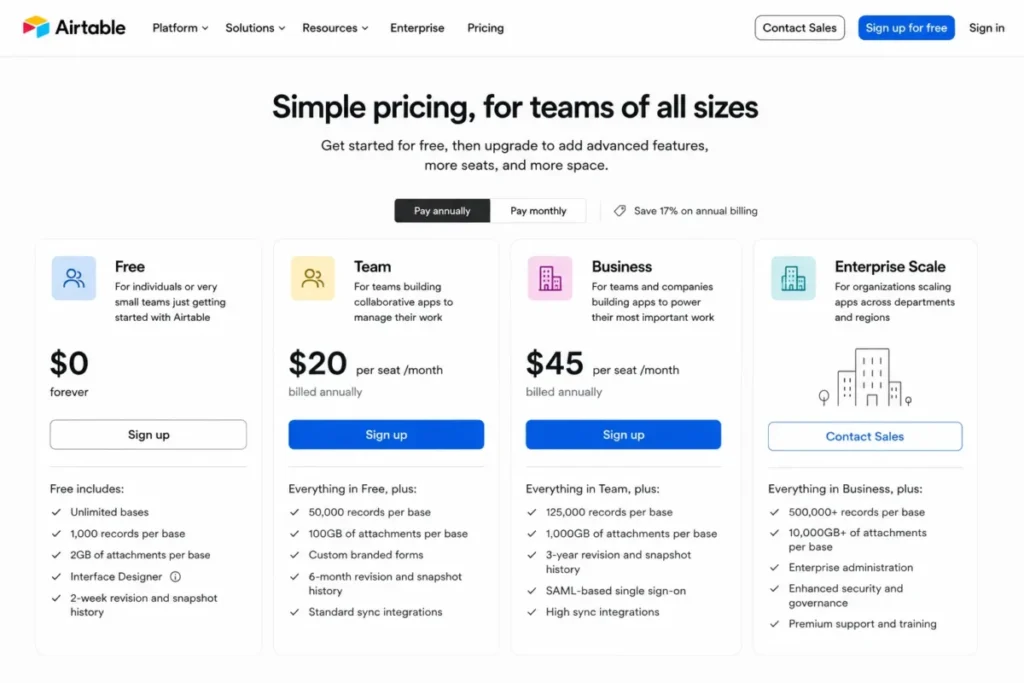
This Airtable review covers 2026 US pricing, the ceiling each plan hits first, the workflows the official documentation supports, migration and export risk, governance gates, and the buyers who should choose a different category of tool. Airtable starts at $0, Team runs $20 per user/month on annual billing, and Business runs $45 per user/month on annual billing.
If the category itself is still open, the project management software roundup is the better starting point, because Airtable is a data model first and a project tool second.
In This Article (17 sections)
Airtable Review 2026: Verdict
Airtable is worth buying for an operations, marketing, or product team that needs a shared relational data model with custom views, intake forms, and app-like surfaces, without commissioning software. It is the wrong purchase for field teams that need offline access, for healthcare workflows below Enterprise Scale, and for sales teams that expect native email and call capture out of the box.
Quick Verdict at a Glance
| Category | Verdict |
|---|---|
| Best for | 3 to 25 person operations, marketing, and product teams replacing spreadsheet sprawl with linked records |
| Not ideal for | Offline or on-premises requirements, mobile-first admins, PHI workflows below Enterprise Scale |
| Starting price | $0 on Free; $20 per user/ |
| Best practical plan | Team for internal builds; Business once capacity, two-way sync, admin controls, or commenter economics apply |
| Free plan or trial | Free plan plus a 14-day Team trial on the first workspace only |
| Setup difficulty | Medium. Schema design is the hard part, not the interface |
| Main strength | Linked records with views, forms, interfaces, and automations on one data model |
| Main limitation | Cloud only, with no offline mode and no self-hosted deployment |
| Best alternative | A dedicated project platform or a specialist CRM when the workflow is standard rather than custom |
Source: Airtable official pricing page and plans overview documentation. Checked: 2026-08-06. Region: US, USD. Billing basis: per billable collaborator, per month. Verify against the Airtable pricing page and the Airtable plans documentation.
Do not buy Airtable if any of these is non-negotiable: offline record capture in the field, on-premises or self-hosted deployment, CSV import and export from a phone, PHI handling on Team or Business, or phone support during an incident. Those are documented product boundaries, not configuration problems, and no amount of schema design removes them.
Airtable Pros and Cons
| Pros | Cons |
|---|---|
| Linked records with lookups, rollups, and counts give one data model instead of five disconnected trackers | Team can charge a full seat for a collaborator who only comments, while self-serve Business does not |
| Free tier carries 1,000 records per base and 100 automation runs per month, enough to validate a schema before paying | Free tops out at 1 GB of attachments per base and 1,000 API calls per workspace per month |
| Business lifts records to 125,000 per base and removes the monthly API-call cap, subject to rate limits | The Web API still throttles at 5 requests per second per base on every plan |
| Interfaces publish an app-like surface over the base without exposing the underlying tables | Free and Team interface recipients need verified Airtable accounts, so client access usually means the Portals add-on |
| Automations, forms, sync, and AI credits sit on the same base rather than on bolted-on tools | Standard exports are table-by-table CSV and omit comments, extensions, field descriptions, and the base guide |
| Business and Enterprise Scale add an admin panel, SSO, and SCIM provisioning for centralized control | Support is email-first with a typical 1 to 2 business-day response and no phone channel |
Source: Airtable plans, API, and support documentation. Checked: 2026-08-06. Verify against the Airtable plans page and the Airtable support contact page.
What Airtable Actually Is
Airtable is a cloud relational database with a spreadsheet-style front end, plus views, forms, interfaces, automations, integrations, and AI features layered on the same records. The operating company is Formagrid Inc., doing business as Airtable, per its privacy policy.
One freshness note matters for procurement. Bending Spoons announced a definitive agreement to acquire Airtable on 2026-08-04, and the parties stated they would operate independently until closing, so on 2026-08-06 Formagrid remains the contracting entity.
For a buyer, that means one thing: ask about contract assignment and renewal terms now rather than assuming the roadmap and price list are frozen.
How We Researched Airtable
This review is built on Airtable’s official US pricing page, current support documentation, the published security and legal pages, and labeled third-party review patterns. Pricing, plan limits, and feature gates were checked on 2026-08-06.
Airtable was assessed against the same buyer criteria applied to every platform on this site: workflow fit, role-based billing, capacity ceilings, automation and API limits, external collaboration, governance controls, migration risk, and the support model.
Greater weight went to the factors that change a purchase order rather than a feature list: which role becomes billable, which ceiling blocks a workflow first, and which capability sits behind a higher tier or a paid add-on.
Claims that official evidence does not support were excluded rather than softened. Workflow descriptions follow documented entry points, permissions, and plan gates, and every quantitative limit carries its unit and its reset behavior.
Who Airtable Is Best For
Marketing operations teams of 3 to 15 people. Campaigns, assets, briefs, and approvals map cleanly onto linked tables with filtered views, and intake moves from email threads into forms that write records directly.
Product operations teams of 5 to 20 people. Roadmap items, research notes, requests, and launch checklists need a schema the team controls, and interfaces give executives a read surface without base access.
Internal operations teams replacing spreadsheet sprawl. When the same customer or vendor appears in four trackers, linked records plus rollups remove the copy-paste layer that causes reporting disputes.
Cross-functional programs with non-technical builders. A creator configures the base and the surfaces while everyone else works inside views, forms, and published interfaces.
Departments distributing a governed source of truth. Airtable-to-Airtable sync plus the admin panel lets one team own the master table while other bases consume it under controlled permissions.
The common thread is a custom data model. If the workflow is standard, a purpose-built tool wins on setup time, and the Smartsheet review or a dedicated project platform is the more sensible shortlist.
Airtable Pricing and Total Cost
| Plan | Annual rate | Monthly rate | Records per base | Attachments per base | Practical verdict |
|---|---|---|---|---|---|
| Free | $0 | $0 | 1,000 | 1 GB | Schema validation and single-owner trackers |
| Team | $20 per user/ | $24 per user/ | 50,000 | 20 GB | The practical entry plan for an internal build |
| Business | $45 per user/ | $54 per user/ | 125,000 | 100 GB | Right once capacity, two-way sync, admin control, or commenter volume applies |
| Enterprise Scale | Custom | Custom | Not published | 1,000 GB | Audit logs, HIPAA with a BAA, and centralized governance |
Source: Airtable plans documentation and attachment storage documentation. Checked: 2026-08-06. Region: US, USD. Enterprise Scale is sales-led, and no public numeric US list price is published. Verify against the attachment field documentation.
What 5, 10, and 25 seats cost per year
| Scenario | 5 seats | 10 seats | 25 seats |
|---|---|---|---|
| Team, annual billing | $1,200 | $2,400 | $6,000 |
| Team, monthly rate annualized | $1,440 | $2,880 | $7,200 |
| Business, annual billing | $2,700 | $5,400 | $13,500 |
| Business, monthly rate annualized | $3,240 | $6,480 | $16,200 |
Source: Airtable plans documentation for both rate inputs, at the Airtable plans overview. Checked: 2026-08-06. Calculation basis: seats multiplied by the published rate multiplied by 12 months. Excludes tax, negotiated terms, implementation labor, third-party connector fees, and additional AI credits.
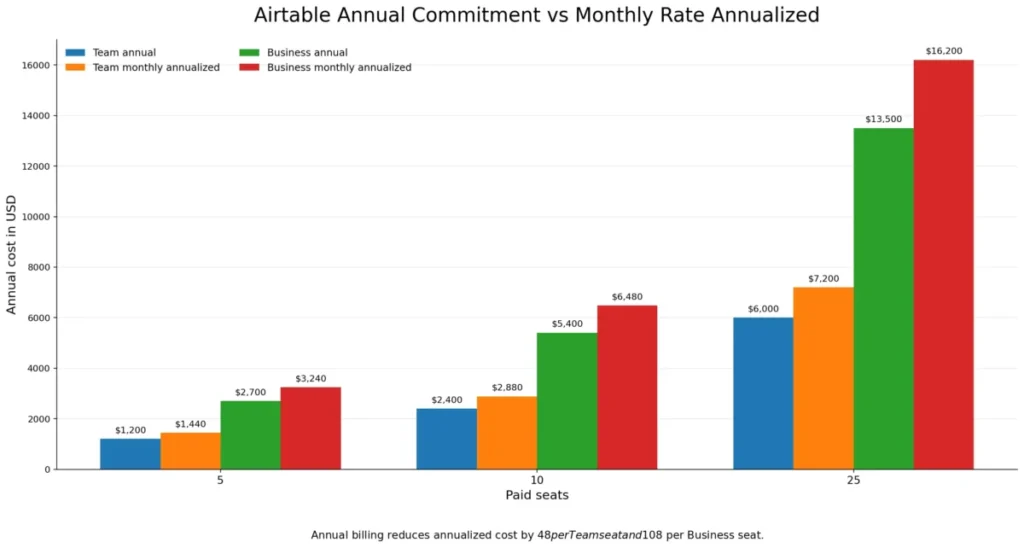
Annual billing saves $48 per Team seat and $108 per Business seat each year, which is 16.67 percent of the monthly-rate total. For a stable 10-person build, that is $480 on Team and $1,080 on Business, so I would only stay on monthly billing while seat count is still moving.
The role-mix trap that reverses the cheaper plan
Team bills Owner, Creator, Editor, and Commenter access inside the covered collaboration scopes. Self-serve Business bills Owner, Creator, and Editor, and commenters are not billable, per the collaborator billing documentation.
Business costs $300 more per paid seat per year than Team at annual rates, so 10 equally billable seats add $3,000 a year. That gap only holds when both plans bill the same headcount.
Model 8 editors plus 12 commenters instead. On Team, all 20 can become billable seats; on Business, the 12 commenters are not, so the comparison stops being $45 against $20 and starts being 8 seats against 20.
I would build the role list before the budget, not after. Counting heads and multiplying by a price is the single most common way an Airtable quote comes back wrong.
Hidden costs most pricing summaries skip
Portals has a seat-pack floor. External collaborator access through Airtable Portals starts at $120 per month for 15 portal seats on Team. On Business it starts at $150 per month for the same 15-seat pack, even when only four clients need access.
That minimum turns a five-seat internal build into $2,640 per year on Team or $4,500 per year on Business once the pack is added. Enterprise Scale portal pricing is custom.
The Business upgrade has an identity gate. Business and Enterprise Scale upgrades require a private email domain, so a team running on Gmail or Yahoo addresses has to resolve domain and identity setup before the upgrade path exists at all.
AI credits are pooled, not per person. Included monthly credits run 500 on Free per eligible editor-or-higher user and 15,000 on Team per billable collaborator. Business adds 20,000 per paid user and Enterprise Scale 25,000, per the AI billing documentation.
Additional credits are available for purchase. I would get the current add-on rate in writing before scoping any AI-heavy workflow.
Connector and build labor sit outside the plan price. The integration directory confirms an ecosystem, not that every connection is native, free, or bidirectional, so connector subscriptions and maintenance time belong in the first-year number.
Feature Gates: What You Get on Each Plan
| Capability | Free | Team | Business | Enterprise Scale |
|---|---|---|---|---|
| Automations per month | 100 runs | 25,000 runs | 100,000 runs | 500,000 runs |
| Run a script action | Not available | Available | Available | Available |
| Monthly API calls per workspace | 1,000 | 100,000 | Unlimited, rate limits apply | Unlimited, rate limits apply |
| Base revision and snapshot history | Shorter window | 1 year | 1 year | Extended |
| Two-way and multi-source sync | Not available | Configuration and plan dependent | Available | Available |
| Interface sharing with user groups | Not available | Not available | Available | Available |
| Admin panel | Not available | Not available | Available | Available |
| SSO and SCIM provisioning | Not available | Not available | Available | Available |
| Audit logs | Not available | Not available | Not available | Available |
| HIPAA support with an executed BAA | Not available | Not available | Not available | Available |
Source: Airtable plans, automation, interface permission, admin, audit, and compliance documentation. Checked: 2026-08-06. Verify against the automations documentation, the interface permissions documentation, the admin panel documentation, and the audit log documentation.
Read that table as four separate upgrade triggers rather than one. Capacity pushes Free to Team, sync and administration push Team to Business, and audit plus HIPAA push Business to Enterprise Scale.
Where Each Airtable Plan Stops Working
| Ceiling | Free | Team | Business | Enterprise Scale | Behavior at the ceiling |
|---|---|---|---|---|---|
| Records per base | 1,000 | 50,000 | 125,000 | Not published | Existing data is retained; new records are blocked until capacity is restored or the plan changes |
| Attachment storage per base | 1 GB | 20 GB | 100 GB | 1,000 GB | Existing files are retained; new attachments are blocked |
| API calls per workspace per month | 1,000 | 100,000 | Unlimited | Unlimited | Calls stop at the cap; the per-second rate limit still applies |
| Automation runs per month | 100 | 25,000 | 100,000 | 500,000 | Runs stop at the cap and reset monthly |
| Automation run history | 2 weeks | 6 months | 1 year | 3 years | Older run records fall out of the troubleshooting window |
| Bases per workspace | 1,500 | 1,500 | 1,500 | 1,500 | A documented maximum, not an architecture target |
Source: Airtable pricing page overflow summary plus plans, automation, and attachment documentation. Checked: 2026-08-06. Verify against the Airtable pricing overview and the Airtable automations guide.
The important part of that table is the last column. Hitting a ceiling does not delete anything, it stops new writes, which is why an intake form or an inbound integration is usually the first thing a team notices breaking.
Base history and automation history are two different clocks
Team and Business each include one year of base revision and snapshot history, which is what a reader assumes when a page says “1 year of history”.
Automation run history is separate and shorter: 2 weeks on Free, 6 months on Team, 1 year on Business, and 3 years on Enterprise Scale. A Team workspace can restore a record from ten months ago and still have no trace of the automation run that changed it seven months ago.
Unlimited monthly API calls still throttle
Business and Enterprise Scale remove the monthly call allowance, but the Web API is still capped at 5 requests per second per base. Exceeding that triggers a documented 30-second wait before requests resume, per the API troubleshooting documentation.
Those are two different ceilings: a plan allowance and a technical throughput limit. A nightly sync that fires thousands of single-record calls hits the second one on any plan, so batching and backoff belong in the integration design rather than in the upgrade decision.
Budget automation runs by attempts, not successes
Failed and successful attempts both consume the monthly allowance, which means a flaky webhook or a badly filtered trigger burns capacity while producing nothing. Testing consumes runs too, because the documentation requires each trigger and action step to pass a test before the automation can be switched on.
I would size the allowance against expected attempts with a failure margin, then check the run history window that comes with the plan. On Free, 100 runs a month and a two-week history is a demonstration budget, not an operations budget.
Core Workflows
Relational tables and linked records
A linked-record field connects two tables, and lookup, rollup, and count fields then surface related values without duplicating the source data, per the linked records documentation. Setup runs from the base to the target table to the field configuration, and requires Owner or Creator access.
This is the reason to choose Airtable over a spreadsheet. It is also the part that goes wrong: a weak schema produces circular links and rollups nobody trusts, and no plan upgrade fixes a bad data model.
Automations
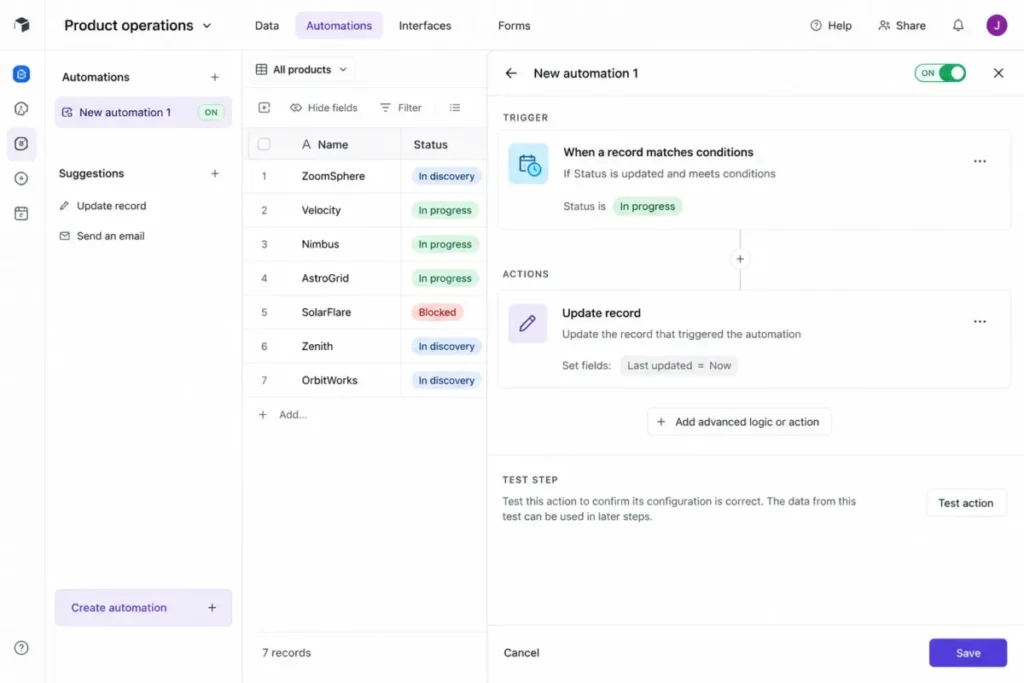
Automations are built from a base under Automations, then Create new, with a trigger, at least one action, and a successful test on every step before the automation turns on. Run a script is unavailable on Free, and monthly caps run from 100 to 500,000 by plan.
The send-email action carries a documented maximum of 1,000 recipients per automation run, per the email action documentation. For anything larger, the correct answer is an email platform, not a bigger Airtable plan.
Interfaces and external sharing
Interface Designer builds a page-based surface over the base, and an interface must be published before anyone outside editing mode can see it. Sharing then happens through the documented share controls.
The gate that surprises buyers sits here. On Free and Team, interfaces can be shared only with people who hold verified Airtable accounts, unlike a public share view, per the interface sharing documentation.
Sharing directly with user groups is a Business and Enterprise Scale capability, and broader external collaboration usually means the Portals add-on and its 15-seat floor.
Forms and structured intake
Forms are created from Home, then the base, then Forms, and each submission writes a record into the selected table. Only creators can create and publish a form, and the documented maximum is 50 forms per base.
For a team drowning in request emails, this is the fastest win in the product. The limitation is presentation and governance rather than capacity, since some form styling sits behind a paid plan.
Airtable Sync
Sync can run one-way, two-way, or multi-source between Airtable bases when the prerequisites and plan access are satisfied. Two-way sync sends permitted edits in a target back to a single source-of-truth table, per the two-way sync documentation.
External Sync API integrations behave differently: they are one-way into Airtable, and changes made in Airtable do not write back to the external application. Request limits are 2 MB, 10,000 rows, and 500 columns per request, with 20 requests per five minutes per base.
Filters, permissions, unmapped fields, and restricted destination settings are the usual reasons a synced record turns out to be uneditable, so I would validate permissions on a sample before rolling sync out to a department.
Airtable AI and reporting surfaces
AI credits draw from a pooled monthly allowance tied to paid users, so a workspace does not get an unlimited assistant, it gets a shared budget that heavy summarization workflows can drain early.
Reporting lives in views, interfaces, and connected analytics tools rather than in a dedicated report builder. Teams that need governed financial or executive reporting usually pair Airtable with a warehouse or a BI tool rather than asking the base to be the reporting layer.
Ease of Use and Setup
Setup difficulty is medium, and the difficulty is not the interface. Anyone comfortable with a spreadsheet can enter data on day one; designing tables, links, and permissions so the base still makes sense at month six is the real work.
Recurring themes across G2 review patterns, Capterra user feedback, and TrustRadius reviews line up on this point. Reviewers praise flexibility, visual data management, and automation.
The repeated criticism covers the learning curve, training burden, cost at scale, and features that sit on higher tiers. That pattern matches the documented plan gates rather than contradicting them.
Here is the 30 and 90 day test I would apply. At 30 days, every recurring request should arrive through a form instead of email, and no one should be maintaining a private copy of the same list.
At 90 days, one owner should be able to explain the schema in five minutes, automations should be running below half the monthly allowance, and the team should have stopped exporting to a spreadsheet to answer basic questions. If any of those fails, the problem is adoption and design, and a plan upgrade will not repair it.
Mobile is a companion rather than a parity experience, which matters for admins. CSV import and export are not supported in the mobile apps, and some previews and interface behaviors differ from desktop.
Limits, Integrations, and Migration Risk
Integrations and the two API ceilings
The official integration directory lists services including Google Drive, Slack, Salesforce, Jira, Zendesk, Miro, Stripe, Tableau, Snowflake, ChatGPT, and Claude. Presence in a directory is not proof that a given connection is native, free, bidirectional, or included on your plan, and the partner’s side, such as Miro’s plan costs, may matter too.
I would verify each mission-critical integration individually, including direction of data flow and which side owns conflict resolution. Where a native path does not exist, an automation platform fills the gap, and the Zapier automation review covers that layer and its own cost.
Import methods have different ceilings
Native import runs from the home screen through Add or import, then a supported source such as Google Sheets, Excel, or CSV, with field review before the records land. A Google Sheets import is a one-time copy, so later edits in Airtable never update the original sheet.
The CSV import extension is capped at 25,000 rows and 5 MB per import, which is a different ceiling from the native path. Mobile cannot perform CSV import at all, so imports are a desktop task by design.
Import is not synchronization, and confusing the two is how teams end up with a stale duplicate system. If the source has to stay authoritative, the answer is a sync configuration, not an import.
Export fidelity is the switching-cost question
A base is exported table by table as CSV. Attachments require separate handling, and standard exports omit comments, extensions, field descriptions, and the base guide, per the technical requirements documentation.
Read that as an exit-cost statement. The records leave, the application does not: linked-record logic, interfaces, automations, and discussion history all have to be rebuilt or re-documented somewhere else.
The reconciliation checklist I would insist on before cutover is short:
- Inventory tables, fields, links, attachments, comments, views, forms, interfaces, automations, permissions, and integrations.
- Choose the import method by file size, then stage the data rather than writing straight into production.
- Validate a representative sample of records and files, and reconcile counts and relationships.
- Keep the source system live until sign-off.
Duplicate handling is the item to test rather than assume, because the import documentation does not establish a single match, replace, or skip rule across every method. The same discipline applies in the other direction, and the CRM migration checklist covers the reconciliation pattern in more depth.
Security, Governance, and Support
Airtable publishes SOC 2 Type II and ISO 27001 materials and states that business continuity and disaster recovery processes are tested on a recurring basis, per its information security standards page. Those are vendor statements, and a regulated buyer should request the current reports under NDA rather than treating a badge list as diligence.
Governance unlocks in stages rather than all at once. The admin panel for users, groups, workspaces, bases, and security administration is a Business and Enterprise capability, SSO configuration and SCIM provisioning sit on Business and Enterprise Scale, and audit logs are Enterprise only.
HIPAA support is narrower still: it requires Enterprise Scale and an executed Business Associate Agreement. Any workflow touching PHI on Free, Team, or Business is outside the supported configuration, which makes this a pre-purchase gate rather than a later add-on.
Support is email-first with a typical 1 to 2 business-day response and a continuously available automated assistant, and there is no phone channel, per the support contact documentation. For a base that runs revenue or fulfillment, I would name an internal owner and a documented escalation path before rollout, because a next-business-day reply is the planning assumption.
The renewal question to answer before year two is simple: can the team point to a workflow that would break if Airtable disappeared, and name the person who maintains it? If not, the seats are a habit rather than an investment.
Airtable Limitations
No offline access and no self-hosted deployment. Airtable is cloud-hosted only, which disqualifies field capture without connectivity and any procurement that requires infrastructure control.
Export does not preserve the application. Table-by-table CSV without comments, extensions, field descriptions, or the base guide means switching costs are rebuild costs, and attachments are a separate job.
Role-based billing distorts naive cost models. A Team workspace can create paid seats for people who only comment, so the plan with the lower sticker price is not automatically the cheaper one.
External access is a paid design decision. Verified-account requirements on Free and Team interfaces push client-facing work toward Portals and its 15-seat minimum pack.
Throughput has a hard technical ceiling. Unlimited monthly API calls on Business and Enterprise Scale do not remove the 5 requests per second per base limit, so high-volume integrations need batching and retry logic.
Support has no live escalation channel. Email-first support with a 1 to 2 business-day expectation is a real operational constraint for teams running customer-facing processes on a base.
Who Should Avoid Airtable
Field and site teams without reliable connectivity. No offline mode means no record capture when the signal drops, and a separate capture layer defeats the point of one shared base.
Healthcare and other PHI workflows below Enterprise Scale. HIPAA support requires Enterprise Scale plus a BAA, so a Business workspace is not a compliant shortcut.
Sales teams wanting a turnkey CRM. Airtable models contacts and deals well, but native mailbox and call capture, sales engagement, and forecasting governance are not what a base gives you out of the box. Teams in that position should read what CRM software does and shortlist from CRM for small business instead.
High-throughput transactional workloads. A per-base limit of 5 requests per second is a design constraint that a custom database or an application backend handles better.
Mobile-first administrators. If the person who owns imports and exports works from a phone, the documented mobile restrictions will block routine maintenance.
Airtable Alternatives
| Alternative | Choose it instead when | Main trade-off versus Airtable |
|---|---|---|
| Dedicated project platform | Dependencies, workload, time tracking, and portfolio reporting must work on day one | Less freedom in the data model, more structure out of the box |
| Specialist CRM | Native email and calendar capture, pipeline forecasting, and sales engagement are mandatory | Narrower scope outside revenue workflows |
| Connected docs and databases | The team wants documents, wikis, and light databases in one surface | Relational depth and automation ceilings differ by product |
| Spreadsheet plus automation layer | The work is genuinely single-table, ad hoc, or offline | No linked records, no interfaces, weaker governance |
| Custom database or internal app | Throughput, bespoke UX, or infrastructure control is non-negotiable | Longer build time and engineering ownership |
For a like-for-like flexible workspace, the Notion review covers the closest competitor on structured docs plus databases. The Coda review covers the same ground with a heavier document focus.
For managed delivery work, the ClickUp review is the better read when the requirement is task execution rather than schema design. The monday.com review sits on the same side of that line.
If the honest answer is that the team needs a shared list rather than a database, a Google Sheets CRM template plus an automation tool will do the job for $0 in software.
The team collaboration tools roundup covers the communication layer around it. Vendor pricing moves, so check each current pricing page before shortlisting.
Final Verdict: Is Airtable Worth It?
Airtable is worth it for a 3 to 25 person operations, marketing, or product team whose workflow does not fit an off-the-shelf tool and that has one person willing to own the schema. Every documented capability below is read as a workflow consequence for that team, because a plan gate only matters when it blocks something the team does weekly. At $20 per user/month on annual Team billing, a 10-seat build costs $2,400 a year, which is cheap against the cost of maintaining five spreadsheets that disagree.
It is not worth it for teams that need offline access, phone support, PHI handling below Enterprise Scale, or a sales system that works without configuration. Those are boundaries in the official documentation, not gaps a consultant closes.
Choose Free while the schema is still changing and the base holds under 1,000 records. Choose Team once records, automations, or attachments outgrow Free and the collaborators are editors rather than commenters.
Choose Business when any of four things is true: records approach 125,000 per base, two-way sync is required, an admin panel and SSO are required, or a large share of collaborators only comment. Choose Enterprise Scale when audit logs, HIPAA with a BAA, or centralized governance are procurement requirements rather than preferences.
My last piece of advice is procedural. Run a 14-day Team trial on a real workflow with real records, count the roles rather than the people, and price the Portals pack before promising any client a login.
Frequently Asked Questions
How much does Airtable cost per user in 2026?
Airtable lists Team at $20 per user/month on annual billing and $24 per user/month on monthly billing, with Business at $45 and $54 respectively. Free is $0, and Enterprise Scale is custom, sales-led pricing.
Ten annual Team seats total $2,400 a year, and ten annual Business seats total $5,400.
Is Airtable worth it in 2026?
Yes, if the team needs a custom relational data model with forms, views, interfaces, and automations, and someone owns the schema. It is not worth it when a purpose-built project tool or CRM already matches the workflow, because Airtable trades setup time for flexibility you may never use.
Does Airtable have a free plan?
Yes. Free supports 1,000 records per base, 1 GB of attachments per base, 1,000 API calls per workspace per month, and 100 automation runs per month.
The first workspace also receives a 14-day Team trial, and later Free workspaces do not receive another trial under the documented rule.
Are Airtable commenters billed?
On Team, yes. Team bills Owner, Creator, Editor, and Commenter access within the covered collaboration scopes.
On self-serve Business, commenters are not billable, so a workspace with many comment-only collaborators can cost less on the higher-priced plan. Check the role mix before comparing per-seat prices.
What happens when Airtable hits the record limit?
Existing data stays in place. New records cannot be added until capacity is restored or the workspace upgrades, and the same pattern applies to attachment storage.
API calls and automation runs stop at their caps, which usually surfaces first as a form submission or an integration that quietly fails to write.
Does Airtable work offline?
No, unless you build a separate capture layer. Airtable is cloud-hosted, offers no offline access, and supports no on-premises or self-hosted deployment.
The mobile apps also exclude CSV import and export, so field teams without reliable connectivity should treat this as a disqualifier rather than an inconvenience.
Is Airtable HIPAA compliant?
Only on Enterprise Scale, and only with an executed Business Associate Agreement. Free, Team, and Business workspaces are outside the supported configuration for protected health information.
Treat this as a pre-purchase gate, because moving PHI into a base first and negotiating later is the costly order to do it in.
Can clients use an Airtable interface without an account?
Not on Free or Team. Interfaces on those plans can be shared only with people who have verified Airtable accounts, which is different from a public share view.
External-facing access usually means the Portals add-on, which starts at $120 per month for 15 seats on Team and $150 per month for 15 seats on Business.
Can Airtable replace a CRM?
For a small team tracking contacts, deals, and follow-ups, a well-designed base does the job. It stops working when the requirement includes native mailbox and calendar capture, sequenced outreach, and forecasting governance, because those are configuration-heavy in Airtable and standard in a specialist CRM.
Who owns Airtable right now?
As of the 2026-08-06 check against the Airtable privacy policy, the operating legal entity is Formagrid Inc., doing business as Airtable. Bending Spoons announced a definitive agreement to acquire the company on 2026-08-04, and the parties said they would operate independently until closing.
Ask about contract assignment and renewal terms during procurement.