The Zoho CRM vs Salesforce decision rarely goes wrong on features. It goes wrong on the second invoice, after seats, support plans, add-ons, and admin hours turn a $25 sticker price into a six-figure operating line.
Choose Zoho CRM if you run a 3- to 50-person sales team, want predictable per-seat pricing, and need broad sales automation without a dedicated administrator. Choose Salesforce if you run a complex, integration-heavy revenue operation with formal release controls, dedicated admins, and the budget to pay for that ceiling.
If neither profile fits, start from the wider best CRM software shortlist instead.
The numbers behind that split are stark. Official pricing checked on July 16, 2026 puts 10 users on Zoho CRM Enterprise at $4,800 per year and 10 users on Salesforce Enterprise at $21,000 per year, license only, before support and add-ons.
Bottom line: Zoho CRM is the value winner for lean and mid-sized sales teams: lower seat prices, monthly or yearly pay-as-you-go billing, and a real three-user free edition. Salesforce Sales Cloud is the platform winner for governed, integration-heavy enterprises: deeper customization, a larger ecosystem, and full sandboxes on Unlimited. Team size, API volume, and governance requirements decide the winner, not brand reputation.
In This Article (23 sections)
Quick Verdict: Zoho CRM vs Salesforce
| Category | Winner | Why |
|---|---|---|
| Entry price | Zoho CRM | Standard is $14/ |
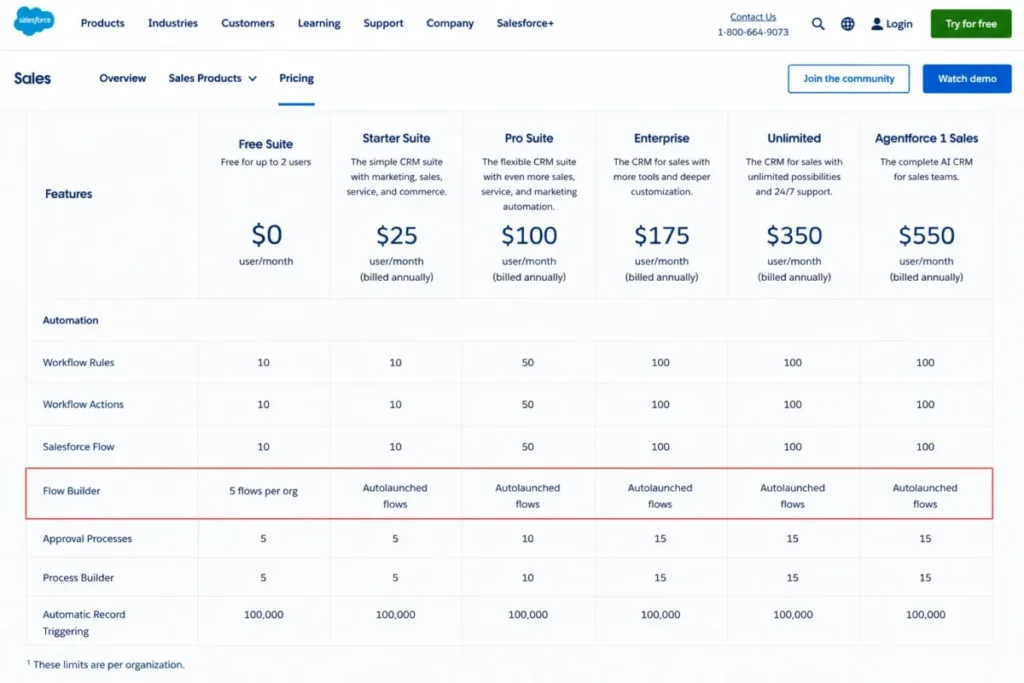
| Free plan | Zoho CRM | Free edition supports 3 users; Salesforce Free Suite exists but caps Flow Builder at 5 flows per org |
| Contract flexibility | Zoho CRM | Monthly or yearly pay-as-you-go; Salesforce Pro and above bill annually |
| Support economics | Zoho CRM | Premium support adds 20% vs Salesforce Premier at 30% of net license fees |
| Customization ceiling | Salesforce | Platform-level objects, profiles, and partner apps beyond Zoho’s 500-module cap |
| Automation and integration architecture | Salesforce | Flow, platform events, and APIs beat Zoho’s outbound-only, 10-field workflow webhooks |
| Governance and sandboxes | Salesforce | Full sandbox ships with Unlimited; Zoho concentrates sandbox access in higher editions |
| API capacity at scale | Salesforce | Paid orgs start at 100,000 requests per rolling 24 hours plus per-license additions |
| AI value per dollar | Zoho CRM | Zia capability arrives inside paid tiers; Salesforce gates advanced AI behind add-ons up to $550/ |
| Mobile apps | Tie | Both ship capable native iOS and Android apps |
Zoho takes the money categories and Salesforce takes the platform categories, which is exactly why tier-name comparisons mislead. The rest of this comparison prices the difference at 5, 10, 25, and 50 seats and names the limits that flip the verdict.
Zoho CRM vs Salesforce at a Glance
| Attribute | Zoho CRM | Salesforce Sales Cloud |
|---|---|---|
| Best for | 5-50 person sales teams wanting value and low admin overhead | 50-500+ person revenue orgs with complex data models and dedicated admins |
| Starting price | $14/ | $25/ |
| Practical tier for a serious sales team | Enterprise at $40/ | Enterprise at $175/ |
| Free plan | Yes, up to 3 users | Free Suite at $0; documented cap of 5 flows per org, other limits need verification |
| Free trial | Yes | “Try for free” calls to action visible on the pricing page as of July 16, 2026 |
| Billing flexibility | Monthly or yearly pay-as-you-go, plan changes supported | Starter monthly or annual; Pro, Enterprise, Unlimited billed annually |
| Setup difficulty | Low to Medium | Medium to High |
| Main strength | Price-to-capability ratio and the wider Zoho suite | Ecosystem depth, extensibility, and enterprise governance |
| Main weakness | One paid edition applies to all regular users; webhook and email ceilings | Practical cost expands through add-ons, support percentages, and services |
Source: official Zoho CRM and Salesforce Sales pricing pages, checked July 16, 2026.
The at-a-glance gap is not features. It is that Salesforce’s practical tier costs about 4.4 times Zoho’s for the same seat count, so the platform depth has to earn that multiple for your specific workflow.
If you are still mapping requirements, our primer on what CRM software actually does sets the evaluation baseline before any vendor demo.
How We Compared: Methodology and Limits
This comparison is built from official sources checked on July 16, 2026: both vendors’ pricing pages, Zoho’s product specifications, email-limit, webhook, migration, support-plan, and security documentation, and Salesforce’s pricing feature table plus developer API references. Third-party editorial reviews were used only to identify recurring sentiment, never as the authority for prices or plan limits.
No production Zoho CRM or Salesforce account was configured for this article, so every claim here rests on official documentation and published pricing rather than first-person product use. Where the documentation is ambiguous, such as Salesforce’s Web Services API pricing footnote, I say so instead of guessing.
Pricing note: Zoho’s pricing page is geolocated and can first render a non-US currency, so confirm the USD and annual toggles before budgeting. Salesforce packaging, Agentforce bundles included, changes often enough that the live order form is the only final authority.
One more limitation matters. Implementation and partner fees are quote-based for both products, so this article explains the cost drivers and refuses to invent a universal multiplier.
Why Teams Switch from Salesforce to Zoho CRM (and the Other Way)
Switching stories in both directions follow money and ceilings, not brand preference. Teams leave Salesforce Sales Cloud when the renewal quote no longer matches the workflow: a 10-seat team running basic pipeline, quoting, and email sequences on Enterprise pays $21,000 a year in licenses alone, and adding Premier support lifts that to $27,300.
Teams leave Zoho CRM when they hit an architectural wall rather than a price wall. The most common documented walls, all examined in our Zoho CRM review: workflow webhooks that transfer at most 10 CRM fields outbound with no inbound retrieval, one main edition forced across all regular users, and mass-email ceilings of 250 to 2,000 sends per organization per day depending on edition.
Reviewer patterns line up with those switch triggers. TechRadar’s April 2026 Zoho CRM review describes strong value with a learning curve at advanced customization and inconsistent support experiences, while its Salesforce review calls the platform scalable and extensible but costly and demanding for smaller teams without technical resources.
My read as a buyer analyst: switching direction is predicted by two questions. Does your integration architecture need more than outbound field pushes, and does a small group of power users need capability the whole org will be forced to pay for on Zoho’s one-edition rule?
Pricing at Scale: Zoho vs Salesforce Pricing From 5 to 50 Seats
Starting prices are the least useful numbers in this comparison. The useful numbers are the practical tier for your workflow and the annual total at your seat count.
Editions and list prices, checked July 16, 2026
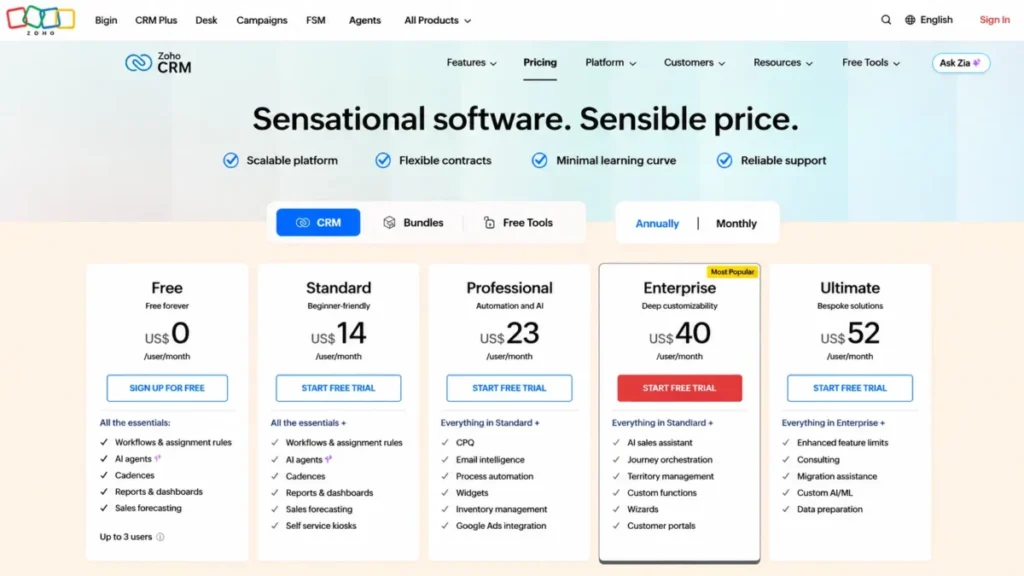
Zoho CRM’s US annual pricing runs $14 (Standard), $23 (Professional), $40 (Enterprise), and $52 (Ultimate) per user per month, with monthly billing at $20, $35, $50, and $65, per the official Zoho CRM pricing page. The Free edition covers up to 3 users with core leads, deals, workflows, reports, API access, and mobile apps.
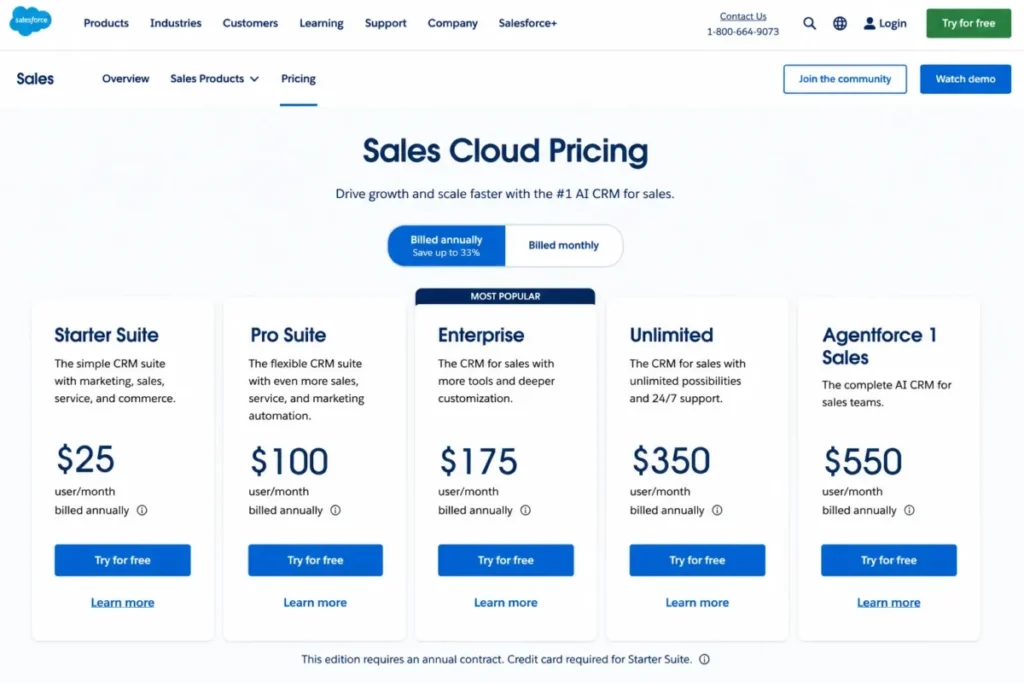
Salesforce’s published US pricing on the official Salesforce Sales pricing page lists Free Suite at $0, Starter Suite at $25 monthly or annual, Pro Suite at $100, Enterprise at $175, Unlimited at $350, and Agentforce 1 Sales at $550, all per user per month with Pro and above billed annually. Unlimited bundles predictive AI, sales engagement, the Premier Success Plan, and a full sandbox.
Capability-matched tiers, not name-matched tiers
Most comparisons put Enterprise next to Enterprise and Ultimate next to Unlimited, as if the names meant parity. The entitlements say otherwise, so match the minimum viable edition to the workflow first and compare cost second.
| Buyer workflow | Minimum viable Zoho CRM edition | Minimum viable Salesforce edition |
|---|---|---|
| Basic pipeline, 3 users or fewer | Free ($0) | Free Suite ($0, verify caps before relying on it) |
| Automated sales team (pipelines, forecasting, email, workflows) | Standard $14 or Professional $23 | Starter $25 or Pro $100 |
| API-integrated RevOps (ERP, warehouse, enrichment) | Enterprise $40 | Enterprise $175 |
| Governed enterprise deployment (sandboxes, advanced AI, engagement) | Enterprise $40 or Ultimate $52 | Unlimited $350 |
Source: official Zoho CRM pricing page and Salesforce Sales pricing page, checked July 16, 2026.
Read that table as a warning against sticker math: a team that needs process management and CPQ outgrows Zoho Standard and Salesforce Starter alike, so the honest comparison for them is $23 against $100, not $14 against $25.
Annual license cost at 5, 10, 25, and 50 users
License-only totals, annual billing, excluding tax, add-ons, support upgrades, and services. Formula: seats x monthly rate x 12.
| Seats | Zoho Standard ($14) | Zoho Professional ($23) | Zoho Enterprise ($40) | Zoho Ultimate ($52) | Salesforce Starter ($25) | Salesforce Pro ($100) | Salesforce Enterprise ($175) | Salesforce Unlimited ($350) |
|---|---|---|---|---|---|---|---|---|
| 5 | $840 | $1,380 | $2,400 | $3,120 | $1,500 | $6,000 | $10,500 | $21,000 |
| 10 | $1,680 | $2,760 | $4,800 | $6,240 | $3,000 | $12,000 | $21,000 | $42,000 |
| 25 | $4,200 | $6,900 | $12,000 | $15,600 | $7,500 | $30,000 | $52,500 | $105,000 |
| 50 | $8,400 | $13,800 | $24,000 | $31,200 | $15,000 | $60,000 | $105,000 | $210,000 |
Source: computed from both vendors’ official pricing pages, checked July 16, 2026.
At the capability-matched Enterprise level, the 50-seat gap is $81,000 per year, every year, before anyone opens a support ticket. That gap is the budget Salesforce’s extra platform depth has to justify.
For a plan-by-plan cost breakdown of the cheaper side, our Zoho CRM pricing guide covers tier gates and billing options in detail.
Hidden costs and add-ons that move the total
The Salesforce base seat is the floor, not the budget. Officially priced extras on the pricing page include Agentforce for Sales from $125, Sales Programs from $100, Revenue Intelligence from $220, and Revenue Cloud from $200, each per user per month, and not every buyer needs any of them.
The full cost and add-on math sits in our Salesforce pricing plans guide.
Two more Salesforce lines deserve a flag. The feature table displays a Web Services API note at an additional $25 per user per month, and the column alignment is ambiguous enough that buyers must confirm which editions it applies to before signing.
Premier Success support adds 30% of net license fees, and Signature is custom-priced through an account executive.
Zoho’s hidden costs are structural rather than itemized. One main edition applies to every regular user in the organization, so three power users who need Enterprise features push all 25 of your regular seats to Enterprise pricing.
Zoho’s restricted license types soften that only partly. Team users cannot own standard-module records, run standard reports, start calls, build core automation, or use Zia and the Google or Microsoft integrations, and Lite users require an Enterprise or Ultimate org with at least 25 regular licenses.
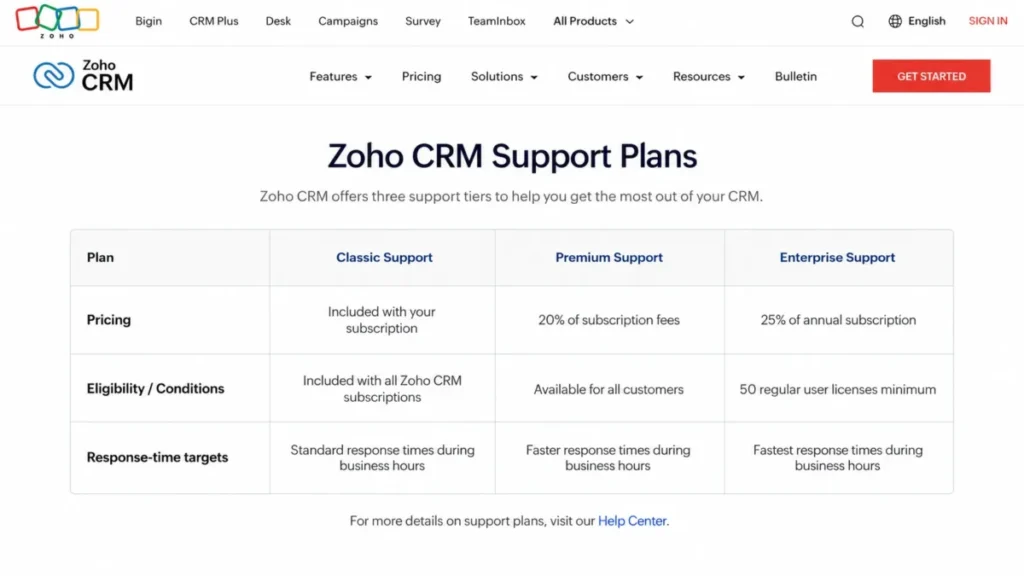
Support percentages compound both bills. Zoho Premium Support adds 20% of subscription fees, Zoho Enterprise Support adds 25% with a 50-license minimum, and Salesforce Premier adds 30% of net license fees, per both vendors’ official support pages.
Billing structure is the quiet differentiator. Zoho advertises monthly or yearly pay-as-you-go with plan changes supported, while Salesforce’s public prices for Pro and above are annual commitments, which matters for seasonal teams and startups with uncertain headcount.
Free plans compared: a 2026 correction
Several 2026 comparison pages still claim Salesforce has no free edition. That is stale: the live pricing table lists Free Suite at $0 per user per month, with a documented cap of five Flow Builder flows per organization.
For a three-person team, Zoho Free is the verified pick as of July 16, 2026 because its entitlements are explicit: 3 users, essential leads, deals, workflows, reports, 5,000 API credits per 24 hours, documents, and mobile apps. Free Suite’s user, storage, and object caps were not fully verifiable in this research, so treat it as an experiment tier until you have checked the live feature table.
Both vendors showed free-trial paths on July 16, 2026: Zoho advertises trials directly, and Salesforce displayed “Try for free” calls to action across multiple editions. No trial duration is claimed here because neither duration was verified.
Verdict on pricing: Zoho CRM wins, and the margin grows with seat count. Salesforce only wins the pricing argument when the workflow genuinely requires platform capability Zoho cannot deliver at any tier.
Feature Comparison Matrix
| Dimension | Zoho CRM | Salesforce Sales Cloud | Winner |
|---|---|---|---|
| Core pipeline and deal management | Multiple pipelines, Blueprint process management | Opportunity management, sales flows, deal insights | Tie |
| Customization and data model | 10-500 custom modules, 10-500 custom fields per module by edition | Platform objects, profiles, layouts, and custom apps with no comparable published edition caps | Salesforce |
| Automation architecture | Workflows, functions, cadences; webhook action capped at 10 outbound fields | Flow, platform events, APIs, middleware, partner apps | Salesforce |
| Email and engagement limits | Published caps: users x 300 individual emails/ | Engagement spread across suites and add-ons; no equivalent single published cap verified | Zoho CRM for transparency |
| Reporting and analytics | Strong reports and dashboards; Zoho Analytics for depth | Enterprise reporting plus Tableau-family analytics on higher bundles | Salesforce |
| AI features | Zia inside paid tiers, gated wider by edition | Agentforce and add-ons, deepest in $550 Agentforce 1 Sales | Zoho for entry cost, Salesforce for ceiling |
| Integrations and ecosystem | 1,000+ app integrations plus the first-party Zoho suite | AppExchange, AgentExchange, MuleSoft, Slack, partner network | Salesforce |
| API entitlements | 5,000 credits/ | Paid orgs 100,000 requests per rolling 24h + per-license additions | Salesforce at scale |
| Mobile apps | Native iOS and Android with field-visit workflows | Native iOS and Android with mobile Lightning apps | Tie |
| Support economics | Classic included; Premium +20%, Enterprise +25% | Standard included; Premier +30%, Signature custom | Zoho CRM |
| Governance and sandboxes | Sandbox in higher editions with documented limits | Full sandbox in Unlimited, deep release governance | Salesforce |
| Value at typical team sizes | Enterprise at $40 covers most mature sales workflows | Comparable capability starts at $175 | Zoho CRM |
Salesforce wins more platform rows and Zoho wins every cost row, which is the whole comparison in miniature. The sections below put numbers and plan gates behind each row.
Customization ceilings: the documented numbers
“Customizable” is not a spec, so here are the specs. Zoho’s complete feature list and specifications documentation set custom-module ceilings at 10 (Standard), 25 (Professional), 200 (Enterprise), and 500 (Ultimate), with custom fields per module at 10, 155, 300, and 500 respectively.
Those numbers are generous for most sales teams and finite for platform builders. A company modeling products, territories, partner processes, and post-sale workflows as separate objects can burn through 25 Professional modules faster than the sales team expects.
Salesforce publishes no comparable simple edition ladder in the sources checked here, and its platform positioning is precisely that the object model scales with licensing and architecture rather than a fixed menu. That is what the 4x seat premium buys, and it only matters if your data model needs it.
Ease of Use and Setup
Based on official documentation and reviewer patterns, Zoho CRM has the lower administrative barrier for standard deployments: pipelines, assignment rules, reports, and email integration are configurable without specialist staff. Complexity arrives with Blueprint processes, functions, portals, and multi-team territory structures.
Salesforce’s Starter Suite is designed for self-serve onboarding, but the platform’s depth becomes the workload as you climb editions. Salesforce itself directs buyers toward Professional Services and certified partners for implementation, which tells you how the vendor expects serious deployments to be staffed.
The 30/90-day test I apply here: after 30 days, reps should be logging deals without chasing the admin, and after 90 days, pipeline reports should be trusted in forecast meetings. Zoho reaches that bar with an internal owner on most teams; Salesforce reaches it reliably when a dedicated admin or partner owns configuration.
Administration burden belongs in the total cost, so run this self-check before choosing: count your sales teams and business units, custom objects, approval chains, integrations, release-control requirements, compliance obligations, and reporting complexity. Two or fewer of those at serious scale points to Zoho self-administration; four or more points to budgeting a dedicated Salesforce admin or partner, whatever the license math says.
Winner: Zoho CRM for lean teams without a CRM administrator. Salesforce closes the gap only when specialist ownership already exists.
Automation, Workflows, and API Limits
Both products automate lead routing, task creation, and field updates. The differences live in the ceilings, and the ceilings are documented.
Zoho’s webhook wall
Zoho’s workflow webhooks are outbound only: per the official webhook documentation, a workflow rule supports up to 6 webhooks, each transfer carries at most 10 CRM fields, and the webhook action cannot retrieve third-party data back into CRM. A bidirectional integration therefore needs the API, functions, Zoho Flow, or external middleware instead of the native workflow action.
This is the “what breaks first” item for integration-minded buyers. Teams design a two-way sync on paper, buy Zoho, then discover the native workflow path only pushes.
API capacity by edition and team size
API allowances decide whether your ERP sync, enrichment jobs, and warehouse pulls fit inside the plan. Both vendors publish formulas, per Zoho’s product specifications and Salesforce’s developer API allocation documentation.
| Scenario | Zoho CRM published entitlement | Salesforce published entitlement |
|---|---|---|
| Free tier | 5,000 API credits per 24 hours | Not applicable for paid-org formula |
| Paid baseline | 50,000 credits/ | 100,000 requests per rolling 24 hours for paid orgs |
| 10 users | Standard: 52,500 credits/ | Enterprise: 110,000 requests/ |
| 50 users | Standard: 62,500 credits/ | Enterprise: 150,000 requests/ |
Source: official Zoho CRM specifications documentation and Salesforce developer API limits documentation, checked July 16, 2026.
One caution on reading that table: a Zoho API credit and a Salesforce API request are not the same unit of work, so treat the columns as capacity planning inputs, not an exchange rate. Salesforce also sells additional API calls, and its API limits reference documents the Enterprise example of 115,000 requests for a 15-license org.
Email and sequence ceilings
Zoho publishes its sending caps in the email limits documentation: paid editions send up to active users x 300 individual emails per day, and mass emails cap at 250 (Standard), 500 (Professional), 1,000 (Enterprise), and 2,000 (Ultimate) per organization per day. A 10-user Professional org therefore tops out at 3,000 individual sends and 500 mass sends daily, which covers sales activity but is not a campaign platform.
Salesforce spreads engagement volume across suites, add-ons, and marketing products, and this research package verified no single equivalent cap. Budget-check outbound volume with your Salesforce account executive before assuming it.
Winner: Salesforce on automation and integration architecture. Zoho CRM wins on published transparency, which makes capacity planning easier at small scale.
Reporting and Analytics
Zoho CRM covers standard sales reporting well: pipeline, forecasting, territory, and activity dashboards ship in paid editions, and Zoho Analytics extends depth for teams already inside the Zoho suite. The practical constraint is organizational, since team-user licenses cannot access standard reports and dashboards.
Salesforce’s reporting engine plus the Tableau-family analytics bundled into Agentforce 1 Sales gives large revenue teams more headroom for cross-object, cross-cloud analysis. That headroom is entangled with edition and add-on cost, so a 10-person team rarely gets to use what it pays for.
Winner: Salesforce, with the caveat that a sub-25-seat team is unlikely to exhaust Zoho’s reporting before it exhausts its budget.
AI Features: Zia vs Agentforce
Generic “both have AI” comparisons hide the gates, and the gates are the decision.
| AI capability | Zoho CRM | Salesforce |
|---|---|---|
| Assistant and email intelligence | Zia features across paid tiers, broader on Enterprise and Ultimate | Documented across editions, deepest with Agentforce |
| Predictive scoring and forecasting | Documented in higher Zia tiers | Predictive AI documented in Unlimited |
| Conversation intelligence | Not confirmed as an equivalent bundled feature in this package | Documented in Enterprise and above |
| Agentic actions | Zia agents documented on paid tiers | Agentforce; unmetered employee usage documented in Agentforce 1 Sales |
| Unified data and credits | Custom AI/ML allowances documented on Ultimate | 2.5 million Data Cloud credits and 1 million Flex Credits per org per year in Agentforce 1 Sales |
| Cheapest serious entry point | Enterprise at $40/ | Agentforce for Sales add-on from $125/ |
Source: official Zoho CRM feature list and Salesforce Sales pricing page, checked July 16, 2026.
The rows marked “documented” reflect official pricing and feature pages, and anything unverified says so. The pattern is consistent: Zoho sells AI as an edition feature, Salesforce sells its top AI as a program.
Winner: Zoho CRM for AI access per dollar. Salesforce for AI platform depth, if the $550 Agentforce 1 Sales bundle matches a real consolidation plan rather than an aspiration.
Integrations and Ecosystem
Zoho’s ecosystem argument is vertical integration: the official Zoho CRM product page states more than 1,000 app integrations, and the strongest connections are first-party, into Zoho Books, Desk, Campaigns, Projects, and Analytics. For a company already standardized on the Zoho suite, that coherence beats a bigger marketplace.
Salesforce’s argument is breadth and extensibility: AppExchange and AgentExchange partner apps, MuleSoft for integration infrastructure, Slack, and a partner network that has built on the platform for two decades. Logo counts flatter both vendors, so compare the exact connector, data direction, supported objects, edition requirements, and any separate license cost instead.
Winner: Salesforce for ecosystem depth and enterprise extension. Zoho CRM when your stack is, or can become, mostly Zoho.
Support, Security, and Admin Controls
Support is a percentage decision, not a quality vibe. Here are the published numbers from Zoho’s support plans page and Salesforce’s pricing page, both checked July 16, 2026.
| Support tier | Cost | Key conditions |
|---|---|---|
| Zoho Classic | Included with paid editions | Email, phone, chat, remote assistance |
| Zoho Premium | 20% of subscription fees | Faster targets, onboarding help |
| Zoho Enterprise Support | 25% of annual subscription | Requires 50+ regular user licenses; TAM, 1-hour initial response target, 24/7 |
| Salesforce Standard | Included | Self-guided resources, Trailhead, community |
| Salesforce Premier | 30% of net license fees | Expert guidance, 24/7 for business-stopping issues; bundled with Unlimited |
| Salesforce Signature | Custom quote | Designated success manager, proactive monitoring |
Source: official Zoho CRM support plans page and Salesforce Sales pricing page, checked July 16, 2026.
Run the 10-user Enterprise math and the compounding shows: Zoho at $4,800 plus 20% Premium is $5,760, while Salesforce at $21,000 plus 30% Premier is $27,300. The support gap alone is larger than Zoho’s entire bill.
On security architecture, Zoho documents TLS 1.2/1.3 in transit, AES-256 at rest for applicable data, tenant isolation, SAML SSO, MFA, and audit logging in its security whitepaper. Salesforce positions granular permissions, profiles, sandboxes, and enterprise trust tooling, and regulated buyers on either product must verify certifications against edition, region, configuration, and contract.
Sandboxes are the governance threshold most comparisons skip. Salesforce includes a full sandbox with Unlimited, while Zoho concentrates sandbox access in its higher editions, so if your change-management policy requires testing every automation before production, that requirement alone sets your minimum edition on both platforms.
Winner: Zoho CRM on support economics. Salesforce on governance depth for regulated, multi-team deployments.
The Real Cost of Switching
Migration between these two platforms is supported in both directions, and it is never free of labor. The costs are data preparation, rebuild time, and retraining, not license fees.
Moving Salesforce data into Zoho runs through documented ceilings in Zoho’s data migration documentation: CSV files up to 5 GB each, a maximum of 200 files, and 25 GB total per migration. Tag handling is stricter than most teams expect, since only the first 10 tags on a record migrate and tags truncate at 25 characters.
A pre-migration checklist that saves real cleanup pain:
| Check | Why it matters |
|---|---|
| Export volume vs the 25 GB / 200-file / 5 GB-per-file caps | Oversized exports force batching and restructuring |
| Custom-object inventory vs Zoho’s module ceilings | Enterprise allows 200 custom modules, Ultimate 500 |
| Tag count and tag length per record | Only the first 10 tags migrate; 25-character limit |
| Field mapping for records your webhooks or APIs touch | Zoho workflow webhooks move at most 10 fields outbound |
| Automation rebuild list | Flows and process builders sit outside the documented data-migration scope; plan a redesign, not an import |
Going the other direction, into Salesforce, the constraint is rarely import capacity and usually rebuild scope. Salesforce points complex moves at Professional Services and certified partners, and those engagements are scoped and priced per project, so demand a written statement of work rather than trusting any generic multiplier you read.
Zoho prices assistance more explicitly: onboarding guidance and Jumpstart setup are defined services, Enterprise Business Solutions handles custom implementation, and Ultimate includes migration assistance and data preparation. Buying support is not the same as buying implementation on either platform, so name the owner for requirements, configuration, migration, integration, training, and ongoing administration before you sign anything.
Our CRM implementation guide turns that ownership list into a working checklist.
Switch-or-stay rule: switch off Salesforce when your paid capability exceeds your used capability by a full edition, and switch off Zoho when a documented limit, not a preference, blocks a revenue workflow. Stay put when the pain is adoption discipline, because migration does not fix adoption.
Migration and Setup Difficulty
| Task | Zoho CRM | Salesforce Sales Cloud |
|---|---|---|
| Initial setup for a standard pipeline | Low | Low (Starter) to Medium (Pro and above) |
| Advanced configuration (processes, territories, custom objects) | Medium | High |
| Data import and migration tooling | Low to Medium, self-service with documented caps | Medium to High, partner-led at scale |
| Automation and integration build | Medium, ceilings arrive early | High complexity, higher ceiling |
| Admin and team training | Low to Medium | Medium to High, Trailhead helps |
| Long-term scalability of the setup | Medium, edition limits define the roof | High, governed by budget rather than limits |
For teams planning either move, our CRM migration guide covers export hygiene, field mapping, and cutover sequencing in more depth.
Setup difficulty verdict: Zoho CRM is the easier system to stand up and staff. Salesforce is the deeper system to grow into, at the cost of specialist ownership.
What You Gain and What You Lose in Each Direction
| Direction | You gain | You lose |
|---|---|---|
| Salesforce → Zoho CRM | A license bill cut by roughly 4.4x at the Enterprise-to-Enterprise pair, monthly billing flexibility, simpler administration, the Zoho suite | Full-sandbox governance below high editions, AppExchange breadth, inbound-capable native workflow webhooks, platform-scale API headroom |
| Zoho CRM → Salesforce | Deeper customization, Flow-based automation, ecosystem and partner depth, stronger release governance | Predictable low seat costs, pay-as-you-go billing, published simple limits, low-admin operation |
Neither direction is a free upgrade. One trades ceiling for cost, the other trades cost for ceiling, and the right trade depends on which constraint your team hits first.
Where Zoho CRM Wins
Zoho CRM takes these scenarios on the evidence:
- The 10-person budget-conscious B2B sales team. Enterprise at $4,800 a year delivers territories, functions, journey orchestration, and broad Zia capability; the Salesforce Enterprise equivalent is $21,000 before support.
- The three-person startup that needs free. Zoho Free supports 3 users with workflows, reports, API access, and mobile apps, a verified entitlement rather than a teaser.
- The Zoho-suite company. If Books, Desk, or Campaigns already run your back office, first-party integration beats connector sprawl.
- The team with no CRM administrator. Standard deployments are self-administrable, and support upgrades cost 20-25% instead of 30%.
- Seasonal or uncertain headcount. Monthly pay-as-you-go billing absorbs seat swings that Salesforce’s annual Pro-and-above commitments do not.
| Zoho CRM pros | Zoho CRM cons |
|---|---|
| Capability-matched tiers cost 1.8x to 6.7x less than Salesforce across the pairs priced here, 4.4x at the Enterprise pair | One main edition forced across all regular users pushes org-wide upgrades |
| Monthly or yearly pay-as-you-go with supported plan changes | Workflow webhooks are outbound only, 6 per rule, 10 fields per transfer |
| Verified 3-user Free edition with API access and mobile apps | Mass email capped at 250-2,000/ |
| Published, plannable limits for API credits, emails, modules, and fields | Team and Lite user licenses carry heavy restrictions and minimums |
| Support upgrades at 20-25% vs Salesforce’s 30% | Sandbox and advanced governance concentrated in higher editions |
Where Salesforce Wins
Salesforce takes these scenarios:
- Integration-heavy RevOps. A warehouse, ERP, enrichment, and 20 SaaS tools need the API headroom (100,000+ requests per rolling day), platform events, and MuleSoft-class middleware.
- Regulated enterprises with release controls. Full sandboxes on Unlimited, granular permissions, and formal change management fit audit-driven environments.
- Complex data models. When your object model outgrows Zoho’s 200-500 custom module ceilings or its 300-500 fields per module, Salesforce’s platform is the escape hatch.
- AI-and-data consolidation programs. Agentforce 1 Sales bundles Unlimited, unmetered employee Agentforce usage, Spiff, Sales Planning, Maps, Tableau Next, Slack Enterprise+, and Data Cloud credits into one $550 seat.
- Organizations with dedicated admin teams. The platform rewards specialist ownership that lean teams cannot staff.
| Salesforce pros | Salesforce cons |
|---|---|
| Deeper customization and platform extensibility than Zoho at every tier compared here | Capability-matched tiers cost 4x+ Zoho’s at every seat count checked |
| API allocation scales with licenses and can be expanded by purchase | Premier support adds 30% of net license fees; Signature is custom-priced |
| Full sandbox and governance tooling on Unlimited | Public Pro-and-above pricing requires annual commitment |
| AppExchange, AgentExchange, MuleSoft, Slack, and partner ecosystem | Add-ons (from $100-$220/ |
| Free Suite now exists at $0 for entry experimentation | Free Suite caps Flow Builder at 5 flows per org; other caps need checking |
Who Should Choose Zoho CRM?
Pick Zoho CRM when these describe you:
- Your sales team is 3 to 50 people and the CRM budget answers to a founder or a sales leader, not a platform team. The $14-$52 seat range keeps the renewal defensible.
- You need working automation, forecasting, and AI without hiring an admin. Enterprise at $40 carries territories, functions, and broader Zia.
- Your company already runs Zoho apps, so CRM completes a suite instead of adding a silo.
- You value published limits you can plan against: API credits, email caps, module counts, all documented per edition.
- Headcount is volatile and monthly pay-as-you-go billing protects cash flow.
Walk away from Zoho CRM, whatever the price advantage, if your integrations need bidirectional native webhooks, if forecast API or email volume exceeds the documented edition ceilings, or if a handful of power users would force an org-wide edition upgrade under the one-edition rule.
Who Should Choose Salesforce?
Pick Salesforce when these describe you:
- Your revenue operation spans multiple teams, business units, or clouds, and the data model needs platform-grade objects and permissions.
- Integration volume is a first-class requirement: ERP syncs, warehouse pipelines, enrichment, and partner apps that need six-figure daily API capacity.
- Compliance or audit policy requires sandboxed release management, which Unlimited delivers as a bundled full sandbox.
- You are consolidating AI, analytics, planning, incentives, and Slack into one vendor program and the Agentforce 1 Sales bundle maps to real line items.
- You already staff, or will fund, dedicated Salesforce administration or a partner relationship.
Walk away from Salesforce, whatever the platform ceiling, if your pipeline is simple, no one will own administration, seat growth is price-sensitive, or the annual commitment on Pro and above does not fit your cash flow.
Who Should Avoid Both?
Some buyers should not be in this comparison at all:
- Solo founders and two-person teams who live in their inbox. Both platforms are heavier than the job; a lighter pipeline tool or even Zoho’s free tier used as a contact book serves better until process exists.
- Teams whose real problem is adoption, not tooling. If the current CRM is empty because reps skip data entry, switching vendors moves the emptiness. Fix workflow discipline first.
- Marketing-led small businesses that mainly need email campaigns. CRM email caps make both products the wrong campaign engine; a marketing automation platform paired with a light CRM fits better.
- Buyers who need deep support-desk tooling more than sales pipeline. A dedicated help desk product solves that faster than either CRM’s core.
Buyers ruling out Salesforce on cost will find lighter options in our Salesforce CRM alternatives roundup.
If Zoho’s documented ceilings are the blocker instead, start with the Zoho CRM alternatives list.
Alternatives to Zoho CRM and Salesforce
| Alternative | Starting price (checked date varies by review) | Choose it if |
|---|---|---|
| HubSpot Sales Hub | Free CRM tier; paid hubs scale by seats | You want marketing and sales in one system with a generous free entry |
| Pipedrive | Low per-seat pricing | You want the simplest visual pipeline and little else |
| Microsoft Dynamics 365 Sales | Enterprise per-seat pricing | Your company is standardized on Microsoft 365 and Azure |
| Freshsales | Value per-seat pricing | You want a Zoho-style value play with a different suite behind it |
HubSpot Sales Hub fits teams that want marketing and sales under one roof with a generous free entry. Its automation gates arrive at the paid hubs, a tradeoff our HubSpot CRM review prices out in detail.
Pipedrive is the pick when your team will live in one visual pipeline and refuses to pay for platform depth nobody uses. Our Pipedrive CRM review covers where that simplicity runs out.
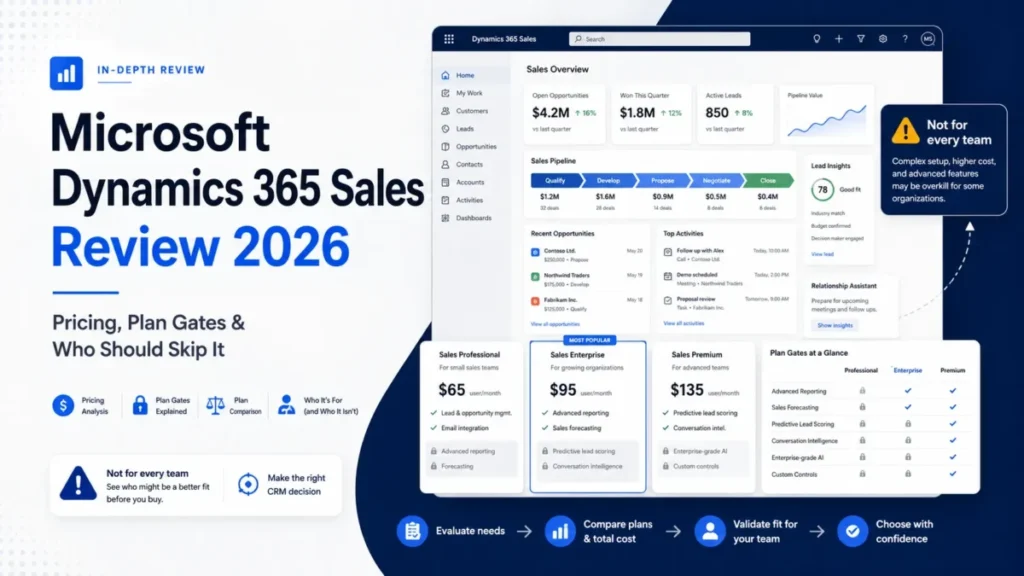
Microsoft Dynamics 365 Sales makes sense almost exclusively inside Microsoft-standardized IT environments, where licensing and identity already favor it. The full Microsoft Dynamics 365 Sales review weighs it against both CRMs compared here.
Freshsales competes directly on Zoho’s value turf and deserves a look when the Zoho suite holds no pull for you. Our Freshsales evaluation breaks down its plan gates and limits.
Final Verdict: Which CRM Wins for Your Team?
There is no universal winner between Zoho CRM and Salesforce, and any comparison that names one is selling something. There is a clear winner per scenario.
| Your situation | Verdict | Deciding factor | Caveat |
|---|---|---|---|
| 1-3 people, free pipeline | Zoho CRM Free | Verified 3-user free edition | Salesforce Free Suite exists; verify its caps first |
| 5-20 person budget-conscious sales team | Zoho CRM Standard or Professional | $840-$6,900/ | Watch mass-email and webhook ceilings |
| Company standardized on Zoho apps | Zoho CRM | First-party suite integration | Confirm edition gates for needed features |
| Mature, cost-sensitive team with complex automation | Zoho CRM Enterprise | $40/ | Check API and module limits against forecast usage |
| Integration-heavy RevOps with dedicated admins | Salesforce Enterprise | API headroom and ecosystem depth | Budget 30% Premier support and add-ons honestly |
| Regulated enterprise with release controls | Salesforce Unlimited | Full sandbox and governance tooling | $350/ |
| Global AI-and-data consolidation program | Agentforce 1 Sales | Bundled AI, data credits, Slack, planning, incentives | $550/ |
| Simple pipeline, no admin, price-sensitive | Zoho CRM | Total cost of ownership | Salesforce can serve it, but you will pay for unused ceiling |
The renewal question to answer twelve months from now: did the platform capability you paid for get used? If the honest answer on Salesforce is no, you bought Zoho’s workload at four times Zoho’s price, and if Zoho’s documented limits forced workarounds in revenue workflows, you bought a ceiling you already knew about.
FAQ: Zoho CRM vs Salesforce
Which is better, Zoho CRM or Salesforce?
Zoho CRM is better for 3- to 50-person teams that want strong sales automation at $14-$52 per user per month with low administrative overhead. Salesforce is better for integration-heavy, governed enterprises that can fund $175-$550 seats plus support and administration.
The deciding factors are team size, API volume, governance requirements, and whether a dedicated admin exists.
Is Zoho CRM cheaper than Salesforce?
Yes, at every capability-matched tier checked on July 16, 2026. Ten users on Zoho Enterprise cost $4,800 per year against $21,000 on Salesforce Enterprise, license only.
Support widens the gap, since Zoho’s Premium adds 20% while Salesforce’s Premier adds 30% of net license fees. Only unused-capability math ever makes Salesforce the cheaper effective choice.
Does Salesforce have a free plan in 2026?
Yes, and older comparisons saying otherwise are stale. Salesforce’s pricing table lists a Free Suite at $0 per user per month, with a documented cap of five Flow Builder flows per organization.
Other limits on users and storage were not fully verified in this research, so check the live feature table before treating it as a Zoho Free equivalent.
Can Zoho CRM handle enterprise sales teams?
Yes, if the workflow fits inside documented ceilings: 200-500 custom modules, 300-500 fields per module, edition-based API credits, and sandbox access in higher editions. Zoho Ultimate adds migration assistance and custom AI allowances.
Organizations needing complex cross-cloud architecture, massive API volume, or partner-built applications will outgrow those limits and belong on Salesforce.
Which CRM is easier to implement?
Zoho CRM, for standard sales deployments. Its pipelines, workflows, and reports are configurable without specialist staff, and paid editions include Classic support.
Salesforce Starter is simple, but Pro and above reward, and effectively expect, dedicated administration or partner services, which Salesforce itself recommends for complex implementations. Neither vendor’s onboarding help replaces a real implementation owner.
Should I switch from Salesforce to Zoho CRM?
Yes, if your paid Salesforce capability exceeds what your team uses by a full edition and your integrations survive Zoho’s outbound-only, 10-field workflow webhooks. No, unless you have audited data volume against Zoho’s migration caps of 5 GB per file and 25 GB total.
Teams with heavy AppExchange dependencies usually stay.
What are the main disadvantages of Zoho CRM?
The one-edition rule forces every regular user onto the same paid tier, so a few power users can trigger an org-wide upgrade. Workflow webhooks are outbound only with a 10-field transfer cap.
Mass email tops out at 250-2,000 sends per org per day by edition, and team-user licenses cannot own records or run standard reports.
What are the main disadvantages of Salesforce?
Cost compounds: $175 Enterprise seats, 30% Premier support, add-ons from $100-$220 per user, a $25-per-user Web Services API footnote to verify, and annual commitments on Pro and above. The platform also demands administration that lean teams cannot staff, and unused capability is the most common form of Salesforce overspend.
Is Zoho CRM good enough for a 10-person sales team?
Yes, for most 10-person B2B teams. Enterprise at $4,800 per year covers multiple pipelines, territories, functions, journey orchestration, and broad Zia access, with roughly 3,000 individual emails per day of sending capacity.
The exceptions are teams needing bidirectional native webhooks, very high API volume, or formal sandboxed release management from day one.
Can I migrate my data from Salesforce to Zoho CRM?
Yes, through Zoho’s self-service migration tooling or its paid Jumpstart and Enterprise Business Solutions services, with Ultimate including migration assistance. Plan around documented caps: CSV files up to 5 GB, 200 files, 25 GB total, only the first 10 tags per record, and 25-character tag limits.
The documented migration path covers records, not automation logic, so plan to rebuild workflows in Zoho.