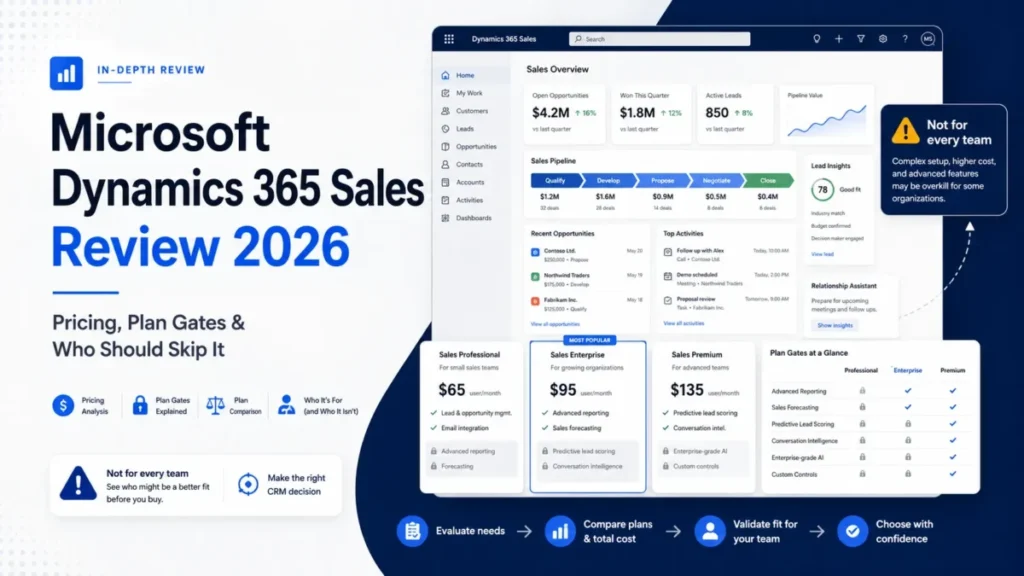
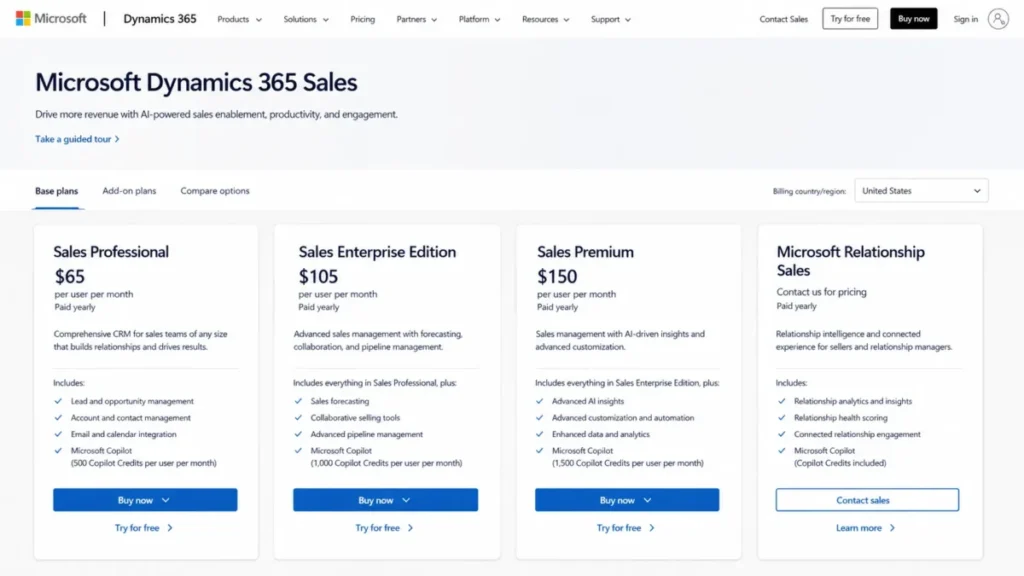
The number that decides this purchase is not the one on Microsoft’s pricing page. Dynamics 365 Sales lists Professional at $65, Enterprise at $105, and Premium at $150 per user per month, all paid yearly, according to Microsoft’s Dynamics 365 Sales pricing page, checked 2026-08-03.
What moves the budget sits elsewhere. Each licensed user carries a 40,000-request daily entitlement, Dataverse storage lists at $40 per GB per month, and Enterprise caps two seller capabilities at 1,500 records a month.
Our verdict up front. Enterprise is the practical default for an established Microsoft 365 organization with an owner for data, security roles, and releases.
Professional is a standardized-pipeline tier, not a cheaper Enterprise. A five-person team with no CRM administrator will do better with a simpler tool from the best CRM software shortlist.
This Microsoft Dynamics 365 Sales review is written for buyers who already know what CRM software does and now have to defend a licensing decision to finance.
In This Article (17 sections)
Quick verdict
| Decision point | Assessment |
|---|---|
| Best for | 25 to 500 sellers inside Microsoft 365, with a RevOps or CRM admin owner |
| Not ideal for | Small teams with no admin capacity, Google Workspace shops, offline-first field teams |
| Starting price | $65 per user/ |
| Practical plan | Sales Enterprise Edition at $105 per user/ |
| Free plan or trial | A free trial is listed on Microsoft’s pricing page; plan-level trial terms are not published there |
| Setup difficulty | High. Licensing, security roles, imports, and integrations each need an owner |
| Main strength | Dataverse extensibility plus native Microsoft 365, Teams, and Power Platform workflows |
| Main limitation | Platform economics sit outside the seat price: requests, storage, credits, and support minimums |
| Best alternative | HubSpot for speed of adoption, Pipedrive for small teams, Salesforce for non-Microsoft stacks |
Source: Microsoft Dynamics 365 Sales pricing and Microsoft Learn product documentation, checked 2026-08-03.
Methodology: How we researched and evaluated Dynamics 365 Sales
This analysis is based on Microsoft’s official US pricing page, Microsoft Learn product and administration documentation, and Power Platform licensing and capacity pages. It also uses the Dynamics 365 support page, the 2026 release wave 1 plan, and labeled reviewer evidence from Gartner Peer Insights, G2, and TrustRadius, with prices and plan limits checked on 2026-08-03 for the US market in US dollars.
Dynamics 365 Sales was assessed against one buyer-focused criteria set: plan gates, documented usage limits, workflow fit for sellers and administrators, platform dependencies, migration mechanics, security administration, support economics, and total annual cost at real seat counts.
Greater weight went to factors that change a purchase decision rather than a feature list: capacity ceilings that force an upgrade, costs that sit outside the seat price, and administrative work that continues after launch. Vendor positioning and affiliate relationships carried no weight.
Claims that could not be traced to an official Microsoft page or an attributed reviewer source were excluded. Seller workflows are reconstructed from Microsoft’s documented steps, states, and prerequisites, and reviewer opinions are labeled by platform and scope.
What Dynamics 365 Sales is built on
Dynamics 365 Sales is a model-driven sales application built on Microsoft Dataverse, covering leads, opportunities, customer relationships, seller activity, and connected Microsoft workflows, per Microsoft Learn’s Dynamics 365 Sales overview.
That architecture is the whole story. Dataverse is a relational platform with its own licensing, storage accounting, request entitlements, and administration model, so buying the CRM means adopting the platform underneath it.
The operating consequence shows up in three places: customization runs through Dataverse and Power Platform rather than a closed CRM configuration screen, automation consumes a licensed request budget, and stored data consumes a licensed capacity pool.
Four commercial packages exist. Professional, Enterprise Edition, and Premium carry public US prices, while Microsoft Relationship Sales is sales-led with a 10-seat minimum and no published amount.
Buying, provisioning, and the first administrative week
Purchase itself is unremarkable for an existing Microsoft 365 customer. An admin opens Billing, then Purchase services in the Microsoft 365 admin center, selects quantity and billing frequency, completes the purchase, and assigns licenses, per Microsoft Learn’s buying guidance for Dynamics 365 Sales.
One exception matters at this step. Microsoft Relationship Sales is not available for direct purchase through that flow, so a LinkedIn-centered rollout starts with a sales conversation rather than a checkout.
Changing plans later is not a toggle. Upgrading a Dynamics 365 Sales license means buying the new subscription, assigning the new license, installing the corresponding app, and removing the previous solution.
Microsoft 365 and Power Platform permissions are required throughout, according to Microsoft’s license upgrade documentation.
We would treat that as a small project rather than a billing change, especially if custom components already sit on the old solution.
Security roles are where the first week gets expensive. Microsoft ships predefined roles for managers, sellers, sequence management, and app access.
Custom security roles do not automatically inherit new permissions that Microsoft later adds to those predefined roles, per the predefined security roles reference.
The maintenance path is manual: compare the custom role against the matching predefined role, add the missing permissions, then reapply your own customizations. Every organization that builds custom roles inherits that chore permanently, and permission errors after a Microsoft update are the usual way teams discover it.
The 30-day and 90-day adoption test. By day 30, licenses are assigned, security roles are mapped to real job functions, and a pilot group is qualifying leads inside the standard process rather than in spreadsheets.
By day 90, three things must be true for the purchase to be working: sequence and scoring volume is measured against the Enterprise caps, Dataverse consumption is trending against the tenant entitlement, and someone owns the monthly permission and solution maintenance. If none of the three has an owner at day 90, the platform is running the team rather than the reverse.
Reconstructed seller workflows
These are the five decision-critical workflows, reconstructed from Microsoft’s documented steps, prerequisites, and outcomes. Each one exposes a constraint that changes either the plan choice or the implementation scope.
Qualifying a lead into pipeline
A seller opens the lead in Sales Hub, completes the qualification fields, and selects Qualify. The lead moves from Open to Closed, and the system creates or associates account, contact, and opportunity records according to how the administrator configured the qualification experience, per Microsoft’s lead qualification documentation.
Two configuration decisions carry governance weight. Duplicate detection can prompt the seller to choose between similar accounts or contacts, and an administrator can allow a single lead to generate up to five opportunities.
The third behavior is the one buyers miss. If no opportunity is created, the lead can still be qualified, and the business process does not advance.
For a revenue team that reports on stage conversion, that is a reporting hole waiting to open. We would decide the qualification policy, duplicate rules, and whether zero-opportunity qualification is permitted before the first seller touches the system.
Building and progressing an opportunity
Opportunities follow Qualify, Develop, Propose, and Close stages, carrying customer, revenue, timeline, products, and stage history, per Microsoft’s opportunity documentation.
One documented constraint deserves a place in your data-quality rules: once line items exist on an opportunity, the currency cannot be changed unless those line items are removed.
Multi-currency teams feel that immediately. A deal desk correcting a currency error after products were added has to strip the line items first, which is exactly the kind of friction that pushes sellers back into spreadsheets.
Turning on sequences, scoring, and conversation intelligence
Digital selling capabilities are configured from Sales Hub by changing the area to App Settings, opening Overview, selecting the capability, and running Quick setup, per Microsoft’s digital selling documentation.
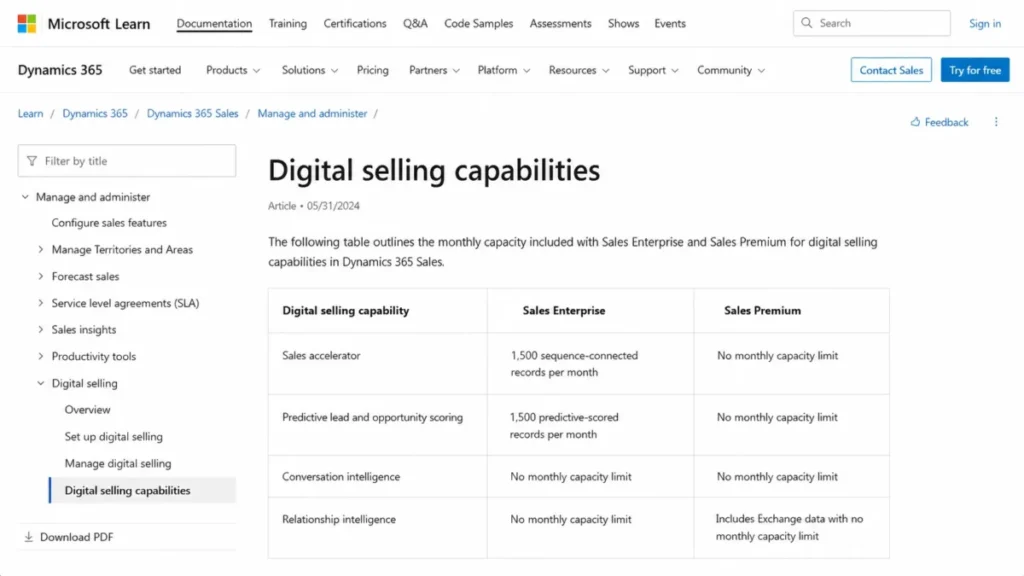
The capacity numbers on that page are the most important licensing facts in this review. Sales Enterprise allows 1,500 sequence-connected records per month in Sales accelerator and predictive lead and opportunity scoring for 1,500 records per month, while Sales Premium carries no monthly capacity limit for either capability.
Predictive scoring is also only as good as the pipeline data feeding it, and the mechanics of lead scoring matter more than the model badge.
Relationship intelligence splits along the same line. Enterprise generates basic insights from Dynamics 365 data, and Premium adds advanced relationship intelligence that also uses Exchange data.
Microsoft’s page states the ceilings without describing what happens at the exact ceiling, so we will not guess whether enrollment queues, skips, or blocks. What we will say is that a team enrolling more than 1,500 records a month needs to size that behavior with Microsoft before signing, because the answer changes the plan.
Importing and validating CRM data
Dataverse offers two documented paths. The preview Excel import experience supports sheet selection, assisted mapping, status notifications, and downloadable error logs, per Microsoft’s import and export documentation.
The mapping screen contains the single most damaging choice in the whole migration. A primary key is required to update existing records, and selecting no primary key inserts every row as a new record.
That is how a routine update run turns into a duplicate cleanup project. We would never run an update import without a stable external ID mapped as the primary key, and we would pilot with 50 to 500 rows before touching production volume.
The wizard path has its own ceiling. Microsoft recommends limiting an Import Data Wizard job to 20,000 rows or fewer.
The maximum file size is 32 MB for ZIP and 8 MB for other supported formats, per the Power Platform data import reference.
Adding LinkedIn Sales Navigator inside the CRM
Embedded LinkedIn Sales Navigator surfaces profiles, mutual connections, decision-makers, and prospect intelligence inside Dynamics 365 Sales. It requires either Microsoft Relationship Sales or LinkedIn Sales Navigator Advanced Plus, per Microsoft’s Sales Navigator integration guidance.
Procurement gets caught here. A Microsoft Relationship Sales subscription alone does not automatically provision the LinkedIn license.
Both the Dynamics 365 and LinkedIn components must be active before controls appear, according to the Sales Navigator installation documentation.
Installation also needs System Administrator access, JavaScript enabled, and pop-up blocking disabled for the Dynamics domain, and on-premises deployments are not supported. A subscription-not-found message during rollout usually traces back to the missing LinkedIn component rather than a broken install.
Plan-by-plan feature gates and upgrade triggers
Microsoft’s comparison table draws two hard lines. The first sits between Professional and Enterprise, the second between Enterprise and Premium.
Professional includes core sales force automation, Microsoft 365 interoperation, reporting, dashboards, and mobile access, and its customization and automation are listed as limited.
It omits custom apps, advanced sales force automation, conversation intelligence, sales engagement, and the Copilot inclusions shown for higher tiers.
Enterprise Edition adds advanced customization, custom apps, advanced sales force automation, included-capacity conversation intelligence and sales engagement, plus Copilot capabilities across Dynamics 365, Outlook, and Teams.
| Capability | Professional | Enterprise | Premium |
|---|---|---|---|
| Core sales force automation | Included | Included | Included |
| Customization and automation | Limited | Advanced | Advanced |
| Custom apps | Not included | Included | Included |
| Conversation intelligence | Not included | Included capacity | Included capacity |
| Sales accelerator sequences | Not included | 1,500 records/ | No monthly cap |
| Predictive lead and opportunity scoring | Not included | 1,500 records/ | No monthly cap |
| Relationship intelligence | Not included | Basic, Dynamics 365 data | Advanced, adds Exchange data |
| Copilot capabilities in Dynamics 365, Outlook, and Teams | Not included | Included | Included |
| Copilot Credits included | None | None | 1,000 per user/ |
| Embedded LinkedIn Sales Navigator | Separate license | Separate license | Separate license |
Sources: Microsoft Dynamics 365 Sales pricing comparison and Microsoft Learn digital selling capabilities, checked 2026-08-03.
Microsoft Relationship Sales sits outside that grid. Microsoft describes it as Sales Enterprise plus LinkedIn Sales Navigator Advanced Plus, under a sales-led price and a 10-seat minimum.
One row on that comparison table is easy to misread. Access to the prebuilt Sales Qualification, Sales Opportunity, and Sales Research agents is listed across Professional, Enterprise, and Premium, but running any agent consumes Copilot Credits, and Premium is the only plan that includes a credit allowance.
So agent access and agent capacity are separate purchases. A Professional or Enterprise team that wants agents in production is buying credits on top of the seat.
Three upgrade triggers follow from that table, and each one has a price attached.
Professional to Enterprise costs $40 per user per month. The trigger is any requirement for custom apps, advanced sales force automation, full customization, conversation intelligence, sales engagement, or Copilot inside Dynamics 365, Outlook, and Teams. For most organizations with a real sales process, this step happens during implementation rather than a year later.
Enterprise to Premium costs $45 per user per month. The trigger is measurable rather than aspirational: sustained monthly volume above 1,500 sequence-connected records or 1,500 predictive-scored records, a need for advanced sales engagement, or a need for Exchange-based relationship intelligence.
Any plan to Relationship Sales is a quote, not a price. The trigger is embedded LinkedIn prospect intelligence, and the entry conditions are a 10-seat minimum plus the dual provisioning described earlier.
We would run the Premium decision off a real number. Count the records your team would enroll in sequences and score in a normal month, then compare that count to 1,500 before anyone signs an Enterprise agreement they will renegotiate in six months.
Copilot, automation, and reporting: what is included and what is metered
Copilot inclusion and Copilot capacity are two different things. Sales Premium includes 1,000 Copilot Credits per user per month, additional credits come through pay-as-you-go or prepaid commit units, and running agents requires an Azure subscription, per Microsoft’s pricing page, checked 2026-08-03.
For scale, Microsoft’s Power Apps and Copilot Studio pricing page lists Copilot Studio at $200 for 25,000 Copilot Credits per month, paid yearly. That works out to $2,400 per year for that offer.
Microsoft does not publish a credit consumption rate for each Sales agent action on the pages used here, so the honest planning position is that Premium’s AI entitlement is metered and workload-dependent rather than unlimited.
Automation carries a second meter, and it is the one that surprises administrators. Every paid Professional, Enterprise, Premium, or Relationship Sales license carries 40,000 Power Platform requests per rolling 24-hour period, per the Power Platform request limits documentation.
Two rules attached to that entitlement change integration architecture. In the base-plus-attach licensing model, an attach license does not add a separate request entitlement, and Microsoft reserves the right to enforce overages through throttling, with each request-capacity add-on raising the limit by 50,000 requests per 24 hours.
The monitoring picture is incomplete on purpose. The downloadable request reports are in preview and currently exclude Dataverse, Power Apps, and Copilot Studio requests, checked 2026-08-03, which means an administrator cannot reconcile the full 40,000-request entitlement from that report alone.
That gap is a governance workstream, not a footnote. A team building heavy Power Automate flows, nightly ERP syncs, and enrichment integrations has to size request consumption from design documents rather than from a dashboard that shows the whole picture.
If AI capability is the reason this purchase is on the table at all, compare the metered model against the wider AI CRM software field before committing to a tier.
Reporting follows the same pattern as customization. Excel export and Power BI-oriented advanced analytics appear in the pricing description across plans, so the reporting ceiling depends on Power BI skills and data modeling rather than on the CRM screen itself.
Dynamics 365 Sales pricing and true cost
| Plan | List price per user/ | Annual per user | Commitment |
|---|---|---|---|
| Sales Professional | $65 | $780 | Paid yearly |
| Sales Enterprise Edition | $105 | $1,260 | Paid yearly |
| Sales Premium | $150 | $1,800 | Paid yearly |
| Microsoft Relationship Sales | Sales-led, no public price | Not published | 10-seat minimum |
Source: Microsoft Dynamics 365 Sales pricing, US, checked 2026-08-03. Annual figures are list price multiplied by 12 and exclude tax, add-ons, and services.
The prices are presented as monthly per-user amounts, and all three public plans require annual payment. If your finance team wants month-to-month CRM spend, confirm that separately with Microsoft, because the public page prices the annual commitment.
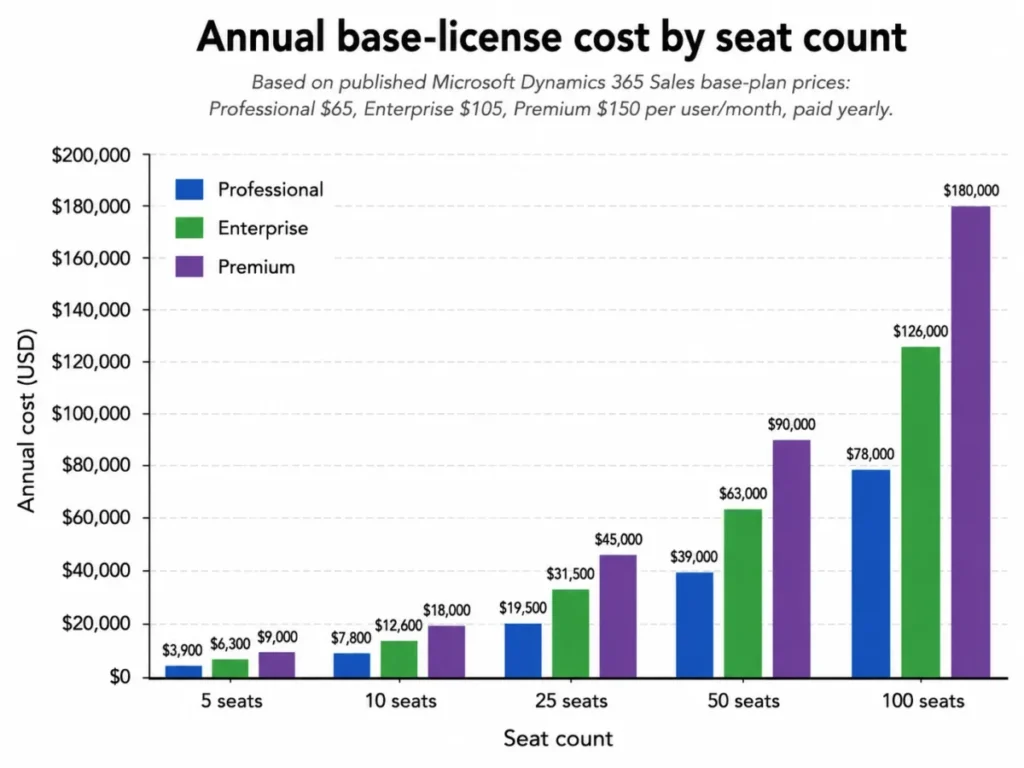
Here is the base-license math at real seat counts.
| Seats | Professional per year | Enterprise per year | Premium per year |
|---|---|---|---|
| 5 | $3,900 | $6,300 | $9,000 |
| 10 | $7,800 | $12,600 | $18,000 |
| 25 | $19,500 | $31,500 | $45,000 |
| 50 | $39,000 | $63,000 | $90,000 |
| 100 | $78,000 | $126,000 | $180,000 |
Source: calculated from Microsoft’s list prices, checked 2026-08-03. Formula: monthly list price multiplied by 12 multiplied by seat count.
Excludes tax, implementation, partner services, Power Apps, Power Automate, Azure, Microsoft 365 and Teams prerequisites, Copilot overage, LinkedIn, support, storage, migration, and training.
The budget pressure points. Four published costs sit outside that table, and any of them can outrun the plan-price difference.
Dataverse Database Capacity lists at $40 per GB per month, paid yearly, which is $480 per GB per year. A tenant that needs an extra 100 GB is looking at $48,000 per year on that line alone, which exceeds the gap between Enterprise and Premium for a 50-seat team.
Power Apps Premium lists at $20 per user per month, paid yearly, including 250 MB of database and 2 GB of file entitlement per assigned user.
This is not a maybe. Microsoft’s own comparison-table footnotes state that customization and automation run through Power Automate and that custom apps run through Power Apps, and that both require additional licenses, checked 2026-08-03.
Professional Direct Support lists at $9 per user per month, paid yearly, with a 20-user minimum and English-only availability, per Microsoft’s Dynamics 365 support page. The unit price understates the entry cost: the published minimum works out to $2,160 per year even for a team of eight.
Copilot credit overage and Power Platform request add-ons are the fourth line. Microsoft publishes the add-on increment of 50,000 requests per 24 hours without a public price on the page used here, so we would get that number in writing before designing an integration-heavy build.
The renewal question. Before renewal, your team must be able to answer one thing: what did Dataverse consumption, request consumption, and Copilot credit consumption do over twelve months? A CRM that renews without those three numbers is renewing blind.
Limitations and hidden costs
These are the constraints we would put in front of an approval committee, each one traced to Microsoft’s own documentation.
Storage overage blocks administration, not just billing. Dataverse warns administrators below 15 percent remaining capacity and warns of admin impact below 5 percent. While a tenant sits in storage overage, environment creation, copy, restore, trial conversion, recovery, and adding a database are blocked.
Microsoft also reserves the right to suspend the service after reasonable notice, per the Dataverse capacity documentation.
That turns a storage problem into a release and disaster-recovery problem. A team that cannot copy or restore an environment cannot safely ship a customization or rehearse a recovery.
There is a bridge, and it is explicitly temporary. A tenant can extend Dataverse storage by 25 percent for 45 days, with a maximum of three extensions, while it procures permanent capacity, per Microsoft’s capacity extension documentation.
Mobile offline does not preserve the full sales process. Offline access requires an administrator-assigned offline profile, and business process flows do not work offline.
Lookup fields can reference only downloaded records, and several opportunity-related actions and views are unavailable offline, per Microsoft’s online and offline actions reference.
Read that against a field-sales pitch carefully. If your process is enforced through business process flows, the offline experience is not the same product your desk-based sellers use.
The mobile app has deployment exclusions. The Dynamics 365 Sales mobile app is designed for field sellers. It is not supported in China, in government or sovereign cloud deployments, or in Customer Engagement on-premises, per Microsoft’s mobile app overview.
Custom security roles drift. As covered earlier, new permissions Microsoft adds to predefined roles do not flow into your custom roles, so permission maintenance is a standing task rather than a one-time configuration.
Currency locks after line items. The opportunity currency cannot be changed once line items exist unless those line items are removed, which matters for multi-currency teams and for migration mapping.
Release-plan features are not all shipped. The 2026 release wave 1 plan covers features scheduled from April through September 2026 and is updated as plans change, per the release wave 1 overview.
Treat anything on that plan as a roadmap item to verify, not a capability you are buying at signature, checked 2026-08-03.
Integrations, security, and support
Microsoft ecosystem integration is the genuine differentiator. Dynamics 365 and Microsoft Teams integration supports collaboration around Dynamics records and Teams communication from connected workflows, per Microsoft’s Teams integration overview.
That is worth real money in adoption terms if your sellers already live in Outlook and Teams. It is worth close to nothing if they live in Gmail and Slack, and a Google-first organization is paying for a connection it will not use.
The Microsoft Teams review covers that collaboration layer in its own right.
Stack-fit map. Before signing, confirm what has to connect: Microsoft 365 identity and mail, Teams, SharePoint or OneDrive for documents, Power Automate for routing, Power BI for reporting, your ERP or billing system, and whatever sales engagement tooling the team already uses. Each connection outside Microsoft’s own walls consumes request budget and needs an owner.
On security, three documented controls matter to a buying committee. Dataverse auditing can log customer-record changes and app or SDK access.
Customer Lockbox applies to managed environments and lets customers approve or reject rare Microsoft engineer data-access requests, per Microsoft’s Power Platform compliance documentation.
Dynamics 365 customer engagement apps use SQL Server cell-level encryption for designated sensitive columns by default, and the feature cannot be turned off, per Microsoft’s column-level encryption documentation.
Microsoft includes Dynamics 365 within its SOC 2 Type 2 compliance scope, per Microsoft’s SOC 2 Type 2 offering page. Read that as a Microsoft service-scope assurance rather than a guarantee that your specific configuration meets your own compliance obligations, because customer configuration sits outside that scope.
Support economics deserve their own line in the budget. Standard support is included with any Dynamics 365 purchase and is positioned for simple environments or customers working with a full-service partner.
Microsoft publishes initial response targets of under four hours for Standard Severity B and under two hours for Professional Direct or Unified.
For Severity C the targets are under eight hours on Standard and under four hours on Professional Direct or Unified, per Microsoft’s support overview.
For a production revenue system, a four-hour first response on a Severity B issue is the number to argue about internally. The upgrade costs $9 per user per month with the 20-user minimum, so the calculation is whether $2,160 per year buys enough response-time improvement for your risk profile.
Migration and implementation risk
Small, staged imports are a wizard job. Anything with history, relationships, automation, or coexistence is a data and integration program, and Microsoft’s own reference architecture makes that plain.
Microsoft’s phased migration guidance requires full synchronization for uninterrupted coexistence. It names Power Automate, Dataverse, Azure Functions, Data Lake, Synapse, Service Bus, Application Insights, managed identities, Key Vault, and Azure SQL as components, per Microsoft’s Dynamics 365 Sales migration considerations.
Read that component list as a staffing requirement. A migration that touches two live opportunity systems needs technical program management, not a data analyst with a CSV file.
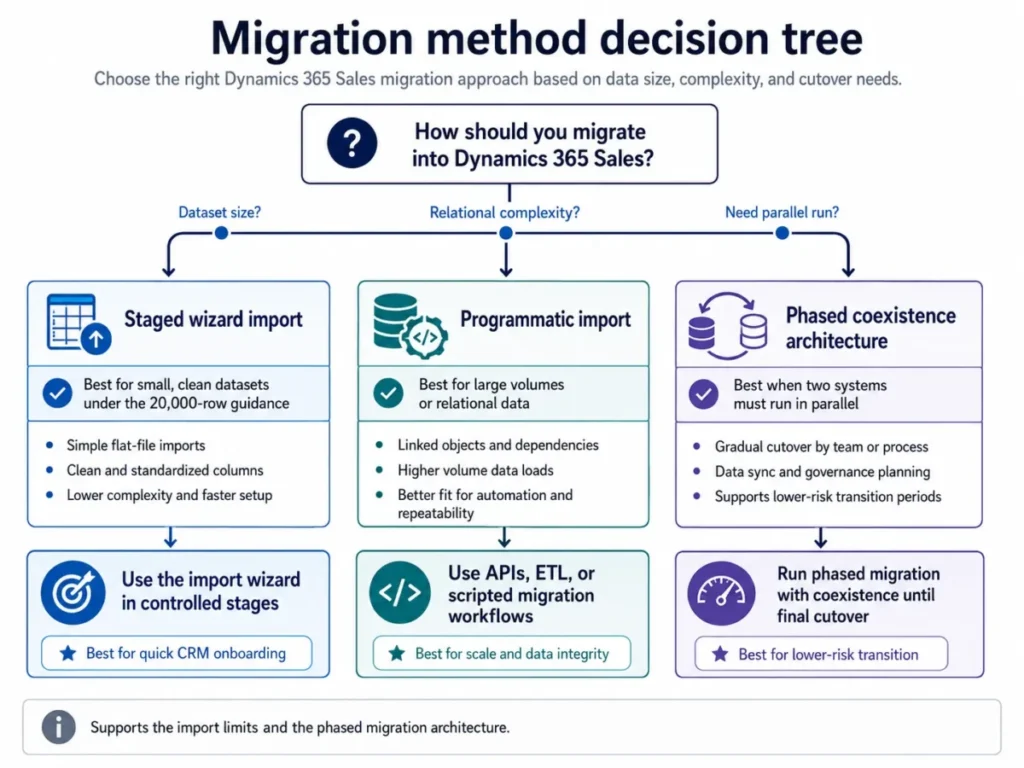
What breaks first in a migration. Duplicates created by an import that ran without a primary key, lookups that fail because related records were not loaded in the right order, and activity history that arrives without the relationships that made it useful.
Microsoft’s documentation covers its own import framework, including notes and attachments, but it does not establish object-by-object fidelity from Salesforce, HubSpot, or any other specific source system. Build a source-object inventory and run a pilot extraction before anyone commits to a cutover date, and use a structured CRM migration plan rather than a single import weekend.
Implementation cost is the number we refuse to invent. Microsoft publishes no universal implementation price, so ask two or three certified partners to scope against a defined list of data objects, integrations, customizations, environments, and training, then compare.
The CRM implementation guide covers how to structure that scoping conversation.
Pros and cons
| Pros | Cons |
|---|---|
| Native Microsoft 365, Outlook, and Teams workflows for sellers who already work there | Platform economics sit outside the seat price: requests, storage, and credits are all metered |
| Dataverse extensibility with custom apps and advanced automation from Enterprise up | Enterprise caps sequences and predictive scoring at 1,500 records per month each |
| Published, quantified capacity limits that let a buyer size a plan before signing | Custom security roles do not inherit new Microsoft permissions and need manual upkeep |
| Documented security controls: default cell-level encryption, auditing, Customer Lockbox | Mobile offline drops business process flows and several opportunity actions |
| Clear upgrade economics: $40 to Enterprise, $45 to Premium, per user per month | Faster support carries a 20-user minimum, or $2,160 per year at the published rate |
| Microsoft’s own phased-migration architecture is published rather than left to a partner | Storage overage blocks environment create, copy, restore, and recovery operations |
Sources: Microsoft Dynamics 365 Sales pricing, Microsoft Learn documentation, and Power Platform administration documentation, checked 2026-08-03.
Who should use Dynamics 365 Sales
A 25 to 150 seller organization already standardized on Microsoft 365. Teams and Outlook are the daily surface, a RevOps or CRM admin exists, forecasting and customization are real requirements, and monthly sequence and scoring volume sits below 1,500 records. Enterprise at $105 per user per month is the fit, and the CRM for sales teams criteria apply on top.
A 50 to 500 seller complex B2B organization. Territory management, advanced forecasting, custom apps, governed security, and phased migration are all on the requirements list. Start at Enterprise, then size the two capacity ceilings before deciding whether Premium is a launch requirement or a year-two decision.
A high-volume SDR or account-based team. Sequence enrollment or predictive scoring above 1,500 records a month puts this team past the Enterprise ceiling.
Premium at $150 per user per month is the honest starting point here rather than an upsell, and the same applies when advanced sales engagement or Exchange-based relationship intelligence is a requirement.
A standardized 10 to 30 seller team. Lead-to-invoice CRM, Microsoft 365 connection, reporting, and mobile access without advanced customization or the Copilot plan inclusions. Professional at $65 per user per month works, provided nobody expects custom apps later.
An enterprise prospecting team built around LinkedIn. Embedded profiles and relationship intelligence justify Microsoft Relationship Sales, as long as procurement accepts custom pricing, the 10-seat minimum, and the dual provisioning step.
Who should avoid Dynamics 365 Sales
A five-person sales team with no CRM administrator. The security-role maintenance, migration mechanics, and platform dependencies cost more attention than a small team has to give.
A simpler option from the best CRM for small business category wins on time to value at that size.
A team that needs full offline parity in the field. Business process flows do not run offline, and several opportunity actions and views are unavailable, so an enforced process breaks the moment connectivity does.
A data-heavy organization unwilling to model Dataverse capacity first. At $480 per GB per year, attachments, audit logs, and analytics tables become a budget line and an operational risk rather than an afterthought.
An automation-heavy organization that will not govern request consumption. The 40,000-request daily entitlement, the throttling clause, and the incomplete usage reporting together mean integration volume has to be designed rather than discovered.
A buyer expecting Relationship Sales to self-provision LinkedIn. Both license components must be active, and on-premises deployments are excluded outright.
A buyer who needs public month-to-month pricing. The published US prices are paid yearly, so a monthly commitment is a negotiation rather than a checkout option.
Alternatives and buyer tradeoffs
| Alternative | Choose it if | Tradeoff against Dynamics 365 Sales |
|---|---|---|
| HubSpot | Adoption speed and low admin overhead matter more than customization depth | Less platform-level extensibility and no Dataverse-style data layer |
| Salesforce | Your stack is not Microsoft-centric, or ecosystem breadth is the deciding factor | You give up the native Outlook and Teams workflow that justifies Dynamics |
| Pipedrive | A small team needs straightforward pipeline management without a dedicated admin | Limited depth for complex processes, governance, and multi-entity reporting |
| Zoho CRM | Budget is the binding constraint and Microsoft integration is not strategic | Weaker fit for a Microsoft-standardized organization |
Each of those tradeoffs is covered in depth in the HubSpot CRM review, the Salesforce CRM review, the Pipedrive review, and the Zoho CRM review.
Competitor pricing and feature gates are outside the evidence set used for this review, so verify each alternative against its own official pricing page before comparing totals.
Switch or stay. Switch to Dynamics 365 Sales when Microsoft 365 is already the standard, an admin owner exists, and process governance is the reason for the purchase. Stay where you are when the current CRM is adopted and the only complaint is feature envy, because the migration and administration cost will exceed the gain.
Delay the decision when nobody can yet state your monthly sequence volume, your Dataverse footprint, or your request consumption, since those three numbers pick the plan for you.
Final verdict: Who should buy Dynamics 365 Sales in 2026
Dynamics 365 Sales earns its price as a governed Microsoft-stack sales platform with real extensibility and documented AI capacity. It does not earn its price as plug-and-play CRM, and the evidence points the same direction reviewers do.
Gartner Peer Insights reviewers praise customization, reporting, Microsoft-service integration, and scalability while qualifying licensing complexity and the learning curve for advanced configuration. TrustRadius reviewers across the broader Dynamics 365 product family repeatedly raise setup complexity, licensing cost, navigation, and legacy-integration friction alongside praise for Microsoft 365 integration and reporting, though that corpus is not isolated to the Sales application.
G2 review excerpts commonly praise Microsoft ecosystem integration and predictive sales capabilities, with individual criticisms that read as single-reviewer issues rather than universal defects.
Our recommendation by buyer type. Choose Enterprise at $105 per user per month if you are an established Microsoft 365 organization with an admin owner and monthly sequence and scoring volume under 1,500 records.
Choose Premium at $150 per user per month if that volume is already above the caps, or if advanced sales engagement and Exchange-based relationship intelligence are requirements rather than nice-to-haves.
Choose Professional at $65 per user per month only if your process is standardized and will stay that way, since custom apps and advanced automation are not available at that tier.
Upgrade from Enterprise to Premium once measured monthly volume crosses either 1,500-record ceiling, and not before, because that is the only Premium trigger the documentation quantifies.
Choose something else entirely if you have fewer than ten sellers, no administrator, and no Microsoft dependency. The platform will cost you more in attention than it returns in control.
Frequently asked questions
These answers cover the licensing, capacity, and migration questions buyers raise most often during a Dynamics 365 Sales evaluation.
How much does Dynamics 365 Sales cost per user?
Microsoft lists Sales Professional at $65, Sales Enterprise Edition at $105, and Sales Premium at $150 per user per month, all paid yearly, checked 2026-08-03 for the US market. Microsoft Relationship Sales is sales-led with a 10-seat minimum and no published amount.
Annual base-license cost works out to $780, $1,260, and $1,800 per user before any add-ons.
What is the difference between Sales Professional, Enterprise, and Premium?
Professional covers core sales force automation with limited customization and no custom apps. Enterprise adds advanced customization, custom apps, advanced sales force automation, included-capacity conversation intelligence and sales engagement, and Copilot across Dynamics 365, Outlook, and Teams.
Premium removes the 1,500-record monthly ceilings on sequences and predictive scoring, adds advanced relationship intelligence using Exchange data, and includes 1,000 Copilot Credits per user per month.
What are the real limits of Dynamics 365 Sales Enterprise?
Two published ceilings define the tier: 1,500 sequence-connected records per month in Sales accelerator and predictive scoring for 1,500 records per month. Both are documented on Microsoft’s digital selling page, and Premium carries no monthly cap for either.
Microsoft does not describe behavior at the exact ceiling, so confirm that with Microsoft before you plan around it.
Does Dynamics 365 Sales include Copilot without extra cost?
Copilot capabilities are included from Enterprise up, and Premium includes 1,000 Copilot Credits per user per month. Additional consumption runs through pay-as-you-go or prepaid commit units, and running agents requires an Azure subscription.
The included credits are a metered pool, not an unlimited AI entitlement.
What hidden costs should I budget beyond the license?
Four published lines sit outside the seat price. They are Dataverse Database Capacity at $40 per GB per month, Power Apps Premium at $20 per user per month, Professional Direct Support at $9 per user per month with a 20-user minimum, and Copilot credit overage.
Power Platform request-capacity add-ons raise the limit by 50,000 requests per 24 hours, and the price for that add-on is not published on Microsoft’s limits page.
How many API and automation requests does a Sales license include?
Each paid Professional, Enterprise, Premium, or Relationship Sales license carries 40,000 Power Platform requests per rolling 24-hour period. An attach license adds no separate entitlement, Microsoft reserves the right to throttle overages, and the downloadable usage reports are in preview and exclude Dataverse, Power Apps, and Copilot Studio requests.
Does Dynamics 365 Sales work offline for field sellers?
Partially. Mobile offline requires an administrator-assigned offline profile, business process flows do not work offline, lookup fields can reference only downloaded records, and several opportunity-related actions and views are unavailable.
The Sales mobile app is also unsupported in China, in government and sovereign cloud deployments, and in Customer Engagement on-premises.
Can I migrate 100,000 contacts and activity history with the built-in import?
Not in one job. Microsoft recommends limiting an Import Data Wizard job to 20,000 rows or fewer, with a 32 MB maximum for ZIP files and 8 MB for other supported formats.
Large or relational migrations move to programmatic import or the phased coexistence architecture Microsoft publishes, which uses Azure Functions, Service Bus, Data Lake, Synapse, and Key Vault among other components.
Does buying Microsoft Relationship Sales automatically give sellers LinkedIn access?
No. The Dynamics 365 and LinkedIn components must both be active, and a Relationship Sales subscription alone does not provision the LinkedIn license.
Installation needs System Administrator access, JavaScript enabled, and pop-up blocking disabled for the Dynamics domain, and on-premises deployments are not supported.
Is Dynamics 365 Sales worth it for a ten-person team?
Only in a narrow case. A ten-seat Professional deployment costs $7,800 per year in base licenses, which is defensible if the team is already inside Microsoft 365 and runs a standardized process.
Without an administrator to own security roles, imports, and platform maintenance, a simpler CRM returns more per dollar at that size.