The AI label on a CRM tells you almost nothing about what the AI will cost to run. Across the ten platforms below, one bills AI inside the seat price, three meter it in credits, one meters it in agent sessions, and one pushes model usage onto a separate token pool.
That is the decision this ranking is built around. Every product here is judged on CRM depth, the plan that opens the AI workflow in practice, how the AI is metered, and what the bill looks like at 5, 25, and 100 seats.
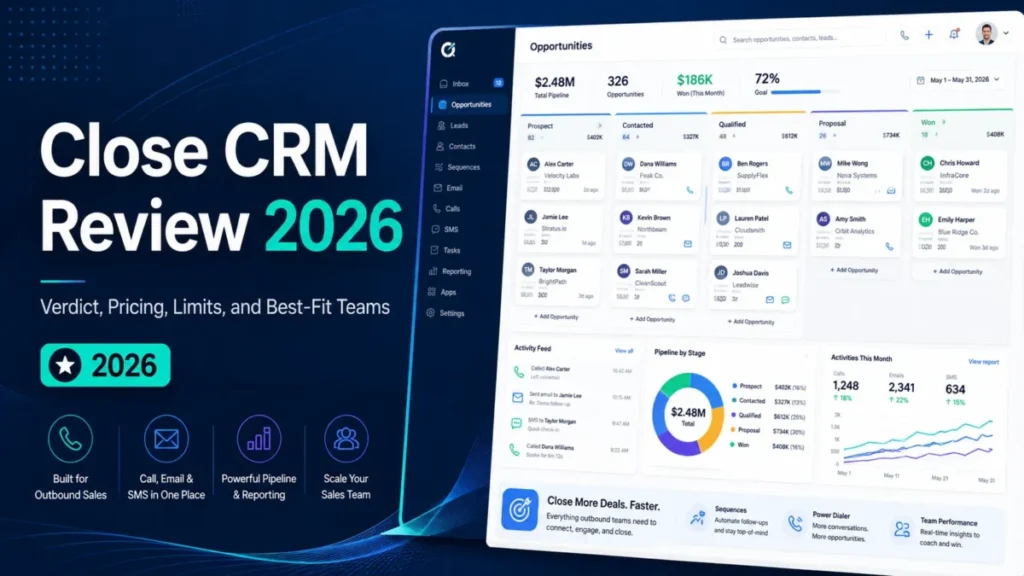
For a 5 to 50 person revenue team that wants marketing, sales, and service data in one place, HubSpot Smart CRM is the strongest all-round starting point.
Zoho CRM is the value pick on seat cost, Salesforce with Agentforce is the enterprise agent platform, and Affinity is the specialist for relationship-led dealmaking.
If you are still scoping the category rather than shortlisting, the broader best CRM software options guide covers the non-AI criteria in more depth.
In This Article (24 sections)
Quick Verdict: Best AI CRM Software by Use Case
| Use case | Best pick | Why it fits |
|---|---|---|
| Strongest all-round choice, 5 to 50 seats | HubSpot Smart CRM | Lifecycle data, native AI assistance, and the widest integration set in one platform |
| Enterprise agentic sales at scale | Salesforce Sales Cloud with Agentforce | Governed agent actions, permission-aware retrieval, and usage monitoring |
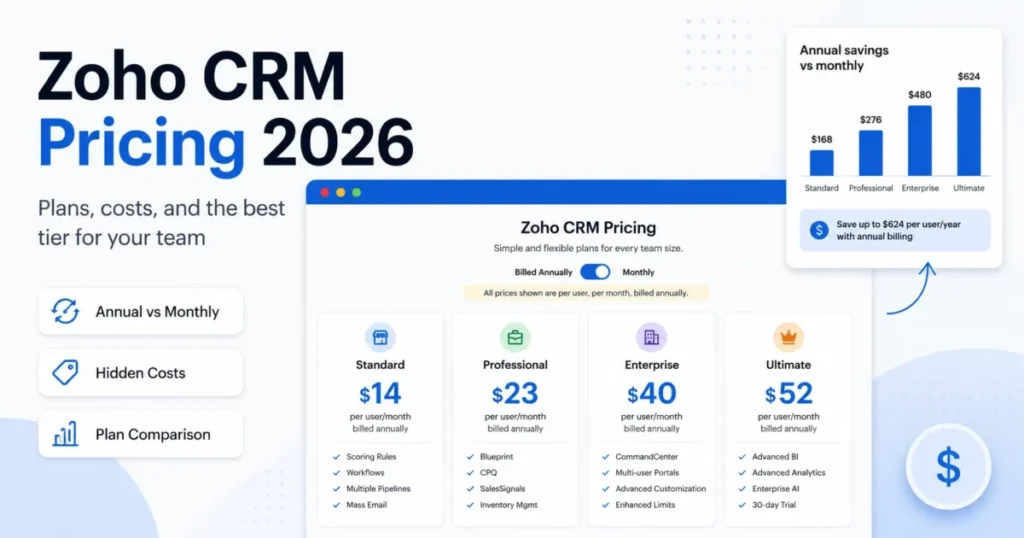
| Lowest cost per AI-capable seat | Zoho CRM | Professional opens AI agents and predictive scoring at the lowest AI-capable seat price here |
| Free plan to start on | Zoho CRM or Attio | Zoho Free covers three users; Attio Free covers three seats |
| Email, calling, and outreach in one workspace | Freshsales | Scoring, deal insight, and sequences sit beside the communication tools |
| Microsoft 365 and Power Platform shops | Microsoft Dynamics 365 Sales | Copilot ships inside Sales Enterprise rather than as an add-on |
| Simple visual pipeline with AI coaching | Pipedrive | Stalled-deal and next-action guidance without an admin program |
| Configurable revenue and delivery work | monday CRM | Agents, Sidekick, and AI fields packaged into the CRM tiers |
| Startup GTM with a custom data model | Attio | Live relationship data queried in natural language |
| Venture capital, private equity, and banking | Affinity | Automatic relationship capture and warm-path mapping |
| No-code process orchestration across departments | Creatio CRM | Sales, marketing, and service workflows designed in one composable platform |
Two picks in that table are specialists, not runners-up. Affinity and Creatio win their rows because of workflow shape, and both are poor value for a conventional pipeline team.
Picks are editorial, built on official US pricing and product evidence checked 2026-07-31. HubSpot, Salesforce, Zoho CRM: HubSpot plan and credit pricing, Salesforce Sales plan pricing, Zoho CRM edition pricing. Freshsales, Dynamics 365, Pipedrive: Freshsales plan and add-on pricing, Dynamics 365 Sales plan pricing, Pipedrive plan and AI gates. monday CRM, Attio, Affinity: monday CRM plans and caps, Attio plans and seat caps, Affinity plans and AI gates. Creatio evidence: the Creatio platform and product licence guide.
Do These Ten AI CRMs Compete for the Same Job?
A ranked list hides a real problem: several of these products do not compete with each other at all. The matrix below maps documented feature scope, not marketing claims.
| Product | Core sales CRM | Marketing and service in-platform | Agentic actions on records | Relationship-graph intelligence | No-code app building |
|---|---|---|---|---|---|
| HubSpot Smart CRM | Yes | Yes | By plan | Limited | By plan |
| Salesforce Sales Cloud with Agentforce | Yes | By plan | Yes | Limited | Yes |
| Zoho CRM | Yes | Yes | By plan | Limited | By plan |
| Freshsales | Yes | Limited | Conditional | No | Limited |
| Microsoft Dynamics 365 Sales | Yes | By plan | Yes | Limited | Yes |
| Pipedrive | Yes | Limited | Limited | No | No |
| monday CRM | Yes | Limited | Yes | No | Yes |
| Attio | Yes | Limited | Conditional | Yes | Limited |
| Affinity | Conditional | No | Conditional | Yes | Limited |
| Creatio CRM | Yes | Yes | Yes | Limited | Yes |
Capability wording is an editorial assessment of documented feature scope, checked 2026-07-31. HubSpot, Salesforce, Zoho CRM: HubSpot Smart CRM, Salesforce Sales Cloud, Zia for Zoho CRM. Freshsales, Dynamics 365, Pipedrive: Freshsales sales product, Dynamics 365 Sales documentation, Pipedrive AI features. monday CRM, Attio, Affinity: monday CRM product page, Attio platform intelligence, Affinity CRM product page. Creatio: Creatio platform overview.
HubSpot, Zoho, Freshsales, Pipedrive, monday CRM, and Attio compete directly for the same mid-market buyer, while Salesforce, Dynamics 365, and Creatio compete on platform depth, and Affinity competes only for relationship-led dealmaking.
How We Chose and Evaluated the Best AI CRM Software
These rankings are based on official US pricing pages, official product pages, vendor help centers, and published plan limits. Pricing, plan gates, and usage limits were checked on 2026-07-31.
Each product was assessed against the same buyer-focused criteria: CRM depth, the practical tier that opens the described AI workflow, how AI usage is metered, governance and action control, migration and data readiness, and adoption burden.
Greater weight was given to factors that move a purchase decision, including the gap between entry price and practical tier, metering units, seat minimums and caps, and the cost of scaling to 100 seats. Brand size and affiliate relationships did not influence the order.
Claims that could not be resolved to an official source were excluded from the analysis, and workflow descriptions are reconstructed from published product documentation. Plan limits absent from a vendor’s own pages are marked undisclosed rather than estimated.
Best AI CRM Software Compared
| Product | Award | Practical AI tier | AI metering unit | First limit that bites | Best-fit cohort |
|---|---|---|---|---|---|
| HubSpot Smart CRM | Top overall pick | Smart CRM Professional, $50 per seat/month | HubSpot Credits | Credit burn on high-volume agent actions | 5 to 50 person revenue teams |
| Salesforce Sales Cloud with Agentforce | Best for Enterprise Agentic Sales | Sales Enterprise plus Agentforce add-on, $300 per user/month combined | Flex Credits or conversations | Credits expire without rolling over | 200-plus reps with admin capacity |
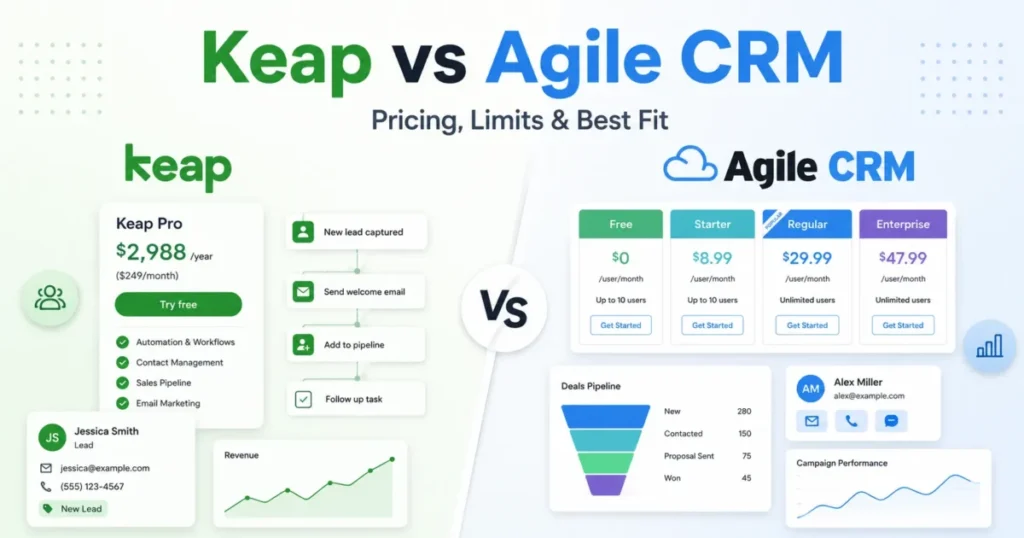
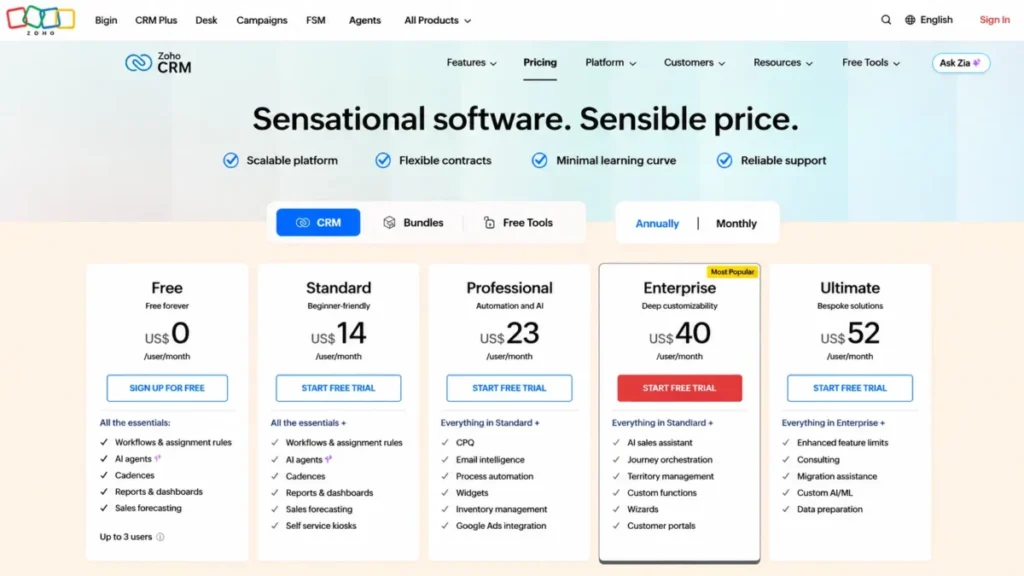
| Zoho CRM | Best Value AI CRM | Professional, $23 per user/month | Hosted model token pool | Broader Zia sits above Professional | 5 to 75 person cost-led sales teams |
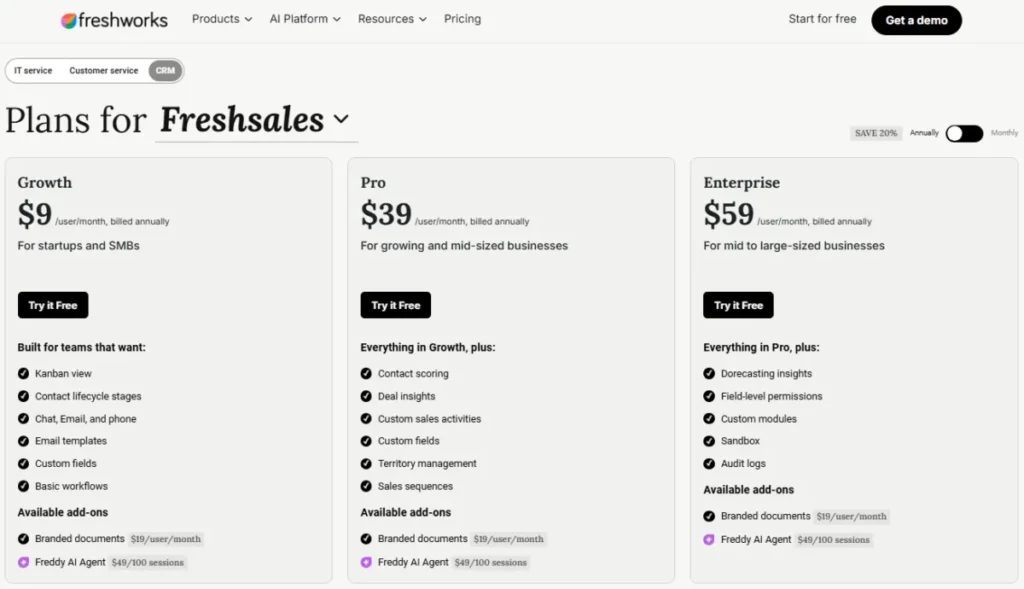
| Freshsales | Best for AI-Assisted Sales Communication | Pro, $39 per user/month | Freddy AI Agent sessions | Forecasting insight needs Enterprise | 10 to 75 rep communication-heavy teams |
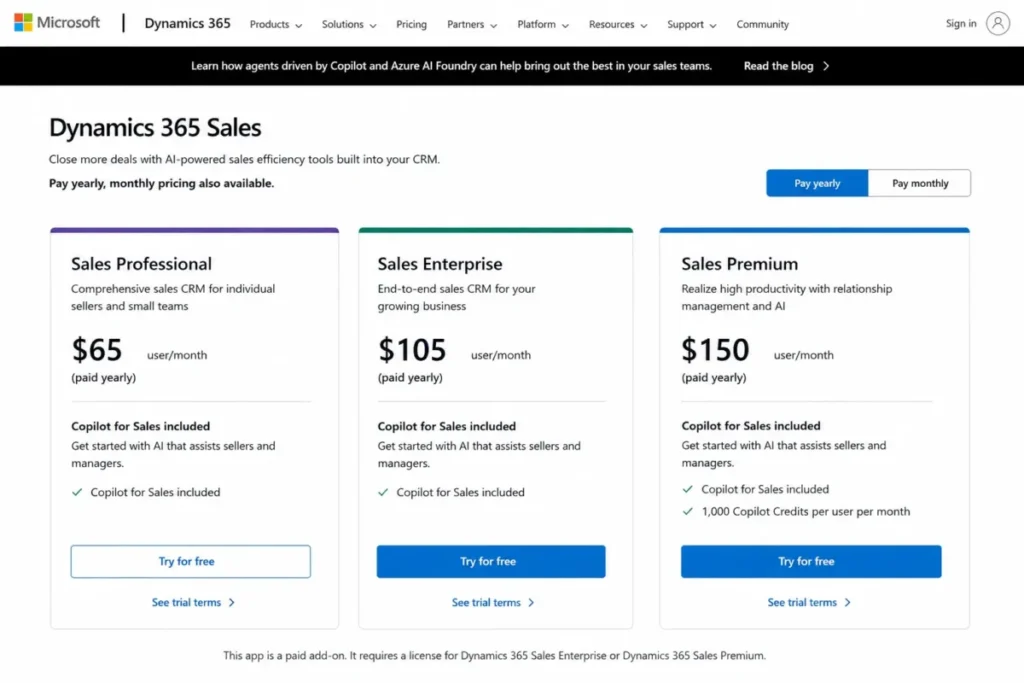
| Microsoft Dynamics 365 Sales | Best for Microsoft-Centric Enterprises | Sales Enterprise, $105 per user/month | Copilot Credits on Premium | Sales Insights needs Premium | 50 to 500 sellers on Microsoft 365 |
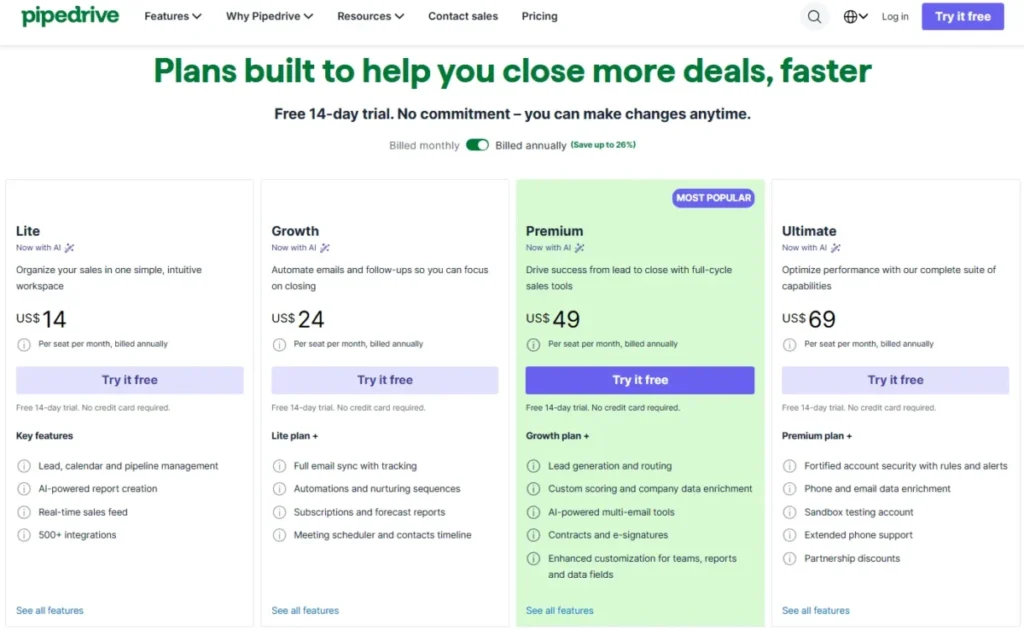
| Pipedrive | Best for Visual Pipeline Coaching | Premium, $59 per seat/month | MCP tokens by plan | AI email tools need Premium | 5 to 40 rep sales-led teams |
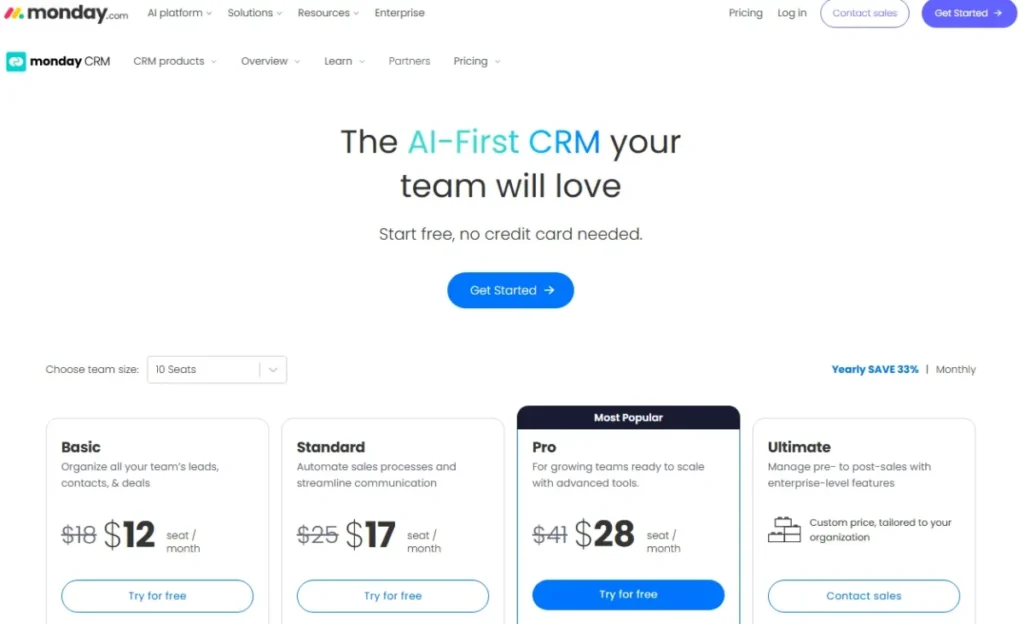
| monday CRM | Best for Flexible Revenue Workflows | Standard, $17 per seat/month | AI credits by plan | 10,000 active contacts and deals on Standard | 5 to 50 person monday.com teams |
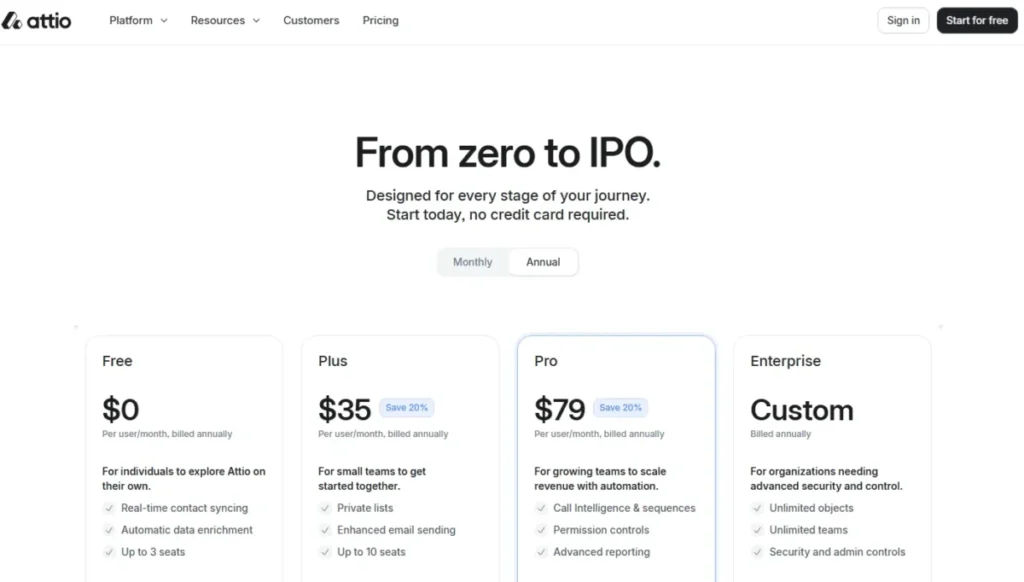
| Attio | Best AI-Native CRM for Startups | Pro, $79 per user/month | Not published | Plus is capped at 10 seats | 3 to 75 person startup GTM teams |
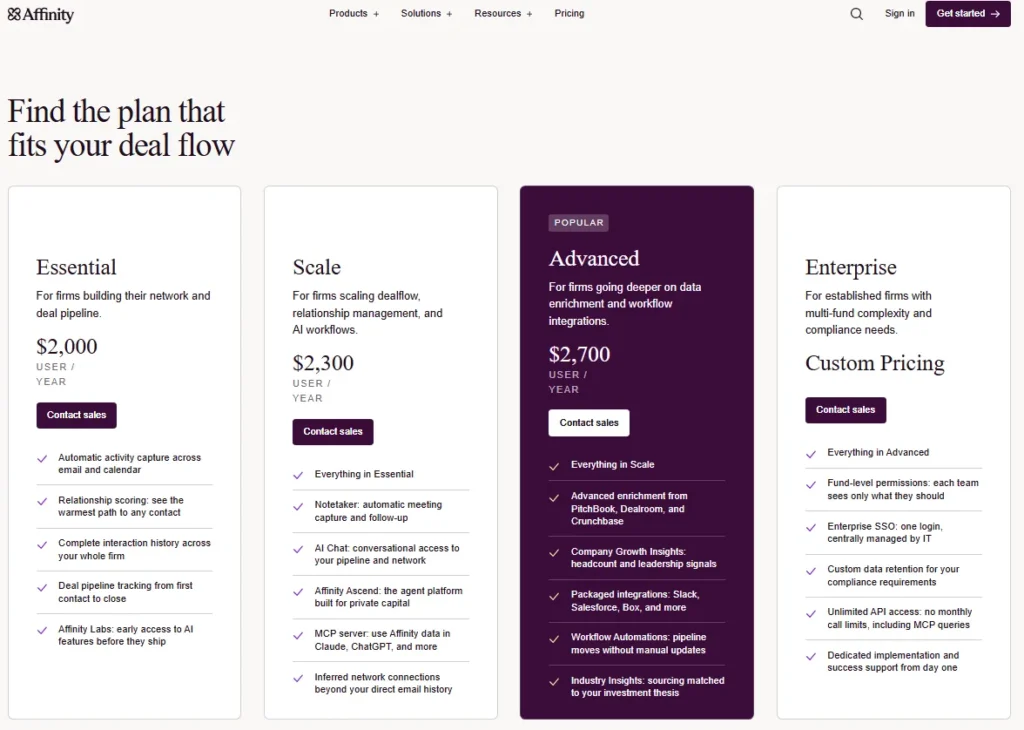
| Affinity | Best for Private Capital Relationship Intelligence | Scale, $2,300 per user/year | API calls per month | 100,000 API calls per month | Venture, private equity, and banking |
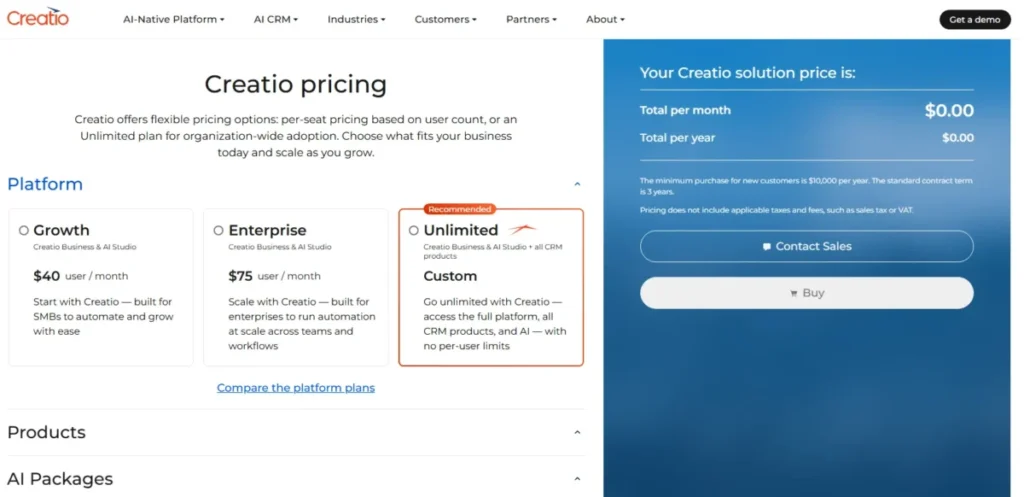
| Creatio CRM | Best for No-Code AI Workflow Orchestration | Growth platform plus Sales product, $55 per user/month | Not published | Platform price excludes the CRM product | 100 to 1,000 user process-led firms |
All plan prices are US list prices checked 2026-07-31. HubSpot, Salesforce, Zoho CRM: HubSpot Sales Hub pricing, Salesforce Sales pricing, Zoho CRM plan pricing. Freshsales, Dynamics 365, Pipedrive: Freshsales plan pricing, Dynamics 365 Sales pricing, Pipedrive plan pricing. monday CRM, Attio, Affinity: monday CRM plan pricing, Attio plan pricing, Affinity plan pricing. Creatio: Creatio CRM pricing guide.
Eight of these ten rows attach a metering unit to the seat price, and the remaining two publish no unit at all. Either way, the seat price is only half of the forecast.
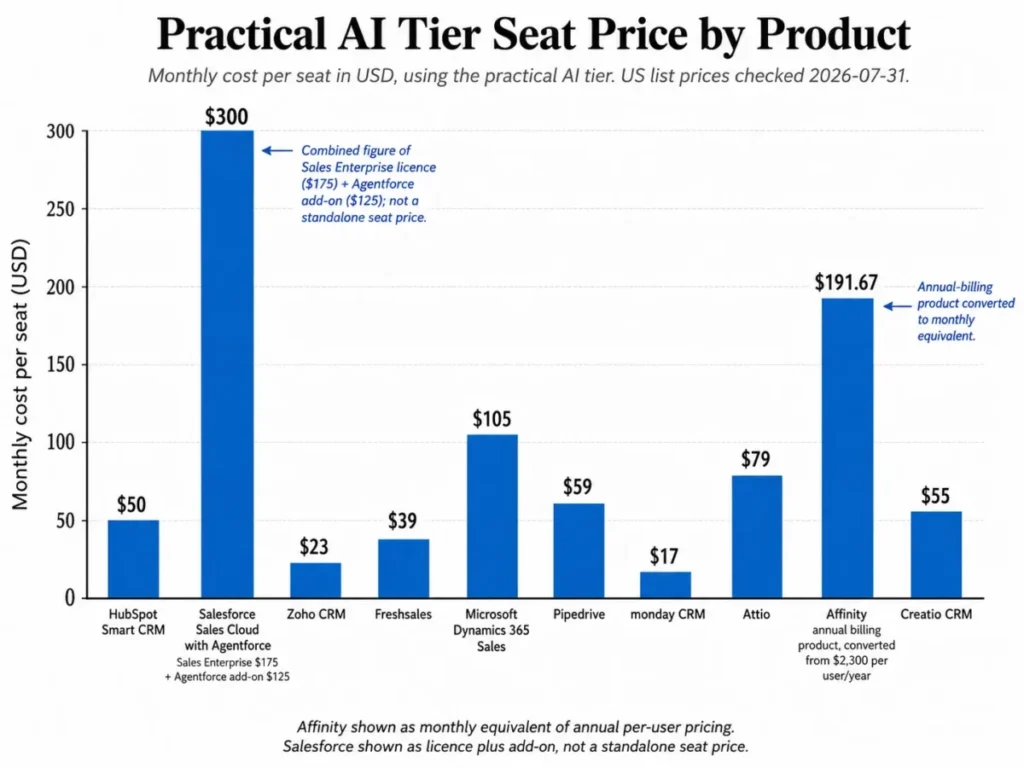
Ranking the same set by practical tier rather than entry tier moves three products several places, which is the point of the chart.
AI Pricing Models and Hidden Costs
Vendors use at least five different units to sell the same capability: seat licences, credits, agent sessions, model tokens, and API calls. None of them convert cleanly into another, so the honest comparison is unit by unit rather than a single blended per-seat number.
| Product | AI included in the seat price | Metered unit | Published unit price | Reset or rollover rule | Documented overflow behavior |
|---|---|---|---|---|---|
| HubSpot Smart CRM | Partly, and edition-gated | HubSpot Credits | $9 per 1,000 credits on annual billing | Not publicly disclosed | Not publicly disclosed |
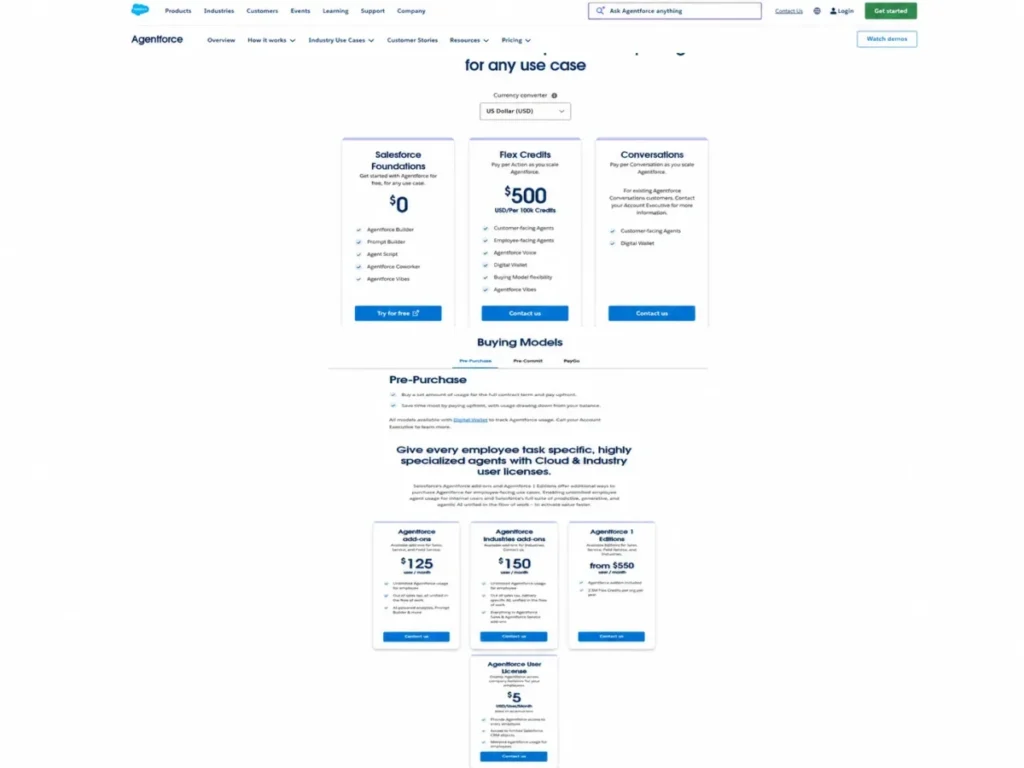
| Salesforce Sales Cloud with Agentforce | No, Agentforce starts at $125 per user/month | Flex Credits or conversations | $500 per 100,000 Flex Credits | Unused Flex Credits do not roll over | Qualifying overages billed monthly in arrears |
| Zoho CRM | Partly, from Professional upward | Hosted model token pool | Not published as a single US rate | Monthly reset | Not publicly disclosed; external models are bring-your-own-key |
| Freshsales | Partly, Freddy AI Agent is separate | Agent sessions | $49 per 100 sessions | Not publicly disclosed | Not publicly disclosed |
| Microsoft Dynamics 365 Sales | Yes on Sales Enterprise | Copilot Credits on Premium | 1,000 credits included with Premium | Not publicly disclosed | Not publicly disclosed |
| Pipedrive | Yes, with plan-based limits | MCP tokens | Not published by plan | Not publicly disclosed | Additional tokens available for purchase |
| monday CRM | Yes, credits included from Standard | AI credits | Not published per agent action | Not publicly disclosed | Not publicly disclosed |
| Attio | Yes, feature access is plan-gated | Not published | Not published | Not publicly disclosed | Not publicly disclosed |
| Affinity | Yes, from the Scale plan | API calls per month | 100,000 calls per month on Scale and Advanced | Monthly allowance | Not publicly disclosed; Enterprise lists unlimited API access |
| Creatio CRM | Yes, inside the platform and product licence | Not published | Not published | Not publicly disclosed | Not publicly disclosed |
Metering units and unit prices were read from official pages on 2026-07-31. HubSpot, Salesforce, Zoho CRM: HubSpot credit pricing, Agentforce credit and conversation pricing, Zia Agents platform pricing. Freshsales, Dynamics 365, Pipedrive: Freddy AI Agent add-on pricing, Copilot inclusion by plan, Pipedrive MCP server. monday CRM, Attio, Affinity: monday CRM AI inclusions, Attio plan feature gates, Affinity API allowances. Creatio: Creatio licence composition.
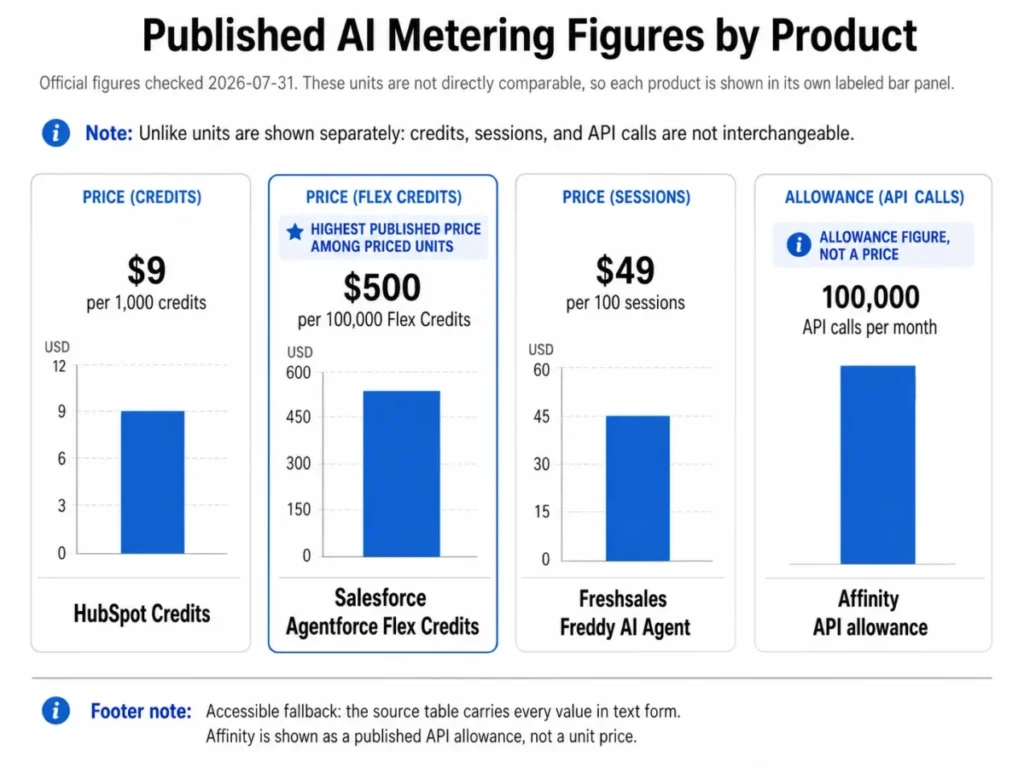
Eight of the ten products in that table publish no overflow rule at all. That is the single largest forecasting risk in this category, because a team can adopt an agent workflow, hit an undisclosed ceiling in month three, and only then discover whether the workflow stops or the invoice grows.
Salesforce is the exception worth studying, because it publishes both the unit and the arithmetic. A $500 pack of 100,000 Flex Credits covers 5,000 standard actions at 20 credits each, or 3,333 whole voice actions at 30 credits each with 10 credits left over.
That arithmetic is editorial, not a vendor quote: 100,000 divided by 20 equals 5,000, and 100,000 divided by 30 equals 3,333 with a remainder. It excludes taxes, negotiated terms, and any conversation-based pricing, and Flex Credits cannot coexist with conversation pricing inside one Salesforce organization.
Native AI, gated AI, metered add-on, or bring-your-own-model
The word “included” hides three different procurement paths, and they carry different approval chains.
- Included in the seat licence: Dynamics 365 Sales Enterprise ships Copilot summaries, meeting preparation, email assistance, and the Sales Close Agent inside the seat price.
- Included but edition-gated: HubSpot, Zoho CRM, Pipedrive, monday CRM, and Attio all place the AI a buyer wants above the entry paid tier.
- Metered add-on on top of a seat licence: Salesforce sells Agentforce from $125 per user/month before credits, and Freshsales sells Freddy AI Agent at $49 per 100 sessions.
- Bring-your-own-model: Zoho lets a buyer connect an external model with their own key, which moves that spend to the model provider and outside the CRM invoice entirely.
Procurement paths were read from official pages on 2026-07-31. Dynamics 365, Salesforce, 2026: Dynamics 365 Sales plan inclusions, Salesforce Agentforce add-on pricing, 2026 packaging update. Freshsales, Zoho CRM: Freshsales add-on pricing, Zia Agents model options.
A finance team can approve a seat licence in one motion. A credit pool that refills on demand needs a spend owner, an alert threshold, and a named person who can turn an agent off.
Pricing Comparison: Starting Price vs Practical Tier
The cheapest plan is rarely the plan that runs the workflow in the product marketing. The table below pairs the entry paid tier with the tier that opens the AI capability described in each product section, then prices ten seats on that practical tier.
| Product | Entry paid tier | Practical AI tier | 10-seat annual cost | Free plan | Hidden costs to budget |
|---|---|---|---|---|---|
| HubSpot Smart CRM | Smart CRM Professional, $50 per seat/month | Smart CRM Professional, $50 per seat/month | $6,000 | Not offered on this plan line | Sales Hub onboarding fees and credit top-ups |
| Salesforce Sales Cloud with Agentforce | Sales Enterprise, $175 per user/month | Enterprise plus Agentforce, $300 per user/month | $36,000 | Not offered | Flex Credits, implementation, success plans |
| Zoho CRM | Professional, $23 per user/month | Professional, $23 per user/month | $2,760 | Yes, up to three users | External model keys billed by the provider |
| Freshsales | Growth, $9 per user/month | Pro, $39 per user/month | $4,680 | Not published on this plan line | Freddy sessions and branded documents |
| Microsoft Dynamics 365 Sales | Sales Professional, $65 per user/month | Sales Enterprise, $105 per user/month | $12,600 | Not offered | Premium upgrade for Sales Insights and credits |
| Pipedrive | Lite, $14 per seat/month | Premium, $59 per seat/month | $7,080 | Not offered | LeadBooster add-on and extra MCP tokens |
| monday CRM | Basic, $12 per seat/month | Standard, $17 per seat/month | $2,040 | Not offered on the CRM plan line | Three-seat minimum and contact caps |
| Attio | Plus, $35 per user/month | Pro, $79 per user/month | $9,480 | Yes, up to three seats | Plus seat cap forces a Pro move at 11 seats |
| Affinity | Essential, $2,000 per user/year | Scale, $2,300 per user/year | $23,000 | Not offered | Complex migration is separately quoted |
| Creatio CRM | Growth platform, $40 per user/month | Growth plus Sales product, $55 per user/month | $6,600 | Not offered | Implementation scope and quoted services |
Entry and practical tiers, from official US pricing pages checked 2026-07-31. HubSpot, Salesforce, Zoho CRM: HubSpot plan prices, Salesforce Sales Cloud plan prices, Zoho CRM edition prices. Freshsales, Dynamics 365, Pipedrive: Freshsales tier prices, Dynamics 365 Sales tier prices, Pipedrive seat prices. monday CRM, Attio, Affinity: monday CRM seat prices, Attio seat prices, Affinity annual seat prices. Creatio: Creatio platform price guide. Each 10-seat figure is arithmetic: practical tier price, times ten seats, times twelve months. Add-ons, onboarding, implementation, taxes, and discounts are excluded.
The spread from cheapest to dearest practical tier is roughly seventeen times on a ten-seat basis, and that gap is not a quality gap. It is a packaging gap between a seat-priced CRM and a licence stack with an agent platform bolted on.
Annual licence cost at 5, 25, and 100 seats. The same practical tier, priced at three realistic team sizes.
| Product | 5 seats | 25 seats | 100 seats | Practical tier used |
|---|---|---|---|---|
| HubSpot Smart CRM | $3,000 | $15,000 | $60,000 | Smart CRM Professional |
| Salesforce Sales Cloud with Agentforce | $18,000 | $90,000 | $360,000 | Sales Enterprise plus Agentforce add-on |
| Zoho CRM | $1,380 | $6,900 | $27,600 | Professional |
| Freshsales | $2,340 | $11,700 | $46,800 | Pro |
| Microsoft Dynamics 365 Sales | $6,300 | $31,500 | $126,000 | Sales Enterprise |
| Pipedrive | $3,540 | $17,700 | $70,800 | Premium |
| monday CRM | $1,020 | $5,100 | $20,400 | Standard |
| Attio | $4,740 | $23,700 | $94,800 | Pro |
| Affinity | $11,500 | $57,500 | $230,000 | Scale |
| Creatio CRM | $3,300 | $16,500 | $66,000 | Growth platform plus Sales product |
Licence-only scenarios from official US pricing pages, checked 2026-07-31. HubSpot, Salesforce, Zoho CRM: Smart CRM Professional seat price, Sales Enterprise and Agentforce add-on prices, Zoho CRM Professional price. Freshsales, Dynamics 365, Pipedrive: Freshsales Pro price, Dynamics 365 Sales Enterprise price, Pipedrive Premium price. monday CRM, Attio, Affinity: monday CRM Standard price, Attio Pro price, Affinity Scale annual price. Creatio: Creatio Growth and Sales licence floor. Formula: practical tier per seat, times seats, times twelve months. Annual-billing vendors use their annual per-user price.
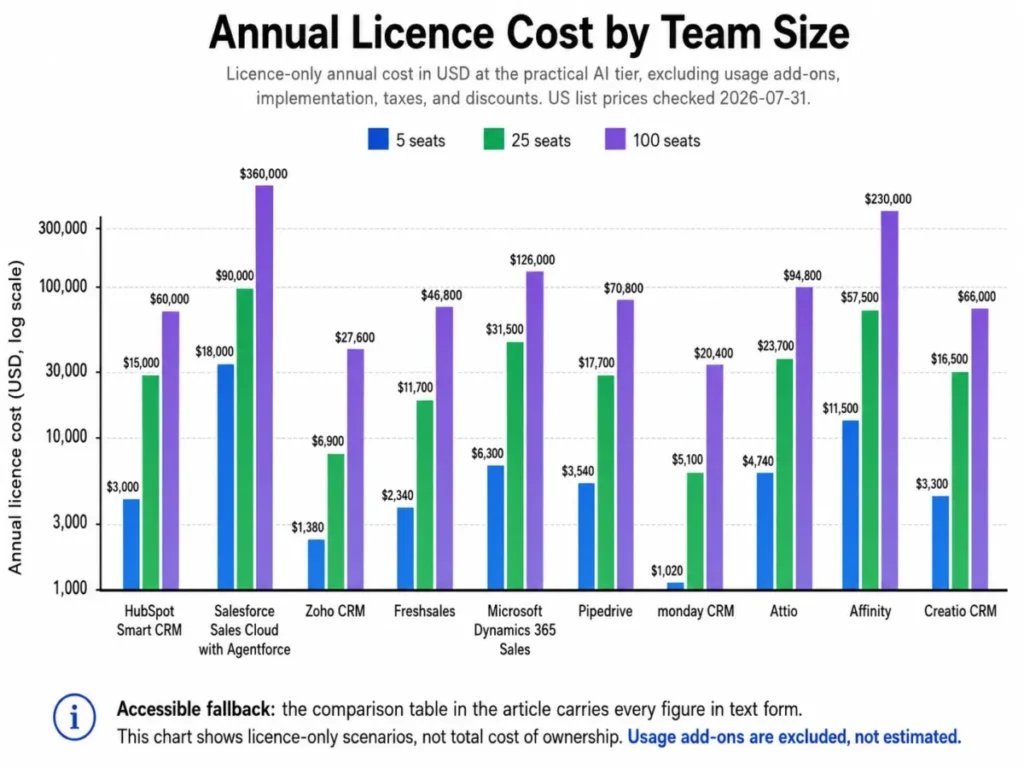
At five seats every product except Salesforce and Affinity sits under $7,000 a year. At one hundred seats the same set spans $20,400 to $360,000, and the ordering barely changes, which means the seat-price decision made in year one is the decision that compounds.
Teams that want the plan-level detail behind these figures can work through HubSpot pricing plans and the Salesforce pricing breakdown before modelling their own seat curve.
Where the AI Stops and a Human Starts
Agent marketing collapses six very different capabilities into one word. The map below labels each product’s documented AI workflow by what the system is permitted to do, using the ordered steps published in each vendor’s own documentation.
| Product | Documented workflow | Highest documented action | Human checkpoint | Governance surface |
|---|---|---|---|---|
| HubSpot Smart CRM | Research and enrich a record with Data Agent | Write, after review | Approve the generated value before saving | Edition permissions and credit balance |
| Salesforce Sales Cloud with Agentforce | Run a governed agent action against sales data | Orchestrate | Approved topics and actions defined in advance | Salesforce permissions and Digital Wallet usage monitoring |
| Zoho CRM | Generate and approve a CRM workflow with Zia | Draft configuration | Inspect and edit before activation | Edition gates and admin role |
| Freshsales | Prioritize a lead and prepare outreach with Freddy | Draft and send | Seller sends or schedules the message | Plan gates and agent session balance |
| Microsoft Dynamics 365 Sales | Prepare for an opportunity meeting with Copilot | Summarize | Seller reviews the briefing and source records | Record-level access and entitlement |
| Pipedrive | Identify a stalled deal with Sales Assistant | Recommend | Seller verifies activity history before acting | Plan gates and change-log entries |
| monday CRM | Qualify and route a lead with agents | Write and orchestrate | Playbook defines qualification rules | Seat, credit, and automation caps |
| Attio | Query live relationship data and operationalize it | Classify and write | Approve output before it lands in a view | Plan-gated permission controls |
| Affinity | Find a warm path into a target company | Summarize and recommend | Deal team coordinates the introduction | Privacy permissions on captured activity |
| Creatio CRM | Design an AI-assisted sales process in no-code tools | Orchestrate | Test in a controlled environment before publishing | Roles, approvals, and process governance |
Workflows are reconstructed from official product and documentation pages checked 2026-07-31. HubSpot, Salesforce, Zoho CRM: HubSpot Smart CRM documentation, Agentforce action and usage terms, Zia capability documentation. Freshsales, Dynamics 365, Pipedrive: Freddy AI sales documentation, Copilot in Dynamics 365 Sales, Pipedrive AI Sales Assistant. monday CRM, Attio, Affinity: monday CRM agent inclusions, Attio embedded intelligence, Affinity relationship intelligence. Creatio: Creatio platform capabilities. The action labels are an editorial classification of documented behavior.
Five of these ten workflows reach a documented write or orchestrate action, and every one of them still names a human checkpoint or a pre-approved action boundary. Anyone evaluating “autonomous” claims should ask the vendor to point at the exact documented action, because lead scoring in practice is a recommendation, not a record mutation.
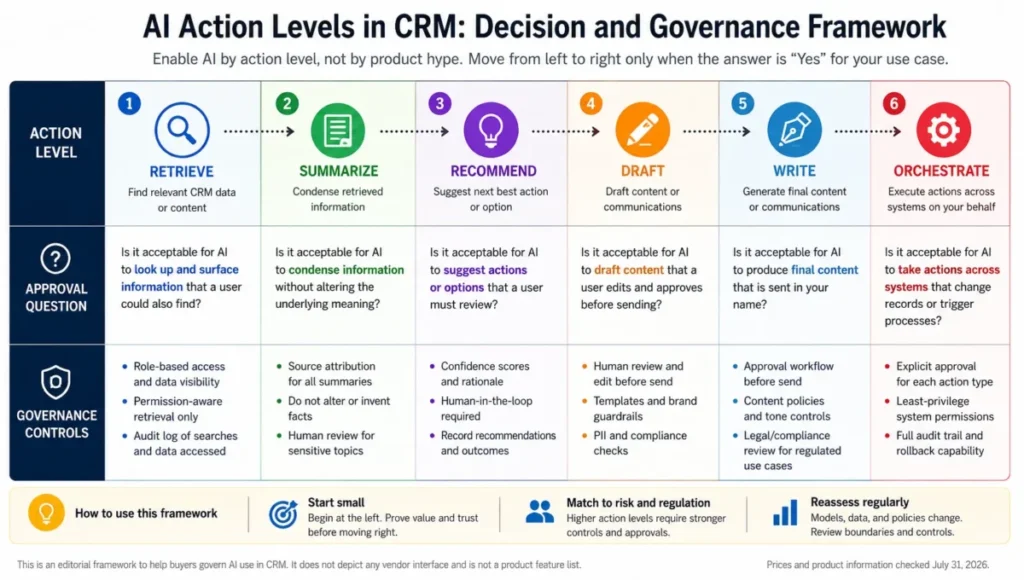
The practical test is simple. If the vendor cannot name the documented action, the permission that bounds it, and the log where it lands, treat the capability as a recommendation engine and price it on that basis.
1. HubSpot Smart CRM: Best Overall AI CRM for Unified Revenue Teams

- Best for:
- 5 to 50 person revenue teams that want marketing, sales, service, and customer data in one platform without running a CRM program.
- Avoid if:
- predictable, uncapped agent usage matters more to you than platform breadth, or a required onboarding fee would blow the first-year budget.
- HubSpot: HubSpot Smart CRM plan pricing. checked 2026-07-31.*
- Practical tier:
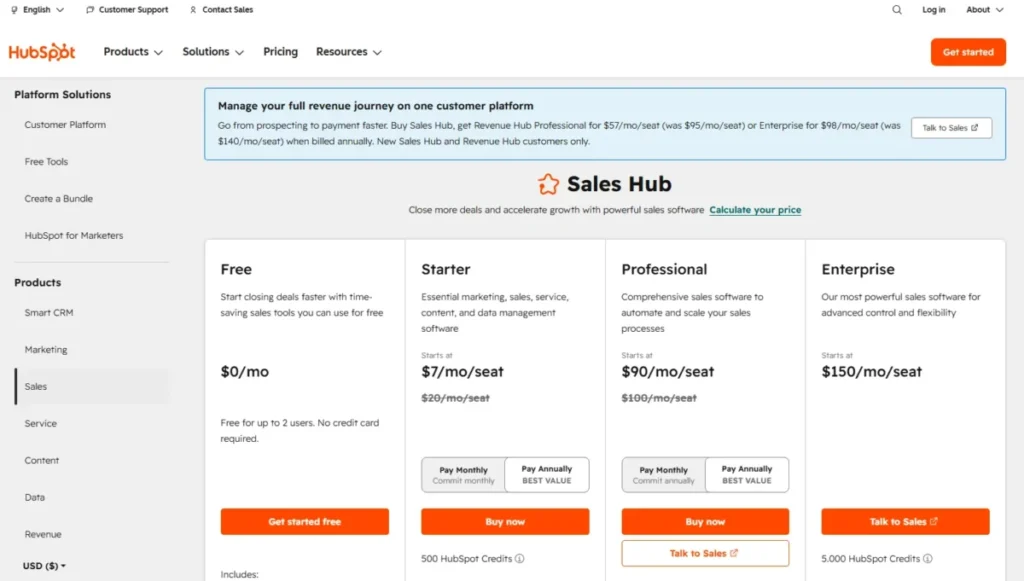
- Smart CRM Professional for AI-enabled CRM work; Sales Hub Professional at $90 per seat/month billed annually when advanced sales workflows are required, per HubSpot Sales Hub pricing.
- Free plan:
- not stated in the plan evidence reviewed for this Smart CRM line.
- First limit that bites:
- HubSpot Credits, because agent actions consume different amounts and high-volume prospecting drains the included pool fastest.
- Better than Salesforce Sales Cloud:
- a team can reach useful AI output without a dedicated administrator or an agent configuration project.
- Worse than Zoho CRM:
- cost per AI-capable seat, where the gap runs to more than double at the practical tier.
- Setup difficulty:
- Medium, because the platform is quick to start and slow to govern once several hubs hold overlapping records.
- Hidden costs:
- a $1,500 one-time onboarding fee on Sales Hub Professional and $3,500 on Enterprise, plus $9 per 1,000 additional credits on annual billing.
- Evidence status:
- prices, credit allowances, and onboarding fees verified against HubSpot’s official pricing and Smart CRM pages on 2026-07-31; the Data Agent workflow is reconstructed from HubSpot’s published product documentation.
Breadth is the argument here, and it is a real one. Smart CRM combines unified customer data with the AI Data Agent, AI-assisted insights, workflows, custom reporting, duplicate management, governance, and more than 2,000 integrations, with availability varying by edition.
The documented Data Agent workflow starts from a record or a smart property, takes a research question, pulls permitted CRM and connected-source context, then returns a value the user reviews before it is saved. That last step is the important one for anyone worried about agents rewriting a pipeline, because the write happens after human approval rather than instead of it.
Where the buying case gets harder is the metering. Sales Hub Professional includes 3,000 HubSpot Credits and Enterprise includes 5,000, but documented agent actions consume very different amounts: 50 credits per resolved Customer Agent conversation and 100 credits per Prospecting Agent outreach recommendation for a single lead.
Run that arithmetic against a real prospecting cadence and the included pool looks thin. Five hundred leads through the Prospecting Agent is 50,000 credits, which is well beyond either included allowance, and additional credits are listed at $9 per 1,000 on annual billing.
HubSpot is better treated as a platform purchase with a usage line item attached than as a flat seat cost. The full HubSpot CRM review goes deeper on the hub structure, and the practical control here is to limit agent actions to decision-critical records and keep deterministic workflows for repetitive updates.
| Pros | Cons |
|---|---|
| Lifecycle data, AI assistance, reporting, and governance sit in one platform rather than three | Credit-based AI usage makes high-volume agent cost hard to forecast before rollout |
| More than 2,000 integrations reduce the number of point tools a revenue team has to maintain | Sales Hub Professional and Enterprise both carry a required one-time onboarding fee |
| Data Agent writes only after a user approves the generated value | Advanced AI Insights, SSO, custom objects, and governance are edition-gated |
| Additional credits carry an openly published per-thousand price on annual billing | Best AI capabilities are spread across hubs rather than concentrated in one licence |
- Verdict:
- choose HubSpot Smart CRM if you want one platform to hold the whole customer lifecycle and you can name a person who owns the credit budget.
2. Salesforce Sales Cloud with Agentforce: Best for Enterprise Agentic Sales
Governance is what Salesforce sells here, and governance is what justifies the price. Agentforce routes a request to an approved topic and action, retrieves only the data the user’s permissions allow, executes, consumes credits, and records the usage in Digital Wallet monitoring.
- Best for:
- organizations with 200-plus reps, dedicated administrators, multiple business units, and budget for agent configuration.
- Avoid if:
- you have no CRM operations capacity, or you need a single monthly AI price you can hand to finance without a model.
- Salesforce: Salesforce Sales pricing. checked 2026-07-31.*
- Practical tier:
- Sales Enterprise plus the Agentforce add-on from $125 per user/month, or Agentforce 1 Sales when a broader bundled agent allowance is needed.
- Free plan:
- not offered on the Sales Cloud plan line.
- First limit that bites:
- Flex Credits, which do not roll over, so an unused pool is spend that expires unused.
- Better than Microsoft Dynamics 365 Sales:
- the agent platform exposes usage and permissions as first-class controls rather than as a licensing footnote.
- Worse than HubSpot Smart CRM:
- time to first useful AI output, because topics, actions, and approval boundaries have to be designed before anything runs.
- Setup difficulty:
- High, and specialist administration is a precondition rather than a nice-to-have.
- Hidden costs:
- Flex Credits at $500 per 100,000, implementation and partner services, and success plans, none of which appear in the seat price.
- Evidence status:
- plan and add-on prices verified on Salesforce’s official Sales and Agentforce pricing pages on 2026-07-31; credit consumption and rollover rules taken from the published Agentforce pricing terms.
The cost stack is where lean teams get caught. A base licence, a per-user agent add-on, a credit pool, implementation, and a success plan are five separate lines, and only the first two are visible on the seat price.
Flex Credits and conversation-based pricing cannot coexist in one Salesforce organization, so the billing model is an organization-level decision made once. Qualifying overages are billed monthly in arrears at the contracted rate, which is at least an honest answer to the overflow question that six other vendors here leave undisclosed.
The safer sequence is two or three narrow, high-value actions first, then a modelled cost per action, then wider rollout. The Salesforce CRM review covers the wider platform, and the 2026 packaging update that replaced the prior Einstein add-ons with Agentforce is documented in the Salesforce pricing and packaging announcement.
| Pros | Cons |
|---|---|
| Agent actions inherit Salesforce record permissions instead of bypassing them | The practical AI stack needs Sales Enterprise plus the Agentforce add-on or a higher bundle |
| Digital Wallet exposes agent usage so spend can be monitored rather than discovered | Unused Flex Credits do not roll over, so over-buying is a pure loss |
| Published credit arithmetic makes cost per action modellable before rollout | Flex Credits and conversation pricing cannot coexist in one organization |
| Deepest governance and multi-business-unit support in this ranking | Implementation typically requires specialist administration and a services budget |
- Verdict:
- choose Salesforce with Agentforce if a compliance or governance requirement already dictates who may touch which record, and skip it if that requirement does not exist yet.
3. Zoho CRM: Best Value AI CRM for Cost-Conscious Teams

At $23 per user/month on annual billing, Zoho CRM Professional is the cheapest tier in this ranking that opens AI agents and predictive intelligence rather than teasing them.
- Best for:
- 5 to 75 person sales teams already using Zoho apps that will trade some interface polish for AI breadth and customization at a low seat cost.
- Avoid if:
- you want every AI capability in one simple tier and no edition matrix or token model to work through.
- Zoho CRM: Zoho CRM plan pricing. checked 2026-07-31.*
- Practical tier:
- Professional for the first AI agents and predictive intelligence; Enterprise when broader Zia coverage, sandboxing, and governance controls are needed.
- Free plan:
- yes, up to three users.
- First limit that bites:
- the edition matrix, because meaningful Zia functions are split across Professional, Enterprise, and higher editions.
- Better than Freshsales:
- the AI surface is wider, covering generation, prediction, scoring, recommendation, enrichment, and anomaly detection rather than a communication-shaped subset.
- Worse than HubSpot Smart CRM:
- consolidation, because the answer to a capability question is often a different Zoho product rather than a deeper tier.
- Setup difficulty:
- Medium, with most of the effort going into deciding which edition and which adjacent Zoho apps a workflow genuinely needs.
- Hidden costs:
- external model usage is bring-your-own-key and billed by the model provider, so part of the AI spend never appears on a Zoho invoice.
- Evidence status:
- plan prices and edition gates verified on Zoho’s official CRM pricing page on 2026-07-31; agent token behavior taken from the official Zia Agents pricing page.
Zia is the broadest AI feature set per dollar in this ranking. It can generate modules, reports, and workflows, score and predict outcomes, recommend next actions, enrich records, identify anomalies, and assist with email and call analysis.
The documented generative workflow is a good example of the human checkpoint done right. A builder describes a rule in natural language, Zia proposes modules, conditions, actions, or fields, the builder inspects the generated configuration and verifies record scope, edits anything unsafe, then activates it deliberately.
The token model is where the cost story stops being simple. Zoho-hosted agent allowances reset monthly and are expressed as token pools, while external models run on the buyer’s own key and are billed by that provider, so two different budget owners can end up funding one workflow.
Sizing Professional first, running the agents that fit inside the hosted pool, and reaching for an external key only once a specific workflow proves it needs one keeps that split manageable. The Zoho CRM review has the fuller edition breakdown for teams weighing Enterprise.
| Pros | Cons |
|---|---|
| Professional opens AI agents and predictive intelligence at the lowest seat price here | Meaningful Zia functions are split across Professional, Enterprise, and higher editions |
| A free edition for up to three users makes evaluation genuinely cheap | Hosted token pools and bring-your-own-key models use two different billing paths |
| Zia covers generation, prediction, enrichment, and anomaly detection in one CRM | Usage and overflow behavior is not published in one consolidated table |
| Generated workflows are presented for inspection before activation | Capability answers often point to another Zoho product rather than a deeper tier |
- Verdict:
- choose Zoho CRM if the budget per seat is the binding constraint and someone on the team enjoys configuration work.
4. Freshsales: Best for AI-Assisted Sales Communication

The awkward part of the Freshsales story arrives before the good part: the agent that vendors demo is not in the seat price. Freddy AI Agent is a separate add-on listed at $49 per 100 sessions, and branded documents cost another $19 per user/month.
- Best for:
- 10 to 75 rep teams that want pipeline, email, calling, lead scoring, and deal insight inside one sales workspace.
- Avoid if:
- session-metered agent costs are a procurement problem, or you need platform extensibility on the scale Salesforce offers.
- Freshsales: Freshsales plan pricing. checked 2026-07-31.*
- Practical tier:
- Pro, because contact scoring, deal insights, sequences, and territory management start there.
- Free plan:
- not published on the plan line reviewed here; a trial is offered instead.
- First limit that bites:
- forecasting insight, custom modules, field-level permissions, sandboxing, and audit logs all sit on Enterprise.
- Better than Pipedrive:
- communication and AI scoring are in the same workspace, so a rep does not leave the record to run the outreach.
- Worse than Zoho CRM:
- AI breadth per dollar, since the Freddy surface is shaped around communication rather than whole-CRM generation.
- Setup difficulty:
- Medium, mostly lead routing rules, scoring thresholds, and channel connection.
- Hidden costs:
- Freddy AI Agent sessions at $49 per 100 and branded documents at $19 per user/month, both outside the seat licence.
- Evidence status:
- plan prices, add-on prices, and tier gates verified on the official Freshworks CRM pricing page on 2026-07-31; the lead-to-outreach workflow is reconstructed from Freshworks’ published sales product documentation.
The documented Freddy workflow is genuinely useful for a communication-heavy team. A lead is captured or imported, routing and scoring rank it, Freddy surfaces deal or contact insight, the rep generates or refines outreach copy, then sends or schedules it and records the next activity.
That chain ends in a send, which puts Freshsales at the higher end of the action-boundary scale, with the rep as the checkpoint rather than an approval queue. The published migration guidance covers CSV import for leads, contacts, accounts, and deals, though field mapping and cleanup stay implementation work.
Buying Pro, running the seat-included Freddy features for a quarter, and adding agent sessions only once the volume of high-intent interactions is measurable keeps the add-on honest. Anyone weighing this against a rival should read the full Freshsales analysis alongside the pricing table above.
| Pros | Cons |
|---|---|
| Email, calling, sequences, scoring, and deal insight sit in one seat licence at Pro | Freddy AI Agent is priced separately by agent session block |
| Pro is the cheapest tier here that bundles scoring with sequences and territories | Branded documents are a separate per-user monthly add-on |
| Official migration guidance covers the core sales objects for CSV import | Forecasting insight, sandboxing, and audit logs require Enterprise |
| The entry Growth tier makes a phased rollout cheap to start | Session definition and overflow behavior are not fully published |
- Verdict:
- choose Freshsales if outreach volume is the bottleneck and you can defer the agent add-on until session demand is proven.
5. Microsoft Dynamics 365 Sales: Best for Microsoft-Centric Enterprises

A 50 to 500 seller organization already standardized on Microsoft 365, Teams, Power Platform, and Azure governance has a shorter decision here than anyone else. Copilot ships inside Sales Enterprise rather than as a separate agent licence.
- Best for:
- 50 to 500 seller organizations running Microsoft 365, Teams, Power Platform, and Azure identity and governance.
- Avoid if:
- the stack is not Microsoft, or the team wants a fast deployment without administration overhead.
- Dynamics 365: Dynamics 365 Sales pricing page. checked 2026-07-31.*
- Practical tier:
- Sales Enterprise for included Copilot; Premium when Sales Insights, AI-powered recommended actions, AI enrichment, and an explicit credit allocation are required.
- Free plan:
- not offered; listed plans require annual payment.
- First limit that bites:
- the Enterprise-to-Premium gap, since the richer AI package and 1,000 Copilot Credits sit on Premium.
- Better than Creatio CRM:
- identity, security, and productivity integration are inherited from a stack the organization already runs.
- Worse than Pipedrive:
- speed to a working pipeline, because deployment is a project rather than a setup task.
- Setup difficulty:
- High, tied to the wider Microsoft platform and its administration model.
- Hidden costs:
- the $45 per user/month step from Enterprise to Premium, plus Power Platform and integration work that lands outside the CRM licence.
- Evidence status:
- plan prices and Copilot inclusions verified on Microsoft’s official Dynamics 365 Sales pricing page on 2026-07-31; the Copilot workflow is reconstructed from Microsoft Learn documentation.
Sales Enterprise includes Copilot and agentic capabilities such as opportunity summaries, meeting and email assistance, natural-language insights, and the Sales Close Agent. Premium adds 1,000 Copilot Credits, Sales Insights, AI-powered recommended actions, and AI enrichment on top of that.
The documented Copilot workflow opens the side pane from a record, takes a suggested or natural-language prompt, retrieves permitted record context, and returns a summary, a recent-change view, meeting preparation, or account news. It summarizes rather than mutates, which makes it one of the lower-risk agent deployments in this list.
What the pricing page does not settle is what happens after the 1,000 Premium credits are consumed. Post-credit behavior belongs on the vendor question list before signing, and the Premium step deserves validation against a named workflow rather than a feature list at $45 per user/month.
The Microsoft Dynamics 365 Sales review covers the administration model in more detail for teams sizing the implementation effort.
| Pros | Cons |
|---|---|
| Copilot summaries, meeting prep, and the Sales Close Agent are included in Sales Enterprise | Premium is a material per-user step for Sales Insights and recommended actions |
| Native fit with Microsoft 365, Teams, and Power Platform reduces integration work | Annual payment is required for the listed plans |
| Copilot answers cite the CRM records they drew from, which supports review | Post-credit overage behavior is not fully defined on the public pricing page |
| Power Platform gives an extension path without a separate agent product | Deployment and administration overhead is material for a small team |
- Verdict:
- choose Dynamics 365 Sales if Microsoft identity and governance already decide your architecture, and start on Enterprise rather than assuming Premium.
6. Pipedrive: Best for Visual Pipeline Coaching

Adoption is the whole case for Pipedrive, and it is a stronger case than feature counts suggest. A 5 to 40 rep sales-led team can run a visual pipeline with AI recommendations without hiring an administrator.
- Best for:
- 5 to 40 rep sales-led teams that value a visual pipeline, quick adoption, and lightweight automation.
- Avoid if:
- you need complex custom objects, cross-department service and marketing operations, or enterprise governance.
- Pipedrive: Pipedrive plan pricing. checked 2026-07-31.*
- Practical tier:
- Premium, because AI email tools, custom scoring, data enrichment, e-signatures, and advanced permissions start there.
- Free plan:
- not offered; the entry paid tier is Lite.
- First limit that bites:
- AI email tools and custom scoring, which are gated to Premium while AI report creation is available from Lite.
- Better than monday CRM:
- the data model is prescriptive, so a small team does not have to design its own CRM schema before selling.
- Worse than HubSpot Smart CRM:
- cross-functional depth, since marketing and service work has to live elsewhere.
- Setup difficulty:
- Low, with spreadsheet import that checks incomplete entries and repeated data and can merge or create duplicates across several sales objects in one flow.
- Hidden costs:
- the LeadBooster add-on from $32.50 per month per company, plus additional MCP tokens beyond the plan allowance.
- Evidence status:
- plan prices and feature gates verified on Pipedrive’s official pricing page on 2026-07-31; MCP behavior taken from the official MCP server product page.
The AI Sales Assistant analyzes pipeline and activity data, exposes patterns and stalled deals, answers performance questions, and recommends deals or next actions. It recommends, and the rep verifies the underlying activity history before acting, which is the correct boundary for a team without an operations function.
The genuinely new item in 2026 is the Pipedrive MCP server, which lets an external AI assistant work with CRM data. It is available on every plan, inherits each user’s CRM permissions, records actions in the change log, and is subject to plan-based token limits with additional tokens available for purchase.
Those token allowances are not published by plan, and that gap matters if MCP becomes part of a daily workflow. One more operational detail rarely mentioned in rankings: the Pipedrive Community platform was discontinued on 2025-07-01, so peer troubleshooting now routes through the knowledge base, academy, and support teams.
Anyone comparing this against a heavier platform should read the Pipedrive CRM review for the pipeline model in detail.
| Pros | Cons |
|---|---|
| AI report creation is available from the entry Lite tier rather than a premium plan | AI email tools and custom scoring require the Premium tier |
| MCP access on every plan inherits user permissions and writes to the change log | MCP token allowances are plan-based but not published by plan |
| Import checks incomplete entries and duplicates across several objects in one flow | Sandbox and the strongest account security sit on the top tier only |
| Setup is achievable without a dedicated CRM administrator | The community forum closed on 2025-07-01, narrowing peer support options |
- Verdict:
- choose Pipedrive if adoption speed matters more than platform depth, and budget for Premium rather than the headline Lite price.
7. monday CRM: Best for Flexible Revenue Workflows

Paid plans start at three users and annual billing is paid upfront, so the advertised $17 per seat is a $612 annual minimum in practice before anyone counts AI usage. That is still the cheapest bundled-agent entry in this ranking.
- Best for:
- 5 to 50 person teams already on monday.com that need CRM, delivery work, and AI agents in one configurable platform.
- Avoid if:
- you want a prescriptive CRM data model, or you need to buy a single seat without a minimum.
- monday CRM: monday CRM plan pricing. checked 2026-07-31.*
- Practical tier:
- Standard for the bundled AI agents and 10,000 active contacts and deals; Pro for the AI workflow builder and 100,000 active contacts and deals.
- Free plan:
- not offered on the CRM plan line, which is distinct from the free Work Management plan.
- First limit that bites:
- capacity, since Standard allows 10,000 active contacts and deals and 250 custom automations per month against 100,000 and 25,000 on Pro.
- Better than Attio:
- the agent set is packaged and ready, so a team gets outreach, sourcing, meeting prep, and note-taking without building them.
- Worse than Pipedrive:
- out-of-the-box sales opinionation, because a blank flexible board still needs a process designed onto it.
- Setup difficulty:
- Medium, driven by board design and playbook definition rather than technical work.
- Hidden costs:
- the three-seat minimum, upfront annual payment, and AI credit consumption that is included but not published per agent action.
- Evidence status:
- plan prices, seat minimum, capacity caps, and AI inclusions verified on monday.com’s official CRM pricing page on 2026-07-31, with plan naming confirmed against the monday.com support centre.
Standard includes AI credits and agents for outreach, lead sourcing, meeting preparation, note-taking, Sidekick, app building, and AI fields. Pro adds the AI workflow builder that chains agents, triggers, and actions together.
The documented agent workflow sources or qualifies a lead against a configured playbook, writes summaries and qualification results into CRM fields, then hands the next interaction to a meeting prep agent or notetaker. That is a write action, so the playbook is the governance control and it deserves the same review a workflow rule would get.
Capacity is the upgrade trigger most rankings miss. A team crossing 10,000 active contacts and deals, or running more than 250 custom automations a month, moves to Pro for operational reasons long before the AI workflow builder becomes the reason.
The pricing page states an annual saving of 18% and the monday.com review covers how the CRM boards differ from the general work platform.
| Pros | Cons |
|---|---|
| Standard bundles outreach, sourcing, meeting prep, notetaker, and AI fields with credits | Paid plans start at three users and annual billing is paid upfront |
| Pro raises capacity to 100,000 active contacts and deals and 25,000 automations | Standard caps at 10,000 active contacts and deals and 250 automations per month |
| CRM and delivery work share one platform, which shortens post-sale handoffs | AI credits are included but not published as a cost per agent action |
| AI workflow builder chains agents, triggers, and actions without code | A flexible board model shifts process design onto the buyer |
- Verdict:
- choose monday CRM if the team already lives in monday.com boards and can model the process on Standard before paying for Pro capacity.
8. Attio: Best AI-Native CRM for Startups

Flexibility is the pitch and also the bill. Attio hands a team a live relationship model and a natural-language query layer, then asks that team to design the objects, attributes, and naming conventions that make the answers trustworthy.
- Best for:
- 3 to 75 person startup, product-led, and modern go-to-market teams that want a custom data model and AI-native querying.
- Avoid if:
- you want a preconfigured sales process and have no appetite for schema design.
- Attio: Attio plan pricing. checked 2026-07-31.*
- Practical tier:
- Pro, the first listed tier with Call Intelligence, sequences, advanced permission controls, and advanced reporting.
- Free plan:
- yes, up to three seats.
- First limit that bites:
- the Plus plan is capped at 10 seats, so the eleventh hire forces a Pro or Enterprise move.
- Better than monday CRM:
- relationship data stays live and queryable rather than being restated as board columns.
- Worse than Freshsales:
- time to first outbound motion, because sequences and call intelligence only start on Pro.
- Setup difficulty:
- Medium to High, driven entirely by data-model decisions rather than technical work.
- Hidden costs:
- the seat-cap jump from Plus to Pro more than doubles the per-user rate at the moment a team is growing fastest.
- Evidence status:
- plan prices, the seat cap, and tier gates verified on Attio’s official pricing page on 2026-07-31; the querying workflow is reconstructed from Attio’s published embedded-intelligence page.
Ask Attio takes a natural-language question about people, companies, opportunities, or relationship context, retrieves live object and relationship data, and returns an answer or a classification the team can push into fields, lists, views, or automation steps. The write happens after approval, which keeps a flexible schema from being rewritten by a query.
Defining a small canonical object model first, and resisting the urge to recreate every legacy CRM field, matters here, because a loose schema is exactly what makes AI answers unreliable later.
| Pros | Cons |
|---|---|
| A free tier for three seats sits beside a genuinely usable Plus tier | Plus is capped at ten seats, which forces a jump to the Pro rate |
| Natural-language queries run against live relationship and object data | Call Intelligence, sequences, and advanced reporting all require Pro |
| Custom objects fit go-to-market motions that a prescriptive CRM cannot model | A flexible object model moves process-design work onto the buyer |
| AI output lands in views and automations only after the team approves it | AI usage allowance is not published, so heavy use cannot be modelled |
- Verdict:
- choose Attio if the sales motion is unusual enough that a standard pipeline would fight it, and plan for Pro from the start above ten seats.
9. Affinity: Best for Private Capital Relationship Intelligence

Venture capital, private equity, private credit, and investment-banking teams are the entire audience for this product, and for them the pricing looks different than it does on a general-sales spreadsheet.
- Best for:
- investment and deal teams whose sourcing depends on warm introductions and institutional relationship history.
- Avoid if:
- you run conventional high-volume pipeline selling, or the per-seat budget has to stay under four figures a year.
- Affinity: Affinity plan pricing. checked 2026-07-31.*
- Practical tier:
- Scale, the first plan listing Notetaker, AI Chat, Affinity Ascend, and hosted MCP; Advanced when enrichment, packaged integrations, and workflow automations are required.
- Free plan:
- not offered.
- First limit that bites:
- 100,000 API calls per month on Scale and Advanced, which is a real ceiling once enrichment and warehouse sync run together.
- Better than Attio:
- relationship strength is captured automatically from firm email and calendar activity rather than modelled by hand.
- Worse than HubSpot Smart CRM:
- value per dollar for anything that is not relationship-led dealmaking.
- Setup difficulty:
- Medium, with standard onboarding included and complex migration scoped separately.
- Hidden costs:
- complex migration and custom field mapping are separately quoted, so the licence is not the whole first-year number.
- Evidence status:
- annual plan prices, AI plan gates, and the API allowance verified on Affinity’s official pricing page on 2026-07-31; the sourcing workflow is reconstructed from Affinity’s published CRM product page.
The documented workflow captures email and calendar activity automatically, maps relationship strength, identifies the strongest warm path into a target company, and lets the deal team summarize that relationship before coordinating an introduction. It recommends and summarizes rather than acting, which suits a workflow where the introduction itself is a human judgment call.
Seats belong with the investment professionals who actively source, because at $2,300 per user/year the marginal seat for an analyst who only reads records is hard to defend.
| Pros | Cons |
|---|---|
| Relationship capture is automatic, so institutional memory survives staff turnover | The practical Scale tier is priced per user per year, in four figures |
| Scale bundles Notetaker, AI Chat, Ascend, and hosted MCP in one plan | Scale and Advanced cap API use at 100,000 calls per month |
| Purpose-built private-capital data model avoids bending a sales CRM into shape | Complex migration and custom field mapping require a separate quote |
| Warm-path mapping is evidence-backed rather than a manual recollection exercise | Value collapses outside relationship-led dealmaking |
- Verdict:
- choose Affinity if warm introductions drive your deal flow, and choose almost anything else in this ranking if they do not.
10. Creatio CRM: Best for No-Code AI Workflow Orchestration

Licence composition is the first thing to get right. The Growth platform starts at $40 per user/month, the Sales product adds $15, and the recurring floor for a sales CRM on Creatio is therefore $55 per user/month before any services.
- Best for:
- 100 to 1,000 user organizations modelling cross-department sales, marketing, and service processes with no-code applications and AI agents.
- Avoid if:
- you want a turnkey CRM at one low entry price with little implementation work.
- Creatio: Creatio CRM pricing guide. checked 2026-07-31.*
- Practical tier:
- Growth plus the Sales product at $15 per user/month each, giving a $55 per user/month licence floor; Enterprise or Unlimited for wider scale and governance.
- Free plan:
- not offered.
- First limit that bites:
- the platform price on its own does not include a CRM product, so a Growth-only quote understates the real licence by more than a third.
- Better than Zoho CRM:
- process orchestration across departments is a first-class design surface rather than a set of per-module rules.
- Worse than monday CRM:
- time to value, because a designed process needs an owner, a data model, and a test environment before it runs.
- Setup difficulty:
- High, and implementation effort grows with process ambition.
- Hidden costs:
- implementation scope, environments, and Unlimited packaging are quoted rather than listed.
- Evidence status:
- platform and product prices verified on Creatio’s official glossary and product pages on 2026-07-31, with the May 2026 packaging change confirmed against Creatio’s own announcement; the design workflow is reconstructed from Creatio’s published platform documentation.
The documented workflow models sales stages and roles, configures objects, fields, and permissions, adds deterministic rules and approvals, then inserts AI agents only where a clear task and review boundary exist, and finally tests in a controlled environment before publishing. That ordering is the reason Creatio suits process-led firms: the AI is placed inside a governed workflow rather than around it.
Creatio’s updated pricing took effect on 2026-05-01 and made Unlimited packaging available globally while keeping per-user Growth and Enterprise options, which is worth confirming in any quote issued against older figures.
| Pros | Cons |
|---|---|
| One composable platform covers sales, marketing, service, and custom applications | The practical CRM licence combines a platform price with a product add-on |
| AI agents are inserted into governed processes with defined review boundaries | Implementation effort grows directly with process ambition |
| No-code design keeps process ownership with operations rather than engineering | Unlimited packaging and complex services require a quote |
| Unlimited packaging became globally available on 2026-05-01 | The Sales product is a separate per-user charge on top of the platform price |
- Verdict:
- choose Creatio if the process is the product and you already have a revenue-operations owner to design it, not if you need a pipeline running next week.
Feature Gate Comparison: Which Plan Opens What
Entry tiers in this category are demonstration tiers. The table below records the tier at which the AI capability most buyers describe becomes available.
| Product | AI reporting or insight from | AI writing or agents from | Advanced permissions from | Sandbox or audit from |
|---|---|---|---|---|
| HubSpot Smart CRM | Smart CRM Professional | Smart CRM Professional | Enterprise editions | Enterprise editions |
| Salesforce Sales Cloud with Agentforce | Sales Enterprise | Agentforce add-on on Enterprise and above | Sales Enterprise | Enterprise governance tooling |
| Zoho CRM | Professional | Professional | Enterprise | Enterprise |
| Freshsales | Pro | Pro, with Freddy AI Agent as a paid add-on | Enterprise | Enterprise |
| Microsoft Dynamics 365 Sales | Sales Enterprise | Sales Enterprise | Sales Enterprise | Premium for Sales Insights |
| Pipedrive | Lite | Premium | Premium | Ultimate |
| monday CRM | Standard | Standard | Pro | Not published on the CRM plan line |
| Attio | Pro | Plus for querying, Pro for sequences | Pro | Enterprise |
| Affinity | Scale | Scale | Advanced | Enterprise |
| Creatio CRM | Growth plus a CRM product | Growth plus a CRM product | Enterprise | Enterprise |
Feature gates were read from official plan and capability pages on 2026-07-31. HubSpot, Salesforce, Zoho CRM: HubSpot Smart CRM capability page, Salesforce Sales plan features, Zoho CRM edition matrix. Freshsales, Dynamics 365, Pipedrive: Freshsales plan features, Dynamics 365 Sales plan comparison, Pipedrive feature gates. monday CRM, Attio, Affinity: monday CRM plan inclusions, Attio tier gates, Affinity plan gates. Creatio: Creatio product composition.
Two patterns repeat across the set. Governance features cost more than AI features, and the tier that satisfies a security review is usually one step above the tier that satisfies a sales demonstration.
Setup and Migration Difficulty
| Product | Setup difficulty | Why |
|---|---|---|
| HubSpot Smart CRM | Medium | Fast to start, slower to govern once several hubs hold overlapping records |
| Salesforce Sales Cloud with Agentforce | High | Topics, actions, permissions, and approval boundaries are designed before anything runs |
| Zoho CRM | Medium | Effort concentrates in edition selection and which adjacent Zoho apps a workflow needs |
| Freshsales | Medium | Routing rules, scoring thresholds, and channel connection dominate the work |
| Microsoft Dynamics 365 Sales | High | Deployment is tied to the wider Microsoft platform and its administration model |
| Pipedrive | Low | Prescriptive model with a guided spreadsheet import for several sales objects |
| monday CRM | Medium | Board design and playbook definition rather than technical configuration |
| Attio | Medium to High | Objects, attributes, and naming conventions must be designed before AI answers are reliable |
| Affinity | Medium | Standard onboarding is included; complex migration is scoped separately |
| Creatio CRM | High | Process modelling, environments, and testing precede a published workflow |
Difficulty ratings are an editorial assessment of documented setup scope, checked 2026-07-31. HubSpot, Salesforce, Zoho CRM: HubSpot Smart CRM governance scope, Salesforce agent configuration terms, Zoho CRM edition scope. Freshsales, Dynamics 365, Pipedrive: Freshsales migration documentation, Dynamics 365 Sales setup documentation, Pipedrive import documentation. monday CRM, Attio, Affinity: monday.com plan documentation, Attio plan scope, Affinity onboarding terms. Creatio: Creatio Academy guides.
The CRM implementation checklist is the right companion for anything in the Medium or High rows, because the difficulty here is organizational rather than technical.
Migration and Data Readiness: What the AI Needs to Inherit
An AI CRM summarizes, scores, and recommends from whatever history survives the import. A clean contact list with no email threads, no call notes, and no activity timeline produces confident output built on almost nothing.
Two products in this set publish enough detail to plan against. Pipedrive’s spreadsheet import checks incomplete entries and repeated data and can merge or create duplicates in one combined flow across several sales objects, while Freshworks publishes CSV migration guidance for leads, contacts, accounts, and deals with field mapping left as implementation work.
For the other eight products, comparable object-by-object migration coverage is not published in a form that supports a like-for-like table, so treat the checklist below as the question set to put to each vendor rather than an answered matrix.
- Contacts, companies, and deals, including owner and stage history.
- Activities, meetings, and call records that feed AI summaries.
- Email threads and attachments, which are the usual casualty of a CSV migration.
- Notes and custom fields, mapped rather than dumped into a description field.
- Automations and workflow rules, which rarely port and usually get rebuilt.
- Relationship history, which is the entire product in Affinity’s case.
- Duplicate handling policy, decided before import rather than after.
- A post-import validation pass on a sample of records.
Affinity is explicit that standard onboarding is included while complex migration and custom field mapping are separately scoped and quoted, which is the honest version of what most vendors leave to the statement of work. Anyone switching platforms should work through the CRM migration guide before committing to a cutover date.
Migration evidence was read from official documentation on 2026-07-31. Pipedrive, Freshsales, Affinity: Pipedrive import and export documentation, Freshsales support documentation, Affinity onboarding and migration terms.
Security and Governance Gates
Security requirements often decide the tier before AI requirements do. HubSpot places SSO, custom objects, and governance controls in its Enterprise editions, Freshsales holds field-level permissions, sandboxing, and audit logs on Enterprise, and Pipedrive reserves sandbox and its strongest account security for the top tier.
Zoho concentrates sandboxing and additional governance controls in Enterprise and above, Attio places advanced permission controls on Pro with broader security and administrative controls on Enterprise, and Affinity moves workflow automation and packaged integrations to Advanced.
Salesforce is the outlier in a useful way, because agent actions inherit record permissions by design and usage is exposed through Digital Wallet monitoring rather than reconstructed from an invoice. For any agent that writes to a record, the three questions worth asking are which permission bounds it, which log records it, and who can switch it off.
Which AI CRM Should You Choose?
Feature count is the wrong first question. Operating model is the right one, because five of these ten products are only in contention once you know how your team already works.
Each ranking reason below is a workflow claim, not a feature score: the cohort comes first, then the plan gate that opens the AI workflow for that cohort, then the disqualifier that removes the product from the shortlist. Every step traces to the official pricing and documentation evidence cited earlier in this article.
Read it as a winner by scenario rather than a single champion, so choose the first line that matches your operating model and treat the rest as a disqualifier list.
Start at the top of this routing logic and stop at the first line that describes you.
- Microsoft 365, Teams, and Power Platform already run the business. Dynamics 365 Sales Enterprise is the shortest path, and Copilot is inside the seat price rather than beside it.
- Deal flow comes from warm introductions rather than campaigns. Affinity Scale is the specialist answer, and no general CRM in this ranking replaces the relationship graph.
- A cross-department process needs to be designed, not adopted. Creatio Growth plus the Sales product suits process-led firms with a revenue-operations owner.
- Governance already dictates who may touch which record. Salesforce Sales Enterprise plus Agentforce is the enterprise agent platform, and the credit model is the price of that control.
- Marketing, sales, and service data must live together. HubSpot Smart CRM Professional is the strongest all-round platform for 5 to 50 person teams.
- The sales motion is unusual enough to need a custom object model. Attio Pro fits product-led and startup go-to-market teams above ten seats.
- Budget per seat is the binding constraint. Zoho CRM Professional opens AI agents at the lowest AI-capable seat price here, and monday CRM Standard is the cheapest bundled-agent entry if the team already uses monday.com boards.
- Adoption speed matters more than depth. Pipedrive Premium for a visual pipeline, or Freshsales Pro when outreach volume is the bottleneck.
Startup teams weighing several of these at once will find more cohort-specific detail in the best CRM for startups guide.
How to Choose the Right AI CRM Software
Work through these seven questions in order, and answer them with numbers rather than impressions.
- How many seats need access now, and how many in twelve months? Seat minimums and seat caps change the answer at three seats and at eleven.
- Which single AI workflow justifies the purchase? Name it, then find the tier that opens it rather than the tier in the advertisement.
- How is that AI metered? Seat, credit, session, token, or API call, and what does one unit of real work consume?
- What happens when the meter runs out? If the vendor cannot answer, treat the ceiling as a live financial risk.
- What must survive migration for the AI to be useful? Activities, email threads, and notes matter more than a clean contact list.
- Which tier satisfies your security review? Check sandbox, audit logs, field-level permissions, and SSO before checking AI features.
- What is the annual licence at your real seat count in year two? Model 25 and 100 seats even if you are buying five.
Common Mistakes When Choosing AI CRM Software
- Budgeting from the entry price. The gap between entry tier and practical tier is more than seventy percent on several products in this ranking.
- Treating “AI included” as a flat cost. Included usually means edition-gated, metered, or both, and three products here bill AI on a second meter entirely.
- Ignoring seat minimums and caps. A three-seat minimum and a ten-seat ceiling both distort small-team pricing in opposite directions.
- Skipping the overflow question. Eight of these ten vendors leave the exhausted-allowance behaviour undisclosed.
- Migrating contacts but not context. AI summaries built on records with no activity history read confidently and mean nothing.
- Buying agents before defining the approval boundary. An agent that writes to records without a named owner and a log is an operational risk, not a productivity gain.
- Confusing platform price with CRM price. A no-code platform licence can exclude the CRM product it is being bought for, which adds 37.5% to the quote in one case here.
Final Verdict: Which AI CRM to Shortlist First
HubSpot Smart CRM takes the top position because it balances usable CRM depth, native AI assistance, ecosystem breadth, and adoption support better than anything else here for a 5 to 50 person revenue team. That is a breadth argument, not a price argument or a claim of unlimited AI, and the credit meter is a real cost to own.
Salesforce with Agentforce is the stronger choice when governance requirements already exist and an administrator is already funded. Zoho CRM wins on cost per AI-capable seat, monday CRM wins on bundled-agent entry price, and Freshsales wins when the bottleneck is outreach volume rather than data structure.
Three products should outrank the leader inside their own cohort. Dynamics 365 Sales for Microsoft-standardized enterprises, Affinity for relationship-led dealmaking, and Creatio for firms that need to design a cross-department process rather than adopt one.
If you take one thing from the pricing analysis above, take the second meter. A seat licence is the cost of access, and credits, sessions, tokens, and API calls are the cost of use, so the AI CRM decision is two purchases signed on the same day.
Frequently Asked Questions
These answers use the same official US pricing and plan evidence as the tables above, checked 2026-07-31.
What is the best AI CRM software in 2026?
For most small and midsize revenue teams, HubSpot Smart CRM is the strongest all-round pick, because it combines lifecycle data, native AI assistance, reporting, and a very large integration set in one platform. Larger organizations with dedicated administrators get more from Salesforce with Agentforce, and cost-led teams get more per dollar from Zoho CRM Professional.
Which AI CRM includes AI without a separate add-on?
Microsoft Dynamics 365 Sales Enterprise is the clearest example, because Copilot summaries, meeting preparation, email assistance, and the Sales Close Agent are inside the seat price. Zoho CRM, Pipedrive, monday CRM, and Attio also include AI, but the capability most buyers want sits above their entry paid tier rather than on it.
What is the cheapest AI CRM?
Zoho CRM Professional at $23 per user/month on annual billing is the lowest price in this ranking that opens AI agents and predictive intelligence. monday CRM Standard at $17 per seat is cheaper still, but paid plans start at three users, so the smallest possible invoice is higher than the headline suggests.
Is there a genuinely free AI CRM?
Yes, if your team is three people or fewer. Zoho CRM offers a Free edition for up to three users and Attio offers a free plan for up to three seats, both usable products rather than time-limited trials.
Above three people, every option in this ranking is paid.
How much does an AI CRM cost for a ten-person team?
On the practical AI tier, ten seats runs from $2,040 a year on monday CRM Standard seat pricing to $36,000 a year on Sales Enterprise plus the Agentforce add-on. Those are licence-only figures calculated from official list prices, and they exclude credits, sessions, onboarding fees, implementation, and taxes.
Are AI CRM agents safe to let update customer records?
No, unless three things are true: the documented action is named, a permission bounds it, and a log records it. Only three of the ten workflows reviewed here are documented as writing to a record, and the safest deployments keep a human approval step between the generated value and the saved field.
Which AI CRM is best for a small business?
Pipedrive Premium suits a small sales-led team that wants a visual pipeline running quickly, while Zoho CRM Professional suits a team optimizing for cost per seat. Freshsales Pro is the better fit when calling and email volume is the constraint rather than pipeline structure.
Which AI CRM is best for enterprise sales teams?
Salesforce Sales Enterprise plus Agentforce is the deepest option for governed agent actions across business units, and the HubSpot vs Salesforce comparison covers that trade-off in detail. Microsoft-standardized enterprises should look at Dynamics 365 Sales Enterprise first, since Copilot arrives without a separate agent licence.
What data does an AI CRM need to work well?
Activity history, email threads, call records, notes, and relationship context, not just a clean contact list. A migration that carries contacts and deals but drops the timeline produces AI summaries with nothing behind them, which is why migration scope belongs in the buying decision rather than the implementation phase.
Can AI replace a traditional CRM?
No. Every product in this ranking still needs a system of record with objects, permissions, and reporting, and the AI layer sits on top of that record rather than replacing it.
The practical shift is that the record has to be complete enough to be summarized, scored, and queried, which raises the bar on data discipline.