Most small business collaboration software fails at the same moment: the day a third person joins, the free plan stops behaving, and someone has to justify a new line item to finance.
That moment arrives faster than the pricing pages suggest. A two-seat cap, a 60MB storage ceiling, or a 90-day message window turns a working setup into a stalled one.
This ranking of team collaboration tools treats the entry price as the least interesting number on the page. What matters is the first limit each product hits, the tier that carries a small team’s workflow, and what ten seats cost once you get there.
Every price and plan limit below was verified against the vendor’s own pricing page or help documentation on 2026-07-31.
In This Article (11 sections)
Quick Verdict: Best Small Business Collaboration Software by Use Case
| Use case | Best pick | Why it fits |
|---|---|---|
| Cloud-native team that lives in documents | Google Workspace | Business email, Drive, real-time Docs, Meet, and Chat under one admin console |
| Business already licensed for Microsoft 365 | Microsoft Teams | Channels, meetings, and Office co-authoring on seats you may already own |
| Remote team that runs on chat | Slack | Channel history, huddles, and app alerts in one searchable workspace |
| Recurring cross-functional projects | Asana | Forms, timelines, dashboards, and unlimited rules on the entry paid tier |
| Budget pick for the widest feature set | ClickUp | Tasks, docs, chat, time tracking, and dashboards on one low yearly seat rate |
| Shared wiki and internal handbook | Notion | Linked databases and teamspaces that replace a folder of scattered files |
| Smallest setup effort | Trello | Boards, lists, and cards a non-technical team can run on day one |
| Configurable departmental workflows | monday.com Work Management | Custom boards, views, and dashboards that different teams can shape separately |
| Agency billing clients by the hour | Teamwork.com | Time tracking, budgets, client access, and delivery reporting in one system |
| Free-plan pick, and flat cost as headcount grows | Basecamp | One complete project hub free for up to 20 people, then a fixed organization price |
Communication layer sources: Google Workspace editions, Microsoft Teams plans, and Slack plan tiers.
Coordination layer sources: Asana plans, ClickUp plans, Trello plans, and monday.com plans.
Knowledge and delivery sources: Notion plans, Teamwork.com plans, and Basecamp packages. All checked 2026-07-31.
Five of these ten tools are not competing with each other at all. Google Workspace and Microsoft Teams sell the communication layer, Asana through Teamwork.com sell the coordination layer, and Notion sells the knowledge layer, which is why a shortlist built from a single ranked list usually produces the wrong purchase.
What Each of These Ten Tools Replaces
A ranked list hides the question buyers most need answered: whether these products compete or solve different jobs. The matrix below reads each product against the six jobs a small business is usually trying to consolidate.
| Product | Business email | Team chat | Video meetings | Document authoring | Task and project tracking | Time and budget tracking |
|---|---|---|---|---|---|---|
| Google Workspace | Yes | Yes | Yes | Yes | Limited | No |
| Microsoft Teams | By plan | Yes | Yes | By plan | Limited | No |
| Slack | No | Yes | Yes | Limited | Limited | No |
| Asana | No | No | No | Limited | Yes | By plan |
| ClickUp | No | Yes | No | Yes | Yes | Yes |
| Notion | No | No | No | Yes | Yes | No |
| Trello | No | No | No | Limited | Yes | No |
| monday.com Work Management | No | No | No | Yes | Yes | By plan |
| Teamwork.com | No | No | No | Limited | Yes | Yes |
| Basecamp | No | Yes | No | Yes | Yes | By add-on |
Capability readings draw on the Google Workspace feature overview, Microsoft Teams collaboration features, and the Slack Pro feature list.
They also draw on Asana plan features, ClickUp plan features, Trello plan features, and monday.com plan features.
The remainder come from the Notion feature comparison, Teamwork.com plan features, and the Basecamp feature list, checked 2026-07-31.
Capability judgments in this matrix are an editorial assessment built from each vendor’s documented feature scope, not a vendor scorecard.
Google Workspace and Microsoft Teams are direct competitors, as are Asana, ClickUp, monday.com Work Management, Trello, and Teamwork.com. Slack, Notion, and Basecamp each sit between those groups, which is why most small teams end up buying one product from the first group and one from the second.
How We Evaluated Small Business Collaboration Software
These rankings are based on official pricing pages, vendor help-center documentation, and current plan comparison pages. Pricing and plan limits were checked on 2026-07-31.
Each tool was assessed against the same buyer-focused criteria: workflow coverage, the practical paid tier for a small team, free-plan usefulness, storage and automation ceilings, guest and client access, onboarding effort, and cost at ten seats.
Greater weight went to factors that change a purchase decision rather than a feature count. Entry pricing, the limit that forces an upgrade, and the cost of scaling to a second department carried more weight than breadth alone.
How We Chose and Ranked These Ten Tools
Selection criteria required an active product with an official US price or a verifiable pricing status, relevance to at least one core collaboration job, and at least one documented limitation a buyer would hit.
Claims that could not be traced to official documentation were excluded from the ranking, and every figure carries the plan, region, and billing cadence it belongs to.
The Three Problems Every Small Business Collaboration Buyer Faces
Small teams rarely buy collaboration software because they lack features. They buy it because one of three things has broken.
Problem one: the conversation and the file have drifted apart. Decisions live in email threads, the file lives in someone’s drive, and the newest version is whichever attachment was opened last. This is a communication and document problem, and it is the job Google Workspace, Microsoft Teams, and Slack are built for.
Problem two: nobody can say what is late. Work is being done, but there is no shared view of owner, due date, and dependency, so status lives in a weekly meeting. This is a coordination problem, it overlaps with the project management software category, and it is where Asana, ClickUp, Trello, monday.com Work Management, and Teamwork.com earn their seat cost.
Problem three: the same answer gets explained every month. Onboarding, process, and policy live in people’s heads, so the same questions return. This is a knowledge problem, and Notion and Basecamp handle it differently from either group above.
Naming which problem you have first prevents the most common small-business mistake, which is buying a project tool to fix a communication failure and then paying for both anyway.
The 10 Best Small Business Collaboration Software Tools
The order runs from the broadest communication suite to the most specialized delivery tool. Every entry names the buyer it fits, the first limit that bites, and the plan gate that forces an upgrade.
1. Google Workspace: Best for Cloud-Native Teams That Live in Documents

- Best for:
- 5 to 50 person service, consulting, and knowledge-work teams that need business email, shared files, and meetings from one vendor.
- Avoid if:
- your main problem is project portfolio tracking, because the suite has no native dependency, workload, or portfolio layer.
- Starting price:
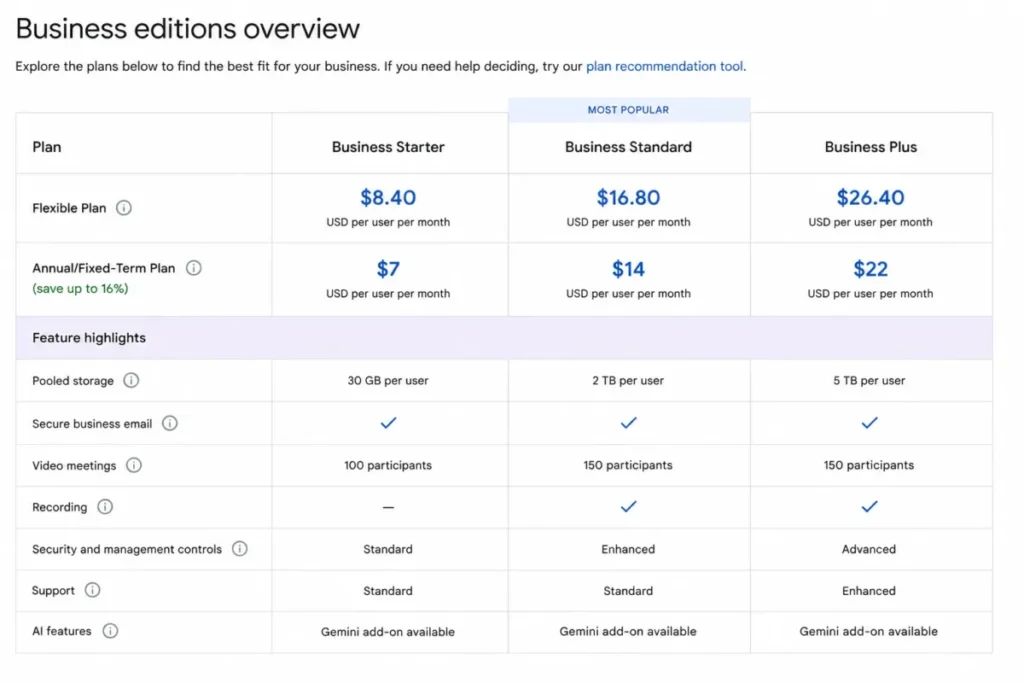
- $7 per user per month for Business Starter on the Annual/Fixed-Term Plan, or $8.40 on the month-to-month Flexible Plan.
- Practical tier:
- Business Standard at $14 per user per month annual, or $16.80 flexible, once shared drives and recorded meetings matter.
- Free plan:
- none for business domains.
- First limit that bites:
- 30 GB of pooled storage per user on Business Starter, against 2 TB on Business Standard.
- Better than Microsoft Teams:
- one purchase decision instead of a license matrix, since email, storage, documents, meetings, and chat arrive in a single Business edition.
- Worse than Asana:
- no native timeline, dependency, or portfolio reporting, so project tracking has to happen somewhere else.
- Setup difficulty:
- Medium. Domain verification and account provisioning are the real work, not the apps.
- Hidden costs:
- the Annual/Fixed-Term Plan lets you reduce licenses only at renewal, so a mid-year headcount drop keeps billing at the committed number.
- Evidence status:
- plan prices, storage tiers, and commitment terms are documented in Google’s own admin knowledge base.
The workflow this suite supports end to end is the one most small businesses run daily. An admin provisions accounts, someone creates a shared Drive folder and sets access, the team authors a Doc, Sheet, or Slide inside it, comments and edits happen in the same file, and a Calendar event with a Meet link closes the review.
Business Starter carries that entire loop, as the Google Workspace review sets out in more detail. The reason to move to Business Standard is not a missing app, it is the storage. 30 GB pooled per user runs out fast once meeting recordings and client assets land in Drive. Recordings saved to Drive are themselves a Standard feature.
The commitment structure deserves more attention than it usually gets, and the Google Workspace pricing guide breaks the editions down further. The $1.40 per user per month gap between the annual and flexible rates looks small until you price a team that hires seasonally. At that point the Flexible Plan’s right to remove licenses at any time is worth more than the lower rate.
| Pros | Cons |
|---|---|
| One vendor covers email, storage, documents, meetings, and chat, so a 10-person team runs on a single admin console | No native timeline, dependency, or portfolio view, so most teams still buy a second coordination tool |
| Annual/Fixed-Term pricing at $7 per user per month is the joint-lowest full-suite rate in this ranking | Business Starter pools only 30 GB per user, which meeting recordings and client files exhaust quickly |
| Real-time co-editing removes attachment versioning from the workflow entirely | Reducing licenses on the annual plan is only possible at renewal |
| Storage jumps from 30 GB to 2 TB per user for $7 more per seat, so the upgrade path is predictable | Editions cap at 300 users, so a fast-scaling business eventually moves to an Enterprise edition |
Source: Google Workspace Business editions and Google Workspace payment plan comparison, checked 2026-07-31.
- Verdict:
- the strongest single purchase for a cloud-native small business that has a communication and document problem, provided the team accepts that project tracking will live in a second tool.
2. Microsoft Teams: Best for Businesses Already Standardized on Microsoft 365

- Best for:
- 10 to 100 person Windows-first businesses whose documents already live in Word, Excel, and SharePoint.
- Avoid if:
- the business has no Microsoft footprint, because Teams Essentials alone carries neither the Office apps nor business email.
- Starting price:
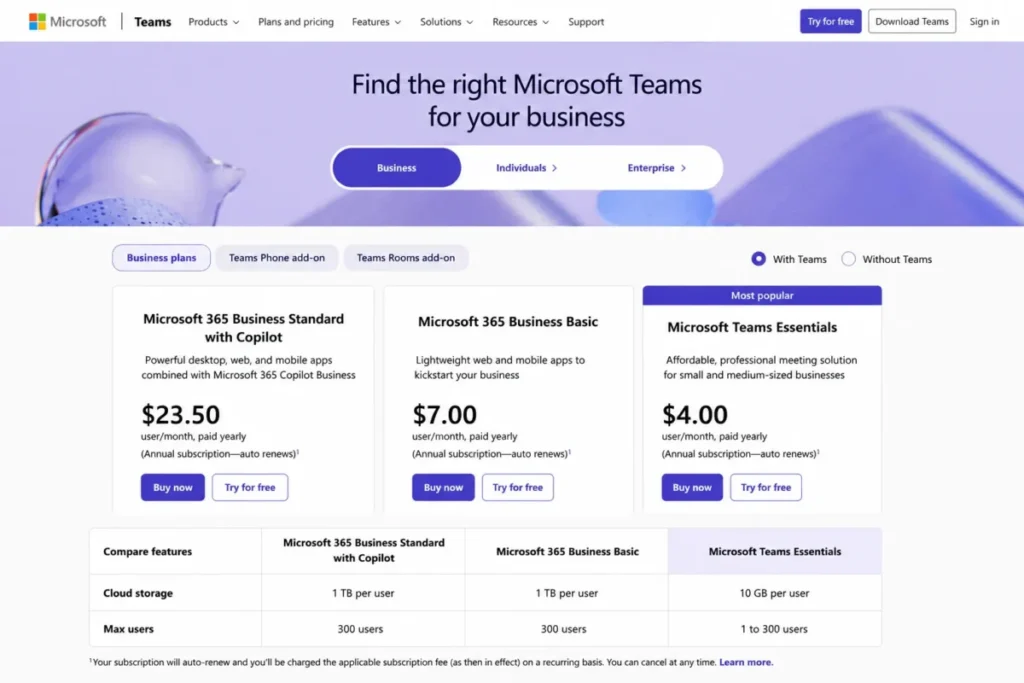
- $4 per user per month for Microsoft Teams Essentials, paid yearly, for organizations of 1 to 300 users.
- Practical tier:
- Microsoft 365 Business Basic at $7 per user per month paid yearly, which adds custom business email and 1 TB of cloud storage per user.
- Free plan:
- a free Teams tier exists, and converting it to a paid account cannot be reversed on the same email address.
- First limit that bites:
- 10 GB of cloud storage per user on Teams Essentials, against 1 TB per user on Business Basic.
- Better than Slack:
- meeting length and capacity are not the constraint, with 30-hour meetings and 300 participants included at the entry tier.
- Worse than Google Workspace:
- the entry Teams plan is a meetings and chat product, so email and the Office apps are a separate purchase decision.
- Setup difficulty:
- Medium to high. Tenant setup, licensing, and SharePoint permissions are the cost, not the Teams client.
- Hidden costs:
- Teams Premium is a $10 per user per month add-on, and Teams Phone Standard is another $10 per user per month.
- Evidence status:
- plan prices, user caps, storage, meeting limits, and add-on rates are listed on Microsoft’s own business plan comparison.
Teams Essentials at $4 is the cheapest way in this ranking to give a small team channels, chat, calls, video meetings, file sharing, tasks, and polling. Microsoft describes channels as open, private, or shared spaces that organize conversations by project or topic. It is also the plan most likely to be misread, because the storage figure is 10 GB per user rather than the 1 TB that the Microsoft 365 plans carry.
The practical decision is rarely Teams against Slack, a question the Slack vs Microsoft Teams comparison treats on its own terms. It is whether the business is buying Teams standalone or arriving at Teams through a Microsoft 365 license it already needs for Word, Excel, Outlook, and a company email domain.
For a business already paying for Microsoft 365 Business Basic or Standard, Teams is a sunk cost and the correct answer is to use it, as the Microsoft Teams review explains. For a business with no Microsoft footprint, adopting Teams standalone means running a Microsoft communication layer beside a non-Microsoft document layer, which is the configuration that produces the worst onboarding experience of any option here.
| Pros | Cons |
|---|---|
| $4 per user per month is the lowest entry price of any product in this ranking | Teams Essentials includes 10 GB per user, a tenth of what the Microsoft 365 plans carry |
| Meeting capacity is not a constraint at the entry tier, with 30-hour meetings and 300 participants | Business email and the Office desktop apps require a Microsoft 365 plan, not Teams Essentials |
| Office co-authoring is native for teams that already hold Microsoft 365 licenses | Tenant, licensing, and SharePoint permission setup is the heaviest admin work in this list |
| Encryption for meetings, chats, calls, and files is included at the entry tier | Downgrading a converted paid account back to free requires a different email address |
Source: Microsoft Teams business plan comparison and Microsoft Teams collaboration overview, checked 2026-07-31.
- Verdict:
- the stronger choice whenever Microsoft 365 is already funded, and a weak standalone purchase for a team whose documents live anywhere else.
3. Slack: Best for Fast Channel-Based Communication and Integrations

- Best for:
- 5 to 75 person remote or hybrid product, support, and agency teams whose work already happens in conversation.
- Avoid if:
- you expect one subscription to cover documents, email, and project tracking, because Slack is deliberately none of those.
- Starting price:
- $7.25 per active user per month on Slack Pro billed annually, or $8.75 billed monthly.
- Practical tier:
- Pro, and for most teams the trigger is message history rather than any feature.
- Free plan:
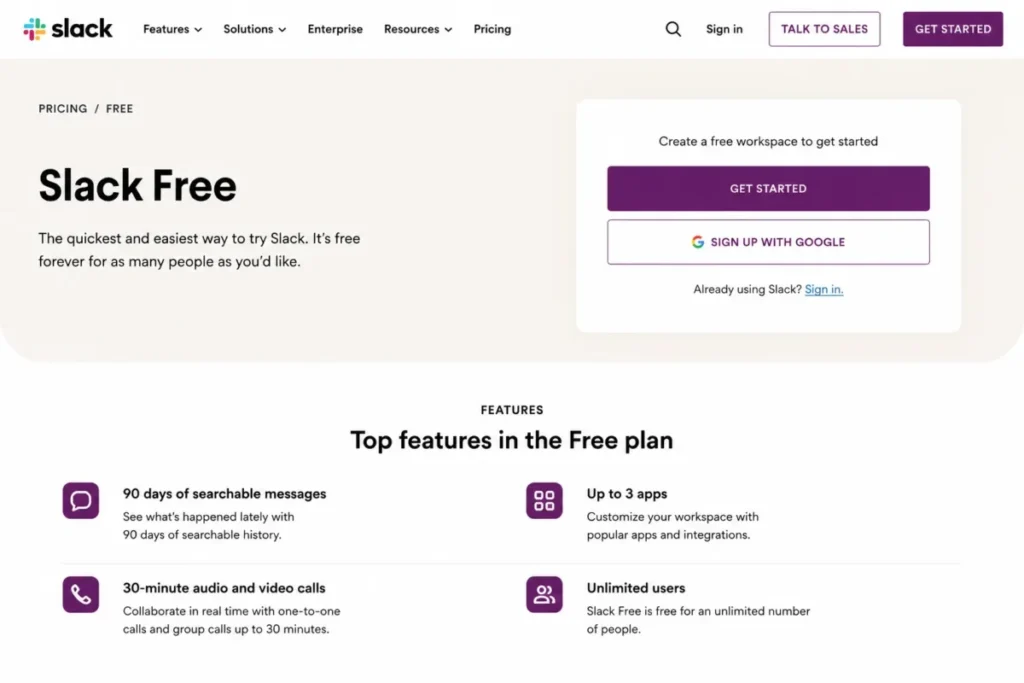
- yes, with 90 days of searchable messages, up to 3 apps, and 30-minute audio and video calls.
- First limit that bites:
- the 90-day search window, which silently removes the decision record a team just built.
- Better than Microsoft Teams:
- onboarding is close to zero, because a channel workspace needs no tenant, domain, or license structure.
- Worse than ClickUp:
- there is no native task hierarchy, dependency, or dashboard layer, so project state has to live elsewhere.
- Setup difficulty:
- Low. A workspace, a channel naming convention, and three app connections is the whole build.
- Hidden costs:
- billing is per active user, so a workspace with dormant accounts costs less than a seat count suggests.
- Evidence status:
- Free-plan limits and both Pro billing rates are stated on Slack’s own plan pages.
The free plan is genuinely usable for a small team, and that is exactly what makes it dangerous. A team runs six months of decisions through channels, then discovers that the first three months are no longer searchable, and the upgrade is no longer optional.
Three apps is the second pressure point. A support team wiring in a help desk, a CRM, and a monitoring alert has already spent the allowance before anyone connects a calendar.
Per-active-user billing is the detail worth budgeting around, a point the full Slack review returns to. Unlike a flat seat count, Slack charges for people who use the workspace, which makes it cheaper than the $7.25 per active user per month billed annually rate suggests for businesses with seasonal or part-time staff.
| Pros | Cons |
|---|---|
| Per-active-user billing at $7.25 annually means dormant accounts do not carry full cost | The Free plan hides messages older than 90 days, which removes the decision record teams rely on |
| A usable workspace exists within an hour, with no domain, tenant, or license setup | Three apps on Free is exhausted by a help desk, a CRM, and one alerting tool |
| Group calls and screen sharing on Pro reach up to 50 teammates | No native task hierarchy or dependency tracking, so a second tool is required for project state |
| Slack Connect brings vendors and clients into the same channels as staff | Free-plan calls stop at 30 minutes, which rules it out as a meeting tool |
Source: Slack Free plan limits and Slack Pro plan pricing, checked 2026-07-31.
- Verdict:
- the right pick when the failure is communication speed, on the condition that you budget for Pro from the start rather than treating Free as the destination.
4. Asana: Best for Structured Cross-Functional Project Execution

- Best for:
- 5 to 50 person marketing, operations, and launch teams running the same project shape every quarter.
- Avoid if:
- the team’s actual problem is chat or meetings, because Asana provides neither.
- Starting price:
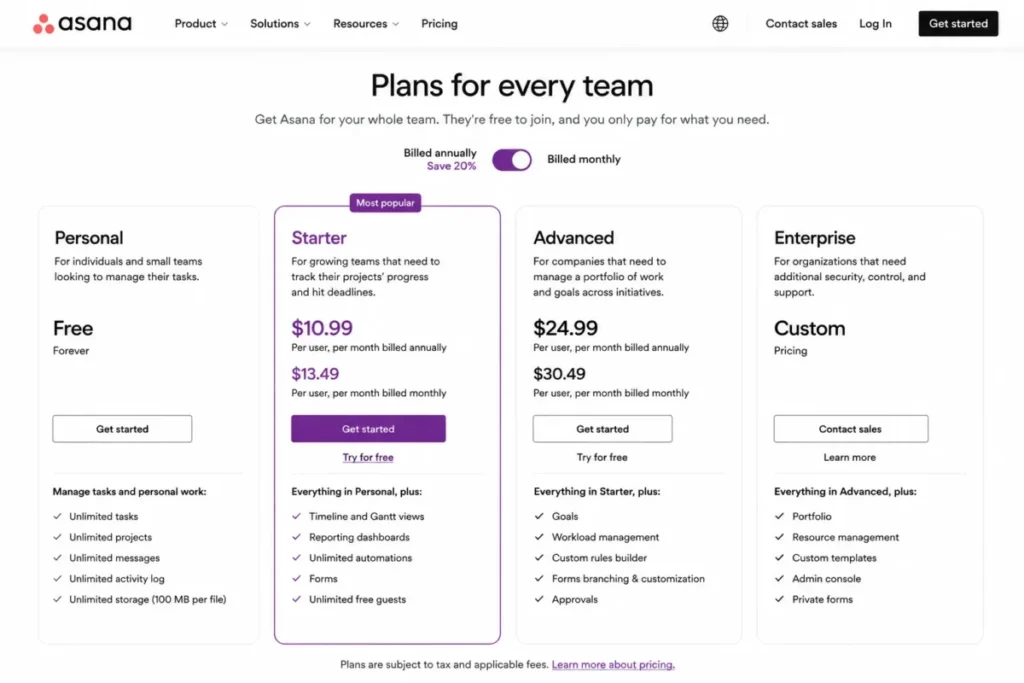
- $10.99 per user per month on Starter billed annually, or $13.49 billed monthly.
- Practical tier:
- Starter, which is where timelines, dashboards, forms, and automation all arrive together.
- Free plan:
- Personal at $0, limited to 2 users for accounts created after 12 November 2025, with a legacy allowance of up to 10 seats for older accounts.
- First limit that bites:
- the Personal plan allowance of up to 2 seats per project and team, which a third hire converts into a paid subscription immediately.
- Better than Trello:
- intake, sequencing, and reporting are one system, since forms, dependencies, timeline, and dashboards sit on the same tier.
- Worse than ClickUp:
- the entry paid seat costs more and carries no native chat, docs, or time tracking.
- Setup difficulty:
- Medium. The build cost is agreeing on custom fields and a request form, not learning the interface.
- Hidden costs:
- portfolios, goals, workload, and native time tracking are gated to Advanced at $24.99 per user per month.
- Evidence status:
- Starter and Advanced rates, the Personal seat cap, and the Starter feature list come from Asana’s pricing page and its Personal plan help article.
Request intake is the workflow that justifies the seat cost here. A form captures the request, the task lands in a project with an owner and a due date, dependencies expose the sequence on a timeline, rules move status without anyone chasing it, and a dashboard answers the status question before the meeting.
Every part of that loop sits on Starter, including unlimited automations and unlimited free guests, and the Asana review walks the same sequence. That last item matters more than it looks for agencies, because a client reviewer costs nothing.
The upgrade trigger is portfolio reporting, which the Asana pricing guide prices tier by tier. A team running one program is well served on Starter, and a team running six programs that need a single roll-up view needs Advanced, which more than doubles the seat cost.
| Pros | Cons |
|---|---|
| Timeline, Gantt, dashboards, forms, custom fields, and unlimited automations all arrive on the entry paid tier | At $10.99 per user per month, Starter is the second most expensive entry seat in this ranking |
| Unlimited free guests make client and contractor review free rather than a per-seat cost | Portfolios, goals, workload, and native time tracking are held back to Advanced at $24.99 |
| Personal covers a genuine solo or two-person workflow with unlimited tasks and projects | The Personal plan stops at 2 users for accounts created after 12 November 2025 |
| Request intake through forms removes email as the front door to the work queue | No chat, meetings, or business email, so Asana is always a second subscription |
Source: Asana plan pricing and Asana Personal plan details, checked 2026-07-31.
- Verdict:
- the stronger coordination pick for a team with repeatable cross-functional projects and a real intake problem, as long as the budget accepts a higher seat rate than the project tools ranked below it.
5. ClickUp: Best Feature-Per-Dollar for Teams Willing to Configure

- Best for:
- 5 to 40 person startups and agencies trying to collapse tasks, docs, chat, and time tracking into one subscription.
- Avoid if:
- nobody on the team owns the configuration, because an unconfigured workspace is the most common way this product fails.
- Starting price:
- $7 per user per month on Unlimited, billed yearly.
- Practical tier:
- Unlimited for most small teams, and Business at $12 per user per month once automation volume or dashboards matter.
- Free plan:
- Free Forever, with unlimited tasks and unlimited free plan members.
- First limit that bites:
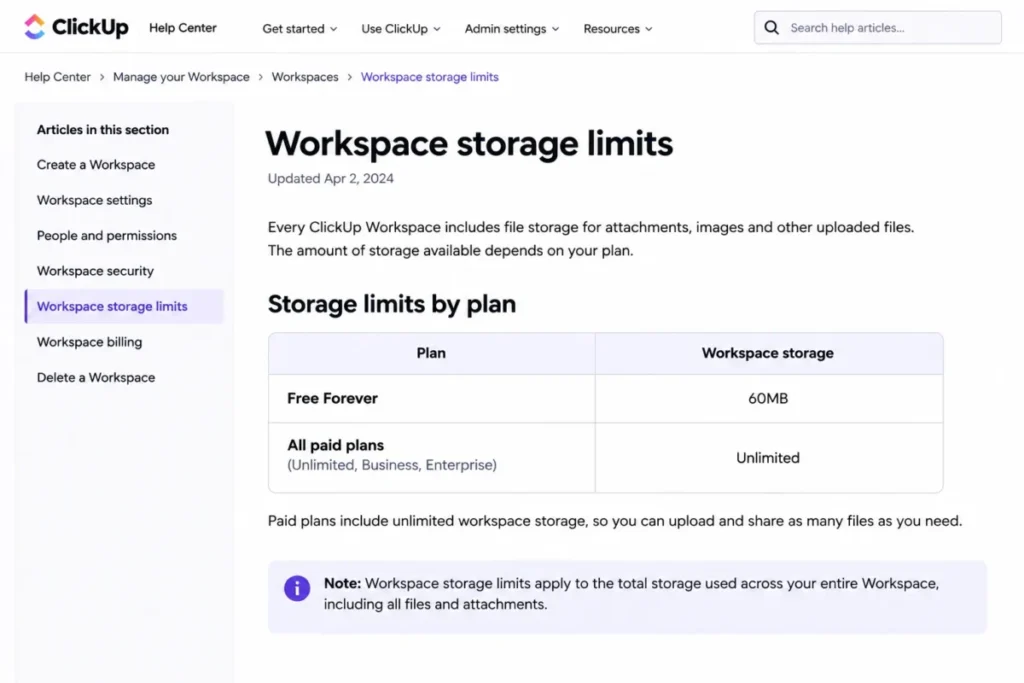
- 60MB of total workspace storage on Free Forever, which a single client folder exhausts.
- Better than Asana:
- the same $7 seat that buys tasks also buys docs, chat, native time tracking, and unlimited integrations.
- Worse than Trello:
- the setup burden is real, because Spaces, Folders, Lists, and custom fields all need decisions before the first task.
- Setup difficulty:
- High. Expect a deliberate workspace design session rather than an afternoon.
- Hidden costs:
- upgrading requires the entire Workspace to move to the paid plan, so partial adoption is not a billing option, and 5,000 automations per month is a Business feature.
- Evidence status:
- plan rates, the Free Forever storage ceiling, automation allowances, and the whole-Workspace upgrade rule are documented on ClickUp’s pricing page and help center.
The consolidation case is strong on paper and conditional in practice. One workspace holds the task hierarchy, the requirements Doc, the discussion, the time log, and the dashboard, which removes three tool boundaries a small agency would otherwise pay for.
That only works when someone owns the structure, a theme the ClickUp review in depth keeps returning to. Spaces, Folders, Lists, statuses, and custom fields are all decisions, and a team that skips them ends up with a slower version of Trello at a similar price.
The storage number is the single most useful figure on the pricing page, and the ClickUp pricing breakdown sets it against the paid tiers. 60MB is not a starter allowance, it is a demonstration, and any team handling client files moves to Unlimited in week one.
Google SSO arrives on Business, while SAML SSO, SCIM provisioning, audit log, and session management are Enterprise features, which matters for any small business with a security questionnaire to answer.
| Pros | Cons |
|---|---|
| $7 per user per month buys tasks, docs, chat, native time tracking, and unlimited integrations in one subscription | 60MB of total workspace storage on Free Forever makes the free tier unusable for client work |
| Unlimited Spaces, Folders, Forms, Gantt charts, and custom fields on the entry paid tier | Upgrading moves the entire Workspace, so a single team cannot pilot the paid plan alone |
| Native time tracking removes a separate timesheet tool for small agencies | Automation volume is gated, with 5,000 automations per month reserved for Business at $12 |
| Guests with permission control are included on Unlimited rather than sold as an add-on | SAML SSO, SCIM, and audit log are Enterprise-only, which fails some security reviews |
Source: ClickUp plan pricing and ClickUp workspace storage limits, checked 2026-07-31.
- Verdict:
- the best value per seat in this ranking for a team that will invest a day in workspace design, and a poor fit for a team that wants to start work in an hour.
6. Notion: Best for Knowledge-Centric Collaboration and Internal Systems

- Best for:
- 3 to 30 person startups, studios, and professional teams building a shared handbook alongside lightweight project tracking.
- Avoid if:
- you need resource planning, live meetings, or enforced project controls out of the box.
- Starting price:
- $10 per member per month on Plus, as listed on Notion’s pricing page.
- Practical tier:
- Plus, because the Free limits are structural rather than cosmetic for a multi-member workspace.
- Free plan:
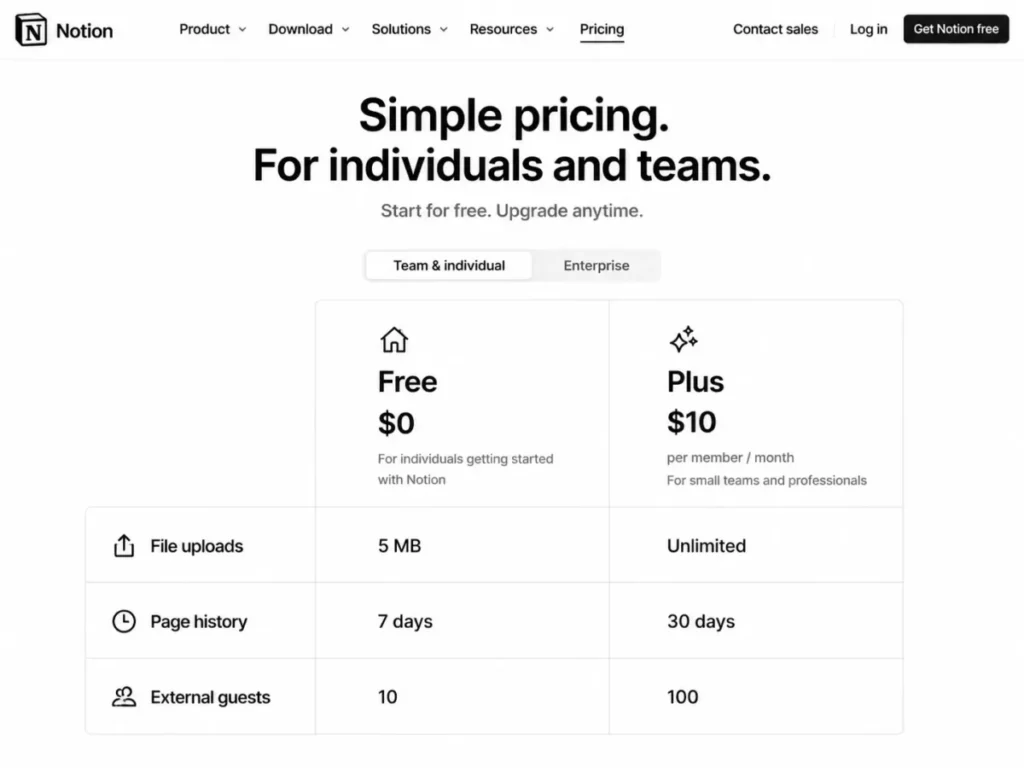
- yes, at $0 per member per month, with file uploads capped at 5 MB, page history at 7 days, and 10 external guests.
- First limit that bites:
- the block ceiling for a workspace with two or more people, documented as up to 1,000 blocks in your workspace on downgrade to Free.
- Better than Google Workspace:
- a wiki with linked databases replaces a folder tree, so process documentation stays queryable instead of buried.
- Worse than Teamwork.com:
- no budgets, no billable time, and no capacity view, so client delivery economics stay invisible.
- Setup difficulty:
- Medium. The tool is easy and the information architecture is not.
- Hidden costs:
- custom domains and branding for a published site are billed per domain, and Custom Agents draw on Notion credits.
- Evidence status:
- Free and Plus rates, the 5 MB upload ceiling, the 7-day history window, the 10-guest limit, and the multi-member block behavior come from Notion’s pricing page and its downgrade help article.
A teamspace, a set of policy pages, and one linked database covering projects or content is the shape almost every small team ends up building. Views and filters then let each role read the same database differently, which is the part a shared drive cannot do.
The Free plan is a trial for teams, not a plan, which the Notion workspace review makes plain. Blocks become limited once a second member joins, uploads stop at 5 MB, page history is seven days, and automations exist only as buttons.
Charts are the quiet gate, and the Notion pricing guide maps the rest of them. Free keeps one chart, so the first dashboard a team builds is also the moment Plus becomes necessary.
| Pros | Cons |
|---|---|
| Linked databases with per-role views replace a folder tree and a spreadsheet at once | Free caps uploads at 5 MB and history at 7 days, which rules it out for real document work |
| Teamspaces keep function-level content separate without splitting the workspace | A workspace with two or more members runs into a block ceiling documented at 1,000 blocks |
| Forms and databases capture structured updates without a separate intake tool | Automations on Free are view-only, so process cannot be enforced without paying |
| Plus at $10 per member per month removes the upload, block, and chart limits together | No native meetings, resource planning, or budget tracking, so it never replaces the delivery tool |
Source: Notion plan pricing and Notion plan downgrade behavior, checked 2026-07-31.
- Verdict:
- the strongest pick when the problem is institutional knowledge rather than scheduling, and a weak single-tool answer for any team that also needs live coordination.
7. Trello: Best for Visual Simplicity and Low-Overhead Task Coordination

- Best for:
- 2 to 20 person creative, editorial, and local-service teams that want a shared board and nothing heavier.
- Avoid if:
- the work has dependencies, portfolio reporting, or granular admin requirements at a low tier.
- Starting price:
- $5 per user per month on Standard billed annually, or $6 billed monthly.
- Practical tier:
- Standard, once the board count or the automation allowance runs out.
- Free plan:
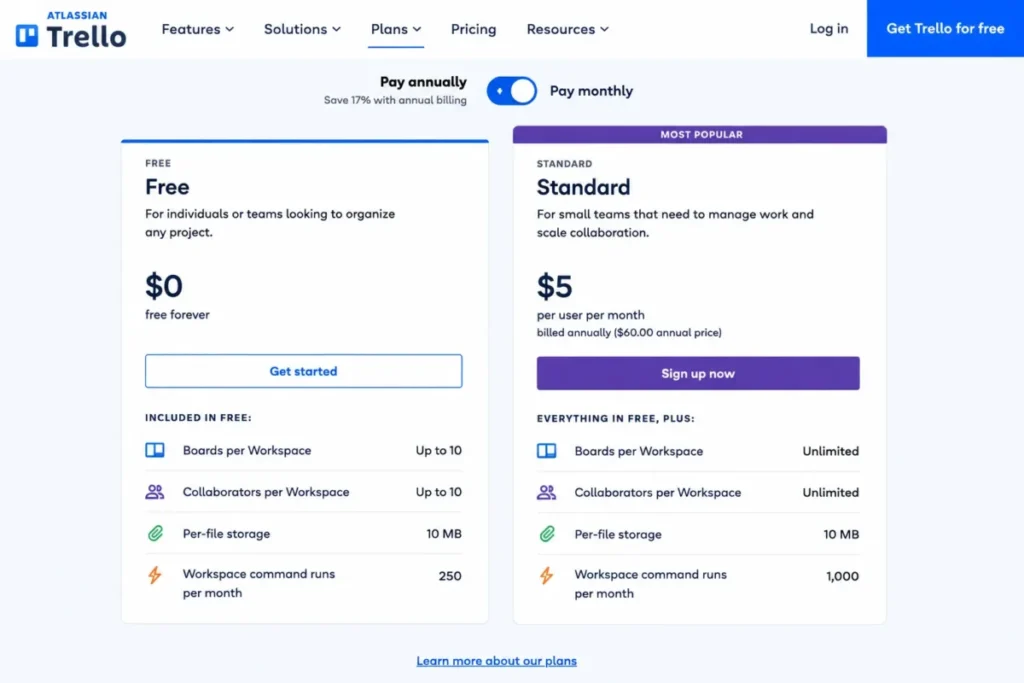
- yes, for up to 10 open boards and up to 10 Collaborators per Workspace.
- First limit that bites:
- 250 Workspace command runs per month on Free, which a single active board consumes.
- Better than monday.com Work Management:
- a team can be productive on day one without a configuration project.
- Worse than Asana:
- no dependencies and no portfolio reporting, so multi-project sequencing stays manual.
- Setup difficulty:
- Low. Lists as stages and cards as work is the entire model.
- Hidden costs:
- partner Power-Ups can carry their own subscriptions, and admin and security controls only arrive on Premium at $10 per user per month.
- Evidence status:
- Free and Standard limits and both billing rates are published on Trello’s pricing page and Atlassian’s plan comparison.
Intake to done is one board. Lists represent stages, cards carry owner, due date, and checklist, automation handles the repeated moves, and Power-Ups connect the specialist tools.
The 10-collaborator ceiling is the constraint most small teams meet first, it applies per Workspace rather than per board, and the Trello board review covers how teams work around it. The 10-board ceiling arrives next for any team that opens a board per client.
Attachments are the third pressure point, and the Trello pricing tiers show where the ceiling moves. 10MB per file on Free becomes 250MB on Standard, which is the difference between linking to a design file and attaching one.
| Pros | Cons |
|---|---|
| Lowest paid entry in the project group at $5 per user per month billed annually | Free stops at 10 collaborators per Workspace, which a 12-person team hits immediately |
| Unlimited Power-Ups per board on Free, so integrations are not the constraint | 250 Workspace command runs per month on Free is a single active board’s worth of automation |
| Board, list, card model needs no training for non-technical staff | No dependencies or portfolio reporting, so sequencing across projects stays manual |
| Standard raises per-file attachments from 10MB to 250MB and adds Custom Fields | Admin and security controls require Premium at $10 per user per month |
Source: Trello plan pricing and Atlassian guidance on choosing a Trello plan, checked 2026-07-31.
- Verdict:
- the right choice when adoption risk outweighs feature depth, and the wrong one for any team whose projects have real sequencing.
8. monday.com Work Management: Best for Configurable Visual Workflows

- Best for:
- 5 to 50 person operations, marketing, and client-service teams that need different departments working differently on one platform.
- Avoid if:
- the team is two people, because the free tier ends exactly there.
- Starting price:
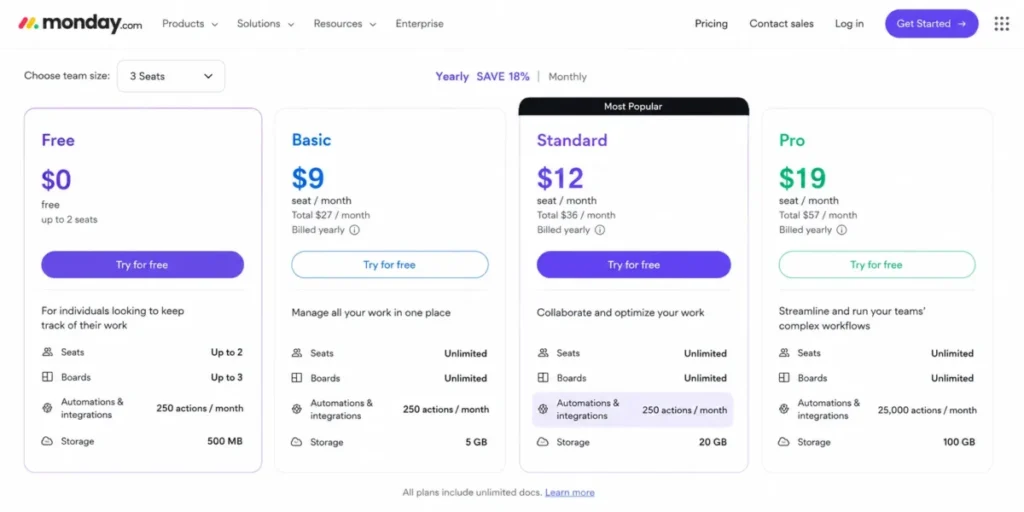
- $9 per seat per month on Basic, as listed on the monday.com pricing page.
- Practical tier:
- Standard at $12 per seat per month, which is the first plan carrying automations, integrations, timeline and Gantt views, and guest access.
- Free plan:
- yes, capped at 2 seats, 3 boards, and 3 docs.
- First limit that bites:
- the 250 automation and 250 integration actions per month on Standard, against 25,000 on Pro.
- Better than Notion:
- boards, dashboards, and views are built for operational status rather than documentation.
- Worse than Trello:
- the configuration effort is far higher for the same first-week outcome.
- Setup difficulty:
- Medium to high. Column design and dashboard scope are the work.
- Hidden costs:
- the plan that most buyers compare on price is Basic, and the plan that carries the workflow features is Standard, a difference of $3 per seat per month.
- Evidence status:
- seat rates, free-tier caps, and the automation and integration action allowances by plan are listed on monday.com’s pricing page.
The board is the unit of work here, and the flexibility is real. Columns capture owner, status, date, priority, and files, forms or manual entry create items, and dashboards aggregate status across boards.
Basic at $9 is the number most comparison tables quote, and the monday.com review explains why it is the wrong one. Automations, integrations, timeline, Gantt, calendar view, and guest access all start on Standard, so any team buying monday.com to reduce manual handoffs is buying Standard.
Action volume is the next ceiling. 250 automation actions per month sounds generous until a single status change fans out to three notifications, at which point Pro at $19 per seat becomes the real budget.
| Pros | Cons |
|---|---|
| Column and view design lets marketing, operations, and delivery run different processes on one platform | The free tier stops at 2 seats and 3 boards, so a third colleague forces a paid plan |
| Standard adds automations, integrations, timeline, Gantt, and guest access in one step | Automations and integrations are absent from Basic, the plan most price comparisons quote |
| Unlimited free viewers keep read-only stakeholders off the seat count | 250 automation actions per month on Standard is a low ceiling for any fan-out workflow |
| Dashboards aggregate board status without exporting to a spreadsheet | API calls are capped at 1,000 per day on Standard, which constrains custom reporting |
Source: monday.com plan pricing, checked 2026-07-31.
- Verdict:
- the stronger fit when several departments need genuinely different workflows, priced honestly at $12 per seat rather than the $9 headline.
9. Teamwork.com: Best for Agencies Billing Client Work

- Best for:
- 5 to 75 person agencies, consultancies, and professional-services firms that invoice against time.
- Avoid if:
- the team does not bill clients, because the time, budget, and profitability layer is the reason to pay for it.
- Starting price:
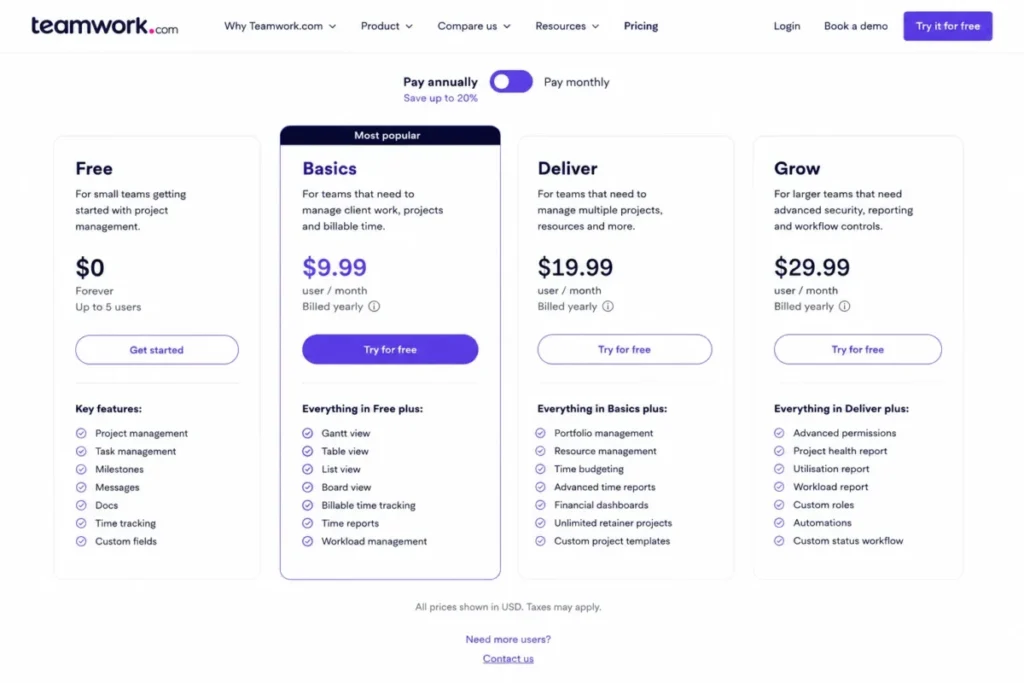
- $9.99 per user per month on Basics billed yearly.
- Practical tier:
- Basics for delivery and time tracking, and Accelerate at $24.99 per user per month once budgets, retainers, and invoicing matter.
- Free plan:
- yes, limited to 5 projects, a maximum of 5 users, and 100 automations.
- First limit that bites:
- the 5-user free cap, followed by the maximum of 5 visible insight widgets on Basics.
- Better than Asana:
- billable time, client organization, and delivery reporting are native rather than an integration.
- Worse than ClickUp:
- the entry seat costs more and carries no chat or docs layer.
- Setup difficulty:
- Medium to high. Client, project, and rate structure has to be decided before the first timesheet.
- Hidden costs:
- workload planning, capacity views, budgets, retainers, and invoicing are Accelerate features, which is a jump of $15 per user per month.
- Evidence status:
- plan rates, free-tier caps, and the per-plan insight widget limits come from Teamwork.com’s pricing page and its reports documentation.
Client delivery is the workflow, and it is a different shape from internal project management. A client and project are created, a template sets tasks and milestones, the team logs time against tasks, and project health is read against budget rather than against a due date.
Basics carries that loop with Gantt, table, list, and board views plus billable time tracking. The reporting ceiling is where it stops: the insights panel shows a maximum of 5 widgets on Basics, against 10 on Accelerate.
For an agency, the honest budget is Accelerate, a conclusion the Teamwork.com review reaches from the delivery side. Budgets, retainers, invoicing from logged time, and live capacity are the features that turn delivery data into margin data, and none of them sit on the entry plan.
| Pros | Cons |
|---|---|
| Billable time tracking and client organization are native, not a bolted-on integration | The reporting insights panel is capped at 5 visible widgets on Basics |
| A real free tier exists at 5 projects and 5 users for a firm testing the model | Budgets, retainers, invoicing, and capacity planning all require Accelerate at $24.99 |
| Unlimited project templates make repeatable client engagements fast to launch | No chat or document layer, so it is always a second subscription |
| Two-factor authentication and SOC 2 compliance are included on every plan | Single sign-on is an Enterprise feature, which affects security-reviewed buyers |
Source: Teamwork.com plan pricing and Teamwork.com insights panel limits, checked 2026-07-31.
- Verdict:
- the correct specialist pick for a services firm that needs margin visibility, and an unnecessary one for any team that does not bill by the hour.
10. Basecamp: Best for Simplicity and a Fixed Price at Scale

- Best for:
- 10 to 100 person small businesses that want one deliberately simple project hub instead of a configurable platform.
- Avoid if:
- you need automation depth, portfolio analytics, or a low per-seat entry price.
- Starting price:
- $15 per user per month on the per-user Pro package, billed monthly.
- Practical tier:
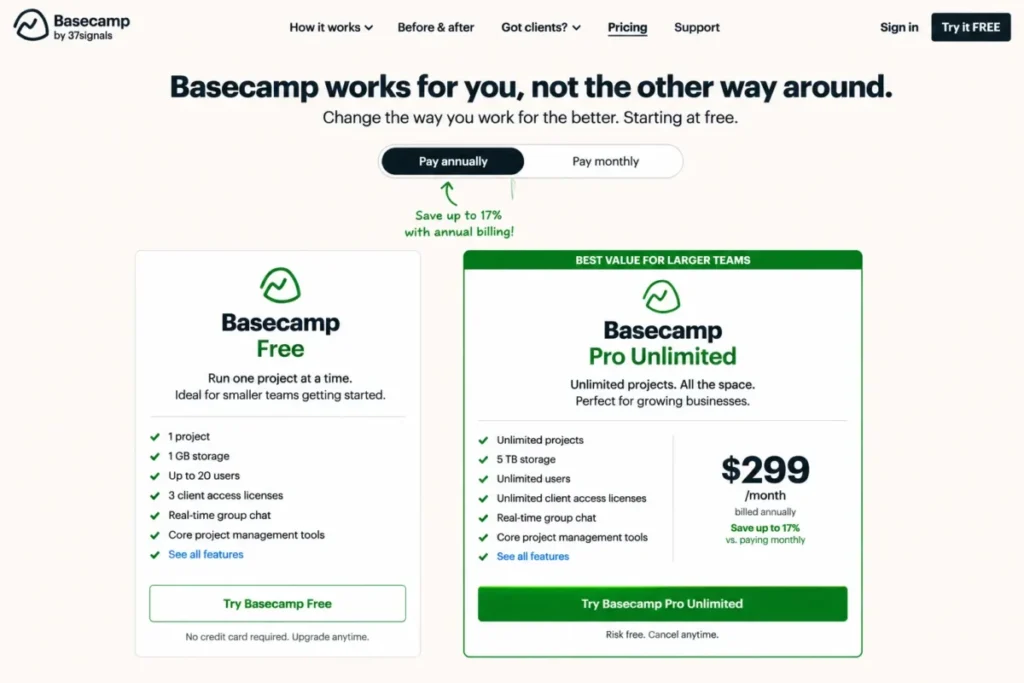
- Pro Unlimited at $299 per month billed annually, which removes user and project caps entirely.
- Free plan:
- yes, covering 1 project, 1 GB of storage, and up to 20 users.
- First limit that bites:
- the single-project ceiling on the free plan, since a second client engagement ends it.
- Better than Slack:
- message boards, to-dos, schedules, docs, and chat live in a project where every project you create gets a dedicated page rather than in a scrolling channel.
- Worse than monday.com Work Management:
- there is no comparable automation, view, or dashboard configuration layer.
- Setup difficulty:
- Low. The product resists configuration by design.
- Hidden costs:
- on the per-user package, the Timesheet upgrade and the Admin Pro Pack are $50 per month each, and an extra 1 TB of storage is another $50 per month.
- Evidence status:
- both package prices, the free-plan caps, and the flat add-on rates are published on Basecamp’s pricing page.
The free plan is the most generous single-project offer in this ranking. 20 users on one project with message boards, to-dos, card tables, chat, schedules, and docs is a complete hub for a small team running one thing at a time.
Pro Unlimited inverts the usual economics. At $299 per month for unlimited users, the cost stops moving with headcount, which makes it the only option here whose price is predictable through a hiring year.
Clients and contractors are not billed on the per-user package, which changes the arithmetic for agencies more than the seat rate does, and the Basecamp review works through the same trade-off.
| Pros | Cons |
|---|---|
| Pro Unlimited holds cost flat at $299 per month no matter how many people join | At 10 seats the flat package costs roughly three times the next most expensive option here |
| The free plan carries a complete project hub for up to 20 users | The free plan allows only 1 project, so a second engagement forces an upgrade |
| Clients and contractors are not billed on the per-user package | Timesheet and Admin Pro Pack are $50 per month each on the per-user package |
| Near-zero configuration effort removes the main adoption risk for non-technical teams | No automation, dependency, or portfolio reporting layer to grow into |
Source: Basecamp package pricing and Basecamp feature overview, checked 2026-07-31.
- Verdict:
- the stronger buy above roughly 20 employees where flat pricing beats per-seat growth, and an expensive choice for the 10-person team this ranking is scaled to.
Pricing and Cost at Scale
Entry prices in this category are close enough that they rarely decide anything. The gap opens at ten seats, and it opens again at the plan a team has to reach for the workflow it came for.
The table below prices the tier that carries a ten-person team’s core workflow, not the cheapest tier on each vendor’s page.
| Product | Plan priced | Billing basis | Rate | Ten seats per month |
|---|---|---|---|---|
| Microsoft Teams | Teams Essentials | Per user, paid yearly | $4.00 | $40.00 |
| Trello | Standard | Per user, billed annually | $5.00 | $50.00 |
| Google Workspace | Business Starter | Per user, Annual/Fixed-Term | $7.00 | $70.00 |
| ClickUp | Unlimited | Per user, billed yearly | $7.00 | $70.00 |
| Slack | Pro | Per active user, billed annually | $7.25 | $72.50 |
| Teamwork.com | Basics | Per user, billed yearly | $9.99 | $99.90 |
| Notion | Plus | Per member, per month | $10.00 | $100.00 |
| Asana | Starter | Per user, billed annually | $10.99 | $109.90 |
| monday.com Work Management | Standard | Per seat, per month | $12.00 | $120.00 |
| Basecamp | Pro Unlimited | Flat, billed annually | $299.00 | $299.00 |
Rates under $75 for ten seats come from Teams Essentials pricing and Trello Standard pricing.
The same band uses Google Workspace edition rates and ClickUp Unlimited pricing.
The middle of the range comes from Slack Pro rates, Teamwork.com Basics rate, and the Notion Plus rate.
The top of the range comes from the Asana Starter rate, monday.com Standard rate, and Basecamp Pro Unlimited rate, all checked 2026-07-31.
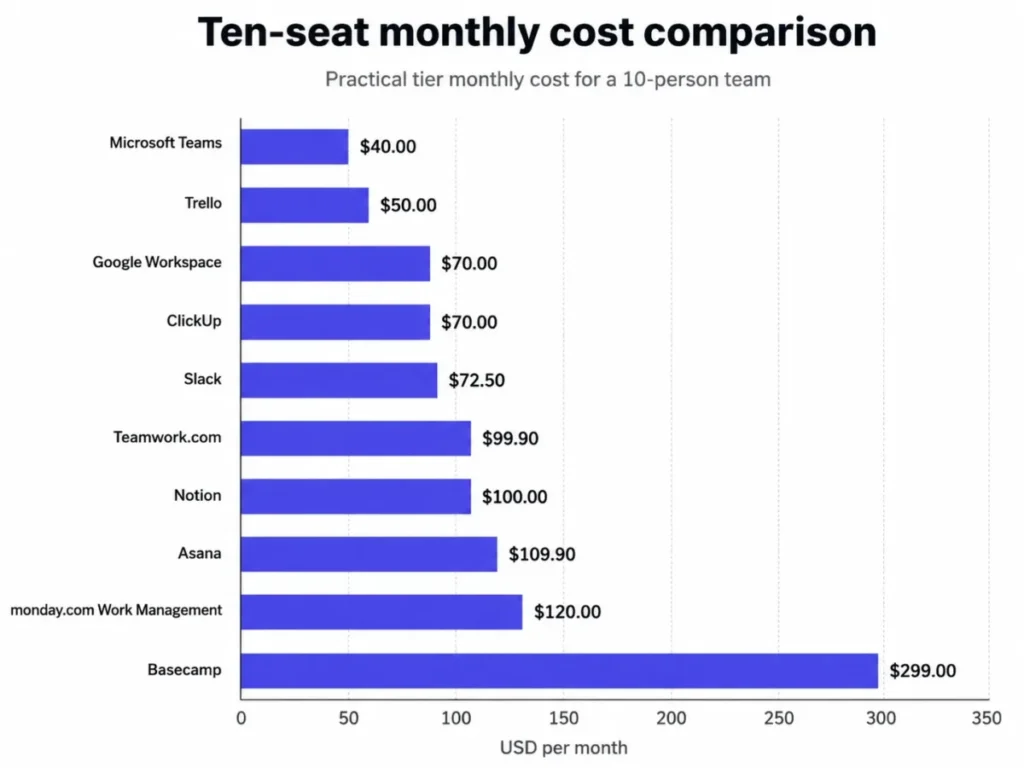
Three readings matter more than the ordering. The communication layer is cheap, with Microsoft Teams Essentials and Google Workspace Business Starter both landing under $75 for ten seats, so a small business rarely saves money by avoiding one.
The coordination layer is where the spread appears. Trello Standard and ClickUp Unlimited sit at half the cost of monday.com Standard for the same ten people, and the difference is configuration depth rather than task tracking.
Basecamp is the outlier by design. At ten seats it costs more than any two other products on this list combined, and that is the correct reading of a plan whose price does not move with headcount.
Annual Commitment Versus Month-to-Month
Four products publish both rates, which makes the cost of billing flexibility visible.
| Product | Plan | Committed rate | Month-to-month rate | Flexibility premium |
|---|---|---|---|---|
| Trello | Standard | $5.00 per user | $6.00 per user | 20% |
| Google Workspace | Business Starter | $7.00 per user | $8.40 per user | 20% |
| Slack | Pro | $7.25 per active user | $8.75 per active user | 20.7% |
| Asana | Starter | $10.99 per user | $13.49 per user | 22.7% |
Rates verified on Trello’s pricing page, Google Workspace payment plan documentation, Slack’s Pro plan page, and Asana’s pricing page, checked 2026-07-31.
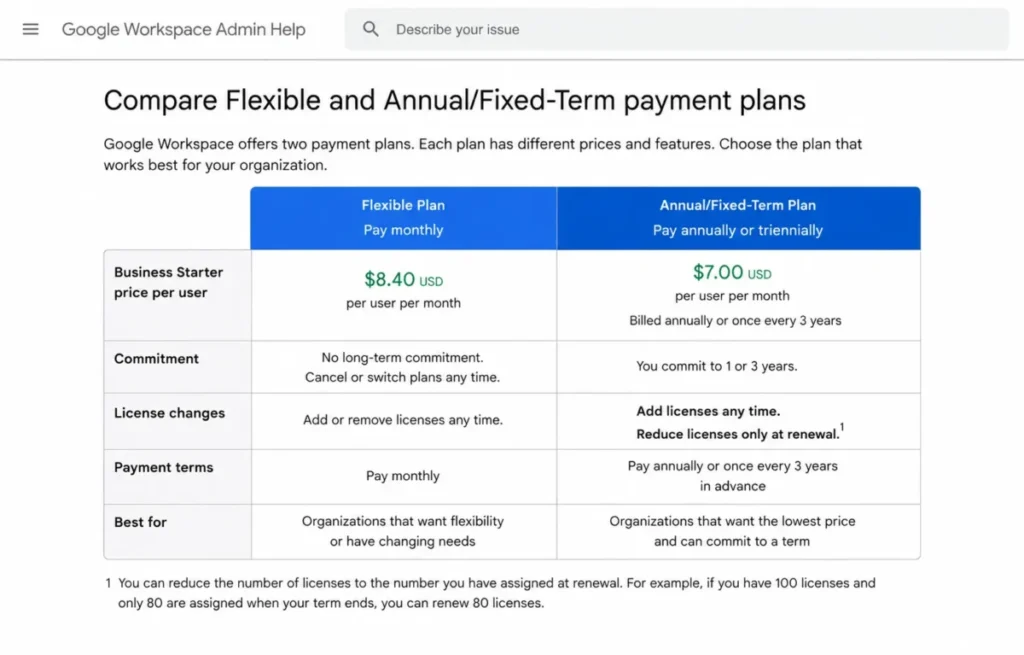
A fifth of the seat cost is a fair price for the right to cancel, and for most small businesses it is worth paying on the coordination tool rather than the suite. Google’s Annual/Fixed-Term Plan permits license reductions only at renewal, so a seasonal team that commits is paying for empty seats until the contract turns over.
Commit annually on the tool that has already survived a full quarter of use. Stay month-to-month on anything the team is still arguing about.
Where Basecamp’s Flat Price Starts Winning
Flat pricing is either the best or the worst deal on this page, and the crossover is arithmetic rather than opinion.
| Compared against | Per-seat rate | Seat count where the flat $299 costs less |
|---|---|---|
| Basecamp per-user package | $15.00 | 20 employees, from $299 ÷ $15 = 19.93 |
| monday.com Work Management Standard | $12.00 | 25 seats, from $299 ÷ $12 = 24.92 |
| Google Workspace Business Starter | $7.00 | 43 seats, from $299 ÷ $7 = 42.71 |
Inputs for those three calculations come from Basecamp’s package rates, the monday.com seat rates, and Google Workspace edition rates for Business Starter, checked 2026-07-31.
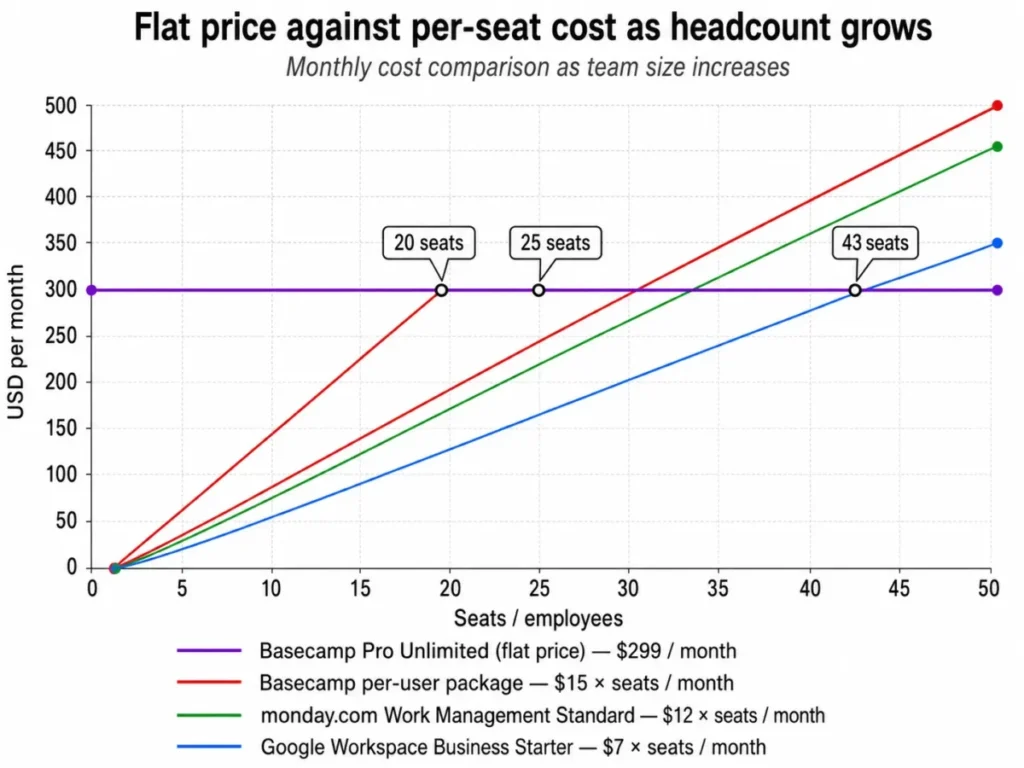
These are seat-cost comparisons, not value comparisons. Basecamp at 43 seats does not deliver what Google Workspace delivers, and the point of the calculation is only to show at which headcount the flat price stops being an expensive choice.
Source for both Basecamp rates: Basecamp package pricing, checked 2026-07-31.
Feature Limits and Upgrade Triggers
Free plans in this category do not fail loudly. They keep working while quietly removing the thing a team was relying on, which is why the failure behavior matters more than the cap.
| Product | Free-plan cap | What stops working | The tier that fixes it |
|---|---|---|---|
| Slack | 90 days of searchable messages, 3 apps, 30-minute calls | Older decisions leave search, and the fourth integration cannot be connected | Pro |
| ClickUp | 60MB of total workspace storage | File attachments stop, and the whole Workspace must upgrade together | Unlimited |
| Notion | 5 MB uploads, 7-day history, 10 guests, 1 chart | Blocks become limited once a second member joins, and automations turn view-only | Plus |
| Trello | 10 boards and 10 collaborators per Workspace, 250 command runs per month | The eleventh colleague cannot be added, and automation stops mid-month | Standard |
| monday.com Work Management | 2 seats, 3 boards, 3 docs | A third colleague cannot join, and no automation or integration exists to begin with | Standard |
| Teamwork.com | 5 projects, 5 users, 100 automations | The sixth client engagement has nowhere to live | Basics |
| Basecamp | 1 project, 1 GB storage, 20 users | The second project cannot be created without deleting the first | Pro Unlimited |
| Asana | 2 users on Personal for accounts created after 12 November 2025 | Collaboration stops at the first hire | Starter |
Free-plan limits verified on Slack’s Free plan page, ClickUp’s workspace storage documentation, and Notion’s downgrade documentation.
Also verified on Atlassian’s Trello plan guidance, the monday.com plan comparison, and Teamwork.com’s plan page.
The last two come from Basecamp’s plan terms and Asana’s Personal plan documentation, checked 2026-07-31.
Google Workspace and Microsoft Teams are absent from that table for a reason. Neither sells a business free tier that a company can run on, so the upgrade trigger for both is the purchase decision itself.
Storage Ceilings Translated Into Workflows
Storage numbers are published in units that are not comparable, which is how a 30 GB allowance and a 60MB allowance end up in the same feature table.
| Product | Storage rule | The workflow it constrains |
|---|---|---|
| Google Workspace | 30 GB pooled per user on Business Starter, 2 TB on Business Standard | Meeting recordings and client asset libraries |
| Microsoft Teams | 10 GB per user on Teams Essentials, 1 TB per user on Business Basic | Shared files and recorded meetings kept in the tenant |
| ClickUp | 60MB total workspace storage on Free Forever, unlimited on paid plans | Any task attachment at all |
| Notion | 5 MB per file on Free, unlimited uploads on Plus | Design files, PDFs, and video attached to documentation |
| Trello | 10MB per file on Free, 250MB per file on Standard | Attaching a working file instead of linking to it |
| Basecamp | 1 GB on the free plan, 5 terabytes on Pro Unlimited | A whole project’s document and asset history |
Storage figures confirmed against Google Workspace edition storage, the Microsoft Teams plan comparison, and ClickUp storage documentation.
The rest come from Notion’s plan comparison, the Trello plan page, and Basecamp’s pricing terms, checked 2026-07-31.
Per-file limits and pooled limits fail differently. A pooled ceiling degrades slowly and gives the admin warning, while a per-file ceiling fails immediately at the moment someone tries to share the exact asset the meeting is about.
Automation Allowances Are Not Interchangeable
An automation checkmark on a comparison table hides a range of two orders of magnitude.
| Product | Plan | Automation allowance |
|---|---|---|
| Trello | Free | 250 Workspace command runs per month |
| Trello | Standard | 1,000 Workspace command runs per month |
| Trello | Premium | Unlimited Workspace command runs |
| monday.com Work Management | Basic | None |
| monday.com Work Management | Standard | 250 automation actions per month |
| monday.com Work Management | Pro | 25,000 automation actions per month |
| ClickUp | Business | 5,000 automations per month |
| ClickUp | Enterprise | 250,000 automations per month |
| Asana | Starter | Unlimited automations |
| Teamwork.com | Free | 100 automations |
Allowances taken from the Trello plan page, the monday.com plan comparison, and the ClickUp plan page.
The last two come from the Asana plan page and the Teamwork.com plan page, checked 2026-07-31.
Asana is the outlier worth naming. Unlimited automations on a $10.99 entry seat is a materially different proposition from 250 monthly actions on a $12 seat, and for a team whose main goal is removing manual status updates it reverses the apparent price ranking.
What happens when an allowance runs out is not documented consistently across these vendors, so a team planning heavy automation should confirm the overflow behavior with the vendor before committing to an annual term.
Setup and Migration Difficulty
Adoption risk, not feature risk, is what kills small business collaboration purchases in the first ninety days. The setup rating below reflects the decisions a team has to make before the tool is useful, not the time to create an account.
| Product | Setup difficulty | What the effort involves |
|---|---|---|
| Trello | Low | Naming the lists that represent your stages |
| Slack | Low | A channel naming convention and three app connections |
| Basecamp | Low | Deciding which projects exist, since the product resists configuration |
| Google Workspace | Medium | Domain verification, account provisioning, and shared drive permissions |
| Asana | Medium | Agreeing custom fields, a request form, and who owns intake |
| Notion | Medium | Information architecture, which is harder than the tool |
| monday.com Work Management | Medium to high | Column design, board structure, and dashboard scope per department |
| Teamwork.com | Medium to high | Client, project, and rate structure before the first timesheet |
| Microsoft Teams | Medium to high | Tenant setup, licensing, and SharePoint permissions |
| ClickUp | High | Spaces, Folders, Lists, statuses, and custom fields before the first task |
Ratings are an editorial assessment of the configuration each product requires before first use.
They are read against the Google Workspace admin editions guide, Microsoft Teams business plans, and the Slack Pro overview.
They are also read against the Asana Starter feature set, ClickUp plan breakdown, Trello plan details, and monday.com Work Management plans.
The remainder come from Notion plan details, Teamwork.com Basics details, and Basecamp package details, checked 2026-07-31.
The pattern is consistent: the products that configure the least are the ones a non-technical team keeps using, and the products that configure the most deliver more once someone owns them.
Migration between these tools is not documented to a common standard, so treat any switch as a project rather than an import. Before committing, confirm with the vendor which objects transfer, whether attachments and comments come with them, how duplicates are handled, and whether the import can be rolled back.
Run any migration on a single non-critical project first. Keep the source system readable for one full billing cycle after the cutover.
Which Collaboration Tool Should You Choose?
Every ranking reason in this list resolves to one micro-cohort, one workflow, and one plan gate, because those three decide the cost far more than the feature list does. Choose by the cohort you match, then confirm the plan gate on the official pricing page, checked 2026-07-31.
Work through these six steps in order. Each one removes options, which is faster than comparing feature tables.
- Name the broken thing. If files and decisions are scattered, buy the communication layer first. If nobody can say what is late, buy the coordination layer first. If the same answers get re-explained, buy the knowledge layer first.
- Check the Microsoft question. If the business already funds Microsoft 365, Teams is free at the point of use and the decision is made. If it does not, compare the two suites on storage and business email rather than on chat features.
- Count the people who need to write. Read-only stakeholders are free on monday.com and cheap as guests on Asana and Trello, so count editors rather than headcount before pricing anything.
- Find the limit you will hit in ninety days. Message history, storage, board count, collaborator count, and automation volume are the five that bite. Price the tier above that limit, not the tier below it.
- Decide who owns configuration. ClickUp, monday.com Work Management, and Notion repay an owner and punish the absence of one. If nobody has that time, Trello, Slack, or Basecamp will produce a better ninety-day outcome.
- Ask the renewal question before you sign. A year from now, can you point at a workflow that runs in this tool and nowhere else? If the answer is no, stay month-to-month.
Common Mistakes When Choosing Collaboration Software
Budgeting from the entry price. The plan most comparison tables quote is rarely the plan a team ends up on, and monday.com is the clearest case: automations start at Standard, not at Basic.
Treating a free plan as a destination. Slack’s 90-day window, ClickUp’s 60MB workspace, and monday.com’s two seats are all designed to be outgrown, and each one removes something a team had come to depend on.
Buying a project tool to fix a communication problem. Adding Asana to a team that cannot find last month’s decision produces two tools and the same problem.
Ignoring who is not a seat. Guests, clients, contractors, and viewers are priced very differently across these products, and for an agency that difference outweighs the seat rate.
Skipping the configuration owner. A workspace nobody designed is the most expensive outcome in this category, because the subscription is paid and the workflow never arrives.
Committing annually before the ninety-day mark. Annual rates save about a fifth of the seat cost, which is not worth a twelve-month lock on a tool the team has used for three weeks.
Final Verdict
Google Workspace is the strongest single purchase for most cloud-native small businesses, because $7 per user per month on the Annual/Fixed-Term Plan covers email, storage, documents, meetings, and chat under one admin console. The upgrade path from 30 GB to 2 TB per user is predictable as well. It does not track projects, and any team pretending otherwise will rebuild a project tracker in Sheets within a quarter.
For a Microsoft-funded business, Teams is the answer and the only real question is whether Teams Essentials at $4 is enough or whether business email pushes the decision to Microsoft 365 Business Basic at $7.
On the coordination side, the honest split is by configuration appetite. ClickUp Unlimited at $7 per user per month delivers the widest feature set per dollar for a team that will design its workspace. Asana Starter at $10.99 delivers the best intake-to-reporting loop with unlimited automations. Trello Standard at $5 delivers the fastest adoption for a team that needs work moving this week.
Two picks are specialist rather than general. Teamwork.com is the right buy for an agency that needs margin visibility, and Basecamp becomes the right buy above roughly 20 employees where a flat $299 stops per-seat growth.
Notion sits outside both groups. Choose it when the failure is institutional knowledge, and pair it with something else rather than expecting it to run delivery.
Frequently Asked Questions
Short answers to the questions that decide a shortlist, using the same verified figures and the same checked date as the sections above.
What is the best collaboration software for a small business?
For most cloud-native small businesses, Google Workspace at $7 per user per month on the Annual/Fixed-Term Plan is the strongest single purchase, because it covers email, files, documents, meetings, and chat in one subscription.
A business already paying for Microsoft 365 should use Microsoft Teams instead, and a team whose main gap is project tracking should pair either suite with Asana, ClickUp, or Trello.
How much does collaboration software cost for 10 users?
At the tier that carries a ten-person workflow, the range in this ranking runs from $40 per month for Microsoft Teams Essentials to $299 per month for Basecamp Pro Unlimited.
Most options land between $50 and $120 per month, with Trello Standard at the bottom of that band and monday.com Standard at the top.
Google Workspace Business Starter and ClickUp Unlimited both land at $70 for ten seats.
Which free collaboration plan is the most usable for a small team?
Among free collaboration tools, Basecamp’s free plan is the most complete for a team running one project, since it covers up to 20 users with message boards, to-dos, chat, schedules, and docs. Slack Free is the most usable for pure communication, with the caveat that messages older than 90 days leave search.
Is Slack or Microsoft Teams better for a small business?
Teams is the stronger choice when the business already pays for Microsoft 365, because the license is sunk and Office co-authoring is native. Slack is the stronger choice when onboarding speed matters and there is no Microsoft footprint, since a Slack workspace needs no tenant, domain, or license structure.
Can Google Workspace replace project management software?
Not for work with dependencies, workload balancing, or portfolio reporting, because the suite has no native layer for any of them. It replaces email, file storage, document authoring, meetings, and chat, which is why most small businesses run Google Workspace alongside a coordination tool rather than instead of one.
Do small teams need both a chat tool and a project tool?
Teams under about five people running one project at a time often do not, and Basecamp or ClickUp can carry both jobs. Beyond that, the two failure modes separate: chat solves the speed of conversation, and a project tool solves the visibility of commitments.
Which collaboration tool has the lowest setup effort?
Trello, Slack, and Basecamp are the three that a non-technical team can run productively in a day. ClickUp sits at the other end, because Spaces, Folders, Lists, statuses, and custom fields are all decisions that have to be made before the first task is useful.
What breaks first on a free collaboration plan?
Message history, storage, and collaborator count, in roughly that order. Slack hides messages past 90 days, ClickUp caps a whole workspace at 60MB, Trello stops at 10 collaborators per Workspace, and monday.com stops at 2 seats.
Is annual billing worth it for collaboration software?
The four products in this ranking that publish both rates charge between 20% and 22.7% more for month-to-month billing. That is a fair price for the right to cancel on a tool the team has used for less than a quarter, and poor value on a tool that has already survived one.
When does Basecamp’s flat price become cheaper than per-seat pricing?
Against Basecamp’s own per-user package at $15 per user per month, the crossover is 20 employees. Against a $12 per seat tool it is 25 seats, and against a $7 per user suite it takes 43 seats, so the flat price is a scaling decision rather than a starting one.