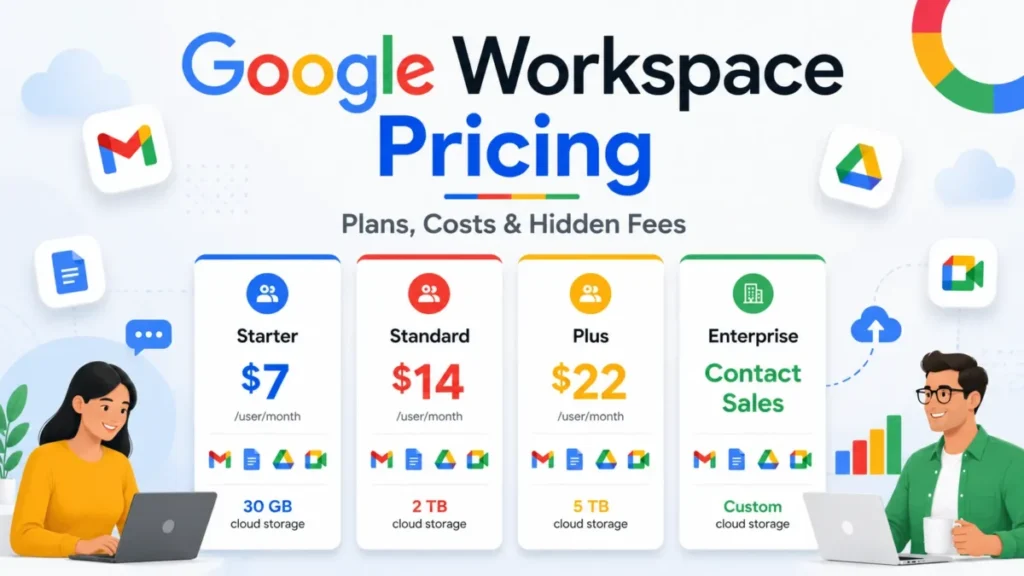
Google Workspace pricing starts at $7 per user per month: Business Starter, Standard and Plus cost $7, $14 and $22 on the Annual/Fixed-Term Plan. The month-to-month Flexible Plan charges $8.40, $16.80 and $26.40 per user per month, billed monthly. Enterprise is quote-only.
For most stable teams of 2 to 300 people, Business Standard on annual billing is the plan to budget, because it is the first with meeting recording and eSignature. Prices are in US dollars, before tax, checked October 2026.
Quick pricing answer
- Plans: Google Workspace Business Starter, Business Standard, Business Plus and Enterprise (quote only).
- Starting price: $7 per user per month on the Annual/Fixed-Term Plan, or $8.40 per user per month on Flexible, billed monthly.
- Free option: a 14-day trial; no free business plan.
- Plan for most teams: Business Standard at $14 per user per month on annual billing, for teams that record meetings or sign documents.
- Cost caveat: annual seats cannot be removed until renewal.
- Checked: October 2026, US dollars, before tax.
Workspace competes for the same budget as other team collaboration tools.
In This Article (13 sections)
Google Workspace Pricing at a Glance
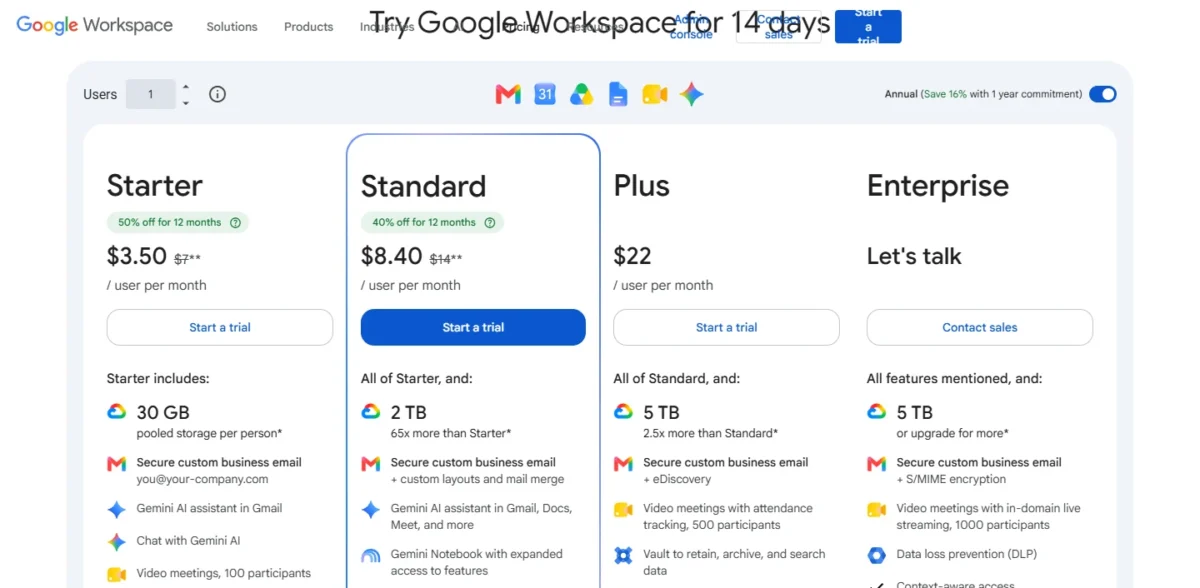
Three Business plans have public US-dollar prices on two payment plans, and Enterprise is sold by quote.
| Plan | Annual/ | Flexible (per user per month) | Best for | Main limitation |
|---|---|---|---|---|
| Business Starter | $7 | $8.40 | Business email for owners and small teams | 30 GB pooled storage per user, no recording |
| Business Standard | $14 | $16.80 | Teams that record calls or sign documents | 150 meeting participants, no Vault |
| Business Plus | $22 | $26.40 | Teams with retention or eDiscovery duties | 300-user maximum |
| Enterprise | Contact sales | Contact sales | Over 300 users, DLP or data regions | No public price |
Sources: Google’s pricing page (annual and monthly views) and Google’s payment plans comparison, checked October 2026.
These are US-dollar list prices read on October 17, 2026. Billing country and currency are chosen at setup and cannot be changed later, and Google offers annual plans only in some countries.
Google Workspace Pricing Plans Explained
Business Standard is the first plan with meeting recording, eSignature and Gemini in Docs and Meet, and Business Plus is the first with Vault. On annual billing those steps cost $14 – $7 = $7 and $22 – $14 = $8 per user per month.
| Feature | Business Starter | Business Standard | Business Plus | Enterprise |
|---|---|---|---|---|
| Pooled storage per user | 30 GB | 2 TB | 5 TB | 5 TB, more on request |
| Meeting participants | 100 | 150 | 500 | 1,000 |
| Meeting recordings | Higher plan: Business Standard | Included | Included | Included |
| eSignature | Higher plan: Business Standard | Included | Included | Included |
| Gemini in Docs and Meet | Higher plan: Business Standard | Included | Included | Included |
| Vault and eDiscovery | Higher plan: Business Plus | Higher plan: Business Plus | Included | Included |
| DLP and data regions | Higher plan: Enterprise | Higher plan: Enterprise | Higher plan: Enterprise | Included |
Sources: Google’s pricing page, plan cards and feature table, checked October 2026.
Meetings can run 24 hours on every plan, so length is never a reason to upgrade. The reasons are the participant cap, recording and noise cancellation from Business Standard, and attendance tracking from Business Plus.
Business Starter
Business Starter is an email plan with a suite attached. Each user gets a you@your-company.com address, 30 GB of pooled storage, 100-person video meetings and the Gemini assistant in Gmail.
For an owner who mainly needs business email, $84 per user per year covers the job. Starter’s Gemini works in Gmail and Vids, but Starter has no Gemini in Docs, Sheets, Slides, Drive, Meet or Chat.
Starter runs out at the first client call you need to record, the first contract to sign, or a pool near 30 GB per person.
Business Standard
The $7 step from Starter buys the tools a client-facing team uses weekly. Standard adds 2 TB of pooled storage per user, recording in 150-person meetings, booking pages, eSignature with Docs and PDFs, and the Workspace Migrate tool.
Gemini moves into Docs, Meet and more, and Gemini Notebook audio overviews rise from 3 to 20 per day.
Standard stops being enough when a legal duty names retention or eDiscovery, or a meeting needs more than 150 people. Storage is rarely the trigger: 10 Standard users already share a 20 TB pool.
Business Plus
Plus is a compliance purchase, not a storage upgrade. It adds Vault to retain, archive and search data, eDiscovery, Secure LDAP, advanced endpoint management and 500-person meetings with attendance tracking.
The step is large at scale: $22 x 100 users x 12 months = $26,400 a year, against $14 x 100 users x 12 months = $16,800 on Standard. Skip Plus when none of those features is a written requirement.
Enterprise
Enterprise has no public price: the card says “Let’s talk” and routes buyers to sales. It becomes unavoidable at user 301, because Starter, Standard and Plus can be bought for at most 300 users, while Enterprise has no minimum or maximum.
It is also the only tier listed with data loss prevention, context-aware access, Enterprise data regions and S/MIME encryption. The add-ons page says Enhanced Support is free with any Enterprise edition. Get the quote before renewal if you expect to pass 300 users mid-contract.
Does Google Workspace Have a Free Plan or Trial?
Google Workspace has no free business plan; it offers a 14-day trial, and eligible nonprofits can get a $0 Google Workspace for Nonprofits plan.
The trial needs billing details at sign-up, but nothing is charged if you cancel within the 14 days. It is limited to 10 users: adding an 11th ends the trial and starts payment.
A new Flexible account has a second cap. Its first 90 days are limited to 20-50 users unless you make a manual payment for 50% of the total users you want, per Google’s Flexible Plan help page.
Monthly vs Annual Google Workspace Pricing
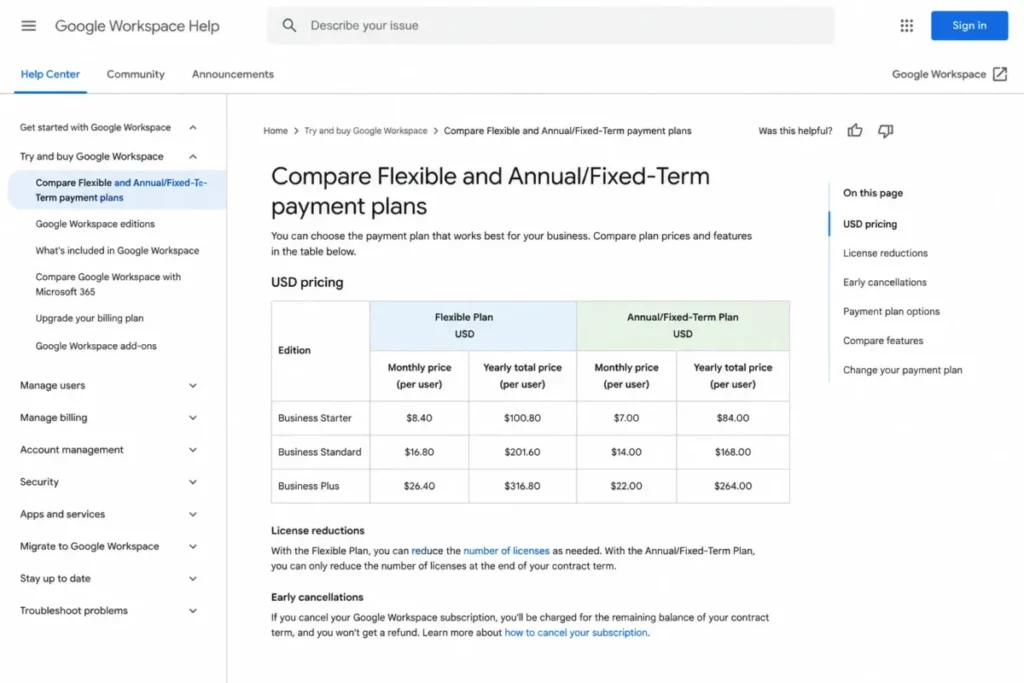
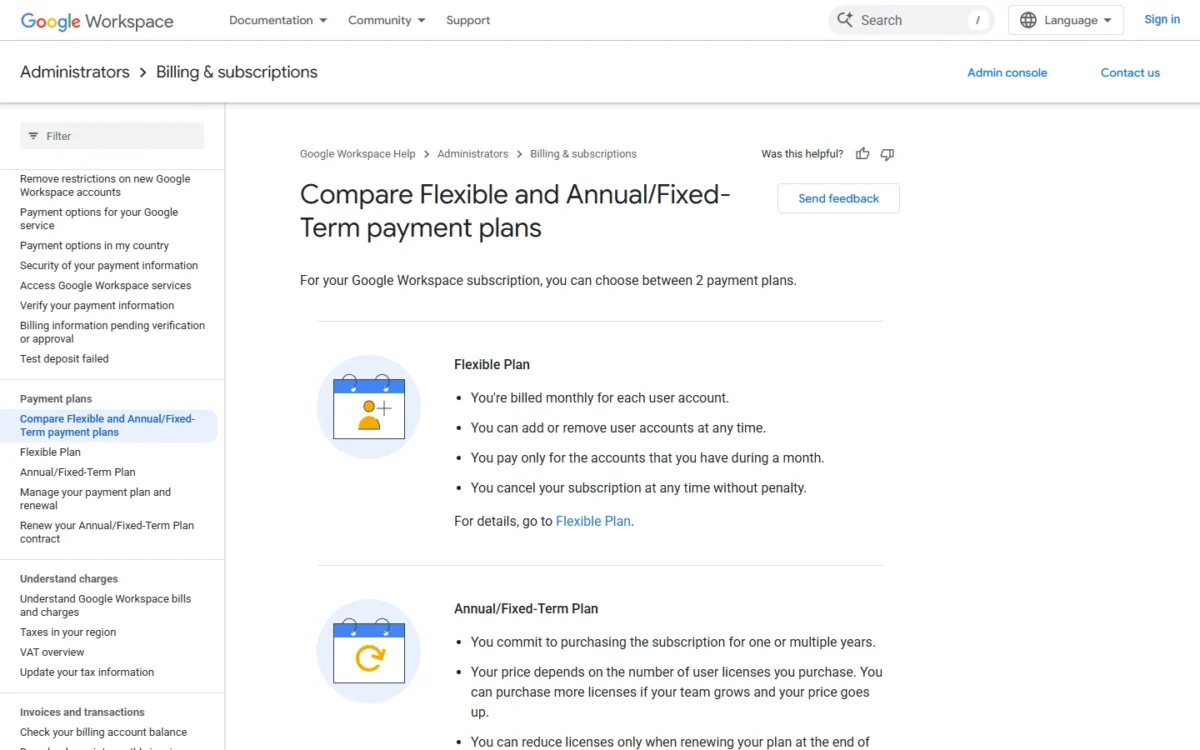
Google Workspace costs $8.40, $16.80 or $26.40 per user per month on the Flexible Plan, billed monthly, against $7, $14 or $22 on the Annual/Fixed-Term Plan. Flexible costs 20% more on every plan: $8.40 – $7 = $1.40, a fifth of $7.
Google’s toggle labels the annual side “Save 16%”, which is the same $1.40 measured against the $8.40 Flexible price instead of the $7 annual one.
| Plan | Flexible, 12 months | Annual, 12 months | Annual saving per user |
|---|---|---|---|
| Business Starter | $100.80 | $84 | $100.80 – $84 = $16.80 |
| Business Standard | $201.60 | $168 | $201.60 – $168 = $33.60 |
| Business Plus | $316.80 | $264 | $316.80 – $264 = $52.80 |
Sources: Google’s payment plans comparison, yearly totals per user, checked October 2026.
The break-even is 10 months per seat: $8.40 x 10 months = $84, the same as a year of annual Starter at $7 x 12 months = $84. Standard and Plus keep the same ratio.
A seat you will keep longer than 10 months is cheaper on annual. A seat you need for 9 months or fewer is cheaper on Flexible, because annual seats can be added at any time but removed only at renewal.
If several people may leave within 10 months, Flexible’s premium costs less than their empty annual seats. “Annual” is the commitment, not always the invoice: Google bills that plan monthly or yearly.
How Much Does Google Workspace Cost for Your Team?
A year runs from $7 x 1 user x 12 months = $84 for one Starter user to $22 x 100 users x 12 months = $26,400 for 100 Plus users on annual billing, before tax.
Google Workspace cost calculator
This calculator needs JavaScript. The scenario table below gives the same estimate for typical workloads.
Enter what you need. The calculator prices it on every plan at list prices and names the cheapest plan that covers it.
- List prices in USD from Google Workspace’s official pricing pages, checked Oct 17, 2026. Tax and regional prices are not included.
- 12-month figures are 12 times the monthly cost at the billing you choose.
- A planning estimate at list prices, not a quote.
Enter your users, the billing basis and the features you need. The calculator shows Business Starter, Standard and Plus side by side with monthly and 12-month costs, and names the cheapest plan that covers you. It leaves out tax, regional prices, add-ons and the introductory offer.
| Team size | Plan | Billing | Monthly equivalent | Annual total | Assumptions |
|---|---|---|---|---|---|
| 1 user: email-first owner | Business Starter | Annual/ | $7 x 1 user = $7 | $7 x 1 user x 12 months = $84 | No recording needed |
| 5 users: records client calls | Business Standard | Annual/ | $14 x 5 users = $70 | $14 x 5 users x 12 months = $840 | Stable headcount |
| 25 users: keeps the right to remove seats | Business Standard | Flexible | $16.80 x 25 users = $420 | $16.80 x 25 users x 12 months = $5,040 | All 25 seats kept; on annual: $14 x 25 users x 12 months = $4,200 |
| 100 users: legal hold | Business Plus | Annual/ | $22 x 100 users = $2,200 | $22 x 100 users x 12 months = $26,400 | Vault required |
Sources: Google’s pricing page, list prices before tax, checked October 2026.
These are estimates from list prices, not quotes. The 25-user row shows the price of flexibility when no one leaves.
Now say 15 of those 25 seats leave after 4 months. Flexible then costs $16.80 x 10 x 12 = $2,016 plus $16.80 x 15 x 4 = $1,008, which is $3,024. An annual plan keeps billing all 25 seats until renewal, at $4,200.
Additional Google Workspace Costs to Consider
Beyond the per-user price, a bill can add tax, Google Voice, Archived User licenses, extra storage and support upgrades sold through sales.
| Cost type | When it applies | Pricing basis | Notes |
|---|---|---|---|
| Tax | On top of listed prices | Not included in listed prices | Stated in the Starter and Standard price details on the pricing page |
| Google Voice | Business phone numbers | $10, $20 or $30 per user per month | Voice Starter covers up to 10 users |
| Archived User licenses | Keeping a former employee’s data | $2, $3 or $4 per license on Starter, Standard, Plus | Billing period not listed |
| Additional storage | The pool runs out | Not listed on the add-ons page | The pricing page’s storage footnote sends buyers to the Help Center for additional storage |
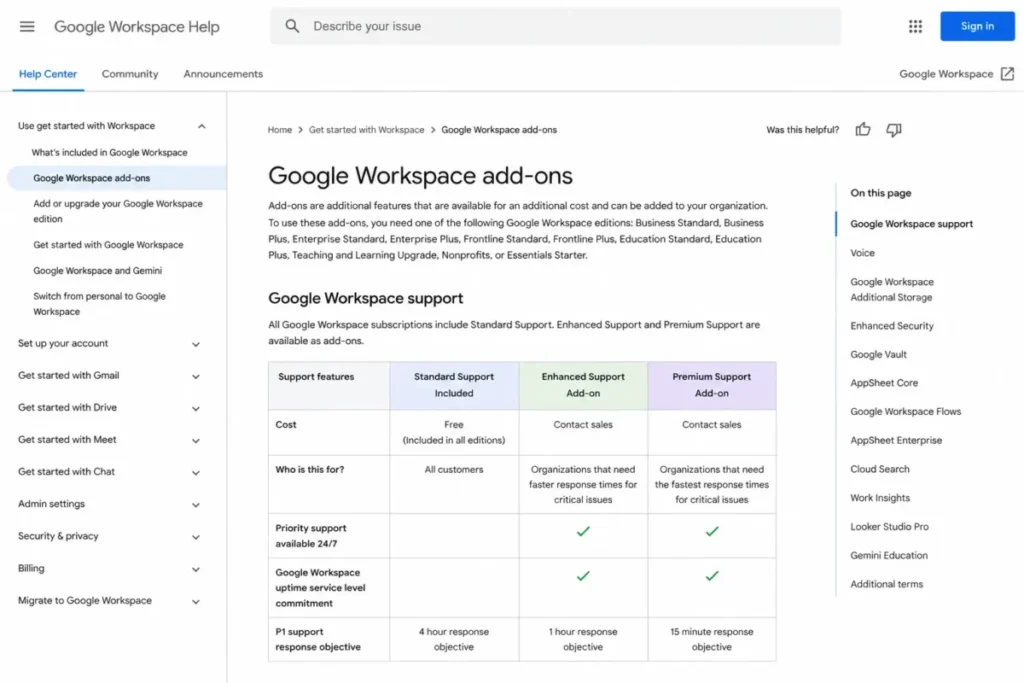
| Enhanced or Premium Support | Faster answers on critical issues | No per-tier price on the add-ons page | P1 objective of 1 hour or 15 minutes, against 4 hours on Standard support |
| AI Expanded Access | Heavier AI use | Not listed on the add-ons page | Workspace Studio limits apply from November 1, 2026 |
Sources: Google Workspace add-ons, checked October 2026.
Storage has two rules that catch new admins (storage FAQ for admins). The full pool arrives only after a $30 USD payment, taking up to 72 hours, and services are affected once you exceed the limit by 25% or for 14 days.
Schedule a large Drive migration after that first payment. My Google Drive review looks at the storage side in more depth.
Which Google Workspace Plan Should You Choose?
Business Standard on annual billing fits most stable teams that record meetings or sign documents. For small business buyers who only need email, Starter is enough, and Plus belongs to teams whose compliance duty names Vault or eDiscovery.
| Your needs | Plan to consider | Why | Main limitation |
|---|---|---|---|
| Email for one owner whose business may stop | Business Starter on Flexible | No commitment | 30 GB pooled storage per user |
| Starter team that never records meetings, signs no documents and stays under its 30 GB pool | Stay on Business Starter | Standard’s recording, eSignature and 2 TB pool would go unused | No Gemini in Docs, Sheets, Slides, Drive, Meet or Chat |
| Stable team that records calls or signs contracts | Business Standard on annual billing | Recording and eSignature start here | No Vault |
| Seats likely to leave within 10 months | Flexible Plan | Users can be removed at any time | Higher monthly rate |
| Retention, legal hold or meetings of 151-500 people | Business Plus | Vault and 500-person meetings start here | 300-user maximum |
| DLP, data regions or more than 300 users | Enterprise | The only tier with these controls and no user cap | Quote only |
Sources: Google’s pricing page and payment plans comparison, checked October 2026.
Is Google Workspace Worth the Price?
Google Workspace is worth its price for web-first teams of 2 to 300 people who share documents and meet daily on Business Standard. It is not worth paying for Plus without a compliance need, or committing annually for a team that will shrink.
At $14 per user per month on annual billing, Standard bundles domain email, recorded meetings, eSignature and Gemini in Docs and Meet in one seat price. Workflow fit is a separate question, answered in my Google Workspace review.
The pricing downsides of Google Workspace
The downsides sit in the contract terms, not the list prices:
- Annual seats stay paid until renewal, and cancelling early charges the remaining balance with no refunds.
- Business plans stop at 300 users, so user 301 means an Enterprise quote.
- Enterprise is Contact sales, and the add-ons page lists no per-tier price for Enhanced or Premium Support.
- Introductory rates end after 12 months and cover only the first 20 users.
- Skip it if:
- you need DLP but want a public price, because only the quote-only Enterprise tier lists it.
Google Workspace Pricing vs Microsoft 365
Microsoft 365 is not a cheaper alternative to Google Workspace at entry level: Microsoft 365 Business Basic costs $7.00 per user per month, paid yearly, the same as Business Starter on annual billing.
The gap opens with AI: Gemini works in Docs and Meet from Business Standard at $14, while Microsoft’s plans with Copilot in its apps cost $23.50 and $32.00 per user per month, paid yearly.
Those two Microsoft plans also include the desktop versions of Word, Excel and PowerPoint, and Premium adds device management, so part of the gap pays for more than AI. Microsoft lists these business plans for 1–300 employees.
| Suite and plan | Price per user per month | Billing | Note |
|---|---|---|---|
| Google Workspace Business Starter | $7 | Annual/ | Gemini in Gmail |
| Google Workspace Business Standard | $14 | Annual/ | Gemini in Gmail, Docs, Meet and more |
| Microsoft 365 Business Basic | $7.00 | Paid yearly, auto renews | Web and mobile Office apps |
| Microsoft 365 Business Standard with Copilot | $23.50 | Paid yearly, auto renews | Desktop apps with Copilot |
| Microsoft 365 Business Premium with Copilot | $32.00 | Paid yearly, auto renews | Adds device security |
Sources: Microsoft 365 business plans and pricing and Google’s pricing page, checked October 2026.
Business Basic includes Microsoft Teams; if Teams is the reason to look at Microsoft, start with my Microsoft Teams review.
For a lower bill than either suite, my ranking of small business collaboration software covers cheaper suites.
Discounts, Billing and Cancellation
New Google Workspace customers get 50% off Starter and 40% off Standard for 12 months on the first 20 users: $3.50 and $8.40 per user per month on annual billing, or $4.20 and $10.08 on Flexible. Plus has no introductory price, and the page states no end date for signing up.
Take 25 Standard users on annual billing. In year one, the first 20 seats cost $8.40 x 20 users x 12 months = $2,016 and the other five $14 x 5 users x 12 months = $840, which is $2,856. From month 13, all 25 pay $14 x 25 users x 12 months = $4,200 a year.
Pricing note
The offer is for new customers only, covers the first 20 users added and lasts 12 months. The introductory Standard rate equals Starter’s Flexible list price, so check the plan name at checkout.
Eligible nonprofits pay $3.50 per user per month for Business Standard with a 1-year commitment ($4.20 billed monthly) and $6.16 for Business Plus ($7.40 billed monthly), up to 2,000 users, per the Google for Nonprofits offer page.
The payment plans comparison sets the exit terms. The Flexible Plan can be cancelled with no penalty at any point; cancelling an annual plan before renewal charges the remaining balance, and no refunds are issued. Multi-year terms go through a Google Sales representative.
How I Verified Google Workspace Pricing
Every figure comes from Google’s and Microsoft’s own pages, checked in October 2026. Google’s pricing page states that all prices are in US dollars. I quote published prices as printed, multiply the per-user price by the number of users and months for each team total, and base plan recommendations on the plan gates.
Enterprise is Contact sales on the pricing page. The add-ons page I checked lists no price for Enhanced Support, Premium Support, additional storage or AI Expanded Access, so none appears here.
Frequently Asked Questions
How much does Google Workspace cost per month?
Google Workspace costs Business Starter $7, Business Standard $14 and Business Plus $22 per user per month on the Annual/Fixed-Term Plan. The Flexible Plan, billed monthly, charges Business Starter $8.40, Business Standard $16.80 and Business Plus $26.40 per user per month, which is 20% more, per Google’s Flexible Plan help page. Enterprise has no public price.
What are the Google Workspace plans?
Google Workspace has four plans: Business Starter, Business Standard and Business Plus have public prices, and Enterprise is quote-only.
- Business Starter ($7 per user per month, annual): custom email with 30 GB of pooled storage per user and 100-person meetings.
- Business Standard ($14): adds meeting recording, eSignature, Gemini in Docs and Meet, and 2 TB of pooled storage per user.
- Business Plus ($22): adds Vault, eDiscovery and 500-person meetings.
- Enterprise (quote only): DLP, data regions and no 300-user cap.
Is it worth paying for Google Workspace instead of free Gmail?
Yes, if the business needs email at its own domain. Google’s FAQ lists what the paid suite adds over free consumer apps: custom business email, twice the cloud storage, 24/7 phone and email support, 99.9% guaranteed uptime on business email and admin controls.
How much is Google Workspace Individual?
The US Individual page sells Google Workspace Business Standard to solo owners: $14 per month, or $16.80 per user per month when billed monthly. It lists no separate Individual price, so a solo buyer is really choosing between Standard and Starter.
Is Gemini included in Google Workspace pricing?
Yes, at two levels. Starter gets the Gemini assistant in Gmail and basic Gemini Notebook access; Standard and Plus get Gemini in Gmail, Docs, Meet and more, with expanded access. AI Expanded Access is a separate add-on for heavier use.
Final Pricing Verdict
Buy Business Standard on annual billing if your team of 2 to 300 is stable and records meetings or signs documents. Choose Business Starter on annual billing if you are a solo owner who mainly needs business email, and take it on Flexible only if the business may stop within 10 months.
Final recommendation
- Upgrade to Business Plus only when Vault, eDiscovery or 500-person meetings are written requirements.
- Go to Enterprise past 300 users or when DLP and data regions are required.
- Budget year two at list price if you sign up with the introductory offer.