Cloud storage buyers almost never get burned by capacity. They get burned by a device ceiling, a sharing budget, a recovery window, or an encryption boundary that nobody mentioned on the pricing page.
This ranking treats those constraints as the primary decision data, not as footnotes. Every price, limit, and gate below is tied to the vendor’s own page, and the figures were verified against those pages on 2026-08-19.
The ten services below are ordered for US buyers: individuals, freelancers, creators, families, privacy-first users, and small teams. IDrive takes the top position on verified capacity economics, and it is also the wrong answer for anyone whose first requirement is live document co-editing.
In This Article (11 sections)
Quick Verdict: Best Cloud Storage by Use Case
| Use case | Best pick | Why it fits |
|---|---|---|
| High-capacity personal archive plus device backup | IDrive | 5 TB at a verified low effective annual rate, with sync and backup on one account |
| Google Docs and Gmail households | Google Drive with Google One | Native co-editing, at the cost of a quota shared with Gmail and Photos |
| Windows and Microsoft 365 stacks | Microsoft OneDrive | Office co-authoring plus 100 GB from the cheapest paid tier |
| Privacy-first client work | Sync.com | Zero-knowledge storage with documented, predictable transfer behaviour |
| Media libraries and public download links | pCloud | Separate monthly link-traffic allowance sized to the storage plan |
| Encrypted documents with real version depth | Proton Drive | Free tier includes Proton Docs and 10 file versions |
| Sending large files to outside clients | Dropbox | 50 GB transfers on Plus, delivered without folder access |
| Lightweight virtual-drive access | Icedrive | Mounts as a drive letter rather than syncing a full local copy |
| Post-quantum encryption positioning | Internxt | Vendor-stated Kyber 512 with zero-knowledge policies |
| Budget pick for Apple households | Apple iCloud+ | 50 GB for under a dollar a month, wired into iOS and macOS |
| Best free plan for raw capacity | Icedrive | 10 GB free, though sync and encryption are paid-only |
| Team-shaped workloads under 5 people | Sync.com | Encrypted sharing that survives a client security review |
Two picks appear twice because the job changes. Icedrive wins on free capacity and on virtual-drive design, and those are different reasons to choose it.
Cloud Storage, Sync, and Backup Are Three Different Products
Half the disappointment in this category comes from buying the wrong one of these three. A ranked list that treats them as interchangeable will send a backup buyer to a collaboration tool.
| Service | Synced working files | Device or folder backup | Live co-editing |
|---|---|---|---|
| IDrive | Yes | Yes | No |
| Google Drive | Yes | Limited | Yes |
| Microsoft OneDrive | Yes | Limited | Yes |
| Sync.com | Yes | Limited | Conditional |
| pCloud | Yes | Limited | No |
| Proton Drive | Yes | No | Yes |
| Dropbox | Yes | Limited | Conditional |
| Icedrive | By plan | No | No |
| Internxt | Yes | By plan | No |
| Apple iCloud+ | Yes | Yes | Conditional |
Those judgements are editorial readings of each vendor’s documented feature scope, not a certification. IDrive, Internxt, and Apple iCloud+ are the three that genuinely compete on protecting a device; Google Drive, OneDrive, and Proton Drive compete on editing a document; everything else competes on holding and sharing files.
The practical consequence: a household that wants a laptop protected should not shortlist Proton Drive, and an agency that needs two people in one spreadsheet should not shortlist IDrive.
Subscription storage is priced like every other seat-based product, so the same budgeting habits apply that I set out in how SaaS subscription pricing works.
How We Chose, Researched, and Evaluated the Best Cloud Storage Services
These rankings are based on official pricing pages, vendor help-center documentation, plan comparison pages, and clearly labeled third-party review patterns. Volatile pricing and plan limits were verified on 2026-08-19.
Each service was assessed against the same buyer-focused criteria: usable capacity for the money, device and file ceilings, sharing and delivery limits, encryption scope, recovery and version windows, ecosystem fit, and documented constraints that disqualify a workflow.
Greater weight was given to factors that change a purchase decision rather than a feature checkbox. Operational ceilings, recovery windows, and encryption scope carried more weight than interface polish or brand familiarity.
Claims that could not be verified from reliable evidence were excluded from the ranking. Temporary promotions are labeled separately from standard rates and are treated as date-bound rather than permanent.
Best Cloud Storage 2026: Quick Comparison
| Service | Entry paid price | Free tier | Hard ceiling that bites first |
|---|---|---|---|
| IDrive | $11.99 per month for 5 TB | 10 GB | No simultaneous co-editing of one file |
| Google Drive | $1.99 per month for 100 GB | 15 GB | 600 individual share recipients per file |
| Microsoft OneDrive | $1.99 per month or $19.99 per year | 5 GB | 250 GB maximum single file |
| Sync.com | $4 per month for 150 GB | 5 GB | 5 active devices per account |
| pCloud | $49.99 per year for 500 GB | 10 GB | 500 GB monthly shared-link traffic |
| Proton Drive | Not published here | 2 GB rising to 5 GB | Password reset locks prior encryption keys |
| Dropbox | $9.99 per month for 2 TB | 2 GB | 3 connected devices on the free tier |
| Icedrive | Not published here | 10 GB with no desktop sync | Encrypted files cannot be shared directly |
| Internxt | Not published here | 1 GB | 10 GB sharing cap on every plan |
| Apple iCloud+ | $0.99 per month for 50 GB | 5 GB | Link sharing sits outside Advanced Data Protection |
Source: official vendor pricing pages and help documentation, checked 2026-08-19.
Three services show no paid US dollar figure because their checked pricing pages rendered paid amounts as placeholders rather than stable values. Publishing a number I could not read on the page would be worse than leaving the cell honest.
The 10 Best Cloud Storage Services in 2026
Each entry below names the micro-cohort it fits, the workflow it is built around, and the plan gate or documented disqualifier that removes it from a shortlist. The ranking reason is stated in the verdict line, so a reader can see the winner by scenario rather than a single overall score.
Depth is tiered by decision complexity rather than by rank alone, and every figure is tied to the vendor page it came from.
1. IDrive

- Best for:
- individuals and creator households that want several terabytes of storage and device backup billed as one product.
- Avoid if:
- two people need to edit the same document at the same time.
- Starting price:
- $11.99 per month for the 5 TB Personal plan on monthly billing.
- Practical tier:
- Personal 5 TB, because the smaller tiers stop making sense once a photo library or a video archive is involved.
- Free plan:
- 10 GB, no card required.
- First limit that bites:
- sharing is restricted to accounts on the default encryption key.
- Better than Dropbox:
- roughly two and a half times the capacity per dollar at the entry paid tier.
- Worse than Google Drive:
- no live document collaboration of any kind.
- Setup difficulty:
- medium, because Cloud Drive and backup are configured separately.
- Hidden costs:
- the promotional rate applies to the first year only.
- Evidence status:
- pricing and Cloud Drive behaviour confirmed against IDrive’s own pricing page and Cloud Drive FAQ.
The annual maths is what earns the rank. Monthly billing annualizes to $143.88, the standard annual rate works out to $119.88, and the discounted first-year rate lands at $83.88.
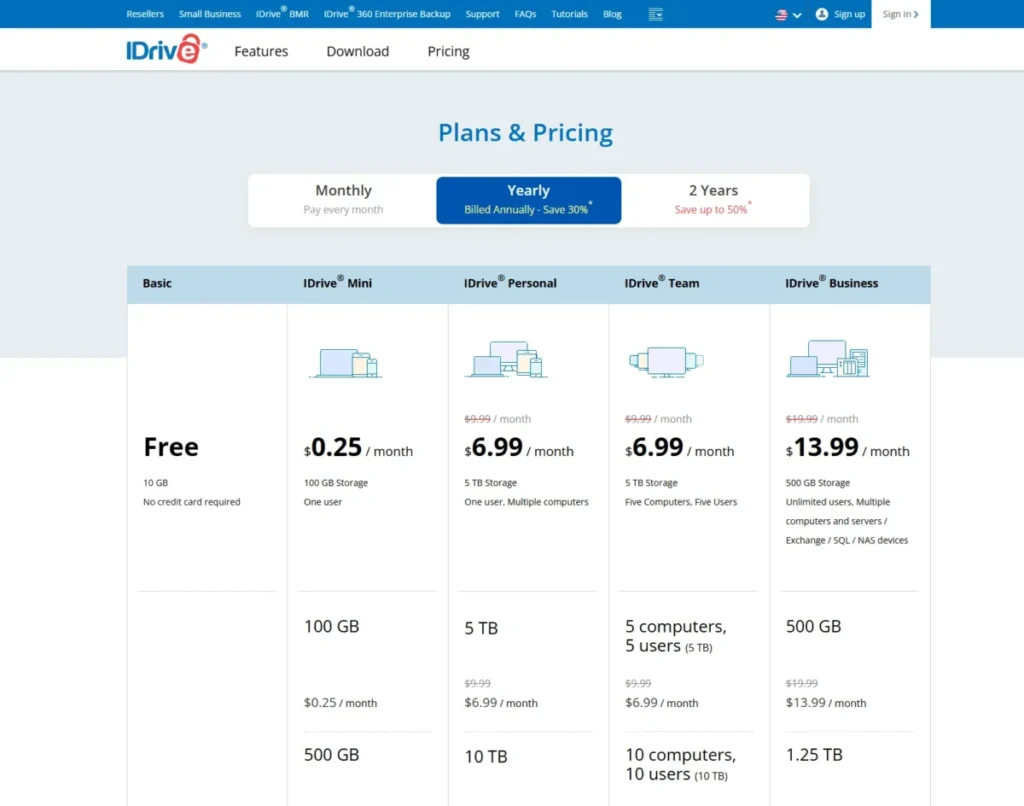
That discounted rate renews at the standard annual price, so the honest budgeting number for year two is $119.88 rather than $83.88. Promotional pricing re-verified on the publish date: 2026-08-19.
The collaboration gap is not a nuance. IDrive states plainly that Cloud Drive does not support collaborative editing and renaming the same file simultaneously from multiple devices, which rules it out as a Docs replacement.
The encryption trade-off is the constraint most rankings skip. Choosing a private encryption key is the stronger privacy posture, and it removes the share feature, so a privacy-first IDrive user loses the ability to hand a client a link.
Link controls are tight when sharing is available: a maximum of 25 downloads and a maximum 30-day expiry. For a photographer delivering one gallery that is fine, and for a creator distributing a public file it is not.
| Pros | Cons |
|---|---|
| Highest verified capacity per dollar in this ranking | No simultaneous editing of a shared file |
| Sync and device backup under one subscription | Private-key encryption removes link sharing |
| Share links support download caps and expiry | First-year pricing is not the renewal price |
| Free 10 GB tier needs no payment card | Two separate products to configure at setup |
- Verdict:
- the strongest pick for a household archiving terabytes across several machines, and the wrong pick for a team whose day runs inside shared documents.
2. Google Drive and Google One
Google Drive earns its place on collaboration, and the storage number on the plan card is not the number a buyer gets, as covered in our Google Drive storage review.
- Best for:
- households, students, and freelancers already living in Docs, Sheets, Gmail, and Photos.
- Avoid if:
- zero-knowledge encryption across general file storage is a requirement.
- Starting price:
- $1.99 per month for the 100 GB Google One Basic plan in the US.
- Practical tier:
- 2 TB for anyone whose Photos library is active, because the entry tier fills faster than buyers expect.
- Free plan:
- 15 GB, shared across the same three products.
- First limit that bites:
- Gmail attachments and Photos uploads consume the same allowance as Drive.
- Better than IDrive:
- real-time co-editing with no file-locking workaround.
- Worse than Sync.com:
- general Drive content is not zero-knowledge encrypted.
- Setup difficulty:
- low, since most buyers already have the account.
- Hidden costs:
- trashed files keep consuming quota until they are purged.
- Evidence status:
- sharing and trash behaviour confirmed against Google’s own Drive help documentation; the plan price carries the research check date rather than a live capture, because the plan page renders prices client-side.
Two documented ceilings decide whether Drive scales to a large audience. A single file can be shared with up to 600 individual email addresses, while a Docs, Sheets, Slides, or Vids file can only be edited on up to 100 open tabs or devices at once.
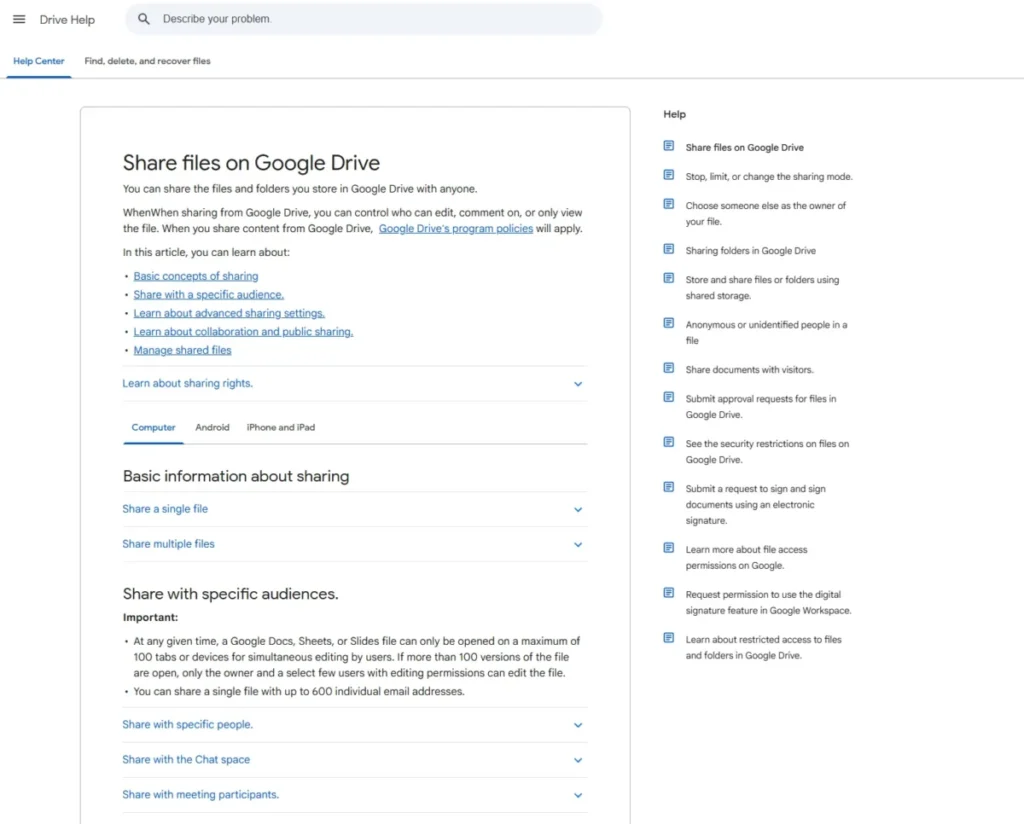
Those are separate limits and they fail differently. A class of 400 students can all receive a document; only 100 of them can have it open in edit mode at the same moment.
Permission design is the other trap. Permissions from a parent folder are inherited by all the files and folders within it.
A subfolder that needs tighter access has to be built as a limited-access folder rather than narrowed in place.
Recovery is generous in time and expensive in space. Deleted items sit in trash for 30 days, and items in your trash take up storage in Google Drive until they’re deleted forever.
That is why a “full” Drive is often a full trash.
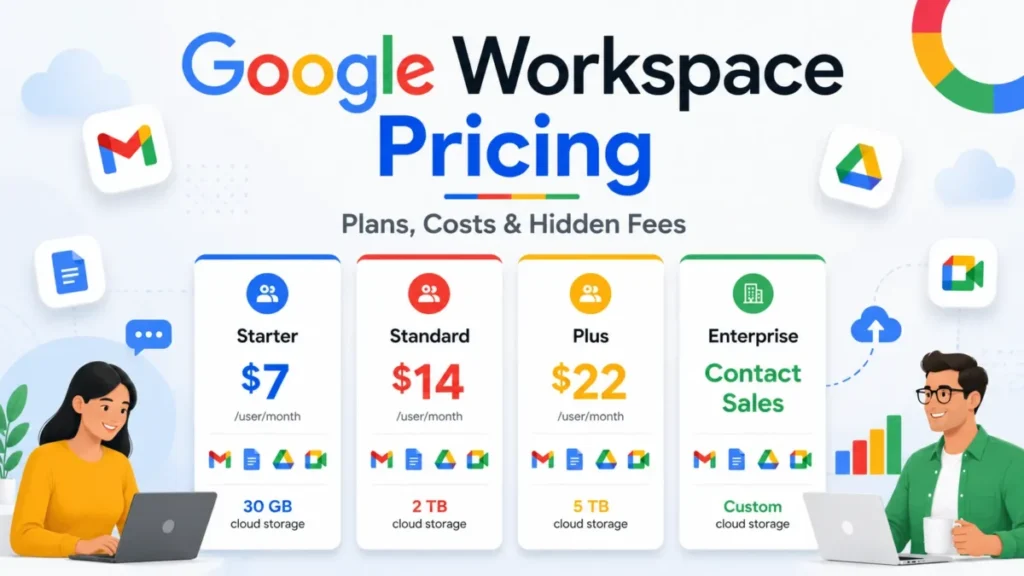
Buyers weighing the paid business path should read the tier structure in my Google Workspace pricing guide before assuming consumer Google One is the cheaper route.
| Pros | Cons |
|---|---|
| Live co-editing that no ranked competitor matches | Quota is shared with Gmail and Google Photos |
| 15 GB free is the largest free tier here | No zero-knowledge option for general Drive files |
| 30-day trash recovery on every tier | Folder permissions inherit downward by default |
| Documented sharing ceilings are unusually high | Trashed files keep consuming paid storage |
- Verdict:
- choose Drive if the working day is already inside Google’s editors, and budget a tier above what the raw file count suggests.
3. Microsoft OneDrive
- Best for:
- Windows users and Microsoft 365 subscribers who want Office co-authoring and file sync from one subscription.
- Avoid if:
- the sync tree is enormous or individual files run past a quarter of a terabyte.
- Practical tier:
- Microsoft 365 Personal at $99.99 per year, which brings 1 TB plus the desktop Office apps.
- Free plan:
- 5 GB.
- First limit that bites:
- link expiry and password protection are subscriber-only controls.
- Better than Dropbox:
- Office co-authoring is native rather than bolted on.
- Worse than IDrive:
- capacity per dollar is roughly a fifth as good at the top consumer tier.
- Setup difficulty:
- low on Windows, medium on macOS.
- Hidden costs:
- none at the plan level, though the storage-only path pushes buyers toward a full Microsoft 365 subscription.
- Evidence status:
- file and sync ceilings confirmed against Microsoft’s own restrictions documentation.
Basic is one of the few plans in this category where annual billing is worth checking rather than assuming. Twelve months of monthly billing comes to $23.88 against $19.99 for the annual commitment, a difference of $3.89.
That is a small number, and it is also the cheapest way in this ranking to add 100 GB of mailbox storage alongside the drive.
The ceilings matter more than the price. OneDrive’s documented maximum individual file size is 250GB for upload, download, and sync, which is generous for video and tight for uncompressed archive sets.
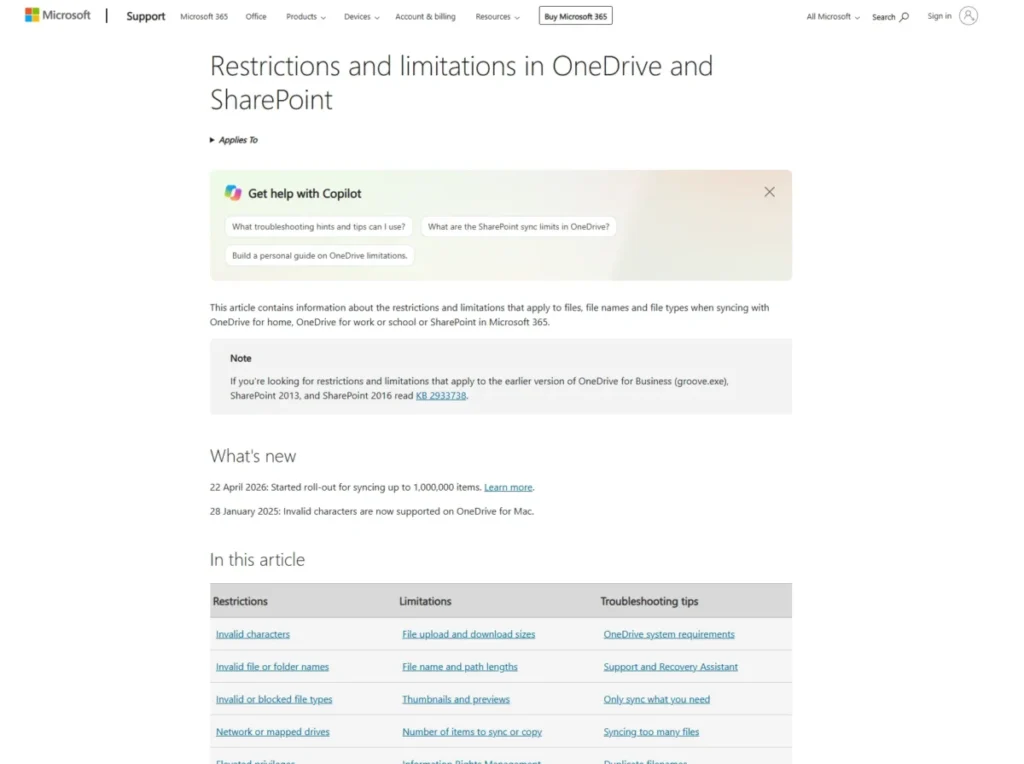
Sync scale is where buyers misread the documentation. Microsoft recommends syncing no more than 300,000 items total for optimum performance, and the million-item mode is a Windows public preview gated behind Windows 11 or Windows Server 2022, 16 GB of RAM, and an SSD.
Treating that preview as a general OneDrive capability is the mistake. It excludes virtual desktop environments outright, so a VDI-based team plans against 300,000 items.
Secure link controls are plan-gated in a way that surprises people. Setting an expiration date or a password on a share link is marked as available only to Microsoft 365 subscribers, so a free OneDrive account cannot lock a link at all.
The same subscription carries the chat and meeting layer, which my Microsoft Teams review treats as the real reason most households stay inside this stack.
| Pros | Cons |
|---|---|
| Cheapest verified route to 100 GB plus mailbox storage | Password and expiry links require a paid subscription |
| Office co-authoring built into the storage layer | 250 GB per-file ceiling on every plan |
| Documented sync guidance is unusually specific | Million-item sync is a conditional Windows preview |
| Annual billing saves $3.89 against monthly on Basic | Capacity per dollar trails IDrive and pCloud |
- Verdict:
- the default for a Windows household already paying for Office, and a poor fit for a machine syncing several hundred thousand files.
4. Sync.com

Privacy-first storage usually costs something operational, and with Sync.com the cost is device count.
- Best for:
- freelancers and small teams handling client files that have to stay unreadable to the provider.
- Avoid if:
- more than five devices need the account, or the working files live on a NAS.
- Starting price:
- $4 per month for Personal 150 GB, or $3.50 per month effective on annual billing.
- Practical tier:
- Personal 1 TB once client deliverables accumulate.
- Free plan:
- 5 GB.
- First limit that bites:
- the five-active-device account ceiling, cited in the comparison table above.
- Better than pCloud:
- zero-knowledge encryption is the default rather than a separately purchased area.
- Worse than Dropbox:
- no Linux desktop client and no WebDAV escape hatch.
- Setup difficulty:
- low for a laptop, high for anything network-attached.
- Hidden costs:
- none in the plan, though the device ceiling can force a second account.
- Evidence status:
- device, file, and transfer limits confirmed against Sync’s own general-limits article.
The pricing gap between cadences is $6 per year, which is small enough that annual billing is the obvious call. Monthly billing annualizes to $48.00 against $42.00 on the annual rate.
The device rule is the disqualifier to check first. Sync states that one account connects up to five active computers or mobile devices, and a two-person household with a laptop, desktop, and phone each is already at six.
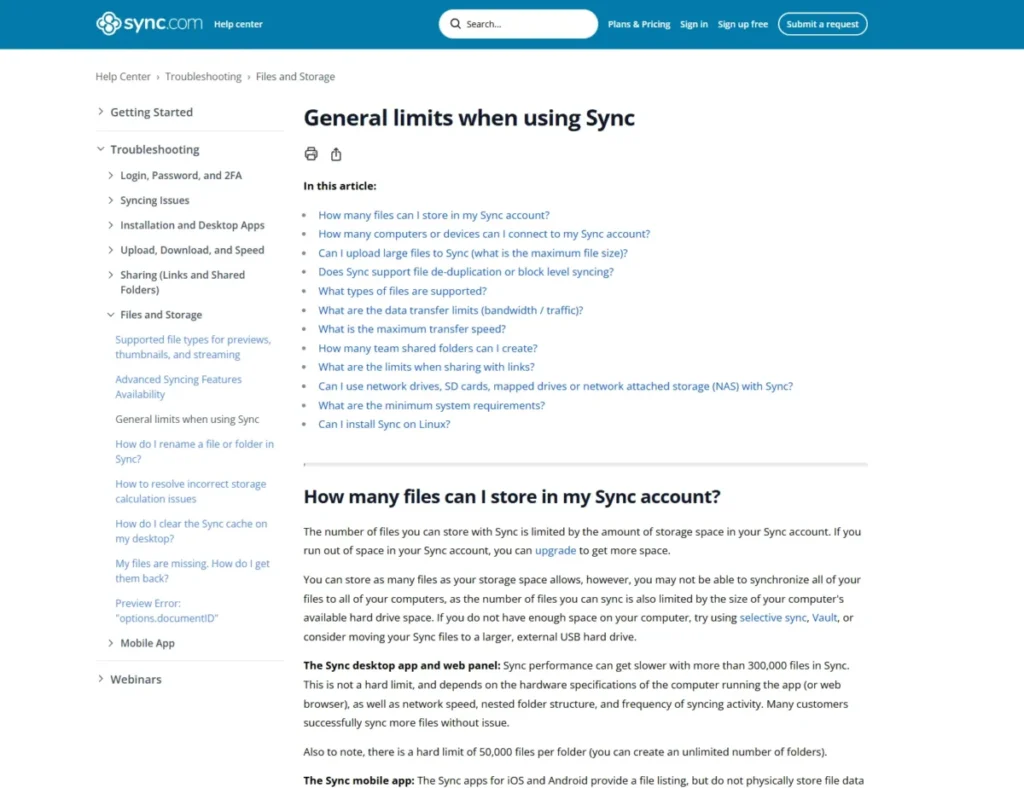
File architecture matters more here than in most competitors. Performance degrades past 300,000 files, and there is a hard limit of 50,000 files per folder, so a flat export directory from a camera or a scanner will hit a wall that no upgrade removes.
Transfer routing is documented rather than left to chance. The desktop app slows on individual files above 40 GB, and the web panel degrades above 500 MB, which makes the browser the wrong tool for anything but small handoffs.
The storage-location restrictions are the ones that end evaluations. Network drives, SD cards, mapped drives, and network attached storage cannot be the Sync folder, and WebDAV and FTP are unsupported, so a NAS-centred studio has no clean path in.
| Pros | Cons |
|---|---|
| Zero-knowledge encryption applies by default | Five active devices per account, with no paid uplift |
| Documented transfer thresholds set clear expectations | 50,000 files per folder is a hard ceiling |
| Annual billing costs only $6 less, so cadence is low-risk | No NAS, mapped drive, WebDAV, or FTP support |
| Predictable behaviour for client-facing file delivery | No block-level deduplication on re-uploads |
- Verdict:
- pick Sync.com when a client security questionnaire is part of the sales process, and skip it when the file library lives on network storage.
5. pCloud

- Best for:
- media-heavy users and creators who publish download links rather than collaborate in documents.
- Avoid if:
- the expectation is zero-knowledge encryption across every ordinary folder at the storage-plan price.
- Starting price:
- $49.99 per year for Premium with 500 GB.
- Practical tier:
- Premium Plus at 2 TB for anyone shipping video.
- Free plan:
- 10 GB.
- First limit that bites:
- the monthly shared-link traffic allowance, which is separate from storage.
- Better than Icedrive:
- links can be shared from ordinary folders without an encryption workaround.
- Worse than Sync.com:
- client-side encryption is scoped to a separate paid area.
- Setup difficulty:
- low, since the virtual drive mounts without a full local copy.
- Hidden costs:
- pCloud Encryption is a separate purchase from the storage plan.
- Evidence status:
- link-traffic behaviour confirmed against pCloud’s own help article.
The link-traffic model is the single most under-reported fact in this category. Storage and delivery are two different budgets: pCloud Basic gets 50 GB per month, Premium gets 500 GB, and Premium Plus gets 2 TB, and the allowance resets monthly regardless of billing cadence.
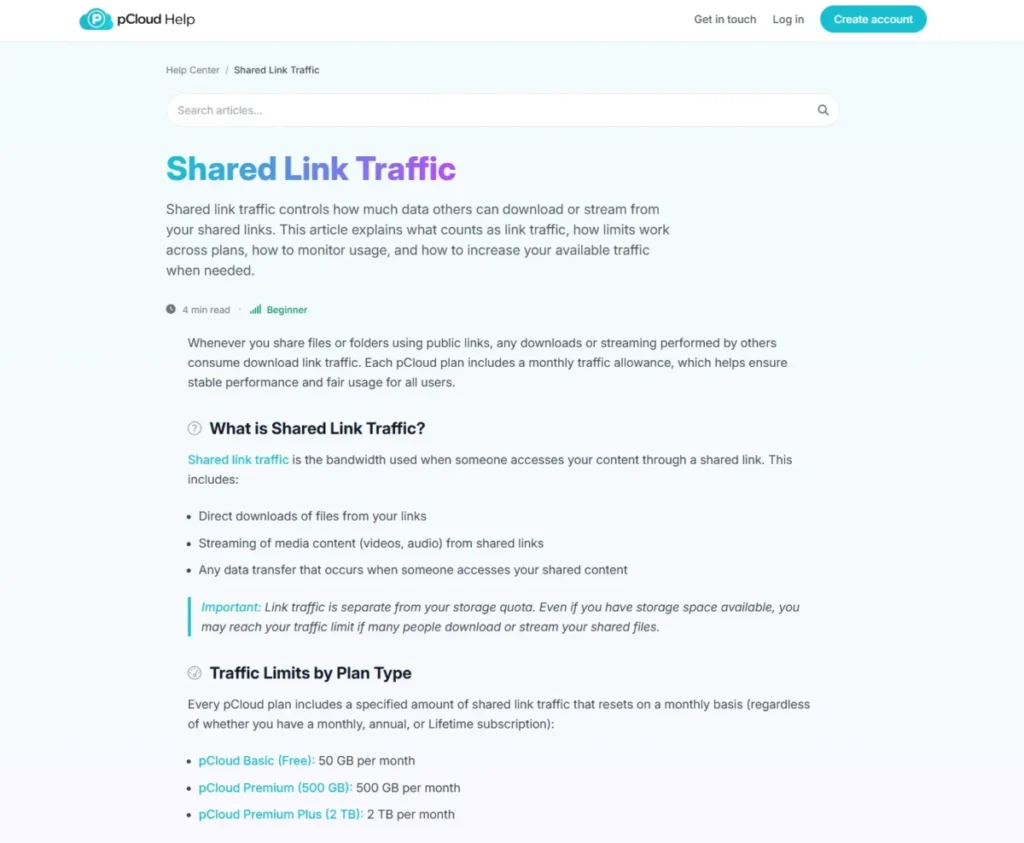
A 500 GB Premium account can therefore run out of delivery before it runs out of space. One 2 GB video shared 250 times exhausts the month.
What happens next is asymmetric, and it is the part that decides whether pCloud works as a delivery platform. Links stay active, paid pCloud recipients can still download, and free recipients see a message saying the traffic limit has been exceeded.
For a creator whose audience is mostly not paying pCloud customers, that is effectively an outage. For a consultant sending files to five clients, it will never be noticed.
Encryption scope needs the same care. pCloud Encryption applies to a dedicated Crypto folder, described as the place where you drop files into the Crypto folder and they’re instantly client-side encrypted.
That is a real zero-knowledge option, sold as a separate one-time purchase rather than bundled into the storage plan. The checked page showed two figures for it without making clear which was current, so no amount is published here.
| Pros | Cons |
|---|---|
| 500 GB annual pricing undercuts most rivals per gigabyte | Link traffic is a separate budget from storage |
| Link-traffic statistics are visible before limits bite | Free recipients are blocked once traffic runs out |
| Client-side Crypto folder is genuinely zero-knowledge | Crypto is a separate one-time purchase |
| Virtual drive avoids duplicating files locally | No live co-editing of documents |
- Verdict:
- the stronger choice for publishing files to a small, known audience, and a risk for anyone whose links go public at volume.
6. Proton Drive

- Best for:
- privacy-focused users who want encrypted storage plus an encrypted document editor.
- Avoid if:
- account recovery material is likely to be lost.
- Starting price:
- not published in this article, because the checked pricing page rendered paid amounts as placeholders rather than stable US dollar figures.
- Practical tier:
- a paid Drive tier for anyone relying on long version history.
- Free plan:
- 2 GB at signup, rising to 5 GB after three actions inside 30 days.
- First limit that bites:
- the free tier starts at 2 GB, not the 5 GB most comparison tables show.
- Better than Icedrive:
- encrypted files can be shared with a link.
- Worse than Google Drive:
- the editor ecosystem is far smaller.
- Setup difficulty:
- low to install, medium to secure properly.
- Hidden costs:
- none, though the recovery setup is unpaid work that has to happen.
- Evidence status:
- storage, versioning, and recovery behaviour confirmed against Proton’s own support documentation.
The free-tier detail is a genuine correction to how this service usually gets listed. A new account gets an extra 3 GB only after adding a file or folder, creating a shareable link, and setting a recovery method, all inside 30 days.
Version depth is the reason to pay. The free plan automatically saves up to 10 versions of each file for up to 7 days, and paid plans extend that to 200 versions for up to 10 years.
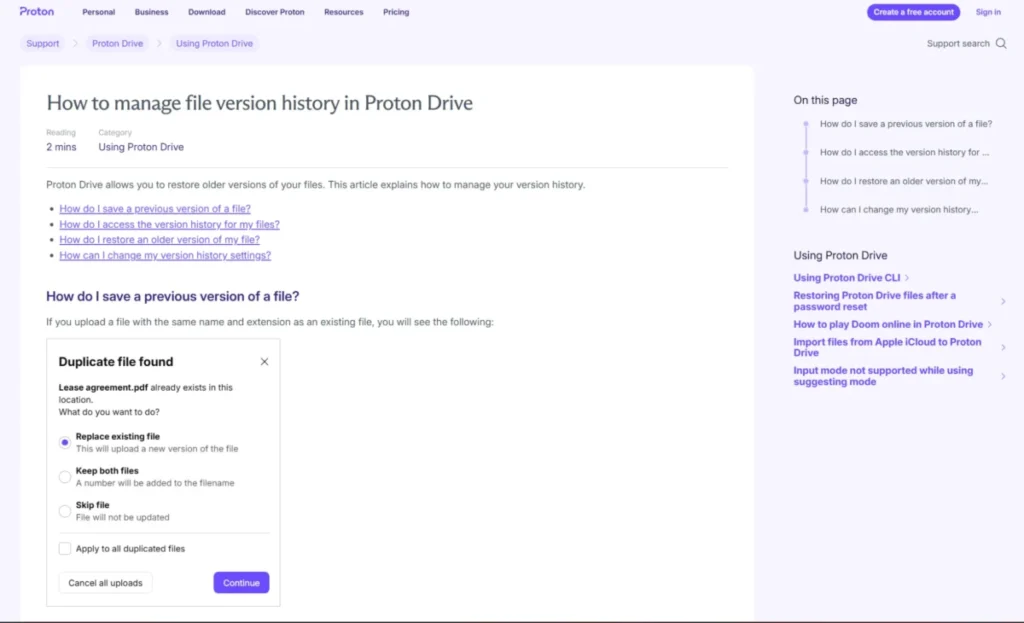
Ten years of version history is an unusual claim in consumer storage, and it changes what the product is for. A contract folder with a decade of revisions is closer to an archive than a sync drive.
The recovery model is the trade-off, and it is not optional reading. Proton states that if you reset your password, the encryption keys that protect your files can no longer be accessed, and regaining access requires the previous password, a recovery phrase, or a recovery file.
That is the honest cost of a provider who cannot read the data. I would set up recovery material before uploading anything that matters, because there is no support ticket that undoes this.
| Pros | Cons |
|---|---|
| Paid version history reaches 200 versions over 10 years | Free tier begins at 2 GB, not 5 GB |
| Encrypted document editing is included on the free plan | Paid US pricing was not readable on the checked page |
| Encrypted files can still be shared by link | A password reset locks prior encryption keys |
| Recovery model is documented rather than implied | Smaller app and integration ecosystem than Google |
- Verdict:
- well-suited to a privacy-first user who will actually store the recovery phrase, and a poor fit for anyone who treats password resets casually.
7. Dropbox

Dropbox is no longer the capacity leader, and it is still the smoothest way to hand a large file to somebody outside the account.
- Best for:
- freelancers, agencies, and mixed-platform teams that send deliverables to external recipients.
- Avoid if:
- the free tier has to cover more than three devices.
- Starting price:
- $9.99 per month for Plus with 2 TB.
- Practical tier:
- Plus, since Basic is a trial in everything but name.
- Free plan:
- 2 GB.
- First limit that bites:
- Dropbox Basic users can be logged into up to three devices at a time.
- Better than Icedrive:
- transfers and sharing work without touching encryption settings.
- Worse than IDrive:
- $9.99 per month buys 2 TB here against 5 TB there.
- Setup difficulty:
- low on every platform.
- Hidden costs:
- none at the individual tier.
- Evidence status:
- device, transfer, and recovery figures confirmed against Dropbox’s own plan and help pages.
The device cap is the reason most people leave the free plan, and it has nothing to do with running out of space. Paid individual plans remove it entirely, so the upgrade trigger is a laptop, not a gigabyte.
Plus annualizes to $119.88, which is the same yearly outlay as IDrive’s standard annual rate for two fifths of the capacity. Dropbox is being paid for delivery, not for storage.
Transfer is where that premium earns out. Dropbox Transfer supports 2 GB on Basic and 50 GB on Plus and Family, with a 7-day expiration on those three plans, and it sends a package rather than granting folder access.
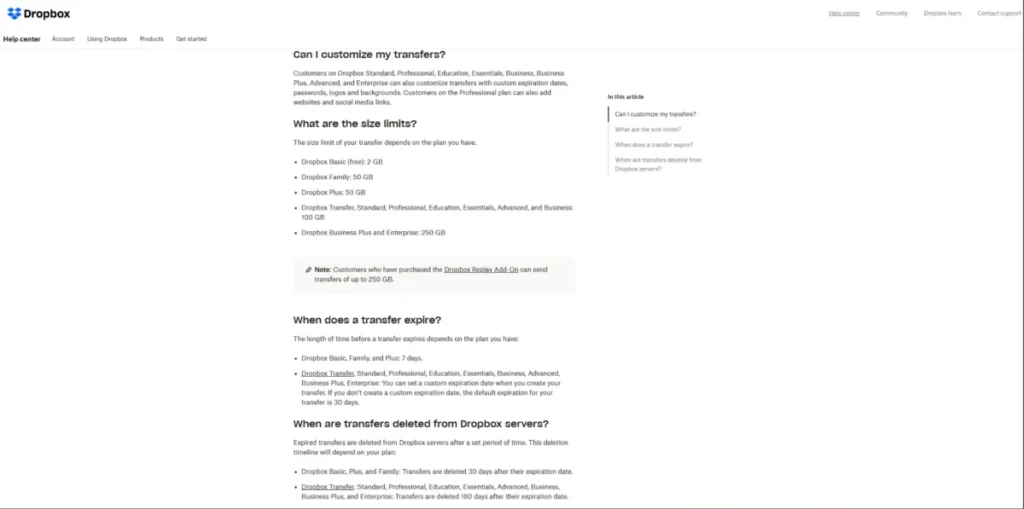
That distinction matters for client work. A shared folder invites the recipient into the workspace; a transfer hands over a copy and then expires.
Recovery is a flat 30 days on Plus, which is the same window as Google Drive and iCloud Drive and half of what a Standard team plan carries.
| Pros | Cons |
|---|---|
| 50 GB transfers deliver files without folder access | Only 2 GB of free storage |
| Paid plans remove the device limit completely | Three-device cap makes Basic unusable for most |
| Cross-platform clients are the most consistent here | 2 TB for $9.99 is beaten on capacity by IDrive |
| 30-day recovery on the entry paid plan | Transfers expire after 7 days on Plus and Family |
- Verdict:
- the right tool when the deliverable leaves the building, and an overpriced one when the job is only holding files. My Dropbox review goes deeper on the team tiers.
8. Icedrive

- Best for:
- individual users who want a mounted drive rather than a synced folder tree.
- Avoid if:
- the workflow depends on WebDAV or on sharing files straight out of encrypted storage.
- Starting price:
- not published in this article, in line with the evidence boundary applied to the other two services whose checked pages did not expose stable US figures.
- Practical tier:
- the entry paid tier, since the free plan is storage only.
- First limit that bites:
- the free plan cannot sync at all.
- Better than Dropbox:
- far more free capacity.
- Worse than pCloud:
- encrypted content cannot be shared.
- Setup difficulty:
- low, because mounting a drive is faster than seeding a sync folder.
- Hidden costs:
- every meaningful feature sits behind the paid tiers.
- Evidence status:
- plan gates and the WebDAV timeline confirmed against Icedrive’s own plans page and support center.
The free tier is the clearest example in this ranking of capacity overstating value. Ten gigabytes reads well against a two-gigabyte rival, and the plan table shows a dash rather than a number for sync devices, sync pairs, file versions, and client-side encryption.
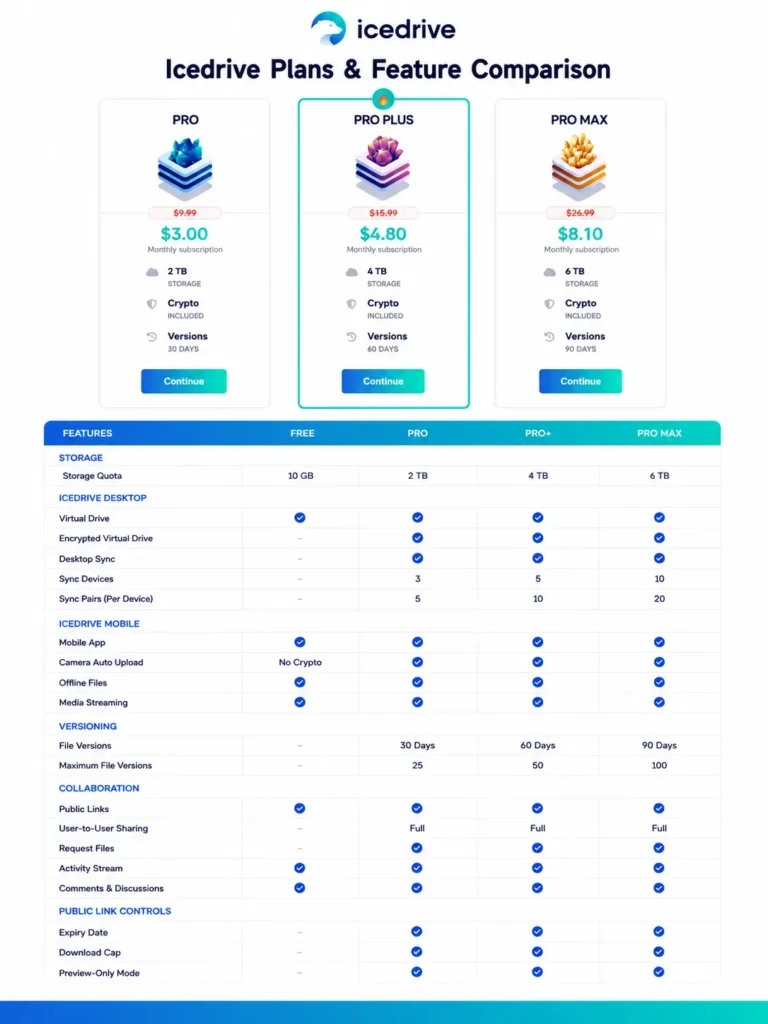
Paid tiers restore those in graded amounts, with sync devices running from 3 upward and version retention from 30 days upward. A buyer comparing free tiers on gigabytes alone is comparing the wrong column.
The encryption limitation is a hard disqualifier for some workflows. Icedrive states that sharing encrypted files is not supported because the recipient would need the secure passphrase, which would compromise the encrypted data.
Moving a file out of encrypted storage to share it is not an equivalent-security workaround, and I would not present it as one. The choice is encryption or direct sharing, not both.
The freshness item is the one that invalidates older advice. WebDAV has been disabled for all new users as of 15 April 2026 and is being gradually sunset for existing users, with no final retirement date stated.
| Pros | Cons |
|---|---|
| 10 GB free is the largest free tier bar Google | Free plan has no sync, encryption, or versioning |
| Virtual drive avoids a full local copy | Encrypted files cannot be shared directly |
| Version retention scales cleanly by tier | WebDAV is closed to new users since April 2026 |
| Two-factor authentication is on every tier | Paid pricing was not stable on the checked page |
- Verdict:
- a reasonable virtual-drive pick for a solo user on a paid tier, and the wrong shortlist entry for anyone who planned to mount it over WebDAV.
9. Internxt

- Best for:
- privacy-focused users drawn to post-quantum cryptography claims.
- Avoid if:
- large files or long recovery windows are part of the job.
- Starting price:
- not published in this article, because the checked pricing page did not expose stable paid US dollar amounts.
- Practical tier:
- Premium or Ultimate, since versioning starts there.
- Free plan:
- 1 GB of encrypted storage.
- First limit that bites:
- 100MB per file on the free plan.
- Better than Icedrive:
- encrypted files can be shared.
- Worse than Proton Drive:
- the editing and recovery tooling is thinner.
- Setup difficulty:
- medium, because backups are a separate desktop workflow.
- Hidden costs:
- none stated, though the recovery window on lower tiers is short enough to matter.
- Evidence status:
- upload, retention, versioning, and backup behaviour confirmed against Internxt’s own help center.
The transfer ceilings are the practical story. Per-file uploads run 100 MB on Free, 10 GB on Essential, 50 GB on Premium, and 100 GB on Ultimate, while sharing is capped at 10 GB on every plan and Internxt Send at 5 GB.
That sharing cap does not rise with the plan, so buying Ultimate to move a 40 GB project file still leaves no way to share it in one piece.
Recovery is short at the bottom and reasonable at the top. Trash retention runs 2 days on the free and legacy tiers, then 7, 15, and 30 days as plans rise.
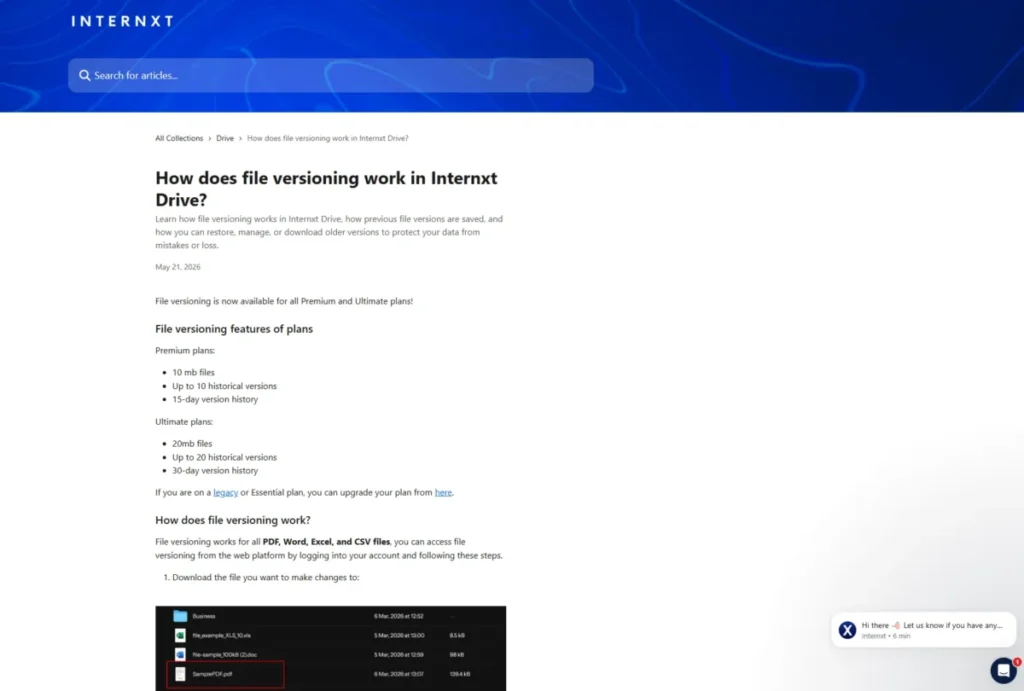
Versioning arrived recently and is narrower than it first sounds. As of 21 May 2026 it covers Premium with up to 10 historical versions and a 15-day window.
Ultimate raises that to 20 versions over 30 days, and both tiers cap the file size at 10 MB and 20 MB respectively.
Backups are a separate product decision. They are paid-plan only, they can only be initiated from a desktop device, and material already uploaded to Drive cannot be moved into Backup.
The cryptography positioning is a vendor statement and stays labeled as one. Internxt says Drive uses Kyber 512 post-quantum encryption with zero-knowledge policies, which is a design claim rather than an independently validated result.
| Pros | Cons |
|---|---|
| Vendor-stated post-quantum encryption design | 10 GB sharing cap applies on every plan |
| Zero-knowledge policies across the product | Free trash retention is only 2 days |
| Versioning now covers Premium and Ultimate | Versioning is limited to 10 MB and 20 MB files |
| Backups support 6, 12, and 24-hour schedules | Existing Drive files cannot be moved into Backup |
- Verdict:
- a defensible choice for a privacy-first buyer with modest files, and a weak one for anyone who needs to share or recover at scale.
10. Apple iCloud+
- Best for:
- iPhone, iPad, and Mac households that want the cheapest storage with no configuration.
- Avoid if:
- the same experience has to hold up on Windows or Android.
- Starting price:
- $0.99 per month for 50 GB.
- Practical tier:
- 200 GB at $2.99 per month once a family shares the plan.
- Free plan:
- 5 GB attached to every Apple account.
- First limit that bites:
- 5 GB free fills within days of a single device backup.
- Better than Dropbox:
- device-level integration nothing outside the ecosystem matches.
- Worse than Sync.com:
- encryption coverage varies by sharing mode.
- Setup difficulty:
- low on Apple devices, medium elsewhere.
- Hidden costs:
- none, and 50 GB annualizes to just $11.88.
- Evidence status:
- pricing, sharing, and Advanced Data Protection scope confirmed against Apple’s own pages.
The entry price is the strongest per-dollar story in this ranking at small capacity. Nothing else here starts under a dollar, and for a single iPhone backup plus a photo roll, 50 GB is usually enough.
Advanced Data Protection is the part that gets summarized wrongly. Apple states that iWork collaboration, the Shared Albums feature in Photos, and sharing content with “anyone with the link,” don’t support Advanced Data Protection.
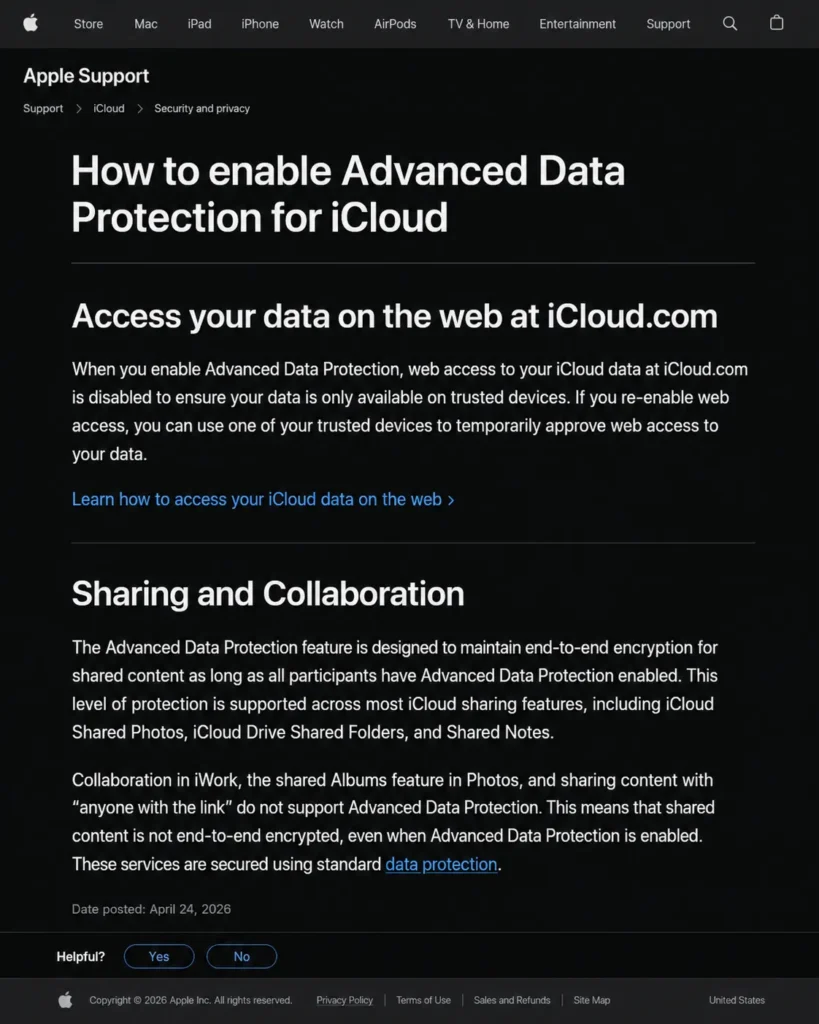
So a file shared by public link is not carrying the same protection as the same file sitting untouched in iCloud Drive. “iCloud is end-to-end encrypted with ADP” is a claim that needs those three exceptions attached every time it is made.
Turning the feature on also changes an ordinary habit. Web access at iCloud.com is disabled by default once ADP is active, which a buyer who works from a browser at the office should know before flipping the switch.
Recovery matches the category norm. Recently deleted files can be recovered for 30 days, and link sharing supports view or edit control per recipient.
| Pros | Cons |
|---|---|
| Cheapest entry tier here at $0.99 per month | 5 GB free is the least usable free allowance |
| Device backup and photo sync need no configuration | Link sharing sits outside ADP protection |
| 30-day recovery on deleted iCloud Drive files | ADP disables iCloud.com browser access by default |
| Per-recipient view or edit control on shared links | Experience degrades outside Apple hardware |
- Verdict:
- the obvious budget answer for an all-Apple household, and a compromise the moment a Windows laptop joins the family.
Pricing, Limits, and Real Cost
Entry prices in this category are close enough that they decide almost nothing. What decides the budget is the cadence, the renewal, and the second budget hiding behind the storage number.
| Service and plan | Monthly rate | Annualized cost | Capacity |
|---|---|---|---|
| IDrive Personal, monthly | $11.99 | $143.88 | 5 TB |
| IDrive Personal, standard annual | $9.99 effective | $119.88 | 5 TB |
| IDrive Personal, first-year offer | $6.99 effective | $83.88 | 5 TB |
| Microsoft 365 Basic, monthly | $1.99 | $23.88 | 100 GB |
| Microsoft 365 Basic, annual | not applicable | $19.99 | 100 GB |
| Sync.com Personal, monthly | $4.00 | $48.00 | 150 GB |
| Sync.com Personal, annual | $3.50 effective | $42.00 | 150 GB |
| Dropbox Plus, monthly | $9.99 | $119.88 | 2 TB |
| Apple iCloud+, monthly | $0.99 | $11.88 | 50 GB |
| pCloud Premium, annual | not applicable | $49.99 | 500 GB |
Source: official vendor pricing pages listed in each product section above.
Every annualized figure is this article’s arithmetic over the vendor’s own rate, not a price the vendor advertises. The IDrive rows are the ones to read twice, because the $83.88 line is a first-year figure and the $119.88 line is what year two costs.
Cost per terabyte splits the field cleanly. IDrive’s standard annual rate works out near $24 per terabyte per year.
Dropbox Plus costs roughly two and a half times that on the same measure, and Microsoft 365 Personal roughly four times.
Buyers paying the higher numbers are not being overcharged. They are buying co-authoring, transfer tooling, or ecosystem integration, and it is worth knowing that is the trade rather than assuming the capacity is competitive.
The hidden budgets are where forecasts break. pCloud meters shared-link traffic separately from storage, Google pools the quota across three products, and pCloud Encryption is bought apart from the storage plan entirely.
Free tiers, compared honestly
| Service | Free capacity | What the free tier removes |
|---|---|---|
| Google Drive | 15 GB | Nothing structural, but the quota is shared |
| Icedrive | 10 GB | Desktop sync, encryption, and versioning |
| IDrive | 10 GB | Higher capacity tiers only |
| Apple iCloud | 5 GB | Advanced Data Protection is available, space is not |
| Sync.com | 5 GB | Higher device and capacity headroom |
| Proton Drive | 2 GB rising to 5 GB | Deep version history |
| Dropbox | 2 GB | Devices beyond three |
| Internxt | 1 GB | Uploads above 100 MB, versioning, and backups |
Ranking free tiers by gigabytes gets two of these badly wrong. Icedrive’s 10 GB arrives without sync or encryption, which makes it a smaller offer than the number suggests.
Dropbox’s free allowance carries the same problem from the other direction, because a three-device cap ends the plan before the storage does.
Security and Encryption Scope
“Encrypted” is doing far too much work in this category. Four different security models are sitting in this ranking, and they fail in four different ways.
| Service | Encryption model | Scope boundary that matters |
|---|---|---|
| Sync.com | Zero-knowledge by default | No NAS or WebDAV path into the encrypted store |
| pCloud | Client-side in the Crypto folder | Ordinary folders sit outside that model |
| Proton Drive | End-to-end with user-held keys | Password reset locks prior keys |
| Internxt | Vendor-stated Kyber 512, zero-knowledge | Design claim, not independently validated here |
| Icedrive | Client-side on paid tiers | Encrypted files cannot be shared |
| Apple iCloud+ | Optional Advanced Data Protection | Link sharing and iWork collaboration are excluded |
| IDrive | Optional private encryption key | Choosing it disables the share feature |
| Google Drive | Provider-managed encryption | No zero-knowledge option for general files |
| Microsoft OneDrive | Provider-managed encryption | Link password and expiry are subscriber-gated |
| Dropbox | Provider-managed encryption | Transfer packages expire on a plan-set schedule |
Read that table as a set of trade-offs rather than a ranking. The three services with the strongest cryptographic posture, Sync.com, Proton Drive, and Icedrive, each pay for it somewhere in sharing, storage location, or recovery.
The pattern is consistent and worth stating plainly: the more completely a provider is locked out of the data, the more the burden of recovery and sharing moves onto the account holder.
Apple’s exceptions deserve one more line because they are the easiest to get wrong in casual advice. A buyer who enables Advanced Data Protection and then shares a folder by public link has not extended that protection to the shared copy.
I would treat encryption scope the way I treat a contract clause. The question is not whether the word appears, it is which folder, which sharing mode, and which recovery path it actually covers.
Sharing, Recovery, and Workflow Limits
This is the section that most competing rankings compress into a checkmark grid, and it is where the shortlist usually changes.
Sharing and delivery ceilings
| Service | Delivery ceiling | Failure behaviour |
|---|---|---|
| IDrive | 25 downloads, 30-day expiry per link | Link stops working at the cap |
| Google Drive | 600 recipients, 100 concurrent editors | Additional editors are locked out |
| Microsoft OneDrive | 250 GB per file | Upload rejected above the ceiling |
| Sync.com | 500 MB comfortable in the browser | Web transfers degrade, desktop continues |
| pCloud | 50 GB to 2 TB monthly link traffic | Free recipients blocked, paid ones unaffected |
| Dropbox | 2 GB free, 50 GB on Plus and Family | Transfer expires after 7 days |
| Internxt | 10 GB sharing, 5 GB via Send | Share cannot be created above the cap |
The pCloud row is the one that behaves differently from every other entry. Nothing breaks for the account owner, and the people receiving the file are the ones who see the failure.
Recovery and version windows
| Service | Deleted-file recovery | Version history |
|---|---|---|
| Google Drive | 30 days, still consuming quota | Documented per file type |
| Dropbox Plus | 30 days | Included on paid plans |
| Apple iCloud Drive | 30 days | Per app and file type |
| Proton Drive free | Trash retention applies | 10 versions for 7 days |
| Proton Drive paid | Trash retention applies | Up to 200 versions for 10 years |
| Internxt Free | 2 days | None |
| Internxt Premium | 15 days | 10 versions, 15 days, 10 MB files |
| Internxt Ultimate | 30 days | 20 versions, 30 days, 20 MB files |
| Icedrive paid | By plan | 30 to 90 days by tier |
Two days of trash retention is the outlier here, and it is worth sitting with. A free Internxt user who deletes a folder on Friday evening has until Sunday evening to notice.
At the other end, Proton’s ten-year paid version window is longer than most people keep the account, which turns version history from a safety net into an archive.
Setup and migration difficulty
| Service | Setup effort | Reason |
|---|---|---|
| Apple iCloud+ | Low | Already active on the device |
| Google Drive | Low | Account usually exists already |
| Dropbox | Low | Single client, one folder |
| Microsoft OneDrive | Low to medium | Simple on Windows, extra steps on macOS |
| Icedrive | Low to medium | Drive mounts fast, encryption is a separate step |
| pCloud | Medium | Virtual drive plus optional Crypto configuration |
| Proton Drive | Medium | Recovery material must be configured deliberately |
| Sync.com | Medium to high | Folder architecture must respect file-count limits |
| Internxt | Medium to high | Backups are configured separately from Drive |
| IDrive | Medium to high | Cloud Drive and backup are two configurations |
I have deliberately not scored migration between these services. The vendor documentation does not support a comparable object-level migration claim across all ten, and inventing one would be the kind of tidy answer that costs a reader a weekend.
The sequencing principles still transfer, and the staged approach in my CRM migration checklist works the same way for a file library: inventory first, move a slice, verify, then cut over.
Which Cloud Storage Should You Choose?
Work through these in order. The first constraint that fails is the one that decides the shortlist, and it is almost never capacity.
- Count the devices, then count them again. Sync.com stops at five active devices and Dropbox Basic stops at three, and no amount of storage fixes either.
- Name the job: hold, sync, back up, or deliver. IDrive and Apple protect devices, Google and Microsoft edit documents, Dropbox and pCloud deliver files, and treating those as one product is the root mistake in this category.
- Check the largest single file you own. OneDrive’s 250 GB ceiling, Internxt’s per-tier upload caps, and Sync’s 40 GB desktop threshold all bite long before storage runs out.
- Decide what “encrypted” has to mean for you. If it means the provider cannot read the file, the shortlist is Sync.com, Proton Drive, pCloud Crypto, or Icedrive, and each one charges for it in sharing or recovery.
- Pick a recovery window you can live with. Thirty days is the category norm, two days is Internxt’s free tier, and ten years is Proton’s paid version history.
- Separate storage cost from delivery cost. pCloud meters link traffic monthly, Dropbox meters transfer size by plan, and Google pools the quota across Drive, Gmail, and Photos.
- Budget the renewal, not the promotion. IDrive’s first-year rate is $83.88 and the standard annual rate is $119.88, and only one of those is a recurring cost.
Common mistakes when choosing cloud storage
Comparing free tiers on gigabytes alone. Icedrive’s 10 GB free plan has no sync, no encryption, and no versioning, which makes it a weaker offer than a smaller free tier that actually syncs.
Assuming a plan’s storage is dedicated to files. A Google One allowance is consumed by Gmail attachments and Photos uploads, so the usable Drive headroom is always lower than the plan card implies.
Reading a public preview as a shipped capability. OneDrive’s million-item sync mode requires Windows 11 or Windows Server 2022, 16 GB of RAM, and an SSD, and excludes virtual desktop environments.
Treating encryption as an account-level property. pCloud’s client-side model lives in the Crypto folder, Icedrive’s encrypted files cannot be shared, and Apple’s Advanced Data Protection excludes link sharing and iWork collaboration.
Trusting older integration advice. WebDAV guidance for Icedrive stopped applying to new accounts on 15 April 2026, so a migration plan built on it will fail at setup.
Confusing sync with backup. Internxt backups are desktop-created and cannot ingest files already sitting in Drive, which means the archive has to be planned before the upload rather than after.
Budgeting from the discounted rate. A first-year offer is a real saving and a bad forecast, and the renewal figure is the one finance will see.
Final Verdict: The Best Cloud Storage for Each Buyer
IDrive takes the top position because its verified capacity economics are not close: $119.88 per year for 5 TB at the standard annual rate, with device backup and a sync drive on one account. Buy it if the job is holding a large personal archive across several machines, and skip it if two people need one document open at once.
For Google-centric households, Google Drive is the correct answer despite the pooled quota, because nothing else here matches live co-editing. Budget one tier higher than the file count suggests, since Gmail and Photos are drawing from the same allowance.
Windows households already paying for Microsoft 365 should stay on OneDrive rather than adding a second subscription. The $19.99 annual Basic tier is the cheapest verified route to 100 GB in this ranking, and the 250 GB per-file ceiling only matters to a minority of buyers.
Privacy-first buyers split three ways. Sync.com is the stronger fit when client files must stay unreadable to the provider and the device count is low.
Proton Drive is better when encrypted document editing and long version history matter, and Internxt suits a buyer who can live with a 10 GB sharing cap.
Creators publishing download links should look at pCloud first, and should size the plan on monthly link traffic rather than on storage. Agencies sending deliverables outward should pay Dropbox’s premium for 50 GB transfers and accept that the capacity is unremarkable.
Apple households buying on price should take iCloud+ at $0.99 per month and enable Advanced Data Protection with the link-sharing exception clearly in mind. Icedrive is a fair virtual-drive pick for a solo paid user, and it is the wrong shortlist entry for anyone who planned to mount it over WebDAV.
If a single rule survives this article, it is this one: choose against the constraint that fails first, not the capacity that looks best. For adjacent workflow decisions, my guide to the best team collaboration tools covers the layer that sits on top of whichever drive you pick.
Frequently Asked Questions
These are the questions the sections above leave genuinely open, mostly about free tiers, encryption scope and what a headline price actually renews at.
Which cloud storage service has the most free storage?
Google Drive, at 15 GB, though that allowance is shared with Gmail and Google Photos.
Icedrive’s 10 GB is the largest free tier with no pooling, and it excludes desktop sync, encryption, and versioning.
What is the difference between cloud storage and cloud backup?
Cloud storage holds files you actively work with and syncs changes across devices. Cloud backup protects a copy of a device or folder so it can be restored after loss, which is why deleting a file in a synced folder deletes it everywhere while a backup keeps the copy.
Can cloud storage providers see my files?
It depends on the encryption model rather than the brand. Sync.com, Proton Drive, Internxt, pCloud’s Crypto folder, and Icedrive’s paid encrypted storage are designed so the provider cannot read the content, while Google Drive, OneDrive, and Dropbox use provider-managed encryption.
Which cloud storage is cheapest for large capacity?
IDrive, by a wide margin at the tier sizes compared here. Its standard annual rate works out to $119.88 per year for 5 TB.
Dropbox Plus reaches the same yearly outlay for 2 TB, which is the clearest capacity gap in this ranking.
Does Apple’s Advanced Data Protection cover shared links?
No. Apple documents that iWork collaboration, Shared Albums, and sharing content with anyone who has the link do not support Advanced Data Protection, and enabling the feature also disables iCloud.com web access by default.
What happens when a pCloud shared link runs out of traffic?
The link stays active and paid pCloud recipients can still download from it, while free recipients see a message saying the owner’s traffic limit has been exceeded. The allowance resets monthly regardless of billing cadence.
How many devices can one cloud storage account cover?
That varies more than capacity does. Sync.com allows five active computers or mobile devices, Dropbox Basic allows three, and Dropbox’s paid individual plans remove the limit.
Is a first-year discount worth choosing a service for?
Only when the renewal price is also acceptable. IDrive’s discounted first year comes to $83.88 and the standard annual rate is $119.88, so the second figure is the one that belongs in a budget.