This OneDrive review comes down to one question: do you want Microsoft’s Office apps as well as storage? If you do, Microsoft 365 Personal at $99.99 a year for 1 TB is easy to justify.
If you only need room for files and photos, you pay for software you will not open.
Two recent changes matter before you buy. New Family and Premium subscriptions now share one 2 TB pool instead of 1 TB per person. Microsoft also closed standalone OneDrive for Business plans to new customers after May 31, 2026.
Evidence basis: official pricing pages and documentation, checked October 2026.
In This Article (10 sections)
OneDrive at a Glance: The Quick Verdict
| Question | Answer |
|---|---|
| Best for | Windows users and families who also want Word, Excel and Outlook |
| Skip it if | You need storage only, or a team needs pooled shared storage |
| Starting price | 5 GB free; Microsoft 365 Basic is $19.99/ |
| Practical plan | Microsoft 365 Personal, $99.99/ |
| Main strength | Subscribers can roll back their whole OneDrive to any point in the last 30 days |
| Main limitation | Deleting an online-only file on one device deletes it everywhere |
| Best alternative | Dropbox Plus for storage alone: 2 TB at $9.99/ |
Sources: Microsoft 365 plan comparison, Microsoft 365 Basic, Dropbox plans, checked October 2026.
The pattern is simple. OneDrive is cheap storage when you value the Office bundle, and ordinary storage when you do not.
What Changed for Family Plans in October 2026
Microsoft’s plan comparison page still lists Family and Premium with “Up to 6 TB of secure cloud storage (1 TB per person).” Its storage support pages now describe a different deal for new buyers.
Microsoft’s storage quota page says new Family and Premium subscriptions from October 7, 2026 include 2 TB of shared OneDrive storage. Existing subscribers move to the pool at a 2027 renewal; Microsoft’s pages give April 1 in one place and May 2 in another.
A shared pool cuts both ways. Under the old model, four family members could each fill their own 1 TB. Under the new one, those four people share 2 TB between them.
For one person who needs more than 1 TB, the change helps. Microsoft’s shared storage FAQ says an owner who does not share the plan can use the full pool.
That makes Family an inexpensive way for one person to get 2 TB from Microsoft: $129.99 – $99.99 = $30.00 a year more than Personal, for twice the storage.
Two details decide what you do next:
- Upgrading an existing plan, for example Family to Premium, before May 2, 2027 moves you to shared storage early.
- Personal, Family, Premium and Pro subscribers can add storage up to 10 TB, and only the account holder can buy it.
If your household already holds more than 2 TB, check the storage dashboard before your renewal rather than after it.
Where OneDrive Earns Its Place
Backing up a Windows PC and a phone’s photos
OneDrive’s strongest job is quiet backup of the places people already save files. It backs up a Windows PC through Windows Backup, chosen folders on PC and Mac, and photos from iOS and Android phones.
Files On-Demand keeps that from filling a small laptop drive. Online-only files appear in File Explorer but take no disk space until you open them, and the feature needs Windows 10 version 1709 or later.
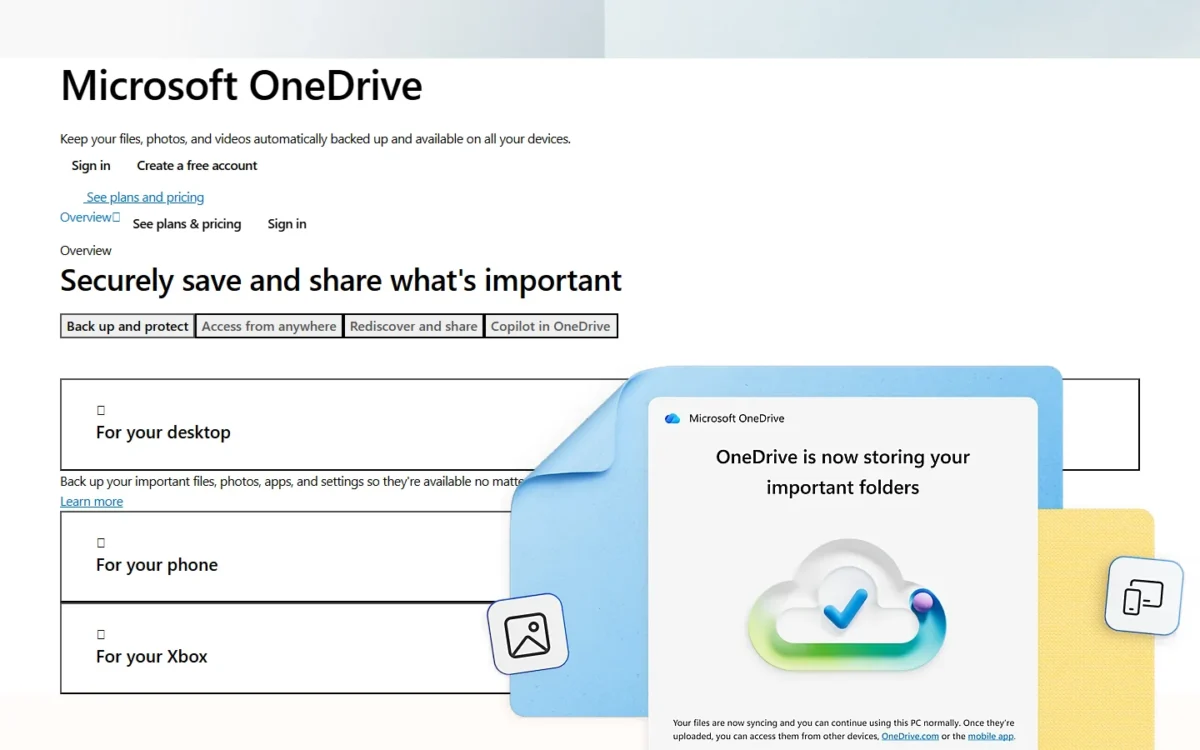
The trade-off is that online-only files do not open without an internet connection. Mark the folders you need on a plane as “Always keep on this device.”
Undoing mistakes and ransomware
This is where a paid plan earns its fee. Microsoft 365 subscribers can restore their entire OneDrive to any point in the last 30 days, which undoes every change made after that date.
If OneDrive detects a ransomware attack, subscribers get an alert, and the restore page fills in a suggested restore date. That turns a week of damage into one rollback.
Every personal account keeps deleted files in the recycle bin for 30 days; work or school accounts keep them for 93 days unless an admin changes that. Version history is retained for 30 days.
So the free tier protects you from one deleted file. The paid tier protects you from a bad week.
Sharing and locking down sensitive files
Subscribers can put a password or an expiration date on a sharing link. Those are the two controls that matter when a tax return or a contract leaves the family.
Personal Vault adds a second check, such as a fingerprint, PIN or emailed code, and locks after 20 minutes of inactivity on the web. Free accounts can keep only three files in it.
Underneath, Microsoft’s security overview says each file is encrypted at rest with a unique AES256 key, and data in transit uses TLS.
Working on Office files
The bundle is the point. Personal, Family and Premium include desktop Word, Excel, PowerPoint, Outlook and OneNote with Copilot, and OneDrive lets people edit Microsoft 365 documents together in real time.
Compare that with buying Office once. Over three years, Personal costs $99.99 x 3 = $299.97. That is $119.98 more than the $179.99 one-time price of Office Home 2024 ($299.97 – $179.99), which covers one PC or Mac.
That gap pays for 1 TB of storage, Copilot, and sign-in on 5 devices at once. If you would buy Office anyway, the storage is the cheap part.
Where OneDrive Falls Short: The Disadvantages
Five limits matter more than the feature list.
It syncs deletions, not just files
Delete an online-only file on your laptop and OneDrive deletes it on every device and online. Microsoft alerts you after a mass deletion in your OneDrive backup, and a personal account can restore deleted files for 30 days.
For anyone treating OneDrive as their only backup, that 30-day window is the real safety net. Dropbox Standard keeps deleted files for 180 days.
The free 5 GB is shared with Outlook.com attachments
The free 5 GB also holds Outlook.com attachments and files from Microsoft 365 apps. Go over it and OneDrive turns read-only, and Outlook.com stops sending and receiving email.
Stay over for three months and the account is frozen. After six months, Microsoft might delete your OneDrive and every file in it.
That makes the free tier a trial, not a home for a photo library.
Basic and Personal storage cannot be shared
Microsoft does not let you share storage from a Basic or Personal plan. A couple who wants one bill needs Family, which for a new subscriber now means one 2 TB pool.
Large libraries strain the sync app
Microsoft recommends syncing no more than 300,000 items and warns of performance problems above that. A 1,000,000-item preview exists for Windows, but it needs at least 16 GB of RAM.
Photographers and developers with years of small files should count items, not gigabytes.
Business plans include 1 TB per person
Business Basic, Standard and Premium give each user 1 TB, while Microsoft 365 E3 and E5 can be raised to 5 TB. Paid Extra Storage packs add more, up to 25 TB per user.
Microsoft’s OneDrive service description also rules out system backups and department-level data.
A five-person office with a 3 TB shared video archive needs SharePoint, not a bigger OneDrive plan.
OneDrive Pricing for Individuals and Families
OneDrive is free for 5 GB, and paid storage starts at $19.99 a year for 100 GB with Microsoft 365 Basic. For most households, the real choice is Personal or Family.
| Plan | Billed yearly | Billed monthly | Cloud storage | People |
|---|---|---|---|---|
| Free Microsoft account | Free | Free | 5 GB, shared with Outlook.com attachments | 1 |
| Microsoft 365 Basic | $19.99/ | $1.99/ | 100 GB | 1 |
| Microsoft 365 Personal | $99.99/ | $9.99/ | 1 TB | 1 |
| Microsoft 365 Family | $129.99/ | $12.99/ | 2 TB shared (new from Oct 7, 2026) | Up to 6 |
| Microsoft 365 Premium | $199.99/ | $19.99/ | 2 TB shared (new from Oct 7, 2026) | Up to 6 |
Sources: Microsoft 365 plan comparison, Microsoft 365 Basic, Microsoft storage quotas, checked October 2026.
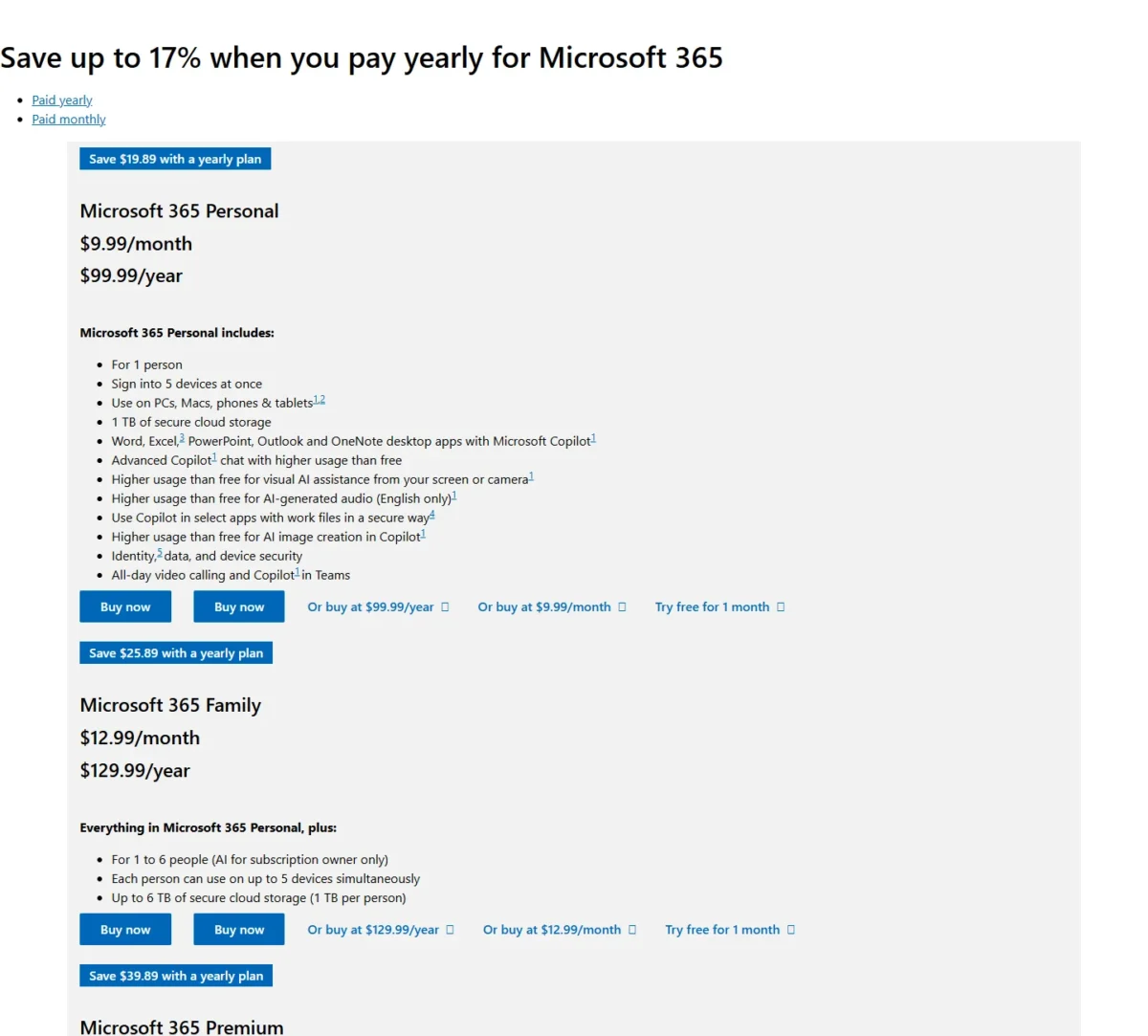
Monthly billing costs more than it looks. Personal paid monthly for a year is $9.99 x 12 = $119.88, or $19.89 more than paying yearly.
Pay monthly only while you check that your files fit. Personal, Family and Premium each come with a one-month free trial, which covers that check.
The plan to avoid for storage: Premium. It costs $199.99 – $129.99 = $70.00 a year more than Family, and the extra buys heavier Copilot use and AI agents, not storage.
The plan for light users: Basic gives 100 GB, ad-free Outlook and support, but no AI features. Word, Excel and PowerPoint stay on the free web and mobile versions.
Basic has a hard ceiling. Add-on storage is for Personal, Family, Premium and Pro subscribers, and Microsoft’s answer for a Basic user who outgrows 100 GB is to switch plans.
Canceling Basic or Personal drops you back to 5 GB. If your files exceed that, you cannot upload, edit or sync until you clear space.
OneDrive for Business Pricing: What a 10-Person Team Pays
For a business, OneDrive comes inside a Microsoft 365 plan. Business Basic, the entry plan with Teams, costs $7.00 per user per month, paid yearly.
Microsoft’s January 2026 partner notice says standalone OneDrive for Business Plan 1 and Plan 2 take no new customers after May 31, 2026. Renewals stop in January 2027.
A company shopping today should ignore any standalone OneDrive price it finds. That plan is closed to new customers.
| Plan | Per user per month, paid yearly | 10 users x 12 months, paid yearly | OneDrive storage | Office apps |
|---|---|---|---|---|
| Microsoft 365 Business Basic | $7.00 | $840 ($7.00 x 10 x 12) | 1 TB per user | Web and mobile |
| Microsoft 365 Business Standard | $14.00 | $1,680 ($14.00 x 10 x 12) | 1 TB per user | Desktop, web and mobile |
| Microsoft 365 Business Premium | $22.00 | $2,640 ($22.00 x 10 x 12) | 1 TB per user | Desktop, web and mobile |
Sources: Microsoft 365 Business Basic, Microsoft 365 Business Premium, Microsoft 365 business plan comparison, checked October 2026.
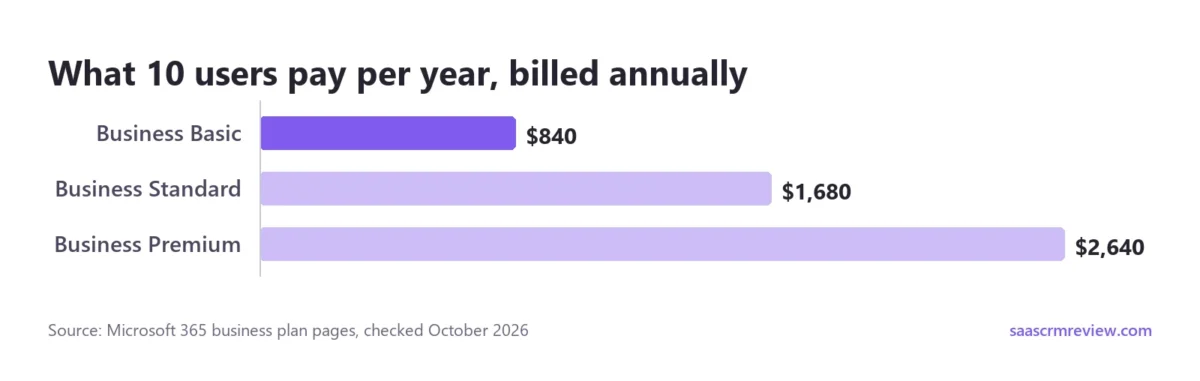
Storage is identical across the three, so the price steps buy apps and security. Basic at $840 a year gives 10 people 1 TB each, email and Teams.
Standard doubles that to $1,680 for desktop apps. Premium at $2,640 is a security purchase, with device management and threat protection, not a storage one.
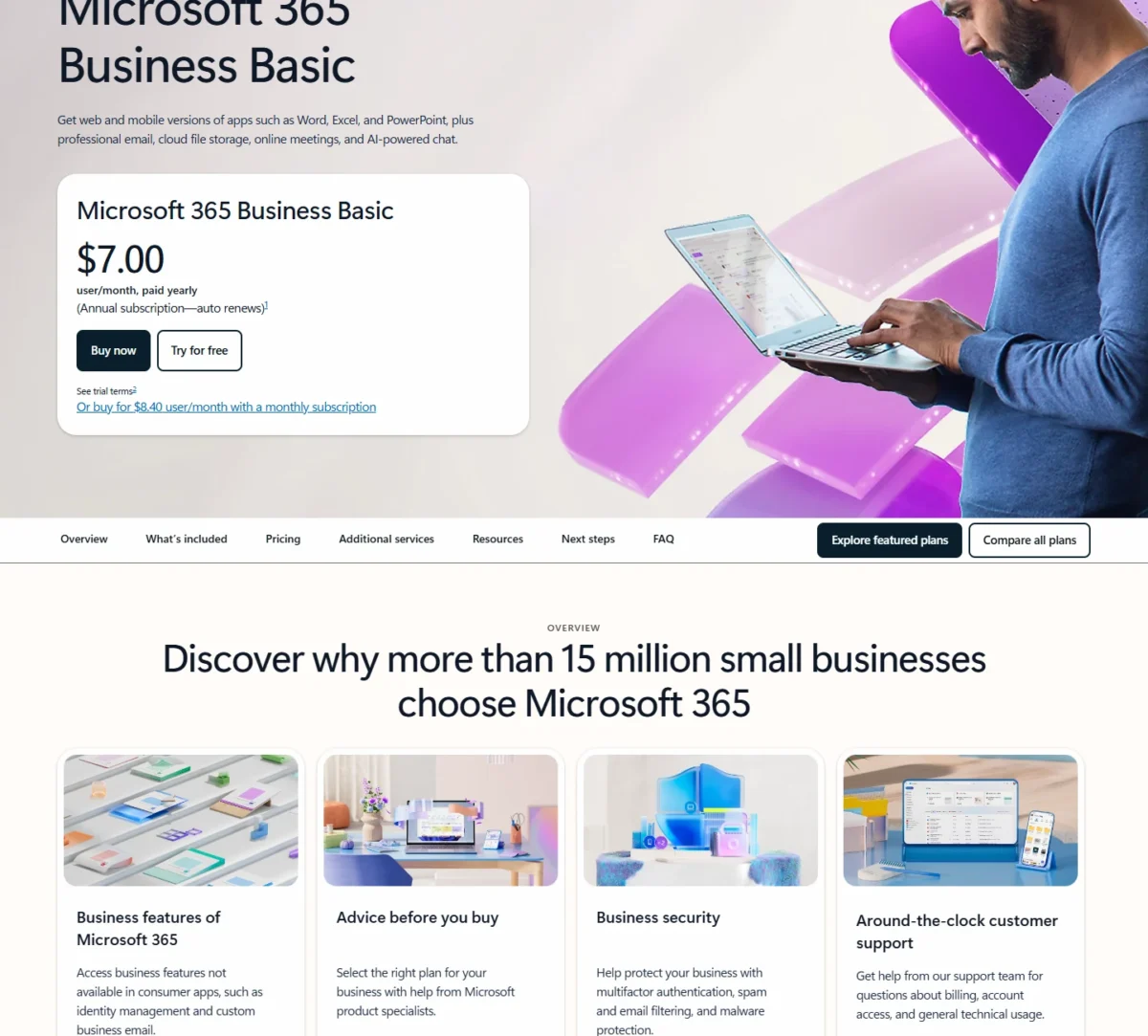
Monthly billing is the cost that grows quietly. Business Basic on a monthly subscription is $8.40 x 10 users x 12 months = $1,008 a year, a $168 premium over the $840 annual price.
Microsoft’s comparison page leads with Copilot bundles: Business Standard with Copilot at $23.50 and Business Premium with Copilot at $32.00 per user per month, paid yearly. Both still list 1 TB of cloud storage per user.
Read the exit terms before the trial. The one-month trial needs a credit card and converts to paid, a prorated refund is available within a 7-day cancellation window, and canceling deletes all associated data.
Business plans also cap out at 300 users. For more space, Microsoft sells OneDrive Extra Storage as capacity packs from 100 GB up to 6 TB.
Google Workspace takes the opposite approach: its plans pool storage across the organization, so a heavy user can draw on space a light user leaves unused. Anyone weighing that pooled model against OneDrive’s per-user storage can start with our Google Workspace pricing breakdown.
Who Should Use OneDrive, and Who Should Skip It
OneDrive is the right default for three buyers:
- Windows users who want PC folders and phone photos backed up without another app
- households that would pay for Word, Excel and Outlook anyway
- small businesses already standardizing on Microsoft 365, where Business Basic covers storage for $7.00 per user per month, paid yearly
Who should skip it
Storage-only buyers: Dropbox Plus gives one person twice Personal’s storage, a better fit if the Office apps would go unused. The math is in the alternatives table below.
Apple households: if nobody opens Word, iCloud+ at 2 TB avoids paying for an app bundle that sits unused.
New families with several heavy users: four people with large photo libraries can outgrow a 2 TB pool. Price the 10 TB add-on route against a second service first.
Teams that need shared department storage: Microsoft points that data to SharePoint. If pooled storage matters more than Office desktop apps, our Google Workspace review covers where its plan gates fall.
Anyone who wants months of deleted-file history: OneDrive personal accounts keep 30 days; Dropbox Standard keeps 180 days and Dropbox Advanced keeps 1 year.
OneDrive Alternatives: Is There a Better Option?
Yes, if the Office apps are not part of what you are buying. Here is how the main alternatives price comparable storage.
| Service and plan | Storage | US price | What the price adds |
|---|---|---|---|
| OneDrive (Microsoft 365 Personal) | 1 TB | $99.99/ | Desktop Office apps, Copilot |
| OneDrive (Microsoft 365 Family, new) | 2 TB shared, up to 6 people | $129.99/ | Office apps for each member |
| Dropbox Plus | 2 TB, 1 person | $9.99/ | 30-day file recovery, 50 GB transfers |
| Dropbox Standard | Starts at 3 TB for the team | $15/ | Team folders, 180-day recovery |
| iCloud+ | 2 TB | $9.99/ | HomeKit Secure Video support |
Sources: Microsoft 365 plan comparison, Dropbox plans, Apple iCloud+ plans and pricing, checked October 2026.
For one person, Dropbox Plus and iCloud+ each cost $9.99 x 12 = $119.88 a year, $19.89 more than Personal’s $99.99, for double the storage. Personal only wins once the Office apps count as part of the value.
At team size, Dropbox Standard costs $15 x 10 users x 12 months = $1,800 a year, against $7.00 x 10 users x 12 months = $840 for Business Basic. Dropbox’s case is shared team folders and 180-day recovery, not price.
Google Drive starts with more free room: every Google account comes with up to 15 GB of storage, three times OneDrive’s 5 GB. Its Google One Basic plan can also be shared with up to 5 others, which Microsoft 365 Basic cannot.
So pick Google Drive if your household runs on Gmail and Android, and OneDrive if it runs on Windows and Office files. If storage alone is the job, our ranking of the best cloud storage services sorts the wider field by price and limits.
OneDrive Review Verdict: Which Plan to Choose
Choose Microsoft 365 Personal if you are one person on Windows who would buy Office anyway. At $99.99 a year, the apps justify the price and the 1 TB comes with them.
Choose Family if two or more people share the bill, or one person needs up to 2 TB. It is the plan I would pick for most households, as long as everyone’s files fit in one 2 TB pool.
Choose Basic only if you need under 100 GB and no desktop apps. For a business, start on Business Basic and move people to Standard only when they need desktop apps.
Skip OneDrive if you need storage alone, long deleted-file history, or pooled storage for a team. Dropbox, iCloud+ and Google Workspace each serve one of those jobs better.
OneDrive FAQ
Is OneDrive free?
Yes, up to 5 GB, and that allowance also covers Outlook.com attachments. Outlook.com email itself has a separate 15 GB free limit, so messages do not eat into your OneDrive space, but the files attached to them do.
Is OneDrive actually good?
Yes, for Windows users who already pay for Microsoft 365: storage, Office apps and whole-account restore come in one bill. One security detail worth knowing: on Windows 10, Personal Vault files sync to a BitLocker-encrypted area of the local drive.
What happens to my files if I cancel Microsoft 365?
Your storage drops to the free 5 GB. Files above that stay in OneDrive in read-only mode, and Microsoft says you can still access and download them for up to three months. Move or delete the excess before the account is frozen.
Can I use personal and work OneDrive accounts on one PC?
Yes. Each device can sync one OneDrive for home account and up to nine work or school accounts at the same time. On a Mac, only one business account from the same organization can sync at once.
Does OneDrive scan files for viruses?
Yes. If OneDrive detects a virus in a file, the sync app stops syncing straight away so it does not spread to your other devices. On the OneDrive website, infected files carry a red symbol beside the file name.