Guru sells an enterprise AI knowledge package built around your scale, knowledge complexity and AI maturity, and this Guru review judges it on those terms. It suits support, enablement and IT teams that need verified, cited answers in Slack, Teams, the browser and AI assistants. Small teams wanting a price list should look elsewhere.
This review covers Guru, the knowledge platform at getguru.com.

In This Article (15 sections)
Verdict: Guru at a Glance
Guru earns a shortlist spot when a wrong answer costs you something: an escalated ticket, a compliance miss, an AI assistant quoting last year’s policy. Verification and permission-aware Knowledge Agents target exactly that. The trade-off is buying before you can see a number.
| Question | Short answer |
|---|---|
| Best for | Support, enablement, IT and HR teams that need verified, cited answers in Slack, Teams, the browser and AI tools |
| Skip it if | You want a self-serve wiki with a public price |
| Starting price | Not published; Guru scopes each package on a call |
| Practical plan | One custom package: platform, expert services and Enterprise Governance |
| Main strength | Enforced verification plus cited, permission-aware AI answers |
| Main limitation | No price, plan or trial to evaluate before talking to sales |
| Best alternative | Glean for company-wide AI search; Notion or Confluence for a general wiki |
Sources: Guru pricing page and Guru features page, checked October 2026.
If a sales-led purchase is off the table for your team, skip to the alternatives.
What Is Guru?
Guru is an internal knowledge base that also feeds other tools. It indexes content from connected apps, keeps it verified, and serves cited answers to people and to AI assistants.
The card-based knowledge base and browser extension are still there. The homepage leads with governance for enterprise AI, and the pricing page sells a package with a strategy team attached.
The homepage examples show who it is for: sales playbooks pushed to reps, HR policies pushed in Teams, IT requests resolved automatically, runbooks and escalation procedures surfaced on demand. These are answers that go stale and hurt when they do.
Key Features (What Matters in Real Use)
Four features change daily work: verification, Knowledge Agents, the MCP server and the browser extension. The rest are what any serious knowledge platform should have.
Verification and trust signals
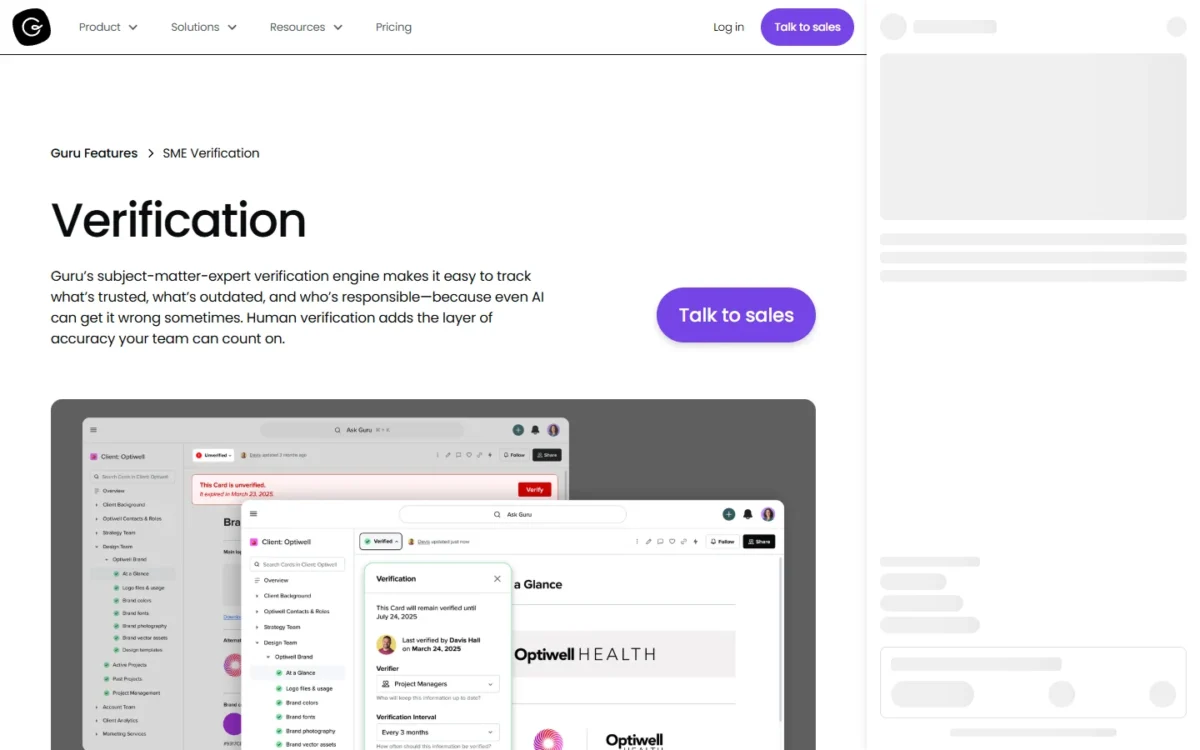
Verification is still the main reason to choose Guru over a plain wiki. When a Card’s review date passes, it is marked Unverified and flagged in the verifier’s task queue. It stays searchable, but readers can see it has not been reviewed recently.
You cannot turn verification off for a Card; the closest option is a custom review date far in the future. For a support team that is the point. For a team that just wants a wiki, I would find it a chore.
Guru says its automation handles about 80–90% of verification (Guru features page). It relies on usage signals, content age and policy rules, and escalates to experts only when needed. Ask to see that on your own content, because it decides how much expert time the system costs.
A large backlog is easier than it sounds. The “Up First” list in the Tasks tab sorts due Cards by relevancy (Guru verification page), so the most viewed or recently updated ones come first.
Knowledge Agents and AI answers
Knowledge Agents are where Guru’s AI work happens. An admin connects sources such as Guru Cards, Google Drive, SharePoint, Confluence, Notion and Slack, then scopes each Agent to all of them or a curated set (Knowledge Agents page).
Every answer includes Answer Details that show what content was used. Employees see only what they are already authorized to access, which is what lets HR, finance and support content live in one system.
Q&A is the default skill. On top of it, Guru offers a deep research mode that synthesizes many sources into cited reports, and Guided Conversations that replace static decision trees.
Agents can also search the web, limited to admin-approved domains, and act in connected systems, such as creating tickets or logging follow-ups as the signed-in user.
The AI Training Center logs every agent interaction. When an expert edits an answer, Guru regenerates it from the selected sources and prioritizes those sources for similar questions later (AI Agent Center page).
One limit matters for audits: the Training Center shows the last 90 days of data, and questions cannot be deleted. If compliance needs a longer record, ask how Guru’s separate audit logs cover AI answers.

MCP server for ChatGPT, Claude, Copilot and Cursor
This is the feature that changes Guru’s role the most. Through MCP, your AI tools pull governed knowledge from Guru with the same permissions and the same citations.
On the Guru integrations page, Claude, Microsoft Copilot and Cursor are marked MCP-compatible, and ChatGPT is listed as a place to search Guru from.
Any app that supports the MCP standard can connect, with OAuth or an API token. Retrieval, search and question answering are fully supported; content creation is limited to drafting and updating Guru Cards. All MCP questions and answers are logged in the AI Agent Center (MCP server page).
For a company already paying for an AI assistant, that reframes the purchase. Guru becomes the verified source the assistant reads, and one correction propagates to every tool connected via MCP.
Browser extension and in-context knowledge
The extension runs in Google Chrome, Microsoft Edge and Opera, inside browser-based tools such as Salesforce, Zendesk, Gmail and HubSpot (browser extension page).
Knowledge Triggers are the part that changes the workflow. Once configured, the extension recognizes specific URLs or page elements and shows the relevant Cards before anyone searches.
That configuration is admin work. Budget time to set Triggers on the pages your agents and reps open most, or the extension is just another search box. The extension does not read, change or store data from the sites you visit.
Cards, authoring and collaboration
Guru content lives in Cards, organized into Collections. Authoring has moved toward AI: agents turn conversations, meetings and tickets into structured docs, then route drafts to subject-matter experts before anything enters the knowledge base.
Real-time co-editing, content templates and SME approval before content goes live cover the editorial side.
Cards suit short, reusable answers. For engineering specs or multi-chapter guides, a page-based wiki fits better.
Permissions, collections and governance
Permissions come from the source systems. Each connected source keeps its original access controls at ingestion, and role-based controls decide who can view, edit or manage content and agents.
DLP masking redacts PII and PHI with regex rules at ingestion, before content is stored or indexed. That removes the classic AI-search risk of an assistant surfacing a salary file to the wrong person, provided the source permissions were right to begin with.
Analytics and content health
Guru covers usage data, search analytics and knowledge health metrics, plus gap detection that finds missing knowledge and drafts documentation for it. A Gartner Peer Insights reviewer wished the analytics were easier to use, so ask for a demo of the reports your knowledge manager will actually use.
Guru Pros and Cons (Balanced)
Pros
- Verification you cannot quietly skip. Unverified Cards go to the verifier’s queue and show their status to readers, which suits support and compliance content where a stale answer is expensive.
- Permission-aware AI answers with sources. Knowledge Agents respect existing permissions and show the content behind each answer, so sensitive teams can share one system.
- One source for your AI tools. The MCP server feeds Claude, Microsoft Copilot and Cursor from the same governed content, and a correction reaches every connected tool.
- Answers where work happens. Slack, Microsoft Teams and the browser extension put answers inside the tools agents and reps already use.
- Security answers on the public site. SOC 2 Type II, a HIPAA BAA, zero retention by third-party LLMs and DLP masking are all stated on Guru’s own pages.
- Rollout help in the package. Knowledge architecture design, agent tuning and a change management playbook come with the purchase, which helps a company without a knowledge manager.
Cons
- No public price, plan or trial. You cannot budget, compare or self-test before a sales call, which slows any team that buys software bottom-up.
- Built for enterprise buying. A package scoped with a solution engineering team is more than a small team needs, and the quote follows scale and AI maturity, not a simple seat count.
- Cards strain long-form documentation. Engineering specs and multi-chapter guides fit a page-based wiki better.
- Verification cannot be turned off per Card. Teams that do not want governance still get review dates and task queues to manage.
- SSO shuts out contractors by default. Once SSO is on, everyone except Guru Admins logs in through your identity provider, so external users need IdP guest accounts or Admin rights.
- No automatic provisioning through Office 365. SCIM needs an identity provider with SCIM 2.0 support, such as Azure, Okta or OneLogin.
- A short AI history. The Training Center keeps 90 days of questions, and they cannot be deleted, which matters for both audit and privacy reviews.
- Not a public help center. Guru delivers answers to employees and AI tools; a customer-facing knowledge base needs another product.
What Gartner and G2 Reviewers Say
Reviewers rate Guru highly, and their complaints are consistent. Guru averages 4.7 out of 5 from 2,323 reviews on G2, checked October 2026.
On Gartner Peer Insights, Guru shows 4.7 from 157 ratings, checked October 2026. A support associate’s Gartner Peer Insights review is titled “Guru Streamlines Information Sharing But Card Format Limits Complex Documentation Access”.
That Gartner reviewer adds that search “can get cluttered as the knowledge base grows”. The dislikes quoted on the same page ask for more card customization and analytics that are easier to read.
G2’s review page tells the same story. G2’s AI-generated summary says users praise ease of use and workflow fit, while some find search slow with large volumes of content. G2’s tags count 726 mentions of ease of use against 146 of inefficient search.
Individual G2 reviews sharpen the picture. One reviewer calls the card-based UI “overly rigid for long-form technical documentation”. Another writes that “the AI responses in Guru definitely need improvement”.
Read the scores with care: G2 marks many of the listed reviews as incentivized. The pattern is more useful than the score. G2 and Gartner reviewers like verification and in-workflow answers; their complaints are search at scale and long documents, and both can be tested in a pilot.
Guru Pricing (2026)
Guru does not publish a price. Its pricing page shows no plan names, per-seat rates, seat minimums or free trial; the call to action is “Book a call with our team”.
The FAQ explains why. Guru presents itself as a platform-and-expertise purchase rather than a per-seat tool. The investment is tailored to your scale, knowledge complexity and AI maturity, and scoped in the first conversation.
What a Guru package includes
| Package layer | What the pricing page lists | What it means for the buyer |
|---|---|---|
| The Platform: AI Knowledge Layer | Knowledge Agents, AI search, deep research, verification workflows, 100+ integrations, MCP delivery and automated upkeep of content quality | The software itself; no feature is shown as a paid add-on |
| The Expertise: AI & KM Strategy Team | Solution engineers who design your knowledge structure, set up and tune agents, connect integrations, plan the rollout and change management, then run optimization reviews and AI advisory | Services you would otherwise staff; ask how they are priced |
| The Infrastructure: Enterprise Governance | SOC 2 Type II, HIPAA and GxP compliance; SSO, SCIM and role-based access; DLP masking; encryption at rest and in transit; centralized audit logs | SSO and SCIM appear in the package description, not as an upsell tier |
Sources: Guru pricing page, checked October 2026.
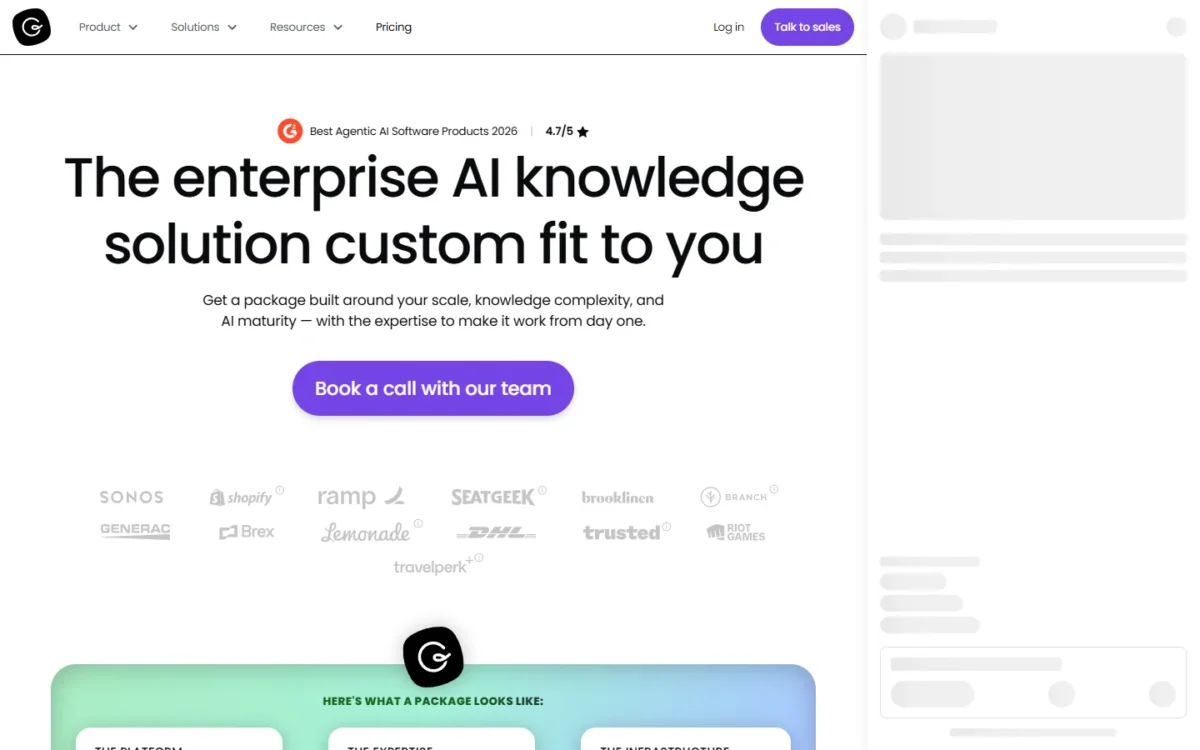
The table explains the missing price. You are buying software, a services team and enterprise security together, sized after a scoping call. That is easier to justify for a large support organization than for a startup with a handful of documents.
Nonprofit pricing: Guru for Good
Guru for Good offers Guru at a reduced cost to eligible organizations, and a 501(c)(3) nonprofit is asked to reach out for details. The page names no discount size, so treat it as an opening for negotiation rather than a known number.
What Drives Total Cost
| Cost driver | What Guru’s pricing FAQ says | What to pin down |
|---|---|---|
| Scale | The investment is tailored to your organization’s scale | Is the unit employees, named users, active users or sources? |
| Knowledge complexity | Listed as a pricing factor | Do more sources or more Knowledge Agents raise the price? |
| AI maturity | Listed as a pricing factor | Are AI answers, deep research reports or MCP requests metered? |
| Expertise layer | Described as “a launchpad, not an ongoing dependency” | Is it a one-time fee, and are the “ongoing optimization reviews” included? |
Sources: Guru pricing page, checked October 2026.
The last row hides the most money. The expertise layer is pitched as temporary, yet the package also lists ongoing optimization reviews, so the renewal price is where a services fee can quietly persist.
The cost no quote shows: expert review time
Guru recommends reviewing most content at least once a year (verification page). By Guru’s own figure, automation handles about 80–90% of verification (features page), so the remaining 10–20% lands on your experts. Here is that workload by knowledge base size:
| Knowledge base size | Expert reviews a year at 80% automation | Expert reviews a year at 90% automation |
|---|---|---|
| 500 Cards (one support team) | 500 x 20% = 100 | 500 x 10% = 50 |
| 2,000 Cards (several departments) | 2,000 x 20% = 400 | 2,000 x 10% = 200 |
| 10,000 Cards (company-wide) | 10,000 x 20% = 2,000 | 10,000 x 10% = 1,000 |
Sources: Guru features page and Guru verification page, checked October 2026. Card counts are illustrative sizes, one review per Card a year.
At 2,000 Cards, that is 200 to 400 expert reviews a year, or about 4 to 8 a week (400 ÷ 52 weeks ≈ 8). Spread across named owners, that is manageable.
At 10,000 Cards, 1,000 to 2,000 reviews a year needs a knowledge manager, and that salary belongs in your total cost next to the quote.
A benchmark for your quote: Microsoft 365 Copilot
Guru’s pricing FAQ compares it with Copilot, and Microsoft does publish a price. Microsoft 365 Copilot is $30 per user per month, paid yearly, and requires a separate license for a qualifying Microsoft 365 plan.
| Company size | Microsoft 365 Copilot, paid yearly |
|---|---|
| 50 users | $30 x 50 users x 12 months = $18,000 a year |
| 200 users | $30 x 200 users x 12 months = $72,000 a year |
| 1,000 users | $30 x 1,000 users x 12 months = $360,000 a year |
Sources: Microsoft 365 Copilot enterprise page, checked October 2026.
Paying monthly costs $31.50 x 12 months = $378 per user a year, against $30 x 12 months = $360 on yearly billing. That is $18 more per user for the same annual commitment.
The two are not substitutes. Guru can feed Copilot over MCP, so in a Microsoft shop a Guru quote sits on top of the Copilot line, not in place of it. Judge the quote by what stale answers cost you, not by the Copilot price.
What to ask for in a Guru quote
Get these answers in writing before the second call:
- The pricing unit, and whether light readers and heavy authors cost the same.
- Contract length, billing frequency and a cap on renewal increases.
- Whether the AI & KM Strategy Team is a one-time onboarding fee or part of the recurring price.
- Whether AI usage is metered, including requests from external tools over MCP.
- Which Enterprise Governance items are in your order form: SSO, SCIM, DLP masking, audit logs, a HIPAA BAA.
- Pilot or proof-of-concept terms, since the pricing page lists no trial.
- Guru for Good terms, if you are a 501(c)(3).
- Data export and deletion terms at the end of the contract.
Ask for a discount too: G2’s pricing insights, averaged from reviewer answers, put the average discount at 12%.
To compare Guru’s answers with other vendors line by line, our knowledge base software requirements template turns them into one scoring sheet.
Implementation, Onboarding, and Time-to-Value
Plan for a quarter, not a sprint. G2’s reviewer averages put time to implement at 2 months and return on investment at 10 months.
The package carries part of that load. Guru’s solution engineers design the knowledge structure, connect integrations and bring a change management playbook for the rollout.
Typical rollout plan
This is the pilot I would run before a company-wide contract:
| Phase | What to do | What to measure |
|---|---|---|
| Weeks 1–2 | Pick one team, connect its two or three main sources, assign verifiers | How many of the team’s top 20 questions get a cited, correct answer |
| Weeks 3–4 | Turn on Slack or Teams and the extension; set Knowledge Triggers on the busiest pages | Questions answered without a human |
| Weeks 5–8 | Review the AI Training Center weekly, fix wrong answers, add sources | Repeat corrections and the size of the unverified queue |
If the repeat corrections do not fall by the end of the pilot, the problem is your content or ownership, and a bigger contract will not fix it.
Governance and ownership model
Guru’s roles map onto a simple model. Admins configure SSO, SCIM and sources. Knowledge Agents take Viewer, Expert and Agent Owner roles, and Experts and Authors see Training Center questions tied to the content they manage or verify.
Name one knowledge manager who owns the verification queue. Without that owner, the system turns into a wiki with Unverified labels.
Migration considerations
Guru does not force a big-bang migration. Confluence, Notion Pages, Google Drive, SharePoint and Jira can stay where they are as sources Guru searches.
Move into Cards only what needs verification, such as policies, escalation procedures and sales playbooks. Leave project docs in place, and do not migrate stale content at all.
Integrations and Ecosystem
Guru connects to 100+ enterprise tools, but the role each tool plays matters more than the count. The integrations page sorts them like this:
| Role on Guru’s integrations page | Examples listed | What it does for you |
|---|---|---|
| Where you search from | Slack, Microsoft Teams, Google Chrome, Microsoft Edge, ChatGPT | People ask Guru without opening it |
| Sources you search | Confluence, Notion Pages, Jira, Google Drive, Box, Dropbox, OneDrive, HubSpot, Intercom, Freshdesk, Helpjuice | Content stays in place, indexed with its permissions |
| MCP-compatible | Claude, Microsoft Copilot, Cursor, Slack | AI tools read Guru’s governed knowledge |
| HRIS sync | BambooHR, Deel, Personio, Hibob | Profiles, org structure and permissions stay current |
| SSO/ | Okta, OneLogin, Microsoft Azure, Delinea, LastPass | Sign-in and provisioning through your identity provider |
| Build your own | Zapier, Workato, Prismatic, API | Custom flows for anything not listed |
Sources: Guru integrations page, checked October 2026.
Confluence, Notion and Jira deserve a note. They are sources Guru searches, so Guru can sit on top of an existing wiki instead of replacing it.
Salesforce and Zendesk appear in the pricing page’s integration answer and in the extension’s list of browser tools. The Freshdesk integration shows the usual pattern: search Freshdesk from Guru, plus page-specific suggestions inside Freshdesk through the extension.
For developers, Guru’s webhooks push real-time events to your server, with up to 25 webhook subscriptions per user. Teams without a web server can use the Zapier or Workato apps instead.
Security, Compliance, and Admin Controls
Is Guru safe to use? On the evidence it publishes, it answers what a security review asks, and it does so on public pages rather than behind a form.
What Guru’s security pages state
| Requirement | What Guru states |
|---|---|
| SOC 2 Type II | Annual independent audit covering the Common Criteria plus Confidentiality and Privacy; report shared under NDA |
| HIPAA | Will sign a boilerplate BAA, after asking you to weigh whether PHI will enter the system |
| AI data handling | Data never used to train, nor retained by, third-party LLMs; only relevant document matches go to the LLM |
| SSO and SCIM | SAML-based SSO and SCIM provisioning, listed in the Enterprise Governance package; SCIM requires SSO first |
| Data protection | Encryption in transit and at rest; DLP masking of PII and PHI at ingestion; IP whitelisting |
| Testing and recovery | Pen tested by an outside agency at least twice a year; daily backups to a separate region; RPO 1 hour, RTO 24 hours |
| Certifications and privacy | Microsoft 365 Certification; Google CASA audit for the Google Drive source; EU standard contractual clauses; CPRA service provider |
Sources: Guru security page, Guru pricing page and SSO and SCIM help article, checked October 2026.
Two rows deserve attention. The AI row answers the question most buyers now ask first: content sent to the third-party LLM is removed once the output is returned. The HIPAA row is candid about scope: Guru will sign a BAA but first asks whether protected health information is likely to enter the system at all.
If a breach happens, Guru commits to telling your Guru administrator within 24 hours of confirming it. Content sits in an AWS database, separated from other clients by a unique team ID; ask which hosting region applies if data residency matters to you.
Admin controls
SSO and SCIM live under Manage > SSO/SCIM, and setting them up requires the workspace Admin role (or a relevant custom role). With both enabled, users and Groups are managed in your IdP, and SCIM Groups link 1:1 with Guru Groups.
Guru Admins can always log in with Google OAuth or a native login as a failsafe. Office 365 cannot provision Guru users automatically; the help article names Google SSO and standard SAML as the supported routes.
For a regulated purchase, request the SOC 2 report under NDA and the pen test executive summary, which Guru offers on request.
Who Guru Is Best For (and Who Should Avoid It)
Best fit profiles
- Support organizations with policy-heavy answers. Verification plus Knowledge Triggers inside the ticket tool cuts the chance of a stale reply reaching a customer.
- Sales enablement teams. Playbooks reach reps in the browser and Slack, with an owner who re-verifies each one.
- Companies rolling out AI assistants. If staff already use Claude, Copilot or Cursor, the MCP server gives those tools one governed source.
- Regulated teams. Audit logs, DLP masking, a BAA and an annual SOC 2 Type II audit cover the usual questionnaire.
- IT and HR. Permission-aware answers let one system hold policies meant for different audiences.
Consider alternatives if…
- You want a general-purpose wiki. Guru’s governance is overhead you will not use; our wiki software ranking compares broader options.
- You are a small team. A package scoped with solution engineers is built for scale. I would start with a simpler wiki, such as the one in our Tettra review, and revisit Guru when stale answers start costing money.
- Engineering documentation is the main job. Long specs fit pages better than Cards, and Confluence is the more natural home next to Jira.
- You need a public help center. Guru serves employees and AI tools. Keep customer-facing articles in a separate public knowledge base; Guru lists Helpjuice as a source it can search.
- Your users will not use the extension, Slack or Teams. In-context delivery is most of Guru’s value; without it you are paying for a search box.
Guru vs Alternatives (Best Alternatives in 2026)
Guru’s own pricing FAQ names its real competition: Glean, Copilot, or building your own. Wiki tools are the second question.
Comparison table
| Tool | Best for | What its own site states | When it beats Guru |
|---|---|---|---|
| Glean | Company-wide AI search and agents | Connects tools such as Slack, Jira, Confluence, SharePoint and Salesforce; permission-aware access; SOC 2 Type II, ISO 27001, HIPAA | You want one AI assistant across every department more than a curated knowledge layer |
| Microsoft 365 Copilot | Companies standardized on Microsoft 365 | $30 per user per month, paid yearly, plus a qualifying Microsoft 365 plan; AI search across work data with 100+ connectors | Your knowledge already lives in SharePoint, Teams and Outlook |
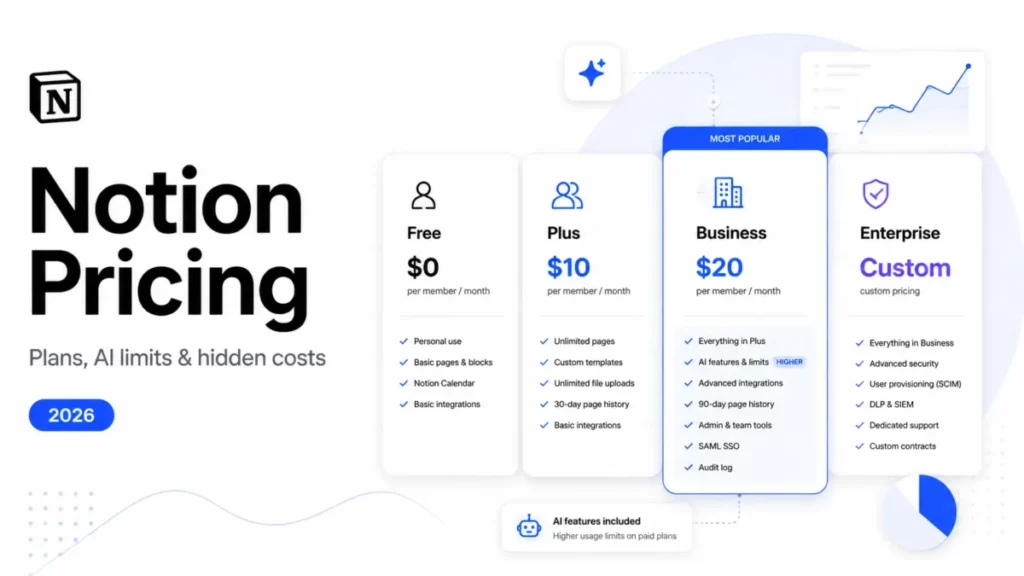
| Notion | Teams that want a wiki with verified pages | Wikis with verified pages and expiry reminders to owners; page verification outside wikis on Business and Enterprise plans | Flexibility matters more than enforced review |
| Confluence | Engineering and product documentation | Status markers and automation flag stale pages; Rovo MCP Server connects Confluence to Claude, ChatGPT or an IDE | Long-form docs that live next to Jira |
| Document360 | Customer-facing help centers | Knowledge base software built for customers to read, with connections to ChatGPT, Claude and Copilot | You need public self-service docs |
Sources: Glean homepage, Microsoft 365 Copilot enterprise page, Notion wikis and verified pages, Confluence product page and Document360 homepage, checked October 2026.
The first two rows are the real decision for an enterprise buyer. The three wikis matter if you want to run the knowledge base yourself.
Guru vs Glean
Glean is the broader bet. Its homepage pitches enterprise AI across work apps and claims 275+ connections to work apps and data sources. Guru’s pitch is narrower: structure and verify the knowledge first, then serve it everywhere.
Guru’s FAQ frames the difference as retrieval of content as-is versus content that is structured, governed and improved. Treat that as a vendor claim, but it points at the real test: messy, contradictory sources need a verification layer; clean ones may only need search.
G2 lists Glean among Guru’s top-rated alternatives. Glean’s site leads with “Get a demo” and shows no price list, so both purchases start with a sales call.
Choose Glean when: you want one AI search and agent platform for every department and your sources are reasonably clean.
Choose Guru when: answer accuracy in a few high-stakes teams matters more than breadth.
Guru vs Microsoft 365 Copilot
For a Microsoft 365 company, Copilot is the default to beat. Microsoft 365 Copilot brings AI chat connected to work and web data, plus AI search across work data with 100+ connectors. Its cost at three company sizes is in the pricing benchmark above.
Guru does not have to replace it. Microsoft Copilot is marked MCP-compatible on Guru’s integrations page, so Copilot can read Guru’s verified content. The real question is whether your SharePoint content needs a verification layer at all.
Choose Copilot alone when: your knowledge sits in Microsoft 365 and stale answers are rare or cheap.
Add Guru when: a wrong policy or support answer has a real cost and someone will own verification.
Guru vs Notion
Notion has verified pages now. A page owner verifies a page until a set date or indefinitely, and Notion notifies the owner by inbox and email when verification expires. Outside wikis, page verification is on Business and Enterprise plans.
So the difference is enforcement and delivery, not the checkmark. In Guru, verification cannot be switched off and stale Cards go to a task queue. Guru also pushes answers into the browser, Slack, Teams and MCP tools.
You can also run both, because Notion Pages is a source Guru searches. The full Guru vs Notion comparison weighs in-workflow answers against Notion’s wikis and verified pages.
Choose Guru when: accuracy matters, you need enforced review, and users live in Salesforce, Zendesk or Slack.
Choose Notion when: you want docs, projects and wikis in one tool and flexibility beats governance.
Guru vs Confluence
Confluence has closed part of the gap. Status markers and automation flag stale pages, and the Rovo MCP Server plugs Confluence into Claude, ChatGPT or your IDE.
Guru’s edge is enforced verification queues, browser Knowledge Triggers, and permission-aware Knowledge Agents across non-Atlassian sources. Confluence is also a source Guru searches, so choosing Guru rarely means leaving Confluence.
Choose Guru when: sales or support teams need verified answers inside Slack and the browser.
Choose Confluence when: your documentation is long-form, engineering-led and lives next to Jira.
Guru vs Document360
Document360 answers a different question: a knowledge base your customers read, with a widget and connections to ChatGPT, Claude and Copilot. Guru serves employees and internal AI tools.
Choose Guru when: internal knowledge for sales, support and IT is the priority.
Choose Document360 when: you need a public help center.
If you want to widen the search beyond these five, our ranking of knowledge base software covers the rest of the category.
Decision Guide (Consultant Framework)
Score Guru and each finalist on the same criteria during demos and the pilot. The weights below are my starting point; move them to match your priorities.
Evaluation rubric
| Criterion | Weight | Score (0–5) | Weighted score |
|---|---|---|---|
| Answer accuracy and verification | Highest | ___ | ___ |
| Findability and search quality | Highest | ___ | ___ |
| Workflow fit (extension, Slack, Teams, MCP) | Highest | ___ | ___ |
| Integrations with your sources | Lower | ___ | ___ |
| Admin controls and analytics | Lower | ___ | ___ |
| Security, SSO and compliance | Lower | ___ | ___ |
| Budget fit (quote plus internal time) | Lower | ___ | ___ |
| Total | ___ |
How to use this rubric
- Use the same evaluators and the same questions for every finalist, and score independently before discussing.
- Disqualify on must-haves. If SSO or a BAA is mandatory and a tool fails it, the total does not matter.
- Weight the budget row honestly. With Guru, cost means the quote plus the expert hours verification takes.
What “good” looks like
- Accuracy: most of your team’s top 20 questions return a cited, correct answer.
- Findability: testers find answers on the first search, without asking a colleague.
- Workflow fit: answers appear in the tools people already use, without a new tab.
- Security: SSO, SCIM and the SOC 2 report clear your review.
- Cost: the quote fits a three-year budget at your realistic headcount.
FAQ – Guru Review 2026
What is Guru used for?
Guru keeps company knowledge verified and delivers it where people and AI tools ask for it: Slack, Microsoft Teams, the browser extension and MCP-compatible assistants such as Claude. Typical content includes sales playbooks, corporate policies, runbooks and escalation procedures, each with an owner who re-verifies it on a schedule.
Is Guru a knowledge base or a wiki?
A knowledge base first. Content lives in Cards with review dates, and Guru also indexes existing wikis such as Confluence and Notion as sources. The practical way to think about it is a governed layer on top of your wiki, not a replacement for one.
How much does Guru cost?
There is no public number. Guru prices each package after a call, based on your organization’s scale, knowledge complexity and AI maturity, and lists no plan, seat minimum or trial. Eligible 501(c)(3) nonprofits can ask about Guru for Good, which offers Guru at a reduced cost.
Is Guru safe to use?
On the evidence Guru publishes, yes for most company knowledge. It is audited annually for SOC 2 Type II, encrypts data at rest and in transit, and will sign a HIPAA BAA. Third-party LLMs neither retain nor train on your content; ask for the pen test summary and the hosting region.
Does Guru work with Slack?
Yes: Slack is a place to search from, a source Guru searches and an MCP-compatible tool. Inside Slack, Guru offers search, cited answers and proactive delivery of relevant answers before users ask. Teams-first companies get search, announcements and cited AI answers inside Microsoft Teams.
Is Guru good for sales enablement?
Yes, when playbooks change often. The extension works inside Salesforce and HubSpot, and Knowledge Triggers can surface a Card when a rep opens a matching page. The verification queue keeps battle cards from going stale, provided someone owns them and clears the queue every week.
How is Guru different from Notion?
Notion has wikis with verified pages; Guru is a knowledge layer built around enforced verification and in-workflow answers. Guru will not let you switch verification off for a Card, and it can index Notion Pages as a source, so you can run both tools.
Does Guru support SSO/SAML?
Yes: Guru supports SAML-based SSO and Google SSO, plus SCIM provisioning through any identity provider with SCIM 2.0 once SSO is configured. Setup guides cover Azure, Okta and OneLogin. Office 365 cannot provision users automatically, and Guru Admins keep a native login as a failsafe.
What are the best Guru alternatives?
Glean suits company-wide AI search and agents, and Microsoft 365 Copilot suits Microsoft 365 companies. Notion fits wikis with verified pages and Document360 a public help center. Pick by the job: verification, broad search or customer-facing documentation.
Is Guru worth it for small teams?
Usually not. Guru sells a scoped package with solution engineers and enterprise governance, and publishes no self-serve plan. I would start a small team with a modest document set on a lightweight wiki, and revisit Guru once stale answers lose customers or deals.
How long does Guru implementation take?
Expect about a quarter. G2 reviewers report an average of 2 months to implement. Guru’s package includes architecture design, integration setup and rollout support; ask how much owner assignment and first-batch verification stays with your team.
Does Guru have AI features?
Yes, AI is now the core of the product. Knowledge Agents give cited, permission-aware answers, chat and deep research reports. Experts correct answers in the AI Training Center, AI drafts documentation from meetings and tickets, and the MCP server lets Claude, Microsoft Copilot and Cursor read Guru’s content.
Can Guru be used for external/public knowledge bases?
Not as its main job. Guru delivers answers to employees and AI tools rather than running a public help center. Pair it with a customer-facing tool such as Document360, and keep Guru for the internal answers your employees and AI tools need.
Final Recommendation
Choose Guru if wrong answers are expensive for you and your people already ask questions in Slack, Teams or an AI assistant. You also need the patience for an enterprise purchase with a scoped quote. Enforced verification and permission-aware answers over MCP are what you pay for.
Choose Glean or Microsoft 365 Copilot if broad AI search matters more than curated accuracy and your content is already in decent shape. Choose Notion or Confluence for a general wiki, and Document360 if the audience is your customers.
Recommended buyer actions
- Run a focused pilot. One team, its main sources, four to eight weeks; track cited answers and repeat corrections in the AI Training Center.
- Bring the quote checklist. Add one request: see verification and the Training Center working on your own content, not a demo workspace.
- Prepare the migration. Name owners, decide which sources stay where they are, and drop stale content instead of moving it.
Sources and Further Reading
- Guru pricing page: package contents, nonprofit pricing, security FAQ
- Guru security page: SOC 2 Type II, HIPAA BAA, AI data handling, SSO and SCIM
- Gartner Peer Insights reviews of Guru: validated user reviews and ratings
- G2 reviews of Guru: user reviews, pros and cons tags, pricing insights