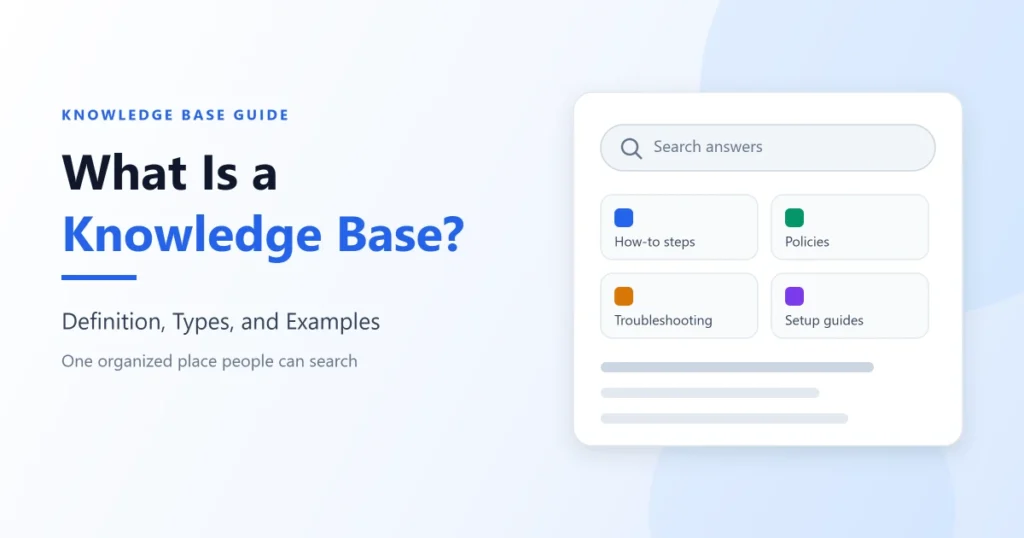
Teams that decide they need a knowledge base often start by picking somewhere to store documents. Storage is the easy part, and the harder work is keeping answers findable and current.
Quick answer: A knowledge base is an organized system for storing, finding, and maintaining written answers, such as how-to steps, policies, and troubleshooting guides, so people can help themselves without asking someone. It can serve employees (an internal knowledge base), customers (an external one), or both.
This guide covers how a knowledge base works, how internal and external ones differ, how it compares with a help center, a wiki, and an FAQ page, and when it is time for dedicated software. I read the topic from the buyer’s side of a support or CRM stack, where the expensive mistake is buying a tool to solve an ownership problem.
In This Article (12 sections)
What a Knowledge Base Means
In plain terms, a knowledge base is a maintained set of written answers that people look up instead of asking someone. A customer checking how to export an invoice and a new hire checking how to request a laptop are both using one.
Under the hood, a mature knowledge base is a collection of articles, each built around one question, task, or reference topic, plus the parts that help it scale: categories for browsing, a search index, permissions that decide who sees what, feedback on each article, and a history of changes. Common article shapes include how-to steps, troubleshooting that starts from a symptom, reference pages for settings and limits, policies, and short FAQ entries.
For the business, a knowledge base turns an answer given once into an answer available at any hour, in the same wording, to every reader it is meant for. That pays off only while the answer is still true, so maintenance decides most of the value.
The expected payoff is fewer repeat questions for support and senior colleagues, the same answer from every agent, and easier onboarding.
The Other Meaning of Knowledge Base
The term has a second sense. In computer science, a knowledge base is a store of structured facts, often with rules, that software can query or reason over.
This guide uses the business sense: answers written for people. The two senses start to overlap when software, such as an AI agent, reads these business articles to answer questions.
How a Knowledge Base Works
A working knowledge base runs the same loop, whether its readers are customers or employees. The last two steps hold most of the value, and they are the easiest to skip.
- A reader has a question or a task.
- The reader searches or browses the categories.
- The knowledge base returns a relevant article, or nothing useful.
- The reader gets the answer and acts on it, or asks a person.
- Feedback is recorded: a vote, a failed search, a ticket, or a chat.
- The owner uses that feedback to write, update, merge, or retire articles.
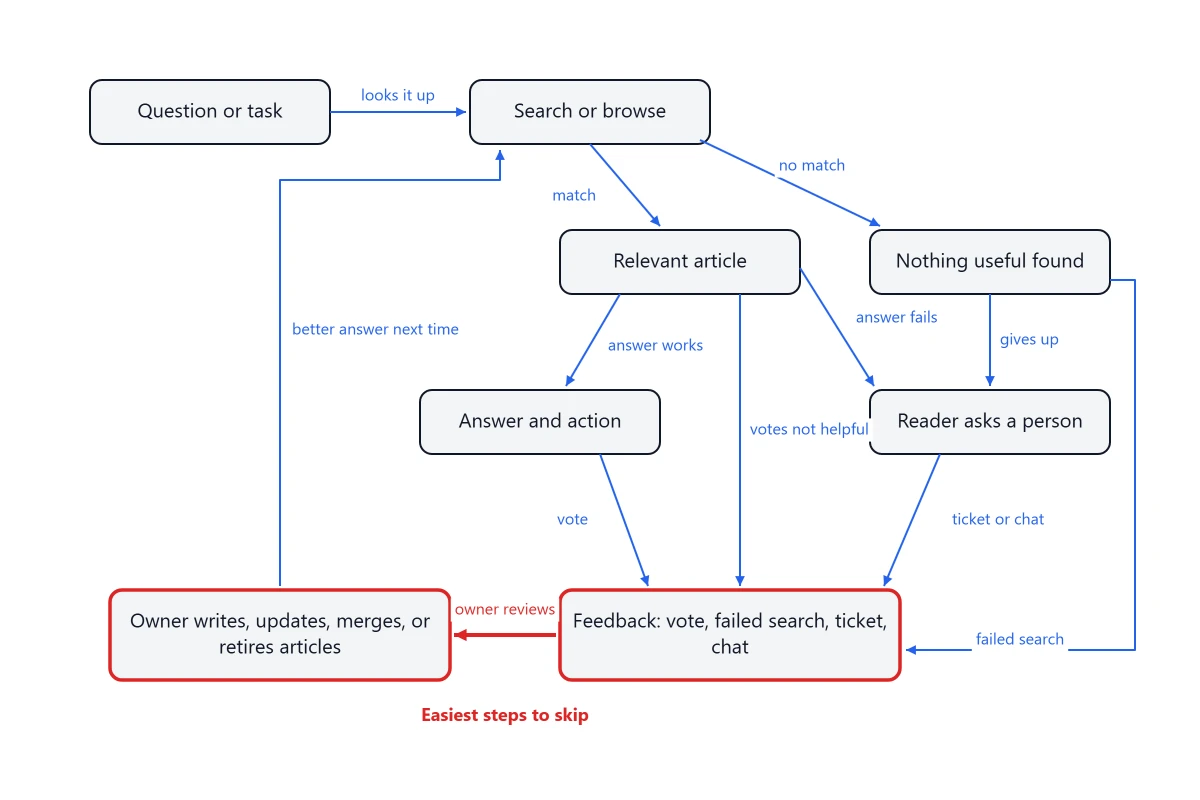
For example, a customer types “change billing email” into a help center search, but the article is titled “Update account contact details”, so the search does not surface it.
The customer opens a ticket, an agent answers from memory, and the question returns the next week. If the owner reviews failed searches, the fix is small: add the customer’s phrase to the title or search keywords, then search again to confirm.
I read ownership as the first thing to break. Stale articles and failed searches are what readers notice, and both last longer when nobody is responsible for acting on the feedback.
Where AI Fits in the Loop
An AI agent that answers from a knowledge base adds a step between the article and the reader: it reads your articles and writes a reply from them.
That raises the cost of a stale article. An outdated page misleads the readers who open it, while an AI agent answering from that page can repeat the error in many conversations on the topic, phrased as a direct answer.
Internal vs External Knowledge Bases
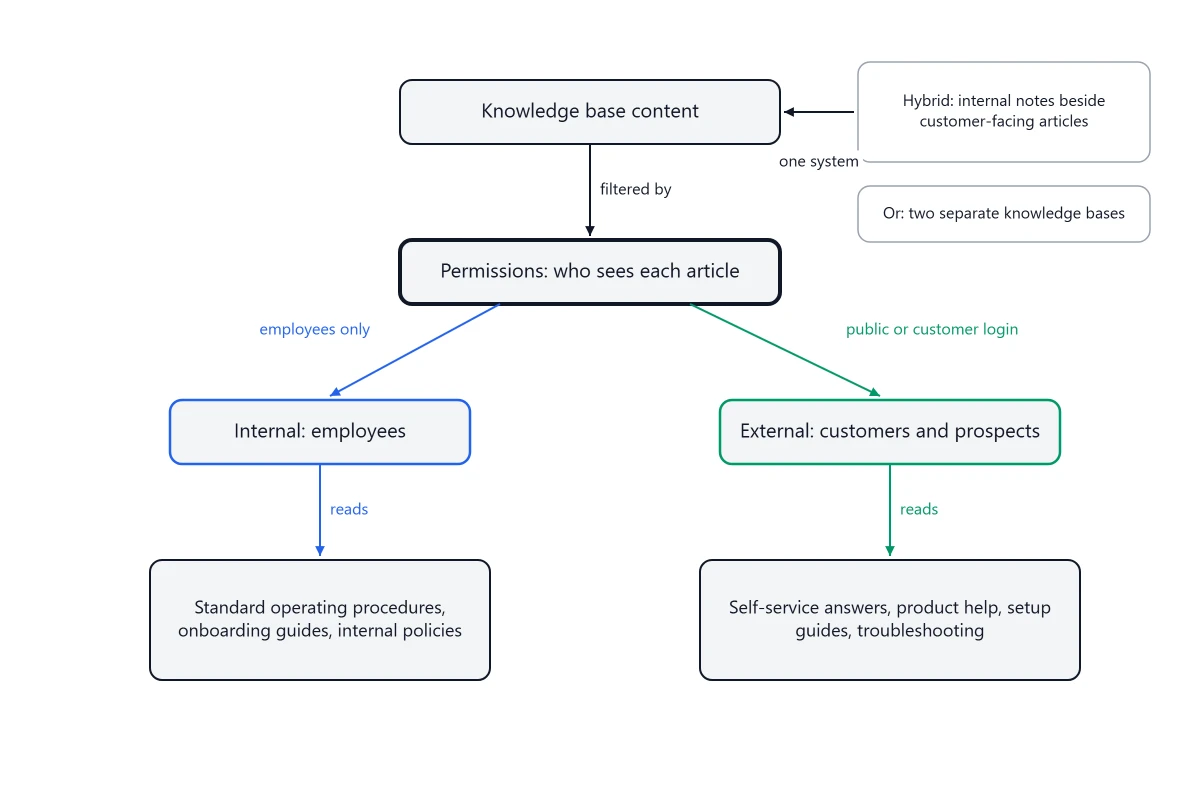
The main difference is the audience. The technology can be the same: one system can hold both kinds of content, with permissions deciding who sees each article.
Internal Knowledge Base
An internal knowledge base serves employees: standard operating procedures, process documentation, onboarding guides, internal policies, and the institutional knowledge that otherwise lives in a few people’s heads. Access is usually private, often split by team or role.
Its main risk is neglect. Unless an agent or an AI tool repeats it to a customer, a wrong internal answer rarely draws customer tickets, so without owners stale articles can go unreported and the knowledge base can stop working as one, often until a new hire follows an outdated process.
External Knowledge Base
An external knowledge base serves customers and prospects: self-service answers, product help, setup guides, troubleshooting, and support documentation. It is usually delivered through a help center, public or behind a customer login.
Its main risk is scale. An outdated external answer can mislead every customer who relies on it, and some of them open a ticket anyway.
Developer documentation is a specialized kind of knowledge base, usually external, built around product versions, reference pages, and code samples. When the bottleneck is writing and versioning those pages, the decision moves to documentation tools, where the editor and version control matter more than support search.
One System or Two
Hybrid setups hold both in one system, with internal notes beside customer-facing articles and permissions on each. That saves writing the same answer twice, but every later edit must keep internal notes away from customers, and some organizations use two separate knowledge bases instead, split by audience or by confidentiality.
Knowledge Base vs Help Center, Wiki, and FAQ Page
These terms get used as synonyms, and the mix-up sends teams shopping in the wrong category.
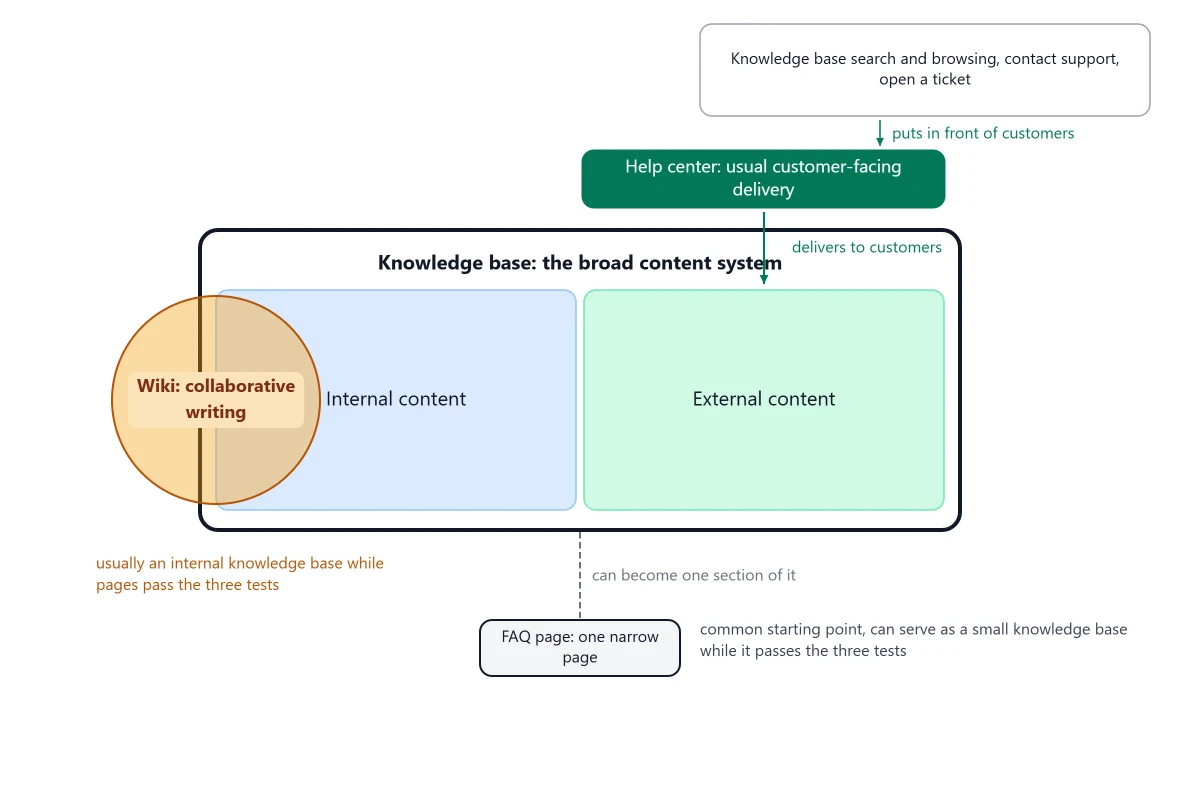
A knowledge base is the broad content system, serving employees, customers, or both. A help center usually delivers its customer-facing part, a wiki is a way to write together, and an FAQ page is a narrower format.
| Concept | When to use | Key difference |
|---|---|---|
| Help center | You publish answers for customers, with search and a route to support | Usually the customer-facing delivery of a knowledge base, plus contact options and ticket entry points |
| Wiki | A team writes and links pages together as a shared working space | A collaborative way of writing, mostly internal, that works as a knowledge base as long as its pages pass the three tests below |
| FAQ page | You have a short list of stable questions with short answers | One narrow question-and-answer page with few or no categories and no search index or built-in maintenance model, which can still serve as a small knowledge base as long as it passes the three tests below |
| Database | Software needs to store and query structured records, such as orders or contacts | It holds records for programs. A business knowledge base holds written answers for people |
| Intranet | Employees need company news, directories, and links to internal tools | It serves internal communication, and an internal knowledge base can be one section of it |
Your readers tell you what you are building. Customer answers point to an external knowledge base usually delivered through a help center, a team’s shared working pages to a wiki, a short list of stable questions to an FAQ page, which can serve as a small knowledge base as long as it passes the three tests, and internal procedures or a mix of audiences to an internal or hybrid knowledge base.
Knowledge Base vs Help Center
A help center is usually the customer-facing delivery of a knowledge base. It puts the external articles and the knowledge base’s search and browsing in front of customers, with a clear route to contact support or open a ticket when an article is not enough.
The two work at different levels. The knowledge base is the content system, including any internal parts, and the help center is the usual way its external part reaches customers, so choosing help center software starts from what customers need to find and do.
Knowledge Base vs Wiki
A wiki leans toward collaborative internal editing: many people write and link pages, and the result captures what a team knows while it works. A knowledge base usually serves a broader audience: employees, customers, support agents, or developers.
The two fit different jobs, and the line between them can blur. A wiki works as a knowledge base, usually an internal one, as long as its pages pass the three tests below, and a team that mostly needs a shared, interconnected space for its own work is choosing wiki software.
Knowledge Base vs FAQ Page
An FAQ page is narrow by design: one page of short questions and answers on a limited set of topics. A mature knowledge base is a larger system with several content types plus search and browsing, so it can hold the deeper documentation an FAQ page leaves out.
An FAQ page is a common starting point, and as long as it passes the three tests in the next section, it can serve as a small knowledge base. I would expand it, or fold it into a larger knowledge base as one section, when the questions outgrow one page or readers stop finding answers on it.
What Makes a Good Knowledge Base
A good knowledge base depends more on habits than on features. Three habits are the minimum bar, and they double as the test of whether any collection of documents works as a knowledge base:
- Useful writing: each article answers one question, supports one task, or covers one reference topic a reader brings, in the words the reader uses.
- Findability: a reader can find it by searching or scanning, without knowing which folder or page it lives in.
- Ownership: a named person owns it and reviews it when the product, price, or policy behind it changes.
In my reading, a shared drive fails the first and third tests by default. Its files are written as general documents rather than around one question, task, or topic each, and nobody is assigned to review a file when the answer changes.
Passing all three with a single document or an FAQ page, one heading per question, is fine. Failing the first or third test is a content and ownership problem that software cannot fix on its own, while failing only the second, findability, is the first point where a tool clearly helps.
Five more qualities decide whether readers keep trusting it:
- Clear structure: categories that follow how readers think about the product or the job.
- Freshness: a visible review date and a review trigger tied to releases and policy changes.
- A feedback loop: votes, failed searches, and tickets reach the owner and change the article.
- Fitting permissions: internal notes stay internal, and customer answers reach the customers they are meant for.
- Consistency: one name for each feature, one format for steps, and one answer per question.
Real-World Examples
Four public examples follow, each described from the organization’s own documentation: a support knowledge base and a company handbook with different governance, an AI agent that answers from support content, and a knowledge base of structured data.
Mozilla Support: Open to Contributors, Reviewed Before Publishing
Mozilla’s knowledge base for users of products such as Firefox is written mostly in MediaWiki markup, like Wikipedia, and contributors can write new articles or improve existing ones. Even so, all article edits go through a review and approval process before they are published.
The same page names two topic areas it does not officially cover, advanced customization and developer-focused tools, and sets priorities using signals that include new features, what users ask about, and article traffic and feedback.
I read this as wiki-style writing with a review step before anything reaches readers. Open contribution and an approval gate can run side by side in one public knowledge base.
GitLab: One Company, Two Handbooks
GitLab’s handbook started when the company had ten people, to keep company information accessible to every team member whenever they joined, and anyone can propose a change through a merge request. The public handbook counted 3,307 pages in its own live count dated September 18, 2026, and readers with questions are pointed to the content owner of each page.
Content that is not public lives elsewhere. GitLab keeps a separate Internal Handbook for content in its “not public” category.
I read the split as mainly one of confidentiality rather than audience. It is a design worth considering: when public and not-public content are separated at filing, later edits are less likely to cross from one space into the other.
Intercom Fin: An AI Agent Answering From Support Content
Intercom’s setup guide for its Fin AI agent states that Fin generates answers from the support content you add, including public articles, internal articles, and content synced from other tools. It also notes that a published article with its Fin toggle off is invisible to Fin.
Two sync details on the same page, checked September 21, 2026, matter if you connect Fin to an existing knowledge base. Website content syncs weekly, and the page suggests a manual re-sync when an update is needed sooner, while articles synced from tools such as Zendesk or Confluence stay view-only in Intercom and pick up changes from the source on the next sync.
In a synced setup like this one, fixing an article and fixing the AI’s answer are two separate events. I would add a re-sync, where one applies, and a test question to the definition of done for any fix to a high-traffic article.
Wikidata: Structured Data Instead of Articles
Wikidata describes itself as “a free, collaborative, multilingual, secondary knowledge base.” Instead of articles, it holds items with IDs, such as Q42 for Douglas Adams, and statements that pair a property with a value, such as “educated at” (P69) with St John’s College.
That is the computer science sense in practice: structured statements that software can query, which people can also read and edit.
Common Misconceptions
Misconception: A knowledge base is a place to store documents.
Reality: It is a maintained set of written answers. Storage without findable articles built around what readers ask, do, and look up is an archive.
Misconception: Once an article is published, the work is done.
Reality: An article goes wrong on the day the product, price, or policy behind it changes. Each one needs an owner and a trigger for review.
Misconception: More articles make a better knowledge base.
Reality: Duplicates split search results and double the upkeep. Merging two overlapping articles usually helps readers more than writing a third.
Misconception: An AI chatbot or agent replaces the knowledge base.
Reality: An AI agent that answers from your knowledge base can only be as good as the articles it reads. When those articles have gaps or go stale, it has nothing better to answer from.
When Not to Build a Knowledge Base Yet
A knowledge base pays off when the same questions keep coming back and the answers hold still long enough to write down. These conditions say to hold the affected articles, or the whole knowledge base when they apply to most of your content, or to fix something else first:
- The process changes every day. During a redesign, a pinned update or a short team note can keep pace with daily changes, and the article can wait until the process settles.
- The source of truth is not settled. If the policy or the product decision is still being made, an article freezes a guess.
- Nobody can own the content. An unowned article goes stale, and stale answers can do more damage than none because readers act on them.
- The real problem is a bug or a confusing screen. An article explains the problem to every reader who finds it, while a product fix removes it for everyone.
Questions that depend on one customer’s account or contract are a separate case. Those answers belong with the customer’s record, and tracking that kind of one-off request is what a ticketing system does, with the answer kept out of public view.
A knowledge base also cannot answer what nobody wrote down. GitLab’s handbook says as much about itself: “it is not possible to document every possible situation,” and a gap in the handbook does not mean something is allowed.
Public articles also carry a security risk: exposure. Internal notes, customer data in screenshots, and security steps are hard to take back once a public article has been indexed, so I would check every public article for internal detail before it goes live.
How to Measure Whether It Works
Page views show what people opened, not whether it helped. The first four rows below need search, vote, or contact analytics, so a team without them can start with the last two and the questions agents log.
| Metric | Meaning | Why it matters |
|---|---|---|
| Searches with no results | Queries that returned nothing | Each repeated phrase is a missing article or a missing synonym |
| Searches with no click | Results appeared, but nobody opened one | Titles often do not match how readers describe the problem |
| Helpfulness votes | Yes or no votes on each article | A run of “no” votes marks the next article to rewrite |
| Contact after reading | A ticket or chat opened after the reader viewed an article | Often, the article was found but did not solve the problem |
| Articles past review date | Articles not checked since their review date passed or a trigger fired | Your stale-content risk, measured before readers hit it |
| Repeated tickets with no article | Ticket topics that keep returning with nothing written | The clearest list of what to write next |
I would review the first and last rows weekly and the rest monthly. The first shows what readers want in their own words, and the last shows what agents keep answering by hand.
A 30/90-day check shows whether the loop is running.
The day-30 target is an owner on every article and a weekly look at failed searches, or at the questions agents logged as missed. The day-90 target is an article for each repeated ticket topic, each one reviewed at least once.
A useful quarterly check is whether last quarter’s failed searches turned into new or fixed articles.
When You Need Knowledge Base Software
Needing a knowledge base and needing dedicated knowledge base software are two different decisions.
A small team can run a knowledge base in structured documents, a shared documentation space, or a workspace tool it already pays for, as long as the three tests hold. Dedicated knowledge base platforms start to earn their cost when these signals appear:
- The article count outgrows browsing, and search quality starts to decide whether readers find answers.
- Several people write, and changes need an approval step before they go live.
- Some articles are for customers and some are internal, and permissions have to keep them apart.
- You need analytics on failed searches, article votes, and contact after reading.
- Readers need answers in their own language or for their product version.
- Governance matters: owner fields, review dates, and a change history.
- An AI agent will answer from the content, including any internal articles you enable for it, so sync and permissions have to be reliable.
Hold off on dedicated software when these are true:
- Most questions are one-offs or specific to one customer’s account.
- The question volume is still small, and the documents or workspace tool you already use can hold the recurring answers.
Choosing the software is a separate decision, and the subscription is only part of the cost, because every article also needs owner time whenever the product behind it changes. The knowledge base buying guide walks through a checklist, a scoring rubric, and a trial plan, so the signals above turn into a shortlist you can defend.
A Beginner Checklist
Work through this list before comparing tools.
- List every question your team answered more than once last month, from tickets, chat, and email.
- Sort the questions by reader: customers, employees, or both.
- Decide which articles are for customers, public or behind a login, and which are internal, before anyone writes.
- Write one article per question, titled the way the reader asks it.
- Put the answer in the first lines, then the steps.
- Name an owner for every article and note what would make it wrong, such as a price or policy change.
- Add readers’ phrasing to titles or search keywords when it differs from yours.
- Turn on helpfulness votes and a failed-search report, or ask agents to log the questions articles missed.
- Merge duplicate articles instead of writing another.
- Before connecting an AI agent, review the articles it will read and test it with real customer questions.
When the list is done, software may be the next step, and items 3, 6, and 8 above matter most because they decide permissions, ownership, and reporting. The knowledge base requirements checklist turns these answers into vendor questions.
FAQ
What is the difference between a knowledge base and knowledge management?
Knowledge management is the wider practice of capturing and sharing what an organization knows. A knowledge base is one part of that practice: the organized system where written answers are kept findable and current.
Can a knowledge base improve customer satisfaction?
It can, when customers find a current answer on their own instead of waiting for a person. A wrong or missing answer works the other way, so I would judge the effect by contact after reading and searches with no results, two rows of the metrics table above, rather than by a survey score alone.
Can a knowledge base help internal IT support?
It can: an internal knowledge base for IT holds step-by-step fixes for recurring requests, such as setting up a device or resetting access, so employees can solve simple problems before they file a ticket. Requests that depend on one person’s device or account still belong in a ticket, the same line this guide draws for questions about one customer’s account.
How much does a knowledge base cost?
The knowledge base itself can start with no extra software cost, in documents a team already uses, as long as the three tests hold. The ongoing cost is owner time for reviews and updates, and a dedicated platform usually adds a subscription on top.
Can AI write a knowledge base for you?
AI tools can draft articles from material you already have, such as notes or past replies, but a draft is not yet an answer anyone should rely on. Each article still needs an owner who checks it before it goes live and reviews it whenever what it describes changes, the same ownership test a hand-written article has to pass.