When teams choose knowledge base software, the failure I would plan against starts before the first demo: a trial activated without agreeing what to check. Knowledge base software selection criteria are the qualities you judge every platform on, weighted by the job your content has to do.
For named picks with prices, start from the best knowledge base software ranked by use case, then score them here.
Quick answer: Score every vendor on the same weighted tests: search quality, authoring, permissions, governance, connected tools, analytics, AI answers, the security tier and the exit path. Set the weights from your use case, price the tier your must-haves force, and finish scoring inside the free-trial window: Slite, Helpjuice and GitBook each state a 14-day trial.
Sources: Slite pricing, Helpjuice pricing, GitBook pricing.
In This Article (14 sections)
Do You Actually Need Knowledge Base Software?
Answer this before you open a single pricing page. A shared document or the help center you already pay for is sometimes the right answer, and the checklist below separates that case from the one where a dedicated tool earns its cost.
When Do You Need One?
Tick every line that applies to your team:
- [ ] Support ticket volume is rising and the same questions keep coming back
- [ ] Onboarding depends on whoever remembers the answer, because knowledge lives in Slack threads and shared drives
- [ ] Product documentation is split across PDFs, old wikis and outdated help pages
- [ ] Compliance or audit work needs approved, versioned and searchable policies
- [ ] Readers outnumber authors, or several teams publish content
- [ ] Customers need a public help center under your own domain and brand
As a rule of thumb (an editorial threshold, not a measured one), two or more ticks justify a structured evaluation. A small team with only one ticked line can often run on a shared wiki or a Notion workspace for now.
Signs It Is Too Early for Dedicated Software
- One small team writes and reads everything, and search across a shared drive still finds answers
- Nobody can be named as the owner of the content after launch
- Your help desk already includes a help center that covers the customer-facing need
- The content changes so rarely that a handful of pinned documents does the job
If shared documents are still the right answer, the roundup of the best docs tools for teams compares general editors such as Google Docs, Word and Notion on pricing and limits.
What a Public Help Center Needs
For a public help center, add five lines to your requirements: a custom domain, your own branding, control over search engine indexing, an embeddable help widget for your app or site, and the languages customers read in. My advice: add these five lines only when customers will read the content.
Who Will Maintain It
In a team without a dedicated knowledge base admin, the tool you pick has to be maintainable by someone doing it as a side job. If nobody can commit a few hours a week, weight authoring simplicity and review reminders higher in the scorecard.
Four levers keep that side job small, and the first costs nothing:
- Owners and review dates. Assign each article an owner and a review date, and set shorter review cycles for policies.
- Verification on the plan you buy. Notion’s Business plan lets teams verify any page, and the verified badge appears in search results and AI citations.
- Verification on a per-user plan. Slite’s Basic plan includes a doc verification workflow and the Knowledge Management Panel.
- Bought-in setup help. My advice for a team with no admin: where a vendor sells migration and onboarding help, price it rather than improvising the migration; the implementation section below names one plan that lists it.
Who This Is For
- Knowledge managers and support leaders selecting or replacing a knowledge base platform
- Product ops and documentation teams evaluating tools for user or developer docs
- IT and operations teams building an internal wiki with governance needs
- Founders and department heads at small and mid-sized companies
Who This Is NOT For
- Personal note-takers, who are better served by a notes app than by a team knowledge base
- Teams that need a website CMS such as WordPress, Webflow or a headless CMS
- LMS-only use cases, where a learning platform handles courses, quizzes and certifications
- Large enterprises with formal procurement: the scoring method still works, but it will sit inside an RFP process
Knowledge Base Software Selection Criteria Explained in Plain English
The criteria only make sense once the category is clear. If the term is new to your team, read what a knowledge base is and which types exist first; this guide starts where that definition ends, at the buying decision.
The Simple Version
Selection criteria are the questions every candidate has to answer well for your team. Five capabilities belong on every list regardless of use case. You need search that handles synonyms and typos, an editor your least technical author can use, and permissions at the level your content needs. Add analytics that show failed searches and integrations with the tools where questions get asked.
The rest of the list depends on who reads the content: customers, employees, developers or a mix.
The Technical Version
Behind each criterion sits a mechanism you can test. Search quality comes from how the index handles typos, synonyms and meaning-based matching. Permissions depend on roles and groups, and on whether those groups sync from your identity provider. Governance is a draft, review and publish workflow with expiry dates and owners. Connected tools mean native connectors, an API or webhooks. The exit path is the export format, or a sync to a Git repository you control.
Two criteria sit outside the product itself: the pricing basis (per user, per site, a flat tier or a quote) and the sign-in protocol your IT team requires. Both decide which plan you can buy before any feature does.
The Business Version
For the business, the criteria decide three things: what the tool costs at next year’s headcount, how much risk it adds through security gaps or lock-in, and whether it returns value through fewer tickets and faster answers. The criteria that change the choice most are the use case, the sign-in protocol, next year’s seat forecast and the exit path. Everything else adjusts a score; those four can rule a vendor out or double a budget.
Methodology: How This Guide Was Built
The process, scorecard and test scripts here are based on official vendor pricing pages and product documentation, checked on 2026-10-05, plus a reading of the guides that rank for this query in US search to find the questions they leave open. Each vendor fact was assessed against the same buyer criteria: plan gates, billing terms, trial length, export options, sign-in and security tiers, and documented limitations.
Greater weight was given to facts that change what a team pays or how it runs an evaluation. Claims that could not be verified against a current official source were left out.
How Knowledge Base Software Selection Works
A selection runs as a pipeline. Each stage feeds the next, and each has one place where it usually breaks:
- Pick the use case. It sets the scorecard weights. It breaks when the team picks “hybrid” to avoid a decision rather than because two audiences share the same content.
- Write the requirements. Must-haves become pass or fail gates. It breaks when everything is marked must-have and the gates get relaxed quietly later.
- Price the tier the requirements force. It breaks when the budget comes from the entry price and SSO or an audit log turns up two tiers higher at contract time.
- Shortlist three to five tools. It breaks when the shortlist is built from brand recognition or the first name on a ranked list.
- Lock a weighted scorecard. It breaks when weights move after a polished demo.
- Run a scripted trial. It breaks when setup work eats the trial clock.
- Check the exit path and billing, then commit. It breaks when nobody opens an export file before signing an annual plan.
Here is the pipeline for a support team moving off shared documents. The use case is customer support, and the requirements name the help desk connection and the sign-in protocol. The tier follows from that protocol, and the shortlist includes the help center already bundled in the team’s help desk. The weights lean on search and analytics, and the trial runs the same scripts on every candidate.
Before Day 1: Prepare Everything That Needs No Account
Gather these inputs before any vendor has your email address. Each one feeds a later stage.
| What to prepare | Why it matters | Usually owned by |
|---|---|---|
| One primary use case (support, internal wiki, product docs or hybrid) | It sets the scorecard weights later on | Project lead |
| Headcount at signing and a year later, split into authors and readers | The gap between vendors widens as headcount grows | Finance or operations |
| The sign-in method your identity provider supports (Google sign-in, OpenID Connect or SAML) | The protocol can decide which edition you need | IT |
| A few dozen real articles exported from where they live now | Sample content tells you nothing about your own formatting problems | Content owner |
| Ten real search queries taken from tickets, chat or Slack | They become the search test during the trial | Support or team lead |
| Three test roles (admin, author, viewer) and one approval path | They drive the permission and workflow scripts | IT or knowledge manager |
| Release cadence, if you publish product docs | It decides how much versioning is worth | Docs lead |
The prep table is what makes a two-week trial workable: none of it needs an account, so none of it should spend trial days.
- [ ] Requirements signed and scorecard weights locked
- [ ] A few dozen sample articles exported, including the messy ones with tables, images, code blocks and long policies
- [ ] The 10-query search set written, with the article that should answer each query
- [ ] Three test users created in your identity provider for the admin, author and viewer roles
- [ ] The integration you cannot live without chosen, with a test account ready
- [ ] A one-hour stakeholder scoring session booked for the last three days of the trial
- [ ] Trial start dates set within two days of each other, so every vendor is scored in the same session
The 14-Day Trial Schedule
Short trial windows are the norm on the vendor pages checked for this guide:
- Slite’s free trial lasts 14 days from sign-up.
- Helpjuice’s trial gives full access to all features for 14 days.
- GitBook lists a 14-day free trial on its Premium and Ultimate site plans.
A four-week evaluation started on day one of any of these runs out before stakeholders score anything. That pushes the team to buy on impressions or to beg for a restart. The fix is to move everything that does not need an account into the prep phase above and keep the trial itself for the checks that need an account.
The schedule below assumes the prep is done, so the trial days hold only the checks that need an account, and scoring finishes on the last day.
| When | Focus | Milestones | Metrics to capture |
|---|---|---|---|
| Opening days | Setup and authoring | Turn on single sign-on if the trial includes it, import the sample articles, three authors publish new articles | Time to first published article; author friction notes |
| Rest of week one | Search and navigation | Run the search test set, build the navigation, five readers look for answers | Search test score; navigation success rate |
| Start of week two | Permissions, workflow, connected tools, AI, export | Run the permission and workflow scripts, connect the critical tool, run the AI test, export the sample content | Permission accuracy; AI answer accuracy; export completeness |
| Final days | Scoring and decision | Stakeholder demo, rubric scoring, deal-breaker review, a written offer for the edition you need | Final weighted score; deal-breaker list |
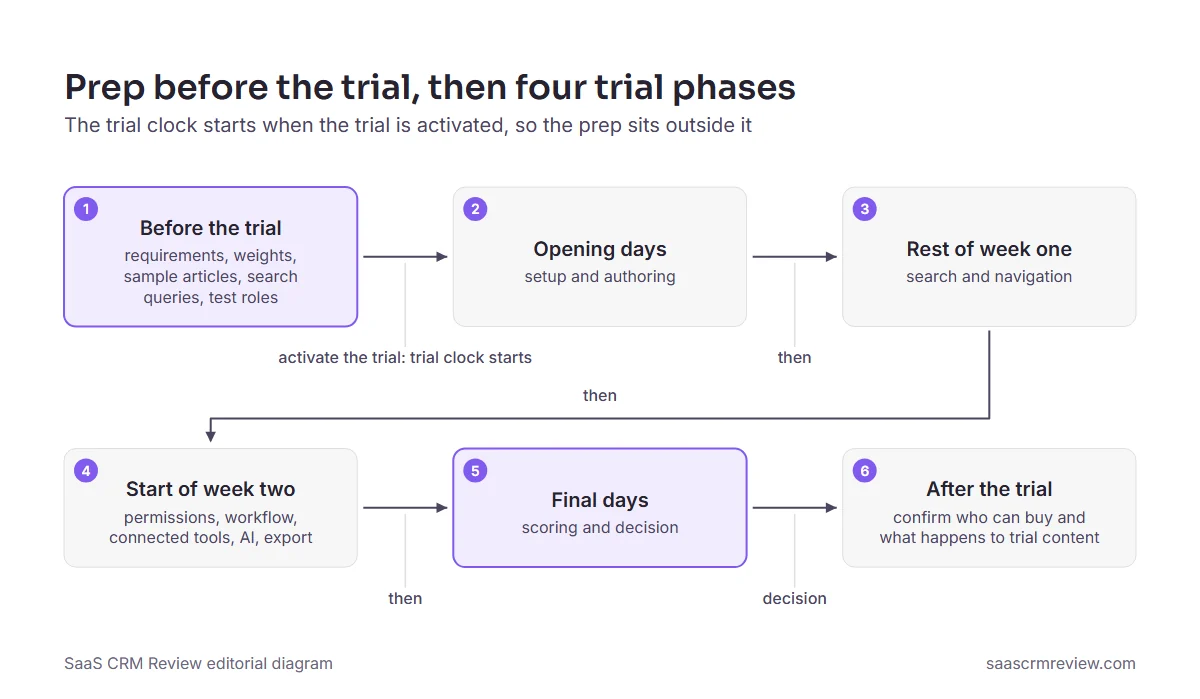
If the team cannot support three trials at once, run two waves with an identical scorecard rather than shortening each trial.
Getting More Time Than 14 Days
Zendesk’s startups program offers early stage startups a 6-month Zendesk Suite trial for up to 50 agents, which turns a two-week test into a real operating period for teams that qualify. Outside programs like that, ask the vendor for an extension and attach your written trial plan, so the request has a concrete end date.
A refund window on an annual plan can also stretch the evaluation, as the billing section below explains.
Selection Criteria vs Requirements, Feature Checklists, RFPs and Trials
These terms get used interchangeably in buying meetings, and the confusion is expensive: a team that treats a feature checklist as its criteria ends up choosing the longest list.
| Concept | When to use | Key difference |
|---|---|---|
| Selection criteria | Before any vendor contact, to agree what matters | The qualities every tool is judged on, weighted by your use case |
| Requirements list | After the use case is chosen, signed by the budget owner and IT | Lines specific to your team; must-haves become pass or fail gates |
| Feature checklist | When reading vendor pages or a comparison grid | Records what a tool can do, not whether it is good enough for you |
| Weighted scorecard | Locked before the first demo | Turns criteria into scores and weights so every vendor ends with one comparable total |
| RFP | When procurement requires a formal process | A formal request sent to vendors; the scorecard sits inside it |
| Free trial or pilot | After the shortlist, with prepared content | Where the criteria get tested on your own articles, roles and queries |
Keep them in that order. Criteria without a requirements page turn into preferences, and a trial without a locked scorecard turns into a popularity vote.
The Cost of Getting It Wrong
Every example in this section comes from a vendor’s own pricing page or documentation. Together they show where an unweighted, unpriced choice turns into a budget or lock-in problem a year later.
How Knowledge Base Software Is Priced
I would not budget from the entry price. Knowledge base vendors price on at least six different bases, and the security lines on your requirements list often decide the tier before any feature does.
| Pricing model | Example from the vendor’s pricing page | What drives the bill | Where it starts to hurt |
|---|---|---|---|
| Per user | Slite Basic at $10 and Pro at $20 per user per month, billed yearly | Every member with an account | Large audiences of occasional readers |
| Per agent | Freshdesk Growth at $19 per agent per month, billed annually | Every support agent who works tickets | Large agent teams that publish little |
| Site fee plus a member fee | GitBook Premium at $65 and Ultimate at $249 per site per month, billed annually, plus a fee for each team member | Number of docs sites and team members | Several separate docs sites |
| Flat tier with a user bundle | Helpjuice’s Knowledge Base plan includes 30 users and its AI-Knowledge Base plan includes 100 users, each at one flat monthly price | The user cap of the tier | The first user above the cap |
| Bundled inside a help desk suite | Zendesk Suite plans include a help center alongside ticketing, messaging, live chat and voice support | The help desk subscription you already pay | Teams that want the help center but not the rest of the suite |
| Custom quote | Guru describes itself as a platform rather than a per-seat tool; Notion and Slite sell Enterprise plans at custom pricing | Negotiation | You cannot score cost until the quote arrives |
Sources: Slite pricing, Freshdesk pricing, GitBook pricing, Helpjuice pricing, Zendesk pricing, Guru pricing, Notion pricing, checked 2026-10-05. Region: prices as listed in USD, viewed from outside the US, so confirm the US price at checkout. Billing basis: annual unless a row says otherwise.
Per-agent pricing charges for the people who answer tickets, not for the people who read the help center. At the listed Growth price, 10 Freshdesk agents cost $2,280 a year (10 agents at $19, times 12 months), and Freshdesk’s Growth plan includes a customer portal and knowledge base alongside ticketing and a shared inbox. Bundles like that one, and the help-desk-suite row in the table above, can make a separate knowledge base tool a second bill for the same job.
A flat tier is cheap per head right up to its cap. Helpjuice says its plans vary by number of users, storage capacity, SSO support and access to AI tools, and its Knowledge Base plan includes 30 users, so the 31st user is an upgrade decision rather than a small line item. Its AI-Knowledge Base plan includes 100 users, so the next cap is also a headcount decision. If your headcount forecast crosses a cap during the contract year, price the higher tier from day one.
What 10, 50 and 200 Users Cost per Year
Two common models for internal and docs use, per user and site fee plus per user, compare like this at three team sizes.
| Team size | Slite Basic (per user) | GitBook Premium (one site plus users) |
|---|---|---|
| 10 users | $1,200 a year | $2,220 a year |
| 50 users | $6,000 a year | $7,980 a year |
| 200 users | $24,000 a year | $29,580 a year |
Sources: Slite pricing and GitBook pricing, annual billing. Basis: users multiplied by the listed yearly-billing price per user and 12 months; the GitBook column adds one Premium site fee per month.
GitBook charges $12 per user per month for additional team members on top of the site plan, billed annually; add that fee for each member to the Premium site fee to redo the GitBook column.
The per-site model costs more at every size in this pair, but for different reasons. At 10 users the fixed site fee is a large share of the GitBook bill. At 200 users it barely registers, and GitBook’s higher per-member fee explains nearly all of the gap. The lesson travels to any vendor: multiply by the 12-month seat forecast, not the headcount at signing, and add every site or workspace fee the model charges.
Which Plan Unlocks SSO, SCIM and Audit Logs
SSO is not one feature, and the protocol your identity provider needs can move you up a tier on its own.
- GitBook includes Google and email-domain SSO on every plan, Free included, but SAML SSO only on its Enterprise plan.
- Slite lists OpenID SSO on its Pro plan, not on Basic. Its Enterprise plan, sold at custom pricing, adds reader-only seats, audit logs and SCIM.
- Notion’s Business plan includes SAML SSO, while SCIM user provisioning and the audit log sit in its Enterprise plan, which has custom pricing.
- Confluence lists Atlassian Guard Standard (SSO, SCIM, mobile app management) as a separate subscription on its Free, Standard and Premium plans, and as included on Enterprise.
Here is what that does to a budget. For 50 users, Slite Basic costs $6,000 a year and Slite Pro costs $12,000 a year (50 users at $20, times 12 months), so an OpenID SSO requirement adds $6,000 a year by itself. Name the protocol your identity provider needs before you price anything. If SCIM or an audit log is a must-have, request Enterprise quotes before you score cost, because there is no list price to score against.
Free Plans and What They Leave Out
Each free plan stops at a different line:
- Confluence Free is free forever for 10 users, and 10 users is also its user limit per site.
- Notion Free is listed at $0 per member per month, and Notion positions it for individuals organizing personal projects. Its Plus plan adds unlimited collaborative blocks and unlimited file uploads to everything in Free.
- GitBook Free is described by GitBook as a plan for individuals. It leaves out custom domains, search analytics, real-time collaboration and review-and-approve edits, and it leaves out PDF export; the Premium, Ultimate and Enterprise plans include them.
Above that, GitBook keeps SAML SSO for Enterprise, and Notion reserves SCIM and the audit log for Enterprise.
A free plan is therefore enough for a one-person pilot or a small team inside Confluence’s user limit, not for a team that needs review-and-approve edits or its own domain. Treat it as a pilot environment or a home for low-risk content, and read its member and page limits on the pricing page before a whole team moves in.
When the Trial Ends
What happens the day after a trial ends differs by vendor, and it decides whether you can pilot with real content. When Helpjuice’s 14-day trial ends, the account becomes inactive until you choose a paid plan, and all data is saved. A pilot built on your own articles therefore survives a decision that takes an extra week.
Slite requires a workspace admin to purchase a plan after the trial. Make sure the person who will sign is an admin in the trial workspace, or the purchase stalls on a permissions problem at the worst moment. For every other vendor, ask before the trial starts what happens to trial content and who is allowed to buy.
Annual vs Monthly Billing and Refund Windows
The per-seat prices in the pricing table are yearly-billing prices, so the default deal is a one-year commitment after a two-week test. Notion’s pricing page says paying yearly saves up to 20%, and Notion refunds the full amount if you downgrade within 30 days of signing up for annual billing. On monthly billing, the same full refund applies only within three days of signing up. My advice: buy annual only when that annual refund window covers the rest of your evaluation, because the monthly plan offers no comparable window. A full-refund window like that turns the first month of an annual contract into a second evaluation period, which is worth more than the discount if adoption is the open question.
Before signing, ask each vendor in writing for its refund terms on annual plans. Where none exist, consider monthly billing for the first months and switch to annual once adoption metrics hold, accepting the higher monthly price as the cost of the option.
Versioning a Docs Team May Not Need
Docusaurus ships a versioning CLI that creates a new docs version from what sits in the docs directory. Yet its own documentation says most sites do not need versioning because it increases build time and adds complexity to the codebase.
Advice like that, from the project that ships the feature, is a good reason to weight versioning by release cadence. If customers run several supported releases with breaking changes, versioning is a must-have. If every customer runs the same release, one living version plus a changelog is cheaper to maintain.
Build the ROI Case With Your Own Numbers
A business case needs your numbers, not a vendor’s average. Collect five inputs:
| Input | Where to get it |
|---|---|
| Tickets per month on topics a help article could answer | Help desk tags, or a manual sample of recent tickets |
| Share of those tickets you expect self-service to absorb | Start conservative, then replace it with trial data from the search test |
| Fully loaded spend per ticket | Support budget divided by tickets handled |
| Internal questions avoided per month, and the time each takes | A short tally from Slack or a team survey |
| What the tool and its setup take from the budget each year | The figures above, plus migration hours |
Monthly value = (tickets per month x share absorbed x cost per ticket)
              + (internal questions avoided per month x hours per question x hourly cost)
Annual value = monthly value x months in the contract year
Net first-year value = annual value - annual license cost - setup and migration cost
If the net is negative at a conservative share, the case rests on softer benefits such as faster onboarding. Present it that way instead of raising the share until the numbers work; finance will test the share first.
Risks a Scorecard Will Not Catch
A scorecard measures what the trial can show. Four risks sit outside it, each with a mitigation:
- Technical: search that works on a few dozen sample articles can degrade on a full library. Include your messiest content in the trial and re-run the search test after migration.
- Operational: the named admin changes role and reviews stop. Name a second owner and put review dates on every article from the first week.
- Security and legal: AI features and sub-processors can move your content outside the boundary your security team approved. Get the data processing terms, the sub-processor list and the data-region options in writing before the trial ends.
- Commercial: plan gates and prices change, and the facts in this guide were checked on a single date. Re-read the pricing page on the day you sign and keep a dated copy.
Common Misconceptions About Choosing Knowledge Base Software
These are the beliefs I would challenge first in a selection meeting. Each correction rests on the vendor pages cited above or on the process in this guide.
Misconception: The tool with the longest feature list is the safest choice. Reality: A feature list shows what is possible; the weights decide what is good enough for your use case. A tool chosen to be adequate at everything tends to score average at the job you actually bought it for.
Misconception: The entry price is the budget. Reality: The sign-in protocol and next year’s headcount set the tier. The SSO example in the cost section shows one requirement doubling an annual bill.
Misconception: A two-week trial is plenty if you start right away. Reality: My advice is to treat the trial clock as the scarcest resource you have. Preparation that needs no account belongs before the trial starts, so the trial days go to the tests that need one.
Misconception: AI search makes structure and maintenance optional. Reality: AI answers draw on the articles you already have. Stale content produces confident wrong answers, and restricted content can leak if the assistant ignores permissions.
Misconception: A listed export means leaving is easy. Reality: The test is what the exported files contain: images, internal links, tables and owners.
Misconception: Every docs team needs versioning. Reality: Versioning has a maintenance cost, so weight it by how many supported releases your customers actually run.
Vendor Claims to Verify
| Vendor claim | Ask | Verify in the trial |
|---|---|---|
| “Smart search” | Is it meaning-based search, or keyword matching with machine-learned ranking? | Run the search test set; if “forgot login” misses the password reset article, the smart layer is thin |
| “Write as much as you like” | Do attachments, file space, version history or developer access run out at some point? | Read the fair-use policy and the contract |
| “Easy migration” | Is there an importer for your current tool, and which export formats does it accept? | Import your sample articles and note the formatting damage |
| “Built for large companies” | Which documents can they share with your IT team, which sign-in protocol do they support, and do they set up user accounts automatically? | Request the documents and record which edition each item comes with |
| “Fast implementation” | What is the typical time for companies your size, and can you speak to references? | Talk to two or three references at a similar scale and use case |
Each row turns a marketing phrase into a question with a written answer, which is the only form a scorecard can use.
How to Evaluate Knowledge Base Software With Weighted Criteria
Write the requirements before you contact vendors, mark each line must-have or nice-to-have, and get the budget owner and IT to sign the page. Must-haves become pass or fail gates in the scorecard; nice-to-haves become weighted criteria. A fuller version with SSO, RBAC, SCIM and audit-log wording is in the knowledge base software requirements template.

Content & Authoring Requirements
- [ ] Number of articles at launch and expected growth per month
- [ ] Formats needed: text, images, video, code blocks, PDFs
- [ ] Content to migrate: source tool, export format, volume
- [ ] Who writes: technical writers, support agents, subject experts
- [ ] Templates or structured article types
- [ ] Languages to publish in
Audience & Access Requirements
- [ ] Primary audience: customers, employees, developers, partners
- [ ] Public, private or mixed visibility
- [ ] Sign-in method: SSO, email and password, or anonymous reading
- [ ] Permissions by team, department or topic
- [ ] One knowledge base or several workspaces
Integration Requirements
- [ ] Help desk or ticketing tool
- [ ] Chat or messaging widget
- [ ] CRM
- [ ] SSO provider
- [ ] Slack or Teams
- [ ] Analytics or BI tool
- [ ] Git repository or docs-as-code pipeline
Governance & Compliance Requirements
- [ ] Approval workflow before publishing
- [ ] Version history and audit logs
- [ ] Expiry dates or scheduled reviews, with named owners
- [ ] A current independent security audit report available now, not “in progress”
- [ ] A GDPR-compliant Data Processing Agreement (DPA)
- [ ] A HIPAA Business Associate Agreement, if health data is involved
- [ ] Data residency options (US, EU or another region)
- [ ] An information security certification, if your security team requires one
Ask for the evidence, not the badge. Request the security audit report under NDA, the DPA, the sub-processor list and the data residency options in writing before the trial ends. A vendor that will only share its report after signature has told you how the security review will go.
Technical & Hosting Requirements
- [ ] SaaS or self-hosted
- [ ] Custom domain and branding
- [ ] API access for custom integrations
- [ ] Uptime commitment you need in the contract
- [ ] Backup and restore expectations
Budget & Timeline
- [ ] Budget range and who approves it
- [ ] Decision deadline and target launch date
- [ ] People and hours available for migration and setup
- [ ] The named admin who will own the tool after launch
If a line would not stop the purchase on its own, it is a nice-to-have. Treating it as a gate only teaches the team to relax gates quietly later.
Rubric Table
| Criterion | Suggested weight | What good looks like | How to test |
|---|---|---|---|
| Authoring Experience | Medium | Visual editor plus Markdown, easy media embeds, reusable blocks, templates | Three authors write the same sample article; note time and friction |
| Search Quality | High | Typo tolerance, synonyms, filters, a meaning-based option, a log of failed searches | Run the search test set and score the top three results |
| Information Architecture | Medium | Nested categories, tags, breadcrumbs, related articles, cross-links | Build your intended structure; three readers find five answers |
| Permissions & Access Control | Medium | Role and group permissions, article-level restrictions, group sync from your sign-in provider | Run the permission script as each role |
| Connected Tools | Medium | Native connectors for your stack, webhooks, Zapier or Make as a fallback | Connect the one tool you cannot live without and check what syncs |
| Analytics & Reporting | Medium | Views, searches, failed searches, ratings, deflection when tied to a help desk | Compare the dashboard with what you know happened during the trial |
| Content Lifecycle & Governance | Medium | Drafts, scheduling, expiry, review reminders, approvals, owners | Run the workflow script end to end |
| AI Search and Answers | Medium | Answers that cite articles, respect permissions and admit when nothing matches | Run the AI test during the trial |
| Customization & Branding | Low | Custom domain, CSS, header and footer, widget styling | Apply your brand and check it on a phone |
| Data Protection & Compliance | Low | The documents your IT team asks for, the sign-in protocol you need, activity history, choice of data region | Request the documents; must-haves are already pass or fail |
| Exit Path | Low | Full export in open formats, or Git sync | Export the sample content and open it outside the tool |
Scoring: rate each criterion from one to five (one is unacceptable, three meets your needs, five exceeds them). Before the first demo, turn the tiers into percentages that add up to one hundred, with every high criterion above every medium one and every medium above every low, then multiply each score by its weight and add the results. Two rules sit above the arithmetic. A failed must-have removes the vendor whatever its total, and a score of one on any high or medium criterion goes to the stakeholders before that vendor can win.
Data protection carries a low weight because its real requirements are already gates on the requirements list; the weight rewards what goes beyond the bar. The exit path gets its own line because nobody scores it after the contract is signed. In a regulated industry, move it to the must-have list. To adjust the tiers for your use case, use the scenario priority table in the use-case section below.
Information Architecture
Check that the platform supports:
- Nested categories or sections
- Tags and custom taxonomies for cross-linking
- Breadcrumbs and navigation menus
- Related-article suggestions
- Links across workspaces, for hybrid setups
Build your intended structure during the trial. If the tool fights the structure you need for a few dozen articles, it will fight harder at several hundred.
Search Quality
I would give search the highest weight in most scorecards, because an article a reader cannot find answers nothing.
| Capability | Why it matters |
|---|---|
| Speed | Results should feel instant; time a few queries on a phone connection during the trial |
| Typo tolerance | Readers mistype, and search should still work |
| Synonym handling | “close my account” should find “delete account” |
| Filters | By category, date, author or tag |
| Search analytics | Shows what readers look for, especially failed queries |
| Meaning-based or AI search | Matches intent instead of exact words |
A tool that misses on typo tolerance or synonyms will fail the search test set below, whatever its demo looked like.
Content Lifecycle
My view is that an outdated article is worse than a missing one, because readers act on it. Look for:
- A draft, review and publish workflow
- Scheduled publishing and unpublishing
- Expiry dates that notify the owner
- Version history with rollback
- Content health signals such as falling views or overdue reviews
Freshness is a habit before it is a feature. Give every article a named owner and a review date, with shorter cycles for policies and anything that mentions prices or plan names. A verification or review-reminder feature only helps if someone is assigned to act on it.
Analytics Essentials
At minimum you need article views, search queries and failed searches, article ratings or feedback, deflection tracking when the tool connects to a help desk, and an export to CSV or a BI tool. Failed searches are the most useful of these: each one is a missing or badly titled article.

Turning Support Tickets Into Articles
My advice is to borrow the practice support teams call KCS (Knowledge-Centered Service): the agent writes or updates the article while resolving the ticket, so the answer is captured while it is fresh. You do not need the full method to borrow its writing queue:
- Tag solved tickets that had no matching article, and review the tag every week.
- Add the zero-result and failed searches from the analytics report to the same queue.
- Draft the article from the ticket’s resolution, then send it through the approval workflow like any other article.
- Link the ticket to the article, so the next agent finds it from the ticket view.
AI drafting can shorten the third step. Zendesk’s pricing page describes generating a ready-to-use knowledge base from ticket history and business context with generative AI. Treat that output as a first draft: an owner checks each article for accuracy, and for customer details copied from tickets, before it is published. In the trial, check whether agents can write from inside the ticket view and whether ticket-to-article links survive an export.
Evaluation Test Scripts
Search test set (adapt the wording to your content):
- Exact title: “How do I reset my password?”
- Synonym: “forgot login” (should find the password reset article)
- Typo: “passowrd reset”
- Long-tail: “change password on mobile app iOS”
- Concept: “account security” (should surface the relevant articles)
- Technical:
API rate limit error(for product docs) - Negative: a topic you do not cover, which should return a clean “no results”
- Partial phrase: “billing invoice”
- Question form: “Why isn’t my payment going through?”
- Ambiguous: “update” (should show the most likely meanings)
Score each query once, on its top three results: three points if the right article is there, two if only related articles appear, one if nothing useful does. Add the points across all ten queries and set the pass mark before the trial starts, high enough that most queries find the right article on the first try.
Permission test:
- Create the three roles: admin, author and viewer.
- Confirm the admin can publish, the author can draft but not publish (if your workflow requires approval), and the viewer can only read what that role should see.
- Sign in through SSO and confirm that group membership grants the right access.
Workflow test:
- Create an article as a draft.
- Submit it for review.
- Approve and publish it.
- Set an expiry or review date.
- Confirm the notifications reach the owner.
How to Test AI Search and AI Answers
AI answers are where a knowledge base can do the most damage quietly, so test them like a skeptic:
- Ask the AI feature ten questions from your search set and count how many answers cite the article that actually holds the answer.
- Sign in as the viewer and ask a question whose only answer sits in restricted content. A permission-aware assistant does not reveal it; any leak is a deal-breaker.
- Ask a question your content does not answer. A good assistant says it found nothing instead of composing a plausible reply.
- Ask the vendor in writing whether customer content trains shared models, how long prompts are kept, and which sub-processors handle them.
- Check how AI use is metered. GitBook’s entry site plan includes a fixed allowance of AI credits, so ask what happens when credits run out and whether the trial shows that limit.
When to Use Each Type of Knowledge Base and When to Avoid It
The audience who reads the content decides the scenario: customers point to a support knowledge base, employees to an internal wiki, developers and partners to product docs, and more than one audience to a hybrid setup. Pick one primary scenario even if you have two.
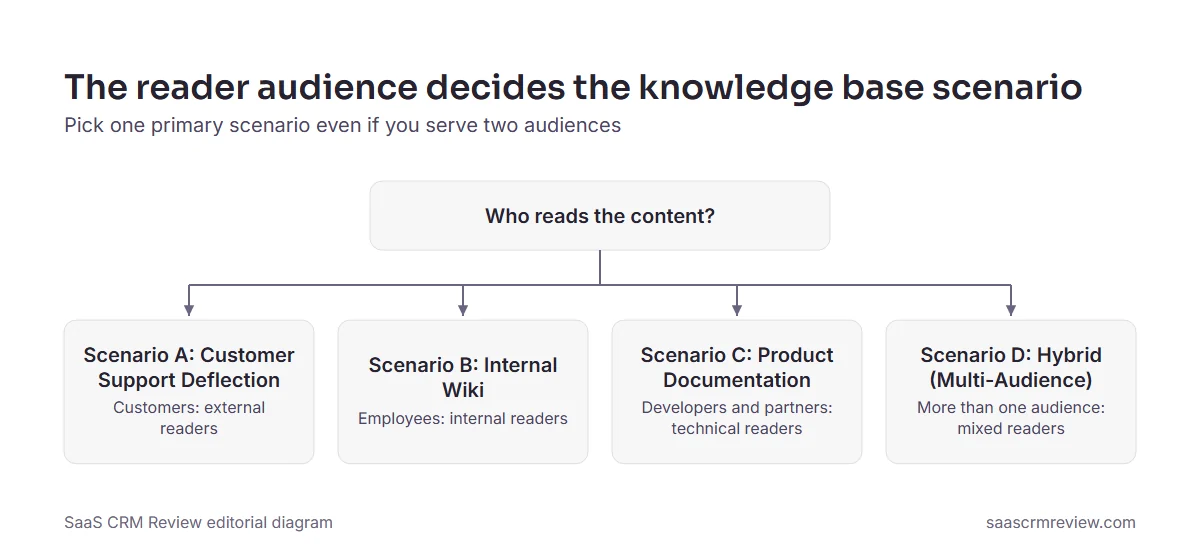
My advice is to pick “hybrid” only when two audiences genuinely share the same content, because every shared article then needs permissions and a review path that work for both audiences.
Customer-Facing vs Internal vs Product Docs
| Attribute | Customer Support KB | Internal Wiki | Product Docs |
|---|---|---|---|
| Audience | Public or signed-in customers | Employees only | Developers, users, partners |
| Tone | Friendly, brand-aligned | Practical, direct | Technical, precise |
| Search priority | Speed, deflection | Accuracy, coverage | Precision on exact terms and code |
| Connected tools | Help desk, chat, CRM | Sign-in provider, HR, collaboration | Git repos, CI pipelines, developer tooling |
| Governance | Light (few approval steps) | Medium (policy review) | Heavy (tied to each product update) |
My advice is to read the governance row first: if your product docs need a review tied to each product update, weight the authoring workflow higher for that scenario.
Scenario A: Customer Support Deflection
Context: You run a help desk and want customers to answer common questions themselves before they open a ticket.
Priorities: help desk integration (article suggestions inside tickets, an embeddable widget), search speed and relevance, analytics on deflection and failed searches, and branding on a custom domain.
Use it when: the same password, billing and API-error questions reach agents every day.
Avoid it when: the help center inside your current help desk already passes every must-have; the bundled-or-standalone check below covers that test.
Scenario B: Internal Wiki
Context: Teams need one source of truth for policies, SOPs, onboarding and the knowledge that lives only in people’s heads.
Priorities: SSO and directory sync, team and role permissions, governance (approvals, expiry dates, named owners), and search from Slack or Teams.
Example: a mid-sized company replacing a sprawling Confluence instance with something easier to maintain.
When Confluence is the incumbent, read the Confluence features and integrations review first, so replacements are scored against what the team already has rather than against a blank page.
If you are choosing a wiki for the first time, a comparison of wiki software for teams is a faster place to build the long list than a general knowledge base roundup.
Scenario C: Product Documentation
Context: Developer docs, API references, user guides or release notes for a technical product.
Priorities: Markdown and code blocks, a Git-based (docs-as-code) workflow, search precision on exact terms and code snippets, and versioning only if your releases demand it, as the versioning example in the cost section explains.
Avoid it when: nobody on the team works in Git. In that case I would start with a hosted editor rather than a docs-as-code pipeline.
Scenario D: Hybrid (Multi-Audience)
Context: You need customer-facing support content and an internal wiki, product docs, or both, often with shared articles.
Priorities: separate workspaces or audience segmentation, granular permissions, content reuse across audiences, and analytics that combine all of them.
Watch for: hybrid is where seat counts and permission models collide. Price it on the full reader count, not just the author count, and test audience separation in the trial.
How Your Scenario Changes What to Prioritize
| Criteria | Support KB | Internal Wiki | Product Docs | Hybrid |
|---|---|---|---|---|
| Help desk connection and chat widget | High | Low | Low | Medium |
| SSO and SCIM (Okta, Microsoft Entra ID, Google) | Medium | High | Medium | High |
| Slack or Teams connection | Medium | High | Medium | Medium |
| Permissions complexity | Low | High | Medium | High |
| Content lifecycle and governance | Low | Medium | High | High |
| Authoring experience | Low | Medium | High | Medium |
| Information architecture | Medium | Medium | High | Medium |
| Analytics | High | Medium | Medium | High |
| AI search and answers | High | Medium | Medium | Low |
| Versioning | Low | Medium | Depends on release cadence | Medium |
| Branding and customization | High | Low | High | Low |
| Docs-as-code workflow and Git sync | Low | Low | High | Medium |
| Exit path | Medium | Medium | High | Medium |
Read the table by column: your scenario’s High rows take the High tier in the rubric, its Low rows the Low tier, and the rest stay Medium. Search stays High in every scenario. A High row that names a connection (help desk, chat, sign-in provider, Slack or Teams, Git) is a candidate must-have for your requirements page, and a tool without that connector should not reach a trial slot.
Bundled Help Center or Standalone Tool?
Support teams on a help desk suite may already own a help center. Zendesk Suite plans include a help center alongside ticketing, messaging, live chat and voice support. A team paying for that suite should score the bundled help center as one of its shortlisted options, using the same scripts as everything else.
Stay with the bundled help center when the audience is customers only and it passes every must-have. Buy a standalone tool when employees also need the content, when non-support teams must write or read internal articles, or when you need documentation features such as versioning or Git sync. Either way, the decision is made on scores, not on which invoice already exists.
Self-Hosted Docs-as-Code or a Hosted Platform?
Open-source frameworks such as Docusaurus or Wiki.js and hosted platforms split the same work differently. With a self-hosted docs site, your team owns the hosting, the framework upgrades, the security patches and the build pipeline, and there is no vendor support desk to call. With a hosted platform, the vendor carries that work and you carry a subscription.
- Self-hosted, what you gain: content in your own Git repository, pull-request review for every change, no per-seat subscription, and full control over where the data is stored and who can reach it. That control can settle data residency, security or compliance requirements a hosted vendor cannot meet.
- Self-hosted, what you take on: hosting, upgrades, security patches and search, the security reviews and audits your compliance team expects, plus authors who are comfortable with Git and Markdown.
- Hosted, what you gain: faster setup, a visual editor, managed security and a vendor support desk.
- Hosted, what you take on: costs that rise with seats and plan tiers, and an exit that depends on the export formats.
Docs-as-code fits when the docs team already works in Git, releases ship with the code, and reviewers are engineers. It also makes the versioning decision yours, and the Docusaurus example in the cost section shows why a versioning command alone is no reason to adopt it. A hosted platform wins when support or operations staff write the articles, nobody has DevOps time for the site, or SSO and permissions are needed quickly.
There is a middle path: a hosted platform with Git sync, covered in the export test below, lets authors work in a hosted editor while the content stays in a repository you control.
Run the Export Test Before You Sign
Avoid any tool whose exit path you have not tested. The vendor pages checked here list these exit routes:
- Slite’s plan comparison lists PDF, Markdown and HTML exports for every plan.
- Notion can export an entire workspace as HTML, Markdown and CSV as a backup.
- GitBook’s Free plan includes sync with GitHub or GitLab, so docs content can live in a repository you control.
A listed export format is a promise; the test is what the files contain. Export your sample articles and check four things: images are present, internal links still point somewhere, tables survive, and owners and review dates come along or are recorded elsewhere. Score the result on the Exit Path line. My advice: treat an exit that means copying articles by hand as a cost you will meet at every renewal, and score it that way.
How to Measure Success
Measure twice: during the trial, to pick the tool, and after launch, to prove the pick worked.
Metrics to Track During Trial
| Metric | Purpose | Editorial target |
|---|---|---|
| Time to first article published | Setup friction | The same day |
| Author satisfaction (informal rating) | Authoring experience | Most authors would happily keep using it |
| Search test score | Search quality | Most queries find the right article in the top three |
| Permission accuracy | Access control reliability | Every check passes |
| Setup time for the critical tool | Stack fit | Connected within an afternoon |
| AI answers citing the right article | AI answer accuracy | Nearly all of them |
These targets are editorial starting points, not vendor benchmarks. Agree on them before the trial starts and keep them identical for every vendor.
What Good Looks Like After 30 and 90 Days
After the first month, every migrated article should have an owner and a review date. The search test, re-run on live content, should score at least as well as it did in the trial, and someone should be reading the failed-search report every week. After three months, compare these against the numbers you recorded before launch:
| Metric | Meaning | Why it matters |
|---|---|---|
| Ticket deflection rate | Self-service resolutions divided by total potential tickets, as a percentage | Shows whether customers find answers before they open a ticket |
| Search success rate | Searches followed by a click, divided by total searches | A falling rate points to missing or badly titled articles |
| Failed searches | Queries that return nothing useful | Each one is an article to write or rename |
| Time to answer | The average time a reader needs to find a resolution | The internal-wiki equivalent of deflection |
| Content health | The share of articles reviewed in the last quarter | Stale articles erode trust and feed AI answers bad material |
| Author activity | Editors who updated at least one article in the month | A knowledge base nobody edits decays, whatever the traffic says |
| First-contact resolution | The share of support conversations resolved in the first contact, without a follow-up | Rises when agents and customers find the answer in an article the first time |
| Average handle time | The average time an agent spends on a ticket, from opening it to resolving it | Falls when agents look answers up instead of asking colleagues |
| Time to competency | How long a new hire needs before handling work without help | Shows whether onboarding content in the knowledge base actually trains people |
Watch the search success rate first, because it is the earliest signal that articles are missing or badly titled. The renewal question to be able to answer: which of these moved, by how much, and what would it cost to leave?
What Sets Your Implementation Timeline
My advice is to build the implementation estimate from the drivers below, then ask each vendor for its own estimate at your size.
| Driver | What stretches the timeline | What to ask the vendor |
|---|---|---|
| Content volume | Hundreds of articles to clean, merge or retire before the move | Is there a bulk importer, and what happens to formatting? |
| Migration path | No importer for your current tool, or exports that lose images and links | Which export formats from your current tool does the importer accept? |
| Sign-in setup | Single sign-on and user provisioning to configure and test with IT | Which edition includes the protocol you need, and who configures it? |
| Approval workflow | Review steps, owners and expiry dates to define for every content area | Can workflows be set per space or category? |
| Connected tools | Help desk, chat or Git connections to set up and test | Which connectors are native, and which need custom work? |
| Training | Authors who must learn the editor and the review process | What onboarding help does the vendor provide? |
Vendor setup help is sometimes part of a plan: Slite’s Enterprise plan lists migration and onboarding support. Where a vendor sells that help, price it next to the subscription instead of assuming the team will absorb the work.
Migration Approach
- Audit existing content: inventory it and decide what to migrate, archive or delete.
- Clean before you move: fix formatting, update outdated articles and merge duplicates.
- Bulk import, then curate by hand: use the import tool for speed and review high-traffic articles manually.
- Redirect old URLs: set up permanent redirects if the help center domain or paths change.
- Verify after migration: spot-check 10% of articles for formatting and broken links.
Change Management Essentials
- Explain the why: tell authors and readers what the new knowledge base fixes for them.
- Train authors in short practical sessions rather than slide decks.
- Set governance expectations: who owns what, the review cadence and the quality bar.
- Track adoption: editor logins, articles updated, search volume and feedback submissions.
- Plan a review at the three-month mark to fix what the first months exposed.

Recommended Tools by Team Size
This is a starting shortlist, not a ranking. Team size matters because it moves the budget pressure point: on a small team a fixed site fee is a large share of the bill, and at a few hundred users the seat price and the security tier decide it.
| Team size | Where to start | What decides the tier |
|---|---|---|
| Small team, one or two authors | Notion’s Free plan for a wiki pilot; GitBook’s Free plan, which GitBook pitches at individuals, for a docs pilot | GitBook keeps SAML SSO for Enterprise; Notion keeps SCIM and the audit log for Enterprise |
| Mid-sized team, several teams publishing | Slite, priced per user; a Helpjuice flat tier sized to next year’s headcount | Slite lists OpenID SSO on Pro; Notion Business includes SAML SSO |
| Large or regulated organization | GitBook Enterprise for SAML SSO on a docs site | Slite Enterprise adds audit logs and SCIM at custom pricing; Notion Enterprise holds SCIM and the audit log |
Sources: Notion pricing, GitBook pricing, Slite pricing, Helpjuice pricing, checked 2026-10-05.
Whatever the size, the row only tells you where to start. The scorecard decides where you finish.
Shortlist by Use Case
Each name below comes with a reason you can check on the vendor’s own pricing or documentation page, and a question to settle before it earns a trial slot.
| Use case | Tool | Why it fits, from the vendor’s own page | Check first |
|---|---|---|---|
| Customer support | Helpjuice | Flat tiers that each bundle a set number of users; a trial with full access to all features; trial data kept after the trial ends | Whether next year’s headcount crosses a tier cap |
| Customer support | Freshdesk | Growth at $19 per agent per month, billed annually; the Growth plan includes a customer portal and knowledge base alongside ticketing | Whether agent count, not reader count, should drive the budget |
| Customer support | The help center in your help desk (Zendesk Suite, for example) | Suite plans include a help center alongside ticketing; the pricing page describes generating a knowledge base from ticket history with generative AI | Whether the bundled help center passes every must-have |
| Internal wiki | Slite | Pricing per user; a doc verification workflow on Basic; OpenID SSO on the Pro plan; PDF, Markdown and HTML exports on every plan | Whether OpenID SSO satisfies your identity provider |
| Internal wiki | Notion | SAML SSO on Business; page verification with a verified badge on Business; whole-workspace export as HTML, Markdown and CSV | Whether SCIM or an audit log is a must-have, since both sit in Enterprise |
| Internal wiki | Guru | Sold as a platform rather than as a per-seat tool | Expect a quote before a number |
| Internal wiki | Confluence | A Free plan for up to 10 users; Standard listed at $5.42 per user per month; SSO and SCIM through a separate Atlassian Guard Standard subscription below Enterprise | Whether the Atlassian Guard subscription belongs in the budget |
| Product docs | GitBook | A site fee plus a fee for each team member; a free trial on the Premium and Ultimate site plans | SAML SSO sits only on Enterprise |
| Product docs | Docusaurus | A versioning CLI that creates a new docs version from the docs directory | Release cadence, before you weight versioning |
| Hybrid | Confluence | Standard adds free guest access to everything in Free | Which content guests should be able to read |
| Hybrid | Notion | The Free plan can publish a Notion page to the web next to the internal workspace | Whether published pages need your own domain and branding |
| Hybrid | GitBook | Git sync on the Free plan for the docs side; custom domains from Premium for the public side | Whether public and internal content need separate sites |
Sources: Helpjuice pricing, Freshdesk pricing, Zendesk pricing, Slite pricing, Notion pricing, Guru pricing, Confluence pricing, GitBook pricing, Docusaurus versioning docs. Region: prices as listed in USD, viewed from outside the US. Billing basis: Freshdesk billed annually; Confluence’s figure is the pricing page’s monthly view at its default team size, and the page changes it with team size and billing.
For a support shortlist, Helpjuice’s tiered user bundles make the cap math from the pricing table the first thing to check, and the Helpjuice review walks through what each tier adds.
Document360 is not in the table because this guide verified none of its plan facts; if it is on your list, the full Document360 review covers its plans and limits before a demo.
Guru describes itself as a platform and expertise solution rather than a per-seat tool, so expect a sales conversation before a number. Before that call, the full Guru review explains what the platform pricing covers.
If Guru and Notion are your two internal wiki finalists, the Guru vs Notion comparison separates in-workflow answers from a general workspace.
If the wiki decision comes down to Notion or Confluence, the Notion vs Confluence breakdown weighs the two side by side.
How to Choose the Right Tool From Your Shortlist
Pick tools whose pricing model and tier fit your requirements, not the best-known names. Three gives you a real comparison; five is about the most a small team can trial properly in parallel. A tool that fails a must-have from your requirements list should never reach a trial slot, and the final choice goes to the highest weighted total that also passed the export test and came with refund terms in writing.
Beginner Checklist
Copy this into your project tracker and work down it in order:
- [ ] Name the primary use case, and at most one secondary one
- [ ] Record headcount at signing and a year later, split into authors and readers
- [ ] Ask IT which sign-in protocol your identity provider needs
- [ ] Write the requirements page, mark the must-haves and get it signed
- [ ] Price the cheapest tier that meets every must-have at the seat forecast, including site or workspace fees
- [ ] Shortlist three to five tools
- [ ] Lock the scorecard weights before any demo
- [ ] Prepare sample content, the search test set and the three test roles
- [ ] Start the trials close together and score every vendor before the first one ends
- [ ] Open an export file and check what it contains
- [ ] Get refund and renewal terms in writing
- [ ] Name the admin who will own the tool after launch
Final Verdict
My recommendation: settle the use case and the sign-in protocol before anything else, because those two answers set both the scorecard weights and the tier you will pay for. Then lock the weights, prepare everything that needs no account, and score inside the trial window. A tool that wins on that process, with an export you have opened and refund terms you have read, is a decision you can defend to finance and revisit at renewal.

FAQ
How much does knowledge base software cost?
It depends more on the pricing model than on the vendor. The pricing pages checked for this guide use six models: per user, per agent, a site fee plus per user, a flat tier with a user bundle, a help center bundled into a help desk suite, and custom quotes. The cost section works out the annual cost at three team sizes and shows how a single sign-in requirement can double the bill, so price the tier your must-haves require, not the entry tier.
What’s the difference between a wiki and a knowledge base?
A wiki is open and collaborative, and it is often loosely structured. A knowledge base is usually more structured, built around search and aimed at a defined audience: it is designed to be read and found, not only edited. Many tools now do both, which is why the use case you pick first matters more than the label on the product.
What is the best free knowledge base software?
No free plan fits every team, so match the plan to the case. Confluence Free suits a small internal wiki, because it is free forever for up to ten users. GitBook Free suits one person publishing docs synced from a GitHub or GitLab repository, but it leaves out custom domains, search analytics, real-time collaboration and review-and-approve edits. Notion Free suits an individual’s pilot workspace, since the unlimited collaborative blocks and file uploads come with Plus. Plan the paid tier before a free workspace quietly becomes the system of record, and use the free plan as the pilot.
Related Resources
- If Notion is on your shortlist, the full Notion review covers how its workspace model behaves when you use it as a team knowledge base.
- Support teams already paying for Zendesk can check what the suite covers beyond ticketing in the Zendesk Suite review before buying a second tool.
- If the customer-facing side is all you need, a comparison of help center software is a better starting list than a general knowledge base roundup.
In short: write the requirements list, lock a weighted scorecard, shortlist three to five tools and run a time-boxed trial that fits inside the vendors’ free-trial windows before committing to a plan.