Picking from the best docs tools is rarely a feature problem. It is a billing-unit problem, a free-plan-ceiling problem, and a governance problem that surfaces in month three.
Google Docs is the safest starting point for most distributed teams that live in a browser. Microsoft Word still wins when the deliverable is a DOCX that has to survive legal review, and Notion wins when the document and the database belong on one page.
Ten tools are ranked below by the job each does best, with the paid tier a real team lands on, the exact limit that ends the free ride, and the buyer who should skip it. Prices and plan limits were checked on 2026-08-06 for the US market, and every product here sits beside the wider set of team collaboration tools a company already runs.
In This Article (12 sections)
Quick Verdict: Best Docs Tools by Use Case
| Use case | Best pick | Why it fits |
|---|---|---|
| Best all-round pick for most teams | Google Docs | Browser-first coauthoring with the lowest training overhead |
| Best for DOCX fidelity and offline work | Microsoft Word | Desktop-grade layout, Track Changes, and file exchange |
| Best combined docs and wiki workspace | Notion | Pages, wikis, and database blocks on a single surface |
| Best programmable document | Superhuman Docs | Tables, formulas, and automations billed only for builders |
| Best for Jira-connected knowledge | Confluence | Spaces, page trees, and native Atlassian integration |
| Best for docs attached to delivery work | ClickUp Docs | Documents that link directly to tasks and project hierarchy |
| Best for verified internal knowledge | Slite | Doc verification plus an answer layer over the knowledge base |
| Best lightweight team wiki | Nuclino | Fast linked pages with almost no administration |
| Best free conventional word processor | Zoho Writer | Free editing with broad import and export format support |
| Best for secure external rooms | ONLYOFFICE DocSpace | Permissioned rooms billed per administrator, not per user |
Read that table as ten different jobs rather than ten ranks of the same job. A team that picks Google Docs and a team that picks ONLYOFFICE DocSpace are usually solving different problems, and the ranking order below reflects how many buyers each job serves.
Source: every pick above rests on the official plan and pricing pages listed below, all checked 2026-08-06.
Do These Docs Tools Compete With Each Other?
The word “docs” covers three separate product surfaces, and a ranked list hides that. This matrix is an editorial assessment of documented feature scope, not a score.
| Tool | Long-form doc editing | Team wiki structure | Structured tables or database | Permissioned external rooms |
|---|---|---|---|---|
| Google Docs | Yes | Limited | Limited | By plan |
| Microsoft Word | Yes | Limited | Limited | By plan |
| Notion | Yes | Yes | Yes | Limited |
| Superhuman Docs | Yes | Yes | Yes | Limited |
| Confluence | Yes | Yes | Yes | By plan |
| ClickUp Docs | Yes | Yes | Yes | By plan |
| Slite | Yes | Yes | Limited | Limited |
| Nuclino | Yes | Yes | Limited | Limited |
| Zoho Writer | Yes | No | Limited | By plan |
| ONLYOFFICE DocSpace | Yes | Limited | Limited | Yes |
Google Docs, Microsoft Word, Zoho Writer, and ONLYOFFICE DocSpace compete directly as document editors, while Notion, Confluence, ClickUp Docs, Slite, and Nuclino compete as team knowledge systems. Superhuman Docs straddles both and competes with neither group cleanly, which is why comparing it on editor features alone produces the wrong shortlist.
Source: capability scope for each row was read from the official product and plan pages below, checked 2026-08-06.
- Google Workspace, Microsoft 365, Zoho Writer, ONLYOFFICE DocSpace
- Notion, Superhuman Docs, Confluence
- ClickUp, Slite, Nuclino
How We Chose and Evaluated the Best Docs Tools
These rankings are based on official pricing pages, product documentation, help-center articles, and current plan-limit pages. Pricing and plan limits were checked on 2026-08-06 for the US market.
Each tool was assessed against the same buyer-focused criteria: document surface, collaboration model, structured-data depth, governance controls, migration and export behavior, billing unit, and documented plan limits.
Greater weight was given to the factors that decide a purchase: the paid tier a real team lands on, the ceiling that ends a free plan, the trigger that forces an upgrade, and the cost of adding people. Brand popularity and affiliate relationships did not influence the order.
Claims that could not be verified from official evidence were excluded from the ranking, and temporary pricing is labeled separately from standard pricing.
The Three Problems Every Docs Tools Buyer Faces
Almost every shortlist in this category fails for one of three reasons, and each reason maps to a different group of products.
Problem one: the document surface is wrong. A team that produces contracts, filings, and client deliverables needs a file that survives round-tripping through someone else’s editor. A team that produces internal process knowledge needs a page tree, ownership, and search.
Problem two: the billing unit is misread. Comparing entry prices assumes every product bills the same way, and three of these ten do not. Superhuman Docs bills only the people who build documents, ONLYOFFICE DocSpace bills administrators while users and guests stay unlimited, and the conventional suites bill every person who opens the app.
Problem three: the free plan is treated as a tier rather than a trial. Several free plans here carry a hard ceiling that a real team hits inside a quarter. One of them counts blocks for the lifetime of the workspace rather than the current content. That is the difference between a pilot that ends in a purchase decision and a pilot that ends in a locked document.
The rest of this guide answers those three problems in order: which surface fits, what each tool costs at ten people, and where each free plan stops.
Quick Comparison of the 10 Best Docs Tools
| Tool | Best for | Entry paid price | Free plan | Billing unit |
|---|---|---|---|---|
| Google Docs | Browser-first coauthoring | $7 per user/ | No, trial only | Per user |
| Microsoft Word | DOCX fidelity and offline editing | $7 per user/ | No, trial only | Per user |
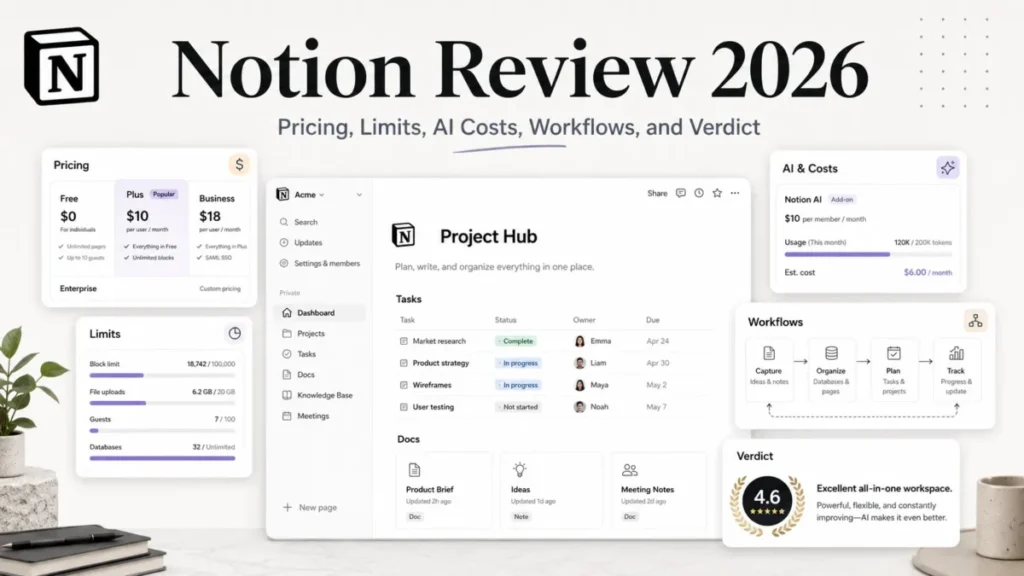
| Notion | Docs plus lightweight databases | Not published here | Yes | Per member |
| Superhuman Docs | Programmable operational docs | Not published here | Yes | Per Doc Maker |
| Confluence | Jira-connected knowledge | $5.42 per user/ | Yes, up to 10 users | Per user |
| ClickUp Docs | Docs tied to task delivery | $7 per user/ | Yes | Per user |
| Slite | Verified internal knowledge | $10 per user/ | No, trial only | Per user |
| Nuclino | Lightweight linked wiki | Not published here | Yes | Per user |
| Zoho Writer | Free conventional word processing | $0 | Yes | Per organization |
| ONLYOFFICE DocSpace | Secure external collaboration | $30 per admin/ | Yes, Startup | Per administrator |
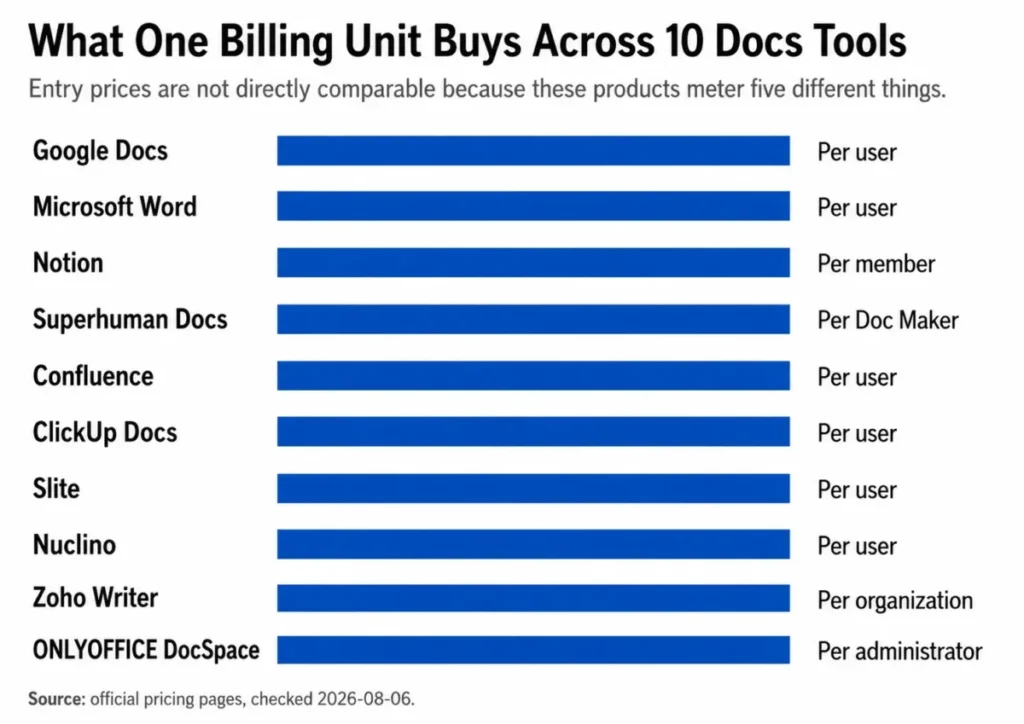
Three cells in the entry-price column say “Not published here” on purpose. Notion, Superhuman Docs, and Nuclino did not expose a reliable rendered US paid amount at the check date, so this guide publishes their free-plan facts and billing model instead of a number that could be wrong.
Source: entry price, free-plan status, and billing unit for each row come from the official pricing pages below.
The 10 Best Docs Tools in 2026
The order below runs from the broadest buyer need to the most specific. Each block carries the same decision fields, so the price and the first hard limit always sit in the same place.
1. Google Docs: Best for browser-first coauthoring

- Best for:
- 5 to 50 person distributed teams that need low-friction coauthoring and familiar link sharing.
- Avoid if:
- The output is a print-ready document that needs desktop-grade layout control or complex mail merge.
- Starting price:
- $7 per user/month on Google Workspace Business Starter with a one-year commitment and monthly billing.
- Practical tier:
- Business Starter is enough for document work; storage and admin depth are what push a team up the Business range.
- Free plan:
- No business free plan, so a pilot runs as a trial rather than a durable tier.
- First limit that bites:
- 30 GB pooled storage per user on Starter, followed by the 300-user ceiling across the Business plans.
- Better than Microsoft Word:
- Nothing to install, and a shared link is the entire onboarding process.
- Worse than Microsoft Word:
- Page layout, typography control, and complex DOCX round-tripping.
- Setup difficulty:
- Low. Domain verification and sharing defaults are the only real decisions.
- Hidden costs:
- Storage expansion, plus the step up from Starter once admin or compliance requirements arrive.
- Evidence status:
- Business Starter price, the 30 GB Starter storage allowance, and the 300-user Business ceiling verified on the Google Workspace pricing page, checked 2026-08-06.
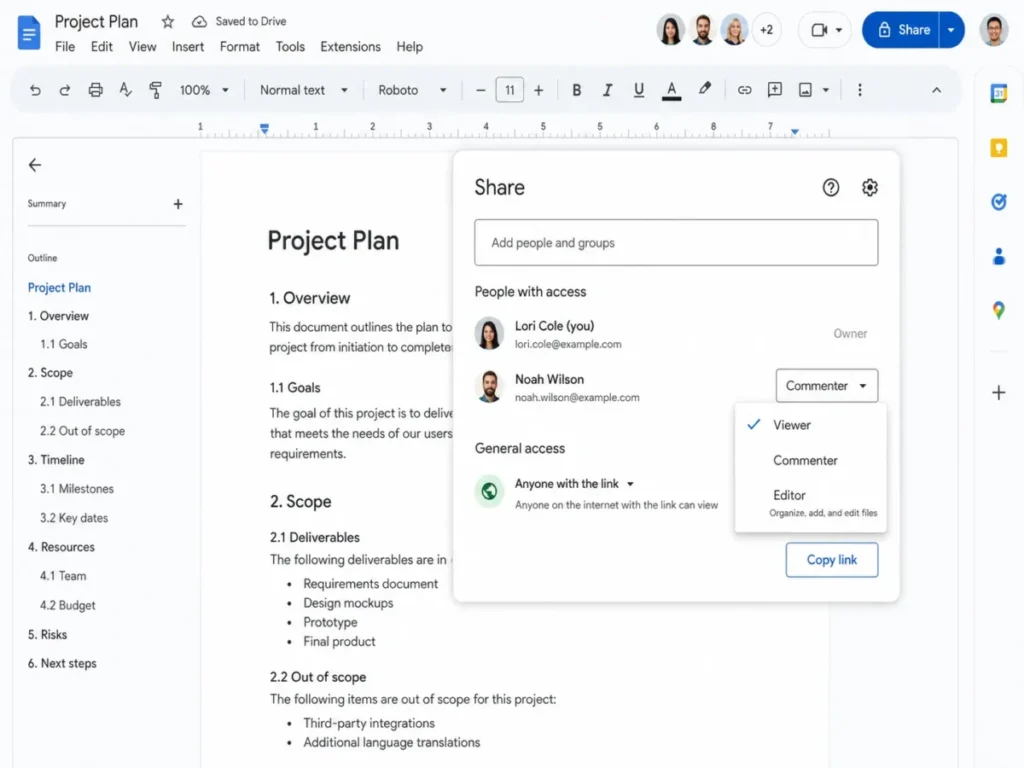
The reason Google Docs ranks first is not feature depth. It is that the documented workflow has almost no setup surface: create a document, invite by email or link, assign Viewer, Commenter, or Editor access, coedit, resolve suggestions, and restore an earlier version when a change goes wrong.
That shape suits a team whose real risk is adoption rather than formatting. If a document has to survive a client’s legal review inside Word, the round trip is where friction appears, and the Google Workspace review covers the suite that surrounds the editor.
The ceiling worth planning for is organizational rather than per-document. Business Starter, Standard, and Plus all stop at 300 users, so a company crossing that line is making an Enterprise decision, not a plan decision.
| Pros | Cons |
|---|---|
| The sharing model is understood by almost every knowledge worker, so training cost stays near zero | Page layout and typography control stay behind Microsoft Word |
| Version history and suggestion mode make review cycles reversible without file copies | Business plans stop at 300 users, which forces an Enterprise conversation at scale |
| Entry business pricing is $7 per user/ | Starter includes 30 GB pooled storage per user, which fills quickly with video and design files |
| Comments, mentions, and link permissions behave the same on mobile and desktop | There is no durable free business tier, so a pilot is a trial rather than a plan |
- Verdict:
- Choose Google Docs if the main job is several people editing one page quickly, and budget for the next Business tier the moment storage or admin control becomes the constraint.
2. Microsoft Word: Best for DOCX fidelity and offline editing

- Best for:
- Legal, finance, operations, and publishing teams that exchange DOCX files and need layout control or offline work.
- Avoid if:
- The team wants the simplest browser-only workspace, or a database-backed wiki rather than a file.
- Starting price:
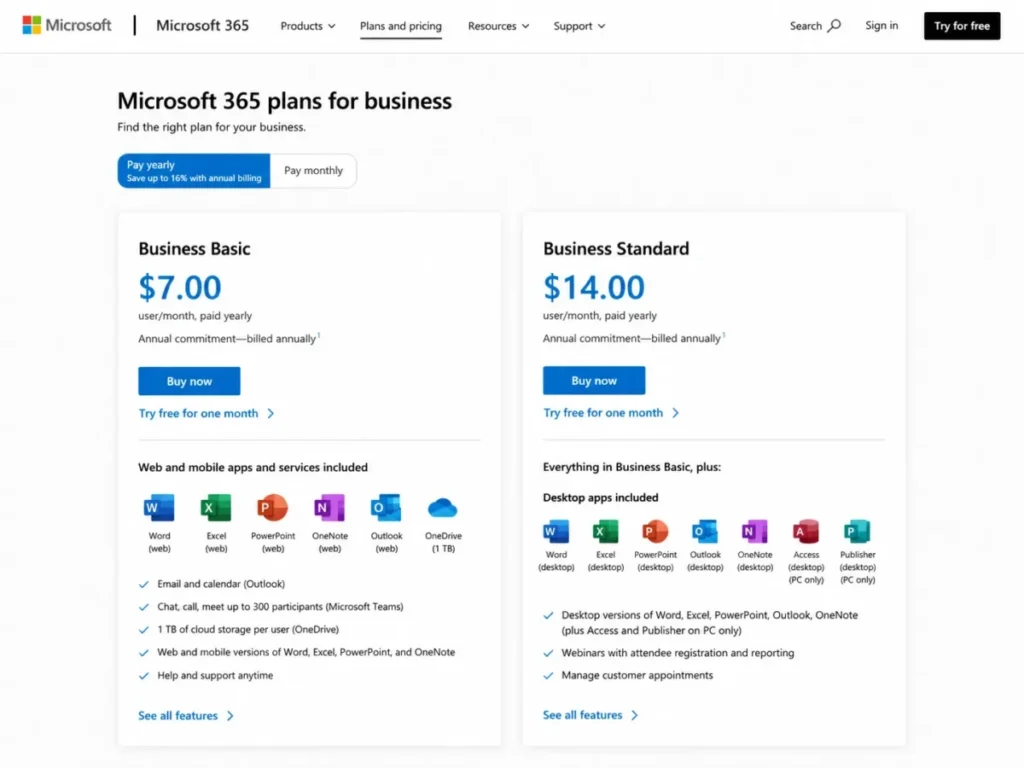
- $7 per user/month on Microsoft 365 Business Basic, paid yearly, for up to 300 users.
- Practical tier:
- Business Basic only if browser and mobile editing is genuinely enough; desktop Word requires a higher Microsoft 365 plan.
- Free plan:
- No business free plan, and the free web editors are not the desktop application.
- First limit that bites:
- The desktop application itself, which Business Basic does not include.
- Better than Google Docs:
- Track Changes depth, page layout, and DOCX fidelity when a file passes through several organizations.
- Worse than Google Docs:
- Setup friction, and a heavier path from link to first edit.
- Setup difficulty:
- Medium. Tenant setup, licensing, and OneDrive or SharePoint storage decisions come before the first document.
- Hidden costs:
- The plan upgrade needed for desktop apps, which is the single most common budgeting mistake in this category.
- Evidence status:
- The $7 Business Basic price, the 300-user ceiling, the 1 TB per-user storage, and the web-and-mobile-only app entitlement verified on the Microsoft 365 business pricing page, checked 2026-08-06.
Legal, finance, and publishing teams rarely choose Word for collaboration. They choose it because a DOCX with tracked changes, styles, numbering, and section breaks has to arrive intact at an organization that runs Word.
The buying trap sits in the entry plan. Business Basic lists at $7 per user/month and includes web and mobile versions of Word, Excel, PowerPoint, and Outlook plus 1 TB of cloud storage per user. It does not include the desktop Word application.
A team that reads that price as a desktop licence will budget the whole rollout wrong. Anyone whose real requirement is offline editing, advanced layout, or heavy mail merge needs to price a higher Microsoft 365 plan before comparing against anything else on this list.
| Pros | Cons |
|---|---|
| DOCX fidelity holds up across organizations that all run Word, which matters for contracts and filings | The advertised $7 Business Basic tier excludes the desktop Word application |
| Track Changes and review tooling remain the reference standard for redlining | Setup involves tenant, licensing, and storage decisions before the first document exists |
| Business Basic includes 1 TB of cloud storage per user | Browser-first teams carry suite complexity they will not use |
| Offline desktop editing is available once the plan supports the installed apps | Business plans stop at 300 users, the same ceiling as Google Workspace Business |
- Verdict:
- Choose Microsoft Word when the deliverable is a file rather than a link, and confirm which plan includes the installed desktop application before signing anything.
3. Notion: Best for docs, wiki, and lightweight databases on one page

- Best for:
- 5 to 30 person product, marketing, and startup teams that want narrative documents and structured work in the same place.
- Avoid if:
- The primary deliverable is a polished DOCX, or the team needs a durable multi-person free workspace.
- Starting price:
- Not published here. Paid plans are billed per member at the workspace level.
- Practical tier:
- A paid plan is effectively required the moment a second owner joins and content stops being disposable.
- Free plan:
- Yes, and it is genuinely useful for one person.
- First limit that bites:
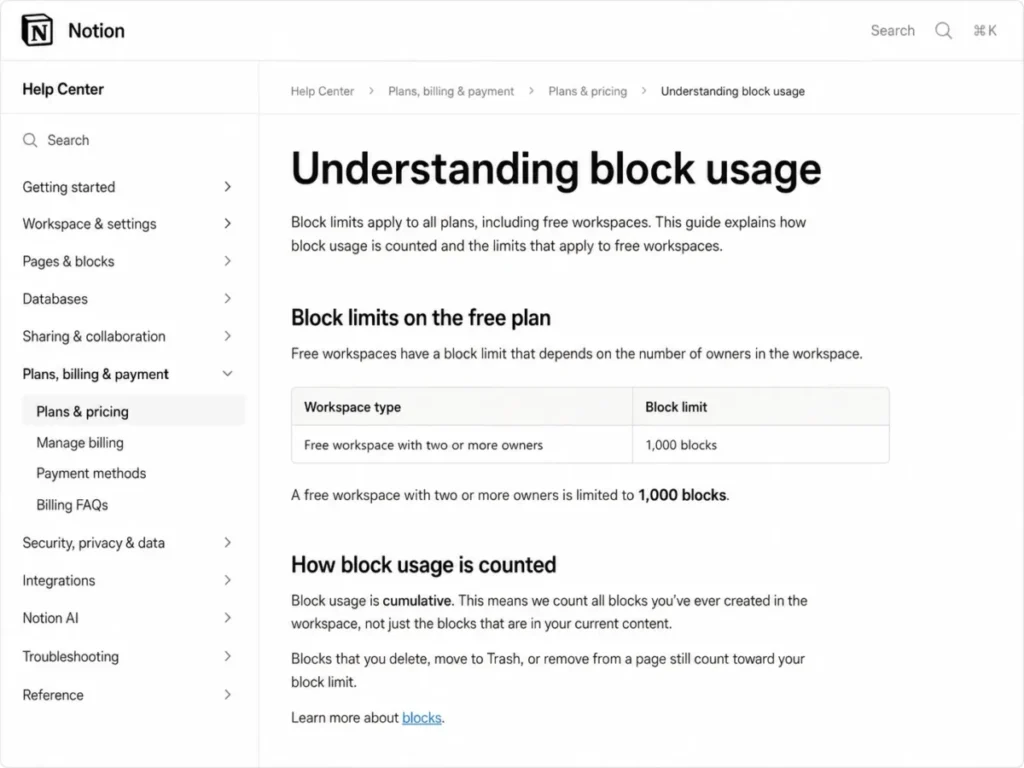
- 1,000 blocks in a free workspace with two or more owners, counted for the lifetime of the workspace.
- Better than Confluence:
- Page design, database views, and the speed of turning a document into a tracked list.
- Worse than Confluence:
- Space-level permission structure and the depth of Jira-connected workflows.
- Setup difficulty:
- Medium. The tool is easy to start and easy to sprawl, so page architecture is the real work.
- Hidden costs:
- The block ceiling arriving earlier than expected, because deleting content does not reduce the count.
- Evidence status:
- The multi-owner free-workspace block ceiling and its cumulative counting behavior verified in Notion’s block usage documentation, checked 2026-08-06.
Two things make Notion different from every conventional editor here. A page is assembled from blocks rather than typed into a fixed canvas, and a database can live inside the page so a written plan and its tracked work stay in one place.
That is also where the free plan turns into a trap. A free workspace with two or more owners is limited to 1,000 blocks, and the count is cumulative. Deleting a page does not give the blocks back, so an aggressive pilot can exhaust the allowance while the workspace still looks small.
Treat the multi-person free tier as an evaluation surface with an expiry rather than a plan. The full Notion review covers how database views behave once a workspace grows past a few hundred pages.
Teams weighing this against a structured wiki should read the Notion vs Confluence comparison before committing a knowledge base to either product.
| Pros | Cons |
|---|---|
| Documents, wikis, and database views live on one surface, so context does not scatter across tools | The free multi-owner workspace stops at 1,000 lifetime-created blocks |
| Page templates and linked databases turn a written plan into tracked work without a second tool | Deleting content does not reduce the block count, so the ceiling arrives without warning |
| Sharing extends to guests, which keeps light external review inside the same workspace | DOCX output is not the strength, so contract-style deliverables belong elsewhere |
| The block model makes restructuring a knowledge base cheaper than in a page-tree wiki | Page architecture needs an owner, or the workspace sprawls within a quarter |
- Verdict:
- Choose Notion when the document and the database are the same artifact, and plan the paid workspace before the second owner arrives rather than after.
4. Superhuman Docs: Best for programmable operational documents

- Best for:
- Operations and product teams where a small group builds documents that many people only read or edit.
- Avoid if:
- The team needs unrestricted shared documents on the free plan, or Windows desktop parity from day one.
- Starting price:
- Not published here. Paid plans bill only Doc Makers, while editors and viewers are free.
- Practical tier:
- A paid Doc Maker seat for each person who builds tables, formulas, buttons, or automations.
- Free plan:
- Yes, with a hard object and row ceiling on shared documents.
- First limit that bites:
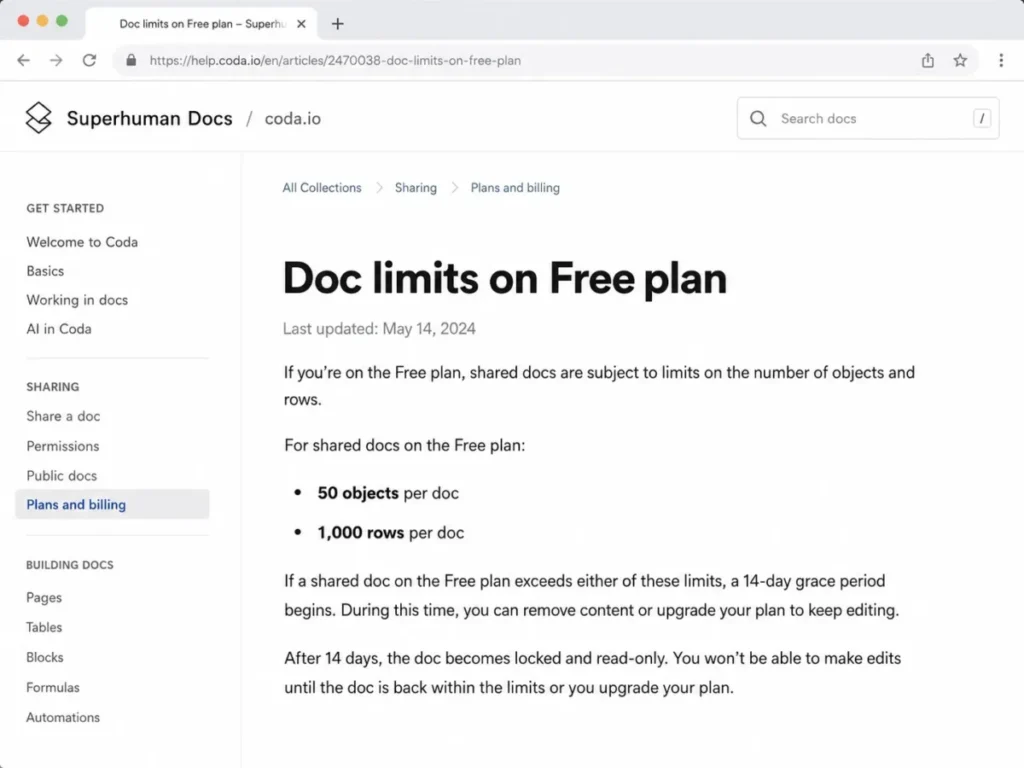
- 50 objects and 1,000 rows in a free shared document, after which a 14-day grace period ends in a locked, read-only document.
- Better than Notion:
- Formulas, buttons, and automations that turn a document into a working process.
- Worse than Notion:
- Breadth of the ecosystem and the volume of ready-made page patterns.
- Setup difficulty:
- Medium to high. The build is quick, but the maintainer role is real and needs naming.
- Hidden costs:
- Rebuilding a locked free document, plus the desktop application being Mac-only as of 2026-07-08.
- Evidence status:
- The free shared-document object and row ceilings and the 14-day grace behavior verified in the Superhuman Docs free-plan limits article, checked 2026-08-06.
On 2026-07-08, Coda became Superhuman Docs, and existing documents, workflows, tables, Packs, automations, and formulas carried over. Anyone still shortlisting from an older comparison page is reading a product name that no longer matches the pricing page, and the earlier Coda review is the same product under its previous name.
The billing model is the genuine differentiator. A team pays for Doc Makers, so three builders can serve forty free editors and viewers, which inverts the arithmetic of every per-user product on this list.
The free plan is where that arithmetic breaks. A shared free document is capped at 50 objects and 1,000 rows. Once it passes those limits a 14-day grace period runs before the document becomes locked and read-only, which is a poor place to discover a limit.
| Pros | Cons |
|---|---|
| Paid seats cover only Doc Makers, so a small build team can serve a large read-and-edit audience | A free shared document is capped at 50 objects and 1,000 rows |
| Tables, formulas, and buttons replace the spreadsheet that usually sits beside a process document | An over-limit free document becomes locked and read-only after a 14-day grace period |
| Packs and the assistant layer connect the document to systems the process already uses | The current desktop application is Mac-only as of 2026-07-08 |
| Existing Coda documents, automations, and formulas carried through the rename intact | The maintainer dependency is real, and an unowned build decays quickly |
- Verdict:
- Choose Superhuman Docs when a handful of builders need to serve many readers, and move off the free plan before a shared document becomes load-bearing.
5. Confluence: Best for Jira-connected technical and operational knowledge

- Best for:
- Software, IT, and product organizations already running Jira that need structured spaces and durable knowledge.
- Avoid if:
- A small team wants customizable permissions without paying, or a light standalone editor with no page tree.
- Starting price:
- $5.42 per user/month for Standard in the current US pricing calculator view, checked 2026-08-06.
- Practical tier:
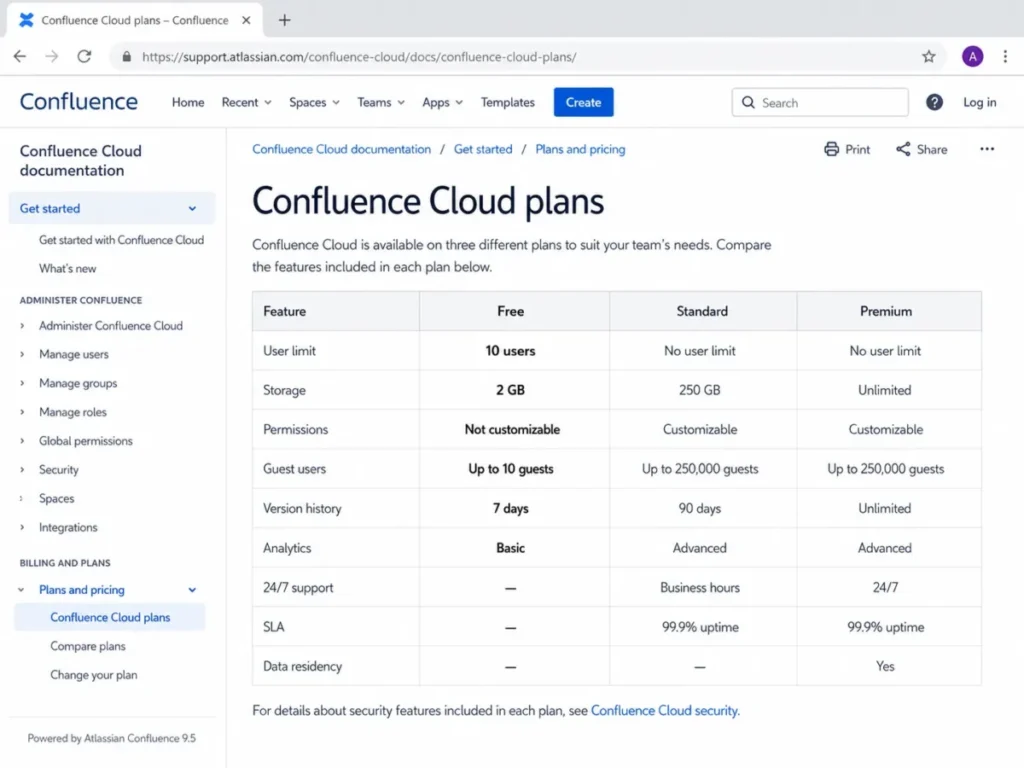
- Standard, because Free cannot express who may see or edit what.
- Free plan:
- Yes, for up to 10 users.
- First limit that bites:
- Permissions on Free are not customizable, well before the 10-user and 2 GB storage ceilings matter.
- Better than Notion:
- Space structure, page-tree governance, and the depth of the Jira relationship.
- Worse than Notion:
- Page-level design freedom and the speed of building an ad hoc database view.
- Setup difficulty:
- Medium to high. Space design, permission scheme, and template choices come before the first useful page.
- Hidden costs:
- Automation runs on Free are capped at 10 rule executions per month, so anything scheduled needs a paid plan.
- Evidence status:
- The 10-user Free cap, the 2 GB storage allowance, the 10 monthly automation runs, and the non-customizable Free permissions are verified in Atlassian’s Confluence Cloud plan documentation. Standard pricing is verified on the Confluence pricing page, checked 2026-08-06.
Buying Confluence is usually a decision about the surrounding system rather than the editor. Spaces, page trees, templates, databases, whiteboards, and linked Jira work are the reason it stays in place for years, and the Confluence review goes deeper on how that structure behaves at scale.
The free plan is the part most shortlists misread. Ten users and 2 GB of storage sound generous for a pilot, but permissions are not customizable on Free, so any content that should be visible to some people and not others forces the paid step immediately.
That single restriction is the real upgrade trigger, not headcount. A ten-person team with one confidential space is already a Standard customer at $5.42 per user/month.
| Pros | Cons |
|---|---|
| Space and page-tree structure keeps a large knowledge base navigable for years | Free permissions are not customizable, which blocks any confidential space |
| Native Jira linking removes the copy-paste layer between planning and documentation | Free is capped at 10 users and 2 GB of file storage |
| Templates, databases, and whiteboards cover most internal documentation patterns | Free automation stops at 10 rule runs per month |
| Standard pricing is the lowest per-user paid entry among the wiki-style tools here | Space design and permission schemes make setup slower than a page-based tool |
- Verdict:
- Choose Confluence if Jira is already the system of record, and price Standard from the start whenever any space needs restricted access.
6. ClickUp Docs: Best for documents attached to delivery work

- Best for:
- 5 to 50 person agencies and operations teams that want documents living beside tasks and projects.
- Avoid if:
- The team wants a neutral document repository without adopting a work-management system around it.
- Starting price:
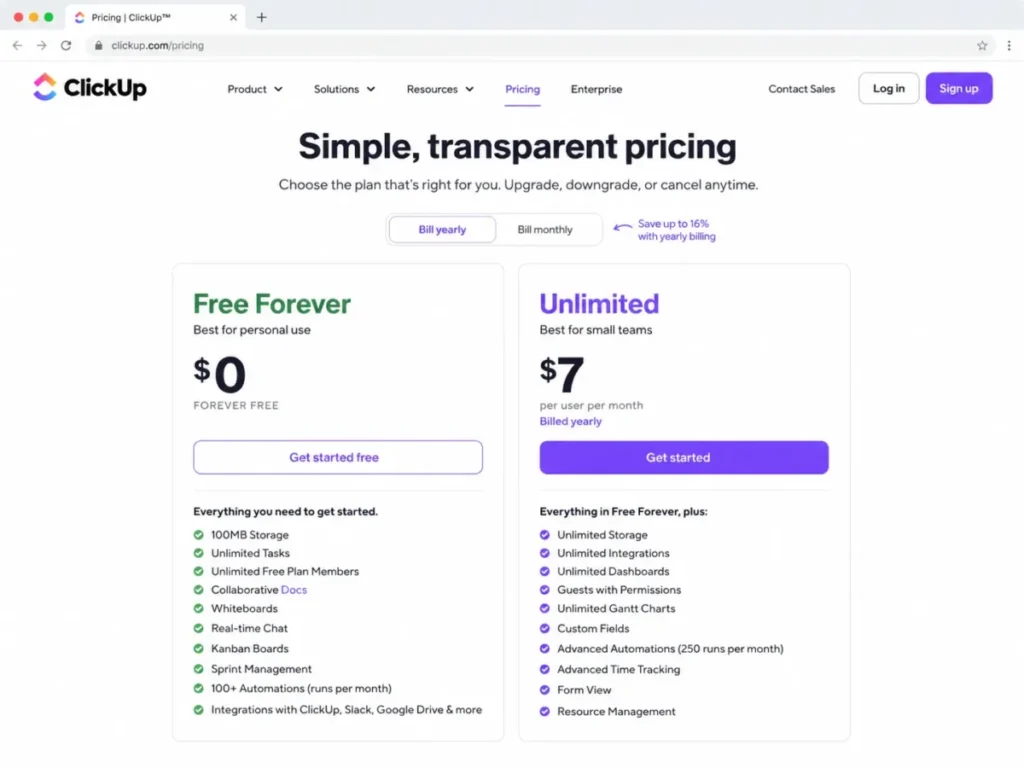
- $7 per user/month on Unlimited, billed yearly.
- Practical tier:
- Unlimited, because Free-plan feature allowances do not reset once consumed.
- Free plan:
- Yes, and collaborative Docs are included in it.
- First limit that bites:
- Whichever plan-based feature allowance runs out first, since ClickUp states those uses do not reset.
- Better than Google Docs:
- A document can create, reference, and track the work it describes.
- Worse than Google Docs:
- Neutrality, because the document arrives with a project hierarchy attached.
- Setup difficulty:
- Medium. Workspace, space, and folder structure decisions come before documents feel organized.
- Hidden costs:
- The upgrade forced by an exhausted free allowance rather than by headcount growth.
- Evidence status:
- The $0 Free Forever tier including collaborative Docs, the $7 Unlimited price billed yearly, and the non-resetting free feature-use behavior verified on the ClickUp pricing page, checked 2026-08-06. The exact Free storage allowance is not stated here because current official ClickUp pages disagree on the figure.
Documents inside ClickUp are not trying to beat a word processor. They are trying to remove the gap between a written plan and the tasks that deliver it, which is why a page can embed and update the work it describes.
The free tier deserves careful reading. ClickUp states that plan-based feature uses do not reset, and that once a limit is reached the user cannot edit or create new items using that feature, so a free workspace degrades rather than throttles.
That behavior makes the upgrade trigger unpredictable in timing but certain in direction. The ClickUp review covers how the wider hierarchy behaves once documents, tasks, and dashboards share one workspace.
| Pros | Cons |
|---|---|
| Documents sit inside the project hierarchy, so a plan and its tasks stop drifting apart | Free-plan feature uses do not reset, and hitting a limit blocks editing with that feature |
| Collaborative Docs are included on the free tier rather than gated behind a paid plan | The exact Free storage allowance is stated inconsistently across current official pages |
| Unlimited at $7 per user/ | A neutral document library is not what this product is optimized to be |
| Templates and task embedding suit repeatable agency and operations delivery | Workspace structure decisions arrive before the first document feels organized |
- Verdict:
- Choose ClickUp Docs when the document is part of delivery rather than a standalone artifact, and treat the free tier as a pilot with a one-way limit.
7. Slite: Best for keeping internal knowledge reviewed and trustworthy

- Best for:
- 20 to 200 person remote companies that need owned, verified knowledge rather than a general office suite.
- Avoid if:
- A permanent free tier is a requirement, or the team needs desktop publishing controls.
- Starting price:
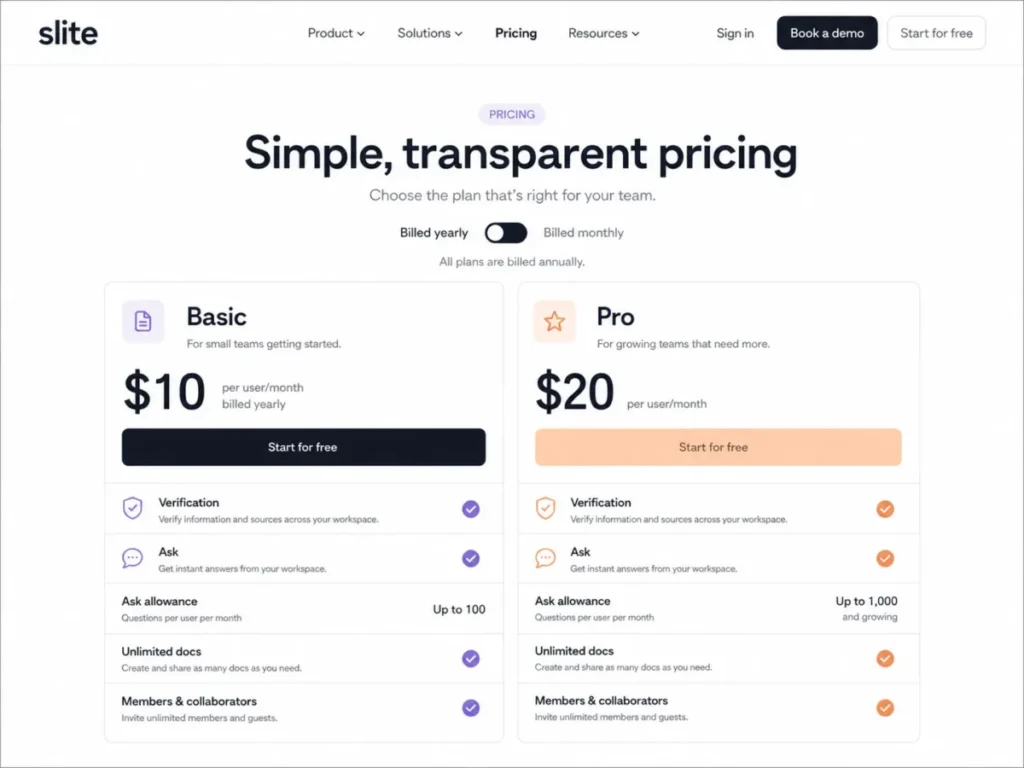
- $10 per user/month on Basic, billed yearly.
- Practical tier:
- Basic for most teams; Pro at $20 per user/month billed yearly for heavier question volume and deeper controls.
- Free plan:
- No permanent free plan. Access starts as a trial.
- First limit that bites:
- Ask is capped at 30 questions per seat per month on Basic, resetting on the first day of the next month.
- Better than Nuclino:
- Verification workflows, ownership, and a management view of what has gone stale.
- Worse than Nuclino:
- Cost of entry, since there is no free tier to grow into.
- Setup difficulty:
- Low to medium. The editor is simple; assigning owners and verification expectations is the work.
- Hidden costs:
- The seat count itself, because every reader who asks questions needs a paid seat.
- Evidence status:
- The Basic and Pro prices, the included verification, knowledge-management, MCP, and API capabilities, and the 30-question monthly Ask cap on Basic verified on the Slite pricing page, checked 2026-08-06.
Most knowledge bases fail quietly. Pages stay searchable long after they stop being true, and the search box happily returns them.
Slite treats that as the product problem rather than a customer discipline problem. Ownership, verification status, a knowledge management panel, and an Ask layer are all on Basic, which is a different proposition from bolting a chatbot onto an unmaintained wiki. The Slite review covers how verification is assigned in practice.
The cost needs modelling before the trial starts. Forty seats at the Basic rate of $10 per user/month works out at $400 per month, and the 30-question monthly Ask cap sets the point where Pro becomes the honest comparison.
| Pros | Cons |
|---|---|
| Document verification and ownership make staleness visible instead of invisible | There is no permanent free plan, so evaluation runs on a trial clock |
| Ask, the knowledge management panel, MCP, and API access are all included on Basic | Basic Ask is capped at 30 questions per seat per month |
| Entry pricing is predictable per user with no add-on credit system to model | Entry cost is higher than every other wiki-style product on this list |
| The editor stays deliberately simple, which keeps contribution friction low | Desktop publishing and DOCX-grade formatting are outside its scope |
- Verdict:
- Choose Slite when the failure mode to prevent is untrustworthy internal knowledge, and price Pro if question volume is the point of buying it.
8. Nuclino: Best lightweight team wiki

- Best for:
- 3 to 20 person teams that want linked pages and near-zero administration.
- Avoid if:
- The team needs deep automation, granular governance, or a large free knowledge base.
- Starting price:
- Not published here, because the crawled US pricing page did not reliably render paid amounts at the check date.
- Practical tier:
- A paid plan, since the free item ceiling arrives well before a real knowledge base is finished.
- Free plan:
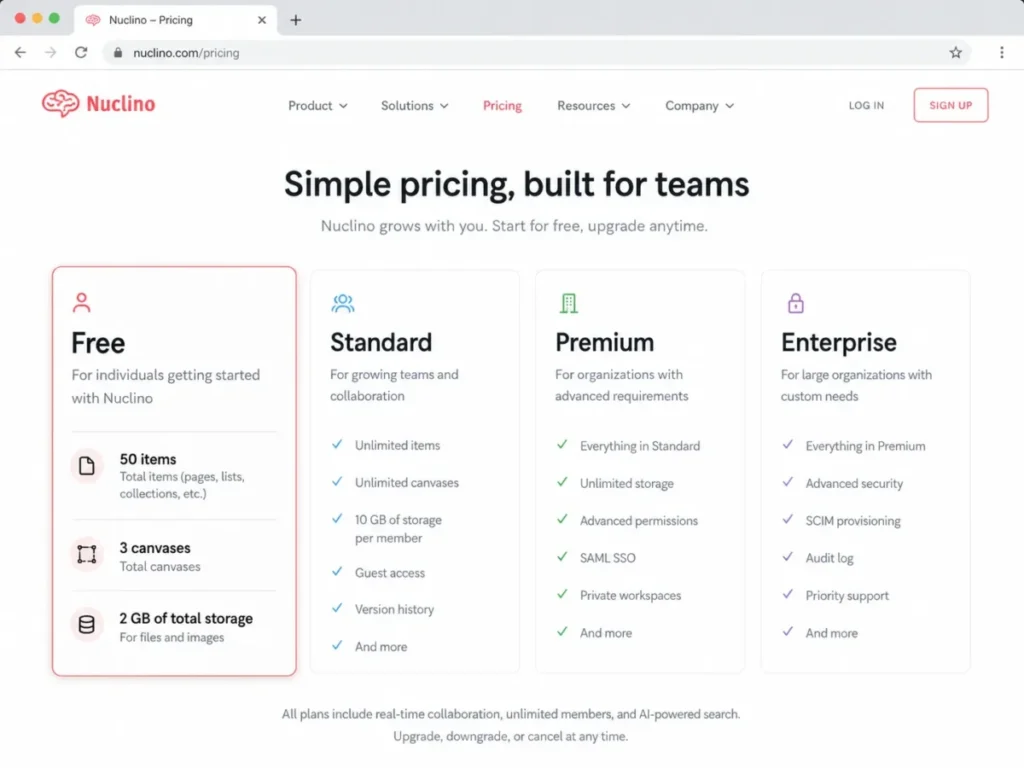
- Yes, capped at 50 items, 3 canvases, and 2 GB of total storage.
- First limit that bites:
- The 50-item ceiling, which a single onboarding handbook can consume on its own.
- Better than Confluence:
- Time from empty workspace to a usable set of linked pages.
- Worse than Confluence:
- Permission depth, automation, and anything resembling governance at scale.
- Setup difficulty:
- Low. Create a workspace, add items, link them, and invite people.
- Hidden costs:
- Free PDF exports carry an “Exported from Nuclino” footnote, so client-facing output needs a paid plan.
- Evidence status:
- The 50-item, 3-canvas, and 2 GB free ceilings and the free PDF export footnote verified on the Nuclino pricing page, checked 2026-08-06.
Speed is the whole argument here. Items open instantly, internal links are trivial to create, and collections, board, and graph views give structure without a space-and-permission model to design first.
The free plan is best read as a demonstration rather than a tier. Fifty items sounds workable until a team writes an onboarding handbook, at which point the ceiling and the export footnote both arrive at once, and the Nuclino review covers where that ceiling lands for different content types.
| Pros | Cons |
|---|---|
| Fast editor and instant internal linking keep contribution friction genuinely low | Free stops at 50 items, 3 canvases, and 2 GB of total storage |
| Collections, board, and graph views add structure with no permission scheme to design | Free PDF exports carry an “Exported from Nuclino” footnote |
| Version history and simple administration suit teams with no dedicated owner | Governance, automation, and granular permissions are thin next to Confluence |
- Verdict:
- Choose Nuclino when speed and simplicity matter more than control, and expect the paid step within the first serious documentation push.
9. Zoho Writer: Best free conventional word processor

- Best for:
- Individuals and budget-conscious businesses that need a conventional word processor with broad file-format support.
- Avoid if:
- The team wants a company wiki, or runs automation-heavy document generation without modelling credit use.
- Starting price:
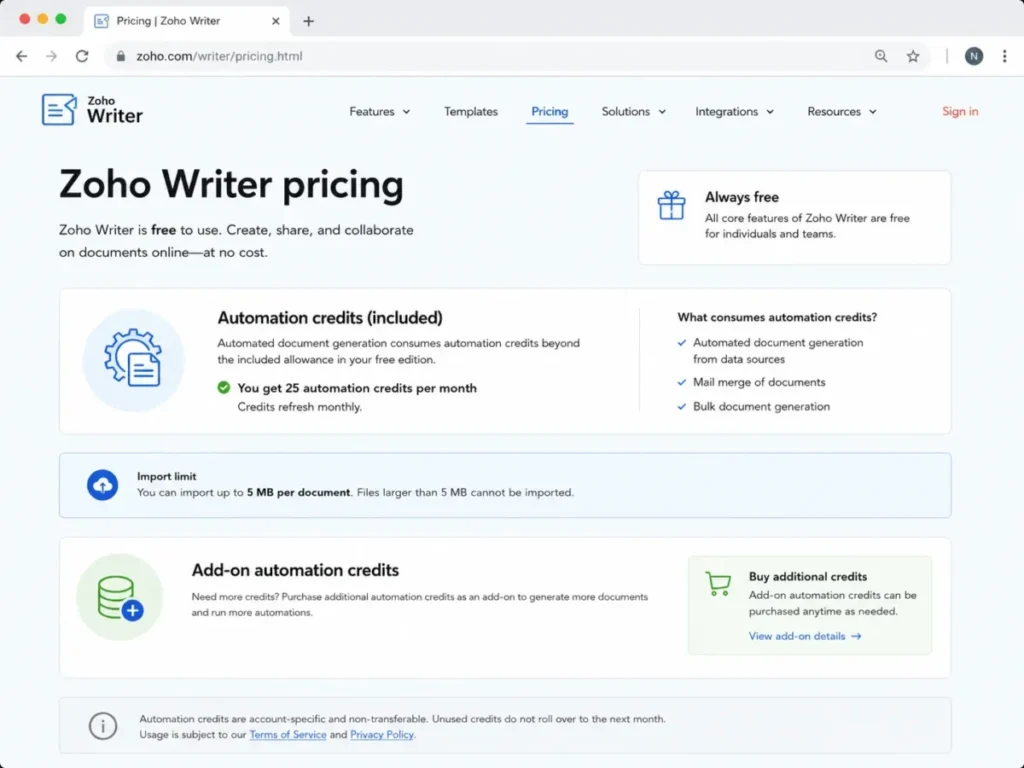
- $0. Writer itself is free for individuals and organizations.
- Practical tier:
- The free edition, with automation credits purchased separately only if merge volume demands it.
- Free plan:
- Yes, and it is a full editor rather than a viewer.
- First limit that bites:
- Document automation credits once the included monthly allowance runs out.
- Better than Google Docs:
- Import and export breadth across office and publishing formats at no cost.
- Worse than Google Docs:
- Ecosystem gravity, since collaborators usually already live in one of the two big suites.
- Setup difficulty:
- Low. An account and a document are the whole setup.
- Hidden costs:
- Add-on automation credits, plus import ceilings of 50 MB for DOCX files and 10 MB for other supported formats.
- Evidence status:
- The free editing entitlement, the credit-based automation model, and the 50 MB DOCX and 10 MB other-format import ceilings verified on the Zoho Writer pricing page, checked 2026-08-06.
Free here means the editor, not the automation. Writing, real-time collaboration, review with Track Changes, and DOCX or ODT round-tripping cost nothing, which makes this the strongest zero-budget option on the list.
Document generation is the separate cost centre. Merging business data into documents consumes credits once the included monthly allowance is spent, so a team automating contracts or invoices should model that volume before treating the product as free.
Import ceilings matter during migration. A 50 MB DOCX limit is generous for text and thin for image-heavy manuals, and teams already inside Zoho’s wider suite can check the Zoho CRM review for how the surrounding stack fits.
| Pros | Cons |
|---|---|
| The core editor is free for organizations, not just individuals | Automated document generation consumes credits after the included allowance |
| Import and export cover office and publishing formats without a paid tier | Imports are capped at 50 MB for DOCX and 10 MB for other formats |
| Track Changes and review tooling exist at the free level | It is a word processor, not a knowledge base, so wiki needs go unmet |
- Verdict:
- Choose Zoho Writer when the budget is zero and the job is conventional documents, and price automation credits separately the moment merge volume becomes a workflow.
10. ONLYOFFICE DocSpace: Best for secure room-based external collaboration

- Best for:
- Organizations collaborating with many external people while paying for a small administrator group, or teams evaluating an on-premises deployment.
- Avoid if:
- The team wants generous free cloud storage or a simple per-user subscription to compare like for like.
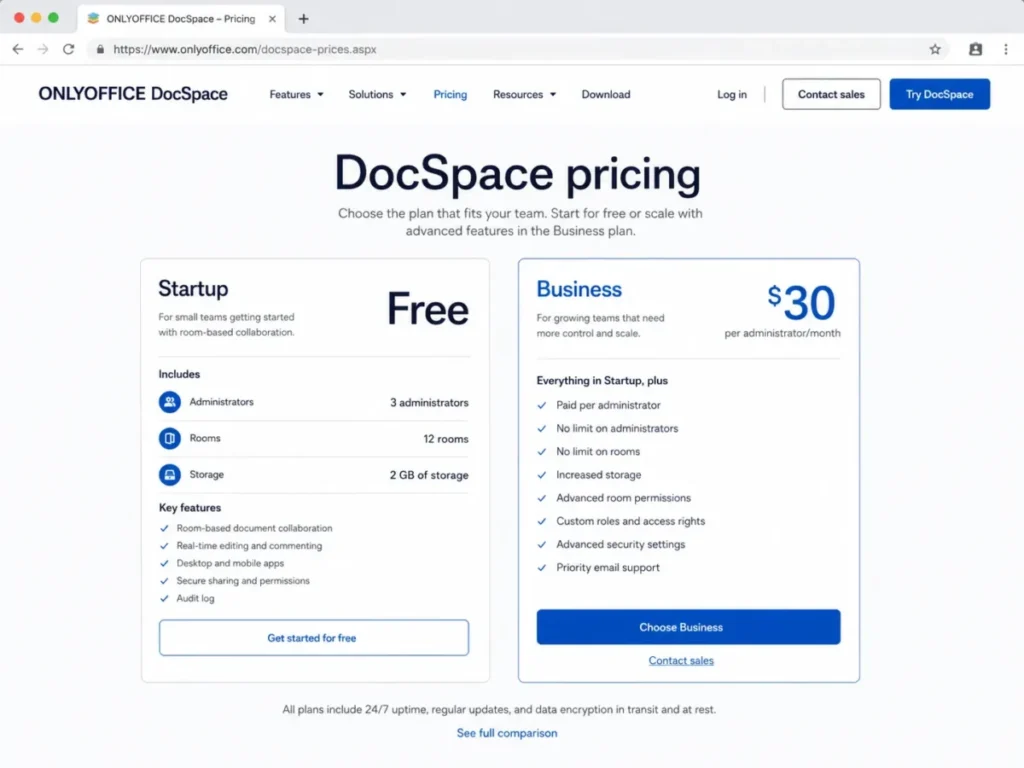
- Starting price:
- $30 per admin/month list price for Business, with a temporary reduced rate of $20 per admin/month shown on the same page, checked 2026-08-06.
- Practical tier:
- Business, once room count, administrator count, or single sign-on becomes the constraint.
- Free plan:
- Yes. The Startup plan costs nothing.
- First limit that bites:
- 3 administrators and 12 rooms on Startup, followed by its 2 GB storage allowance.
- Better than Google Docs:
- External collaboration boundaries, because a room is the unit of access rather than a file.
- Worse than Google Docs:
- Familiarity, and the amount of explaining a new collaborator needs on first contact.
- Setup difficulty:
- Medium. Room types, roles, and invitation policy are decisions that come before any content.
- Hidden costs:
- Storage beyond the Startup allowance, and the administrator count itself, which is the entire billing basis.
- Evidence status:
- The free Startup plan, its 3-administrator, 12-room, and 2 GB ceilings, and the $30 list and $20 temporary Business rates are verified on the ONLYOFFICE DocSpace pricing page. Unlimited users and guests are stated on the DocSpace product overview, checked 2026-08-06.
Pricing per administrator changes the comparison completely. Users and guests are unlimited, so a company running heavy external collaboration can support a large audience while paying for two or three administrators.
Rooms are the organizing idea. A DocSpace holds rooms, each room carries its own type and permissions, and files live inside that boundary rather than inside a folder tree with inherited sharing.
The Startup plan is the constraint to watch. Three administrators, twelve rooms, and 2 GB of storage are enough to prove the model and not enough to run it, and single sign-on sits on Business.
| Pros | Cons |
|---|---|
| Unlimited users and guests make external collaboration cost-predictable | Startup is capped at 3 administrators, 12 rooms, and 2 GB of storage |
| Rooms give each external group its own permission boundary instead of per-file sharing | Per-administrator billing cannot be compared to per-user pricing without modelling both |
| Cloud and on-premises deployment are both available for regulated environments | Single sign-on requires the Business plan |
- Verdict:
- Choose ONLYOFFICE DocSpace when many external collaborators must be served by few administrators, and model administrator count rather than headcount before comparing its price to anything else here.
Pricing and Limits: Starting Price vs Practical Tier
Entry price answers almost nothing in this category. The number that matters is what ten people cost on the tier a team lands on, and which unit each vendor is counting.
| Tool | Practical tier | Price basis | 10-seat monthly cost | Main hidden cost |
|---|---|---|---|---|
| Google Docs | Workspace Business Starter | $7 per user/ | $70 | Storage expansion beyond 30 GB per user |
| Microsoft Word | Business Basic, or higher for desktop apps | $7 per user/ | $70 | The plan upgrade required for desktop Word |
| Notion | Paid workspace once a second owner joins | Per member, amount not published here | Not published here | Block ceiling reached during the free pilot |
| Superhuman Docs | Paid Doc Maker seats only | Per Doc Maker, amount not published here | Not published here | Rebuilding a locked free shared document |
| Confluence | Standard | $5.42 per user/ | $54.20 | Automation runs and permissions gated on Free |
| ClickUp Docs | Unlimited | $7 per user/ | $70 | Exhausted free feature allowances that never reset |
| Slite | Basic, or Pro for question volume | $10 per user/ | $100 | Every reader needs a paid seat |
| Nuclino | Paid plan, amount not published here | Per user, amount not published here | Not published here | Free export footnote on client-facing PDFs |
| Zoho Writer | Free edition | $0 | $0 | Automation credits beyond the included allowance |
| ONLYOFFICE DocSpace | Business | $30 per admin/ | Not per-seat comparable | Storage, plus the administrator count itself |
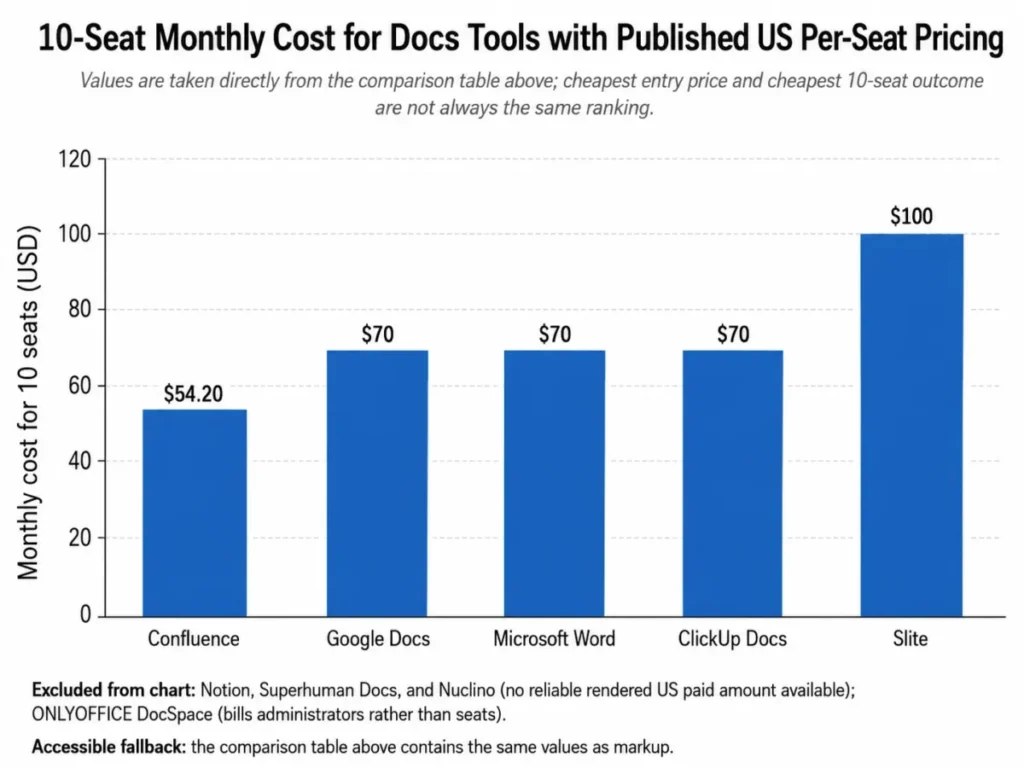
Each ten-seat figure is simple arithmetic on the published rate: ten seats multiplied by the per-user price, before tax, add-ons, and any contract-specific terms. Confluence Standard is the cheapest published outcome at $54.20 per month, and Slite is the most expensive at $100, which is the cost of buying verification rather than editing.
Two products refuse the comparison entirely. Superhuman Docs bills Doc Makers rather than people, and ONLYOFFICE DocSpace bills administrators while users and guests stay unlimited, so both can be far cheaper or far more expensive than a per-seat product depending on team shape.
Teams pricing the wider suites should also check Google Workspace pricing for the tiers above Starter.
Free-Plan Cliffs and What Happens When You Hit Them
A free plan is only useful if a team knows where it stops and what stopping looks like.
| Tool | Free ceiling | Does the allowance reset? | Behavior at the limit | Upgrade trigger |
|---|---|---|---|---|
| Notion | 1,000 blocks in a workspace with two or more owners | No, the count is cumulative for the workspace lifetime | Not publicly documented in the block usage article | A second owner joining the workspace |
| Superhuman Docs | 50 objects and 1,000 rows per shared document | Not applicable, the cap is per shared document | Locked and read-only after a 14-day grace period | Any shared document becoming load-bearing |
| Confluence | 10 users, 2 GB storage, 10 automation runs per month | Automation runs reset monthly | Not publicly documented per limit type | Needing customizable permissions |
| ClickUp Docs | Plan-based feature allowances | No, ClickUp states free feature uses do not reset | Editing and creating with that feature is blocked | Any allowance running out |
| Nuclino | 50 items, 3 canvases, 2 GB total storage | No, the ceilings are absolute | Not publicly documented | Writing a full handbook, or needing clean PDF export |
| ONLYOFFICE DocSpace | 3 administrators, 12 rooms, 2 GB storage | No, the ceilings are absolute | Not publicly documented | A fourth administrator, a thirteenth room, or single sign-on |
| Zoho Writer | Included monthly automation credits | Yes, the included allowance is monthly | Automation requires purchased credits | Recurring merge or generation volume |
| Google Docs | No business free plan | Not applicable | Not applicable | The pilot ending |
| Microsoft Word | No business free plan | Not applicable | Not applicable | The pilot ending |
| Slite | No permanent free plan | Not applicable | Not applicable | The trial ending |
Four of those cells say “not publicly documented” on purpose. Vendors publish the number far more often than they publish what happens when a team crosses it, and guessing that behavior would be the kind of invented detail that gets a migration planned around a fiction.
Two behaviors are documented, and both are severe. A Notion free workspace counts blocks cumulatively, so deleting content does not buy headroom, and a Superhuman Docs free shared document becomes read-only after its grace period, which turns a process document into an artifact.
The practical rule is to decide the paid tier during the pilot rather than at the ceiling. Teams comparing workspace pricing directly can start from Notion pricing plans and work backwards from the block model.
Why the Billing Unit Matters More Than the Entry Price
| Tool | Billing unit | Who is billed | What to model before buying |
|---|---|---|---|
| Google Docs | Per user | Everyone with an account | Headcount at signature and in twelve months |
| Microsoft Word | Per user | Everyone with an account | Headcount, plus who genuinely needs desktop apps |
| Notion | Per member | Every workspace member, guests treated separately | Member count against guest count |
| Superhuman Docs | Per Doc Maker | Only the people who build documents | How many builders versus editors and viewers |
| Confluence | Per user | Everyone with access to the site | Headcount and the tier that opens permissions |
| ClickUp Docs | Per user | Everyone in the workspace | Headcount across the whole work-management suite |
| Slite | Per user | Everyone who reads or asks questions | Total seats, since readers are not free |
| Nuclino | Per user | Everyone with workspace access | Headcount against the free item ceiling |
| Zoho Writer | Per organization | Nobody for core editing | Automation credit consumption only |
| ONLYOFFICE DocSpace | Per administrator | Only administrators, users and guests unlimited | Administrator count and room count |
Two teams of forty people can pay wildly different amounts for the same category. Forty Slite seats bill forty times, forty people using documents built by three Superhuman Docs makers bill three times, and forty people collaborating in ONLYOFFICE DocSpace rooms managed by two administrators bill twice.
That is the single most useful thing to work out before a trial. Count the builders, the readers, the administrators, and the external guests separately, then apply each vendor’s unit rather than its headline.
The ClickUp pricing plans breakdown on this site shows how a per-user model behaves once one workspace carries documents, tasks, and dashboards.
Source: the billing basis for each row is taken from the vendor’s own plan page, checked 2026-08-06.
Feature and Governance Gates by Plan
| Tool | Real-time coauthoring | Structured tables or database | Assisted search or AI layer | Permissions and identity gate |
|---|---|---|---|---|
| Google Docs | Included on Business plans | Limited to in-document tables | Included at the suite level | Admin controls deepen up the Business range |
| Microsoft Word | Included with web and mobile apps | Limited to in-document tables | Included at the suite level | Tenant and licensing controls from the start |
| Notion | Included on all plans | Yes, databases are native | Included as a paid workspace capability | Guest and member roles, deeper controls on higher plans |
| Superhuman Docs | Included on all plans | Yes, tables and formulas are native | Docs AI and the assistant layer are product capabilities | Doc Maker versus editor and viewer roles |
| Confluence | Included on all plans | Yes, databases are a product capability | Atlassian intelligence sits above the base plans | Customizable permissions require a paid plan |
| ClickUp Docs | Included on all plans | Yes, through tasks and views | Included as a paid workspace capability | Roles and admin controls scale with the paid tiers |
| Slite | Included on all plans | Limited, tables inside documents | Ask is included on Basic with a monthly question cap | Ownership and verification roles from Basic |
| Nuclino | Included on all plans | Limited, items and collections | Limited compared with the wiki specialists here | Simple workspace-level administration |
| Zoho Writer | Included at no cost | Limited to in-document tables | Automation is credit-based rather than conversational | Organization-level controls |
| ONLYOFFICE DocSpace | Included in rooms | Limited to in-document tables | Not the product’s positioning | Single sign-on requires the Business plan |
Three gates decide most purchases in this category, and none of them is the editor. Customizable permissions in Confluence, single sign-on in ONLYOFFICE DocSpace, and the paid Doc Maker seat in Superhuman Docs are each the moment a free plan stops being viable.
The fourth gate is quieter and usage-based. Slite meters Ask at 30 questions per seat per month on Basic, which is generous for occasional lookups and thin for a support team that wants the knowledge base to answer instead of a colleague.
Teams treating that answer layer as the main purchase should compare it against dedicated knowledge base software options before committing.
Source: capability availability for each row is read from the official plan and documentation pages below, checked 2026-08-06.
Setup and Migration Difficulty
| Tool | Setup difficulty | Why it lands there | Migration risk to check first |
|---|---|---|---|
| Google Docs | Low | Domain verification and sharing defaults are the main decisions | Formatting drift when DOCX files round-trip |
| Microsoft Word | Medium | Tenant, licensing, and storage choices precede the first document | Which plan includes the installed desktop application |
| Notion | Medium | Easy to start, and easy to sprawl without page architecture | Block consumption during a bulk import |
| Superhuman Docs | Medium to high | Building tables, formulas, and automations needs a named owner | Free shared-document ceilings during a pilot |
| Confluence | Medium to high | Space design and permission schemes come before useful pages | Unsupported objects and shapes when importing office files |
| ClickUp Docs | Medium | Workspace and folder structure decisions arrive early | Free feature allowances consumed by the import itself |
| Slite | Low to medium | The editor is simple, and ownership assignment is the real work | Deciding who verifies each imported document |
| Nuclino | Low | Create a workspace, add items, and link them | The 50-item ceiling during a bulk import |
| Zoho Writer | Low | An account and a document complete the setup | Import ceilings of 50 MB for DOCX and 10 MB for other formats |
| ONLYOFFICE DocSpace | Medium | Room types, roles, and invitation policy come before content | Rebuilding folder sharing as room permissions |
Migration failures in this category are rarely about text. They are about the objects around the text: comments, permissions, attachments, embedded shapes, and automations, and official migration documentation does not cover every object type for every source platform.
Run a pilot import of the ugliest twenty documents before committing. If comments, permissions, and attachments survive those, the rest of the library will follow, and if they do not, the discovery costs a weekend rather than a quarter.
Source: setup ratings are editorial judgments, while the plan facts behind each migration risk come from the pages below, checked 2026-08-06.
- Google Workspace, Microsoft 365 business, Notion help documentation
- Superhuman Docs help center, Confluence plan documentation, ClickUp plans
- Slite plans, Nuclino plans, Zoho Writer plans, ONLYOFFICE DocSpace overview
Which Docs Tool Should You Choose?
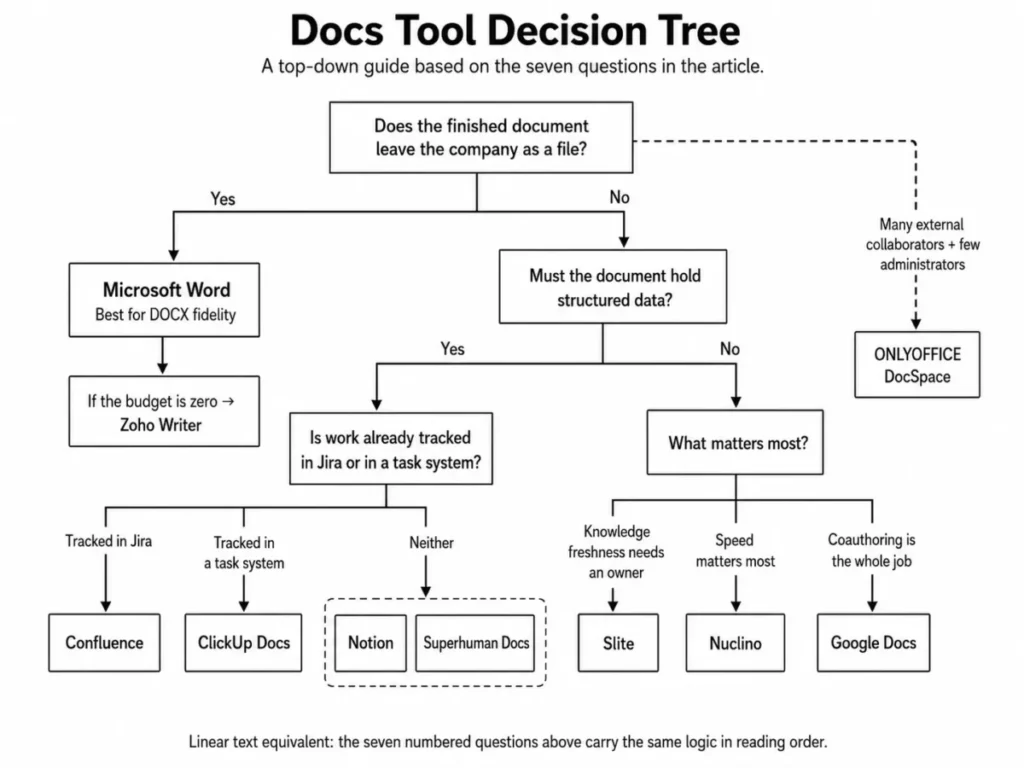
Work through these seven questions in order. The first one that produces a hard answer usually eliminates six of the ten products.
- What is the deliverable? A file that leaves the company points to Microsoft Word or Zoho Writer, while a page that stays inside it points to the wiki group.
- Who has to open it? External reviewers with no account push toward ONLYOFFICE DocSpace rooms or Google Docs link sharing.
- Does the document need to hold structured data? A yes here removes the conventional editors and leaves Notion, Superhuman Docs, Confluence, and ClickUp Docs.
- Is the work already tracked somewhere? Jira points to Confluence, and a task-centric delivery process points to ClickUp Docs.
- Who maintains the knowledge? If nobody owns freshness at all, Slite is the only product here built to force that decision.
- What is the billing unit against the team shape? Count builders, readers, administrators, and guests separately before comparing any headline price.
- What governance is non-negotiable? Customizable permissions, single sign-on, and audit expectations each move the practical tier upward before headcount does.
Two cohorts deserve a shortcut. A team under ten people with no compliance requirement should start with Google Docs or Nuclino and revisit in six months. A team above a hundred people with a Jira dependency should start at Confluence Standard and treat everything else as a supplement.
Common Mistakes When Choosing a Docs Tool
Comparing entry prices across different billing units. Five of these products bill per user, one bills members, one bills Doc Makers, one bills administrators, and one bills nothing for the editor. A price table sorted by the first column ranks the wrong thing.
Treating a free plan as a tier. Notion counts blocks for the lifetime of the workspace, Superhuman Docs locks an over-limit shared document, and ClickUp states that free feature uses do not reset. Each of those turns a pilot into a migration.
Assuming the entry business plan includes desktop software. Microsoft 365 Business Basic lists at $7 per user/month and includes web and mobile Word rather than the installed application, which is the most expensive misreading in this category.
Buying an answer layer before fixing ownership. Assisted search over an unmaintained wiki returns stale pages faster, which is why verification and ownership belong in the evaluation criteria rather than in a later project.
Ignoring governance until the second quarter. Confluence permissions are not customizable on Free and single sign-on in ONLYOFFICE DocSpace requires Business, so the governance requirement, not headcount, is what sets the practical tier.
Migrating everything before testing anything. Comments, permissions, attachments, and embedded objects are where imports break, and a twenty-document pilot exposes that in an afternoon. A structured requirements pass helps here, and the guide on how to choose knowledge base software works as a checklist for the wiki-style options.
Final Verdict: The Best Docs Tools by Buyer
| Buyer | Pick | Condition that makes it right |
|---|---|---|
| 5 to 50 person distributed team | Google Docs | Coauthoring speed matters more than layout control |
| Legal, finance, or publishing team | Microsoft Word | The deliverable is a DOCX that has to survive external review |
| 5 to 30 person product or startup team | Notion | The document and its tracked data belong on one page |
| Operations team with few builders | Superhuman Docs | Three builders can serve forty readers and editors |
| Jira-dependent engineering organization | Confluence | Spaces and permissions matter as much as the editor |
| Agency or delivery team | ClickUp Docs | Documents should create and track the work they describe |
| 20 to 200 person remote company | Slite | Untrustworthy internal knowledge is the failure to prevent |
| 3 to 20 person team with no admin | Nuclino | Speed and simplicity outrank governance |
| Zero-budget business | Zoho Writer | Conventional documents with no wiki requirement |
| External-collaboration-heavy organization | ONLYOFFICE DocSpace | Many guests served by very few administrators |
The ranking reason behind every row is the same pair of questions: which workflow the team runs, and which plan gate stands between that cohort and the tier it needs. Google Docs leads because its workflow needs almost no configuration, while ONLYOFFICE DocSpace wins its cohort only when room permissions and single sign-on are the deciding plan gate.
Google Docs takes the top rank because it answers the most common version of this search with the least friction and a transparent $7 per user/month entry point. That is a statement about breadth of fit, not superiority on every dimension.
Microsoft Word remains the better pick for document fidelity, Notion for mixed documents and databases, Superhuman Docs for programmable operations, and ONLYOFFICE DocSpace for external rooms. Teams that already tried Notion and bounced off the block model can compare replacements in the Notion alternatives guide.
Whichever product wins the shortlist, decide the paid tier during the pilot. Every free plan on this list has a documented ceiling, and two of them change the state of a document when a team crosses it.
Source: every cohort pick rests on the plan, limit, and pricing evidence published on the pages below, checked 2026-08-06.
Frequently Asked Questions
What is the best docs tool for most teams?
Google Docs fits the largest share of teams because coauthoring, commenting, suggestion mode, and version history need almost no setup and no training budget. Business Starter lists at $7 per user/month under a one-year commitment, checked 2026-08-06.
It is not the strongest choice for print-grade layout or heavy DOCX exchange, where Microsoft Word still leads.
What is the best free docs tool for a business?
Zoho Writer, because the editor itself is free for organizations rather than free for individuals only. Real-time collaboration, Track Changes, and DOCX or ODT support are included, and only automated document generation consumes credits.
Nuclino and Notion offer free tiers too, but both carry hard content ceilings that a working team reaches quickly.
Which docs tool is cheapest at ten users?
Zoho Writer is the cheapest at $0 for core editing. Among paid tools with a published per-user US price, Confluence Standard is the cheapest at $54.20 per month for ten users.
Zoho Writer is cheaper still at nothing, provided a wiki is not part of the requirement.
Is Notion good for team documents?
Yes, if the team wants documents and structured data on the same page and is prepared to pay for a workspace early. The free plan with two or more owners stops at 1,000 blocks counted cumulatively, so deleting content does not reclaim room.
For contract-style deliverables that must arrive as clean DOCX files, a conventional editor is the better fit.
What replaced Coda in 2026?
Coda became Superhuman Docs on 2026-07-08, and existing documents, workflows, tables, Packs, automations, and formulas carried through the change. Any shortlist still listing Coda as a separate product is out of date.
The billing model stayed distinctive: paid seats cover Doc Makers, while editors and viewers remain free.
Which docs tool works offline?
Microsoft Word, once the plan includes the installed desktop application. That is the detail worth checking, because Business Basic at $7 per user/month covers web and mobile versions rather than the desktop apps.
Every other product on this list is browser-first, and Superhuman Docs ships a desktop application that was Mac-only as of 2026-07-08.
Are free docs-tool plans good enough for a real team?
Sometimes, but most team free plans work better as pilots than permanent operating tiers.
Notion caps a multi-owner free workspace at 1,000 lifetime blocks, and Nuclino stops at 50 items.
Superhuman Docs locks an over-limit free shared document after a grace period, while ONLYOFFICE Startup stops at three administrators and twelve rooms.
Which docs tool supports single sign-on at a sensible price?
ONLYOFFICE DocSpace puts single sign-on on its Business plan, which bills per administrator at a $30 list price rather than per user, so a small admin group can cover a large user base. Confluence requires a paid plan for customizable permissions before identity controls are even the question.
Check each vendor’s own plan page before budgeting, because identity features move between tiers more often than prices do.
How do I move existing Google Docs or Word files into a new tool?
Export to DOCX or a supported format, import a small batch first, and inspect comments, permissions, attachments, and embedded objects rather than body text. Import ceilings matter, and Zoho Writer caps DOCX imports at 50 MB and other formats at 10 MB.
Official migration documentation does not cover every object type, so a pilot import is the only reliable test.
Which docs tool is best for a 10-person remote team?
Pick by the failure you expect first. If the risk is adoption, Google Docs at $70 per month for ten seats is the safe answer.
If the risk is scattered knowledge, Confluence Standard at $54.20 per month is cheaper and more structured. If the risk is nobody owning accuracy, Slite buys verification rather than editing at $100 per month.