Confluence Cloud is free for up to 10 users, and its paid plans cost $7.15 per user per month on Standard or $14.10 per user per month on Premium, billed monthly. Enterprise is billed annually and sold through Atlassian’s sales team.
Annual billing is priced by user tier, not per user: Standard costs $720 a year for any team of 1 to 10 users. These are US list prices in USD from Atlassian’s calculator, read in November 2026; the monthly rate stays flat up to 100 users and falls above that.
The tiers carry a catch. At 11 users, annual Standard costs $1,050 a year, while monthly billing comes to $7.15 x 11 users x 12 months = $943.80.
Quick pricing answer
Most Confluence teams of 11 to 100 people need Standard, billed monthly at $7.15 per user. Free covers 10 users who can share every page. Premium, billed monthly at $14.10 per user, adds 24/7 critical support, a 99.9% uptime SLA and unlimited storage.
Pay monthly until headcount settles near the top of an annual tier, because the tier price covers every seat in it. Rovo AI extra credits bill at $0.01 each by default. Prices checked November 2026.

In This Article (12 sections)
Confluence Pricing at a Glance
Confluence Cloud has four plans: a $0 Free plan for up to 10 users, two paid plans billed per user each month or per user tier each year, and an Enterprise plan sold annually through sales.
| Plan | Monthly billing (up to 100 users) | Annual billing (1-10 user tier) | Best for | Main limitation |
|---|---|---|---|---|
| Free | $0 | $0 | Teams of 10 or fewer that share every page | 10-user cap, no space or page permissions, 2 GB storage |
| Standard | $7.15 per user per month | $720 per year | Teams of 11 to 100 that need private spaces or guests | Business-hours support, 250 GB storage |
| Premium | $14.10 per user per month | $1,400 per year | Teams that need 24/7 critical support or a 99.9% SLA | SSO still needs an Atlassian Guard subscription |
| Enterprise | Not offered | Contact sales | Organizations of 801+ users or with several sites | No price shown below 801 users |
Sources: Atlassian’s pricing page and calculator, checked Nov 2026.
Prices are US list prices in US dollars, read on November 8, 2026: per user on monthly billing, a flat price per user tier on annual billing. The pricing page does not state whether prices include tax.

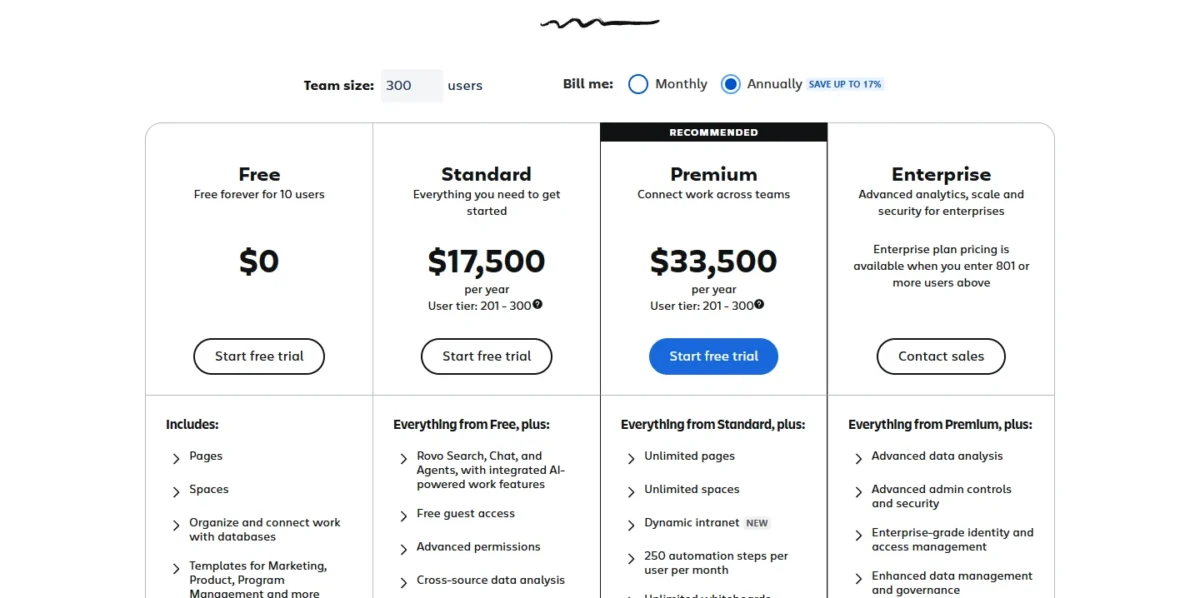
The 300-user view shows lower rates than a team of 100 or fewer pays. Budget from the table, not that view.
Confluence Pricing Plans Explained
Standard is the plan most paying teams need, because Free stops at 10 users and cannot restrict who sees a space or page. All four plans run the same wiki; they differ on access control, support hours, storage and allowances.
Free
Free costs $0 for up to 10 users and includes 2 GB of file storage, Atlassian Community support and up to 3 active whiteboards per user. Automation is capped at 50 steps per month for the whole subscription, not per user.
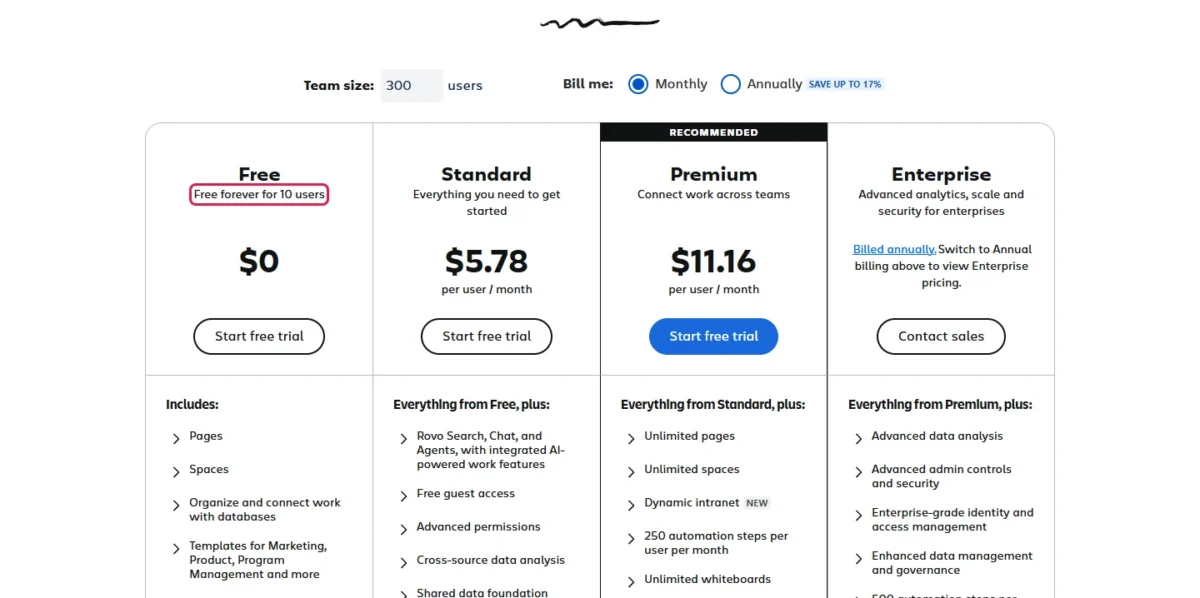
The limit that decides most cases is permissions: the Free plan does not allow permission settings for spaces or pages. That suits a founding team writing shared docs. It fails as soon as HR notes or client folders need to stay private, and the 11th hire forces the upgrade anyway.
Standard
Standard costs $7.15 per user per month on monthly billing, or $720 a year for the 1-10 user tier on annual billing. Over Free, it raises the cap from 10 users to 250,000 users per site and adds space and page permissions, guest access, audit logs, 250 GB of file storage, 100 automation steps per user per month, 25 Rovo credits per user per month and support in local business hours.
Guests change the math for agencies. Admins can add up to 5 guests per paid user at no extra cost, each limited to one space, so a 10-seat team can bring in 5 x 10 = 50 client contacts without buying seats.
Upgrade when the team needs help outside business hours, an uptime guarantee or more than 250 GB of files. Whether the editor and Jira links justify a seat at all is the question my Confluence review answers.
Premium
Premium costs $14.10 per user per month on monthly billing, or $1,400 a year for the 1-10 user tier on annual billing. It adds 24/7 Premium Support with 1-hour response times for critical issues, a 99.9% uptime SLA backed by service credits, unlimited storage and whiteboards, 250 automation steps and 70 Rovo credits per user per month.
At 50 users on monthly billing, Premium costs $14.10 x 50 = $705 a month and Standard $7.15 x 50 = $357.50, a $347.50 monthly gap. Pay it when an outage or a weekend support ticket would cost more than that; a team that writes docs in office hours gets little from it. Premium still leaves SSO to a separate Atlassian Guard subscription.
Enterprise
Enterprise is billed annually only, and Atlassian asks buyers to contact sales. Its calculator shows no Enterprise price below 801 users and $137,000 a year for the 801-1,000 user tier, or $137,000 / 1,000 users / 12 months = $11.42 per user per month at 1,000 users, billed annually.
It adds up to 150 sites, 24/7 support for all issues, a 99.95% uptime SLA, 500 automation steps and 150 Rovo credits per user per month, and Atlassian Guard Standard. Below 801 users, the reason to call sales is several sites or bundled Guard, not price.
Does Confluence Have a Free Plan or Trial?
Yes: Free is a free-forever plan for up to 10 users, and both paid plans come with free trials for new customers. Atlassian’s Standard plan page and its pricing FAQ both give a 7-day free trial of Standard. The same FAQ gives Premium a 7-day trial too, while the Premium plan page offers a free 30-day trial, so check the length shown when you start.
If a Free site exceeds the 10-user limit, Atlassian automatically moves it to a 7-day free trial of Standard. A team at nine or ten people should start that trial on its own schedule, before a new hire starts the clock.
Monthly vs Annual Confluence Pricing
Annual billing saves money only when a team fills most of its user tier, because Atlassian bills the whole tier, not the users you have.
At 10 users, Standard costs $7.15 x 10 x 12 = $858 a year on monthly billing against $720 on annual, a $138 saving, or 16% of $858. Premium costs $14.10 x 10 x 12 = $1,692 against $1,400, a $292 saving, or 17% of $1,692.
For monthly subscriptions, Atlassian charges the following month for the exact number of users; for annual subscriptions, it charges for the tier that most closely matches your user count.
When Annual Billing Costs More Than Monthly
On Standard, annual billing costs more than monthly at 1-8, 11-12, 16-20, 26-41 and 51-83 users. Premium follows the same pattern, except that its last range ends at 82 users.
| User tier | Standard annual | Standard monthly, last cheaper size | Premium annual | Premium monthly, last cheaper size |
|---|---|---|---|---|
| 1-10 | $720 | 8 x $7.15 x 12 = $686.40 | $1,400 | 8 x $14.10 x 12 = $1,353.60 |
| 11-15 | $1,050 | 12 x $7.15 x 12 = $1,029.60 | $2,100 | 12 x $14.10 x 12 = $2,030.40 |
| 16-25 | $1,800 | 20 x $7.15 x 12 = $1,716 | $3,550 | 20 x $14.10 x 12 = $3,384 |
| 26-50 | $3,600 | 41 x $7.15 x 12 = $3,517.80 | $7,100 | 41 x $14.10 x 12 = $6,937.20 |
| 51-100 | $7,200 | 83 x $7.15 x 12 = $7,121.40 | $14,000 | 82 x $14.10 x 12 = $13,874.40 |
Sources: Atlassian’s calculator, Monthly and Annually views at 10, 11, 25, 50 and 100 users, checked Nov 2026.
The worst case is a team that just crossed into a tier. A 26-person team on annual Standard pays the full $3,600 for the 26-50 tier, while monthly billing would cost 26 x $7.15 x 12 = $2,230.80. At the top of a tier the effect reverses: 15 users pay $1,050 on annual Standard against 15 x $7.15 x 12 = $1,287 on monthly.
My take
Pick monthly billing if the team is still growing through a tier. Annual is worth it once headcount sits above the break-even for the tier you expect to stay in all year, which makes it the better deal for a stable team and a poor one for a team that hires in bursts.
Rovo AI Credits and Other Costs Beyond the Subscription
Beyond the per-user price, a Confluence bill can grow through Rovo credits over the allowance at $0.01 each, and an Atlassian Guard subscription for SSO below Enterprise; guests, up to 5 per paid user, cost nothing.
| Cost type | When it applies | Pricing basis | Notes |
|---|---|---|---|
| Rovo extra credits | The organization uses more than its pooled monthly allowance | $0.01 per credit ($10.00 per 1,000) | Extra usage is on by default until an admin turns it off or sets a cap |
| Atlassian Guard Standard | You need SSO, SCIM or mobile app management | Separate subscription on Free, Standard and Premium | Included on Enterprise |
| Atlassian Guard Premium | You need data classification, threat detection or content scanning | Separate subscription on every plan | Not listed on the Confluence pricing page |
| Guests | Clients or partners need access | No extra cost, up to 5 per paid user | Standard and above; each guest limited to one space |
Sources: Atlassian’s Rovo pricing FAQ, the Confluence Standard plan page and Atlassian’s pricing page, checked Nov 2026.
Rovo is the cost that moves month to month. Each paid seat adds its credits to one organization-wide pool that resets monthly, and basic AI interactions such as Quick Answers in Rovo Chat use 10 credits each. Standard’s 25 credits per user cover about 2.5 basic interactions per user per month; Premium’s 70 cover 7.
If a 25-person Standard team asks Rovo Chat 200 basic questions a month, it uses 200 x 10 = 2,000 credits, which is 2,000 – 625 = 1,375 credits over the pool (25 users x 25 Standard credits = 625). Those extra credits cost 1,375 x $0.01 = $13.75.
The overage is small per answer but open-ended by default. The Rovo FAQ says admins get alerts at 80% and 100% of the allowance, and Rovo Search, summaries and chart insights keep working at no cost after it runs out. Turning extra usage off in that example saves the 1,375 x $0.01 = $13.75 overage but pauses new Rovo Chat requests once the pool (25 users x 25 Standard credits = 625) is spent, after 625 / 10 = 62.5, or about 62, of the 200 questions.
How Much Does Confluence Cost for Your Team?
A 25-person team on Standard pays $7.15 x 25 = $178.75 a month on monthly billing, or $1,800 a year on annual billing for the 16-25 user tier.
Confluence Cloud cost calculator
This calculator needs JavaScript. The scenario table below gives the same estimate for typical workloads.
Enter what you need. The calculator prices it on every plan at list prices and names the cheapest plan that covers it.
- List prices in USD from Confluence’s official pricing pages, checked Nov 8, 2026. Tax and regional prices are not included.
- 12-month figures are 12 times the monthly cost at the billing you choose.
- A planning estimate at list prices, not a quote.
Enter your user count and tick the features you need. The calculator shows Free, Standard and Premium side by side with monthly and yearly totals, and names the cheapest plan that covers the need. It uses the monthly rate for teams of up to 100 users, so it overstates the bill above 100, and it leaves out annual tiers, tax, Rovo extra credits and Guard.
| Team size | Plan | Billing | Monthly equivalent | Annual total | Assumptions |
|---|---|---|---|---|---|
| 10 users | Free | Free | $0 | $0 | Everyone can see every page |
| 10 users | Standard | Monthly | $7.15 x 10 = $71.50 | $71.50 x 12 = $858 | Exact user count |
| 10 users | Standard | Annual | $720 / 12 = $60 | $720 | Flat tier price, up to 10 users included |
| 11 users | Standard | Monthly | $7.15 x 11 = $78.65 | $78.65 x 12 = $943.80 | Exact user count |
| 11 users | Standard | Annual | $1,050 / 12 = $87.50 | $1,050 | Flat tier price, up to 15 users included |
| 25 users | Standard | Monthly | $7.15 x 25 = $178.75 | $178.75 x 12 = $2,145 | Exact user count |
| 25 users | Standard | Annual | $1,800 / 12 = $150 | $1,800 | Flat tier price, up to 25 users included |
| 50 users needing 24/7 support | Premium | Monthly | $14.10 x 50 = $705 | $705 x 12 = $8,460 | Exact user count |
| 50 users needing 24/7 support | Premium | Annual | $7,100 / 12 = $591.67 | $7,100 | Flat tier price, up to 50 users included |
| 100 users | Standard | Monthly | $7.15 x 100 = $715 | $715 x 12 = $8,580 | Exact user count |
| 100 users | Standard | Annual | $7,200 / 12 = $600 | $7,200 | Flat tier price, up to 100 users included |
Sources: Atlassian’s calculator, checked Nov 2026. Totals are estimates from list prices, before tax, Rovo extra credits and Guard.
Annual Standard saves $2,145 – $1,800 = $345 at 25 users and $8,580 – $7,200 = $1,380 at 100 users, but at 11 users it costs $1,050 – $943.80 = $106.20 more than monthly. The 50-person Premium team saves $8,460 – $7,100 = $1,360 a year on annual.
Above 100 Users and at Enterprise Scale
Above 100 users the monthly rate falls: the calculator shows $5.78 per user per month on Standard and $11.16 on Premium at 300 users, billed monthly. On annual billing, the 201-300 user tier costs $17,500 a year on Standard and $33,500 on Premium.
At 300 users, monthly Standard comes to $5.78 x 300 x 12 = $20,808 a year against $17,500 annual, so a company that size with stable headcount has little reason to pay monthly.
At 801-1,000 users the annual tiers are $45,500 on Standard, $90,500 on Premium and $137,000 on Enterprise. Spread over 1,000 users, Standard works out to $45,500 / 1,000 / 12 = $3.79 per user per month, billed annually. Enterprise’s $137,000 – $90,500 = $46,500 a year over Premium buys multiple sites, 24/7 support for all issues, the 99.95% SLA and Guard Standard.
Which Confluence Plan Should You Choose?
Buy Standard if you have 11 to 100 users; stay on Free only if 10 people can share every page, and move to Premium when support hours, uptime or storage is the risk.
| Your needs | Plan to consider | Why | Main limitation |
|---|---|---|---|
| 10 or fewer users, no private spaces | Free, no upgrade needed | $0 covers 10 users and 2 GB of files | The 11th user forces a paid plan |
| 11 to 100 users who need private spaces or client guests | Standard | Space and page permissions plus up to 5 free guests per paid user | Support runs on local business hours |
| Headcount still changing month to month | Standard on monthly billing | Billed on the exact user count each month | Gives up the annual saving at a full tier |
| 24/7 critical support, a 99.9% SLA or more than 250 GB of files | Premium | 1-hour response for critical issues and unlimited storage | $14.10 per user per month on monthly billing |
| Daily Rovo use across the team | Standard with a spending cap or an overage budget | Premium’s 70 credits against 25 add 45 per user, worth 45 x $0.01 = $0.45, for a $14.10 – $7.15 = $6.95 per user monthly gap | Extra credits bill at $0.01 each by default |
| 801+ users, several sites or bundled SSO | Enterprise | Up to 150 sites, Guard Standard included, 99.95% SLA | Annual only, priced through sales |
Sources: Atlassian’s pricing page and Rovo pricing FAQ, checked Nov 2026.
My take
For a 20-person team, my pick is Standard on monthly billing for the first year: permissions and guests change daily work, and the 16-25 tier only pays off past 20 users. Premium is worth it when someone would be paged at night if Confluence went down.
Is Confluence Worth the Price?
Confluence is worth its Standard rate for teams already on Jira or teams that need private spaces and client guests; it is a harder sell for a team that only wants shared docs.
Jira teams get the clearest value. Rovo credits from Jira and Confluence seats stack into one organization pool, and the Jira Issues macro puts live issue updates on Confluence pages. My Jira pricing guide covers the second bill.
Value drops in two cases: an 11- or 12-person team on annual Standard pays $1,050 for a 15-user tier, and an AI-heavy team that leaves extra usage uncapped carries an open-ended Rovo line. If Notion is the alternative on your shortlist, the Notion vs Confluence comparison sets the two side by side.
My take
Buy Confluence when access control or Jira is the reason, and skip the paid plans when 10 or fewer people only need a shared doc space, which Free covers. A team that wants a simpler wiki should start with my ranking of the best knowledge base software.
Billing, Refunds and Plan Changes
Monthly plans bill the exact user count by card or PayPal, annual plans bill the matching tier by card, bank transfer or check, and both carry a refund window.
- Monthly subscriptions take credit cards (MasterCard, Visa or American Express) or PayPal; annual subscriptions take credit cards, bank transfer or check.
- Monthly subscriptions can be refunded within the first paid month, after the trial ends; annual subscriptions within 30 days of payment.
- Users can be added and removed as the team changes.
- An existing customer who trials a higher plan gets a trial that spans the current billing cycle plus the next one; on an annual subscription the evaluation period is a fixed 30 days.
- The pricing page’s “save up to 17%” label refers to annual billing.
How I Verified Confluence Pricing
I read every price in this guide in US dollars, for the US region, from Atlassian’s pricing page and its calculator on November 8, 2026, at seven team sizes from 10 to 1,000 users, plus the Standard plan, Premium plan and Rovo pricing pages.
List prices are Atlassian’s. Totals, break-even headcounts and per-user equivalents are my arithmetic: monthly totals are the per-user rate x users x 12, and annual totals are the tier price the calculator shows. The plan picks are my judgment from those prices and the plan limits.
Atlassian does not publish an Enterprise price below 801 users, a Data Center price or a Guard price on the Confluence pricing page, and the page does not say whether prices include tax.
Frequently Asked Questions
Is Confluence being phased out?
No. Atlassian ended sales of new server licenses and ended server support on Feb 15, 2024, but Confluence Cloud is sold on the plans above and Atlassian says it is continuing investment in Data Center, its self-managed edition.
What does Confluence Data Center cost?
Atlassian lists no Data Center price on its pricing page. It describes Data Center as its self-managed offering for customers with strict regulatory or security requirements and asks buyers to contact it, so treat it as a sales-quoted purchase separate from Cloud.
Can I turn off Rovo AI to avoid credit charges?
Yes. Organization admins can deactivate AI, or turn off extra usage so new credit-consuming requests pause until the allowance resets the next month. With AI deactivated, Rovo’s core search and studio apps still work, but AI-powered search and chat do not.
Final Pricing Verdict
Start on Free if 10 people can share everything. Most teams of 11 to 100 should buy Standard and pay monthly until headcount settles near the top of an annual tier.
Move to Premium when 24/7 critical support or the 99.9% SLA protects real work, and call sales only at 801+ users or when you need several sites. Watch two limits first: the 11th user, which ends Free, and Rovo extra usage, which stays on until an admin caps it.