Slite earns its price for teams whose real problem is stale internal docs. Verification decides what its AI trusts, and Pro’s agent drafts fixes when Slack or GitHub move on. Skip it if you want a free plan or SCIM without an Enterprise contract.
This Slite review’s short answer on cost: Basic is $10 and Pro is $20 per user per month, billed yearly, after a 14-day trial. The number to watch is the AI allowance each plan meters, not the seat price.
I tested Slite in a one-seat Pro trial on October 9, 2026, with one five-line test doc and three Slite Agent questions. All three answers matched the doc, and the AI usage page then showed 499 of 500 credits left.
In This Article (15 sections)
Slite at a Glance
| Question | Answer |
|---|---|
| Best for | Teams that want one verified internal wiki, with AI answers drawn from it |
| Skip if | You need a free plan, SCIM or audit logs without Enterprise |
| Starting price | Basic, $10 per user/ |
| Plan to pick for connected tools | Pro, $20 per user/ |
| Main strength | Verification steers the AI: outdated docs are excluded from the Slite Agent |
| Main limitation | Metered AI: 30 Ask questions per seat on Basic, 50 pooled credits per seat on Pro |
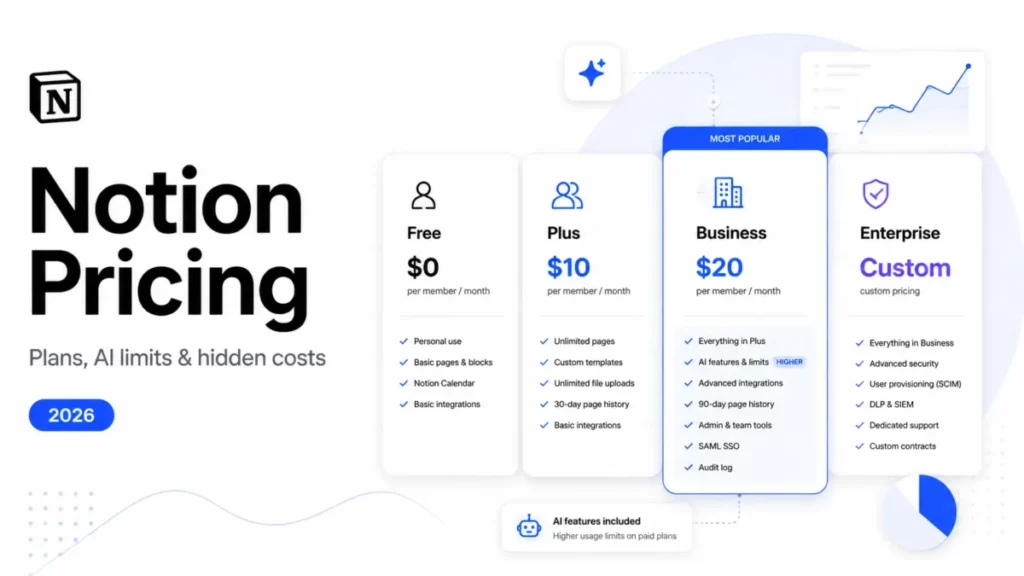
| Best alternative | Notion, if you want databases next to docs (its Free plan includes them); Business at $20 per member/ |
Sources: Slite pricing page, Slite doc verification guide and Notion pricing page, checked October 2026.
The last two rows carry the decision: Slite’s value depends on how much AI your team will use, and Notion matches its $20 tier.
Slite Review 2026: The Verdict
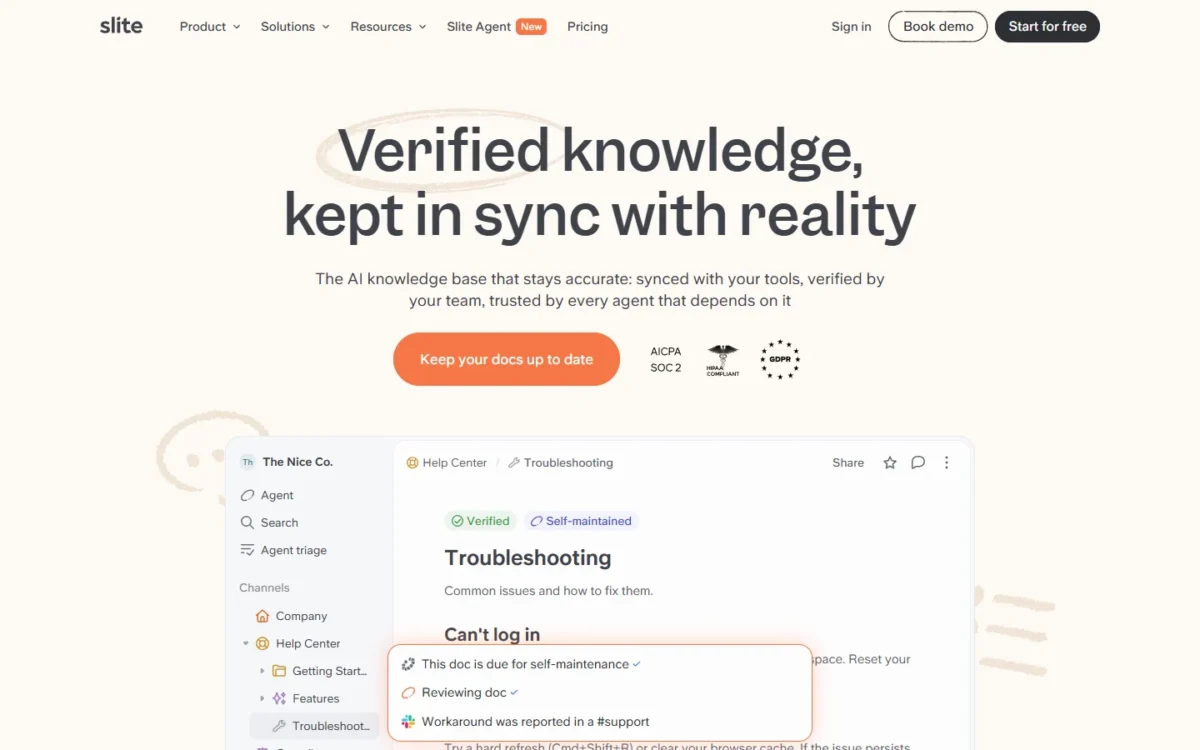
Slite sells itself in 2026 as a “self-maintaining” AI knowledge base, and its plans split along that line. Basic is the wiki plus Ask. Pro adds the Slite Agent, which watches your other tools and proposes doc updates.
That split is the buying decision. Basic suits a team that writes its knowledge in Slite and asks occasional questions. Pro makes sense only when the answers your team needs sit in Slack threads, Jira issues and Drive files as much as in docs.
My main reservation is metering. Both AI tiers come with fixed monthly allowances, Pro’s credits block AI work when they run out, and per-user credit caps aren’t available yet. One heavy user can drain the pool for everyone.
- Skip it if:
- you want a free plan for a small team, or your security team requires US data residency.
Quick specs
| Spec | Slite in October 2026 |
|---|---|
| Plans | Basic, Pro, Enterprise (custom pricing) |
| Trial | 14 days, no credit card, Basic and Pro features, 500 shared credits |
| After the trial | A paid plan is required to keep using Slite |
| Apps | Web app, macOS, Windows, iOS, Android, Chrome extension |
| AI | Ask on Basic; Slite Agent on Pro and Enterprise |
| Developer access | REST API and MCP server, both listed on Basic |
| Sign-in and SSO | Google, Slack and Apple sign-in; OpenID SSO on Pro; SCIM on Enterprise |
| Compliance | SOC 2 Type II and GDPR; HIPAA with a BAA on the Enterprise tier |
| Hosting | Google Cloud, with all production data in the EU (Belgium) |
| AI data use | Customer data is not used to train external models |
Sources: Slite pricing page, Slite credits guide, Slite security page and Slite download page, checked October 2026.
Two rows matter more for US buyers than they look: EU-only production hosting, and OpenID SSO, which starts at the $20 tier.
How I Tested Slite
I ran the test on October 9, 2026, in my own signed-in Slite Pro trial account. Its Billing page showed Current plan Pro, Seats 1 and Cancels Oct 23, 2026.
I worked in my own Chrome browser, and my notes record the UTC browser-clock time of each step. The sections below place each result where it applies: verification, the Slite Agent, AI credits, setup and help.
| Task | Sample | What I recorded |
|---|---|---|
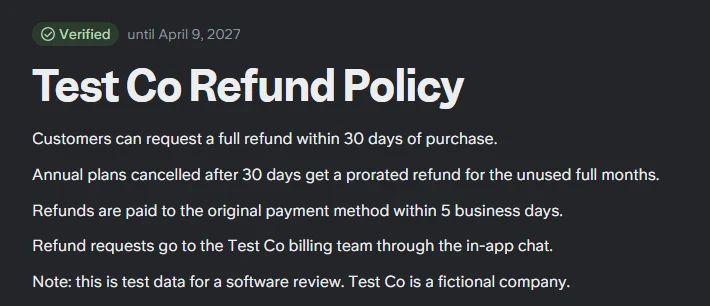
| First verified doc | 1 five-line doc, “Test Co Refund Policy” (a fictional company) | Created at 13:38:58 UTC, verified at 13:39:56 UTC |
| Doc verification | 1 doc, 6-month period | Badge read “Verified until April 9, 2027” |
| Slite Agent answers | 3 questions, Standard mode, no external source | 3 of 3 matched the doc; answers took 4s, 1s and 7s |
| Question outside the doc | 1 of the 3 questions | The Agent said the doc does not mention hardware purchases |
I counted an answer as a match when it agreed with the five lines of the doc and added no rule the doc lacked. The test does not cover:
- Answer quality across a real knowledge base. It was one user, one five-line doc and three questions.
- Anything that needs a connected source. I connected no Slack, Google Drive, Jira or GitHub, so cross-tool answers and Agent digests went untested.
- Imports and the Basic plan.
- Anything that needs a second person. I invited no team members, so permissions, verification requests between people and outdated-doc notifications went untested.
What Slite Is in 2026
Slite is a team knowledge base for the documents a company runs on: policies, onboarding guides, runbooks and specs. Docs sit in channels, and each doc can carry an owner and a verification status.
The AI layer is where the plans diverge. On Basic, Ask answers questions from Slite docs only. On Pro, the Slite Agent replaces Ask, searches more than 20 connected tools, and proposes doc updates for a person to approve.
Internal wikis and customer help centers are different purchases, and the main types of knowledge base need different tools. Slite’s feature set centers on the internal kind.
Slite Features That Change the Workflow
Four things decide whether Slite fits: how Ask is capped, how verification feeds the AI, what the Agent does on Pro, and how far sharing goes.
Ask on Basic: AI answers from your own docs
Ask answers plain-language questions using only the docs the asker can view. Basic includes 30 questions per member per month, pooled across the workspace, and Ask uses no credits.
Pooling helps more than the number suggests. A 10-person team gets 300 questions a month (30 x 10 members), and the three people who ask most can use the share of those who rarely do.
Spread over 22 working days, 10 seats x 30 questions = 300 questions, which is about 14 a day. That covers lookups for a small team, not a support desk asking all day.
Ask also works in Slack and through a Chrome extension, and it replies in the language of the question. Verified docs rank higher in its answers and outdated ones lower, which is why verification matters more here than in a plain wiki.
Doc verification and freshness
A doc owner marks a doc Verified with a review period, for example 3 months. When it lapses, the status changes to Verification expired and the owner is notified. Any team member can flag a doc as Outdated, and teammates can request verification to prompt the owner.
The statuses do real work. Outdated docs are excluded from the Slite Agent and ranked lower in Ask, so verification is the lever that controls answer quality, not a badge.
In my test, the Verify doc menu offered For 6 months, For 1 year, Set custom date and Forever, next to Flag as outdated and Request verification. I chose 6 months, and the doc showed “Verified until April 9, 2027” with a toast saying I would be notified when it expires.
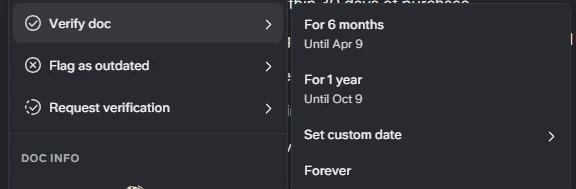
The presets in my menu started at 6 months, so a 3-month cycle, the example above, would mean setting a custom date. I did not test requests between people or outdated-doc notifications.
Notion’s Business plan lists Verify any page too, so having a verification feature does not separate the two products. Slite’s distinction is the documented link from verification status to its AI answers.
Knowledge Management Panel
The Knowledge Management Panel lists docs by verification status and filters them by owner, status or channel. From there, an admin can bulk-verify, reassign owners or archive outdated docs.
That turns a quarterly cleanup into a filtered list instead of a doc-by-doc hunt. The panel is on Basic, so governance is not a Pro upsell, and that is the strongest argument for the cheaper plan.
Slite Agent on Pro
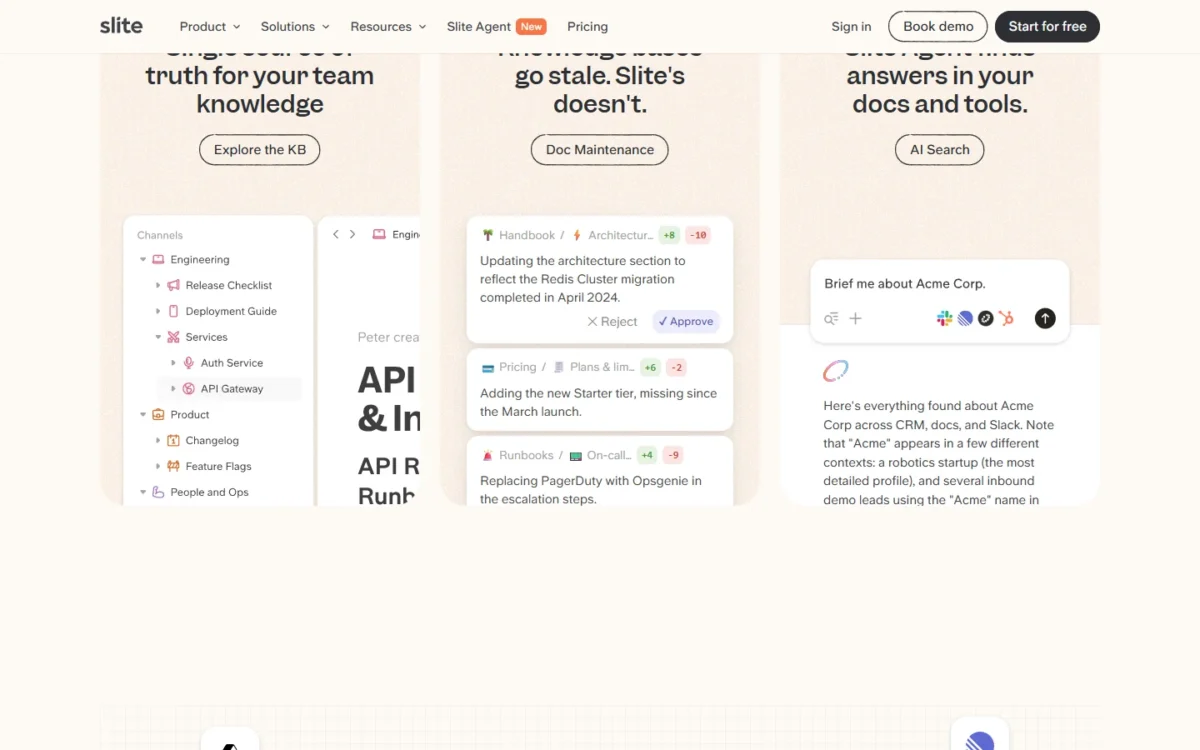
The Slite Agent watches connected tools such as Slack, Linear and GitHub, detects when docs have drifted from reality, and drafts the fix. Every change goes through human approval before anything goes live.
That is what Pro charges for. A team whose runbooks break whenever on-call tooling changes gets its money’s worth from Pro’s $20 over Basic’s $10 per user per month. A team whose policy docs rarely change does not.
Pro adds doc fact-checking with suggested fixes, agent workflows and search across connected tools. Agent requests use credits wherever they start, including Slack, the API and MCP.
In my test, I asked the Agent three questions about the five-line doc, in Standard mode with no external source connected. All three answers matched the doc, and they took 4s, 1s and 7s, with the first and third labelled “Based on 1 source”.
The second question was a two-part case: a customer cancels an annual plan 4 months after purchase. The Agent answered with a prorated refund for the unused full months, which it put at 8 months, paid to the original payment method within 5 business days.
The third question, about hardware refunds, was not in the doc. The Agent ran two searches and then said the policy does not mention hardware purchases, instead of inventing a rule.

That refusal to guess is what an internal wiki needs from its AI: an answer traced to a doc, or a stated gap. My test shows how the Agent grounds answers in one doc, not what Pro charges for. I connected no source, so cross-tool answers and Agent digests went untested.
Editor, templates, and structure
The editor is collaborative in real time, with comments, mentions, custom templates, scheduled recurring docs and doc history. Exports come out as PDF, Markdown or HTML, which keeps the cost of leaving low.
Basic caps the AI writing assistant at 30 AI edits per user per month; Pro and Enterprise list it as unlimited. Thirty edits is under two per working day, so teams that draft with AI daily will outgrow Basic here first.
Slite reads as a docs tool first: its plan comparison groups features under editing, verification, AI, integrations, sharing and admin. A team that also runs tasks beside its docs should decide where that tracking will live before buying.
Sharing and public docs
Docs can be shared publicly, and readers can get AI answers on public docs. Pro adds a custom domain for public docs. Guest collaborators, user groups, doc permissions and protected editing cover the internal side.
That makes Slite workable for a public changelog or a handful of customer guides. If the public side is the main job, compare it with a dedicated help center tool before paying for Pro’s custom domain.
Slite Pricing in 2026: Plans, Limits, and What You Actually Pay
Slite has three plans: Basic at $10 and Pro at $20 per user per month, both billed yearly, and Enterprise at custom pricing. My one-seat Pro trial’s Billing page showed “Billing period Monthly”, so every price here comes from the pricing page’s yearly-billed view, not from the trial account.
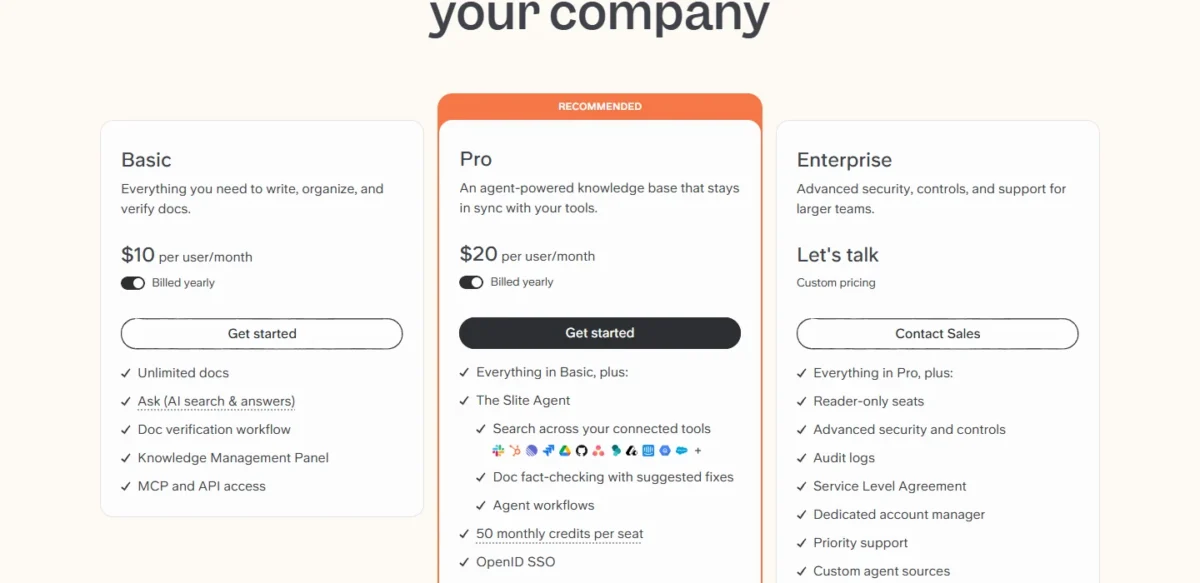
| Plan | Price | AI allowance | What it adds |
|---|---|---|---|
| Basic | $10 per user/ | Ask: 30 questions per seat per month, pooled, Slite docs only | Unlimited docs, doc verification, Knowledge Management Panel, MCP and API access |
| Pro | $20 per user/ | Slite Agent: 50 credits per seat per month, pooled | Search across connected tools, doc fact-checking, agent workflows, OpenID SSO, custom domain for public docs |
| Enterprise | Custom pricing | Credits customisable per organisation | Reader-only seats, audit logs, SCIM, SLA, priority support, migration support, HIPAA with a BAA |
Sources: Slite pricing page, Slite credits guide and Slite security page, checked October 2026.
The jump from Basic to Pro doubles the seat price. The question is whether your team needs answers from outside Slite, not whether it wants AI.
Basic: who it fits
Basic is the plan I would start most teams on. A 10-person team commits $10 x 10 users x 12 months = $1,200 a year and gets verification, the panel, Ask and API access.
It breaks down in two places. Ask is limited to 30 pooled questions per seat a month from Slite docs only, and any company that requires OpenID SSO has to buy Pro. Nonprofit and academic teams can ask Slite for a Basic discount.
Pro: who it fits
Pro fits a team whose knowledge is spread across Slack, Jira, Google Drive or HubSpot and who wants one cited answer across them. For 25 seats, that is $20 x 25 users x 12 months = $6,000 a year.
Those 25 seats bring 1,250 pooled credits a month (50 x 25 seats). Slite’s benchmark puts a simple lookup at 0.7 credits, so that is about 1,785 lookups (1,250 / 0.7).
Heavier tasks change the math. A digest averages 3.8 credits, research and edit tasks run 1.5 to 3.2, and thorough investigations 2.7 to 5.3.
One digest every working day uses about 22 x 3.8 = 83.6 credits a month. If all 25 seats ran one, that is 2,090 credits (83.6 x 25), more than the 1,250 pool. Teams that automate heavily should budget for top-ups starting at $10 for 100 credits.
Pro also adds OpenID SSO. A company whose IT policy mandates OpenID SSO pays $20, not $10, per user per month billed yearly from day one.
Enterprise: who it fits
Enterprise adds reader-only seats, audit logs, SCIM, an SLA, a dedicated account manager, priority support, custom agent sources, and migration and onboarding support. HIPAA support with a BAA is offered on the Enterprise tier. Slite does not publish Enterprise pricing.
Reader-only seats are the line item to watch. Because they exist only on Enterprise, a company-wide wiki on Basic or Pro should be budgeted as if every employee is a full user.
Before that sales call, a requirements checklist covering SSO, SCIM and audit logs keeps the Enterprise conversation specific.
What Slite costs at 10, 25 and 100 seats
| Seats | Basic per year | Pro per year | Pro credits per month | Basic Ask questions per month |
|---|---|---|---|---|
| 10 | $10 x 10 x 12 = $1,200 | $20 x 10 x 12 = $2,400 | 50 x 10 = 500 | 30 x 10 = 300 |
| 25 seats | $10 x 25 x 12 = $3,000 | $20 x 25 x 12 = $6,000 | 50 x 25 = 1,250 | 30 x 25 = 750 |
| 100 | $10 x 100 x 12 = $12,000 | $20 x 100 x 12 = $24,000 | 50 x 100 = 5,000 | 30 x 100 = 3,000 |
Sources: Slite pricing page and Slite credits guide, checked October 2026. Prices are billed yearly.
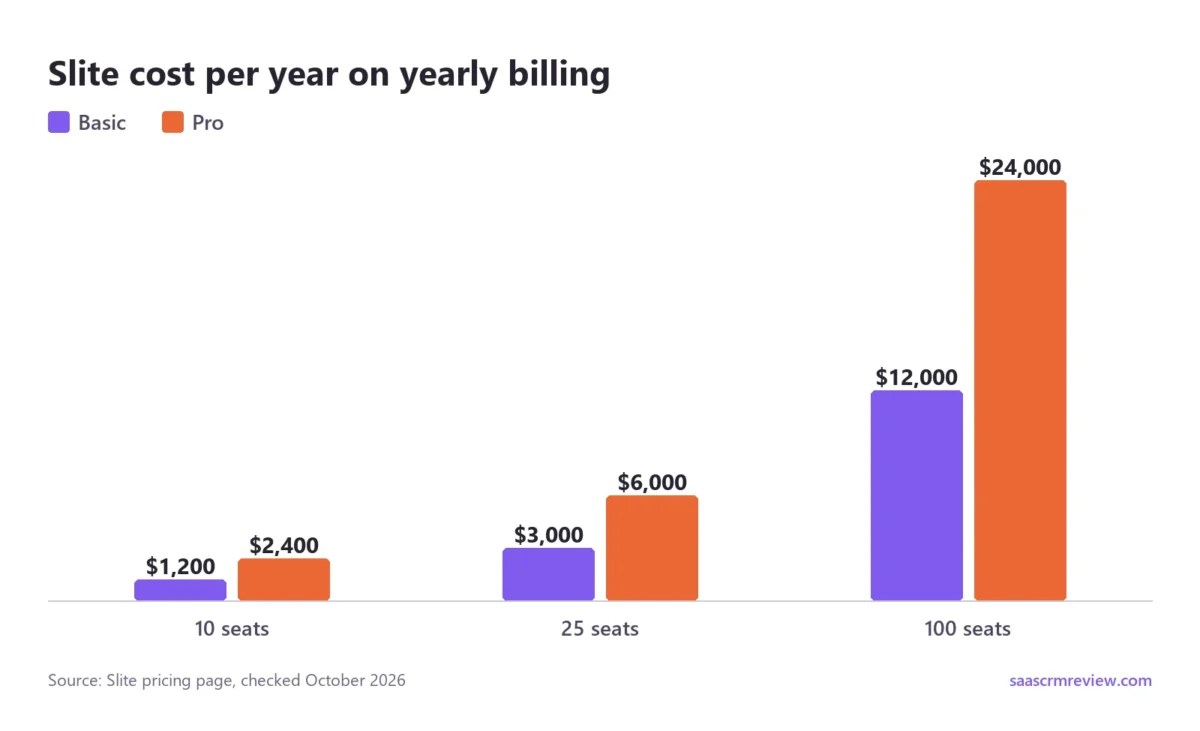
The Pro premium grows with headcount: $3,000 a year at 25 seats ($6,000 – $3,000) and $12,000 at 100 seats ($24,000 – $12,000). At that scale, it needs a visible drop in stale docs to pay off.
Hidden costs and limits to check before you pay
The credits guide and the pricing FAQ hold most of the fine print:
- Credits can run out mid-month. At zero, AI features are blocked and new Agent tasks can’t start, though docs, editing, comments and search keep working. Unused included credits don’t roll over.
- No per-user caps. Per-user credit limits and spending caps aren’t available yet, and top-ups are bought manually. Admins can see a per-user breakdown under AI Usage.
- Top-ups expire. Packs start at $10 for 100 credits and expire after 1 year. They can’t be spent on a plan without the Agent.
- Credits follow paid seats. A contract for 20 seats gets credits for 20 seats even if only 15 are active.
- Seat counts ratchet. On yearly billing, added users are prorated, while removed users only lower the renewal invoice.
- Storage doubles on Pro. Basic gives 5GB of storage per user. Pro and Enterprise double that to 10GB per user (5 x 2) and list file uploads as unlimited.
- Trial credits are fixed. The 14-day trial includes 500 shared credits whatever your seat count, and extending the trial doesn’t refill them.
In my one-seat Pro trial, Settings > AI usage listed Total seats 1 and Monthly allowance credits 500, resetting November 23. That fits the 500 trial credits above, not Pro’s listed 50 credits per seat (50 x 1 seat). I read it as a trial figure, not a paid plan’s allowance.
After my three Agent questions, the page showed 499 of 500 credits left, read about a minute after my last answer. Three simple lookups at Slite’s 0.7-credit benchmark would cost 2.1 credits (3 x 0.7). The 1 credit counted neither confirms nor measures that benchmark, and I did not check later usage postings.
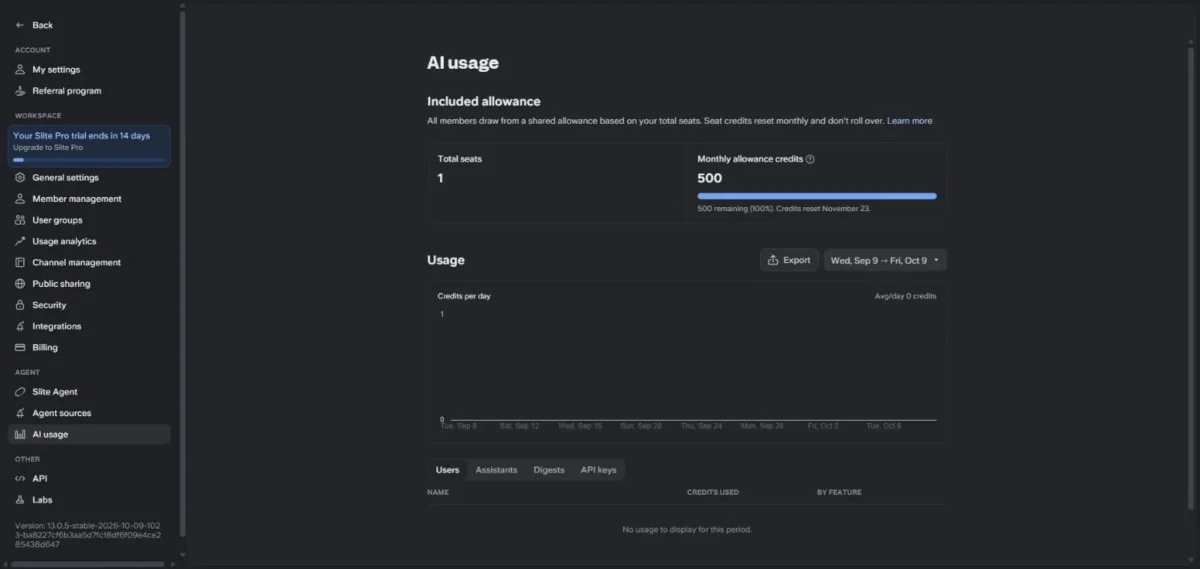
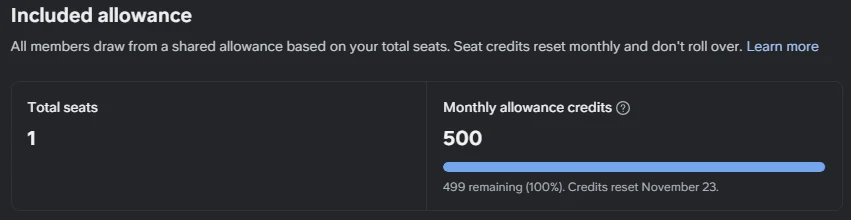
I used 1 credit, so I never reached the zero-credit block described above, and no task was blocked.
The trial’s Billing page also showed Used storage 0/5GB for its one seat, not the doubled storage listed for Pro above. That is another reason to treat a trial as a preview of the paid plans, not a copy.
Integrations, API, and Workflow Fit
Slite’s integrations come in three kinds: embeds inside docs, places you call Slite from, and sources the Agent searches. Searching that third kind is what needs Pro, which is why the integration list alone can mislead a Basic buyer.
Slack: answers in the thread
One Slack app handles Ask, notifications, doc unfurls and the Slite Agent. Mention @Slite and it reads the thread, infers the question and replies with links to the sources. It can also spot questions and propose answers without a mention.
The catch is visibility. The bot answers from the docs the asker can access, which others in the channel may not see. The asker can delete a sensitive reply, but that relies on noticing, so start the bot in team channels before company-wide ones.
Setup needs someone who is an admin in both Slite and Slack. On Basic, Slack answers come from Slite docs; on Pro, they come from all connected tools. The Slack integration guide covers channel syncing and notifications.
Google Drive, Jira, Linear, GitHub and other sources
Docs can embed Figma designs, Loom videos, Miro boards, Jira and Linear issues, GitHub issues and pull requests, and Google Docs, Sheets and Slides. Searching inside those tools, rather than showing them, is the Pro feature.
As Agent data sources, each tool syncs a defined slice. Jira brings issue descriptions from one year without comments, Google Drive skips Sheets, images and videos, and HubSpot syncs the 1,000 most recent deals.
Access is the setting to check before you connect anything. Mirrored sources such as Slack, Jira and Google Drive return only what each member can already see in that tool.
Shared sources such as GitHub, HubSpot and Notion can be queried by every workspace member unless an admin restricts them. Set root-node access first, then invite the team.
For automations, Slite connects to Zapier, where an event in another app can create, fetch, search, update or replace Slite docs. The Zapier setup currently has no Slite trigger, so a change in Slite cannot start a workflow.
API and MCP: when you need them
Basic already includes MCP and API access. The Slite API lists, searches, creates, updates and archives docs and changes owners, with a rate limit of 120 calls per minute. Personal keys can be read-only; service account keys are an Enterprise feature.
The Slite MCP server connects Claude Desktop, Cursor, Windsurf and other MCP clients over OAuth, with the signed-in user’s permissions. It reads and writes docs, and write actions can be queued for human approval.
On Pro, Agent requests made through the API or MCP draw on the same credit pool. A coding assistant that queries Slite all day spends the allowance your support team also relies on.
Setup and Adoption
Slite’s setup work is mostly migration and permissions. The AI only helps once the docs and their owners are in place.
Onboarding in my trial: a first verified doc in about a minute
A first verified doc took me about one minute in my trial workspace. I added the doc from the plus next to My private channel at 13:38:58 UTC, had its title and five lines by 13:39:15, and verified it at 13:39:56 UTC.
Slite Agent’s first run had its own onboarding. It showed “Meet Slite Agent” with a Get Started button, then three intro screens. A step titled “Choose where you want to use Slite Agent” listed Slack, Browser, Claude and ChatGPT.
I clicked Skip and landed on Agent sources, which said “No sources connected yet”. The Agent prompt was ready at 13:42:17 UTC, about two minutes after my click on Slite Agent, including my screenshots.
The Agent page then kept a banner reading “Make Slite agent smarter, by connecting sources.” with a Connect now button.
Those minutes are a floor for a trial, not an estimate for a real rollout. The test touched no import, no permission setting and no connected tool, and that is the work below.
Migration, permissions and structure
Slite has importers for Notion, Confluence and Google Drive, plus bulk file import. Notion and Confluence content comes in through an HTML export, and each import lands in a new channel you set as open or private.
Expect some loss. Confluence’s HTML export leaves out comments, blog posts and whiteboards, users don’t come across, and mentions turn into plain text. Very large docs can import empty, which the Confluence import guide routes to support.
On Enterprise, migration and onboarding support is part of the plan. On Basic and Pro, budget your own time for cleanup, especially assigning owners and verification dates after the import.
Common adoption blockers and fixes
| Blocker | Slite control | First move |
|---|---|---|
| Nobody trusts old docs | Verification periods; outdated docs drop out of Agent answers | Verify the most-asked docs |
| Slack answers expose restricted docs | The bot answers from the asker’s access; replies can be deleted | Invite @Slite to team channels first |
| Connected tools overshare | Admins restrict Shared sources per root node | Set root-node access before inviting members |
| One user drains the credits | AI Usage shows a per-user breakdown; no per-user caps yet | Review AI Usage weekly in the first month |
| Basic’s Ask allowance runs short | 30 questions per seat per month, pooled | Upgrade the workspace only if the pooled cap runs out |
Sources: Slite doc verification guide, Slack integration guide, Agent data sources guide and Slite credits guide, checked October 2026.
The 14-day trial covers Basic and Pro features, so you can test each of these controls before paying.
Help inside the app
The “?” button at the bottom of the sidebar opens a help menu in my trial. Its seven entries are “Ask a question about Slite…”, “Visit our help center”, “Visit the changelog”, “Contact support”, “Send a feature request”, “Request a demo” and “Keyboard shortcuts”.
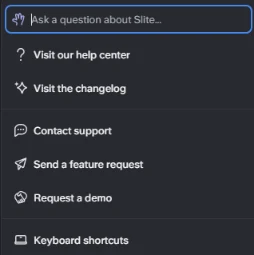
That puts a Contact support route inside the product, at least in a Pro trial; I did not test the Basic plan’s menu. My test recorded the menu only, so how fast support answers is unmeasured, and the plan table lists priority support as an Enterprise feature.
Pros and Cons
Pros
- Verification steers the AI. Outdated docs are excluded from the Slite Agent and ranked lower in Ask, which helps any team with years of stale pages.
- Grounded answers in a small test. In my 3 Agent questions on a five-line doc, all 3 answers matched it, and the question the doc did not cover got a “does not mention” answer, not an invented rule.
- The cheapest plan has the governance tools. Doc verification, the Knowledge Management Panel and API access all come with Basic.
- Pooled AI allowances. Basic’s questions and Pro’s credits are shared across the workspace, so frequent askers aren’t capped one by one.
- An agent that drafts, not publishes. Pro’s Agent proposes changes and waits for approval, which suits teams that want automation without unreviewed edits.
- Low exit cost. PDF, Markdown and HTML exports, plus importers for Notion, Confluence and Google Drive, keep switching costs low in both directions.
Cons
- No free plan. After the 14-day trial, a paid plan is required, which hurts a three-person team that wants to grow into a wiki slowly.
- Metered AI on both tiers. Basic’s Ask allows 30 pooled questions per seat a month from Slite docs only, and Pro’s credits block AI work at zero.
- No per-user credit caps yet. One person running daily digests or deep investigations spends everyone’s allowance.
- Enterprise gates key admin controls. SCIM, audit logs and reader-only seats need Enterprise, and Slite does not publish its price.
- EU-only production hosting. Production data sits on Google Cloud in Belgium, and Slite does not offer end-to-end encryption, which can fail a US data-residency review.
- Lossy Confluence migration. Comments, blog posts and whiteboards don’t come across, and mentions become plain text.
Who Should Skip Slite
Slite is the wrong purchase in five situations:
- You want a free wiki for a small team. Slab is free for up to 10 users, Nuclino’s Free plan allows 50 items, and Notion has a $0 plan.
- Your docs need databases and task tracking beside them. Notion includes databases with custom properties on its Free plan.
- You need SAML SSO and an audit log on a small budget. Nuclino Business includes both at $10 per user per month billed yearly.
- Your security team requires US data residency. Slite hosts all of its production data in the EU.
- Most employees only read, and you won’t sign an Enterprise contract. Reader-only seats are an Enterprise feature.
Slite vs the Top Alternatives (2026)
The alternatives split by what you want beside your docs: databases (Notion), the Atlassian stack (Confluence), a managed enterprise rollout (Guru), or lower seat prices (Slab, Nuclino). My ranking of the best wiki software covers the wider field.
Slite vs Notion
| Product | Paid entry, billed yearly | AI agent plan | Page verification | SSO on the $20 plan | Free plan |
|---|---|---|---|---|---|
| Slite | Basic, $10 per user/ | Pro, $20 per user/ | Doc verification on Basic | OpenID SSO | No, 14-day trial only |
| Notion | Plus, $10 per member/ | Business, $20 per member/ | Verify any page on Business | SAML SSO | Yes, $0 per member/ |
Sources: Slite pricing page and Notion pricing page, checked October 2026.
The headline prices match tier for tier, so the choice is about shape. Notion Business bundles Notion Agent, Enterprise Search (in beta), SAML SSO and page verification into the same $20 per member per month that buys Slite Pro.
Slite wins for a team that only needs docs and wants verification status to steer the AI, as Slite documents it. Notion wins when docs live next to databases, projects and forms, and its Free plan already covers databases.
On Reddit, one r/KnowledgeBaseSoftware poster who uses both tools put it this way: “Slite’s actually just better at one thing, and Notion’s better at not committing to anything.”
Moving from Notion has a cost. Slite’s Notion import guide exports databases in their default view, and Notion as an Agent source syncs pages without database objects, so database-heavy workspaces lose the most.
If Notion is your incumbent and Slite is only one candidate, my comparison of Notion alternatives ranks the other options.
Slite vs Confluence
Confluence has a Free plan for up to 10 users with 2 GB of storage, and its Standard plan includes Rovo Search, Chat and Agents plus advanced permissions. Premium adds unlimited storage and a 99.9% uptime SLA.
Slite fits when the job is a verified wiki rather than a hub for Jira work. Confluence makes more sense when Jira links, Atlassian administration and Premium’s SLA matter more.
There is a middle path. Slite Pro can connect Confluence as a Mirrored Agent source, so a team can search Confluence pages from Slite before migrating anything. A full move uses an HTML export, which needs the Export Space permission in Confluence.
Slite vs Guru, Slab, and Nuclino
Guru’s pricing page shows no per-seat price; it scopes a package with solution engineers and lists SOC 2 Type II, HIPAA and GxP compliance. That makes Guru the managed enterprise rollout, while Slite is the self-serve option with prices you can see.
Slab is free for up to 10 users, then $6.67 on Startup or $12.50 on Business per user per month, billed annually. It has no read-only users and bills everyone who can log in.
Nuclino is the budget pick: Starter is $6 and Business $10 per user per month billed yearly ($8 and $12 billed monthly). Business includes Sidekick AI, SAML SSO and an audit log. If seat price leads your decision, my Nuclino review is the next stop.
Quick comparison table
| Product | Free option | Paid entry price | AI answers | Best fit |
|---|---|---|---|---|
| Slite | 14-day trial only | Basic, $10 per user/ | Ask on Basic, Agent on Pro | Verified internal wiki |
| Notion | Free plan, $0 | Plus, $10 per member/ | Notion Agent on Business | Docs plus databases |
| Confluence | Free for up to 10 users | Standard, priced per user by team size | Rovo on Standard | Jira and Atlassian teams |
| Guru | Working session with sales | Custom package | Knowledge Agents | Managed enterprise rollout |
| Slab | Free for up to 10 users | Startup, $6.67 per user/ | AI Ask listed | Small teams on a budget |
| Nuclino | Free up to 50 items | Starter, $6 per user/ | Sidekick on Business | Low-cost wiki |
Sources: Slite pricing page, Notion pricing page, Confluence pricing page, Guru pricing page, Slab pricing page and Nuclino pricing page, checked October 2026.
Slite is not the cheapest entry here: Slab and Nuclino undercut its $10 Basic seat. Its case rests on verification-driven AI, not price.
Decision tree: Basic, Pro, or another tool
- Choose Basic if your knowledge lives in Slite docs and the team asks occasional questions.
- Choose Pro if answers sit across Slack, Jira, Drive or HubSpot, or IT requires OpenID SSO.
- Choose Enterprise if you need SCIM, audit logs, reader-only seats or a BAA.
- Choose Notion if you need databases or project tracking beside your docs.
- Choose Confluence if Jira and Atlassian admin already run your engineering work.
- Choose Nuclino or Slab if the lowest seat price matters more than AI governance.
Best Alternatives by Use Case
Best for engineering orgs
Confluence, when the team already lives in Jira. Slite Pro is the counter-case for teams on Linear and GitHub: it syncs their issues and pull requests and drafts doc updates when code or tickets change.
Best for cross-functional ops teams
Slite Basic, for ops teams whose SOPs and policies are the knowledge. Verification periods suit policies that change on a schedule, and the Knowledge Management Panel finds the overdue ones. If the same team tracks vendors or inventory, Notion handles both jobs in one workspace.
Best lightweight wiki
Nuclino. Its Starter plan undercuts Slite Basic by $4 a seat ($10 – $6, both billed yearly), and its Free plan allows 50 items. Pick Slite instead when you want verification statuses to steer AI answers.
Best for customer-facing knowledge bases
A dedicated help center tool. Slite’s public docs and Pro’s custom domain cover a changelog or a few guides. A help center run by a customer service team deserves software built around it.
For a wider shortlist, my ranking of knowledge base software covers more options.
Slite Review FAQs
What is Slite used for?
Slite is used as an internal knowledge base for policies, onboarding guides, runbooks and specs, with AI answers drawn from those docs. It runs in a browser, as macOS and Windows apps, on iOS and Android, and as a Chrome extension, so the same answers reach people outside the web app.
Is Slite free?
No. Slite is free only during its 14-day trial, which needs no credit card and includes Basic and Pro features with 500 shared credits. After the trial, a paid plan is required to keep using the workspace. Eligible nonprofit and academic organizations can ask Slite for a discount on Basic.
How much does Slite cost per month?
Slite costs $10 per user per month on Basic and $20 on Pro, both billed yearly; Enterprise is custom. On Pro, extra AI capacity comes as top-ups starting at $10 for 100 credits, and those credits expire after 1 year.
What are the key differences between Slite and Notion?
Slite is a docs-only wiki where verified pages control the AI, while Notion pairs docs with databases, including subtasks and dependencies. That makes Slite better for a docs-only team and Notion better for mixed work. Both charge $20 per seat per month billed yearly for their agent tier, so feature fit decides, not price.
Is Slite good for documentation?
Yes, for internal documentation that needs owners and review dates. Each doc can carry a verification period, and expired docs notify their owner. For external docs, check the limits first: public sharing is available, but a custom domain for public docs starts on Pro.
Does Slite work with Slack?
Yes. A single Slack app answers questions when someone mentions @Slite, can create and edit docs from Slack, unfurls shared doc links and syncs channel activity.
Installing it requires an admin in both Slite and Slack. Personal Slack notifications can then be switched on by each user in their own settings.
Can Slite publish public docs?
Yes. Docs can be shared publicly, and readers of public docs can get AI answers from them. A custom domain for public docs comes with Pro at $20 per user per month billed yearly, which matters if the docs should sit under your own company URL.
How does Slite AI “Ask” work?
Ask answers a typed question from the Slite docs the asker has permission to view, ranking verified docs higher and outdated ones lower. It suggests questions from your team’s content as you type. On Pro and Enterprise, the Slite Agent replaces Ask and draws on pooled credits instead of a question allowance.
Is Slite HIPAA compliant?
Slite offers HIPAA support, including a signed BAA, for Enterprise-tier customers. It encrypts protected health information in transit and at rest and holds a SOC 2 Type II certification audited yearly. Healthcare buyers in the US should also weigh that production data is hosted in the EU.
What are the best Slite alternatives?
Notion for docs with databases, Confluence for Jira-centered teams, Guru for a managed enterprise rollout, and Slab or Nuclino for lower seat prices. Slab and Nuclino both keep a free plan, which Slite does not, so they are the easier tools to pilot without a deadline.
Can I migrate from Confluence to Slite?
Yes. Export the Confluence space as HTML, then use Slite’s Confluence importer, which keeps document structure and most formatting.
Comments, blog posts and whiteboards are not in Confluence’s export, and users are not imported. You need the Export Space permission in Confluence, and Enterprise plans include migration support.
Does Slite have an API?
Yes. Slite has a REST API at api.slite.com, documented in OpenAPI 3.0, plus an MCP server for AI clients. Calls are authenticated with a personal API key or an Enterprise service account key, and the rate limit is 120 calls per minute, which support can raise on request.
How I Reviewed Slite
What I read
Beside the hands-on test, this review rests on Slite’s own documentation. In October 2026, I read Slite’s pricing page, credits guide, security page and product pages for the Agent, Ask, AI search and MCP. I also read its help guides on verification, Slack, the API, data sources and imports.
Rival facts come from the Notion, Confluence, Guru, Slab and Nuclino pricing pages, read the same month. The homepage and pricing screenshots are captures of Slite’s public website; the six workspace screenshots come from my test account.
What this review does not cover
The limits of my test are listed under How I Tested Slite. Beyond them, real credit burn on a paid plan rests on Slite’s own benchmark averages, since my trial counted 1 credit. Enterprise pricing is unpublished, and this review does not estimate it.
Who this review is for
Ops leads, knowledge managers and team leads choosing an internal wiki, who want the plan math before a demo. A solo note-taker is better served by a tool with a free plan.
Final Recommendation
The decision tree above names the plan or tool for each kind of team. The 14-day trial is how to test that pick before paying.
How to use the 14-day trial
- Import a real slice. Bring in docs from your existing tools, assign owners, and set verification periods on the docs people ask about most.
- Spend the 500 trial credits on real work. Ask the questions your team asks in Slack, schedule one digest, and check AI Usage to see what each task cost.
- Decide Basic or Pro on that evidence. If the useful answers came from Slite docs, buy Basic; if they needed Slack, Jira or Drive, Pro’s premium is justified. A selection scorecard and trial plan helps compare finalists side by side.
Sources
- Slite pricing page: plans, prices, AI allowances and plan gates
- Slite credits guide: credit pooling, task costs and top-ups
- Slite security page: SOC 2, GDPR, HIPAA and EU hosting
- Slite integrations page: embeds and connected sources
- Slite Ask page: how Ask answers and where it runs
- Slite app in the Slack Marketplace: the Slack app listing
- Notion pricing page: Plus and Business plans for comparison