Notion rarely fails on day one. It fails around month four, when the workspace has 4,000 pages, three half-built databases, a formula nobody remembers writing, and a new hire who cannot find the onboarding doc.
That is the moment most teams start searching for Notion alternatives, and it is why a generic “best all-in-one workspace” list will not help you. The right replacement depends entirely on which part of Notion broke for you.
This guide compares 10 Notion alternatives by the exact frustration that pushes teams out: slow and sprawling workspaces, shallow project execution, weak data ownership, governance gaps, or the cost of rebuilding databases you already maintain. I have kept every price, plan gate, and migration limit tied to official documentation checked on July 17, 2026, because switching on stale numbers is how a “cheaper” tool turns into a bigger bill.
One correction up front, since half the ranking pages still get it wrong: Coda became Superhuman Docs on July 8, 2026. If a comparison still calls it Coda and quotes old prices, that page has not been touched since the rebrand.
In This Article (14 sections)
Quick Verdict: Best Notion Alternatives by Switching Trigger
Match the reason you are leaving to the tool that fixes it. Each pick below is explained in full later, with pricing, migration cost, and an avoid-if line.
| If you are leaving Notion because… | Best alternative | Why it fits |
|---|---|---|
| You want the closest flexible workspace, with free viewers | Superhuman Docs | Docs plus deeper formulas and automation; only Doc Makers are billed |
| Project execution is too shallow (dependencies, workload) | ClickUp | Native dependencies, time tracking, dashboards, and a direct Notion importer |
| You live in Jira and need governed documentation | Confluence | Deep Jira integration, spaces, permissions, and enterprise administration |
| Large workspaces feel slow and hard to maintain | Slite | Verification workflows and AI search that keep a knowledge base trustworthy |
| The blank canvas creates setup and governance overhead | Nuclino | A fast, low-configuration wiki with far fewer decisions to make |
| You do not fully own your data and want local files | Obsidian | Local Markdown vaults, offline-first, and portable files you control |
| You want polished, client-ready documents | Craft | Presentation-grade writing, publishing, and offline cross-device editing |
| You need Microsoft 365 native collaboration | Microsoft Loop | Portable components inside Teams, Outlook, and the Loop app |
| You run visual operations, not just documents | monday work management | Boards, timelines, dashboards, and automations for operational workflows |
| You want a self-hostable, decentralized workspace | Anytype | Local-first objects, encrypted sync, and a self-hosting path |
No single tool wins for everyone here. Superhuman Docs is the closest one-for-one replacement, but a Jira-centered enterprise, a local-first researcher, and a 200-person operations team should each end up somewhere different.
If you only skim one thing before switching: inventory every saved database view you rely on. A standard Notion export reflects the current or default view, not every view your team built, and that gap is the first nasty surprise in most migrations.
How I evaluated these Notion alternatives
I did not run hands-on trials of each workspace, so this is a research-based comparison, not a testing claim. Every pricing, plan-gate, migration, API, and security statement here is drawn from official product, pricing, help-center, and developer documentation checked on July 17, 2026, with public review platforms used only to identify recurring sentiment, never as the source for prices or capabilities.
Where a vendor renders prices dynamically or ties them to a bundle, I say so instead of inventing a clean per-seat number. Migration effort is described in low, medium, and high bands because responsible timelines require workspaces of known size and complexity that I did not have.
Source: official vendor pricing and documentation pages, including the official Notion pricing page; checked July 17, 2026; US dollars, annual billing unless noted.
The Notion Problem Map: What Breaks and Why

Notion is a strong product. Teams do not leave because it is bad; they leave because a specific layer stopped matching how they work.
Naming that layer is the whole decision.
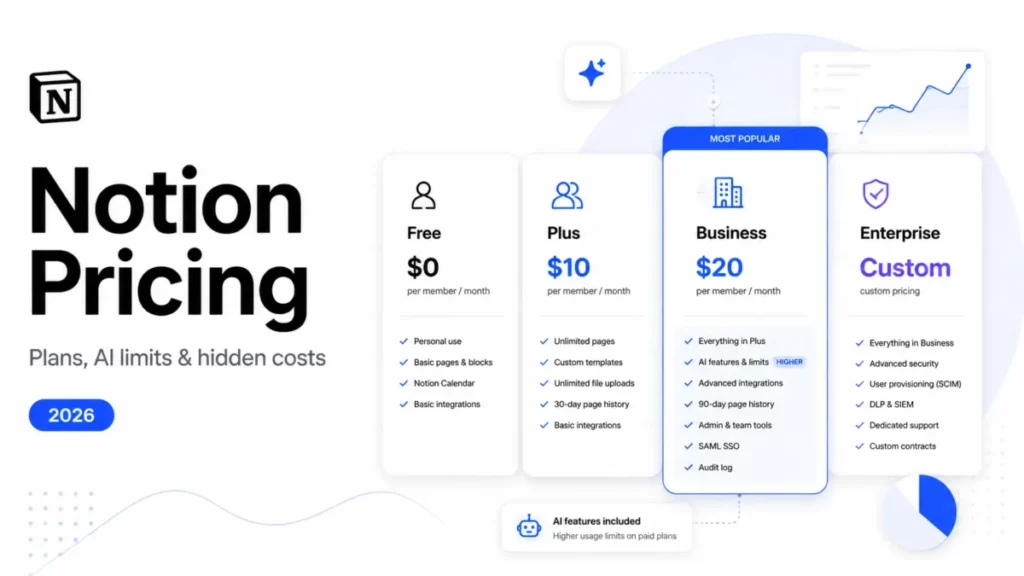
Here is what Notion charges and where its gates sit, checked July 17, 2026, so the switching triggers below have a factual anchor.
| Notion plan | Price (per member, annual) | Key gates and limits |
|---|---|---|
| Free | $0 | Limited collaborative blocks for multi-member workspaces; 5 MB upload cap; 7-day page history |
| Plus | $10/ | Unlimited collaborative blocks, basic integrations, 30-day page history |
| Business | $20/ | Notion AI in-plan, advanced integrations, SAML SSO, 90-day page history |
| Enterprise | Custom | SCIM provisioning, audit log, advanced security and governance |
Pricing checked on the official Notion pricing page, July 17, 2026, US dollars, annual billing unless noted. Notion lists Plus at $10 per member monthly on annual billing and $12 on monthly billing.
That table already shows two exit triggers. SAML SSO sits on Business and above, and SCIM provisioning is Enterprise-only, so an identity requirement can force a plan jump that has nothing to do with features you use.
Now the frustrations that send teams to this list, each mapped to the alternatives that resolve it.
Trigger 1: Large workspaces get slow and shallow. Review patterns on G2 repeatedly mention lag in big, highly customized workspaces, a less fluid mobile experience, and project reporting that trails dedicated work-management tools. If your database has thousands of related rows, Notion’s flexibility starts working against you.
Trigger 2: Project execution is too light. Notion handles briefs, notes, and lightweight trackers well, but dependencies, workload planning, and portfolio reporting are not its strength. Delivery teams hit this wall first.
Trigger 3: The blank canvas becomes governance chaos. The same open canvas that makes Notion capable means every team invents its own structure, and a 50-person company ends up with no consistent permissions, naming, or source of truth.
Trigger 4: You do not own your data. Notion is a hosted cloud workspace. Teams that want local Markdown files, offline-first access, open formats, or self-hosting treat that as a dealbreaker, not a preference.
Trigger 5: Migration and lock-in risk. Standard database export reflects only the current view, the public Notion API averages about three requests per second per integration, and rebuilding relational databases elsewhere is real work. Buyers who plan an exit before they need one weight portability heavily.
Trigger 6: Governance and identity gates. SAML on Business, SCIM on Enterprise, and audit controls concentrated at the top tier mean regulated buyers pay for the plan their security team requires, not the plan their workflow requires.
Keep these six triggers in mind. The rest of this guide is organized around them, because the correct Notion alternative is a function of which trigger is yours.
Before the deep dives, here is the shortlist in one view.
| Alternative | Best for the team leaving because… | Starting price (US, annual) | Direct Notion import? | Migration difficulty |
|---|---|---|---|---|
| Superhuman Docs | They want Notion’s flexibility with more depth | $12 per Doc Maker/ | Not documented as lossless | Medium-High |
| ClickUp | Project execution is too shallow | $7 per user/ | Yes, on all plans | Medium-High |
| Confluence | They live in Jira and need governance | Free up to 10 users; then $5.42/ | Yes, with user mapping | Medium |
| monday work management | They run visual operations | $9 per seat/ | No verified lossless importer | Medium-High |
| Obsidian | They want local Markdown ownership | Core free; Sync $4/user/ | Markdown export, not direct | Low-Medium |
| Slite | Knowledge sprawl needs maintaining | $10 per user/ | HTML export, not lossless | Medium |
| Craft | Documents must look client-ready | Starter free; Plus $8/month effective | Yes, but not linked databases | Low-Medium |
| Microsoft Loop | They standardize on Microsoft 365 | Included with eligible M365 | No verified path | Medium-High |
| Anytype | They want self-hostable ownership | Free; Plus $4/month | Yes, values-only for logic | Medium-High |
| Nuclino | The blank canvas is too much setup | Free (50 items); Starter ~$6/ | No direct importer documented | Medium |
Prices reflect official pages checked July 17, 2026, except Nuclino, whose amounts are vendor-listed and explained in the pricing section. The two right-hand columns are the ones most comparison tables skip, and they decide whether a switch takes an afternoon or a quarter.
Alternatives That Fix Slow, Shallow Notion
If your trigger is performance at scale or thin project execution, you need a tool built around structured work, closer to dedicated project management software than a blank page. These three replace the layer where Notion runs out of depth.
Superhuman Docs: The Closest One-for-One Replacement

Superhuman Docs, the product covered in our Coda review, is the alternative that feels most like Notion while adding the depth Notion lacks. It became Superhuman Docs on July 8, 2026, and its documents, tables, formulas, and automations continue under the new brand.
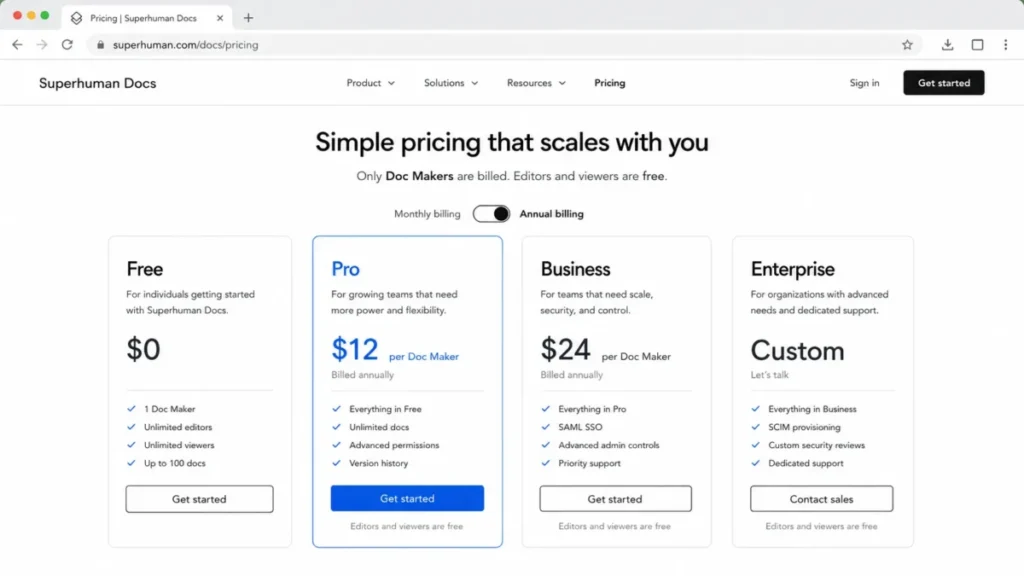
The pricing model is the reason it belongs at the top for many teams. The Pro plan lists at $12 per Doc Maker per month on annual billing, or $15 monthly, and editors and viewers stay free, according to the official Superhuman Docs pricing and billing documentation checked July 17, 2026.
That structure changes the math for teams where only a few people build. A five-person team with two builders pays for two makers, not five seats, which is a real advantage over Notion’s per-member billing.
Where it goes beyond Notion is interactive logic. Formulas, buttons, cross-doc actions, Packs integrations, and automations let a document behave like a small application, which suits operations teams that outgrew Notion’s lighter database layer.
The tradeoff is honest. New Superhuman Docs pricing is higher per maker than legacy Coda headline prices, and the July 2026 rebrand means grandfathered Coda customers may hold different terms, so verify your account before assuming the public price applies.
| Pros | Cons |
|---|---|
| Closest match to Notion’s doc-plus-database model | Higher per-maker price than legacy Coda |
| Free editors and viewers around a small maker group | Rebrand makes older comparisons and pricing stale |
| Deeper formulas, automations, and Packs than Notion | No officially documented lossless Notion migration |
| Strong fit for interactive, app-like documents | AI credit allowances are described as temporary or beta-stage |
- Best for:
- Teams with a few builders and many read-only or editing collaborators
- Operations groups that need formulas, automations, and interactive controls
- Notion refugees who want the same mental model, not a new tool to learn
- Avoid if:
- You want a guaranteed one-click, lossless import of complex Notion databases
- Every team member builds, which erodes the free-viewer pricing advantage
- Migration difficulty:
- Medium to high. Documents and tables carry over conceptually, but Notion-specific database logic, templates, permissions, and integrations should be validated and often rebuilt, and the official material does not promise a lossless path.
- Verdict:
- Choose Superhuman Docs if you want Notion’s flexibility with more automation depth and your team has more readers than builders.
ClickUp: Best for Real Project Execution

Start with the gap ClickUp closes. Notion tracks projects; ClickUp runs them, with native dependencies, workload views, time tracking, goals, and dashboards that Notion’s databases only approximate.
Pricing starts with a Free Forever plan, and the practical tier for most switching teams is Unlimited at $7 per user per month on annual billing, per ClickUp’s official pricing page checked July 17, 2026. Business at $12 adds more advanced dashboards, automations, and administration.
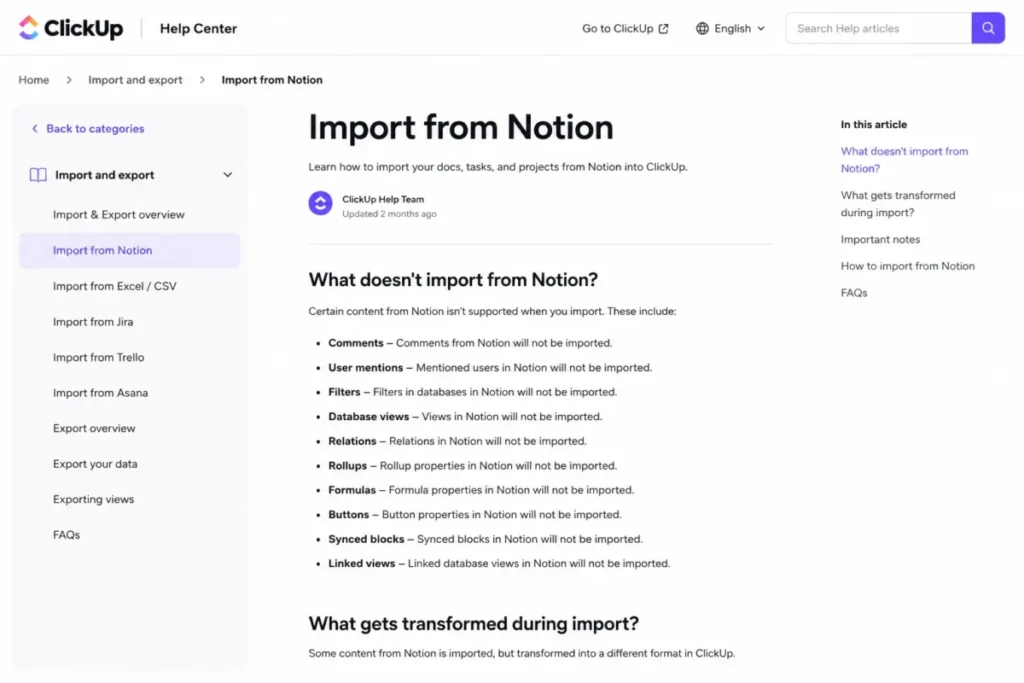
ClickUp also offers a direct Notion importer on every plan, which sounds like it removes migration risk. It does not remove it entirely.
Official ClickUp import documentation notes that some inline database content, page history, and certain rich blocks do not transfer without transformation, so budget cleanup time for anything beyond plain pages. A direct importer and a lossless importer are not the same thing.
The other cost is complexity. ClickUp’s feature density is its strength for delivery teams and its burden for everyone else, and our ClickUp review digs into that setup effort and the occasional loading friction reviewers report.
| Pros | Cons |
|---|---|
| Native dependencies, workload, and time tracking | Feature density creates a steep setup and training curve |
| Free Forever plan plus a $7 practical tier | Notion import flattens or omits some content |
| Dashboards and goals Notion cannot match | Review patterns cite performance friction at scale |
| Direct Notion importer on all plans | Document editing is secondary to task execution |
- Best for:
- 10-to-100-person delivery, agency, and product teams
- Teams that need portfolio-level reporting and dependencies
- Groups replacing Notion’s task layer, not its wiki layer
- Avoid if:
- You mainly need a document and knowledge workspace, not a project engine
- Your team wants minimal configuration out of the box
- Migration difficulty:
- Medium to high. The importer runs on all plans, but unsupported database fields, page history, and rich content require manual rework, and workflows must be rebuilt around ClickUp’s task model.
- Verdict:
- Choose ClickUp if the reason you are leaving Notion is execution depth, and you can invest in setup.
monday work management: Best for Visual Operations

monday work management earns its place for teams that were using Notion databases as an operations tracker and kept hitting walls on automation and reporting. It is board-first, not document-first.
The plan structure matters before the features do. monday is Free for up to two seats, Basic runs $9 per seat per month on annual billing, Standard is $12, and Pro is $19, with paid plans starting at a three-seat purchase, per monday.com’s official pricing checked July 17, 2026.
That three-seat minimum is the first budget trap. A two-person team cannot buy a single Basic seat; the smallest paid commitment is three seats, so the real entry cost is $27 per month, not $9.
monday’s strength is visual structure: boards, timelines, dashboards, workload, and automations that make operational status legible at a glance. Standard, though, caps automation and integration actions and API usage, so heavy automators often need Pro.
The limitation for Notion refugees is documents, and our monday.com review weighs it. monday has workdocs, but a documentation-heavy team may still need a separate knowledge layer, which means monday replaces the operations board and leaves the wiki open.
| Pros | Cons |
|---|---|
| Strong visual boards, timelines, and dashboards | Paid plans start at a three-seat minimum |
| Automations and forms for operational workflows | Standard caps automation, integration, and API actions |
| Clear ownership and status at a glance | Weaker document and wiki layer than Notion |
| Scales to large cross-functional operations | No verified lossless Notion importer |
- Best for:
- Operations, marketing, and PMO teams that think in boards
- Groups replacing Notion’s tracker databases, not its docs
- Teams that need dashboards and automation over free-form pages
- Avoid if:
- Your Notion use is mostly wiki and documentation
- You are a two-person team unwilling to pay for three seats
- Migration difficulty:
- Medium to high. Tabular data can be reconstructed in boards, but nested databases, relations, templates, and wiki pages need deliberate redesign, and no verified lossless importer exists.
- Verdict:
- Choose monday work management if you want visual operations and can staff the board setup, but keep a plan for your documents.
Alternatives That Fix Notion Sprawl and Governance
If your trigger is a workspace that grew faster than its structure, the fix is not more flexibility.
It is governance, verification, or the discipline of purpose-built knowledge base software. These three each attack sprawl from a different angle.
Confluence: Best for Jira Teams and Governed Documentation

Confluence is the default answer for one specific buyer: an organization already running Jira that needs documentation with real permissions, templates, and administration. Its value is tied to that ecosystem, and outside it the case weakens.
The pricing is friendlier than its enterprise reputation suggests. Confluence is Free for up to 10 users, Standard lists at $5.42 per user per month, and Premium at $10.44, per Atlassian’s official pricing checked July 17, 2026, with progressive per-user rates that shift by seat count.
Where Confluence pulls ahead of Notion, a gap our Notion vs Confluence comparison details, is governed knowledge linked to development work. Spaces, granular permissions, templates, analytics, and native Jira integration give software and IT teams a documentation system that maps to how they already ship.
Migration is a genuine path, not a bolt-on. Atlassian offers a Notion import that can map content, comments, mentions, and users, but two caveats decide your timeline.
First, imports can take hours, and adding mapped users may affect billing, so a large import can quietly increase your seat count and cost. Second, Atlassian documents that complex Notion content can render differently after import, with caveats for private pages, permissions, comments, and mentions.
The honest weakness is at scale, and our Confluence review documents it. Review patterns cite clutter, search and performance friction in large instances, permission complexity, and dependence on marketplace apps for some workflows, and database export carries functionality caveats of its own.
| Pros | Cons |
|---|---|
| Deep Jira integration for software and IT teams | Value drops sharply outside the Atlassian ecosystem |
| Free up to 10 users, then modest per-user pricing | Imports can raise seat count and affect billing |
| Spaces, permissions, templates, and administration | Complex Notion content can render differently |
| Enterprise governance and analytics | Search and performance friction in large instances |
- Best for:
- 20-to-500-person software, IT, and enterprise teams on Jira
- Groups that need governed, permissioned documentation
- Buyers who want knowledge linked to development work
- Avoid if:
- You do not use Jira and want a flexible personal workspace
- You want minimal administration and a light-touch wiki
- Migration difficulty:
- Medium. The Notion import maps users and content, but complex pages may reformat, private-page and permission handling needs review, and mapped users can change your bill.
- Verdict:
- Choose Confluence if you are a Jira-centered team that values governance over free-form flexibility.
Slite: Best for a Knowledge Base That Maintains Itself

Slite exists for a problem Notion creates: documentation that goes stale because nobody owns keeping it true. It is knowledge-management-first and deliberately narrower than a full workspace.
Pricing starts at Basic, $10 per user per month on annual billing, with Pro at $20 and a 14-day trial, per Slite’s official pricing checked July 17, 2026. There is no perpetual free team plan in the current public lineup, and our Slite review flags the same point, which matters if a free tier is a hard requirement.
The differentiator is trust. Verification workflows, AI search, and a knowledge-management panel help a team keep answers current, so the wiki stays reliable instead of becoming an archive of half-true pages.
Slite can also sit alongside Notion during a transition. It connects Notion as a knowledge source with permission-aware search, so you can stage a move rather than cut over in one weekend.
Migration has a specific gap. Slite imports Notion HTML exports and converts databases into collections, but users are not imported and mentions become plain text, so ownership and @-references need cleanup afterward.
| Pros | Cons |
|---|---|
| Verification workflows keep docs trustworthy | No perpetual free team plan in the current lineup |
| AI search and a knowledge-management panel | Import drops users and converts mentions to text |
| Can connect to Notion during a staged migration | Narrower than Notion; not a database workspace |
| SSO and SCIM available on higher tiers | Weaker fit for interactive or relational data |
- Best for:
- 10-to-200-person remote teams that need a maintained wiki
- Groups that value verified, searchable answers over flexibility
- Teams tired of Notion documentation rot
- Avoid if:
- You rely on relational databases and interactive tables
- A free team plan is non-negotiable
- Migration difficulty:
- Medium. HTML import brings pages and collections, but the loss of users and live mentions means identity and cross-references are rebuilt by hand.
- Verdict:
- Choose Slite if your real problem is keeping team knowledge accurate, not building databases.
Nuclino: Best for the Simplest Team Wiki

Nuclino is the answer when Notion’s blank canvas is the problem, not the solution. It trades configuration depth for speed and clarity, and for many small teams that is the right trade.
The free plan covers up to 50 items, which is a real cap rather than a soft limit. On paid tiers, current vendor listings on G2 and Capterra show Starter at $6 and Business at $10 per user per month on annual billing, though Nuclino’s official pricing page rendered those amounts dynamically when checked July 17, 2026, so confirm at checkout.
What you get is a fast collaborative wiki with collections, internal links, list and graph views, and canvases, without the setup overhead Notion demands. Adoption is the point, and it is where Nuclino wins.
What you give up is depth, and our Nuclino review is blunt about it. There is no direct Notion importer in the documented paths, so a database-heavy migration means export conversion or rebuilding, and complex relational workflows and automation are outside Nuclino’s scope by design.
| Pros | Cons |
|---|---|
| Very low setup overhead and fast adoption | Free plan capped at 50 items |
| Clean collections, internal links, and graph view | No documented direct Notion importer |
| SAML SSO, audit logs, and version history on paid | Shallow databases and automation versus Notion |
| Whole-workspace Markdown export for portability | Official numeric pricing rendered dynamically |
- Best for:
- 3-to-50-person teams that want documentation without complexity
- Groups prioritizing adoption speed over feature depth
- Avoid if:
- You depend on relational databases and automation
- You need a one-click Notion database migration
- Migration difficulty:
- Medium. Markdown, Word, and HTML imports exist, but without a direct Notion importer, database-heavy content is rebuilt or converted before it lands.
- Verdict:
- Choose Nuclino if the frustration is setup and maintenance, and your knowledge needs are straightforward.
Alternatives That Fix Data Ownership and Ecosystem Gaps
If your trigger is that Notion holds your data on its servers, or that it does not live where the rest of your work does, these tools change the ownership model or the ecosystem. One caution first: local-first is not the same as team-ready, and I will be blunt about where that bites.
Obsidian: Best for Local Markdown Ownership

Obsidian flips Notion’s model. Your notes are local Markdown files on your own disk, offline-first, in a format you control, and that is exactly why researchers, writers, and technically comfortable users pick it.
The core application is free. Sync costs $4 per user per month on annual billing or $5 monthly, and Publish is $8 annually or $10 monthly, per Obsidian’s official pricing checked July 17, 2026, with your files remaining yours regardless of subscription.
For a single knowledge worker, Obsidian is hard to beat on ownership, backlinks, graph view, and an extension ecosystem that bends the tool to your workflow. The linking and portability are genuinely stronger than Notion’s.
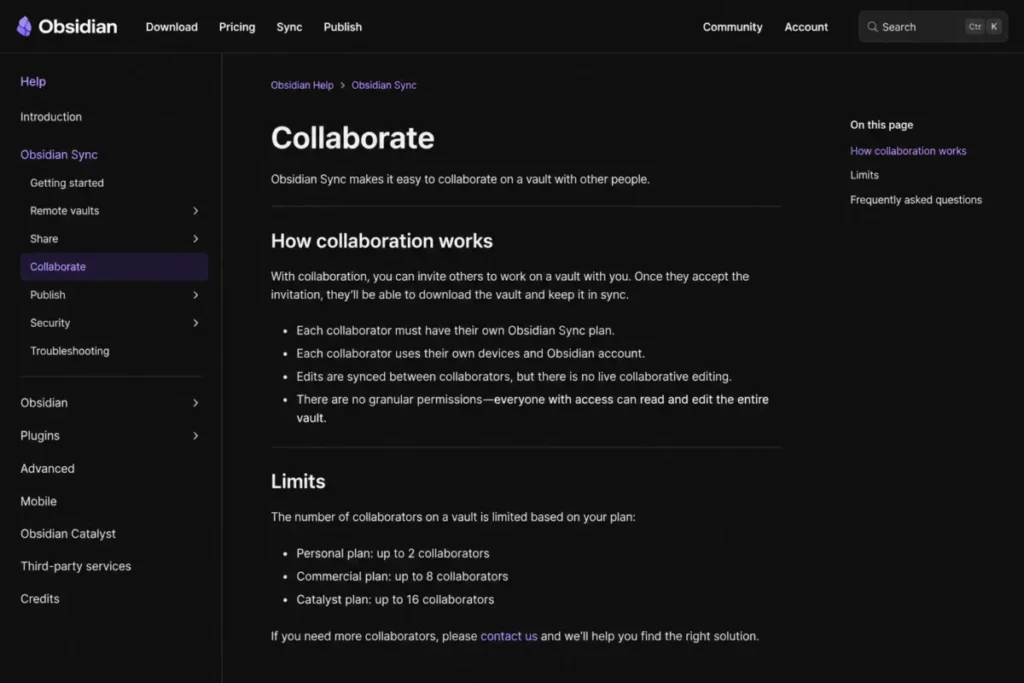
Here is the part privacy-focused lists gloss over. Obsidian’s team synchronization requires Sync for every collaborator, supports a limited collaborator count, and lacks granular permissions and live collaborative editing, according to its official collaboration documentation.
For an operations team that co-edits documents all day, that is a collaboration regression, not an upgrade. Local ownership and offline access do not deliver real-time multi-user editing or enterprise administration.
| Pros | Cons |
|---|---|
| Local Markdown files you fully own | No live co-editing, unlike Notion |
| Offline-first with strong backlinks and graph view | Granular team permissions are absent |
| Large plugin ecosystem for customization | Every collaborator needs a paid Sync seat |
| Portable, future-proof file format | Setup and plugin upkeep fall on the user |
- Best for:
- Individual researchers, writers, and knowledge workers
- Technically comfortable users who want data ownership
- Small groups that share files more than they co-edit
- Avoid if:
- Your team co-edits documents live all day
- You need granular permissions and central administration
- Migration difficulty:
- Low to medium for page-heavy Markdown content; high for relational Notion databases, permissions, and collaborative workflows that must be redesigned.
- Verdict:
- Choose Obsidian for personal or small-group knowledge with full ownership, not as a drop-in team workspace.
Craft: Best for Client-Ready Documents

Craft wins on a dimension Notion barely competes on: how the document looks when someone outside your team opens it. It is writing-first and presentation-first, with polished output, publishing, and custom domains.
Pricing is where buyers misread Craft. Starter is free, and Plus costs $96 annually, which works out to $8 per month, or $10 on monthly billing, per Craft’s official plan documentation checked July 17, 2026.
The trap is that Plus is a solo plan. Adding team members requires a different plan family such as Family, Team, or Business, so quoting the $8 Plus price as a team cost understates the real commitment, and the Team offer is sold as a fixed bundle rather than a simple per-seat rate.
On documents, Craft is a pleasure: blocks, spaces, collections, publishing, share analytics, offline use, and clean cross-platform apps. It is the tool I would reach for when the deliverable is a proposal or a client doc, not an internal database.
Two limits matter for switchers. Craft does not import linked Notion databases, and additional AI usage is sold as session top-ups with expiration conditions, so heavy AI users carry a variable cost on top of the plan.
| Pros | Cons |
|---|---|
| Presentation-grade documents and publishing | Plus is solo; team use needs a different plan |
| Offline use and fast cross-device apps | Linked Notion databases are not imported |
| Custom domains and share analytics | Team plan is a fixed bundle, not per-seat |
| Multiple clean export formats | AI top-ups add a separate, variable cost |
- Best for:
- Consultants, founders, writers, and designers
- Small teams producing client-facing documents
- Users who value polish over database depth
- Avoid if:
- Your Notion workspace is database-heavy
- You need many collaborators on the cheapest plan
- Migration difficulty:
- Low to medium for documents; high for database-heavy workspaces, because linked databases do not import and collaboration may require a plan change.
- Verdict:
- Choose Craft if your output is documents that need to look professional, and databases are not the point.
Microsoft Loop: Best for Microsoft 365 Teams

Microsoft Loop makes sense for exactly one situation, and it is a common one: your company already runs Microsoft 365 and wants collaborative pages and portable components inside Teams, Outlook, and the Loop app.
The pricing question is the one most tables get wrong. Loop does not have a simple standalone business price; its business access depends on eligible Microsoft 365 work or school subscriptions, and Microsoft 365 Business Basic starts at $6 per user per month on annual billing with Teams in the researched US offer, per Microsoft’s official pages checked July 17, 2026.
For an existing Microsoft 365 customer, Loop is effectively an included capability, which is a strong incremental-cost story. For a business outside that ecosystem, the real decision is a Microsoft 365 subscription, not a Loop line item.
The catch is dependency and storage. Loop content consumes Microsoft storage and has documented workspace and membership limits, and advanced Copilot capabilities require their own eligible license, so “free” only holds for teams already paying for the suite.
Migration is also unproven here. No direct Notion migration path was verified in the official sources, so pages and structured databases likely need manual reconstruction or intermediate formats.
| Pros | Cons |
|---|---|
| Native to Teams, Outlook, and Microsoft 365 | No simple standalone business price |
| Portable components across Microsoft apps | Value depends on the Microsoft ecosystem |
| Included for eligible Microsoft 365 users | Content counts against Microsoft storage |
| Real-time collaboration inside familiar tools | No verified direct Notion migration path |
- Best for:
- Teams already standardized on Microsoft 365
- Groups that want components inside Teams and Outlook
- Avoid if:
- You do not use Microsoft 365 and do not plan to
- You need Notion’s database depth in one place
- Migration difficulty:
- Medium to high, because no direct Notion path is verified and structured content is rebuilt manually or through intermediate formats.
- Verdict:
- Choose Microsoft Loop only if you already live in Microsoft 365; outside that, it is a suite decision, not a workspace decision.
The Alternative Nobody Mentions: Anytype
Most Notion alternative lists stop at the well-known names. Anytype rarely makes them, and for a specific buyer that is a miss worth correcting.
Anytype: Best for Self-Hostable, Decentralized Ownership

Anytype is local-first and object-based, built around user-controlled data, encrypted synchronization, and a path toward self-hosting that no mainstream cloud workspace offers. For privacy-conscious teams and communities, that architecture is the entire appeal.
Pricing starts with a free plan for local use, and Plus is listed at $4 per month before any annual discount, with Pro and Ultra tiers and custom Business arrangements, per Anytype’s official pricing checked July 17, 2026. Free local use plus optional network storage is a different model from per-seat SaaS.
Anytype offers a direct Notion importer, which is more than several better-known tools provide. The catch is what the import changes.
Its documentation states that formulas and rollups can arrive as static values, mentions and date ranges can become text, and files or links need validation, so visible data survives while editable logic does not. Preserving values is not the same as preserving a working database.
Import and export are also desktop-centric, and enterprise administration is less established than in mature cloud suites, so a regulated 100-person rollout is not where Anytype is strongest.
| Pros | Cons |
|---|---|
| Local-first objects with a self-hosting path | Import flattens formulas and rollups to values |
| Encrypted sync and strong data ownership | Import and export are desktop-oriented |
| Direct Notion importer available | Enterprise administration is less mature |
| Free local use and portable export formats | Smaller ecosystem than mainstream suites |
- Best for:
- Privacy-conscious individuals and communities
- Technically capable teams that want self-hosting
- Buyers who prioritize data control over polish
- Avoid if:
- You need mature enterprise administration in place
- Your databases depend on live formulas and rollups
- Migration difficulty:
- Medium to high. A direct importer exists, but flattened logic, desktop-only workflows, and file validation mean structured workspaces need a backup-and-check pass before you trust them.
- Verdict:
- Choose Anytype if ownership and self-hosting outrank enterprise polish, and you can accept values-only database migration.
Pricing Comparison and Real 10-User Cost
Headline prices lie by omission here, because these tools bill in four different ways: per member, per builder, per fixed bundle, and inside a suite. The table below normalizes to a real 10-user monthly cost with the assumption stated for each, so you compare what you will pay.
| Product | Starting price (annual) | Practical tier | Real 10-user monthly cost | Free plan |
|---|---|---|---|---|
| Notion | $10/ | Plus, or Business for AI and SAML | $100 on Plus; $200 on Business | Yes, limited for teams |
| Superhuman Docs | $12/ | Pro | $24 with 2 makers; $120 if all 10 build | Yes |
| ClickUp | $7/user/ | Unlimited | $70 | Yes, Free Forever |
| Confluence | $5.42/ | Standard | $0 up to 10 users; ~$54 on Standard | Yes, up to 10 users |
| monday work management | $9/seat/ | Standard | $90 on Basic; $120 on Standard | Yes, up to 2 seats |
| Obsidian | $4/user/ | Sync for collaborators | $40 if all 10 need Sync | Yes, core app |
| Slite | $10/ | Basic or Pro | $100 on Basic | No; 14-day trial |
| Craft | $8/month effective (Plus, solo) | Team bundle | Fixed team bundle, verify price | Yes, Starter |
| Microsoft Loop | Included with eligible M365 | Via M365 Business Basic | ~$60 as M365 Basic (suite, not Loop) | With eligible M365 |
| Nuclino | ~$6/ | Starter or Business | ~$60 Starter; ~$100 Business | Yes, 50 items |
Prices reflect official pages checked July 17, 2026, US dollars, annual billing.
Nuclino figures are vendor-listed on G2 and Capterra because the official page rendered amounts dynamically; verify at checkout. Superhuman Docs, ClickUp, monday, Obsidian, Slite, and Nuclino 10-user figures are simple multiplications of the stated per-seat price by 10, except where a free tier or bundle applies.
The cheapest sticker price rarely wins once you count who pays. Superhuman Docs at $24 for a two-builder team undercuts almost everything, but the same tool costs $120 if all 10 people build, so its rank depends entirely on your creator-to-viewer ratio.
Confluence is effectively free at 10 users, monday’s real floor is three seats not one, and Craft’s solo Plus price should never be used as a team number.
AI pricing is not one number
Every vendor meters AI differently, so “AI included” is not a comparison. The table maps each model in its own unit rather than pretending they convert.
| Product | AI metering model | Note |
|---|---|---|
| Notion | Notion AI in the Business plan presentation | Credit and allowance details vary by plan |
| Superhuman Docs | AI credits, described as temporary or beta-stage | Allowances differ for makers, editors, free users |
| ClickUp | AI sold as a paid add-on | Separate cost on top of the plan |
| Slite | AI search and answers with plan-based quotas | Question and edit limits differ by tier |
| Craft | AI session top-ups with expiration | Variable cost beyond the plan |
| monday work management | AI credits | Credit-based, separate from seats |
Because credits, sessions, add-ons, and quotas are not interchangeable, I would not treat any single “AI included” claim as a like-for-like advantage. Price the AI you will use in the vendor’s own unit before you switch for it.
Feature Gate Comparison
The decision often comes down to four capabilities Notion refugees care about most: automation depth, real-time co-editing, local ownership, and where identity controls become available. This matrix compares them without collapsing incomparable units.
| Product | Real-time co-editing | Local/ | Automation depth | Identity gate (SAML/ |
|---|---|---|---|---|
| Notion | Yes | Cloud, limited offline | Light | SAML on Business; SCIM on Enterprise |
| Superhuman Docs | Yes | Cloud | Strong (formulas, automations) | Advanced security on higher tiers |
| ClickUp | Yes | Cloud | Strong (native automations) | SSO on higher plans |
| Confluence | Yes | Cloud | Moderate (automation quotas) | SSO and governance on Premium/ |
| monday work management | Yes | Cloud | Strong, but capped on Standard | Governance on Enterprise |
| Obsidian | No | Local Markdown | Via plugins | Not offered as a hosted control |
| Slite | Yes | Cloud | Workflow and verification | SSO and SCIM on Enterprise |
| Craft | Yes | Offline-capable | Light | Not published for the researched tiers |
| Microsoft Loop | Yes | Cloud, in Microsoft 365 | Via Microsoft 365 | Managed through Microsoft 365 identity |
| Anytype | Limited | Local-first | Light | Not established for enterprise use |
Read this matrix against your non-negotiable. If real-time co-editing is mandatory, Obsidian and Anytype are out regardless of their ownership advantages.
If a security team requires SAML or SCIM, budget for Business or Enterprise from the start, because that gate usually sets your price floor before any feature comparison begins.
Identity and governance by plan
Regulated buyers should read the plan gate, not the feature list. Notion places SAML SSO on Business and above and restricts SCIM provisioning to Enterprise, which is the single most common reason a Notion bill jumps.
| Product | SAML SSO | SCIM provisioning | Audit log |
|---|---|---|---|
| Notion | Business and Enterprise | Enterprise only | Enterprise |
| Confluence | Premium and Enterprise tiers | Enterprise-grade tiers | Higher tiers |
| Slite | Enterprise | Enterprise | Enterprise |
| Nuclino | Paid plans (Business) | Not confirmed in researched sources | Business |
| monday work management | Enterprise | Enterprise | Enterprise |
Where a cell says “not confirmed,” treat it as a question for the vendor, not a yes. I would never assume a control exists because a competitor offers it.
Migration Risk Assessment: What Transfers
Migration cost is driven by workspace complexity, not page count. Ten thousand plain pages move easily; two hundred relational databases with formulas, rollups, and permissions do not.
Before you export anything, do this: inventory every saved database view your team relies on. A standard Notion export reflects only the current or default view, so the board, calendar, and filtered views your operations depend on can silently vanish unless you export or document each one deliberately.
This is the single most common migration surprise, and it costs nothing to prevent.
The next question is whether your target imports directly from Notion or forces an export-and-upload path, and what it loses on the way. “Import” is not a yes-or-no feature.
| Product | Import path | Databases | Formulas and rollups | Mentions and users | Page history |
|---|---|---|---|---|---|
| Superhuman Docs | Not documented as lossless | Validate and often rebuild | Not documented | Not documented | Not documented |
| ClickUp | Direct, all plans | Some inline content omitted | Requires transformation | Not documented preserved | Omitted |
| Confluence | Direct, with user mapping | Complex content can reformat | Not documented | Users mapped; complex mentions differ | Not documented |
| monday work management | No verified importer | Rebuild in boards | Rebuild | Rebuild | Rebuild |
| Obsidian | Indirect, Markdown export | Relational data rebuilt | Not preserved as logic | Not preserved as live links | Not preserved |
| Slite | Indirect, HTML export | Converted to collections | Not applicable | Users omitted; mentions become text | Not documented |
| Craft | Direct import | Linked databases not imported | Not documented | Not documented | Not documented |
| Microsoft Loop | No verified path | Manual reconstruction | Rebuild | Rebuild | Rebuild |
| Anytype | Direct importer | Imported as objects | Flattened to static values | Mentions and date ranges become text | Not documented |
| Nuclino | No direct importer | Rebuild or convert | Not applicable | Not documented | Not documented |
Marked from each vendor’s official import and export documentation checked July 17, 2026. “Not documented” means the source is silent, which is a reason to test with a sample before committing, not a guarantee either way.
Two patterns stand out. Direct importers (ClickUp, Confluence, Craft, Anytype) still lose specific things, so a direct path shortens the work but does not remove cleanup.
Indirect paths (Obsidian, Slite, Nuclino) strip structure by design, which is fine for a document library and painful for a relational operations workspace.
Migration difficulty by alternative
Migration difficulty here is an editorial estimate based on data-model complexity, workflow rebuild effort, integration requirements, and setup depth. I have used effort bands rather than timelines, because I did not migrate live workspaces of known size.
| Alternative | Difficulty | Main risk |
|---|---|---|
| Obsidian | Low to Medium | Relational databases and workflows have no home |
| Craft | Low to Medium | Linked Notion databases do not import |
| Confluence | Medium | Complex pages reformat; mapped users can raise billing |
| Slite | Medium | Users and live mentions are lost on import |
| Nuclino | Medium | No direct importer; databases rebuilt or converted |
| Superhuman Docs | Medium to High | No documented lossless path; logic revalidated |
| ClickUp | Medium to High | Inline database content and history need rework |
| monday work management | Medium to High | Pages and nested databases fully rebuilt |
| Microsoft Loop | Medium to High | No verified Notion path; manual reconstruction |
| Anytype | Medium to High | Formulas and rollups arrive as static values |
The pattern to internalize: the more your Notion workspace leans on live database logic, the higher every one of these numbers climbs. A wiki moves easily; an operations system does not.
How to Choose the Right Notion Alternative
Do not start from a feature list. Start from the exact reason you are leaving, because that single fact narrows 10 options to one or two.
Work down this decision path.
Is your core need the closest possible Notion replacement? Choose Superhuman Docs, especially if you have more viewers than builders and want deeper formulas and automation.
Is project execution the gap: dependencies, workload, portfolio reporting? Choose ClickUp, and accept a setup investment in exchange for real delivery controls.
Do you live in Jira and need governed documentation? Choose Confluence, provided the Atlassian ecosystem is where your work already happens.
Is your problem knowledge that goes stale, not databases? Choose Slite for verification workflows, or Nuclino if the deeper issue is that Notion demanded too much setup.
Do you want to own your files locally? Choose Obsidian for personal or small-group Markdown ownership, or Anytype if self-hosting and a decentralized model matter more than enterprise polish.
Is the deliverable a polished, client-facing document? Choose Craft, and budget for a team plan rather than the solo Plus price.
Do you already run on Microsoft 365? Choose Microsoft Loop, and treat it as an included capability rather than a new subscription.
Do you run visual operations more than documentation? Choose monday work management, and plan separately for where your wiki will live.
Three variables cut across every branch: your creator-to-viewer ratio (which decides whether maker-based billing beats per-seat), your security requirement (which can force an Enterprise plan on its own), and your migration tolerance (which favors simpler targets when a clean cutover matters more than feature depth).
Which Notion Alternative Should You Avoid?
Naming the wrong fit is more useful than another round of praise. Each tool here is good for someone and a mistake for someone else.
| Avoid this alternative if… | Reason |
|---|---|
| Obsidian, when your team co-edits live | No real-time editing or granular permissions |
| Anytype, for a regulated enterprise rollout | Enterprise administration is not yet mature |
| Microsoft Loop, outside Microsoft 365 | Its value and pricing assume the suite |
| ClickUp, for a documentation-first team | It is a project engine, not a wiki |
| monday work management, for wiki replacement | Strong on boards, thin on documents |
| Craft (Plus), as a team purchase | Plus is a solo plan; team needs a bundle |
| Slite, when a free team plan is required | No perpetual free tier in the lineup |
| Superhuman Docs, if everyone builds | Maker-based pricing loses its edge |
| Confluence, without Jira | Governance overhead without the payoff |
| Nuclino, for relational database workflows | Simplicity means shallower databases |
None of these is a criticism of the product. Each is a mismatch between a tool’s design and a buyer’s actual trigger, and matching those two is the whole job.
When to Stay with Notion
Switching has a cost, and sometimes the honest answer is to stay. Our Notion review lays out where it still wins, and several cases favor staying put.
Stay if your workspace is mid-sized and mostly documents, wikis, and lightweight trackers, because that is exactly where Notion is strongest and a switch buys you little. Stay if your team already invested months designing databases, templates, and permissions that work, since rebuilding that elsewhere is real, unpaid labor.
Stay if you need one flexible place for docs and light databases and no single specialist tool replaces both without a gap. Stay if the frustration is governance discipline rather than the product, because most alternatives will develop the same sprawl without naming conventions and ownership.
Switch when a specific layer has broken: execution depth, data ownership, ecosystem fit, or an identity requirement Notion gates behind a higher tier. Delay the decision when the real issue is workspace hygiene, because a migration will carry your bad habits with it and cost you a quarter to learn that.
The question I would answer before renewing Notion: can we keep this workspace clean and governed for the next 90 days without a tool change? If yes, stay and fix the process.
If no, and the reason is structural, pick the alternative that matches your trigger.
Final Verdict: The Best Notion Alternative for Most Teams
For most teams leaving Notion, Superhuman Docs is the alternative I would shortlist first. It keeps Notion’s document-plus-database model, adds real formula and automation depth, and bills only Doc Makers, so a team with a few builders and many collaborators often pays less than it did on Notion.
That is a recommendation, not a coronation. The best pick still depends on your trigger, so here it is by buyer type.
Best overall replacement: Superhuman Docs, for teams that want Notion’s flexibility with more power and free viewers. Best for project execution: ClickUp, for delivery teams that need dependencies, workload, and dashboards.
Best for enterprise governance: Confluence, for Jira-centered organizations. Best free option: Confluence, which is free up to 10 users, or ClickUp’s Free Forever plan for task work.
Best for data ownership: Obsidian for individuals and small groups, Anytype for self-hosting.
Best for simple team knowledge: Nuclino for speed, Slite for maintained accuracy.
Best for polished documents: Craft. Best for Microsoft shops: Microsoft Loop.
Best for visual operations: monday work management.
The stay-or-switch signal is simple. Switch when a specific Notion layer has structurally failed and one of these tools directly fixes it.
Stay when your workspace is mostly documents and the real problem is hygiene, because no migration fixes a governance habit, and the cost of moving is measured in weeks your team will not get back.
FAQ
What is the best alternative to Notion?
There is no single best alternative, because the right pick depends on why you are leaving. Superhuman Docs is the closest one-for-one replacement for flexible workspaces, ClickUp is strongest for project execution, and Confluence suits Jira-centered enterprises.
Match the tool to your specific frustration rather than a generic ranking.
Is there a free alternative to Notion?
Yes. Confluence is free for up to 10 users, ClickUp offers a Free Forever plan, and Obsidian’s core app is free for local use.
Nuclino has a free tier capped at 50 items, and Anytype offers free local use. Slite is the notable exception, with a 14-day trial but no perpetual free team plan.
What is better than Notion for project management?
ClickUp is the stronger project engine, with native dependencies, workload views, time tracking, and dashboards that Notion’s databases only approximate. monday work management and other team collaboration tools fit visual, board-based operations. Both replace Notion’s task layer, but neither is a drop-in wiki, so plan for where documentation will live.
Is Obsidian better than Notion?
For a single knowledge worker who wants local Markdown files, offline access, and full ownership, yes. For a team that co-edits documents live, no.
Obsidian’s team sync lacks real-time collaborative editing and granular permissions and requires a paid Sync seat per collaborator, so it is a personal-knowledge tool more than a team workspace.
Which Notion alternative works offline?
Obsidian is offline-first with local Markdown files, Anytype is local-first with encrypted sync, and Craft supports offline use across devices. Notion and most cloud workspaces need a connection for full functionality.
If offline ownership is the trigger, Obsidian and Anytype are the strongest picks, with the collaboration tradeoffs noted above.
Can I export everything from Notion?
Not automatically. A standard Notion export reflects the current or default database view rather than every saved view, so board, calendar, and filtered views can be missed.
Inventory and export each important view deliberately before migrating, and expect relations, formulas, and rollups to need rework in any destination tool.
How difficult is it to migrate away from Notion?
It depends on complexity, not page count. Plain pages move easily, but relational databases, formulas, rollups, permissions, and mentions transfer unevenly.
Direct importers like ClickUp, Confluence, Craft, and Anytype still lose specific elements, and indirect paths strip structure by design. Test with a sample before committing your full workspace.
Is Confluence better than Notion for teams?
Yes, if your team already uses Jira and needs governed documentation with permissions and administration. No, unless you are in the Atlassian ecosystem, because outside it the governance overhead outweighs the benefit.
Confluence is free up to 10 users, but review patterns cite search and performance friction in large instances.
Which Notion alternative has the most predictable pricing?
ClickUp pricing at a flat $7 per user is the easiest to forecast. Superhuman Docs is predictable only if you know your builder count, since it bills per Doc Maker. Watch the traps: monday starts at three seats, Craft’s team plan is a bundle, Microsoft Loop assumes a Microsoft 365 subscription, and Nuclino’s official prices render dynamically.
Should I switch from Notion or stay?
Switch when a specific layer has structurally failed, such as execution depth, data ownership, ecosystem fit, or an identity control Notion gates behind Enterprise. Stay when your use is mostly documents and lightweight databases, or when the real problem is workspace hygiene.
A migration carries your habits with it, so fix process issues before blaming the tool.