
Most buyers size up Remove.bg by asking one question: how many credits do I get for the money. That is the wrong first question.

The decision that actually costs you money sits in two places the pricing page does not shout about. Those are when your credits expire, and which access mode carries the right to use the output commercially.
Remove.bg is a fast, accurate, one-click background remover that is genuinely good at what it does. In late 2025 it quietly changed how subscription credits behave, and its most useful capabilities are all gated behind paying.
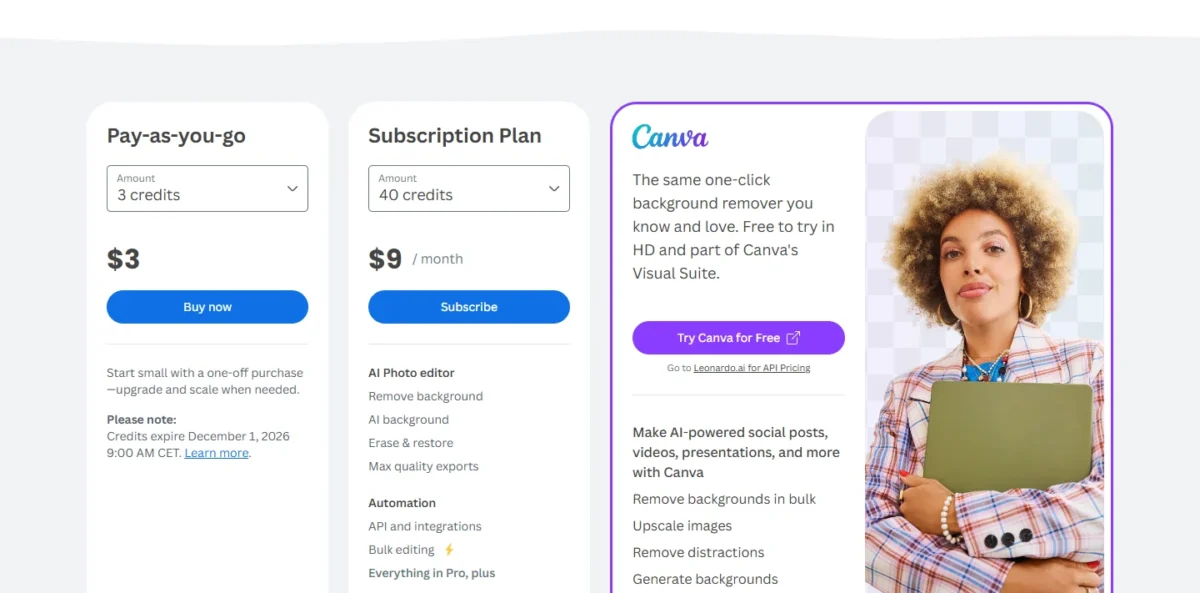
The pricing page I read on October 21, 2026 says remove.bg’s background removal is moving to Canva, and the standalone website closes from 1 December 2026 at 9:00am CET. From December 1, 2026, background removal through the API moves to Leonardo.Ai, also part of Canva.
The same page calls the remover part of Canva’s Visual Suite and notes that credits expire on December 1, 2026. I would not buy credits for work that runs past that date.
My recommendation up front: treat the free tier as a quality test only. Until the closure date, Pay-as-you-go suits irregular volume, and a subscription only makes sense once you know your steady monthly image count.
In This Article (18 sections)
Quick Verdict
| Quick verdict | Detail |
|---|---|
| Best for | High-volume e-commerce and product-photo teams that need clean cutouts fast |
| Not ideal for | Anyone needing print-grade retouching, or free commercial use |
| Starting price | Free tier at $0 (preview resolution only); Pay-as-you-go 3 credits for $3 as a one-off purchase, or the Subscription Plan at 40 credits for $9 / month |
| Practical plan | Lowest paid subscription, or Pay-as-you-go for irregular volume |
| Free plan | Yes, but capped at 0.25 megapixel previews and non-commercial |
| Setup difficulty | Low for web, moderate for API |
| Main strength | Fast, accurate edge detection on people, products, and animals |
| Main limitation | Subscription credits now expire each billing period |
| Best alternative | PhotoRoom or Clipdrop for cheaper API volume and custom backgrounds |
Source: remove.bg pricing page and credits help page
Remove.bg Review 2026: Pricing, Credits, Limits and Verdict
Remove.bg earns its reputation on speed and edge quality, and I would keep it on a shortlist for any team that pushes product photos through a pipeline every week. The friction is commercial, not technical.
You have to read the credit rules and the licensing gate carefully. Both changed what the tool costs in practice, and both are documented on the official help center.
Here is the shape of the decision before the detail.
| Pros | Cons |
|---|---|
| Clean, fast one-click cutouts on people, products, animals, and cars | Subscription credits expire at the end of each billing period since October 2025 |
| A mature, well-documented REST API with a free monthly test allowance | Commercial-use rights, full resolution, and the API are all paid-only |
| Pay-as-you-go credits you can use whenever you like, kept as a backup behind a subscription until they expire on December 1, 2026 | Any upgrade, downgrade or other subscription change moves a legacy subscriber onto the no-rollover policy immediately |
| Photoshop, Figma, desktop, Android, and Canva surfaces, plus a 14-day refund window | Free output is capped at 0.25 megapixels, unusable for print or large web |
| Part of Canva’s Visual Suite, where the remover is moving as the standalone site closes on 1 December 2026 | Credits left at the end of the final billing period after you cancel also expire |
| Commercial use is permitted on Subscription plans and on full-resolution Pay-as-you-go images | Small Pay-as-you-go packs cost more per credit: 3 credits for $3, against 40 subscription credits for $9 / month |
Source: remove bg subscription benefits and rollover policy
The verdict in one line: worth paying for when speed at volume is the priority and the licensing gate is understood going in. The rest of this review is about not being surprised by the bill.
How Remove.bg Was Reviewed
This review draws on Remove.bg’s official pricing page, help center, API documentation, and product release notes, cross-checked for internal consistency. Pricing model facts and plan policies were checked on August 19, 2026, and any figure that could not be confirmed from an official page is flagged rather than stated as fact.
Remove.bg was assessed against the criteria a buyer actually weighs: the credit and cost model, feature gates by access mode, output resolution and format limits, commercial-use terms, API fit, data handling, and documented limitations. Each fact maps to an official source.
Greater weight went to the factors that change a purchase decision, which are credit expiry, the commercial-use gate, and the real cost of scaling image volume. Brand recognition and marketing claims carried no weight.
Claims that could not be verified from a readable official page were excluded from the scoring. The Pay-as-you-go and Subscription Plan prices come from the pricing page as I read it on October 21, 2026.
What Is Remove.bg?
Remove.bg is an automatic background-removal service that isolates a foreground subject and returns a transparent cutout, usually in a few seconds. It handles people, products, animals, and cars, and it requires a clear foreground to work, as the official API documentation states.
It is not a general photo editor and not a retouching tool. It does one job and does it at volume, through a web app, desktop apps, plugins, and an API.
The product became part of Canva in 2021 and operates as a Canva Austria GmbH brand. Canva is where the background remover is moving when the standalone website closes on 1 December 2026.
What Remove.bg Gets Right
The core engine is the reason to consider it, and three capabilities carry the value.
One-click removal that holds up on hard edges
Remove.bg’s model detects the subject and cuts it out without manual masking, returning a transparent PNG or the alpha matte. For product catalogs and marketplace listings, that speed is the whole point.
Output runs up to 50 megapixels as JPG or ZIP, or up to 10 megapixels as PNG, and each processed image costs one credit, per the official API changelog. Website previews are free, while previews through the apps, plugins, or API cost a quarter credit.
The engine is a workflow accelerator, not a finishing tool. For clean studio-lit product shots it is reliable, and for messy hair edges it will get you most of the way rather than to a retoucher’s finish.
An API and automation path built for scale
The API is a plain HTTP interface with an X-API-Key header. It accepts a file upload or an image URL and returns a transparent PNG or a separate alpha matte, according to the official API documentation.
A GET call to the account endpoint reports your credit balance, which makes budget monitoring straightforward. Every account gets the first 50 API calls per month free, which is enough to validate an integration before spending credits.
One caveat matters for developers. Those free calls are restricted to small, preview resolution, so you cannot validate full-resolution output for free, per the official release notes.
I would budget a short proof-of-concept against the free calls, then move to paid credits before testing production resolution. That sequencing keeps the evaluation honest without wasting the free allowance.
Plugins and ecosystem reach
Remove.bg reaches well beyond its website. It ships a Photoshop extension, a Figma plugin, desktop apps for Windows, Mac, and Linux, an Android app, Design Templates, and an Edit-in-Canva widget, alongside the REST API, as listed on the official help pages.
For a design team already inside Photoshop or Figma, that reach removes a context switch. For a developer, the API and the desktop tooling cover both interactive and batch work.
If you want to see how this sits next to broader editors, the best AI photo editor guide puts single-purpose cutout tools against full suites.
Where Remove.bg Costs You
The problems are not about output quality. They are about how the credit economy and licensing work, and each one has a direct buyer consequence.
Credits stopped rolling over in late 2025
This is the change most competing reviews still get wrong. Older reviews say Remove.bg subscription credits roll over up to five times your monthly allowance, and that is no longer true.
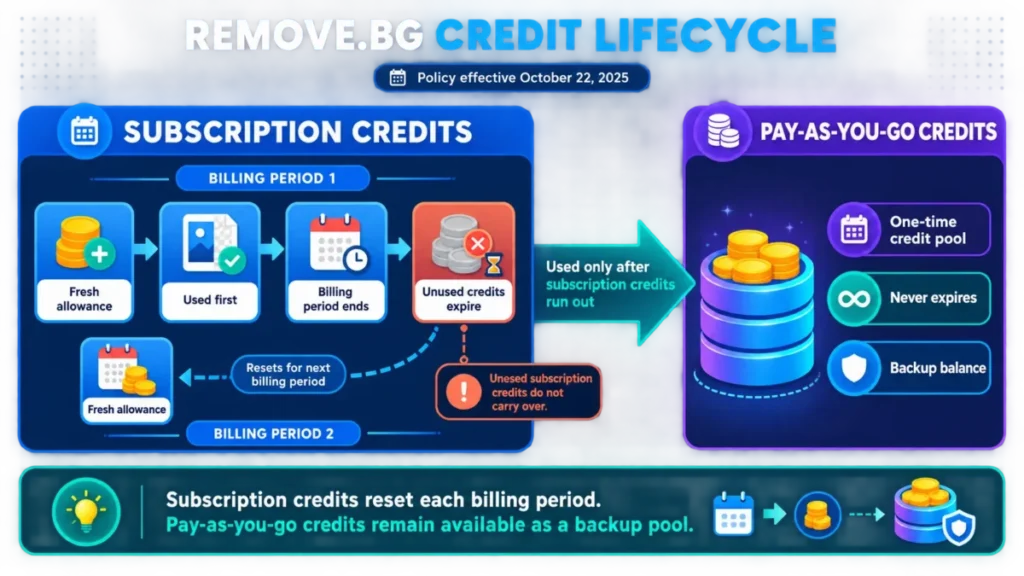
Since October 22, 2025, unused subscription credits expire at the end of each billing period, and every new cycle starts fresh, per the official rollover policy page. Existing subscribers keep legacy rollover only while their subscription stays unchanged.
Here is the trap inside that rule. If you upgrade, downgrade, cancel and resubscribe, or make any change, the no-rollover policy applies to you immediately, as the same official page states.
A seasonal seller who bumps to a bigger plan for the holidays and drops back down can lose the buffer they thought they were banking. That is a real cost hidden inside a routine plan change.
A Pay-as-you-go credit package lets you use credits whenever you like, and when an account holds both kinds, subscription credits are always used first, so the Pay-as-you-go credits stay as a backup.
The pricing page I read on October 21, 2026 notes that credits expire on December 1, 2026 at 9:00 AM CET.
Commercial use is a paywall, not a default
Commercial use is permitted on Subscription plans and on full-resolution Pay-as-you-go images, per remove.bg’s commercial-use help page. The Free plan and use without an account are restricted to non-commercial use.
That reframes the free account entirely. It is a quality test, not a production tool, and a freelancer using free output on client work is outside the license.
The same page gives the dividing line: posting processed pictures on your website to sell products is commercial use, while a passport photo is personal use. A seller with irregular volume can therefore stay on Pay-as-you-go credits and still use full-resolution cutouts commercially.
What Spends a Credit, and the Preview Ceiling
A credit is spent on the high-resolution download: each image you download in high resolution costs 1 credit, per the help page on image credits. Previews cost nothing on the remove.bg website and ¼ credit through the remove.bg apps and API.
That rule decides how I would handle tricky subjects such as transparent glassware or fine hair. I would check each one as a free website preview and download in high resolution only the cutouts that hold up; in an app or API pipeline, the same check costs a quarter credit per image.
The free tier stops at that preview size, capping output at 0.25 megapixels (for example 625 x 400 pixels), per the official plan documentation. That is fine for a quality check and useless for print or a large web hero.
Remove.bg Pricing and Plans
Remove.bg is priced by image credits, not by seats, so the usual per-user math does not apply. Your cost driver is monthly image volume multiplied by the effective credit price, plus any Pay-as-you-go credits you hold as a backup behind a subscription until they expire on December 1, 2026.
There are three access modes. On the pricing page I read on October 21, 2026, Pay-as-you-go shows 3 credits for $3 as a one-off purchase, and the Subscription Plan shows 40 credits for $9 / month.
| Access mode | What it costs | What you get | Credit behavior |
|---|---|---|---|
| Free Account | $0 | Preview output up to 0.25 MP, a free trial credit for AI edits, first 50 API calls per month free, non-commercial | Preview only |
| Subscription | 40 credits for $9 / month | Full resolution up to 50 MP, API access, commercial-use rights | Credits expire at end of each billing period |
| Pay-as-you-go | 3 credits for $3, one-off purchase | A credit package you use whenever you like | Used only once subscription credits run out; the pricing page notes credits expire December 1, 2026 |
Source: remove.bg pricing page , image credits help page and commercial-use help page
The practical entry point for real work is the lowest paid subscription, because only paid access includes full resolution and the commercial license. Pay-as-you-go suits volume that is irregular and finishes before 1 December 2026, because those credits can be used whenever you like, while unused subscription credits expire at the end of each billing period.
Watch three costs on any paid plan. Every high-resolution download spends 1 credit and every app or API preview ¼ credit. High-volume API work adds up per image, and the credit-expiry rule quietly penalizes anyone who over-buys a subscription tier and does not use it, per the official rollover policy page.
All subscriptions carry a 14-day refund window, which lowers the risk of testing a paid tier, per the official release notes.
A worked example: an Etsy seller updating 30 product photos a month uses about 30 credits, plus a buffer for re-processing tricky shots. On a subscription, credits left unused at the end of the billing period expire, so I would size the plan to typical volume.
Extra volume can sit in Pay-as-you-go credits, which combine with a subscription: subscription credits are used first, and the Pay-as-you-go credits stay as backup. Those credits expire on December 1, 2026.
Feature Gates: What Each Access Mode Includes
The gate that matters is not credit count. It is which mode carries resolution, the API, and the commercial license, per the official subscription benefits page.
| Capability | Free | Subscription | Pay-as-you-go |
|---|---|---|---|
| Output resolution | Up to 0.25 MP preview | Up to 50 MP | Up to 50 MP |
| Commercial-use rights | No | Yes | Not clearly documented |
| API access | 50 preview calls per month | Full access | Full access |
| Credit expiry | Not listed on the credits help pages | Unused credits expire at the end of each billing period | Used whenever you like; pricing page dates expiry to December 1, 2026 |
| Refund window | Not applicable | 14 days | Not applicable |
Source: remove bg subscription benefits and rollover policy
The reading is simple. If you need clean full-resolution cutouts you can legally use, you are paying, and the only real choice is subscription versus Pay-as-you-go.
Ease of Use and Setup
For the web app, there is almost no setup. Uploads take JPG, PNG, or WebP files of up to 22 megabytes each, per the supported formats help page. An upload can run up to 50 megapixels, and larger images are automatically resized, per the maximum resolution help page.
The uploaded image and the result are deleted at the latest about one hour after the upload, so downloading promptly is on you. For the API, setup is moderate: generate a key, send a multipart request, and handle the PNG or alpha response.
The learning curve is short because the product does one thing. A first-time user gets a usable result on the first upload, which is the main reason it wins casual and high-volume users alike.
On a 30-day adoption view, the sign of a healthy purchase is simple. The team stops opening a manual masking tool for routine cutouts and the credit balance tracks predictably against image volume.
Integrations and Ecosystem
Beyond the API, Remove.bg plugs into the tools designers already use. The Photoshop extension and Figma plugin bring removal inside the canvas, and the Edit-in-Canva widget hands a cutout straight into Canva, as the official benefits page lists.
For automation, the REST API is the integration surface, and its documented historical rate limit reached 500 images per minute, resolution-dependent, per the official API documentation. There is no native Shopify or Zapier connector called out on the official pages, so a store workflow is built through the API rather than a one-click app.
If you are comparing this ecosystem against generative suites, the best AI image generators guide covers where cutout tools stop and generation begins.
Automation, AI, and Reporting
The AI here is narrow and purpose-built: subject detection and matting, not generation or editing. There is no analytics dashboard in the reporting sense, but the account API endpoint reports your credit balance, which is the number that matters for budgeting a pipeline, per the official API documentation.
Automation is the API’s job, and it suits a folder-watch or catalog-ingest pattern. What you do not get is a background-replacement or generative-fill step, so pairing it with a separate generator is common for full product scenes.
Security, Support, and Data Handling
Support runs through a help center, contact form, refunds page, and a platform status page. The 14-day refund window on subscriptions is the clearest buyer protection, per the official release notes.
The data-handling detail worth knowing is retention. Images travel SSL/TLS-encrypted and serve only to remove the background and offer the result for download. They are deleted at the latest about one hour after the upload, and API images right after a call is processed, per the help page on whether remove.bg is safe.
The Improvement Program is your choice per image. The help pages offer an optional “Contribute this image” step under the Improvement Program Conditions, where you choose whether that image is used for quality improvements, with a box to remember the decision for future images you rate negatively.
The privacy policy goes further: remove.bg may analyze activity, content, media uploads and related data in your account to train its algorithms, models and AI products.
For a brand or agency handling confidential imagery, I would leave the per-image contribution unchosen, read that privacy clause before uploading client work, and treat the one-hour deletion as the retention window it is.
Remove.bg Limitations
Five limitations shape who this fits. Each maps to a documented fact, not a hunch.
First, subscription credits expire each billing period, which punishes over-buying and seasonal plan changes, per the official rollover policy page. Second, commercial use, full resolution, and the API are all paid-only, so the free tier cannot serve production.
Third, every high-resolution download spends 1 credit and every app or API preview ¼ credit, so an automated pipeline pays even to check hard inputs, per the image credits help page. Fourth, PNG output caps at 10 megapixels against 50 for JPG or ZIP, which matters if your pipeline standardizes on PNG.
Fifth, there is no native background replacement or generative editing, so complex scenes need a second tool. None of these is a dealbreaker for the core use case, but each one changes the cost math.
On a portrait the second tool is often just a prompt: the change-background-only headshot prompt replaces the backdrop while naming the face, hair edges and clothing as fixed.
Who Should Use Remove.bg?
E-commerce and marketplace sellers processing steady batches of product photos are the clearest fit, because speed and clean edges directly shorten listing time.
Design teams living in Photoshop, Figma, or Canva benefit from the in-canvas plugins and the Canva handoff. Developers who want a mature, well-documented cutout service with predictable per-image billing get a reliable building block.
Small marketing teams that need quick transparent PNGs, and can accept the credit model, will find the web app fast enough to use daily.
Who Should Avoid Remove.bg?
Anyone who needs a retoucher’s edge quality on hair and fine detail will be disappointed, because this trades absolute precision for speed. Brands and agencies that cannot allow uploads to feed AI training should read the privacy policy’s clause on training models with account uploads, not only the optional per-image contribution, before they commit.
High-volume API buyers who are cost-sensitive will likely pay more per image than budget-focused alternatives charge. Anyone hoping the free tier covers commercial or print-resolution work should not build on it, since it is preview-only and non-commercial, per the official plan documentation.
Remove.bg Alternatives
If Remove.bg is the wrong fit, three alternatives cover the common escape routes.
| Alternative | Choose if | Rough positioning |
|---|---|---|
| PhotoRoom | You want background removal plus AI-generated backgrounds and a fuller editing suite | Editing platform, per-image and subscription pricing |
| Clipdrop | You want a lower-cost API for straightforward removal | Developer-friendly, credit and subscription pricing |
| Adobe Photoshop | You need true retouching control and already own the suite | Professional editor, subscription pricing |
Source: vendor official pricing pages for each alternative
If the closure sends you shopping for another credit-billed remover, Cutout.Pro also bills background removal in credits. Its monthly plans start at $5.00 for 80 credits on its image pricing page, and the Cutout Pro review is the longer read on it.
Pricing for these tools varies by plan and region, so confirm current figures on each vendor’s official page before committing. For deeper picks on the generation side, the Canva AI review covers the sibling ecosystem Remove.bg now feeds into.
Final Verdict: Is Remove.bg Worth It?
For its core job, yes, with a deadline: the standalone website will no longer be available from 1 December 2026, and the remover moves into Canva.
If your work is high-volume product photography, it earns its place in the pipeline. The value depends on matching the access mode to your volume and rights.
Buy Pay-as-you-go if your usage is irregular and finishes before 1 December 2026, since those credits can be used whenever you like.
On new or changed subscriptions, unused credits have expired at the end of each billing period since October 22, 2025. Existing rollover credits stay while the subscription is unchanged.
Move to a subscription only once your monthly image count is steady enough to consume the credits before they expire.
Treat the free tier as a quality test, not a plan, and leave the optional per-image Improvement Program contribution unchosen for anything you cannot share. If you need cheaper API volume or built-in background replacement, look at PhotoRoom or Clipdrop first.
On balance, Remove.bg is worth paying for when speed at volume is the priority and the licensing gate is understood going in.
The tool is not the risk. The credit expiry and the commercial-use gate are, and both are manageable once you plan around them.
FAQ
Is Remove.bg free to use?
There is a permanent free account, but it outputs only preview-resolution images up to 0.25 megapixels and does not carry commercial-use rights. A full-resolution download costs 1 credit, and commercial use is permitted only on subscription plans or on pay-as-you-go full-resolution images; the free plan is restricted to non-commercial use.
Do Remove.bg credits roll over?
Not anymore for subscriptions. Since October 22, 2025, unused subscription credits expire at the end of each billing period, and any plan change ends legacy rollover.
Pay-as-you-go credits can be used whenever you like and stay as a backup behind a subscription, but the pricing page notes that credits expire on December 1, 2026.
Does Remove.bg allow commercial use?
Yes, on paid access: remove.bg’s commercial-use help page permits commercial use on Subscription plans and on full-resolution Pay-as-you-go images. A shop posting cutouts on its website to sell products needs one of those two, not a free account.
When does Remove.bg charge a credit?
Each high-resolution download costs 1 credit per image. A preview of up to 0.25 megapixels costs nothing on the remove.bg website and ¼ credit through the apps and API. I would check tricky images as website previews before downloading.
How much does the Remove.bg API cost?
The API spends the same credits: 1 per high-resolution cutout and ¼ per preview. The first 50 API calls each month are free.
Credits cost 3 credits for $3 as a one-off Pay-as-you-go purchase, or 40 credits for $9 / month on the Subscription Plan. The pricing page also points to Leonardo.ai for API pricing, where API background removal moves from December 1, 2026.
What happens to images I upload to Remove.bg?
Remove.bg deletes the uploaded image and the result at the latest about one hour after the upload, and API images right after a call is processed.
Contributing an image to the Improvement Program is an optional choice made per image. The privacy policy adds that remove.bg may analyze media uploads in your account to train its AI models, which matters for confidential or client imagery.
Who owns Remove.bg?
Canva, since 2021; the site footer names remove.bg a Canva Austria GmbH brand. After the standalone website closes on 1 December 2026, background removal moves into Canva and API background removal moves to Leonardo.Ai.