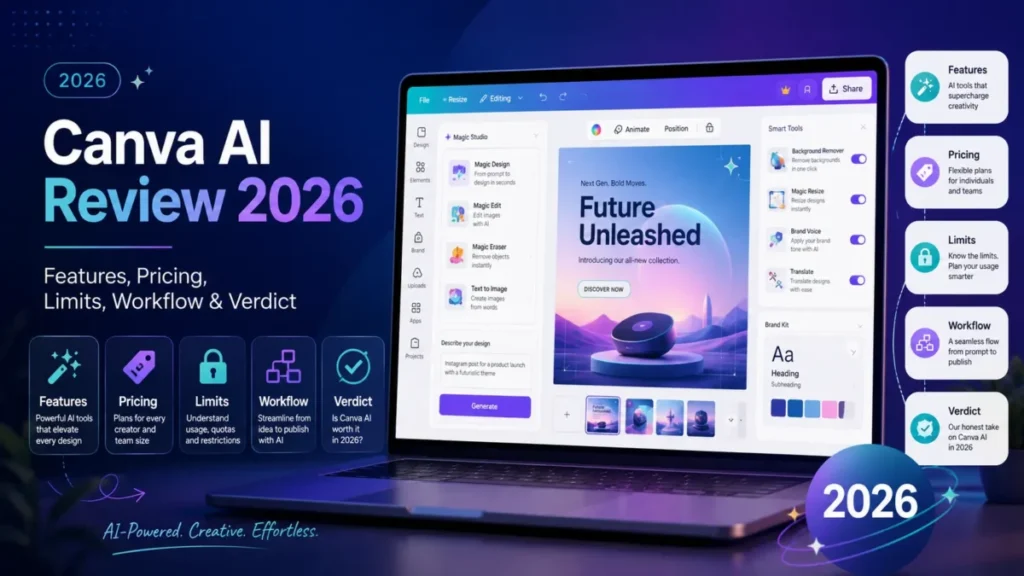
The risk behind this Canva AI Review is not whether the tools work. It is whether the plan you buy carries enough monthly AI allowance for a normal content week, and whether the feature you are buying for has reached your account yet.
Canva AI is worth it for solo creators and small marketing teams that want generative AI output to land inside an editable design instead of a flat file.
It is a weak fit for anyone needing specialist precision editing, legal clearance on AI output, or a verified API throughput number.
Canva Free costs $0 monthly for individuals. The plan most small teams land on is Canva Business, published at $20 per person monthly with no seat minimum in Canva’s Business launch announcement.
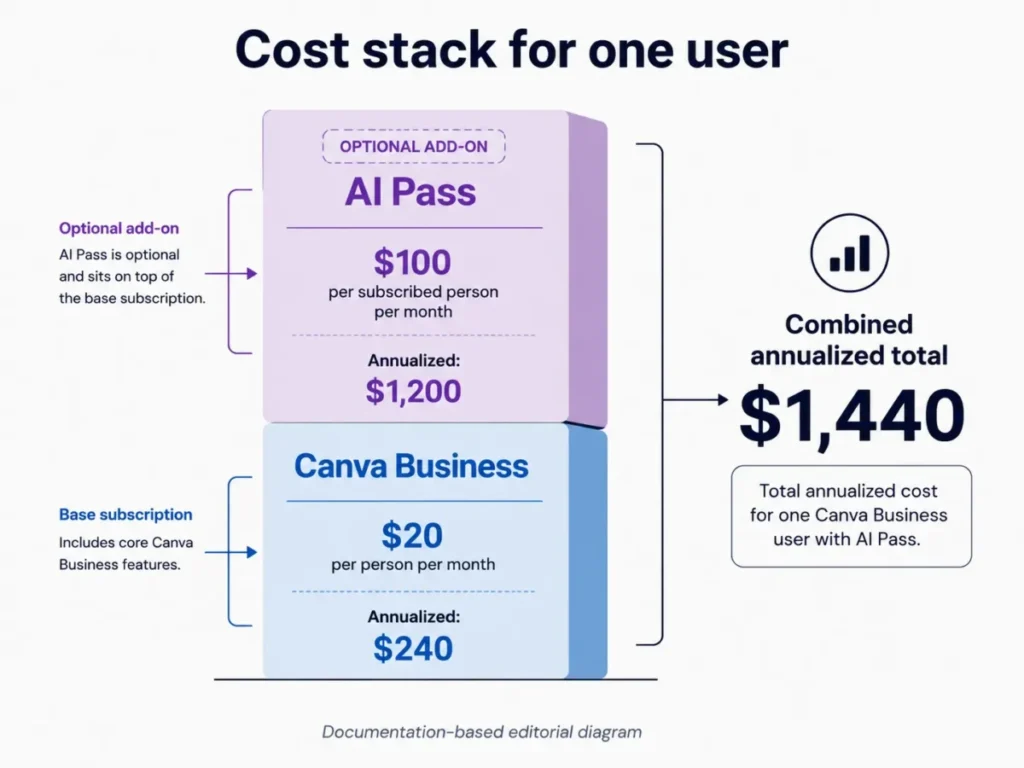
The add-on that changes the budget is AI Pass at $100 per person monthly.
In This Article (21 sections)
Quick Verdict
| Category | Verdict |
|---|---|
| Best for | Solo creators and marketing teams of two to twenty people producing recurring social, presentation, and campaign assets |
| Not ideal for | Specialist designers, API-dependent teams, and anyone who needs preview-stage agentic features in production |
| Starting price | Canva Free, available at no cost |
| Best practical plan | Canva Business, for teams that need shared brand control plus the higher Standard AI allowance |
| Free plan/ | Yes, Canva Free is permanent |
| Setup difficulty | Low for creators, medium once brand controls and team roles are configured |
| Main strength | AI output arrives as editable layers, not a finished flat image |
| Main limitation | Monthly AI allowance is finite, counted per person, and the tier figures are alternatives rather than a combined pool |
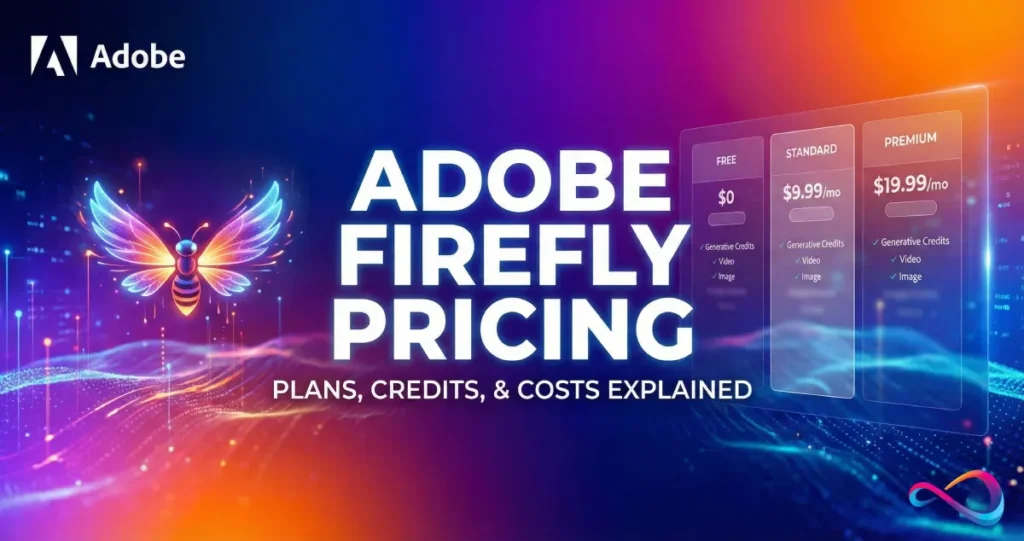
| Best alternative | Adobe Firefly for tighter creative control, or a dedicated generator when raw image quality is the whole job |
Sources: Canva plan and Help Center documentation, checked 2026-08-12.
Canva AI Pros and Cons
| Pros | Cons |
|---|---|
| Magic Layers rebuilds a flat image into editable text and separable objects, so an almost-right asset does not need a full regeneration | The Standard, Premium, and Ultra allowance figures are joined by OR in Canva’s own documentation, and reading them as separate pools overstates capacity by a wide margin |
| Canva Code 2.0 is available across Free, Pro, Business, Enterprise, and Education, so interactive output is not gated behind the top tier | Canva states the allowance numbers are estimates, and a complex prompt consumes more, so no team can budget AI volume precisely |
| Canva Business publishes a per-person monthly price with no seat minimum, which suits a three-person marketing team as cleanly as a fifteen-person one | AI Pass is priced at five times the published Canva Business seat, and Canva publishes only a multiplier rather than a numeric allowance for it |
| Canva makes no copyright claim over AI output, gives account holders privacy controls over training on private content, and counts allowances per member rather than pooling them | IP indemnification through Canva Shield reaches only enterprise customers above 100 seats, and Canva AI 2.0 is still framed as preview rather than a released dependency |
Sources: Canva Pro page and Canva Help Center allowance documentation, checked 2026-08-12.
Methodology: How This Canva AI Review Was Built
This analysis is based on Canva’s public product pages, the Canva Help Center, official newsroom announcements, and published security and AI-safety pages. Pricing, plan limits, and AI allowance figures were checked on 2026-08-12.
Canva AI was assessed against the same buyer-focused criteria applied to every tool on this site: workflow fit, editability of output, plan gates, monthly usage ceilings, cost at team scale, governance controls, and documented limitations.
Greater weight went to the factors that change a purchase decision rather than a demo impression: the tier allowance, the behavior at the ceiling, release state, and where total cost stops matching the headline seat price.
Claims that could not be verified were left out. Canva’s live pricing page did not render in a supported session, so official figures are labeled with their source and date rather than presented as a live checkout price.
What Is Canva AI?
Canva AI is the generative layer built into Canva’s design editor rather than a separate product with its own login. The Canva AI product page groups it into design generation, image and photo tools, video, 3D, writing, code, and brand-aware creation.
The distinction that matters commercially is placement. Most AI content creation tools hand back a file; Canva hands back an object inside a canvas that already holds brand assets, resizing, collaboration, and publishing.
That is why the allowance model, not the model quality, decides which plan a buyer needs.
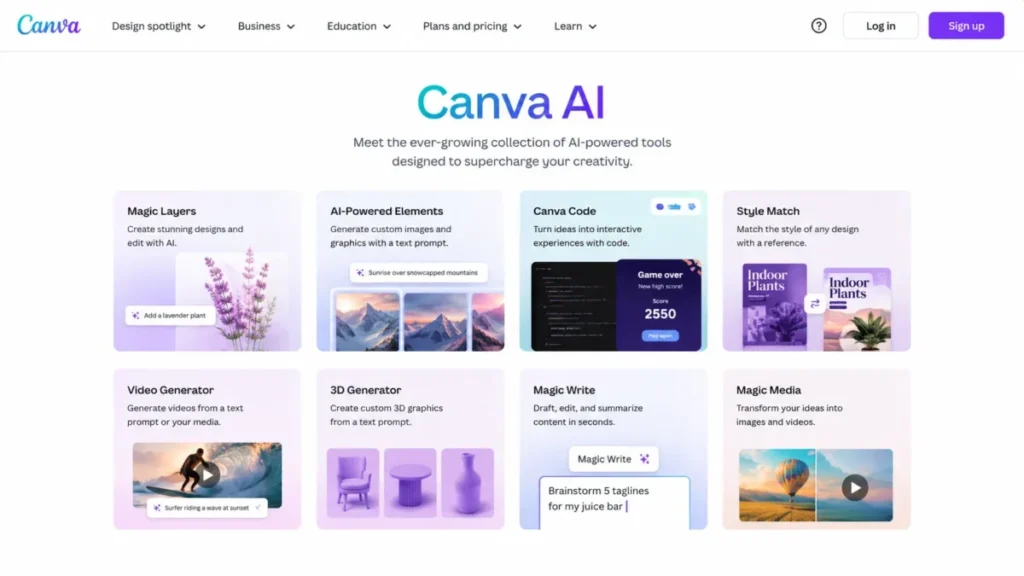
Source: Canva AI product page, checked 2026-08-12.
Canva AI Review 2026
Three different release states sit under the single phrase “Canva AI” in 2026, and most competing reviews flatten them into one feature list. Separating what is released from what is still preview is how a buyer avoids paying for a workflow their account cannot run.
Canva Code 2.0 shipped broadly in July 2026 to Free, Pro, Business, Enterprise, and Education users per the Canva Code 2.0 announcement. Magic Layers sits in public beta across the United States, United Kingdom, Canada, and Australia in the Magic Layers announcement.
Canva AI 2.0 is the one to treat carefully. The Canva AI 2.0 launch announcement described it as a research preview, and the product page still invites users to get ready for it rather than presenting it as live.
| Capability | Release state, checked 2026-08-12 | What a buyer should assume |
|---|---|---|
| Canva Code 2.0 | Released across Free, Pro, Business, Enterprise, Education | Safe to plan around |
| Magic Layers | Public beta in US, UK, Canada, Australia | Plan around it only in those markets, and expect rollout variance |
| Canva AI 2.0 conversational design | Preview stage, with allowance consumption already documented in the Help Center | Treat as upside, never as a dependency |
| AI 2.0 connectors (Slack, Gmail, Google Drive, Google Calendar, Notion, Zoom, HubSpot, Microsoft, Atlassian, Linear) | Named inside the preview architecture | Do not assume any single connector is live on your account |
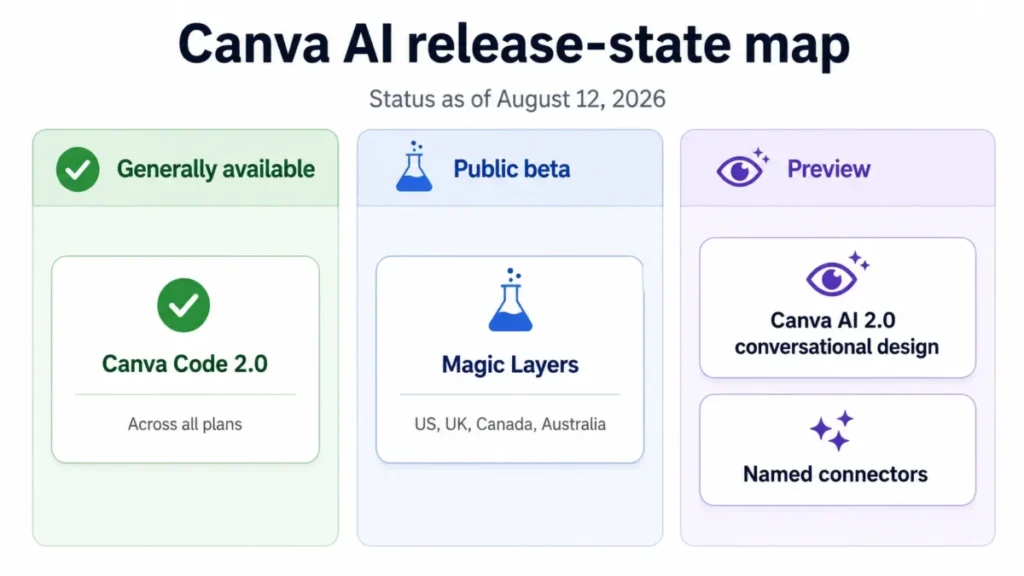
One wrinkle is worth naming. Canva’s Help Center now documents how Canva 2.0 draws on your AI allowance and lists multi-page conversational generation among the Ultra tools, which reads like a product moving through rollout.
I would still not budget on it. A documented capability that consumes allowance but is not confirmed for your account is a planning risk, not a purchased capability.
Sources: Canva newsroom announcements for Canva Code 2.0, Magic Layers, and Canva AI 2.0, checked 2026-08-12.
The Three Problems Canva AI Solves
Regenerating a whole image because one line of text is wrong
The standard failure mode with generative design is a flat output that is nearly right, where fixing the last few details costs another prompt, another generation, and another draw on the monthly allowance.
Canva documents Magic Layers as taking that flat image and reconstructing it into an editable multi-layer design, with text restored as editable text, recognized objects separated, and background and layout relationships preserved. The documented sequence runs from opening the image in Magic Layers to repositioning, recoloring, or retyping individual elements before publishing.
For a social team producing several variants of one campaign asset, that changes the arithmetic. Editing costs no generation; regenerating does.
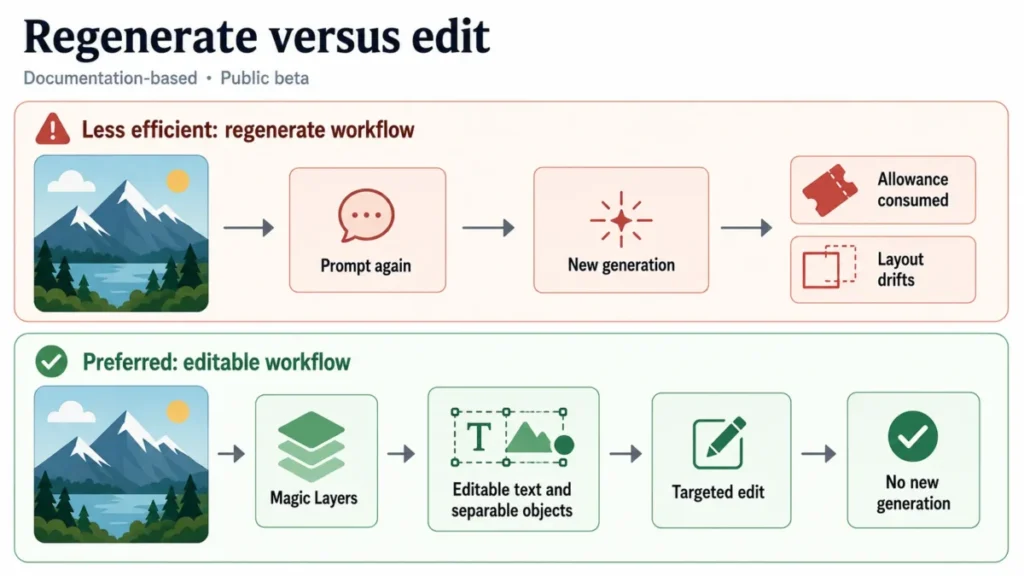
This workflow is reconstructed from Canva’s Magic Layers documentation, and the feature remains in public beta.
Needing a developer for a small interactive asset
Canva Code 2.0 covers the gap between a static design and a small web experience, starting from a natural-language prompt, a Canva Code template, or imported HTML.
What separates it from prompt-only code tools is the editing loop: text, images, colors, and fonts can be changed with normal Canva editor controls, and selected elements refined through conversation instead of a full reprompt. A marketer building a quiz or a landing experience can fix a heading without touching code or spending another generation.
Brand drift once more than two people are generating assets
Generation is easy to distribute and hard to govern. Canva’s team-level answer is Business, which adds a shared workspace, advanced brand controls, Canva Grow Insights, and higher AI access on top of Pro.
Canva also lists Leonardo.Ai Essential and Flourish Presenter as Business inclusions, though both are partner products rather than native Canva AI. The buyer consequence is that Business is not simply a larger Pro: it is the tier where brand governance and AI volume rise together.
Sources: Canva’s Magic Layers announcement and Canva’s plan comparison, checked 2026-08-12.
The Two Problems Canva AI Creates
The allowance is a ceiling, and it is not additive
Canva publishes monthly AI figures per plan using the word OR between tool classes: Canva Pro carries up to 2,000 Standard uses, OR up to 200 Premium uses, OR up to 20 Ultra uses.
Adding those three figures together is the most expensive misreading available in this product, because it is one shared allowance expressed three ways. Canva also states that the ranges are estimates and that complex prompts consume more, so a marketer generating multi-page designs will burn allowance faster than someone running Magic Formulas.
Preview features are not a purchase
A team that buys Business because of an agentic demo may find the conversational workflow unavailable, partly available, or capped differently than the launch material implied. I would buy Canva on what is released and treat the preview layer as unpriced upside.
Canva AI Usage Limits: How the Allowance Really Works
This is the section most competing reviews skip, and the one that decides the plan. Every figure below comes from the Canva Help Center page Understanding your AI usage.
| Plan | Monthly AI allowance | Ultra access |
|---|---|---|
| Canva Free | Up to 200 Standard uses OR up to 20 Premium uses | None |
| Canva Pro, legacy Teams, Nonprofits | Up to 2,000 Standard OR up to 200 Premium OR up to 20 Ultra | Yes |
| Canva Business | Up to 4,000 Standard OR up to 400 Premium OR up to 40 Ultra | Yes |
| Canva Enterprise | Up to 4,000 Standard OR up to 400 Premium OR up to 40 Ultra | Yes |
| Canva Education | Up to 2,000 Standard OR up to 200 Premium OR up to 20 Ultra | Yes |
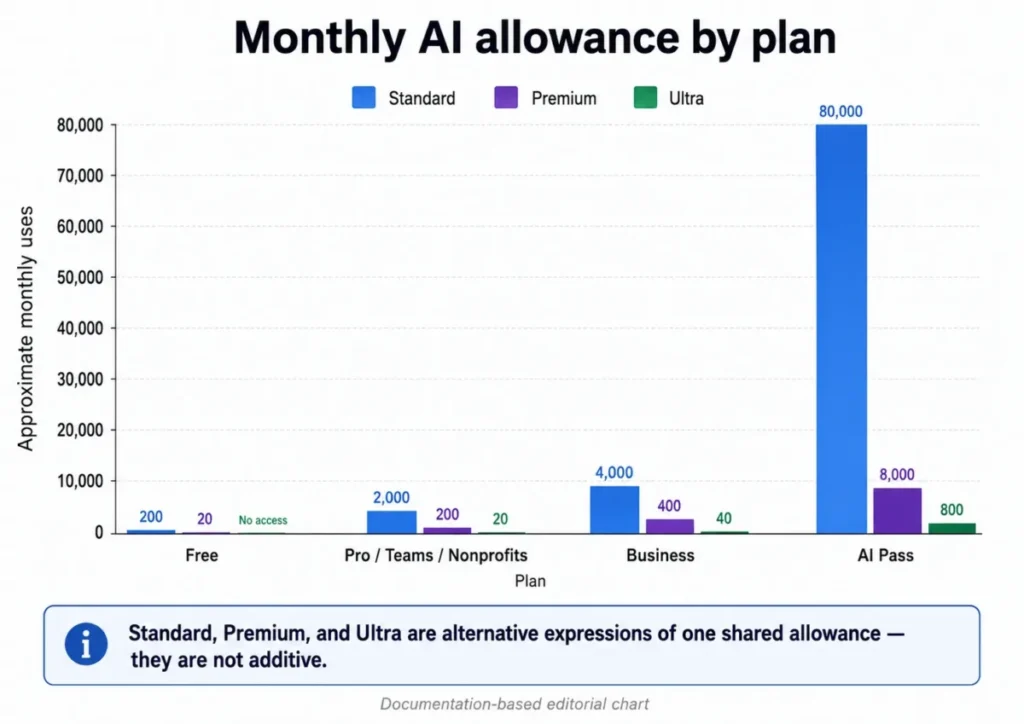
The values are alternative expressions of one allowance joined by OR, and they must not be summed.
Two details in that documentation change how a team should plan. Enterprise carries the same figures as Business, so buying Enterprise for more AI volume alone is a mistake; Enterprise is a governance purchase.
Allowances are counted per member on Teams, Business, Nonprofits, Education, and Enterprise, and Canva states they are not shared or pooled. One heavy generator cannot starve the rest of the team.
What happens when you hit the limit
Canva documents the ceiling behavior, and it differs by tier in a way that matters operationally.
On paid plans, reaching the limit produces short pauses between generations for Standard and Premium tools, after which the prompt can be entered again. Ultra tools are excluded from those pauses and stay unavailable until the monthly allowance resets.
On Canva Free, all tiers become unavailable until the reset, per Canva’s AI quality tiers documentation. That asymmetry is the practical trigger for AI Pass: a team leaning on Ultra hits a hard stop, not a slowdown.
What sits outside the allowance
Not every AI feature draws on the pool. The Canva AI Pass page states that AI Design tools are available on all plans and sit outside the usage allowance, subject to fair use limits.
For a writer using Magic Write daily rather than a designer generating images, that lowers the pressure to upgrade.
Canva Pricing Reality: What Canva AI Costs in 2026
Canva sells four plans plus one AI add-on. The figures below come from Canva’s own announcements and help documentation rather than a rendered checkout page, and Canva’s prices are region-dependent, so confirm the current amount at checkout before you budget.
| Plan | Published price | Monthly AI allowance | Best for | Worth it? |
|---|---|---|---|---|
| Canva Free | $0 monthly for individuals | 200 Standard OR 20 Premium | Evaluation and light creation | Good enough to test whether the allowance model works for you |
| Canva Pro | Paid, live US amount not published in this review | 2,000 Standard OR 200 Premium OR 20 Ultra | One creator needing Brand Kit, Magic Resize, Background Remover, premium content | The default for a solo operator, once you confirm the current price |
| Canva Business | $20 per person monthly, no seat minimum, per Canva’s launch announcement | 4,000 Standard OR 400 Premium OR 40 Ultra | Small marketing teams needing shared brand control and higher AI access | The practical team plan |
| Canva Enterprise | Custom quote, sales-led | 4,000 Standard OR 400 Premium OR 40 Ultra | Organizations with identity, audit, and residency requirements | Only when governance forces it, not for more AI |
| AI Pass (add-on) | $100 per subscribed person monthly | Canva publishes a multiplier, not a number: 40x Pro, 20x Business | Heavy generators who keep hitting the ceiling | Only after the allowance genuinely binds |
Sources: Canva Business launch announcement, Canva Help Center on AI Pass, and Canva’s contact sales page for Enterprise, checked 2026-08-12.
The Canva Pro price I am not publishing
Third-party pages listed conflicting monthly amounts for Canva Pro in the United States on 2026-08-12, and Canva’s live pricing page did not render in a supported session on that date. Publishing a number under those conditions would be guessing with a dollar sign attached.
Canva Pro is a paid plan carrying the higher Standard allowance shown above, and its current United States amount should be read from Canva’s pricing page immediately before you buy. That gap also blocks a Pro-to-Business dollar delta, so the upgrade case rests on capability and allowance instead.
What Canva Business costs at real team sizes
The figures below annualize the published Canva Business price of $20 per person monthly, verified in Canva’s Business launch announcement. They are not annual-plan prices, so treat them as a comparison ceiling rather than a quote.
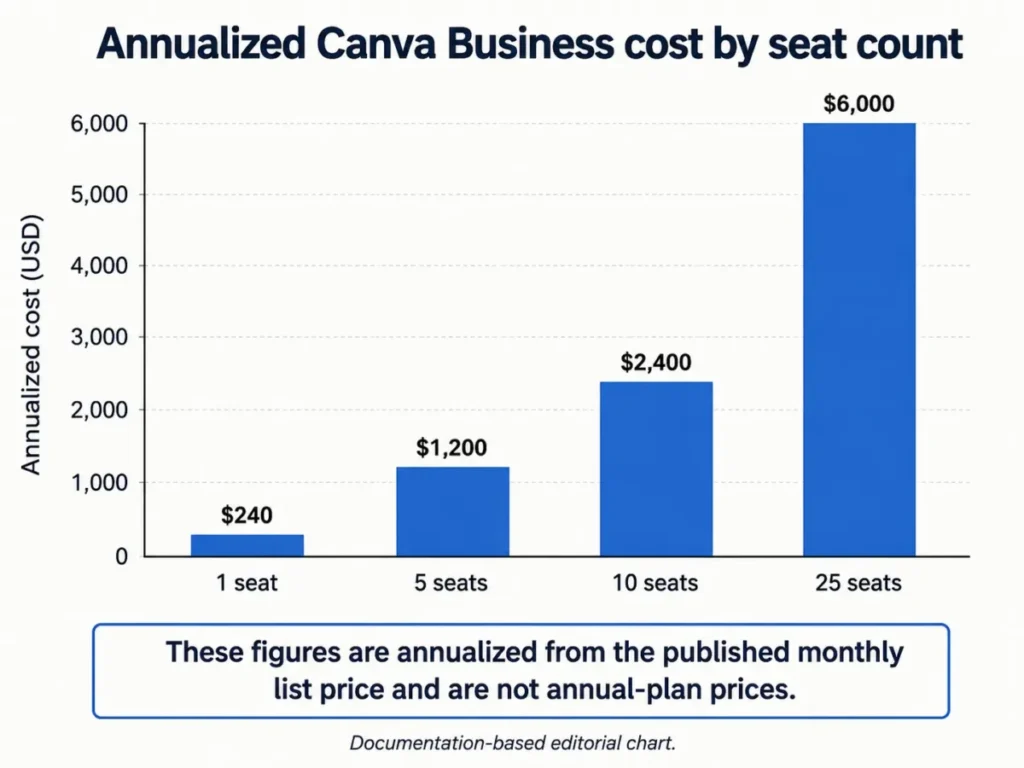
The formula is the published monthly seat price multiplied by twelve months and then by seat count.
| Canva Business team size | Annualized from the published monthly list price, USD |
|---|---|
| One person | 240 |
| Five people | 1,200 |
| Ten people | 2,400 |
| Twenty-five people | 6,000 |
Source: Canva’s Business launch announcement, annualized, checked 2026-08-12.
AI Pass is the line item that breaks the budget
One AI Pass subscription costs $100 per subscribed person monthly under Canva’s AI Pass documentation, five times the published Canva Business seat price. Annualized, the add-on alone is a four-figure line item per person on top of the seat cost above.
Three constraints make this a planning decision rather than a checkbox. AI Pass must be bought by a team owner or admin, it is unavailable on prepaid plans and free trials, and Canva expresses the extra capacity as a multiplier rather than a published number of generations.
Before buying it, count how many Ultra generations a month the team needs, because Ultra is the tier with a hard stop rather than a pause.
Legacy Teams, accepted seats, and the billing details that surprise admins
Canva Teams is closed to new sign-ups and upgrades, with Canva Business taking its place, while existing Teams subscribers keep their plan and pricing under Canva’s grandfathering position. Two buyers reading the same review can therefore be looking at two different plan structures.
Billing on Business follows a pay-as-you-grow model: Canva bills only for members who accept an invitation, adjusted monthly on monthly subscriptions and quarterly on annual ones. An admin who invites twelve people and sees six accept is billed for six, so cost drifts upward quietly as acceptances arrive.
Sources: Canva Business launch announcement and Canva’s small business page, checked 2026-08-12.
Feature Gates: What You Get on Each Canva Plan
Two rows below do most of the work in a real buying conversation. The Canva Code row is the pleasant surprise, because interactive output is not a premium upsell; the Shield row is the unpleasant one, covered in the security section.
Creation gates
| Creation capability | Free | Pro | Business | Enterprise |
|---|---|---|---|---|
| Standard AI allowance | 200 | 2,000 | 4,000 | 4,000 |
| Ultra AI tools | No | Yes, up to 20 | Yes, up to 40 | Yes, up to 40 |
| Brand Kit and Magic Resize | No | Yes | Yes, with advanced brand controls | Yes, with advanced brand controls |
| Canva Code 2.0 | Yes | Yes | Yes | Yes |
Source: Canva Help Center allowance documentation, checked 2026-08-12.
Team and governance gates
The table below covers the gates procurement cares about rather than the ones a creator notices.
| Team and governance capability | Free | Pro | Business | Enterprise |
|---|---|---|---|---|
| Shared workspace and team collaboration | No | Limited, positioned for solo use | Yes | Yes, multi-team |
| Canva Grow Insights, Leonardo.Ai Essential, Flourish Presenter | No | No | Yes | Yes |
| SSO, SCIM, audit logs, data residency, AI governance | No | No | No | Yes |
| IP indemnification through Canva Shield | No | No | No | Eligible enterprise customers above 100 seats |
Sources: Canva Shield and Canva’s plan comparison, checked 2026-08-12.
Key Features and Where Each One Stops
Magic Layers
Magic Layers is the feature that makes Canva’s AI output behave differently from a generator that hands back a finished file.
The gate is geography, not plan. Public beta covered the United States, United Kingdom, Canada, and Australia when this review was checked, so a team outside those markets should not plan a workflow around it yet.
Canva Code 2.0
Canva Code 2.0 turns a prompt, a template, or imported HTML into an interactive experience that stays editable inside Canva.
The limit is consumption rather than access. Canva groups interactive creation with Canva Code among Premium AI tools, so heavy iteration spends from the same pool that funds image generation.
On-brand generation and Brand Kit
Brand Kit and on-brand generation are the reason a marketing team tolerates distributed generation at all. Pro covers the basics, and Business adds advanced brand controls suited to shared workspaces.
The practical limit is human: brand controls constrain assets, not judgment, and a team without an approval habit will still produce inconsistent output.
Magic Write and the AI Design tools
Magic Write and the wider AI Design tools sit outside the metered allowance under fair use limits, which makes them the cheapest AI in the product for high-frequency use.
The limit is scope. A team whose hard problem is narrative structure rather than layout will get more from a dedicated writing assistant, as the ChatGPT review 2026 sets out.
Image, video, and 3D generation
Canva’s AI page lists photo generation, video generation, a 3D content generator, Style Match, Magic Background, and an AI-powered photo editor. That breadth in one place beats depth spread across several dedicated AI video generators.
The limit is quality tiering. Ultra output consumes allowance faster and has no short-pause fallback, so the best-looking output carries the hardest monthly stop.
Sources: Canva AI product page and Canva Help Center allowance documentation, checked 2026-08-12.
Ease of Use and Setup
Setup difficulty is low for an individual and medium for a team. A creator can generate and edit on day one; an admin configuring brand controls, roles, and invitations is doing real work.
The structural advantage for non-designers is that AI output lands in the same editor as templates, brand assets, and export settings, with no handoff step between generating an asset and finishing it.
The onboarding cost teams underestimate is the AI quality tier setting. Standard, Premium, and Ultra are a user-level choice that determines how fast the allowance drains, and a team that leaves everyone on Ultra will find the ceiling early.
Canva also shipped offline editing for essential edits and local-image work, with synchronization when connectivity returns. Generative AI execution while offline is not established by that documentation.
Source: Canva Offline announcement, checked 2026-08-12.
Integrations and Ecosystem
Canva’s small business material names HubSpot, Mailchimp, Google Drive, and social platforms including LinkedIn and Pinterest among available integrations, while Enterprise adds custom and API integrations.
The connectors announced with Canva AI 2.0 are a different category. Slack, Gmail, Google Drive, Google Calendar, Notion, Zoom, HubSpot, Microsoft, Atlassian, and Linear were named inside the preview architecture, and naming is not availability.
Canva documents that Enterprise exposes API and custom integration capability, but no numeric rate limit was verifiable for this review, so an automation-heavy team should confirm throughput before committing.
Sources: Canva for small and medium businesses and the Canva AI 2.0 announcement, checked 2026-08-12.
Automation, AI Governance, and Reporting
Reporting is where Business earns part of its price. Canva Grow Insights tracks ad creative performance with AI-driven suggestions.
Governance sits one tier higher: Canva documents AI governance, granular administration, and multi-team organization at Enterprise, and administrators on Teams, Enterprise, and Education can switch Canva’s AI tools on or off from the admin panel.
A twenty-five-person team wanting centralized control over AI tools plus audit logs is looking at an Enterprise conversation even though its seat count says otherwise.
Source: Canva’s plan comparison for Pro, Business, and Enterprise, checked 2026-08-12.
Security, Support, and Admin Controls
Canva publishes AES256 encryption for designs, TLS and SSL in transit, SOC 2 Type II compliance, and ISO 27001 certification, with periodic external audits described on the Security at Canva page. That is a normal enterprise baseline and clears most procurement checklists.
The AI-specific terms deserve more attention than they usually get in a design review. Canva states that it makes no copyright claim over content generated with Canva AI and that the user owns the designs produced, while noting that the law on copyright in AI-generated content is unsettled.
Ownership is not clearance. Canva does not promise that AI output is free of resemblance to existing protected work, and IP indemnification through Canva Shield reaches only eligible enterprise customers with more than 100 seats.
For a Free or Pro user producing client work, the output is yours, the clearance risk is also yours, and the insurance sits on a tier you are not buying. Canva Shield separately describes controls over whether private content is used to improve AI features, alongside moderation and safety systems.
Support scales with tier. Canva publishes dedicated support, onboarding, priority handling, and customer success functions at Enterprise; response commitments for Free, Pro, and Business were not verifiable for this review and are not stated here.
Sources: Security at Canva, Canva Shield, and the Canva AI product page, checked 2026-08-12.
Canva AI Limitations
The allowance cannot be budgeted precisely. Canva states the published figures are estimates and that complex prompts consume more, so a team can model an approximate volume and nothing tighter.
Ultra has a hard monthly stop. Standard and Premium degrade into short pauses on paid plans; Ultra waits for the reset, which makes it the wrong tier to depend on near month end.
Indemnification is effectively enterprise-only. Below 100 seats there is no Canva Shield coverage for AI output.
Preview capability is not a dependency. Canva AI 2.0’s agentic workflows and named connectors are preview-stage, and account-level access conditions are not published.
Offline does not mean offline AI. Canva Offline documents essential editing and local-image work only, and generative execution without connectivity is unverified.
Specialist editing remains a ceiling. Independent reviews praise speed, template breadth, and accessibility for non-designers while noting weaker suitability for advanced image and video manipulation.
Mobile parity and migration are undocumented. A one-to-one mapping of every 2026 AI feature to mobile was not verifiable, and the only verified import path is Canva Code’s HTML import, so object mapping, comment history, and rollback from competing suites remain unestablished.
Who Should Use Canva AI?
Solo creators publishing several formats a week. The Canva Pro allowance covers a heavy weekly cadence, and Magic Resize plus Brand Kit remove the repetitive part of multi-format publishing.
Marketing teams of two to twenty people. Business is where shared workspace, advanced brand controls, Grow Insights, and the higher Standard allowance arrive together.
Non-designer founders. Templates, brand controls, and generation in one editor remove the tool-switching that usually kills a founder-run content habit.
Organizations with governance requirements. Enterprise is the only tier that answers SSO, SCIM, audit logs, data residency, and AI governance in one contract.
Teams that iterate heavily on near-miss assets. Magic Layers converts regeneration cost into editing time, which is cheaper on both allowance and calendar.
Who Should Avoid Canva AI?
Agencies producing client work below 100 seats. No Canva Shield indemnification plus no clearance promise is a poor risk position for work you are billing someone else for.
Specialist designers and video editors. If precise manipulation is the job rather than fast production, the Midjourney review 2026 covers the closest comparison.
API-first implementation teams. Without a verified numeric rate limit, an automation-heavy integration is an unpriced risk.
Buyers whose case depends on the agentic preview. If the reason to purchase is the conversational Canva AI 2.0 workflow or a named connector, the purchase is ahead of the product.
Very heavy Ultra generators on a tight budget. Once the pattern is high-volume Ultra output, the workflow consequence is a Business seat plus AI Pass, and a dedicated platform may deliver more output per dollar.
Canva AI Alternatives
| Alternative | Better for | Why choose it instead |
|---|---|---|
| Adobe Firefly | Creative teams already inside Adobe workflows | Closer fit with professional editing when precision matters more than production speed |
| Leonardo.Ai | Image generation depth and model control | More control over generation itself, though Canva Business already includes the Essential plan |
| Midjourney | Raw image quality as the primary deliverable | Higher aesthetic ceiling when the output is the product rather than an input to a layout |
| Figma | Product and interface design teams | Purpose-built for interface work, where Canva’s template-first model gets in the way |
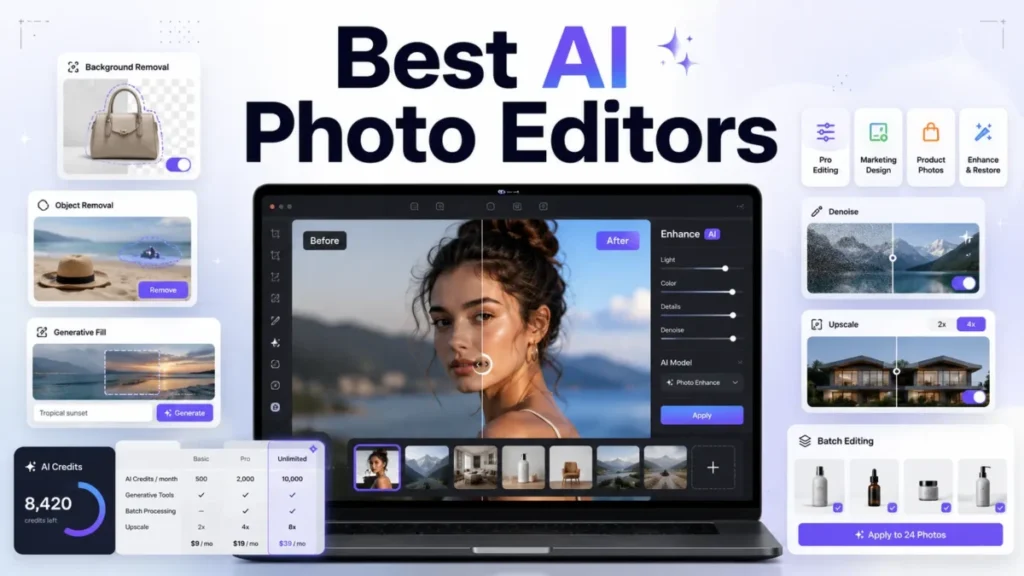
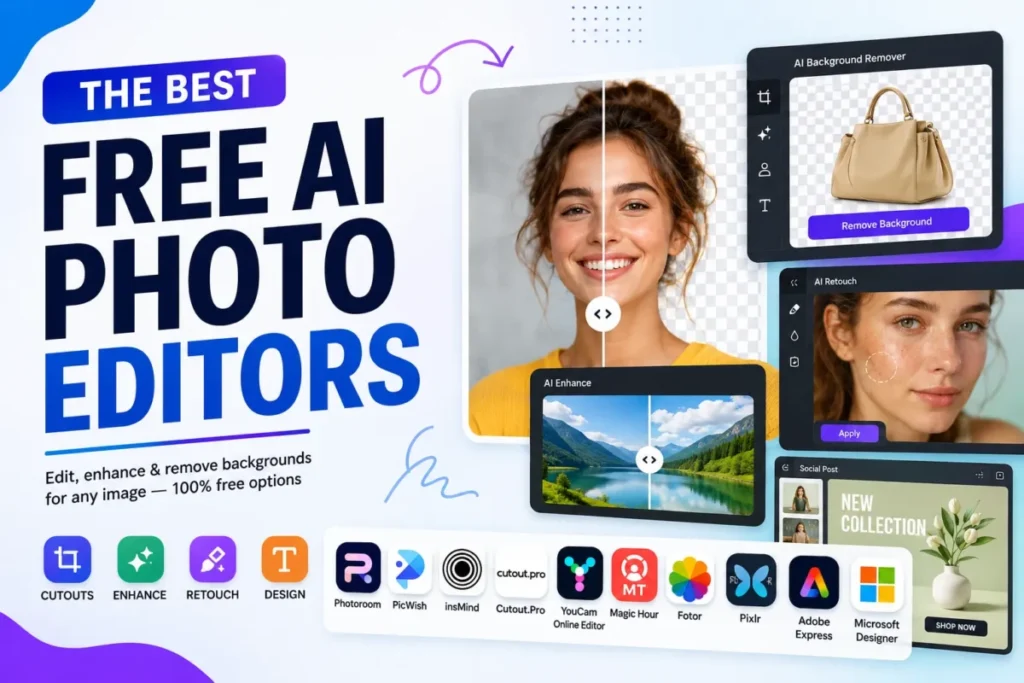
Before switching, weigh Firefly against the wider field of AI photo editors. Read the Leonardo.Ai review before paying separately for a plan Canva Business already includes.
For pure image quality the best AI image generators comparison ranks the field.
Interface teams should check the Figma pricing guide against a Business seat.
The pattern across all four is the same. Canva wins when generation is one step inside a production workflow, and loses when generation is the entire job.
Final Verdict: Is Canva AI Worth It in 2026?
Canva AI is worth it for creators and small marketing teams whose bottleneck is production throughput, because output arrives editable, brand-aware, and one step from publishing. It is not worth it for teams whose bottleneck is creative precision, legal clearance at scale, or programmable generation volume.
The decision chain runs from documented capability to workflow consequence to plan choice. The documented capability is an editable, allowance-metered AI layer inside a design editor.
The workflow consequence is that near-miss output is repaired rather than regenerated, while generation volume stays capped per person each month.
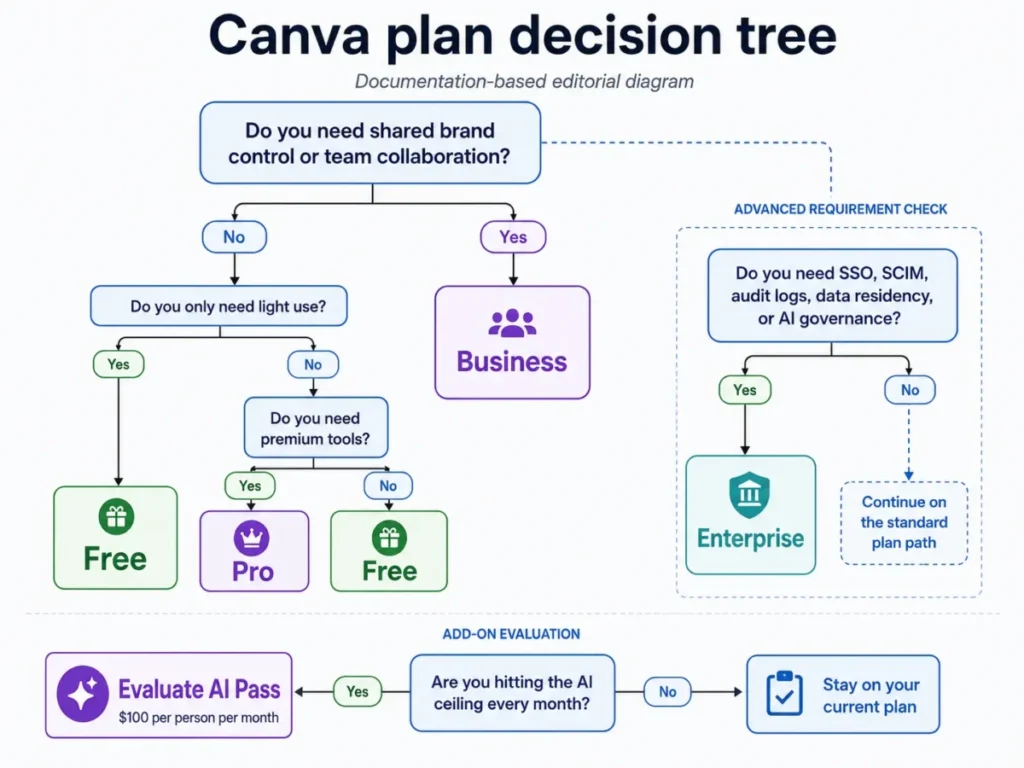
Choose Canva Free if you are testing whether the allowance model survives your normal week. Choose Canva Pro if you work alone and need Brand Kit, Magic Resize, and premium content, after reading the current price from Canva’s pricing page.
Choose Canva Business if a shared workspace, advanced brand controls, or the higher Standard allowance is the thing you keep running into. Choose Canva Enterprise when SSO, SCIM, audit logs, data residency, AI governance, or Shield indemnification is a procurement requirement.
Add AI Pass only after the ceiling has started to bite, and choose a specialist alternative when the deliverable is the image rather than the campaign.
Ninety days in, the renewal question is short: did the team stop leaving Canva to finish assets? If people still export elsewhere for the final polish, the AI allowance was never the constraint.
Frequently Asked Questions
Is Canva AI free?
Yes, partly. Canva Free includes up to 200 Standard AI uses or up to 20 Premium AI uses per month, with no access to Ultra tools.
That is enough to evaluate the workflow and thin for weekly publishing. AI Design tools such as Magic Write sit outside the metered pool on all plans under fair use limits.
How many Canva AI uses do you get per month?
Canva Free gets up to 200 Standard or up to 20 Premium uses, while Canva Pro, legacy Teams, and Nonprofits get up to 2,000 Standard, 200 Premium, or 20 Ultra.
Canva Business and Canva Enterprise both get up to 4,000 Standard, 400 Premium, or 40 Ultra, per Canva’s AI usage documentation. Those figures are alternatives joined by OR, not separate pools.
What happens when you hit the Canva AI limit?
On paid plans, Standard and Premium tools continue with short pauses between generations, and re-entering the prompt resumes work. Ultra tools are excluded from that fallback and stay unavailable until the monthly reset.
On Canva Free, all tiers become unavailable until the reset, which is the strongest practical argument for AI Pass.
How much does Canva AI Pass cost?
AI Pass costs $100 per subscribed person monthly under Canva’s AI Pass documentation, five times the published Canva Business seat price for the same month. Canva describes the extra capacity as forty times Canva Pro and twenty times Canva Business rather than publishing a number of generations, and only a team owner or admin can buy it.
What is the difference between Canva Pro and Canva Business?
Pro is positioned for solo creators and opens up Brand Kit, Magic Resize, Background Remover, and premium content. Business adds a shared workspace, advanced brand controls, Canva Grow Insights, Leonardo.Ai Essential, Flourish Presenter, and double the AI allowance, so the upgrade trigger is collaboration or AI volume rather than headcount.
How much is Canva Business?
Canva Business is published at $20 per person monthly with no seat minimum in Canva’s Business launch announcement. Annualizing that monthly list price gives the team totals shown in the pricing section above.
Canva’s pricing is region-dependent and has changed before, so confirm the current amount at checkout.
Can Canva AI create editable designs?
Yes. Magic Layers reconstructs a flat image into an editable multi-layer design with editable text and separable objects, so a near-miss asset can be corrected instead of regenerated. It was in public beta in the United States, United Kingdom, Canada, and Australia when this review was checked.
Is Canva AI safe for business use?
For most teams, yes on the security baseline. Canva publishes AES256 encryption, TLS and SSL transport, SOC 2 Type II, and ISO 27001, plus admin controls over AI availability.
The gap is legal: IP indemnification through Canva Shield covers only eligible enterprise customers above 100 seats.
Can Canva use private designs to train AI?
Canva states that users hold controls over whether private content is used to improve AI-powered features, and administrators on team plans manage AI availability centrally. Anyone handling client or regulated data should read those privacy controls before enabling generation broadly.
Is Canva AI 2.0 available yet?
Not as a dependency. Canva announced Canva AI 2.0 as a research preview in April 2026, and the product page still framed the 2.0 experience as coming rather than live when this review was checked.
The Help Center already documents how it draws on the AI allowance, so rollout is moving, but buy on the released feature set.
Choose Canva Free, Canva Pro, Canva Business, or Canva Enterprise based on AI volume, collaboration, brand governance, and security requirements. Choose a specialist alternative when workflow complexity sits outside what Canva covers.